

Gratis juridisk CRM-programvare viser til programvare for håndtering av klientrelasjoner utviklet for advokatfirmaer, som er tilgjengelig med en gratisplan eller prøveperiode fra leverandøren. Hvis du driver en juridisk virksomhet, kan et kostnadsfritt CRM-system hjelpe deg med å følge opp klientopplysninger, administrere saker og forbedre arbeidsflyten – uten å overskride budsjettet ditt.
Denne veiledningen tar deg gjennom de beste gratisplanene i 2026, hva du kan forvente av funksjonene deres, og hvordan du velger et juridisk CRM-system som dekker de faktiske behovene på et advokatkontor.
Why Trust Our Software Recommendations
6,700+
Reviews
20
Industry experts
16+
Evaluation factors
14
Years
Our team has been testing and reviewing software since 2012. As legal practice leaders ourselves, we know how difficult—and important—it is to choose the right software.
For this guide, we evaluated tools using hands-on testing and independent research, scoring tools using our selection criteria.
Our reviews reflect our human editorial judgment, not a sales pitch.
Sammenligningstabell for gratis juridiske CRM-systemer
Denne sammenligningstabellen oppsummerer prisopplysningene for mine gratis juridiske CRM-systemer.
| Tool | Best For | Trial Info | Price | ||
|---|---|---|---|---|---|
| 1 | Best for matter and party relationship tracking | Free plan + 7-day free trial + free demo available | From $9/user/month (billed annually) | Website | |
| 2 | Best for no-code custom CRM app building | Free plan + free demo available | From $19/month (billed annually) | Website | |
| 3 | Best for user-friendly matter and contact linking | 14-day free trial | From $18/user/month (billed annually) | Website | |
| 4 | Best free plan with compliance-friendly logs | Free plan available + free demo available | From $12/user/month (billed annually) | Website | |
| 5 | Best for built-in intake form customization | Free forever plan + free demo available | From $10/user/month (billed annually) | Website | |
| 6 | Best for integrated client communication tracking | Free plan available | From $7/user/month | Website | |
| 7 | Best for built-in case and document management | Free plan available | From $39/user/month (billed annually) | Website | |
| 8 | Best for customizable legal workflow automation | 15-day free trial + free demo available | From $49/month (billed annually) | Website | |
| 9 | Best for automated legal intake forms | Free plan available | From $149/user/month | Website | |
| 10 | Best for secure legal client portals | Free plan available | From $20/month | Website |


Anmeldelser av gratis juridiske CRM-systemer
Nedenfor finner du mine detaljerte oppsummeringer av de gratis juridiske CRM-verktøyene som kom med på kortlisten min. Anmeldelsene mine gir et detaljert innblikk i funksjonene, de beste bruksområdene og integrasjonene til hver plattform, slik at du kan finne den som passer best for deg.
 Best for matter and party relationship tracking
- Free plan + 7-day free trial + free demo available
- From $9/user/month (billed annually)
Visit WebsiteCustomer Rating:4.8/5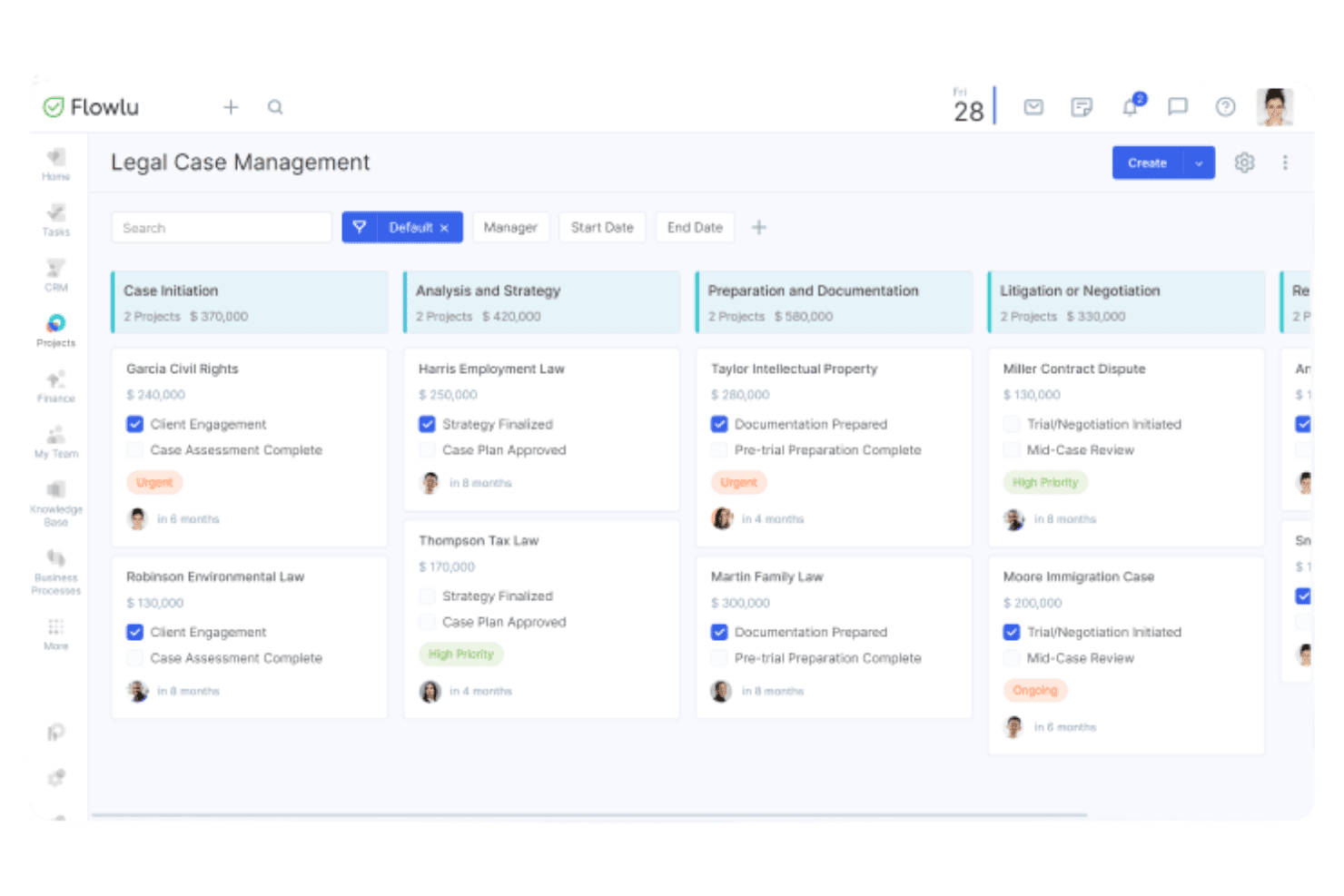
Flowlu manages leads, contacts, invoices, tasks, and sales pipelines for legal teams. Flowlu is an all-in-one business management platform with a built-in CRM that covers lead capture, contact management, client invoicing, task tracking, and sales pipeline management for lawyers and law firms.
Who Is Flowlu Best For?
Flowlu is a good fit for solo attorneys and two-person legal offices that want a free, multi-function platform covering CRM, invoicing, and task management in one place.
Why I Picked Flowlu
I picked Flowlu as one of the best because its Multiple Contact Relations feature lets me map every person tied to a matter, whether that's the client, their employer, an opposing party, or a referred contact, all linked to the same project record. I can see at a glance who is connected to whom without digging through separate records. Combined with the Leads Kanban board, I can track where each prospective client sits in the intake pipeline while keeping their contact relationships intact.
Flowlu Key Features
- Custom web intake forms: Create online forms to capture lead information directly into your CRM.
- Kanban sales pipeline: Visualize and manage client intake progress with drag-and-drop pipeline stages.
- Invoice and payment tracking: Generate, send, and monitor invoices directly within the platform.
- Basic knowledge base: Build and share internal wikis and documentation for firm processes or case notes.
Flowlu Integrations
Flowlu offers native integrations with Google Workspace, Microsoft 365, Mailchimp, and Stripe, and connects with Zapier. An API is available for custom integrations.
What's Free?
Flowlu’s free-forever plan supports up to two users and includes core CRM, project, finance, and collaboration tools. The free tier allows up to 100 contacts and one sales pipeline, along with lead capture forms, one project workflow, Kanban and list views, milestones, invoices and estimates, expense tracking, private chat, calendars, comments, a basic wiki, mind maps, and the company feed.
Pros and Cons
Pros:
- Invoicing built into the CRM natively
- Free plan never expires for two users
- Multiple contact relations mapped to one record
Cons:
- No native legal matter or case object
- Free tier caps contacts at only 100
Learn more about Flowlu: Best for no-code custom CRM app building
- Free plan + free demo available
- From $19/month (billed annually)
Visit WebsiteCustomer Rating:4.7/5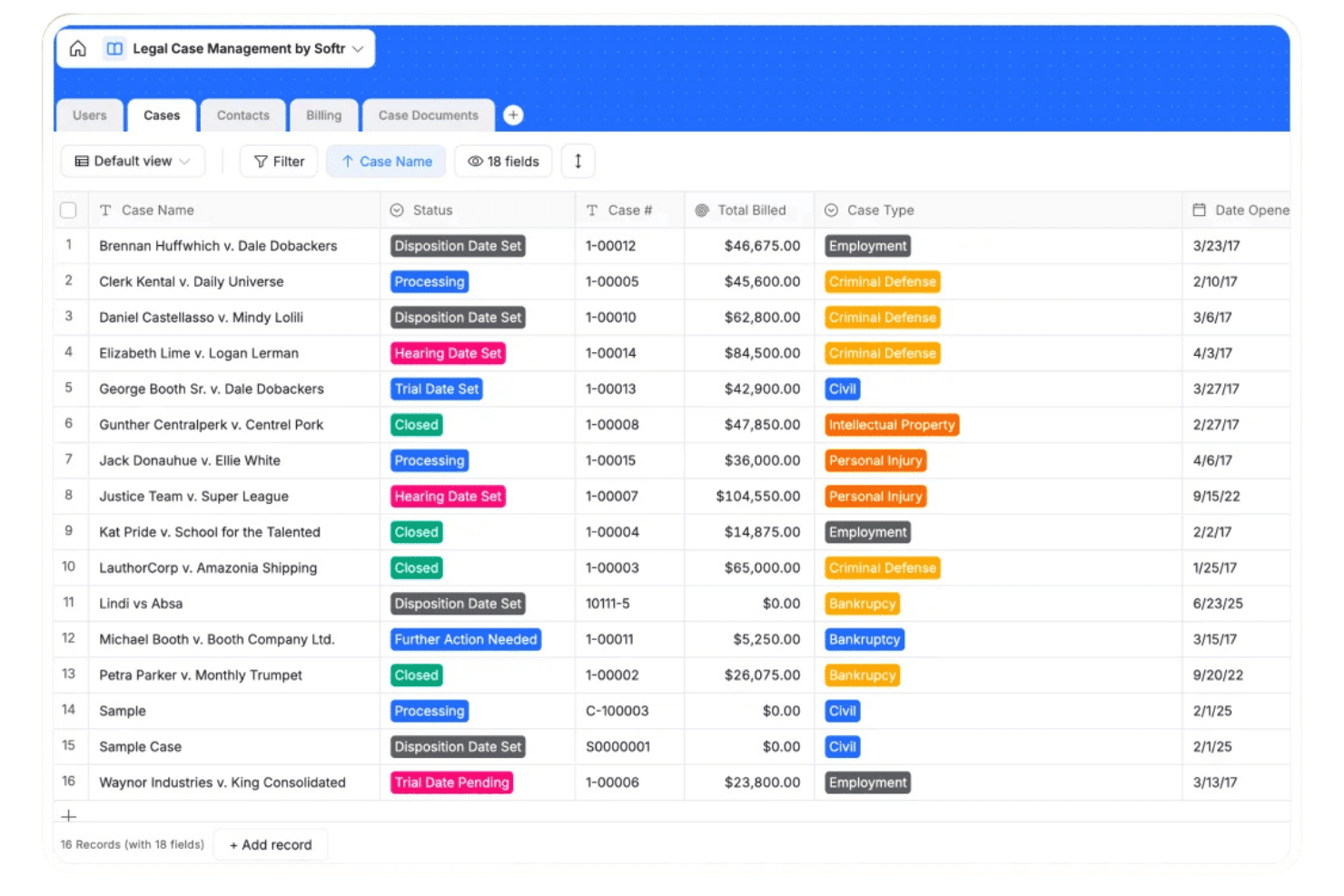
Softr centralizes legal case tracking with statuses, billing, and case types. Softr is a no-code app-building platform that lets law firms and solo attorneys build custom CRM applications, client portals, intake forms, and automated workflows on top of a built-in database or connected external data sources.
Who Is Softr Best For?
Softr is a strong fit for solo attorneys and small law firms that want a tailored CRM without the cost or complexity of purpose-built legal software.
Why I Picked Softr
Softr earns its spot on my shortlist because I love that you can describe your legal CRM in plain language and its AI co-builder generates the app, database, and workflows from scratch. I like using Softr's granular role-based permissions to restrict file access by attorney or matter type, keeping sensitive client data contained. Custom intake forms auto-create contact and matter records on submission, cutting out manual data entry entirely.
Softr Key Features
- Centralized database with role-based access: Create, relate, and secure matter and contact records with detailed user permissions for attorneys, staff, and clients.
- Custom workflow automation: Build visual automations to trigger email alerts, schedule matter follow-ups, or update case status.
- Integrated file management: Attach, view, and organize sensitive legal documents within each client or matter entry.
- Kanban and calendar case views: Track lead stages, court dates, or project deadlines using built-in kanban boards and shared calendar displays.
Softr Integrations
Softr offers native integrations with Airtable, Google Sheets, HubSpot, Mailchimp, Stripe, and Gmail. It connects with Zapier and provides an API for custom integrations.
What's Free?
Softr's free-forever plan supports up to 3 builders and 5 app users, with 5,000 database records and 500 workflow actions per month.
Pros and Cons
Pros:
- Visual kanban boards track client intake stages
- Granular role-based permissions protect sensitive client records
- Builds fully custom intake forms without coding
Cons:
- Softr branding visible on free-plan portals
- No native legal matter or case objects
Learn more about Softr: Best for user-friendly matter and contact linking
- 14-day free trial
- From $18/user/month (billed annually)
Visit WebsiteCustomer Rating:4.7/5
Capsule CRM keeps client contacts, documents, calls, and opportunities in one record. Capsule CRM is a lightweight CRM platform that allows legal professionals to manage client contacts, track intake pipelines, log communications, and link documents to contact records.
Who Is Capsule CRM Best For?
Solo attorneys and small law firm teams who want a simple, no-cost CRM to organize client contacts and track intake without a steep learning curve.
Why I Picked Capsule CRM
I've included Capsule CRM in my top picks because of how naturally it handles the relationship between a contact and every interaction, document, and opportunity tied to them. Each contact record in Capsule becomes a living file: I can attach contracts, log calls, and link active pipeline opportunities all in one place. The shared contact database means anyone on the team can pull up a client record before a call and see the full history, without digging through emails.
Capsule CRM Key Features
- Custom sales pipelines: Set up and manage multi-stage deal pipelines tailored to intake and conversion tracking.
- Task and activity tracking: Assign, organize, and monitor tasks for yourself or colleagues, including repeat reminders.
- Centralized document storage: Attach and access contracts, emails, and notes directly from contact and opportunity records.
- Integrated mobile app: Use the mobile app to view clients, update opportunities, and log activities on the go, even offline.
Capsule CRM Integrations
Capsule CRM offers native integrations with Google Workspace, Microsoft 365, Xero, Mailchimp, QuickBooks Online, and Transpond, and it connects with Zapier. An API is available for custom integrations.
What's Free?
Capsule CRM’s free-forever plan supports up to 2 users and 250 contacts, with 5 custom fields and 1 sales pipeline for managing contacts and sales activity.
Pros and Cons
Pros:
- Shared contact history visible across the team
- Free plan includes a built-in pipeline
- Contact records link to all related activity
Cons:
- No native matter or case objects
- Free plan caps contacts at 250
Learn more about Capsule CRM: Best free plan with compliance-friendly logs
- Free plan available + free demo available
- From $12/user/month (billed annually)
Visit WebsiteCustomer Rating:4.3/5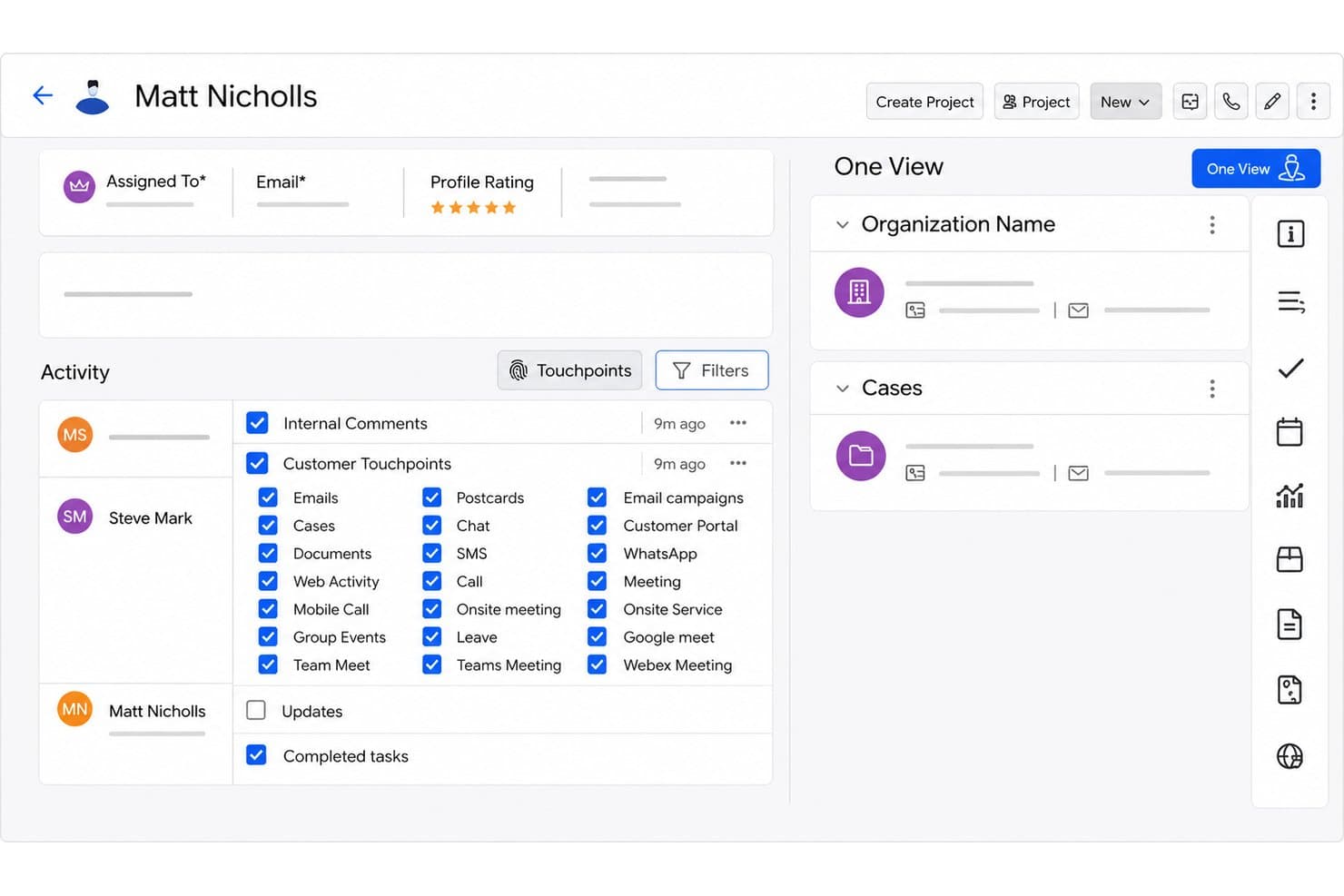
Vtiger CRM manages client intake, matters, documents, and follow-up workflows. Vtiger CRM is a customizable CRM platform for law firms that covers client intake, contact and matter tracking, document management, and automated follow-up workflows across sales, marketing, and support functions.
Who Is Vtiger CRM Best For?
Vtiger CRM is a good fit for small law firms and solo practitioners who need a free, multi-function CRM without committing to a legal-specific platform.
Why I Picked Vtiger CRM
I've included Vtiger CRM in my top picks because its free plan includes compliance-oriented features you don't typically see without a paid tier, like GDPR consent tracking and First Response SLA logging. My team can capture leads through Web-to-Lead forms, log every client interaction via the Actions Page, and run automated email sequences, all without spending anything. That level of audit-trail depth on a free plan is genuinely rare in this category.
Vtiger CRM Key Features
- Document management: Upload, share, and track engagement with legal documents in a centralized repository.
- Appointment scheduling: Clients can self-book consultations and meetings through personalized scheduling pages.
- Custom web-to-lead forms: Capture intake data directly into the CRM using forms tailored for client onboarding.
- Deal Kanban board: Visually manage and track leads or matters through customizable pipeline stages.
Vtiger CRM Integrations
Vtiger CRM offers native integrations with Google Workspace, Microsoft 365, DocuSign, Dropbox, OneDrive, WhatsApp, and QuickBooks, and it connects with Zapier. An API is available for custom integrations.
What's Free?
Vtiger CRM's One Pilot plan is a free-forever plan capped at 10 users and 3,000 records, with 3 GB of storage. It includes lead and contact management, Web-to-Lead forms, email campaigns (1,000 emails/month), sales pipeline, email sequences, appointment pages, First Response SLA logging, and GDPR consent tracking.
Pros and Cons
Pros:
- Web-to-Lead forms auto-populate contact records
- Audit logs included without a paid upgrade
- GDPR consent tracking on the free tier
Cons:
- 3,000 record cap limits growing client lists
- No native legal matter object
Learn more about Vtiger CRM : Best for built-in intake form customization
- Free forever plan + free demo available
- From $10/user/month (billed annually)
Visit WebsiteCustomer Rating:4.5/5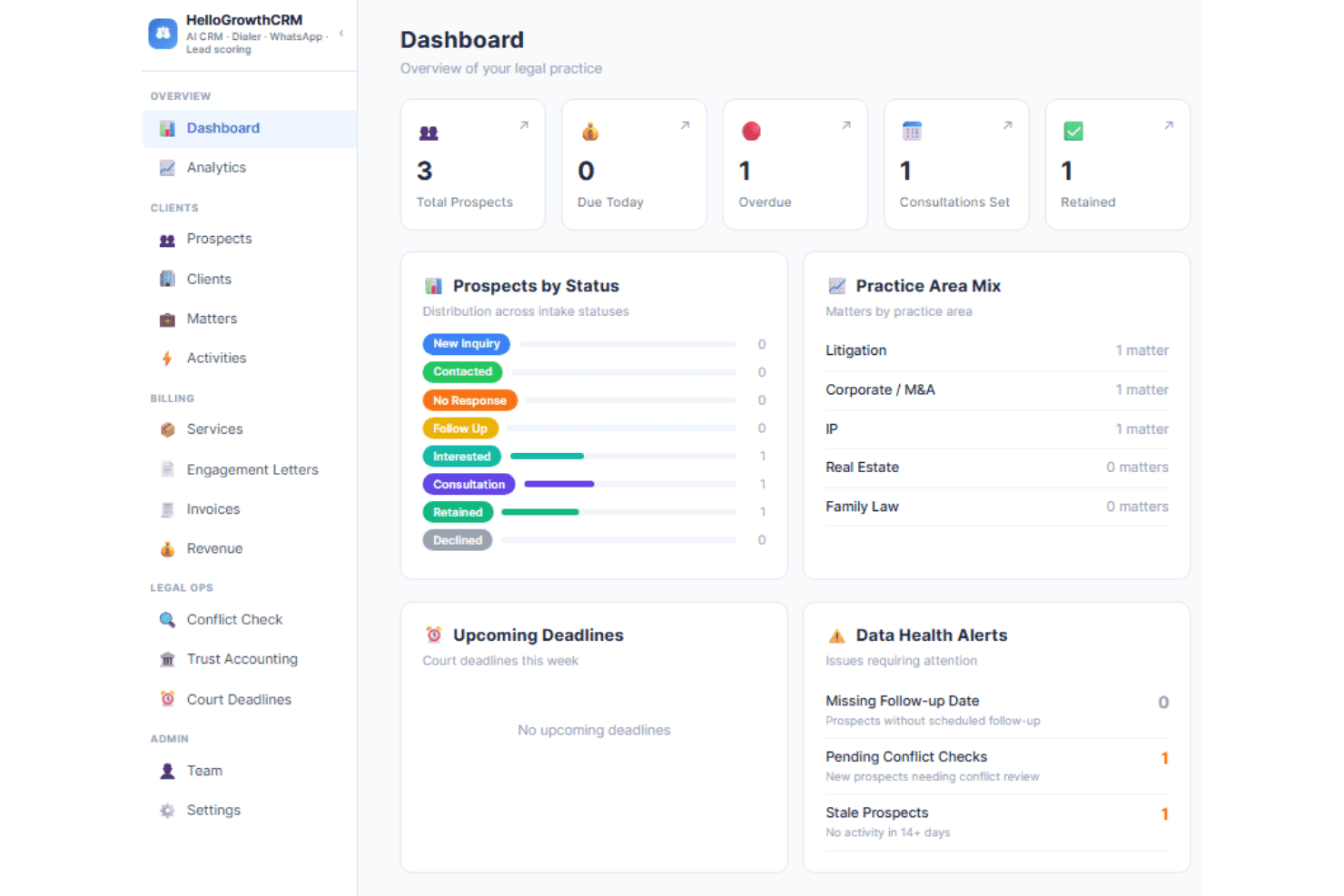
HelloGrowthCRM manages lead scoring, client intake, and communication tracking. HelloGrowthCRM is a free legal CRM with AI-powered lead scoring, intake pipeline management, omnichannel communication tracking, and customizable intake forms built for law firms managing client acquisition.
Who Is HellowGrowth CRM Best For?
HelloGrowthCRM fits solo practitioners and small law firms that need a structured client intake pipeline without paying for a full practice management platform.
Why I Picked HellowGrowth CRM
I picked HelloGrowthCRM as one of the best because the intake form customization goes beyond a basic contact form. You can assign forms directly within the intake workflow, so a family law inquiry triggers a different set of questions than a corporate matter. I also like that referral source tracking is built into the same pipeline, linking each intake back to a bar association, partner, or specific channel.
HellowGrowth CRM Key Features
- Matter pipeline segmentation: Organize intakes by practice area, such as litigation, corporate, family, or intellectual property.
- Activity logging: Track call records, emails sent, meetings scheduled, and internal notes for every contact and matter.
- Role-based access control: Restrict user permissions and manage team access to sensitive information within the CRM.
- Referral source tracking: Flag and report on leads referred by partners, bar associations, or specific marketing channels.
HellowGrowth CRM Integrations
Native integrations are not clearly documented. An API is available for custom integrations.
What's Free?
HelloGrowthCRM offers a free forever plan with no credit card required or time limit. The free tier includes core CRM tools for managing up to 200 leads, 50 accounts, one deal pipeline, tasks, appointments, and basic activity tracking.
Pros and Cons
Pros:
- Pipeline stages segmented by legal practice area
- Referral source tracking built into the pipeline
- Intake forms support conditional logic by matter
Cons:
- Conflict check functionality not clearly documented
- No free-forever plan for long-term use
Learn more about HellowGrowth CRM: Best for integrated client communication tracking
- Free plan available
- From $7/user/month
Visit WebsiteCustomer Rating:4.4/5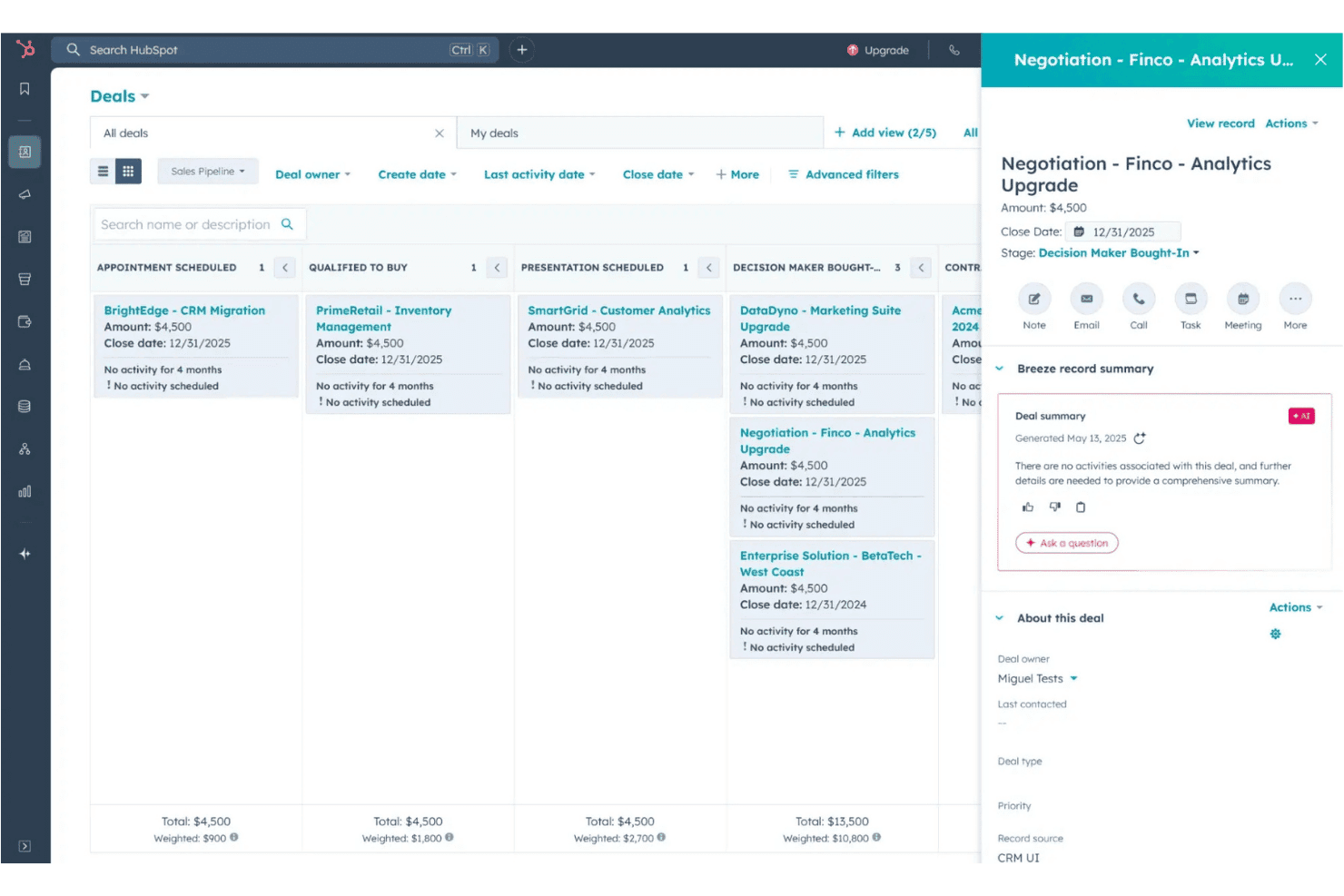
HubSpot CRM tracks contacts, deals, emails, and client communications. HubSpot CRM is a general-purpose CRM platform that offers contact management, deal pipelines, email tracking, and client communication logging on a free-forever plan with native integrations to legal-specific tools like Clio and MyCase.
Who Is HubSpot CRM Best For?
HubSpot CRM is a strong fit for solo attorneys and small law firms focused on client acquisition and business development rather than full case management.
Why I Picked HubSpot CRM
HubSpot CRM earns its spot on my shortlist because the automatic communication logging is something I've found genuinely useful across multiple client conversations. Every email, call, and meeting is captured on the contact's activity timeline without manual input, so I can open any client record and see exactly what was discussed and when. The two-way Gmail and Outlook sync keeps every thread tied to the right contact, even when replies happen outside the CRM.
HubSpot CRM Key Features
- Customizable deal pipelines: Set up and adjust pipeline stages to mirror your client intake and lead tracking workflow.
- Form builder and landing pages: Create custom intake forms and landing pages to capture potential client data directly into the CRM.
- Task and activity management: Assign, track, and manage tasks related to contacts, matters, or deals from within the platform.
- Native integration with legal tech: Connect with platforms like Clio, MyCase, and LawPay to sync client data and manage payments.
HubSpot CRM Integrations
HubSpot CRM offers native integrations with Clio, MyCase, LawPay, Google Workspace, Microsoft 365, Outlook, Gmail, and Zoom, and connects with Zapier. An API is available for custom integrations.
What's Free?
HubSpot CRM's free-forever plan supports unlimited users and includes contact management, deal pipelines, email tracking, and basic form building.
Pros and Cons
Pros:
- Contact activity timeline is highly detailed
- Email tracking logs every client interaction automatically
- Unlimited users on the free plan
Cons:
- Conflict check tools are completely absent
- No native matter or case records
Learn more about HubSpot CRM: Best for built-in case and document management
- Free plan available
- From $39/user/month (billed annually)
Visit WebsiteCustomer Rating:4.4/5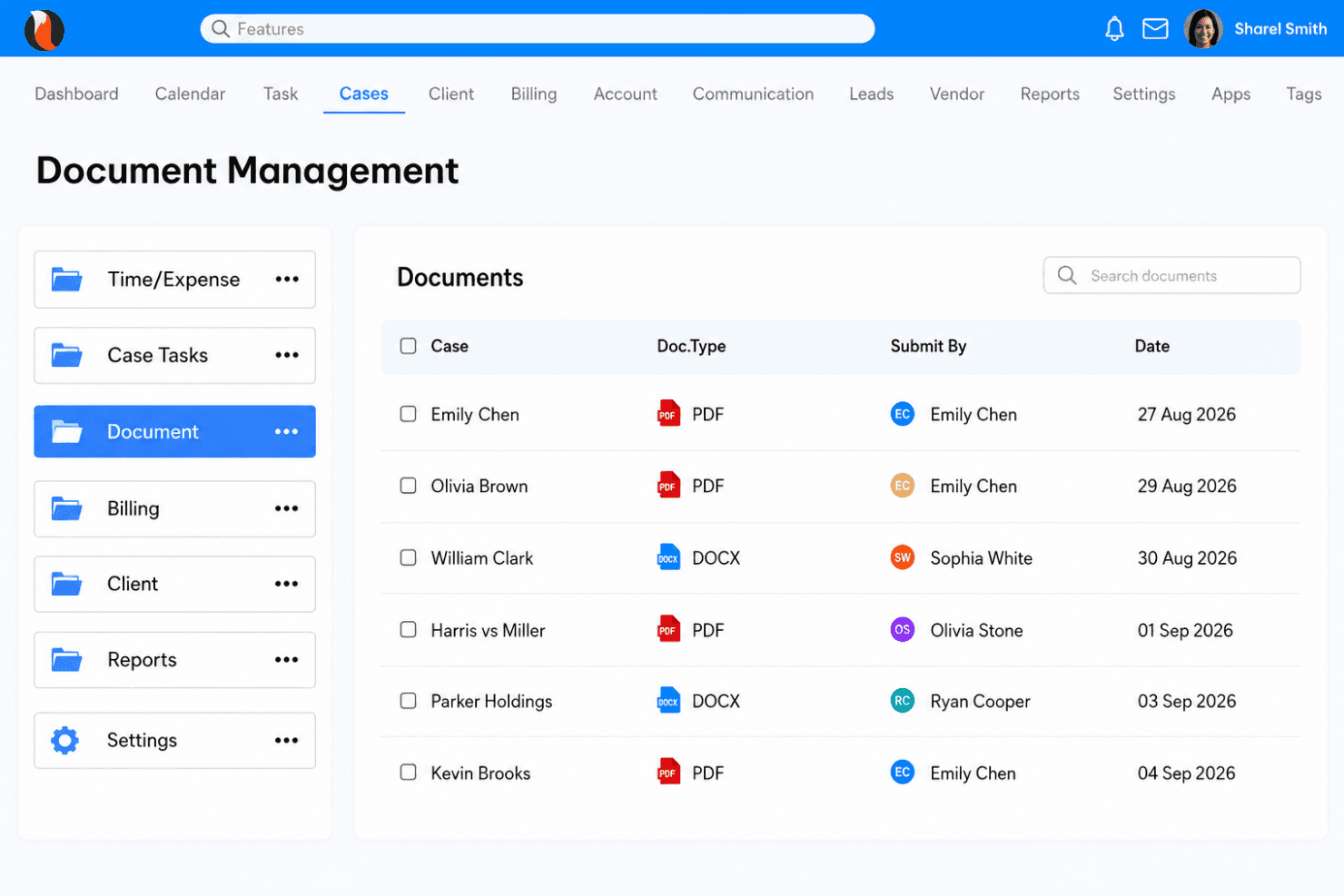
CaseFox manages client intake, cases, documents, billing, and conflict checks. CaseFox is a cloud-based legal practice management platform with a free-forever plan that covers client intake, case and document management, time tracking, legal billing, conflict checks, and client portals.
Who Is CaseFox Best For?
CaseFox suits solo attorneys and small law firms that need a full-featured practice management platform without the cost of enterprise legal software.
Why I Picked CaseFox
I picked CaseFox as one of the best because its case and document management aren't bolt-on features. They're built into the core platform alongside client intake, conflict checks, and custom matter fields. I particularly like the AI document module, which lets me draft, summarize, and analyze legal documents directly inside the platform without switching tools. The native conflict check also runs across contacts and matters, so I can log a search result before taking on a new client.
CaseFox Key Features
- Client portals: Share documents, billing details, and updates with clients securely online.
- Custom intake forms: Create tailored online forms to collect new client and matter information.
- Time and expense tracking: Log billable hours and costs by matter for accurate recordkeeping.
- Trust accounting: Manage client trust funds with built-in ledgers and compliance controls.
CaseFox Integrations
CaseFox offers native integrations with Google Workspace, Microsoft Office 365, Xero, QuickBooks, LawPay, Dropbox, and Box. An API is available for custom integrations.
What's Free?
CaseFox offers a free-forever plan for up to 2 users and 4 cases. It includes time and expense tracking, calendaring and reminders, reporting, LEDES billing, invoicing and payments, client access, and case updates.
Pros and Cons
Pros:
- Active case limit suits true solo practices
- Manages documents and cases in one place
- Native conflict check included in free tier
Cons:
- Mobile app experience feels underdeveloped
- Free plan capped at 4 active cases
Learn more about CaseFox: Best for customizable legal workflow automation
- 15-day free trial + free demo available
- From $49/month (billed annually)
Visit WebsiteCustomer Rating:4.2/5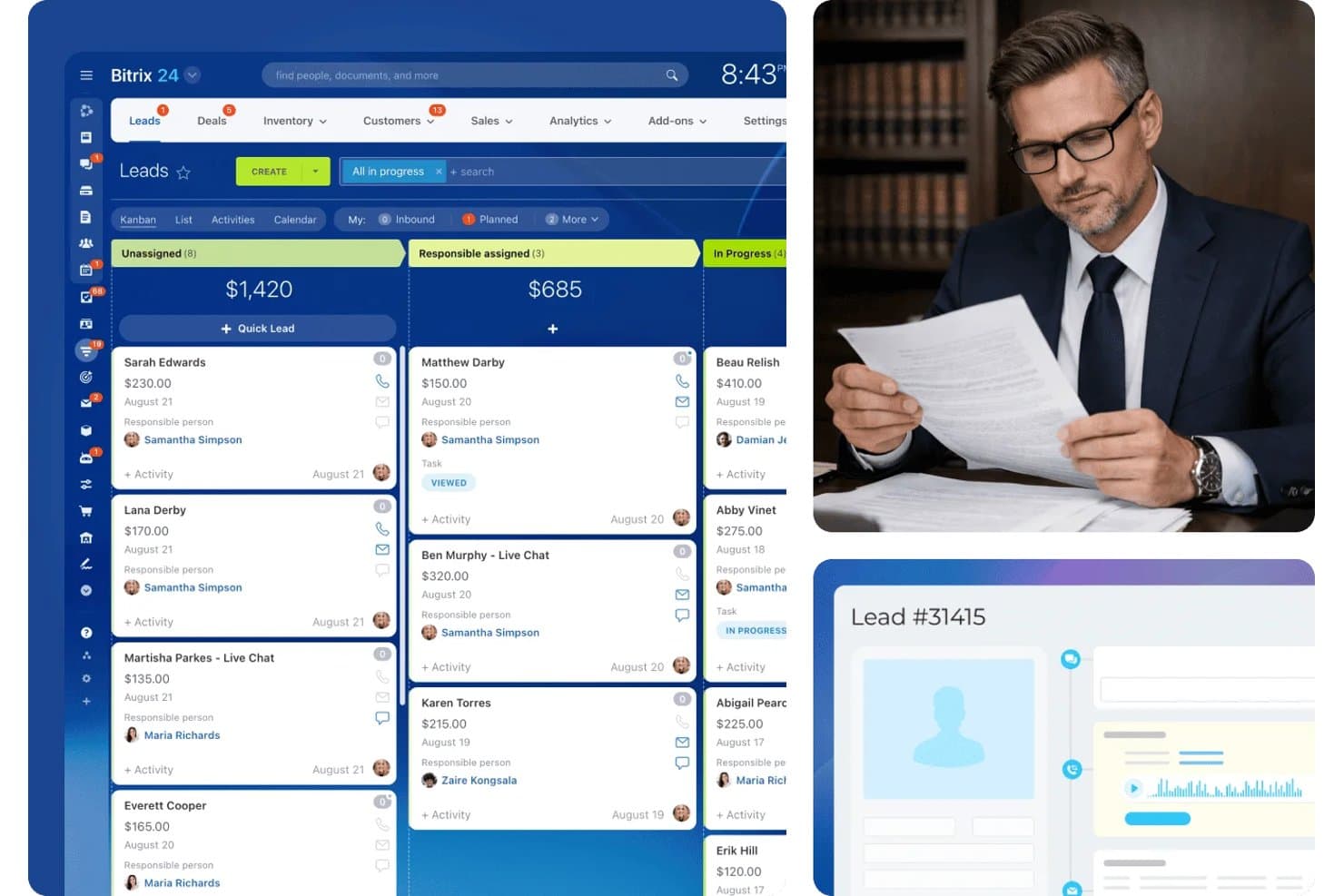
Bitrix24 organizes legal leads by status in a kanban pipeline view. Bitrix24 is an all-in-one CRM platform that covers lead management, contact and deal records, communication logging, workflow automation, and team collaboration—available on a free-forever plan with no per-user pricing.
Who Is Bitrix24 Best For?
Bitrix24 is a strong fit for solo attorneys and small law firms that want a highly configurable CRM without paying per-user fees as the team grows.
Why I Picked Bitrix24
I picked Bitrix24 because its multi-step conditional workflow automation lets me build trigger sequences that mirror a firm's actual client intake process. I use the web form designer to create intake questionnaires with conditional logic, routing new matters directly into the correct pipeline stage automatically. CoPilot AI then transcribes client calls and logs them against the contact record without any manual input.
Bitrix24 Key Features
- Omnichannel communication logging: Automatically logs emails, calls, SMS, and chat messages to client records for a complete communication history.
- Custom access permissions: Lets firms set granular user roles and restrict access to sensitive client or matter data.
- Calendar and appointment scheduling: Provides shared calendars and booking tools for managing consultations and court appearances.
- App marketplace integrations: Supports connections to tools like DocuSign, Dropbox, and Mailchimp for document and workflow needs.
Bitrix24 Integrations
Bitrix24 offers native integrations with Gmail, Outlook, Zoom, Slack, Dropbox, DocuSign, Mailchimp, WhatsApp, Facebook Messenger, and Microsoft 365. It connects with Zapier and offers an API for custom integrations.
What's Free?
Bitrix24 offers a free-forever plan that supports up to 2 users with 5 GB of storage, basic CRM (deals and contacts), tasks, shared calendars, and chat. Note that telephony and Bitrix24 Market apps are only available on paid plans, so key features like email integration and web forms require an upgrade.
Pros and Cons
Pros:
- Built-in AI call transcription logs client conversations
- Multi-step workflow automation on the free tier
- Unlimited contacts on the free plan
Cons:
- Steep setup complexity for non-technical firms
- No native legal matter or case records
Learn more about Bitrix24:
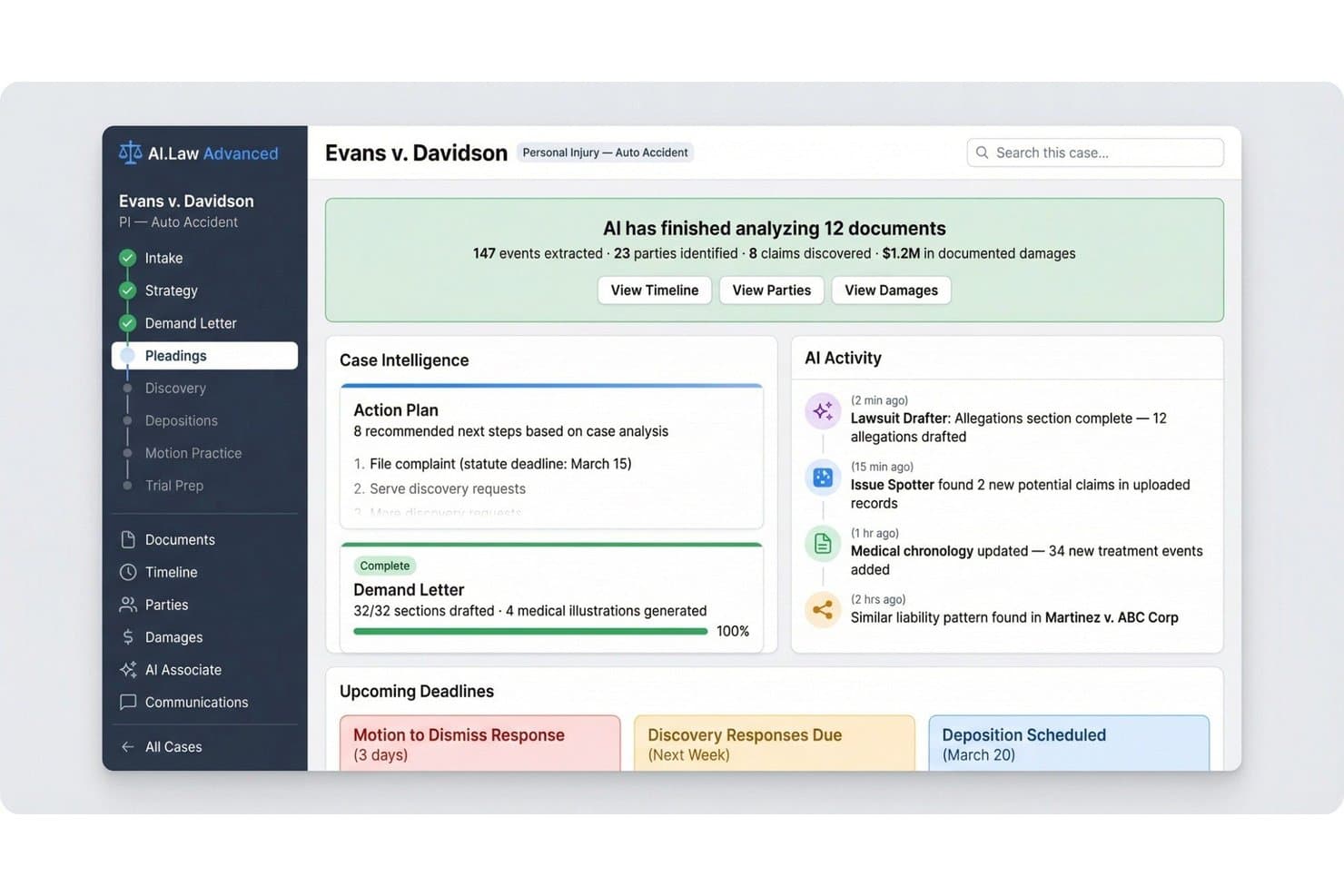
AI.Law centralizes case intelligence, deadlines, and AI activity in one dashboard. AI.Law is a litigation-focused legal CRM with a free-forever tier that includes lead tracking, bilingual AI-driven client intake, conflict checks, document management, and built-in billing.
Who Is AI.Law Best For?
AI.Law is a strong fit for solo and small-firm civil litigators who need a no-cost practice management and CRM foundation built around contingency-based matters.
Why I Picked AI.Law
AI.Law earns its spot on my shortlist because its automated intake goes well beyond a basic web form. The AI conducts 24/7 client interviews in both English and Spanish, capturing matter details in the client's own words before anyone on my team is involved. I also like that conflict checks run automatically at the point of intake, so no time is wasted on a prospect the firm can't represent.
AI.Law Key Features
- Matter-centric records: Each client, contact, and case is tracked in a matter-focused structure designed for litigation.
- Document management: Upload, store, and search documents using AI-based indexing for easy retrieval.
- IOLTA trust accounting: Manage client funds in compliance with legal trust accounting requirements.
- Calendar and SOL calculator: Sync deadlines, appointments, and statute-of-limitations calculations with Google or Outlook.
AI.Law Integrations
Native integrations include Google Calendar and Microsoft Outlook Calendar. An API is available for custom integrations.
What's Free?
AI.Law’s free-forever plan includes unlimited users and matters, CRM, calendar, billing, IOLTA trust accounting, document storage, lead pipelines, e-signatures, conflict checks, Google and Outlook sync, workflow automation, and encrypted security.
Pros and Cons
Pros:
- Free tier includes trust accounting and e-signatures
- Conflict checks run before intake time is spent
- Bilingual AI intake captures richer client detail
Cons:
- AI tools require paid seats beyond the free tier
- Built exclusively for civil litigators, not general practice
Learn more about AI.Law: Best for secure legal client portals
- Free plan available
- From $20/month
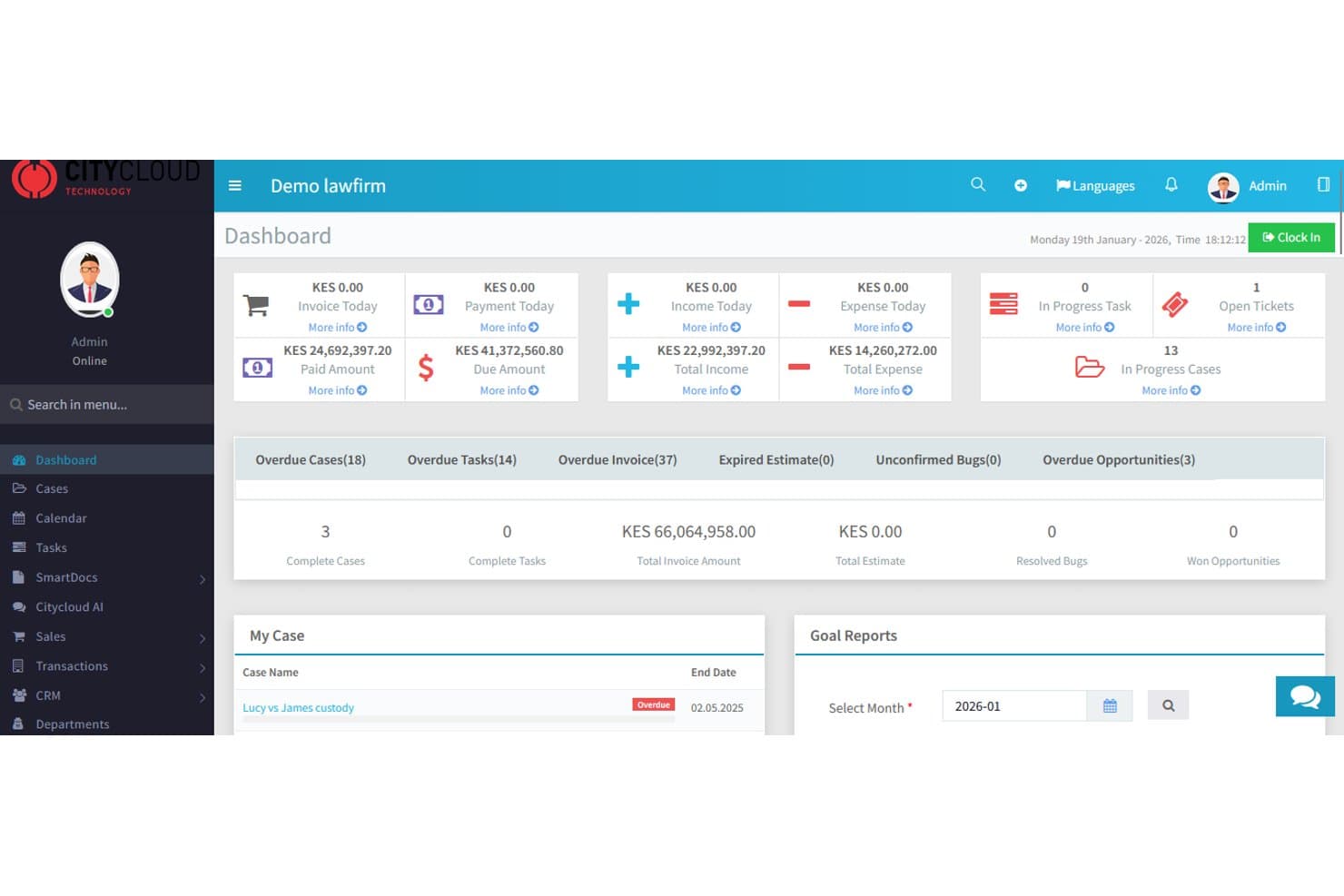
CityCloud Technology centralizes legal case finances and tasks in one dashboard. Law Firm Hub Pro is a cloud-based legal practice management platform that combines CRM, client intake tracking, case management, document storage, and automated client communications across email, SMS, and WhatsApp.
Who Is Law Firm Hub Pro Best For?
It's a strong fit for solo practitioners and small law firms in Kenya and East Africa who need an all-in-one practice management platform built around local compliance requirements.
Why I Picked Law Firm Hub Pro
Law Firm Hub Pro earns its spot on my shortlist because it's one of the very few free legal platforms that includes a dedicated client self-service portal. I like that clients can log in to review case updates and retrieve shared documents without a back-and-forth email chain. Every file is covered by encrypted storage and a full audit trail, which matters when you're handling sensitive legal documents from day one.
Law Firm Hub Pro Key Features
- Role-based dashboards: Dashboard views are customized for partners, associates, paralegals, and accounting staff.
- HRM and payroll module: Built-in staff leave tracking, payroll calculation compliant with Kenya’s regulatory schemes, and biometric attendance support.
- Document version control: Every uploaded legal file is tracked with audit trails of edits, views, and downloads.
- Court date and resource scheduler: The calendar supports automated court reminders, resource allocation, and event-linked task creation for cases.
Law Firm Hub Pro Integrations
Native integrations are not clearly documented. An API is available for custom integrations.
What's Free?
Law Firm Hub Pro’s free-forever plan includes a core dashboard and CRM for up to 20 clients and 50 invoices, along with email and document storage and community support.
Pros and Cons
Pros:
- Native court scheduling with automated reminders
- Built-in conflict check search tool
- Encrypted client portal included on free plan
Cons:
- Case management locked behind paid plans
- Free plan caps clients at 20
Learn more about CityCloud Technology:
Andre gratis juridiske CRM-systemer
Her er noen flere gratis juridiske CRM-alternativer som ikke kom med på kortlisten min, men som likevel er verdt å undersøke:
- 11SchedulingKitBest for streamlined legal appointment scheduling
- 12Bigin by Zoho CRMBest fast setup with legal-specific pipelines
- 13ClickUpBest for multi-platform task management
- 14Odoo CRMBest customizable pipelines for legal matters
- 15monday CRMBest visual workflow boards for case intake
- 16QuillmaticBest AI-driven legal document templates
- 17FirmChambersBest time tracking tied to case progress
- 18Konfidential.lawBest encrypted document storage for case files
- 19Vici.legalBest built-in conflict check and matter linking
- 20HoudiniEsqBest records management with access controls
How I Evaluate Free Legal CRM
First, I define what counts as free. For legal CRM, I only consider vendors with a free-forever plan—short-term trials don't work for an ongoing function like client intake and matter tracking. From there, I split my evaluation into the core functionality a tool must cover to make the list and the differentiating factors that separate one platform from another.
Core Functionality (Table Stakes For This List)
In addition to my free offer requirements, I also use a scoring system to select tools for my list. Here's how it works:
When I'm selecting tools for my list, I rank each one on a scale from 0 (does not offer the functionality) to 5 (excels in this area) for each core functionality listed below. I then calculate the tool's total score into a percentage, using 65% as a benchmark to help assess its overall fit for the list.
- Lead/Intake Management: I look for structured pipelines that let you move a prospective client from initial inquiry through consultation to engagement, segmented by matter type like family law or personal injury.
- Contact & Matter Records: Each tool should link contacts to specific matters rather than generic deals, so you can pull up a client and see every case, party, and relationship tied to them.
- Communication Tracking: I check whether emails, calls, and notes are logged against the right contact record automatically, so nothing falls through the cracks when a client calls about a pending matter.
- Follow-Up Automation: Automated reminders and task sequences matter here—like triggering a follow-up email three days after a consultation or flagging an unsigned retainer agreement for your paralegal.
- Conflict Check Support: I evaluate whether the search spans contacts, matters, and related parties, since catching a conflict before engagement is a core ethical obligation for any practice.
- Custom Intake Forms: The platform should offer forms you can tailor with legal-specific fields like matter type, opposing party, and referral source, ideally populating a new contact record on submission.
Once I have a list of tools that meet the criteria, I consider what sets each platform apart.
Differentiating Factors (What Sets Vendors Apart)
Here's how I compare and contrast different vendors:
Standout Features
Document templates with merge fields save real time—I look for platforms that auto-generate retainer agreements or engagement letters from matter data, so you're not retyping client details into every document. A secure client portal is another differentiator worth evaluating, especially for sharing sensitive case updates without relying on email. Time and activity tracking tied directly to matters helps solo attorneys and small teams capture billable work inside the same tool they use for client management.
Beyond Features
Confidentiality matters—I check whether a vendor offers encryption and access controls that align with professional obligations around client data. Integrations also carry weight, especially email sync with Outlook or Gmail and connections to billing tools like Clio or LawPay. Free tier user limits are worth verifying too, since a solo attorney typically needs at least one additional seat for a paralegal or office administrator to handle intake.
Slik velger du et gratis juridisk CRM-system
Hva er den mest direkte måten å vite om et gratis juridisk CRM-system dekker behovene til virksomheten din og beskytter klientdataene dine i alle faser? Bruk denne tabellen for å tilpasse CRM-valgene til de viktigste prioriteringene dine:
| Hvis prioriteringen din er... | Se etter... |
|---|---|
| Hvis prioriteringen din er...Effektiv innhenting av klientopplysninger | Se etter...Tilpassbare nettskjemaer som knyttes direkte til saker |
| Hvis prioriteringen din er...Konfliktsjekker før oppdragsinngåelse | Se etter...Søkeverktøy som gjennomgår både kontakter og saker |
| Hvis prioriteringen din er...Automatisering av juridiske dokumenter | Se etter...Innebygde maler med flettefelt for saksdata |
| Hvis prioriteringen din er...Sikker kommunikasjon med klienter | Se etter...En klientportal med dokumentdeling og meldingsfunksjon |
| Hvis prioriteringen din er...Tilgang for flere brukere i personalet | Se etter...En gratisnivå som tillater plasser for advokatfullmektiger eller administrativt personale |
Slik vurderer du kortlisten
- Test verktøyene for inntak og konfliktsjekk: Send inn et testskjema for saksinntak og gjennomfør et konfliktsøk samme dag.
- Undersøk retningslinjene for dataeksport: Be om en eksempelfil med dataeksport eller dokumentasjon som beskriver dataportabilitet og sletting.
- Gjennomgå tilgangskontrollene for brukere: Opprett minst én advokatfullmektig eller administrativ bruker i en prøvekonto og tildel tillatelser; dokumenter eventuelle mangler du oppdager.
- Vurder integrasjonene: Koble verktøyet til e-posten eller kalenderen din, og bekreft at aktivitetsloggen fungerer, innen 24 timer.
- Avveining du må ta: Hvis du verdsetter avanserte juridiske arbeidsflyter høyere enn strenge juridiske datastrukturer, kan et gratis generelt CRM-system være tilstrekkelig; velg et bransjespesifikt system bare hvis funksjoner som konfliktsjekker og kobling av saker er avgjørende.
Hva er gratis juridiske CRM-systemer?
Gratis CRM-systemer for juridisk sektor er programvareplattformer utviklet for advokatfirmaer, som tilbyr funksjoner for håndtering av klientforhold uten kostnad gjennom en kostnadsfri plan uten tidsbegrensning. Disse verktøyene hjelper deg med å håndtere potensielle klienter, kontaktinformasjon, juridiske saker og konfliktsjekker uten forhåndsinvesteringer. Med fokus på juridiske arbeidsflyter støtter et gratis CRM-system for juridisk sektor løpende registrering av nye henvendelser, kommunikasjonssporing og saksbehandling for enkeltstående advokater og små virksomheter som ser etter viktige skybaserte verktøy.
Funksjoner i gratis CRM-systemer for juridisk sektor
La oss gå gjennom funksjonene som vanligvis finnes i CRM-systemer for juridisk sektor, og se hvilke som vanligvis er inkludert i gratisplaner kontra betalte planer.
Vanlige funksjoner i gratis CRM-systemer for juridisk sektor
- Kontaktadministrasjon: Lagre klientdata og hold oversikt over adresser, telefonnumre og e-postkorrespondanse for saker og pågående prosesser.
- Sporing av potensielle klienter: Registrer og organiser nye henvendelser, slik at du kan følge opp potensielle klienter fra nettstedet ditt, henvisninger eller uanmeldte besøk.
- Grunnleggende saksbehandling: Opprett saksmapper og knytt dem til kontakter, slik at du får en strukturert måte å følge med på åpne og avsluttede saker.
- Oppgavepåminnelser: Angi påminnelser og gjøremål knyttet til klienter eller saker, slik at frister og oppfølging ikke blir glemt.
- Grunnleggende konfliktsjekk: Søk i klient- og saksoppføringer etter duplikate navn for å unngå etiske konflikter når du tar inn nye saker.
- E-postregistrering: Spor e-poster som er sendt og mottatt i CRM-systemet for å opprette en sentralisert kommunikasjonslogg.
- Tilpassede registreringsskjemaer: Bruk grunnleggende registreringsskjemaer til å samle inn informasjon fra potensielle klienter via nettstedet ditt eller en offentlig lenke.
- Brukerroller: Tildel grunnleggende tillatelser til enkeltstående advokater eller et lite team for å administrere datatilgang for assistenter eller advokatfullmektiger.
Vanlige funksjoner i betalte CRM-systemer for juridisk sektor
- Automatisering av arbeidsflyter: Sett opp automatiserte prosesser i flere trinn for å håndtere registrering av nye henvendelser, oppfølging av klienter eller fullføring av oppgaver basert på saksstatus.
- Dokumentautomatisering: Slå sammen klient- og saksdata med maler for juridiske dokumenter, for eksempel salæravtaler eller standardiserte prosesskriv, slik at tiden som brukes på manuell utarbeidelse reduseres.
- Klientportal: Tilby et sikkert nettbasert område der klienter kan sjekke saksstatus, laste opp dokumenter eller sende meldinger uten å være avhengige av e-post.
- Avansert konfliktsjekk: Utfør avanserte søk på tvers av alle saker, relaterte parter og enheter for å avdekke potensielle konflikter før oppdraget aksepteres.
- Kalenderintegrasjoner: Synkroniser CRM-systemet med Google- eller Outlook-kalendere for å håndtere frister, rettsdatoer og avtaler uten dobbeltregistrering.
- Tids- og faktureringssporing: Spor tiden som brukes på oppgaver, og generer fakturaer direkte fra saksoppføringer for enklere fakturering.
- Rollebasert tilgangskontroll: Angi svært detaljerte tillatelser, beskytt sensitiv informasjon og støtt skott mellom urelaterte saker.
- Tilpasset analyse og rapportering: Bygg dashbord og rapporter basert på data om registreringer, konverteringer og saker for å forstå trender, effektivitet og hvor klientene kommer fra.
- Integrasjoner med juridiske verktøy: Koble CRM-systemet til programvare for fakturering, elektronisk signering eller juridisk søkearbeid for sømløs administrasjon av virksomheten.
- API-tilgang: Muliggjør tilpassede programvareintegrasjoner eller utvidelser av arbeidsflyter gjennom et åpent API for avanserte automatiseringsbehov.
Fordeler med gratis CRM-systemer for juridisk sektor
Implementering av et gratis CRM-system for juridisk sektor gir flere fordeler for teamet og virksomheten din. Her er noen av fordelene du kan se frem til:
- Bedre registrering av nye klienter: Nettbaserte skjemaer og arbeidsflyter for potensielle klienter hjelper deg med å organisere og konvertere henvendelser med mindre manuell dataregistrering.
- Sentralisert saksoppfølging: Du kan enkelt følge med på alle klienter og saker i én sikker database i stedet for å håndtere regneark eller papirfiler.
- Redusert risiko for konflikter: Innebygde verktøy for konfliktsjekk støtter etisk etterlevelse ved å hjelpe teamet med å identifisere problemer før dere tar på dere nye saker.
- Bedre kommunikasjon: E-postregistrering og kontakthistorikk gjør at teamet opprettholder en fullstendig oversikt over all klientkommunikasjon på ett sted.
- Mer effektiv oppgavehåndtering: Oppgavepåminnelser og brukerroller gjør det enklere å delegere, følge opp og fullføre oppfølgingshandlinger i tide.
- Lavere driftskostnader: En kostnadsfri plan uten tidsbegrensning gjør det mulig å ta i bruk viktige CRM-funksjoner for juridisk sektor uten forhåndsinvesteringen som kreves for betalt programvare.
- Raskere opplæring av ansatte: Intuitive grensesnitt og enkle oppsettsprosesser hjelper nye assistenter eller advokatfullmektiger med å komme i gang med en gang.
Kostnader og priser for juridisk CRM
Jeg forstår at du kom til denne artikkelen på jakt etter de beste juridiske CRM-alternativene som er tilgjengelige gratis. Siden gratisabonnementer imidlertid bare tilbyr begrensede funksjoner, er det en god sjanse for at du må oppgradere abonnementet ditt i fremtiden.
Tabellen nedenfor oppsummerer vanlige abonnementer, gjennomsnittsprisene deres og typiske funksjoner som er inkludert i juridiske CRM-systemer:
Sammenligningstabell for abonnementer for juridiske CRM-systemer
| Abonnementstype | Gjennomsnittspris | Vanlige funksjoner |
|---|---|---|
| AbonnementstypeGratisabonnement | Gjennomsnittspris$0 | Vanlige funksjonerGrunnleggende kontakt- og saksbehandling, inntaksskjemaer, oppgavepåminnelser, enkle interessekonfliktsjekker og begrenset e-postlogging. |
| AbonnementstypePersonlig abonnement | Gjennomsnittspris$20–$35 per bruker per måned | Vanlige funksjonerAlle funksjonene i gratisabonnementet, automatisering av dokumenter, flere muligheter for tilpasning av inntak, grunnleggende rapportering og begrensede integrasjoner. |
| AbonnementstypeForretningsabonnement | Gjennomsnittspris$40–$70 per bruker per måned | Vanlige funksjonerAdministrasjon av flere brukere, automatisering av arbeidsflyter, klientportal, utvidet rapportering og avansert kontroll av interessekonflikter. |
| AbonnementstypeVirksomhetsabonnement | Gjennomsnittspris$80–$150 per bruker per måned | Vanlige funksjonerTilpassede tillatelser, revisjonslogger, avansert analyse, prioritert kundestøtte, API-tilgang og integrasjoner på virksomhetsnivå. |
Vanlige spørsmål om gratis juridisk CRM
Her er noen svar på vanlige spørsmål om gratis juridisk CRM:
Tilbyr gratis juridiske CRM-plattformer sikker lagring av klientdata?
Ja, de fleste gratis juridiske CRM-plattformer bruker kryptering og databeskyttelsesfunksjoner for å sikre klientdata, men det er viktig å bekrefte at løsningen overholder konfidensialitetsreglene i din jurisdiksjon før du lagrer sensitive saksdokumenter på en forsvarlig måte.
Kan jeg håndtere interessekonfliktsjekker med et gratis juridisk CRM-system?
Ja, mange gratis juridiske CRM-løsninger inkluderer grunnleggende verktøy for kontroll av interessekonflikter, slik at du kan søke gjennom kontakter og saker etter duplikate navn eller parter før du tar inn en ny klient.
Hvordan fungerer inntaksskjemaer i gratis juridiske CRM-systemer?
Gratis juridiske CRM-systemer inkluderer ofte tilpassbare inntaksskjemaer som du kan dele på nettstedet ditt. Disse fyller automatisk ut klient- og saksoppføringer i CRM-systemet ditt, slik at inntaksprosessen blir mer effektiv.
Er samarbeid mulig med et gratis juridisk CRM-abonnement?
Ja, enkelte gratis juridiske CRM-abonnementer støtter å legge til én eller to ekstra brukere, slik at en advokat som jobber alene kan samarbeide med en advokatfullmektig eller assistent uten ekstra kostnad.
Kan jeg eksportere dataene mine hvis jeg vil bytte til et annet CRM-system?
Ja, anerkjente leverandører av gratis juridiske CRM-systemer lar deg vanligvis eksportere kontakt-, saks- og kommunikasjonsoppføringer i standardformater som CSV eller PDF hvis du bestemmer deg for å bytte system.