

Gratis programvare for juridisk kalenderstyring gir deg en måte å holde oversikt over frister, rettsdatoer og avtaler uten å betale for et abonnement – enten gjennom en gratisplan eller en prøveperiode. Juridiske fagfolk som håndterer fulle kalendere, vet hvor raskt oversitte frister eller overlappende avtaler kan føre til risiko og stress.
Hvis du ser etter måter å holde oversikt over saksmengden din uten ekstra kostnader, kan riktig verktøy utgjøre en stor forskjell. I denne listen går jeg gjennom de beste alternativene for gratis programvare for juridisk kalenderstyring, slik at du kan finne det som passer arbeidsflyten og kravene til etterlevelse i 2026.
Hvorfor du kan stole på våre programvareanbefalinger
6,700+
Reviews
20
Industry experts
16+
Evaluation factors
14
Years
Teamet vårt har testet og anmeldt programvare siden 2012. Vi leder selv advokatfirmaer, så vi vet hvor vanskelig og hvor viktig det er å velge riktig programvare.
I denne guiden har vi vurdert verktøyene gjennom praktisk testing og uavhengig research og gitt dem poeng ut fra våre utvelgelseskriterier.
Anmeldelsene våre bygger på vår egen redaksjonelle vurdering. De er ikke et salgsargument.
Sammenligningstabell: Gratis juridisk kalenderstyring
Denne sammenligningstabellen oppsummerer prisdetaljene for mine beste utvalgte gratisprogrammer for juridisk kalenderstyring.
| Tool | Best For | Trial Info | Price | ||
|---|---|---|---|---|---|
| 1 | Best for customizable deadline tracking | Free plan + free trial + free demo available | From $12/user/month | Website | |
| 2 | Best for calendar and case tracking | Free plan available; 14-day free trial | From $20/user/month (billed annually) | Website | |
| 3 | Best for shared legal task calendars | Free plan available | From $1.49 | Website | |
| 4 | Best for visual legal scheduling | Free plan + free trial available | From $5/user/month (billed annually) | Website | |
| 5 | Best for flexible legal planning | Free plan + Free trial + Free demo available | From $10/user/month | Website | |
| 6 | Best for court docket deadline tracking | 3-day free trial | From $39.99/month | Website | |
| 7 | Best for free solo legal calendaring | Free plan available | From $39/user/month (billed annually) | Website | |
| 8 | Best for legal team scheduling | 15-day free trial + free demo available | From $49/month (billed annually) | Website | |
| 9 | Best for rules-based court deadlines | Free demo available | From $19/user/month (billed annually) | Website | |
| 10 | Best for integrated legal calendaring | Free download available | From $48/user/month | Website |


Anmeldelser av gratis programvare for juridisk kalenderstyring
Nedenfor finner du mine detaljerte sammendrag av den gratis programvaren for juridisk kalenderstyring som kom med på kortlisten min. Anmeldelsene mine gir en grundig gjennomgang av funksjonene, de beste bruksområdene og integrasjonene til hvert verktøy, slik at du kan finne det som passer best for deg.
 Best for customizable deadline tracking
- Free plan + free trial + free demo available
- From $12/user/month
Visit WebsiteCustomer Rating:4.6/5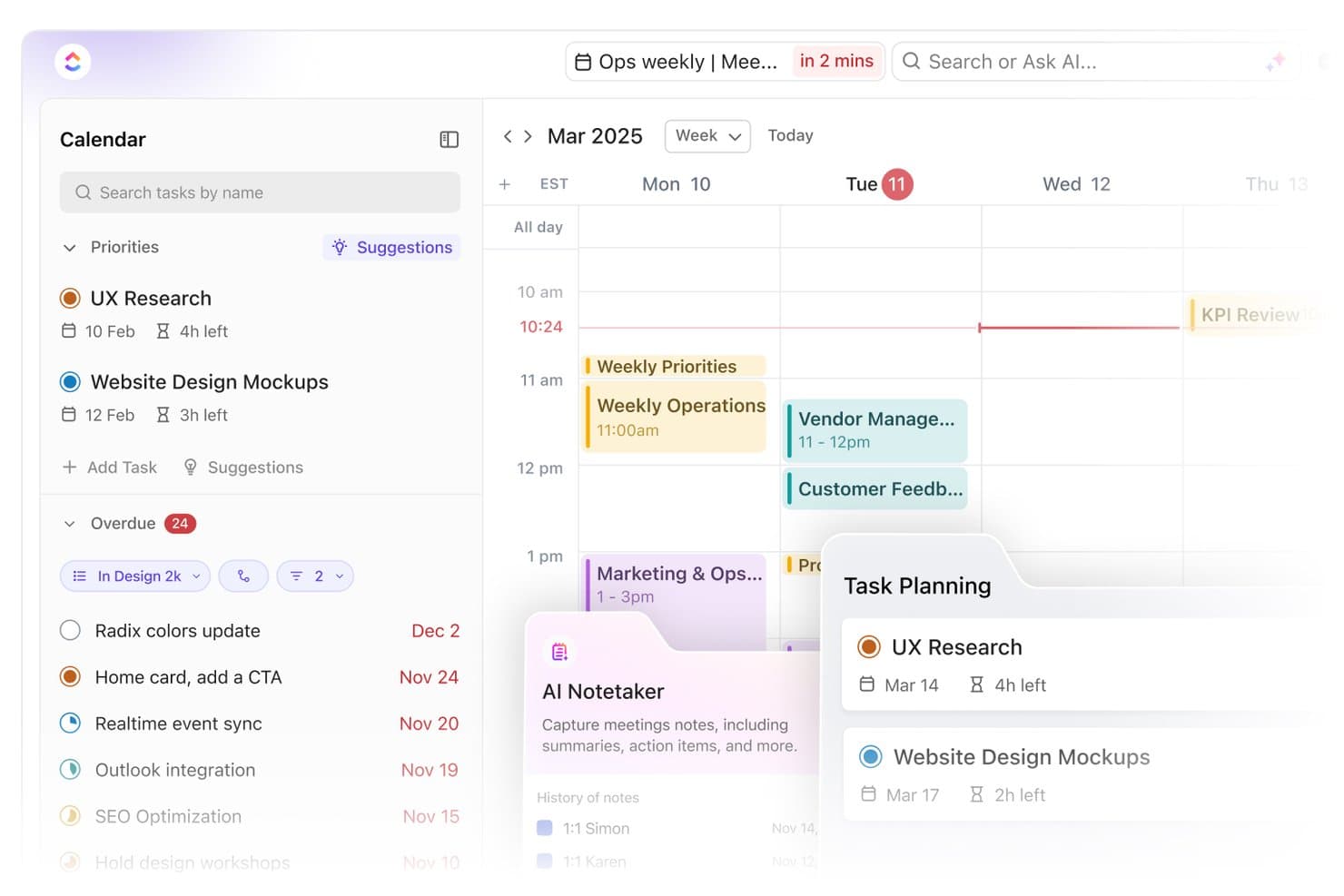
ClickUp offers a weekly calendar view with task planning, overdue items, and AI Notetaker feature for capturing meeting notes and action items. ClickUp is a customizable work management platform with a flexible task hierarchy, 15+ view types including Calendar, custom fields, task dependencies, and multi-user collaboration that legal teams can configure for matter and deadline organization.
Who Is ClickUp Best For?
ClickUp suits solo attorneys and small law firms that want a configurable, low-cost task and deadline management tool they can adapt to their own workflows.
Why I Picked ClickUp
I've included ClickUp in my top picks because its custom fields let you track exactly what a legal deadline requires, like statute of limitations dates, matter numbers, and responsible attorneys, all on the same task. I also like how task dependencies let you build cascading deadline chains, so when one date shifts, linked tasks update accordingly. The Timeline and Gantt views make it easy to visualize a matter's full deadline scope at a glance.
ClickUp Key Features
- Calendar view: Displays all tasks and deadlines on a visual grid, color-coded by matter or project.
- Recurring tasks: Lets you set court appearances, reminders, or filing dates to repeat automatically at set intervals.
- Permission controls: Assigns custom access levels to team members for editing, viewing, or managing legal deadlines.
- Calendar integrations: Syncs with Google Calendar and provides one-way sync to Outlook and Apple Calendars.
ClickUp Integrations
ClickUp offers native integrations with Google Calendar, Outlook, Slack, Dropbox, GitHub, GitLab, Zoom, Microsoft Teams, OneDrive, and Figma. It also connects with Zapier and provides an API for custom integrations.
What's Free?
ClickUp offers a free-forever plan with unlimited users and unlimited tasks, making it accessible for small legal teams without a seat cap. The free plan limits storage to 100MB and restricts advanced features like unlimited Gantt chart views, custom field options, and time tracking, which may matter depending on how complex your matter tracking needs are.
Pros and Cons
Pros:
- Multiple calendar views including Gantt and Timeline
- Highly customizable task fields for matter tracking
- Unlimited users on the free plan
Cons:
- Not built for legal matter management
- No court rules-based deadline calculation
Learn more about ClickUp: Best for calendar and case tracking
- Free plan available; 14-day free trial
- From $20/user/month (billed annually)
Visit WebsiteCustomer Rating:4.6/5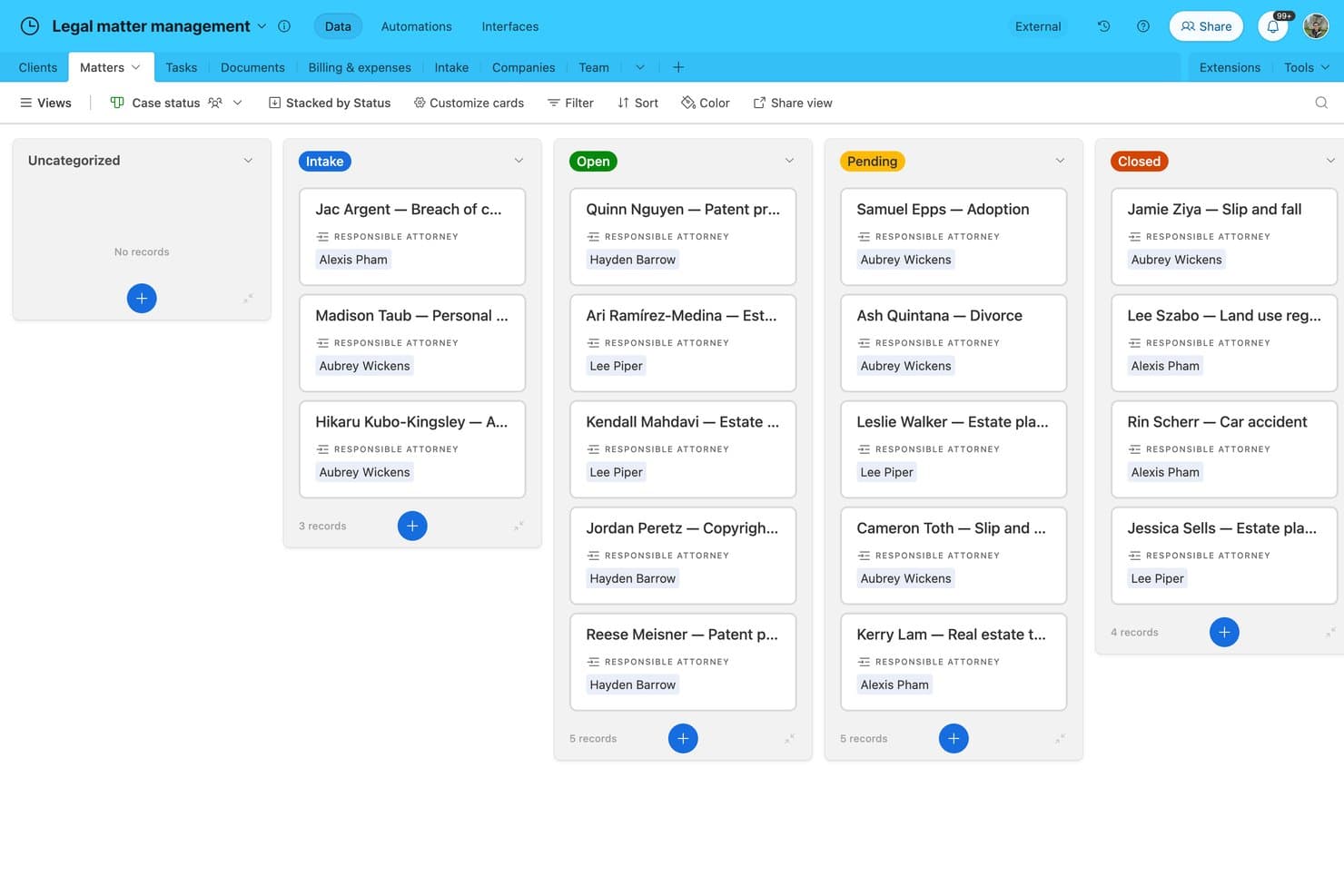
Airtable offers a Kanban-style legal matter management board that organizes client cases by status, including Intake, Open, Pending, and Closed, with assigned attorneys visible on each card. Airtable is a no-code database platform that offers a Legal Case Tracking and Billing template, giving legal teams a customizable way to organize case records, track deadlines in a calendar view, and manage billing alongside matter data.
Who Is Airtable Best For?
Solo attorneys and small legal teams comfortable building their own workflows will get the most out of Airtable's template-based approach to case and deadline tracking.
Why I Picked Airtable
I've included Airtable in my top picks because its calendar view genuinely works for tracking court dates and filing deadlines across active matters. The Legal Case Tracking template maps cases through six lifecycle stages (Intake through Closed), and you can link every calendar event to a specific matter record. Built-in email reminders fire 7 days before key dates, covering the basics without any extra setup.
Airtable Key Features
- Customizable intake forms: Capture new matter details and client information using drag-and-drop form creation.
- Kanban board view: Organize matters or tasks visually with Kanban-style cards for clearer workload management.
- Document storage and commenting: Upload, store, and discuss legal documents directly within each matter record.
- Role-based access control: Adjust user permissions for viewing or editing specific cases, tasks, or calendar records.
Airtable Integrations
Airtable offers native integrations with Google Calendar, Outlook Calendar, Slack, and Google Drive, and it connects with Zapier. An API is available for custom integrations.
What's Free?
Airtable's free plan is a free-forever offering that supports up to 5 editors per workspace, 1,000 records per base, 1 GB of attachments per base, and 100 automation runs per month. It gives you access to the Legal Case Tracking template, but the record cap can be a real constraint if you're managing more than a handful of active matters.
Pros and Cons
Pros:
- Highly customizable without writing any code
- Pre-built legal case lifecycle template included
- Calendar view links deadlines to case records
Cons:
- Not purpose-built for legal workflows
- No jurisdiction-specific court rules calculation
Learn more about Airtable:
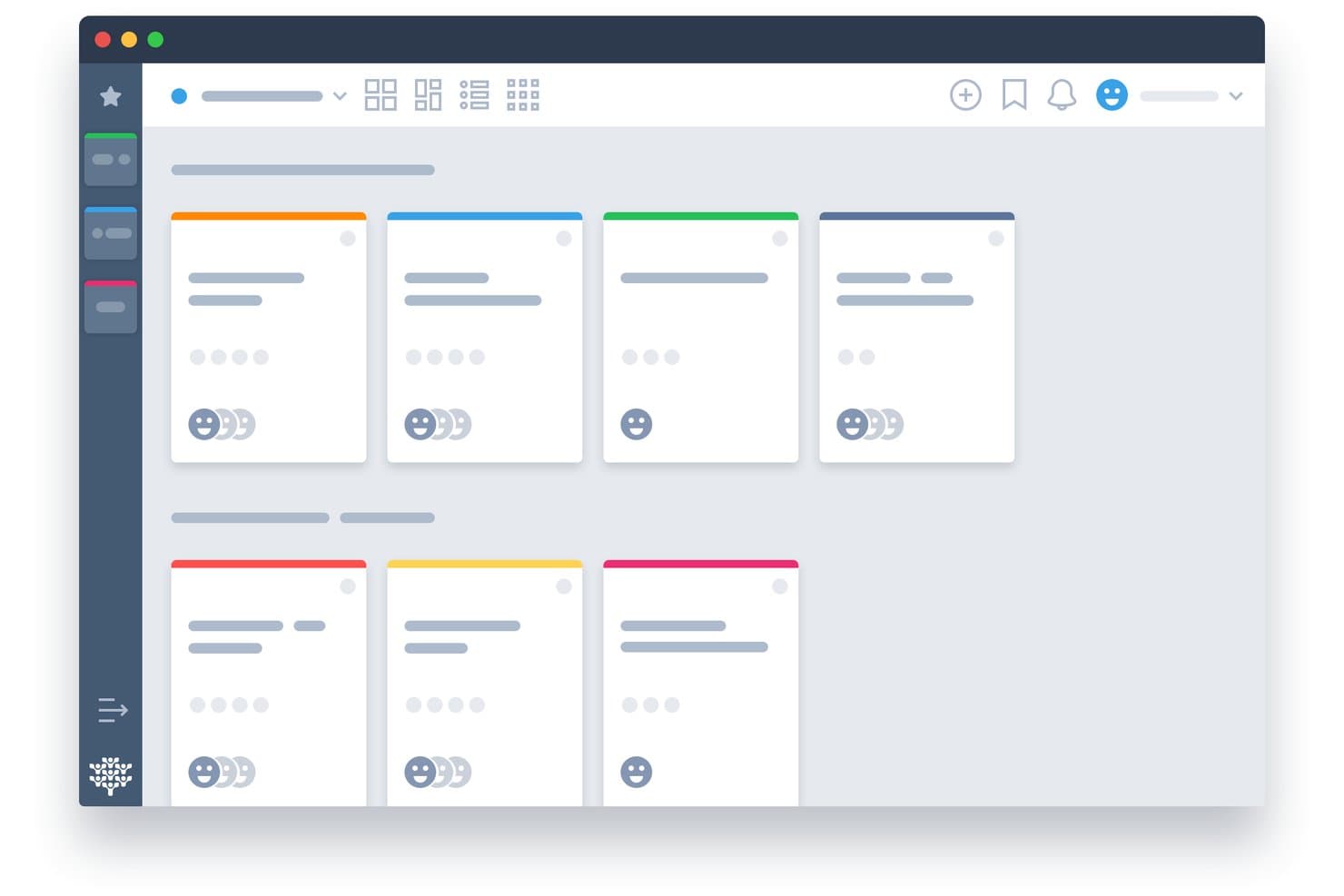
Freedcamp offers a card-based project board view with color-coded task cards, team member avatars, and multiple layout options for organizing work. Freedcamp is a free project management platform with shared calendars, task tracking, multi-user collaboration, and Google Calendar, Outlook, and iCal sync across unlimited users and projects.
Who Is Freedcamp Best For?
Freedcamp suits small law firms and solo practitioners who need a free, multi-user shared calendar without the overhead of a full legal practice management platform.
Why I Picked Freedcamp
I've included Freedcamp in my top picks because its dual-calendar structure genuinely sets it apart for shared legal task calendars. It runs both a project-level calendar (for matter-specific deadlines) and a global calendar that spans all active projects at once, so an attorney can see every case deadline in a single view. I also like that you can invite external parties like clients or co-counsel directly into calendar events, with RSVP tracking, without paying for extra seats.
Freedcamp Key Features
- Unlimited users and projects: Add as many team members and matters as you need without user or project limits.
- Integrated task management: Create, assign, and organize tasks alongside calendar events for each project.
- One-way calendar feed export: Push calendar data to Google Calendar, Outlook, or Apple Calendar using standard iCal feeds.
- Role-based access controls: Manage user permissions with admin, regular user, read-only, and guest roles.
Freedcamp Integrations
Freedcamp offers native integrations with Google Calendar, Outlook, and Dropbox, and provides an API for custom integrations.
What's Free?
Freedcamp's free plan is free forever and supports unlimited users, unlimited projects, and unlimited storage. Advanced add-ons like CRM, invoicing, and issue tracking are paywalled, but the core calendar, task management, and multi-user sharing features are fully available on the free tier.
Pros and Cons
Pros:
- External guests can RSVP to calendar events
- Global calendar view spans all active matters
- Unlimited users on the free plan
Cons:
- No native legal matter file linking
- No court rules-based deadline calculation
Learn more about Freedcamp: Best for visual legal scheduling
- Free plan + free trial available
- From $5/user/month (billed annually)
Visit WebsiteCustomer Rating:4.5/5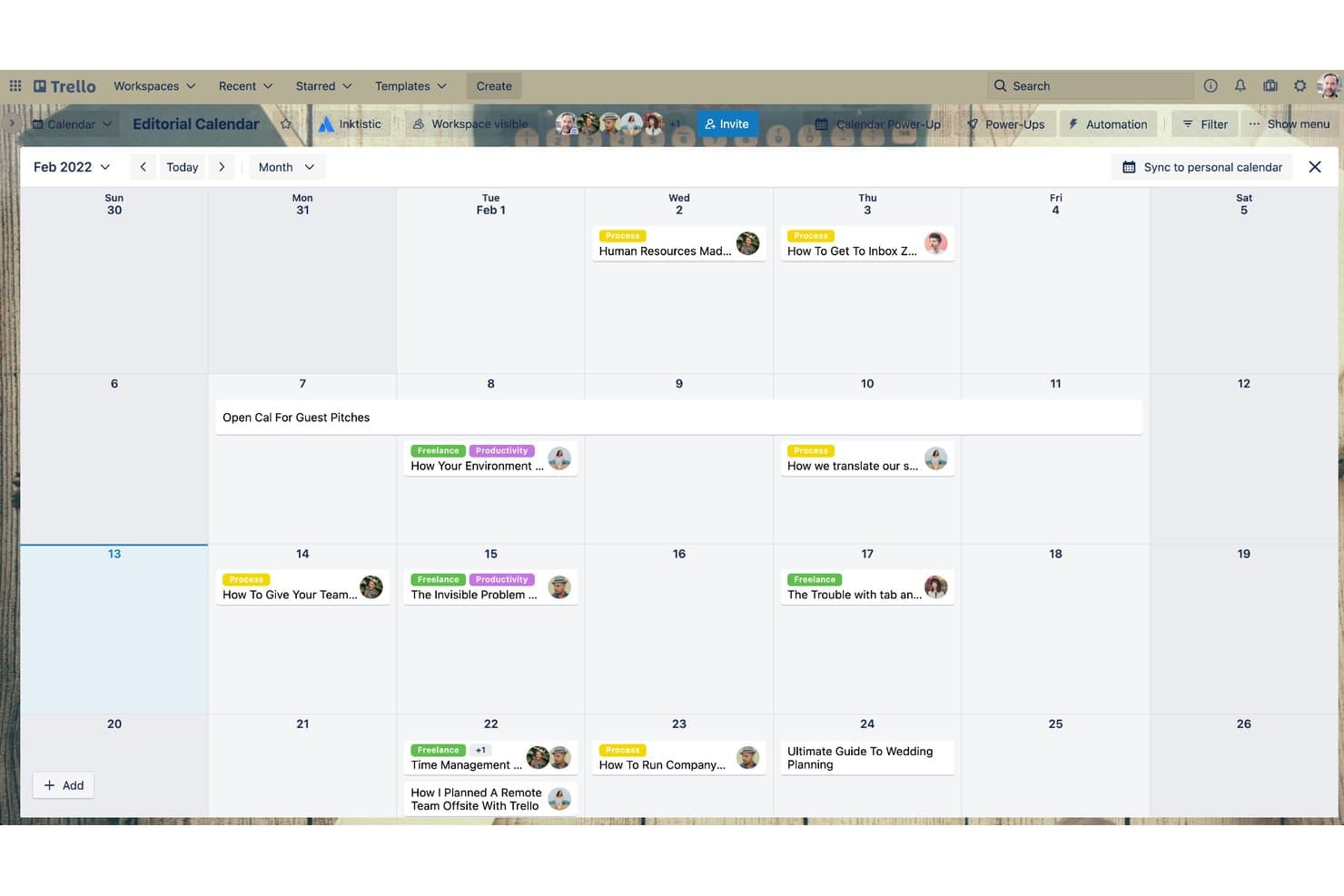
Trello offers a monthly calendar view where editorial teams can schedule and track content publication dates across a full month. Trello is a visual project management tool that organizes tasks, due dates, and team workflows across kanban boards, calendar views, and timeline layouts.
Who Is Trello Best For?
Trello suits solo practitioners and small legal teams who need a simple, visual way to organize tasks and deadlines without complex legal-specific features.
Why I Picked Trello
I picked Trello as one of the best because its Calendar and Timeline views make it easy to visualize filing windows, hearing dates, and task sequences at a glance. I use Butler automation to build rules that auto-assign due dates and trigger reminders when a card moves to a new list, keeping deadline tracking consistent across a matter. The Planner feature lets me drag and reorder cards on a calendar, which is genuinely useful for blocking time around depositions or court appearances.
Trello Key Features
- Kanban boards: Organize matters or workflows into visually distinct lists and cards.
- Power-Ups directory: Add custom integrations like Google Calendar and document storage to enhance board functionality.
- Inbox capture: Collect tasks and appointments from email, Slack, or Teams directly into Trello.
- Mobile and desktop apps: Access calendars and boards from iOS, Android, or desktop for scheduling on the go.
Trello Integrations
Trello offers native integrations with Google Drive, Slack, Jira, Dropbox, Microsoft Teams, and Evernote, plus connects with Zapier and provides an API for custom integrations.
What's Free?
Trello's free plan is free forever and supports up to 10 collaborators per Workspace with unlimited cards and Power-Ups. The main restriction is a 10-board limit per Workspace, which can be a constraint if you're managing a high volume of active matters simultaneously.
Pros and Cons
Pros:
- Butler automation triggers deadline reminders automatically
- Free plan supports up to 10 collaborators
- Calendar view maps deadlines across active matters
Cons:
- Matter linking requires manual card organization
- No court rules-based deadline calculation
Learn more about Trello: Best for flexible legal planning
- Free plan + Free trial + Free demo available
- From $10/user/month
Visit WebsiteCustomer Rating:4.6/5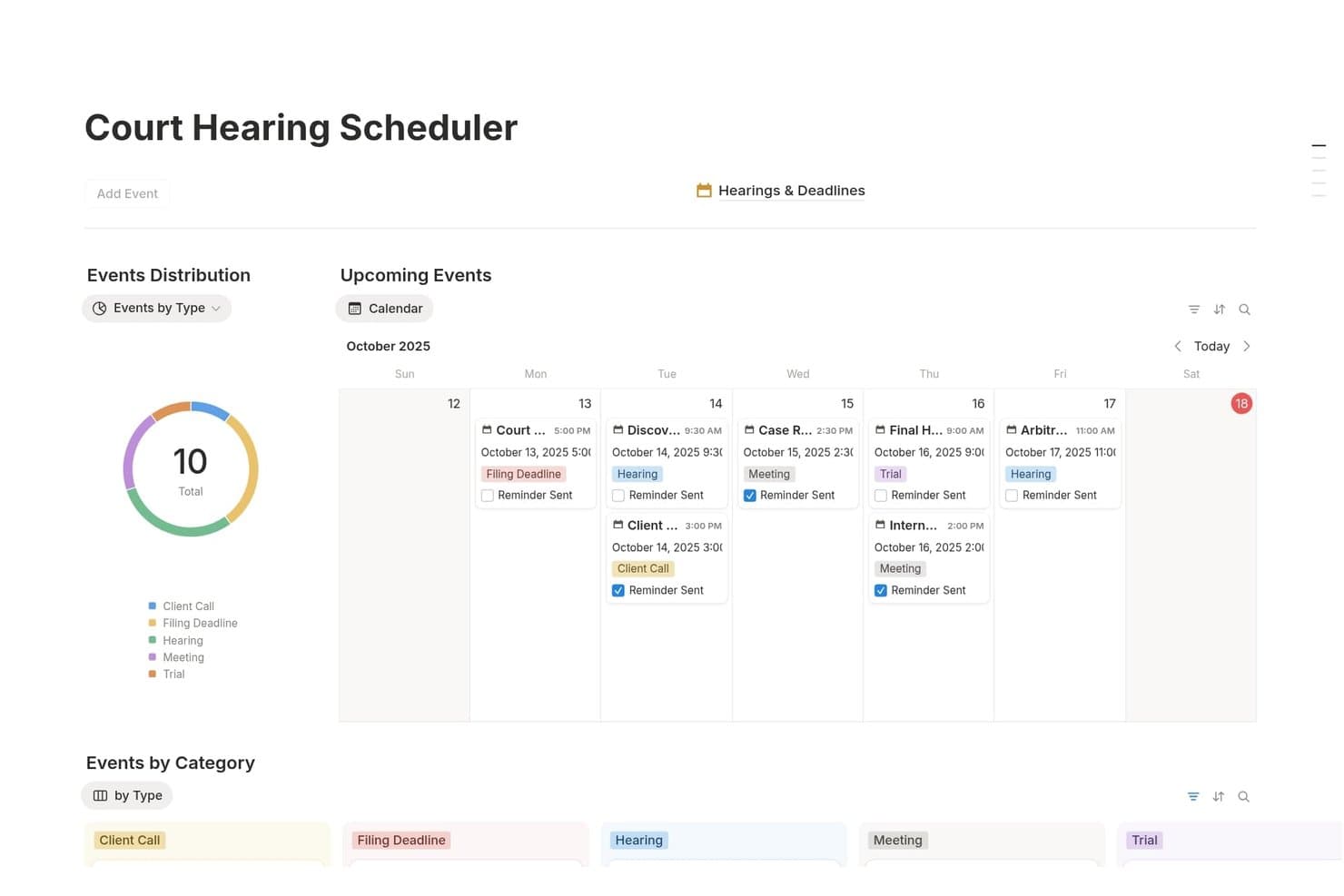
Notion offers a Court Hearing Scheduler template with a calendar view, event type distribution chart, and categorized legal deadlines for managing hearings and filings. Notion is a general-purpose workspace platform that lets legal professionals build custom case trackers, deadline databases, and matter calendars using a flexible template and database system.
Who Is Notion Best For?
Notion suits solo attorneys and small legal teams who want a free, self-built workspace for organizing matters and tracking deadlines without dedicated legal software.
Why I Picked Notion
Notion earns its spot on my shortlist because of how much I can shape it to match a specific legal workflow. I use linked databases to build matter-specific deadline trackers where each case record connects directly to calendar events and timeline views. The 245+ legal service templates covering hearings, client intake, and case hubs mean I can stand up a structured planning system without starting from a blank page.
Notion Key Features
- Template gallery: Choose from over 200 community-built legal templates for cases, hearings, and document management.
- Calendar database views: Organize legal deadlines and court dates visually with embedded calendar and timeline layouts.
- Permissions and sharing: Assign access or editing rights to staff, clients, or outside collaborators on a per-page or database basis.
- Integration with Notion Calendar: Link events from external Google calendars to centralize scheduling alongside matter notes and reminders.
Notion Integrations
Notion offers native integrations with Google Calendar, Slack, GitHub, Jira, and Zoom. It also provides an API for custom integrations.
What's Free?
Notion's free plan is free forever and includes unlimited pages and blocks for individual users. If you add a second member to the workspace, blocks become limited, file uploads are capped at 5MB each, page history is restricted to 7 days, and external guests are capped at 10.
Pros and Cons
Pros:
- Free plan supports unlimited pages and blocks
- Large library of legal-specific templates available
- Highly customizable database and calendar layouts
Cons:
- No native conflict checking across matters
- No automatic court rules deadline calculation
Learn more about Notion: Best for court docket deadline tracking
- 3-day free trial
- From $39.99/month
Visit WebsiteCustomer Rating:4.5/5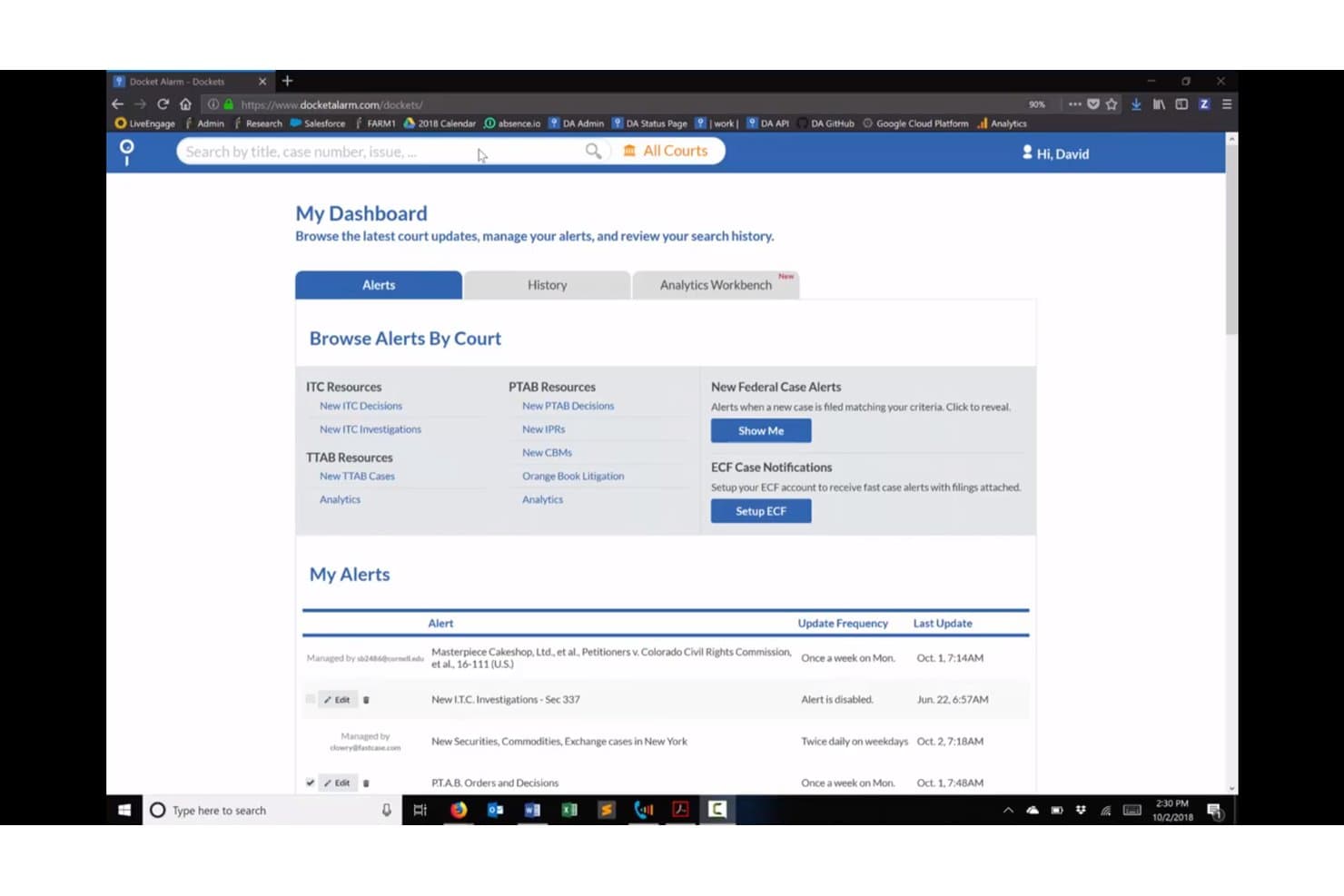
Docket Alarm offers a My Dashboard view with alert management, court browsing, and case update tracking for legal professionals. Docket Alarm is a legal docketing and rules-based calendaring platform that tracks court filings, auto-extracts deadlines from docket sheets, and syncs case events to Outlook and Google Calendar.
Who Is Docket Alarm Best For?
Litigation attorneys and IP practitioners who need reliable, court-specific deadline tracking across federal, state, and agency dockets will get the most out of this platform.
Why I Picked Docket Alarm
Docket Alarm earns its spot as one of the best on my shortlist because of how it handles court docket deadline tracking at a level most calendaring tools don't attempt. I like that it auto-extracts deadlines directly from docket sheets and underlying filings like scheduling orders, rather than requiring manual entry. The rules-based engine covers federal courts, 34+ U.S. states, PTAB, and TTAB, so I'm not manually calculating trigger dates across different jurisdictions.
Docket Alarm Key Features
- Alerts and tracking: Receive real-time alerts and notifications when new filings or docket updates occur.
- Bulk data export: Export documents, docket sheets, and tracking information as spreadsheets for offline review.
- Analytics workbench: Build custom litigation analytics reports for state, federal, or administrative jurisdictions.
- API access: Integrate calendaring, alerts, and docket data with other legal software or custom applications.
Docket Alarm Integrations
Docket Alarm offers native integrations with Outlook, Google Calendar, and Clio. An API is available for custom integrations.
What's Free?
Docket Alarm offers a 3-day free trial, not a free-forever plan. The trial gives you access to docket tracking and deadline alerts, but full platform access, including rules-based calendaring and API features, requires a paid subscription starting at $39.99/month.
Pros and Cons
Pros:
- Real-time alerts on new case filings
- Auto-extracts deadlines from docket sheets and filings
- Covers federal, state, and agency dockets
Cons:
- Not built for full matter management
- No free-forever plan for ongoing matters
Learn more about Docket Alarm: Best for free solo legal calendaring
- Free plan available
- From $39/user/month (billed annually)
Visit WebsiteCustomer Rating:4.4/5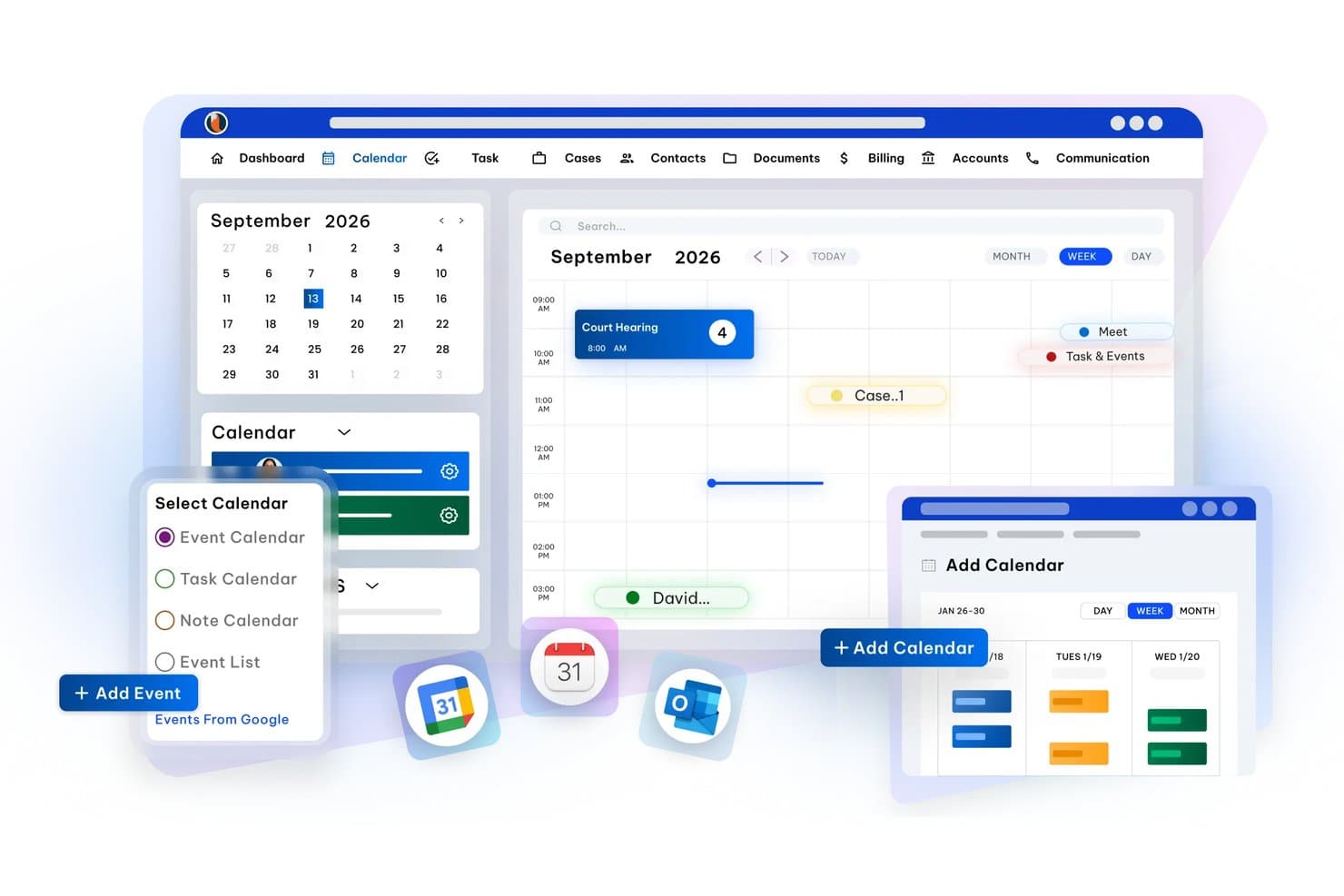
CaseFox offers a legal calendaring interface with week/month/day views, event scheduling, Google Calendar integration, and calendar type selection including Event, Task, and Note calendars. CaseFox is a free legal practice management platform for solo attorneys that includes matter-linked calendaring, court date tracking, deadline reminders, and two-way sync with Google Calendar, Outlook, and iCal.
Who Is CaseFox Best For?
CaseFox is a strong fit for solo attorneys and very small law firms that need free, fully functional legal calendaring without committing to a paid plan.
Why I Picked CaseFox
I picked CaseFox because it's one of the only practice management tools I've found with a genuinely free plan that includes case-linked calendaring. In practice, I can attach court dates directly to matter records and receive automatic email reminders at two days out, one day out, and the day itself. I also like that I can view colleagues' calendars alongside my own, which keeps a small team coordinated on upcoming hearings.
CaseFox Key Features
- Two-way calendar sync: Syncs calendar events with Google Calendar, Outlook, and iCal for unified access across devices.
- Role-based calendar access: Lets you assign different viewing and editing rights to each user in the system.
- Case and client document storage: Attach files and documents directly to matters for easy access alongside calendar events.
- Client portal: Clients can view their appointments, invoices, and messages through a dedicated online portal.
CaseFox Integrations
CaseFox offers native integrations with Google Calendar, Outlook, and iCal for calendar sync. An API is available for custom integrations.
What's Free?
CaseFox's Solo plan is free forever and includes legal calendaring, court date tracking, deadline reminders, and calendar sync. The free plan is capped at 2 users and 4 active cases, and rule-based calendaring is reserved for the paid Professional plan.
Pros and Cons
Pros:
- Free data migration and onboarding support included
- Active case calendar visible across multiple user accounts
- Free plan includes genuine matter-linked calendaring
Cons:
- Mobile app is inconsistently updated and lower-rated
- Rule-based court deadline calculation locked behind paid plans
Learn more about CaseFox: Best for legal team scheduling
- 15-day free trial + free demo available
- From $49/month (billed annually)
Visit WebsiteCustomer Rating:4.2/5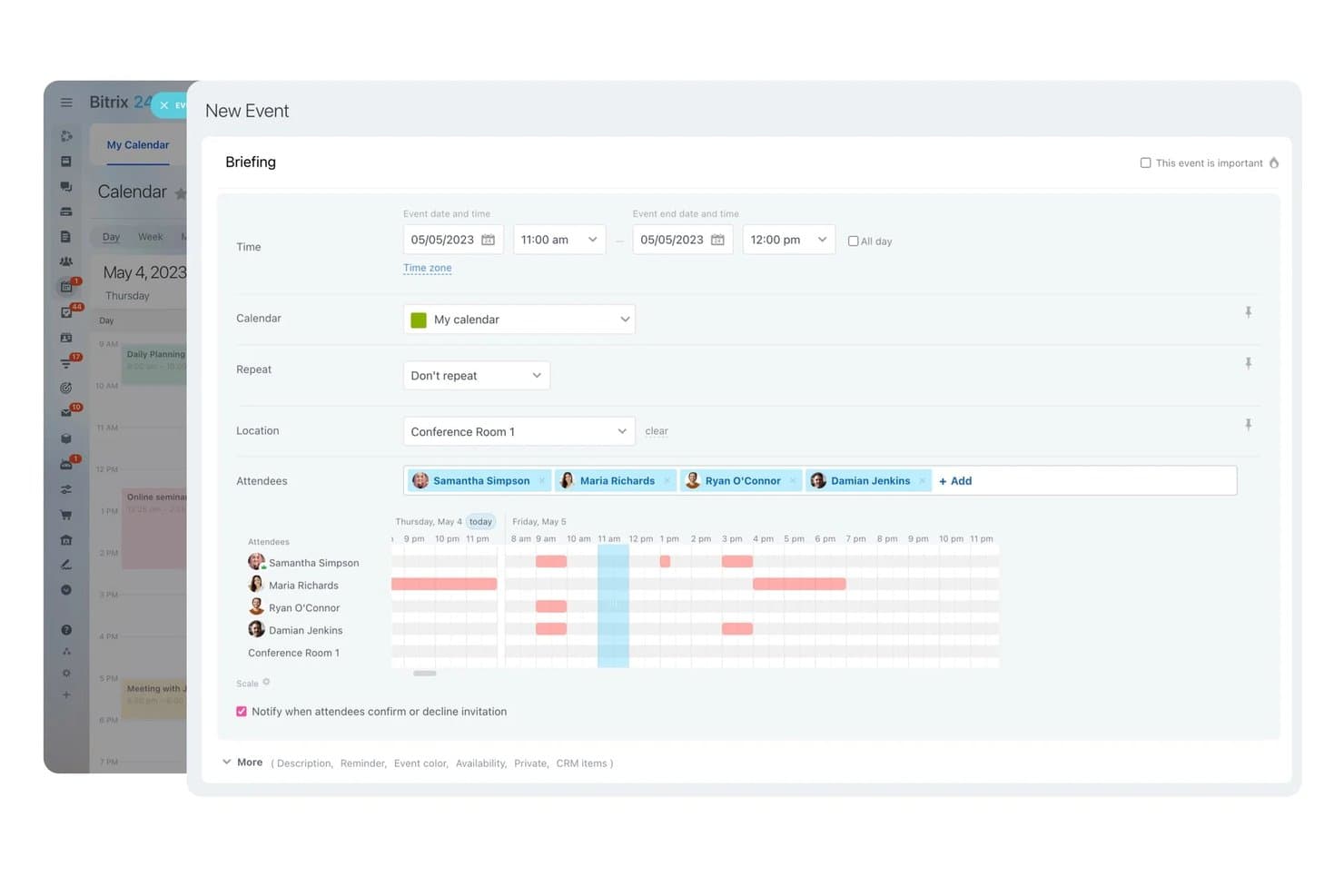
Bitrix24 offers a New Event scheduling interface with attendee availability visualization, location selection, and repeat options for team calendar coordination. Bitrix24 is a business management platform with built-in CRM, shared team calendars, appointment booking, and task management, offering a legal industry configuration for coordinating client consultations and attorney scheduling.
Who Is Bitrix24 Best For?
Bitrix24 suits small legal teams and office administrators who need a free, centralized platform for coordinating attorney availability and client appointment scheduling.
Why I Picked Bitrix24
I picked Bitrix24 because its scheduling capabilities go well beyond a basic shared calendar. The online booking tool lets clients self-schedule consultations directly, links every booking to a CRM record automatically, and fires off appointment reminders to cut no-shows. My team can view lawyer availability in real time and fill canceled slots using a built-in waitlist, which I find genuinely useful for keeping a busy consultation schedule full.
Bitrix24 Key Features
- Two-way calendar sync: Connect Google Calendar and Outlook accounts for live updating across platforms and devices.
- Matter-linked event records: Attach calendar events to CRM client or case records for contextual tracking and follow-up.
- Multi-user shared calendars: Allow attorneys, paralegals, and staff to view, edit, and coordinate team schedules in one place.
- Task and deadline reminders: Set up multiple automated alerts for upcoming events, hearings, or deadlines within the calendar interface.
Bitrix24 Integrations
Bitrix24 offers native integrations with Google Calendar, Microsoft Outlook, and Zoom, and provides an API for custom integrations.
What's Free?
Bitrix24 offers a free-forever plan that's genuinely free with no time limit, but it caps at 1–2 users and includes only 5 GB of storage. Features like telephony, booking, and marketplace apps are locked behind paid plans, so the free tier covers shared calendars, basic CRM, and task management only.
Pros and Cons
Pros:
- Clients can self-schedule consultation appointments
- CRM records link directly to calendar events
- Unlimited users supported on the free plan
Cons:
- Not built for legal-specific workflows
- No court rules deadline calculation available
Learn more about Bitrix24: Best for rules-based court deadlines
- Free demo available
- From $19/user/month (billed annually)
Visit WebsiteCustomer Rating:4.1/5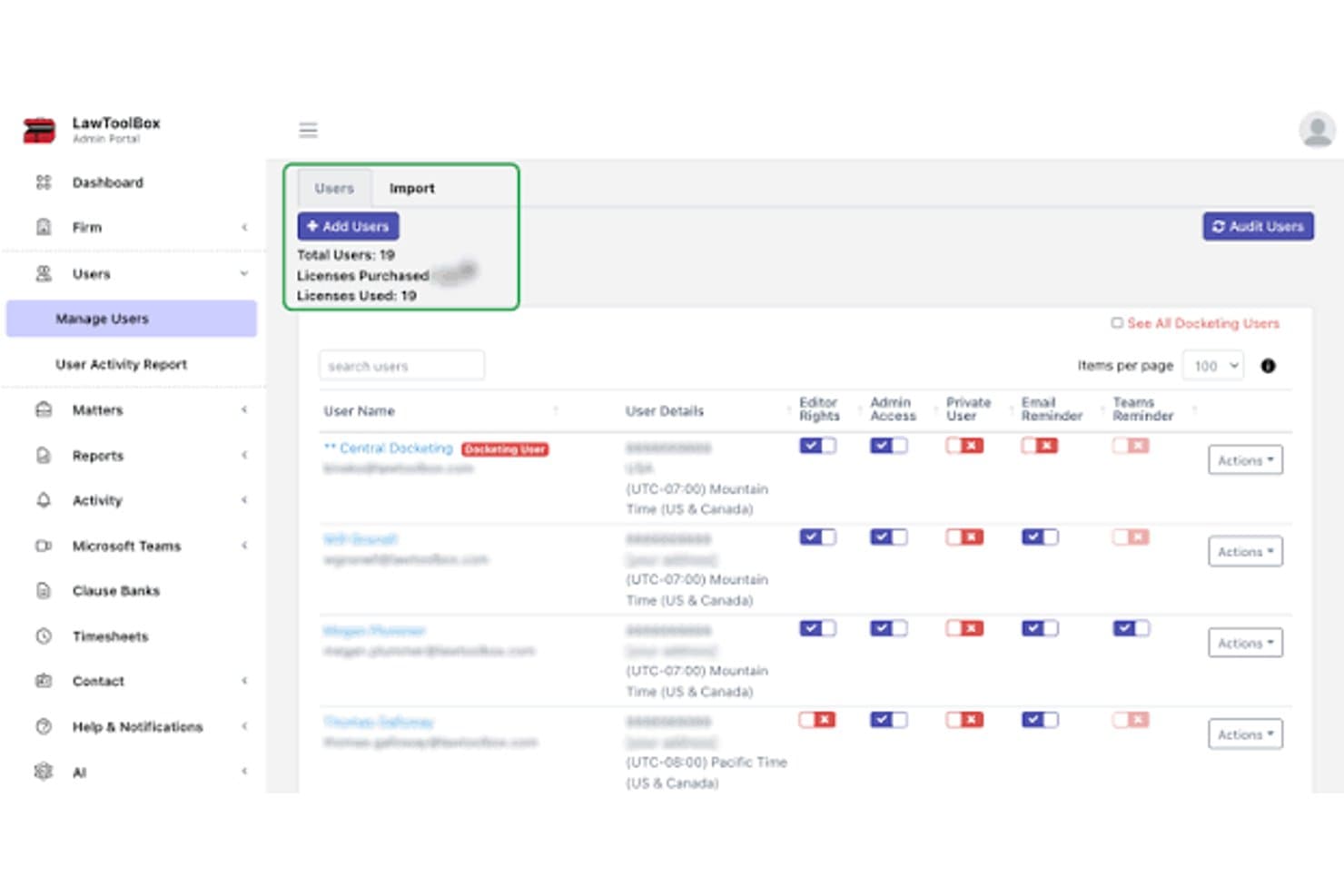
LawToolBox admin dashboard for managing legal calendaring users, permissions, and reminders LawToolBox is a legal calendaring platform built into Microsoft 365 that automates court deadline calculation using jurisdiction-specific rules across thousands of state and federal courts.
Who Is LawToolBox Best For?
LawToolBox is a strong fit for litigation-focused law firms that run their practice inside Microsoft 365 and need jurisdiction-specific deadline calculation built into their existing workflow.
Why I Picked LawToolBox
LawToolBox earns its spot on my shortlist because of how it handles rules-based court deadline calculation. Enter one trigger date, and it generates 80+ jurisdiction-specific deadlines automatically, pulling from court rule sets across thousands of state and federal courts. I also like the AI deadline extraction feature, which embeds direct links to source documents inside Outlook calendar entries so I can verify exactly how each deadline was calculated.
LawToolBox Key Features
- Matter management in Microsoft 365: Instantly creates a dedicated workspace in Teams, Outlook, SharePoint, and OneNote for each case.
- Customizable deadline templates: Lets you build and reuse templates for recurring or unique case types.
- Deadline reassignment and reporting: Provides tools to assign deadlines to new users and generate deadline-based reports by staff or location.
- Role-based user permissions: Supports controlled access and permissions for attorneys, paralegals, and admin staff.
LawToolBox Integrations
LawToolBox has native integrations across the Microsoft ecosystem, including Microsoft 365, Teams, Outlook, SharePoint, and OneNote. An API is available for custom integrations.
What's Free?
LawToolBox doesn't offer a free plan. You can take a free tour of the platform without a credit card, but full access requires a paid subscription with a minimum one-year commitment.
Pros and Cons
Pros:
- Deadlines embed directly inside Outlook calendar entries
- AI extracts deadlines from source court documents
- Accurate deadline calculation across thousands of courts
Cons:
- Only works within the Microsoft 365 ecosystem
- No free plan available for users
Learn more about LawToolBox: Best for integrated legal calendaring
- Free download available
- From $48/user/month
Visit WebsiteCustomer Rating:4.1/5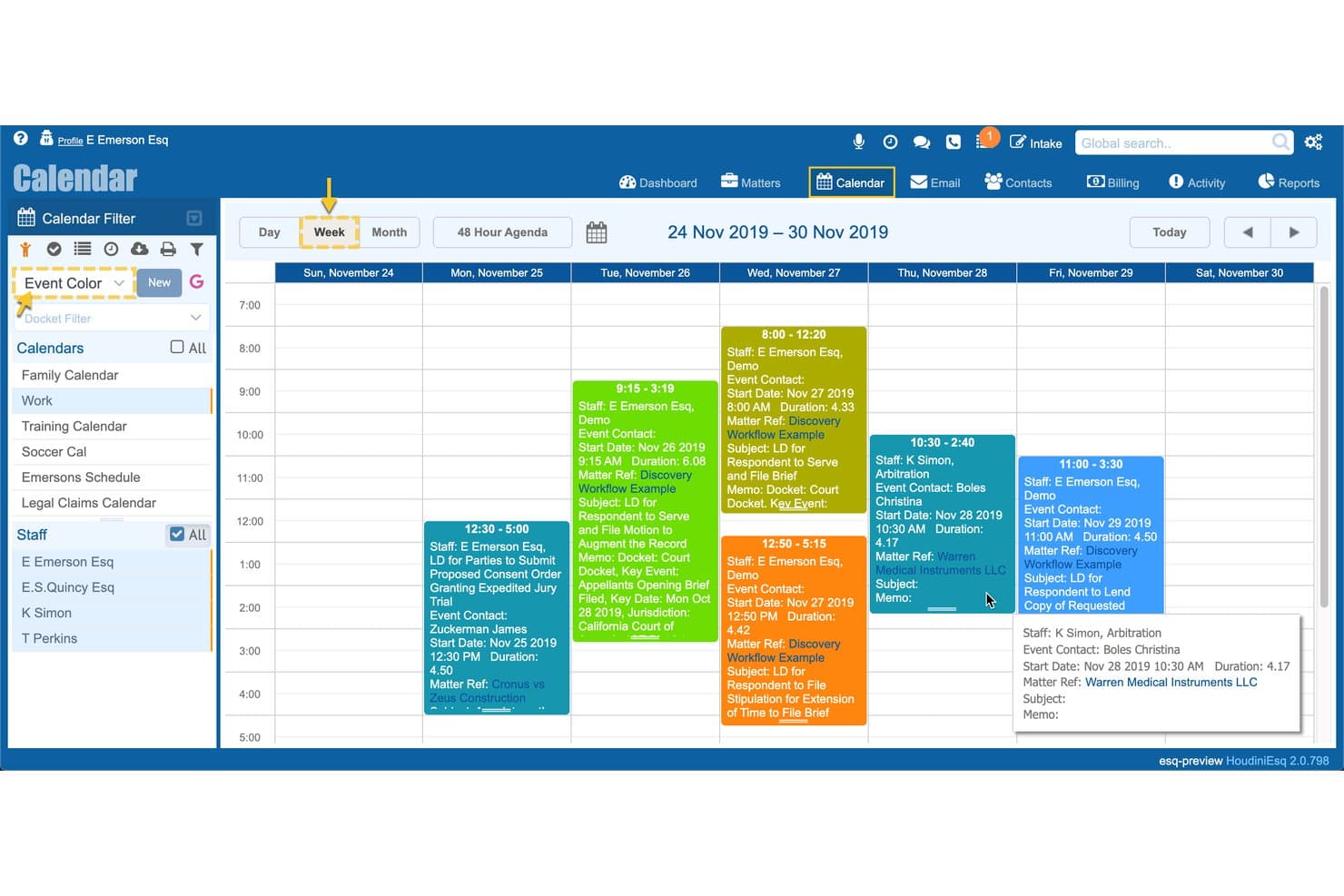
HoudiniESQ legal calendar showing court deadlines, matters, staff schedules, and docket events HoudiniESQ is a legal practice management platform that combines matter-based calendaring, court-rules deadline tracking, workflow automation, document management, and billing in both cloud and self-hosted deployments.
Who Is HoudiniESQ Best For?
HoudiniESQ is a strong fit for solo practitioners who need a full-featured, self-hosted practice management system at no cost.
Why I Picked HoudiniESQ
HoudiniESQ earns its spot as one of the best on my shortlist because of how deeply calendaring is woven into every part of the platform. I particularly like the calendaring triggers with conditional branching, which let me set up deadline chains that fire automatically when a matter hits a specific stage. What really sets it apart is the Calendar Rules/SoftFile integration for jurisdiction-specific court-rules calculation, so I'm not manually counting days after a summons is filed.
HoudiniESQ Key Features
- Bi-directional calendar sync: Syncs with Google Calendar and Outlook so updates appear in both systems.
- Integrated document management: Lets you store, search, and attach documents directly within calendar events.
- Automated alerts and notifications: Sends reminders and system alerts for upcoming court dates and deadlines.
- On-premise deployment option: Allows installation on your own server for enhanced data control and compliance.
HoudiniESQ Integrations
HoudiniESQ offers native integrations with Google Calendar, Outlook, and Calendar Rules/SoftFile, and provides an API for custom integrations.
What's Free?
HoudiniESQ offers a free-forever solo license for self-hosted (on-premise) deployment, which gives a single user access to the full platform at no cost. The free plan is limited to one user seat, so firms with more than one attorney or staff member will need to upgrade to a paid multi-seat license.
Pros and Cons
Pros:
- Self-hosted deployment keeps client data on-premise
- Court rules calculation included at no cost
- Full matter-linked calendaring on the free plan
Cons:
- Outdated interface requires significant setup time
- Free tier limited to single user only
Learn more about HoudiniESQ:
Annen gratis programvare for juridisk kalenderstyring
Her er noen flere alternativer for gratis programvare for juridisk kalenderstyring som ikke kom med på kortlisten min, men som likevel er verdt å se nærmere på:
- 11AsanaBest for legal task coordination
- 12WrikeBest for legal deadline and task tracking
- 13Zoho CalendarBest for team calendar coordination
- 14Google CalendarBest for simple shared scheduling
- 15Microsoft Outlook CalendarBest for Microsoft 365 law firms
How I Evaluate Free Legal Calendaring Software
First, I define what counts as free. For legal calendaring software, that means a long-term free plan—not a trial—since court deadlines don't pause after 14 days. From there, I evaluate core functionality and the differentiating factors that separate one tool from another.
Core Functionality (Table Stakes For This List)
In addition to my free offer requirements, I also use a scoring system to select tools for my list. Here's how it works:
I rank each one on a scale from 0 (does not offer the functionality) to 5 (excels in this area) for each core functionality listed below. Then, I calculate the tool's total score into a percentage. Each tool needs to achieve a minimum total score of 65% to be considered for inclusion.
- Court Rules Calculation: I check whether a tool can auto-calculate trigger-based deadlines from a filing or hearing date using jurisdiction-specific court rules.
- Matter-Based Calendaring: Each event should link to a specific case or client, so I look for tools that let you view all deadlines tied to a single matter in one place.
- Deadline Reminders: Automated alerts for upcoming court dates and filings are essential. I evaluate how many reminders you can set per event and whether they reach you through multiple channels.
- Calendar Sync: I look at whether the tool syncs with Google Calendar, Outlook, or iCal so attorneys can see legal deadlines alongside personal appointments on any device.
- Multi-User Sharing: For small firms, paralegals and attorneys need shared visibility into the same calendar. I evaluate user caps on the free plan and what permission levels are available.
- Conflict Checking: Scheduling overlaps between hearings, depositions, and client meetings create real problems. I look for tools that flag conflicts across users and matters automatically.
Once I have a list of tools that meet the criteria, I consider what sets each platform apart.
Differentiating Factors (What Sets Vendors Apart)
Here's how I compare and contrast different vendors:
Standout Features
Statute of limitations tracking is a big differentiator. Tools that flag approaching deadlines on open matters add a layer of malpractice protection you won't get from a basic calendar. I also evaluate conflict and availability checks—specifically whether a tool detects overlaps across attorneys and shared resources like conference rooms before you book. Two-way calendar sync matters here too, since attorneys need legal deadlines visible alongside personal appointments on mobile.
Beyond Features
Data security is top of mind—legal calendars hold privileged client information, so I check for encryption standards and vendor data handling practices. User caps on the free tier also matter. A solo practitioner has different needs than a small firm with three attorneys and a paralegal, and some free plans force upgrades after just one seat. I also look at whether the tool connects with your existing practice management or email platform, since duplicate data entry between systems creates the kind of gaps where deadlines slip through.
Slik velger du gratis programvare for juridisk kalenderstyring
Det er lett å gå seg vill i lange funksjonslister og kompliserte prisstrukturer. For å hjelpe deg med å holde fokus mens du går gjennom den unike prosessen med å velge programvare, får du her en sjekkliste over faktorer du bør ha i bakhodet:
| Faktor | Hva du bør vurdere |
| Skalerbarhet | Vil verktøyet fungere etter hvert som firmaet ditt vokser? Sjekk brukergrensene i gratisplanen og om du må oppgradere hvis du legger til flere advokater eller ansatte. |
| Integrasjoner | Kan programvaren kobles til verktøyene for praksisadministrasjon, dokumentlagring eller e-post, for eksempel Outlook eller Clio, som du allerede bruker? |
| Tilpasningsmuligheter | Kan du tilpasse arbeidsflyter, påminnelser eller kalendervisninger til måten det juridiske teamet ditt arbeider på, eller er du bundet til rigide maler? |
| Brukervennlighet | Er grensesnittet intuitivt for ansatte uten teknisk bakgrunn? Vær oppmerksom på bratte læringskurver som forsinker innføringen i hele firmaet. |
| Implementering og opplæring | Hvor lang tid tar oppsettet? Se etter selvbetjente verktøy for datamigrering, veiledninger og kunnskapsbaser, særlig hvis du går over fra regneark eller papir. |
| Kostnad | Finnes det skjulte gebyrer for viktige funksjoner? Dobbeltsjekk begrensninger for brukere, saker eller kalenderintegrasjoner før du bestemmer deg. |
| Sikkerhetstiltak | Tilbyr verktøyet kryptering, SOC 2-samsvar og personvernkontroller for sensitive saksdata? Bekreft hvordan leverandøren håndterer juridisk taushetsplikt. |
| Tilgjengelig kundestøtte | Hvilken hjelp kan du forvente hvis et teknisk problem blokkerer tilgangen til kalenderen? Sjekk om gratisplanen inkluderer e-post, ressurser i hjelpesenteret eller brukerfora. |
Hva er gratis programvare for juridisk kalenderstyring?
Gratis programvare for juridisk kalenderstyring er verktøy som lar advokatfirmaer og juridiske fagfolk holde oversikt over rettsmøtedatoer, frister for innlevering og saksspesifikke hendelser uten løpende kostnader. Disse plattformene er utviklet for å organisere saksspesifikke kalendere, automatisere påminnelser om frister og hjelpe team med å unngå planleggingskonflikter uten krav om et betalt abonnement eller engangskjøp.
Funksjoner i gratis programvare for juridisk kalenderstyring
La oss gå gjennom funksjonene som vanligvis finnes i programvare for juridisk kalenderstyring, og hvilke som vanligvis er inkludert i gratis kontra betalte abonnementer.
Funksjoner som vanligvis er inkludert i gratis programvare for juridisk kalenderstyring
- Saksbaserte kalendere: Lar deg knytte kalenderhendelser til bestemte saker eller klienter for enklere planlegging og mer oversiktlig oppfølging av frister.
- Grunnleggende hendelsespåminnelser: Sender enkeltstående eller standardiserte varsler om kommende rettsmøter, innleveringer eller avtaler, slik at du ikke går glipp av viktige hendelser.
- Kalenderdeling for små team: Lar én eller noen få brukere se og oppdatere de samme sakskalenderne, vanligvis med enkle delingstillatelser.
- Begrenset kalendersynkronisering: Tilbyr enveis- eller grunnleggende synkronisering med e-post eller eksterne kalendersystemer som Google Kalender eller Outlook.
- Konfliktregistrering (enkel): Merker tydelige planleggingskonflikter i din egen kalender eller i en delt brukers kalender.
- Fargekodede hendelser: Lar deg skille hendelser visuelt ved hjelp av farger, slik at det blir enklere å oppdage rettsmøter, klientmøter eller andre viktige frister.
- Oppgave- og gjøremålslister: Integrerer grunnleggende oppgavestyring, slik at du kan knytte en liste over gjøremål til hver sak eller frist.
- Planlegging av gjentakende hendelser: Støtter automatisk planlegging av regelmessige møter, rettsmøter eller innleveringer på gjentakende basis.
Funksjoner som vanligvis finnes i betalt programvare for juridisk kalenderstyring
- Automatisk beregning etter rettsregler: Beregner automatisk frister for innleveringer og rettsmøter basert på rettsregler som gjelder i den aktuelle jurisdiksjonen, noe som reduserer manuelle datofeil.
- Støtte for flere jurisdiksjoner: Tilbyr fristberegning på tvers av flere domstoler eller delstater og støtter advokatvirksomheter med større geografisk rekkevidde.
- Avanserte fristpåminnelser: Gjør det mulig å bruke varsler i flere kanaler, tilpasset tidspunkt for påminnelser og varsler som trappes opp til flere mottakere.
- Tokveis kalendersynkronisering: Tilbyr sanntidsintegrasjon i begge retninger med større kalendersystemer, slik at hendelser holdes oppdatert overalt.
- Tilgangskontroller basert på roller: Gir detaljerte brukertillatelser, slik at advokater, juridiske assistenter og øvrig personale får riktig tilgangsnivå og redigeringsmulighet.
- Omfattende konfliktkontroll: Kontrollerer om det finnes hendelseskonflikter på tvers av flere brukere, saker og delte ressurser som rettssaler eller møterom.
- Tilpasset arbeidsflytautomatisering: Støtter opprettelse av automatiserte arbeidsflyter for gjentakende oppgaver innen kalenderstyring og fristbehandling knyttet til juridiske prosesser.
- Integrasjoner med juridiske teknologiplattformer: Kobler seg direkte til systemer for saksstyring, fakturering, dokumenthåndtering eller domstolsinnlevering for en sømløs arbeidsflyt.
- Revisjonslogger og rapportering: Sporer brukerhandlinger og kalenderredigeringer og tilbyr rapporter for etterlevelse, klientoppdateringer eller interne revisjoner.
- Oversikter for hele virksomheten: Lar deg se alle teammedlemmenes kalendere og kommende frister fra et sentralt kontrollpanel for koordinering på tvers av hele virksomheten.
Fordeler med gratis programvare for juridisk kalenderstyring
Implementering av gratis programvare for juridisk kalenderstyring gir flere fordeler for teamet og virksomheten din. Her er noen av fordelene du kan se frem til:
- Reduser antallet oversitte frister: Automatiske påminnelser og saksbaserte kalendere hjelper teamet med å holde oversikt over rettsdatoer og kritiske innleveringer.
- Forbedre samarbeidet: Deling mellom flere brukere sikrer at advokater og ansatte kan koordinere sakskalendere og oppdateringer i sanntid.
- Reduser administrativt arbeid: Innebygde hendelsesmaler og oppsett av gjentakende møter sparer tid sammenlignet med manuell sporing i regneark.
- Hold informasjonen organisert: Når kalenderhendelser knyttes til saker, kan du se frister, oppgaver og påminnelser på ett sted for hver klient eller sak.
- Støtt arbeidet med etterlevelse: Grunnleggende konfliktdeteksjon og revisjonsverktøy bidrar til å forhindre dobbeltbookinger og støtter transparente rutiner for juridisk kalenderføring.
- Gjør ekstern tilgang mulig: Skybasert kalendertilgang og synkronisering med eksterne kalendere gjør det mulig for advokater å kontrollere eller oppdatere timeplaner uansett hvor de befinner seg.
- Minimer kostnadene: Gratisabonnementer tilbyr viktige funksjoner for kalenderstyring uten å belaste budsjettet, og uten løpende abonnementsavgifter.
Kostnader og priser for juridisk kalenderprogramvare
Jeg forstår at du kom til denne artikkelen på jakt etter de beste juridiske kalenderprogrammene som er tilgjengelige gratis. Siden gratisabonnementer imidlertid bare tilbyr begrensede funksjoner, er det en god sjanse for at du må oppgradere abonnementet ditt senere.
Tabellen nedenfor oppsummerer vanlige abonnementer, gjennomsnittsprisene deres og typiske funksjoner som er inkludert i juridisk kalenderprogramvare:
Sammenligningstabell for abonnementer på juridisk kalenderprogramvare
| Abonnementstype | Gjennomsnittspris | Vanlige funksjoner |
| Gratisabonnement | $0 | Grunnleggende saksbasert kalenderføring, tilgang for én bruker eller et begrenset antall brukere, enkle påminnelser og enveis kalendersynkronisering. |
| Personlig abonnement | $5-$20/user/month | Støtte for flere brukere, avanserte påminnelser, fargekodede hendelser, begrensede integrasjoner og planlegging av gjentakende hendelser. |
| Forretningsabonnement | $20-$40/user/month | Automatisk beregning av rettsregler, toveis kalendersynkronisering, rollebaserte tillatelser og omfattende konfliktsjekker. |
| Virksomhetsabonnement | $40-$80/user/month | Støtte for flere jurisdiksjoner, tilpasset arbeidsflytautomatisering, revisjonslogger, forbedrede sikkerhetskontroller og prioritert brukerstøtte. |
Vanlige spørsmål om gratis juridisk kalenderprogramvare
Her er noen svar på vanlige spørsmål om gratis juridisk kalenderprogramvare:
Hvilke begrensninger har gratis juridisk kalenderprogramvare?
Gratisabonnementer begrenser vanligvis antallet brukere, saker eller integrasjoner du har tilgang til, og inkluderer kanskje ikke avanserte fristberegnere eller støtte for flere jurisdiksjoner.
Kan gratis juridisk kalenderprogramvare synkroniseres med min eksisterende Google- eller Outlook-kalender?
Ja, de fleste gratisversjoner tilbyr grunnleggende enveis- eller begrenset toveis synkronisering, men avansert synkronisering eller synkronisering i sanntid er ofte bare tilgjengelig i betalte abonnementer.
Er klient- eller saksdata sikre i gratisabonnementer?
De fleste leverandører tilbyr grunnleggende sikkerhet og kryptering, men kan utelate avanserte personvernkontroller eller regulatoriske sertifiseringer som finnes i betalte nivåer. Les alltid gjennom leverandørens sikkerhetspolicyer før bruk.
Lar gratisabonnementer hele teamet mitt samarbeide i én kalender?
Noen gratisverktøy tillater tilgang for flere brukere, men mange har begrensninger på antall brukere og avanserte samarbeidsfunksjoner. Bekreft derfor brukerbegrensningene før du tar løsningen i bruk i virksomheten.
Kan jeg overføre eksisterende frister og hendelser til gratis juridisk kalenderprogramvare?
Mange plattformer tilbyr selvbetjente importverktøy eller veiledninger som hjelper deg med å flytte eksisterende hendelser fra regneark eller andre kalendere, men noen kan kreve manuell registrering av store datamengder.