

Kontraktsstyringsprogramvare for juridiske avdelinger er spesialutviklet teknologi som hjelper teamet ditt med å automatisere, organisere og kontrollere alle deler av kontraktsprosessen – fra utarbeidelse og forhandling til godkjenning og etterlevelse etter signering. Hvis du vurderer den beste kontraktsstyringsprogramvaren for juridiske avdelinger, ser du sannsynligvis etter verktøy som faktisk passer inn i juridiske arbeidsflyter, støtter håndheving av avdelingens retningslinjer og gir full oversikt over kontraktsrisiko. I denne veiledningen går jeg gjennom de beste verktøyene juridiske team stoler på for AI-drevet gjennomgang, omfattende etterlevelse og automatisering av arbeidsflyter, slik at du kan velge systemet som passer praksisen din og holder både kontraktene og teamet ditt under kontroll.
Hvorfor du kan stole på våre programvareanbefalinger
6,700+
Reviews
20
Industry experts
16+
Evaluation factors
14
Years
Teamet vårt har testet og anmeldt programvare siden 2012. Vi leder selv advokatfirmaer, så vi vet hvor vanskelig og hvor viktig det er å velge riktig programvare.
I denne guiden har vi vurdert verktøyene gjennom praktisk testing og uavhengig research og gitt dem poeng ut fra våre utvelgelseskriterier.
Anmeldelsene våre bygger på vår egen redaksjonelle vurdering. De er ikke et salgsargument.
Sammenligningstabell for kontraktsstyringsprogramvare for juridiske avdelinger
Denne sammenligningstabellen oppsummerer prisopplysningene for mine utvalgte kontraktsstyringsprogrammer for juridiske avdelinger:
| Tool | Best For | Trial Info | Price | ||
|---|---|---|---|---|---|
| 1 | Best for no-code playbook enforcement at scale | Free plan available | Pricing upon request | Website | |
| 2 | Best for AI-native contract review in-house | Free demo available | Pricing upon request | Website | |
| 3 | Best for legal teams enforcing AI playbooks at scale | Free demo available | Pricing upon request | Website | |
| 4 | Best for enterprise CLM with AI playbook enforcement | Free demo available | From $35/user/month | Website | |
| 5 | Best for AI-driven playbook enforcement in legal | Free demo available | Pricing upon request | Website | |
| 6 | Best for legal teams on the Docusign ecosystem | Free demo available | Pricing upon request | Website | |
| 7 | Best for AI-driven clause libraries and playbooks | Free demo available | From $59/user/month | Website | |
| 8 | Best for in-house legal AI redlining and playbooks | Free demo available | Pricing upon request | Website | |
| 9 | Best for enterprise-scale playbook enforcement | Free demo available | Pricing upon request | Website | |
| 10 | Best for post-signature obligation tracking at scale | Free demo available | Pricing upon request | Website |


Anmeldelser av kontraktsstyringsprogramvare for juridiske avdelinger
Nedenfor finner du mine detaljerte sammendrag av den beste kontraktsstyringsprogramvaren for juridiske avdelinger som kom med på kortlisten min. Anmeldelsene mine gir en detaljert gjennomgang av funksjonene, de beste bruksområdene og egenskapene til hver plattform, slik at du kan finne den beste løsningen for deg.
 Best for no-code playbook enforcement at scale
- Free plan available
- Pricing upon request
Visit WebsiteCustomer Rating:4.7/5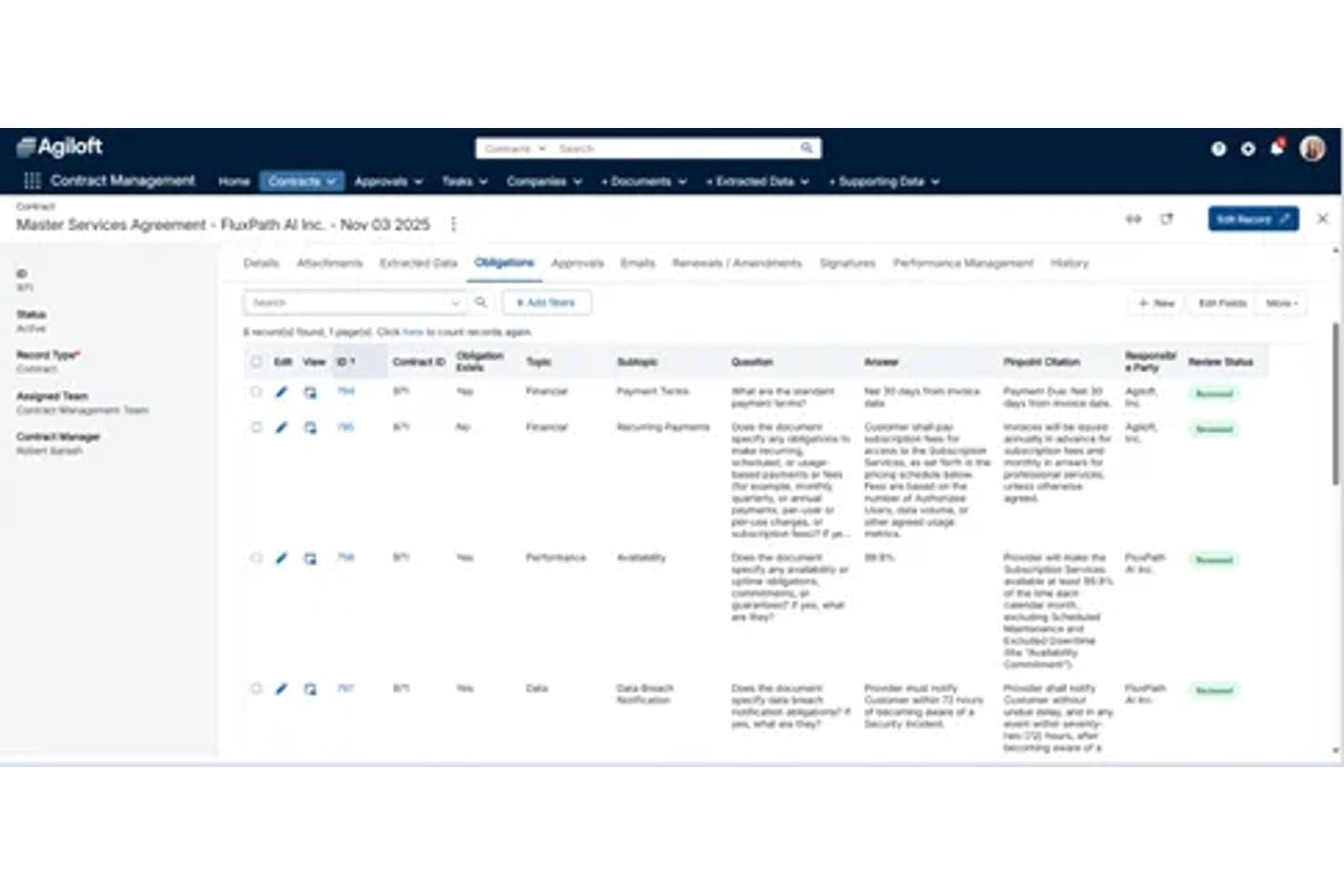
Agiloft tracks contract obligations with status, type, and review details. Agiloft is a no-code contract lifecycle management platform built for legal and operations teams, covering intake, drafting, AI-powered review and redlining, approval workflows, obligation tracking, and post-signature portfolio management.
Who Is Agiloft Best For?
Agiloft is a strong fit for legal operations teams at mid-size to large enterprises that need to configure complex, multi-department contract workflows without relying on IT or developers.
Why I Picked Agiloft
I picked Agiloft as one of the best because its no-code playbook engine genuinely enforces negotiation standards at scale, without legal needing to chase down every reviewer. I love how Astra flags deviations from your playbook directly inside Microsoft Word, surfacing pre-approved fallback language in context, so attorneys reviewing third-party paper aren't starting from scratch. The Prompt Lab lets legal ops build custom AI automations across the lifecycle, configuring conditional routing, extraction rules, and risk signals, all without writing a line of code.
Agiloft Key Features
- Obligation tracking and renewal alerts: Automatically extracts obligations, key dates, and commitments from executed contracts and assigns owners with automated deadline notifications.
- Salesforce integration: Bidirectional sync with Salesforce lets sales teams initiate contracts directly from CRM records without switching platforms.
- ConvoAI repository search: Natural language search across your entire contract archive surfaces specific clause language, terms, or commitments without requiring exact keyword matches.
- Role-based access controls: Field- and record-level permissions let you restrict visibility and editing rights by user, team, or contract type across the platform.
Agiloft Integrations
Agiloft offers 1,000+ pre-built integrations through its Integration Hub, including Salesforce, DocuSign, Adobe Sign, SAP, Oracle, Workday, Slack, Microsoft SharePoint, Microsoft Teams, and a native Microsoft Word add-in for AI review and redlining. It also supports iPaaS middleware connections and provides a REST API for custom integrations.
Pros and Cons
Pros:
- No-code workflow automation for legal operations
- Playbook-based negotiation standards enforcement
- Native AI contract review in Microsoft Word
Cons:
- Full deployment can take several months
- No native e-signature solution included
Learn more about Agiloft: Best for AI-native contract review in-house
- Free demo available
- Pricing upon request
Visit WebsiteCustomer Rating:4.7/5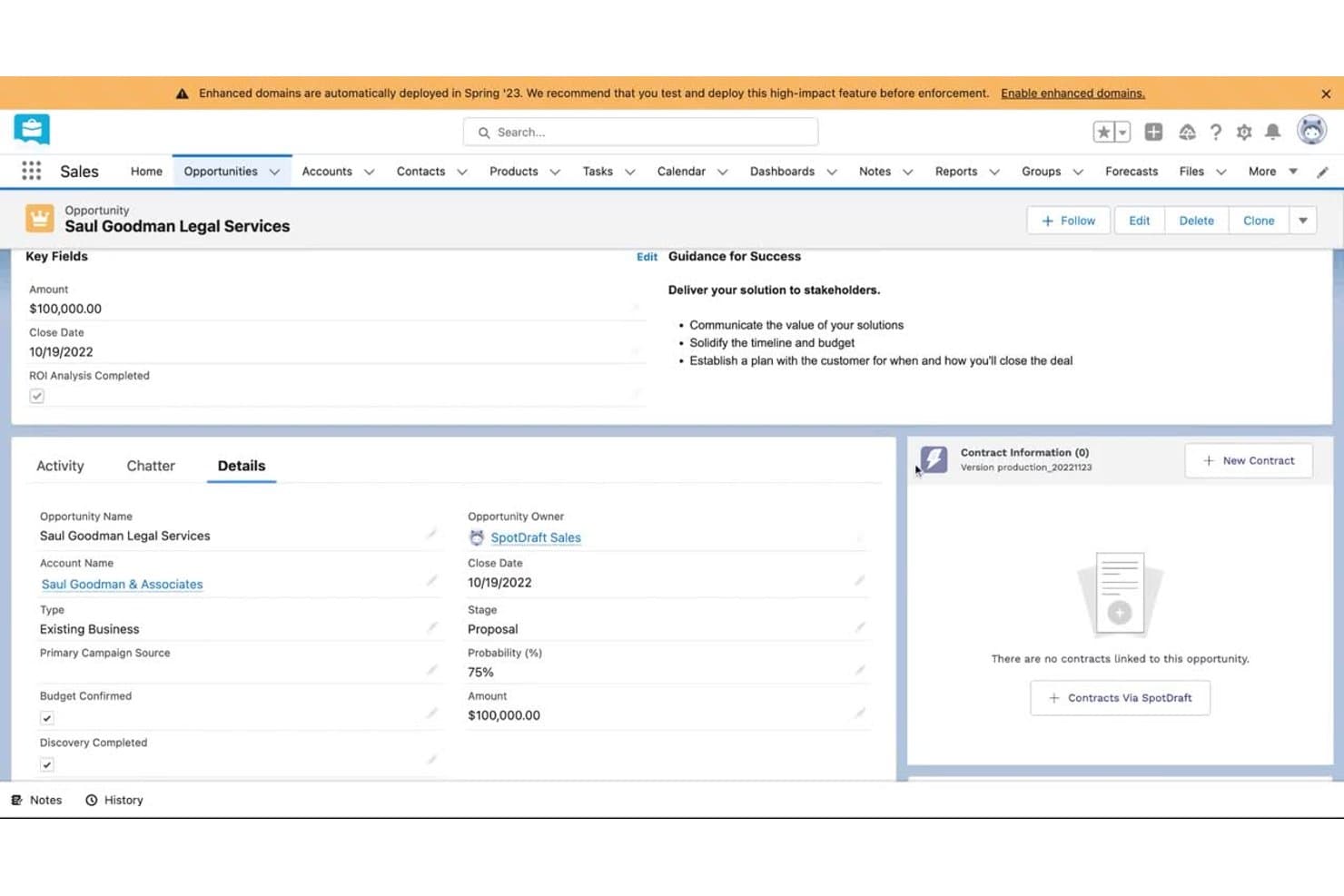
SpotDraft lets users create contracts directly from Salesforce CRM opportunities. SpotDraft is an AI-native contract lifecycle management platform built for in-house legal teams, covering intake, drafting, negotiation, approval, e-signature, and post-signature repository management.
Who Is SpotDraft Best For?
SpotDraft is a strong fit for mid-market in-house legal teams that frequently review third-party paper and want AI-native tooling built around legal operations workflows.
Why I Picked SpotDraft
SpotDraft earns its spot on my shortlist because it's one of the few CLM platforms built specifically around how in-house legal teams actually work, not adapted from a sales or procurement tool. I'm particularly drawn to VerifAI, which embeds directly into Microsoft Word to flag deviations from your playbook and suggest redlines the moment a counterparty's paper lands in your inbox. Paired with Ask AI, which lets you query any contract in plain language and surfaces the exact clause it's drawing from, SpotDraft makes third-party paper review meaningfully faster without pulling attorneys out of their existing workflow.
SpotDraft Key Features
- Legal intake portal: A centralized request portal lets business teams submit contract requests through dynamic questionnaires, with built-in triage and routing to keep legal in control.
- Clause library with conditional logic: Pre-approved clauses and fallback language are stored in a template library that supports conditional routing and version control.
- Obligation and renewal tracking: Automated alerts monitor key dates and milestones, with owner assignments and dashboard reporting for your full executed contract portfolio.
- Native e-signature: Built-in e-signature functionality compliant with ESIGN, eIDAS, and ECA standards supports multiple signatories, customizable signing order, and a bulk signing queue.
SpotDraft Integrations
SpotDraft offers 30+ native integrations, including Salesforce, HubSpot, Slack, Microsoft Teams, DocuSign, Google Drive, SharePoint, Microsoft Word, Coupa, and Jira, and it connects with Zapier.
Pros and Cons
Pros:
- Native e-signature with compliance certifications
- Legal intake portal enables centralized request triage
- Advanced AI contract review in Microsoft Word
Cons:
- Bulk downloads capped at 50 files
- Pricing requires custom quote after demo
Learn more about SpotDraft: Best for legal teams enforcing AI playbooks at scale
- Free demo available
- Pricing upon request
Visit WebsiteCustomer Rating:4.4/5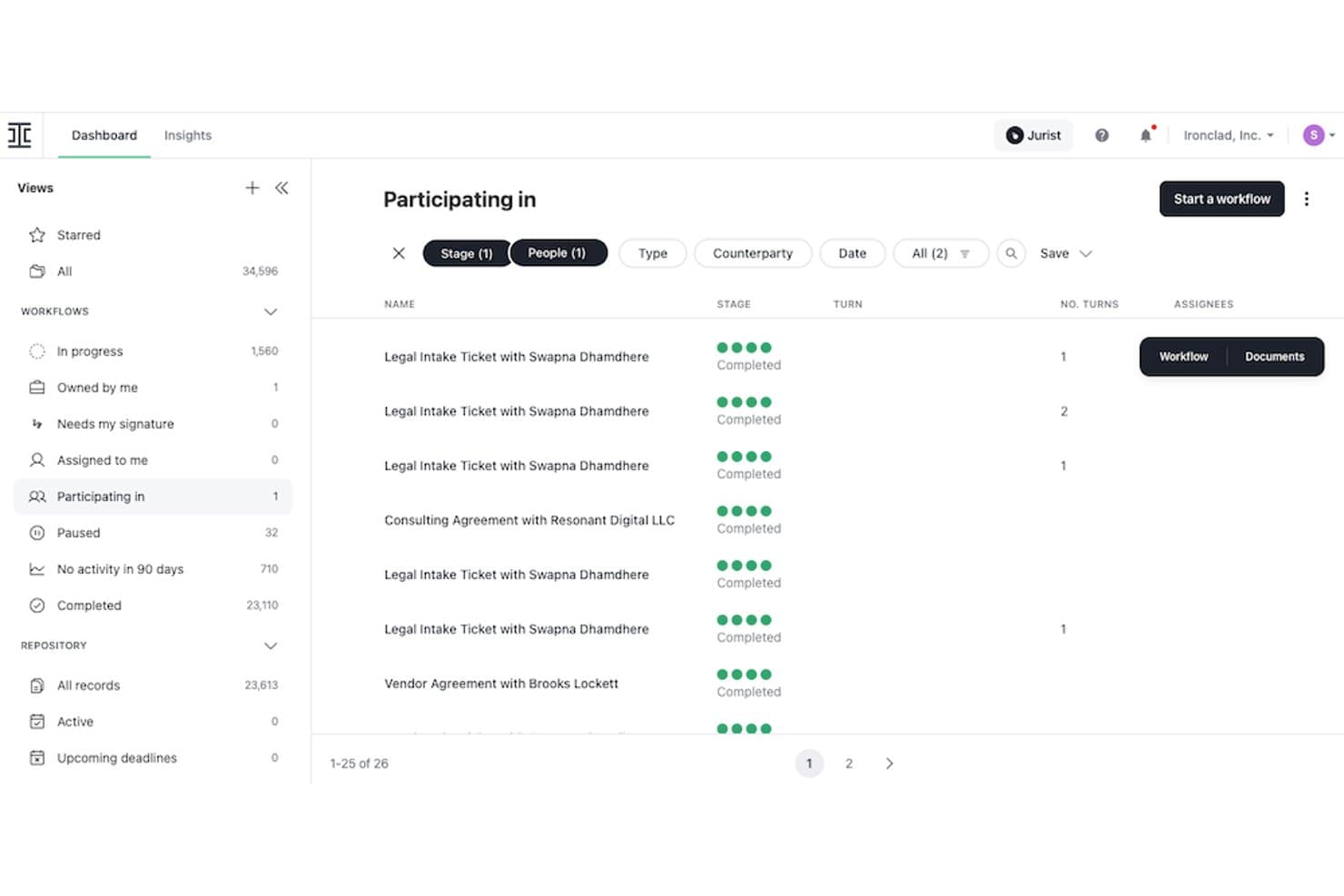
Ironclad tracks contract workflows and participation status in one dashboard. Ironclad is a contract lifecycle management platform built specifically for in-house legal teams, covering end-to-end contract workflows from intake and drafting to AI-assisted redlining, playbook enforcement, e-signature, and post-signature repository management.
Who Is Ironclad Best For?
Ironclad is a strong fit for in-house legal teams at mid-to-enterprise companies that need to enforce consistent contract standards across high-volume, multi-stakeholder workflows.
Why I Picked Ironclad
Ironclad earns its spot on my shortlist because of how seriously it takes playbook enforcement at scale. I love that legal teams can codify their exact negotiation positions and fallback clauses into AI Playbooks, which then automatically flag any deviations during review and surface pre-approved alternatives in real time. Jurist takes this further by redlining third-party paper directly against those playbooks in minutes, inside Microsoft Word, so attorneys aren't context-switching to get a first pass done.
Ironclad Key Features
- Legal Front Door intake portal: Routes business unit contract requests through a self-service portal with branching questionnaires and SLA tracking, keeping legal out of routine contracts.
- No-code Workflow Designer: A drag-and-drop interface for building approval workflows with dynamic, conditional routing based on contract type, value, or risk level.
- Native eSignature with clickwrap support: Supports both embedded PDF/Word signatures and HTML-native clickwrap signing, with full approval history tracked throughout.
- Smart Import repository: Uses OCR to bulk-scan, tag, and index legacy contracts, making them searchable by financial terms, key dates, party names, and custom metadata.
Ironclad Integrations
Ironclad offers native integrations with Salesforce, Coupa, SAP, NetSuite, Microsoft Word, Slack, Microsoft Teams, DocuSign, Adobe Acrobat Sign, and Google Drive, plus additional connectors for Jira, HubSpot, Box, Dropbox, OneTrust, and Vanta. It also supports iPaaS connectivity through Tray and MuleSoft, is available on Zapier, and provides a RESTful API for custom integrations.
Pros and Cons
Pros:
- Salesforce integration supports contract workflows in CRM
- AI playbooks enforce organization-wide negotiation standards
- No-code workflow designer for legal ops
Cons:
- AI redlining accuracy requires manual review
- Contract search depends on accurate tagging
Learn more about Ironclad: Best for enterprise CLM with AI playbook enforcement
- Free demo available
- From $35/user/month
Visit WebsiteCustomer Rating:4.2/5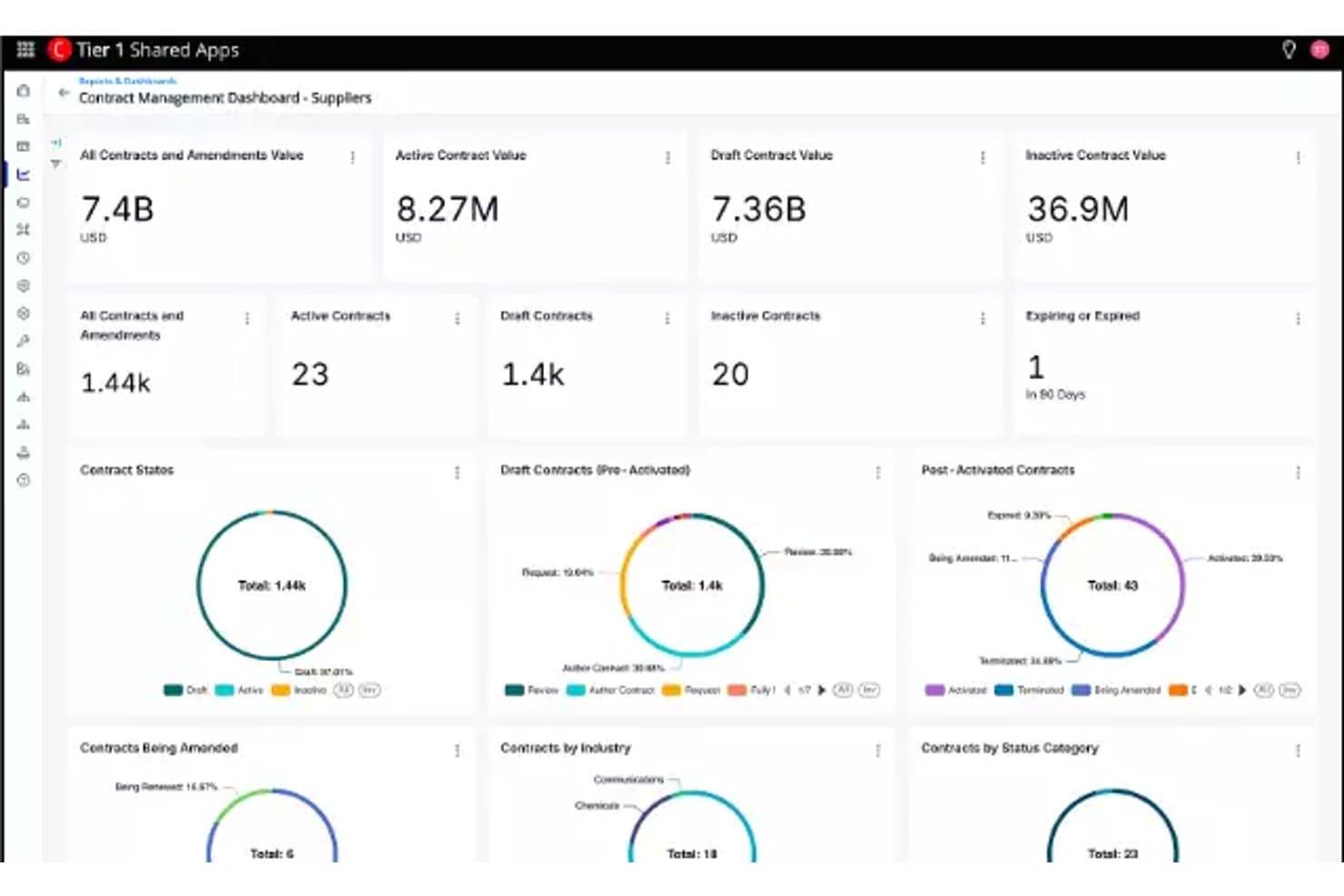
Conga Contracts centralizes contract value and status metrics in one dashboard. Conga Contracts is an enterprise CLM platform that covers the full contract lifecycle—from guided intake and AI-assisted drafting to clause playbook enforcement, approval workflows, e-signature, and post-signature obligation tracking—across both buy-side and sell-side agreements.
Who Is Conga Contracts Best For?
Conga Contracts is a strong fit for enterprise legal and revenue operations teams that run Salesforce and need to govern high volumes of contracts with codified clause playbooks and AI-assisted review.
Why I Picked Conga Contracts
I picked Conga Contracts as one of the best because its clause playbook enforcement is genuinely built for enterprise legal teams that need to govern negotiation, not just track it. When a counterparty redlines a clause, the platform surfaces pre-approved fallback positions directly in the workflow, so junior attorneys negotiate within sanctioned guardrails without escalating every deviation. Pair that with Conga Copilot's AI-driven risk scoring against those same playbooks and you get real-time deviation flagging at scale across buy-side and sell-side agreements.
Conga Contracts Key Features
- Conga Sign e-signature: A native, white-labeled e-signature tool that's ESIGN, UETA, and eIDAS compliant, with tamper-proof audit trails and multiple signer authentication methods.
- Natural language contract search: Query the contract repository conversationally using Conga Copilot to surface obligations, clause positions, or contract status without structured search inputs.
- No-code workflow configuration: Build and adjust multi-step approval workflows with conditional routing, parallel approvals, and escalation paths without IT involvement.
- Obligation tracking dashboards: Monitor key dates, milestones, and renewal windows with configurable dashboards, automated alerts, and owner assignments across the executed contract portfolio.
Conga Contracts Integrations
Conga Contracts is built on the Salesforce platform with a native Salesforce CRM integration, and it connects with Microsoft Dynamics 365, HubSpot, SAP, Oracle, Conga Composer, Conga Sign, DocuSign, Adobe Sign, and the Microsoft ecosystem including Microsoft Word and Microsoft 365. An open API is available for custom integrations with other CRM, ERP, and cloud systems.
Pros and Cons
Pros:
- Native e-signature with white-label options
- AI-powered contract risk scoring and Q&A
- Clause playbooks with fallback negotiation positions
Cons:
- No dedicated legal front-door intake portal
- Requires Salesforce licenses and administration
Learn more about Conga Contracts: Best for AI-driven playbook enforcement in legal
- Free demo available
- Pricing upon request
Visit WebsiteCustomer Rating:4.5/5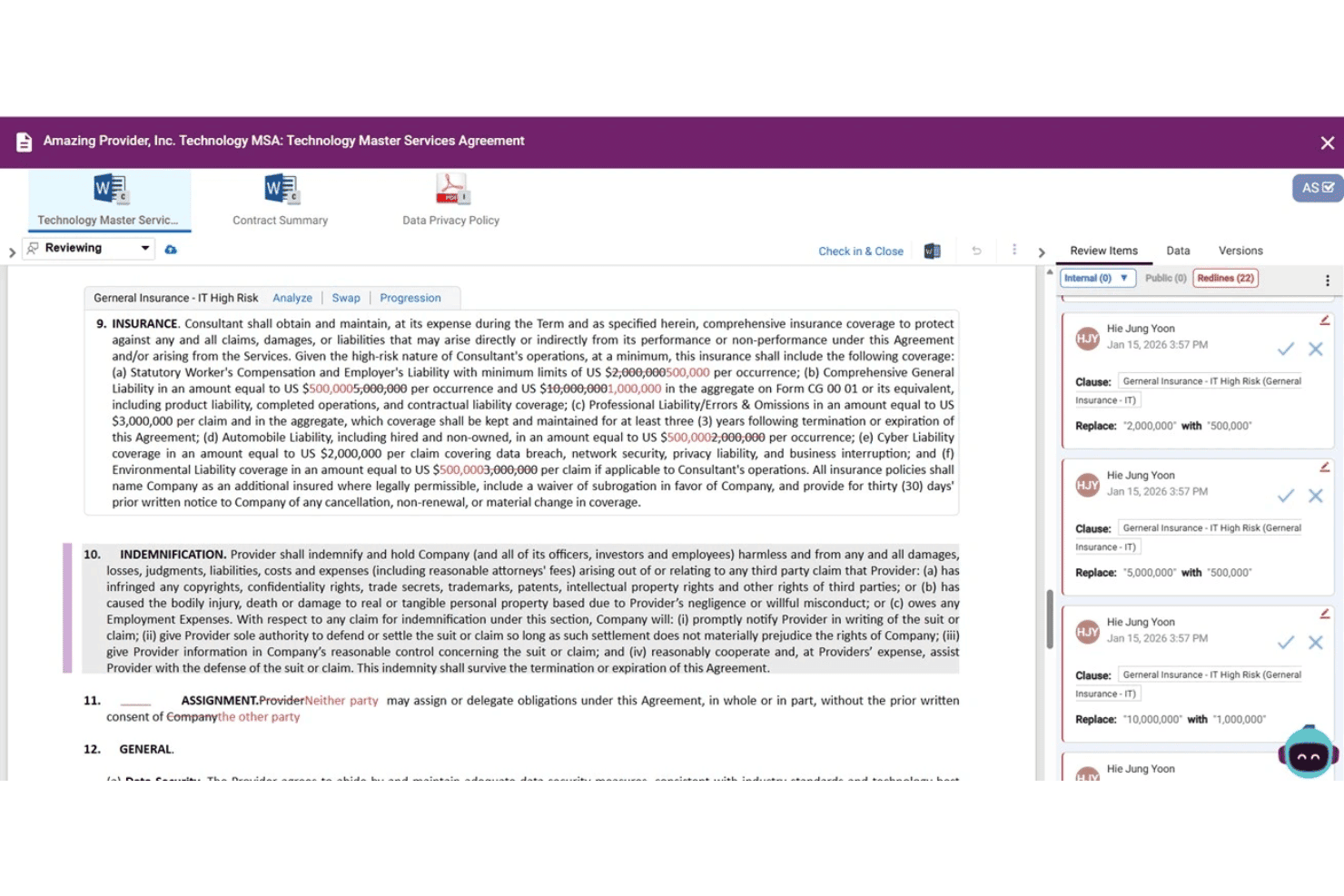
Malbek enables legal teams to review and redline contract insurance clauses with tracked changes and inline comments directly in the contract editor. Malbek is a contract lifecycle management platform built for enterprise legal, sales, and procurement teams, offering end-to-end contract management across intake, authoring, negotiation, approvals, obligation tracking, and renewals—with AI natively embedded throughout via its Ensemble LLM architecture.
Who Is Malbek Best For?
Malbek is a strong fit for enterprise legal, sales, and procurement teams that need AI-enforced contract guardrails across high-volume, cross-functional contract workflows.
Why I Picked Malbek
Malbek earns its spot on my shortlist because its clause-level playbook enforcement is genuinely the most thorough I've seen in a CLM platform. When a counterparty pushes back on a term, Bek AI surfaces your approved fallback positions in real time, so your legal team isn't hunting through a shared drive for the right language. The Ensemble LLM architecture cross-validates outputs across multiple models before surfacing a suggestion, which meaningfully reduces the hallucination risk that makes most legal teams skeptical of AI redlining tools.
Malbek Key Features
- Ensemble LLM architecture: Cross-validates outputs across multiple large language models simultaneously to reduce hallucinations in AI-generated contract analysis.
- BusinessIQ commercial intelligence: Uses natural language queries to surface renewal exposures, obligation milestones, and hidden revenue risks across your executed contract portfolio.
- No-code workflow configuration: A drag-and-drop workflow engine lets business admins build conditional approval routing, intake portals, and delegation rules without IT support.
- Malbek 360° customer success program: Includes ongoing training, quarterly performance reviews, and advisory services at no additional cost post-implementation.
Malbek Integrations
Malbek offers 50+ marketplace integrations, including Salesforce, Salesforce CPQ, HubSpot, DocuSign, Adobe Sign, SAP Ariba, Coupa, Microsoft Word, Microsoft SharePoint, and Slack, with a REST API available for custom integrations.
Pros and Cons
Pros:
- No-code workflows enable business admin control
- Clause playbook enforcement with fallback positions
- Ensemble LLM reduces AI hallucination risk
Cons:
- No native e-signature option available
- Microsoft Word add-in often causes friction
Learn more about Malbek: Best for legal teams on the Docusign ecosystem
- Free demo available
- Pricing upon request
Visit WebsiteCustomer Rating:4.7/5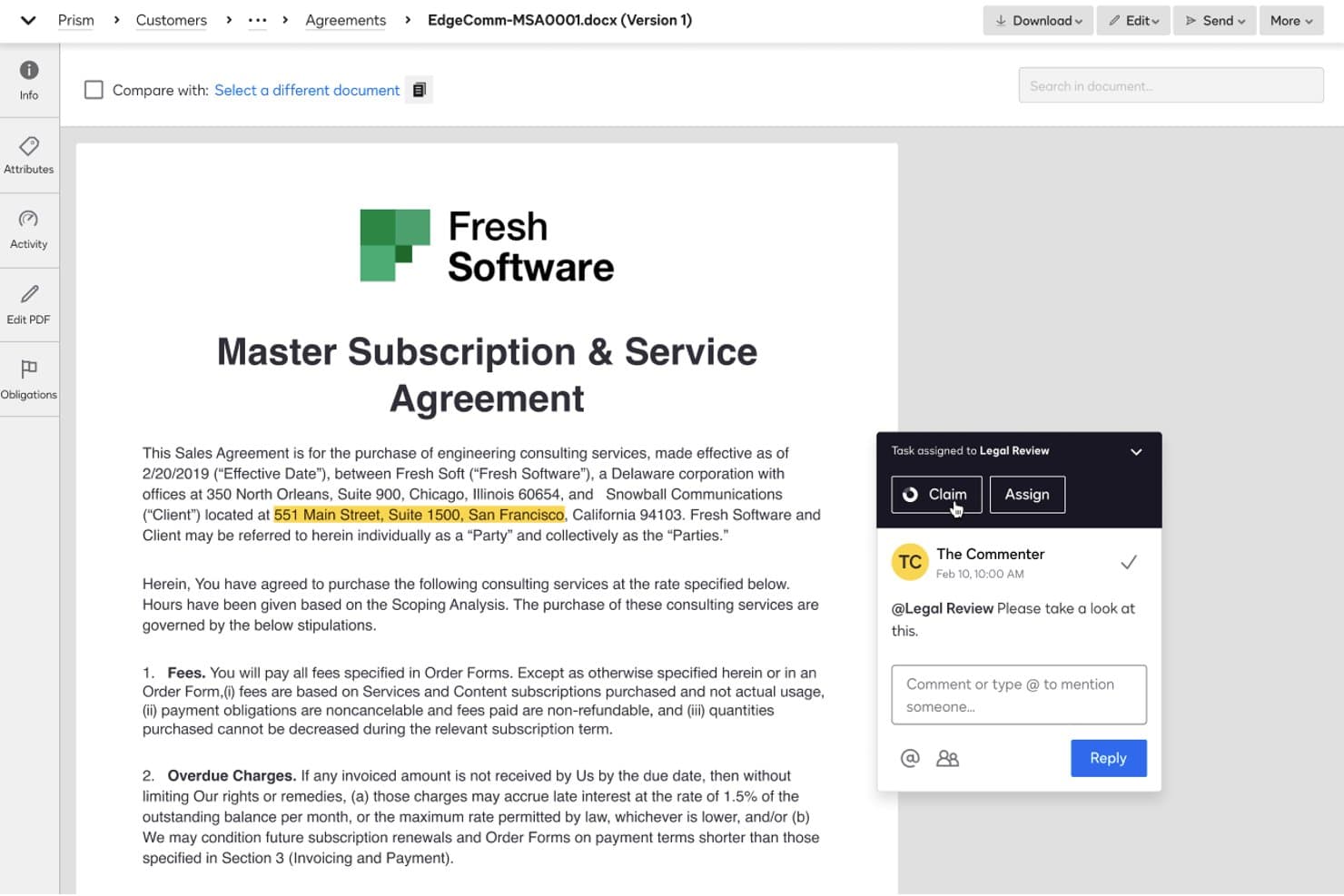
Docusign CLM lets legal teams collaborate on contracts with comments and task assignments. Docusign CLM is an enterprise contract lifecycle management platform that covers intake, drafting, negotiation, approval workflows, native eSignature, and post-execution obligation tracking in a single system.
Who Is Docusign CLM Best For?
Docusign CLM is a strong fit for enterprise legal teams already operating within the Docusign ecosystem who need a single system to manage contracts from intake through post-signature obligations.
Why I Picked Docusign CLM
I picked Docusign CLM as one of the best because if your legal team already runs on Docusign eSignature, adding CLM is the most natural way to extend that foundation into a full contract lifecycle system. I especially like the native Iris AI layer, which runs smart redlining against your own playbooks and flags non-compliant clauses automatically, without routing every contract to counsel. The agentic AI layer also lets you build custom intake triage and redlining agents grounded in your internal standards.
Docusign CLM Key Features
- Drag-and-drop workflow editor: Build no-code approval workflows with 100+ pre-configured steps, conditional routing, and parallel approval paths.
- Pre-approved clause library: Maintain a centralized library of legal-governed clauses with AI flagging of non-compliant language and approved fallback suggestions.
- Web Forms intake portals: Let business users submit contract requests through self-service forms that feed directly into CLM workflows.
- Obligation and renewal tracking: Extract key dates and obligations from executed contracts automatically, with owner assignments and automated alerts.
Docusign CLM Integrations
Docusign CLM offers 1,000+ pre-built integrations, including Salesforce, SAP Ariba, Coupa, NetSuite, Workday, Slack, Harvey, CoCounsel by Thomson Reuters, and Google Workspace, alongside native integrations across the Microsoft ecosystem, including Microsoft 365 and Dynamics. A full REST API is available for custom integrations and embedded signing.
Pros and Cons
Pros:
- Drag-and-drop legal workflow automation
- Expansive clause library with fallback suggestions
- AI-powered redlining agents for playbook enforcement
Cons:
- Advanced configurations often require vendor support
- Post-signature search can frustrate power users
Learn more about Docusign CLM: Best for AI-driven clause libraries and playbooks
- Free demo available
- From $59/user/month
Visit WebsiteCustomer Rating:4.8/5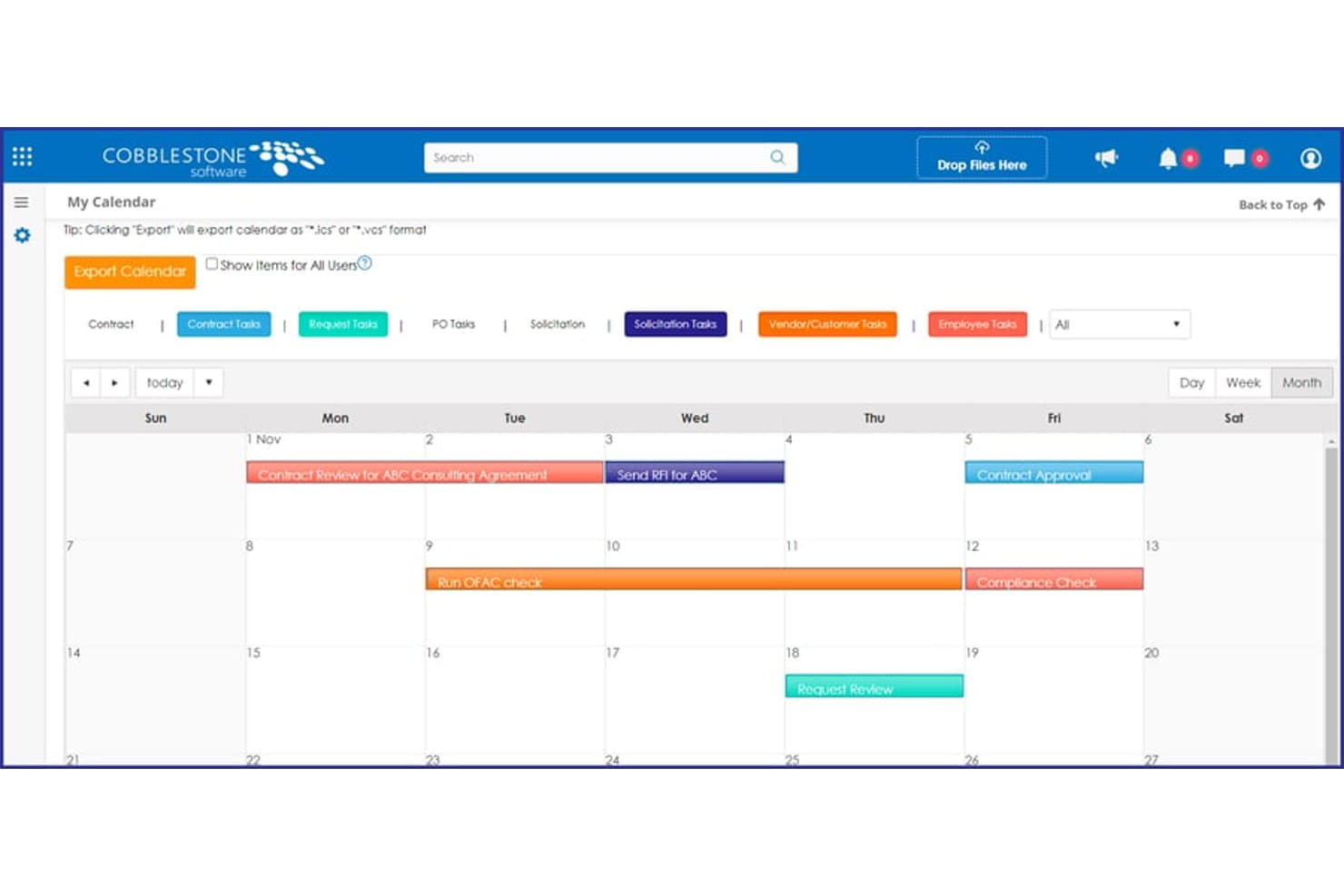
CobbleStone Contract Insight centralizes contract deadlines in a calendar view. CobbleStone Contract Insight is a full-lifecycle contract management platform with AI-driven drafting, clause libraries, redlining, obligation tracking, workflow automation, and a centralized repository built for legal and procurement teams.
Who Is CobbleStone Contract Insight Best For?
CobbleStone Contract Insight is a strong fit for legal and procurement teams in government, regulated industries, or enterprise environments that need AI-driven clause management and on-premises deployment options.
Why I Picked CobbleStone Contract Insight
I picked CobbleStone Contract Insight as one of the best because its AI-driven clause library is genuinely one of the deepest I've seen in this category. IntelliDraft.ai gives you access to roughly one million clause examples through a chatbot interface, while Auto-Redline surgically swaps non-approved language with pre-approved fallbacks in real time. VISDOM AI also flags playbook deviations and surfaces preferred language, so clause standardization happens during drafting rather than after a legal review cycle.
CobbleStone Contract Insight Key Features
- VISDOM AI obligation tracking: Automatically inspects clause grammar to identify and extract obligation language from executed contracts without manual review.
- IntelliSign® native e-signature: Built-in e-signature module with rules-based clause inclusion, routing, bulk signing, and counterparty signing portal.
- Configurable intake portal: Lets non-legal business stakeholders submit contract requests, which automatically generate contract records upon acceptance.
- On-premises deployment option: Offers a locally hosted Workgroup and Enterprise edition for organizations with strict data residency or IT security requirements.
CobbleStone Contract Insight Integrations
CobbleStone Contract Insight offers native integrations with DocuSign, Adobe Acrobat Sign, SignNow, Salesforce, SAP S/4HANA, Oracle Applications, Microsoft Dynamics, NetSuite, QuickBooks, and across the Microsoft ecosystem including Microsoft 365, Word, Outlook, and Power Automate. It also supports OFAC and Dun & Bradstreet compliance screening, and provides an open RESTful API for custom integrations.
Pros and Cons
Pros:
- Full on-premises deployment option available
- Agentic AI for real-time in-browser drafting
- Extensive FAR and DFARS clause library
Cons:
- User interface can feel click-heavy
- Real-time collaboration features still maturing
Learn more about CobbleStone Contract Insight: Best for in-house legal AI redlining and playbooks
- Free demo available
- Pricing upon request
Visit WebsiteCustomer Rating:4.7/5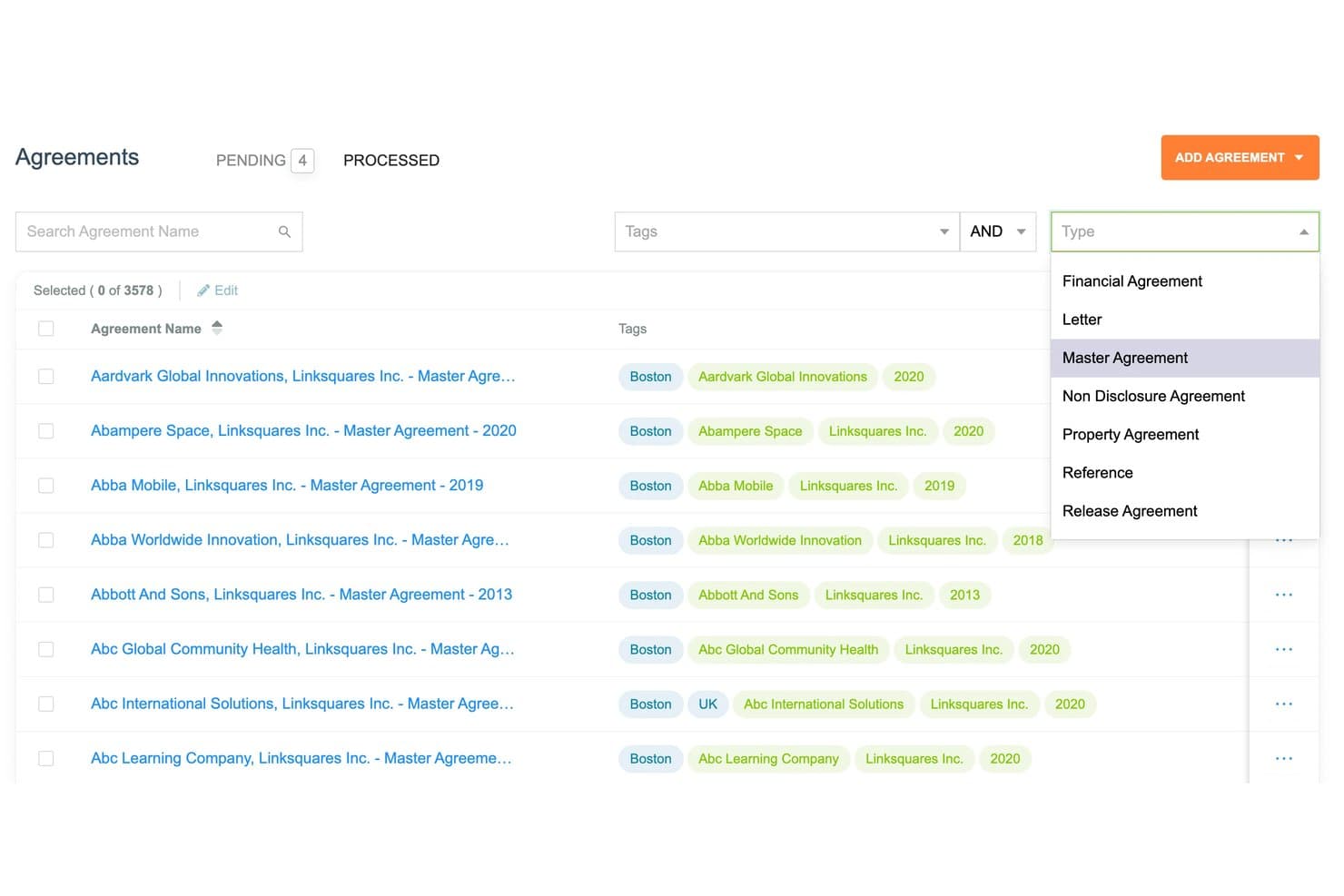
LinkSquares lets users filter agreements by type, tags, and name. LinkSquares is an AI-powered contract lifecycle management platform built specifically for in-house legal teams, covering pre-signature drafting and negotiation, post-signature repository and analytics, native e-signature, legal project management, and AI-driven contract review with playbook enforcement.
Who Is LinkSquares Best For?
LinkSquares is a strong fit for mid-to-large in-house legal teams that need AI-driven contract review, playbook enforcement, and a unified pre- and post-signature workflow in one platform.
Why I Picked LinkSquares
LinkSquares earns its spot on my shortlist because of how tightly its AI redlining is woven into actual playbook enforcement. When my team reviews third-party paper, LinkAI doesn't just flag issues—it generates redlines aligned to our pre-approved fallback positions directly inside Microsoft Word. The AI-powered Playbooks engine then checks every incoming contract against defined standards, surfacing deviations before a human even opens the file.
LinkSquares Key Features
- Legal Front Door intake: Submit contract requests via email, web form, or Slack, feeding a centralized legal queue with all required information captured upfront.
- LinkSquares Sign: A native e-signature module compliant with UETA, ESIGN, and eIDAS, with real-time signatory tracking, nudge reminders, and a full audit log.
- Natural language repository search: Query your entire executed contract portfolio using plain-language questions to surface specific clauses, dates, or agreement types instantly.
- Legal project management ("Prioritize"): A dedicated workspace for tracking all legal requests, team capacity, and workload, with dashboards built specifically for legal ops reporting.
LinkSquares Integrations
LinkSquares offers native integrations with Salesforce, HubSpot, Microsoft Dynamics 365, Microsoft Word, Slack, DocuSign, Adobe Sign, NetSuite, Ramp, and cloud storage platforms like Google Drive, Dropbox, OneDrive, Box, SharePoint, ShareFile, and Amazon S3. An open API is available for custom integrations, including connections to additional e-signature tools.
Pros and Cons
Pros:
- Legal ops dashboard tracks workload and requests
- Legal playbooks enforce clause standardization
- AI redlines contracts directly in Word
Cons:
- AI extraction struggles with nonstandard contract formats
- No free trial or self-serve demo
Learn more about LinkSquares: Best for enterprise-scale playbook enforcement
- Free demo available
- Pricing upon request
Visit WebsiteCustomer Rating:4.3/5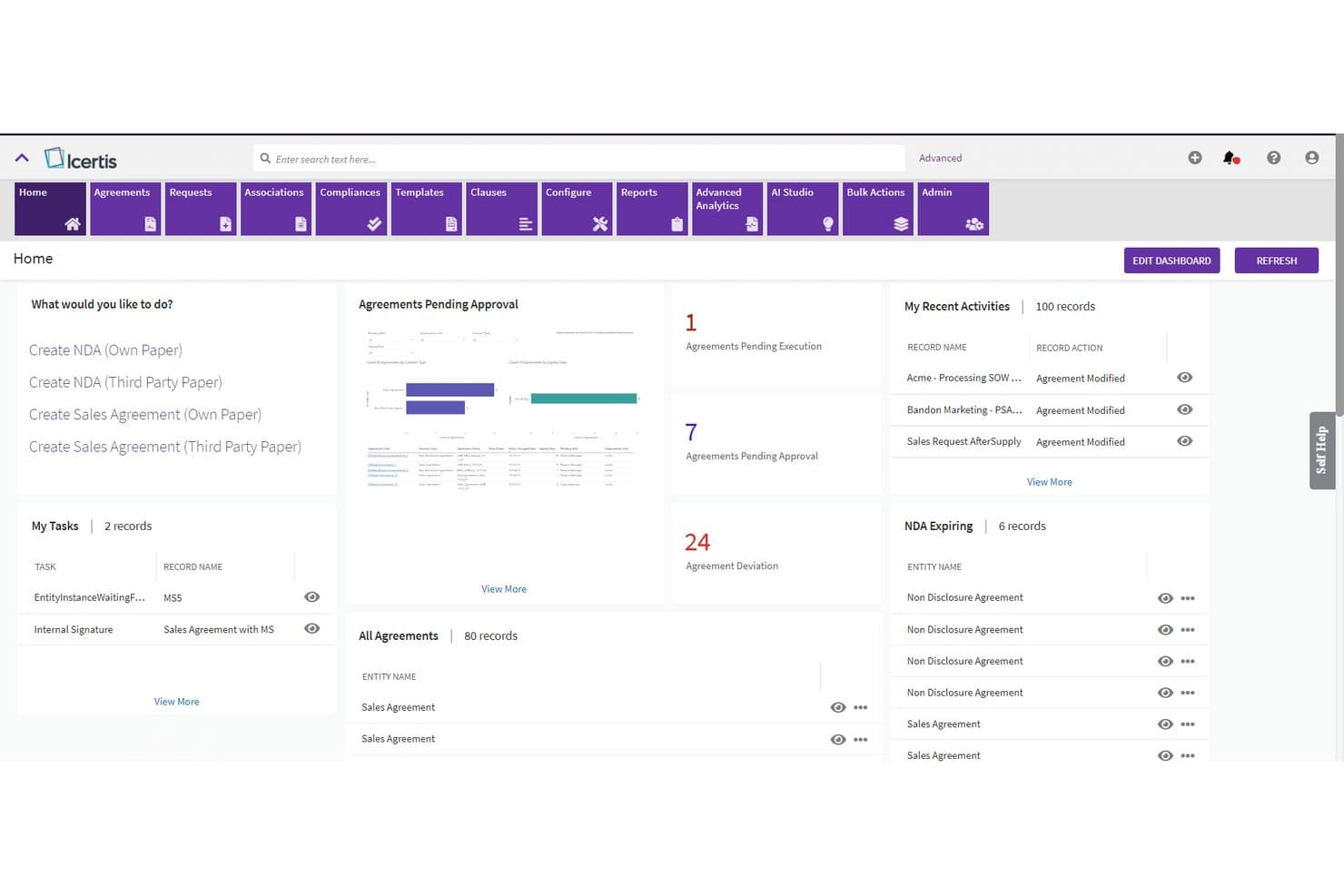
Icertis offers a centralized contract management dashboard with agreement tracking, pending approvals, task management, and NDA expiration alerts for enterprise users. Icertis is an AI-native contract management platform built for large enterprises, covering the full contract lifecycle with tools for drafting, redlining, playbook enforcement, obligation tracking, and portfolio-wide analytics.
Who Is Icertis Best For?
Icertis is built for large enterprise legal departments that need AI-driven playbook enforcement and contract intelligence at scale across complex, multi-jurisdictional portfolios.
Why I Picked Icertis
Icertis earns its spot on my shortlist because no other CLM platform enforces legal playbooks at enterprise scale the way it does. I particularly like the Vera Redline Agent, which applies your defined playbooks directly inside Microsoft Word, flags clause deviations, and generates compliant redlines with 95% accuracy. The Vera Obligations product automatically extracts post-signature commitments, assigns owners, and alerts teams before renewal traps or missed deadlines become real problems.
Icertis Key Features
- Vera Composer Agent: Generates first-draft contracts from natural-language inputs, drawing on approved templates and clause libraries to keep output within legal-approved guardrails.
- Agent Studio: A no-code visual builder that lets your team configure custom AI agents and agentic workflows for complex or recurring contracting tasks.
- Self-service intake portal: Business users can draft and execute standard contracts like NDAs and SOWs without opening a legal ticket, with escalation triggered only for non-standard terms.
- Vera Copilot: A conversational AI assistant that runs semantic search across your entire contract portfolio, surfacing clause-level citations and enabling direct workflow triggers from natural-language queries.
Icertis Integrations
Icertis offers native adapters across major enterprise systems, including Salesforce, SAP Ariba, SAP S/4HANA, Workday, Oracle ERP, DocuSign, Adobe Sign, and the Microsoft ecosystem (Word, Teams, Outlook, SharePoint, and Microsoft 365), plus AI agent interoperability with OpenAI, Anthropic Claude, Microsoft Copilot, and SAP Joule. Licensed public APIs are available for custom enterprise integrations.
Pros and Cons
Pros:
- Clause deviations flagged with grounded citations
- Handles bulk contract changes and migrations
- AI enforces legal playbooks at scale
Cons:
- Interface described as cluttered by reviewers
- Implementation projects often run 6–12 months
Learn more about Icertis: 10Best for post-signature obligation tracking at scale
Sirion
- Free demo available
- Pricing upon request
Visit WebsiteCustomer Rating:4.5/5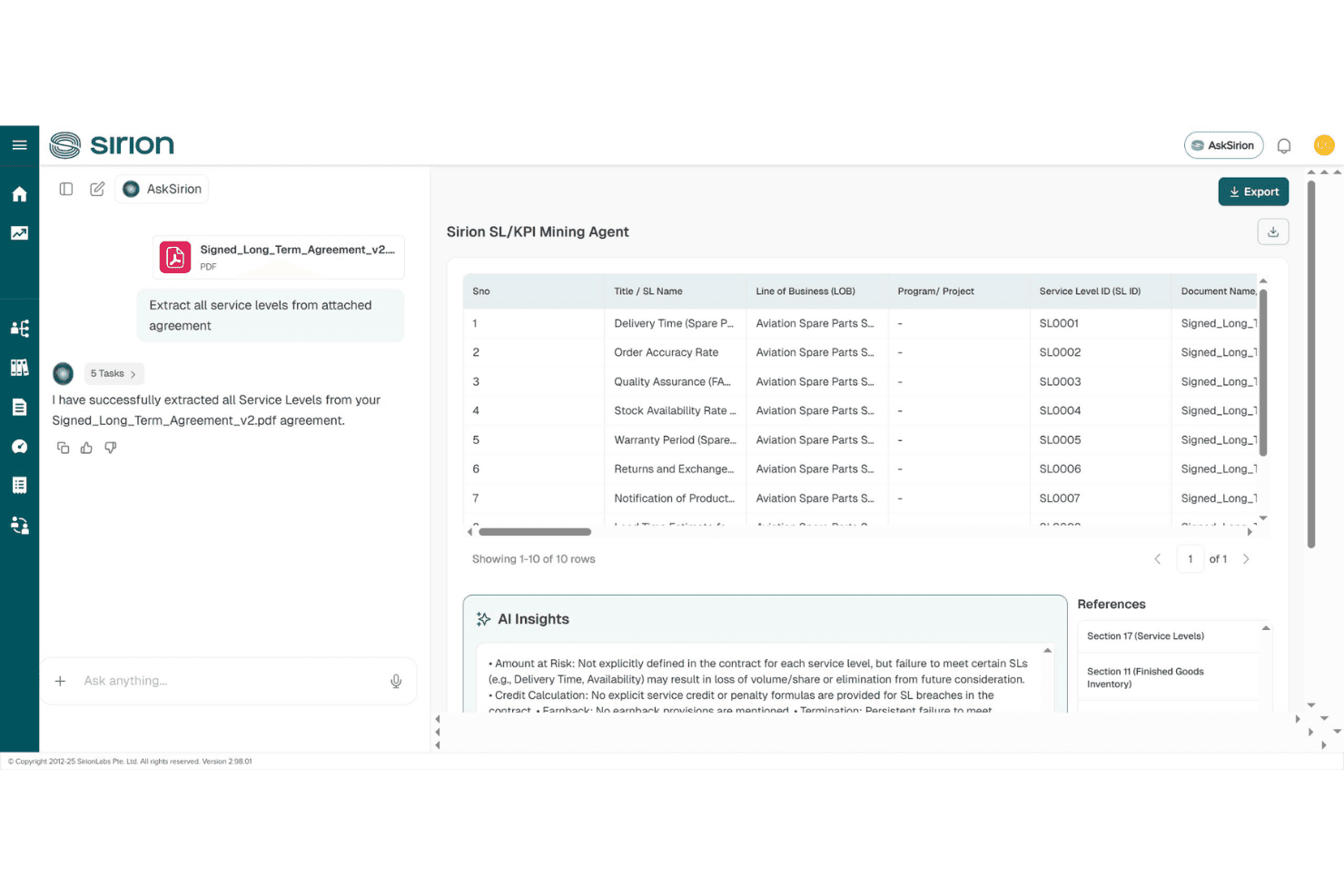
Sirion's AskSirion AI assistant automatically extracts and organizes service levels from contracts using its SL/KPI Mining Agent. Sirion is an enterprise CLM platform built around AI-native agents for drafting, clause management, negotiation, and post-signature obligation tracking across legal, procurement, and finance workflows.
Who Is Sirion Best For?
Sirion is built for enterprise legal and procurement teams managing high volumes of complex contracts across multiple business units, jurisdictions, and counterparties.
Why I Picked Sirion
Sirion earns its spot on my shortlist because no other CLM platform I've used comes close to its post-signature obligation tracking at enterprise scale. The Obligations Agent continuously monitors SLAs, deliverables, and regulatory requirements, surfacing risks before a performance gap becomes a dispute. I also rely on AskSirion to query the executed contract portfolio in plain language, pulling clause-level answers with source citations across thousands of agreements instantly.
Sirion Key Features
- Playbook Agent: Converts your legal policies into smart, reusable templates with pre-approved fallback positions and conditional clause logic.
- Issue Detection Agent: Flags clause-level deviations against your custom playbooks in real time during contract negotiation.
- Microsoft Word Add-In: Embeds drafting, redlining, and approval workflows directly inside Word so attorneys can work in their native environment.
- Self-service contract generation: Lets business users create standard contracts within legal-defined guardrails, with exceptions automatically escalated to legal for review.
Sirion Integrations
Sirion offers native integrations with Salesforce, SAP Ariba, DocuSign, Adobe Sign, Slack, and across the Microsoft ecosystem, including a Microsoft Word Add-In and Microsoft Outlook, along with hosting on AWS, Azure, Oracle, and IBM clouds. It also supports SSO via SAML 2.0, connects to ERP, Source-to-Pay, GRC, ITSM, and IAM systems, and provides an API and no-code connectors for custom integrations across 1,000+ enterprise systems.
Pros and Cons
Pros:
- Conversational search across full contract repository
- Playbook enforcement for clause standardization
- AI-powered post-signature obligation tracking at scale
Cons:
- Long enterprise-focused implementation timelines
- PDF auto-redlining not fully supported
Learn more about Sirion:
Annen kontraktsstyringsprogramvare for juridiske avdelinger
Her er noen flere alternativer innen kontraktsstyringsprogramvare for juridiske avdelinger som ikke kom med på kortlisten min, men som likevel er verdt å se nærmere på:
- 11ContractPodBest for AI-driven playbooks and redlining
- 12AlineBest for AI-native legal intake and playbook control
- 13LuminanceBest for AI-native contract negotiation in-house
- 14JuroBest for self-service contracting with legal oversight
- 15LawVuBest for in-house legal intake and spend in one view
- 16GatekeeperBest for vendor risk and contract oversight
- 17LegalOnBest for attorney-built playbooks and AI redlining
- 18DocJurisBest for generative AI redlining on third-party paper
Related Reviews
How I Evaluate Contract Management Software for Legal Departments
I split my evaluation into baseline criteria every tool must meet and differentiators that separate the tools built for legal teams from generic CLM platforms chasing sales-side use cases.
Core Functionality (Table Stakes for This List)
When I'm selecting tools for my list, I rank each one on a scale from 0 (does not offer the functionality) to 5 (excels in this area) for each core functionality listed below. I then calculate the tool's total score into a percentage, using 65% as a benchmark to help assess its overall fit for the list.
- Contract lifecycle management: I evaluate whether a platform covers intake through post-signature management in a single workflow, not just drafting or execution in isolation.
- Clause and template library: Pre-approved clause libraries with playbook enforcement and fallback positions matter here—static document templates alone don't cut it.
- AI contract review: I look for AI that can redline third-party paper against your playbooks, flag deviations, and extract metadata without manual tagging.
- Workflow and approval automation: Configurable routing with conditional logic and self-service intake portals for business teams is what separates legal-grade tools from basic approval chains.
- E-signature and repository: Full-text search, metadata filtering, and permission controls in the contract repository are just as important as native or integrated e-signature support.
- Obligation and renewal tracking: I check for automated extraction of key dates, renewal alerts with owner assignments, and dashboards that surface compliance risk across your executed portfolio.
Once I have a list of tools that meet the criteria, I consider what sets each platform apart.
Differentiating Factors (What Sets Vendors Apart)
Here's how I compare and contrast different vendors:
Standout Features
I look for a playbook enforcement engine that goes beyond static clause libraries—tools like Ironclad and Malbek let you codify fallback positions and flag deviations automatically, so junior attorneys negotiate within approved guardrails without constant senior review. A legal front door intake portal is equally important. I evaluate whether the portal offers dynamic questionnaires and triage logic that route requests to the right team, giving business users self-service access while preserving legal's oversight and SLA tracking. I also check for conversational repository search—the ability to query executed contracts in natural language, like "show me all MSAs with uncapped indemnity," turns a passive archive into a working knowledge base for GCs.
Beyond Features
I evaluate whether a vendor's CLM is oriented toward legal-side workflows or built primarily for sales-side contract ops. Platforms like Ironclad and LinkSquares skew toward in-house legal use cases, while others center on CPQ and revenue pipelines—that distinction shapes playbook design, reporting, and day-to-day fit. Security posture matters just as much: I check for SOC 2 Type II, data residency options, and clear policies on whether AI models ingest privileged content. I also look at implementation timelines, since go-live windows can range from weeks to nearly a year for enterprise deployments.
Slik velger du kontraktsstyringsprogramvare for juridiske avdelinger
Når du sammenligner kontraktsstyringsprogramvare for juridiske avdelinger, bør du spørre deg selv: Hvilke verktøy kan dokumentere at de håndhever retningslinjene dine, minimerer risiko og er tilpasset den daglige arbeidsflyten til det juridiske teamet?
| Hvis prioriteten din er … | Se etter … |
| Håndheving av kontraktsmaler utarbeidet av firmaet | Plattformer med AI-drevet varsling om avvik og håndheving av alternative bestemmelser |
| Redusere arbeidsmengden ved manuell kontraktsgjennomgang | AI-drevne gjennomgangsverktøy som automatisk markerer endringer i motpartens avtaleutkast |
| Revisjonsklar sporing av forpliktelser og fornyelser | Automatiserte oversikter som viser risiko, oppgaver knyttet til etterlevelse og varsler om fornyelse |
| Juridisk tilpasset mottak og prioritering | Dynamiske mottaksportaler med betinget ruting og sporing av juridiske SLA-er |
| Holde sensitive data sikre | Leverandører med SOC 2 Type II-sertifisering og åpne retningslinjer for datahåndtering |
Slik vurderer du kortlisten din
- Be om en direkte demonstrasjon av en spillbok: Avtal en økt og se verktøyet flagge og håndheve reserveklausuler ved hjelp av firmaets egen mal på under 60 minutter.
- Last opp en tredjepartskontrakt for KI-gjennomgang: Send en eksempelfil og følg med på om løsningen foreslår endringer i den opp mot deres spillbok i løpet av en 24-timers konseptbevisperiode.
- Be om et eksempel på et dashbord for forpliktelsesoppfølging: Be om et skjermbilde eller en sandkassepålogging som viser samsvarende fornyelsespåminnelser og tildeling av ansvarlige for alle aktive kontrakter.
- Bekreft konfigurasjonen av den juridiske forespørselsprosessen: Be leverandøren bygge et dynamisk forespørselsskjema som sender to ulike kontraktstyper til separate gjennomgangsteam, og demonstrere dette i sanntid.
- Vei konfigurerbarhet opp mot juridisk spesialisering: Vurder om dere trenger bred fleksibilitet i arbeidsflyten eller mer omfattende spillbok- og forespørselsfunksjoner som er utviklet utelukkende for juridiske team – avveiningene her påvirker implementeringstid og egnethet.
Hva er kontraktsstyringsprogramvare for juridiske avdelinger?
Kontraktsstyringsprogramvare for juridiske avdelinger er spesialutviklet teknologi som hjelper juridiske team med å automatisere, organisere og kontrollere alle deler av kontraktsprosessen. Disse systemene støtter oppgaver som utarbeidelse, forhandling, godkjenning og oppfølging av samsvar etter signering, samtidig som de tilbyr verktøy for automatisering av arbeidsflyter, håndheving av spillbokregler og risikostyring som er spesielt tilpasset juridiske arbeidsprosesser. De hjelper juridiske fagpersoner med å få oversikt over og kontrollere alle kontraktsrelaterte aktiviteter.
Funksjoner i kontraktsstyringsprogramvare for juridiske avdelinger
Når dere velger kontraktsstyringsprogramvare for juridiske avdelinger, bør dere se etter følgende viktige funksjoner:
- Styring av kontraktens livssyklus: Sentraliserer og automatiserer alle faser av kontraktsprosessen, fra forespørsel til oppfølging etter signering. Dette skaper én enkelt, etterprøvbar arbeidsflyt for utarbeidelse, forhandling, godkjenning, signering og periodehåndtering, slik at det blir enkelt å overvåke kontraktstatus og frister.
- Bibliotek for klausuler og maler: Lagrer forhåndsgodkjente klausuler og maler som teamet kan sette inn i kontrakter. Dette bidrar til å standardisere formuleringer, redusere antall gjennomgangsrunder og opprettholde konsistens på tvers av avtaler med høyt volum, særlig når firmaets spillbokregler skal håndheves.
- KI-gjennomgang av kontrakter: Bruker maskinlæring eller regelbasert logikk til å sammenligne kontraktstekst med deres spillbok, automatisk flagge avvik og foreslå endringer. Dette reduserer manuelt arbeid og hjelper yngre advokater med å forhandle trygt innenfor forhåndsdefinerte rammer.
- Automatisering av arbeidsflyter og godkjenninger: Lar dere bygge og tilpasse rutingslogikk, automatiske eskaleringer og gjennomgangstrinn basert på kontraktstype, verdi eller risikonivå. Godkjennere mottar varsler og tydelige oppgaver, noe som støtter samsvar og reduserer flaskehalser.
- Integrasjon med elektronisk signering og dokumentarkiv: Tilbyr sikker støtte for elektronisk signering, integreres med leverandører av elektronisk signering og gir et søkbart digitalt arkiv. Dere kan raskt finne, filtrere og rapportere om signerte kontrakter, med kontroll over hvem som kan få tilgang til eller redigere dokumenter.
- Oppfølging av forpliktelser og fornyelser: Følger automatisk opp viktige kontraktsdatoer, krav til samsvar og fornyelsesklausuler. Brukerne får påminnelser, egendefinerte varsler og dashbord som viser kommende forpliktelser og tildelte kontraktsansvarlige.
- Portal for juridiske forespørsler: Tilbyr et dedikert og tilpassbart forespørselsskjema der forretningsteam kan sende inn nye kontrakter eller juridiske forespørsler. Dynamiske felt og rutingslogikk sørger for at forespørslene effektivt blir vurdert og sendt til riktig juridisk ressurs.
- Revisjonsspor og aktivitetslogger: Registrerer alle handlinger som utføres på en kontrakt, inkludert redigeringer, godkjenninger, kommentarer og signaturer, og oppretter en tidsstemplet historikk for hvert dokument. Dette sikrer transparent samsvar med interne retningslinjer og ved eksterne revisjoner.
- Tilpasset rapportering og analyse: Leverer dashbord og rapporter om kontraktsvolum, behandlingstid, risikoeksponering og trender for samsvar. Juridiske team kan eksportere data for å analysere resultater, avdekke flaskehalser og raskt svare på spørsmål fra ledelsen.
- Kontroller for sikkerhet og tilgangsrettigheter: Tilbyr detaljerte brukerroller, tilgang på dokumentnivå og beskyttelse av sensitive data. Funksjoner som SOC 2 Type II-samsvar, kryptering og revisjonsklare logger bidrar til å oppfylle krav til profesjonell konfidensialitet og regelverksetterlevelse.
Fordeler med kontraktsstyringsprogramvare for juridiske avdelinger
Implementering av kontraktsstyringsprogramvare for juridiske avdelinger gir flere fordeler for teamet og virksomheten. Her er noen av fordelene dere kan se frem til:
- Forbedret håndheving av arbeidsflyter: Utarbeid og kodifiser juridiske arbeidsflyter ved hjelp av klausulbiblioteker og AI-drevet flagging av avvik, slik at kontraktsgjennomgåere forhandler innenfor de godkjente rammene.
- Redusert arbeidsmengde for manuell gjennomgang: Benytt funksjoner for AI-kontraktsgjennomgang som automatisk foreslår endringer i tredjepartsdokumenter og trekker ut nøkkelvilkår, slik at juridisk team slipper repetitiv analyse.
- Revisjonsklar samsvarssporing: Bruk sporing av forpliktelser og fornyelser med automatiske påminnelser og dashbord for å sikre at viktige frister og ansvarsområder aldri overses.
- Ensartet og samsvarende kontraktsspråk: Standardiser klausuler og maler slik at kontraktene alltid gjenspeiler virksomhetens godkjente formuleringer, også når de håndteres av mindre erfarne teammedlemmer.
- Sikker håndtering av kontraktsdata: Kontroller tilgangen med detaljerte tillatelser, sørg for dokumentintegritet med revisjonsspor, og oppfyll krav til konfidensialitet ved å velge leverandører med sterke sertifiseringer som SOC 2 Type II.
- Effektivisert juridisk inntak og prioritering: Implementer dynamiske inntaksportaler og rutingslogikk som sender nye kontraktsforespørsler til riktig juridisk ressurs, noe som gir raskere svar og bedre oversikt.
- Handlingsrettet kontraktsanalyse: Få tilgang til rapporter og dashbord som fremhever behandlingstider, flaskehalser i forhandlingene og risikoområder, slik at du kan gi ledelsen tydelige svar og støtte kontinuerlig prosessforbedring.
Kostnader og priser for kontraktstyringsprogramvare for juridiske avdelinger
Ved valg av kontraktstyringsprogramvare for juridiske avdelinger er det nødvendig å forstå de ulike prismodellene og abonnementene som er tilgjengelige. Kostnadene varierer basert på funksjoner, teamstørrelse, tillegg og mer. Tabellen nedenfor oppsummerer vanlige abonnementer, gjennomsnittsprisene deres og typiske funksjoner som inngår i løsninger for kontraktstyringsprogramvare for juridiske avdelinger:
Sammenligningstabell for abonnementer for kontraktstyringsprogramvare for juridiske avdelinger
| Abonnementstype | Gjennomsnittspris | Vanlige funksjoner |
| Gratisabonnement | $0 | Grunnleggende kontraktsarkiv, begrenset elektronisk signering, begrenset antall brukerplasser og enkle arbeidsflytverktøy. |
| Personlig abonnement | $30-$50/bruker/måned | Fullstendig kontraktsarkiv, standard elektronisk signering, grunnleggende klausulbibliotek og enkle arbeidsflyter for godkjenning. |
| Forretningsabonnement | $60-$120/bruker/måned | Avansert automatisering av arbeidsflyter, sporing av forpliktelser, klausul- og malbibliotek, AI-kontraktsgjennomgang, integrasjonsmuligheter og utvidede brukertillatelser. |
| Virksomhetsabonnement | $150-$250/bruker/måned | Tilpasset utforming av arbeidsflyter, dynamiske inntaksportaler, håndheving av arbeidsflyter, avansert analyse, dashbord for forpliktelser, forbedrede sikkerhetskontroller, prioritert brukerstøtte og dedikert implementering. |