


PracticePanther mod. LEAP: Detaljeret sammenligning og anmeldelser for 2026
Jeg gennemgår, hvor PracticePanther og LEAP virkelig adskiller sig – funktioner, brugeroplevelse og priser – så du trygt kan vælge det værktøj til sagsstyring, der passer til dig i 2026.

We review tools independently, and commissions help fund our testing. See our transparency policy, our methodology, or suggest a tool.
Comparing PracticePanther vs. LEAP legal case management software starts with a simple question: which tool will actually make your caseload lighter and your workflow smoother? If you’ve spent too much time wrestling with clunky features, confusing pricing, or support that never seems to show up, you’re not alone. This head-to-head breakdown will help you get a real feel for what each platform brings to the table—and how their differences might affect your day-to-day.
I’ll walk you through everything you need to know: a direct comparison of pros and cons, practical use cases, how pricing actually shakes out, what you can expect from security, and how easy each one is to use. By the end, you’ll have the right details to decide which legal case management software fits your needs best.
PracticePanther
4.3/5
- 7-day free trial
- From $49/user/month (billed annually)
LEAP
4.3/5
- Free demo available
- Pricing upon request
Why Trust Our Software Recommendations
6,700+
Reviews
20
Industry experts
16+
Evaluation factors
14
Years
Our team has been testing and reviewing software since 2012. As legal practice leaders ourselves, we know how difficult—and important—it is to choose the right software.
For this guide, we evaluated tools using hands-on testing and independent research, scoring tools using our selection criteria.
Our reviews reflect our human editorial judgment, not a sales pitch.
| PracticePanther | LEAP | |
|---|---|---|
| Free Trial | 7-day free trial | Free demo available |
| Pricing | From $49/user/month (billed annually) | Pricing upon request |
PracticePanther vs. LEAP: Priser og skjulte omkostninger
PracticePanther bruger en trindelt abonnementsmodel, hvor dit månedlige gebyr dækker en pakke af kernefunktioner, men tilføjelser og integrationer kan medføre ekstra omkostninger – f.eks. elektroniske signaturer, avanceret dokumentautomatisering eller premiumsupport.
LEAP er også baseret på abonnementspriser, men strukturerer typisk kontrakterne pr. bruger med længere bindingsperioder. Omkostningerne kan stige på grund af onboardinggebyrer, hjælp til migrering eller valgfrie moduler til specialiserede praksisområder.
For at få den rigtige aftale skal du se ud over listeprisen og undersøge, hvad der faktisk er inkluderet på hvert trin. Bed begge leverandører om en tydelig oversigt over, hvad der er inkluderet, hvad der koster ekstra, og om priserne ændrer sig, når dit team vokser, eller dine arbejdsgange udvikler sig.
Gennemgå eksempler på kontrakter for opsigelsesvilkår og muligheder for opgradering, så du ved præcis, hvor du står, før du skriver under.
PracticePanther og LEAP leverer begge centrale funktioner til sagsstyring for advokatvirksomheder, som hjælper dig med at administrere sager, registrere tid, automatisere fakturering og opbevare dokumenter på én sikker platform. Du får kalenderstyring, opgavestyring, klientkommunikation, rapportering og indbyggede integrationer med almindelige værktøjer, hvilket gør det nemt at håndtere det daglige sagsarbejde fra ét kontrolpanel.
Det, der adskiller PracticePanther, er den tilpassede automatiseringsbygger og den intuitive klientportal, som lader dig skræddersy arbejdsgange og levere praktiske opdateringer. LEAP skiller sig ud med sit omfattende bibliotek af forudbyggede retsformularer og skabeloner samt indbygget e-mailstyring i realtid, hvilket gør platformen til et oplagt valg for virksomheder, der har brug for stærke værktøjer til dokumentgenerering og compliance.
| PracticePanther | LEAP | |
|---|---|---|
| 2-Factor Authentication | Yes | Yes |
| API | Yes | Yes |
| Approval Workflows | Yes | Yes |
| Audit Trail | Yes | Yes |
| Calendar Management | Yes | Yes |
| Compliance Tracking | Yes | Yes |
| Contract Management | Yes | Yes |
| Custom Reports | Yes | Yes |
| Customer Management | Yes | No |
| Data Export | Yes | Yes |
| Data Import | Yes | Yes |
| Document Management | Yes | Yes |
| External Integrations | Yes | Yes |
| Multi-User | Yes | Yes |
| NDA Management | Yes | No |
| Notifications | Yes | Yes |
| Policy Management | Yes | No |
| Scheduling | Yes | Yes |
| Workflow Management | Yes | Yes |
| Integration | PracticePanther | LEAP |
|---|---|---|
| IntegrationQuickBooks Online | PracticePanther✅ | LEAP✅ |
| IntegrationLawPay | PracticePanther✅ | LEAP✅ |
| IntegrationMicrosoft 365 | PracticePanther✅ | LEAP✅ |
| IntegrationGoogle Workspace | PracticePanther✅ | LEAP✅ |
| IntegrationDropbox | PracticePanther✅ | LEAP❌ |
| IntegrationXero | PracticePanther✅ | LEAP❌ |
| IntegrationInfoTrack | PracticePanther❌ | LEAP✅ |
| IntegrationNetDocuments | PracticePanther❌ | LEAP✅ |
| IntegrationAPI | PracticePanther✅ | LEAP✅ |
| IntegrationZapier | PracticePanther✅ | LEAP❌ |
PracticePanther og LEAP dækker begge de store navne som QuickBooks, LawPay og Microsoft 365, så du kan forbinde de vigtigste værktøjer. Men PracticePanther er foran med flere integrationer, der fungerer direkte fra start, samt understøttelse af Zapier, mens LEAP har større fokus på dybdegående, juridisk specifikke tilføjelser – hvilket betyder, at det bedste valg afhænger af, om du ønsker mere fleksibilitet eller ekstra funktioner, der er bygget til juridisk arbejde.
| Faktor | PracticePanther | LEAP |
|---|---|---|
| FaktorDatakryptering | PracticePantherBruger 256-bit SSL-kryptering på bankniveau for data under overførsel og i hvile. | LEAPAnvender ende-til-ende-kryptering og sikker AWS-datalagring på tværs af alle geografiske områder. |
| FaktorLovgivningsmæssig compliance | PracticePantherUnderstøtter GDPR- og HIPAA-compliance med konfigurerbare brugertilladelser og revisionslogfiler. | LEAPEr udviklet til global compliance (GDPR, PII) og juridiske regnskabsstandarder i flere jurisdiktioner. |
| FaktorPlacering af datacenter | PracticePantherOpbevarer klientdata i sikre, geografisk distribuerede datacentre i Nordamerika. | LEAPUdnytter Amazon Web Services-infrastruktur til lokaliseret lagring og redundans verden over. |
| FaktorAdgangskontroller | PracticePantherTilbyder detaljeret rollebaseret adgang og tofaktorgodkendelse for brugere på alle plantyper. | LEAPLeverer strenge rolle- og gruppebaserede tilladelser samt SSO-understøttelse til brugeradministration i hele virksomheden. |
| FaktorSystemoppetid | PracticePantherGaranterer 99,9 % oppetid i henhold til SLA og et statuskontrolpanel i realtid til overvågning af tjenesten. | LEAPVedligeholder en offentlig oppetidssporing og redundans i backend-systemet for høj tilgængelighed. |
PracticePanther og LEAP leverer begge et solidt grundniveau for sikker drift af advokatvirksomheder, men LEAP har en lille fordel takket være sin internationale compliance-dybde og infrastruktur. Jeg oplever, at PracticePanther er nemmere for virksomheder, der ønsker enkle kontroller og gennemsigtighed, mens LEAP giver internationalt orienterede teams bedre mulighed for at opfylde alle compliance-krav.
| Faktor | PracticePanther | LEAP |
|---|---|---|
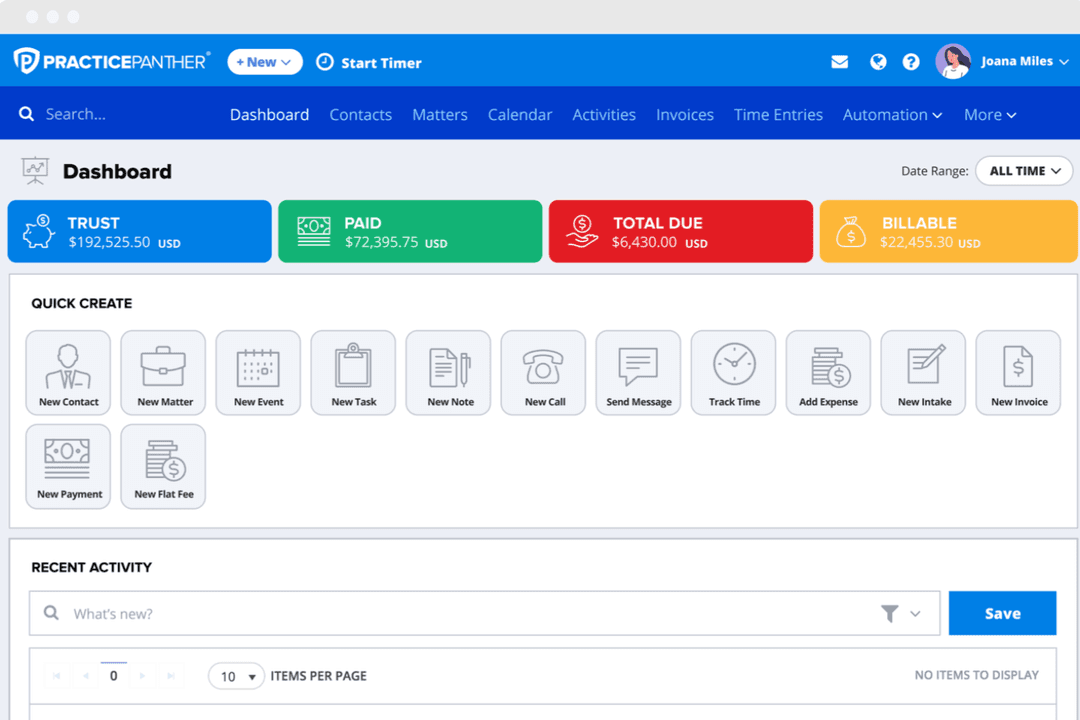
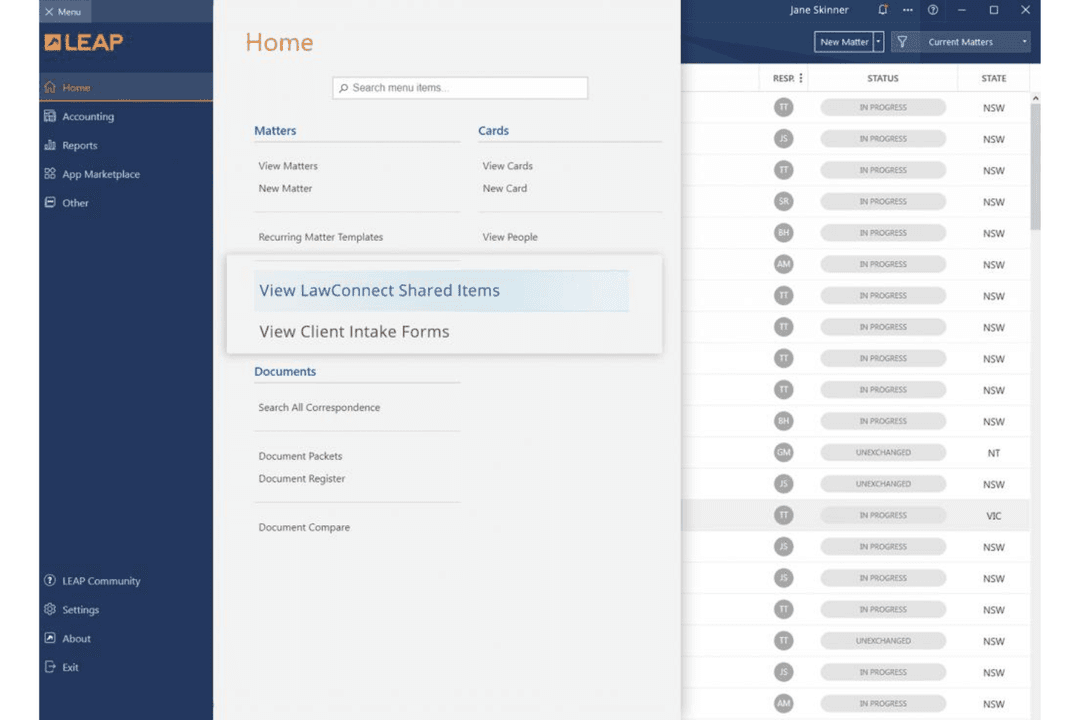
| FaktorBrugerflade | PracticePantherRent og intuitivt layout med træk-og-slip-funktioner, der hjælper nye brugere hurtigt i gang. | LEAPStrømlinet, men teksttung brugerflade med mange menuer og juridiske felter som standard. |
| FaktorIntroduktion | PracticePantherTrinvis, guidet opsætning og selvbetjeningsressourcer gør den første oplevelse problemfri for de fleste firmaer. | LEAPOpsætningsprocessen kræver ofte flere træningsopkald og føles mindre intuitiv for små teams. |
| FaktorTilpasning | PracticePantherDet er nemt at tilpasse dashboards og automatiseringer uden programmeringskendskab. | LEAPTilpasning er mulig, men kræver normalt administratorhjælp og kan virke overvældende. |
| FaktorLøbende support | PracticePantherHurtig chatsupport og et detaljeret hjælpecenter besvarer de fleste spørgsmål hurtigt. | LEAPTelefon- og e-mailsupport er pålidelig, men løsning af problemer kan tage længere tid for ikke-hastende henvendelser. |
PracticePanther føles nemmere at komme i gang med og navigere i, især for teams der er nye inden for juridisk teknologi, mens LEAP’s oplevelse kan være mere kompleks, men belønner dem, der ønsker juridisk dybde. Jeg tror, du vil sætte pris på PracticePanthers imødekommende brugerflade til det daglige arbejde og LEAP, hvis du ikke har noget imod en læringskurve til gengæld for omfattende juridiske arbejdsgange.
PracticePanther
- Automated workflows and reminders reduce manual admin work
- Responsive customer support with live chat and onboarding help
- Built-in e-signature and payment processing included in all plans
- Trust accounting can be less intuitive for complex needs
- Document management tools are basic compared to some competitors
- Reporting features lack advanced customization options
LEAP
- Document automation saves time on repetitive drafting tasks
- Built-in trust accounting supports compliance with state bar rules
- Mobile app lets you manage cases and billing remotely
- Data migration can be slow and error-prone for some firms
- Some users report slow customer support response times
- Limited compatibility with non-Microsoft email platforms
PracticePanther
- Legal Billing DepartmentsIntegrated time tracking and payment processing simplify invoicing and collections.
- Virtual Law FirmsCloud-based access and mobile app enable remote work and collaboration.
- Immigration Law OfficesAutomated reminders and workflow templates support high-volume casework.
- Family Law PracticesSecure client portals and document sharing help manage sensitive cases.
- Small Law FirmsFlat-rate pricing and easy onboarding suit firms with limited IT resources.
- Solo PractitionersPracticePanther’s all-in-one dashboard and automation save time for solo attorneys.
LEAP
- Solo PractitionersLEAP’s all-in-one platform reduces the need for multiple tools and manual processes.
- Small Law FirmsMatter management, billing, and document automation are tailored for firms with limited IT resources.
- Family Law PracticesPre-built templates and forms for family law streamline casework and filings.
- Real Estate LawIntegrated conveyancing tools and e-signature support real estate transactions.
- Legal Aid OrganizationsCloud access and mobile app help manage high case volumes on the go.
- In-House Legal TeamsCentralized document storage and compliance features support internal legal operations.
Hvem bør bruge PracticePanther, og hvem bør bruge LEAP?
PracticePanther er det oplagte valg for små og mellemstore firmaer samt juridiske teams, der ønsker hurtig opsætning, fleksible tilpasninger og en brugerflade, der føles imødekommende fra første dag—særligt hvis jeres praksis håndterer en bred blanding af sager eller har brug for mange integrationsmuligheder.
LEAP giver mening for firmaer, der fokuserer på dokumenttungt, domstolsorienteret arbejde eller opererer på tværs af flere jurisdiktioner, hvor dybdegående juridiske skabeloner og complianceværktøjer er vigtigst. Hvis dit team værdsætter enkelhed og selvstændighed, så vælg PracticePanther; hvis du ønsker omfattende juridiske arbejdsgange og international compliance dækket, er LEAP svær at slå.
| PracticePanther | LEAP | |
|---|---|---|
| Automation Builder | PracticePanther Lets you create custom automations with a drag-and-drop builder for everyday tasks. | LEAP Offers standard workflow automations but requires admin support for deeper customization. |
| Document Management | PracticePanther Features flexible storage with Dropbox and Xero integrations and a user-friendly client portal. | LEAP Delivers a large library of pre-built court forms, deep legal templates, and email management. |
| Integration Options | PracticePanther Broad, out-of-the-box integrations—includes Zapier, Google Workspace, and an open API for flexibility. | LEAP Focuses on legal-specific add-ons like InfoTrack and NetDocuments, but fewer general integrations. |
| Pricing Model | PracticePanther Monthly subscription with bundled features—extra charges for advanced tools and add-ons. | LEAP Per-user pricing with longer contracts—extra costs for onboarding, migration, and specialized modules. |
| User Interface | PracticePanther Clean, modern interface with quick setup and customizable dashboards for easy navigation. | LEAP Text-heavy layout with legal-specific fields and menus, better suited for complex workflows. |
| Billing & Payments | PracticePanther and LEAP both have built-in time tracking, invoice generation, and batch billing options tailored for legal work. Both connect with standard legal payment processors and offer trust accounting support, so you can track billable hours and keep client accounts compliant. PracticePanther emphasizes flexibility in customizing bills, while LEAP focuses on linking billing directly to matter workflows. |
|---|---|
| Client Collaboration | PracticePanther and LEAP both provide secure client communication portals and tools for sharing updates, collecting documents, and handling e-signatures. You can invite clients to log in, see case status, or securely exchange paperwork. PracticePanther spotlights its easy-to-use client portal; LEAP folds client communications into matter management for firms with heavier document demands. |
| Core Case Management | Both PracticePanther and LEAP give you a secure matter dashboard, task tracking, time tracking, calendaring, and document storage all in one spot. Each platform helps legal teams organize daily work, keep matters moving, and centralize your most important files and notes—meaning you won’t need a stack of extra tools to manage your caseload. |
| Integration Support | You’ll find integrations with the essentials—like QuickBooks Online, LawPay, Microsoft 365, and Google Workspace—in both platforms. They each offer an open API, letting your team connect additional tools as needed. PracticePanther leans toward general business integrations, while LEAP complements core integrations with more legal-specific add-ons, though their roster overlaps on major services most firms care about. |
| Security & Compliance | Both solutions use strong encryption, granular user permissions, and offer robust audit trails. Each is built for regulatory compliance in law, including GDPR support and uptime guarantees aligned with industry expectations. PracticePanther and LEAP invest in secure hosting and frequent system updates, so you can trust your client data’s confidentiality and integrity regardless of the platform. |