


CosmoLex vs. LEAP: Vergleich & Expertenbewertungen 2026
Ich vergleiche CosmoLex mit LEAP – von Abrechnung und Buchhaltung bis hin zu Fallabläufen –, damit Sie die passendere Lösung für Ihre Kanzlei erkennen können, bevor Sie eine Demo buchen.

Wir bewerten Tools unabhängig und Provisionen helfen, unsere Tests zu finanzieren. Sehen Sie unsere transparente Richtlinie, unsere Methodik oder schlagen Sie ein Tool vor.
Choosing between CosmoLex and LEAP can be difficult when you need better control over case workflows, billing, and firm operations. This comparison of legal case management software helps you see which tool better fits your team’s workload, practice needs, and budget.
I’ll compare both platforms’ pros and cons, use cases, pricing, security, and usability so you can make a confident shortlist before booking demos.
Die Wahl zwischen CosmoLex und LEAP kann schwierig sein, wenn Sie eine bessere Kontrolle über Fallabläufe, Abrechnung und Kanzleibetrieb benötigen. Dieser Vergleich von Software zur Verwaltung von Rechtsfällen hilft Ihnen dabei zu erkennen, welches Tool besser zur Arbeitsbelastung, den Anforderungen und dem Budget Ihres Teams passt.
Ich vergleiche die Vor- und Nachteile, Anwendungsfälle, Preise, Sicherheit und Benutzerfreundlichkeit beider Plattformen, damit Sie vor der Vereinbarung von Demos eine fundierte Vorauswahl treffen können.
CosmoLex
4.4/5
- 10-day free trial
- From $49/user/month (billed annually)
LEAP
4.3/5
- Free demo available
- Pricing upon request
Warum Sie unseren Software-Empfehlungen vertrauen können
6,700+
Reviews
20
Industry experts
16+
Evaluation factors
14
Years
Unser Team testet und bewertet Software seit 2012. Als Führungskräfte in der Rechtsbranche wissen wir selbst, wie schwierig – und wichtig – es ist, die richtige Software auszuwählen.
Für diesen Leitfaden haben wir Tools mithilfe von praktischen Tests und unabhängiger Recherche bewertet und dabei unsere Bewertungskriterien angewendet.
Unsere Bewertungen spiegeln unser menschliches redaktionelles Urteilsvermögen wider, keine Verkaufsstrategie.
| CosmoLex | LEAP | |
|---|---|---|
| Free Trial | 10-day free trial | Free demo available |
| Pricing | From $49/user/month (billed annually) | Pricing upon request |
Hier kommt der Titel des Abschnitts „Versteckte Kosten“ hin.
Hier kommt der Text des Abschnitts „Versteckte Kosten“ hin.
| CosmoLex | LEAP | |
|---|---|---|
| 2-Factor Authentication | Yes | Yes |
| API | No | Yes |
| Approval Workflows | No | Yes |
| Audit Trail | No | Yes |
| Calendar Management | Yes | Yes |
| Compliance Tracking | No | Yes |
| Contract Management | No | Yes |
| Custom Reports | No | Yes |
| Customer Management | Yes | No |
| Data Export | No | Yes |
| Data Import | Yes | Yes |
| Document Management | No | Yes |
| External Integrations | Yes | Yes |
| Multi-User | Yes | Yes |
| NDA Management | No | No |
| Notifications | Yes | Yes |
| Policy Management | No | No |
| Scheduling | Yes | Yes |
| Workflow Management | No | Yes |
| Integration | CosmoLex | LEAP |
|---|---|---|
| IntegrationMicrosoft 365 | CosmoLex✅ | LEAP✅ |
| IntegrationLawPay | CosmoLex✅ | LEAP✅ |
| IntegrationBox | CosmoLex✅ | LEAP❌ |
| IntegrationDropbox | CosmoLex✅ | LEAP❌ |
| IntegrationGoogle Drive | CosmoLex✅ | LEAP❌ |
| IntegrationQuickBooks Online | CosmoLex❌ | LEAP✅ |
| IntegrationXero | CosmoLex❌ | LEAP✅ |
| IntegrationInfoTrack | CosmoLex❌ | LEAP✅ |
| IntegrationAPI | CosmoLex✅ | LEAP✅ |
| IntegrationZapier | CosmoLex✅ | LEAP✅ |
CosmoLex und LEAP verfügen über gemeinsame Verbindungen zu Microsoft 365, LawPay, API und Zapier, während CosmoLex den Schwerpunkt auf der Dokumentenspeicherung legt und LEAP mehr Integrationen für Buchhaltung und juristische Arbeitsabläufe bietet. Beide sollten die Anforderungen der meisten Kanzleien erfüllen. Prüfen Sie jedoch vor der Auswahl die regionale Verfügbarkeit, erforderliche Abonnements und den API-Zugriff.
| Faktor | CosmoLex | LEAP |
|---|---|---|
| FaktorVerschlüsselung | CosmoLexCosmoLex verschlüsselt den Datenverkehr mit 256-Bit-SSL und verschlüsselt gespeicherte Daten. | LEAPLEAP verschlüsselt Daten während der Übertragung mit TLS 1.2 und im Ruhezustand mit AES-256, einschließlich Sicherungskopien. |
| FaktorZugriffskontrollen | CosmoLexCosmoLex bietet Zwei-Faktor-Authentifizierung, Rollenzuweisungen, Zugriffsberechtigungen und Sicherheitsstufen für Benutzer. | LEAPLEAP unterstützt Mehr-Faktor-Authentifizierung, rollenbasierten Zugriff, OAuth 2.0, Zugriffsüberprüfungen und zeitlich begrenzten privilegierten Supportzugriff. |
| FaktorCompliance-Kontrollen | CosmoLexCosmoLex verfügt über die SOC-2-Typ-2-Zertifizierung und unterstützt Treuhandbuchhaltung, Compliance-Berichte und prüfungssichere Finanzunterlagen. | LEAPLEAP verfügt über die Zertifizierungen SOC 2 Typ II und SOC 3, unterstützt Verpflichtungen gemäß der DSGVO und stellt Auftragsverarbeitungsverträge sowie Sicherheitsdokumentation bereit. |
| FaktorDatenstandort | CosmoLexCosmoLex speichert Kanzleidaten auf Servern in den Vereinigten Staaten, wodurch diese Daten der US-amerikanischen Gerichtsbarkeit unterliegen. | LEAPLEAP hostet Daten in regionalen AWS-Standorten, unter anderem in den USA, Kanada, Australien, Neuseeland und Europa. |
| FaktorGeschäftskontinuität | CosmoLexCosmoLex sichert Daten alle paar Stunden, verschlüsselt diese Sicherungskopien und speichert sie redundant an mehreren Standorten. | LEAPLEAP nutzt AWS-Hosting über mehrere Zonen, eine Aktiv-Aktiv-Architektur, verschlüsselte Sicherungskopien, festgelegte Wiederherstellungsziele und getestete Notfallwiederherstellungspläne. |
LEAP verfügt über das stärker dokumentierte Sicherheits- und Kontinuitätskonzept, während CosmoLex glaubwürdige Schutzmaßnahmen mit umfassenderen Kontrollen für die juristische Buchhaltung verbindet. Meiner Ansicht nach liegen die Stärken von CosmoLex in der Compliance für Treuhandkonten und zuverlässigen Finanzunterlagen, während LEAP ein stärkeres regionales Hosting, eine bessere Zugriffsverwaltung und robustere Wiederherstellungskontrollen bietet.
| Faktor | CosmoLex | LEAP |
|---|---|---|
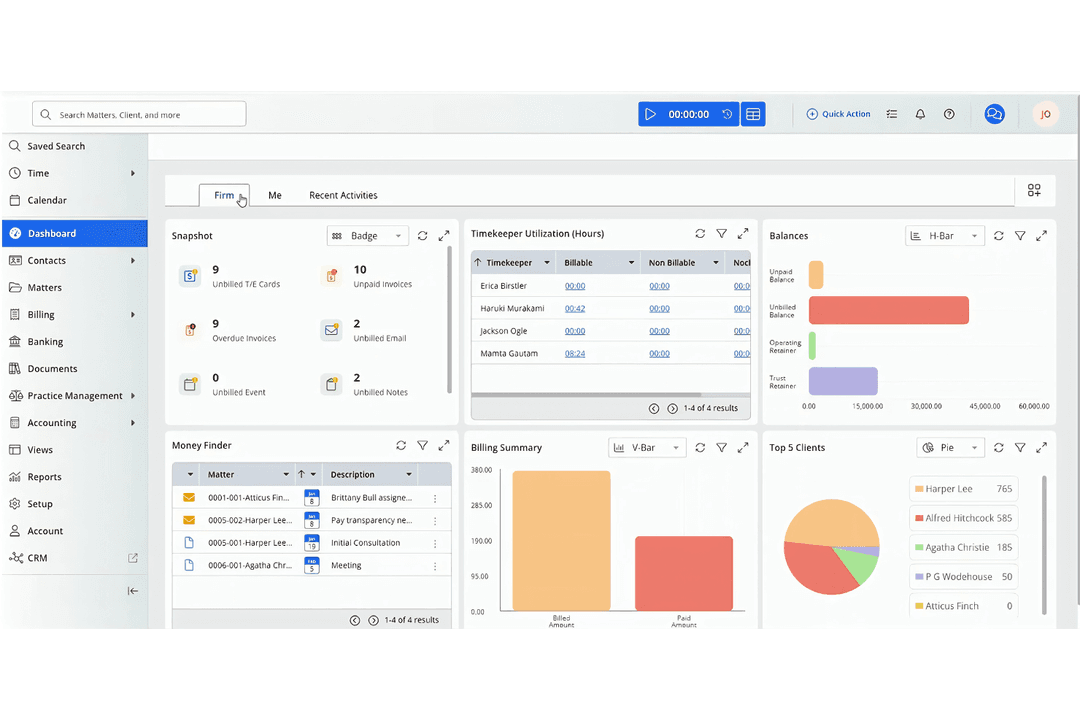
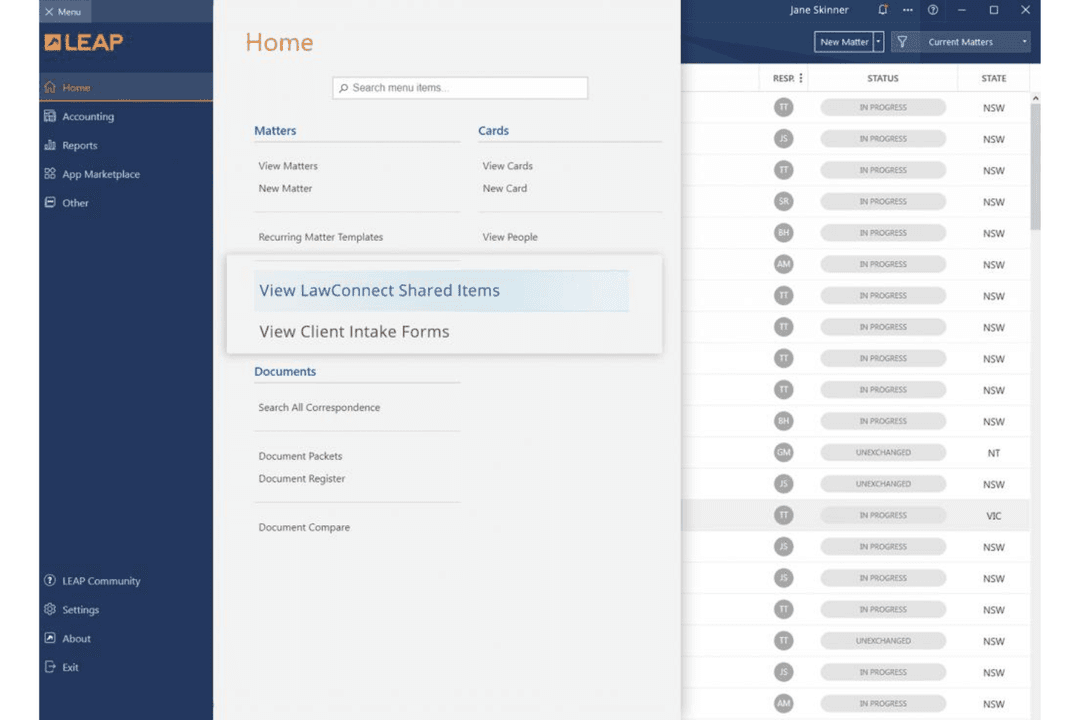
| FaktorBenutzeroberfläche | CosmoLexCosmoLex bietet ein übersichtliches Dashboard, das Fälle, Abrechnung, Buchhaltung und Treuhandguthaben zusammenführt. | LEAPLEAP ermöglicht eine intuitive Fallnavigation, wobei Dokumente, Korrespondenz, Abrechnung und Fristen innerhalb jeder Akte organisiert sind. |
| FaktorEinrichtungsprozess | CosmoLexCosmoLex unterstützt eine begleitete Einführung und ermöglicht kleineren Kanzleien den Start innerhalb weniger Wochen, ohne dass eine eigene IT-Unterstützung erforderlich ist. | LEAPLEAP bietet eine Implementierung per Fernzugriff, Unterstützung bei der Datenmigration und personalisierte Schulungen für die Arbeitsabläufe jeder Kanzlei. |
| FaktorLernkurve | CosmoLexCosmoLex ist im Allgemeinen leicht zu erlernen, obwohl Benutzer manchmal Hilfe benötigen, um weniger häufig verwendete Funktionen zu finden. | LEAPLEAP lässt sich für die tägliche Fallarbeit leicht navigieren, aber der umfangreiche Funktionsumfang kann strukturierte Schulungen erfordern. |
| FaktorSupportressourcen | CosmoLexCosmoLex bietet fortlaufenden Support, Schulungsressourcen und Hilfe bei Arbeitsabläufen, Buchhaltung und treuhandbezogenen Aufgaben. | LEAPLEAP bietet ein Hilfezentrum, Videos, Webinare, Kurse an der LEAP University und fortlaufenden Kundensupport nach der Implementierung. |
LEAP weist bei der Fallverwaltung die sanftere Lernkurve auf, während CosmoLex für Kanzleien, die eine in die täglichen Arbeitsabläufe integrierte Buchhaltung wünschen, zugänglicher wirkt. Meiner Erfahrung nach eignen sich das einheitliche Dashboard und die schnelle Unterstützung von CosmoLex für finanzorientierte Teams, während der übersichtliche Arbeitsbereich für Fälle und die strukturierte Schulung von LEAP größeren Teams dabei helfen, weitere Funktionen zu übernehmen.
CosmoLex
- Built-in legal accounting eliminates need for third-party tools.
- Trust accounting and compliance features are included.
- Responsive customer support and onboarding assistance.
- Some users report slow performance during peak hours.
- Portal access issues occasionally disrupt client communications.
- Lacks advanced reporting customization options.
LEAP
- Document automation saves time on repetitive drafting tasks
- Built-in trust accounting supports compliance with state bar rules
- Mobile app lets you manage cases and billing remotely
- Data migration can be slow and error-prone for some firms
- Some users report slow customer support response times
- Limited compatibility with non-Microsoft email platforms
CosmoLex
- Estate Planning FirmsTrust accounting and document automation fit estate planning workflows.
- In-House Legal DepartmentsCentralized matter management and billing streamline internal legal operations.
- Family Law PracticesMatter-centric workflows and document management support high-volume casework.
- Legal Aid OrganizationsIntegrated time tracking and billing help manage grant and case reporting.
- Solo PractitionersBuilt-in trust accounting and compliance features simplify solo practice management.
- Small Law FirmsCosmoLex’s all-in-one platform reduces the need for separate billing and accounting tools.
LEAP
- Solo PractitionersLEAP’s all-in-one platform reduces the need for multiple tools and manual processes.
- Small Law FirmsMatter management, billing, and document automation are tailored for firms with limited IT resources.
- Family Law PracticesPre-built templates and forms for family law streamline casework and filings.
- Real Estate LawIntegrated conveyancing tools and e-signature support real estate transactions.
- Legal Aid OrganizationsCloud access and mobile app help manage high case volumes on the go.
- In-House Legal TeamsCentralized document storage and compliance features support internal legal operations.
Wer sollte CosmoLex nutzen und wer sollte LEAP nutzen?
CosmoLex eignet sich besser für kleine und mittelgroße Kanzleien, die Abrechnung, Kanzleibuchhaltung, Treuhandbuchhaltung und Fallverwaltung in einem System zusammenführen möchten. Es passt zu Teams, die finanzielle Kontrolle, eine unkomplizierte Einführung und eine planbare, stufenbasierte Preisgestaltung priorisieren. LEAP eignet sich für Kanzleien, die dokumentenintensive Fälle bearbeiten und bundesstaatsspezifische Formulare, Dokumentenautomatisierung, übersichtliche Arbeitsbereiche für Fälle und Matter AI benötigen. Entscheiden Sie sich für LEAP, wenn Ihr Team eine strukturierte Implementierung und Schulung für eine umfassendere Plattform für juristische Arbeitsabläufe unterstützen kann.
| CosmoLex | LEAP | |
|---|---|---|
| Automation | CosmoLex Money Finder flags potentially missed billable tasks, meetings, and emails. | LEAP State-specific forms, document automation, and Matter AI reuse client data and extract insights from correspondence. |
| Document Storage | CosmoLex Connects with Box, Dropbox, and Google Drive for document storage. | LEAP Focuses on built-in matter document organization and connects with Microsoft 365, but does not list Box, Dropbox, or Google Drive integrations. |
| Financial Tools | CosmoLex Connects matter management with office accounting, trust accounting, bank reconciliation, and compliance reporting. | LEAP Includes billing and trust accounting, with QuickBooks Online and Xero integrations for broader accounting workflows. |
| Matter Workspace | CosmoLex Uses a dashboard that combines matters, billing, accounting, and trust balances. | LEAP Organizes documents, correspondence, billing, and deadlines within each matter. |
| Pricing Model | CosmoLex Uses per-user monthly pricing with Launch, Core, and Pro tiers. | LEAP Uses per-user subscriptions, but requires a quote instead of publishing standard pricing. |
| Billing And Payments | Both platforms support time-based billing, invoice management, trust accounting, and online payments. CosmoLex connects billing closely with office and trust accounting, while LEAP organizes billing within each matter and supports legal workflow integrations. |
|---|---|
| Matter Management | Both solutions centralize client and matter information for legal teams. CosmoLex links matter records with billing and accounting details, while LEAP connects matters with documents, correspondence, deadlines, and legal forms. |
| Mobile Access | CosmoLex and LEAP provide mobile access so legal professionals can review matters and handle work away from the office. CosmoLex supports mobile access to financial and matter information, while LEAP extends mobile matter work across documents, correspondence, and deadlines. |
| Security Controls | Both platforms protect legal data with encryption, multifactor authentication, role-based permissions, and SOC-certified controls. CosmoLex emphasizes access privileges and financial record protection, while LEAP adds access reviews, OAuth 2.0, and time-limited privileged support access. |
| Time Tracking | CosmoLex and LEAP let firms record billable time against matters and use those entries for invoices. CosmoLex’s Money Finder can flag potentially missed billable activities, while LEAP ties time records to its matter-based billing workflows. |