

Al navegar por el mundo, a menudo abrumador, de la comparación de documentos legales, entiendo las complejidades a las que te enfrentas. Estos proveedores de software de comparación de documentos legales se encargan de gran parte del trabajo pesado.
Agilizan el proceso de comparación y análisis de diversos documentos legales. Más que simples herramientas para ahorrar tiempo, reducen el riesgo de errores, cuentan con funciones de arrastrar y soltar, rentabilidad, versiones con marcas de cambio fáciles de entender y un módulo de OCR, aumentan la productividad y ofrecen tranquilidad. Con estas herramientas, puedes despedirte de la laboriosa comparación manual de documentos y dar la bienvenida a una forma de trabajar más eficiente, precisa y fiable.
Por qué confiar en nuestras recomendaciones de software
6,700+
Reviews
20
Industry experts
16+
Evaluation factors
14
Years
Nuestro equipo lleva probando y evaluando software desde 2012. Como líderes de despachos jurídicos, sabemos lo difícil —y lo importante— que es elegir el software adecuado.
Para esta guía, evaluamos las herramientas mediante pruebas prácticas e investigación independiente, puntuando las herramientas según nuestros criterios de selección.
Nuestras reseñas reflejan nuestro criterio editorial humano, no un discurso de ventas.
Tabla comparativa: programas de comparación de documentos legales
\u003cspan style=\u0022font-weight: 400\u0022\u003eEsta tabla comparativa resume los detalles de precios de mi selección de los mejores programas de comparación de documentos legales.\u003c/span\u003e
| Tool | Best For | Trial Info | Price | ||
|---|---|---|---|---|---|
| 1 | Ideal para comparar PDF dentro de flujos de trabajo DMS | Prueba gratuita de 14 días | Desde $10.99/usuario/mes | Website | |
| 2 | La mejor opción para comparar PDF con revisión integrada de cláusulas mediante IA | Prueba gratuita de 7 días | Desde $19.99/usuario/mes (facturado anualmente) | Website | |
| 3 | Ideal para realizar comparaciones con marcas dentro de los flujos de trabajo existentes de Word | Plan gratuito disponible | Precio bajo solicitud | Website | |
| 4 | Ideal para realizar un seguimiento de las negociaciones contractuales internas | Hay un plan gratuito disponible | Precio bajo solicitud | Website | |
| 5 | Ideal para el marcado de cambios de contratos internos y la comparación con IA | Demo gratuita disponible | Precio bajo solicitud | Website | |
| 6 | Más adecuada para la estandarización del marcado de cambios a escala de Am Law 100 | Demostración gratuita disponible | $20/user/month | Website | |
| 7 | Ideal para la revisión de cambios y documentos con IA integrada en el DMS | Demostración gratuita disponible | Precio disponible previa solicitud | Website | |
| 8 | La mejor opción para un visor de comparación fácil de navegar | Prueba gratuita de 5 días | Desde $10.75/usuario/mes | Website | |
| 9 | Ideal para comparaciones con control de cambios entre formatos durante una prueba gratuita | Plan gratuito disponible; prueba gratuita de 14 días | Desde $20/usuario/mes (facturado anualmente) | Website | |
| 10 | La mejor opción para marcar cambios en contratos comparándolos con los precedentes del bufete | Demostración gratuita disponible | Precio previo a solicitud | Website |




Análisis de los mejores programas de comparación de documentos legales
A continuación, encontrarás mis resúmenes detallados de los mejores programas de comparación de documentos legales que llegaron a mi lista final. En mis análisis encontrarás una visión detallada de las funciones principales, ventajas \u0026 desventajas, integraciones y casos de uso ideales de cada herramienta para ayudarte a encontrar la más adecuada para ti.
 Ideal para comparar PDF dentro de flujos de trabajo DMS
- Prueba gratuita de 14 días
- Desde $10.99/usuario/mes
Visit WebsiteCustomer Rating:4.6/5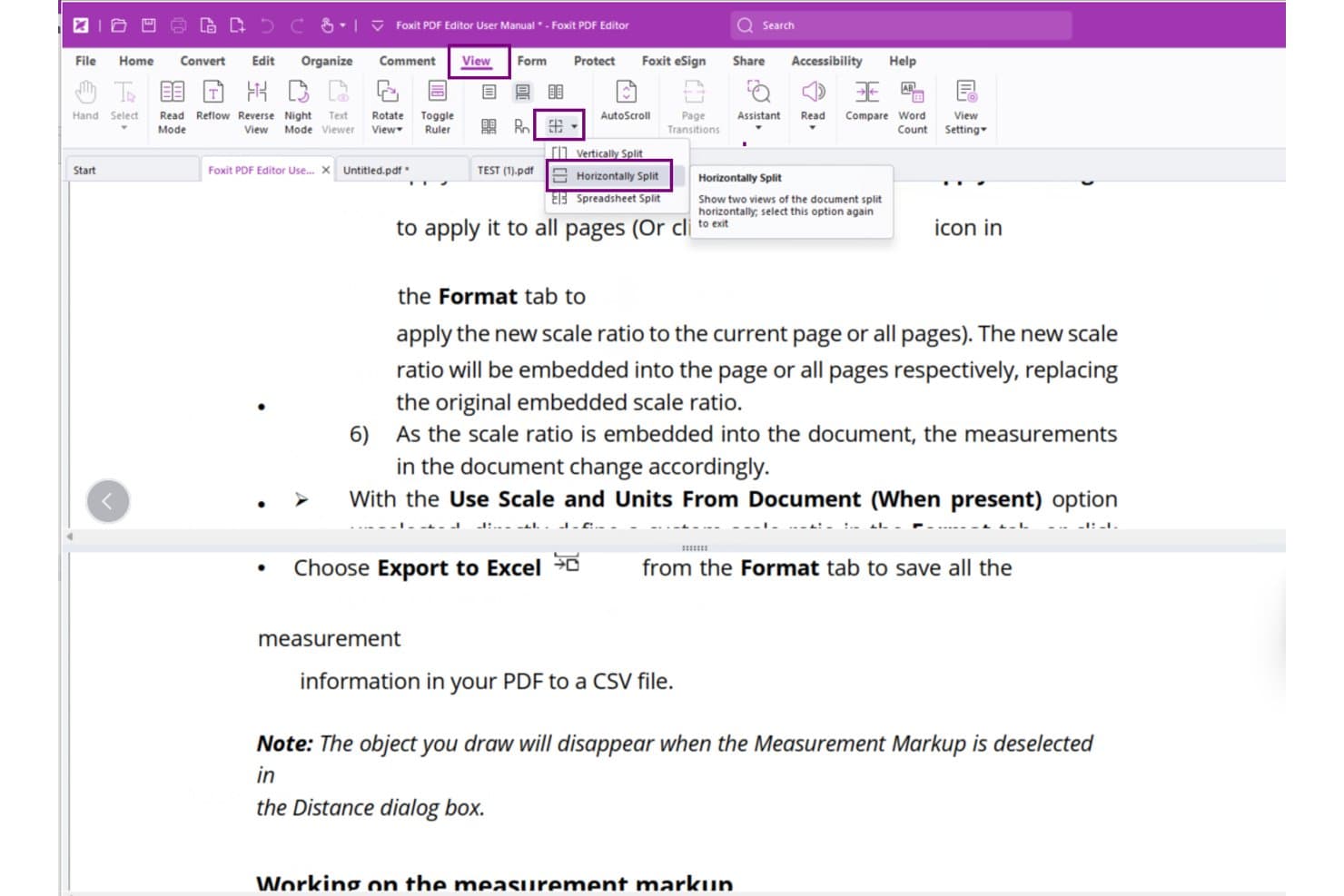
Foxit PDF Editor permite a los usuarios ver los documentos uno al lado del otro con División horizontal. Foxit PDF Editor es una herramienta de edición y gestión de PDF que incluye comparación de versiones, generación de marcas de revisión, eliminación de metadatos, numeración Bates e integración directa con plataformas DMS legales como iManage y NetDocuments.
¿Para quién es más adecuado Foxit PDF Editor?
Foxit PDF Editor es una opción excelente para equipos legales que ya trabajan dentro de iManage, NetDocuments o SharePoint y necesitan incorporar la comparación de PDF a su flujo de trabajo DMS existente.
Por qué elegí Foxit PDF Editor
He incluido Foxit PDF Editor entre mis principales opciones porque es la única herramienta de esta lista que permite abrir, comparar y guardar PDF sin salir de iManage o NetDocuments. El botón 'Abrir desde ECM' del cuadro de diálogo Comparar obtiene ambas versiones directamente de su DMS, y el algoritmo de comparación entre páginas de la versión 2026.2 reduce las detecciones de cambios falsos en documentos con muchas revisiones.
Características principales de Foxit PDF Editor
- Eliminación de metadatos y datos ocultos: La herramienta Saneamiento de documentos elimina toda la información oculta en un solo paso, con opciones para quitar selectivamente metadatos, marcadores, campos de formulario, scripts incrustados y mucho más.
- Numeración Bates: Aplique números Bates a conjuntos de PDF directamente dentro del editor, incluso mediante comandos en lenguaje sencillo introducidos en la versión v2025.3.
- Inspector de acciones de PDF: Analiza los documentos en busca de JavaScript incrustado y comportamientos de automodificación que podrían eludir la redacción, añadido en la versión v2026.1.
- Eliminación automática de datos ocultos al guardar: Configure Foxit para que elimine automáticamente la información oculta cada vez que se guarda o cierra un archivo, reduciendo el riesgo de divulgación accidental de metadatos.
Integraciones de Foxit PDF Editor
Foxit PDF Editor ofrece 10 integraciones DMS nativas documentadas, incluidas iManage Work, NetDocuments, SharePoint, Worldox, eDOCS DM, Documentum, Epona DMSforLegal y Alfresco. Su cuadro de diálogo Comparar puede abrir directamente ambas versiones del documento desde los sistemas conectados.
Pros and Cons
Pros:
- Detección precisa de cambios de PDF entre páginas
- Resúmenes claros de marcas de revisión en paralelo
- La eliminación de metadatos favorece una divulgación más segura
Cons:
- La comparación exclusiva de PDF limita los flujos de trabajo con Word
- No permite comparar textos movidos ni realizar comparaciones por lotes
Learn more about Foxit PDF Editor: La mejor opción para comparar PDF con revisión integrada de cláusulas mediante IA
- Prueba gratuita de 7 días
- Desde $19.99/usuario/mes (facturado anualmente)
Visit WebsiteCustomer Rating:4.5/5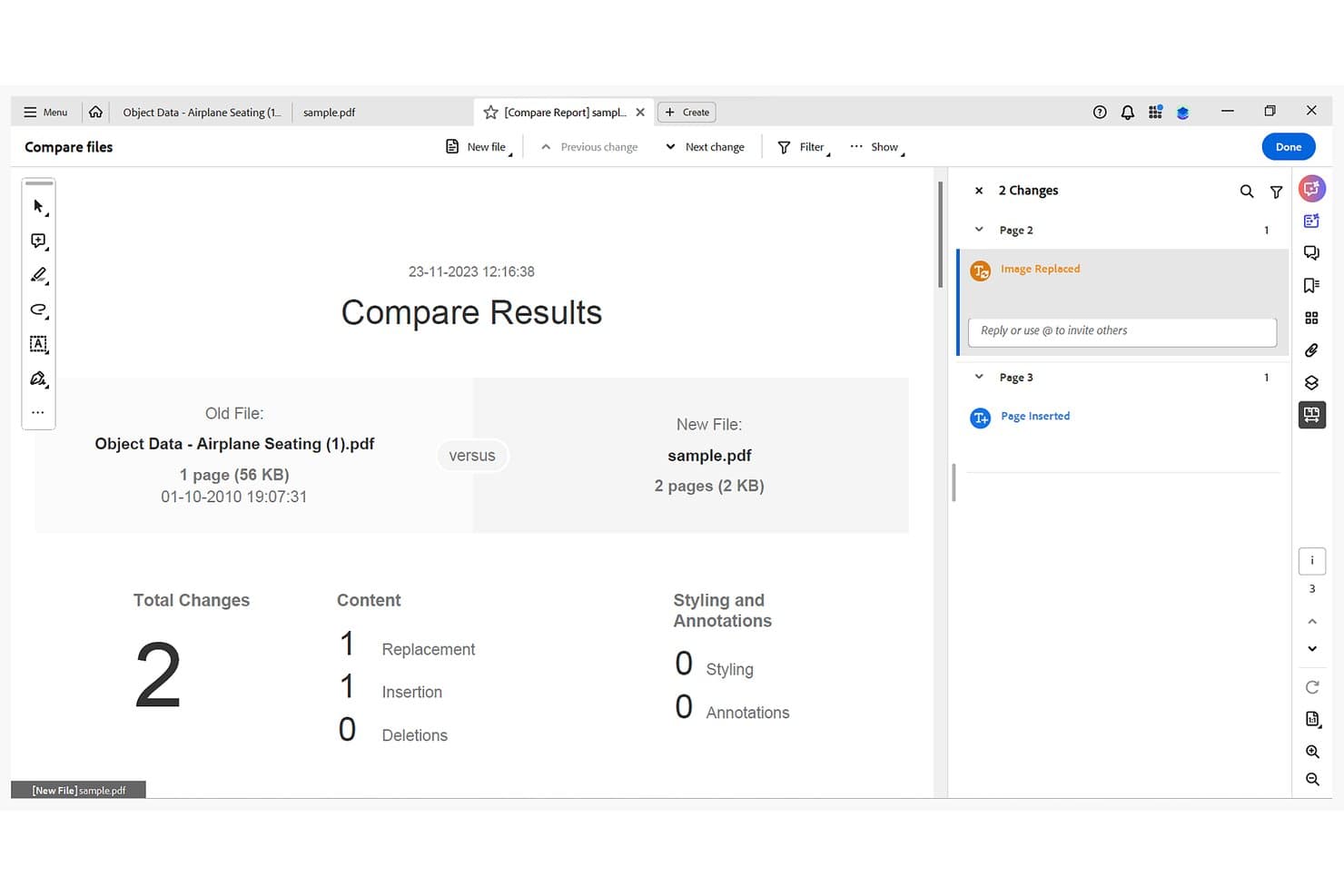
Adobe Acrobat resalta los reemplazos y las inserciones entre dos PDF. Adobe Acrobat es una suite de PDF que incluye comparación de documentos, redacción, firma electrónica, OCR y revisión de cláusulas con tecnología de IA en los flujos de trabajo jurídicos.
¿Para quién es más adecuado Adobe Acrobat?
Adobe Acrobat es una opción ideal para equipos jurídicos que ya utilizan Acrobat Pro como estándar y desean contar con comparación de PDF, redacción y revisión de cláusulas mediante IA sin añadir otra herramienta a su conjunto tecnológico.
Por qué elegí Adobe Acrobat
He incluido Adobe Acrobat entre mis principales opciones porque es la única herramienta de esta lista que integra directamente la comparación de PDF con la revisión de cláusulas mediante IA, por lo que no es necesario cambiar de plataforma durante la revisión. Comparar archivos señala las diferencias de texto, imágenes, formato y encabezados una al lado de la otra, con un recuento resumido de inserciones, eliminaciones y reemplazos, mientras que el Asistente de IA añade la extracción de cláusulas y la identificación de lenguaje de riesgo en el mismo flujo de trabajo. Me gusta especialmente que los documentos escaneados obtengan una comparación a nivel de píxel, lo que funciona muy bien cuando se trabaja con versiones antiguas de contratos que nunca se crearon digitalmente.
Características principales de Adobe Acrobat
- Modos de comparación según el tipo de documento: Elige entre los modos Detección automática, Informes, Presentaciones o Documentos escaneados para adaptar el análisis de Acrobat al tipo de archivo específico.
- Desinfección de metadatos: Elimina metadatos ocultos, contenido incrustado e información confidencial de los PDF mediante el flujo de trabajo integrado de redacción y desinfección.
- Extracción de cláusulas mediante el Asistente de IA: Haz preguntas y extrae cláusulas clave de los contratos, con respuestas generadas por IA vinculadas a las ubicaciones de origen en el documento.
- Controles de administración empresarial: Gestiona el acceso de los usuarios, SSO, el aprovisionamiento SCIM y la gobernanza de las funciones de IA desde una consola de administración centralizada.
Integraciones de Adobe Acrobat
Adobe Acrobat ofrece integraciones nativas con el ecosistema de Microsoft, incluidos Microsoft 365, Teams, SharePoint, OneDrive y Outlook, además de Google Drive, Dropbox y Box. También se conecta con iManage Work y NetDocuments para abrir y guardar archivos, y ofrece API para conexiones personalizadas con ERP, CRM y CLM.
Pros and Cons
Pros:
- La comparación a nivel de píxel admite documentos escaneados
- La revisión de cláusulas mediante IA señala posibles expresiones de riesgo
- Integra la comparación con la redacción y el OCR
Cons:
- No ofrece resultados nativos de cambios controlados de Word
- Los errores de OCR pueden distorsionar los resultados de la comparación
Learn more about Adobe Acrobat: Ideal para realizar comparaciones con marcas dentro de los flujos de trabajo existentes de Word
- Plan gratuito disponible
- Precio bajo solicitud
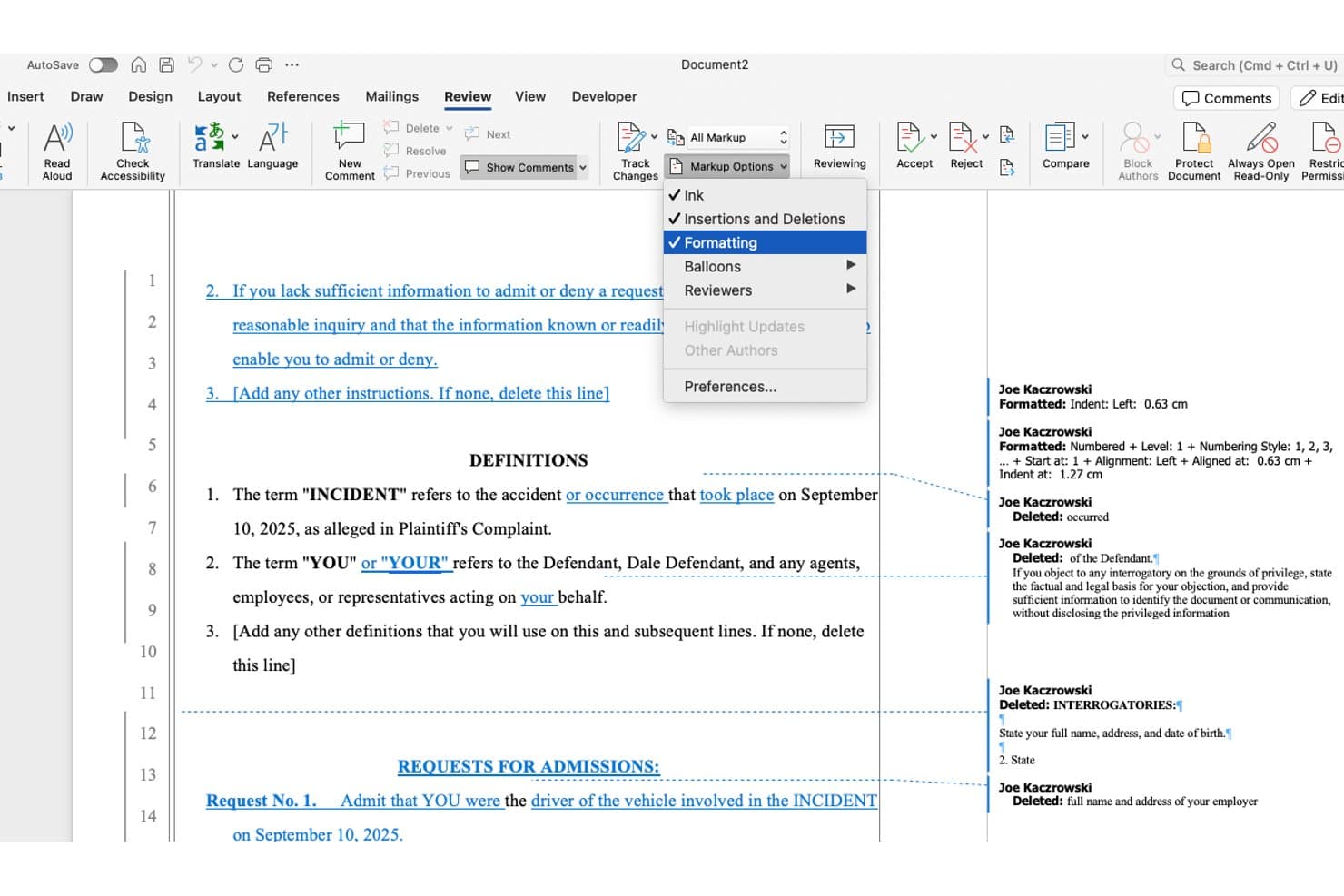
Microsoft Word registra los cambios de formato y las eliminaciones con anotaciones de marcas. Microsoft Word es una aplicación de procesamiento de textos con una función integrada de comparación legal con marcas que identifica inserciones, eliminaciones, cambios de formato y texto movido entre dos versiones de un documento.
¿Para quién es más adecuado Microsoft Word?
La función Comparar de Microsoft Word es ideal para abogados litigantes y transaccionales que ya trabajan diariamente en Word y necesitan una herramienta fiable para realizar comparaciones con marcas sin añadir nuevo software a su conjunto de herramientas.
Por qué elegí Microsoft Word
He incluido Microsoft Word entre mis principales opciones porque, si tu firma ya trabaja diariamente en Word, su función integrada de comparación legal con marcas significa que no necesitas una herramienta independiente para las tareas estándar de comparación. Me gusta que Comparar genere un tercer documento limpio que muestra cada inserción, eliminación y cambio de formato, y que el resultado aparezca directamente en Control de cambios para que puedas aceptar o rechazar las ediciones una por una. Los ajustes de comparación detallados, incluida la detección a nivel de caracteres y los controles independientes para tablas, notas al pie y encabezados, permiten reducir el ruido en los contratos en los que, de otro modo, los cambios menores de formato saturarían las marcas.
Características principales de Microsoft Word
- Inspector de documentos: Analiza tu documento y elimina los datos ocultos, incluidos los cambios realizados mediante Control de cambios, los comentarios, la información personal y el XML personalizado, antes de compartirlo externamente.
- Integración con iManage y NetDocuments: Ambas plataformas de gestión documental muestran el motor Comparar de Word directamente dentro de sus complementos para Word, lo que te permite realizar comparaciones con marcas sin salir de tu entorno de gestión documental.
- Estilos de marcas personalizados: Configura los colores y formatos de las inserciones, eliminaciones, textos movidos y celdas de tablas mediante el cuadro de diálogo Opciones avanzadas de Control de cambios para adaptarlos a las convenciones de comparación de tu firma.
- Análisis de contratos con IA de Copilot: Cuando está disponible en un plan de Microsoft 365 apto, Copilot resume las diferencias entre versiones de contratos y señala cláusulas inusuales en forma de tabla estructurada dentro de Word.
Integraciones de Microsoft Word
Microsoft Word cuenta con integraciones nativas en todo el ecosistema de Microsoft, incluidas Microsoft 365, OneDrive, SharePoint y Outlook. Su función Comparar también se integra con iManage Work y NetDocuments mediante sus complementos para Word.
Pros and Cons
Pros:
- La comparación legal integrada crea un tercer documento
- Los ajustes detallados reducen el ruido del formato
- Control de cambios permite revisar cada edición individualmente
Cons:
- La comparación exclusiva para escritorio excluye los flujos de trabajo web
- La conversión de PDF puede crear diferencias falsas
Learn more about Microsoft Word: Ideal para realizar un seguimiento de las negociaciones contractuales internas
- Hay un plan gratuito disponible
- Precio bajo solicitud
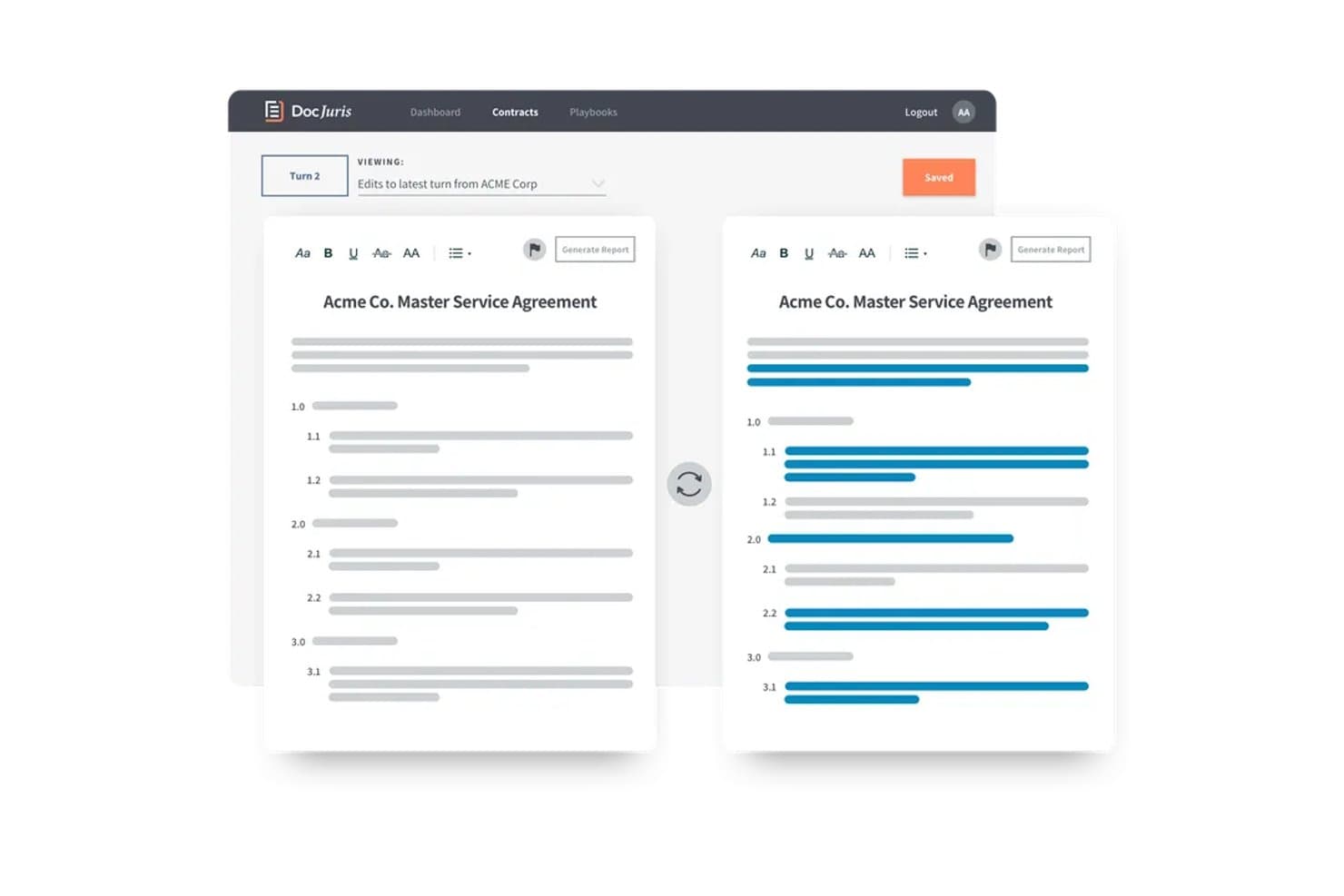
DocJuris muestra las ediciones con control de cambios en paralelo para agilizar la revisión de contratos. DocJuris es una plataforma de revisión y negociación de contratos basada en IA para equipos jurídicos internos que combina la comparación de documentos, el seguimiento de turnos, el control de cambios y la revisión de cláusulas basada en manuales de negociación.
¿Para quién es más adecuado DocJuris?
DocJuris es adecuado para equipos jurídicos internos de empresas medianas y grandes que gestionan grandes volúmenes de negociaciones contractuales y necesitan realizar un seguimiento de cada turno durante todo el ciclo de vida del acuerdo.
Por qué elegí DocJuris
He incluido DocJuris entre mis principales opciones porque es la única herramienta de esta lista que considera la comparación de documentos como parte de un flujo de trabajo de negociación activo, en lugar de una tarea puntual. Me gusta cómo el seguimiento de turnos compara automáticamente cada nueva versión con la anterior y codifica los cambios por colores según la parte que los realizó, para que puedas detectar modificaciones inadvertidas de un vistazo. La función Historial de negociación lleva esto un paso más allá al generar un registro de cambios cláusula por cláusula de cada borrador de una carpeta, entregado como un informe de Word y un mapa de calor de Excel.
Características principales de DocJuris
- Espacio de trabajo para la contraparte: Una sala de acuerdos compartida que permite a las partes contrarias acceder mediante un enlace mágico, sin necesidad de crear una cuenta, para revisar documentos versionados y realizar un seguimiento del estado de cada uno.
- Comprobador de documentos: Una herramienta de revisión previa a la firma que señala errores de referencias cruzadas, problemas con términos definidos, fechas contradictorias y problemas de puntuación en archivos de Word.
- Agente de correo electrónico gratuito para contratos: Envía cualquier contrato de Word o PDF a una dirección de correo electrónico de DocJuris y recibe en cuestión de minutos un resumen de riesgos o un archivo de Word con marcas, sin necesidad de registrarte.
- Comparación de formatos mixtos: Compara archivos de Word con PDF, PDF con PDF o archivos bloqueados y cifrados con documentos estándar, con conversión automática gestionada por la plataforma.
Integraciones de DocJuris
DocJuris es compatible con SharePoint, NetDocuments mediante Power Automate, Google Drive, Dropbox, Box, OneDrive, Salesforce y Microsoft 365. También ofrece una API para conectores personalizados y Zapier.
Pros and Cons
Pros:
- Realiza un seguimiento de los turnos de negociación en cada borrador
- Genera documentos nativos de Word con control de cambios
- Compara archivos PDF bloqueados con archivos de Word
Cons:
- La conversión de PDF puede generar un control de cambios excesivamente cargado
- No detecta objetos incrustados ni cambios en los metadatos
Learn more about DocJuris: 5Ideal para el marcado de cambios de contratos internos y la comparación con IA
Ivo
- Demo gratuita disponible
- Precio bajo solicitud
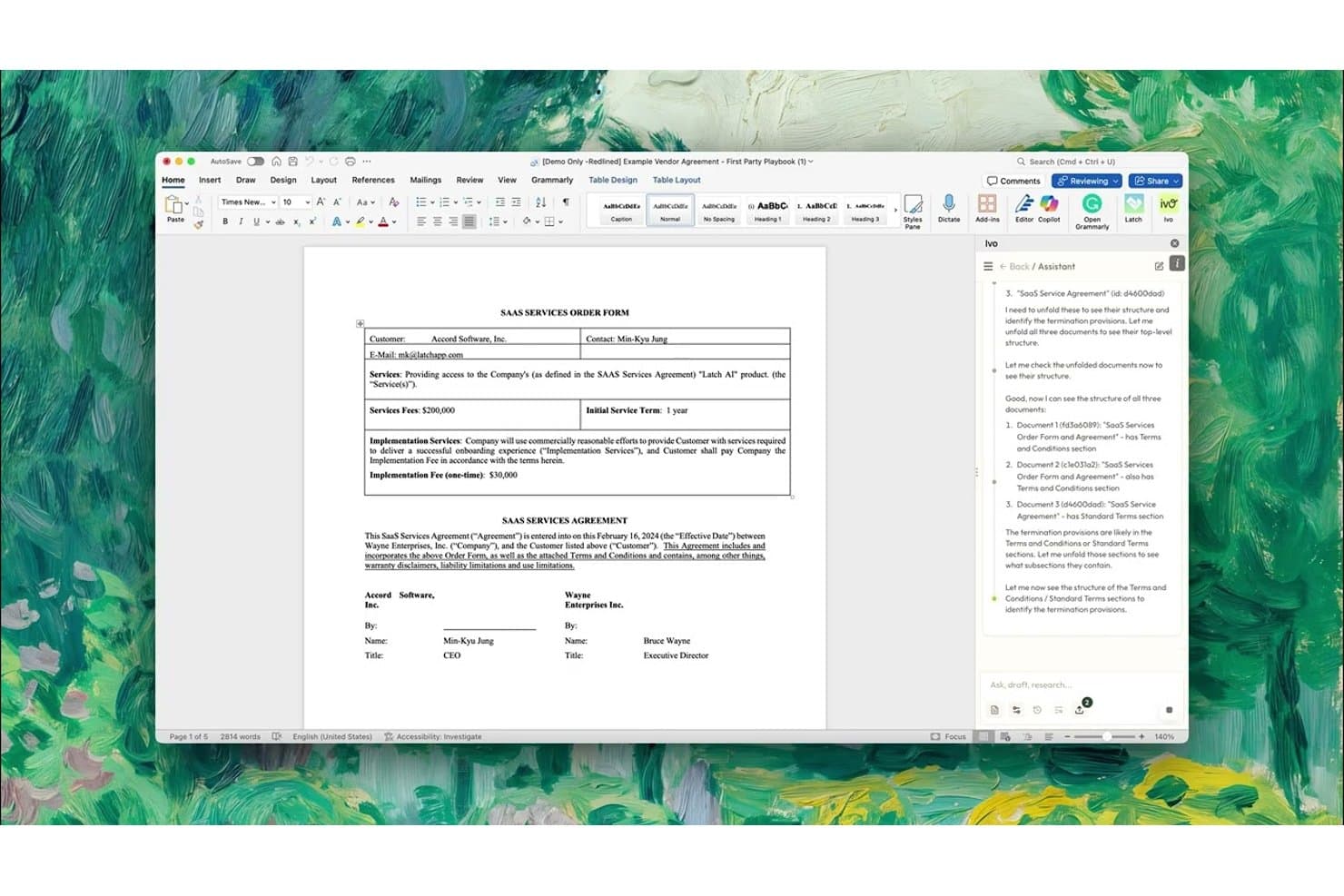
El asistente de IA de Ivo analiza y compara estructuras de documentos jurídicos lado a lado. Ivo es una plataforma de revisión y marcado de cambios de contratos basada en IA que funciona dentro de Microsoft Word y Google Docs, y ofrece comparaciones de cláusulas, comparación de versiones e inteligencia del repositorio de contratos para equipos jurídicos internos.
¿Para quién es más adecuado Ivo?
Ivo está diseñado para equipos jurídicos internos de empresas medianas y grandes que necesitan marcado de cambios y comparación de cláusulas de contratos impulsados por IA directamente dentro de Word o Google Docs.
Por qué elegí Ivo
He incluido Ivo entre mis principales opciones porque es una de las pocas herramientas que incorpora el marcado de cambios y la comparación de cláusulas de contratos impulsados por IA directamente en Word y Google Docs, donde los equipos internos ya trabajan. Su función Comparar versiones es especialmente útil: carga la versión que enviaste a la contraparte antes de su última modificación, e Ivo aísla únicamente los cambios nuevos de esa ronda, reduciendo el ruido en negociaciones de varias rondas. También me gusta cómo compara las cláusulas con tus propios contratos firmados, filtrados por tipo de contrato y ley aplicable, para que puedas ver exactamente en qué se desvía la posición de una contraparte de tus patrones históricos.
Funciones principales de Ivo
- Repositorio de contratos con IA: Ivo Intelligence indexa automáticamente tus contratos firmados sin etiquetado manual y, a continuación, crea acuerdos compuestos que incorporan modificaciones y registran cómo han cambiado las condiciones con el tiempo.
- Revisión con varios manuales: Ejecuta hasta tres manuales simultáneamente durante una sola revisión, como un MSA, un DPA y una adaptación regional, para aplicar todas las normas pertinentes en una única pasada.
- Carga masiva de documentos en el Asistente: Carga varios archivos PDF o DOCX a la vez y solicita a Ivo que genere una tabla comparativa de las diferencias entre todas las versiones.
- Sincronización con DMS y almacenamiento en la nube: Ivo se conecta directamente a NetDocuments, SharePoint, OneDrive, Box y Google Drive, manteniendo tus contratos en su lugar sin necesidad de migrarlos ni archivarlos de nuevo.
Integraciones de Ivo
Ivo ofrece integraciones nativas con Microsoft Word, Google Docs, NetDocuments, SharePoint, OneDrive, Box, Google Drive, Salesforce y DocuSign. También proporciona acceso mediante API y MCP para conexiones personalizadas.
Pros and Cons
Pros:
- Aísla los nuevos cambios de la contraparte entre rondas
- Compara las cláusulas con acuerdos históricos
- Genera versiones con cambios registrados para la revisión de contratos
Cons:
- No puede insertar cambios registrados en archivos PDF
- La conservación del formato y las alucinaciones ocasionales requieren revisión
Learn more about Ivo: Más adecuada para la estandarización del marcado de cambios a escala de Am Law 100
- Demostración gratuita disponible
- $20/user/month
Litera Compare muestra los cambios de marcado en documentos uno al lado del otro. Litera Compare es una herramienta de comparación de documentos diseñada para flujos de trabajo jurídicos, que ofrece marcado de cambios determinista, compatibilidad con múltiples formatos, perfiles de marcado personalizables, comparación por lotes e integración profunda con sistemas de gestión documental como iManage y NetDocuments.
¿Para quién es más adecuada Litera?
Litera Compare es una opción excelente para grandes firmas de abogados que necesitan estándares de marcado de cambios aplicados de forma centralizada entre decenas o cientos de abogados.
Por qué elegí Litera
Litera Compare ocupa un lugar en mi lista de opciones principales porque sus perfiles de comparación bloqueados de forma centralizada resuelven un problema real de estandarización a gran escala. En firmas de Am Law 100, donde cada uno de los numerosos abogados podría aplicar sus propios criterios de marcado de cambios, los administradores pueden imponer un único estilo de marcado en toda la firma. También valoro mucho su detección de texto movido: en lugar de señalar una cláusula reubicada como una eliminación y una inserción, muestra el movimiento como un cambio independiente con su propio estilo, lo que reduce el tiempo de revisión en borradores muy reestructurados.
Características principales de Litera
- Comparación por lotes y masiva: Ejecuta comparaciones uno a uno, uno a varios o masivas entre varios documentos desde la aplicación de escritorio, la web o directamente dentro de tu sistema de gestión documental.
- Resúmenes de cambios de Lito AI: Lito se integra con el motor de comparación para resumir cambios, señalar riesgos y sugerir reformulaciones a nivel de cláusula utilizando el lenguaje aprobado por tu firma.
- Compatibilidad con módulos para múltiples formatos: Los módulos de comparación específicos gestionan archivos de Word, Excel, PowerPoint y PDF, con procesamiento OCR disponible para documentos escaneados mediante el módulo de Word.
- Comparación en el sistema de gestión documental con clic derecho: Los abogados pueden hacer clic derecho directamente en los documentos dentro de iManage o NetDocuments y abrir una comparación en Litera Platform sin salir de su flujo de trabajo de gestión documental.
Integraciones de Litera
Litera Compare ofrece integraciones nativas con NetDocuments, iManage Work, OpenText eDOCS, Worldox, SharePoint, Microsoft 365, Google Docs y Google Drive. Litera Compare Server también proporciona una API para integraciones personalizadas.
Pros and Cons
Pros:
- La detección de texto movido evita marcados de cambios engañosos
- Detecta tablas, imágenes y objetos incrustados
- Los perfiles bloqueados estandarizan el marcado de cambios en toda la firma
Cons:
- La aplicación de escritorio para Windows limita la flexibilidad de la plataforma
- La comparación nativa de PDF carece de OCR e imágenes
Learn more about Litera: Ideal para la revisión de cambios y documentos con IA integrada en el DMS
- Demostración gratuita disponible
- Precio disponible previa solicitud
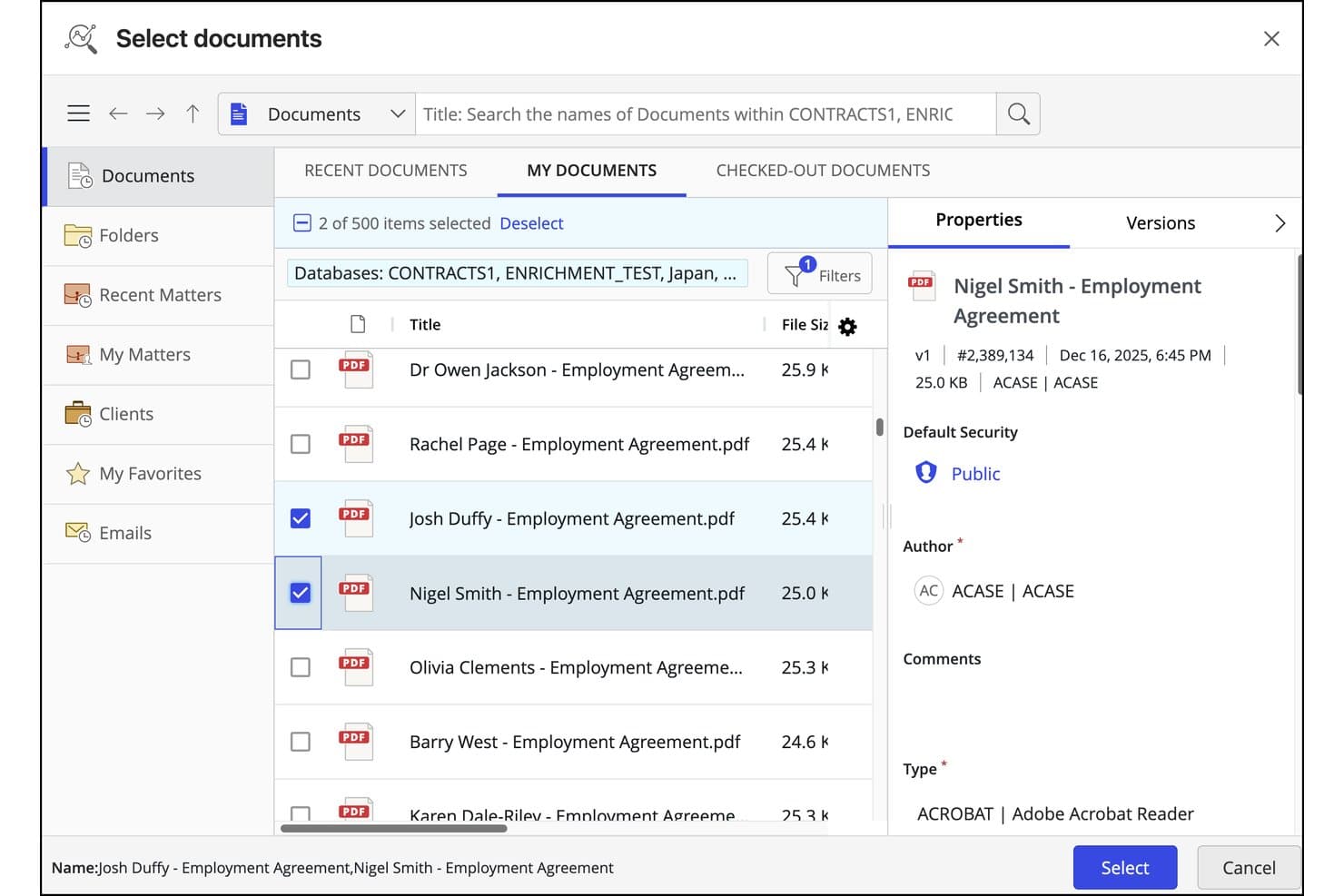
iManage Work permite a los usuarios seleccionar y comparar varios documentos en paralelo. iManage Work es un sistema de gestión de documentos y correos electrónicos jurídicos (DMS) con comparación de documentos integrada mediante su herramienta nativa Compare basada en Office y análisis de cambios impulsado por IA a través de Ask iManage.
¿Para quién es más adecuado iManage Work?
iManage Work es una opción muy adecuada para bufetes de abogados y equipos jurídicos que ya utilizan iManage como su DMS y desean integrar la comparación de documentos en la misma plataforma donde gestionan sus asuntos.
Por qué elegí iManage Work
He incluido iManage Work entre mis opciones principales porque es la única herramienta de esta lista que integra la comparación de documentos directamente en un DMS completo, por lo que no es necesario cambiar de plataforma para comparar versiones. Me gusta especialmente el análisis de cambios con IA de Ask iManage, lanzado en enero de 2026: genera documentos de cambios exportables en Word o PDF con una tabla de cambios estructurada, resúmenes en lenguaje sencillo y una categorización de riesgos que separa las modificaciones sustantivas del ruido de formato. Esta última parte es importante al revisar un contrato con muchos cambios marcados y tener que identificar las modificaciones a nivel de cláusula que realmente implican un riesgo jurídico.
Funciones principales de iManage Work
- Comparación de versiones desde el DMS: Selecciona directamente cualquier par de versiones guardadas de un documento desde el historial de versiones de iManage y ejecuta una comparación sin descargar copias locales.
- Análisis mediante guías de negociación: Comprueba los contratos con las posiciones previamente aprobadas de tu organización para señalar las desviaciones respecto al lenguaje estándar.
- Tabla de cambios exportable: Ask iManage genera una tabla de cambios estructurada junto con el documento de cambios, que puedes exportar a Word o Excel y guardar de nuevo en el expediente del asunto.
- Integración con la cinta de Microsoft 365: Ejecuta comparaciones y accede directamente a Ask iManage desde la cinta de iManage dentro de Word, PowerPoint y Excel sin cambiar de aplicación.
Integraciones de iManage Work
iManage Work ofrece integraciones nativas con Microsoft 365, incluidas Word, PowerPoint, Excel, Outlook, Teams y Copilot. También proporciona una API abierta, un conector de Power Automate y más de 200 integraciones con socios tecnológicos, incluidas Litera, Draftable y Diffchecker.
Pros and Cons
Pros:
- Compara versiones guardadas dentro de los flujos de trabajo de los asuntos
- La IA prioriza las modificaciones sustantivas de las cláusulas
- Exporta documentos de cambios y tablas de cambios estructuradas
Cons:
- No ofrece compatibilidad nativa con la comparación por lotes
- Los documentos escaneados requieren herramientas independientes
Learn more about iManage Work: La mejor opción para un visor de comparación fácil de navegar
- Prueba gratuita de 5 días
- Desde $10.75/usuario/mes
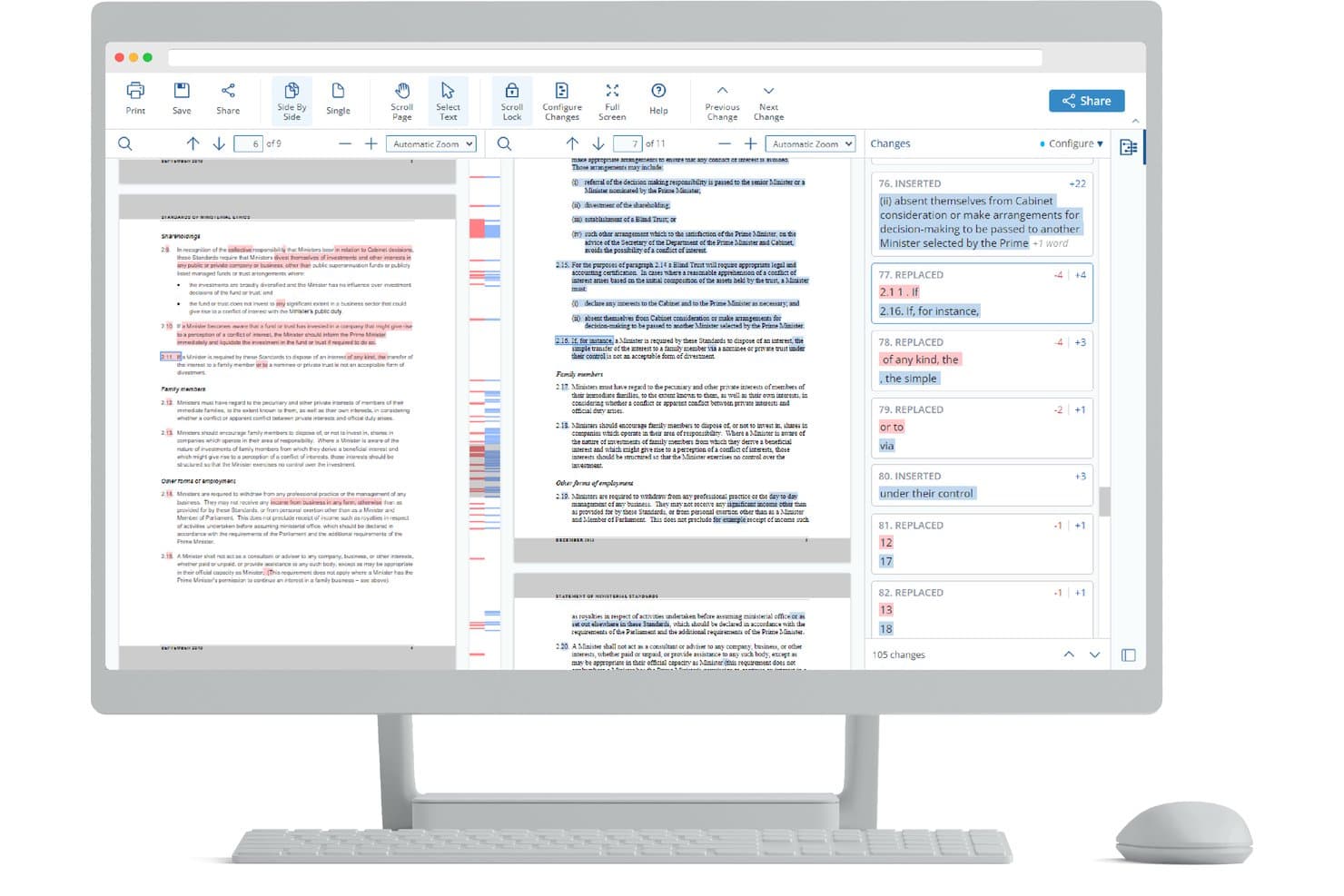
Draftable resalta los cambios registrados en paralelo para la revisión de documentos legales. Draftable es una herramienta de comparación de documentos para escritorio de Windows, diseñada para bufetes de abogados, que admite el control de cambios, la comparación en varios formatos de Word, PDF, PowerPoint y Excel, así como resultados específicos para el ámbito legal, como tablas de desviaciones y comparación masiva.
¿Para quién es más adecuado Draftable?
Draftable es una opción excelente para bufetes de abogados y equipos jurídicos que desean una herramienta de comparación de documentos que los abogados y asistentes legales puedan aprender a usar sin capacitación formal.
Por qué elegí Draftable
Draftable merece un lugar en mi lista de opciones porque el visor de comparación es, sinceramente, uno de los más claros que he utilizado. Me encanta que puedas cambiar entre las vistas en paralelo, integrada y de 3 paneles sin perder tu posición, y que la lista de cambios filtrable te permita etiquetar y anotar ediciones individuales antes de incorporarlas a una exportación de tabla de desviaciones. El menú desplegable 'Ajustar comparación' es un detalle pequeño pero importante: puedes intercambiar las versiones de los archivos o cambiar tu perfil de control de cambios sin cerrar el visor ni empezar de nuevo.
Características principales de Draftable
- Comparación masiva: Ejecuta cientos de comparaciones a la vez en los modos Pares, Uno a muchos o Línea de tiempo, con resultados exportables como una tabla de desviaciones combinada.
- Control de cambios en el correo electrónico: Muestra los cambios de los hilos de correo electrónico directamente dentro de Outlook, con compatibilidad para aceptar todo, rechazar todo y buzones compartidos.
- Perfiles de control de cambios: Permite a los bufetes personalizar el color, el resaltado y el estilo del texto para cada tipo de cambio, con perfiles que los administradores pueden bloquear mediante la Directiva de grupo.
- Exportación de cambios preparada para IA: Genera un resumen de texto procesado localmente de las inserciones, eliminaciones y movimientos para pegarlo en herramientas de IA como Copilot, Harvey o CoCounsel.
Integraciones de Draftable
Draftable ofrece integraciones nativas con iManage, NetDocuments, SharePoint, Worldox, Epona 365, Microsoft Office y Outlook. Su API REST admite integraciones personalizadas, con opciones de implementación alojada y autoalojada.
Pros and Cons
Pros:
- Navegación sencilla entre tres vistas de comparación
- La detección de texto movido aclara el lenguaje contractual reubicado
- La comparación masiva admite revisiones legales de gran volumen
Cons:
- La compatibilidad con el escritorio de Windows excluye a los usuarios de macOS
- La eliminación de metadatos requiere un producto independiente
Learn more about Draftable: Ideal para comparaciones con control de cambios entre formatos durante una prueba gratuita
- Plan gratuito disponible; prueba gratuita de 14 días
- Desde $20/usuario/mes (facturado anualmente)
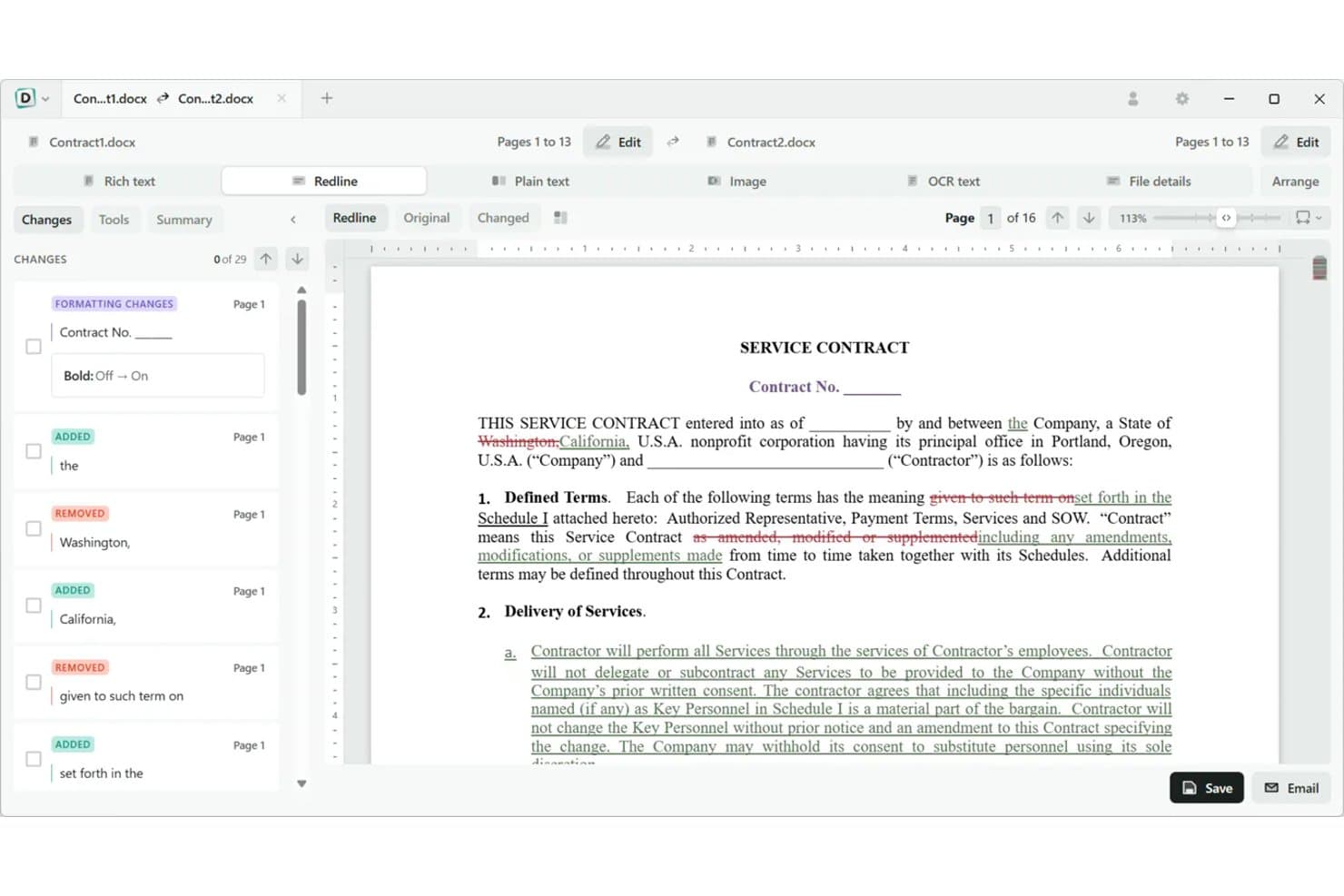
Diffchecker resalta el texto añadido, eliminado y con formato lado a lado. Diffchecker es una herramienta de comparación de documentos que admite el marcado de cambios entre formatos en Word, PDF, Excel, PowerPoint y archivos escaneados, con exportación de cambios controlados y resultados de marcado personalizables.
¿Para quién es más adecuado Diffchecker?
Diffchecker es adecuado para responsables de contratos y pequeños equipos jurídicos que necesitan comparar documentos en varios formatos —Word, PDF y Excel— sin comprometerse con un costoso contrato empresarial.
Por qué elegí Diffchecker
He incluido Diffchecker entre mis principales opciones porque gestiona la comparación entre formatos mejor que la mayoría de las herramientas de este rango de precios, lo que permite realizar un marcado de cambios entre Word y PDF sin preparativos de reformateo. Me gusta especialmente la exportación nativa de cambios controlados de Word, ya que el marcado de cambios que produces en Diffchecker se incorpora correctamente a un borrador de contrato que tu contraparte puede revisar. La aplicación de escritorio sin conexión también permite comparar archivos PDF escaneados y procesados mediante OCR sin que los archivos lleguen a tocar un servidor.
Características principales de Diffchecker
- Comparación de documentos entre formatos: Compara archivos de Word, PDF, Excel, PowerPoint y PDF escaneados en cualquier combinación sin tener que reformatearlos primero.
- Detección de contenido movido: Identifica el texto que se ha reubicado dentro de un documento, no solo el que se ha añadido o eliminado, para que ningún cambio pase desapercibido durante una revisión.
- Comparación por lotes y de carpetas: Compara cientos de archivos a la vez mediante la comparación recursiva de carpetas, disponible en los planes de escritorio.
- Estilos de marcado de cambios personalizables: Define colores, estilos de texto y perfiles de configuración guardados para que los resultados de marcado de tu equipo sean uniformes en todos los asuntos.
Integraciones de Diffchecker
Diffchecker cuenta con integraciones documentadas con iManage Cloud, Microsoft Word y Git; el complemento de Word y la integración con Git están disponibles en el plan empresarial. También ofrece una API y una CLI para flujos de trabajo personalizados.
Pros and Cons
Pros:
- Compara archivos de Word, PDF, Excel e imágenes
- Exporta cambios controlados nativos de Word
- Detecta contenido movido y cambios de formato
Cons:
- No ofrece clasificación a nivel de cláusula
- Ofrece una profundidad limitada para los flujos de trabajo jurídicos
Learn more about Diffchecker: La mejor opción para marcar cambios en contratos comparándolos con los precedentes del bufete
- Demostración gratuita disponible
- Precio previo a solicitud
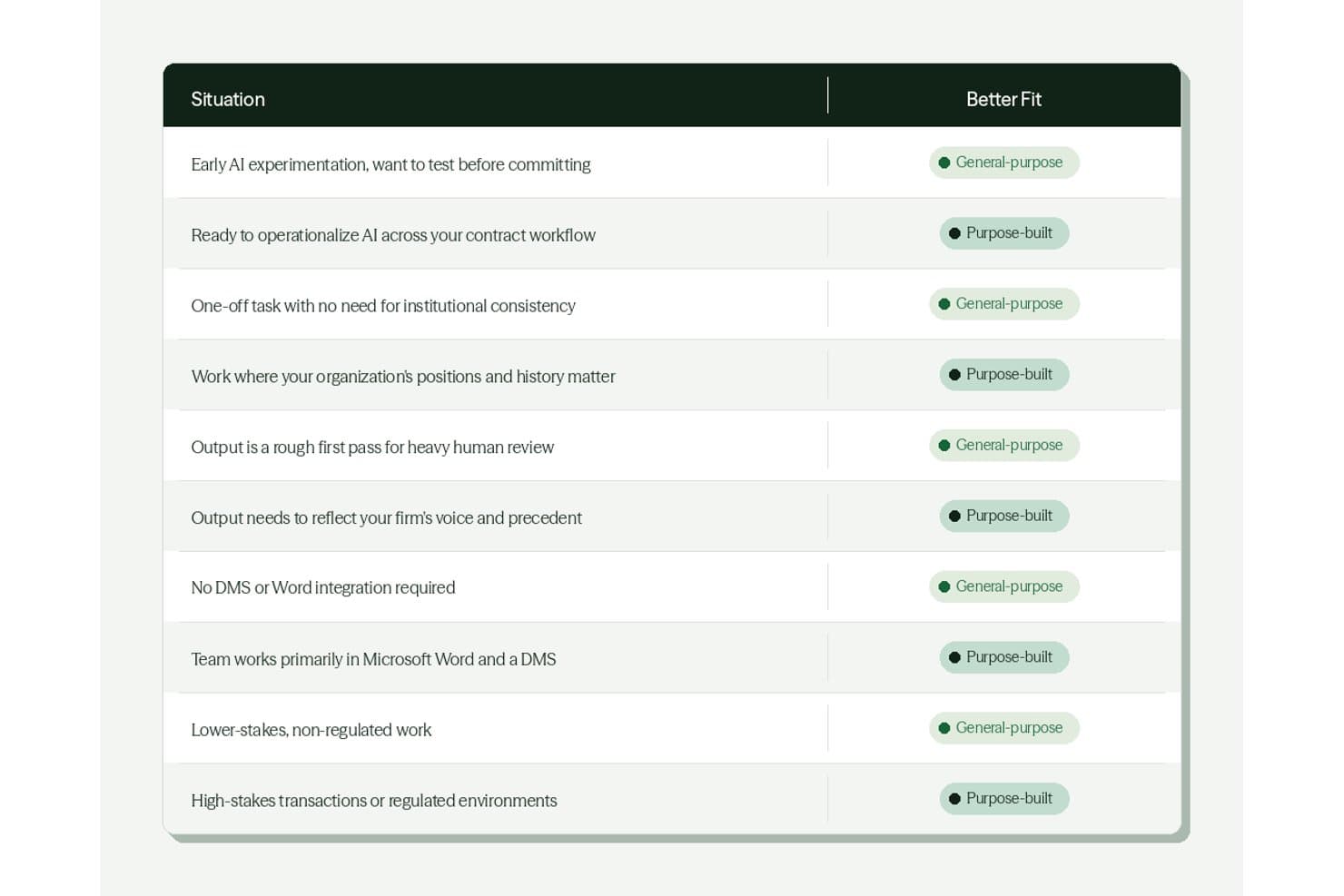
DraftWise guía a los usuarios hacia la herramienta de IA adecuada según su situación. DraftWise es una plataforma de IA para la redacción y revisión de contratos que compara las cláusulas con los precedentes del bufete, señala las desviaciones respecto de las posiciones preferidas y genera versiones con cambios directamente dentro de Microsoft Word.
¿Para quién es más adecuado DraftWise?
DraftWise es adecuado para abogados transaccionales de grandes bufetes que necesitan una revisión contractual basada en IA y fundamentada en el historial de operaciones propio del bufete.
Por qué elegí DraftWise
Elegí DraftWise como uno de los mejores porque hace algo que ninguna herramienta genérica de comparación hace: marca los cambios de tu contrato comparándolo con el historial de operaciones de tu propio bufete, no solo con un estándar en blanco. La herramienta de marcado señala las desviaciones de las cláusulas respecto de las posiciones preferidas y propone versiones con cambios generadas por IA directamente en Word. AI Associate va más allá y marca acuerdos completos, indicando una fuente de precedente citada para cada sugerencia.
Funciones principales de DraftWise
- Comprobador de hojas de términos: Compara automáticamente un borrador de acuerdo con una hoja de términos cargada para señalar discrepancias en todo el documento.
- Detección de términos definidos: Identifica definiciones que faltan, señala términos incoherentes e inserta las definiciones necesarias directamente en Word.
- Tabla de operaciones: Extrae obligaciones, fechas de renovación, calendarios de pagos y patrones de riesgo de grandes conjuntos de acuerdos formalizados.
- Replicación de permisos del DMS: Replica los controles de acceso y las barreras éticas del sistema de gestión documental dentro del entorno de DraftWise.
Integraciones de DraftWise
DraftWise se integra con Microsoft Word, iManage, NetDocuments, SharePoint, Google Drive, DocuSign y Outlook. Las integraciones del Marketplace incluyen Egnyte y Okta, con replicación de permisos del DMS y aplicación de barreras éticas.
Pros and Cons
Pros:
- Las versiones con cambios basadas en precedentes reflejan las posiciones del bufete
- Las comprobaciones a nivel de cláusula detectan errores en los términos definidos
- Las sugerencias citadas facilitan la revisión por parte del abogado
Cons:
- No cuenta con un motor documentado de comparación de caja negra de dos versiones
- La comparación de PDF y documentos escaneados sigue sin estar disponible
Learn more about DraftWise:
Otros programas de comparación de documentos legales
A continuación, encontrarás una lista de programas adicionales de gestión de despachos jurídicos que incluí en mi lista final, pero que no llegaron a estar entre los 10 primeros. Sin duda, merece la pena echarles un vistazo.
- 11RecitalLa mejor opción para el marcado de cambios interno impulsado por el motor de Litera
- 12DocStyle CompareIdeal para el marcado de cambios nativo de Word con integración con sistemas de gestión documental
- 13CongaMejor para la automatización integral de documentos legales
Cómo evalúo el software de comparación de documentos legales
Divido mi evaluación en tres partes. La primera —y la que tiene mayor peso— es la funcionalidad principal: ¿puede la herramienta detectar de forma fiable todos los cambios de texto, formato y estructura, y gestionar archivos de Word, PDF y documentos escaneados sin perder resultados? Después analizo funciones destacadas, como la detección de texto movido. Por último, considero la reputación del proveedor, las garantías de privacidad de los datos y la transparencia de los precios.
Funcionalidad principal (requisitos básicos para esta lista)
Al seleccionar herramientas para mi lista, califico cada una en una escala de 0 (no ofrece la funcionalidad) a 5 (sobresale en esta área) para cada una de las funcionalidades principales que se indican a continuación. Después convierto el total en un porcentaje para ayudar a evaluar la adecuación general de cada herramienta, con un peso adicional para cualquier funcionalidad que haya considerado esencial.
- Precisión en la comparación de versiones (esencial): Compruebo si la herramienta detecta todos los cambios de texto, formato y estructura, incluso en documentos ampliamente revisados con cláusulas reordenadas.
- Compatibilidad con múltiples formatos (esencial): Evalúo la fiabilidad con la que cada herramienta compara archivos de Word, PDF y documentos escaneados, ya que la parte contraria rara vez devuelve el mismo formato que se le envió.
- Resultado con control de cambios y marcas: El control de cambios debe ser lo bastante claro como para compartirlo con clientes o colegas sin necesidad de limpiarlo, por lo que analizo las opciones de personalización y resumen.
- Detección a nivel de metadatos y cláusulas: Busco la identificación detallada de cambios en los metadatos, modificaciones en objetos incrustados y ediciones a nivel de párrafo que hagan visibles revisiones ocultas.
- Integración con la gestión documental: Las herramientas que se conectan directamente con plataformas como iManage, NetDocuments u Outlook permiten comparar versiones sin salir del flujo de trabajo, algo que tengo en cuenta aquí.
Una vez que tengo una lista de herramientas que cumplen los criterios, considero qué distingue a cada plataforma.
Factores diferenciadores (lo que distingue a los proveedores)
Así es como comparo y contrasto distintos proveedores:
Funciones destacadas
La detección de texto movido es lo que más me importa. Durante la diligencia debida de operaciones de M&A, he visto cláusulas de indemnización completas trasladadas entre secciones; las herramientas sin esta función las señalan como eliminaciones e inserciones independientes, ocultando el cambio real. También evalúo cómo gestiona cada herramienta los bloques de firma y las tablas, ya que estos se alteran fácilmente en las comparaciones. La comparación por lotes es otro factor diferenciador; revisar cientos de modificaciones de contratos de arrendamiento de dos en dos no es realista dentro de los plazos de una operación.
Más allá de las funciones
Evalúo si un proveedor ofrece una implementación local o en una nube privada, ya que los despachos que gestionan asuntos sujetos a secreto profesional a menudo no pueden canalizar documentos a través de una infraestructura compartida. La transparencia de las licencias también es importante: compruebo si el precio se calcula por usuario, dispositivo o despacho completo, porque los costes ocultos por puesto se acumulan rápidamente al incorporar a un equipo en crecimiento. También analizo hasta qué punto cada proveedor respalda la implementación en un despacho, incluidos los recursos de formación específicos y la configuración de la integración con el sistema de gestión documental, sin interrumpir los flujos de trabajo existentes de los abogados.
Cómo elegir un programa de comparación de documentos legales
Es fácil perderse entre largas listas de funciones y estructuras de precios complejas. Para ayudarte a mantener la atención mientras avanzas en tu proceso único de selección de software, aquí tienes una lista de factores que debes tener en cuenta:
| Factor | Qué considerar |
|---|---|
| FactorEscalabilidad | Qué considerar¿Puede el software crecer junto con su empresa? Considere si admite el número de usuarios que espera tener dentro de unos años. Busque opciones que puedan gestionar un mayor volumen de documentos. |
| FactorIntegraciones | Qué considerar¿Se conecta con sus herramientas actuales, como los sistemas de gestión documental o el almacenamiento en la nube? Asegúrese de que encaje en su flujo de trabajo actual sin causar interrupciones. |
| FactorPersonalización | Qué considerar¿Puede adaptar el software para satisfacer sus necesidades específicas? Busque opciones que le permitan ajustar la configuración o crear informes personalizados. |
| FactorFacilidad de uso | Qué considerar¿La interfaz es intuitiva para su equipo? Pruebe el software para comprobar si es fácil de utilizar sin necesidad de una formación extensa. |
| FactorImplementación e incorporación | Qué considerar¿Cuánto tiempo se tardará en ponerlo en funcionamiento? Compruebe si el proveedor ofrece recursos de formación y asistencia durante la fase de transición. |
| FactorCoste | Qué considerar¿El precio se ajusta a su presupuesto? Tenga en cuenta las tarifas ocultas o los costes de las funciones adicionales. Compare con herramientas similares para asegurarse de obtener una buena relación calidad-precio. |
| FactorMedidas de seguridad | Qué considerar¿Están protegidos sus documentos? Asegúrese de que el software cumpla las normas de protección de datos y ofrezca cifrado. |
| FactorDisponibilidad del soporte | Qué considerar¿Hay ayuda disponible cuando la necesita? Busque proveedores que ofrezcan asistencia las 24 horas del día, los 7 días de la semana, y varios métodos de contacto, como chat y teléfono. |
¿Qué es el software de comparación de documentos jurídicos?
El software de comparación de documentos jurídicos es una herramienta esencial para los profesionales del ámbito jurídico, incluidos abogados, asistentes jurídicos y departamentos jurídicos de organizaciones. Está diseñado para identificar y resaltar las diferencias entre dos o más documentos jurídicos, como contratos, acuerdos o formularios legales.
El software simplifica la tarea, a menudo tediosa, de comparar documentos manualmente, que puede estar sujeta a errores humanos. Esto resulta especialmente útil al revisar versiones de documentos jurídicos, identificar cambios no autorizados o garantizar el cumplimiento de las normas legales. Esta tecnología no solo ahorra tiempo, sino que también mejora significativamente la precisión y la eficiencia en el proceso de revisión de documentos jurídicos.
Funciones
Al seleccionar un software de comparación de documentos jurídicos, preste atención a las siguientes funciones clave:
- Detección de cambios: Identifica y resalta automáticamente los cambios entre las versiones de los documentos, asegurándose de que no se pase nada por alto.
- Compatibilidad con varios formatos: Permite comparar documentos en distintos formatos, lo que ofrece flexibilidad en la gestión documental.
- Comparación en paralelo: Muestra los documentos uno junto al otro para facilitar la comparación visual y mejorar la precisión.
- Capacidades de integración: Se conecta con herramientas existentes, como los sistemas de gestión documental, para mejorar la eficiencia del flujo de trabajo.
- Informes personalizables: Genera informes adaptados a necesidades específicas de documentación jurídica, lo que facilita el análisis personalizado.
- Colaboración en tiempo real: Permite que varios usuarios trabajen simultáneamente en los documentos, fomentando el trabajo en equipo y la productividad.
- Funciones de seguridad: Proporciona cifrado y cumplimiento de las normas de protección de datos, protegiendo la información confidencial.
- Interfaz fácil de usar: Ofrece un diseño intuitivo que reduce la curva de aprendizaje y facilita el acceso a todos los miembros del equipo.
- Acceso desde dispositivos móviles: Permite comparar documentos en dispositivos móviles, lo que resulta práctico para los profesionales que trabajan en movilidad.
- Análisis basados en IA: Utiliza inteligencia artificial para proporcionar un análisis y una perspectiva más profundos, mejorando la toma de decisiones.
Ventajas
La implementación de un software de comparación de documentos jurídicos ofrece varias ventajas para su equipo y su empresa. Estas son algunas de las que puede esperar:
- Mayor precisión: La detección automática de cambios reduce el riesgo de pasar por alto ediciones importantes y garantiza la precisión.
- Ahorro de tiempo: Funciones como la comparación en paralelo agilizan el proceso de revisión y liberan tiempo para otras tareas.
- Colaboración mejorada: Las herramientas de colaboración en tiempo real permiten que los miembros del equipo trabajen juntos de forma eficiente y mejoran el trabajo en equipo.
- Mayor seguridad: Las funciones de seguridad integradas protegen la información confidencial y le ofrecen tranquilidad.
- Flexibilidad: La compatibilidad con varios formatos permite gestionar distintos tipos de documentos y adaptarse a diferentes necesidades jurídicas.
- Comodidad: El acceso desde dispositivos móviles garantiza que pueda revisar documentos en cualquier momento y lugar, mejorando la productividad.
- Mejor toma de decisiones: El análisis basado en IA proporciona una perspectiva más profunda y respalda decisiones jurídicas fundamentadas.
Costes y precios
Seleccionar un software de comparación de documentos legales requiere comprender los distintos modelos de precios y planes disponibles. Los costes varían en función de las características, el tamaño del equipo, los complementos y otros factores.
La siguiente tabla resume los planes habituales, sus precios medios y las características típicas incluidas en las soluciones de software de comparación de documentos legales:
Tabla comparativa de planes para software de comparación de documentos legales
| Tipo de plan | Precio medio | Características habituales |
|---|---|---|
| Tipo de planPlan gratuito | Precio medio$0 | Características habitualesDetección básica de cambios, formatos de documentos limitados y almacenamiento restringido |
| Tipo de planPlan personal | Precio medio$10-$30/usuario/mes | Características habitualesDetección de cambios, compatibilidad con varios formatos y funciones básicas de generación de informes. |
| Tipo de planPlan empresarial | Precio medio$30-$60/usuario/mes | Características habitualesHerramientas avanzadas de comparación, capacidades de integración y funciones de seguridad mejoradas. |
| Tipo de planPlan para empresas | Precio medio$60-$100/usuario/mes | Características habitualesPersonalización completa, colaboración en tiempo real, asistencia especializada y medidas de seguridad integrales |
Preguntas frecuentes sobre el software de comparación de documentos legales
Estas son algunas respuestas a preguntas habituales sobre el software de comparación de documentos legales:
¿Puedo utilizar un software de comparación de documentos legales en dispositivos móviles?
Sí, muchas herramientas de comparación de documentos legales son compatibles con dispositivos móviles. Algunas tienen aplicaciones móviles específicas, mientras que otras ofrecen interfaces web adaptadas a dispositivos móviles. Esto garantiza que pueda revisar documentos desde cualquier lugar. Si el acceso móvil es importante para su flujo de trabajo, confirme que el software es compatible con su dispositivo antes de contratarlo.
¿Qué nivel de seguridad tienen mis datos con un software de comparación de documentos legales?
La seguridad de los datos varía según el software, pero la mayoría de las herramientas de confianza incluyen cifrado y controles de acceso. Compruebe siempre las funciones de seguridad y las normas de cumplimiento, como el RGPD o HIPAA. Si gestiona información confidencial, dé prioridad a un software con medidas de seguridad sólidas para proteger sus datos frente a accesos no autorizados.
¿Necesito formación para utilizar un software de comparación de documentos legales?
La mayoría de los programas están diseñados para ser fáciles de usar, aunque cierta formación puede resultar útil. Muchos proveedores ofrecen tutoriales, guías y asistencia al cliente para ayudarle a empezar. Si no tiene experiencia con este tipo de software, aproveche los recursos disponibles para garantizar una transición fluida y un uso eficaz.
¿Puede el software de comparación de documentos legales integrarse con mi flujo de trabajo actual?
Sí, la mayoría de las soluciones modernas se integran con sistemas de gestión documental, plataformas de correo electrónico y servicios de almacenamiento en la nube para facilitar la colaboración y el control de versiones.
¿Es el software de comparación de documentos legales adecuado tanto para equipos jurídicos pequeños como para grandes bufetes?
Sí, muchas plataformas se adaptan al número de usuarios y a las necesidades de almacenamiento, y ofrecen soporte tanto para profesionales que trabajan por cuenta propia como para equipos jurídicos internos y grandes bufetes de abogados.