

Gestionar documentos jurídicos puede ser una tarea abrumadora. Es posible que te encuentres ahogado entre papeles y tengas dificultades para mantenerlo todo organizado y accesible. Ahí es donde entra en juego el software de gestión de documentos jurídicos. Estas herramientas están diseñadas para ayudarte a ti y a tu equipo a gestionar documentos de forma eficiente, garantizando el cumplimiento normativo y ahorrando tiempo.
Llevo años investigando y probando estas soluciones. Comprendo los desafíos a los que te enfrentas en el sector de la práctica jurídica. En este artículo, compartiré mis principales opciones de software de gestión de documentos jurídicos. Encontrarás reseñas imparciales y bien documentadas que te ayudarán a tomar una decisión. Tanto si buscas funciones específicas como facilidad de uso general, aquí hay algo para todos.
Por qué confiar en nuestras recomendaciones de software
6,700+
Reviews
20
Industry experts
16+
Evaluation factors
14
Years
Nuestro equipo lleva probando y evaluando software desde 2012. Como líderes de despachos jurídicos, sabemos lo difícil —y lo importante— que es elegir el software adecuado.
Para esta guía, evaluamos las herramientas mediante pruebas prácticas e investigación independiente, puntuando las herramientas según nuestros criterios de selección.
Nuestras reseñas reflejan nuestro criterio editorial humano, no un discurso de ventas.
Resumen del mejor software de gestión de documentos jurídicos
\u003cspan style=\u0022font-weight: 400\u0022\u003eEsta tabla comparativa resume los detalles de precios de mis principales opciones de software de gestión de documentos jurídicos para ayudarte a encontrar la mejor para tu presupuesto y las necesidades de tu empresa.\u003c/span\u003e
| Tool | Best For | Trial Info | Price | ||
|---|---|---|---|---|---|
| 1 | Ideal para la automatización de tareas diarias | Sí | $39/usuario/mes | Website | |
| 2 | Ideal para conservar un historial de registros de RR. HH. que pueda respaldarse legalmente | Demostración gratuita disponible | Precios disponibles previa solicitud | Website | |
| 3 | La mejor integración con Microsoft 365 | Prueba gratuita disponible | Desde $4.95/usuario/mes (facturación anual) | Website | |
| 4 | Ideal para gestión inteligente de casos | Demostración gratuita disponible | Precio según solicitud | Website | |
| 5 | Mejor para la redacción asistida por IA de documentos | Sí | Desde $83/usuario/mes (facturado anualmente) | Website | |
| 6 | Ideal para la gestión integral de la práctica legal | Sí | $39/usuario/mes | Website | |
| 7 | Mejor para gestión de comunicación con clientes | No | $49/usuario/mes | Website | |
| 8 | Ideal para una gestión sólida de casos | No | Precios según cotización | Website | |
| 9 | Mejor para almacenamiento seguro de documentos | Prueba gratuita + demo disponible | Desde $69/usuario/mes | Website | |
| 10 | Ideal por sus funciones de contabilidad integradas | No | $79/user/month | Website |


Reseña del mejor software de gestión de documentos jurídicos
\u003cspan style=\u0022font-weight: 400\u0022\u003eA continuación se incluyen mis resúmenes detallados del mejor software de gestión de documentos jurídicos que llegó a mi selección. Mis reseñas ofrecen un análisis detallado de las funciones principales, ventajas y desventajas, integraciones y casos de uso ideales de cada herramienta para ayudarte a encontrar la mejor opción para ti.\u003c/span\u003e


La función de portal para clientes de PracticePanther es donde puedes brindar a tus clientes una visión clara del progreso de su caso PracticePanther ofrece a los profesionales legales una plataforma centralizada para gestionar documentos, comunicaciones y detalles de casos. Su interfaz intuitiva y herramientas de flujo de trabajo están diseñadas para despachos de abogados que buscan reducir el trabajo manual y mejorar la organización digital.
¿Para quién es mejor PracticePanther?
PracticePanther es adecuado para despachos de abogados pequeños y medianos, así como para profesionales independientes que deseen digitalizar y automatizar sus flujos de trabajo de documentos legales.
Por qué elegí PracticePanther
Elegí PracticePanther por la profundidad de su automatización de tareas, lo que reduce directamente la carga administrativa de los equipos legales. Su automatización de flujos de trabajo permite configurar tareas, eventos y listas de verificación que se activan automáticamente a medida que un asunto avanza en cada etapa, de modo que tu equipo no tenga que crear manualmente los pasos de seguimiento después de cada incorporación de un cliente o actualización de un caso. También aprecio la función de creación masiva de documentos, que permite generar, editar y enviar múltiples documentos legales en una sola sesión utilizando plantillas prediseñadas que completan automáticamente los datos de contacto y del asunto. Para despachos que gestionan un alto volumen de documentos, solo eso ya reduce significativamente el tiempo no facturable en la jornada.
Características clave de PracticePanther
- Formularios de incorporación de clientes: Recoge información de contacto y detalles del caso a través de formularios automatizados y personalizados desde que se abre un nuevo asunto.
- Firma electrónica: Envía documentos para firma electrónica y almacena las copias firmadas directamente en PracticePanther sin necesidad de herramientas de terceros.
- Permisos basados en roles: Asigna roles de acceso específicos para controlar qué miembros del equipo pueden ver o editar datos confidenciales de asuntos y clientes.
- Mensajería empresarial bidireccional: Envía y recibe mensajes de texto con los clientes directamente desde la plataforma, registrados junto con otras comunicaciones del asunto.
Integraciones de PracticePanther
Las integraciones incluyen Outlook, Gmail, Google Drive, OneDrive, Box, Dropbox, QuickBooks, Lawmatics, WealthCounsel y Smith.ai.
Pros and Cons
Pros:
- Fuerte enfoque en la automatización
- Funciones completas de gestión de casos
- Integración perfecta con varias aplicaciones
Cons:
- No hay un plan gratuito permanente, solo una prueba de 7 días
- La interfaz puede resultar abrumadora para usuarios primerizos
- Costo más alto en comparación con algunas alternativas
Learn more about PracticePanther: Ideal para conservar un historial de registros de RR. HH. que pueda respaldarse legalmente
- Demostración gratuita disponible
- Precios disponibles previa solicitud
Visit WebsiteCustomer Rating:5/5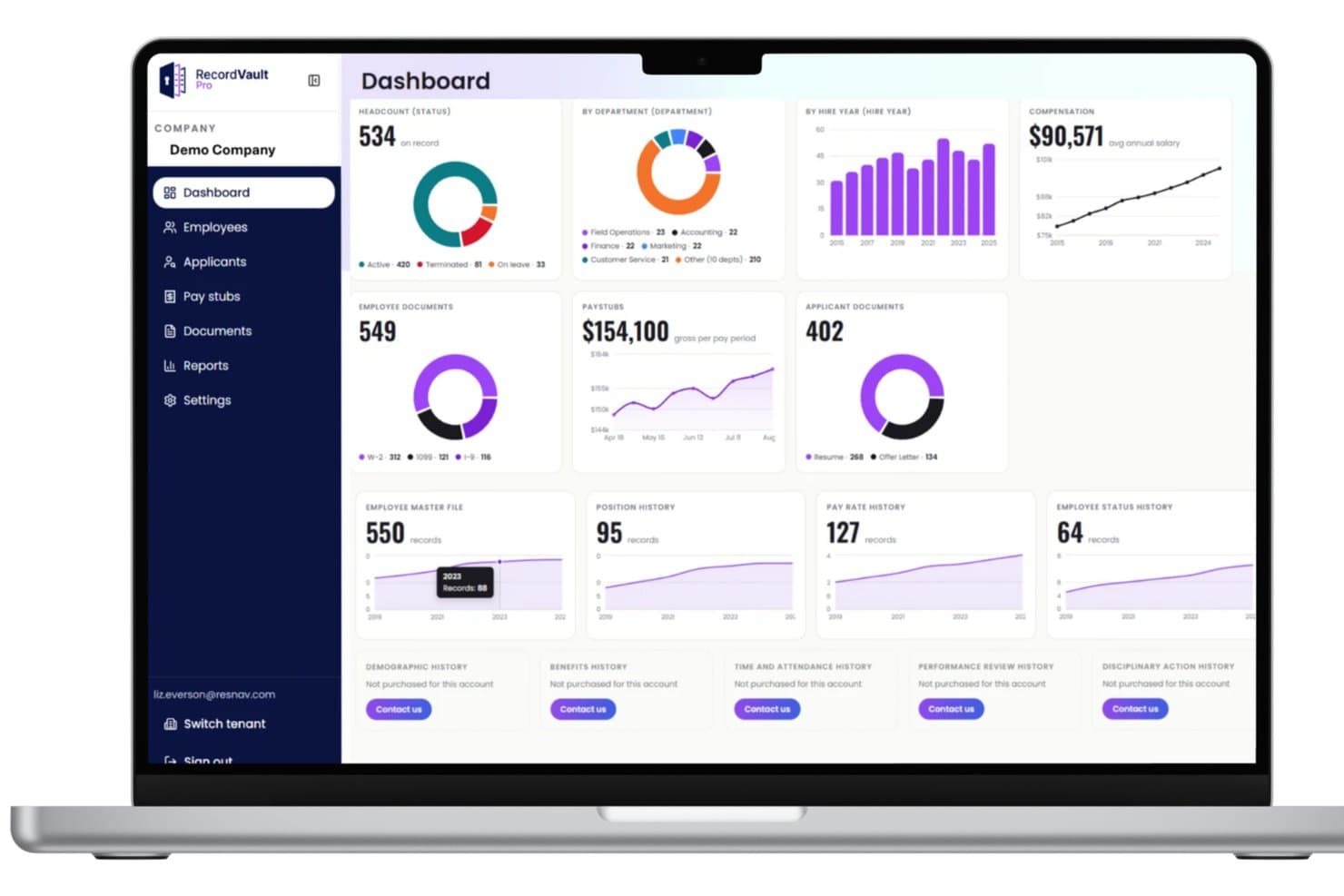
El panel de RecordVault centraliza métricas de RR. HH. como el número de empleados, los salarios y los documentos. El enlace History Link de ResNav ofrece a los equipos legales y de RR. HH. una solución especializada para gestionar y rastrear registros laborales confidenciales. Su enfoque en mantener historiales documentales detallados y con evidencia de manipulación resulta atractivo para las organizaciones que necesitan pistas de auditoría fiables para el cumplimiento normativo y la resolución de disputas.
¿Para quién es más adecuado ResNav?
Profesionales de RR. HH. y del ámbito legal en industrias reguladas que necesitan mantener registros seguros y auditables de las acciones y la documentación laborales.
Por qué elegí ResNav
Elegí History Link porque resuelve un problema específico que las exportaciones de archivos planos simplemente no pueden resolver: mantener registros de RR. HH. y nóminas inalterados y auditables después de una transición de sistema. Aprecio que la plataforma conserve datos estructurados, no solo instantáneas puntuales, para que registros como el historial de tarifas salariales, los cambios de estado de los empleados y el historial de prestaciones permanezcan intactos y puedan consultarse. En la práctica, eso significa que mi equipo puede obtener un registro laboral completo y sin manipular durante una disputa salarial o una auditoría normativa, sin tener que reconstruir apresuradamente los datos a partir de un archivo CSV. La arquitectura basada en Azure también garantiza que los registros almacenados cumplan los requisitos de conservación locales, estatales y federales en distintas jurisdicciones.
Características principales de History Link
- Portal de registros consultable: Consulta datos estructurados de RR. HH. y nóminas, incluidos recibos de nómina, informes fiscales e historial de prestaciones, directamente dentro de la plataforma sin exportar archivos.
- Conservación de datos multinivel: Almacena registros tanto a nivel del empleado como de la empresa, cubriendo el historial de puestos, los cambios de estado y la información sobre las prestaciones de las personas dependientes.
- Informes conjuntos con proveedores de HRIS y nóminas: Se integra con los sistemas existentes de nóminas y HRIS para permitir informes entre plataformas desde un único archivo histórico.
- Cumplimiento de la conservación específica de cada estado: Rastrea y aplica reglas de conservación específicas de cada jurisdicción en estados como Nueva York, California e Illinois dentro de la misma plataforma.
Integraciones de History Link
Actualmente no se indican integraciones nativas.
Pros and Cons
Pros:
- El portal centraliza los documentos necesarios para auditorías e investigaciones.
- El repositorio consultable proporciona acceso rápido a los registros laborales durante los casos.
- La estructura de archivo precisa preserva la integridad de la documentación para su revisión legal.
Cons:
- La integración más allá de la extracción de archivos históricos puede requerir trabajo personalizado.
- No es un DMS de propósito general completo: se centra principalmente en registros de RR. HH. y nóminas.
Learn more about ResNav - RecordVault: La mejor integración con Microsoft 365
- Prueba gratuita disponible
- Desde $4.95/usuario/mes (facturación anual)

MacroView permite el registro y liberación segura de documentos para mantener el control de versiones. MacroView ofrece a los equipos legales y despachos de abogados una solución de gestión documental diseñada para funcionar de forma nativa dentro de entornos Microsoft. Resulta atractiva para organizaciones que buscan gestionar, buscar y organizar documentos legales directamente desde las herramientas conocidas de Microsoft 365, reduciendo así la fricción en los flujos de trabajo.
¿Para quién es mejor MacroView?
Profesionales del derecho y firmas legales que utilizan Microsoft 365 y necesitan funciones avanzadas de gestión documental y cumplimiento dentro de su ecosistema existente de Microsoft.
Por qué elegí MacroView
La profunda integración de MacroView con Microsoft 365 es lo que lo hace destacar para la gestión documental legal. Lo elegí porque los equipos legales pueden guardar documentos directamente desde Outlook, Word y Excel en SharePoint sin cambiar de aplicación: el archivado se realiza dentro de las herramientas que los abogados ya usan a diario. También destaco las reglas automatizadas de archivado de correos electrónicos, que permiten a mi equipo configurar lógicas para dirigir correos entrantes y salientes a las carpetas de cada asunto sin intervención manual. Además, la búsqueda potenciada por Copilot IA me permite filtrar en SharePoint por metadatos, tipo de documento o ubicación, encontrando un contrato o comunicación específica en segundos en vez de minutos.
Características clave de MacroView
- Historial de versiones y restauración: Seguimiento y recuperación de versiones anteriores de documentos almacenados en SharePoint directamente desde la interfaz del sistema de gestión documental.
- Archivado por arrastrar y soltar: Mueve documentos desde tu escritorio o explorador de archivos a carpetas de SharePoint sin abrir el navegador.
- Generación de documentos con plantillas de cumplimiento: Crea y personaliza plantillas de documentos que cumplen automáticamente con las normas regulatorias y mantienen la coherencia de la marca.
- Archivado masivo de correos electrónicos: Selecciona y archiva varios correos a la vez en las carpetas de asunto correctas, capturando metadatos durante el proceso.
Integraciones de MacroView
Las integraciones incluyen Microsoft SharePoint, Microsoft Teams, Microsoft OneDrive, Microsoft Outlook (clásico y nuevo), Microsoft Word, Microsoft Excel, Microsoft PowerPoint, Adobe Acrobat y Foxit Reader.
Pros and Cons
Pros:
- La captura automatizada de metadatos mejora la organización documental.
- La interfaz en estilo explorador de archivos simplifica la navegación del usuario.
- La integración total con Microsoft 365 mejora las herramientas existentes.
Cons:
- No es ideal para organizaciones que no usan productos Microsoft.
- El soporte limitado para aplicaciones móviles restringe la accesibilidad.
Learn more about MacroView: Ideal para gestión inteligente de casos
- Demostración gratuita disponible
- Precio según solicitud
Visit WebsiteCustomer Rating:4.8/5
Smokeball ofrece capacidades de gestión documental, reduciendo el tiempo dedicado a la redacción. Smokeball ofrece a los profesionales legales una plataforma diseñada para automatizar la gestión de casos y los flujos de trabajo de documentos. Los despachos que buscan reducir tareas manuales y mejorar la colaboración en diversos asuntos pueden encontrar especialmente útil su enfoque integrado de creación, seguimiento y comunicación de documentos.
¿Para Quién Es Mejor Smokeball?
Smokeball es ideal para despachos jurídicos pequeños y medianos que requieren una gestión centralizada de casos y automatización de documentos adaptada a los flujos de trabajo legales.
Por Qué Elegí Smokeball
La automatización de documentos legales de Smokeball es lo que más me atrae: cada contacto, parte e información de caso introducidos en la plataforma se rellenan automáticamente en los documentos, eliminando la necesidad de copiar y pegar manualmente en cada asunto. También valoro AutoTime, que registra en segundo plano el tiempo facturable mientras mi equipo redacta documentos y responde correos electrónicos, vinculando cada actividad directamente al asunto relevante. Además, la biblioteca automatizada de formularios legales incluye más de 20,000 plantillas de jurisdicciones federales, estatales y de condado, por lo que mi equipo no tiene que crear documentos desde cero. Para los despachos que gestionan grandes volúmenes de documentos, esa combinación hace que Smokeball sea una opción realmente práctica.
Características Clave de Smokeball
- Gestión de correos electrónicos: Registra y rastrea automáticamente cada correo electrónico según el asunto relacionado, proporcionando al equipo acceso a toda la correspondencia de un caso en un solo lugar.
- Portal para clientes: Permite a clientes y abogados intercambiar mensajes y documentos a través de un canal de comunicación seguro y dedicado.
- Calendario legal: Muestra fechas límite judiciales, reuniones con clientes y citas con vistas de semana, mes y cronológicas.
- Contabilidad fiduciaria: Gestiona cuentas de fondos en fideicomiso y anticipos con controles integrados de cumplimiento para mantener las finanzas del despacho en orden.
Integraciones de Smokeball
Las integraciones incluyen Microsoft Word, Microsoft Outlook, LawPay, Birdeye, VXT, CollBox, Aatrox Communications, Accounting Logic, AcroDocz y Activa Communications.
Pros and Cons
Pros:
- El seguimiento automático del tiempo ayuda a asegurar la precisión en la facturación.
- Integración fluida con Microsoft Word y Outlook.
- Potente automatización de documentos y biblioteca de formularios legales.
Cons:
- Los informes y análisis pueden no ser tan sólidos para despachos grandes.
- Personalización limitada de plantillas o flujos de trabajo para casos de uso muy específicos.
Learn more about Smokeball: Mejor para la redacción asistida por IA de documentos
- Sí
- Desde $83/usuario/mes (facturado anualmente)
Visit WebsiteCustomer Rating:4.9/5
Vista del constructor de aplicaciones de intake legal de Gavel. Gavel ofrece a los equipos legales y despachos de abogados una plataforma diseñada para automatizar y gestionar flujos de trabajo documentales complejos. Su enfoque en la automatización personalizable atrae a profesionales que buscan reducir la redacción manual, mejorar la precisión y garantizar el cumplimiento en entornos legales digitales.
¿Para quién es mejor Gavel?
Equipos de operaciones legales y despachos de abogados que necesitan automatizar la redacción de documentos complejos y optimizar procesos de flujo de trabajo.
Por qué elegí Gavel
Elegí Gavel porque sus capacidades de redacción asistida por IA van mucho más allá del simple llenado de plantillas. Con Gavel Exec, puedo marcar todo un contrato directamente en Microsoft Word usando playbooks personalizados que reflejan las posturas preferidas de mi equipo—sin necesidad de cambiar de herramienta. También valoro que Gavel Workflows use lógica condicional para adaptar la salida documental en función de las respuestas iniciales del cliente, por lo que documentos complejos como planes patrimoniales o acuerdos operativos se generan de forma precisa sin ediciones manuales. Para los equipos legales que gestionan grandes volúmenes de documentos, esa combinación de revisión impulsada por IA y redacción automatizada en una sola plataforma es difícil de igualar.
Funciones clave de Gavel
- Biblioteca de plantillas legales: Acceda a una colección predefinida de plantillas legales y formularios judiciales automatizados en áreas comunes de práctica, personalizables dentro de su cuenta de Workflows.
- Portal de registro de clientes cifrado: Recabe información sensible de clientes a través de un portal cifrado y personalizado que ingresa directamente a la generación de documentos.
- Comparación de cláusulas: Compare el idioma de las cláusulas contractuales con datos del mercado para identificar posiciones fuera de mercado antes de la negociación.
- Espacios de trabajo de equipo: Comparta proyectos, playbooks y archivos de asuntos entre su equipo con controles de acceso granulares que garantizan revisiones consistentes y colaborativas.
Integraciones de Gavel
Las integraciones incluyen Clio, DocuSign y Zapier, y Gavel también ofrece una API para integraciones personalizadas.
Pros and Cons
Pros:
- Se integra con Word, automatización de PDF, lógica condicional, cálculos.
- Potentes flujos de trabajo de captación de clientes y entrevistas guiadas incluidos.
- Automatización de documentos legales muy versátil sin código o con bajo código.
Cons:
- Centrada principalmente en la generación/automatización de documentos más que en la gestión del ciclo de vida completo (almacenamiento, archivo).
- Algunas integraciones o conexiones con Zapier son más débiles o limitadas.
Learn more about Gavel: 6Ideal para la gestión integral de la práctica legal
Clio
- Sí
- $39/usuario/mes
Visit WebsiteCustomer Rating:4.7/5
El panel de Clio muestra detalles de un asunto Clio ofrece a los profesionales jurídicos una plataforma centralizada para gestionar documentos, casos y comunicaciones con los clientes en un solo lugar. Su enfoque en flujos de trabajo digitales y colaboración segura la hace especialmente útil para despachos de abogados que buscan modernizar la gestión documental y simplificar las operaciones diarias.
¿Para Quién es Mejor Clio?
Clio es adecuado para despachos de abogados de todos los tamaños en el Reino Unido que necesitan herramientas integradas para gestionar documentos legales, casos y relaciones con los clientes.
Por Qué Elegí Clio
Clio cubre todo el ciclo de vida de la gestión de la práctica legal—desde la creación y almacenamiento de documentos hasta la facturación y comunicación con los clientes—en una sola plataforma conectada. Lo elegí porque Clio Manage permite a mi equipo generar documentos automáticamente usando datos activos de casos y clientes, eliminando la reintroducción manual que suele causar errores en los asuntos. También valoro que Clio Draft convierta archivos de Word existentes en plantillas reutilizables mediante IA, permitiendo a mi equipo empezar a redactar desde el primer día sin tener que crear una biblioteca de plantillas desde cero. En conjunto, estas herramientas implican que no tengo que alternar entre sistemas desconectados para avanzar un asunto.
Características Clave de Clio
- Portal para clientes: Permite a los clientes ver documentos, enviar mensajes y recibir actualizaciones a través de un portal seguro dedicado vinculado a su asunto.
- Recopilación de firmas electrónicas: Recoge firmas legalmente vinculantes directamente en Clio, sin tener que enviar los documentos a una herramienta de firma separada.
- Cuestionarios impulsados por IA: Envía a los clientes formularios de admisión dinámicos que asignan las respuestas directamente a plantillas de documentos, reduciendo la introducción manual de datos.
- Panel de control del rendimiento del despacho: Muestra las horas registradas, facturadas y cobradas en todo el despacho en un solo informe.
Integraciones de Clio
Las integraciones incluyen Outlook, Gmail, Google Drive, OneDrive, DropBox, Box, NetDocuments, QuickBooks, Xero, InfoTrack y Arken Professional.
Pros and Cons
Pros:
- Suite completa de herramientas para la gestión de la práctica legal
- Se integra con varias herramientas legales esenciales, compatibilidad total con sistemas de archivos de Windows y Mac OS
- Ofrece una prueba gratuita para que los usuarios evalúen la plataforma
Cons:
- El precio inicial es relativamente alto en comparación con otras herramientas
- Las funciones premium requieren un coste adicional
- La plataforma puede resultar compleja para despachos pequeños con necesidades simples
Learn more about Clio:

Vista del panel de MyCase MyCase ofrece a los profesionales del derecho una plataforma centralizada para organizar documentos de casos, gestionar flujos de trabajo y colaborar de forma segura. Es especialmente útil para bufetes de abogados que buscan optimizar la gestión de documentos y mejorar la coordinación en los asuntos de los clientes.
¿Para quién es mejor MyCase?
Abogados independientes y despachos pequeños o medianos que buscan una plataforma todo en uno para gestionar documentos legales e interacciones con clientes.
Por qué elegí MyCase
La comunicación con el cliente es donde MyCase realmente destaca en la gestión documental legal. Lo elegí porque el portal del cliente sincroniza automáticamente todos los mensajes, documentos y actualizaciones del caso en un solo lugar—de modo que cuando un cliente sube un documento firmado o responde a una tarea, recibo una notificación instantánea sin tener que buscar en hilos de correos electrónicos. También valoro la función de mensajería de texto integrada, que asigna un número dedicado al despacho y sincroniza automáticamente cada mensaje directamente en el expediente relevante. En la práctica, eso significa que mi equipo puede enviar recordatorios de facturas o confirmaciones de citas sin usar teléfonos personales, y cada intercambio queda registrado y se puede buscar dentro del expediente del caso.
Características clave de MyCase
- Automatización avanzada de documentos: Genera documentos legales en MS Word—como acuerdos de honorarios o solicitudes de pruebas—utilizando plantillas predefinidas que se rellenan con datos del caso y contacto.
- MyCase Drive: Sincroniza archivos directamente desde tu escritorio a las carpetas de MyCase, con actualizaciones automáticas en tiempo real en ambas ubicaciones.
- Búsqueda de texto completo: Busca en todos los documentos de casos almacenados para localizar archivos específicos sin tener que navegar manualmente por las carpetas.
- Calendario basado en reglas: Calcula y establece automáticamente plazos judiciales utilizando una base de datos de reglas de los tribunales de los 50 estados.
Integraciones de MyCase
Las integraciones incluyen QuickBooks, LawPay, Google Calendar, Outlook, Dropbox, CalendarRules, Infusionsoft, Kenect, CasePeer, Smith.ai y la tarjeta 8am™ Visa® Business Card.
Pros and Cons
Pros:
- Excelentes funciones para la gestión de la comunicación con clientes
- Se integra con plataformas ampliamente utilizadas
- Precios transparentes sin cargos ocultos
Cons:
- No hay un plan gratuito permanente, solo un periodo de prueba
- La interfaz de usuario, la búsqueda avanzada y el control de acceso podrían ser más intuitivos
- Costo elevado en comparación con algunos competidores


Vista del panel de contratos de Filevine Filevine ofrece a los equipos legales una plataforma centralizada diseñada para gestionar expedientes de casos complejos, flujos de trabajo de documentos y necesidades de colaboración. Su interfaz flexible y funciones de automatización la hacen especialmente útil para despachos de abogados y departamentos legales que manejan grandes volúmenes de documentos confidenciales.
¿Para quién es mejor Filevine?
Filevine es ideal para despachos de abogados medianos y grandes, así como departamentos legales que necesitan coordinar el trabajo de casos complejos y la gestión documental entre múltiples equipos.
Por qué elegí Filevine
Elegí Filevine porque su gestión de casos va mucho más allá de la organización básica de archivos: vincula los documentos directamente a los casos, tareas y la actividad del equipo en un único espacio de trabajo. Aprecio cómo la función DocGen extrae automáticamente los datos del cliente y del caso en las plantillas de documentos, eliminando la entrada manual de datos que ralentiza a los equipos en casos de alto volumen. Los flujos de trabajo personalizables de la plataforma también permiten a mi equipo crear procesos específicos para cada caso, por lo que un asunto de lesiones personales sigue un camino distinto al de un caso de defensa penal sin necesidad de soluciones alternativas. Para firmas que gestionan decenas o cientos de casos activos a la vez, ese nivel de estructura es difícil de encontrar en otros lugares.
Características clave de Filevine
- Búsqueda OCR: Busca el texto completo de cada documento en tu sistema—incluidos PDF y documentos escaneados—para localizar palabras o frases específicas.
- Numeración Bates: Aplica números de página secuenciales y pies de página en varios documentos para presentaciones organizadas ante tribunales y clientes.
- Verificador de conflictos: Analiza los documentos subidos y compara nombres y detalles con los clientes y casos existentes para señalar posibles conflictos éticos.
- Compartición de carpetas bidireccional: Permite al equipo compartir carpetas de casos con clientes o colaboradores externos y recibir aportaciones en un entorno controlado.
Integraciones de Filevine
Las integraciones incluyen Sageness, Gemini Legal, InfoTrack, Record Retrieval Solutions, DocuPost, MoveDocs, Copitrak, FedEx, Stamps y Microsoft Teams.
Pros and Cons
Pros:
- Gestión de casos personalizable
- Herramientas avanzadas de informes
- Integración fluida con Microsoft 365 y Google Workspace
Cons:
- No tiene versión gratuita ni periodo de prueba
- La fijación de precios por cotización carece de transparencia
- Puede tener una curva de aprendizaje pronunciada para algunos usuarios
Learn more about Filevine: Mejor para almacenamiento seguro de documentos
- Prueba gratuita + demo disponible
- Desde $69/usuario/mes
Visit WebsiteCustomer Rating:4.5/5
Tabs3 proporciona una vista detallada de la gestión de asuntos para casos legales. Tabs3 ofrece a los profesionales del derecho una solución de gestión documental diseñada para manejar archivos de casos sensibles y registros de clientes. Los despachos que buscan organización avanzada, seguimiento de auditorías e integración con herramientas de facturación o gestión de prácticas pueden encontrar Tabs3 especialmente útil para mantener el control sobre los documentos digitales.
¿Para Quién es Mejor Tabs3?
Tabs3 es adecuado para despachos jurídicos y departamentos legales pequeños y medianos que necesitan una gestión centralizada y conforme de documentos legales confidenciales.
Por Qué Elegí Tabs3
El almacenamiento seguro de documentos es donde Tabs3 realmente se gana su lugar en esta lista. Lo escogí porque la gestión documental de PracticeMaster nombra y almacena automáticamente archivos vinculados al asunto correcto; así, cuando consulto un caso, todos los contratos, anexos de correos electrónicos y documentos judiciales están allí, organizados y registrados. También valoro los controles de permisos por usuario y por campo, que me permiten restringir quién puede ver, editar o eliminar registros sensibles de clientes. Además, la integración con LexShare añade cifrado de nivel bancario para el intercambio de archivos, algo importante cuando mi equipo comparte documentos confidenciales con clientes de manera remota.
Funciones Clave de Tabs3
- Ensamblaje de documentos: Completa automáticamente plantillas con datos específicos del cliente y del asunto para generar borradores.
- Comprobador de conflictos de interés: Realiza búsquedas parciales y fonéticas en los casos para alertar sobre posibles conflictos en segundos.
- Automatización WorkFlows: Activa tareas automáticas, como correos de seguimiento o programación de citas, según condiciones predefinidas.
- Matter Manager: Muestra una cronología completa de la actividad del caso, incluyendo correos electrónicos, honorarios, citas y notas de investigación en una sola vista.
Integraciones de Tabs3
Las integraciones incluyen LawPay, LexCharge, BillSync by Scan Logic, ALB, Taskbill, TBDevice, Copitrak, Equitrac, PaperCut y QuickBooks.
Pros and Cons
Pros:
- Gestión de documentos y asuntos integrada (con archivos de asuntos, contactos).
- Buen módulo de fideicomisos y módulos financieros específicos para el sector legal.
- Potentes funciones de facturación y control de tiempos diseñadas para despachos jurídicos.
Cons:
- Algunas limitaciones de integración con herramientas y API de terceros.
- La interfaz de usuario y la navegación se consideran anticuadas.
Learn more about Tabs3: 10Ideal por sus funciones de contabilidad integradas
CosmoLex
- No
- $79/user/month
Visit WebsiteCustomer Rating:4.4/5
Panel principal de CosmoLex CosmoLex ofrece a los despachos de abogados una plataforma en la nube que combina la gestión de prácticas legales con capacidades de gestión documental. Está diseñado para profesionales jurídicos que buscan un sistema unificado para manejar expedientes, cumplimiento normativo y desafíos de flujo de trabajo en un entorno digital de primera línea.
¿Para quién es mejor CosmoLex?
CosmoLex es ideal para despachos de abogados pequeños y medianos, así como para abogados independientes que necesitan una gestión legal y documental integrada con contabilidad incorporada.
Por qué elegí CosmoLex
Lo que distingue a CosmoLex para mí es que sus herramientas de contabilidad no están añadidas como complemento, sino que están integradas en el núcleo de la plataforma. Lo elegí porque los despachos que gestionan fondos de clientes necesitan una contabilidad fiduciaria nativa en su sistema de gestión documental y de asuntos, no una solución improvisada a través de QuickBooks. La contabilidad fiduciaria incorporada de CosmoLex previene automáticamente sobregiros en el libro mayor y la mezcla de fondos, y puedo hacer conciliaciones de tres vías en solo unos clics. La plataforma también genera informes fiduciarios listos para auditoría—como resúmenes de actividad del libro mayor e informes de saldo de cuentas—por lo que mi equipo siempre está preparado si llega un auditor del colegio de abogados.
Funciones clave de CosmoLex
- Ensamblaje de documentos: Crea plantillas reutilizables en Microsoft Word usando campos de combinación de CosmoLex para generar documentos específicos de cada asunto.
- Gestión de correos electrónicos por asunto: Archiva automáticamente los correos entrantes en la carpeta correcta de cliente-asunto y marca los mensajes no emparejados.
- Portal seguro para clientes: Permite a los clientes subir documentos, ver facturas y enviar mensajes, con toda la actividad registrada en el expediente correspondiente.
- Automatización personalizada de flujos de trabajo: Crea flujos de tareas y asígnalos a asuntos nuevos o existentes, para gestionar plazos y responsabilidades del equipo.
Integraciones de CosmoLex
Las integraciones incluyen Microsoft 365, Google Workspace, Dropbox, NetDocuments, Box, OneDrive, LawPay, QuickBooks Online, CalendarRules e InfoTrack.
Pros and Cons
Pros:
- Funciones de contabilidad integradas
- Herramientas completas de gestión de prácticas legales
- Integración sin fisuras con Office 365 y Box
Cons:
- Precio inicial ligeramente superior
- Algunos usuarios pueden encontrar su interfaz menos intuitiva
- Requiere un compromiso anual
Learn more about CosmoLex:
Otros programas de gestión de documentos jurídicos
\u003cspan style=\u0022font-weight: 400\u0022\u003eEstas son otras opciones de software de gestión de documentos jurídicos que no llegaron a mi selección, pero que aun así merece la pena conocer:\u003c/span\u003e
- 11iManageIdeal para la gestión documental impulsada por IA
- 12LawVuIdeal para la colaboración de equipos legales internos
- 13CaseFleetMejor para visualizaciones intuitivas de líneas de tiempo
- 14GuruIdeal para búsquedas de documentos impulsadas por IA
- 15PreciselyIdeal para la automatización de contratos
- 16CenterbaseIdeal para flujos de trabajo personalizables
- 17RedactableMejor para la redacción automatizada
- 18RocketMatterMejor para seguimiento del tiempo y facturación
- 19Assembly NEOSMejor para migración de contenido y datos
- 20XakiaIdeal para la organización de documentos
- 21OntraMejor para automatización y análisis de contratos
- 22Document360Ideal para contenido interno basado en roles
Cómo Evalúo el Software de Gestión de Documentos Legales
Divido mi evaluación en dos capas: requisitos básicos imprescindibles como la gestión documental por asunto y las pistas de auditoría, y luego los diferenciadores que hacen que una herramienta se ajuste a las necesidades específicas de un despacho.
Funcionalidad Básica (Condiciones Indispensables para Esta Lista)
Cuando selecciono herramientas para mi lista, califico cada una en una escala de 0 (no ofrece la funcionalidad) a 5 (destaca en esta área) por cada funcionalidad principal que se enumera a continuación. Luego, calculo la puntuación total de la herramienta en un porcentaje. Cada herramienta debe lograr una puntuación mínima total del 65% para ser considerada para su inclusión.
- Organización de Documentos Centrada en Asuntos: Evalúo si cada herramienta estructura los archivos en torno a asuntos y clientes en lugar de carpetas genéricas, para que los abogados puedan acceder a todos los documentos relacionados a un caso en un solo lugar.
- Seguridad de Documentos Legales: Permisos granulares, barreras éticas entre grupos de práctica y detalladas pistas de auditoría son factores clave—especialmente para despachos que gestionan datos confidenciales o privilegiados de clientes.
- Control de Versiones y Registro de Entrada/Salida: Busco herramientas que registren todo el historial de ediciones, admitan registro de entrada/salida para evitar borradores conflictivos y permitan a los usuarios comparar versiones lado a lado.
- Plantillas Legales y Ensamblaje de Documentos: Ya sea generando cartas de compromiso o creando NDA a partir de una biblioteca de cláusulas, verifico cuán bien cada plataforma facilita la creación de documentos legales reutilizables.
- Búsqueda Legal Avanzada: Evalúo la búsqueda por asunto, tipo de documento, autor, rango de fechas y contenido completo—el tipo de filtrado que ayuda a un asistente legal a localizar un solo anexo entre miles de archivos.
- Integración con Microsoft Office y Correo Electrónico: La mayor parte del trabajo legal aún se realiza en Word y Outlook, así que reviso cuán profundamente se conecta cada herramienta—archivando correos por asunto, abriendo documentos de forma nativa y sincronizando las ediciones.
Una vez que tengo una lista de herramientas que cumplen con estos criterios, considero lo que diferencia a cada plataforma.
Factores Diferenciadores (Lo que Distingue a los Proveedores)
Así es como comparo y contrasto diferentes proveedores:
Funciones Destacadas
El análisis documental impulsado por IA es un diferenciador importante. Las herramientas que pueden extraer cláusulas clave o señalar términos inusuales durante la debida diligencia ahorran horas reales de revisión. También es relevante la gestión del conocimiento—evalúo si una plataforma admite bibliotecas de precedentes que permitan a los abogados reutilizar trabajo verificado en distintos asuntos. La integración con la gestión de despachos completa mi evaluación, porque un sistema de gestión documental conectado a la facturación, calendarios y herramientas de eDiscovery del despacho mantiene los flujos de trabajo unificados en lugar de aislados.
Más Allá de las Funcionalidades
Las certificaciones de cumplimiento legal como SOC 2 Tipo II e ISO 27001 están en la cima de mi lista de verificación—los despachos que gestionan datos privilegiados necesitan una postura de seguridad comprobada, no solo promesas. También evalúo el tamaño del despacho y la adaptación por área de práctica, porque las necesidades de un profesional independiente no se parecen en nada a las de un despacho AmLaw 200 gestionando litigios complejos. El soporte para migraciones es otro factor clave. Cambiar desde un sistema legado como Worldox o una carpeta compartida puede ser difícil, así que reviso si los proveedores ofrecen servicios dedicados de migración y programas de incorporación específicos para el sector legal.
Cómo elegir un software de gestión de documentos jurídicos
Es fácil perderse entre largas listas de funciones y estructuras de precios complejas. Para ayudarte a mantener la atención mientras avanzas en tu proceso particular de selección de software, aquí tienes una lista de factores que debes tener en cuenta:
| Factor | Qué tener en cuenta |
|---|---|
| FactorEscalabilidad | Qué tener en cuenta¿El software crecerá con su bufete? Considere el tamaño futuro de su bufete y el volumen de documentos. Asegúrese de que la herramienta pueda gestionar un aumento de datos sin problemas de rendimiento. |
| FactorIntegraciones | Qué tener en cuenta¿Funciona con sus herramientas actuales? Compruebe la compatibilidad con programas como clientes de correo electrónico, CRM y sistemas de facturación para garantizar una integración fluida del flujo de trabajo. |
| FactorPersonalización | Qué tener en cuenta¿Puede adaptarlo a sus necesidades? Busque configuraciones flexibles que le permitan ajustar los flujos de trabajo, los permisos y las plantillas de documentos para adaptarlos a los procesos específicos de su bufete. |
| FactorFacilidad de uso | Qué tener en cuenta¿Es fácil de usar para su equipo? Evalúe la interfaz y la navegación. Una curva de aprendizaje pronunciada puede ralentizar la adopción y la eficiencia. |
| FactorImplementación e incorporación | Qué tener en cuenta¿Cuánto tiempo se tarda en empezar? Considere el tiempo y los recursos necesarios para la configuración, la formación y la migración de datos. Busque guías de inicio rápido y opciones de asistencia. |
| FactorCoste | Qué tener en cuenta¿Se ajusta a su presupuesto? Compare los planes de precios, las tarifas ocultas y el coste total de propiedad. Considere el valor a largo plazo por encima del ahorro inicial. |
| FactorMedidas de seguridad | Qué tener en cuenta¿Qué nivel de seguridad ofrecen sus datos? Busque cifrado, controles de acceso y cumplimiento de normas legales como GDPR o HIPAA para proteger la información sensible. |
| FactorRequisitos de cumplimiento | Qué tener en cuenta¿Cumple las normativas del sector? Asegúrese de que el software permita cumplir las obligaciones legales específicas de su jurisdicción o área de práctica. |
¿Qué es el software de gestión de documentos jurídicos?
El software de gestión de documentos jurídicos es uno de los tipos de software jurídico diseñados para organizar, almacenar y gestionar documentos jurídicos de forma eficiente. Los abogados, asistentes jurídicos y equipos jurídicos suelen utilizar estas herramientas para mejorar el acceso a los documentos y garantizar el cumplimiento normativo. Las funciones de búsqueda, los permisos de acceso y el control de versiones ayudan a organizar los archivos, mantener la seguridad y realizar un seguimiento de los cambios. En general, estas herramientas ahorran tiempo y reducen los errores en la gestión de documentos.
Funciones
Al seleccionar un software de gestión de documentos jurídicos, preste atención a las siguientes funciones clave:
- Almacenamiento de documentos: Almacena los archivos de forma segura en una ubicación centralizada para facilitar el acceso y la recuperación.
- Control de versiones: Realiza un seguimiento de los cambios en los documentos a lo largo del tiempo, lo que permite a los usuarios consultar las versiones y ediciones anteriores.
- Permisos de acceso: Controla quién puede ver o editar los documentos, garantizando la confidencialidad y el cumplimiento normativo.
- Función de búsqueda: Proporciona herramientas de búsqueda avanzadas para localizar rápidamente documentos según palabras clave o metadatos.
- Capacidades de integración: Se conecta con otras herramientas de software, como sistemas de correo electrónico o facturación, para agilizar los flujos de trabajo.
- Asistencia para el cumplimiento normativo: Garantiza que la gestión de documentos cumpla las normativas y los estándares del sector.
- Flujos de trabajo personalizables: Permite a los usuarios adaptar los procesos documentales a sus necesidades y prácticas específicas.
- Acceso móvil: Permite a los usuarios acceder a los documentos y gestionarlos desde dispositivos móviles, ofreciendo flexibilidad y comodidad.
- Etiquetado automatizado: Clasifica automáticamente los documentos con etiquetas relevantes para facilitar su organización y recuperación.
- Medidas de seguridad: Implementa cifrado y otras medidas de seguridad para proteger la información jurídica sensible.
Beneficios
La implementación de un software de gestión de documentos jurídicos ofrece varios beneficios para su equipo y su negocio. Estos son algunos de los que puede esperar:
- Mayor eficiencia: Automatiza la gestión de documentos, reduce las tareas manuales y ahorra tiempo.
- Mayor seguridad: Protege la información sensible mediante cifrado y controles de acceso.
- Mejor organización: Centraliza el almacenamiento de documentos, lo que facilita encontrar y gestionar los archivos.
- Colaboración mejorada: Permite que los miembros del equipo trabajen simultáneamente en los documentos con control de versiones.
- Cumplimiento normativo: Facilita el cumplimiento de los estándares del sector y las normativas legales.
- Ahorro de costes: Reduce el uso de papel y los costes de almacenamiento al digitalizar los documentos.
- Flexibilidad: Permite acceder a los documentos desde cualquier lugar gracias a las capacidades móviles y en la nube.
Costes y precios
Seleccionar un software de gestión de documentos jurídicos requiere comprender los distintos modelos y planes de precios disponibles. Los costes varían en función de las funciones, el tamaño del equipo, los complementos y otros factores. La tabla siguiente resume los planes habituales, sus precios medios y las funciones que suelen incluir las soluciones de software de gestión de documentos jurídicos:
Tabla comparativa de planes de software de gestión de documentos legales
| Tipo de plan | Precio medio | Funciones habituales |
|---|---|---|
| Tipo de planPlan gratuito | Precio medio$0 | Funciones habitualesAlmacenamiento básico de documentos, funcionalidad de búsqueda limitada y permisos de acceso básicos. |
| Tipo de planPlan personal | Precio medio$5-$25/usuario/mes | Funciones habitualesAlmacenamiento mejorado de documentos, control de versiones, integraciones básicas y funcionalidad de búsqueda mejorada. |
| Tipo de planPlan empresarial | Precio medio$30-$100/usuario/mes | Funciones habitualesIntegraciones avanzadas, flujos de trabajo personalizables, funciones de seguridad mejoradas y asistencia para el cumplimiento normativo. |
| Tipo de planPlan corporativo | Precio medio$100+/usuario/mes | Funciones habitualesProtecciones de seguridad integrales, opciones completas de personalización, asistencia premium y acceso móvil. |
Preguntas frecuentes sobre el software de gestión de documentos legales
Estas son algunas respuestas a preguntas habituales sobre el software de gestión de documentos legales:
¿Puede el software de gestión de documentos legales integrarse con otras herramientas?
Sí, muchas soluciones de software de gestión de documentos legales pueden integrarse con otras herramientas, como clientes de correo electrónico, sistemas de facturación y CRM. Esto puede ayudar a agilizar los flujos de trabajo al mantener todo conectado y accesible desde un mismo lugar. Al elegir un software, comprueba su compatibilidad con las herramientas que ya utilizas para evitar interrupciones.
¿Cuánto tiempo se tarda en implementar un software de gestión de documentos legales?
El tiempo de implementación varía según la complejidad del software y las necesidades de tu firma. Algunas herramientas ofrecen guías de inicio rápido y plantillas que pueden ayudarte a comenzar en pocos días. Otras pueden requerir más tiempo de configuración, especialmente si necesitas migrar una gran cantidad de datos existentes. Evalúa los recursos y la asistencia disponibles para garantizar una transición fluida.
¿Se proporciona formación al comprar un software de gestión de documentos legales?
La mayoría de los proveedores ofrecen recursos de formación, como seminarios web, tutoriales y guías de usuario. Algunos pueden incluir sesiones de formación personalizadas como parte de su paquete, especialmente para firmas grandes. Aprovecha estos recursos para ayudar a tu equipo a familiarizarse con el software y maximizar sus ventajas. Comprueba siempre qué opciones de formación están disponibles antes de realizar la compra.
Qué sigue:
Si estás investigando software de gestión de documentos legales, ponte en contacto con un asesor de SoftwareSelect para recibir recomendaciones gratuitas.
Rellenas un formulario y mantienes una breve conversación en la que se profundiza en los detalles de tus necesidades. Después recibirás una lista de software preseleccionado para revisar. También te ayudarán durante todo el proceso de compra, incluidas las negociaciones de precios.