

El software de gestión de proyectos legales ayuda a los despachos jurídicos a organizar casos, controlar tareas y gestionar plazos en un solo lugar. Si buscas herramientas para la gestión de proyectos legales que te permitan coordinar el trabajo jurídico, mejorar la colaboración y mantener los asuntos bajo control, sabes lo rápido que la desorganización puede conducir a perder plazos o incurrir en riesgos de cumplimiento. Muchas plataformas modernas combinan funcionalidades tecnológicas legales como la gestión de contratos, la investigación jurídica y el seguimiento de casos en un sistema integral pensado para equipos legales con alta carga de trabajo.
Estas herramientas ayudan a los despachos a responder a las crecientes expectativas de los clientes, mejorar la rentabilidad y optimizar los flujos de trabajo internos con interfaces intuitivas. Esta lista te ayudará a comparar las mejores opciones de software de gestión de prácticas legales para 2026, para que encuentres la que mejor se adapte al flujo de trabajo de tu equipo, las necesidades de tus clientes y los requisitos normativos.
Por qué confiar en nuestras recomendaciones de software
6,700+
Reviews
20
Industry experts
16+
Evaluation factors
14
Years
Nuestro equipo lleva probando y evaluando software desde 2012. Como líderes de despachos jurídicos, sabemos lo difícil —y lo importante— que es elegir el software adecuado.
Para esta guía, evaluamos las herramientas mediante pruebas prácticas e investigación independiente, puntuando las herramientas según nuestros criterios de selección.
Nuestras reseñas reflejan nuestro criterio editorial humano, no un discurso de ventas.
Resumen de los mejores software de gestión de proyectos legales
Esta tabla comparativa resume los detalles de precios de mis principales selecciones de software de gestión de proyectos legales para ayudarte a encontrar la mejor opción según tu presupuesto y necesidades empresariales.
| Tool | Best For | Trial Info | Price | ||
|---|---|---|---|---|---|
| 1 | Best for integrated legal billing solutions | Free trial available | Pricing upon request | Website | |
| 2 | Best for secure client portal access | 10-day free trial | From $11/user/month | Website | |
| 3 | Best for solo and small firm collaboration | Free trial available | From £79/user/month | Website | |
| 4 | Best for visual task board interface | 14-day free trial | From $39/user/month (billed annually) | Website | |
| 5 | Best for document generation features | Free trial + free demo available | Pricing upon request | Website | |
| 6 | Best for integrated time and billing tracking | 10-day free trial + free demo available | From $59/user/month (billed annually) | Website | |
| 7 | Best for customizable process templates | Free demo available | Pricing upon request | Website | |
| 8 | Best for advanced workflow automation | Free demo available | Pricing upon request | Website | |
| 9 | Best for built-in compliance management | Free demo available | Pricing upon request | Website | |
| 10 | Best for mobile-friendly task management | 7-day free trial | From $49/user/month (billed annually) | Website |


Reseñas de software de gestión de proyectos legales
A continuación encontrarás mis resúmenes detallados sobre los software de gestión de proyectos legales que se incluyeron en mi lista corta. Mis reseñas ofrecen una visión completa de las funcionalidades, los mejores casos de uso y las integraciones de cada plataforma para ayudarte a encontrar la mejor opción para ti.
 1Best for integrated legal billing solutions
8am
- Free trial available
- Pricing upon request
Visit WebsiteCustomer Rating:4.6/5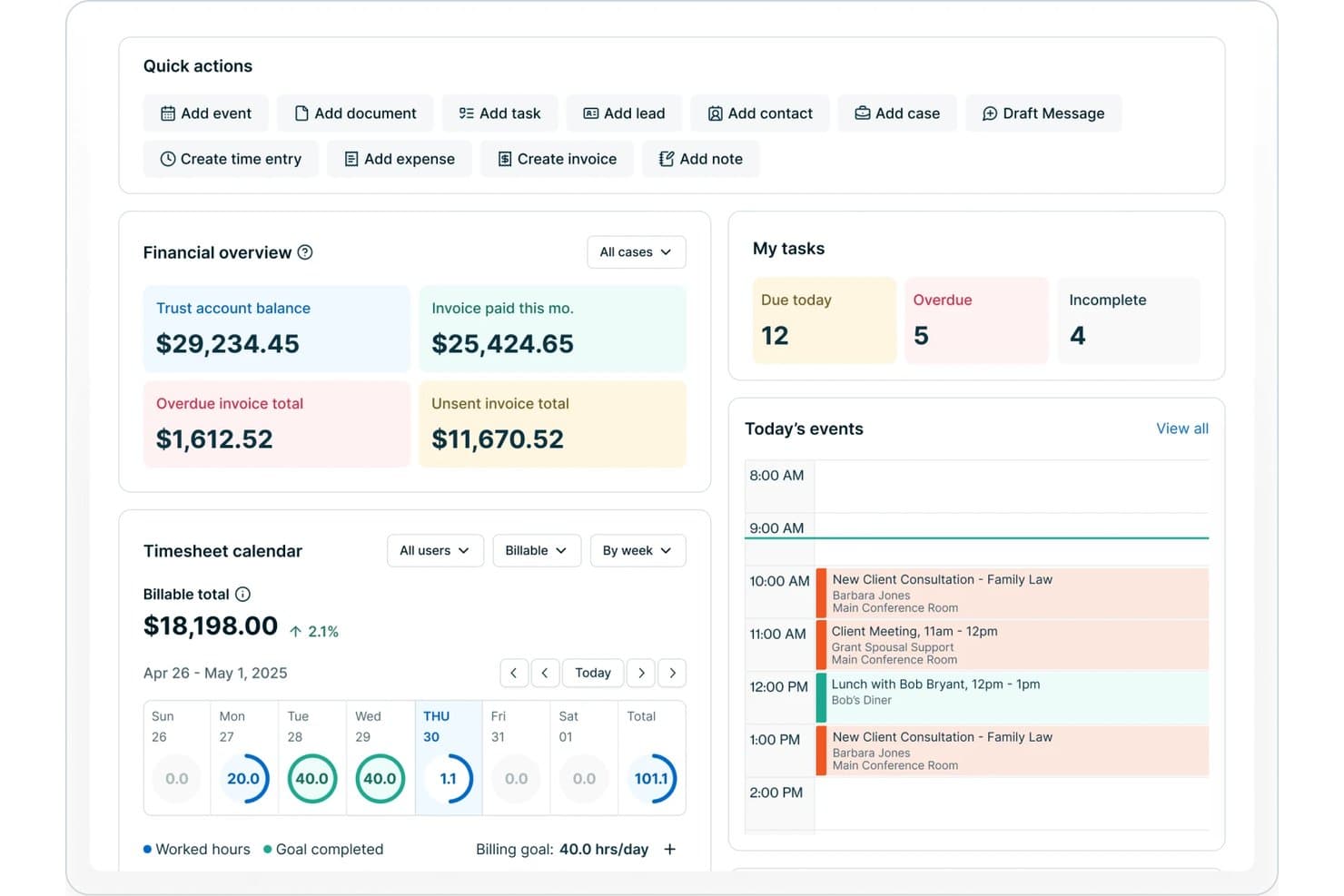
8am offers a legal practice dashboard with financial overview, task tracking, timesheet calendar, and today's events including client consultations and meetings. 8am is a legal project management software platform offering matter planning, automated billing, time tracking, document management, and workflow tools designed specifically for law firms and legal teams.
Who Is 8am Best For?
Law firms and legal departments seeking a centralized platform for managing matters, billing, and legal team collaboration.
Why I Picked 8am
I picked 8am as one of the best because the platform centralizes billing, payment processing, and time tracking inside matter workflows. I’ve sent client invoices, tracked outstanding balances, and received trust payments directly within the legal case file.
8am Key Features
- Matter templates: Create and reuse structured templates for common case types and workflows.
- Document management: Store, organize, and version control all case-related files securely in one location.
- Role-based permissions: Set detailed access and editing rights for teams and individual users on sensitive data.
- Custom reporting: Build and schedule matter and financial reports tailored to firm needs.
8am Integrations
Native integrations are not publicly listed.
Pros and Cons
Pros:
- Specialized workflows for case and matter types
- Role-based permissions for sensitive case data
- Built-in e-signature and document version control
Cons:
- Initial workflow setup takes time
- Limited advanced analytics and forecasting
Learn more about 8am: Best for secure client portal access
- 10-day free trial
- From $11/user/month
Visit WebsiteCustomer Rating:4.8/5
Clinked handles workflows and improves client communication. Clinked offers legal teams and law firms a dedicated client portal designed to centralize document sharing, communication, and collaboration. Its focus on privacy and granular access controls helps legal professionals manage sensitive client matters and streamline project workflows.
Who Is Clinked Best For?
Clinked suits law firms and legal departments that need a secure, branded portal for managing client communications and sensitive documents.
Why I Picked Clinked
I picked Clinked because its client portal is built specifically around secure, controlled access—something legal teams can't compromise on. I appreciate that it lets you assign granular permissions at the group or individual level, so clients only see the files and conversations relevant to their matter. The white-label branding feature also stands out for firms that want to present a professional, firm-branded experience rather than a generic third-party tool. In practice, that means my team can share sensitive documents and track client activity in one place, without relying on unsecured email threads.
Clinked Key Features
- Kanban board: Visualize task progress across client matters using a drag-and-drop Kanban board with due dates and status tracking.
- Document version control: Track changes to files over time, with access to previous versions of any document stored in the portal.
- Audit trail: Log every user action in real time, including file views, edits, and downloads, to maintain a full activity record.
- File request: Send clients a direct request to upload specific documents into the portal without requiring them to navigate the full interface.
Clinked Integrations
Integrations include Google Workspace, Microsoft 365, DocuSign, and Jotform. An API is also available for custom integrations.
Pros and Cons
Pros:
- Task assignment links directly to client workspaces
- Group chat enables real-time client discussions
- Document versioning tracks all file changes
Cons:
- Notification settings can be difficult to manage
- No built-in document automation tools
Learn more about Clinked: 3Best for solo and small firm collaboration
Clio
- Free trial available
- From £79/user/month
Visit WebsiteCustomer Rating:4.7/5
Clio simplifies client management and billing for solo practitioners. Clio offers legal project management software designed legal professionals (specializing in UK-based firms) seeking to organize cases, documents, and client communications in one place. Its intuitive interface and cloud-based access make it especially appealing to smaller practices aiming to simplify daily workflows.
Who Is Clio Best For?
Clio suits solo practitioners and small law firms in the UK looking for centralized case, document, and client management.
Clio Key Features
- Standardized task lists: Build reusable task sequences tied to specific matter types, with relative deadlines and per-user assignments managed from inside a matter.
- Time and expense tracking: Log billable hours directly from a task and track expenses against matters using the built-in Timekeeper tool.
- Law firm performance reporting: View hours captured, billed, and collected across your firm in a single dashboard, with filters by user, matter, or date.
- Client portal: Give clients a dedicated desktop and mobile app to view assigned tasks, receive reminders, and communicate securely with your firm.
Clio Integrations
Integrations include Xero, QuickBooks Online, Legl, InfoTrack, OurFamilyWizard, Case Status, ChartSquad, Scorpion RevenueMAX, Precedent Demand Composer, and Clio’s open API for custom integrations.
Pros and Cons
Pros:
- Calendar sync with court dates and deadlines
- Matter-centric organization for all case files
- Built-in time tracking for billable matters
Cons:
- Document automation lacks advanced customization
- Limited reporting options for project analytics
Learn more about Clio: Best for visual task board interface
- 14-day free trial
- From $39/user/month (billed annually)
Visit WebsiteCustomer Rating:4.8/5
Lawcus structures projects and organizes legal work. Lawcus offers legal teams a modern project management platform designed to simplify matter tracking and collaboration. Its intuitive interface and workflow automation features make it a strong fit for law firms and legal departments seeking to organize complex legal work with greater clarity.
Who Is Lawcus Best For?
Lawcus suits small to midsize law firms and legal teams that want to manage matters, tasks, and workflows visually.
Why I Picked Lawcus
I picked Lawcus for its visual task board interface, which lets legal teams manage matters and tasks across Kanban-style boards that mirror how legal work actually moves through stages. I appreciate that you can drag and drop matters between pipeline stages, giving attorneys an at-a-glance view of where every case stands. I also like Lawcus's built-in workflow automation, which triggers task assignments and status updates automatically as matters progress. In practice, that means my team spends less time on manual follow-ups and more time on substantive legal work.
Lawcus Key Features
- Client portal: Lets clients access case updates, exchange messages, share documents, and make payments through an encrypted, firm-branded portal.
- Nova AI writing assistant: Generates emails, notes, matter descriptions, and task descriptions directly within the platform using AI.
- Custom reporting: Produces over 100 standard reports—covering accounts receivable, trust ledgers, pipeline value, and referral sources—with a custom report builder for additional configurations.
- Time and expense tracking: Logs billable hours and expenses against specific matters to support accurate invoicing.
Lawcus Integrations
Integrations include Box, Calendly, Dropbox, Gmail, Google Calendar, Google Drive, LawPay, Microsoft 365, QuickBooks, and Xero.
Pros and Cons
Pros:
- Built-in client portal supports secure messaging
- Workflow automation reduces repetitive task steps
- Kanban boards visualize matter progress clearly
Cons:
- User roles offer limited permission granularity
- No built-in document assembly tools
Learn more about Lawcus: Best for document generation features
- Free trial + free demo available
- Pricing upon request
Visit WebsiteCustomer Rating:4.5/5
Filevine optimizes task management and document handling. Filevine is a legal project management platform designed for law firms and legal teams that need advanced workflow automation and collaboration tools. Its flexible case management features help legal professionals handle complex matters, deadlines, and communications in one place.
Who Is Filevine Best For?
Filevine suits midsize to large law firms and legal departments seeking customizable workflows and centralized case management.
Why I Picked Filevine
Document generation is where I find Filevine genuinely pulls ahead of other legal project management tools. Its DocGen feature uses template-based automation to pull case and client data directly into documents with one click—so when my team needs to produce a settlement demand letter, the relevant fields populate automatically from the case file. I also appreciate the proprietary .vine file format, which keeps documents live and connected to case data, so updates in the project automatically reflect in the document. For teams drafting high volumes of contracts, pleadings, or demand letters, that kind of built-in accuracy cuts down on dual data entry and manual error correction.
Filevine Key Features
- Case timeline tracking: View deadlines, tasks, and milestones across all active matters in a single timeline view.
- Client portal: Share documents, collect signatures, and exchange messages with clients through a dedicated portal.
- Team task assignment: Assign, delegate, and track tasks across team members directly within each case file.
- Reporting dashboard: Generate custom reports on case progress, team workload, and matter status using built-in analytics tools.
Filevine Integrations
Integrations include Sageness, Gemini Legal, InfoTrack, Record Retrieval Solutions, DocuPost, MoveDocs, Copitrak, FedEx, Stamps, and Microsoft Teams.
Pros and Cons
Pros:
- Bulk document upload saves time on intake
- Deadline chains automate multi-step case processes
- Custom reporting adapts to firm requirements
Cons:
- User permissions can be difficult to configure
- Workflow automation setup can be time-consuming
Learn more about Filevine: Best for integrated time and billing tracking
- 10-day free trial + free demo available
- From $59/user/month (billed annually)
Visit WebsiteCustomer Rating:4.4/5
Rocket Matter simplifies billing and time management for law firms. Rocket Matter offers legal professionals a platform designed to simplify case management and project workflows. Its focus on integrating practice management with advanced billing features makes it a strong fit for law firms seeking to unify operations and reduce administrative overhead.
Who Is Rocket Matter Best For?
Rocket Matter suits small to midsize law firms and legal teams that need centralized project management and billing in one platform.
Why I Picked Rocket Matter
I picked Rocket Matter because time tracking and billing aren't separate workflows—they're built into the same system. I appreciate that timers run directly against specific matters, so when I'm done working on a case, converting that tracked time into a billable entry takes seconds. Rocket Matter Track goes further by automatically capturing time across office apps and devices, which means my team isn't manually reconstructing hours at the end of the day. The Matter Status Board also lets me see exactly where each case stands, so I can connect project progress to billing phases without switching between tools.
Rocket Matter Key Features
- Legal trust accounting: Manage and transfer funds across multiple client trust accounts, with built-in compliance safeguards for credit card payments and bank statement reconciliation.
- Document automation: Generate legal documents from customizable templates with auto-populated fields pulled from your central client database.
- Batch billing: Prepare all monthly invoices at once and review them from a paperless prebill screen before sending.
- Conflict checks: Run conflict-of-interest searches across contacts and matters directly within the platform.
Rocket Matter Integrations
Integrations include Office 365, OneDrive, QuickBooks Online, NetDocuments, Dropbox, Google Calendar, and Box.
Pros and Cons
Pros:
- Automated reminders for tasks and deadlines
- Built-in document assembly from templates
- Kanban boards for visual matter tracking
Cons:
- Limited customization for workflow stages
- No built-in client portal for collaboration
Learn more about Rocket Matter: Best for customizable process templates
- Free demo available
- Pricing upon request
Visit WebsiteCustomer Rating:4.2/5
Actionstep automates workflows and simplifies firm operations. Actionstep offers legal teams a cloud-based platform designed to manage complex workflows and automate matter management. Its flexible approach appeals to law firms and legal departments seeking to tailor processes, centralize information, and improve collaboration across cases.
Who Is Actionstep Best For?
Actionstep suits small to mid-sized law firms and legal teams that need to customize workflows and automate legal processes.
Why I Picked Actionstep
I picked Actionstep because its matter type system lets my team build fully customized process templates for each practice area—defining the exact steps, tasks, and deadlines that apply to that matter type from the start. When a new matter opens, Actionstep automatically applies the right workflow, so nothing gets missed. I also appreciate that template management extends to documents and emails, letting my team auto-populate client-specific details without manual drafting. That combination of matter-type templates and document automation makes Actionstep a strong fit for legal project management.
Actionstep Key Features
- Conflict check: Search across all matters, contacts, and emails in one scan to identify potential conflicts of interest before onboarding a new client.
- AI time capture: AI-powered time suggestions auto-fill timesheets based on your activity, capturing billable time you might otherwise miss.
- Client portal: Share matter updates, documents, and invoices with clients through a secure, dedicated portal.
- Trust accounting: Manage client funds and maintain compliance with jurisdiction-specific trust accounting rules directly within the platform.
Actionstep Integrations
Integrations include Outlook 365, InfoTrack, First AML, MiTimes, SpeechWrite, BillerAssist, datacove, Lexidesk, and Zapier.
Pros and Cons
Pros:
- Built-in document versioning for legal files
- Matter types can be fully customized
- Workflow builder supports multi-branch processes
Cons:
- Bulk task editing is not supported
- No built-in Kanban or timeline views
Learn more about Actionstep: Best for advanced workflow automation
- Free demo available
- Pricing upon request
Visit WebsiteCustomer Rating:4.3/5
HighQ boosts efficiency and tracks project progress. HighQ offers legal teams and law firms a platform designed to manage complex legal projects, matter collaboration, and document workflows. Its integration with Thomson Reuters’ legal ecosystem appeals to professionals seeking secure, centralized control over project tasks and client communications.
Who Is HighQ Best For?
Legal operations teams and law firms handling high-volume matters or complex, multi-party projects benefit most from HighQ’s workflow and collaboration capabilities.
Why I Picked HighQ
I picked HighQ because its no-code workflow automation goes further than basic task assignment. I can build conditional rules that trigger actions across the entire platform—automatically creating tasks, generating documents, sending custom emails, and updating data records based on conditions in live matter data. For example, when a contract review reaches a specific stage, HighQ can auto-generate an NDA using document automation and notify the right stakeholders without any manual input. I also rely on its spend-versus-budget dashboards and project risk trackers to keep complex matters on track in real time.
HighQ Key Features
- Client portals: Give clients 24/7 access to matter-specific legal information and resources within a secure, personalized portal.
- Solution templating: Access a library of pre-built templates for matter intake, contract lifecycle management, and end-to-end transaction and litigation management.
- Shared team calendars: Track project milestones, deadlines, and meetings across the team using a shared calendar view.
- Document Insights: Use CoCounsel's AI within HighQ to extract key information, summarize documents, and surface critical findings during review.
HighQ Integrations
Integrations include Microsoft SharePoint, iManage, NetDocuments, Kira Systems, Leverton, Eigen, Seclore, Microsoft Office 365, G Suite, DocuSign, and Adobe Sign.
Pros and Cons
Pros:
- Customizable dashboards for project tracking
- Automated notifications for task deadlines
- Real-time collaboration on case files
Cons:
- Reporting customization options are limited
- Interface can feel complex for new users
Learn more about HighQ: Best for built-in compliance management
- Free demo available
- Pricing upon request

MerusCase facilitates billing and document handling. MerusCase offers legal professionals a cloud-based platform designed to manage complex workflows and sensitive case data. Its integrated approach appeals to law firms and legal departments seeking a unified system for document management, calendaring, and secure collaboration.
Who Is MerusCase Best For?
Law firms and legal teams handling high volumes of cases and requiring secure, centralized management of sensitive legal documents and workflows.
Why I Picked MerusCase
MerusCase's built-in compliance tools set it apart from legal practice management platforms that treat compliance as an afterthought. I appreciate that MerusPay—its native payment processor—is 100% compliant with IOLTA, ABA, and all 50 state bar guidelines, so my team doesn't need to verify third-party payment tools against bar rules. The platform also exceeds HIPAA compliance standards through end-to-end SSL encryption and 256-bit data hashing, which matters when handling sensitive client health information in workers' comp or personal injury matters. For firms where regulatory exposure is a daily reality, having those guardrails built directly into the system removes a layer of manual oversight.
MerusCase Key Features
- Document automation: Generate legal documents using pre-built templates populated with case data.
- Built-in time tracking: Log billable hours directly within matters and sync entries to invoices.
- Calendar and deadline management: Set court dates, deadlines, and task reminders tied to specific cases.
- Client portal: Share documents and communicate with clients through a secure, dedicated portal.
MerusCase Integrations
Integrations include Microsoft Word, Microsoft Outlook, and a developer API for custom integrations.
Pros and Cons
Pros:
- Email is integrated with case files
- Batch scanning speeds up document uploads
- Compliance tracking is built into workflows
Cons:
- Limited options for custom task views
- Interface updates can disrupt daily work
Learn more about MerusCase: Best for mobile-friendly task management
- 7-day free trial
- From $49/user/month (billed annually)
Visit WebsiteCustomer Rating:4.3/5
PracticePanther tracks billing and improves workflow. PracticePanther offers legal professionals a platform designed to simplify case, task, and document management from anywhere. Its intuitive interface and automation features make it a strong fit for law firms seeking to coordinate projects and client work on the go.
Who Is PracticePanther Best For?
Solo practitioners and small to midsize law firms looking for a flexible, mobile-accessible platform to manage legal projects and daily workflows.
Why I Picked PracticePanther
I picked PracticePanther because its mobile app brings full task management functionality to iOS and Android—not just a stripped-down view. I appreciate that I can check assigned tasks, review case updates, and track time from my phone without switching to a desktop. The task dashboard lets me see what's been completed and what's pending across the whole firm at a glance. I also like that tasks can be assigned directly to clients through the client portal, which keeps matters moving without back-and-forth emails.
PracticePanther Key Features
- Custom workflow templates: Apply one-click templates to automatically generate tasks and events for standard legal processes like client intake and billing.
- Client portal: Share documents and communicate with clients through a secure, dedicated portal built into the platform.
- Legal CRM with tagging: Capture client contact details and use custom tags to filter and track leads, matters, and case data.
- eSignature: Send documents for electronic signature and store signed files directly within PracticePanther without a third-party tool.
PracticePanther Integrations
Integrations include QuickBooks, Outlook, Gmail, Google Drive, Dropbox, Box, Lawmatics, WealthCounsel, TrustBooks, and Google Calendar.
Pros and Cons
Pros:
- Calendar syncs with Google and Outlook
- Time tracking links directly to matters
- Mobile app supports full task management
Cons:
- Document automation features are limited
- No built-in Gantt or timeline views
Learn more about PracticePanther:
Otros software de gestión de proyectos legales
Aquí tienes algunas opciones adicionales de software de gestión de proyectos legales que no entraron en mi lista corta, pero que aún así vale la pena revisar:
- 11BasecampBest for team communication threads
- 12WrikeBest for cross-department collaboration
- 13monday AI WorkspaceBest for customizable workflow boards
- 14Microsoft ProjectBest for advanced timeline visualization
- 15AsanaBest for task dependency tracking
- 16TrelloBest for visual card-based planning
- 17Dashboard LegalBest for centralized matter dashboards
How I Evaluate Legal Project Management Software
I evaluate every tool against two layers: the baseline matter planning, budgeting, and deadline tracking a tool must offer, and the differentiators that set the best apart.
Core Functionality (Table Stakes For This List)
When I'm selecting tools for my list, I rank each one on a scale from 0 (does not offer the functionality) to 5 (excels in this area) for each core functionality listed below. Then, I calculate the tool's total score into a percentage. Each tool needs to achieve a minimum total score of 65% to be considered for inclusion.
- Matter Planning & Scoping: I check whether a tool lets you break matters into phases, tasks, and milestones—like structuring a multi-phase litigation from discovery through trial prep.
- Budgeting & Fee Tracking: Each tool should let you set matter-level budgets and track actual spend against estimates, with alerts when a phase starts exceeding its cap.
- Legal Task & Deadline Management: I evaluate how tasks connect to court-driven deadlines—things like statute of limitations dates or filing windows that shift based on jurisdiction.
- Resource & Workload Allocation: Visibility into who's assigned where matters here. I look for dashboards that show attorney and paralegal utilization across concurrent matters.
- Document & Matter Collaboration: Teams need centralized matter files with version control and role-based access, so associates and partners aren't working off outdated drafts.
- Reporting & Matter Analytics: I look at what each tool surfaces in its reporting—matter status, budget burn rate, realization rates, and portfolio-level performance views.
Once I have a list of tools that meet this criteria, I consider what sets each platform apart.
Differentiating Factors (What Sets Vendors Apart)
Here's how I compare and contrast different vendors:
Standout Features
A client portal changes how firms share matter updates—clients can check status, budgets, and milestones directly instead of waiting on email threads. I also look for a knowledge management library where teams store matter templates and post-matter retrospectives, so lessons from a complex M&A deal or multi-party litigation carry forward to the next one. AI-powered matter insights are a growing differentiator too, especially tools that flag budget risk early or auto-generate task plans based on prior matters.
Beyond Features
Legal tech ecosystem integrations matter a lot—I check whether a tool connects to the systems firms already rely on, like iManage, NetDocuments, or e-billing platforms. Security and data governance are equally important when client-privileged information is involved, so I evaluate SOC 2 compliance, ethical wall controls, and data residency options. Practice area fit varies widely too. A tool built for litigation timelines won't always suit transactional teams managing closing checklists, so I consider how well each platform adapts to different matter types and firm sizes.
Cómo elegir un software de gestión de proyectos legales
Es fácil perderse en largas listas de funciones y estructuras de precios complejas. Para ayudarte a mantener el enfoque mientras avanzas en tu proceso de selección de software, aquí tienes una lista de factores a tener en cuenta:
| Factor | Qué considerar |
|---|---|
| FactorEscalabilidad | Qué considerar¿El software apoyará el crecimiento de tu firma, nuevas áreas de práctica o un mayor volumen de asuntos con el tiempo? Revisa los límites de usuarios, topes de almacenamiento y caminos de actualización. |
| FactorIntegraciones | Qué considerar¿La herramienta se conecta nativamente con tus sistemas de gestión de documentos, facturación o firmas electrónicas? Considera cuánto trabajo manual será necesario para cubrir brechas. |
| FactorPersonalización | Qué considerar¿Puedes adaptar flujos de trabajo, plantillas y permisos para igualar los procesos de tu firma? Cuidado con los sistemas rígidos que te obligan a adaptar tu práctica a la herramienta. |
| FactorFacilidad de uso | Qué considerar¿Tu equipo y clientes adoptarán la herramienta rápidamente? Busca una navegación clara, requisitos mínimos de capacitación y una interfaz lógica. |
| FactorImplementación y puesta en marcha | Qué considerar¿Cuánto tiempo tomará ponerlo en funcionamiento? Pregunta sobre soporte de migración, recursos de capacitación y si el proveedor ofrece ayuda para la incorporación. |
| FactorCosto | Qué considerar¿Los niveles de precios son transparentes y previsibles? Ten en cuenta todos los usuarios, almacenamiento y posibles complementos. Pon atención a tarifas ocultas o actualizaciones obligatorias. |
| FactorSalvaguardas de seguridad | Qué considerar¿El software ofrece cifrado, trazabilidad de auditoría y controles de acceso detallados? Confirma el cumplimiento de los estándares de la industria legal y necesidades de confidencialidad de clientes. |
| FactorDisponibilidad de soporte | Qué considerar¿Qué canales de soporte se ofrecen y en qué horarios? Considera si necesitarás ayuda 24/7 o un gestor de cuentas dedicado para asuntos legales urgentes. |
¿Qué es un software de gestión de proyectos legales?
El software de gestión de proyectos legales es una plataforma digital diseñada para ayudar a firmas de abogados y equipos legales a organizar, controlar y gestionar asuntos legales, tareas, documentos y plazos. Estas herramientas centralizan la información de los proyectos, facilitan la colaboración entre abogados y clientes, y proporcionan visibilidad sobre el progreso de los casos. Al estandarizar flujos de trabajo y la comunicación, el software de gestión de proyectos legales ayuda a los profesionales del derecho a coordinar trabajos complejos manteniendo el cumplimiento y la confidencialidad.
Características
Al seleccionar un software de gestión de proyectos legales, ten en cuenta las siguientes características clave:
- Gestión de asuntos: Centraliza toda la información, documentos y comunicaciones relacionadas con cada caso legal o asunto en un espacio de trabajo organizado.
- Asignación y seguimiento de tareas: Permite asignar tareas a miembros del equipo, establecer plazos y monitorizar el progreso para que nada se quede olvidado.
- Gestión de documentos: Ofrece almacenamiento seguro, control de versiones y fácil recuperación de documentos legales, contratos y correspondencia.
- Calendario y seguimiento de plazos: Brinda calendarios compartidos y recordatorios automáticos para fechas judiciales, plazos de presentación y hitos clave.
- Registro de horas: Permite a los usuarios registrar horas facturables y no facturables directamente en la plataforma para una facturación precisa a clientes e informes internos.
- Portal de clientes: Da a los clientes acceso seguro a actualizaciones de casos, documentos compartidos y comunicación directa con el equipo legal.
- Herramientas de colaboración: Incluye funciones como chat grupal, hilos de discusión y secciones de comentarios para apoyar el trabajo en equipo en tiempo real y asíncrono.
- Controles de permisos: Permite a los administradores establecer niveles granulares de acceso para los usuarios, garantizando que la información sensible solo esté disponible para personas autorizadas.
- Informes y analítica: Genera informes personalizables sobre el estado de los casos, cargas de trabajo, plazos y otros indicadores clave para apoyar la toma de decisiones basada en datos.
Funciones comunes de IA en software de gestión de proyectos legales
Además de las funciones estándar de los software de gestión de proyectos legales mencionadas arriba, muchas de estas soluciones están incorporando IA con funcionalidades como:
- Revisión automática de documentos: Utiliza IA para escanear, analizar y señalizar problemas o inconsistencias en documentos legales, ayudando a los equipos a identificar riesgos y errores más rápido.
- Gestión predictiva de plazos: Aplica aprendizaje automático para prever posibles retrasos o plazos incumplidos basándose en datos históricos de proyectos y carga actual de trabajo.
- Priorización inteligente de tareas: Aprovecha la IA para sugerir qué tareas deben priorizarse según urgencia, dependencias y disponibilidad de recursos.
- Extracción de cláusulas contractuales: Identifica y extrae automáticamente cláusulas o términos clave de los contratos, haciendo más fácil revisar y comparar documentos.
- Clasificación inteligente de asuntos: Clasifica nuevos asuntos o casos por tipo, jurisdicción o complejidad usando procesamiento de lenguaje natural, agilizando la admisión y asignación.
- Sugerencias automáticas de imputación de tiempos: Analiza la actividad y las comunicaciones del usuario para recomendar o completar automáticamente registros de horas, reduciendo el seguimiento manual y mejorando la precisión de la facturación.
Beneficios
Implementar un software de gestión de proyectos legales ofrece varios beneficios para tu equipo y tu negocio. Aquí tienes algunos a los que puedes aspirar:
- Mejor organización de los asuntos: Centraliza toda la información, los documentos y las comunicaciones relacionadas con los casos, facilitando la gestión de trabajos legales complejos.
- Colaboración mejorada: Facilita el trabajo en equipo tanto en tiempo real como de manera asincrónica con funciones como chat grupal, espacios de trabajo compartidos y portales para clientes.
- Mayor control de plazos: Realiza el seguimiento de fechas clave y envía recordatorios automáticos, ayudando a tu equipo a evitar perder fechas de juicios o plazos de presentación.
- Mayor seguridad de datos: Ofrece controles de permisos de detalle y registros de auditoría para proteger información sensible de los clientes y facilitar el cumplimiento de normativas.
- Comunicación con el cliente más eficiente: Proporciona portales seguros para compartir actualizaciones y documentos, reduciendo la sobrecarga de correos electrónicos y mejorando la satisfacción del cliente.
- Mejor visibilidad de cargas de trabajo: Ofrece paneles y herramientas de informes que ayudan a monitorizar el progreso, asignar recursos e identificar cuellos de botella.
- Facturación más precisa: Integra seguimiento del tiempo y sugerencias automáticas de registro de horas, apoyando una facturación exacta y reduciendo las pérdidas de ingresos.
Costos y Precios
Seleccionar un software de gestión de proyectos legales requiere comprender los diferentes modelos y planes de precios disponibles. Los costos varían según las funciones, el tamaño del equipo, complementos y más. La siguiente tabla resume los planes más comunes, sus precios promedio y las características típicas incluidas en las soluciones de software de gestión de proyectos legales:
Tabla Comparativa de Planes para Software de Gestión de Proyectos Legales
| Tipo de plan | Precio promedio | Características comunes |
|---|---|---|
| Tipo de planPlan gratuito | Precio promedio$0 | Características comunesGestión básica de asuntos, seguimiento limitado de tareas, almacenamiento básico de documentos y herramientas simples de colaboración. |
| Tipo de planPlan personal | Precio promedio$5-$25/usuario/mes | Características comunesAsignación de tareas, integración de calendario, informes básicos, gestión de documentos y soporte por correo electrónico. |
| Tipo de planPlan empresarial | Precio promedio$25-$60/usuario/mes | Características comunesGestión avanzada de asuntos, portal para clientes, seguimiento de tiempos, automatización de flujos de trabajo, integraciones e informes personalizados. |
| Tipo de planPlan empresarial avanzado | Precio promedio$60-$120/usuario/mes | Características comunesSeguridad avanzada, permisos granulares, incorporación personalizada, acceso a API, soporte prioritario y herramientas de cumplimiento. |
Preguntas frecuentes sobre el software de gestión de proyectos legales
Aquí tienes algunas respuestas a preguntas comunes sobre el software de gestión de proyectos legales:
¿En qué se diferencia el software de gestión de proyectos legales de las herramientas generales de gestión de proyectos?
El software de gestión de proyectos legales está diseñado para las necesidades únicas de los equipos jurídicos, incluyendo la organización centrada en los asuntos, características de cumplimiento y manejo seguro de documentos. Las herramientas de gestión de proyectos generales pueden carecer de funciones como facturación legal, portales para clientes o controles de permisos granulares requeridos para el trabajo legal.
¿Puede el software de gestión de proyectos legales integrarse con mi sistema actual de gestión de documentos?
Sí, muchas soluciones de gestión de proyectos legales ofrecen integraciones con sistemas de gestión de documentos populares. Antes de elegir una herramienta, confirma la compatibilidad con tus sistemas actuales y revisa si la integración permite la sincronización bidireccional, control de versiones y el intercambio seguro de archivos.
¿Qué características de seguridad debo buscar en un software de gestión de proyectos legales?
Busca cifrado en tránsito y en reposo, registros de auditoría, permisos de usuario granulares y cumplimiento de estándares del sector legal como GDPR o SOC 2. Estas funciones ayudan a proteger datos confidenciales de los clientes y respaldan las obligaciones de confidencialidad de tu despacho.
¿Cuánto tiempo se tarda en implementar un software de gestión de proyectos legales?
Los tiempos de implementación varían, pero la mayoría de las soluciones en la nube pueden configurarse en pocos días o semanas. Los factores incluyen necesidades de migración de datos, capacitación de usuarios y personalización de flujos de trabajo. Consulta con los proveedores sobre el soporte de incorporación y los recursos disponibles para acelerar la adopción.
¿Es adecuado el software de gestión de proyectos legales para pequeños despachos de abogados?
Sí, muchas plataformas ofrecen planes y características adaptadas para pequeños despachos. Busca soluciones con precios flexibles, configuración sencilla y funciones esenciales como gestión de asuntos, seguimiento de tareas y compartición segura de documentos sin complejidad innecesaria.