


PracticePanther Vs. LEAP: Detailed Comparison & Reviews For 2026
I break down where PracticePanther and LEAP truly differ—features, user experience, pricing—so you can confidently pick the legal case management tool that’s right for you in 2026.

We review tools independently, and commissions help fund our testing. See our transparency policy, our methodology, or suggest a tool.
PracticePanther
4.3/5
- Free trial available
- From $49/user/month (billed annually)
LEAP
4.3/5
- Free demo available
- Pricing upon request
Why Trust Our Software Recommendations
6,700+
Reviews
20
Industry experts
16+
Evaluation factors
14
Years
Our team has been testing and reviewing software since 2012. As legal practice leaders ourselves, we know how difficult—and important—it is to choose the right software.
For this guide, we evaluated tools using hands-on testing and independent research, scoring tools using our selection criteria.
Our reviews reflect our human editorial judgment, not a sales pitch.
| PracticePanther | LEAP | |
|---|---|---|
| Free Trial | Free trial available | Free demo available |
| Pricing | From $49/user/month (billed annually) | Pricing upon request |
PracticePanther Vs. LEAP Pricing & Hidden Costs
PracticePanther uses a tiered subscription model, where your monthly fee covers a bundle of core features but add-ons and integrations can trigger extra charges—think e-signatures, advanced document automation, or premium support.
LEAP also relies on subscription pricing but typically structures contracts on a per-user basis with longer-term commitments. Costs can rise due to onboarding fees, migration assistance, or optional modules for specialized practice areas.
To get the right deal, look beyond the sticker price and dig into what’s actually included at each tier. Ask both vendors for a clear rundown of what’s bundled, what’s extra, and whether prices shift as your team grows or your workflows evolve.
Review sample contracts for cancellation terms and upgrade paths so you know exactly where you stand before you sign.
PracticePanther and LEAP both deliver core legal case management features that help you manage matters, track time, automate billing, and store documents in one secure platform. You get calendaring, task management, client communications, reporting, and built-in integrations with mainstream tools—making it easy to handle daily casework from one dashboard.
What sets PracticePanther apart is its custom automation builder and intuitive client portal, which lets you tailor workflows and deliver convenient updates. LEAP stands out for its deep library of pre-built court forms and templates, plus real-time email management baked into the platform—making it a go-to for firms needing strong document generation and compliance tools.
| PracticePanther | LEAP | |
|---|---|---|
| 2-Factor Authentication | Yes | Yes |
| API | Yes | Yes |
| Approval Workflows | Yes | Yes |
| Audit Trail | Yes | Yes |
| Calendar Management | Yes | Yes |
| Compliance Tracking | Yes | Yes |
| Contract Management | Yes | Yes |
| Custom Reports | Yes | Yes |
| Customer Management | Yes | No |
| Data Export | Yes | Yes |
| Data Import | Yes | Yes |
| Document Management | Yes | Yes |
| External Integrations | Yes | Yes |
| Multi-User | Yes | Yes |
| NDA Management | Yes | No |
| Notifications | Yes | Yes |
| Policy Management | Yes | No |
| Scheduling | Yes | Yes |
| Workflow Management | Yes | Yes |
| Integration | PracticePanther | LEAP |
|---|---|---|
| IntegrationQuickBooks Online | PracticePanther✅ | LEAP✅ |
| IntegrationLawPay | PracticePanther✅ | LEAP✅ |
| IntegrationMicrosoft 365 | PracticePanther✅ | LEAP✅ |
| IntegrationGoogle Workspace | PracticePanther✅ | LEAP✅ |
| IntegrationDropbox | PracticePanther✅ | LEAP❌ |
| IntegrationXero | PracticePanther✅ | LEAP❌ |
| IntegrationInfoTrack | PracticePanther❌ | LEAP✅ |
| IntegrationNetDocuments | PracticePanther❌ | LEAP✅ |
| IntegrationAPI | PracticePanther✅ | LEAP✅ |
| IntegrationZapier | PracticePanther✅ | LEAP❌ |
PracticePanther and LEAP both cover the big names like QuickBooks, LawPay, and Microsoft 365, so you’ll be able to connect the essentials. But PracticePanther edges ahead with more out-of-the-box integrations and Zapier support, while LEAP is more focused on deep, legal-specific add-ons—meaning your best fit depends on whether you want more flexibility or built-for-legal extras.
| Factor | PracticePanther | LEAP |
|---|---|---|
| FactorData Encryption | PracticePantherUses bank-grade 256-bit SSL encryption for data in transit and at rest. | LEAPApplies end-to-end encryption and secure AWS data storage across all geographies. |
| FactorRegulatory Compliance | PracticePantherSupports GDPR and HIPAA compliance with configurable user permissions and audit logs. | LEAPDesigned for global compliance (GDPR, PII) and legal accounting standards in multiple jurisdictions. |
| FactorData Center Location | PracticePantherStores client data in secure, geographically distributed data centers within North America. | LEAPLeverages Amazon Web Services infrastructure for localized storage and redundancy worldwide. |
| FactorAccess Controls | PracticePantherOffers granular role-based access and two-factor authentication for users at every plan tier. | LEAPDelivers strict role and group-based permissions plus SSO support for firm-wide user management. |
| FactorSystem Uptime | PracticePantherGuarantees 99.9% uptime SLA and real-time status dashboard for service monitoring. | LEAPMaintains a public uptime tracker and backend redundancy for high availability. |
Both PracticePanther and LEAP nail the baseline for secure legal practice, but LEAP takes a slight edge with its international compliance depth and infrastructure. I find PracticePanther easier for firms that want straightforward controls and transparency, while LEAP gives internationally-minded teams more room to tick every compliance box.
| Factor | PracticePanther | LEAP |
|---|---|---|
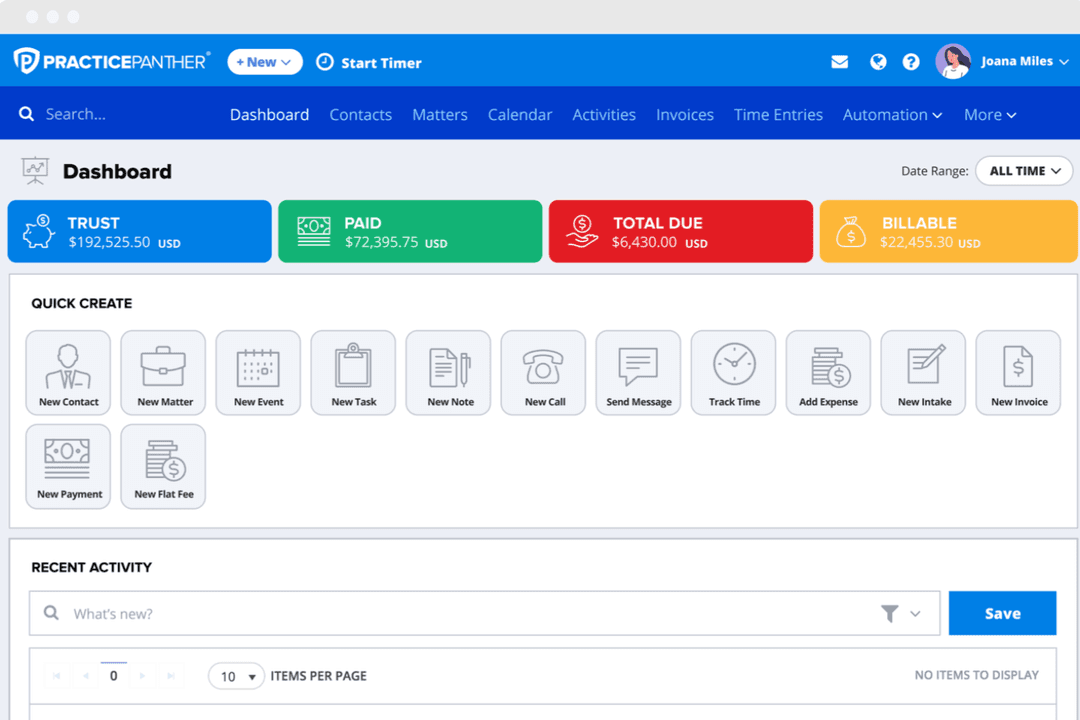
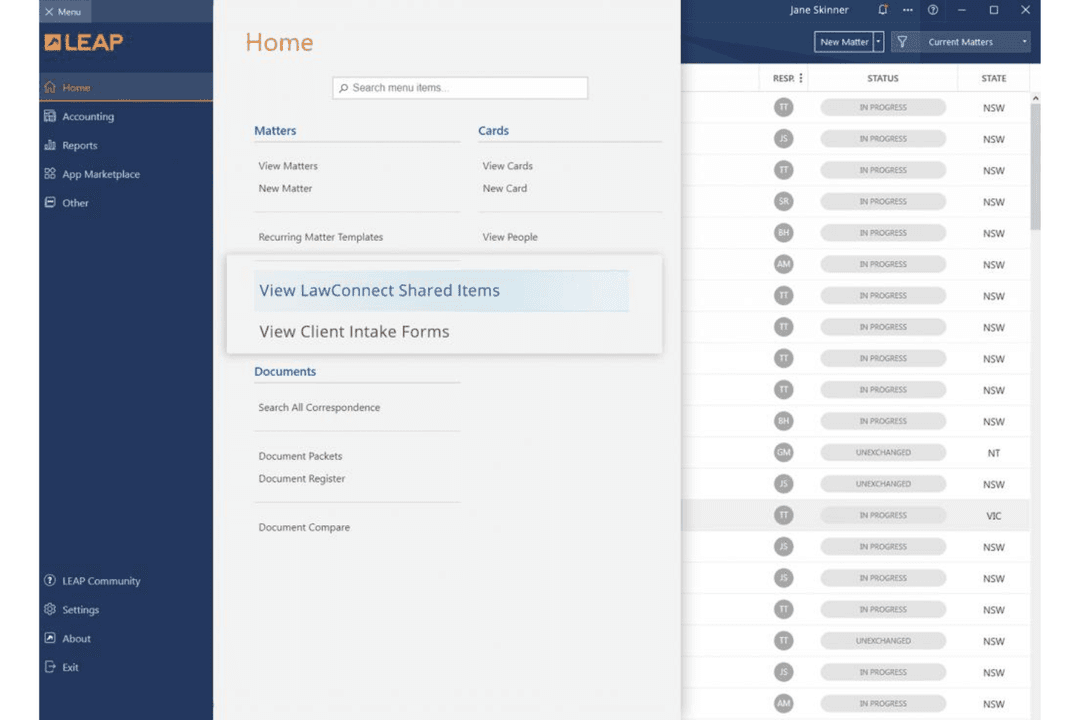
| FactorUser Interface | PracticePantherClean and intuitive layout with drag-and-drop features that help new users ramp up quickly. | LEAPStreamlined but text-heavy interface with many menus and legal-specific fields by default. |
| FactorOnboarding | PracticePantherStep-by-step guided setup and self-serve resources make the initial experience smooth for most firms. | LEAPSetup process often requires more training calls and feels less intuitive for small teams. |
| FactorCustomization | PracticePantherEasy to personalize dashboards and automations without coding knowledge. | LEAPCustomization is available but usually requires admin support and can get overwhelming. |
| FactorOngoing Support | PracticePantherResponsive chat support and detailed help center get most questions answered fast. | LEAPPhone and email support are reliable, but issue resolution can be slower for non-urgent items. |
PracticePanther feels easier to pick up and navigate, especially for teams new to legal technology, while LEAP’s experience can be more complex but rewards those who want legal-specific depth. I think you’ll appreciate PracticePanther’s approachable interface for daily work, and LEAP if you don’t mind a learning curve in exchange for rich legal workflows.
PracticePanther
- Automated workflows and reminders reduce manual admin work.
- Responsive customer support with live chat and onboarding help.
- Built-in e-signature and payment processing included in all plans.
- Trust accounting can be less intuitive for complex needs.
- Document management tools are basic compared to some competitors.
- Reporting features lack advanced customization options.
LEAP
- Document automation saves time on repetitive drafting tasks
- Built-in trust accounting supports compliance with state bar rules
- Mobile app lets you manage cases and billing remotely
- Data migration can be slow and error-prone for some firms
- Some users report slow customer support response times
- Limited compatibility with non-Microsoft email platforms
PracticePanther
- Legal Billing DepartmentsIntegrated time tracking and payment processing simplify invoicing and collections.
- Virtual Law FirmsCloud-based access and mobile app enable remote work and collaboration.
- Immigration Law OfficesAutomated reminders and workflow templates support high-volume casework.
- Family Law PracticesSecure client portals and document sharing help manage sensitive cases.
- Small Law FirmsFlat-rate pricing and easy onboarding suit firms with limited IT resources.
- Solo PractitionersPracticePanther’s all-in-one dashboard and automation save time for solo attorneys.
LEAP
- Solo PractitionersLEAP’s all-in-one platform reduces the need for multiple tools and manual processes.
- Small Law FirmsMatter management, billing, and document automation are tailored for firms with limited IT resources.
- Family Law PracticesPre-built templates and forms for family law streamline casework and filings.
- Real Estate LawIntegrated conveyancing tools and e-signature support real estate transactions.
- Legal Aid OrganizationsCloud access and mobile app help manage high case volumes on the go.
- In-House Legal TeamsCentralized document storage and compliance features support internal legal operations.
Who Should Use PracticePanther, and Who Should Use LEAP?
PracticePanther is the pick for small to mid-sized firms and legal teams who want a quick setup, flexible customizations, and an interface that feels friendly from day one—especially if your practice handles a broad mix of cases or needs lots of integration options.
LEAP makes sense for firms focused on document-heavy, court-focused work or operating across multiple jurisdictions, where deep legal templates and compliance tools matter most. If your team values simplicity and self-sufficiency, go PracticePanther; if you want heavy legal workflows and international compliance covered, LEAP is hard to beat.
| PracticePanther | LEAP | |
|---|---|---|
| Automation Builder | PracticePanther Lets you create custom automations with a drag-and-drop builder for everyday tasks. | LEAP Offers standard workflow automations but requires admin support for deeper customization. |
| Document Management | PracticePanther Features flexible storage with Dropbox and Xero integrations and a user-friendly client portal. | LEAP Delivers a large library of pre-built court forms, deep legal templates, and email management. |
| Integration Options | PracticePanther Broad, out-of-the-box integrations—includes Zapier, Google Workspace, and an open API for flexibility. | LEAP Focuses on legal-specific add-ons like InfoTrack and NetDocuments, but fewer general integrations. |
| Pricing Model | PracticePanther Monthly subscription with bundled features—extra charges for advanced tools and add-ons. | LEAP Per-user pricing with longer contracts—extra costs for onboarding, migration, and specialized modules. |
| User Interface | PracticePanther Clean, modern interface with quick setup and customizable dashboards for easy navigation. | LEAP Text-heavy layout with legal-specific fields and menus, better suited for complex workflows. |
| Billing & Payments | PracticePanther and LEAP both have built-in time tracking, invoice generation, and batch billing options tailored for legal work. Both connect with standard legal payment processors and offer trust accounting support, so you can track billable hours and keep client accounts compliant. PracticePanther emphasizes flexibility in customizing bills, while LEAP focuses on linking billing directly to matter workflows. |
|---|---|
| Client Collaboration | PracticePanther and LEAP both provide secure client communication portals and tools for sharing updates, collecting documents, and handling e-signatures. You can invite clients to log in, see case status, or securely exchange paperwork. PracticePanther spotlights its easy-to-use client portal; LEAP folds client communications into matter management for firms with heavier document demands. |
| Core Case Management | Both PracticePanther and LEAP give you a secure matter dashboard, task tracking, time tracking, calendaring, and document storage all in one spot. Each platform helps legal teams organize daily work, keep matters moving, and centralize your most important files and notes—meaning you won’t need a stack of extra tools to manage your caseload. |
| Integration Support | You’ll find integrations with the essentials—like QuickBooks Online, LawPay, Microsoft 365, and Google Workspace—in both platforms. They each offer an open API, letting your team connect additional tools as needed. PracticePanther leans toward general business integrations, while LEAP complements core integrations with more legal-specific add-ons, though their roster overlaps on major services most firms care about. |
| Security & Compliance | Both solutions use strong encryption, granular user permissions, and offer robust audit trails. Each is built for regulatory compliance in law, including GDPR support and uptime guarantees aligned with industry expectations. PracticePanther and LEAP invest in secure hosting and frequent system updates, so you can trust your client data’s confidentiality and integrity regardless of the platform. |