

Il miglior software per le pratiche immobiliari aiuta gli studi legali a semplificare le transazioni immobiliari, ridurre il lavoro burocratico e mantenere la conformità alle normative. Con la soluzione giusta per la gestione delle pratiche immobiliari, potrai ridurre gli errori e offrire ai clienti un'esperienza più fluida.
Dopo aver trascorso anni a testare e valutare soluzioni software legali insieme ai responsabili degli studi, so come individuare gli strumenti che migliorano davvero l'efficienza. Ho visto come l'adozione del software giusto per le pratiche immobiliari possa trasformare le attività quotidiane e sostenere la crescita a lungo termine del tuo studio legale.
In questa guida ti presenterò le migliori opzioni di software per la gestione delle compravendite immobiliari, sulla base di test nel mondo reale e analisi di esperti. Ogni consiglio include le funzionalità principali, i casi d'uso più adatti e gli aspetti che lo distinguono, così potrai scegliere una piattaforma in linea con i tuoi standard di assistenza ai clienti, i tuoi flussi di lavoro e i tuoi obiettivi di crescita.
Perché fidarsi dei nostri consigli sui software
6,700+
Reviews
20
Industry experts
16+
Evaluation factors
14
Years
Il nostro team testa e recensisce software dal 2012. In quanto leader di studi legali noi stessi, sappiamo quanto sia difficile — e importante — scegliere il software giusto.
Per questa guida, abbiamo valutato gli strumenti attraverso test pratici e ricerche indipendenti, assegnando un punteggio agli strumenti in base ai nostri criteri di selezione.
Le nostre recensioni riflettono il nostro giudizio editoriale umano, non un discorso di vendita.
Tabella comparativa dei software per le pratiche immobiliari
La tabella seguente confronta i dettagli dei prezzi delle mie migliori selezioni di software per le pratiche immobiliari.
| Tool | Best For | Trial Info | Price | ||
|---|---|---|---|---|---|
| 1 | Ideale per flussi di lavoro personalizzabili | Demo gratuita disponibile | Prezzo su richiesta | Website | |
| 2 | Ideale per l'accesso mobile | Demo gratuita disponibile | Prezzo su richiesta | Website | |
| 3 | Ideale per studi sudafricani | Demo gratuita disponibile | Prezzi su richiesta | Website | |
| 4 | Ideale per studi di medie dimensioni | Demo gratuita disponibile | Prezzi su richiesta | Website | |
| 5 | Ideale per gli studi con sede nel Regno Unito | Demo gratuita disponibile | Da $30/utente/mese (fatturazione annuale) | Website | |
| 6 | Ideale per flussi di lavoro integrati | Demo gratuita disponibile | Da $85/utente/mese | Website | |
| 7 | Ideale per la gestione dei documenti | Demo gratuita disponibile | Prezzo su richiesta | Website | |
| 8 | Ideale per piccoli studi legali | Demo gratuita disponibile | A partire da $99/utente/mese (fatturato annualmente) | Website | |
| 9 | Ideale per la conformità canadese | Demo gratuita disponibile | Da $30/pratica | Website | |
| 10 | Ideale per aggiornamenti automatici ai clienti | Demo gratuita disponibile | Da $60/pratica | Website |


Recensioni dei migliori software per le pratiche immobiliari
Di seguito trovi i miei riepiloghi dettagliati dei migliori software per le pratiche immobiliari inclusi nella mia selezione. Le mie recensioni offrono uno sguardo approfondito sulle funzionalità principali, i pro & contro, le integrazioni e i casi d’uso ideali di ogni strumento, per aiutarti a trovare quello più adatto a te.
 Ideale per flussi di lavoro personalizzabili
- Demo gratuita disponibile
- Prezzo su richiesta
Visit WebsiteCustomer Rating:4.2/5
Actionstep offre strumenti per pratiche, fatturazione e documenti dedicati agli studi legali immobiliari. Actionstep è un software di gestione dello studio legale basato su cloud, progettato per studi di varie dimensioni, con un focus su diritto immobiliare e altre aree legali. Offre gestione dei casi, fatturazione e automazione dei documenti, rendendolo uno strumento versatile per i professionisti legali.
Perché ho scelto Actionstep: Offre flussi di lavoro altamente personalizzabili che consentono di adattare i processi alle proprie esigenze specifiche. Il software mette a disposizione strumenti di automazione per gestire in modo efficiente documenti e fatturazione. Grazie al suo motore di workflow flessibile, è possibile adattare il sistema al proprio modo di lavorare preferito. Questa adattabilità lo rende una soluzione ideale per gli studi che cercano soluzioni su misura.
Caratteristiche e integrazioni principali:
Caratteristiche includono automazione dei documenti per ridurre il lavoro manuale, fatturazione flessibile adattabile ai processi dello studio e un motore di workflow personalizzabile per adattare le attività alle proprie esigenze. È progettato per supportare varie aree legali, incluso il diritto immobiliare. L'elevata adattabilità di Actionstep lo rende ideale per gli studi che desiderano una soluzione di gestione dello studio su misura.
Integrazioni includono Microsoft Office, Xero, QuickBooks, NetDocuments, DocuSign, HotDocs, Zapier, LawPay, Box e Google Workspace.
Pros and Cons
Pros:
- Supporta diverse aree di pratica
- Automazione efficiente dei documenti
- Ottime funzionalità di fatturazione
Cons:
- Curva di apprendimento per i nuovi utenti
- Può risultare complesso per piccoli team
- Necessità occasionale di supporto
Learn more about Actionstep: 2Ideale per l'accesso mobile
LEAP
- Demo gratuita disponibile
- Prezzo su richiesta
Visit WebsiteCustomer Rating:4.3/5
LEAP gestisce pratiche, documenti e fatturazione per gli studi legali tramite accesso cloud LEAP è un software cloud per la gestione degli studi legali, progettato per studi di piccole e medie dimensioni, con un'attenzione particolare al settore immobiliare e ad altre aree del diritto. Aiuta a gestire pratiche, documenti e fatturazione tramite un’interfaccia intuitiva accessibile da qualsiasi dispositivo.
Perché ho scelto LEAP: Offre un eccellente accesso mobile, consentendo di gestire pratiche e documenti ovunque ci si trovi. Con la sua app mobile, è possibile visualizzare e modificare documenti, tracciare il tempo e comunicare con i clienti da qualsiasi luogo. La natura cloud del software assicura che i dati siano sempre sincronizzati e aggiornati. Questa mobilità e accessibilità lo rendono ideale per i professionisti legali impegnati che necessitano di flessibilità.
Funzionalità e integrazioni principali:
Funzionalità incluse: monitoraggio del tempo per una fatturazione accurata, automazione dei documenti per ridurre il lavoro manuale e una libreria integrata di moduli legali per risparmiare tempo. L'approccio cloud garantisce la sincronizzazione su tutti i dispositivi. LEAP è ideale per i professionisti che necessitano di flessibilità e accesso mobile.
Integrazioni disponibili con Microsoft Office, Xero, QuickBooks, LawConnect, InfoTrack, RapidPay, By Lawyers, LawTap, Perfect Portal e DocuSign.
Pros and Cons
Pros:
- Ottima app mobile
- Ampia gamma di moduli legali
- Supporta diverse aree del diritto
Cons:
- Curva di apprendimento per i nuovi utenti
- Opzioni di personalizzazione limitate
- Potrebbe non essere adatto a studi di grandi dimensioni
Learn more about LEAP:

Lexis Convey gestisce le transazioni immobiliari sudafricane con strumenti completi per la traslazione di proprietà. Lexis Convey è un software per la gestione delle pratiche immobiliari pensato per i professionisti legali in Sudafrica, con un focus sulle transazioni immobiliari. Aiuta a gestire l'intero processo di trasferimento di proprietà, dalla preparazione dei documenti alla comunicazione con i clienti.
Perché ho scelto Lexis Convey: È specifico per gli studi sudafricani, integrandosi con sistemi e normative locali. Il software offre funzionalità come la generazione automatica di documenti e controlli di conformità, assicurando che i tuoi processi siano in linea con le leggi locali. Con il suo focus sulle esigenze sudafricane, fornisce una soluzione affidabile per gli studi locali. L'interfaccia intuitiva aiuta il tuo team a lavorare in modo efficiente ed efficace.
Funzionalità e integrazioni principali:
Funzionalità includono la generazione automatica di documenti per risparmiare tempo, controlli di conformità per rispettare le normative sudafricane e un'interfaccia intuitiva per una navigazione semplice. È progettato appositamente per gli studi legali locali. Lexis Convey rende il processo di trasferimento immobiliare più fluido ed efficiente.
Integrazioni includono Deeds Office, SARS eFiling, Microsoft Outlook, GhostConvey, Microsoft Word, Microsoft Excel, LegalSuite, WinDeed, SAP e Pastel Accounting.
Pros and Cons
Pros:
- Adattato alle normative sudafricane
- Controlli di conformità automatizzati
- Generazione efficiente dei documenti
Cons:
- Limitato al mercato sudafricano
Learn more about Lexis Convey: Ideale per studi di medie dimensioni
- Demo gratuita disponibile
- Prezzi su richiesta
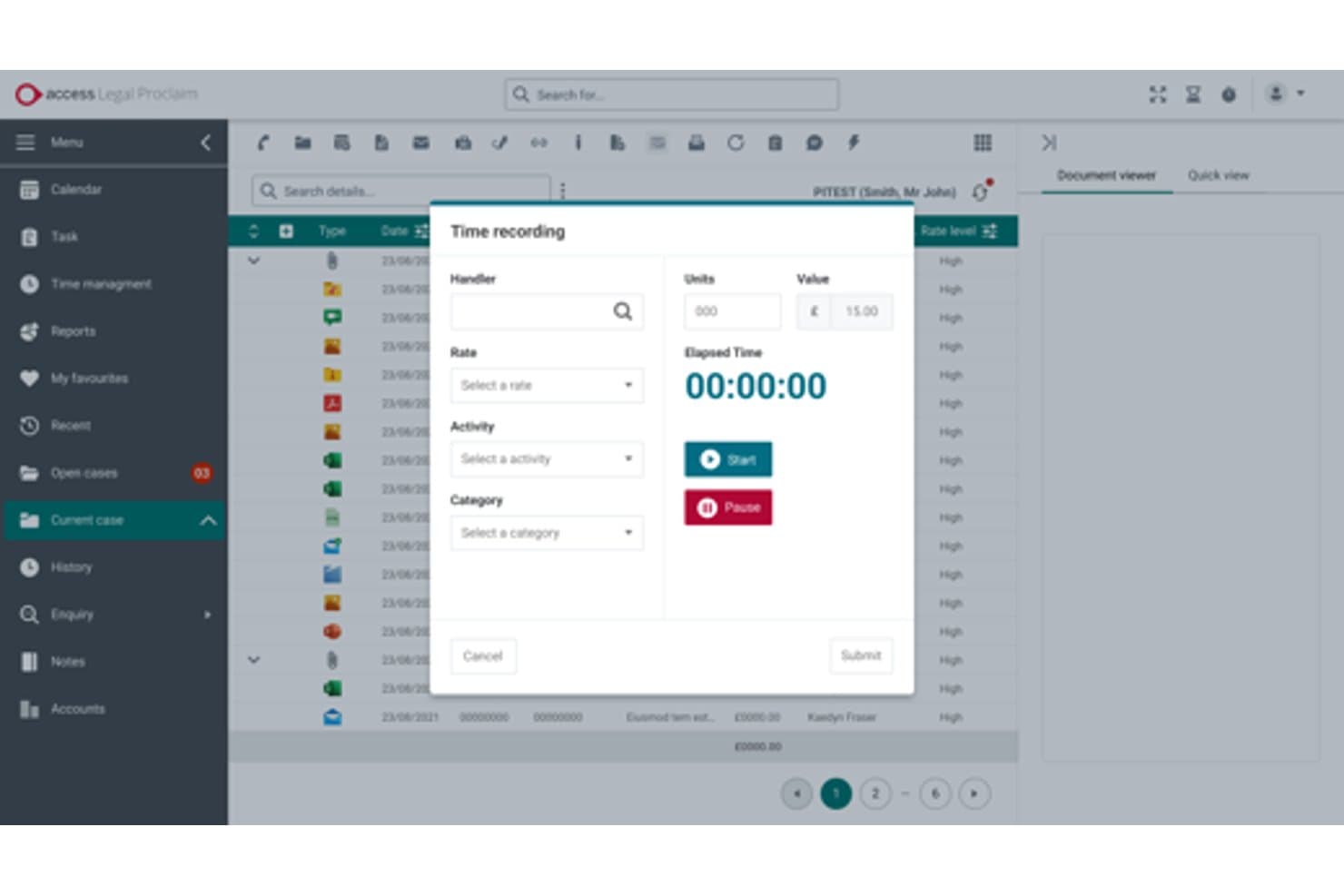
The Access Group consente agli utenti di registrare e monitorare il tempo fatturabile per ogni pratica. Access Legal di The Access Group è un ecosistema software britannico per il trasferimento immobiliare che comprende la gestione dei casi, i moduli TA digitali, l'avvio delle procedure AML/KYC, le integrazioni con il Catasto e i servizi di ricerca, la contabilità dei clienti e un portale clienti personalizzato con messaggistica bidirezionale.
Per chi è più adatto The Access Group?
The Access Group è adatto agli studi legali britannici di medie dimensioni che desiderano un ecosistema di un unico fornitore, in grado di coprire la gestione dei casi, l'avvio delle procedure AML, la contabilità legale e il coinvolgimento dei clienti senza dover integrare strumenti separati.
Perché ho scelto The Access Group
Ho scelto The Access Group come una delle soluzioni migliori perché funziona davvero come un ecosistema di un unico fornitore per gli studi di medie dimensioni che non vogliono gestire separatamente strumenti per la gestione dei casi, l'AML, la contabilità e il coinvolgimento dei clienti. Sono rimasto particolarmente colpito da inCase, che gestisce nativamente all'interno del fascicolo la verifica biometrica dell'identità, la lettura dei passaporti NFC e la prova dei fondi tramite sistema bancario aperto. La formazione per l'accreditamento CQS e il modulo dal preventivo all'incarico, che converte i preventivi personalizzati in pratiche attive senza dover reinserire i dati, sono elementi distintivi di rilievo che non ho visto eguagliati altrove.
Caratteristiche principali di The Access Group
- Moduli TA digitali: moduli TA6, TA7 e TA10 accreditati dalla Law Society, con salvataggio automatico, controlli di convalida e firma elettronica integrati.
- Invio SDLT: calcolo automatico dell'imposta di registro e invio online dell'SDLT direttamente dal fascicolo della pratica.
- Ricerche di Access Legal: le ricerche regolamentate, i controlli dei titoli presso il Catasto e i risultati vengono ordinati e restituiti all'interno del fascicolo tramite la piattaforma Legal Bricks.
- Formazione per l'accreditamento CQS: Access Legal è una delle sole tre organizzazioni autorizzate a erogare la formazione del programma di qualità per il trasferimento immobiliare al di fuori della Law Society.
Integrazioni di The Access Group
Access Legal dispone di integrazioni native con Legal Bricks e SmartSearch, oltre alla connettività con Microsoft 365, inclusi Outlook e Teams. CaseMatters Evo offre un'API aperta per integrazioni personalizzate, mentre Power BI supporta la reportistica personalizzata per Proclaim.
Pros and Cons
Pros:
- I controlli AML biometrici riducono i ritardi nell'avvio della procedura
- I moduli TA digitali favoriscono l'invio di dati accurati
- InCase riduce le chiamate dei clienti per chiedere aggiornamenti sullo stato della pratica
Cons:
- La risoluzione dei problemi da parte dell'assistenza può richiedere diversi giorni
- La migrazione dai sistemi precedenti risulta impegnativa
Learn more about The Access Group: Ideale per gli studi con sede nel Regno Unito
- Demo gratuita disponibile
- Da $30/utente/mese (fatturazione annuale)
Visit WebsiteCustomer Rating:2.3/5
Hoowla semplifica le transazioni immobiliari nel Regno Unito con automazione e portali per i clienti. Hoowla è un software di gestione pratiche immobiliari progettato per i professionisti legali nel Regno Unito, con particolare attenzione alle transazioni immobiliari. Offre gestione delle pratiche, automazione dei documenti e portali per i clienti, migliorando la comunicazione e l'efficienza.
Perché ho scelto Hoowla: Progettato specificamente per studi con sede nel Regno Unito, si integra con l'HM Land Registry e supporta le funzionalità di fatturazione. I portali per i clienti del software migliorano la comunicazione, mentre l'automazione dei documenti riduce le attività manuali. Essendo basato su cloud, consente una collaborazione semplice e una gestione rapida delle pratiche. Questa attenzione alle esigenze specifiche del Regno Unito lo rende ideale per gli studi in questa regione.
Caratteristiche e integrazioni principali:
Caratteristiche includono la gestione delle pratiche per mantenere i casi organizzati, automazione dei documenti per risparmiare tempo e portali per i clienti per una comunicazione migliore. È progettato per gli studi nel Regno Unito e si integra con HM Land Registry. Il sistema cloud rende la collaborazione e la gestione dei casi facile.
Integrazioni includono HM Land Registry, Microsoft Outlook, Google Calendar, Xero, QuickBooks, DocuSign, Adobe Sign, Dropbox, Mailchimp e Zapier.
Pros and Cons
Pros:
- Comunicazione efficace con i clienti
- Flussi di lavoro personalizzabili
- Produzione rapida di documenti
- Si integra con i sistemi del Regno Unito
Cons:
- Uso internazionale limitato
- Complessità nella configurazione iniziale
Learn more about Hoowla: Ideale per flussi di lavoro integrati
- Demo gratuita disponibile
- Da $85/utente/mese

Osprey Approach aumenta la produttività degli studi legali del Regno Unito con strumenti automatizzati per il trasferimento di proprietà. Osprey Approach è un software di gestione dei casi pensato per gli studi legali del Regno Unito, con un focus su trasferimento di proprietà e gestione delle pratiche legali. Automatizza i flussi di lavoro, gestisce i documenti e supporta la comunicazione con i clienti, rendendolo ideale per gli studi che desiderano aumentare la produttività.
Perché ho scelto Osprey Approach: Si distingue per la fornitura di flussi di lavoro integrati che collegano i vari aspetti della pratica legale. I flussi di lavoro legali automatizzati semplificano i processi, mentre i campi personalizzabili consentono di adattare il software alle proprie esigenze. Il portale clienti e l'app mobile migliorano la gestione della clientela. Le sue capacità di integrazione con strumenti popolari ne aumentano ulteriormente la funzionalità.
Funzionalità e integrazioni principali:
Funzionalità includono flussi di lavoro automatizzati per ottimizzare le attività, un portale clienti per una comunicazione più efficace e campi personalizzabili per adattarsi alle esigenze dello studio. È progettato per studi legali nel Regno Unito specializzati in trasferimento di proprietà e gestione delle pratiche legali. Osprey Approach si integra anche con strumenti popolari per aumentare l'efficienza complessiva.
Integrazioni includono InfoTrack, DocuSign, Microsoft Power BI, Perfect Portal, Coadjute, Lexis Smart Forms, Microsoft Outlook, Google Calendar, Xero e QuickBooks.
Pros and Cons
Pros:
- Ottime funzionalità per la gestione dei clienti
- Supporta diversi tipi di transazione
- Accesso a un'ampia gamma di moduli legali
Cons:
- Complessità nella configurazione iniziale
- Richiede formazione per un utilizzo ottimale
- Potrebbe essere troppo complesso per i team ridotti
Learn more about Osprey Approach: Ideale per la gestione dei documenti
- Demo gratuita disponibile
- Prezzo su richiesta

CaseLoad by Denovo supporta gli studi legali con strumenti per documenti, monitoraggio dei casi e comunicazione. CaseLoad by Denovo è un software completo per la gestione degli atti immobiliari progettato per i professionisti legali che devono gestire in modo efficiente diverse documentazioni legali. Serve gli studi legali fornendo strumenti per la gestione dei documenti, il monitoraggio dei casi e la comunicazione con i clienti.
Perché ho scelto CaseLoad by Denovo: Eccelle nella gestione dei documenti, offrendo funzionalità che garantiscono che la documentazione dello studio sia organizzata e facilmente accessibile. Il software ti permette di archiviare, recuperare e condividere i documenti con facilità. Le sue funzionalità di automazione dei documenti fanno risparmiare tempo riducendo l'inserimento manuale. Questa attenzione all'efficienza documentale lo rende ideale per gli studi con elevate esigenze di gestione della carta.
Caratteristiche principali & integrazioni:
Caratteristiche includono un avanzato monitoraggio dei casi per mantenere aggiornato il team, strumenti per la comunicazione con i clienti per semplificare le interazioni e automazione dei documenti per risparmiare tempo. È pensato per gli studi che gestiscono un grande volume di documentazione legale. CaseLoad by Denovo aiuta a mantenere tutto organizzato e a far funzionare ogni cosa senza intoppi.
Integrazioni includono Microsoft Word, Microsoft Outlook, Adobe Acrobat, QuickBooks, Xero, DocuSign, Dropbox, Google Drive, Salesforce e Zapier.
Pros and Cons
Pros:
- Solide capacità di gestione dei documenti
- Riduce l'inserimento manuale dei documenti
- Supporta vari formati di file
Cons:
- Complessità dell'impostazione iniziale
- Può risultare troppo complesso per i piccoli team
- Curva di apprendimento per i nuovi utenti
Learn more about CaseLoad by Denovo: Ideale per piccoli studi legali
- Demo gratuita disponibile
- A partire da $99/utente/mese (fatturato annualmente)

InTouch semplifica il trasferimento immobiliare con flussi di lavoro e strumenti per la firma elettronica. InTouch è un software cloud per la gestione delle pratiche di trasferimento immobiliare e dei casi legali, pensato appositamente per studi legali e professionisti del settore. Aiuta a gestire l'intero processo di trasferimento tramite funzionalità come flussi di lavoro personalizzabili e firme elettroniche.
Perché ho scelto InTouch: È progettato pensando ai piccoli studi legali, offrendo funzionalità che rispondono alle loro esigenze specifiche. Il software fornisce un portale clienti e reportistica in tempo reale, rendendo più semplice tenere informati i clienti. I moduli online e le firme elettroniche riducono la burocrazia e fanno risparmiare tempo. Il design intuitivo lo rende accessibile anche a chi ha competenze tecniche limitate.
Funzionalità distintive & integrazioni:
Funzionalità includono flussi di lavoro personalizzabili, firme elettroniche e un portale clienti per tenere aggiornati i clienti. I moduli online aiutano a ridurre la burocrazia e a risparmiare tempo. Il software è facile da usare, risultando una soluzione ideale per i piccoli studi legali.
Integrazioni includono Microsoft Outlook, Google Calendar, Xero, Mailchimp, Zapier, DocuSign, Amazon S3, Dropbox, QuickBooks e Adobe Sign.
Pros and Cons
Pros:
- Facile da configurare
- Flussi di lavoro personalizzabili
- Migliora la comunicazione con i clienti
Cons:
- Funzionalità avanzate limitate
- Occasionali aggiornamenti del software necessari
- Non ideale per grandi studi
Learn more about InTouch:

LCS supporta gli avvocati immobiliari dell’Ontario con strumenti per la gestione degli atti conformi alle normative. LCS è un software per la gestione degli atti immobiliari progettato specificamente per avvocati immobiliari dell’Ontario, Canada. Si concentra sulla gestione dei documenti, la comunicazione con i clienti e il rispetto delle normative locali.
Perché ho scelto LCS: È pensato per garantire la conformità canadese, con funzionalità che rispondono alle esigenze specifiche degli avvocati dell’Ontario. Il software include un elenco integrato di contatti di avvocati e modelli personalizzabili per ottimizzare il flusso di lavoro. I calcoli automatici dei prospetti e l’archiviazione in cloud aumentano l’efficienza e la sicurezza dei dati. Il focus sulla conformità locale lo rende una scelta affidabile per gli studi legali canadesi.
Funzionalità eccezionali & integrazioni:
Funzionalità includono calcoli automatici dei prospetti per risparmiare tempo, modelli personalizzabili per adattarsi alle tue esigenze e archiviazione sicura in cloud per un facile accesso ai documenti. È progettato specificamente per gli avvocati immobiliari dell’Ontario. Il focus sulla conformità locale lo rende una scelta affidabile per gli studi legali canadesi.
Integrazioni includono Stewart Title Insurance, Chicago Title Insurance, Teranet Connect, e altro.
Pros and Cons
Pros:
- Transizione semplice con curva di apprendimento ridotta
- Salvataggio automatico dei documenti
- Ampie risorse formative
- Assistenza clienti reattiva
- Migliaia di contatti di avvocati integrati
Cons:
- Non adatto ai mercati extra-canadesi
- Limitato al mercato dell’Ontario
Learn more about LCS:

Closer automatizza la comunicazione con i clienti per migliorare la trasparenza nelle pratiche immobiliari. Closer è un software per la gestione delle pratiche immobiliari progettato per i professionisti legali, con l'obiettivo di automatizzare la comunicazione con i clienti durante il processo di compravendita. Si rivolge principalmente ad avvocati specializzati in immobili e studi legali che desiderano migliorare il coinvolgimento dei clienti e la trasparenza.
Perché ho scelto Closer: Si distingue per l'automazione degli aggiornamenti ai clienti, garantendo che i clienti siano sempre informati durante l'intero processo di transazione. Il software invia aggiornamenti di stato e promemoria automatici, riducendo la necessità di solleciti manuali. Il suo cruscotto intuitivo offre una panoramica chiara delle transazioni in corso. Questo focus sull'automazione lo rende uno strumento efficiente per la comunicazione con i clienti.
Caratteristiche principali e integrazioni:
Funzionalità includono un cruscotto intuitivo per il monitoraggio delle transazioni, aggiornamenti automatici sullo stato per tenere informati i clienti e modelli personalizzabili per comunicazioni su misura. È progettato per semplificare il coinvolgimento del cliente durante il processo di compravendita. Closer aiuta a ridurre il lavoro manuale e mantiene tutto efficiente.
Integrazioni includono Microsoft Outlook, Google Calendar, Xero, QuickBooks, DocuSign, Adobe Sign, Dropbox, Mailchimp, Zapier e Slack.
Pros and Cons
Pros:
- Comunicazione automatica ai clienti
- Modelli di comunicazione personalizzabili
- Monitoraggio delle transazioni in tempo reale
Cons:
- Pensato principalmente per il settore immobiliare
- Potrebbe non essere adatto a grandi studi
Learn more about Closer:
Altri software per le pratiche immobiliari
Ecco alcune opzioni aggiuntive di software per le pratiche immobiliari che non sono entrate nella mia selezione, ma che vale comunque la pena prendere in considerazione:
- 11OctopusProIdeale per l'integrazione dei servizi sul campo
- 12VeyaIdeale per la comunicazione con i clienti
- 13ProConveyIdeale per un design facile da usare
Come Valuto il Software per la Trasmissione Immobiliare
Divido la mia valutazione in due livelli: la soglia minima che uno strumento deve superare—come le integrazioni con il Catasto e i flussi di lavoro AML—e i fattori differenzianti che distinguono i migliori.
Funzionalità Principali (Requisiti Minimi per Questa Lista)
Quando seleziono gli strumenti per la mia lista, valuto ciascuno su una scala da 0 (la funzionalità non è offerta) a 5 (eccelle in questa area) per ciascuna delle funzionalità chiave indicate qui sotto. Successivamente, calcolo il punteggio totale dello strumento in percentuale. Ogni software deve raggiungere un punteggio totale minimo del 55% per poter essere incluso.
- Gestione delle Pratiche di Trasmissione: Cerco flussi di lavoro dedicati alla trasmissione immobiliare con fasi preimpostate per compravendite, acquisti e mutui, invece del semplice tracciamento generico dei casi che andrebbe configurato da zero.
- Moduli e Modelli di Documenti: Il software dovrebbe includere moduli per la trasmissione immobiliare che si autocompilano, come atti di trasferimento o questionari informativi sugli immobili, non solo un archivio di documenti vuoti.
- Onboarding del Cliente e AML/KYC: Valuto se controlli AML, verifica dell'identità e flussi di lavoro sulla provenienza dei fondi sono integrati o incorporati, poiché eseguirli esternamente alla piattaforma crea lacune nella conformità.
- Integrazione con Catasto e Ricerca Proprietà: Qui sono importanti i collegamenti diretti ai catasti e ai fornitori di ricerche immobiliari—verifico se sia possibile richiedere visure e presentare pratiche senza uscire dalla piattaforma.
- Contabilità Clienti e Registri: La gestione di rendiconti di chiusura, spese e registri separati cliente/ufficio in conformità con le regole contabili legali è essenziale per qualsiasi strumento focalizzato sulla trasmissione immobiliare.
- Portale Clienti Sicuro e Comunicazioni: Valuto se i clienti possano accedere agli aggiornamenti sulle pratiche, caricare documenti e firmare elettronicamente tramite un portale personalizzato invece di affidarsi a catene di email.
Una volta individuati gli strumenti che soddisfano i criteri, considero ciò che rende ciascuna piattaforma unica.
Fattori Differenzianti (Cosa Distingue i Fornitori)
Ecco come confronto i diversi fornitori:
Funzionalità Distintive
La visualizzazione della catena delle transazioni è una grande discriminante—cerco software che mappano le transazioni collegate così da individuare blocchi nella catena immobiliare prima che ritardino la conclusione. Anche le integrazioni con i panel dei finanziatori sono rilevanti. I collegamenti diretti alle piattaforme dei finanziatori ipotecari per l’invio dei certificati di proprietà fanno risparmiare ore di lavoro manuale per ciascuna pratica. Valuto inoltre se lo strumento offre calcolatori di preventivi online e flussi di istruzione digitali, risorse che aiutano gli studi a convertire i referral da agenti immobiliari e broker senza necessità di follow-up manuali.
Oltre le Funzionalità
La conformità normativa è una delle prime cose che verifico—se la piattaforma supporta le regole contabili legali applicabili e gli obblighi AML direttamente, invece che tramite soluzioni di compromesso. Anche la struttura dei prezzi è importante, poiché alcuni fornitori applicano tariffe per utente mentre altri a pratica, il che cambia la convenienza in base al fatto che si sia professionisti individuali o studi ad alto volume. Infine valuto il supporto all’onboarding, in particolare la migrazione dei dati da sistemi legacy di trasmissione, perché una transizione complicata può bloccare le pratiche attive.
Come scegliere il software per le pratiche immobiliari
È facile perdersi tra lunghi elenchi di funzionalità e strutture tariffarie complesse. Per aiutarti a rimanere concentrato mentre affronti il tuo specifico processo di selezione del software, ecco una lista di controllo dei fattori da tenere a mente:
| Fattore | Cosa considerare |
| Scalabilità | Assicurati che il software possa crescere insieme al tuo studio. Cerca soluzioni in grado di gestire carichi di lavoro e numeri di utenti maggiori senza compromettere le prestazioni. |
| Integrazioni | Verifica che il software si integri con gli strumenti esistenti, come email, calendario e sistemi contabili, per semplificare i processi. |
| Personalizzazione | Cerca un software che ti permetta di adattare flussi di lavoro e modelli alle esigenze e alle preferenze specifiche del tuo studio. |
| Facilità d'uso | Scegli un software con un'interfaccia intuitiva che richieda una formazione minima, consentendo al tuo team di adattarsi rapidamente e lavorare in modo efficiente. |
| Budget | Considera il costo totale, comprese le commissioni di configurazione e gli abbonamenti continuativi. Assicurati che rientri nel piano finanziario del tuo studio. |
| Misure di sicurezza | Verifica che il software offra solide funzionalità di protezione dei dati, come crittografia e controlli degli accessi, per mantenere al sicuro le informazioni dei tuoi clienti. |
| Servizi di assistenza | Valuta la disponibilità dell'assistenza clienti, inclusi chat dal vivo e supporto telefonico, per aiutarti a risolvere rapidamente i problemi. |
| Funzionalità di conformità | Assicurati che il software includa strumenti per aiutarti a rispettare i requisiti legali e normativi specifici della tua area geografica. |
Tendenze nel software per le pratiche immobiliari
Nella mia ricerca ho analizzato gli ultimi aggiornamenti dei prodotti, le roadmap dei fornitori e le discussioni del settore che stanno plasmando il futuro della tecnologia per la gestione delle pratiche immobiliari. Ecco alcune delle tendenze più interessanti che sto osservando in questo momento:
- Automazione documentale basata sull'IA: oltre ai modelli, l'IA viene ora utilizzata per redigere, revisionare e segnalare errori nei contratti e nei moduli. Ciò riduce gli errori umani, accelera i tempi di elaborazione e libera gli avvocati dalle attività amministrative ripetitive.
- Verifica digitale dell'identità (eIDV): con le transazioni a distanza sempre più diffuse, i fornitori di software integrano direttamente nei flussi di lavoro controlli biometrici, selfie in tempo reale e scansioni sicure dei documenti d'identità per contrastare le frodi e accelerare l'inserimento dei clienti.
- Integrazioni intelligenti con catasti e finanziatori: le piattaforme moderne si stanno orientando verso integrazioni fluide con catasti, istituti di credito ipotecario e fornitori di servizi di ricerca immobiliare. Questa tendenza elimina la necessità di inserire più volte gli stessi dati e crea aggiornamenti delle transazioni quasi in tempo reale.
- Miglioramento dell'esperienza del cliente con portali progettati per i dispositivi mobili: i portali per i clienti si stanno trasformando in centri ottimizzati per i dispositivi mobili, dove i clienti possono chattare in modo sicuro, firmare documenti e ricevere aggiornamenti immediati, portando la praticità della tecnologia consumer nel settore legale.
- Collaborazione nativa sul cloud e a distanza: gli studi adottano sempre più piattaforme per la compravendita immobiliare completamente basate sul cloud, che supportano il lavoro a distanza e ibrido, garantendo ai team la possibilità di collaborare in modo sicuro da qualsiasi luogo.
- Analisi predittiva per rischi e flussi di lavoro: gli strumenti emergenti analizzano i dati dei casi per prevedere i colli di bottiglia, individuare i rischi di conformità o prevedere le tempistiche delle transazioni, aiutando gli studi a prendere decisioni più consapevoli e a definire aspettative più chiare per i clienti.
Che cos'è il software per la compravendita immobiliare?
Il software per la compravendita immobiliare è un tipo di tecnologia legale che aiuta avvocati, professionisti delle compravendite immobiliari e studi legali a gestire il processo di trasferimento degli immobili. Queste piattaforme semplificano attività come la preparazione dei documenti, la comunicazione con i clienti, il monitoraggio dei casi, i controlli di conformità e le firme digitali, riducendo il lavoro manuale e gli errori.
Automatizzando le attività di routine e centralizzando le informazioni, il software per la compravendita immobiliare rende le transazioni immobiliari più rapide, precise e trasparenti, migliorando sia l'efficienza dei professionisti legali sia l'esperienza complessiva del cliente.
Funzionalità del software per la compravendita immobiliare
Quando scegli un software per la compravendita immobiliare, presta attenzione alle seguenti funzionalità principali:
- Gestione dei documenti: organizza e archivia in modo sicuro i documenti legali, rendendone semplice il recupero e la condivisione.
- Comunicazione con i clienti: migliora l'interazione con i clienti attraverso portali e aggiornamenti automatici, mantenendoli informati.
- Strumenti per la conformità: garantisce il rispetto dei requisiti legali e normativi, aiutandoti a evitare sanzioni.
- Monitoraggio dei casi: controlla l'avanzamento delle transazioni, fornendo aggiornamenti in tempo reale al tuo team.
- Flussi di lavoro personalizzabili: ti consente di adattare i processi alle esigenze specifiche del tuo studio e di migliorare l'efficienza.
- Notifiche automatiche: invia avvisi e promemoria tempestivi, riducendo le attività manuali di follow-up.
- Accesso basato sul cloud: offre la flessibilità di lavorare da qualsiasi luogo, supportando i team a distanza.
- Analisi predittiva: utilizza i dati per fornire informazioni e previsioni utili a prendere decisioni.
- Accesso da dispositivi mobili: ti permette di gestire le attività in mobilità, garantendo una connessione costante.
- Misure di sicurezza: protegge i dati sensibili dei clienti con la crittografia e i controlli degli accessi, garantendo la riservatezza.
Vantaggi del software per la compravendita immobiliare
L'implementazione di un software per la compravendita immobiliare offre diversi vantaggi al tuo team e alla tua attività. Ecco alcuni dei benefici che puoi aspettarti:
- Maggiore efficienza: automatizza le attività ripetitive come la preparazione dei documenti e gli aggiornamenti ai clienti, liberando tempo per il lavoro più complesso.
- Maggiore precisione: riduce gli errori nella documentazione e nella conformità grazie a controlli e modelli automatici.
- Maggiore soddisfazione dei clienti: mantiene i clienti informati e coinvolti attraverso portali e aggiornamenti regolari, favorendo relazioni migliori.
- Risparmio di tempo: semplifica processi come il monitoraggio dei casi e la comunicazione, consentendo di completare più rapidamente le transazioni.
- Supporto al lavoro a distanza: offre accesso basato sul cloud, consentendo al tuo team di lavorare facilmente da qualsiasi luogo.
- Migliore processo decisionale: fornisce informazioni e previsioni attraverso l'analisi predittiva, aiutandoti a compiere scelte consapevoli.
- Sicurezza dei dati: protegge le informazioni dei clienti con funzionalità di sicurezza avanzate, garantendo riservatezza e fiducia.
Costi e prezzi del software per la compravendita immobiliare
La scelta del software per la gestione delle pratiche di trasferimento immobiliare richiede una comprensione dei vari modelli e piani tariffari disponibili. I costi variano in base alle funzionalità, alle dimensioni del team, ai componenti aggiuntivi e ad altri fattori. La tabella seguente riassume i piani più comuni, i relativi prezzi medi e le funzionalità tipicamente incluse nelle soluzioni software per la gestione delle pratiche di trasferimento immobiliare:
Tabella comparativa dei piani per il software di gestione delle pratiche di trasferimento immobiliare
| Tipo di piano | Prezzo medio | Funzionalità comuni |
| Piano gratuito | $0 | Gestione di base dei documenti, comunicazione limitata con i clienti e strumenti di base per la conformità. |
| Piano personale | $10-$30/ utente/mese | Gestione avanzata dei documenti, portali per i clienti e funzionalità di base per la reportistica. |
| Piano aziendale | $40-$70/ utente/mese | Flussi di lavoro personalizzabili, accesso da dispositivi mobili, funzionalità di sicurezza avanzate e analisi predittive. |
| Piano per grandi aziende | $80-$150/ utente/mese | Strumenti completi per la conformità, funzionalità complete di integrazione, assistenza personalizzata e spazio di archiviazione illimitato. |
Domande frequenti sul software per il trasferimento immobiliare
Ecco alcune risposte alle domande comuni sul software per il trasferimento immobiliare:
Quale software utilizzano i professionisti del trasferimento immobiliare?
I professionisti del trasferimento immobiliare utilizzano in genere software specializzati progettati per gestire le transazioni immobiliari dall’inizio alla fine. Tra le opzioni più diffuse figurano strumenti come InfoTrack, Hoowla, Redbrick Solutions e LEAP, che gestiscono la gestione delle pratiche, l’automazione dei documenti, i controlli di conformità e la comunicazione con i clienti. Questi sistemi sono realizzati per semplificare l’intero processo di trasferimento immobiliare e ridurre il lavoro amministrativo manuale.
Qual è il software legale più diffuso?
Il software legale più diffuso dipende dal tipo di studio. Per il trasferimento immobiliare, nel Regno Unito sono ampiamente utilizzate piattaforme come InfoTrack e Redbrick Solutions, mentre gli studi di altre regioni possono preferire strumenti come Clio o LEAP per esigenze più ampie di gestione dello studio. Queste soluzioni sono popolari perché integrano la gestione delle pratiche, la fatturazione e la conformità in un’unica piattaforma.
Quale software utilizzano gli avvocati?
Gli avvocati utilizzano una combinazione di software per la gestione dello studio e strumenti specializzati, a seconda della propria area del diritto. Per il diritto immobiliare, si affidano a software per il trasferimento immobiliare che si collegano ai registri fondiari e agli istituti di credito. Per la pratica legale generale, vengono comunemente utilizzati software come Clio, LEAP, PracticeEvolve o Actionstep per gestire i dati dei clienti, la fatturazione e i flussi di lavoro.
Esiste una differenza tra il software per il trasferimento immobiliare e il software per la chiusura delle transazioni immobiliari?
Sì, esiste una differenza, anche se i due strumenti sono strettamente correlati e talvolta si sovrappongono a seconda della giurisdizione.
Il software per il trasferimento immobiliare viene utilizzato soprattutto nei Paesi di diritto consuetudinario come il Regno Unito, l’Australia e la Nuova Zelanda, dove indica l’intero processo legale di trasferimento della proprietà immobiliare. Questi strumenti sono progettati ponendo grande attenzione alla conformità normativa, alle integrazioni con i registri fondiari, alle ricerche sui titoli di proprietà e ai controlli antiriciclaggio. Sono pensati per studi legali e professionisti abilitati che gestiscono transazioni immobiliari nell’ambito di rigorosi quadri normativi.
Il software per la chiusura delle transazioni immobiliari, al contrario, è più comune in Nord America, soprattutto negli Stati Uniti. Si concentra sulla gestione della fase finale di una vendita immobiliare, ovvero il processo di chiusura. Queste piattaforme spesso includono funzioni come la gestione dei depositi fiduciari, i prospetti di liquidazione, le firme digitali e le integrazioni con i fornitori di assicurazioni sui titoli di proprietà. Sebbene la conformità sia importante, l’attenzione è rivolta maggiormente alla gestione della transazione e alla liquidazione finanziaria, piuttosto che al quadro giuridico più ampio.
In breve:
-
Software per il trasferimento immobiliare = processo legale completo per il trasferimento della proprietà, da un capo all’altro (incentrato sullo studio legale).
-
Software per la chiusura delle transazioni immobiliari = fase della transazione e della liquidazione (spesso incentrato sulla società titolare del titolo di proprietà o sull’agente fiduciario).
È possibile effettuare il trasferimento immobiliare online?
Oggi il trasferimento immobiliare può essere effettuato in gran parte online grazie ai moderni software per il trasferimento immobiliare e agli strumenti digitali. Molti studi legali e professionisti abilitati offrono servizi online che consentono di compilare moduli, verificare la propria identità, firmare documenti elettronicamente e monitorare l’avanzamento della pratica tramite portali clienti sicuri.
In alcune regioni, anche i registri fondiari e gli istituti di credito supportano le integrazioni digitali, consentendo di completare più rapidamente i trasferimenti immobiliari e con meno incontri di persona. Tuttavia, il livello di servizi online disponibili per il trasferimento immobiliare dipende dalle normative locali: alcune giurisdizioni richiedono ancora la presentazione di determinati documenti o l’apposizione di firme di persona.
Che cos'è un addetto alla chiusura nel diritto?
Nel diritto, un “addetto alla chiusura” indica generalmente un professionista che gestisce la fase finale di una transazione legale o finanziaria, nella maggior parte dei casi nel settore immobiliare.
- Nel diritto immobiliare, un addetto alla chiusura (talvolta chiamato agente di liquidazione) coordina il processo di chiusura, ovvero il momento in cui la proprietà dell’immobile viene ufficialmente trasferita dal venditore all’acquirente. Prepara e verifica i documenti di chiusura, gestisce i fondi (deposito fiduciario), garantisce il rispetto dei requisiti legali e guida tutte le parti durante la firma.
- Nel contesto di uno studio legale, un addetto alla chiusura può essere un paralegale o un assistente legale il cui ruolo consiste nel finalizzare le pratiche o gli accordi, assicurandosi che i documenti siano correttamente sottoscritti, depositati presso il tribunale o il registro e che non rimanga nulla in sospeso.
Pertanto, sebbene le mansioni precise varino a seconda della giurisdizione e dell’area di pratica, un “addetto alla chiusura” è essenzialmente la persona responsabile di assicurarsi che una transazione legale venga completata in modo accurato, conforme alla legge ed efficiente.