

Gestire i documenti legali può essere un compito scoraggiante. Potresti ritrovarti sommerso dalle pratiche burocratiche, facendo fatica a mantenere tutto organizzato e accessibile. È qui che entra in gioco il software per la gestione dei documenti legali. Questi strumenti sono progettati per aiutare te e il tuo team a gestire i documenti in modo efficiente, garantendo la conformità e risparmiando tempo.
Ho trascorso anni a ricercare e testare queste soluzioni. Comprendo le difficoltà che affronti nel settore degli studi legali. In questo articolo condividerò le mie migliori scelte tra i software per la gestione dei documenti legali. Troverai recensioni imparziali e approfondite che ti aiuteranno a orientare la tua decisione. Che tu stia cercando funzionalità specifiche o una facilità d'uso generale, qui troverai qualcosa per ogni esigenza.
Perché fidarsi dei nostri consigli sui software
6,700+
Reviews
20
Industry experts
16+
Evaluation factors
14
Years
Il nostro team testa e recensisce software dal 2012. In quanto leader di studi legali noi stessi, sappiamo quanto sia difficile — e importante — scegliere il software giusto.
Per questa guida, abbiamo valutato gli strumenti attraverso test pratici e ricerche indipendenti, assegnando un punteggio agli strumenti in base ai nostri criteri di selezione.
Le nostre recensioni riflettono il nostro giudizio editoriale umano, non un discorso di vendita.
Riepilogo dei migliori software per la gestione dei documenti legali
Questa tabella comparativa riassume i dettagli sui prezzi delle mie migliori selezioni di software per la gestione dei documenti legali, per aiutarti a trovare quello più adatto al tuo budget e alle esigenze della tua azienda.
| Tool | Best For | Trial Info | Price | ||
|---|---|---|---|---|---|
| 1 | Ideale per la governance dei contenuti legali su scala aziendale | Demo gratuita disponibile | Prezzi su richiesta | Website | |
| 2 | Ideale per l'automazione delle attività quotidiane | Sì | $39/user/month | Website | |
| 3 | Ideale per preservare una cronologia dei registri HR difendibile | Dimostrazione gratuita disponibile | Prezzo su richiesta | Website | |
| 4 | Ideale per la gestione intelligente dei fascicoli | Demo gratuita disponibile | Prezzo su richiesta | Website | |
| 5 | Ideale per la redazione documentale assistita dall’IA | Sì | Da $83/utente/mese (fatturato annualmente) | Website | |
| 6 | Ideale per la gestione completa dello studio legale | Sì | $39/utente/mese | Website | |
| 7 | Ideale per la gestione della comunicazione con i clienti | No | $49/utente/mese | Website | |
| 8 | Ideale per la gestione avanzata delle pratiche | No | Prezzi su preventivo | Website | |
| 9 | Ideale per l'archiviazione sicura dei documenti | Prova gratuita + demo disponibili | Da $69/utente/mese | Website | |
| 10 | Ideale per funzionalità contabili integrate | No | $79/user/month | Website |


Recensione dei migliori software per la gestione dei documenti legali
Di seguito trovi i miei riepiloghi dettagliati dei migliori software per la gestione dei documenti legali inclusi nella mia selezione. Le mie recensioni offrono un’analisi approfondita delle funzionalità principali, dei pro e dei contro, delle integrazioni e dei casi d’uso ideali di ogni strumento, per aiutarti a trovare quello più adatto a te.
 Ideale per la governance dei contenuti legali su scala aziendale
- Demo gratuita disponibile
- Prezzi su richiesta
Visit WebsiteCustomer Rating:4.8/5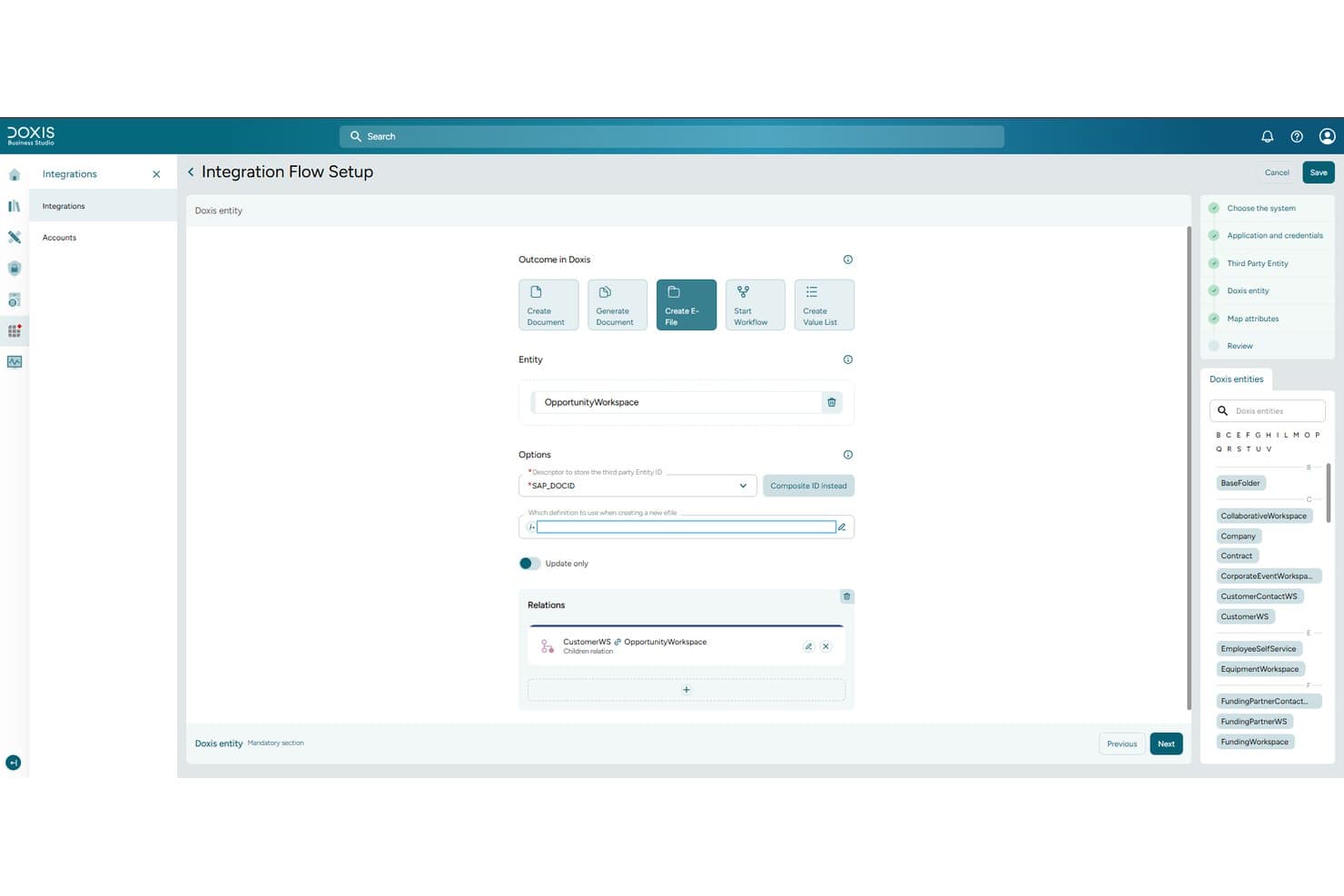
Doxis consente agli utenti di configurare flussi di integrazione che collegano entità e documenti legali. Doxis è una piattaforma di gestione dei contenuti aziendali che centralizza i documenti legali in fascicoli digitali, automatizza la classificazione e l'instradamento dei documenti e supporta la gestione del ciclo di vita dei contratti, la ricerca nel testo integrale e l'archiviazione ai fini della conformità.
Per chi è più adatto Doxis?
Doxis è particolarmente adatto ai dipartimenti legali aziendali e ai direttori IT di grandi imprese che devono gestire su larga scala elevati volumi di contratti, fascicoli e documenti relativi alla conformità.
Perché ho scelto Doxis
Ho incluso Doxis tra le mie scelte principali perché gestisce la governance dei contenuti legali su scala aziendale meglio di quasi tutte le altre soluzioni che ho valutato. Il suo modulo AI.dp classifica automaticamente i contratti in entrata, estrae le clausole e le scadenze principali e instrada i documenti nel fascicolo elettronico corretto senza intervento manuale. Apprezzo anche la sua archiviazione certificata a prova di audit, che registra ogni evento di accesso con una marca temporale, fornendo ai team legali aziendali il registro tracciabile di cui hanno bisogno per i controlli normativi.
Funzionalità principali di Doxis
- Ricerca nel testo integrale e per metadati: Cerca tra contratti, fascicoli e documenti utilizzando parole chiave, numero del contratto, scadenza, prezzo e termini.
- Data room virtuale iRoom: Condividi documenti riservati relativi a operazioni di M&A e due diligence con utenti interni ed esterni tramite stanze con accesso controllato e a tempo limitato.
- Gestione del ciclo di vita dei contratti: Gestisci i contratti dalla stesura alla firma fino all'archiviazione, con approvazioni a più fasi e avvisi di escalation per le scadenze.
- Integrazione con Microsoft 365: Archivia e gestisci le e-mail da Outlook, monitora le modifiche ai documenti tra i vari reparti e utilizza l'assistente IA di Doxi direttamente all'interno di Outlook.
Integrazioni di Doxis
Doxis offre integrazioni native con Microsoft 365, SAP ERP e S/4HANA, Salesforce, Workday, ServiceNow, Oracle, HCL Notes e SharePoint. La sua architettura basata sulle API supporta integrazioni personalizzate e si connette a sistemi aziendali come SQL Server e PostgreSQL.
Pros and Cons
Pros:
- Si adatta a enormi archivi legali
- I percorsi di audit supportano i controlli normativi
- I recensori apprezzano l'archiviazione documentale stabile e personalizzabile
Cons:
- L'implementazione guidata da consulenti richiede un'attenta pianificazione
- Le barriere etiche e i controlli sui conflitti non sono documentati
Learn more about Doxis: Ideale per l'automazione delle attività quotidiane
- Sì
- $39/user/month
Visit WebsiteCustomer Rating:4.3/5
La funzione portale clienti di PracticePanther è dove puoi offrire ai clienti una visione chiara dell’avanzamento del loro caso PracticePanther offre ai professionisti legali una piattaforma centralizzata per gestire documenti, comunicazioni e dettagli dei casi. La sua interfaccia intuitiva e gli strumenti di workflow sono pensati per gli studi legali che desiderano ridurre il lavoro manuale e migliorare l'organizzazione digitale.
Per Chi è Ideale PracticePanther?
PracticePanther è adatto a studi legali di piccole e medie dimensioni e a liberi professionisti che desiderano digitalizzare e automatizzare i flussi di lavoro documentali legali.
Perché Ho Scelto PracticePanther
Ho scelto PracticePanther per la profondità nell'automazione delle attività, che riduce direttamente il carico amministrativo sui team legali. L'automazione dei flussi di lavoro consente di impostare attività, eventi e checklist attivati automaticamente durante le varie fasi di un caso—così il tuo team non dovrà creare manualmente ogni passaggio di follow-up dopo ogni acquisizione cliente o aggiornamento del caso. Apprezzo anche la funzione di creazione in batch dei documenti, che permette di generare, modificare e inviare più documenti legali in una singola sessione utilizzando modelli predefiniti che popolano automaticamente i dettagli del contatto e del caso. Per gli studi che gestiscono grandi volumi di documenti, solo questa funzione permette un taglio significativo del tempo non fatturabile durante la giornata.
Funzionalità Chiave di PracticePanther
- Moduli di acquisizione clienti: Raccogli i dati di contatto e dettagli sui casi dei clienti tramite moduli d’acquisizione automatici, in linea con il brand, già dall’apertura di una nuova pratica.
- Firma elettronica: Invia documenti per la firma elettronica e archivia le copie firmate direttamente su PracticePanther senza bisogno di strumenti di terze parti.
- Permessi basati su ruolo: Assegna ruoli d’accesso specifici per controllare quali membri del team possono visualizzare o modificare dati sensibili su casi e clienti.
- Messaggistica aziendale bidirezionale: Invia e ricevi messaggi di testo con i clienti direttamente dalla piattaforma, registrati insieme alle altre comunicazioni relative ai casi.
Integrazioni di PracticePanther
Le integrazioni includono Outlook, Gmail, Google Drive, OneDrive, Box, Dropbox, QuickBooks, Lawmatics, WealthCounsel e Smith.ai.
Pros and Cons
Pros:
- Forte attenzione all'automazione
- Funzionalità di gestione dei casi complete
- Integrazione senza interruzioni con varie applicazioni
Cons:
- Nessun piano gratuito permanente, solo periodo di prova di 7 giorni
- L’interfaccia può risultare complessa per i neofiti
- Costo superiore rispetto ad alcune alternative
Learn more about PracticePanther: Ideale per preservare una cronologia dei registri HR difendibile
- Dimostrazione gratuita disponibile
- Prezzo su richiesta
Visit WebsiteCustomer Rating:5/5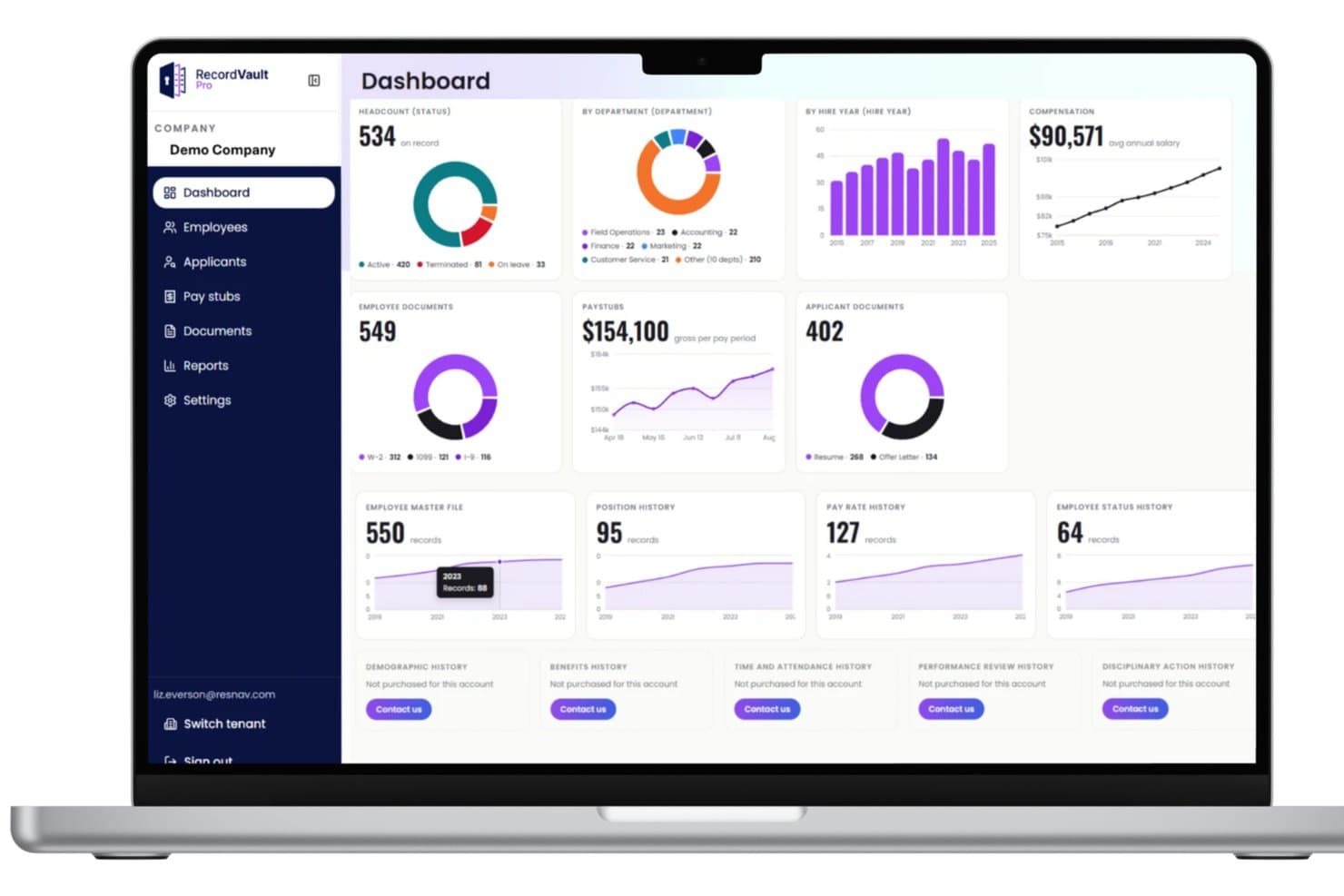
Il pannello di controllo di RecordVault centralizza metriche HR come organico, retribuzioni e documenti. Il collegamento History Link di ResNav offre ai team legali e delle risorse umane una soluzione specializzata per la gestione e il monitoraggio dei dati sensibili relativi ai dipendenti. La sua attenzione alla conservazione di cronologie documentali dettagliate e a prova di manomissione è particolarmente adatta alle organizzazioni che necessitano di tracce di audit affidabili per la conformità normativa e la risoluzione delle controversie.
Per chi è più adatto ResNav?
Professionisti delle risorse umane e legali operanti in settori regolamentati che devono conservare registri sicuri e verificabili delle azioni e della documentazione relative ai dipendenti.
Perché ho scelto ResNav
Ho scelto History Link perché risolve un problema specifico che le esportazioni in file semplici non possono risolvere: mantenere inalterati e verificabili i registri delle risorse umane e delle paghe dopo una transizione di sistema. Apprezzo il fatto che la piattaforma conservi dati strutturati, non solo istantanee temporali, così che registri come la cronologia delle tariffe retributive, le variazioni dello stato dei dipendenti e la cronologia dei benefit rimangano intatti e consultabili. In pratica, questo significa che il mio team può recuperare un registro completo e non manipolato del rapporto di lavoro durante una controversia salariale o un audit normativo, senza dover ricostruire affannosamente i dati a partire da un file CSV. L'architettura basata su Azure garantisce inoltre che i registri archiviati soddisfino i requisiti di conservazione locali, statali e federali nelle diverse giurisdizioni.
Caratteristiche principali di History Link
- Portale per la consultazione dei registri: consente di interrogare i dati strutturati delle risorse umane e delle paghe, inclusi cedolini, rapporti fiscali e cronologia dei benefit, direttamente all'interno della piattaforma senza esportare file.
- Conservazione dei dati su più livelli: archivia i registri sia a livello di dipendente sia a livello aziendale, includendo la cronologia delle posizioni, le variazioni dello stato e le informazioni sui benefit dei familiari a carico.
- Rapporti congiunti con i fornitori di sistemi HRIS e paghe: si integra con i sistemi paghe e HRIS esistenti per consentire la generazione di rapporti multipiattaforma da un unico archivio.
- Conformità alla conservazione specifica per stato: monitora e applica le regole di conservazione specifiche delle diverse giurisdizioni in stati come New York, California e Illinois all'interno della stessa piattaforma.
Integrazioni di History Link
Le integrazioni native non sono attualmente elencate.
Pros and Cons
Pros:
- Il portale centralizza i documenti necessari per verifiche e indagini.
- L'archivio consultabile offre un accesso rapido ai registri dei dipendenti durante le controversie.
- La struttura di archiviazione precisa preserva l'integrità della documentazione per le revisioni legali.
Cons:
- Le integrazioni oltre all'estrazione per l'archiviazione potrebbero richiedere interventi personalizzati.
- Non è un sistema di gestione documentale completo e generico: è principalmente incentrato sui registri HR e delle paghe.
Learn more about ResNav - RecordVault: Ideale per la gestione intelligente dei fascicoli
- Demo gratuita disponibile
- Prezzo su richiesta
Visit WebsiteCustomer Rating:4.8/5
Smokeball offre funzionalità di gestione documentale, riducendo il tempo dedicato alla redazione. Smokeball offre ai professionisti legali una piattaforma progettata per automatizzare la gestione dei casi e i flussi di lavoro dei documenti. Gli studi che desiderano ridurre le attività manuali e migliorare la collaborazione sui fascicoli possono trovare particolarmente utile il suo approccio integrato alla creazione, tracciamento e comunicazione dei documenti.
Per Chi è Ideale Smokeball?
Smokeball è adatto a studi legali di piccole e medie dimensioni che necessitano di una gestione centralizzata dei casi e dell'automazione documentale adattata ai flussi di lavoro legali.
Perché Ho Scelto Smokeball
Ciò che mi attira maggiormente di Smokeball è l'automazione nella redazione dei documenti legali: ogni contatto, parte e dettaglio dei fascicoli inserito nella piattaforma viene automaticamente riportato nei documenti, eliminando la necessità di copiare e incollare manualmente tra i vari casi. Apprezzo anche AutoTime, che registra il tempo fatturabile in background mentre il mio team redige documenti e risponde alle email, collegando ogni attività direttamente al fascicolo pertinente. Inoltre, la libreria automatizzata di formulari legali offre oltre 20.000 modelli tra giurisdizioni federali, statali e locali, evitando che il mio team debba creare documenti da zero. Per gli studi che gestiscono un’elevata mole di documentazione, questa combinazione rende Smokeball una scelta davvero pratica.
Caratteristiche Principali di Smokeball
- Gestione delle email: Tiene traccia e registra automaticamente ogni email in relazione al fascicolo pertinente, offrendo a tutto il team l’accesso alla corrispondenza da un’unica posizione.
- Portale clienti: Permette a clienti e avvocati di scambiarsi messaggi e documenti attraverso un canale di comunicazione sicuro e dedicato.
- Calendario legale: Visualizza scadenze processuali, incontri con i clienti e appuntamenti su viste settimanali, mensili e a timeline.
- Contabilità fiduciaria: Gestisce conti fiduciari e anticipi con controlli di conformità integrati per mantenere la contabilità dello studio in ordine.
Integrazioni Smokeball
Le integrazioni includono Microsoft Word, Microsoft Outlook, LawPay, Birdeye, VXT, CollBox, Aatrox Communications, Accounting Logic, AcroDocz e Activa Communications.
Pros and Cons
Pros:
- Monitoraggio automatico del tempo a supporto della precisione nella fatturazione.
- Integrazione fluida con Microsoft Word e Outlook.
- Avanzata automazione documentale e ampia libreria di formulari legali.
Cons:
- Reportistica e analisi potrebbero essere insufficienti per studi di grandi dimensioni.
- Personalizzazione limitata di modelli o flussi di lavoro per usi di nicchia.
Learn more about Smokeball: Ideale per la redazione documentale assistita dall’IA
- Sì
- Da $83/utente/mese (fatturato annualmente)
Visit WebsiteCustomer Rating:4.9/5
Vista del costruttore dell’app di raccolta dati legali di Gavel. Gavel offre ai team legali e agli studi legali una piattaforma progettata per automatizzare e gestire workflow documentali complessi. Il suo focus sull'automazione personalizzabile attrae i professionisti che desiderano ridurre la redazione manuale, migliorare l'accuratezza e mantenere la conformità negli ambienti legali digitali.
Per chi è più adatto Gavel?
I team di operation legali e gli studi legali che hanno bisogno di automatizzare la redazione di documenti complessi e semplificare i processi di workflow.
Perché ho scelto Gavel
Ho scelto Gavel perché le sue capacità di redazione assistita dall’IA vanno ben oltre il semplice riempimento di modelli. Con Gavel Exec posso effettuare la redazione di interi contratti direttamente in Microsoft Word utilizzando playbook personalizzati che riflettono le posizioni preferite del mio team, senza dover cambiare strumento. Apprezzo anche il fatto che Gavel Workflows utilizza logiche condizionali per adattare l’output dei documenti in base alle risposte dell’onboarding dei clienti, così documenti complessi come piani successori o atti societari vengono generati con precisione senza modifiche manuali. Per i team legali che gestiscono grandi volumi di documenti, questa combinazione di revisione guidata dall’IA e redazione automatizzata su un’unica piattaforma è difficile da eguagliare.
Funzionalità principali di Gavel
- Libreria di modelli legali: Accedi a una collezione preimpostata di modelli legali e moduli giudiziari automatizzati nelle aree di pratica più comuni, personalizzabili all’interno del tuo account Workflows.
- Portale di raccolta dati clienti crittografato: Raccogli informazioni sensibili dei clienti tramite un portale brandizzato e crittografato che inserisce i dati direttamente nella generazione dei documenti.
- Benchmarking delle clausole: Confronta il linguaggio delle clausole contrattuali con i dati di mercato per individuare posizioni fuori mercato prima della negoziazione.
- Team Workspaces: Condividi progetti, playbook e fascicoli fra il tuo team con controlli di accesso granulari per una revisione coerente e collaborativa.
Integrazioni di Gavel
Le integrazioni includono Clio, DocuSign e Zapier; inoltre, Gavel offre un’API per integrazioni personalizzate.
Pros and Cons
Pros:
- Integrazione con Word, automazione PDF, logica condizionale, calcoli.
- Solidi workflow di raccolta dati clienti e interviste guidate inclusi.
- Automazione documentale legale no-code/low-code altamente avanzata.
Cons:
- Incentrato principalmente sulla generazione/automazione dei documenti e non sulla gestione dell’intero ciclo di vita documentale (archiviazione, conservazione).
- Alcune integrazioni o connessioni tramite Zapier sono più deboli o limitate.
Learn more about Gavel: 6Ideale per la gestione completa dello studio legale
Clio
- Sì
- $39/utente/mese
Visit WebsiteCustomer Rating:4.7/5
La dashboard di Clio mostra i dettagli di una pratica Clio offre ai professionisti legali una piattaforma centralizzata per gestire documenti, casi e comunicazioni con i clienti in un unico posto. Il suo focus sui flussi di lavoro digitali e sulla collaborazione sicura lo rende particolarmente utile per gli studi legali che desiderano modernizzare la gestione dei documenti e ottimizzare le operazioni quotidiane.
Per chi è più adatto Clio?
Clio è adatto a studi legali di tutte le dimensioni nel Regno Unito che necessitano di strumenti integrati per gestire documenti legali, casi e relazioni con i clienti.
Perché ho scelto Clio
Clio copre l'intero ciclo di vita della gestione dello studio legale: dalla creazione e archiviazione dei documenti alla fatturazione e comunicazione con il cliente, tutto su un'unica piattaforma collegata. L'ho scelto perché Clio Manage permette al mio team di generare automaticamente documenti utilizzando dati aggiornati su casi e clienti, eliminando così l'inserimento manuale che solitamente causa errori tra le diverse pratiche. Apprezzo anche che Clio Draft trasformi i file Word esistenti in modelli riutilizzabili tramite l'IA, così il mio team può iniziare a redigere documenti dal primo giorno senza dover costruire una libreria di modelli da zero. Insieme, questi strumenti significano che non devo passare continuamente da un sistema all'altro per portare avanti una pratica.
Caratteristiche principali di Clio
- Portale clienti: Consente ai clienti di visualizzare documenti, inviare messaggi e ricevere aggiornamenti tramite un portale sicuro dedicato collegato alla loro pratica.
- Raccolta di firme elettroniche: Consente di raccogliere firme legalmente vincolanti direttamente all'interno di Clio, senza dover inviare i documenti a uno strumento di firma separato.
- Questionari alimentati da IA: Invia ai clienti moduli di raccolta dati dinamici che riportano le risposte direttamente sui modelli di documenti, riducendo l'inserimento manuale delle informazioni.
- Dashboard delle prestazioni dello studio legale: Visualizza le ore registrate, fatturate e incassate in tutto lo studio in un'unica schermata di reportistica.
Integrazioni di Clio
Le integrazioni includono Outlook, Gmail, Google Drive, OneDrive, DropBox, Box, NetDocuments, QuickBooks, Xero, InfoTrack e Arken Professional.
Pros and Cons
Pros:
- Suite completa di strumenti per la gestione dello studio legale
- Si integra con vari strumenti legali essenziali, piena compatibilità con il file system di Windows e Mac OS
- Offre una prova gratuita per valutare la piattaforma
Cons:
- Il prezzo di partenza è relativamente elevato rispetto ad altri strumenti
- Le funzionalità premium richiedono un costo aggiuntivo
- La piattaforma può risultare complessa per gli studi piccoli con esigenze semplici
Learn more about Clio: Ideale per la gestione della comunicazione con i clienti
- No
- $49/utente/mese
Visit WebsiteCustomer Rating:4.6/5
Vista dashboard di MyCase MyCase offre ai professionisti legali una piattaforma centralizzata per organizzare i documenti dei casi, gestire i flussi di lavoro e collaborare in modo sicuro. È particolarmente utile per gli studi legali che desiderano semplificare la gestione dei documenti e migliorare il coordinamento tra le pratiche dei clienti.
Per chi è ideale MyCase?
Professionisti singoli e studi legali di piccole e medie dimensioni che cercano una piattaforma tutto-in-uno per gestire documenti legali e interazioni con i clienti.
Perché ho scelto MyCase
La comunicazione con i clienti è il vero punto di forza di MyCase nella gestione dei documenti legali. L'ho scelta perché il portale clienti sincronizza automaticamente tutti i messaggi, i documenti e gli aggiornamenti dei casi in un unico luogo: quindi, quando un cliente carica un documento firmato o risponde a un'attività, ricevo una notifica istantanea senza dover cercare tra le conversazioni email. Apprezzo anche la funzione integrata di messaggistica testuale, che assegna un numero dedicato allo studio e sincronizza automaticamente ogni messaggio direttamente con la pratica corretta. In pratica, significa che il mio team può inviare promemoria di fatture o conferme di appuntamenti senza usare telefoni personali, e ogni scambio viene registrato e può essere ricercato all'interno del fascicolo della pratica.
Funzionalità principali di MyCase
- Automazione avanzata dei documenti: Genera documenti legali basati su MS Word—come accordi di compenso o richieste di discovery—utilizzando modelli preimpostati già compilati con dati relativi a casi e contatti.
- MyCase Drive: Sincronizza i file direttamente dal desktop alle cartelle MyCase, con le modifiche automaticamente aggiornate in tempo reale su entrambe le posizioni.
- Ricerca testuale completa: Cerca all'interno di tutti i documenti dei casi archiviati per trovare file specifici senza dover navigare manualmente nelle cartelle.
- Calendario basato su regole: Calcola e imposta automaticamente le scadenze giudiziarie utilizzando un database di regole dei tribunali di tutti i 50 stati.
Integrazioni di MyCase
Le integrazioni includono QuickBooks, LawPay, Google Calendar, Outlook, Dropbox, CalendarRules, Infusionsoft, Kenect, CasePeer, Smith.ai e la 8am™ Visa® Business Card.
Pros and Cons
Pros:
- Eccellenti funzionalità per la gestione della comunicazione con i clienti
- Si integra con piattaforme molto diffuse
- Prezzi trasparenti senza costi nascosti
Cons:
- Nessun piano gratuito permanente, solo periodo di prova
- L'interfaccia utente per la ricerca avanzata e il controllo accessi potrebbe essere più intuitiva
- Costo elevato rispetto ad alcuni concorrenti
 Ideale per la gestione avanzata delle pratiche
- No
- Prezzi su preventivo
Visit WebsiteCustomer Rating:4.5/5
Vista dashboard contratti di Filevine Filevine offre ai team legali una piattaforma centralizzata progettata per gestire pratiche complesse, flussi di lavoro documentali e esigenze di collaborazione. La sua interfaccia flessibile e le funzionalità di automazione la rendono particolarmente utile per studi legali e dipartimenti legali che gestiscono grandi volumi di documenti sensibili.
Per Chi è Filevine?
Filevine è adatto a studi legali di medie e grandi dimensioni e ai dipartimenti legali che necessitano di coordinare pratiche complesse e la gestione documentale tra diversi team.
Perché Ho Scelto Filevine
Ho scelto Filevine perché la sua gestione delle pratiche va ben oltre la semplice organizzazione dei file: collega i documenti direttamente ai casi, alle attività e alle azioni del team in un unico spazio di lavoro. Apprezzo la funzionalità DocGen, che inserisce automaticamente dati del cliente e della pratica nei modelli di documento, eliminando l'inserimento manuale di dati che rallenta i team nei casi ad alto volume. I flussi di lavoro personalizzabili della piattaforma permettono inoltre al mio team di costruire processi specifici per ogni tipo di pratica, così una causa per lesioni personali segue un percorso diverso rispetto a una di difesa penale, senza bisogno di soluzioni alternative. Per gli studi che gestiscono decine o centinaia di pratiche attive contemporaneamente, questo livello di struttura è difficile da trovare altrove.
Funzionalità Principali di Filevine
- Ricerca OCR: Consente di cercare il testo completo di ogni documento presente nel sistema, inclusi PDF e immagini scansionate, per trovare specifiche parole o frasi.
- Numerazione Bates: Applica numeri di pagina sequenziali e piè di pagina a più documenti, per fascicoli giudiziari ordinati e presentazioni ai clienti.
- Verifica conflitti: Analizza i documenti caricati e confronta nomi e dettagli con quelli di clienti e pratiche esistenti per segnalare potenziali conflitti di interesse.
- Condivisione bidirezionale di cartelle: Permette ai team di condividere le cartelle delle pratiche con clienti o collaboratori esterni e ricevere contributi all'interno di un ambiente controllato.
Integrazioni Filevine
Le integrazioni includono Sageness, Gemini Legal, InfoTrack, Record Retrieval Solutions, DocuPost, MoveDocs, Copitrak, FedEx, Stamps e Microsoft Teams.
Pros and Cons
Pros:
- Gestione delle pratiche personalizzabile
- Strumenti di reportistica avanzati
- Integrazione senza soluzione di continuità con Microsoft 365 e Google Workspace
Cons:
- Nessun livello gratuito o periodo di prova
- La formula su preventivo riduce la trasparenza
- Può avere una curva di apprendimento ripida per alcuni utenti
Learn more about Filevine: Ideale per l'archiviazione sicura dei documenti
- Prova gratuita + demo disponibili
- Da $69/utente/mese
Visit WebsiteCustomer Rating:4.5/5
Tabs3 fornisce una vista dettagliata della gestione delle pratiche legali. Tabs3 offre ai professionisti legali una soluzione di gestione dei documenti progettata per gestire fascicoli sensibili e registri dei clienti. Gli studi legali che cercano un'organizzazione avanzata, tracciabilità delle modifiche e integrazione con strumenti di fatturazione o gestione dello studio troveranno Tabs3 particolarmente utile per mantenere il controllo sui documenti digitali.
Per Chi È Ideale Tabs3?
Tabs3 è adatto a studi legali di piccole e medie dimensioni e reparti legali che necessitano di una gestione centralizzata e conforme dei documenti legali sensibili.
Perché Ho Scelto Tabs3
La conservazione sicura dei documenti è il vero punto di forza che colloca Tabs3 in questa lista. L'ho scelto perché la gestione documentale di PracticeMaster attribuisce automaticamente nomi e archivia i file collegati alla pratica corretta—così, quando apro un caso, ogni contratto, allegato email e deposito in tribunale è subito disponibile, organizzato e registrato. Apprezzo anche i controlli sui permessi per utente e per campo, che mi permettono di limitare chi può visualizzare, modificare o eliminare registri sensibili dei clienti. Inoltre, l'integrazione con LexShare aggiunge una crittografia a livello bancario per la condivisione dei file, un aspetto fondamentale quando il team scambia documenti riservati con i clienti a distanza.
Funzionalità Chiave di Tabs3
- Composizione dei documenti: Compila automaticamente i modelli con dati specifici del cliente e della pratica per generare bozze di documenti.
- Verifica dei conflitti di interesse: Esegue ricerche parziali e fonetiche tra le pratiche per segnalare potenziali conflitti in pochi secondi.
- Automazione WorkFlows: Attiva attività automatiche—come email di follow-up o pianificazione di appuntamenti—in base a condizioni predefinite.
- Matter Manager: Mostra una cronologia completa dell'attività di una pratica, incluse email, parcelle, appuntamenti e note di ricerca, tutto in un'unica visualizzazione.
Integrazioni Tabs3
Le integrazioni includono LawPay, LexCharge, BillSync by Scan Logic, ALB, Taskbill, TBDevice, Copitrak, Equitrac, PaperCut e QuickBooks.
Pros and Cons
Pros:
- Gestione integrata di documenti e pratiche (con relativi file e contatti).
- Ottima gestione dei fondi fiduciari e moduli contabili dedicati al settore legale.
- Potenti funzionalità di fatturazione e rilevamento ore pensate per gli studi legali.
Cons:
- Alcune limitazioni di integrazione con strumenti di terze parti e API.
- Interfaccia utente e navigazione considerate obsolete.
Learn more about Tabs3: 10Ideale per funzionalità contabili integrate
CosmoLex
- No
- $79/user/month
Visit WebsiteCustomer Rating:4.4/5
Dashboard di CosmoLex CosmoLex offre agli studi legali una piattaforma basata su cloud che combina la gestione dello studio legale con funzionalità di gestione documentale. È pensata per i professionisti legali che cercano un sistema unificato per gestire i fascicoli, la conformità e le sfide legate al workflow in un ambiente digitale.
Per chi è più indicato CosmoLex?
CosmoLex è adatto a studi legali di piccole e medie dimensioni e a professionisti singoli che necessitano di una gestione integrata dello studio legale e dei documenti con contabilità incorporata.
Perché ho scelto CosmoLex
Ciò che distingue CosmoLex per me è il fatto che gli strumenti di contabilità non sono aggiunti a parte, ma integrati nel cuore della piattaforma. L'ho scelto perché gli studi legali che gestiscono fondi dei clienti hanno bisogno di una contabilità fiduciaria nativa nel sistema di gestione di documenti e pratiche, non di un adattamento tramite QuickBooks. La contabilità fiduciaria integrata di CosmoLex previene automaticamente gli scoperti sui libri contabili e la commistione di fondi, e posso effettuare riconciliazioni in tre fasi con pochi clic. La piattaforma genera anche report fiduciari pronti per audit, come riepiloghi delle attività sui libri contabili e report dei saldi dei conti, così il mio team è sempre pronto in caso di controlli da parte dell'ordine.
Funzionalità principali di CosmoLex
- Creazione documenti: Crea modelli riutilizzabili in Microsoft Word utilizzando i campi di unione CosmoLex per generare documenti specifici per ciascuna pratica.
- Gestione e-mail per pratica: Archivia automaticamente le e-mail in arrivo nella cartella cliente-correlata e segnala i messaggi non abbinati.
- Portale clienti sicuro: Permette ai clienti di caricare documenti, visualizzare fatture e inviare messaggi, con tutte le attività registrate sulla relativa pratica.
- Automazione personalizzata del workflow: Crea workflow di attività e assegnali a pratiche nuove o esistenti per gestire le scadenze e le responsabilità del team.
Integrazioni di CosmoLex
Le integrazioni includono Microsoft 365, Google Workspace, Dropbox, NetDocuments, Box, OneDrive, LawPay, QuickBooks Online, CalendarRules e InfoTrack.
Pros and Cons
Pros:
- Funzionalità contabili integrate
- Strumenti completi per la gestione dello studio legale
- Integrazione senza soluzione di continuità con Office 365 e Box
Cons:
- Prezzo iniziale leggermente più alto
- Alcuni utenti potrebbero trovare l'interfaccia meno intuitiva
- Richiede un impegno annuale
Learn more about CosmoLex:
Altri software per la gestione dei documenti legali
Ecco alcune altre opzioni di software per la gestione dei documenti legali che non sono entrate nella mia selezione, ma che vale comunque la pena prendere in considerazione:
- 11iManageIdeale per la gestione documentale guidata dall’IA
- 12LawVuIdeale per la collaborazione dei team legali interni
- 13CaseFleetIdeale per le visualizzazioni intuitive delle linee temporali
- 14GuruIdeale per la ricerca documentale tramite IA
- 15PreciselyIdeale per l'automazione dei contratti
- 16CenterbaseIdeale per workflow personalizzabili
- 17RedactableIdeale per la redazione automatizzata
- 18RocketMatterIdeale per la rilevazione dei tempi e la fatturazione
- 19Assembly NEOSIdeale per la migrazione di contenuti e dati
- 20XakiaIdeale per l'organizzazione dei documenti
- 21OntraIdeale per automazione ed analytics dei contratti
- 22Document360Ideale per la gestione interna dei contenuti basata sui ruoli
- 23MacroViewIdeale per l'integrazione con Microsoft 365
Come valuto il software di gestione documentale legale
Baso la valutazione su due livelli: i requisiti di base come l’archiviazione incentrata sulle pratiche e le tracce di audit, poi i fattori di differenziazione che rendono uno strumento adatto alle esigenze specifiche di uno studio.
Funzionalità di base (Requisiti essenziali per questa lista)
Quando seleziono gli strumenti per la mia lista, valuto ognuno su una scala da 0 (non offre la funzionalità) a 5 (eccelle in quest'area) per ciascuna delle funzionalità di base elencate di seguito. Quindi, calcolo il punteggio totale dello strumento in percentuale. Ogni strumento deve raggiungere un punteggio totale minimo del 65% per essere incluso.
- Organizzazione documentale incentrata sulla pratica: Valuto se ogni strumento struttura i file intorno a pratiche e clienti piuttosto che su cartelle generiche, permettendo così agli avvocati di visualizzare in un unico luogo tutti i documenti legati a un caso.
- Sicurezza dei documenti legali: Permessi granulari, barriere etiche tra i gruppi di pratica e tracce di audit dettagliate sono fondamentali, soprattutto per studi che gestiscono dati privilegiati o sensibili dei clienti.
- Controllo delle versioni e check-in/check-out: Verifico che gli strumenti traccino l'intera cronologia di modifica, supportino il check-in/check-out per evitare conflitti tra bozze e consentano agli utenti di confrontare le versioni fianco a fianco.
- Template legali e composizione documenti: Che si tratti di generare lettere di incarico o assemblare NDA da una libreria di clausole, esamino quanto bene ogni piattaforma supporti la creazione riutilizzabile di documenti legali.
- Ricerca legale avanzata: Valuto la ricerca per pratica, tipo di documento, autore, intervallo di date e contenuto testuale completo: il tipo di filtro che aiuta un assistente legale a individuare un solo allegato tra migliaia di file.
- Integrazione con Microsoft Office e email: Gran parte del lavoro legale avviene ancora in Word e Outlook, quindi osservo il livello di connessione: archiviazione delle email nelle pratiche, apertura di documenti nativamente e sincronizzazione delle modifiche.
Una volta identificati gli strumenti che soddisfano questi criteri, considero ciò che distingue ogni piattaforma.
Fattori di differenziazione (Cosa distingue i fornitori)
Ecco come confronto i diversi fornitori:
Caratteristiche eccezionali
L’analisi documentale basata su AI è un fattore determinante. Gli strumenti che possono estrarre clausole chiave o segnalare termini insoliti durante la due diligence risparmiano ore di revisione. Anche la gestione della conoscenza è importante: valuto se la piattaforma consente librerie di precedenti che permettano agli avvocati di riutilizzare lavori verificati su più pratiche. L’integrazione con la gestione dello studio completa la valutazione, perché un DMS collegato a strumenti di fatturazione, calendari ed eDiscovery mantiene i flussi di lavoro unificati e non isolati.
Oltre le funzionalità
Le certificazioni di conformità legale come SOC 2 Type II e ISO 27001 sono al primo posto nella mia lista di controllo; gli studi che gestiscono dati privilegiati hanno bisogno di sicurezza verificata, non solo di promesse. Valuto anche la dimensione dello studio e la compatibilità rispetto alle aree di pratica, perché le esigenze di un avvocato singolo sono ben diverse da quelle di uno studio AmLaw 200 impegnato in contenziosi complessi. Il supporto alla migrazione è un altro fattore chiave. Passare da un DMS legacy come Worldox o da un'archiviazione su condivisione file può essere complicato, quindi verifico che i fornitori offrano servizi di migrazione dedicati e programmi di onboarding specifici per il settore legale.
Come scegliere un software per la gestione dei documenti legali
È facile perdersi in lunghi elenchi di funzionalità e strutture tariffarie complesse. Per aiutarti a rimanere concentrato mentre affronti il tuo particolare processo di selezione del software, ecco una lista di fattori da tenere a mente:
| Fattore | Cosa considerare |
|---|---|
| FattoreScalabilità | Cosa considerareIl software crescerà insieme al tuo studio? Considera le dimensioni future del tuo studio e il volume di documenti. Assicurati che lo strumento possa gestire una maggiore quantità di dati senza problemi di prestazioni. |
| FattoreIntegrazioni | Cosa considerareFunziona con gli strumenti che già utilizzi? Verifica la compatibilità con software come client di posta elettronica, CRM e sistemi di fatturazione per garantire un'integrazione fluida dei flussi di lavoro. |
| FattorePersonalizzazione | Cosa considerarePuoi adattarlo alle tue esigenze? Cerca impostazioni flessibili che consentano di modificare flussi di lavoro, autorizzazioni e modelli di documenti in base ai processi specifici del tuo studio. |
| FattoreFacilità d'uso | Cosa considerareÈ intuitivo per il tuo team? Valuta l'interfaccia e la navigazione. Una curva di apprendimento ripida può rallentare l'adozione e ridurre l'efficienza. |
| FattoreImplementazione e avviamento | Cosa considerareQuanto tempo occorre per iniziare? Considera il tempo e le risorse necessari per la configurazione, la formazione e la migrazione dei dati. Cerca guide per iniziare rapidamente e opzioni di assistenza. |
| FattoreCosto | Cosa considerareRientra nel tuo budget? Confronta i piani tariffari, i costi nascosti e il costo totale di proprietà. Considera il valore a lungo termine anziché il risparmio iniziale. |
| FattoreMisure di sicurezza | Cosa considerareQuanto sono sicuri i tuoi dati? Cerca funzionalità di crittografia, controlli degli accessi e conformità agli standard legali come GDPR o HIPAA per proteggere le informazioni sensibili. |
| FattoreRequisiti di conformità | Cosa considerareRispetta le normative del settore? Assicurati che il software supporti la conformità agli obblighi legali specifici della tua giurisdizione o area di pratica. |
Che cos'è il software di gestione dei documenti legali?
Il software di gestione dei documenti legali è uno dei tipi di software legale progettati per organizzare, archiviare e gestire in modo efficiente i documenti legali. Avvocati, paralegali e team legali utilizzano generalmente questi strumenti per migliorare l'accesso ai documenti e garantire la conformità. Le funzionalità di ricerca, le autorizzazioni di accesso e il controllo delle versioni aiutano a organizzare i file, mantenere la sicurezza e monitorare le modifiche. Nel complesso, questi strumenti fanno risparmiare tempo e riducono gli errori nella gestione dei documenti.
Funzionalità
Quando scegli un software di gestione dei documenti legali, presta attenzione alle seguenti funzionalità principali:
- Archiviazione dei documenti: Archivia i file in modo sicuro in una posizione centralizzata per facilitarne l'accesso e il recupero.
- Controllo delle versioni: Tiene traccia delle modifiche apportate ai documenti nel tempo, consentendo agli utenti di visualizzare le versioni e le modifiche precedenti.
- Autorizzazioni di accesso: Controlla chi può visualizzare o modificare i documenti, garantendo riservatezza e conformità.
- Funzionalità di ricerca: Offre potenti strumenti di ricerca per individuare rapidamente i documenti in base a parole chiave o metadati.
- Funzionalità di integrazione: Si collega ad altri strumenti software, come i sistemi di posta elettronica o di fatturazione, per semplificare i flussi di lavoro.
- Supporto alla conformità: Garantisce che la gestione dei documenti rispetti le normative e gli standard del settore.
- Flussi di lavoro personalizzabili: Consente agli utenti di adattare i processi documentali alle proprie esigenze e pratiche specifiche.
- Accesso da dispositivi mobili: Permette agli utenti di accedere ai documenti e gestirli da dispositivi mobili, offrendo flessibilità e praticità.
- Assegnazione automatica dei tag: Categorizza automaticamente i documenti con tag pertinenti per facilitarne l'organizzazione e il recupero.
- Misure di sicurezza: Implementa la crittografia e altre misure di sicurezza per proteggere le informazioni legali sensibili.
Vantaggi
L'implementazione di un software di gestione dei documenti legali offre diversi vantaggi al tuo team e alla tua attività. Ecco alcuni dei vantaggi che puoi aspettarti:
- Maggiore efficienza: Automatizza la gestione dei documenti, riducendo le attività manuali e facendo risparmiare tempo.
- Maggiore sicurezza: Protegge le informazioni sensibili con la crittografia e i controlli degli accessi.
- Organizzazione migliore: Centralizza l'archiviazione dei documenti, facilitando la ricerca e la gestione dei file.
- Collaborazione potenziata: Consente ai membri del team di lavorare contemporaneamente sui documenti grazie al controllo delle versioni.
- Conformità normativa: Supporta il rispetto degli standard di settore e delle normative legali.
- Risparmio sui costi: Riduce l'utilizzo della carta e i costi di archiviazione digitalizzando i documenti.
- Flessibilità: Consente di accedere ai documenti da qualsiasi luogo grazie alle funzionalità mobili e cloud.
Costi e prezzi
La scelta di un software di gestione dei documenti legali richiede la comprensione dei vari modelli e piani tariffari disponibili. I costi variano in base alle funzionalità, alle dimensioni del team, ai componenti aggiuntivi e ad altri fattori. La tabella seguente riassume i piani più comuni, i relativi prezzi medi e le funzionalità tipicamente incluse nelle soluzioni software di gestione dei documenti legali:
Tabella comparativa dei piani per il software di gestione dei documenti legali
| Tipo di piano | Prezzo medio | Funzionalità comuni |
|---|---|---|
| Tipo di pianoPiano gratuito | Prezzo medio$0 | Funzionalità comuniArchiviazione di base dei documenti, funzionalità di ricerca limitate e autorizzazioni di accesso di base. |
| Tipo di pianoPiano personale | Prezzo medio$5-$25/utente/mese | Funzionalità comuniArchiviazione avanzata dei documenti, controllo delle versioni, integrazioni di base e funzionalità di ricerca migliorate. |
| Tipo di pianoPiano aziendale | Prezzo medio$30-$100/utente/mese | Funzionalità comuniIntegrazioni avanzate, flussi di lavoro personalizzabili, funzionalità di sicurezza avanzate e supporto alla conformità. |
| Tipo di pianoPiano enterprise | Prezzo medio$100+/utente/mese | Funzionalità comuniMisure di sicurezza complete, opzioni di personalizzazione totali, supporto premium e accesso da dispositivi mobili. |
Domande frequenti sul software di gestione dei documenti legali
Ecco alcune risposte alle domande più frequenti sul software di gestione dei documenti legali:
Il software di gestione dei documenti legali può integrarsi con altri strumenti?
Sì, molte soluzioni software per la gestione dei documenti legali possono integrarsi con altri strumenti, come client di posta elettronica, sistemi di fatturazione e CRM. Questo può aiutare a semplificare i flussi di lavoro mantenendo tutto collegato e accessibile da un unico luogo. Quando scegli il software, verifica la compatibilità con gli strumenti già in uso per evitare interruzioni.
Quanto tempo occorre per implementare il software di gestione dei documenti legali?
I tempi di implementazione variano a seconda della complessità del software e delle esigenze del tuo studio. Alcuni strumenti offrono guide introduttive e modelli che possono aiutarti a iniziare in pochi giorni. Altri potrebbero richiedere più tempo per la configurazione, soprattutto se devi migrare molti dati esistenti. Valuta le risorse e il supporto offerti per garantire una transizione senza problemi.
La formazione è inclusa nell'acquisto del software di gestione dei documenti legali?
La maggior parte dei fornitori offre risorse formative come webinar, tutorial e guide per gli utenti. Alcuni possono includere sessioni di formazione personalizzate nel proprio pacchetto, soprattutto per gli studi più grandi. Sfrutta queste risorse per aiutare il tuo team a familiarizzare con il software e a sfruttarne al massimo i vantaggi. Verifica sempre quali opzioni di formazione sono disponibili prima dell’acquisto.
Cosa succede ora:
Se stai cercando un software per la gestione dei documenti legali, contatta gratuitamente un consulente SoftwareSelect per ricevere consigli personalizzati.
Compili un modulo e fai una breve conversazione durante la quale il consulente approfondirà le tue esigenze specifiche. In seguito riceverai una lista ristretta di software da valutare. Ti assisterà anche durante l'intero processo di acquisto, comprese le trattative sul prezzo.