

Il software di gestione dei progetti legali aiuta gli studi legali a organizzare i casi, monitorare le attività e gestire le scadenze in un unico posto. Se stai cercando strumenti per coordinare il lavoro legale, migliorare la collaborazione e mantenere le pratiche sotto controllo, sai quanto velocemente la disorganizzazione può portare a scadenze mancate o rischi di non conformità. Molte piattaforme moderne combinano funzioni di tecnologia legale come gestione dei contratti, ricerca legale e monitoraggio dei casi in un sistema tutto-in-uno pensato per team legali impegnati.
Questi strumenti aiutano gli studi a soddisfare le crescenti aspettative dei clienti, migliorare la redditività e semplificare i flussi di lavoro interni grazie a interfacce user-friendly. Questo elenco ti aiuterà a confrontare le migliori soluzioni software di gestione pratica legale per il 2026, così potrai trovare quella più adatta al flusso di lavoro del tuo team, alle esigenze dei clienti e ai requisiti normativi.
Perché fidarsi dei nostri consigli sui software
6,700+
Reviews
20
Industry experts
16+
Evaluation factors
14
Years
Il nostro team testa e recensisce software dal 2012. In quanto leader di studi legali noi stessi, sappiamo quanto sia difficile — e importante — scegliere il software giusto.
Per questa guida, abbiamo valutato gli strumenti attraverso test pratici e ricerche indipendenti, assegnando un punteggio agli strumenti in base ai nostri criteri di selezione.
Le nostre recensioni riflettono il nostro giudizio editoriale umano, non un discorso di vendita.
Riepilogo dei migliori software per la gestione dei progetti legali
Questa tabella riassuntiva sintetizza i dettagli sui prezzi delle migliori soluzioni di project management per il settore legale, per aiutarti a trovare la più adatta alle tue esigenze di budget e business.
| Tool | Best For | Trial Info | Price | ||
|---|---|---|---|---|---|
| 1 | Ideale per soluzioni integrate di fatturazione legale | Demo gratuita disponibile | Prezzo su richiesta | Website | |
| 2 | Ideale per l'accesso sicuro al portale clienti | Prova gratuita di 10 giorni + demo gratuita disponibile | Da $239/mese (fatturazione annuale) | Website | |
| 3 | Ideale per la collaborazione tra professionisti singoli e piccoli studi | Prova gratuita di 7 giorni + demo gratuita disponibile | Da $49/utente/mese (fatturazione annuale) | Website | |
| 4 | Ideale per interfaccia visiva a lavagna dei compiti | Prova gratuita di 14 giorni + demo gratuita disponibile | Da $39/utente/mese | Website | |
| 5 | Ideale per le funzionalità di generazione documentale | Prova gratuita + demo gratuita disponibili | Prezzo su richiesta | Website | |
| 6 | Ideale per la rilevazione integrata di tempo e fatturazione | Prova gratuita di 10 giorni + demo gratuita disponibile | Da $59/utente/mese (fatturato annualmente) | Website | |
| 7 | Ideale per modelli di processo personalizzabili | Demo gratuita disponibile | Prezzo su richiesta | Website | |
| 8 | Ideale per l’automazione avanzata dei flussi di lavoro | Demo gratuita disponibile | Prezzo su richiesta | Website | |
| 9 | Ideale per la gestione della conformità integrata | Demo gratuita disponibile | Da $49/utente/mese (fatturazione annuale, con un minimo di 5 postazioni) | Website | |
| 10 | Ideale per la gestione delle attività tramite dispositivi mobili | Prova gratuita di 7 giorni + demo gratuita disponibile | Da $49/utente/mese (fatturazione annuale) | Website |


Recensioni software per la gestione dei progetti legali
Di seguito trovi un riepilogo dettagliato dei software di project management legale che sono entrati nella mia shortlist. Le mie recensioni ti offrono uno sguardo approfondito su funzionalità, casi d’uso ideali e integrazioni di ciascuna piattaforma, per aiutarti a trovare quella più adatta a te.
 1Ideale per soluzioni integrate di fatturazione legale
8am
- Demo gratuita disponibile
- Prezzo su richiesta
Visit WebsiteCustomer Rating:4.6/5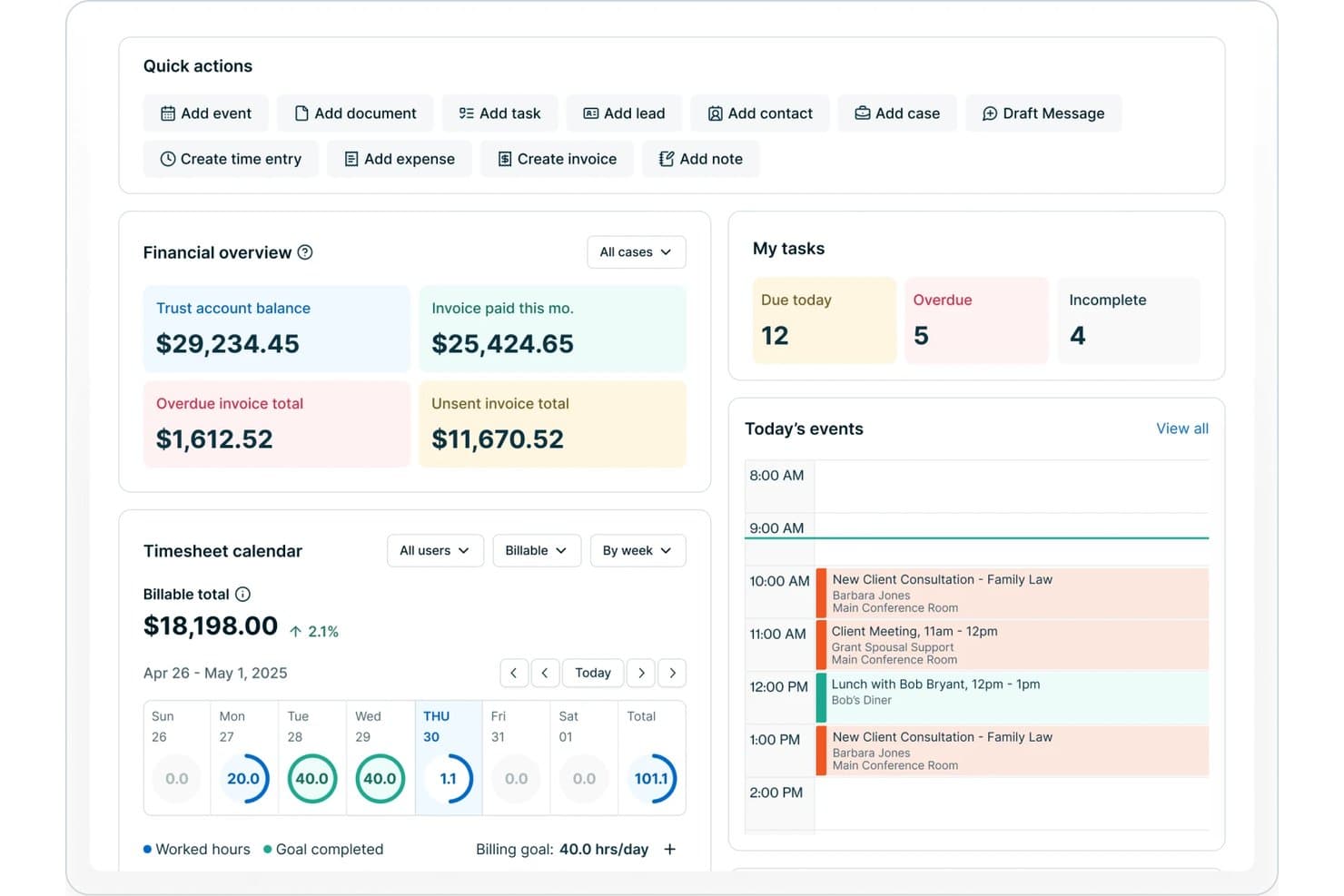
8am offre un cruscotto per studi legali con panoramica finanziaria, monitoraggio delle attività, calendario delle ore lavorate e gli eventi di oggi tra cui consultazioni con i clienti e riunioni. 8am è una piattaforma software per la gestione di progetti legali che offre pianificazione delle pratiche, fatturazione automatizzata, rilevazione del tempo, gestione documentale e strumenti di workflow progettati specificamente per studi legali e team legali.
Per chi è migliore 8am?
Studi legali e dipartimenti legali che cercano una piattaforma centralizzata per gestire le pratiche, la fatturazione e la collaborazione nel team legale.
Perché ho scelto 8am
Ho scelto 8am come uno dei migliori perché la piattaforma centralizza fatturazione, processi di pagamento e rilevazione del tempo all’interno dei workflow delle pratiche. Ho inviato fatture ai clienti, tracciato saldi in sospeso e ricevuto pagamenti fiduciari direttamente all’interno del fascicolo legale.
Funzionalità chiave di 8am
- Modelli di pratica: Crea e riutilizza modelli strutturati per tipi di casi comuni e workflow.
- Gestione documentale: Archivia, organizza e gestisci il versionamento di tutti i file relativi alle pratiche in modo sicuro in un’unica posizione.
- Permessi basati sui ruoli: Imposta diritti dettagliati di accesso e modifica per team e singoli utenti su dati sensibili.
- Report personalizzati: Crea e pianifica report su pratiche e finanza su misura per le esigenze dello studio.
Integrazioni 8am
Le integrazioni native non sono elencate pubblicamente.
Pros and Cons
Pros:
- Firma elettronica integrata e controllo versione dei documenti
- Permessi basati sui ruoli per dati sensibili delle pratiche
- Workflow specializzati per tipi di pratiche e casi
Cons:
- Analisi avanzate e previsioni limitate
- La configurazione iniziale dei workflow richiede tempo
Learn more about 8am: Ideale per l'accesso sicuro al portale clienti
- Prova gratuita di 10 giorni + demo gratuita disponibile
- Da $239/mese (fatturazione annuale)
Visit WebsiteCustomer Rating:4.8/5
Clinked gestisce i flussi di lavoro e migliora la comunicazione con il cliente. Clinked offre ai team legali e agli studi legali un portale clienti dedicato progettato per centralizzare la condivisione di documenti, la comunicazione e la collaborazione. La sua attenzione alla privacy e ai controlli di accesso granulari aiuta i professionisti legali a gestire questioni sensibili dei clienti e a semplificare i flussi di lavoro dei progetti.
Per chi è Clinked?
Clinked è adatto a studi legali e dipartimenti legali che necessitano di un portale sicuro e personalizzato per gestire le comunicazioni con i clienti e i documenti sensibili.
Perché ho scelto Clinked
Ho scelto Clinked perché il suo portale clienti è costruito specificamente attorno a un accesso sicuro e controllato—qualcosa su cui i team legali non possono scendere a compromessi. Apprezzo il fatto che consenta di assegnare permessi dettagliati sia a livello di gruppo che di individuo, così i clienti vedono solo i file e le conversazioni che riguardano la loro pratica. Anche la funzione di personalizzazione del brand è rilevante per gli studi che vogliono offrire un'esperienza professionale e personalizzata, invece di uno strumento generico di terze parti. In pratica, questo significa che il mio team può condividere documenti sensibili e monitorare l'attività dei clienti in un unico posto, senza dover fare affidamento su conversazioni e-mail non sicure.
Caratteristiche principali di Clinked
- Bacheca Kanban: Visualizza l'avanzamento dei compiti relativi alle pratiche dei clienti tramite una bacheca Kanban drag-and-drop con scadenze e monitoraggio dello stato.
- Controllo delle versioni dei documenti: Traccia le modifiche ai file nel tempo, con accesso alle versioni precedenti di qualsiasi documento archiviato nel portale.
- Audit trail: Registra ogni azione dell'utente in tempo reale, inclusa la visualizzazione, la modifica e il download dei file, per mantenere un registro completo delle attività.
- Richiesta di file: Invia ai clienti una richiesta diretta per caricare specifici documenti nel portale senza che debbano navigare all'interno dell'intera interfaccia.
Integrazioni Clinked
Le integrazioni includono Google Workspace, Microsoft 365, DocuSign e Jotform. È inoltre disponibile un'API per integrazioni personalizzate.
Pros and Cons
Pros:
- Il versionamento dei documenti traccia tutte le modifiche ai file
- La chat di gruppo consente discussioni in tempo reale con i clienti
- L'assegnazione delle attività è collegata direttamente agli spazi di lavoro dei clienti
Cons:
- Nessun strumento integrato di automazione dei documenti
- Le impostazioni delle notifiche possono essere difficili da gestire
Learn more about Clinked: 3Ideale per la collaborazione tra professionisti singoli e piccoli studi
Clio
- Prova gratuita di 7 giorni + demo gratuita disponibile
- Da $49/utente/mese (fatturazione annuale)
Visit WebsiteCustomer Rating:4.7/5
Clio semplifica la gestione dei clienti e la fatturazione per i professionisti singoli. Clio offre un software di gestione progetti legali progettato per i professionisti del settore legale (con particolare attenzione agli studi con sede nel Regno Unito) che desiderano organizzare pratiche, documenti e comunicazioni con i clienti in un unico luogo. La sua interfaccia intuitiva e l'accesso basato su cloud lo rendono particolarmente interessante per gli studi più piccoli che mirano a semplificare i flussi di lavoro quotidiani.
Per chi è più indicato Clio?
Clio è ideale per avvocati singoli e piccoli studi legali nel Regno Unito che cercano una gestione centralizzata di pratiche, documenti e clienti.
Caratteristiche principali di Clio
- Liste di attività standardizzate: Costruisci sequenze di attività riutilizzabili collegate a specifici tipi di pratiche, con scadenze relative e incarichi per utente gestiti all'interno della pratica.
- Monitoraggio di tempi e spese: Registra le ore fatturabili direttamente da un'attività e traccia le spese associate alle pratiche utilizzando lo strumento integrato Timekeeper.
- Report sulle performance dello studio legale: Visualizza ore registrate, fatturate e incassate in tutto lo studio all'interno di un'unica dashboard, con filtri per utente, pratica o data.
- Portale clienti: Fornisci ai clienti un'app dedicata per desktop e mobile per visualizzare le attività assegnate, ricevere promemoria e comunicare in modo sicuro con lo studio.
Integrazioni con Clio
Le integrazioni includono Xero, QuickBooks Online, Legl, InfoTrack, OurFamilyWizard, Case Status, ChartSquad, Scorpion RevenueMAX, Precedent Demand Composer e l'API aperta di Clio per integrazioni personalizzate.
Pros and Cons
Pros:
- Monitoraggio integrato del tempo per le pratiche fatturabili
- Organizzazione centrata sulla pratica per tutti i fascicoli
- Sincronizzazione del calendario con date e scadenze di tribunale
Cons:
- Opzioni di reportistica limitate per l'analisi dei progetti
- L'automazione dei documenti manca di personalizzazione avanzata
Learn more about Clio: Ideale per interfaccia visiva a lavagna dei compiti
- Prova gratuita di 14 giorni + demo gratuita disponibile
- Da $39/utente/mese
Visit WebsiteCustomer Rating:4.8/5
Lawcus struttura i progetti e organizza il lavoro legale. Lawcus offre ai team legali una piattaforma di project management moderna progettata per semplificare la gestione delle pratiche e la collaborazione. La sua interfaccia intuitiva e le funzionalità di automazione dei flussi di lavoro la rendono una scelta ideale per studi legali e dipartimenti legali che desiderano organizzare lavori legali complessi con maggiore chiarezza.
Per chi è più adatto Lawcus?
Lawcus si adatta a studi legali e team legali di piccole e medie dimensioni che vogliono gestire pratiche, compiti e flussi di lavoro in modo visivo.
Perché ho scelto Lawcus
Ho scelto Lawcus per la sua interfaccia con lavagna visiva dei compiti, che consente ai team legali di gestire pratiche e compiti tramite board in stile Kanban che rispecchiano il modo in cui il lavoro legale si sviluppa realmente attraverso le varie fasi. Apprezzo il fatto che sia possibile trascinare le pratiche tra le fasi della pipeline, offrendo agli avvocati una panoramica immediata della posizione di ogni caso. Mi piace anche l'automazione integrata dei flussi di lavoro di Lawcus, che assegna compiti e aggiorna stati automaticamente man mano che le pratiche avanzano. In pratica, significa che il mio team dedica meno tempo a solleciti manuali e più tempo al lavoro legale sostanziale.
Funzionalità principali di Lawcus
- Portale clienti: Permette ai clienti di accedere agli aggiornamenti sulle pratiche, scambiare messaggi, condividere documenti e effettuare pagamenti tramite un portale criptato e personalizzato con il marchio dello studio.
- Assistente di scrittura Nova AI: Genera email, note, descrizioni delle pratiche e dei compiti direttamente all'interno della piattaforma utilizzando l'intelligenza artificiale.
- Report personalizzati: Produce oltre 100 report standard—comprendenti incassi, registri fiduciari, valore delle pipeline e fonti di referenze—con un generatore di report personalizzati per configurazioni aggiuntive.
- Tracciamento di tempo e spese: Registra le ore fatturabili e le spese relative a specifiche pratiche per supportare una fatturazione accurata.
Integrazioni di Lawcus
Le integrazioni includono Box, Calendly, Dropbox, Gmail, Google Calendar, Google Drive, LawPay, Microsoft 365, QuickBooks e Xero.
Pros and Cons
Pros:
- Le board Kanban visualizzano chiaramente l'avanzamento delle pratiche
- L'automazione dei flussi di lavoro riduce i passaggi ripetitivi delle attività
- Portale clienti integrato che supporta la messaggistica sicura
Cons:
- Nessun strumento di composizione documentale integrato
- I ruoli utente offrono una granularità limitata dei permessi
Learn more about Lawcus: Ideale per le funzionalità di generazione documentale
- Prova gratuita + demo gratuita disponibili
- Prezzo su richiesta
Visit WebsiteCustomer Rating:4.5/5
Filevine ottimizza la gestione dei compiti e dei documenti. Filevine è una piattaforma di project management legale progettata per studi legali e team giuridici che necessitano di strumenti avanzati per l'automazione dei flussi di lavoro e la collaborazione. Le sue funzionalità flessibili di gestione dei casi aiutano i professionisti del diritto a gestire pratiche complesse, scadenze e comunicazioni in un unico posto.
Per chi è Filevine?
Filevine è adatto a studi legali di medie e grandi dimensioni e dipartimenti legali che cercano flussi di lavoro personalizzabili e gestione centralizzata dei casi.
Perché ho scelto Filevine
La generazione di documenti è l'aspetto in cui trovo che Filevine superi davvero altri strumenti di project management legale. La sua funzione DocGen utilizza l'automazione tramite modelli per inserire dati di casi e clienti direttamente nei documenti con un solo clic—quindi quando il mio team deve produrre una lettera di richiesta di risarcimento, i campi pertinenti si popolano automaticamente dalla pratica. Apprezzo anche il formato proprietario .vine, che mantiene i documenti 'vivi' e collegati ai dati dei casi, così ogni aggiornamento del progetto si riflette automaticamente nel documento. Per i team che redigono grandi volumi di contratti, atti o lettere di richiesta, questo livello di precisione integrata riduce le doppie registrazioni e la correzione manuale degli errori.
Funzionalità principali di Filevine
- Monitoraggio della cronologia dei casi: Visualizza scadenze, attività e traguardi di tutte le pratiche attive in una vista cronologica unica.
- Portale cliente: Condividi documenti, raccogli firme e scambia messaggi con i clienti tramite un portale dedicato.
- Assegnazione dei compiti al team: Assegna, delega e monitora le attività tra i membri del team direttamente all'interno di ogni fascicolo.
- Dashboard reportistica: Genera report personalizzati su avanzamento dei casi, carico di lavoro del team e stato delle pratiche usando strumenti di analisi integrati.
Integrazioni di Filevine
Le integrazioni includono Sageness, Gemini Legal, InfoTrack, Record Retrieval Solutions, DocuPost, MoveDocs, Copitrak, FedEx, Stamps e Microsoft Teams.
Pros and Cons
Pros:
- La reportistica personalizzata si adatta alle esigenze dello studio
- Le catene di scadenze automatizzano i processi dei casi a più fasi
- Il caricamento massivo dei documenti fa risparmiare tempo all'accettazione
Cons:
- L'impostazione dell'automazione dei flussi di lavoro può richiedere tempo
- La configurazione dei permessi utente può essere complessa
Learn more about Filevine: Ideale per la rilevazione integrata di tempo e fatturazione
- Prova gratuita di 10 giorni + demo gratuita disponibile
- Da $59/utente/mese (fatturato annualmente)
Visit WebsiteCustomer Rating:4.4/5
Rocket Matter semplifica la fatturazione e la gestione del tempo per gli studi legali. Rocket Matter offre ai professionisti legali una piattaforma progettata per semplificare la gestione dei casi e i flussi di lavoro dei progetti. Il suo focus sull'integrazione della gestione dello studio con funzionalità avanzate di fatturazione lo rende una scelta solida per gli studi legali che desiderano unificare le operazioni e ridurre il carico amministrativo.
Per chi è ideale Rocket Matter?
Rocket Matter è adatto a studi legali di piccole e medie dimensioni e a team legali che necessitano di una gestione centralizzata di progetti e fatturazione in un'unica piattaforma.
Perché ho scelto Rocket Matter
Ho scelto Rocket Matter perché la rilevazione del tempo e la fatturazione non sono flussi di lavoro separati, ma integrati nello stesso sistema. Apprezzo il fatto che i timer siano collegati direttamente a specifiche pratiche, quindi quando termino il lavoro su un caso, trasformare quel tempo rilevato in una voce fatturabile richiede solo pochi secondi. Rocket Matter Track va oltre, catturando automaticamente il tempo su app e dispositivi d'ufficio, il che significa che il mio team non deve ricostruire manualmente le ore a fine giornata. La Matter Status Board mi permette anche di vedere esattamente a che punto è ogni caso, così posso collegare l'avanzamento del progetto alle fasi di fatturazione senza dover passare da uno strumento all'altro.
Funzionalità principali di Rocket Matter
- Contabilità fiduciaria legale: Gestisci e trasferisci fondi su più conti fiduciari clienti, con tutele integrate di conformità per i pagamenti con carta di credito e la riconciliazione degli estratti conto bancari.
- Automazione documentale: Genera documenti legali partendo da modelli personalizzabili con campi auto-compilati provenienti dal tuo database centrale dei clienti.
- Fatturazione in batch: Prepara tutte le fatture mensili in una sola volta e revisionale tramite una schermata pre-fattura digitale prima dell'invio.
- Verifiche di conflitto: Esegui ricerche di conflitti di interesse su contatti e pratiche direttamente all'interno della piattaforma.
Integrazioni di Rocket Matter
Le integrazioni includono Office 365, OneDrive, QuickBooks Online, NetDocuments, Dropbox, Google Calendar e Box.
Pros and Cons
Pros:
- Kanban board per la gestione visiva delle pratiche
- Composizione documenti integrata da modelli
- Promemoria automatici per compiti e scadenze
Cons:
- Nessun portale clienti integrato per la collaborazione
- Personalizzazione limitata per le fasi di workflow
Learn more about Rocket Matter: Ideale per modelli di processo personalizzabili
- Demo gratuita disponibile
- Prezzo su richiesta
Visit WebsiteCustomer Rating:4.2/5
Actionstep automatizza i flussi di lavoro e semplifica le operazioni dello studio. Actionstep offre ai team legali una piattaforma basata su cloud progettata per gestire flussi di lavoro complessi e automatizzare la gestione delle pratiche. Il suo approccio flessibile è ideale per studi legali e dipartimenti legali che desiderano personalizzare i processi, centralizzare le informazioni e migliorare la collaborazione tra i casi.
Per chi è più indicato Actionstep?
Actionstep è adatto a studi legali e team legali di piccole e medie dimensioni che necessitano di personalizzare i flussi di lavoro e automatizzare i processi legali.
Perché ho scelto Actionstep
Ho scelto Actionstep perché il suo sistema di tipologia di pratica permette al mio team di creare modelli di processo completamente personalizzati per ogni area di attività—definendo fin dall'inizio le esatte fasi, attività e scadenze applicabili a quel tipo di pratica. Quando si apre una nuova pratica, Actionstep applica automaticamente il flusso di lavoro corretto, così non si perde nessun passaggio. Apprezzo anche che la gestione dei modelli si estenda a documenti e email, consentendo al mio team di compilare automaticamente i dettagli specifici del cliente senza redazione manuale. Questa combinazione di modelli di tipologia di pratica e automazione dei documenti rende Actionstep particolarmente adatto per la gestione di progetti legali.
Caratteristiche principali di Actionstep
- Verifica dei conflitti: Cerca tra tutte le pratiche, i contatti e le email in un'unica scansione per individuare potenziali conflitti di interesse prima di acquisire un nuovo cliente.
- Rilevamento dei tempi tramite AI: I suggerimenti sui tempi generati dall'intelligenza artificiale compilano automaticamente i timesheet in base alle tue attività, catturando tempo fatturabile che potresti altrimenti perdere.
- Portale clienti: Condividi aggiornamenti sulle pratiche, documenti e fatture con i clienti attraverso un portale sicuro e dedicato.
- Contabilità fiduciaria: Gestisci i fondi dei clienti e mantieni la conformità con le regole di contabilità fiduciaria specifiche per giurisdizione direttamente sulla piattaforma.
Integrazioni di Actionstep
Le integrazioni includono Outlook 365, InfoTrack, First AML, MiTimes, SpeechWrite, BillerAssist, datacove, Lexidesk e Zapier.
Pros and Cons
Pros:
- Il costruttore di flussi di lavoro supporta processi ramificati
- Le tipologie di pratica possono essere completamente personalizzate
- Versionamento dei documenti integrato per i file legali
Cons:
- Nessuna vista Kanban o timeline integrata
- La modifica in blocco delle attività non è supportata
Learn more about Actionstep: Ideale per l’automazione avanzata dei flussi di lavoro
- Demo gratuita disponibile
- Prezzo su richiesta
Visit WebsiteCustomer Rating:4.3/5
HighQ aumenta l'efficienza e monitora l'avanzamento dei progetti. HighQ offre ai team legali e agli studi legali una piattaforma progettata per gestire progetti legali complessi, collaborazione sulle pratiche e flussi di lavoro documentali. La sua integrazione con l’ecosistema legale di Thomson Reuters è particolarmente apprezzata dai professionisti che cercano un controllo sicuro e centralizzato sulle attività progettuali e le comunicazioni con i clienti.
Per chi è ideale HighQ?
I team di operations legali e gli studi legali che gestiscono pratiche ad alto volume o progetti complessi e multi-parte traggono il massimo vantaggio dalle capacità di workflow e collaborazione di HighQ.
Perché ho scelto HighQ
Ho scelto HighQ perché la sua automazione dei flussi di lavoro senza codice va oltre la semplice assegnazione di compiti. Posso creare regole condizionali che attivano azioni su tutta la piattaforma, ad esempio creando automaticamente attività, generando documenti, inviando email personalizzate e aggiornando i record dei dati in base a condizioni presenti nei dati in tempo reale. Per esempio, quando una revisione contrattuale raggiunge una fase specifica, HighQ può generare automaticamente un NDA tramite automazione documentale e notificare le persone giuste senza alcun intervento manuale. Mi affido anche ai suoi dashboard spesa vs. budget e ai tracker di rischio progetto per mantenere i progetti complessi sempre sotto controllo in tempo reale.
Funzionalità principali di HighQ
- Portali clienti: Offri ai clienti accesso 24/7 a informazioni e risorse legali relative alle loro pratiche tramite un portale sicuro e personalizzato.
- Modelli di soluzione: Accedi a una libreria di modelli predefiniti per l’onboarding delle pratiche, la gestione del ciclo di vita dei contratti e la gestione end-to-end di transazioni e contenziosi.
- Calendari condivisi del team: Monitora scadenze, milestone e incontri di progetto tramite una vista del calendario condiviso dal team.
- Document Insights: Usa l’AI di CoCounsel all’interno di HighQ per estrarre informazioni chiave, riassumere documenti ed evidenziare risultati critici durante la revisione.
Integrazioni HighQ
Le integrazioni includono Microsoft SharePoint, iManage, NetDocuments, Kira Systems, Leverton, Eigen, Seclore, Microsoft Office 365, G Suite, DocuSign e Adobe Sign.
Pros and Cons
Pros:
- Collaborazione in tempo reale sui fascicoli
- Notifiche automatiche per le scadenze dei compiti
- Dashboard personalizzabili per il monitoraggio dei progetti
Cons:
- L’interfaccia può risultare complessa per i nuovi utenti
- Opzioni di personalizzazione dei report limitate
Learn more about HighQ: Ideale per la gestione della conformità integrata
- Demo gratuita disponibile
- Da $49/utente/mese (fatturazione annuale, con un minimo di 5 postazioni)

MerusCase facilita la fatturazione e la gestione dei documenti. MerusCase offre ai professionisti legali una piattaforma basata su cloud progettata per gestire flussi di lavoro complessi e dati sensibili dei casi. Il suo approccio integrato attrae studi legali e dipartimenti legali che cercano un sistema unificato per la gestione dei documenti, la calendarizzazione e la collaborazione sicura.
Per chi è ideale MerusCase?
Studi legali e team legali che gestiscono un elevato volume di casi e necessitano di una gestione sicura e centralizzata di documenti legali sensibili e flussi di lavoro.
Perché ho scelto MerusCase
Gli strumenti di conformità integrati di MerusCase lo distinguono dalle piattaforme di gestione delle pratiche legali che trattano la conformità come un elemento secondario. Apprezzo che MerusPay—il processore di pagamenti nativo—sia conforme al 100% con IOLTA, ABA e con tutte le regole degli ordini degli avvocati dei 50 stati, così il mio team non ha bisogno di verificare strumenti di pagamento di terze parti rispetto alle regole degli ordini. La piattaforma supera inoltre gli standard di conformità HIPAA grazie a crittografia SSL end-to-end e all’hashing dei dati a 256 bit, elemento importante nella gestione di informazioni sensibili sulla salute dei clienti in ambito infortunistico o di indennità per i lavoratori. Per gli studi in cui l’esposizione normativa è una realtà quotidiana, avere queste protezioni integrate direttamente nel sistema elimina uno strato di controllo manuale.
Funzionalità Chiave di MerusCase
- Automazione dei documenti: Genera documenti legali utilizzando modelli predefiniti popolati con i dati del caso.
- Rilevazione integrata del tempo: Registra le ore fatturabili direttamente all’interno delle pratiche e sincronizza le registrazioni alle fatture.
- Gestione di calendario e scadenze: Imposta date di udienza, scadenze e promemoria delle attività collegati a casi specifici.
- Portale clienti: Condividi documenti e comunica con i clienti tramite un portale dedicato e sicuro.
Integrazioni di MerusCase
Le integrazioni includono Microsoft Word, Microsoft Outlook e un'API per sviluppatori per integrazioni personalizzate.
Pros and Cons
Pros:
- Il monitoraggio della conformità è integrato nei flussi di lavoro
- La scansione in batch velocizza il caricamento dei documenti
- L'email è integrata con i fascicoli dei casi
Cons:
- Gli aggiornamenti dell'interfaccia possono interrompere il lavoro quotidiano
- Opzioni limitate per viste personalizzate delle attività
Learn more about MerusCase: Ideale per la gestione delle attività tramite dispositivi mobili
- Prova gratuita di 7 giorni + demo gratuita disponibile
- Da $49/utente/mese (fatturazione annuale)
Visit WebsiteCustomer Rating:4.3/5
PracticePanther tiene traccia della fatturazione e migliora il flusso di lavoro. PracticePanther offre ai professionisti legali una piattaforma progettata per semplificare la gestione di casi, attività e documenti da qualsiasi luogo. La sua interfaccia intuitiva e le funzionalità di automazione la rendono una scelta solida per gli studi legali che desiderano coordinare progetti e lavori con i clienti anche fuori ufficio.
Per Chi È Ideale PracticePanther?
Professionisti singoli e studi legali di piccole e medie dimensioni che cercano una piattaforma flessibile e accessibile da mobile per gestire progetti legali e flussi di lavoro quotidiani.
Perché Ho Scelto PracticePanther
Ho scelto PracticePanther perché la sua app mobile offre una gestione completa delle attività su iOS e Android, non solo una visualizzazione ridotta. Apprezzo che posso controllare le attività assegnate, rivedere aggiornamenti dei casi e monitorare le ore lavorate direttamente dal telefono, senza dover passare al computer. Il pannello delle attività consente di vedere a colpo d'occhio ciò che è stato completato e ciò che è ancora in sospeso in tutto lo studio. Mi piace anche che le attività possano essere assegnate direttamente ai clienti tramite il portale dedicato, mantenendo così le pratiche in movimento senza dover inviare continui email.
Caratteristiche Principali di PracticePanther
- Modelli di flusso di lavoro personalizzati: Applica modelli preimpostati con un clic per generare automaticamente attività ed eventi per processi legali standard come l'acquisizione di nuovi clienti e la fatturazione.
- Portale clienti: Condividi documenti e comunica con i clienti tramite un portale dedicato e sicuro integrato nella piattaforma.
- CRM legale con tag: Raccogli i dettagli di contatto dei clienti e usa tag personalizzati per filtrare e tracciare lead, pratiche e dati dei casi.
- eSignature: Invia documenti per la firma elettronica e archivia i file firmati direttamente in PracticePanther senza bisogno di strumenti di terze parti.
Integrazioni di PracticePanther
Le integrazioni includono QuickBooks, Outlook, Gmail, Google Drive, Dropbox, Box, Lawmatics, WealthCounsel, TrustBooks e Google Calendar.
Pros and Cons
Pros:
- L'app mobile supporta la gestione completa delle attività
- Il monitoraggio delle ore è collegato direttamente alle pratiche
- Il calendario si sincronizza con Google e Outlook
Cons:
- Nessuna visualizzazione Gantt o timeline integrata
- Le funzionalità di automazione dei documenti sono limitate
Learn more about PracticePanther:
Altri software per la gestione dei progetti legali
Ecco alcune soluzioni aggiuntive di gestione dei progetti legali che non sono entrate nella mia shortlist, ma che vale comunque la pena considerare:
- 11AsanaIdeale per il monitoraggio delle dipendenze tra attività
- 12TrelloIdeale per la pianificazione visiva basata su schede
- 13Dashboard LegalIdeale per dashboard centralizzati delle pratiche
Come valuto il software di gestione progetti legali
Valuto ogni strumento su due livelli: le funzionalità di base per la pianificazione delle cause, il budgeting e il monitoraggio delle scadenze, e i fattori che differenziano i migliori dal resto.
Funzionalità core (requisiti fondamentali per questa lista)
Quando seleziono gli strumenti per la mia lista, valuto ciascuno su una scala da 0 (non offre la funzionalità) a 5 (eccelle in questo ambito) per ogni funzionalità fondamentale elencata di seguito. Poi, calcolo il punteggio totale dello strumento in percentuale. Ogni strumento deve raggiungere un punteggio minimo totale del 65% per essere considerato.
- Pianificazione e delimitazione della pratica: Verifico se uno strumento consente di suddividere gli incarichi in fasi, compiti e traguardi—come strutturare un contenzioso multi-fase, dalla discovery fino alla preparazione per il processo.
- Budgeting e monitoraggio delle parcelle: Ogni strumento dovrebbe permettere di impostare budget a livello di incarico e tracciare la spesa effettiva rispetto alle stime, con avvisi quando una fase supera il suo limite.
- Gestione delle attività legali e delle scadenze: Valuto come i compiti siano collegati alle scadenze dettate dal tribunale—come le date di prescrizione o le finestre di deposito, che variano in base alla giurisdizione.
- Allocazione delle risorse e del carico di lavoro: Qui conta la visibilità su chi è assegnato a cosa. Cerco dashboard che mostrano l'utilizzo di avvocati e paralegali su più incarichi contemporaneamente.
- Collaborazione su documenti e pratiche: I team hanno bisogno di file centralizzati con il controllo delle versioni e accessi basati sui ruoli, così associati e partner non lavorano su bozze non aggiornate.
- Reportistica e analisi della pratica: Osservo quali dati emergono dai report dello strumento—stato della pratica, tasso di consumo del budget, percentuali di realizzazione e visualizzazioni a livello di portafoglio.
Una volta raccolti gli strumenti che rispondono a questi criteri, considero ciò che distingue ciascuna piattaforma.
Fattori di differenziazione (cosa distingue i fornitori)
Ecco come confronto e metto a paragone i diversi fornitori:
Funzionalità distintive
Un portale clienti cambia il modo in cui gli studi condividono aggiornamenti sulle pratiche—i clienti possono controllare direttamente stato, budget e traguardi invece di attendere le email. Cerco anche una libreria di gestione della conoscenza dove i team archiviano modelli di pratica e retrospettive dopo la chiusura, così le lezioni di una complessa operazione M&A o di un contenzioso multiparte si trasferiscono su quello successivo. Anche le intuizioni alimentate dall'AI stanno diventando un fattore di differenziazione importante, specie gli strumenti che rilevano precocemente i rischi sul budget o generano automaticamente piani di attività sulla base di pratiche simili passate.
Oltre le funzionalità
Le integrazioni con l'ecosistema della tecnologia legale sono molto importanti—verifico se uno strumento si collega ai sistemi già usati dagli studi, come iManage, NetDocuments o piattaforme di e-billing. Sicurezza e governance dei dati sono altrettanto cruciali quando si tratta di informazioni coperte dal segreto professionale, quindi valuto la conformità SOC 2, i controlli di separazione etica e le opzioni di residenza dei dati. Anche l'adattamento alle diverse aree di pratica può variare molto. Uno strumento progettato per i tempi del contenzioso potrebbe non andare bene per team transazionali che gestiscono checklist di chiusura, quindi considero quanto bene ogni piattaforma si adatti a tipologie di incarico e a studi di dimensioni differenti.
Come scegliere un software per la gestione dei progetti legali
È facile perdersi nelle lunghe liste di funzionalità e nelle strutture di prezzo complesse. Per aiutarti a restare focalizzato durante il processo di selezione software, ecco una checklist di fattori da tenere presenti:
| Fattore | Cosa considerare |
|---|---|
| FattoreScalabilità | Cosa considerareIl software supporterà la crescita dello studio, l’introduzione di nuovi settori di attività o l’aumento del volume delle pratiche nel tempo? Verifica limiti di utenti, capienza di archiviazione e possibilità di upgrade. |
| FattoreIntegrazioni | Cosa considerareLo strumento si collega in modo nativo con la gestione documentale, la fatturazione o i sistemi di firma elettronica? Considera quanto lavoro manuale sarà necessario per colmare eventuali lacune. |
| FattorePersonalizzazione | Cosa considerareÈ possibile adattare flussi di lavoro, modelli e permessi ai processi dello studio? Attenzione ai sistemi rigidi che obbligano a modificare il proprio metodo di lavoro. |
| FattoreFacilità d’uso | Cosa considerareIl team e i clienti adotteranno rapidamente lo strumento? Cerca una navigazione chiara, requisiti minimi di formazione e un’interfaccia logica. |
| FattoreImplementazione e onboarding | Cosa considerareQuanto tempo serve per iniziare? Chiedi del supporto per la migrazione, delle risorse formative e se il fornitore offre assistenza nell’onboarding. |
| FattoreCosto | Cosa considerareI livelli di prezzo sono trasparenti e prevedibili? Considera tutti gli utenti, l’archiviazione e i possibili componenti aggiuntivi. Fai attenzione a costi nascosti o upgrade obbligatori. |
| FattoreMisure di sicurezza | Cosa considerareIl software offre crittografia, registri delle attività e controlli granulari sugli accessi? Verifica la conformità agli standard legali e alle esigenze di riservatezza dei clienti. |
| FattoreDisponibilità del supporto | Cosa considerareQuali canali di supporto sono disponibili e in quali fasce orarie? Valuta se hai bisogno di assistenza 24/7 o di un responsabile dedicato per questioni urgenti. |
Che cos’è il software di Legal Project Management?
Il software di legal project management è una piattaforma digitale pensata per aiutare studi legali e team giuridici a organizzare, monitorare e gestire pratiche legali, attività, documenti e scadenze. Questi strumenti centralizzano le informazioni di progetto, favoriscono la collaborazione tra avvocati e clienti e consentono una visibilità continua sull’avanzamento dei casi. Standardizzando i flussi di lavoro e le comunicazioni, il software di legal project management permette ai professionisti del settore di coordinare attività complesse nel rispetto di conformità e riservatezza.
Funzionalità
Quando scegli un software di legal project management, tieni in considerazione le seguenti funzionalità chiave:
- Gestione delle pratiche: Centralizza tutte le informazioni, i documenti e le comunicazioni legate a ogni pratica o causa legale in un unico spazio organizzato.
- Assegnazione e monitoraggio delle attività: Permette di assegnare compiti ai membri del team, fissare scadenze e monitorare lo stato di avanzamento, garantendo che nulla venga trascurato.
- Gestione documentale: Offre archiviazione sicura, controllo delle versioni e un rapido recupero di documenti legali, contratti e corrispondenza.
- Calendario e monitoraggio delle scadenze: Fornisce calendari condivisi e promemoria automatici per udienze, termini di deposito e principali traguardi.
- Monitoraggio del tempo: Consente agli utenti di registrare ore fatturabili e non direttamente dalla piattaforma, per una fatturazione accurata e reportistica interna.
- Portale clienti: Garantisce ai clienti accesso sicuro agli aggiornamenti sulle pratiche, ai documenti condivisi e a una comunicazione diretta con il team legale.
- Strumenti di collaborazione: Include funzionalità come chat di gruppo, thread di discussione e sezioni per commenti a supporto del lavoro di squadra sia in tempo reale sia asincrono.
- Controlli sui permessi: Consente agli amministratori di impostare livelli di accesso granulari, assicurando che le informazioni sensibili siano disponibili solo agli autorizzati.
- Reportistica e analisi: Genera report personalizzabili sullo stato delle pratiche, sul carico di lavoro, sulle scadenze e altri indicatori chiave per decisioni basate sui dati.
Funzionalità comuni basate su AI nei software di Legal Project Management
Oltre alle funzionalità standard sopra elencate, molte di queste soluzioni integrano l’intelligenza artificiale con caratteristiche come:
- Revisione automatica dei documenti: Utilizza l’AI per scansionare, analizzare e segnalare problemi o incongruenze nei documenti legali, aiutando il team a individuare rischi ed errori più rapidamente.
- Gestione predittiva delle scadenze: Applica il machine learning per prevedere possibili ritardi o scadenze mancate in base ai dati storici e al carico di lavoro attuale.
- Prioritizzazione intelligente delle attività: Sfrutta l’AI per suggerire quali attività dovrebbero avere priorità in base all’urgenza, alle dipendenze e alle risorse disponibili.
- Estrazione di clausole contrattuali: Identifica ed estrae automaticamente clausole o termini chiave dai contratti, facilitando la revisione e il confronto tra documenti.
- Classificazione delle pratiche con AI: Classifica nuove pratiche o casi per tipologia, giurisdizione o complessità grazie al natural language processing, snellendo la fase di intake e assegnazione.
- Suggerimenti automatici di registrazione ore: Analizza l’attività degli utenti e le comunicazioni per suggerire o compilare automaticamente le registrazioni di tempo, riducendo l’inserimento manuale e migliorando la precisione della fatturazione.
Vantaggi
L'implementazione di un software di legal project management offre numerosi vantaggi per il tuo team e la tua azienda. Ecco alcuni dei benefici a cui puoi guardare con aspettativa:
- Migliore organizzazione delle pratiche: Centralizza tutte le informazioni, i documenti e le comunicazioni relativi ai casi, rendendo più semplice la gestione del lavoro legale complesso.
- Collaborazione migliorata: Supporta il lavoro di squadra in tempo reale e in modalità asincrona con funzionalità come chat di gruppo, spazi di lavoro condivisi e portali clienti.
- Maggiore controllo delle scadenze: Traccia le date chiave e invia promemoria automatici, aiutando il team a evitare udienze o scadenze di deposito mancate.
- Maggiore sicurezza dei dati: Offre controlli di autorizzazione granulari e registri di audit per proteggere le informazioni sensibili dei clienti e supportare la conformità.
- Comunicazione con il cliente più efficiente: Fornisce portali sicuri per la condivisione di aggiornamenti e documenti, riducendo il sovraccarico di email e aumentando la soddisfazione del cliente.
- Maggiore visibilità sul carico di lavoro: Offre dashboard e strumenti di reportistica che aiutano a monitorare l’avanzamento, allocare le risorse e individuare i colli di bottiglia.
- Fatturazione più accurata: Integra il monitoraggio del tempo e suggerimenti automatici per la registrazione delle ore, supportando una fatturazione precisa e riducendo la perdita di ricavi.
Costi e Prezzi
La scelta di un software di legal project management richiede la comprensione dei diversi modelli e piani di prezzo disponibili. I costi variano in base alle funzionalità, alla dimensione del team, agli add-on e altri fattori. La tabella seguente riassume i piani più comuni, i prezzi medi e le caratteristiche tipiche incluse nelle soluzioni di legal project management:
Tabella Comparativa dei Piani per Software di Legal Project Management
| Tipo di Piano | Prezzo Medio | Caratteristiche Comuni |
|---|---|---|
| Tipo di PianoPiano Gratuito | Prezzo Medio$0 | Caratteristiche ComuniGestione base delle pratiche, monitoraggio limitato delle attività, archiviazione documenti di base e strumenti di collaborazione semplici. |
| Tipo di PianoPiano Personale | Prezzo Medio$5-$25/user/month | Caratteristiche ComuniAssegnazione di attività, integrazione del calendario, reportistica di base, gestione dei documenti e supporto tramite email. |
| Tipo di PianoPiano Business | Prezzo Medio$25-$60/user/month | Caratteristiche ComuniGestione avanzata delle pratiche, portale clienti, monitoraggio del tempo, automazione dei flussi di lavoro, integrazioni e report personalizzati. |
| Tipo di PianoPiano Enterprise | Prezzo Medio$60-$120/user/month | Caratteristiche ComuniSicurezza avanzata, autorizzazioni granulari, onboarding personalizzato, accesso API, supporto prioritario e strumenti di conformità. |
FAQ sul software di Legal Project Management
Ecco alcune risposte alle domande più comuni sul software di legal project management:
In cosa differisce il software di legal project management dai normali strumenti di project management?
Il software di legal project management è progettato per le esigenze specifiche dei team legali, tra cui l’organizzazione centrata sulle pratiche, funzionalità di conformità e gestione sicura dei documenti. I comuni strumenti di project management possono non avere funzioni come fatturazione legale, portali per i clienti o controlli di autorizzazione granulari richiesti nel settore legale.
Il software di legal project management può integrarsi con il mio attuale sistema di gestione documentale?
Sì, molte soluzioni di legal project management offrono integrazioni con i più diffusi sistemi di gestione documentale. Prima di scegliere uno strumento, verifica la compatibilità con i sistemi in uso e controlla se l’integrazione supporta la sincronizzazione bidirezionale, il controllo delle versioni e la condivisione sicura dei file.
Quali funzionalità di sicurezza dovrei cercare in un software di legal project management?
Cerca la crittografia dei dati in transito e a riposo, audit trail, autorizzazioni granulari per gli utenti e conformità agli standard del settore legale come il GDPR o il SOC 2. Queste funzionalità aiutano a proteggere i dati sensibili dei clienti e a rispettare i tuoi obblighi di riservatezza professionale.
Quanto tempo occorre per implementare un software di legal project management?
I tempi di implementazione variano, ma la maggior parte delle soluzioni cloud può essere configurata in pochi giorni o alcune settimane. I fattori da considerare sono la migrazione dei dati, la formazione degli utenti e la personalizzazione dei flussi di lavoro. Chiedi ai fornitori quale supporto e risorse sono disponibili per accelerare l’adozione.
Il software di legal project management è adatto anche a piccoli studi legali?
Sì, molte piattaforme propongono piani e funzionalità pensati per gli studi legali di piccole dimensioni. Scegli soluzioni con prezzi flessibili, facile configurazione e funzionalità essenziali quali gestione delle pratiche, monitoraggio delle attività e condivisione sicura dei documenti, evitando complicazioni inutili.