

De beste alternativene til Logikcull gir deg rask og pålitelig elektronisk bevisinnhenting, tydelig kostnadskontroll og trygg datasikkerhet – uten komplisert oppsett eller bortkastet tid. Hvis du leter etter alternativer til Logikcull, ser du sannsynligvis etter enklere saksbehandling eller arbeidsflyter som passer bedre.
Denne veiledningen tar deg gjennom fremtredende alternativer, slik at du kan sammenligne funksjoner, priser og styrker som dekker utfordringene juridiske team står overfor i dag.
Hva er Logikcull?
Logikcull er en skybasert plattform for elektronisk bevisinnhenting som er utviklet for å hjelpe juridiske team med raskt å søke i, gjennomgå og produsere dokumenter til rettstvister, undersøkelser eller etterlevelse. Den automatiserer databehandlingen og tilbyr sikker håndtering av sensitive saksfiler. Juridiske fagfolk bruker Logikcull til å forenkle dokumenttunge arbeidsflyter og overholde stramme tidsfrister.
Sammenligningstabell: alternativer til Logikcull
Denne sammenligningstabellen oppsummerer prisdetaljer for mine utvalgte alternativer til Logikcull.
| Tool | Best For | Trial Info | Price | ||
|---|---|---|---|---|---|
| 1 | Best for all-in-one cloud-based case management | Free demo available | Pricing upon request | Website | |
| 2 | Best for cost-effective solutions for small firms | Free plan available | From $27/month | Website | |
| 3 | Best for rapid processing of complex data types | Free demo available | Pricing upon request | Website | |
| 4 | Best for comprehensive legal hold and compliance | Free demo available | Pricing upon request | Website | |
| 5 | Best for unified collection from cloud apps | Free demo available | Pricing upon request | Website | |
| 6 | Best for collaborative litigation workflows | Free demo available | Pricing upon request | Website | |
| 7 | Best for intuitive AI-driven document review | Free demo available | Pricing upon request | Website | |
| 8 | Best for advanced analytics and visual discovery | Free demo available | Pricing upon request | Website | |
| 9 | Best for connected litigation and investigations | Free demo available | Pricing upon request | Website | |
| 10 | Best for enterprise-scale matter management | Free demo available | Pricing upon request | Website |


Hvorfor du kan stole på våre programvareanbefalinger
6,700+
Reviews
20
Industry experts
16+
Evaluation factors
14
Years
Teamet vårt har testet og anmeldt programvare siden 2012. Vi leder selv advokatfirmaer, så vi vet hvor vanskelig og hvor viktig det er å velge riktig programvare.
I denne guiden har vi vurdert verktøyene gjennom praktisk testing og uavhengig research og gitt dem poeng ut fra våre utvelgelseskriterier.
Anmeldelsene våre bygger på vår egen redaksjonelle vurdering. De er ikke et salgsargument.
Anmeldelser av de beste alternativene til Logikcull
Nedenfor finner du mine detaljerte sammendrag av de beste alternativene til Logikcull som kom med på kortlisten min. Anmeldelsene mine gir en detaljert gjennomgang av funksjonene, de beste bruksområdene og prisene for hver plattform, slik at du kan finne den beste for deg.
 Best for all-in-one cloud-based case management
- Free demo available
- Pricing upon request
Visit WebsiteCustomer Rating:4.4/5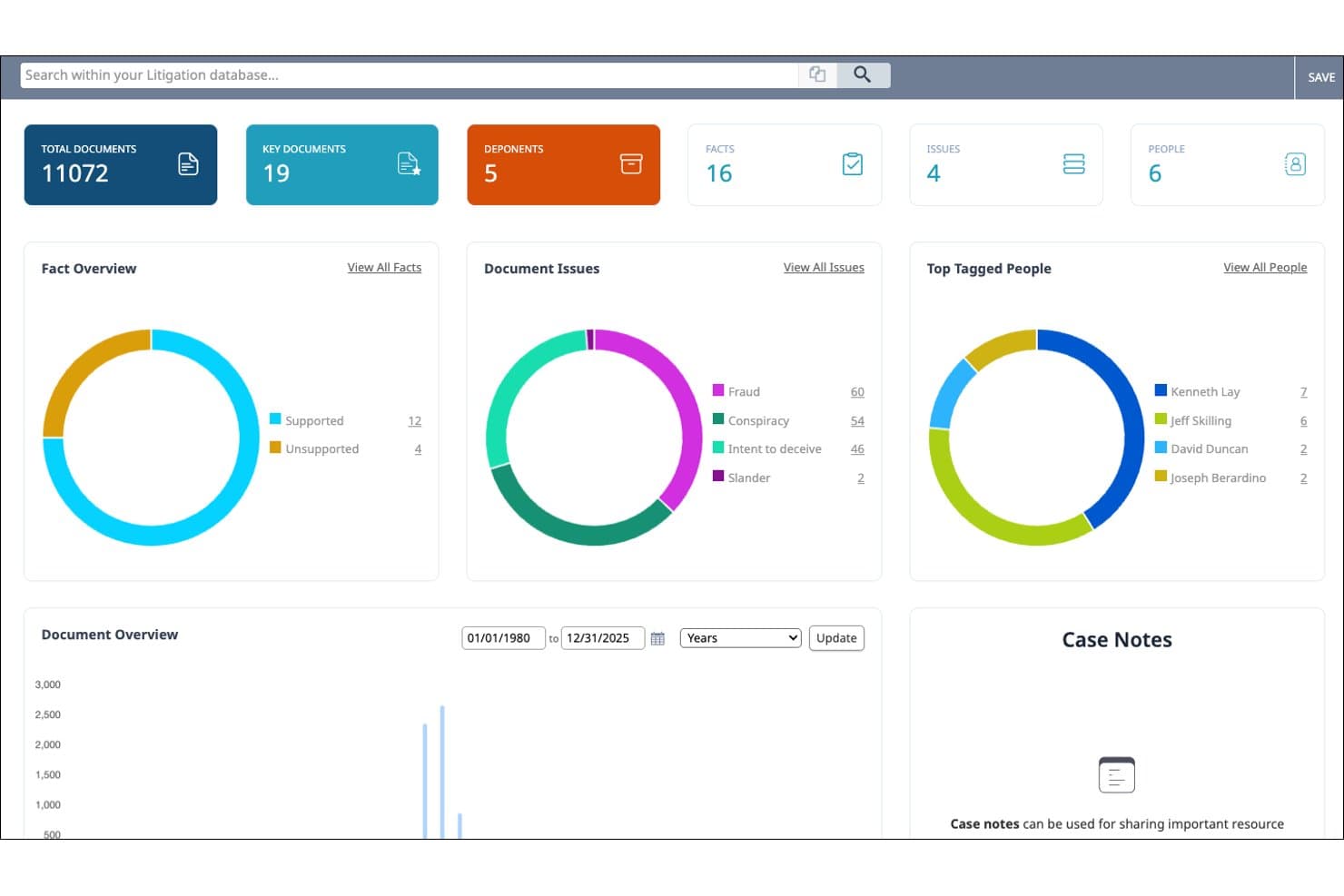
Nextpoint connects discovery, depositions, evidence, and courtroom presentation. Nextpoint is a cloud-native litigation platform that covers the full case lifecycle—from ESI ingestion and document review to deposition management and trial presentation—making it a strong fit for litigation teams who want to replace multiple point solutions with one platform.
Who Is Nextpoint Best For?
Nextpoint is a good fit for small to midsize litigation firms that handle document-intensive cases and want a single platform covering ediscovery through trial.
Why Nextpoint Is a Good Logikcull Alternative
Nextpoint earns its spot on my shortlist because it covers the full case lifecycle in one cloud-based platform. I particularly like how deposition transcripts sync with video and link directly to the evidence database we used during review, so testimony and exhibits stay connected rather than siloed. Theater Mode for in-court presentation is a capability Logikcull simply doesn't offer, and it's what makes Nextpoint genuinely all-in-one rather than just another ediscovery tool.
Nextpoint Key Features
- Cloud data source integrations: Import evidence directly from OneDrive, Google Drive, Dropbox, and Zoom accounts for quick data collection.
- Customizable coding panels: Set up tags, issue codes, and privilege codes to match your team’s review needs and workflows.
- Flexible production templates: Configure productions with Bates stamping, redactions, load files, and export formats including native, PDF, and TIFF.
- Granular user permissions: Control access and actions for each user or group, with full activity logging across all matters in the platform.
Nextpoint Integrations
Nextpoint offers native integrations with OneDrive, Google Drive, Dropbox, and Zoom for direct evidence import. An API is available for custom integrations.
Pros and Cons
Pros:
- ECA dashboards include visual communication mapping
- Built-in deposition management with video sync
- Covers ediscovery through in-court trial presentation
Cons:
- TAR capabilities lag behind enterprise-grade platforms
- Onboarding takes longer than self-service competitors
Learn more about Nextpoint: Best for cost-effective solutions for small firms
- Free plan available
- From $27/month
Visit WebsiteCustomer Rating:5/5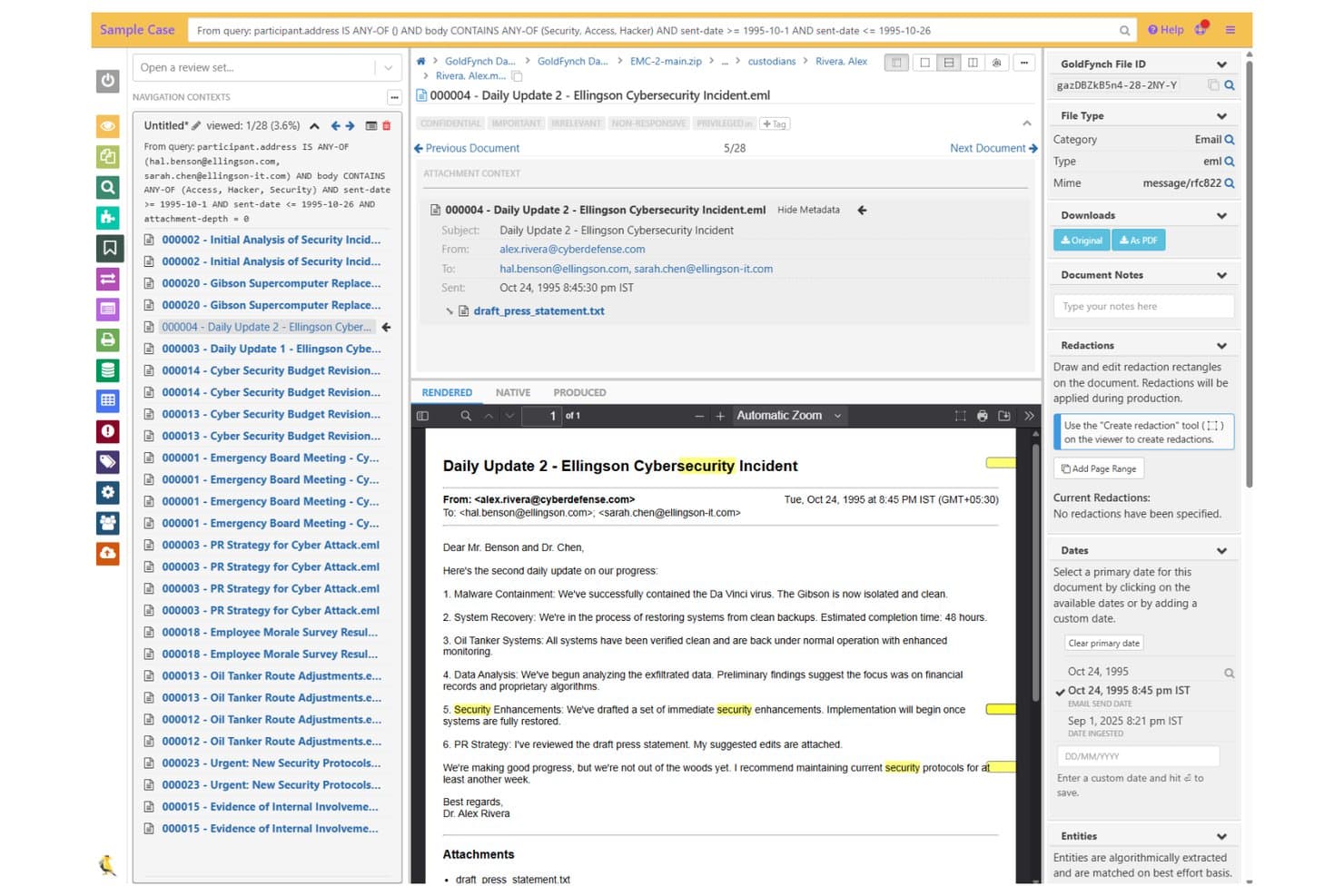
GoldFynch offers a document review interface with email threading, metadata panels, redaction tools, and keyword highlighting for legal discovery workflows. GoldFynch is a cloud-based eDiscovery platform built for small law firms and solo practitioners who need to process, review, and produce documents without the complexity or cost of enterprise-grade tools.
Who Is GoldFynch Best For?
GoldFynch suits solo practitioners and small litigation firms managing cost-sensitive matters who need a self-serve eDiscovery workflow without relying on vendor support.
Why GoldFynch Is a Good Logikcull Alternative
I've included GoldFynch in my top picks because its per-case pricing model is genuinely built around how small firms work. I appreciate that billing is prorated to the second, so a two-week matter costs a fraction of a longer case. What I find especially valuable is that unlimited productions with Bates numbering and unlimited collaborators come included at no extra charge, removing the per-page and per-user fees that make platforms like Logikcull unpredictable at scale.
GoldFynch Key Features
- Broad file type support: Upload and process common formats like PST, MBOX, Office, PDF, and nested ZIPs for eDiscovery.
- Automated OCR for all documents: Every file is automatically OCR processed, making text searchable without manual intervention.
- Role-based access and audit logs: Set permissions for collaborators and track all user activity within each case for defensibility.
- Customizable productions: Export documents with custom load files, Bates numbering, burned-in redactions, and multiple format options.
GoldFynch Integrations
Native integrations are not clearly documented. An API is available for custom integrations.
Pros and Cons
Pros:
- Fast document rendering during review
- Prorated billing closes out with each case
- No per-user fees for collaborators
Cons:
- Document viewer doesn't support multiple screens
- No predictive coding or TAR capabilities
Learn more about GoldFynch: 3Best for rapid processing of complex data types
Nuix
- Free demo available
- Pricing upon request
Visit WebsiteCustomer Rating:4.2/5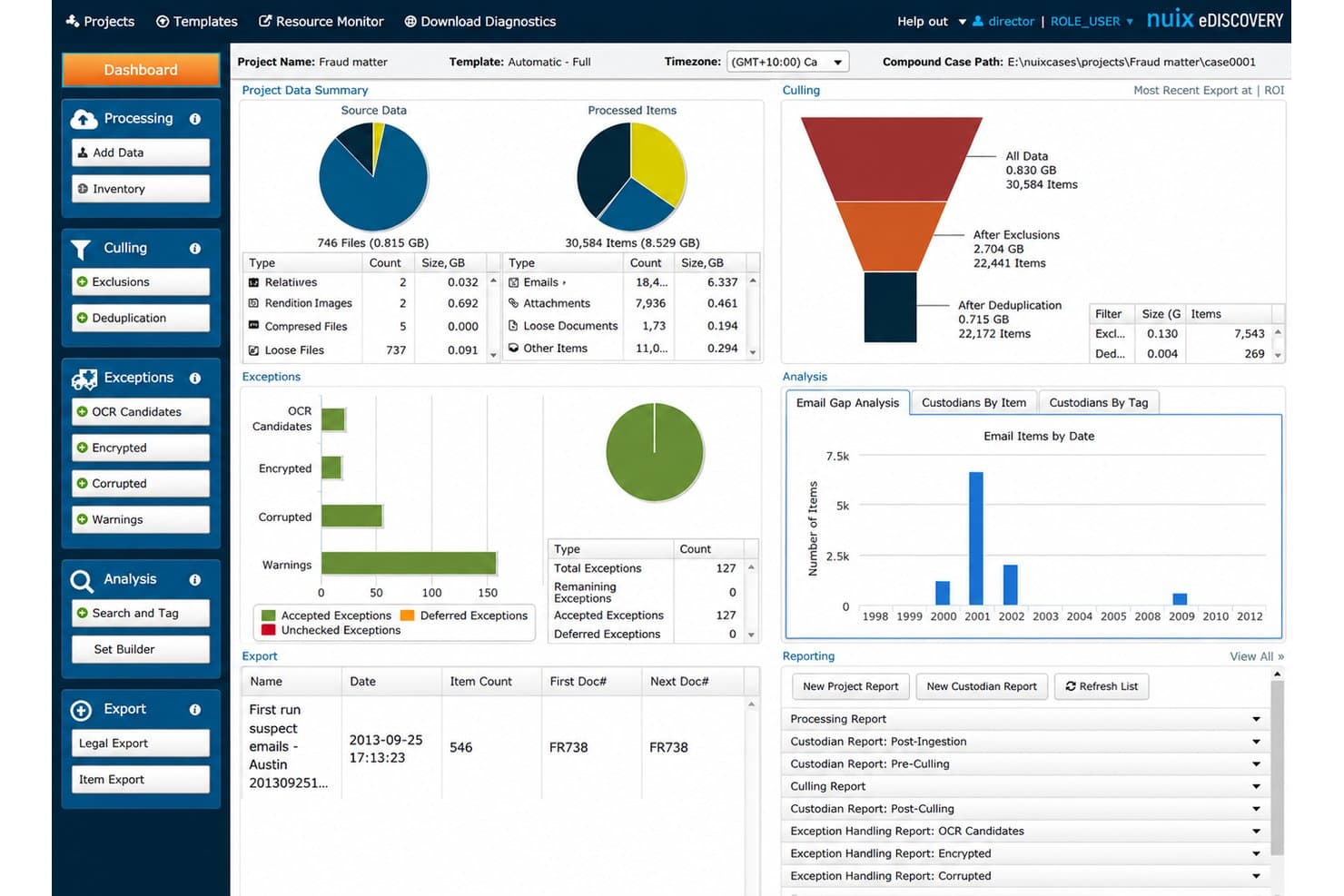
Nuix Discover processes large eDiscovery datasets across cloud and hybrid systems. Nuix Discover is an enterprise eDiscovery platform built for litigation teams and legal operations professionals who need to ingest, process, and review massive, complex data sets across cloud, on-premises, or hybrid environments.
Who Is Nuix Best For?
Nuix Discover fits mid-market and enterprise legal teams handling high-volume, complex matters where processing speed and deployment flexibility are non-negotiable.
Why Nuix Is a Good Logikcull Alternative
I picked Nuix Discover as one of the best because of how it handles data volume and complexity that Logikcull simply wasn't built for. It supports over 1,000 file types with automated processing at scale, and its "Start Fast" capability means my team can ingest data and begin reviewing in minutes, no load files needed. Layered on top is CogAI-powered Continuous Active Learning, which prioritizes the most relevant documents first across massive data sets.
Nuix Key Features
- Web-based review interface: Lets you tag, code, redact, and annotate documents for collaborative review workflows.
- Multi-jurisdictional production tools: Enables you to create court-ready productions with configurable formats and QC rules.
- Automated PII detection and redaction: Identifies and redacts personally identifiable information across your document set.
- Flexible deployment options: Supports cloud, on-premises, or hybrid installations to meet regulatory and client requirements.
Nuix Integrations
Nuix Discover offers native integrations across the Microsoft ecosystem, including Microsoft 365 and Azure, and provides an API for custom integrations.
Pros and Cons
Pros:
- Continuous active learning prioritizes relevant documents
- Supports on-premises and hybrid deployment options
- Processes 1,000+ file types at scale
Cons:
- Better suited for enterprise than small firms
- Steeper onboarding than self-service eDiscovery tools
Learn more about Nuix: Best for comprehensive legal hold and compliance
- Free demo available
- Pricing upon request
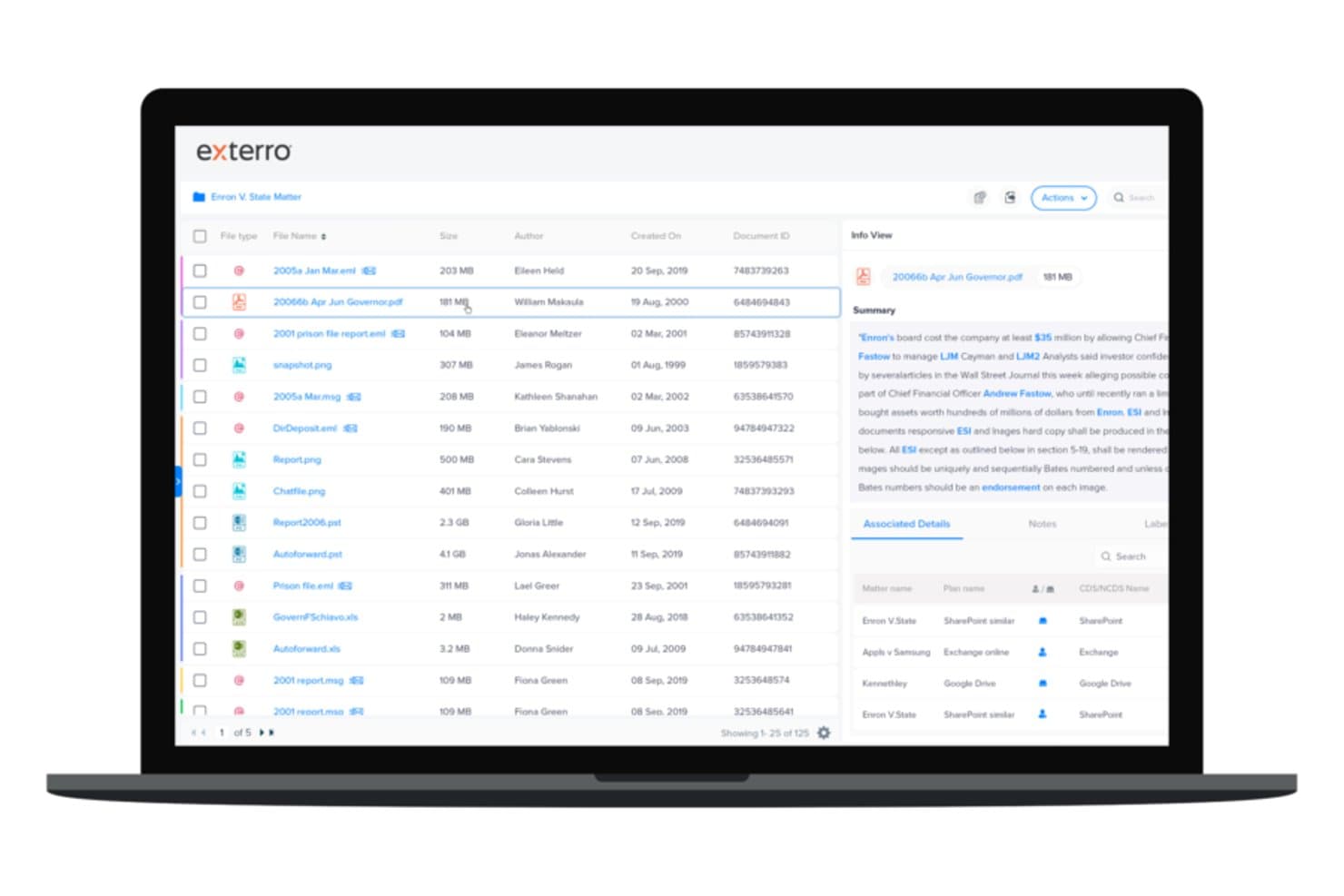
Exterro offers a document review interface with file management, metadata details, and associated matter tracking across multiple data sources. Exterro is an enterprise eDiscovery platform built for corporate legal teams and legal operations professionals who need end-to-end control over legal holds, ESI collection, early case assessment, and document review within a single, unified system.
Who Is Exterro Best For?
Exterro is a strong fit for large enterprises and government agencies managing high-volume, recurring discovery obligations across multiple matters simultaneously.
Why Exterro Is a Good Logikcull Alternative
I've included Exterro in my top picks because its legal hold capabilities go well beyond what Logikcull offers. I particularly like the Employee Change Monitor, which automatically detects custodian status changes and triggers hold actions without manual intervention. I also appreciate how Exterro's agentic AI handles custodian identification and preservation workflows, generating a fully auditable record that holds up in court. When a matter escalates fast, I can issue holds, track acknowledgments, and document the entire chain of custody without piecing together separate tools.
Exterro Key Features
- Early case assessment dashboard: Visualize data metrics and custodians quickly before large-scale review begins.
- Generative AI document summarization: Automatically summarize documents and extract facts using LLM-powered tools.
- Modern chat and mobile data ingestion: Collect and preserve data from Slack, Teams, and mobile messaging sources for review.
- Multi-format production exports: Generate productions with Bates stamping, redactions, and multiple export formats like native files, PDF, and TIFF.
Exterro Integrations
Exterro offers native integrations across the Microsoft ecosystem, including Microsoft 365 and Azure, as well as Salesforce, Slack, Google Workspace, Box, and Dropbox. An API is available for custom integrations.
Pros and Cons
Pros:
- Handles cross-border matters with multilingual processing
- TAR 2.0 with continuous active learning
- Full legal hold audit trail built-in
Cons:
- Too complex for single-custodian small matters
- Steep implementation timeline for new adopters
Learn more about Exterro:
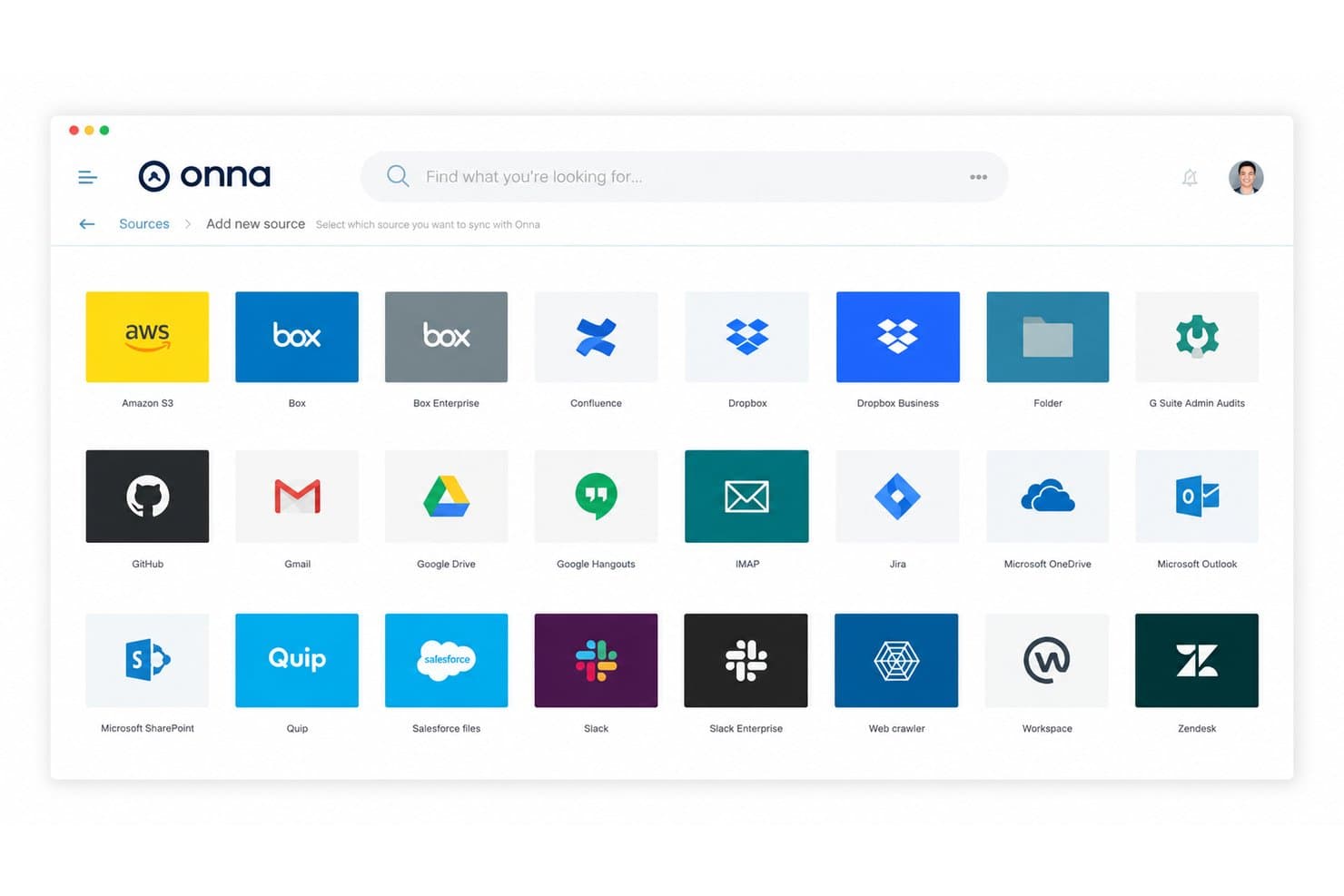
Onna collects and indexes collaboration data to reduce eDiscovery review volume. Onna is a cloud data collection platform built for legal and eDiscovery teams who need to gather, preserve, and search ESI from modern workplace apps like Slack, Microsoft 365, and Google Workspace before pushing collections into review.
Who Is Onna Best For?
Onna is a strong fit for eDiscovery managers and legal ops teams at organizations where key data lives across cloud collaboration tools rather than traditional email systems.
Why Onna Is a Good Logikcull Alternative
I've included Onna in my top picks because of how well it handles data collection from modern collaboration tools. Where Logikcull focuses on review, Onna fills a real gap: pulling ESI from Slack, Microsoft Teams, Google Workspace, and Zoom through 29+ no-code connectors, with real-time indexing that makes data searchable within minutes of collection. I appreciate that my team can cull data sets by 70%+ before any export, which cuts downstream review volume significantly.
Onna Key Features
- Unified workspace search: Quickly search across multiple connected cloud data sources from a single interface.
- Role-based access controls: Administrators can assign granular permissions for data sources and cases.
- Comprehensive audit trails: Every collection, search, and export action is logged and tracked for defensibility.
- Continuous data monitoring: Automatically index and monitor synced data sources for new or changed content.
Onna Integrations
Onna offers native integrations with Microsoft 365, Slack, Google Workspace, Zoom, Confluence, Jira, Salesforce, Quip, Box, and Dropbox. An API is available for custom integrations.
Pros and Cons
Pros:
- Real-time data sync keeps collections current
- Collects non-traditional ESI other tools can't
- No additional processing needed post-indexing
Cons:
- QC-ing collections within the portal is limited
- Customer support response times can be slow
Learn more about Onna: Best for collaborative litigation workflows
- Free demo available
- Pricing upon request
Visit WebsiteCustomer Rating:4.7/5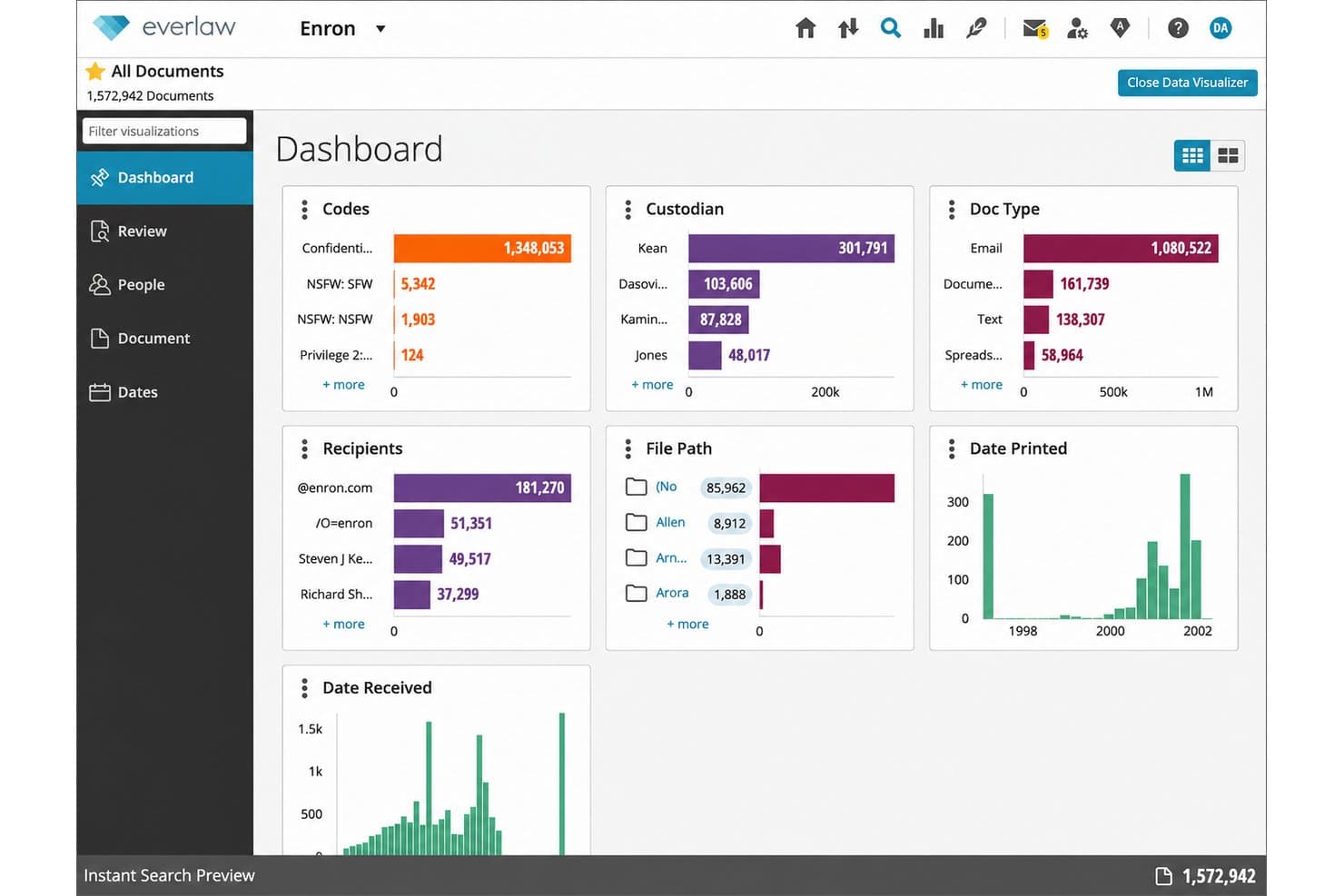
Everlaw processes large ESI volumes and manages review from one cloud workspace. Everlaw is a cloud-based ediscovery platform built for litigation attorneys, eDiscovery managers, and in-house counsel who need to process large ESI volumes, conduct early case assessment, and manage document review from a single workspace.
Who Is Everlaw Best For?
Everlaw is a strong fit for large law firms and enterprise legal teams managing high-volume, multi-party litigation or complex internal investigations.
Why Everlaw Is a Good Logikcull Alternative
I picked Everlaw as one of the best because its Storybuilder feature genuinely changes how litigation teams collaborate. Rather than siloing review and case prep, Storybuilder lets my team weave discovery documents into a shared case narrative for depositions and trial prep in real time. The Writing Assistant then synthesizes that evidence into drafted arguments, so the handoff from review to strategy happens inside a single platform.
Everlaw Key Features
- Data ingestion from cloud sources: Connect directly to Microsoft 365, Google Drive, Slack, Zoom, and more for seamless data collection.
- Automated deduplication and deNISTing: Automatically removes duplicate and irrelevant files during ingestion for cleaner document sets.
- Advanced search and filtering: Supports Boolean queries, metadata filters, date ranges, and concept searches to target relevant ESI.
- Redaction and annotation tools: Includes batch redaction, annotation, and coding features to streamline document review and production.
Everlaw Integrations
Everlaw offers native integrations with Microsoft 365, Google Workspace, Slack, Zoom, Dropbox, Box, and Salesforce, and provides an API for custom integrations.
Pros and Cons
Pros:
- Real-time multi-reviewer collaboration across large matters
- TAR 2.0 continuously refines document prioritization
- Storybuilder links review directly to case narrative
Cons:
- Less suited for small single-custodian matters
- Setup requires more onboarding than DIY tools
Learn more about Everlaw: Best for intuitive AI-driven document review
- Free demo available
- Pricing upon request
Visit WebsiteCustomer Rating:4.6/5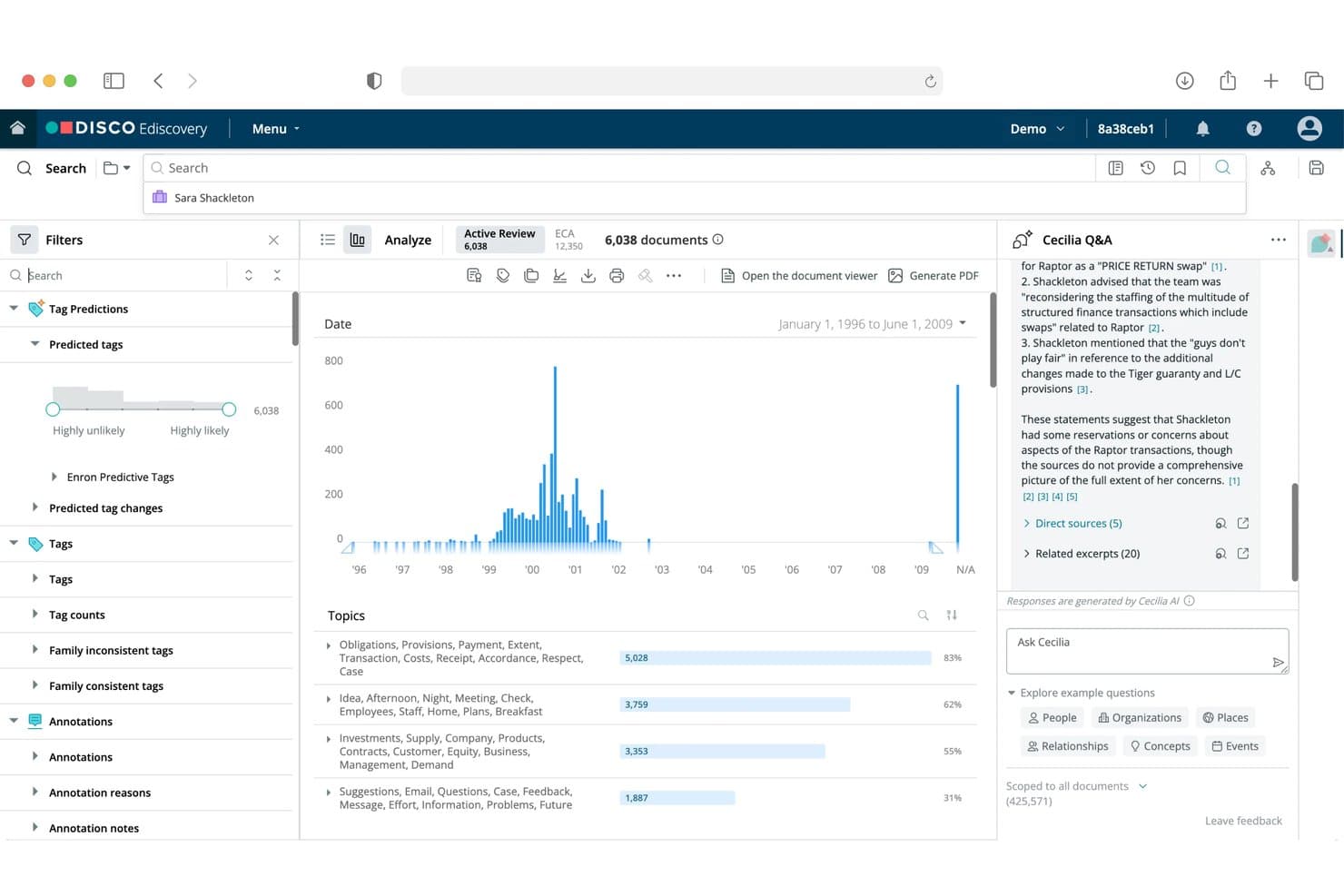
DISCO offers an AI-powered eDiscovery platform with document filtering, predictive tagging, topic analysis, and a Cecilia Q&A AI assistant for case review. For litigation attorneys and legal ops teams handling complex, high-volume matters, DISCO is a cloud-native ediscovery platform that manages the full lifecycle from legal hold through AI-driven document review and production.
Who Is DISCO Best For?
DISCO is a strong fit for mid-market to enterprise legal teams managing large, complex litigation or internal investigations who need AI to reduce manual review volume.
Why DISCO Is a Good Logikcull Alternative
I picked DISCO as one of the best because its Cecilia AI suite goes well beyond standard TAR. Auto Review completes first-pass document review in hours, with precision that consistently outperforms human-only workflows. Cecilia Q&A acts as an AI fact expert, letting you ask plain-language questions directly against your document database to surface key facts fast.
DISCO Key Features
- Single-database early case assessment: Assess and review documents in one environment without duplicating data or splitting workflows.
- High-speed ingestion and processing: Quickly ingest, deduplicate, and process broad file types including emails, cloud data, and large data sets.
- Batch document production: Generate court-ready productions with Bates stamping, redactions, and load file creation in customizable formats.
- Granular access controls: Set custom user roles and permissions to manage document visibility and workflow assignment across large, distributed teams.
DISCO Integrations
DISCO offers native integrations with Microsoft 365, Google Vault, and Slack for direct data collection, and provides an API for custom integrations.
Pros and Cons
Pros:
- Ingests Slack, Teams, and mobile message data
- Native ECA dashboards aid early case scoping
- Cecilia AI reduces manual review volume significantly
Cons:
- TAR workflows require validation expertise to implement
- Onboarding takes longer than self-service competitors
Learn more about DISCO: Best for advanced analytics and visual discovery
- Free demo available
- Pricing upon request
Visit WebsiteCustomer Rating:4.5/5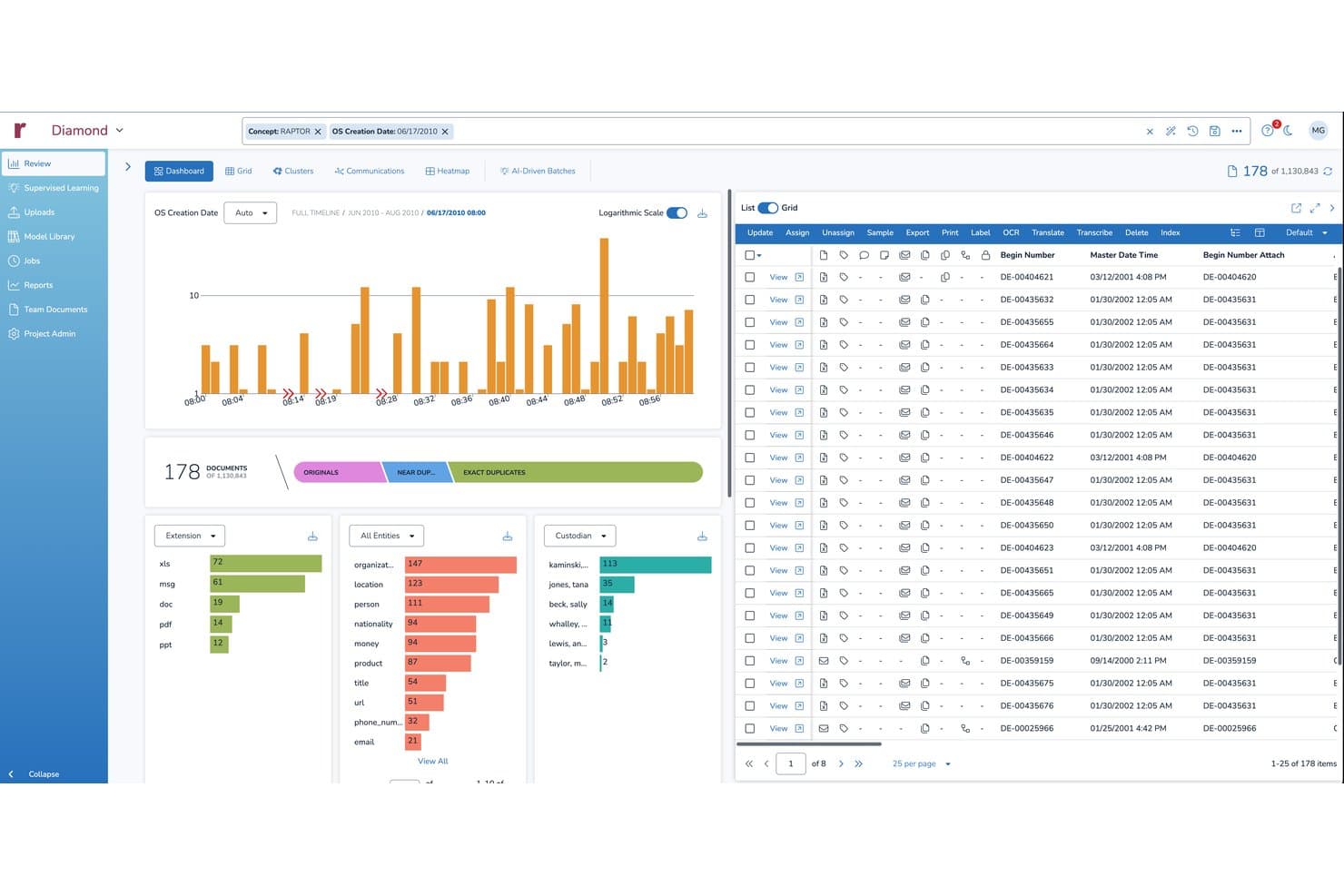
Reveal offers an eDiscovery review dashboard with document filtering, timeline charts, entity extraction, and a paginated document list for case analysis. Reveal is an AI-driven eDiscovery platform designed for litigation teams and legal ops professionals managing complex, high-volume matters that require advanced document review, predictive coding, and integrated legal holds in a single environment.
Who Is Reveal Best For?
Reveal is a strong fit for enterprise law firms and large corporate legal departments running complex, multi-matter eDiscovery programs at scale.
Why Reveal Is a Good Logikcull Alternative
I've included Reveal in my top picks because its Brainspace analytics engine does something most eDiscovery tools can't match: it surfaces conceptual clusters and document relationships visually, so my team can spot patterns across a large document population without reading every file. I also rely on the "Ask" feature, which combines semantic search and generative AI to return plain-language answers from the data set. That combination of visual discovery and active learning (TAR 2.0) makes prioritizing review far faster on genuinely complex matters.
Reveal Key Features
- Legal hold management: Send, track, and escalate legal hold notifications directly from the platform with automated responses and compliance tracking.
- Early case assessment tools: Access dashboards for data volume analysis, timeline visualizations, and communication mapping before full-scale review.
- Multi-source data ingestion: Collect and process emails, office docs, chats, and cloud data with automatic deduplication and metadata extraction.
- Customizable production exports: Generate Bates-stamped productions in native, TIFF, or PDF formats with redactions and privilege logging.
Reveal Integrations
Reveal offers native integrations with Microsoft 365, Slack, Google Vault, and Relativity, and provides an API for custom integrations.
Pros and Cons
Pros:
- Handles Slack and Teams threading natively
- Native generative AI drafts privilege log entries
- Brainspace visual clustering maps document relationships clearly
Cons:
- Less suited to small single-matter caseloads
- Steeper onboarding than self-service Logikcull workflows
Learn more about Reveal: Best for connected litigation and investigations
- Free demo available
- Pricing upon request
Visit WebsiteCustomer Rating:4.9/5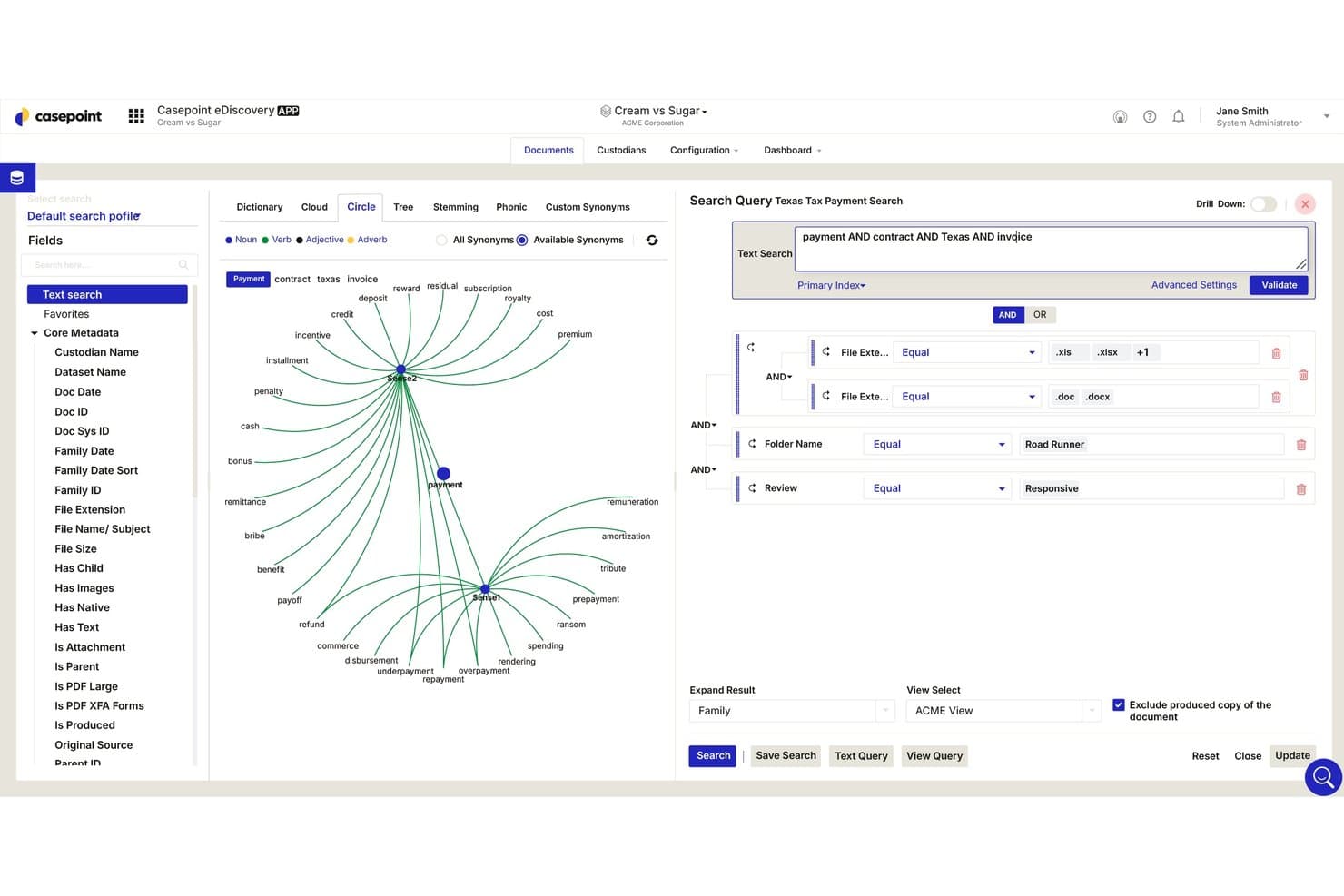
Casepoint offers an advanced search interface with Circle visualization, Boolean text queries, file extension filters, folder name, and review status filters for eDiscovery document searches. Casepoint is an end-to-end eDiscovery platform built for corporations, law firms, and government agencies that need to manage legal hold, ESI processing, AI-powered review, and document production within a single defensible system.
Who Is Casepoint Best For?
Casepoint is a strong fit for enterprise legal teams and government agencies managing complex, high-volume matters that require top-tier security compliance.
Why Casepoint Is a Good Logikcull Alternative
I picked Casepoint as one of the best because it handles the full EDRM lifecycle without forcing data transfers between separate tools. What I particularly like is CaseAssist Active Learning (TAR 2.0), which trains continuously as reviewers code documents inside the same environment. That means my team can collect directly from M365 or Slack, apply active learning during review, and produce with Bates numbering all without ever leaving the platform.
Casepoint Key Features
- Legal hold and preservation module: Issue and track hold notices, automate reminders, and maintain a defensible chain of custody.
- Native chat and cloud data processing: Collect and review data from Slack, Teams, and other modern collaboration tools.
- Batch review and productivity dashboards: Manage review assignments and monitor progress with real-time reporting.
- Multi-format document production: Generate native, TIFF, or PDF exports with customizable Bates stamping and redactions.
Casepoint Integrations
Casepoint offers native integrations with Microsoft 365, Slack, Google Vault, and Box, and provides an API for custom integrations.
Pros and Cons
Pros:
- FedRAMP and CJIS certified for government matters
- Continuous active learning TAR 2.0 included
- Unifies litigation and investigations in one platform
Cons:
- Not designed for small single-custodian matters
- Onboarding requires more IT support than competitors
Learn more about Casepoint: Best for enterprise-scale matter management
- Free demo available
- Pricing upon request
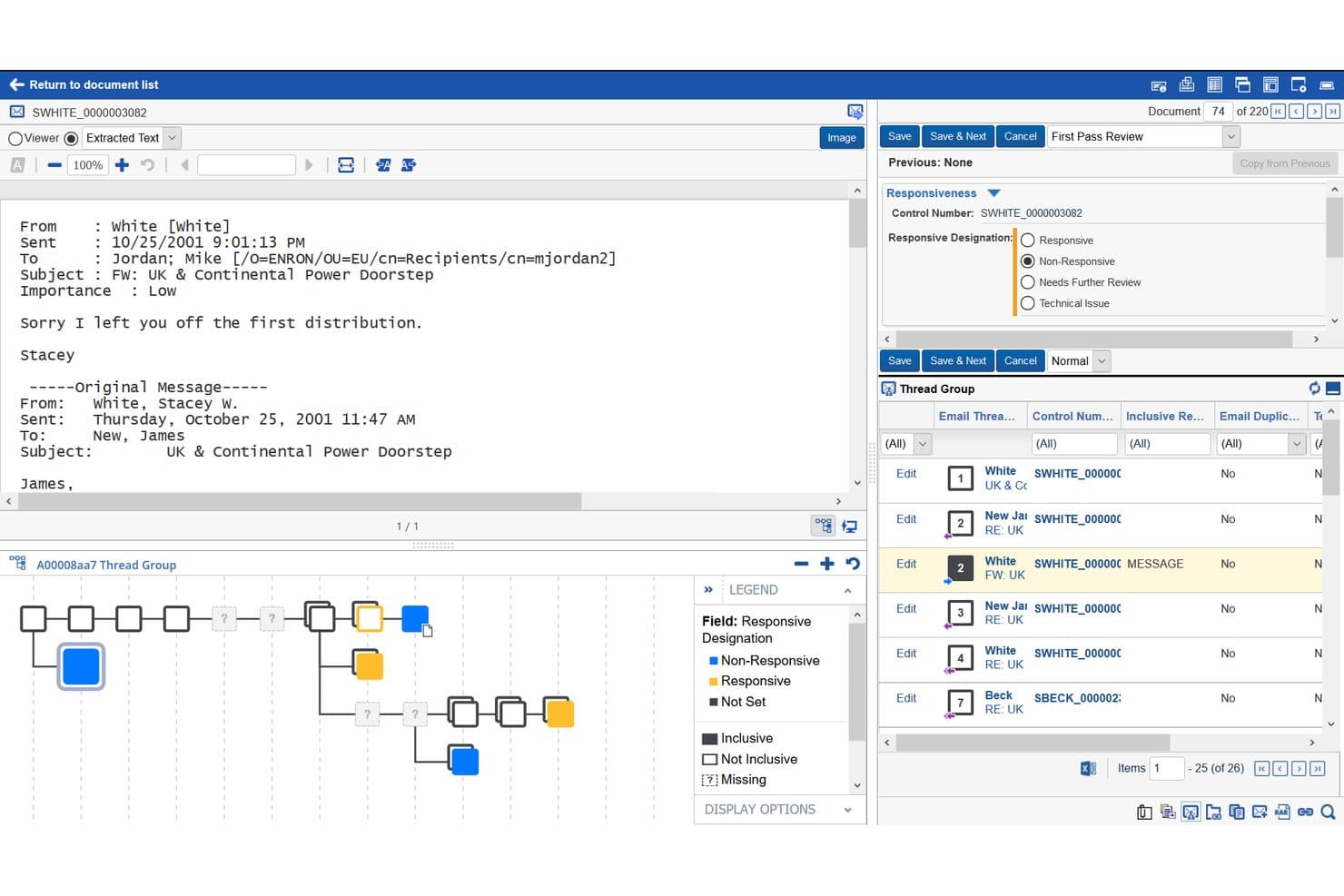
Relativity offers a document review interface with email thread grouping, responsive designation fields, and a visual thread map for eDiscovery workflows. RelativityOne is a cloud-based eDiscovery platform built for enterprise legal teams that need AI-powered document review, large-scale ESI processing, and end-to-end matter management across complex, high-volume litigation.
Who Is Relativity Best For?
It's a strong fit for large law firms, eDiscovery service providers, and corporate legal departments managing high-volume or multi-matter litigation.
Why Relativity Is a Good Logikcull Alternative
Relativity earns its spot on my shortlist because of how well it handles enterprise-scale matter management across concurrent, high-volume matters. I particularly like the Relativity aiR suite: aiR for Review applies generative AI to document-level relevance decisions, while aiR for Privilege flags potentially protected documents before they reach reviewers. In practice, that means my team can run AI-assisted review and privilege screening simultaneously, at a scale that Logikcull's SMB-oriented model simply wasn't built to support.
Relativity Key Features
- Review Center: Centralized review workspace for setting up document queues, assigning tasks, and tracking progress.
- Audio and video transcription: Built-in tools for automatic transcription of audio and video evidence in multiple languages.
- Relativity App Hub: Marketplace for integrating Relativity with custom apps and third-party software.
- Integrated translation: In-platform machine translation for more than 100 languages across your document sets.
Relativity Integrations
Relativity offers native integrations with Microsoft 365, Google Workspace, Slack, and Box, and supports export compatibility with iManage and NetDocuments. An API is available for custom integrations.
Pros and Cons
Pros:
- Scales across multi-terabyte, concurrent litigation matters
- Native generative AI for privilege log drafting
- Continuous active learning for TAR review
Cons:
- Overkill for solo practitioners and small firms
- Complex initial setup before first matter launch
Learn more about Relativity:
Andre alternativer til Logikcull
Her er noen flere alternativer til Logikcull som ikke kom med på kortlisten min, men som likevel er verdt å se nærmere på:
- 11CloudNineBest for flexible setup and self-service review
- 12LighthouseBest for cross-border data and language support
- 13Epiq DiscoveryBest for expert-led managed review options
- 14iCONECTBest for custom review workspace design
- 15Microsoft Purview eDiscoveryBest for integrated Microsoft 365 data management
- 16OpenText eDiscoveryBest for defensible end-to-end ESI workflows
- 17ZapprovedBest for streamlined legal hold automation
- 18Consilio SightlineBest for guided AI review support
- 19Nebula eDiscoveryBest for processing at enterprise data scale
- 20zyLAB ONEBest for in-depth data analytics and reporting
How I Evaluate Logikcull Alternatives
I evaluate Logikcull alternatives across two layers: core functionality each platform must cover, and differentiating factors that set strong options apart. Core features mirror what Logikcull does—ESI ingestion, document review, and production.
Core Functionality (Table Stakes For This List)
When I'm selecting tools for my list, I rank each one on a scale from 0 (does not offer the functionality) to 5 (excels in this area) for each core functionality listed below. Then, I calculate the tool's total score into a percentage. Each tool needs to achieve a minimum total score of 65% to be considered for inclusion.
- Data Ingestion & Processing: I look for automated deduplication, deNISTing, and metadata extraction across file types like emails, attachments, and cloud data from M365 or Slack.
- Advanced Search & Filtering: Boolean, metadata, date-range, and concept searches all matter when you're culling millions of documents down to a reviewable set.
- Document Review Interface: I evaluate the web-based review workspace for tagging, coding, redaction, and batch capabilities that support multi-reviewer workflows.
- Production & Export: Defensible productions need Bates numbering, burned-in redactions, load files, and flexible output formats like native, TIFF, and PDF.
- Predictive Coding / TAR: I check for technology-assisted review options like continuous active learning or concept clustering that help prioritize relevant documents.
- Legal Hold & Preservation: Automated hold notices, custodian tracking, acknowledgment reminders, and audit trails keep your preservation defensible if challenged.
Once I have a list of tools that meet the criteria, I consider what sets each platform apart.
Differentiating Factors (What Sets Vendors Apart)
Here's how I compare and contrast different vendors:
Standout Features
ECA dashboards let you scope a matter's size and merit before committing to full review, saving your team from costly surprises. Generative AI summarization is another differentiator I evaluate; platforms that can draft privilege log entries or answer natural-language questions across a document set cut hours of manual work. I also check how each tool handles modern data sources like Slack and Teams, since threaded conversation views need to stay intact for review and production to be defensible.
Beyond Features
Pricing transparency matters a lot in this space. Logikcull popularized flat-rate pricing, so I evaluate whether alternatives offer predictable subscription models or per-GB fees that can spike on large matters. Compliance certifications like SOC 2 Type II and FedRAMP are worth checking too, especially if your team handles regulated industries or government work. I also consider deployment flexibility—cross-border matters often require regional data centers or client-controlled encryption keys to satisfy local privacy requirements.
Hvorfor se etter et alternativ til Logikcull?
Selv om Logikcull er et godt valg av programvare for elektronisk bevisinnhenting, finnes det flere grunner til at enkelte brukere ser etter alternative løsninger. Du ser kanskje etter et alternativ til Logikcull fordi …
- Du trenger mer avansert analyse eller prediktiv koding
- Du står overfor uforutsigbare eller høye kostnader for lagring per GB
- Du ønsker detaljert kontroll over datalagringssted eller lokal distribusjon
- Du håndterer saker på flere terabyte eller på tvers av landegrenser i stor skala
- Du trenger dypere integrasjoner med den eksisterende juridiske teknologistakken
- Du ønsker mer tilpassbare arbeidsflyter eller brukerroller
Hvis noe av dette høres kjent ut, har du kommet til rett sted. Listen min inneholder flere alternativer til Logikcull som er bedre egnet for team som møter disse utfordringene med Logikcull og ser etter alternative løsninger.
Viktige funksjoner i Logikcull
Her er noen av de viktigste funksjonene i Logikcull, slik at du kan se forskjeller og sammenligne hva alternative løsninger tilbyr:
- Automatisert datainnhenting: Dra-og-slipp-støtte for e-poster, dokumenter, chatdata og skykilder med fjerning av duplikater og uttrekking av metadata.
- Avanserte søkeverktøy: Boolsk søk, nøkkelord, datoperiode og metadatafiltre hjelper deg med raskt å begrense store datamengder til det som er relevant.
- Nettbasert gjennomgangsgrensesnitt: Merk, kod, sladd og kommenter dokumenter fra hvilken som helst nettleser – ingen installasjon kreves.
- Etterprøvbar produksjon og eksport: Generer produksjoner med Bates-nummerering, last inn filer og eksporter i opprinnelig format, TIFF eller PDF.
- Funksjoner for prediktiv koding/TAR: Bruk KI-drevne verktøy til å prioritere relevante dokumenter og effektivisere gjennomgangen.
- Håndtering av juridiske oppbevaringspålegg: Send automatiserte varsler om oppbevaringspålegg, følg opp oppbevaringsansvarlige og oppretthold etterprøvbarhet gjennom hele bevaringsprosessen.
- Revisjonsspor og rapportering: Få tilgang til detaljerte logger og eksporterbare rapporter som støtter krav til dokumentert beviskjede og samsvar.
- Prismodell med fast pris: Forutsigbare og transparente priser eliminerer overraskelser og støtter budsjettstyring på tvers av saker.
- Rollebaserte tillatelser: Tildel detaljerte brukertillatelser for å kontrollere tilgang og arbeidsflyter på tvers av flere saker.
- Skybasert distribusjon: Dra nytte av skalerbar og sikker skyhosting som støtter saker av varierende størrelse og kompleksitet.