

Et godt Relativity-alternativ kombinerer smidig dokumentgjennomgang, sømløst teamsamarbeid og fleksible eDiscovery-konfigurasjoner for å støtte krevende saker i virksomheten din. Hvis du vurderer Relativity-alternativer, ønsker du sannsynligvis verktøy som tilpasser seg teamets størrelse, sakens kompleksitet og behovene for samsvar.
Nedenfor ser du hvilke alternativer jeg mener passer bedre for dem som går videre fra Relativity – og hvilke unike funksjoner hvert av dem tilbyr.
Hva er Relativity?
Relativity er en plattform for eDiscovery og juridisk gjennomgang som brukes av advokatfirmaer og juridiske avdelinger til å håndtere dokumentgjennomgang, databehandling, juridiske bevaringspålegg og arbeidsflyter for samsvar. Den hjelper juridiske team med å organisere, søke i, merke og analysere store datamengder i forbindelse med undersøkelser, rettstvister eller regulatoriske saker.
Relativity fokuserer på å forenkle arbeidsflyter, støtte samarbeid og opprettholde sikre og etterprøvbare prosesser gjennom hele eDiscovery-livssyklusen.
Sammenligningstabell for Relativity-alternativer
Denne sammenligningstabellen oppsummerer prisdetaljene for mine utvalgte Relativity-alternativer:
| Tool | Best For | Trial Info | Price | ||
|---|---|---|---|---|---|
| 1 | Best for enterprise-scale case management | Free demo available | Pricing upon request | Website | |
| 2 | Best for case management and legal analytics | Free demo available | Pricing upon request | Website | |
| 3 | Best for agile litigation and regulatory response | Free demo available | Pricing upon request | Website | |
| 4 | Best for processing complex and diverse data types | Free demo available | Pricing upon request | Website | |
| 5 | Best for seamless Microsoft 365 data integration | 30-day free trial | From $12/user/month (billed annually) | Website | |
| 6 | Best for real-time collaborative document review | Free demo available | Pricing upon request | Website | |
| 7 | Best for instant self-service data review | Free trial available | Pricing upon request | Website | |
| 8 | Best for intuitive cloud eDiscovery workflows | Free demo available | Pricing upon request | Website | |
| 9 | Best for advanced AI-powered analytics integration | Free demo available | Pricing upon request | Website | |
| 10 | Best for legal hold and compliance | Free demo available | Pricing upon request | Website |


Hvorfor du kan stole på våre programvareanbefalinger
6,700+
Reviews
20
Industry experts
16+
Evaluation factors
14
Years
Teamet vårt har testet og anmeldt programvare siden 2012. Vi leder selv advokatfirmaer, så vi vet hvor vanskelig og hvor viktig det er å velge riktig programvare.
I denne guiden har vi vurdert verktøyene gjennom praktisk testing og uavhengig research og gitt dem poeng ut fra våre utvelgelseskriterier.
Anmeldelsene våre bygger på vår egen redaksjonelle vurdering. De er ikke et salgsargument.
Anmeldelser av Relativity-alternativer
Nedenfor finner du mine detaljerte oppsummeringer av de beste Relativity-alternativene som kom med på kortlisten. Anmeldelsene mine gir en detaljert gjennomgang av funksjonene, mulighetene og de beste bruksområdene for hver plattform, slik at du kan finne den som passer best for deg.
 Best for enterprise-scale case management
- Free demo available
- Pricing upon request
Visit WebsiteCustomer Rating:4.2/5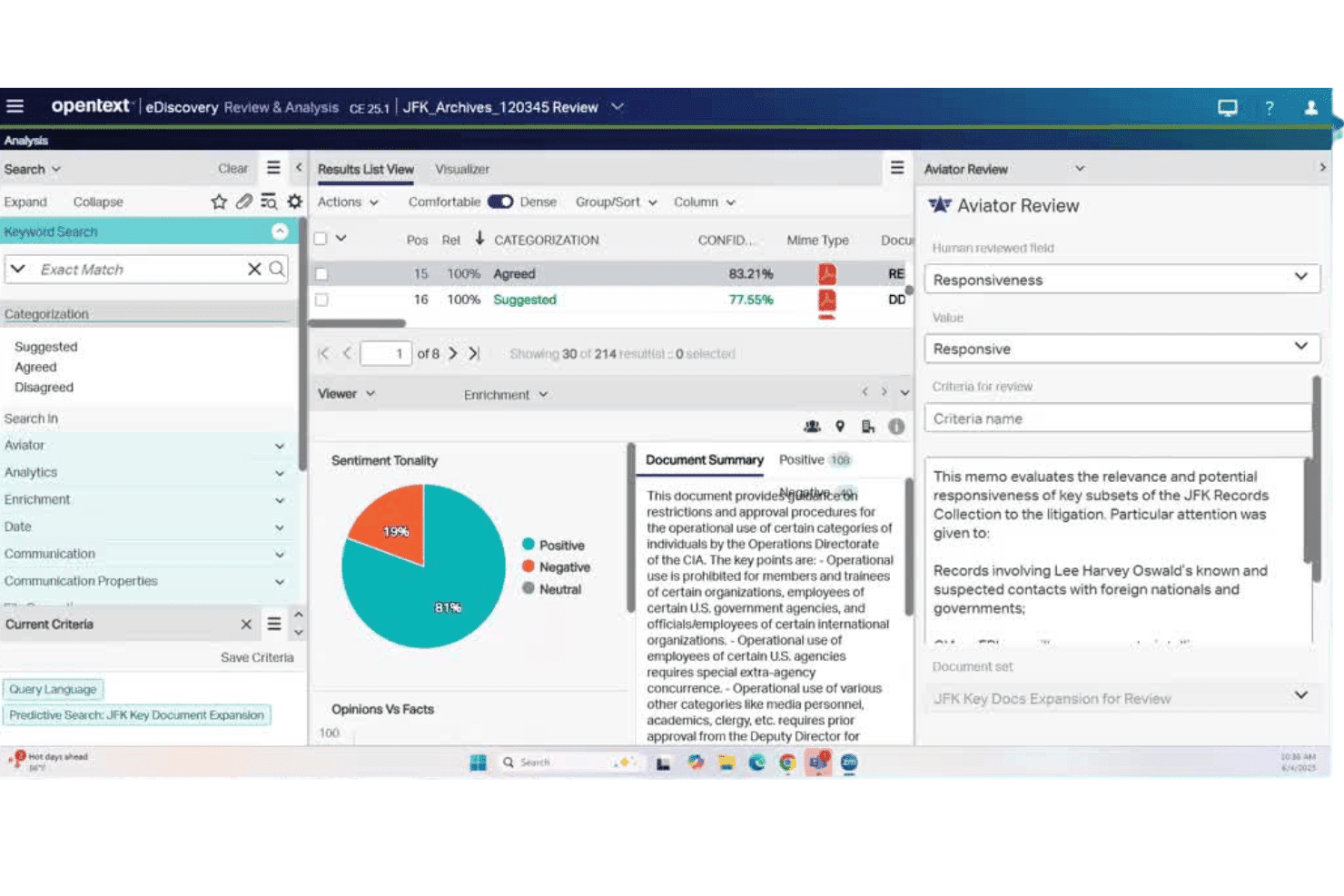
OpenText eDiscovery manages ESI processing, review, and enterprise legal cases. OpenText eDiscovery is an AI-powered platform built for corporate legal teams and litigation support professionals who need end-to-end ESI processing, document review, and case management at enterprise scale.
Who Is OpenText Best For?
OpenText eDiscovery is a strong fit for large enterprises and corporate legal departments managing high-volume litigation, investigations, or regulatory compliance across complex data environments.
Why OpenText Is a Good Relativity Alternative
OpenText eDiscovery earns its spot on my shortlist because it handles enterprise-scale case management end-to-end, from legal hold to production, in a single platform. I particularly like the Aviator Review capability, which applies continuous active learning to large document sets and meaningfully cuts review volume. The 45+ data-source connectors also make ingesting ESI from complex enterprise environments far more manageable than stitching together separate tools.
OpenText Key Features
- GenAI-powered document summarization: Instantly generates concise summaries of lengthy documents to help prioritize review.
- Audio and video content analysis: Ingests, transcribes, searches, and redacts audio and video files as part of discovery workflows.
- Integrated legal hold notifications: Automates custodian notifications and acknowledgment tracking within one platform.
- Flexible deployment options: Lets you choose among public cloud, private cloud, or hybrid deployment to meet compliance and data sovereignty needs.
OpenText Integrations
OpenText eDiscovery offers 45+ native integrations, including Microsoft 365, Google Workspace, Slack, Box, SharePoint, and Exchange. An API is available for custom integrations.
Pros and Cons
Pros:
- Processes 300+ file types including structured data
- Continuous active learning reduces document review volume
- Single platform covers hold through production
Cons:
- Interface feels dated compared to newer platforms
- Setup requires significant IT and admin resources
Learn more about OpenText: Best for case management and legal analytics
- Free demo available
- Pricing upon request
Visit WebsiteCustomer Rating:4.9/5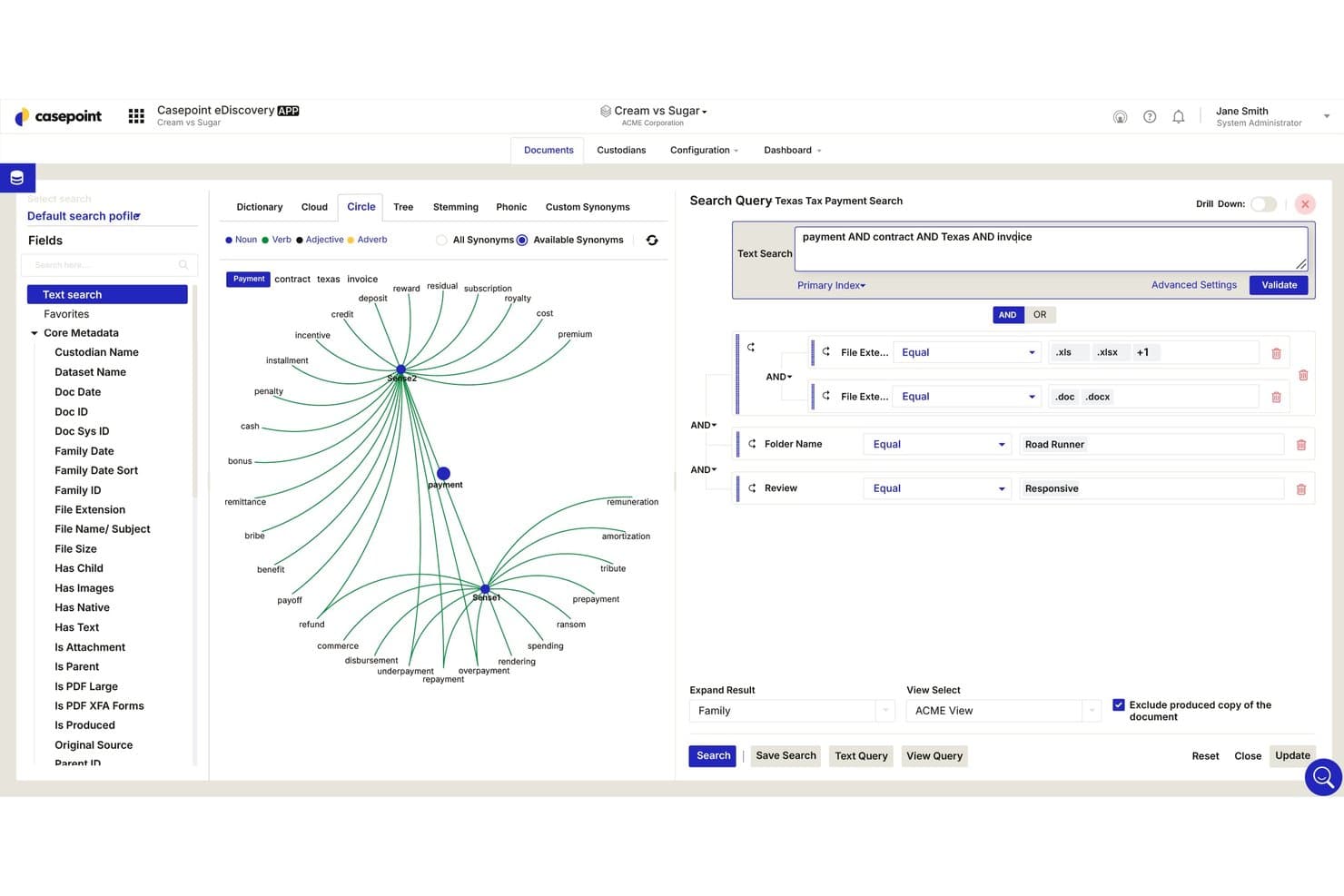
Casepoint offers an advanced search interface with a visual circle synonym graph, multiple filter fields, and Boolean query builder for precise document discovery. Casepoint is a cloud-based eDiscovery and legal data management platform built for corporate legal teams and government agencies that need defensible ESI processing, AI-powered document review, and integrated legal hold—without Relativity's complex licensing structure.
Who Is Casepoint Best For?
Casepoint is a strong fit for government agencies and mid-market enterprises operating in heavily regulated industries where security compliance and defensible workflows aren't optional.
Why Casepoint Is a Good Relativity Alternative
I've included Casepoint in my top picks because its analytics capabilities genuinely stand out. CaseAssist, its built-in AI, runs predictive coding, concept clustering, and email threading natively, so I'm not paying analytics add-on fees the way I would with Relativity. The legal hold module also automatically flags custodian status changes by connecting directly to HR systems, which closes a gap that manual hold processes consistently miss.
Casepoint Key Features
- FedRAMP High and DOD IL6 certifications: Government-grade security and compliance for sensitive litigation and regulatory data.
- Batch review workflow: Assign, manage, and track large document sets across distributed review teams.
- Cloud data connectors: Collect and preserve data directly from Microsoft 365, Slack, Google Workspace, Box, and more.
- Configurable production tools: Output productions with custom Bates numbering, redactions, and privilege logs for court compliance.
Casepoint Integrations
Casepoint offers native integrations with Microsoft 365, Google Workspace, Slack, Box, and Dropbox, and provides an API for custom integrations.
Pros and Cons
Pros:
- No-code review workflow builder included
- FedRAMP-certified for government-sensitive matters
- Native AI-powered early case assessment built-in
Cons:
- Reporting customization is comparatively limited
- Smaller certified admin community than Relativity
Learn more about Casepoint: Best for agile litigation and regulatory response
- Free demo available
- Pricing upon request
Visit WebsiteCustomer Rating:4.4/5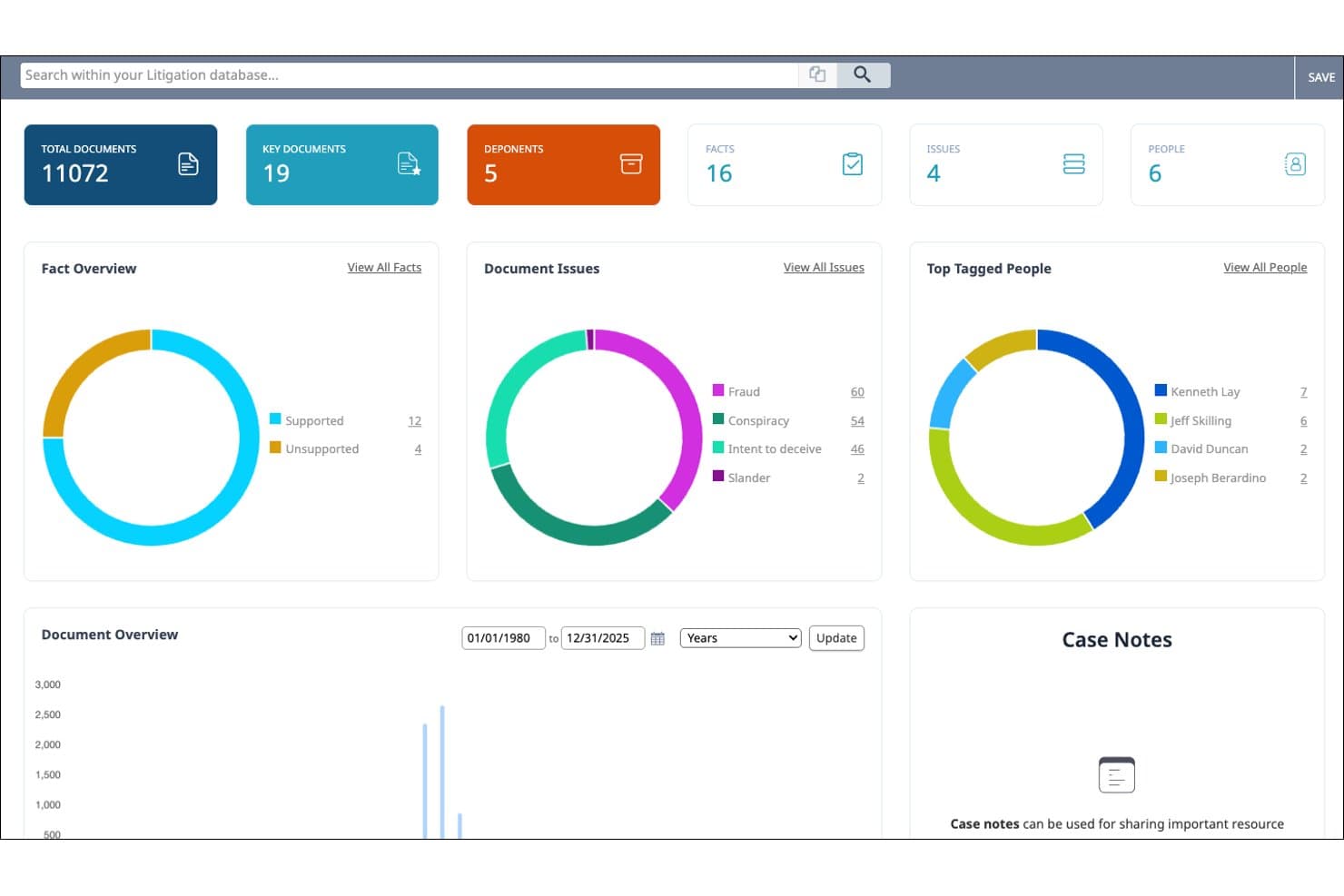
Nextpoint connects discovery, depositions, evidence, and courtroom presentation. Nextpoint is a cloud-native ediscovery platform built for law firms and legal teams that need to process, review, and produce ESI without the per-GB costs and complexity that come with enterprise tools like Relativity.
Who Is Nextpoint Best For?
Nextpoint is a strong fit for small-to-midsize law firms that handle litigation in-house and need a full ediscovery workflow without enterprise-level overhead.
Why Nextpoint Is a Good Relativity Alternative
I picked Nextpoint as one of the best because its drag-and-drop upload and cloud-native processing let my team move from raw ESI to active review in minutes. I also appreciate the built-in case chronology tools and AI-powered deposition summaries, which mean I can build a factual record and prep for courtroom presentations without switching platforms.
Nextpoint Key Features
- Advanced search and filtering: Run keyword, Boolean, and metadata searches across all uploaded documents for fast data culling.
- Batch redactions and tagging: Apply redactions, highlights, tags, and custom codes to document groups in one action.
- Deposition transcript management: Manage transcripts with synchronized video, designation coding, and connected exhibits.
- SOC 2 Type II certified security: Ensure document confidentiality with audit trails, granular permissions, and encryption in transit and at rest.
Nextpoint Integrations
Nextpoint provides native integrations with Dropbox, Google Drive, OneDrive, and Zoom for direct data collection. An API is available for custom integrations.
Pros and Cons
Pros:
- AI predictive coding included in base plan
- No-code workflow builder for review automation
- Cloud-native with no server administration needed
Cons:
- Reporting lacks depth for complex matter portfolios
- Analytics less granular than enterprise-grade tools
Learn more about Nextpoint: Best for processing complex and diverse data types
- Free demo available
- Pricing upon request
Visit WebsiteCustomer Rating:3.5/5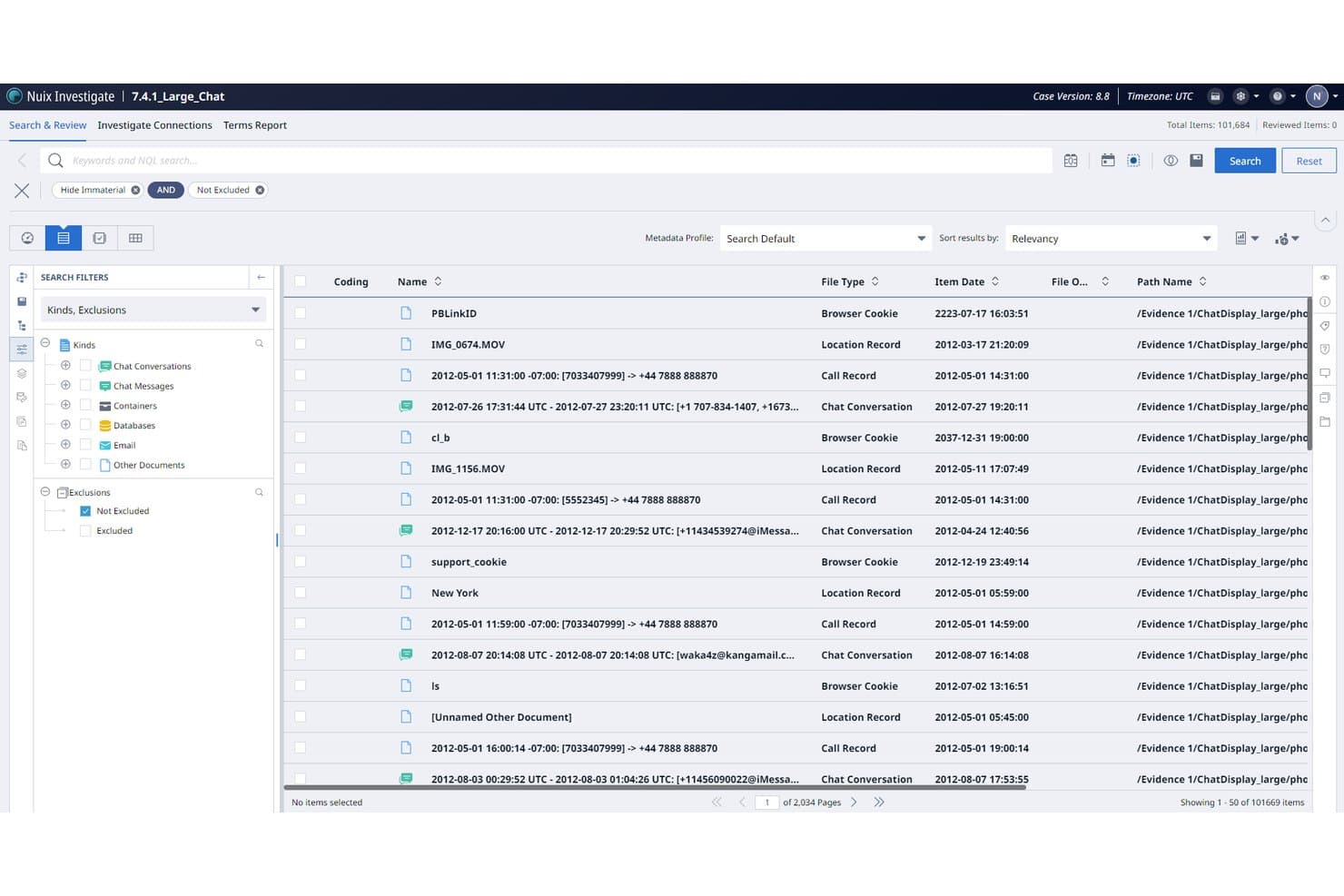
Nuix Discover offers a Search & Review interface with advanced filtering by file type, item date, and document kind including chat conversations, call records, and browser cookies. Nuix Discover is an eDiscovery platform built for legal teams and litigation support professionals who need forensic-grade data processing, AI-driven document review, and multi-jurisdictional production capabilities without the constraints of a single-vendor ecosystem.
Who Is Nuix Discover Best For?
Nuix Discover is a strong fit for enterprise legal teams and litigation support professionals managing high-volume, complex investigations across multiple data sources and jurisdictions.
Why Nuix Discover Is a Good Relativity Alternative
I picked Nuix Discover as one of the best because the Nuix Engine processes over 1,000 file types, including forensic data sources most eDiscovery platforms can't handle natively. I particularly appreciate its Cognitive AI (CogAI), which ships with 500+ pre-built eDiscovery-tuned models for concept clustering and continuous active learning, cutting the gap between raw ingestion and a prioritized review set significantly.
Nuix Discover Key Features
- Visual review interface: Delivers document clustering and relevance maps for easier navigation of large data sets.
- Multi-tenant architecture: Allows secure data separation for law firms, enterprises, and government clients.
- Automated PII redaction: Identifies and redacts sensitive information across many data types for compliance.
- Gap identification tools: Flags missing custodians, date ranges, or key documents to enhance defensibility and completeness.
Nuix Discover Integrations
Nuix Discover offers native integrations with Microsoft 365, Google Workspace, Slack, Box, and Relativity. An API is available for custom integrations.
Pros and Cons
Pros:
- Forensic-grade chain-of-custody audit logging built in
- CogAI models drastically reduce manual review volume
- Ingests 1,000+ file types without third-party preprocessing
Cons:
- UI complexity can slow down first-time review teams
- Setup and configuration demands dedicated technical resources
Learn more about Nuix Discover: Best for seamless Microsoft 365 data integration
- 30-day free trial
- From $12/user/month (billed annually)
Visit WebsiteCustomer Rating:4.4/5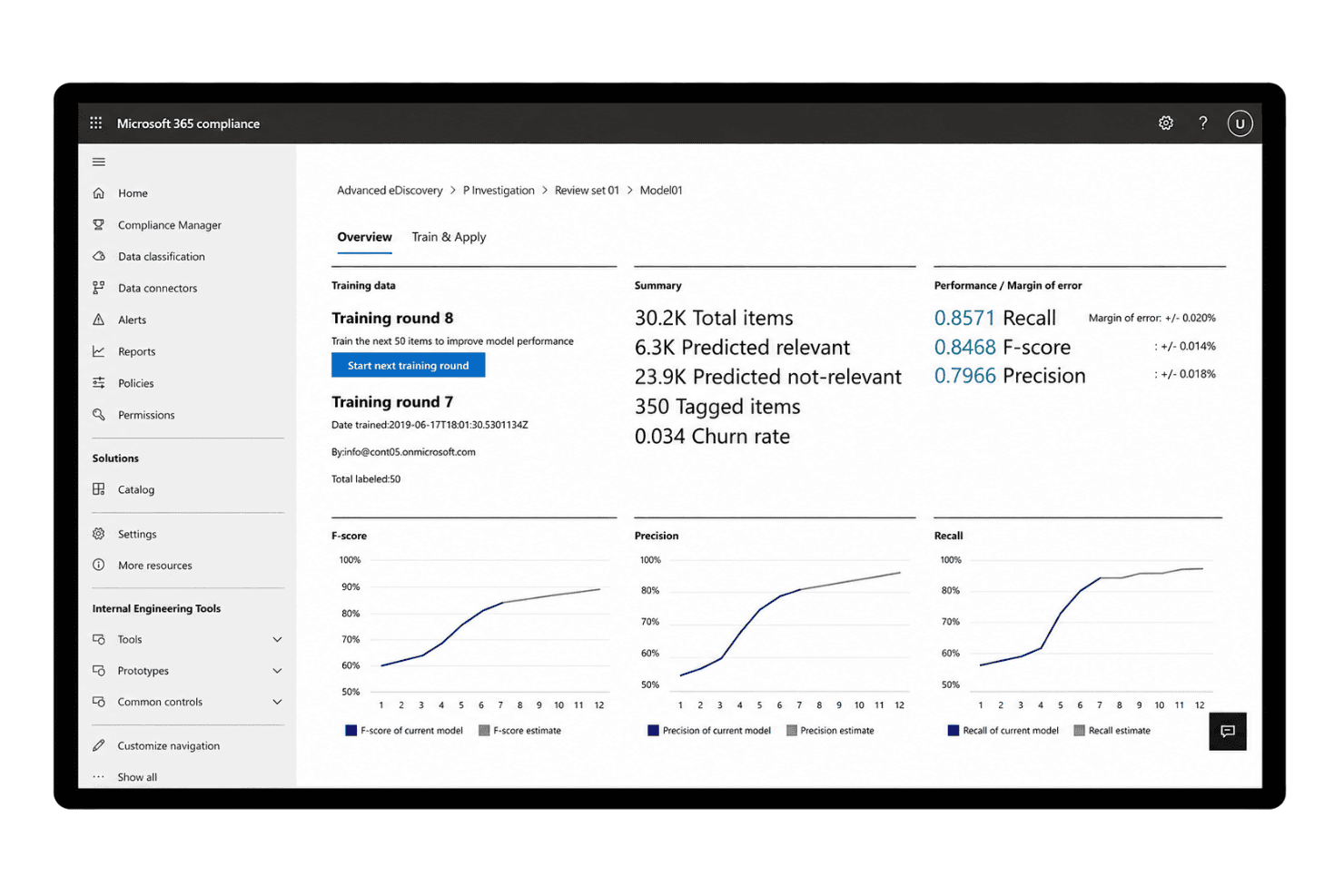
Microsoft Purview eDiscovery offers a predictive coding model dashboard displaying training rounds, recall, F-score, and precision metrics for document review sets. Microsoft Purview eDiscovery is a compliance-native tool built into the Microsoft 365 ecosystem, giving corporate legal and eDiscovery teams a way to search, preserve, and collect ESI without stepping outside their existing Microsoft environment.
Who Is Microsoft Purview eDiscovery Best For?
It's a strong fit for enterprise in-house legal and compliance teams already operating within Microsoft 365 who need integrated eDiscovery without a separate platform.
Why Microsoft Purview eDiscovery Is a Good Relativity Alternative
I picked Microsoft Purview eDiscovery because its in-place discovery model keeps data inside your Microsoft 365 boundary, eliminating the need to copy content out to a third-party platform. When I search across Exchange, SharePoint, and Teams, I'm working against live data rather than a duplicate copy. The built-in custodian mapping automatically links data sources to individuals of interest, and the legal hold notification workflow runs entirely within the same environment.
Microsoft Purview eDiscovery Key Features
- Advanced indexing and search: Search across Exchange, SharePoint, OneDrive, and Teams with keyword, Boolean, and advanced filters.
- Review set management: Copy collected data to review sets where users can tag, annotate, and analyze documents.
- Legal hold notification workflows: Manage automated legal hold notifications and acknowledgment tracking for custodians.
- Machine learning-based privilege detection: Use integrated models to flag content likely containing attorney-client privileged information.
Microsoft Purview eDiscovery Integrations
Microsoft Purview eDiscovery has native integrations across the Microsoft ecosystem, including Microsoft 365 and Azure. An API is available for custom integrations.
Pros and Cons
Pros:
- In-place search across Exchange, Teams, and SharePoint
- Legal hold notifications built into the platform
- Native Microsoft 365 data collection without exporting
Cons:
- Review sets lack advanced QC workflow tools
- Limited TAR and predictive coding capabilities
Learn more about Microsoft Purview eDiscovery: Best for real-time collaborative document review
- Free demo available
- Pricing upon request
Visit WebsiteCustomer Rating:4.7/5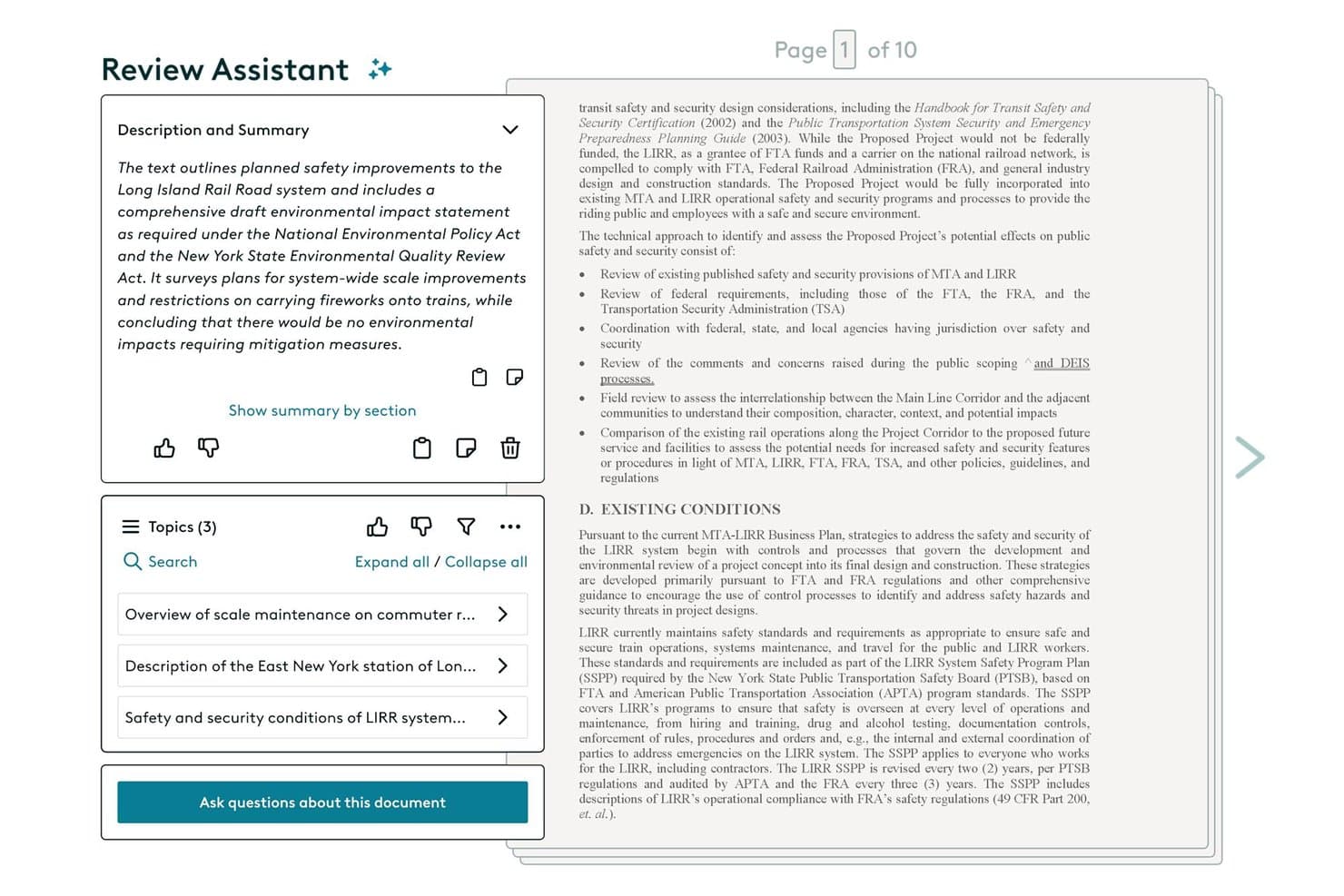
Everlaw offers an AI-powered Review Assistant that provides document summaries, topic extraction, and an interactive Q&A feature to streamline document review. Everlaw is a cloud-native ediscovery platform built for litigation teams and legal operations who need a less complex, more accessible alternative to Relativity for ESI processing, document review, and investigation workflows.
Who Is Everlaw Best For?
Everlaw is a strong fit for law firms and corporate legal teams that handle high-volume litigation and need ediscovery tools that don't require dedicated technical administrators.
Why Everlaw Is a Good Relativity Alternative
I've included Everlaw in my top picks because of how it handles real-time collaborative document review. Multiple reviewers can code documents simultaneously, with AI Coding Suggestions that auto-categorize documents and return rationales based on your coding sheet. Deep Dive layers on natural language querying across entire datasets with direct citations, keeping reviewer teams aligned without constant back-and-forth.
Everlaw Key Features
- Concept clustering dashboard: Visualizes relationships between documents to help surface patterns and connections across massive datasets.
- Integrated legal holds: Manages custodian notifications, acknowledgment tracking, and preservation-in-place directly from the platform.
- Audio and video transcription: Converts spoken content from multimedia files into searchable and review-ready text.
- Unlimited productions: Lets users create and export an unlimited number of court-ready productions with redactions and privilege logs.
Everlaw Integrations
Everlaw offers native integrations with Microsoft 365, Google Workspace, Slack, Box, and Zoom, and provides an API for custom integrations.
Pros and Cons
Pros:
- No dedicated admin required to operate
- AI coding suggestions with explainable rationales
- Real-time multi-reviewer coding on same documents
Cons:
- Steep learning curve for advanced analytics features
- Limited support for on-premise deployment needs
Learn more about Everlaw: Best for instant self-service data review
- Free trial available
- Pricing upon request
Visit WebsiteCustomer Rating:4.6/5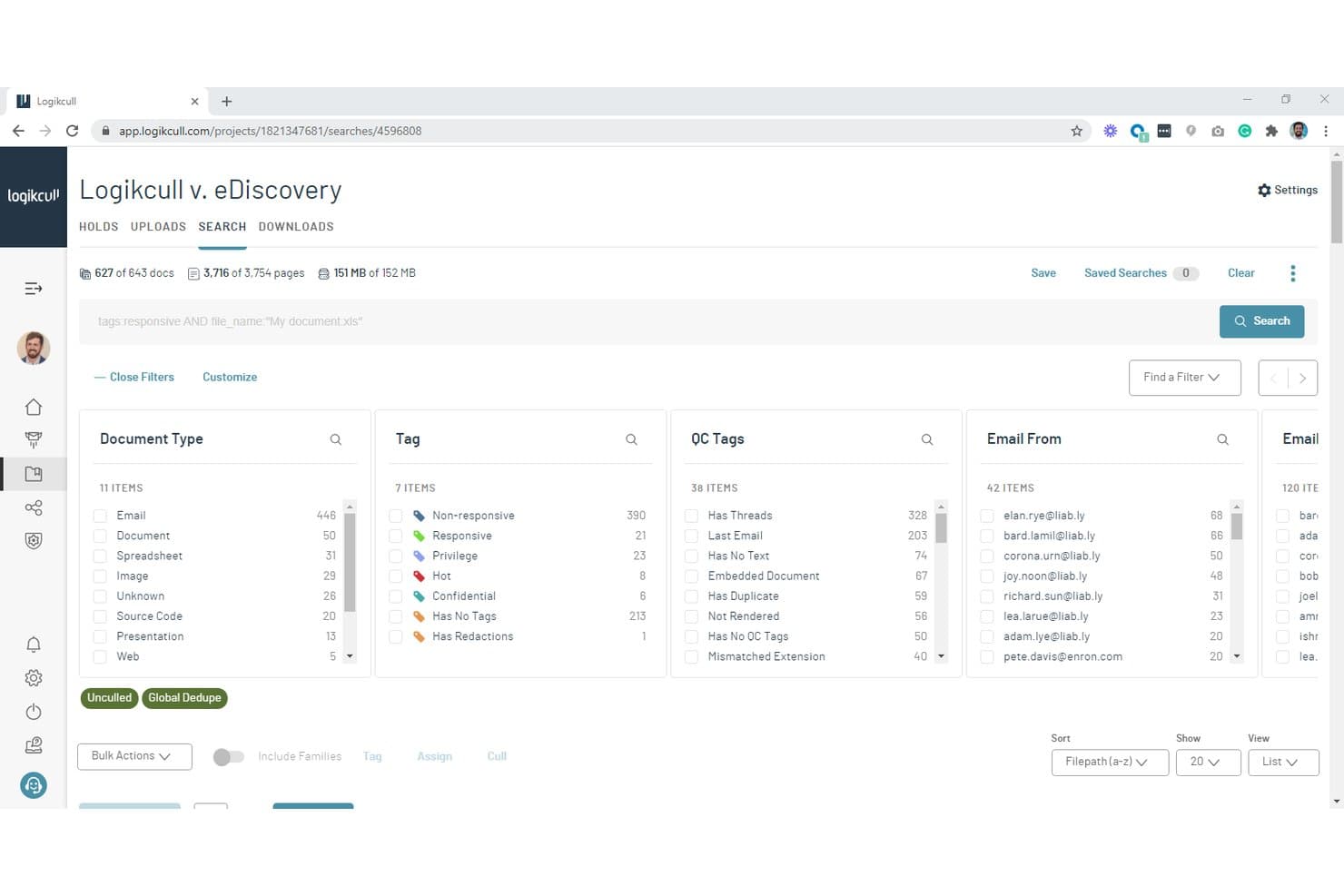
Logikcull offers a powerful search and filtering interface with document type, tag, QC tags, and email filters for efficient eDiscovery review. Logikcull is a cloud-based eDiscovery platform that lets legal teams process, review, and produce ESI without the infrastructure overhead or steep learning curve that comes with Relativity.
Who Is Logikcull Best For?
Small to mid-sized law firms and in-house legal teams who need to run eDiscovery in-house without dedicated IT support will get the most out of Logikcull.
Why Logikcull Is a Good Relativity Alternative
I've included Logikcull in my top picks because of how fast my team can move from raw data to a reviewable set. Drag-and-drop uploads trigger 300+ automated processing steps, spinning up a new project in under 30 seconds with no IT involvement. I also like Culling Intelligence™, which lets me drill down to the relevant documents in under 10 clicks, cutting through noise before review even begins.
Logikcull Key Features
- Legal hold management: Centralizes notice distribution, reminders, and tracking for all custodians involved in a matter.
- Integrated chat data review: Supports direct Slack and Teams data imports with full threading and contextual rendering.
- Public records portal: Offers a dedicated portal for managing FOIA and public records requests from intake through fulfillment.
- Onna-powered multi-source collections: Enables collection and search across over 29 data sources, including Zoom, Box, and Salesforce.
Logikcull Integrations
Logikcull offers native integrations with Microsoft 365, Google Workspace, Slack, Box, Dropbox, and Onna for multi-source enterprise data ingestion. An API is available for custom integrations.
Pros and Cons
Pros:
- No Relativity-certified admin needed to operate
- Processes 300+ file types automatically on upload
- Instant project setup with no IT support
Cons:
- Better suited for mid-size matters only
- TAR less advanced than enterprise-grade platforms
 Best for intuitive cloud eDiscovery workflows
- Free demo available
- Pricing upon request
Visit WebsiteCustomer Rating:4.6/5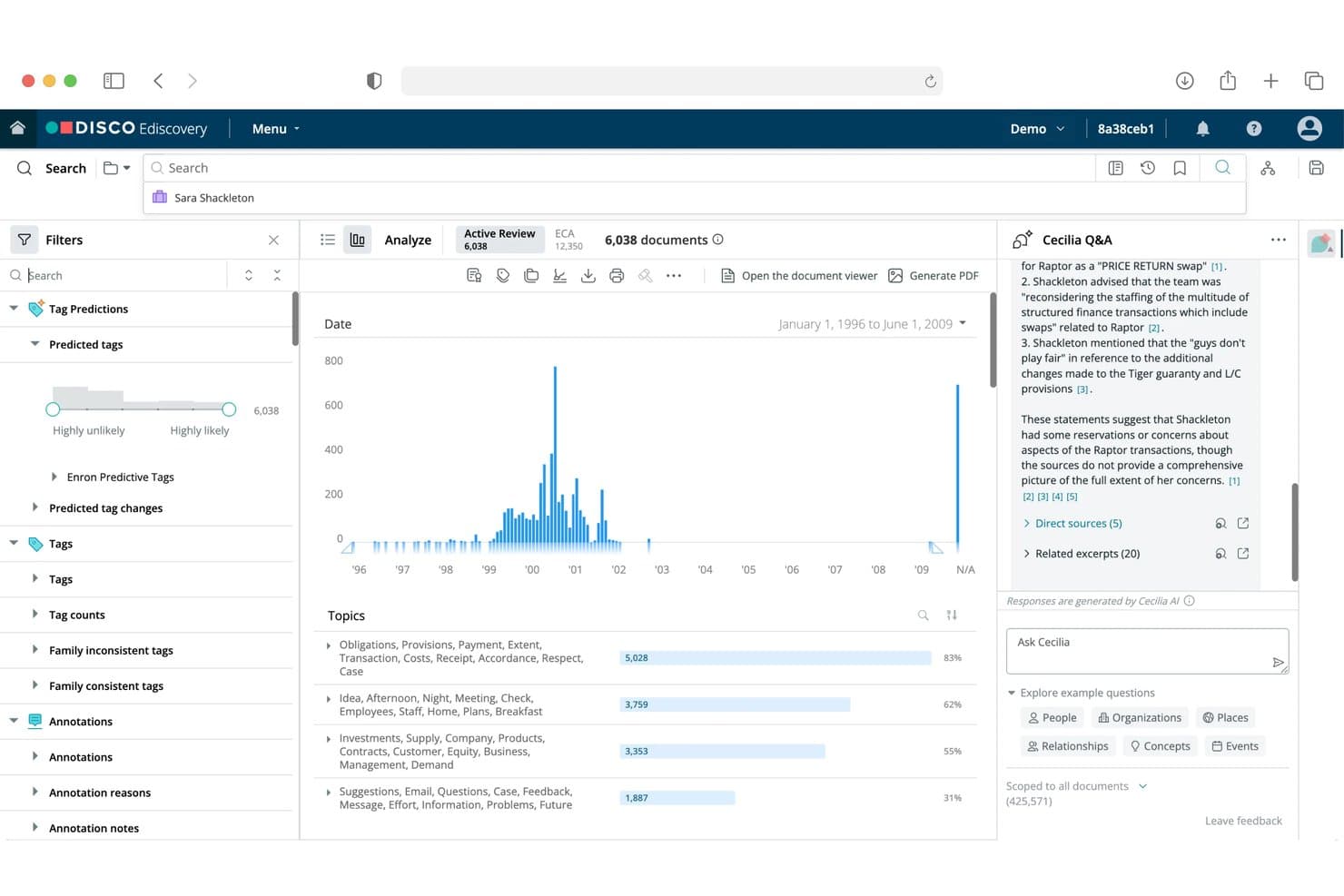
DISCO offers an AI-powered eDiscovery interface with document filtering, predictive tagging, topic analysis, and a Cecilia Q&A assistant for case review. DISCO is a cloud-native eDiscovery platform built for law firms and corporate legal teams that need fast ESI processing, AI-assisted document review, and predictable per-GB pricing without Relativity's complexity or cost.
Who Is DISCO Best For?
DISCO is a strong fit for litigation support professionals and eDiscovery managers handling high-volume matters who need fast, intuitive review without heavy IT overhead.
Why DISCO Is a Good Relativity Alternative
I picked DISCO as one of the best because its Cecilia Auto Review uses generative AI to code documents directly within the review database, without requiring a separate analytics environment. I also love that ECA lives in the same database as active review, so my team can shift from data culling to full review without migrating anything. Topic clustering then automatically builds a structured table of contents for the entire document set before review even begins, which meaningfully changes how you approach large matters.
DISCO Key Features
- Direct data source connectors: Ingest data from Microsoft 365, Google Workspace, Slack, and Box with one-click integration.
- Unlimited storage model: Upload and review large volumes of ESI without artificial hosting limits or separate database requirements.
- Deposition and transcript management: Manage transcripts, create collaborative annotations, and generate searchable deposition summaries in one platform.
- Configurable productions: Generate court-ready document productions with Bates numbering, redactions, and custom load file formats.
DISCO Integrations
DISCO offers native integrations with Microsoft 365, Google Workspace, Slack, Box, SAP, and Workday. An API is available for custom integrations.
Pros and Cons
Pros:
- ECA and active review share one database
- Cloud-native setup needs no server configuration
- AI auto-coding reduces manual document review significantly
Cons:
- Steeper ramp-up for teams new to AI-assisted review
- Reporting customization options are relatively limited
Learn more about DISCO: Best for advanced AI-powered analytics integration
- Free demo available
- Pricing upon request
Visit WebsiteCustomer Rating:4.5/5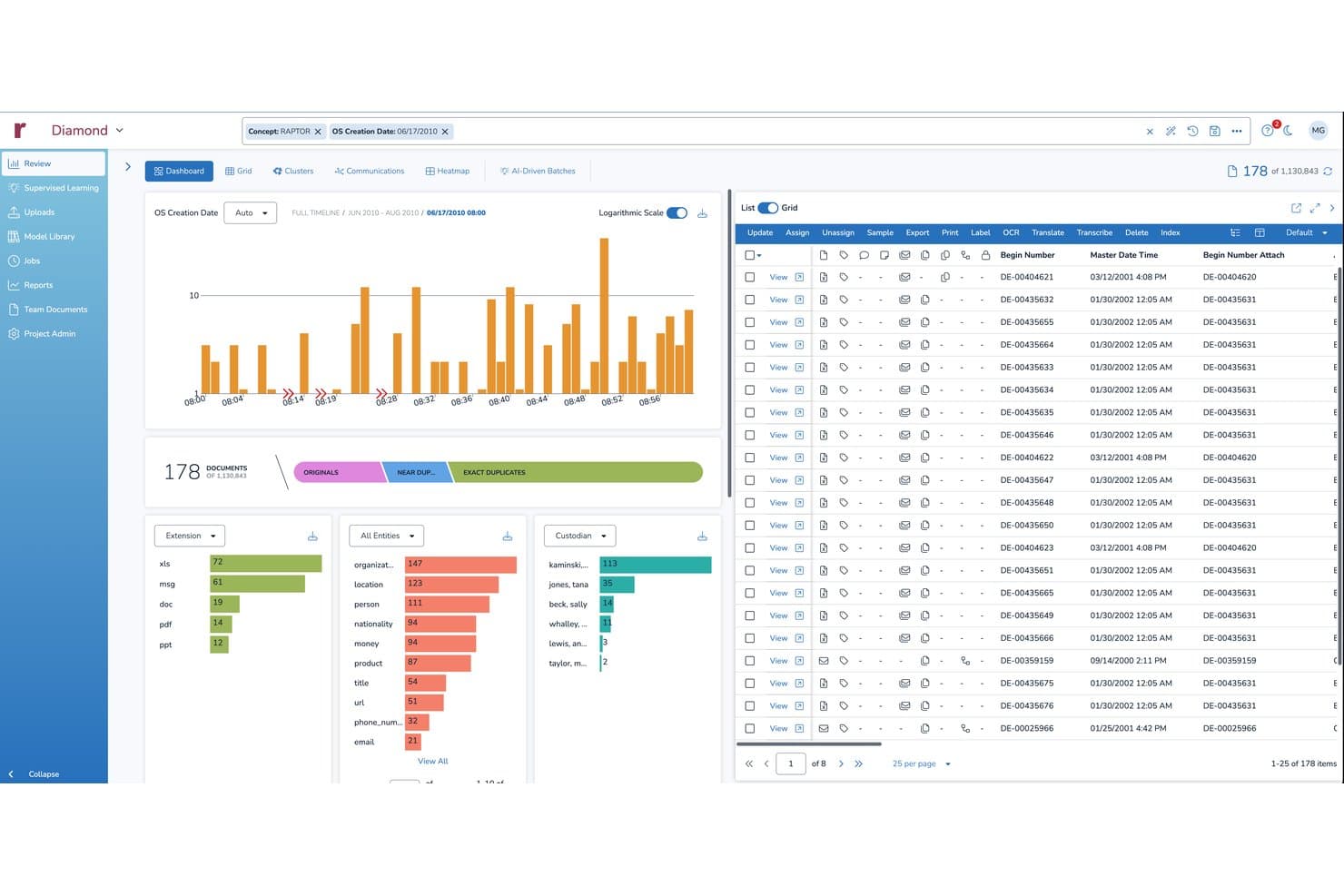
Reveal offers a comprehensive eDiscovery review dashboard with document filtering, timeline visualization, entity extraction, and custodian analytics. Reveal is an AI-driven eDiscovery platform built for law firms, corporations, and legal operations teams that need enterprise-scale ESI processing, document review, and advanced analytics without Relativity's complex licensing structure.
Who Is Reveal Best For?
Reveal is a strong fit for eDiscovery managers and litigation support teams handling high-volume, multi-language matters that demand deep AI analytics and defensible review workflows.
Why Reveal Is a Good Relativity Alternative
I've included Reveal in my top picks because its AI analytics stack genuinely goes beyond what Relativity offers out of the box. Brainspace delivers conceptual clustering, CAL/TAR 2.0, and sentiment analysis in a single integrated layer, so my team can surface patterns across massive document sets without building separate workflows. The aji agentic review layer and GenAI "Ask" feature return answers with source citations attached, cutting verification time significantly on complex, high-volume matters.
Reveal Key Features
- Multi-language document processing: Automatically processes and translates documents across 14+ major world languages in a single workflow.
- Integrated legal hold management: Centralizes custodian notification, tracking, and defensible collection from sources like Microsoft 365, Google Workspace, Slack, and Box.
- No-code data connectors: Directly imports communications, documents, and cloud content using prebuilt integrations for Teams, Zoom, Dropbox, and more.
- Customizable review dashboards: Lets teams build real-time, role-based dashboards for reviewer performance, issue tagging, and quality control tracking.
Reveal Integrations
Reveal offers native integrations with Microsoft 365, Google Workspace, Slack, Teams, Zoom, Box, Dropbox, Salesforce, and Jira. An API is available for custom integrations.
Pros and Cons
Pros:
- Purpose-built Slack and Teams chat review
- Native legal hold included without add-ons
- Built-in CAL and TAR 2.0 analytics
Cons:
- Reporting customization options feel limited
- Admin configuration requires significant technical expertise
Learn more about Reveal:
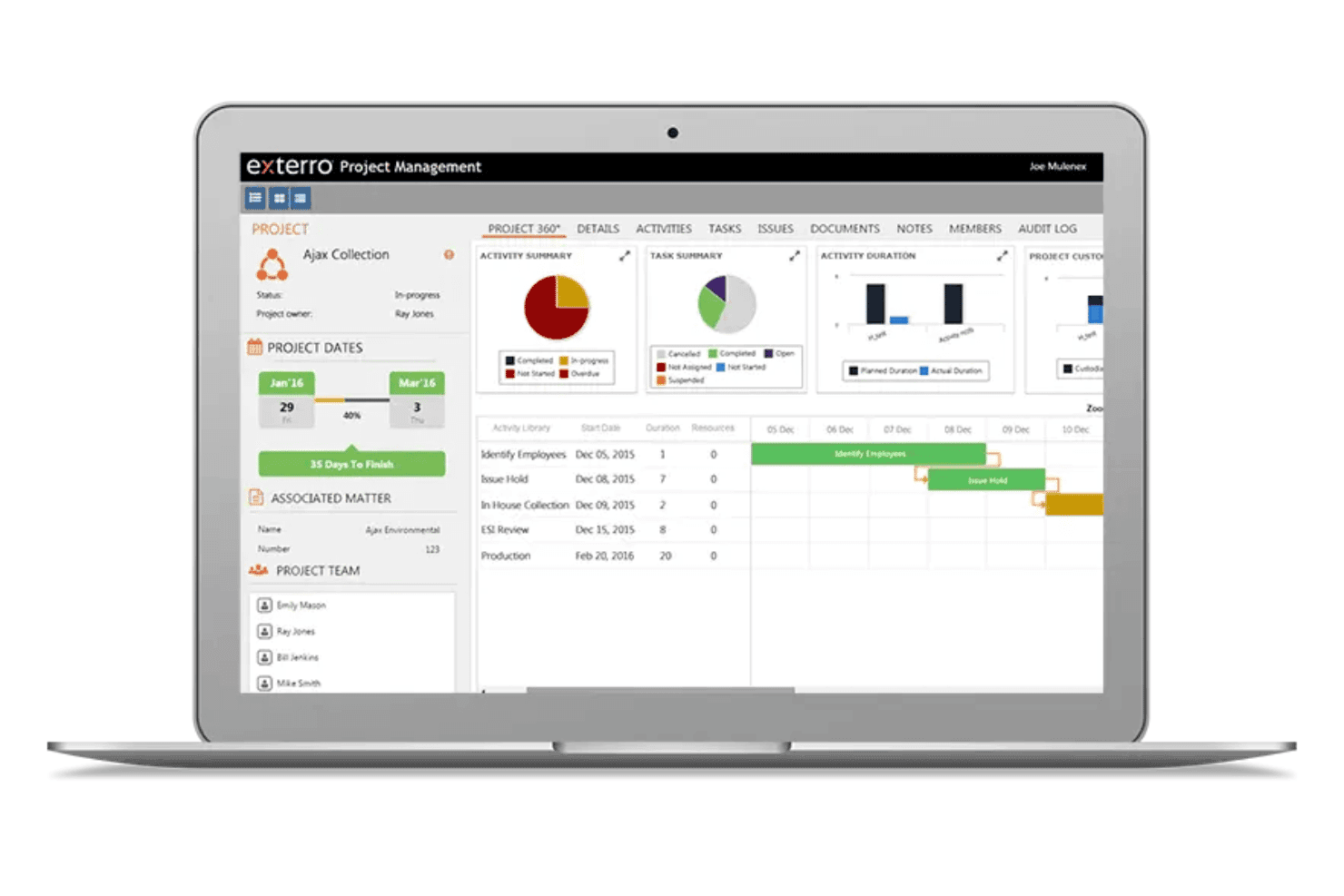
Exterro manages legal holds, ESI collection, review, and production workflows. Exterro is an AI-powered eDiscovery platform built for enterprise legal teams that want full EDRM lifecycle coverage—from legal hold and collection through processing, review, and production—in a single integrated system.
Who Is Exterro Best For?
Exterro is a strong fit for enterprise in-house legal and legal operations teams managing high-volume litigation, regulatory investigations, or complex compliance obligations.
Why Exterro Is a Good Relativity Alternative
I've included Exterro in my top picks because its legal hold tooling is genuinely best-in-class. You can issue, track, and enforce holds with automated custodian notifications, acknowledgment tracking, and full audit trails, all from one place. The Subpoena Manager feature goes further, using autonomous AI to handle end-to-end subpoena intake, triage, collection, and response with minimal manual intervention, which is something I haven't seen matched elsewhere in this category.
Exterro Key Features
- Agentic AI-powered early case assessment: Analyze and prioritize large data sets before formal document review starts.
- Integrated review interface: Multi-user coding, batch assignment, and quality control workflows for document review teams.
- Configurable production and export tools: Generate Bates-stamped, redacted, and privilege-logged productions in multiple standard load file formats.
- Direct connectors to enterprise data sources: Collect data natively from sources like Microsoft 365, Google Workspace, Box, and Slack without third-party utilities.
Exterro Integrations
Exterro offers native integrations with Microsoft 365, Google Workspace, Slack, Salesforce, Box, and Zendesk, and provides an API for custom integrations.
Pros and Cons
Pros:
- AI-powered early case assessment cuts review volume
- Custodian acknowledgment tracking with full audit trail
- End-to-end EDRM coverage in one platform
Cons:
- UI feels dated compared to newer platforms
- Complex to configure without dedicated admin support
Learn more about Exterro:
Andre Relativity-alternativer
Her er noen flere Relativity-alternativer som ikke kom med på kortlisten min, men som likevel er verdt å ta en titt på:
- 11ZapprovedBest for legal hold and custodian tracking
- 12CloudNineBest for flexible hybrid deployment
- 13GoldFynchBest for simple, transparent per-case pricing
- 14Epiq DiscoveryBest for managed global eDiscovery services
- 15Zylab OneBest for advanced self-service analytics tools
- 16OnnaBest for broad cloud app data collections
- 17IPROBest for early case assessment workflows
- 18Digital WarRoomBest for desktop and on-premise deployment options
- 19Consilio SightlineBest for secure multi-matter workspace management
- 20LighthouseBest for AI-powered privilege review automation
How I Evaluate Relativity Alternatives
I look at two layers: baseline capabilities Relativity covers—ESI processing, TAR, and production—and differentiators that set vendors apart. Differentiators include pricing structure, deployment model, and support for modern chat data sources.
Core Functionality (Table Stakes For This List)
When I'm selecting tools for my list, I rank each one on a scale from 0 (does not offer the functionality) to 5 (excels in this area) for each core functionality listed below. I then calculate the tool's total score into a percentage, using 65% as a benchmark to help assess its overall fit for the list.
- ESI Processing: I look for support across diverse file types—emails, PDFs, databases—plus metadata extraction and deduplication at ingestion.
- Document Review: Multi-user coding panels, batch assignments, and QC dashboards matter when you're coordinating contract reviewers on a tight deadline.
- Advanced Search: I evaluate whether the platform supports Boolean, proximity, and fuzzy queries—useful for isolating custodian communications in large datasets.
- TAR and Analytics: Predictive coding, email threading, and clustering reduce review populations. I check how each tool handles continuous active learning workflows.
- Production and Export: Court-ready output with Bates numbering, redactions, and privilege logs matters here. I look at format flexibility and production automation.
- Legal Hold and Collection: I consider how each platform manages custodian notifications, acknowledgment tracking, and defensible collection from sources like Microsoft 365.
Once I have a list of tools that meet the criteria, I consider what sets each platform apart.
Differentiating Factors (What Sets Vendors Apart)
Here's how I compare and contrast different vendors:
Standout Features
AI-powered early case assessment can cut a review population dramatically—I look for platforms where clustering and concept search surface key custodians within hours of ingestion. Modern chat data handling is another area I evaluate closely. Matters increasingly involve Slack or Teams conversations, and tools that preserve threading and context make review far more accurate than those that flatten chat into email-style exports. I also consider no-code workflow automation, which lets smaller teams build review assignments and auto-coding rules without relying on certified admins.
Beyond Features
Pricing transparency matters when you're comparing against Relativity's layered hosting and user fees—I check whether processing, hosting, and production are bundled or billed separately. Deployment model is another factor I weigh carefully. Some clients mandate single-tenant or on-premise hosting, so I look at whether a vendor offers SaaS, private cloud, and hybrid options. Security certifications like SOC 2 Type II and ISO 27001 also factor in, especially for matters involving regulated industries or government data.
Hvorfor se etter et Relativity-alternativ?
Selv om Relativity er en god eDiscovery-plattform, finnes det flere grunner til at enkelte brukere ser etter alternative løsninger. Det kan hende du ser etter et Relativity-alternativ fordi …
- Du ønsker mer transparente eller forutsigbare priser
- Du trenger raskere oppsett for små eller enkeltstående saker
- Du ser etter støtte for moderne chat eller gjennomgang av mobildata
- Du trenger mindre ressursbruk eller enklere administrasjon
- Du ønsker fleksibilitet når det gjelder geografisk hosting eller alternativer for samsvar
- Du ønsker en løsning som er utviklet for mindre eller spesialiserte firmaer
Hvis noe av dette høres kjent ut, har du kommet til rett sted. Listen min inneholder flere Relativity-alternativer som passer bedre for team som møter disse utfordringene med Relativity og ser etter alternative løsninger.
Viktige funksjoner i Relativity
Her er noen av de viktigste funksjonene i Relativity, slik at du kan sammenligne hva de alternative løsningene tilbyr:
- ESI-behandling: Håndterer, indekserer og normaliserer e-poster, kontordokumenter, strukturerte data og mer til formater som er klare for gjennomgang.
- Arbeidsområde for dokumentgjennomgang: Tilbyr en robust plattform for merking, koding, kommentering og sikkert samarbeid om dokumenter med fleksible tilgangskontroller.
- Avansert søk: Støtter søk etter nøkkelord, boolske operatorer, nærhet og metadata på tvers av store databaser for raskt å isolere relevant informasjon.
- TAR og analyse: Tilbyr verktøy for teknologiassistert gjennomgang, som prediktiv koding, klynging og datavisualiseringer, for å effektivisere og fremskynde gjennomgangen.
- Produksjon og eksport: Genererer produksjoner som er klare for retten, med Bates-nummerering, sladding, privilegielogger og egendefinerte innlastingsfiler for juridiske krav.
- Juridiske bevaringspålegg og innsamling: Håndterer identifisering av dataansvarlige, automatiserte varsler om bevaringspålegg, sporing av bekreftelser og etterprøvbare datainnsamlinger fra større datakilder.
- Revisjon og rapportering: Sporer all aktivitet og dokumenthistorikk for etterprøvbarhet, beviskjede og opprettholdelse av samsvar i sensitive saker.
- Utforming av tilpassede arbeidsflyter: Gjør det mulig for team å opprette, automatisere og administrere tilpassede arbeidsflyter ved hjelp av innebygde verktøy og Relativitys utvidbare app-rammeverk.
- Integrasjonsmuligheter: Kobler til systemer som Microsoft 365, Google Workspace, DMS-plattformer og analyseverktøy for sømløs dataflyt og prosessintegrasjon.
- Sikkerhetskontroller: Tilbyr rollebasert tilgang, SOC 2- og ISO 27001-sertifiseringer samt kryptering av data i ro og under overføring for strenge krav til forskriftsmessig samsvar.