

O software de CRM jurídico no Reino Unido ajuda os escritórios de advogados a gerir as relações com os clientes, automatizar os fluxos de trabalho dos processos e responder às necessidades regulamentares específicas do setor jurídico britânico. Se gere um escritório e precisa de centralizar os dados dos clientes, aumentar a eficiência da sua equipa e manter a conformidade, este guia é para si.
Vou apresentar-lhe opções de destaque que oferecem suporte local no Reino Unido, funcionalidades de automatização e uma atenção especial ao tratamento seguro de informações jurídicas sensíveis — para que possa escolher um sistema que se adeque verdadeiramente à forma de trabalhar do seu escritório.
Why Trust Our Software Recommendations
6,700+
Reviews
20
Industry experts
16+
Evaluation factors
14
Years
Our team has been testing and reviewing software since 2012. As legal practice leaders ourselves, we know how difficult—and important—it is to choose the right software.
For this guide, we evaluated tools using hands-on testing and independent research, scoring tools using our selection criteria.
Our reviews reflect our human editorial judgment, not a sales pitch.
Tabela comparativa de CRM jurídicos no Reino Unido
Esta tabela comparativa resume os detalhes de preços das minhas principais seleções de software de CRM jurídico no Reino Unido:
| Tool | Best For | Trial Info | Price | ||
|---|---|---|---|---|---|
| 1 | Best for all-in-one firm and client collaboration | 10-day free trial available | From $50/user/month (billed annually) | Website | |
| 2 | Best for end-to-end lead and pipeline management | Free demo available | Pricing upon request | Website | |
| 3 | Best for automatic relationship data capture | Free demo available | Pricing upon request | Website | |
| 4 | Best for connected legal accounting and cashiering | Not available | Pricing upon request | Website | |
| 5 | Best for flexible matter-centric workflows | Free demo available | Pricing upon request | Website | |
| 6 | Best for automated client intake workflows | 7-day free trial | From $49/user/month (billed annually) | Website | |
| 7 | Best for full UK data residency and support | Free trial available | From £44/user/month | Website | |
| 8 | Best for integrated practice and CRM management | Free demo available | Pricing upon request | Website | |
| 9 | Best for built-in UK compliance tools | Free demo available | Pricing upon request | Website | |
| 10 | Best for unlimited UK-based training | Free demo available | From £110/user/month | Website |


Análises de CRM jurídicos no Reino Unido
Apresento abaixo os meus resumos detalhados das melhores ferramentas de CRM jurídico no Reino Unido que entraram na minha lista restrita. As minhas análises oferecem uma visão detalhada das funcionalidades, dos casos de utilização mais adequados e das integrações de cada plataforma, para o ajudar a encontrar a melhor opção para si.
 Best for all-in-one firm and client collaboration
- 10-day free trial available
- From $50/user/month (billed annually)
Visit WebsiteCustomer Rating:4.6/5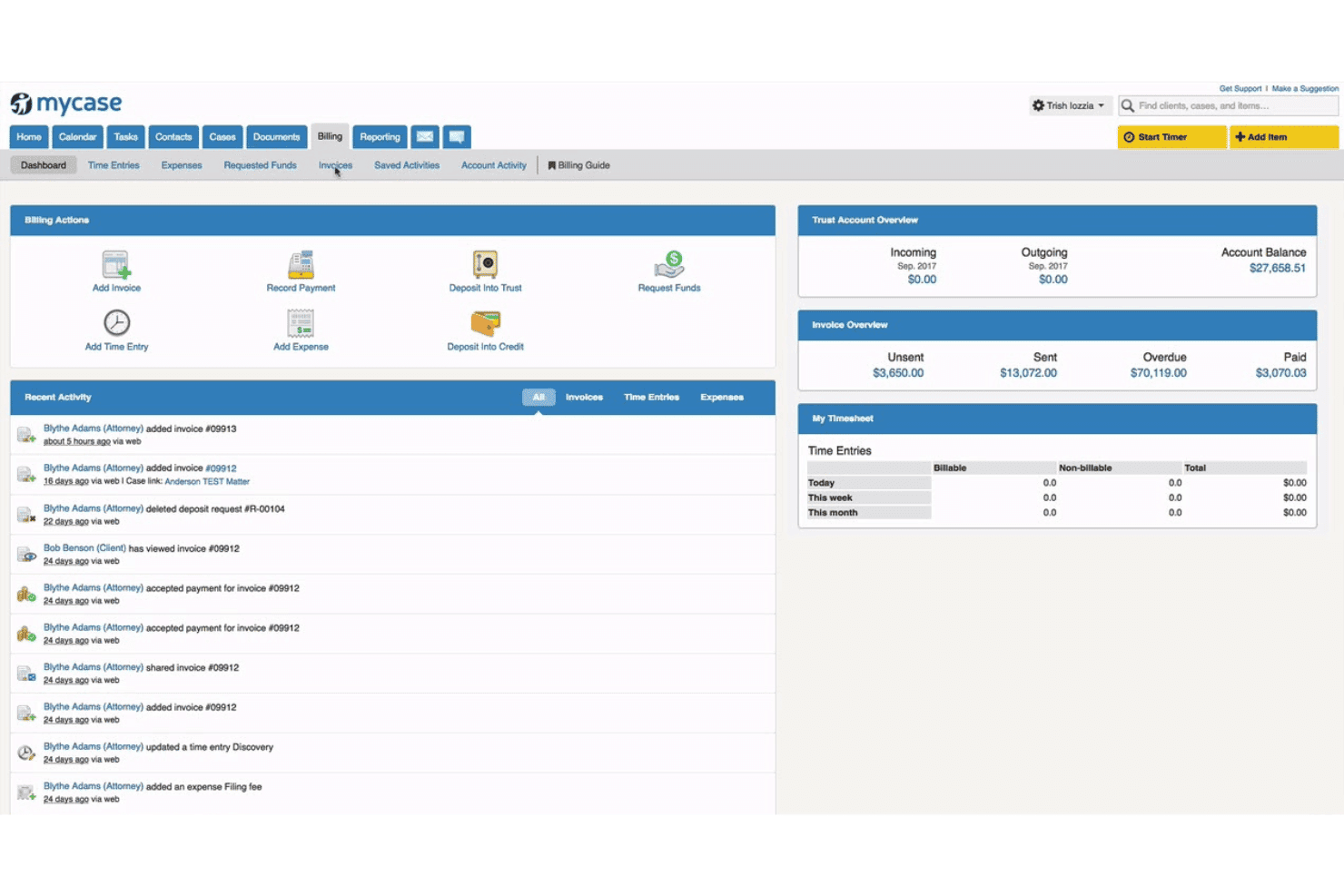
MyCase combines case management, billing, trust accounting, and client communication. MyCase is a cloud-based legal practice management platform that combines client intake CRM, pipeline tracking, case management, billing, document storage, and a client portal into a single system.
Who Is MyCase Best For?
MyCase suits small to midsize law firms that want a single platform for case management, client intake, and billing without stitching together separate tools.
Why I Picked MyCase
MyCase earns its spot as one of the best on my shortlist because the client collaboration tools genuinely go beyond a standard portal. I particularly like the dedicated 2-way texting number, which lets fee earners and clients exchange messages without swapping personal numbers. Combined with automated retainer generation and eSignature on the same platform, intake moves from enquiry to signed engagement without leaving the system.
MyCase Key Features
- Pipeline management dashboard: Visualizes client and matter stages from intake through matter opening for lead tracking.
- Time and expense tracking: Records billable hours and expenses directly to matters for accurate invoicing.
- Customizable intake forms: Lets teams capture specific data for prospective clients and route enquiries into the CRM.
- Open API for integrations: Enables connection with external systems to extend functionality beyond the built-in modules.
MyCase Integrations
MyCase offers native integrations with QuickBooks, LawPay, Google Calendar, and InfoTrack. Zapier and an open API are available for custom integrations.
Pros and Cons
Pros:
- Automated retainer generation within the platform
- Conflict checking built into intake workflows
- Built-in client portal with 2-way texting
Cons:
- No native AML or KYC verification
- Primarily designed for the US market
 Best for end-to-end lead and pipeline management
- Free demo available
- Pricing upon request
Visit WebsiteCustomer Rating:4.6/5
Lawmatics organizes leads across pipeline stages in a visual CRM board. Lawmatics is a legal CRM platform built exclusively for law firms, combining client intake automation, lead pipeline management, email and SMS marketing automation, conflict checking, e-signature, and performance analytics.
Who Is Lawmatics Best For?
Lawmatics is a strong fit for mid-sized law firms with high enquiry volumes, particularly in personal injury, immigration, family law, and estate planning.
Why I Picked Lawmatics
I picked Lawmatics as one of the best because no other legal CRM I've used gives you this level of control over the full intake pipeline, from first enquiry to signed retainer. The Kanban pipeline view tracks every lead by stage and practice area, and QualifyAI automatically scores and routes incoming enquiries before a fee earner touches them. Built-in referrer attribution and UTM tracking then show you exactly which channels are converting.
Lawmatics Key Features
- Custom intake form builder: Easily create branded forms to capture detailed client and matter information for each enquiry.
- Conflict check automation: Instantly scans existing client records to identify potential conflicts for new matters.
- Integrated e-signature: Send and receive engagement letters or retainer agreements for electronic signatures within the platform.
- Practice management system integration: Syncs new client and matter data with leading platforms like LEAP, Clio, and Smokeball.
Lawmatics Integrations
Lawmatics offers native integrations with LEAP, Clio, MyCase, Rocket Matter, PracticePanther, Smokeball, Filevine, and SmartAdvocate. An API is available for custom integrations.
Pros and Cons
Pros:
- Multi-channel automated follow-up sequences built in
- Strong pipeline visibility across fee earners
- Highly configurable intake workflows per practice area
Cons:
- Reporting customisation can require significant initial setup
- US-focused platform with limited UK-specific compliance tools
Learn more about Lawmatics: Best for automatic relationship data capture
- Free demo available
- Pricing upon request
Visit WebsiteCustomer Rating:4.9/5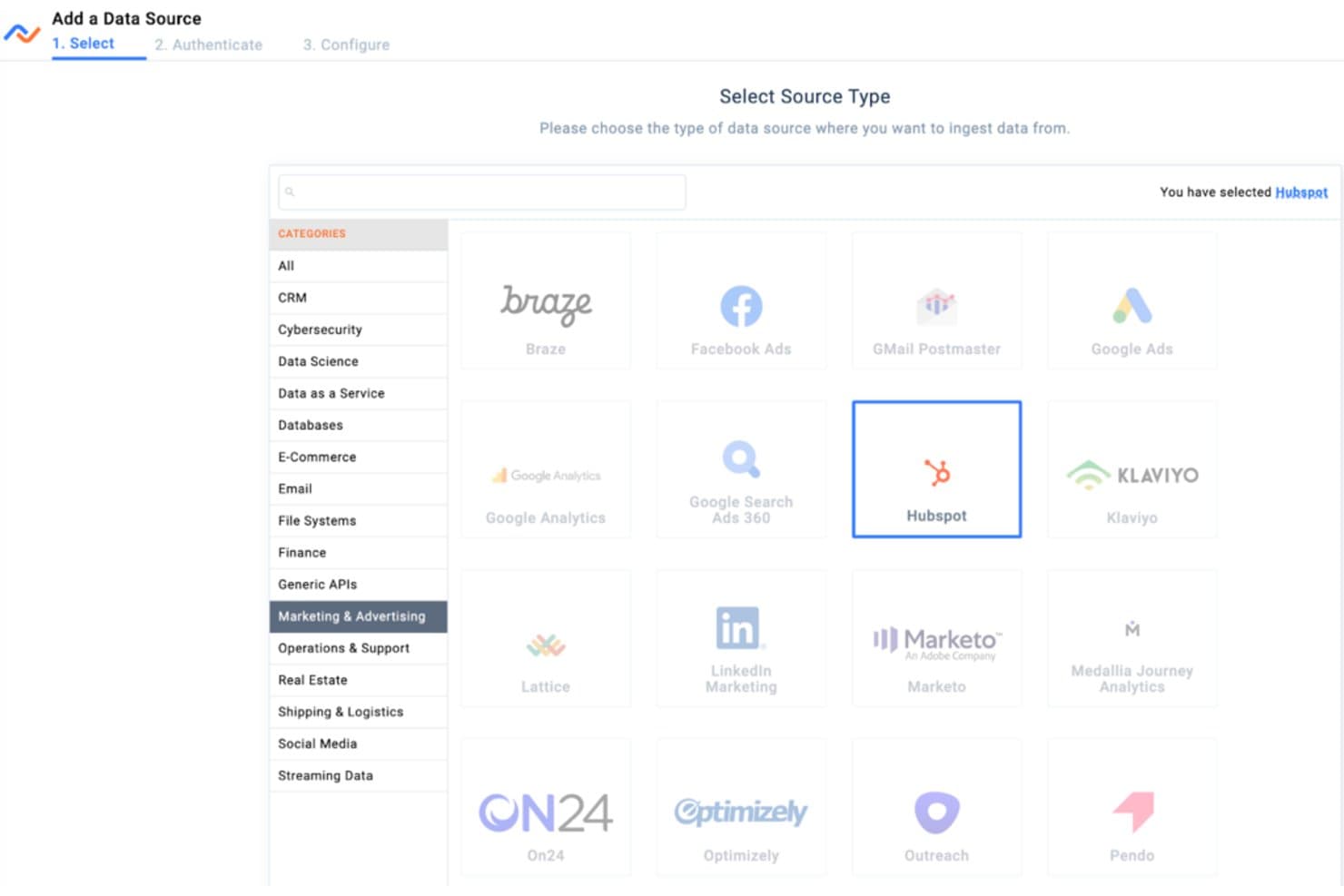
Nexla lets users connect CRM data sources like HubSpot easily. Nexl is a legal CRM built specifically for law firms, combining automatic relationship tracking, pipeline management, referral tracking, and integrated email marketing in a single platform.
Who Is Nexl Best For?
Nexl is a strong fit for mid-sized to large law firms where partners and BD teams drive growth through relationships and referral networks.
Why I Picked Nexl
I've included Nexl in my top picks because no other legal CRM handles relationship data capture the way it does. Rather than relying on lawyers to log their own activity, Nexl connects directly to Microsoft 365 and automatically records every email and meeting as interaction metadata, without ever reading email content. The "Who Knows Who" mapping then turns that data into a live view of relationship strength across the firm, surfacing warm connections that would otherwise go unnoticed.
Nexl Key Features
- Integrated email marketing: Build and send targeted campaigns directly within the platform using a built-in email editor and analytics.
- Opportunity pipeline tracking: Visualize and manage business development pipelines across practice groups and fee earners.
- Referral source tracking: Log, monitor, and attribute new business to specific referral sources within your database.
- Collaborative BD workspaces: Enable marketing and business development teams to coordinate activities, share insights, and assign tasks inside Nexl.
Nexl Integrations
Nexl offers native integrations across the Microsoft ecosystem, including Microsoft 365 and Outlook. It also provides an open API for custom integrations.
Pros and Cons
Pros:
- Built specifically for law firm BD workflows
- "Who Knows Who" mapping surfaces firm-wide connections
- Automatic relationship data capture without manual input
Cons:
- No documented AML or KYC compliance features
- Limited client matter intake and conflict check tools
Learn more about Nexla: Best for connected legal accounting and cashiering
- Not available
- Pricing upon request

Quill centralizes legal case documents in one organized interface. Quill is a cloud-based UK legal practice management platform that combines case and matter management, legal accounting, cashiering, time recording, and document management in a single system.
Who Is Quill Best For?
Quill is a strong fit for small to mid-sized UK law firms that need SRA-compliant accounts management tightly connected to their day-to-day case and matter work.
Why I Picked Quill
I've included Quill in my top picks because it's one of the few UK legal platforms where client ledgers, matter records, and billing are genuinely connected rather than bolted together. I particularly like how the legal cashiering function is staffed by qualified cashiers, so firms can outsource that role entirely when needed. The automated billing tools calculate complex legal charges directly from time-recorded matter activity, keeping invoice generation tight and SRA-compliant.
Quill Key Features
- Integrated document management: Store, organize, and access matter-related documents in a central location.
- Time recording tools: Record fee earner time directly to matters with built-in timers.
- Configurable permissions: Set role-based access and controls to manage sensitive matter data.
- Outlook integration: Sync emails, calendar entries, and tasks with Microsoft Outlook for streamlined correspondence.
Quill Integrations
Quill offers native integrations with NetDocuments, Bundledocs, Legl, FormEvo, InfoTrack, and Microsoft Outlook. An API is available for custom integrations.
Pros and Cons
Pros:
- Strong conveyancing and matter billing connectivity
- Outsourced cashiering option for smaller firms
- SRA-compliant accounts built into the platform
Cons:
- No publicly documented AML/KYC workflow features
- Limited dedicated CRM and pipeline tracking tools
Learn more about Quill: Best for flexible matter-centric workflows
- Free demo available
- Pricing upon request
Visit WebsiteCustomer Rating:2.3/5
Hoowla lets users track and manage legal cases with progress timelines. Hoowla is a UK-built cloud legal case management platform that combines matter tracking, document automation, a client portal, AML compliance tools, and integrated legal accounts across practice areas including conveyancing, family law, and probate.
Who Is Hoowla Best For?
Hoowla suits small to mid-sized UK law firms running multi-practice workflows, particularly those with an active conveyancing caseload.
Why I Picked Hoowla
Hoowla earns its spot on my shortlist because the workflow engine adapts to each matter type rather than forcing every case into the same template. I like how document automation generates pre-filled legal forms tied directly to the matter in progress, whether that's a probate file, a family case, or a conveyancing transaction. The Undertakings Register and Compliance Area also sit natively within each matter, so regulatory obligations stay inside the workflow rather than tracked separately.
Hoowla Key Features
- Integrated quote calculators: Let you generate branded instant fee quotes for conveyancing and Wills work.
- Legal accounts management: Handles client and office accounts, reconciles transactions, and produces SRA-compliant financial reports.
- Client portal: Securely shares documents, updates, and messages with clients in real time.
- Panel management tools: Manages referrals and collaboration with estate agents and partner firms.
Hoowla Integrations
Hoowla offers native integrations with Outlook, Outlook 365, Xero, Signable, InfoTrack, Land Registry, and HMRC for SDLT submissions, with an API available for custom integrations.
Pros and Cons
Pros:
- Client portal supports real-time matter updates
- AML and compliance tools included out of the box
- Conveyancing-specific workflows built in natively
Cons:
- Mobile experience lags behind desktop functionality
- Reporting capabilities are limited for marketing attribution
Learn more about Hoowla: Best for automated client intake workflows
- 7-day free trial
- From $49/user/month (billed annually)
Visit WebsiteCustomer Rating:4.7/5
Clio Grow organizes client matters into a visual pipeline by stage. Clio Grow is a legal CRM built for law firms that combines client intake forms, matter pipeline tracking, automated email workflows, e-signatures, appointment scheduling, and referral source reporting in a single platform.
Who Is Clio Grow Best For?
Clio Grow is a strong fit for solo and small-to-mid-sized law firms that want to manage the full client journey from first enquiry to retained matter.
Why I Picked Clio Grow
I've included Clio Grow in my top picks because its intake automation goes deeper than most legal CRMs on the market. The multi-step email workflows trigger automatically from the moment an enquiry lands, and Grow AI runs conflict checks and lead screening before a fee earner ever gets involved. I also like that intake forms sync directly to matters in Clio Manage, keeping the handoff between prospecting and active work clean.
Clio Grow Key Features
- Matter pipeline dashboard: Visualize every potential and retained client’s status in a customizable Kanban-style pipeline.
- Custom referral source tracking: Attribute each enquiry to a referral partner or marketing campaign and generate performance reports.
- Online appointment scheduling: Clients can book consultations directly through an online calendar with automated reminders.
- Built-in reputation management: Send automated review requests after matter closure to collect client feedback.
Clio Grow Integrations
Clio Grow offers native integrations with Clio Manage, HelloSign, Google Calendar, Microsoft 365, and LawPay. It connects with Zapier and provides an API for custom integrations.
Pros and Cons
Pros:
- Online scheduling reduces phone tag with prospects
- Branded client portal for secure document sharing
- Referral source attribution reporting built-in
Cons:
- Best suited only to Clio Manage users
- Limited AML/KYC tools for UK compliance
Learn more about Clio Grow: Best for full UK data residency and support
- Free trial available
- From £44/user/month
Visit WebsiteCustomer Rating:4.6/5
OpenCRM visualizes sales pipelines and lead sources on one dashboard. OpenCRM is a UK-built general-purpose CRM with contact management, sales pipeline tracking, email marketing, helpdesk, and project management tools — all hosted on UK servers with built-in GDPR features and customisable workflows.
Who Is OpenCRM Best For?
OpenCRM suits UK-based small to mid-sized law firms that need a GDPR-compliant CRM for business development and client relationship management.
Why I Picked OpenCRM
I've included OpenCRM in my top picks because its ISO 27001-certified UK data centres and UK-retained backups directly address the data-residency concerns that come with handling sensitive client information under UK GDPR. I also like its granular user permissions, which let you lock down access at the record level, so different fee earners only see their own client files. The UK-based support team is genuinely reachable and knowledgeable, which matters when a data question needs a fast answer.
OpenCRM Key Features
- Sales pipeline management: Track and manage leads, referrers, and opportunities across customizable pipeline stages.
- Helpdesk module: Centralize client queries with automated SLAs, time tracking, and a branded client portal.
- Custom workflows: Design automated processes for client onboarding, follow-up, and staff assignments tailored to firm needs.
- Email campaign builder: Create, schedule, and analyze client and marketing communications with templates and segmentation.
OpenCRM Integrations
Native integrations include BulkSMS, TxtLocal, Mailchimp, Stripo, ClicData, Xero, and Sage. OpenCRM also connects with Zapier and offers an API for custom integrations.
Pros and Cons
Pros:
- Granular record-level user permissions
- UK-based support team is highly responsive
- All data hosted on UK servers
Cons:
- Reporting customisation requires significant manual setup
- No native legal PMS integrations documented
Learn more about OpenCRM: Best for integrated practice and CRM management
- Free demo available
- Pricing upon request
Visit WebsiteCustomer Rating:4.2/5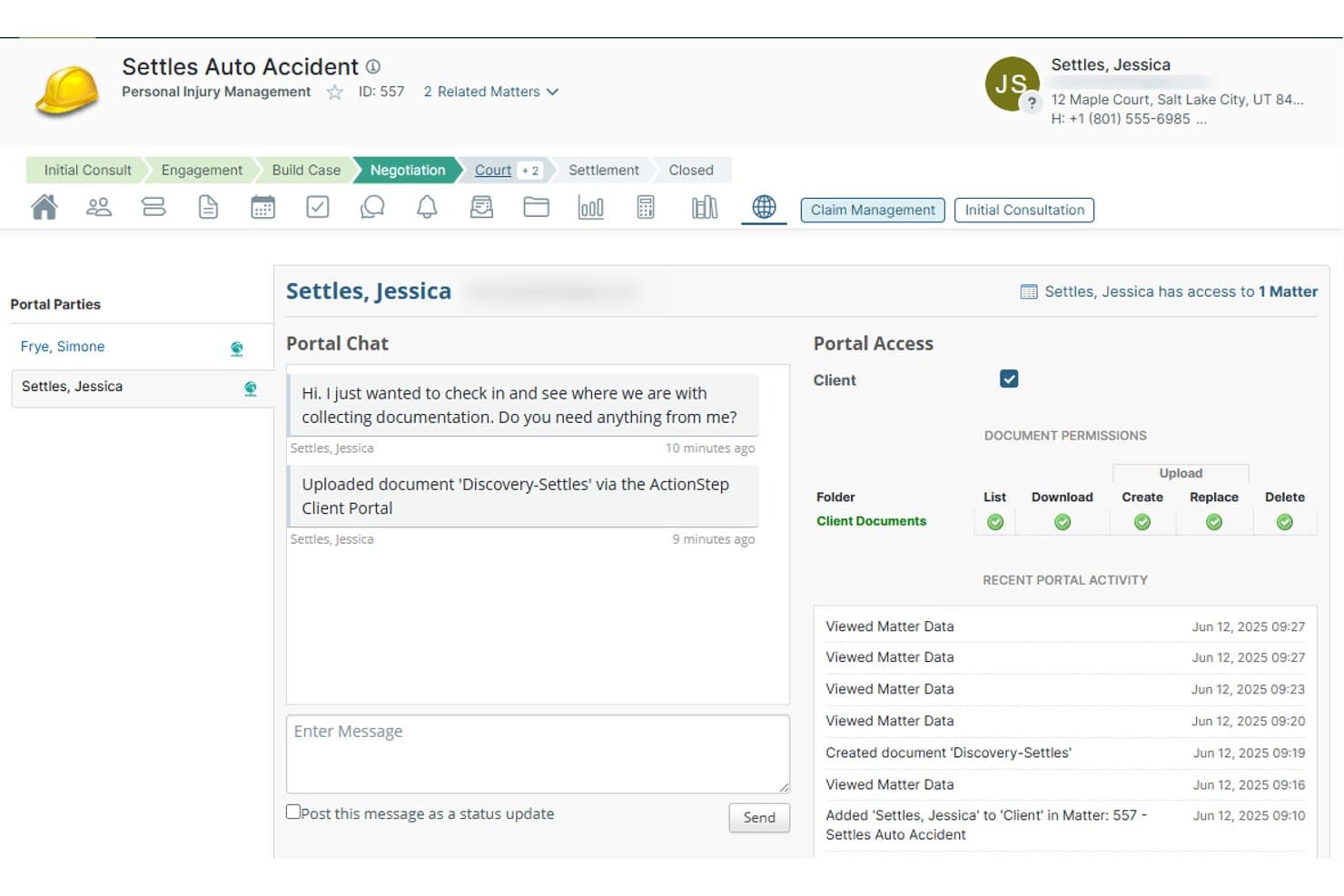
Actionstep lets clients upload documents and chat directly via the portal. Actionstep is an all-in-one legal practice management platform that combines CRM, client intake, matter management, document automation, time recording, and legal accounting in a single connected system.
Who Is Actionstep Best For?
Actionstep suits midsize law firms that need CRM, matter management, and legal accounting under one roof rather than connecting separate tools.
Why I Picked Actionstep
Actionstep earns its spot on my shortlist because the CRM isn't bolted on as a separate tool. Client intake, matter opening, and contact management all sit inside the same platform as time recording and legal accounting. I particularly like the Capture module, which lets you embed webforms directly into a firm website and route new enquiries into matter workflows automatically. The UK-specific integration with First AML also means AML/KYC checks run inside the same system.
Actionstep Key Features
- Conflict check automation: Searches existing and historical matters to help you catch conflicts before matter opening.
- Integrated legal accounting: Provides trust accounting, client accounting, and compliance tools tailored to law firm finance needs.
- Document assembly and template management: Lets your team generate legal letters, forms, and contracts with custom templates.
- Customisable business reporting: Delivers detailed reports on matters, time recording, billing, and practice performance.
Actionstep Integrations
Actionstep offers native integrations with Microsoft 365, Xero, DocuSign, InfoTrack, LawPay, First AML, and Bundledocs. An API is available for custom integrations.
Pros and Cons
Pros:
- Accounting and CRM share one database
- AML and KYC built into client onboarding
- Conflict checks run inside matter workflows
Cons:
- Reporting customisation can feel limited
- Initial configuration requires significant time investment
Learn more about Actionstep: 9Best for built-in UK compliance tools
LEAP
- Free demo available
- Pricing upon request
Visit WebsiteCustomer Rating:4.3/5
LEAP centralizes client opportunities and AI assistance in one CRM view. LEAP is a cloud-based legal practice management platform built for UK law firms, combining matter management, legal accounting, document automation, time recording, and CRM-style lead intake via its LEAP Leads module.
Who Is LEAP Best For?
LEAP is a strong fit for small to mid-sized UK law firms that want a single platform covering both practice management and client intake.
Why I Picked LEAP
LEAP earns its spot on my shortlist because no other platform I've tested embeds SRA compliance as deeply into day-to-day workflows. I love that AML/KYC identity checks run directly through InfoTrack without leaving the platform, and that client account rules are enforced at the ledger level. LEAP Leads then feeds verified prospects straight into matter opening, keeping the compliance chain intact from first enquiry to file.
LEAP Key Features
- Matter-centric pipeline: Visual pipelines allow you to track enquiries from lead capture through to instruction and ongoing matter stages.
- Automated legal document templates: Access a large library of UK-specific legal forms and precedents that auto-fill with client and case information.
- Integrated legal accounting: Manage billing, client accounts, and trust accounting natively within your practice management environment.
- Client portal: Clients can securely view documents, upload information, and communicate through a branded online portal.
LEAP Integrations
LEAP offers native integrations with InfoTrack, Xero, Outlook, Microsoft 365, Bundledocs, Klyant, and RapidLEI. An API is available for custom integrations.
Pros and Cons
Pros:
- Covers accounts, time recording, and CRM natively
- AML/KYC checks without leaving the platform
- Built-in SRA conflict checks at matter opening
Cons:
- Limited pipeline customisation for non-transactional matters
- Steep initial setup for smaller high-street firms
Learn more about LEAP: Best for unlimited UK-based training
- Free demo available
- From £110/user/month
Visit WebsiteCustomer Rating:3.9/5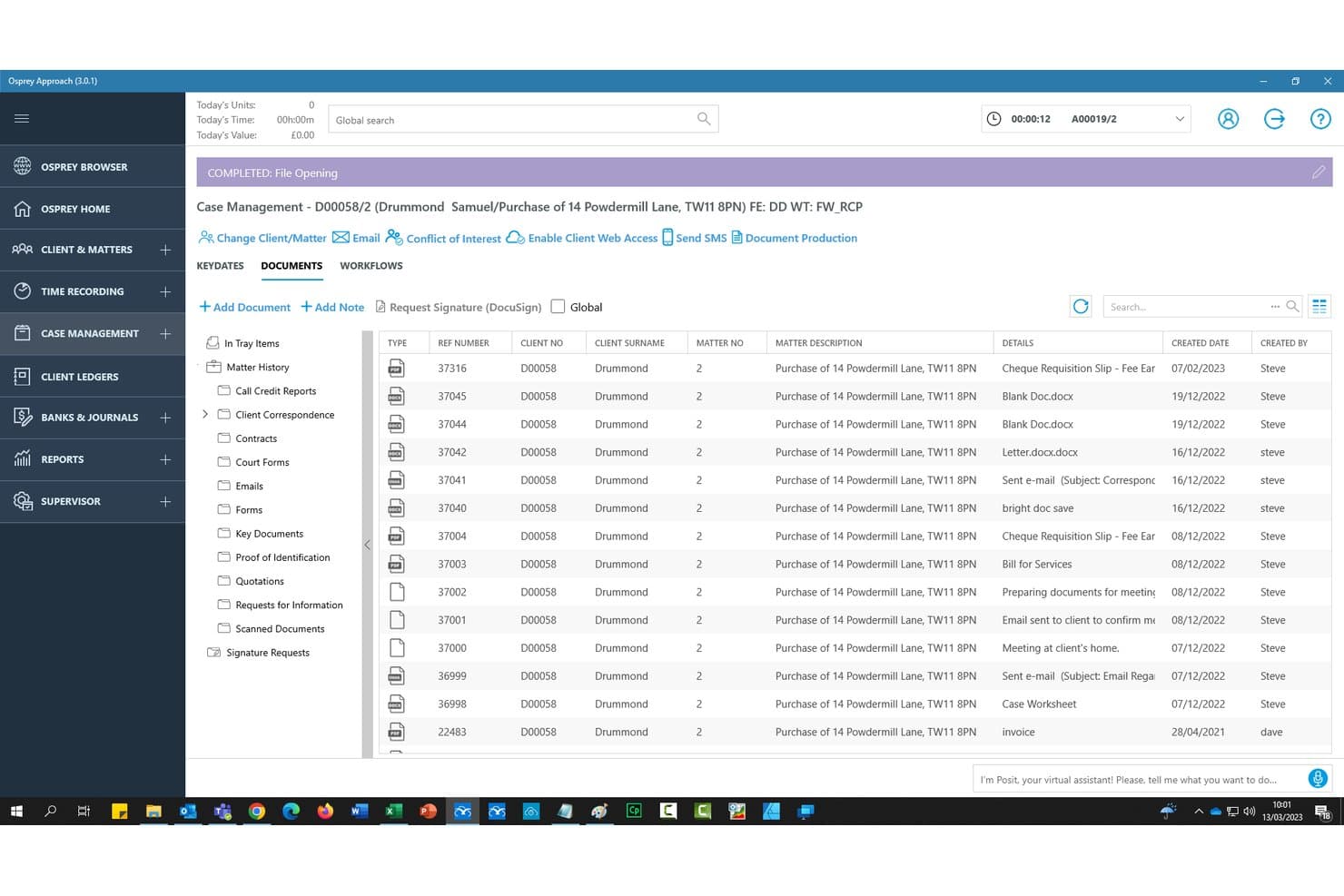
Osprey Approach centralizes legal case documents in one organized matter view. Osprey Approach is a cloud-based legal practice management platform built exclusively for UK law firms, combining CRM, client intake, case management, legal accounting, compliance monitoring, and document production in a single system.
Who Is Osprey Approach Best For?
Osprey Approach is a strong fit for UK high-street and multi-branch law firms that need a single platform to manage both client relationships and day-to-day practice operations.
Why I Picked Osprey Approach
Osprey Approach earns its spot on my shortlist because the unlimited UK-based training is genuinely built into every plan, not sold as a separate add-on. I particularly like that the Advanced and Premium tiers include trainer-led group sessions and dedicated 1-2-1 training, so new starters can get up to speed on matter workflows without waiting on a support queue. The Osprey Academy also gives my team 24/7 access to how-to guides between those sessions.
Osprey Approach Key Features
- Integrated legal accounting: Manage client and office accounts, billing, VAT submissions, and financial reporting from within the same platform.
- Automated case management workflows: Use pre-built workflows and document automation tailored for UK law firms.
- Compliance monitoring and reporting: Enable COFA, COLP, and MLRO oversight with built-in reporting and dashboards aligned to SRA and Lexcel standards.
- Microsoft 365 and legal tech integrations: Connect seamlessly with Outlook, Word, InfoTrack, DocuSign, and other legal sector tools.
Osprey Approach Integrations
Osprey Approach offers native integrations with InfoTrack, DocuSign, TextAnywhere, Microsoft 365, Lexis Smart Forms, Perfect Portal, Minerva, Katchr, and Coadjute. An API is available for custom integrations.
Pros and Cons
Pros:
- Matter-centric workflows designed for UK law firms
- Unlimited UK-based training on every plan
- Built-in SRA and AML compliance tools
Cons:
- Not suited to non-UK legal markets
- Reporting customization options are relatively limited
Learn more about Osprey Approach:
Outros CRM jurídicos no Reino Unido
Eis algumas opções adicionais de CRM jurídico no Reino Unido que não entraram na minha lista restrita, mas que ainda vale a pena conhecer:
- 11inTouchBest for AI-powered case data extraction
- 12PracticePantherBest for customizable workflow automation
- 13InsightlyBest for workflow management with dashboards
- 14SmokeballBest for integrated document automation
Related Reviews
How I Evaluate Legal CRM UK
I split my evaluation into baseline criteria—client intake, UK compliance, and pipeline tracking—and differentiators like AML/KYC integration, referral attribution, and UK data residency.
Core Functionality (Table Stakes For This List)
When I'm selecting tools for my list, I rank each one on a scale from 0 (does not offer the functionality) to 5 (excels in this area) for each core functionality listed below. I then calculate the tool's total score into a percentage, using 55% as a benchmark to help assess its overall fit for the list.
- Client & Matter Intake: I check whether the platform can capture enquiries, run conflict checks, and route new matters to the right fee earner or practice area automatically.
- UK Compliance Support: Each tool should support GDPR consent management, SRA-aligned workflows, and AML/KYC identity verification during client onboarding.
- Lead & Pipeline Tracking: I look for visual pipelines that let you segment prospects by practice area—conveyancing leads tracked separately from family or PI enquiries, for example.
- Legal PMS Integration: The CRM needs native connections to practice management systems like Clio, LEAP, or Actionstep so matter data flows without manual re-entry.
- Communication Automation: I evaluate how well the tool automates engagement letters, retainer emails, and follow-up sequences across email, SMS, and document channels.
- Referrer & Marketing Tracking: Firms rely on referrals and introducers, so I look for attribution tools that tie new instructions back to specific sources and campaigns.
Once I have a list of tools that meet the criteria, I consider what sets each platform apart.
Differentiating Factors (What Sets Vendors Apart)
Here's how I compare and contrast different vendors:
Standout Features
Conflict check automation is a big differentiator. I look for tools that search across current and historical matters before onboarding, keeping your firm aligned with SRA obligations. AML and KYC workflows also matter, especially platforms that integrate with UK verification providers so identity checks happen inside the CRM rather than in a separate system. I also evaluate matter-centric pipelines that mirror how legal work actually progresses—from enquiry through engagement letters to matter opening—rather than forcing you into a generic sales funnel.
Beyond Features
Data residency is a key factor I evaluate—UK or EU-based hosting matters when your regulator or clients expect it, and certifications like ISO 27001 or Cyber Essentials Plus add confidence. I also consider how well each platform connects to the broader UK legal tech stack, including case management systems, legal accounting tools, and external resources like Companies House or HM Land Registry. Firm size and practice area fit round out my assessment, since a high-volume conveyancing firm needs very different workflow configurations than a boutique advisory practice.
Como escolher um CRM jurídico no Reino Unido
Está a perguntar-se qual será o sistema de CRM jurídico no Reino Unido que se adapta realmente às suas necessidades regulamentares, de fluxo de trabalho e de gestão de referências? Utilize a tabela abaixo para associar as suas prioridades ao foco de produto adequado:
| Se a sua prioridade é… | Procure… |
| Conformidade com a SRA e o RGPD | Kit regulamentar completo para o Reino Unido e verificações AML integradas |
| Admissão rápida de novas instruções | Fluxos de trabalho automatizados desde o pedido de informação até à abertura do processo e verificação de conflitos |
| Associar referências a novos processos | Funcionalidades detalhadas de atribuição a referenciadores e de atribuição de campanhas de marketing |
| Ligar ao sistema de gestão de processos | Integrações nativas com plataformas britânicas de gestão de processos jurídicos |
| Localização dos dados e certificação | Alojamento no Reino Unido ou na UE e certificações ISO |
Como avaliar a sua lista restrita
- Solicite uma demonstração ao vivo com dados reais: Veja um exemplo desde a admissão até à abertura de um processo num cenário específico do direito britânico.
- Peça documentação sobre as integrações: Analise provas escritas das ligações aos sistemas de gestão de processos que o seu escritório já utiliza.
- Verifique as provas de conformidade regulamentar: Solicite uma cópia do documento de conformidade com o RGPD ou de preparação para auditorias.
- Teste o acompanhamento de referências: Configure uma campanha de teste e acompanhe a atribuição desde o primeiro pedido de informação até à atribuição ao responsável pelo processo.
- Compromisso — profundidade da automatização vs. adequação jurídica: Decida se pretende uma automatização mais profunda e personalizada dos fluxos de trabalho ou uma maior compatibilidade com a conformidade jurídica e o tratamento de dados no Reino Unido.
O que são as ferramentas de CRM jurídico no Reino Unido?
As ferramentas de CRM jurídico do Reino Unido são sistemas de gestão de relações com clientes concebidos para escritórios de advogados que operam ao abrigo dos quadros regulamentares do Reino Unido. Automatizam a admissão de clientes e processos, gerem o acompanhamento de referências, apoiam a conformidade com a SRA e o RGPD e integram-se com plataformas de gestão de processos e contabilidade adaptadas às práticas jurídicas do Reino Unido. Estas ferramentas ajudam o seu escritório a centralizar as informações dos clientes, monitorizar potenciais clientes em diferentes áreas de prática e manter fluxos de trabalho conformes e eficientes, que respondem às exigências específicas dos profissionais jurídicos no Reino Unido.
Funcionalidades do CRM jurídico do Reino Unido
Ao selecionar um CRM jurídico do Reino Unido, procure as seguintes funcionalidades essenciais:
- Admissão de clientes e processos: Regista novos pedidos de informação, permite verificações de conflitos e automatiza a abertura de processos para simplificar a integração de clientes e a conformidade.
- Ferramentas de conformidade no Reino Unido: Apoia os fluxos de trabalho do RGPD e da SRA, incluindo registos de auditoria, gestão de consentimentos e definições de retenção de dados específicas das normas regulamentares do Reino Unido.
- Atribuição de referências e marketing: Regista a origem de cada novo mandato, associa referências e campanhas a processos e ajuda a medir o ROI do marketing.
- Gestão visual do pipeline: Disponibiliza pipelines Kanban ou baseados em etapas, adaptados aos ciclos de vendas jurídicos, para que possa acompanhar os processos desde o pedido de informação inicial até ao encerramento do mandato.
- Integrações com PMS e tecnologia jurídica: Liga-se diretamente a plataformas de gestão de práticas jurídicas e de contabilidade orientadas para o Reino Unido, permitindo o fluxo de dados entre a admissão, a gestão de processos e a faturação.
- Automatização das comunicações: Agenda e automatiza cartas de contratação, emails de retenção, lembretes de marcações e acompanhamentos através de email, SMS ou mensagens no portal do cliente.
- Verificação AML e KYC: Integra verificações de prevenção do branqueamento de capitais e de verificação de identidade na integração de clientes, para cumprir os requisitos regulamentares sem sair do CRM.
- Controlo de acesso baseado em funções: Permite atribuir permissões por advogado, departamento ou localização, protegendo a confidencialidade e apoiando auditorias de supervisão.
- Portal do cliente e assinatura eletrónica: Disponibiliza um portal seguro para os clientes consultarem documentos, comunicarem e assinarem cartas de contratação ou acordos online.
- Gestão de referências e angariadores: Regista os referenciadores e angariadores, gere relações profissionais e gera relatórios para fins de conformidade e desenvolvimento do negócio.
Benefícios das ferramentas de CRM jurídico do Reino Unido
A implementação de ferramentas de CRM jurídico do Reino Unido proporciona vários benefícios à sua equipa e à sua empresa. Eis alguns dos benefícios que pode esperar:
- Admissão simplificada de clientes: Automatiza as verificações de conflitos e a abertura de processos, ajudando a sua equipa a integrar novos clientes mais rapidamente e com menos erros.
- Confiança na conformidade regulamentar: Apoia as obrigações da SRA e do RGPD através de gestão de consentimentos, registos de auditoria e funcionalidades de tratamento de dados específicas do Reino Unido integradas.
- Melhoria do acompanhamento de potenciais clientes e referências: Permite monitorizar as fontes de referências, o desempenho das campanhas e os novos mandatos, para que possa concentrar os esforços onde são mais importantes.
- Fluxos de trabalho integrados: Liga a admissão, as comunicações e a gestão de processos, reduzindo a reintrodução manual de dados e mantendo a consistência das informações entre sistemas.
- Comunicações melhoradas com os clientes: Automatiza cartas de contratação, lembretes e acompanhamentos através de ferramentas multicanal, garantindo que os clientes recebem atualizações atempadas.
- Segurança e confidencialidade dos dados: Disponibiliza controlos de acesso baseados em funções e alojamento no Reino Unido ou na UE para ajudar a proteger informações sensíveis dos clientes e satisfazer as expectativas dos reguladores.
- Relatórios informativos: Fornece análises sobre taxas de conversão, ROI do marketing e eficiência operacional para o ajudar a tomar decisões empresariais fundamentadas.
Custos e preços das ferramentas de CRM jurídico do Reino Unido
A seleção de ferramentas de CRM jurídico do Reino Unido exige uma compreensão dos vários modelos de preços e planos disponíveis. Os custos variam consoante as funcionalidades, a dimensão da equipa, os complementos, entre outros fatores. A tabela abaixo resume os planos comuns, os respetivos preços médios e as funcionalidades normalmente incluídas nas soluções de CRM jurídico do Reino Unido:
Tabela de comparação de planos para CRM jurídico do Reino Unido
| Tipo de plano | Preço médio | Funcionalidades comuns |
| Plano gratuito | $0 | Recolha básica de dados dos clientes, gestão simples de contactos e apoio limitado. |
| Plano pessoal | $25-$40/utilizador/mês | Fluxos de trabalho melhorados para a recolha de dados, modelos de e-mail, campos do RGPD e pipelines para um único processo. |
| Plano empresarial | $45-$80/utilizador/mês | Acompanhamento de vários pipelines, comunicações automatizadas, integrações com sistemas de gestão de prática e ferramentas de conformidade. |
| Plano empresarial de grande dimensão | $85-$150/utilizador/mês | Fluxos de trabalho personalizados, acompanhamento avançado de referências, armazenamento de dados no Reino Unido, apoio dedicado e registos de auditoria. |
Perguntas frequentes sobre CRM jurídico no Reino Unido
Eis algumas respostas a perguntas comuns sobre CRM jurídico no Reino Unido:
As ferramentas de CRM jurídico no Reino Unido permitem efetuar verificações de conformidade com a SRA?
Sim, a maioria das ferramentas de CRM jurídico no Reino Unido inclui automatização da verificação de conflitos e registos de auditoria para ajudar o seu escritório a cumprir as Normas e Regulamentos da SRA durante a integração de clientes e a gestão de processos.
Posso integrar uma ferramenta de CRM jurídico no Reino Unido com o meu sistema atual de gestão de processos?
Sim, muitas ferramentas de CRM jurídico no Reino Unido disponibilizam integrações nativas ou ligações através de API com soluções populares de gestão de práticas jurídicas no Reino Unido, permitindo sincronizar dados de clientes e processos entre sistemas.
Que normas de segurança seguem os fornecedores de CRM jurídico no Reino Unido?
A maioria dos fornecedores aloja os dados no Reino Unido ou na UE e mantém normalmente certificações como a ISO 27001 ou a Cyber Essentials Plus, que demonstram um compromisso com a segurança e a conformidade no setor jurídico.
O acompanhamento de referências e de entidades que fazem apresentações está integrado nas ferramentas de CRM jurídico no Reino Unido?
Sim, normalmente encontrará funcionalidades integradas de gestão de referências que permitem atribuir novas instruções a entidades que fazem apresentações ou a campanhas, apoiando a conformidade e a análise de marketing.
Como lidam as ferramentas de CRM jurídico no Reino Unido com a migração de dados de sistemas antigos?
Os fornecedores disponibilizam frequentemente apoio à integração e à migração, incluindo serviços de importação de dados e guias adaptados às necessidades das práticas jurídicas, para ajudar a garantir uma transição sem problemas.