

Gerir um pequeno escritório de advocacia implica um conjunto próprio de desafios. Tem de conciliar as exigências dos clientes, gerir processos e manter-se em conformidade com os regulamentos. É muito para gerir, e é aqui que o software para pequenos escritórios de advocacia entra em ação para ajudar.
Neste artigo, partilho as minhas principais escolhas de software para aliviar a sua carga de trabalho e manter a sua prática a funcionar sem problemas. Testei e analisei estas ferramentas de forma independente para lhe fornecer informações imparciais.
Encontrará informações sobre funcionalidades, experiência do utilizador e sobre como cada ferramenta pode integrar-se no seu fluxo de trabalho. O meu objetivo é ajudá-lo a tomar decisões informadas que beneficiem a sua equipa e melhorem a eficiência da sua prática.
Why Trust Our Software Recommendations
6,700+
Reviews
20
Industry experts
16+
Evaluation factors
14
Years
Our team has been testing and reviewing software since 2012. As legal practice leaders ourselves, we know how difficult—and important—it is to choose the right software.
For this guide, we evaluated tools using hands-on testing and independent research, scoring tools using our selection criteria.
Our reviews reflect our human editorial judgment, not a sales pitch.
Tabela de comparação dos melhores softwares para pequenos escritórios de advocacia
| Tool | Best For | Trial Info | Price | ||
|---|---|---|---|---|---|
| 1 | Best for seamless client communication | 7-day free trial + free demo available | From $59/user/month | Website | |
| 2 | Best for mobile time tracking tools | Free trial available | From $49/user/month | Website | |
| 3 | Best with built-in compliance controls | Free trial available | Pricing upon request | Website | |
| 4 | Best for document automation | Free demo available | Pricing upon request | Website | |
| 5 | Best for robust integrations and customizability | Free trial available | From £79/user/month | Website | |
| 6 | Best for advanced case analytics | Free demo available | From $90/user/month | Website | |
| 7 | Good for personal injury law firms | Free demo available | Pricing upon request | Website | |
| 8 | Best for comprehensive financial management | 10-day free trial + free demo available | From $49/user/month (billed annually) | Website | |
| 9 | Best for streamlined billing and invoicing | 10-day free trial + free demo available | From $59/user/month (billed annually) | Website | |
| 10 | Best for bankruptcy attorneys | Free plan available + free demo available | From $159 up to 4 cases/year | Website |


Análises dos melhores softwares para pequenos escritórios de advocacia
 Best for seamless client communication
- 7-day free trial + free demo available
- From $59/user/month
Visit WebsiteCustomer Rating:4.3/5
Practice Panther Small Law Firm Software Interface PracticePanther is a comprehensive law practice management software designed to streamline a variety of legal tasks. It excels in facilitating client communication, making it a top choice for small law firms aiming to improve client relationships.
Why I Picked PracticePanther: I chose PracticePanther for this list due to its user-friendly interface and its exceptional focus on client communication. In my opinion, it stands out as the best option for law firms looking to enhance their client interactions and overall satisfaction.
Standout features & integrations:
PracticePanther offers robust features like document automation, time tracking, and invoicing. Its secure client portal allows for easy communication and document sharing, fostering trust between clients and attorneys.
It also integrates seamlessly with popular platforms like QuickBooks, Microsoft Office 365, and LawPay, ensuring a smooth experience across various tasks.
Pros and Cons
Pros:
- User-friendly interface
- Integrates with popular platforms like QuickBooks and Office 365
- Secure client portal for communication and document sharing
Cons:
- Limited customization options compared to some competitors
- Relatively expensive starting price
- No monthly billing, only annual plans available
Learn more about PracticePanther: Best for mobile time tracking tools
- Free trial available
- From $49/user/month
Visit WebsiteCustomer Rating:4.8/5
Bill4Time’s dashboard helps small law firms track time, manage billing, and monitor performance in one streamlined platform. Bill4Time is a cloud-based legal billing and practice management platform built for law firms, combining time tracking, invoicing, trust accounting, expense management, and case organization in one system.
Who Is Bill4Time Best For?
Bill4Time is a good fit for solo attorneys and small law firms that need a dedicated legal billing system without the complexity of a full enterprise platform.
Why I Picked Bill4Time
I've included Bill4Time in my top picks because of how well its mobile app handles time capture in real-world legal workflows. You can run simultaneous timers across your phone, tablet, and desktop at once, and entries save offline and sync automatically when you reconnect. I also like the one-click conversion of calendar events, tasks, and emails into billable time entries, which makes it easy to capture time from court appearances or client calls without manual entry after the fact.
Bill4Time Key Features
- Trust accounting: Manage IOLTA and client trust accounts with built-in compliance safeguards aligned with ABA and state bar requirements.
- Client portal: Give clients a secure login to view invoices, make payments, and access shared documents directly from the platform.
- Conflict checker: Search across matters, clients, and contacts to flag potential conflicts before taking on new cases.
- Batch invoicing: Generate and send invoices for multiple matters or clients at once using customizable billing templates.
Bill4Time Integrations
Bill4Time offers a small set of native integrations, including QuickBooks, Box, Google Calendar, Outlook Calendar, and NetDocuments, as well as LawPay for online payment processing. An API is available that supports read operations from Bill4Time to other applications. Zapier support is not clearly documented.
Pros and Cons
Pros:
- Mobile time capture on iPhone and iPad
- LEDES invoicing with configurable reporting
- Built-in IOLTA trust reconciliation tools
Cons:
- Interface feels dated compared to competitors
- No online bank account connection support
Learn more about Bill4Time: 3Best with built-in compliance controls
8am
- Free trial available
- Pricing upon request
Visit WebsiteCustomer Rating:4.6/5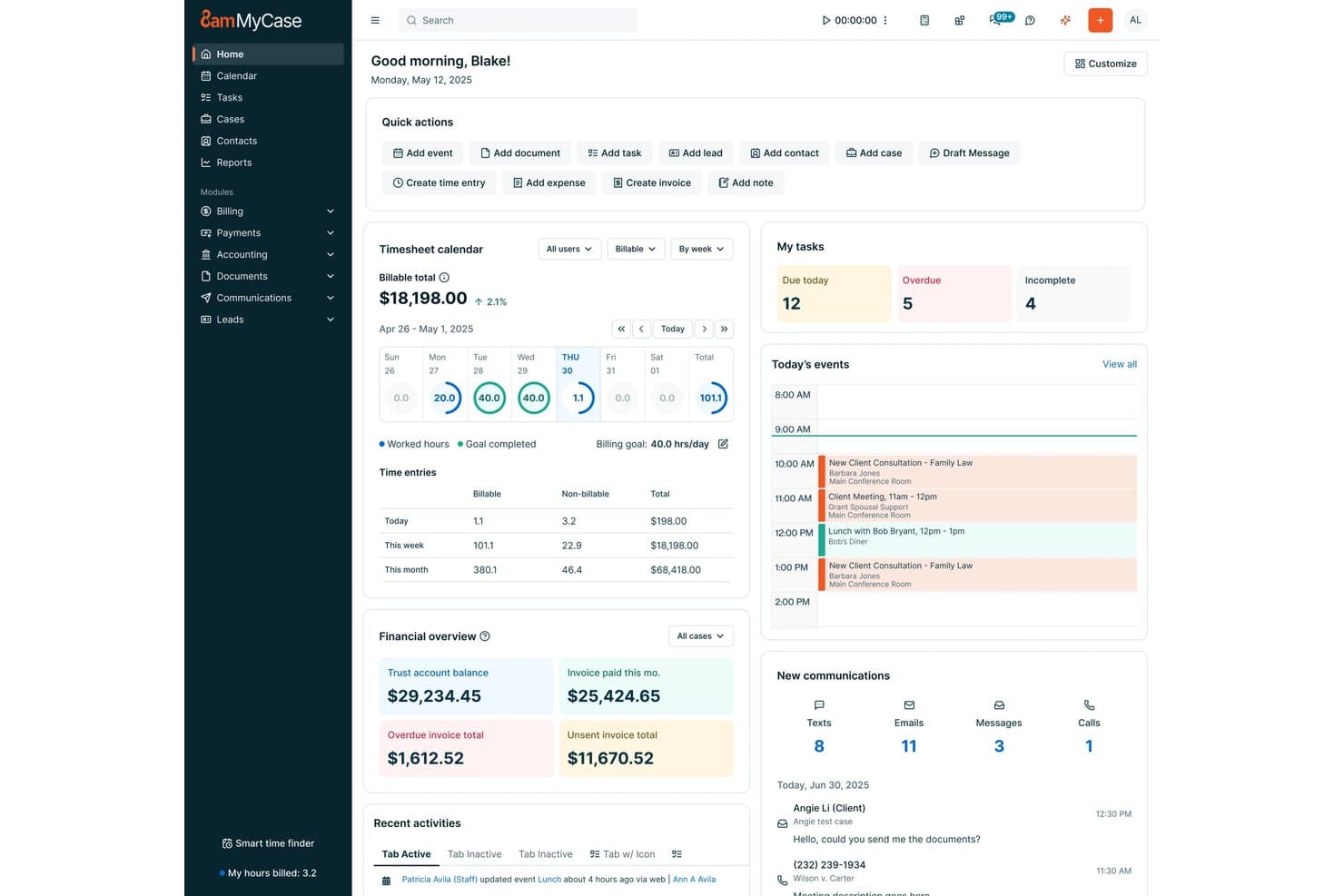
8am offers a dashboard featuring timesheets and task management for small law firm practice management. 8am is a law practice management platform designed for small firms, offering case and matter management, time tracking, billing, document automation, trust accounting, calendaring, and client intake tools in a unified system.
Who Is 8am Best For?
Designed for solo attorneys and small legal teams needing built-in compliance and unified practice management.
Why I Picked 8am
I picked 8am as one of the best because I can rely on its built-in compliance controls for trust accounting and IOLTA management. In my experience, the system’s audit-ready ledgers and three-way reconciliation help keep our small practice audit-ready and ethically sound.
8am Key Features
- Matter management dashboard: Lets you organize, track, and update all matters in one place.
- Batch LEDES billing: Enables you to create and send multiple LEDES-compliant invoices at once.
- Document automation templates: Lets you generate legal documents using customizable templates and merge fields.
- Court rules calendaring: Provides deadline tracking and court rule triggers for select jurisdictions.
8am Integrations
8am offers native integrations with LawPay, CasePeer, QuickBooks, and more.
Pros and Cons
Pros:
- Document automation using templates
- Built-in legal calendaring for deadlines
- Audit-ready trust accounting and reconciliations
Cons:
- Some court rules coverage is jurisdiction-limited
- Advanced billing features require workarounds
Learn more about 8am: Best for document automation
- Free demo available
- Pricing upon request
Visit WebsiteCustomer Rating:4.8/5
Smokeball Small Law Firm Software Interface Smokeball is a legal case management software that specializes in document automation, streamlining the document creation process for law firms. Its focus on automating routine tasks makes it the ideal choice for practices seeking to improve efficiency in their document management.
Why I Picked Smokeball: I chose Smokeball for this list because its document automation features differentiate it from other legal practice management tools. The software's ability to streamline document creation and management makes it the best option for law firms looking to enhance their efficiency and reduce manual work.
Standout features & integrations:
Smokeball offers robust features such as matter management, time tracking, and billing. Its document automation capabilities stand out, significantly reducing the time spent on creating legal documents.
The software integrates with popular tools like Microsoft Office, LawPay, and InfoTrack, facilitating seamless workflow across platforms.
Pros and Cons
Pros:
- Comprehensive case management features
- Integrates with widely-used tools like Microsoft Office and LawPay
- Exceptional document automation capabilities
Cons:
- May not be suitable for smaller firms with limited budgets
- No free plan or free trial offered
- Pricing information is not readily available
Learn more about Smokeball: 5Best for robust integrations and customizability
Clio
- Free trial available
- From £79/user/month
Visit WebsiteCustomer Rating:4.7/5
Clio Small Law Firm Software Interface Clio is a comprehensive legal practice management software that offers extensive integration options and customization. Its robust integration capabilities make it an ideal choice for law firms looking to optimize their workflows with a customizable software solution.
Why I Picked Clio: I chose Clio for this list because of its exceptional integration capabilities and customizability, which differentiate it from other practice management tools. Its ability to connect with numerous third-party applications and adapt to a law firm's specific needs makes it the best choice for those seeking a customizable and well-integrated software solution.
Standout features & integrations:
Clio offers a wide range of features, including matter management, billing, contact management, document assembly, document storage, document management, and reporting.
Some of its most valuable integrations include QuickBooks Online, Microsoft Office 365, Google Workspace, and LawPay. These integrations allow law firms to streamline their processes and improve overall efficiency.
Pros and Cons
Pros:
- Comprehensive features for practice management, calendaring, billing, and document management
- Highly customizable to suit individual law firm needs
- Extensive integration options with popular tools like QuickBooks Online, Microsoft Office 365, and Google Workspace
Cons:
- Steeper learning curve due to its extensive features and customizability
- No monthly billing option, only annual plans available
- Pricing may be prohibitive for smaller firms or solo practitioners
Learn more about Clio: Best for advanced case analytics
- Free demo available
- From $90/user/month
Visit WebsiteCustomer Rating:4.8/5
Case Peer Small Law Firm Software Interface CASEpeer is a legal case management software that focuses on providing advanced case analytics to law firms. Its in-depth data analysis capabilities make it the top choice for practices seeking to leverage data-driven insights for better decision-making.
Why I Picked CASEpeer: I selected CASEpeer for this list because of its comprehensive case analytics capabilities, which set it apart from other legal practice management tools. Its emphasis on data-driven insights makes it the best option for law firms looking to optimize their operations and make informed decisions.
Standout features & integrations:
CASEpeer offers powerful features such as case tracking, document management, and collaboration tools. Its standout feature is the advanced case analytics that deliver valuable insights for law firms.
The software integrates with tools like QuickBooks, Microsoft Office 365, and Google Workspace, streamlining the user experience.
Pros and Cons
Pros:
- Comprehensive case tracking and document management features
- Integrates with popular productivity tools like QuickBooks and Microsoft Office 365
- Advanced case analytics for data-driven decision-making
Cons:
- No free plan available
- Pricing may be higher compared to some competitors
- No monthly billing option, only annual subscriptions available
 Good for personal injury law firms
- Free demo available
- Pricing upon request
Visit WebsiteCustomer Rating:4.8/5
CloudLex Small Law Firm Software Interface CloudLex is a legal practice management software specifically tailored for personal injury law firms. It provides an array of features designed to handle the unique challenges of personal injury cases, making it the go-to choice for firms in this niche.
Why I Picked CloudLex: I chose CloudLex for this list because it's a specialized solution for personal injury law firms, offering features that cater to their specific needs. In my assessment, it stands out as the best option for personal injury attorneys seeking a tool tailored to their practice.
Standout features & integrations:
CloudLex's most notable features include case management, document management, and its built-in Referral Engine. Additionally, it offers a Matter Intake tool to streamline client onboarding and a robust reporting module for insights into your firm's performance.
CloudLex integrates with Microsoft Office 365 and various third-party applications, ensuring seamless data exchange and collaboration.
Pros and Cons
Pros:
- Matter Intake tool for efficient client onboarding
- Built-in Referral Engine for networking opportunities
- Tailored for personal injury law firms
Cons:
- Not suitable for firms handling multiple practice areas
- Limited integrations compared to some competitors
- Pricing not readily available on the website
Learn more about CloudLex: Best for comprehensive financial management
- 10-day free trial + free demo available
- From $49/user/month (billed annually)
Visit WebsiteCustomer Rating:4.3/5
CosmoLex Small Law Firm Software Interface CosmoLex is a legal practice management software with a strong focus on financial management, including accounting and billing features. Its comprehensive financial tools make it an excellent choice for law firms seeking to streamline their financial processes.
Why I Picked CosmoLex: I selected CosmoLex for this list due to its extensive financial management capabilities, which set it apart from other legal practice management solutions. Its ability to handle both accounting and billing within a single platform makes it the best choice for law firms looking for an all-in-one financial management tool.
Standout features & integrations:
CosmoLex offers a wide range of features, including matter management, document management, billing software, and time tracking. Its standout financial management features include integrated legal accounting, trust accounting, and billing.
The software integrates with popular tools such as QuickBooks Online, LawPay, and Office 365, enhancing productivity and collaboration.
Pros and Cons
Pros:
- Integrates with QuickBooks Online, LawPay, and Office 365
- Trust accounting compliant with regulations
- Comprehensive financial management tools, including legal accounting and billing
Cons:
- May be too costly for smaller firms with limited budgets
- No free plan or free trial offered
- No monthly billing option, only annual plans available
Learn more about CosmoLex: Best for streamlined billing and invoicing
- 10-day free trial + free demo available
- From $59/user/month (billed annually)
Visit WebsiteCustomer Rating:4.4/5
Rocket Matter Small Law Firm Software Interface Rocket Matter is a legal practice management software with a strong focus on billing and invoicing features. Its robust financial capabilities make it the ideal choice for law firms looking to optimize their billing processes.
Why I Picked Rocket Matter: I chose Rocket Matter for this list because of its exceptional billing and invoicing functionalities. In my analysis, it stands out as the best option for law firms seeking to simplify and streamline their financial operations.
Standout features & integrations:
Rocket Matter offers key features such as case management, document management, and time tracking. However, its standout feature is the robust billing and invoicing module that simplifies complex billing processes.
The software integrates with platforms like QuickBooks Online, Dropbox, and Office 365, ensuring seamless data exchange and collaboration.
Pros and Cons
Pros:
- Comprehensive case and document management capabilities
- Integrates with popular platforms like QuickBooks Online and Office 365
- Robust billing and invoicing features
Cons:
- May be more than needed for firms not focused on billing optimization
- Annual billing, no monthly plans
- Relatively expensive starting price
Learn more about Rocket Matter: Best for bankruptcy attorneys
- Free plan available + free demo available
- From $159 up to 4 cases/year
Visit WebsiteCustomer Rating:4.8/5
Next Chapter Small Law Firm Software Interface NextChapter is a cloud-based legal practice management software specifically designed for bankruptcy attorneys. Its tailored features and functionality make it the ideal choice for legal professionals in this niche area.
Why I Picked NextChapter: I chose NextChapter for this list because it caters exclusively to bankruptcy attorneys, providing them with the specialized tools and features they require. In my comparison, it stood out as the best solution for professionals in this particular field.
Standout features & integrations:
NextChapter offers essential features for bankruptcy attorneys, such as case management, document automation, and electronic court filing. Its built-in means test calculator simplifies the process of determining client eligibility for bankruptcy.
The software integrates with tools like PACER, Clio, and LawPay, ensuring a cohesive workflow experience.
Pros and Cons
Pros:
- Integrates with essential tools like PACER, Clio, and LawPay
- Includes a built-in means test calculator
- Tailored specifically for bankruptcy attorneys
Cons:
- Customization options may be limited compared to other platforms
- No free plan available
- Limited usefulness for attorneys outside of bankruptcy law
Learn more about NextChapter:
Outros softwares para pequenos escritórios de advocacia
Segue-se uma lista de opções adicionais de ferramentas de software para pequenos escritórios de advocacia que analisámos, mas que não chegaram às 10 melhores. Vale definitivamente a pena consultá-las.
- 11RedactableBest for automated redaction
- 12CARET Legal (Zola Suite)Best for all-in-one legal management
- 13TypeLaw Automated Brief FormattingBest for court-specific document compliance
- 14Mitratech CasecloudBest for automating repetitive tasks
- 15LEAPGood for comprehensive practice management
- 16FilevineGood for comprehensive case management
- 17Amicus AttorneyGood for streamlining legal workflows
- 18LollyLawGood for immigration case management
How I Evaluate Small Law Firm Software
I split my evaluation into baseline criteria—like matter management, trust accounting, and conflict checks—and the differentiators that separate the best options from the rest.
Core Functionality (Table Stakes For This List)
When I'm selecting tools for my list, I rank each one on a scale from 0 (does not offer the functionality) to 5 (excels in this area) for each core functionality listed below. Then, I calculate the tool's total score into a percentage. Each tool needs to achieve a minimum total score of 65% to be considered for inclusion.
- Matter & Case Management: I look for centralized matter records that link contacts, notes, tasks, and documents so an attorney can pull up a full case picture in seconds.
- Time Tracking & Billing: Each tool should let users capture time via running timers or manual entry and generate invoices tied directly to matters.
- Trust & IOLTA Accounting: I evaluate whether the platform supports separate client trust ledgers and three-way reconciliation to keep firms audit-ready.
- Legal Document Management: Storage and version control are baseline, but I check for template-based automation like auto-filling client names into retainer agreements.
- Legal Calendaring & Deadlines: Court-rules-aware calendaring matters here—I look for tools that auto-calculate deadline cascades from a trigger date.
- Client Intake & Conflict Checks: The intake workflow should move from web form to new matter, and conflict searches should flag matches across all existing contacts.
Once I have a list of tools that meet this criteria, I consider what sets each platform apart.
Differentiating Factors (What Sets Vendors Apart)
Here's how I compare and contrast different vendors:
Standout Features
A client portal changes the client experience—I look for ones that let clients view case updates, upload documents, and pay invoices without a single phone call. I also evaluate mobile apps, since solo attorneys and small firm lawyers spend time in court or meeting clients and need to log hours on the go. AI-assisted features are increasingly worth checking, especially tools that draft correspondence or summarize case notes to save time on repetitive work.
Beyond Features
Pricing transparency matters for small firms—I check whether trust accounting, client portals, or document storage come bundled or carry extra fees that inflate the real cost. Integrations are another key factor, especially connections with payment processors like LawPay and accounting tools like QuickBooks, since most small firms rely on these daily. I also evaluate security posture, looking for SOC 2 certification and encryption standards that meet bar association expectations for safeguarding privileged client data.
Como escolher software para pequenos escritórios de advocacia
É fácil ficar atolado em listas longas de funcionalidades e estruturas de preços complexas. Para o ajudar a manter-se concentrado enquanto analisa o seu processo único de seleção de software, apresentamos uma lista de fatores a ter em conta:
| Fator | O que considerar |
|---|---|
| FatorEscalabilidade | O que considerarO software crescerá com o seu escritório? Considere se suporta utilizadores, processos e dados adicionais à medida que o seu escritório cresce. Evite ferramentas que limitem o crescimento com custos elevados ou planos rígidos. |
| FatorIntegrações | O que considerarFunciona com as suas ferramentas existentes? Verifique a compatibilidade com software atual, como sistemas de correio eletrónico, calendários e gestão documental, para evitar interrupções no fluxo de trabalho. |
| FatorPersonalização | O que considerarPode adaptá-lo às suas necessidades? Procure opções que lhe permitam ajustar fluxos de trabalho, modelos e definições de utilizador para corresponder aos processos únicos do seu escritório. |
| FatorFacilidade de utilização | O que considerarÉ fácil de utilizar pela sua equipa? Avalie a interface e a navegação do software. Os sistemas complexos podem atrasar as operações diárias e exigir mais formação. |
| FatorImplementação e integração inicial | O que considerarCom que rapidez pode começar? Avalie o tempo de configuração, a formação disponível e o apoio durante a utilização inicial. Considere a facilidade de transição do seu sistema atual. |
| FatorCusto | O que considerarQual é o custo total de propriedade? Para além das taxas de subscrição, tenha em conta os custos de funcionalidades adicionais, apoio, formação e possíveis atualizações futuras. |
| FatorMedidas de segurança | O que considerarComo protege os seus dados? Certifique-se de que o software cumpre as normas legais e oferece encriptação, controlos de acesso e atualizações de segurança regulares. |
| FatorRequisitos de conformidade | O que considerarCumpre as normas do setor jurídico? Verifique se o software suporta a conformidade com regulamentos como o RGPD ou a HIPAA, dependendo da sua jurisdição e base de clientes. |
O que é o software para pequenos escritórios de advocacia?
O software para pequenos escritórios de advogados é um tipo de software para escritórios de advogados concebido para ajudar os pequenos escritórios jurídicos a gerir as suas operações de forma mais eficiente. Os advogados, paralegais e gestores de escritório utilizam normalmente estas ferramentas para tratar de tarefas como a gestão de processos, a faturação e a organização de documentos. Funcionalidades como a gestão de clientes, o registo de tempo e a emissão de faturas ajudam a melhorar a eficiência e a organização. De um modo geral, estas ferramentas oferecem um apoio valioso na gestão das operações diárias de um pequeno escritório de advogados.
Funcionalidades
- Gestão de processos: Uma gestão eficaz dos processos é crucial para os pequenos escritórios de advogados, pois ajuda a acompanhar todos os processos em curso, a gestão de clientes, os próximos prazos e os documentos essenciais. Esta funcionalidade, que é também uma função central do software de gestão de escritórios de advogados, garante que os advogados podem aceder facilmente às informações dos processos, acompanhar o progresso e manter a organização, resultando numa maior eficiência e produtividade.
- Automatização de documentos: A automatização de documentos simplifica o processo de criação e gestão de documentos jurídicos, gerando automaticamente modelos, combinando dados e garantindo a consistência em todos os documentos. Esta funcionalidade ajuda a poupar tempo, reduzir erros e aumentar a eficiência geral do escritório.
- Registo de tempo e faturação: As funcionalidades de registo de tempo e faturação permitem aos advogados registar com precisão as horas faturáveis, gerar faturas e acompanhar os pagamentos. Isto permite práticas de faturação transparentes, uma melhoria do fluxo de caixa e um processo mais simplificado tanto para o escritório como para os seus clientes.
- Portal seguro do cliente: Um portal seguro do cliente permite uma comunicação segura e eficiente entre advogados e clientes. Ao disponibilizar uma plataforma centralizada para partilhar documentos, mensagens e atualizações, o portal do cliente melhora a colaboração e garante que as informações sensíveis permanecem confidenciais.
- Fluxos de trabalho personalizáveis: Os fluxos de trabalho personalizáveis permitem aos pequenos escritórios de advogados adaptar os seus processos de acordo com as suas necessidades específicas. Esta flexibilidade permite-lhes otimizar as suas operações e melhorar a eficiência geral, o que é crucial para o crescimento e o sucesso do escritório.
- Verificação de conflitos: A verificação de conflitos é uma funcionalidade essencial que ajuda os escritórios de advogados a identificar potenciais conflitos de interesses antes de aceitarem novos clientes ou processos. Ao garantir o cumprimento das regras e regulamentações éticas, esta funcionalidade reduz o risco de litígios e protege a reputação do escritório.
- Contabilidade fiduciária: As funcionalidades de contabilidade fiduciária ajudam os escritórios de advogados a gerir os fundos dos clientes em conformidade com as regulamentações legais. Esta funcionalidade garante um registo preciso, evita a mistura de fundos e permite uma apresentação transparente de relatórios, o que é essencial para manter a confiança e a credibilidade junto dos clientes.
- Relatórios detalhados: As funcionalidades de relatórios detalhados fornecem informações sobre vários aspetos do desempenho do escritório, como as finanças, a produtividade e o progresso dos processos. Estes relatórios permitem tomar decisões fundamentadas e ajudam a identificar áreas de melhoria, contribuindo, em última análise, para o crescimento e o sucesso do escritório.
- Integração com ferramentas populares: A integração com ferramentas populares, como sistemas de gestão de correio eletrónico e de documentos, permite aos escritórios de advogados simplificar os seus fluxos de trabalho e melhorar a eficiência geral. Ao ligar diferentes ferramentas de forma integrada, os advogados podem poupar tempo e concentrar-se na prestação de serviços jurídicos de elevada qualidade aos seus clientes.
- Suporte ao cliente ágil: Um suporte ao cliente ágil é crucial para garantir uma experiência de utilização fluida com o software para escritórios de advogados. O acesso a uma equipa de suporte dedicada, capaz de responder rapidamente a questões ou preocupações relacionadas com o software, ajuda a minimizar o tempo de inatividade e garante que o escritório pode continuar a operar de forma eficiente.
Vantagens
A implementação de software para pequenos escritórios de advogados proporciona várias vantagens à sua equipa e à sua empresa. Eis algumas das vantagens que pode esperar:
- Maior eficiência: Automatiza tarefas rotineiras, como a faturação e a gestão de documentos, libertando tempo para tarefas mais importantes.
- Organização melhorada: Mantém as informações dos clientes e dos processos devidamente organizadas, facilitando a localização e a atualização dos dados.
- Faturação precisa: Garante o registo e a faturação precisos das horas faturáveis, reduzindo os erros e melhorando o fluxo de caixa.
- Melhor comunicação com os clientes: Facilita uma comunicação clara e consistente com os clientes através de ferramentas de gestão integradas.
- Segurança dos dados: Protege as informações sensíveis através de funcionalidades de segurança robustas, garantindo o cumprimento das normas do setor.
- Tomada de decisões fundamentada: Fornece informações e análises que ajudam a tomar decisões estratégicas para o crescimento do escritório.
- Personalização: Permite adaptar o software aos processos e às necessidades específicas do escritório, melhorando a facilidade de utilização.
Custos & Preços
A seleção de software para pequenos escritórios de advogados exige uma compreensão dos vários modelos de preços e planos disponíveis. Os custos variam consoante as funcionalidades, o tamanho da equipa, os complementos e outros fatores. A tabela abaixo resume os planos comuns, os respetivos preços médios e as funcionalidades normalmente incluídas nas soluções de software para pequenos escritórios de advogados:
Tabela de comparação de planos para software de pequenos escritórios de advogados
| Tipo de plano | Preço médio | Funcionalidades comuns |
|---|---|---|
| Tipo de planoPlano gratuito | Preço médio$0 | Funcionalidades comunsGestão básica de clientes, armazenamento limitado de documentos e suporte por e-mail. |
| Tipo de planoPlano pessoal | Preço médio$15-$30/utilizador/mês | Funcionalidades comunsGestão de clientes, registo de horas, faturação e armazenamento de documentos. |
| Tipo de planoPlano empresarial | Preço médio$40-$70/utilizador/mês | Funcionalidades comunsGestão avançada de clientes, relatórios personalizados, integrações e segurança dos dados. |
| Tipo de planoPlano empresarial de grande escala | Preço médio$80-$150/utilizador/mês | Funcionalidades comunsPersonalização completa, suporte premium, análise avançada e ferramentas de conformidade. |
Os escritórios que procuram minimizar os custos do software podem começar por explorar opções gratuitas de gestão de escritórios de advogados.
Perguntas frequentes
O software para pequenos escritórios de advogados consegue acompanhar o crescimento do meu escritório?
Sim, muitas soluções de software para pequenos escritórios de advogados são escaláveis. Procure funcionalidades que suportem utilizadores, processos e armazenamento de dados adicionais à medida que o seu escritório cresce. Verifique se o modelo de preços acomoda o crescimento sem aumentos acentuados dos custos e certifique-se de que o software consegue lidar com cargas de trabalho maiores.
Que medidas de segurança devo esperar num software para pequenos escritórios de advogados?
Espere encriptação para proteção dos dados, métodos seguros de autenticação dos utilizadores e atualizações regulares do software para corrigir vulnerabilidades. Certifique-se de que o software cumpre as normas legais de proteção de dados, como o GDPR ou o CCPA, se aplicável. Pergunte sempre ao fornecedor quais são os seus protocolos de segurança.
Está disponível formação para novos utilizadores de software para pequenos escritórios de advogados?
A maioria dos fornecedores disponibiliza formação através de seminários online, tutoriais em vídeo e documentação. Alguns oferecem visitas guiadas interativas ao produto ou suporte direto de uma equipa de sucesso do cliente. Verifique se o fornecedor disponibiliza sessões de formação personalizadas ou assistência durante a integração para ajudar a sua equipa a familiarizar-se rapidamente com o software.
Que tipo de suporte ao cliente devo esperar?
Procure fornecedores que ofereçam vários canais de suporte, como telefone, e-mail e chat em direto. Verifique o horário do suporte para garantir que coincide com o seu horário de trabalho. Alguns fornecedores disponibilizam gestores de conta dedicados ou suporte prioritário para planos de nível superior, o que pode ser útil para obter assistência contínua.