

CosmoLex covers legal practice management and accounting, but its approach may not suit every firm's workflows. Some alternatives offer AI-powered case summaries, automated document drafting, and more flexible matter management, while others focus on client communication, billing, and trust accounting.
I've compared these options based on their features, integrations, and practical use cases to identify where each platform offers something different from CosmoLex.
What Is CosmoLex?
CosmoLex is an all-in-one legal practice management platform that combines matter workflows with billing and trust accounting. It gives firms one system for managing case-related work and financial processes, though another platform may fit better if your team needs different workflows, integrations, or migration support.
Comparison Table: CosmoLex Alternatives
Compare pricing and specs, side by side, for the CosmoLex alternatives that made it onto my shortlist.
| Tool | Best For | Trial Info | Price | ||
|---|---|---|---|---|---|
| 1 | Best for automatic legal time tracking | Free demo available | Pricing upon request | Website | |
| 2 | Best for personal injury case management | Free demo available | Pricing upon request | Website | |
| 3 | Best for customizable legal practice workflows | 7-day free trial | From $49/user/month | Website | |
| 4 | Best for AI-powered case summaries | 10-day free trial available | From $50/user/month (billed annually) | Website | |
| 5 | Best for firms standardizing case workflows | Free demo available | Pricing upon request | Website | |
| 6 | Best for matter-level trust and WIP-AR reporting | Free demo available | Pricing upon request | Website | |
| 7 | Best for capturing billable work across apps | 10-day free trial + free demo available | From $59/user/month (billed annually) | Website | |
| 8 | Best for midsize firms standardizing workflows | Free demo available | Pricing upon request | Website | |
| 9 | Best for AI agents across legal workflows | Free demo available | Pricing upon request | Website | |
| 10 | Best for automated legal document drafting | Free demo available | Pricing upon request | Website |


Why Trust Our Software Recommendations
6,700+
Reviews
20
Industry experts
16+
Evaluation factors
14
Years
Our team has been testing and reviewing software since 2012. As legal practice leaders ourselves, we know how difficult—and important—it is to choose the right software.
For this guide, we evaluated tools using hands-on testing and independent research, scoring tools using our selection criteria.
Our reviews reflect our human editorial judgment, not a sales pitch.
CosmoLex Alternatives Reviews
Below are my summaries of the best CosmoLex alternatives on my shortlist. Each review covers matter workflows, billing features, and migration support to help you find the right platform for your firm.
 Best for automatic legal time tracking
- Free demo available
- Pricing upon request
Visit WebsiteCustomer Rating:4.8/5
Smokeball lets users log and review billable time entries by date and staff. Smokeball is legal practice management software built for law firms of all sizes that want to centralize matter files, automate document preparation, track time, and handle trust accounting without juggling multiple tools.
Who Is Smokeball Best For?
Smokeball is a strong fit for law firms that lose billable hours to manual time tracking and want a system that captures work automatically in the background.
Why I Picked Smokeball
I picked Smokeball as one of the best because its AutoTime feature captures billable activity in the background while you work in Word and Outlook, automatically assigning time to the right matter without manual entry. That means a client call, a drafted motion, an email thread—all logged without you stopping to record it. I also appreciate that those captured entries feed directly into invoicing, so the gap between work done and work billed stays tight.
Smokeball Key Features
- TemplateLab document library: Access to 20,000+ legal templates across 250+ matter types that auto-fill with matter data to reduce manual document preparation.
- Communicate client portal: A secure, MFA-protected portal for exchanging messages and files with clients, with optional SMS notifications linked directly to matters.
- Three-way trust reconciliation: Built-in trust accounting that reconciles client ledgers, trust account records, and bank statements across multiple trust accounts.
- LawToolBox court deadline calculator: Rule-based deadline calculation that generates court deadlines from a selected rule set and trigger date, added directly as calendar events or tasks.
Smokeball Integrations
Smokeball offers native integrations with Microsoft Word, Microsoft Outlook, Outlook Calendar, QuickBooks Online, and InfoTrack. It also supports REST API access, webhooks, and desktop and web SDKs for custom integrations, plus marketplace integrations through Archie Apps.
Pros and Cons
Pros:
- Document templates reduce repetitive drafting
- Matter files keep case materials organized
- Automatic capture helps recover missed billable time
Cons:
- Users report glitches and slow performance
- Billing workflows feel cumbersome and step-heavy
Learn more about Smokeball: Best for personal injury case management
- Free demo available
- Pricing upon request
Visit WebsiteCustomer Rating:4.7/5
SmartAdvocate's Intake Wizard displays incident details, injury tracking, drug intake history, and plaintiff-specific medical questions. SmartAdvocate is a legal case management platform built for litigation-heavy firms that need to centralize case intake, automate deadline tracking, manage documents, and keep client communications tied to individual case records.
Who Is SmartAdvocate Best For?
SmartAdvocate is a strong fit for litigation-heavy firms—particularly personal injury practices—that need a dedicated case management system built around high-volume, deadline-sensitive work.
Why I Picked SmartAdvocate
I picked SmartAdvocate as one of the best because it's purpose-built for personal injury and high-volume litigation practices in a way that general-purpose tools simply aren't. The Intake Wizard runs automatic conflict checks the moment a new case is created, and WorkPlans chain together the follow-up tasks, deadline calculations, and client communications that keep PI cases moving. I also like that statutes of limitations are calculated by matter type and jurisdiction directly within the case record, so nothing slips through on deadline-heavy dockets.
SmartAdvocate Key Features
- Document templates with merge codes: Create reusable Word, Excel, or PDF templates that auto-populate with case data using over 4,000 standard and custom merge codes.
- Client portal with document upload: Give clients controlled access to case documents, calendar entries, and notes, and let them upload files directly to their case record.
- Case Browse custom reports: Build custom reports using hundreds of case criteria and schedule them for automatic email delivery to your team.
- WorkPlans task checklists: Assign structured task lists to cases that define required work, ownership, and next steps to keep case handling consistent across your firm.
SmartAdvocate Integrations
SmartAdvocate reports 175+ integrations across 20+ categories, including native Microsoft Outlook synchronization and integrations with QuickBooks, Confido Legal, Docubee, DocuSign, and CalendarRules. It can create custom integrations for existing partners, but a public API isn’t documented.
Pros and Cons
Pros:
- Intake conflict checks connect lead screening to case files
- Barcode filing handles large scanned document batches
- Case-linked deadline tracking reduces manual docket checks
Cons:
- Crowded screens add steps to routine tasks
- Built-in trust ledgers and reconciliation aren’t documented
Learn more about SmartAdvocate: Best for customizable legal practice workflows
- 7-day free trial
- From $49/user/month
Visit WebsiteCustomer Rating:4.7/5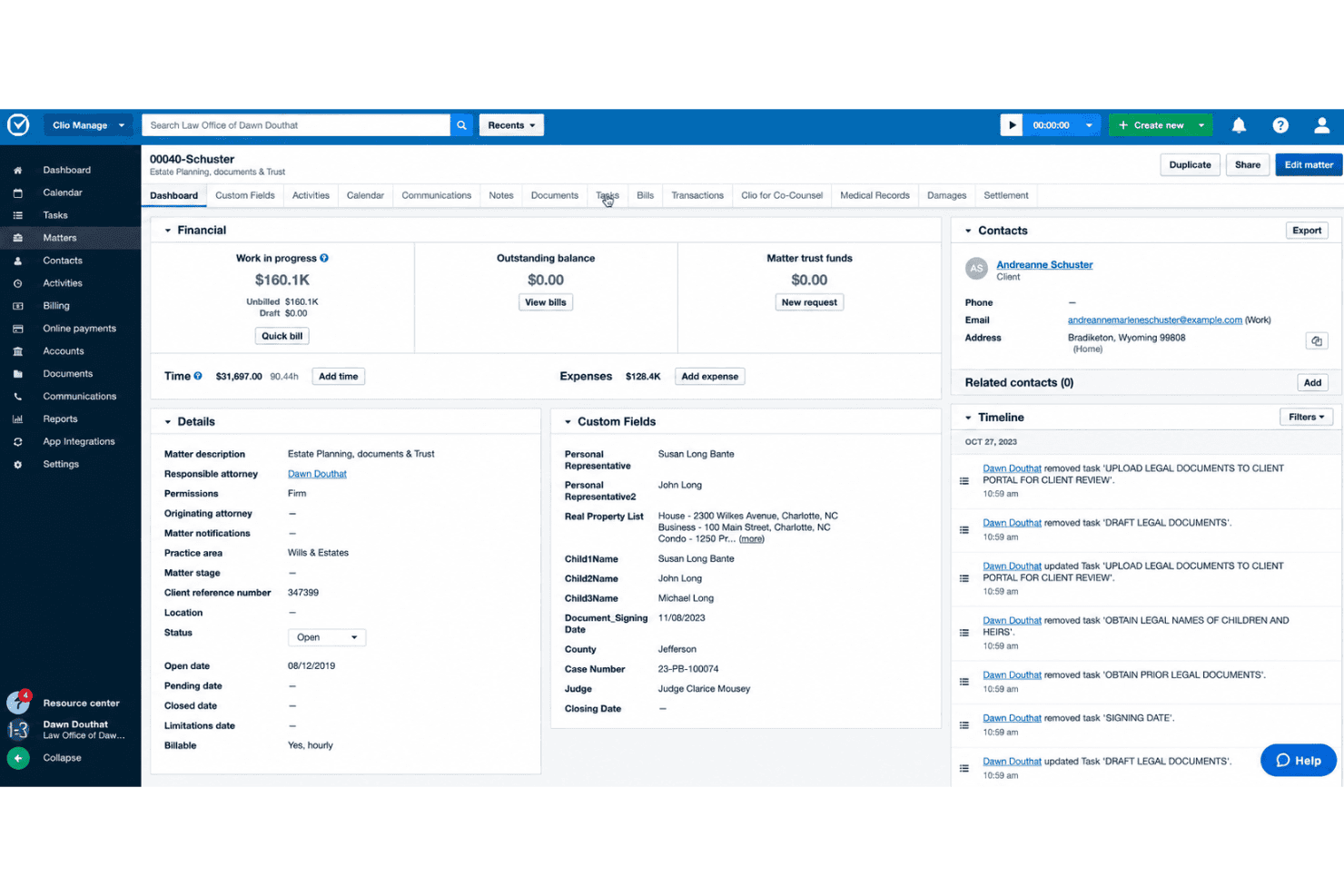
Clio Manage customizes matter workflows, task groups, and court-rule-based deadlines. Clio Manage is a legal practice management platform that brings together matter management, trust accounting, billing, document storage, and client communication in one place—making it a strong fit for law firms looking to move away from accounting-first tools like CosmoLex.
Who Is Clio Manage Best For?
Clio Manage is a strong fit for law firms of any size that want matter management, billing, trust accounting, and client communication built into one platform rather than stitched together from separate tools.
Why I Picked Clio Manage
I've included Clio Manage in my top picks because its matter-centric design lets you build fully customizable workflows around how your firm actually works, not around a fixed accounting structure like CosmoLex's. I particularly like that you can define matter stages with kanban-style boards, apply templated task groups to recurring case types, and use court-rule-based deadline calculation across 2,200+ U.S. jurisdictions, all tied to a single matter record. Trust reconciliation is built in from the Starter plan, so you're not cobbling together a separate accounting tool.
Clio Manage Key Features
- Trust account reconciliation: Compare bank records, the client trust ledger, and the firm's trust ledger side by side, with locked reports retained for 10 years.
- AI-assisted billing: Automatically prepare bills from recorded time and expenses, flagging issues for attorney review before invoices go out.
- Client portal: Give clients a secure space to send messages, share documents, view matter updates, and pay bills from a browser or mobile app.
- 300+ app integrations: Connect Clio Manage to tools like QuickBooks, Xero, Gmail, Outlook, Google Drive, and Zapier through the Clio App Directory.
Clio Manage Integrations
Clio Manage offers 300+ integrations through its App Directory, including QuickBooks, Xero, Gmail, Outlook, Google Drive, Microsoft 365, and Google Workspace. It also provides an API and Zapier connectivity for custom workflows.
Pros and Cons
Pros:
- Shared calendars help coordinate deadlines
- Trust reconciliation connects three ledgers
- Matters keep casework together
Cons:
- CosmoLex migration requires manual exports
- Reports can require spreadsheet workarounds
Learn more about Clio Manage: Best for AI-powered case summaries
- 10-day free trial available
- From $50/user/month (billed annually)
Visit WebsiteCustomer Rating:4.6/5
MyCase IQ generates an AI case summary directly within a case record. MyCase is a legal practice management platform that combines case management, client communication, billing, trust accounting, and document handling with AI-powered case summaries. Its 8am IQ Case Assistant analyzes case files, identifies key facts, and generates summaries and timelines from legal documents.
Who Is MyCase Best For?
MyCase is a strong fit for small to mid-sized law firms that need AI-assisted case summaries, document analysis, and client communication alongside everyday practice management.
Why I Picked MyCase
I picked MyCase as a CosmoLex alternative because its 8am IQ Case Assistant goes beyond traditional case management by generating summaries from filings, client records, and discovery documents. I particularly like how it identifies key facts, deadlines, and parties while building case timelines from existing records. It also provides source citations so your team can verify AI-generated insights without manually searching through multiple case files.
MyCase Key Features
- Trust ledger and reconciliation: Track trust-account transactions by case or client, manage multiple bank accounts, and reconcile against bank statements within the platform.
- Workflow automation: Automatically trigger tasks, events, and document creation based on case activity to reduce manual follow-up across matters.
- Conflict check tracking: Search across cases, contacts, and documents to surface potential conflicts of interest before taking on new clients.
- LawToolBox court-rules integration: Calculate jurisdiction-specific court deadlines from a trigger date and push those events directly into the MyCase calendar.
MyCase Integrations
MyCase offers 70+ marketplace integrations, including QuickBooks, Google Calendar, Microsoft Outlook, LawToolBox, Dropbox, NetDocuments, and Zapier. Its Advanced plan adds an open API for custom integrations.
Pros and Cons
Pros:
- Clients praise portal messaging and deadline tracking
- Trust ledgers pair with case billing
- AI case summaries speed matter review
Cons:
- Customization requires setup time
- Advanced AI features may cost extra
 Best for firms standardizing case workflows
- Free demo available
- Pricing upon request
Visit WebsiteCustomer Rating:4.5/5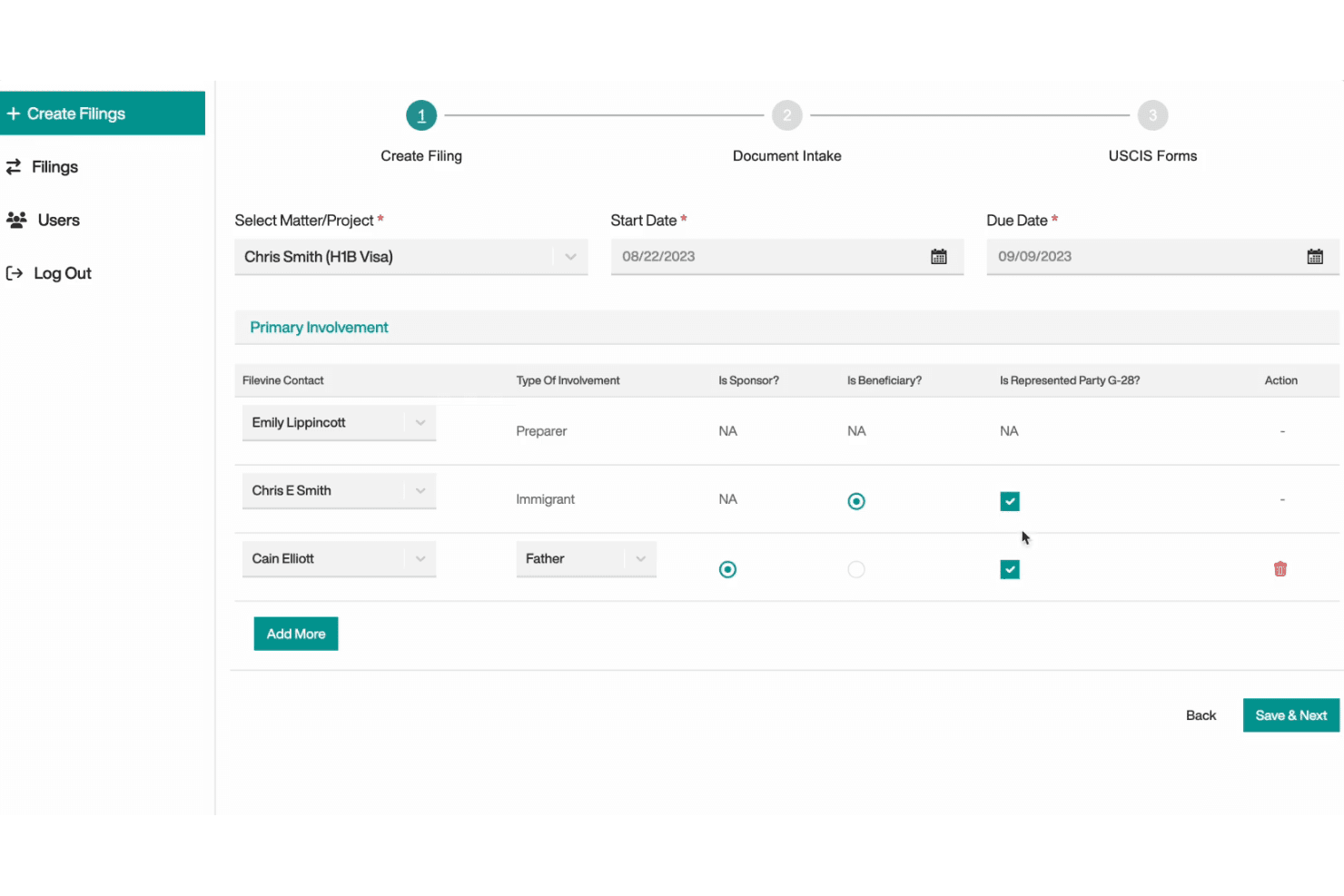
Filevine builds custom case workflows with tailored phases, fields, and taskflows. Filevine is a cloud-based case management platform built for law firms that want to centralize matters, documents, client communication, and billing workflows in a single, highly customizable workspace.
Who Is Filevine Best For?
Filevine is a strong fit for law firms that need to build structured, repeatable case workflows across practice areas and teams.
Why I Picked Filevine
I picked Filevine as one of the best because it's built around the idea that every practice area needs its own structured workflow, not a one-size-fits-all case record. I love how project templates let you define custom fields, deadline chains, and automatic task flows per matter type, so a personal injury file and a corporate transaction each follow their own repeatable process. The project feed pulls two-way texting, captured emails, and third-party tool activity into a single case view, keeping communication traceable without manual logging.
Filevine Key Features
- Document assembly: Generate documents from matter data using templates that automatically fill in client and case information with one click.
- Vinesign e-signature: Send PDF documents by text or email for signing directly from a case file, with a full audit log for completed documents.
- Client Portal: Give clients secure access to messages, assigned tasks, documents, and invoices, with multilingual form support across 12+ languages.
- QuickBooks integration: Sync client and matter data between Filevine and QuickBooks, and export time entries and expenses in either direction.
Filevine Integrations
Filevine lists over 2,000 potential integrations, including QuickBooks, Microsoft 365, Google Workspace, Outlook, and NetSuite. It also offers an API and webhooks for custom integrations.
Pros and Cons
Pros:
- Case-linked texting organizes client conversations
- Document generation keeps drafts tied to matters
- Custom matter templates keep case steps consistent
Cons:
- Complex reports take effort to configure
- Trust-accounting depth may not replace CosmoLex
Learn more about Filevine: Best for matter-level trust and WIP-AR reporting
- Free demo available
- Pricing upon request
Visit WebsiteCustomer Rating:4.4/5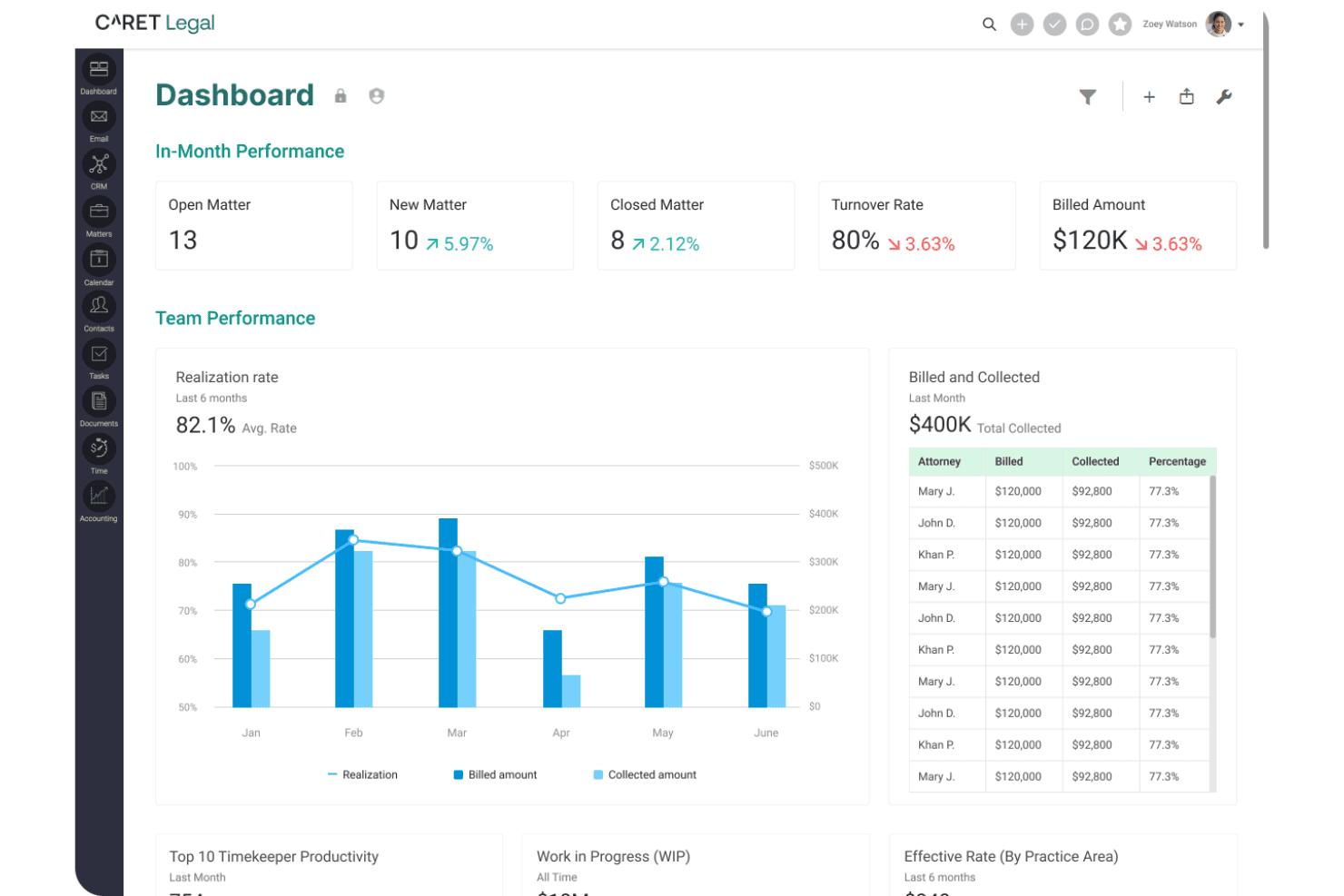
CARET Legal provides matter-level financial reporting on WIP, receivables, and trust balances. CARET Legal is a cloud-based practice management platform built for law firms that want matter management, billing, trust accounting, and client communication handled in one place.
Who Is CARET Legal Best For?
CARET Legal is a good fit for mid-sized law firms where billing attorneys and operations staff need matter-level visibility into trust balances, WIP, and accounts receivable in one place.
Why I Picked CARET Legal
I've included CARET Legal in my top picks because its matter-level financial reporting goes deeper than most practice management platforms. The WIP-AR-Trust report breaks down unbilled fees, accounts receivable, unused trust, and operating retainers by matter, and you can filter it by billing attorney, practice area, or matter status. Pair that with the Three-way Reconciliation report comparing bank balance, book balance, and client-ledger totals, and you get a clear picture of where every dollar sits across your caseload.
CARET Legal Key Features
- Built-in email with matter linking: Send and receive email directly within CARET Legal and associate correspondence with the relevant matter record.
- Client portal (Caseway): Share documents and invoices with clients through a secure portal, where clients can pay invoices or replenish retainers.
- LawToolBox court deadline calculation: Connect a LawToolBox account to calculate court deadlines and automatically update calendar dates for rule changes, weekends, and court holidays.
- QuickBooks Online sync: Push invoice approvals, edits, and deletions from CARET Legal to QuickBooks Online to keep accounting records aligned.
CARET Legal Integrations
CARET Legal offers native integrations with QuickBooks Online, Microsoft 365, Google Workspace, LawToolBox, NetDocuments, OneDrive, and Payments. It also connects with RMail, Lawmatics, HotDocs, Microsoft Word for Windows, and IMAP; API availability isn’t documented.
Pros and Cons
Pros:
- Matter-linked documents keep correspondence in context
- Reviewers praise connected billing and case files
- Matter-level WIP, AR, and trust visibility
Cons:
- Calendar delays and deadline calculation complaints
- Reviewers report bugs in trust workflows
Learn more about CARET Legal: Best for capturing billable work across apps
- 10-day free trial + free demo available
- From $59/user/month (billed annually)
Visit WebsiteCustomer Rating:4.4/5
Rocket Matter centralizes tasks, billing, and calendar on one dashboard. Rocket Matter is a cloud-based legal practice management platform for law firms that centralizes matter management, time tracking, billing, trust accounting, and document assembly in one system.
Who Is Rocket Matter Best For?
Rocket Matter is a strong fit for law firms where billing partners and office managers need tight control over time capture, invoicing, and trust accounting across the full matter lifecycle.
Why I Picked Rocket Matter
I picked Rocket Matter because of how it handles billable time capture across the apps attorneys already use. Rocket Matter Track runs in the background on your desktop, logging activity across office apps so you can assign that work to matters without reconstructing your day from memory. Pair that with email timekeeping directly from Outlook and timers you can run simultaneously on multiple matters, and very little billable time slips through.
Rocket Matter Key Features
- Trust accounting: Create separate trust accounts per matter, track deposits and disbursements, place holds, and generate trust ledgers across clients.
- Document assembly: Build legal documents from customizable templates pre-populated with matter and contact data stored in Rocket Matter.
- Batch billing: Review, approve, and send multiple invoices in a single session using the paperless prebilling screen.
- Conflict checking: Search matters and contacts to flag potential conflicts of interest before taking on new clients or matters.
Rocket Matter Integrations
Rocket Matter offers native integrations with QuickBooks Online, Microsoft Outlook, Office 365, OneDrive, Google Calendar, Box, Dropbox, and NetDocuments. It also lists WebCal, iCalendar, and Zapier, and provides an HTTP JSON API for custom integrations.
Pros and Cons
Pros:
- Matter-linked templates reduce repetitive document entry
- Combines trust ledgers with invoice workflows
- Captures billable activity across desktop apps
Cons:
- Reviewers flag clunky mobile app behavior
- Intake workflows sit behind a paid add-on
Learn more about Rocket Matter: Best for midsize firms standardizing workflows
- Free demo available
- Pricing upon request
Visit WebsiteCustomer Rating:4.2/5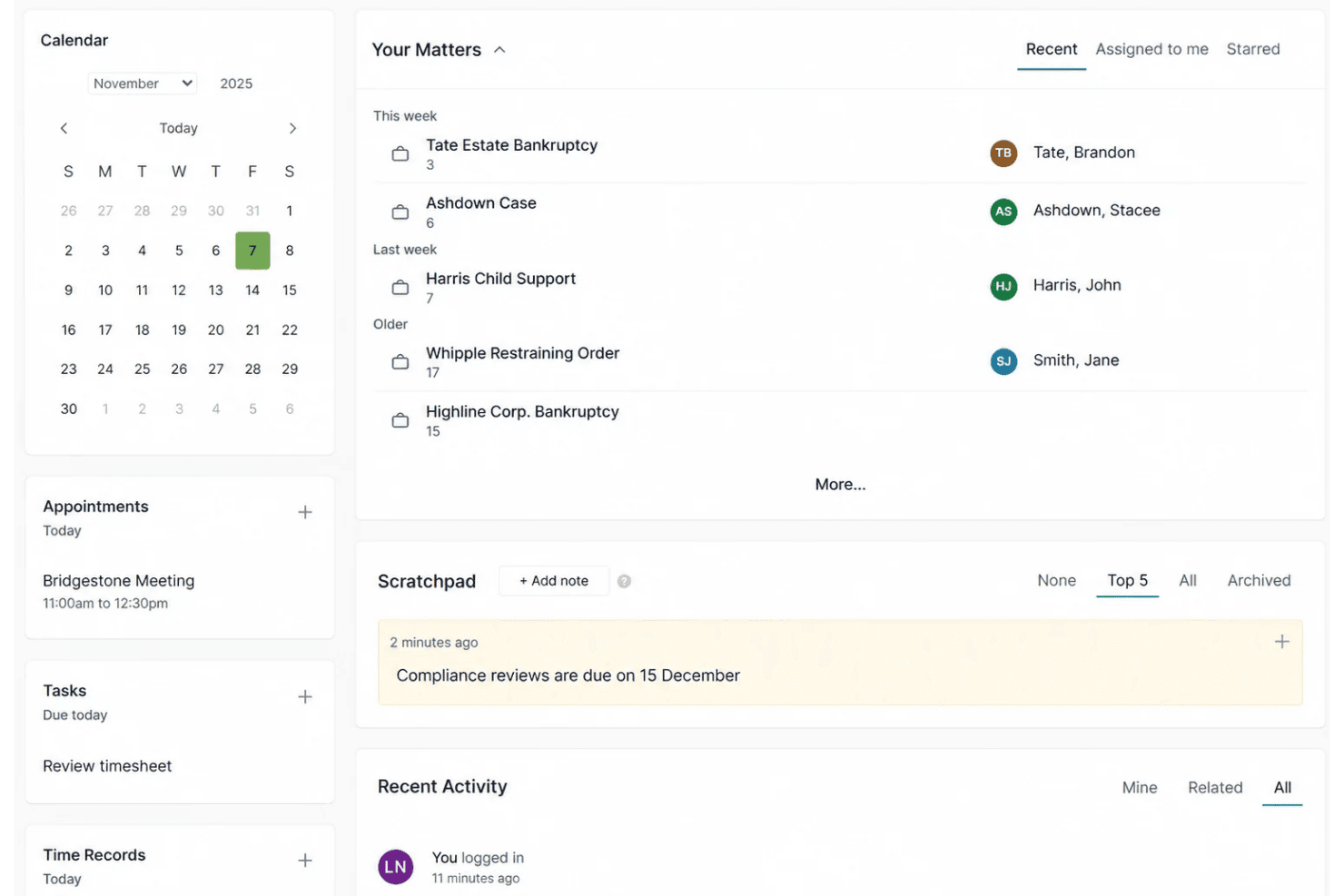
Actionstep automates matter workflows, task assignments, reminders, and case stages. Actionstep is a cloud-based practice management platform built for midsize law firms that need to connect matter management, client intake, trust accounting, billing, and workflow automation in one configurable system.
Who Is Actionstep Best For?
Actionstep is a strong fit for midsize law firms that need matter management, trust accounting, billing, and client intake connected in one configurable system.
Why I Picked Actionstep
I've included Actionstep in my top picks because it's purpose-built for midsize firms that need every matter to follow a defined, repeatable process. I particularly like how matter types come with their own configurable workflows, document templates, and task automations, so your firm's intake-to-close process isn't improvised case by case. The LawToolBox integration also stands out for US-based teams, calculating relative court deadlines from a trigger date and pushing them directly to synced Outlook or Google calendars.
Actionstep Key Features
- Trust account reconciliation: Reconcile trust accounts manually against a printed bank statement or electronically by uploading OFX or QIF files, with completed reconciliations locked against further editing.
- Client portal: Share matter documents and exchange encrypted messages with clients through a permission-controlled portal, with client notifications triggered on each upload or update.
- QuickBooks Online integration: Sync invoices between Actionstep and QuickBooks Online, with edits and deletions automatically pushed across both systems.
- Mobile time tracking: Log time, create file notes, and manage tasks directly from the iOS or Android app using concurrent timers and matter-linked time entries.
Actionstep Integrations
Actionstep has documented integrations with QuickBooks Online, DocuSign, LawToolBox, Microsoft Office 365, Outlook, and Google Calendar. It also offers a REST API, webhooks, and Zapier.
Pros and Cons
Pros:
- Client portals keep matter documents accessible
- Timekeeping and billing share matter context
- Matter workflows adapt to firm-specific processes
Cons:
- Reporting and trust tools draw reviewer criticism
- Workflow configuration demands substantial setup
Learn more about Actionstep: Best for AI agents across legal workflows
- Free demo available
- Pricing upon request
Visit WebsiteCustomer Rating:4.2/5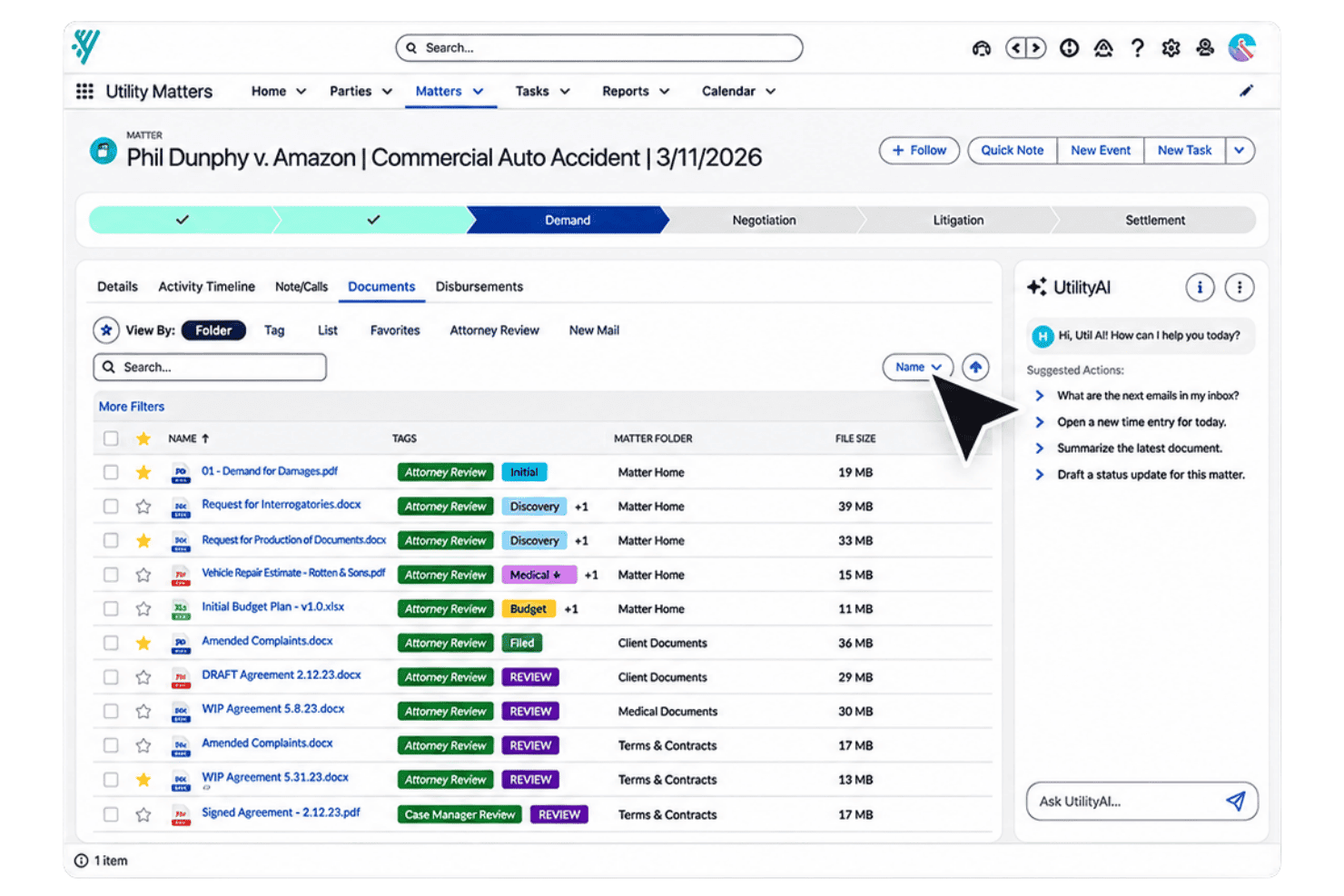
Litify's AI agents automate casework, from matter summaries to risk reviews and intake. Litify is a Salesforce-native legal platform built for mid-to-large law firms and legal departments that need AI-driven matter management, automated intake workflows, and firm-wide reporting.
Who Is Litify Best For?
Litify is a strong fit for mid-to-large law firms and legal departments that want AI-driven matter management, automated intake, and firm-wide operational reporting on a Salesforce-native platform.
Why I Picked Litify
I picked Litify as one of the best because of how far its AI agents actually reach into day-to-day legal work. The Matter Summary Agent pulls together Chatter threads, notes, tasks, emails, and files into an on-demand brief, while the Strengths & Weakness Agent reviews case-file documents to flag legal risks before they surface in court. I also appreciate the Intake Qualifier Agent, which screens prospective claims against your firm's criteria automatically, cutting the manual triage that bogs down intake teams at busier practices.
Litify Key Features
- LitifyAI time capture: Tracks your activity across emails and internal coordination, then generates review-ready time entries automatically.
- Mass bill generation: Runs multiple billing jobs simultaneously or schedules them for off-hours to reduce manual billing work.
- Configurable matter plans: Templated task lists by practice area and case type give your team a structured, repeatable process for each matter.
- Legal KPI dashboards: Real-time dashboards track time-on-desk, staff productivity, and billing realization across your firm.
Litify Integrations
Litify integrates with QuickBooks, Accounting Seed, DocuSign, CalendarRules, LawPay, Confido Legal, Outlook, NetDocuments, iManage, and RingCentral. It also offers a REST API for custom connections.
Pros and Cons
Pros:
- Searchable files keep case documents accessible
- Custom dashboards track team productivity
- AI agents summarize matters and flag risks
Cons:
- Numerous tabs can obscure case information
- Prior-system migration can lose matter-plan details
Learn more about Litify: 10Best for automated legal document drafting
LEAP
- Free demo available
- Pricing upon request
Visit WebsiteCustomer Rating:4.3/5
LEAP combines legal case management, document automation, trust accounting, and AI tools. LEAP is a legal practice management platform that brings together case management, document automation, trust accounting, billing, and AI tools—making it a strong fit for solo attorneys and small-to-midsize law firms that want to run their entire practice from one system.
Who Is LEAP Best For?
LEAP is a strong fit for solo attorneys and small-to-midsize law firms that want matter management, document automation, trust accounting, and billing in one platform.
Why I Picked LEAP
I picked LEAP as one of the best because its document automation is genuinely impressive: it pulls client and matter data already stored in the platform to populate forms, letters, and court documents without re-entering anything. I also like that LEAP's AI Generator drafts discovery requests, wills, and trust agreements using your own practice documents as source material. When switching from CosmoLex, that combination means your firm's existing precedents become the foundation for faster drafting from day one.
LEAP Key Features
- Trust accounting workflows: Built-in trust and operating ledgers support IOLTA and IOLA compliance, with reconciliations, audit reports, and low-balance alerts included.
- AutoTime time tracking: Runs in the background to automatically capture billable time across matter activities without manual input.
- LawConnect client portal: Lets clients securely share files, complete intake, review documents, and pay invoices directly from a branded portal.
- Power BI reporting connector: Pulls real-time matter data into pre-built dashboards and customizable reports for firm-level performance tracking.
LEAP Integrations
LEAP has native integrations with QuickBooks Online, Xero, Microsoft 365, Lawmatics, LawToolBox, InfoTrack, LawConnect, and Power BI. It also offers REST APIs and Zapier connectivity to more than 8,000 apps; several integrations may cost extra.
Pros and Cons
Pros:
- Mobile access covers matters, documents, and time
- Trust accounting and billing share matter workflows
- Matter data populates reusable legal documents
Cons:
- Email filing can require extra steps
- CosmoLex data migration may omit records
Learn more about LEAP:
Other CosmoLex Alternatives
Here are a few options that didn’t make my shortlist but are still worth checking out:
- 11CenterbaseBest for AI-powered law firm financial reporting
- 12PracticePantherBest for matter-linked client-to-cash workflows
- 13CasePeerBest for managing PI cases through settlement
- 14Bill4TimeBest for billing-first case management
- 15NeosBest for PI demands with cited records
- 16LawmaticsBest for AI-assisted legal lead intake
- 17DocketWiseBest for immigration forms and USCIS tracking
- 18SurePointBest for partners' financial and market insight
- 19PCLaw Time MattersBest for firms building matter workflows
- 20LollyLawBest for multilingual immigration intake
Related Reviews
How I Evaluate CosmoLex Alternatives
I split my evaluation into three parts. First, core functionality: any alternative must handle matter and case management and trust and billing accounting—this carries the most weight. Second, standout features like client payment portals and court rules integration. Third, I look at migration support, pricing transparency, and onboarding quality.
Core Functionality (Table Stakes For This List)
When I'm selecting tools for my list, I score each one on a scale from 0 (does not offer the functionality) to 5 (excels in this area) for each core functionality listed below. I then convert the total into a percentage to help assess each tool's overall fit, with extra weight on any functionalities I’ve deemed essential.
- Matter & Case Management (Essential): I look for searchable matter records that link parties, documents, notes, tasks, and status updates across a case’s lifecycle.
- Trust & Billing (Essential): I assess time entry, invoice generation, client trust ledgers, reconciliation, and audit trails for routine financial workflows.
- Document Management: I check how teams organize, search, version, and permission documents tied to matters, including templates and retrieval.
- Calendaring & Deadlines: I look for matter-linked court dates, tasks, and deadline tools that help staff coordinate filing work and avoid missed dates.
- Client Intake & Communication: I assess whether intake details connect to matters and whether teams can track client messages and follow-up.
- Reporting & Analytics: I check for useful billing, matter-status, and productivity reports, plus options to customize views across the firm.
Once I have a list of tools that meet the criteria, I consider what sets each platform apart.
Differentiating Factors (What Sets Vendors Apart)
Here's how I compare and contrast different vendors:
Standout Features
Court rules integration is a big one. I check whether a platform auto-calculates jurisdiction-specific deadlines from a single trigger date, since a missed filing deadline can't be undone. Clio and MyCase both offer this, though implementations differ. I also evaluate client payment portals—specifically whether they support credit card, ACH, and payment plans tied to trust-compliant invoicing. A firm that still emails invoices and waits on checks will notice the difference. Finally, I look at mobile app depth beyond basic access; attorneys deposing witnesses or in court need real time entry, document access, and client messaging from their phone.
Beyond Features
Migration support matters most when you're moving trust ledgers and matter histories. I check whether a vendor offers dedicated implementation specialists who map your data before cutover, since a botched trust migration can trigger bar compliance issues. Pricing transparency is the other factor I weigh heavily. Some platforms advertise a base rate but charge extra for e-signatures or trust accounting modules, so I look for clear per-user or flat-rate plans that won't surprise a growing firm. I also evaluate how responsive support is during urgent, deadline-driven moments like a filing crunch.
Why Look for CosmoLex Alternatives?
While CosmoLex is a good choice of legal case management software, some users seek alternatives that better match their needs. You might be looking for an alternative to CosmoLex because:
- Your practice needs workflows for complex litigation or high-volume matters
- Your team relies on tools outside the integrations you use
- Your growing firm needs workflows suited to larger operations
- Your accounting rules differ from the requirements CosmoLex supports
- Your team needs migration support that fits a tight cutover schedule
If any of these sound like you, you’ve come to the right place. My list contains several legal case management software options that are better suited for teams facing these challenges with CosmoLex and looking for alternative solutions.
CosmoLex Key Features
Here are the key features of CosmoLex to help you compare it with alternative options:
- Matter management: CosmoLex links emails, tasks, events, documents, billable items, and transactions to client matters. This gives your team a shared matter record for tracking case activity and finding related information.
- Trust and business accounting: The platform combines trust and business accounting with practice management. Your firm can manage these financial workflows alongside matter records, including trust accounting requirements supported by the software.
- Time and billing: Capture time and create legal invoices within the platform. CosmoLex’s Money Finder flags unassigned meetings and tasks for review as possible billable items, helping staff check for work that may need to be billed.
- Calendar, tasks, and workflows: Manage matter-related events and tasks, then create task workflows for new or existing matters. Assigning who does what and when gives staff a consistent way to follow recurring case steps.
- Email management: CosmoLex files emails to client matters and alerts you when it can’t find a match or finds more than one. You can categorize billable email communications and set viewing permissions for sensitive messages.
- Document management: Store and retrieve documents tied to client matters, with access to connected storage services such as OneDrive, Google Drive, NetDocuments, Dropbox, and Box. Word-based document assembly can use CosmoLex database fields to populate templates.
- Client portal: Clients can exchange messages and documents through a secure portal, where communications are logged in matter records. They can also view invoices, make online payments, and access shared files; the platform lists eSignature as a portal capability.
- Reporting and analytics: Use reports and analytics to review firm and matter information. These views can help you check matter status and billing activity when monitoring workloads or preparing operational reviews.
Costs & Pricing of CosmoLex Alternatives
Pricing varies by features, firm size, and add-ons. Here are the typical price ranges and features you’ll find across CosmoLex alternatives.
Plan Comparison Table for CosmoLex Alternatives
| Plan Type | Average Price | Common Features |
|---|---|---|
| Plan TypePersonal Plan | Average Price$39–$60/user/month | Common FeaturesMatter and case management, time tracking, and basic billing. |
| Plan TypeBusiness Plan | Average Price$60–$125/user/month | Common FeaturesAdvanced matter workflows, trust accounting, client portals, and reporting. |
| Plan TypeEnterprise Plan | Average Price$125–$200+/user/month or custom pricing | Common FeaturesFirm-wide administration, advanced permissions, implementation support, and custom integrations. |