

SmartAdvocate offers case management tools for personal injury firms, but its workflows, accounting features, or customization options may not match how every legal team operates. Some alternatives provide greater control over client intake, case stages, and deadlines, while others focus on document automation, billing, and financial reporting.
I've compared these platforms based on their practical features, implementation requirements, and ability to support different practice areas.
What Is SmartAdvocate?
SmartAdvocate is a legal case management platform for law firms and litigation teams. It supports intake, case tracking, document assembly, deadline management, reporting, and automated case procedures. Firms can choose cloud-based or server-based access, with features for personal injury and other practice areas. Its tools include medical-record summaries, client portals, e-signatures, and integrations with external services.
Comparison Table: SmartAdvocate Alternatives
Compare pricing and specs, side by side, for the SmartAdvocate alternatives that made it onto my shortlist.
| Tool | Best For | Trial Info | Price | ||
|---|---|---|---|---|---|
| 1 | Best for PI medicals and settlement tracking | Free trial + free demo available | Pricing upon request | Website | |
| 2 | Best for matter-linked legal accounting | 7-day free trial | From $49/user/month | Website | |
| 3 | Best for AI-powered matter summaries | 10-day free trial available | From $50/user/month (billed annually) | Website | |
| 4 | Best for linking intake and case workflows | Free plan + trial available | From $49/user/month | Website | |
| 5 | Best for personal injury litigation workflows | Free demo available | Pricing upon request | Website | |
| 6 | Best for firms building phase-based workflows | Free demo available | Pricing upon request | Website | |
| 7 | Best for firms managing trust accounting | 10-day free trial + free demo available | From $49/user/month (billed annually) | Website | |
| 8 | Best for law-firm accounting beyond billing | 10-day free trial + free demo available | From $59/user/month (billed annually) | Website | |
| 9 | Best for customizable matter management workflows | Free demo available | Pricing upon request | Website | |
| 10 | Best for Salesforce-based legal operations | Free demo available | Pricing upon request | Website |


Why Trust Our Software Recommendations
6,700+
Reviews
20
Industry experts
16+
Evaluation factors
14
Years
Our team has been testing and reviewing software since 2012. As legal practice leaders ourselves, we know how difficult—and important—it is to choose the right software.
For this guide, we evaluated tools using hands-on testing and independent research, scoring tools using our selection criteria.
Our reviews reflect our human editorial judgment, not a sales pitch.
SmartAdvocate Alternatives Reviews
Below are my reviews of the best SmartAdvocate alternatives on my shortlist. They cover each legal case management platform’s features, pricing, and workflow fit to help you find the right option.
 Best for PI medicals and settlement tracking
- Free trial + free demo available
- Pricing upon request
Visit WebsiteCustomer Rating:4.8/5
Smokeball tracks personal injury matters, client intake, billing, and settlements. Smokeball is a legal practice management platform built for law firms that need to manage matters, documents, billing, and client intake in one place—with dedicated tooling for personal injury practices.
Who Is Smokeball Best For?
Smokeball is a strong fit for personal injury law firms that need dedicated tools for tracking medical providers, managing liens, and recording settlement details alongside everyday matter and document management.
Why I Picked Smokeball
I picked Smokeball as one of the best because its Medicals & Settlement Details tab gives PI firms a genuinely purpose-built place to log providers, track document requests, record liens, and capture settlement figures, all inside the matter file. I especially like that medical providers entered there automatically populate as potential lienholders, cutting out duplicate data entry at settlement time. Pair that with TemplateLab's 20,000-plus court forms auto-populated from matter data, and you have a tight loop from records tracking to document generation.
Smokeball Key Features
- Lead-to-matter conversion: Tracks leads from first contact through retention, then converts them directly into open matters with a single action.
- AutoTime activity capture: Automatically records time spent in Smokeball, Word, and Outlook against the relevant matter and converts it into billable entries.
- TemplateLab document automation: Auto-populates court forms and legal documents from matter data using a library of more than 20,000 templates across 250-plus matter types.
- Archie AI document review: Compares documents for inconsistencies, produces event chronologies, and reviews documents against firm-defined criteria directly within the matter file.
Smokeball Integrations
Smokeball offers native integrations across Microsoft 365, including Word and Outlook, plus integrations with QuickBooks Online and InfoTrack for eSignatures. Its Archie marketplace includes CaseMark, Novo AI, and Supio, while a REST API supports custom integrations.
Pros and Cons
Pros:
- Court forms auto-populate from matter data
- Matter-linked workflows help organize pre-suit cases
- PI medical and settlement tracking
Cons:
- Settlement lien amounts require manual entry
- Medical records requests aren't sent automatically
Learn more about Smokeball: Best for matter-linked legal accounting
- 7-day free trial
- From $49/user/month
Visit WebsiteCustomer Rating:4.7/5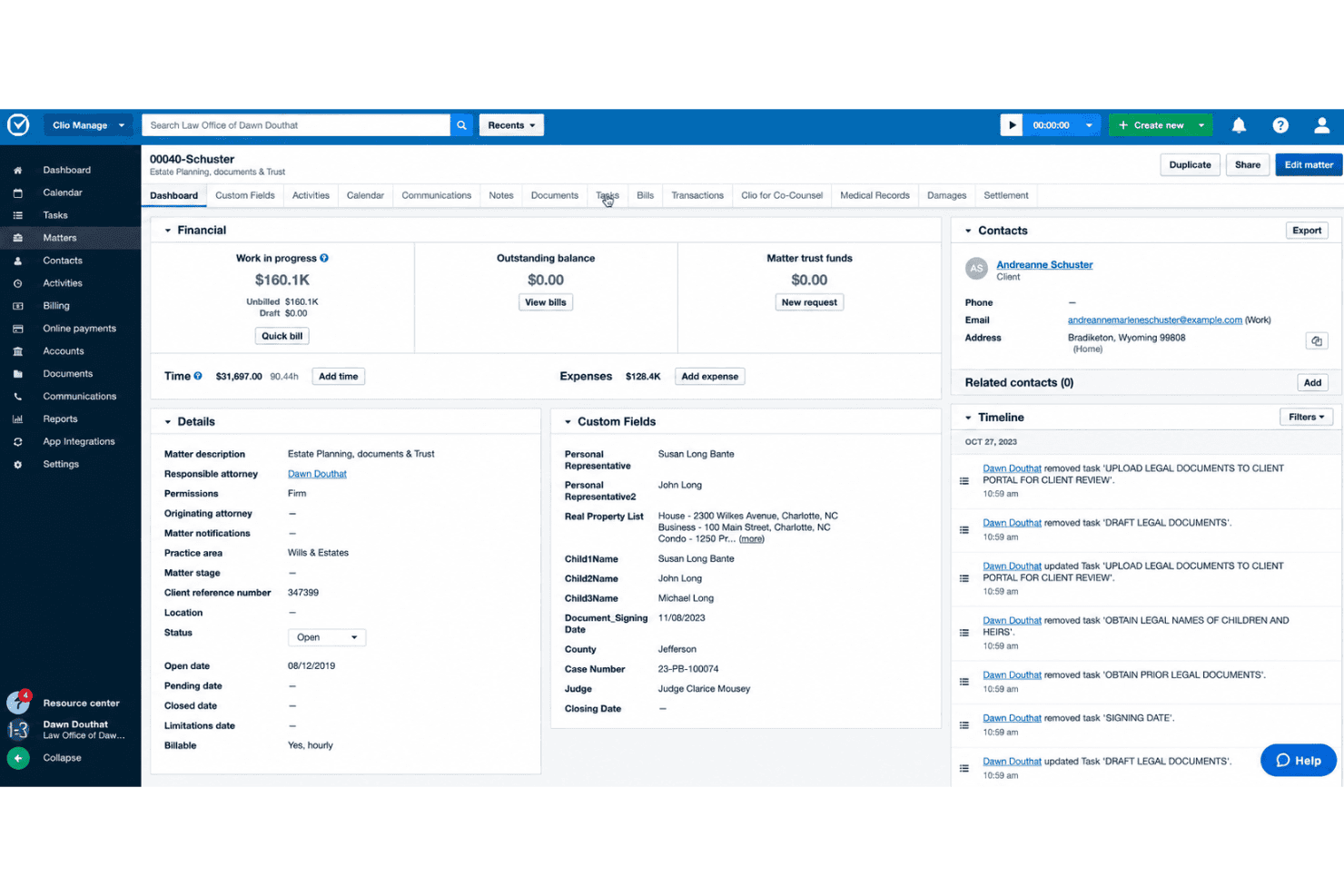
Clio Manage connects legal matters, billing, trust accounting, and client communications. Clio Manage is a cloud-based legal practice management platform that centralizes matters, billing, trust accounting, documents, and client communications—making it a strong fit for law firms that want case and financial data tightly connected in one place.
Who Is Clio Manage Best For?
Clio Manage is a strong fit for law firms that need billing, trust accounting, and case management tightly linked in a single matter record.
Why I Picked Clio Manage
I've included Clio Manage in my top picks because trust accounting and matter management living in the same record is genuinely rare. When a client payment comes in, it hits the trust ledger and links directly to the matter, so reconciliation isn't a separate chore. I also appreciate that billing runs on the same matter record, meaning time entries, invoices, and trust-balance notifications are all connected without any manual bridging between systems.
Clio Manage Key Features
- Matter stages and kanban boards: Track case progress through customizable stages displayed in a kanban-style board view.
- Court calendaring rules: Automatically populate your calendar with court deadlines using local, state, and federal court procedure rules.
- Automated workflows: Trigger task assignments, document generation, and matter updates as cases move through defined stages.
- Custom reporting with scheduled delivery: Build tailored reports using flexible filters and datasets, then schedule them for automatic delivery.
Clio Manage Integrations
Clio Manage lists 300+ integrations, including native integrations with Gmail, Microsoft Outlook, Google Calendar, QuickBooks, and Xero, plus marketplace integrations with OneDrive, Google Drive, Dropbox, Box, and NetDocuments. It also offers an API with OAuth 2.0 and webhooks.
Pros and Cons
Pros:
- Personal injury add-on tracks records and settlements
- Matter stages connect deadlines, documents, and billing
- Trust ledgers reconcile within matter records
Cons:
- Grow-to-Manage sync can require correction
- Personal injury workflows trail specialized platforms
Learn more about Clio Manage: Best for AI-powered matter summaries
- 10-day free trial available
- From $50/user/month (billed annually)
Visit WebsiteCustomer Rating:4.6/5
MyCase IQ generates an AI case summary directly within a case record. MyCase is a legal practice management platform for solo attorneys and small firms that consolidates case tracking, client intake, billing, document management, and client communications into a single system.
Who Is MyCase Best For?
MyCase is a strong fit for solo attorneys and small firms that want case management, billing, and client communication in one place without a steep learning curve.
Why I Picked MyCase
I picked MyCase as one of the best because I love how the 8am IQ Case Assistant surfaces matter summaries without requiring you to dig through case files manually. When I'm mid-caseload, the Document Assistant pulls key details from uploaded files and surfaces them in context, so I'm not rereading 40-page intake packets to find a single fact. The Advanced tier also includes the Discovery Assistant, which auto-processes scanned PDFs and images via OCR, making the full contents of a case searchable from day one.
MyCase Key Features
- Client portal: Gives clients secure, self-serve access to case documents, messages, invoices, tasks, and events from any device.
- Two-way texting: Lets you send and receive client text messages directly within MyCase, with records saved to the related case file.
- Trust accounting: Tracks client funds, generates trust account reports, and supports IOLTA compliance alongside standard time and expense tracking.
- Workflow automation: Applies reusable workflow templates to cases, automatically generating tasks, calendar events, and documents based on triggers like court dates or intake submissions.
MyCase Integrations
MyCase advertises 70+ integrations, including marketplace integrations with Google Calendar, Microsoft Outlook, QuickBooks, Arctrieval, LawToolBox, and Attorney Share. Advanced includes an Open API, and Zapier is also supported.
Pros and Cons
Pros:
- AI tools summarize documents and case files
- Client portal supports document sharing
- Matter histories keep case activity together
Cons:
- Reviewers cite limited reporting and bulk entry
- Document search and syncing can frustrate
 Best for linking intake and case workflows
- Free plan + trial available
- From $49/user/month
Visit WebsiteCustomer Rating:4.8/5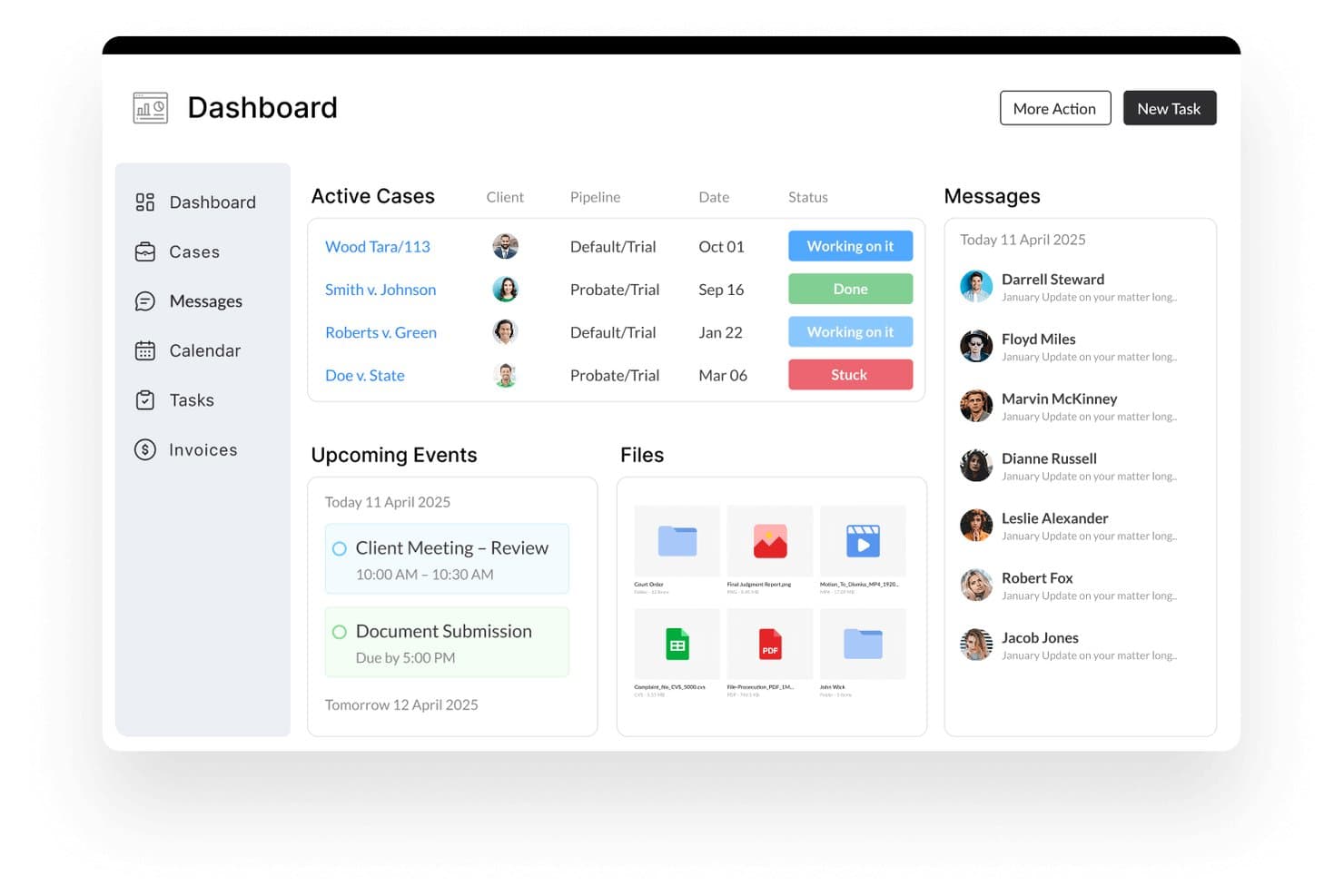
Lawcus centralizes cases, messages, files, and events in one dashboard. Lawcus is a cloud-based legal practice management platform that unifies client intake, matter tracking, billing, document automation, and workflow automation in one place—making it a strong fit for solo attorneys and small firms that want to run their full practice without juggling multiple tools.
Who Is Lawcus Best For?
Lawcus is a strong fit for solo attorneys and small firms that want intake, matter tracking, billing, and automation in one platform without managing multiple tools.
Why I Picked Lawcus
I picked Lawcus as one of the best because it's one of the few platforms that genuinely connects the intake pipeline to active case management without treating them as separate systems. When a lead submits an intake form, I can convert that record directly into a matter, carrying over the lead source, referral details, and any notes collected during intake. From there, Elite-tier workflow automation triggers tasks, documents, and calendar events based on matter stage changes, keeping cases moving without manual follow-up at every step.
Lawcus Key Features
- Nova AI writing assistant: Generate drafts for emails, text messages, notes, matter descriptions, and task descriptions directly within the platform.
- Trust accounting: Create and manage multiple trust accounts, add and transfer funds, and pay invoices using trust or credit balances.
- Kanban-style matter pipelines: Track matters across configurable stages on visual boards, with filters, grouping, sorting, and aggregation options.
- LEDES UTBMS billing codes: Bill corporate clients using industry-standard legal billing formats built into the invoicing workflow.
Lawcus Integrations
Lawcus offers integrations with QuickBooks, Xero, Google Drive, Box, Dropbox, Gmail, Microsoft Outlook, Microsoft 365, and Zapier. It also provides an API for custom integrations; no total integration count is stated.
Pros and Cons
Pros:
- Trust accounting sits within matter workflows
- Configurable pipelines track matter stages visually
- Converts intake leads directly into matters
Cons:
- No prebuilt personal injury litigation workflows
- No dedicated medical records or provider tracking
Learn more about Lawcus: Best for personal injury litigation workflows
- Free demo available
- Pricing upon request
Visit WebsiteCustomer Rating:4.8/5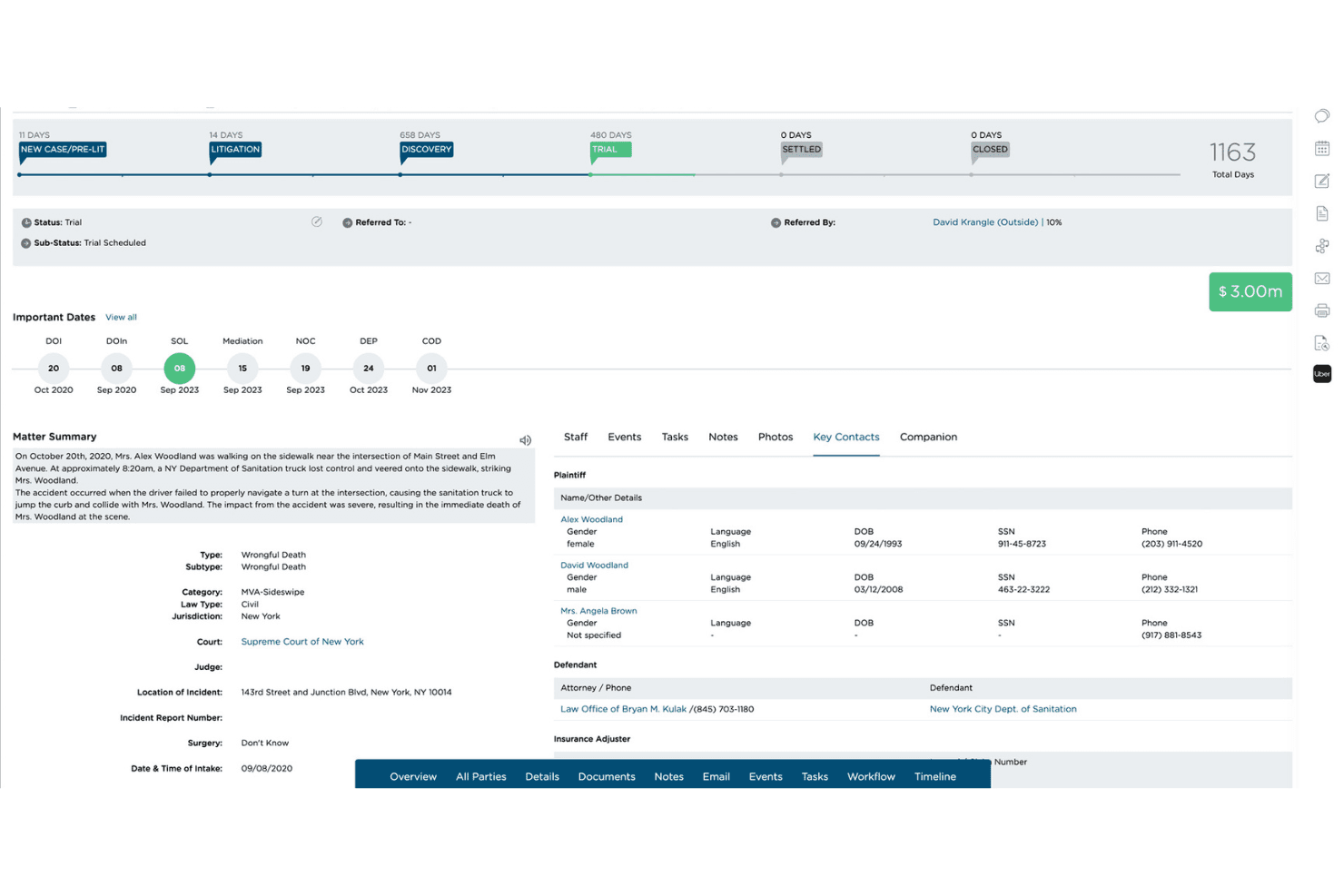
CloudLex provides cloud-based, end-to-end personal injury case management for handling matters, documents, workflows, and client information in one platform. CloudLex is a practice management platform built exclusively for plaintiff personal injury firms, connecting intake, case tracking, medical records, client communication, and settlement workflows in one place.
Who Is CloudLex Best For?
CloudLex is built for plaintiff personal injury firms—from solo practitioners to growing practices—that need a single platform to manage intake, litigation, and settlement workflows.
Why I Picked CloudLex
CloudLex earns its spot on my shortlist because it's built exclusively for plaintiff personal injury firms, which makes it a tighter fit than a general-purpose platform like SmartAdvocate for PI-focused practices. I particularly like how litigation workflow automation triggers tasks and reminders based on matter status, so when a demand is sent, the next set of assignments fires automatically. I also appreciate Lexee AI's medical summary workflow, which tracks records through Requested, In Progress, and Ready for Review stages before attaching a paralegal-reviewed chronology directly to the matter.
CloudLex Key Features
- Settlement negotiation tracking: Record demands, counteroffers, and negotiation history directly on the matter, alongside attorney fees, liens, and client recovery calculations.
- Two-way client texting: Send and receive client texts and MMS through a firm-dedicated number, with messages linked to cases and built-in consent capture and opt-out handling.
- Role-based access controls: Define security levels and permissions for each team member to control who can view or edit specific case information.
- Referral Engine: Send and receive case referrals with other PI firms, track fee agreements, share case documents, and monitor referred-matter updates within CloudLex.
CloudLex Integrations
CloudLex offers native integrations with Microsoft 365, QuickBooks Online, Gmail, and Outlook, plus partner integrations with Adobe Sign and DocuSign. It also supports Google Calendar, iCal, RingCentral, and website forms API integrations.
Pros and Cons
Pros:
- Reviewed medical chronologies surface treatment timelines
- Matter-triggered deadlines reduce routine follow-up
- PI-specific intake through settlement workflows
Cons:
- Notes lack pinning and categories
- PDF OCR requires manual processing
Learn more about CloudLex: Best for firms building phase-based workflows
- Free demo available
- Pricing upon request
Visit WebsiteCustomer Rating:4.5/5
Filevine automates case workflows, role-based task assignments, and court deadlines. Filevine is a cloud-based legal case management platform built for law firms that need to organize matters, documents, deadlines, and client communications in one configurable workspace—particularly well-suited to personal injury and solo or small-firm practices.
Who Is Filevine Best For?
Filevine is a strong fit for personal injury and small-to-midsize law firms that need a highly configurable case management system built around phase-based workflows.
Why I Picked Filevine
I picked Filevine as one of the best because of how its phase-based case workflows translate directly into automated task assignment. When a personal injury case moves from intake to litigation, taskflows trigger role-assigned tasks automatically, so nothing slips through. I also like that rules-based calendaring calculates court deadlines from phase changes, keeping critical dates tied to where the case actually stands.
Filevine Key Features
- Document generation: Auto-populate templates with matter data to produce client-ready documents directly from a case file.
- Client portal: Give clients 24/7 access to case timelines, shared documents, secure messaging, and online payment tools.
- Custom reporting and dashboards: Build reports from case notes, tasks, fields, and calendar events, then export or share them with team members.
- QuickBooks integration: Sync client and matter information, invoices, payments, time entries, and expenses between Filevine and QuickBooks.
Filevine Integrations
Filevine lists over 2,000 potential integrations, including QuickBooks, Google Calendar, Outlook, YoCierge, ChartSquad, and RecordsOnTime. It also offers an API and lists Zapier.
Pros and Cons
Pros:
- Personal injury workflows support medical-record handling
- Case-linked documents and templates earn praise
- Phase changes trigger role-assigned tasks
Cons:
- Calendar search reaches back only 14 days
- Setup and staff training can take months
Learn more about Filevine: Best for firms managing trust accounting
- 10-day free trial + free demo available
- From $49/user/month (billed annually)
Visit WebsiteCustomer Rating:4.3/5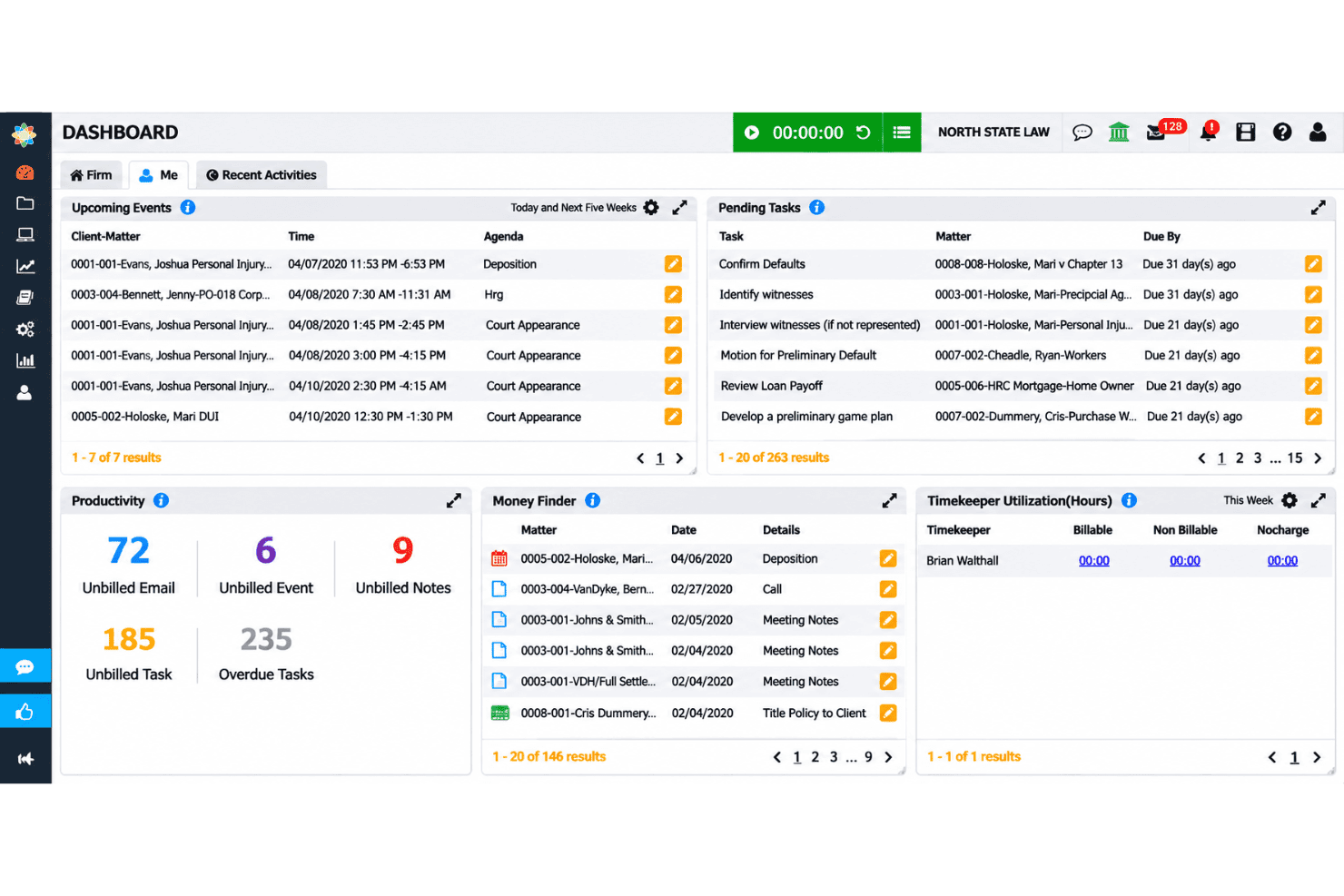
CosmoLex organizes matter tasks, events, deadlines, and trust accounting records. CosmoLex is a cloud-based legal practice management platform that ties matter tracking, billing, and full law firm accounting into one system—making it a practical fit for solo attorneys and small firms that want to avoid managing separate tools for cases and books.
Who Is CosmoLex Best For?
CosmoLex is a strong fit for solo attorneys and small firms that need matter management, billing, and trust accounting in one place without stitching together separate tools.
Why I Picked CosmoLex
I picked CosmoLex as one of the best because it's the only tool on this list that bakes full law firm accounting directly into the practice management layer. Where SmartAdvocate leans on external accounting tools, CosmoLex handles trust accounting natively, including three-way reconciliation and safeguards that prevent ledger overdrafts and commingling. I especially like that trust activity ties directly to individual matter records, so I can see a matter's full financial picture without jumping between systems.
CosmoLex Key Features
- Matter status boards: View and track the status of active matters in a board layout, with matter budgets tied directly to each record.
- Custom intake forms: Build logic-based intake forms that capture lead information and convert submissions into matters, with field data populating contact and matter records.
- Workflow-driven task automation: Create matter workflows that assign tasks, set due dates relative to a workflow start date, and make tasks contingent on the completion of prior tasks.
- AI document summaries: Upload documents to a matter and extract key terms, obligations, deadlines, and action items automatically, with data isolated by matter.
CosmoLex Integrations
CosmoLex integrates with Microsoft 365, Outlook, Google Calendar, QuickBooks Online, OneDrive, Google Drive, NetDocuments, Dropbox, Box, and LawPay. It also supports Zapier and a REST API for custom integrations.
Pros and Cons
Pros:
- Matter workflows assign dependent tasks and deadlines
- Personal-injury fields capture records and settlements
- Reviewers praise three-way trust reconciliation
Cons:
- Users report friction in client document sharing
- Reviewers report clunky screens and extra clicks
Learn more about CosmoLex: Best for law-firm accounting beyond billing
- 10-day free trial + free demo available
- From $59/user/month (billed annually)
Visit WebsiteCustomer Rating:4.4/5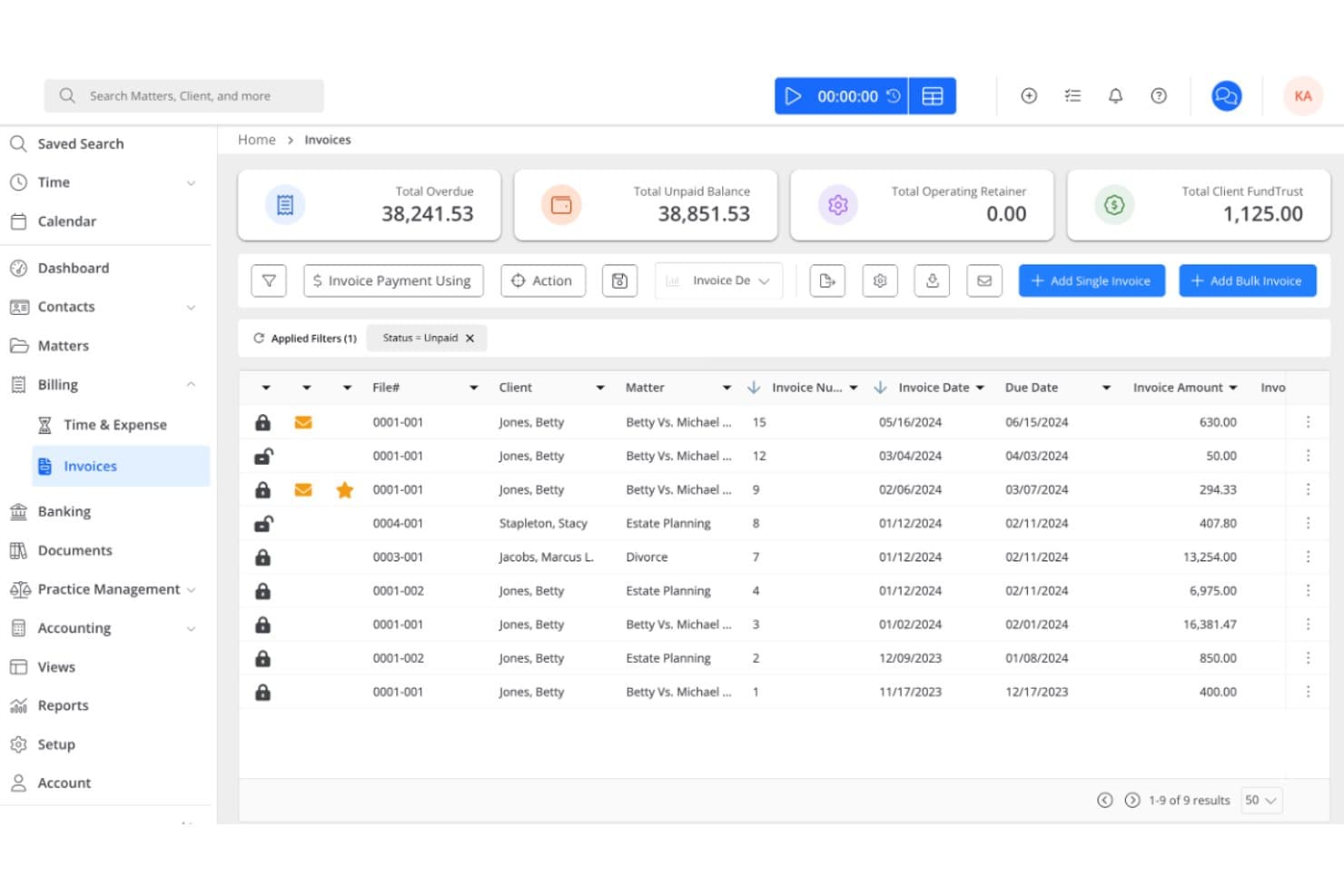
Rocket Matter tracks legal matters, automates billing, and manages trust accounting. Rocket Matter is a cloud-based legal practice management platform for solo attorneys and small firms who need to manage matters, automate billing workflows, and handle trust accounting in one place.
Who Is Rocket Matter Best For?
Rocket Matter is a strong fit for solo attorneys and small firm lawyers who need time tracking, billing, and trust accounting managed in one place.
Why I Picked Rocket Matter
I've included Rocket Matter in my top picks because its accounting depth goes well beyond what most legal practice management tools offer. The Elite plan includes a legal-specific chart of accounts, full account reconciliation across operating, trust, and credit card accounts, and accounts payable tracking with an automatic bank data feed. I especially appreciate how trust accounting is woven into the matter dashboard itself, so deposits, disbursements, and balances are visible right alongside case tasks and billing activity.
Rocket Matter Key Features
- Matter status boards: Track matter progress visually across active cases using configurable status boards tied to each matter.
- Statute-of-limitations calculation: Calculate statutes of limitations directly from the calendar tools within matter records.
- Document assembly: Generate routine legal documents from reusable templates with custom fields that pull matter data automatically.
- Conflict checking: Search matters, contacts, clients, and activities to surface potential conflicts before taking on new work.
Rocket Matter Integrations
Rocket Matter offers native integrations with Microsoft Outlook/Office 365, Google Calendar, QuickBooks Online, OneDrive, NetDocuments, Dropbox, Box, WebCal, and iCalendar. It also lists Zapier and provides a JSON API for custom integrations.
Pros and Cons
Pros:
- Reviewers praise document assembly and time capture
- Matter dashboards pair tasks, deadlines, and billing
- Trust accounting handles matter-level transactions
Cons:
- Stage-triggered task automation remains limited
- No dedicated medical-records tracking for PI cases
Learn more about Rocket Matter: Best for customizable matter management workflows
- Free demo available
- Pricing upon request
Visit WebsiteCustomer Rating:4.2/5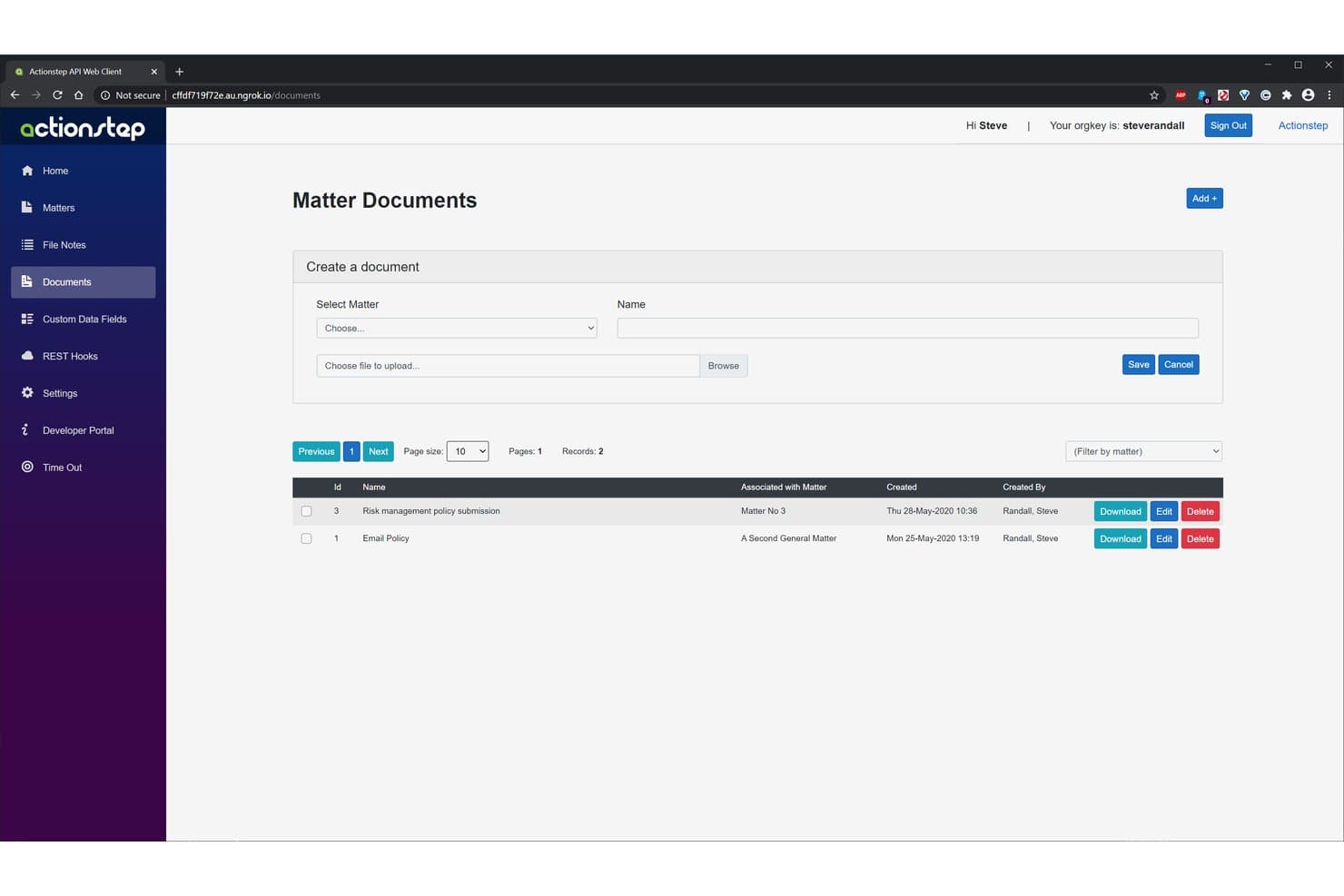
Actionstep offers a Matter Documents interface allowing users to create, upload, and manage documents associated with specific legal matters. Actionstep is a cloud-based legal practice management platform built for law firms that want to centralize matter tracking, document management, billing, and client intake in one configurable system.
Who Is Actionstep Best For?
Actionstep is a strong fit for law firms that need to tailor their matter management workflows to match how their practice actually runs.
Why I Picked Actionstep
I picked Actionstep as one of the best because it lets firms build matter workflows that mirror exactly how their practice operates, rather than forcing teams to adapt to a fixed process. I particularly like how you can configure matter types for personal injury work to capture claim numbers, incident details, and associated parties, then automate task assignments and status updates as a case moves forward. The document template library extends this further, letting my team generate complaints, incident reports, and discovery documents directly from matter data.
Actionstep Key Features
- Client portal: Lets firms share matter updates, documents, and billing information with clients through a secure, dedicated portal.
- Conflict check: Flags potential conflicts of interest before a new matter is opened or a client is onboarded.
- Trace – AI Time Capture: Passively records activity across Outlook, Word, and desktop tools, then maps that activity to matters and drafts billing narratives.
- Acumen – Embedded Analytics: Provides pre-built dashboards and role-based reporting with AI-powered insights drawn directly from your Actionstep data.
Actionstep Integrations
Actionstep offers documented integrations with Xero, Microsoft Office 365 through its Outlook add-in, Google Docs, Dropbox, Box, Google Drive, and Zapier. Its REST API and webhooks support custom integrations.
Pros and Cons
Pros:
- Document templates support complaints and discovery
- Centralized matter records clarify case progress
- Configurable workflows fit personal injury case processes
Cons:
- Saved-email search and document retrieval frustrate users
- Workflow setup demands substantial planning
Learn more about Actionstep: 10Best for Salesforce-based legal operations
Litify
- Free demo available
- Pricing upon request
Visit WebsiteCustomer Rating:4.2/5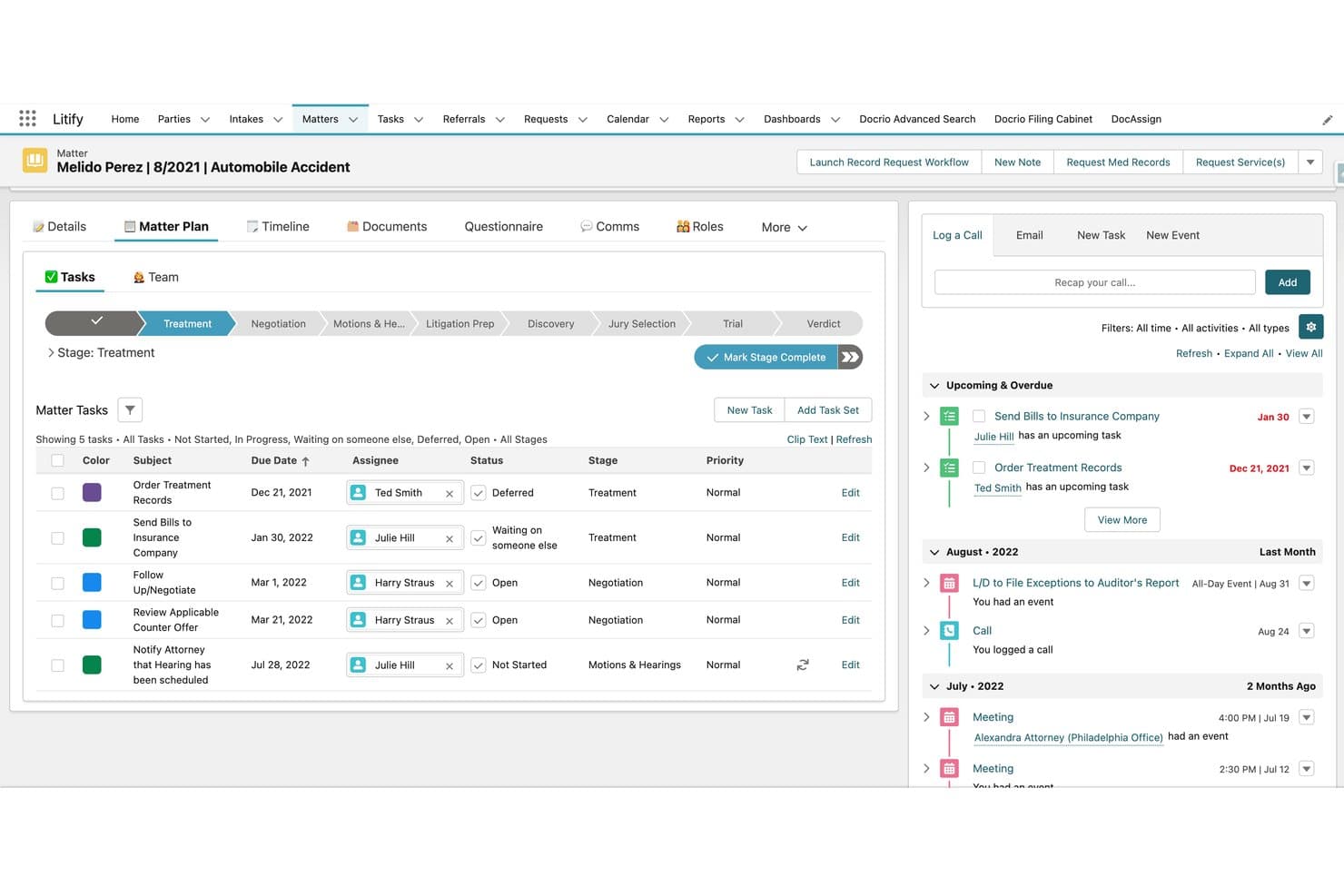
Litify manages personal injury cases, client intake, billing, and AI-powered workflows. Litify is a Salesforce-native legal platform built for law firms and legal departments that need to manage matters, client intake, documents, billing, and reporting in one place—with a strong focus on personal injury practice and AI-powered workflows.
Who Is Litify Best For?
Litify is a strong fit for personal injury law firms and legal departments that are already on Salesforce or want to build their legal operations on top of it.
Why I Picked Litify
I picked Litify as one of the best because it's the only legal case management platform built natively on Salesforce, which means your matter data, workflows, and reporting all live inside an enterprise-grade cloud infrastructure rather than a standalone system. I love how the ACE AI agents handle real litigation work, like drafting demand letters when damages approach policy limits or generating medical chronologies from encounter records, without leaving the platform.
Litify Key Features
- LitifyAI Call Intelligence: AI transcribes calls and voicemails, scores leads, and populates intake questionnaires with caller-linked answers saved directly to Litify records.
- Case Activity Timeline: A chronological matter history organizes files, emails, and calendar events, with filtering by activity type across the full matter lifecycle.
- Legal spend management: AI reviews invoices line by line against preset billing rules and budgets, flags inconsistencies, and applies automatic discounts to late invoices.
- No-code workflow configuration: Users can build and modify matter workflows, automation rules, and reporting dashboards without writing any code.
Litify Integrations
Litify is built on Salesforce and has documented integrations with Outlook, QuickBooks, Accounting Seed, DocuSign, AssureSign, Ironclad, NetDocuments, iManage, Case Status, and CalendarRules. An API is available for custom integrations.
Pros and Cons
Pros:
- AI builds source-linked medical chronologies
- Searchable documents retain version history
- Configurable matter stages surface case progress
Cons:
- Migration and customization can burden smaller teams
- Busy screens complicate matter navigation
Learn more about Litify:
Other SmartAdvocate Alternatives
Here are a few additional options that didn’t make my shortlist but are still worth checking out:
- 11Amicus AttorneyBest for rule-based linked court deadlines
- 12PracticePantherBest for matter-linked trust accounting
- 13CARET LegalBest for guided legacy-system migration
- 14CasePeerBest for PI treatment and lien tracking
- 15Tabs3Best for firms already using Tabs3 billing
- 16NeosBest for cited medical chronologies and demands
- 17DocketWiseBest for immigration firms tracking USCIS cases
- 18LexzurBest for firms needing on-server hosting
- 19MerusCaseBest for firms replacing legacy case systems
- 20SimpleLawBest for finding paralegals and co-counsel
Related Reviews
How I Evaluate SmartAdvocate Alternatives
I split my evaluation into three parts. First, core functionality: alternatives must organize the full matter lifecycle and store and generate case-linked documents—these carry the most weight. Second, I look for standout features like litigation workflow automation and medical records tracking. Third, I consider onboarding depth and pricing transparency.
Core Functionality (Table Stakes For This List)
When I'm selecting tools for my list, I score each one on a scale from 0 (does not offer the functionality) to 5 (excels in this area) for each core functionality listed below. I then convert the total into a percentage to help assess each tool's overall fit, with extra weight on any functionalities I’ve deemed essential.
- Matter Tracking (Essential): I look for clear case stages, timelines, and key dates, so staff can see what needs attention across a growing caseload.
- Document Management (Essential): I assess whether teams can organize case files, find records, and generate routine documents from matter details and templates.
- Tasks & Deadlines: I check for matter-linked reminders, assigned tasks, and rule-based deadlines that help staff manage filing dates and follow-ups.
- Contacts & Communications: I look for client and third-party records linked to matters, with searchable communication histories for handoffs and status checks.
- Intake & Leads: I evaluate how forms, referrals, and follow-ups move a prospective client from first contact into an active matter.
- Billing & Finances: I check for matter-linked time, expenses, invoices, and trust accounting that support routine financial reviews.
Once I have a list of tools that meet the criteria, I consider what sets each platform apart.
Differentiating Factors (What Sets Vendors Apart)
Here's how I compare and contrast different vendors:
Standout Features
I look for litigation workflow automation that triggers tasks based on case milestones—like sending a demand letter once treatment ends—since manual tracking breaks down as caseloads grow. Medical provider and records tracking matters just as much; I evaluate whether a platform has dedicated modules for treatment histories and damages, not just generic notes fields. I also check for referral and co-counsel tracking, which firms with active referral networks need to manage fee splits accurately.
Beyond Features
I evaluate how each platform handles data migration, since moving years of case histories and documents from a legacy system can stall a rollout if the vendor only offers self-service imports. Pricing structure matters too—per-user fees hit small firms differently than flat-rate plans, and hidden costs for modules like AI or document generation can shift the total well beyond the listed price. I also check whether a tool integrates with accounting platforms like QuickBooks and court e-filing services, because gaps there force staff into manual data entry between systems.
Why Look for SmartAdvocate Alternatives?
While SmartAdvocate is a good choice of legal case management software, some teams look elsewhere when its setup or buying process doesn’t match their needs. You might be looking for a SmartAdvocate alternative because:
- You want published pricing to compare costs before scheduling a demo.
- You need practice-specific workflows that match the matters your team handles.
- You prefer cloud-only access without a server-based deployment option.
- You need more information about available integrations before committing to a platform.
If any of these sound like you, you’ve come to the right place. My list contains several legal case management software options that are better suited for teams facing these challenges with SmartAdvocate and looking for alternative solutions.
SmartAdvocate Key Features
Here are the key features of SmartAdvocate to help you compare it with alternative options:
- Intake: SmartAdvocate supports intake workflows for bringing prospective clients and their matters into the system. This gives teams a place to manage intake alongside case information.
- Case tracking: The platform organizes case information and tracks matters through litigation. Teams can use it to review case progress and keep matter details together.
- Document assembly: SmartAdvocate can generate documents using case information. This supports routine document preparation without requiring staff to enter matter details from scratch each time.
- Deadline management: The platform includes tools for managing case deadlines. Teams can use them to monitor key dates and keep filing and follow-up obligations visible.
- Automated case procedures: SmartAdvocate supports automated procedures for cases. These can help teams manage recurring steps in a matter’s workflow.
- Reporting: Reporting tools let teams review case information and activity. Firms can use reports to check matters and support internal workflow oversight.
- Medical-record summaries: SmartAdvocate includes tools for summarizing medical records. This can help personal injury teams review records as part of case preparation.
- Client portal: The client portal provides a way for clients to access case-related information. It gives firms a dedicated channel for client interaction within the platform.
- E-signatures: SmartAdvocate includes e-signature tools for signing documents electronically. Teams can use them for documents that require client or other party signatures.
- Cloud or server access: Firms can choose cloud-based or server-based access. This gives teams a deployment option that can fit their existing technology setup.
Cost & Pricing of SmartAdvocate Alternatives
Pricing varies by features, team size, add-ons, and deployment needs. Here are the typical price ranges and features you can expect from SmartAdvocate alternatives:
Plan Comparison Table for SmartAdvocate Alternatives
| Plan Type | Average Price | Common Features |
|---|---|---|
| Plan TypeFree Plan | Average Price$0 | Common FeaturesFree trials, limited AI or intake tools, basic account access, and no full case management. |
| Plan TypePersonal Plan | Average Price$40-$60/user/month | Common FeaturesMatter and contact management, calendar and task tracking, document storage, and time entry. |
| Plan TypeBusiness Plan | Average Price$60-$125/user/month | Common FeaturesPersonal plan features, workflow automation, client portals, document generation, and reporting. |
| Plan TypeEnterprise Plan | Average Price$100-$200/user/month | Common FeaturesBusiness plan features, advanced permissions, custom integrations, dedicated onboarding, and tailored support. |