

Ao navegar pelo mundo frequentemente avassalador da comparação de documentos jurídicos, compreendo as complexidades que enfrenta. Estes fornecedores de software de comparação de documentos jurídicos retiram-lhe esse trabalho pesado dos ombros.
Simplificam o processo de comparação e análise de vários documentos jurídicos. Mais do que simples ferramentas que poupam tempo, reduzem o risco de erros, têm funcionalidades de arrastar e largar, rentabilidade, versões com alterações destacadas fáceis de compreender, módulo OCR, aumentam a produtividade e proporcionam tranquilidade. Com estas ferramentas, pode dizer adeus à laboriosa comparação manual de documentos e dar as boas-vindas a uma forma de trabalhar mais eficiente, precisa e fiável.
Why Trust Our Software Recommendations
6,700+
Reviews
20
Industry experts
16+
Evaluation factors
14
Years
Our team has been testing and reviewing software since 2012. As legal practice leaders ourselves, we know how difficult—and important—it is to choose the right software.
For this guide, we evaluated tools using hands-on testing and independent research, scoring tools using our selection criteria.
Our reviews reflect our human editorial judgment, not a sales pitch.
Tabela de comparação: software de comparação de documentos jurídicos
Esta tabela de comparação resume os detalhes de preços das minhas principais escolhas de software de comparação de documentos jurídicos.
| Tool | Best For | Trial Info | Price | ||
|---|---|---|---|---|---|
| 1 | Best for PDF comparison within DMS workflows | 14-day free trial | From $10.99/user/month | Website | |
| 2 | Best for PDF comparison bundled with AI clause review | 7-day free trial | From $19.99/user/month (billed annually) | Website | |
| 3 | Best for redlining within existing Word workflows | Free plan available | Pricing upon request | Website | |
| 4 | Best for in-house contract negotiation tracking | Free plan available | Pricing upon request | Website | |
| 5 | Best for in-house contract redline and AI benchmarking | Free demo available | Pricing upon request | Website | |
| 6 | Best for Am Law 100-scale redline standardization | Free demo available | Pricing upon request | Website | |
| 7 | Best for DMS-embedded redline and AI change review | Free demo available | Pricing upon request | Website | |
| 8 | Best for an easy-to-navigate comparison viewer | 5-day free trial | From $10.75/user/month | Website | |
| 9 | Best for cross-format redlines on a free trial | Free plan available; 14-day free trial | From $20/user/month (billed annually) | Website | |
| 10 | Best for contract redlining against firm precedent | Free demo available | Pricing upon request | Website |




Avaliações do melhor software de comparação de documentos jurídicos
Abaixo encontram-se os meus resumos detalhados do melhor software de comparação de documentos jurídicos que integrou a minha lista restrita. As minhas avaliações oferecem uma análise detalhada das principais funcionalidades, dos prós & contras, das integrações e dos casos de utilização ideais de cada ferramenta, para o ajudar a encontrar a melhor opção para si.
 Best for PDF comparison within DMS workflows
- 14-day free trial
- From $10.99/user/month
Visit WebsiteCustomer Rating:4.6/5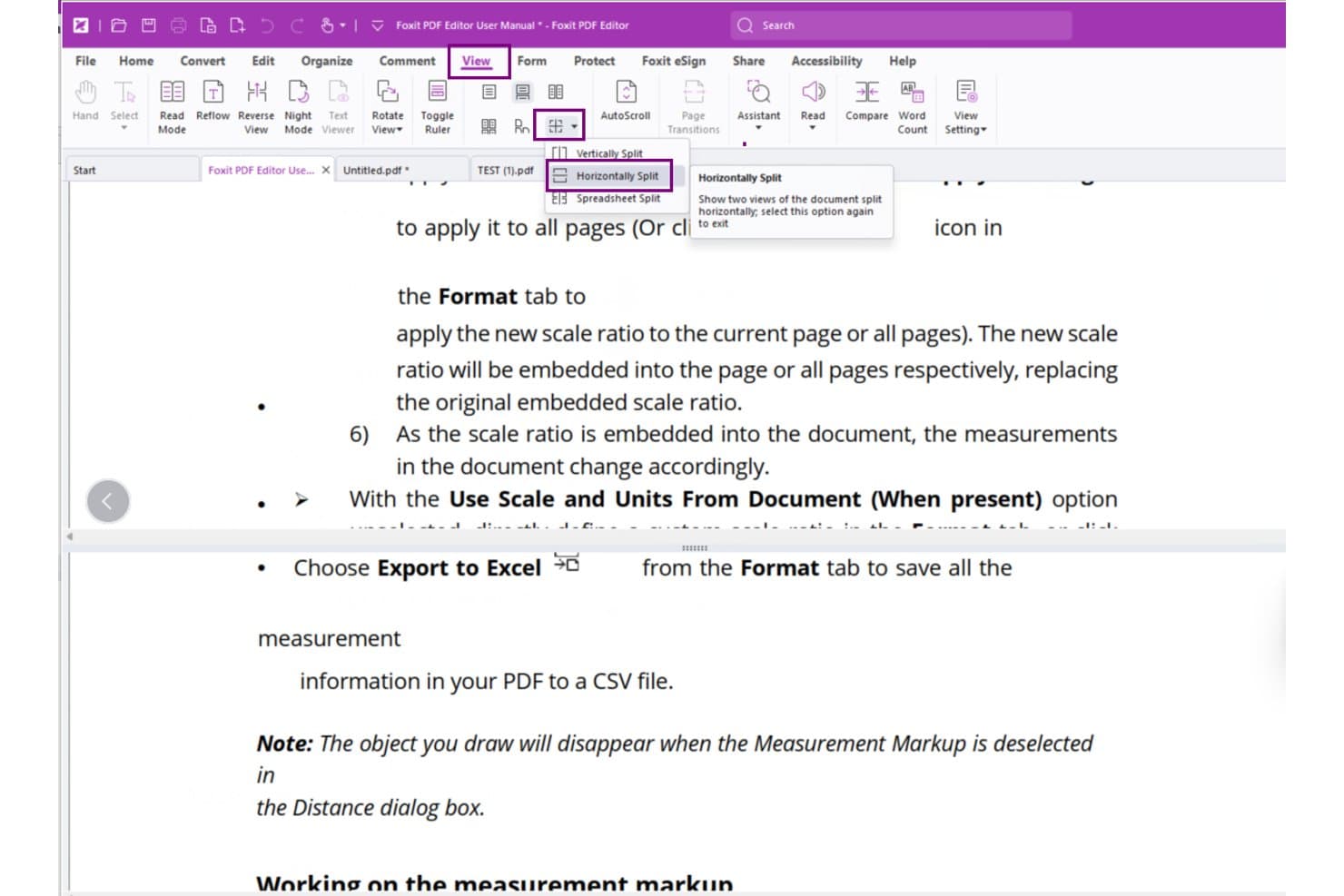
Foxit PDF Editor lets users view documents side by side with Horizontally Split. Foxit PDF Editor is a PDF editing and management tool that includes version comparison, redline markup output, metadata scrubbing, Bates numbering, and direct integration with legal DMS platforms like iManage and NetDocuments.
Who Is Foxit PDF Editor Best For?
Foxit PDF Editor is a strong fit for legal teams already working inside iManage, NetDocuments, or SharePoint who need PDF comparison built into their existing DMS workflow.
Why I Picked Foxit PDF Editor
I've included Foxit PDF Editor in my top picks because it's the only tool on this list that lets you open, compare, and save PDFs without ever leaving iManage or NetDocuments. The Compare dialog's "Open from ECM" button pulls both versions directly from your DMS, and the 2026.2 cross-page comparison algorithm cuts down on false change detections in heavily revised documents.
Foxit PDF Editor Key Features
- Metadata and hidden data removal: The Sanitize Document tool removes all hidden information in one step, with options to selectively strip metadata, bookmarks, form fields, embedded scripts, and more.
- Bates numbering: Apply Bates numbers to PDF sets directly within the editor, including via plain-language commands introduced in v2025.3.
- PDF Action Inspector: Scans documents for embedded JavaScript and self-modifying behavior that could bypass redaction, added in v2026.1.
- Automatic hidden data removal on save: Configure Foxit to strip hidden information automatically each time a file is saved or closed, reducing the risk of accidental metadata disclosure.
Foxit PDF Editor Integrations
Foxit PDF Editor offers 10 documented native DMS integrations, including iManage Work, NetDocuments, SharePoint, Worldox, eDOCS DM, Documentum, Epona DMSforLegal, and Alfresco. Its Compare dialog can open both document versions directly from connected systems.
Pros and Cons
Pros:
- Metadata scrubbing supports safer disclosure
- Clear side-by-side redline summaries
- Accurate cross-page PDF change detection
Cons:
- No moved-text or batch comparison
- PDF-only comparison limits Word workflows
Learn more about Foxit PDF Editor: Best for PDF comparison bundled with AI clause review
- 7-day free trial
- From $19.99/user/month (billed annually)
Visit WebsiteCustomer Rating:4.5/5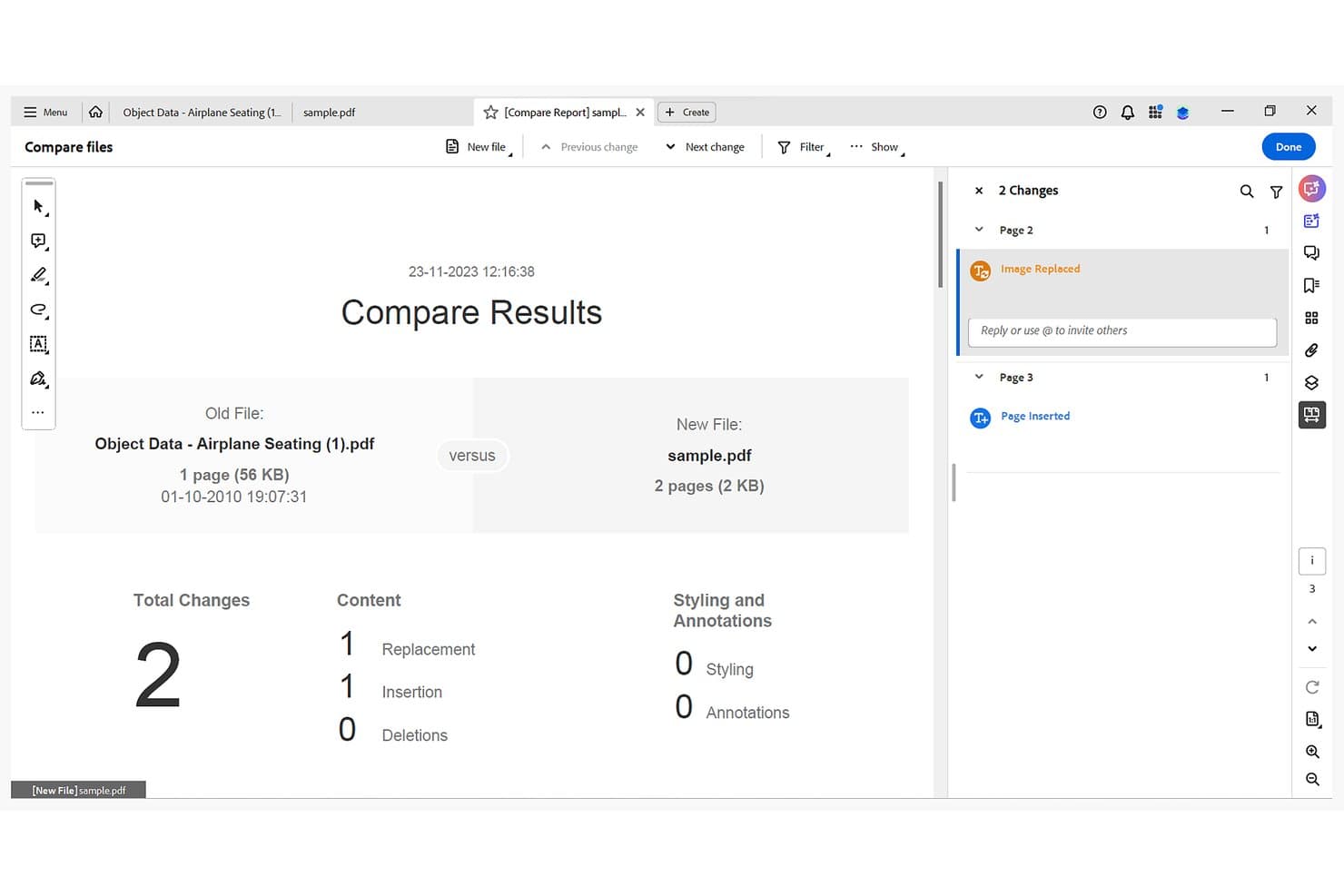
Adobe Acrobat highlights replacements and insertions between two PDFs. Adobe Acrobat is a PDF suite that includes document comparison, redaction, e-signature, OCR, and AI-powered clause review across legal workflows.
Who Is Adobe Acrobat Best For?
Adobe Acrobat is a strong fit for legal teams that are already standardized on Acrobat Pro and want PDF comparison, redaction, and AI clause review without adding another tool to their stack.
Why I Picked Adobe Acrobat
I've included Adobe Acrobat in my top picks because it's the only tool on this list that bundles PDF comparison directly with AI clause review, so you're not switching between platforms mid-review. Compare Files flags text, image, formatting, and header differences side by side with a summary count of insertions, deletions, and replacements, while AI Assistant layers on clause extraction and risk-language identification in the same workflow. I particularly like that scanned documents get pixel-level comparison, which holds up well when you're working with older contract versions that were never digitally authored.
Adobe Acrobat Key Features
- Document-type comparison modes: Choose from Autodetect, Reports, Presentation Decks, or Scanned Documents modes to tailor how Acrobat analyzes your specific file type.
- Metadata sanitization: Remove hidden metadata, embedded content, and sensitive information from PDFs using the built-in redaction and sanitize workflow.
- AI Assistant clause extraction: Ask questions and extract key clauses from contracts, with AI-generated answers linked back to source locations in the document.
- Enterprise admin controls: Manage user access, SSO, SCIM provisioning, and AI feature governance from a centralized Admin Console.
Adobe Acrobat Integrations
Adobe Acrobat has native integrations across the Microsoft ecosystem, including Microsoft 365, Teams, SharePoint, OneDrive, and Outlook, plus Google Drive, Dropbox, and Box. It also connects with iManage Work and NetDocuments for file open/save, and offers APIs for custom ERP, CRM, and CLM connections.
Pros and Cons
Pros:
- Bundles comparison with redaction and OCR
- AI clause review flags potential risk language
- Pixel-level comparison supports scanned documents
Cons:
- OCR errors can distort comparison results
- No native Word tracked-changes output
Learn more about Adobe Acrobat: Best for redlining within existing Word workflows
- Free plan available
- Pricing upon request
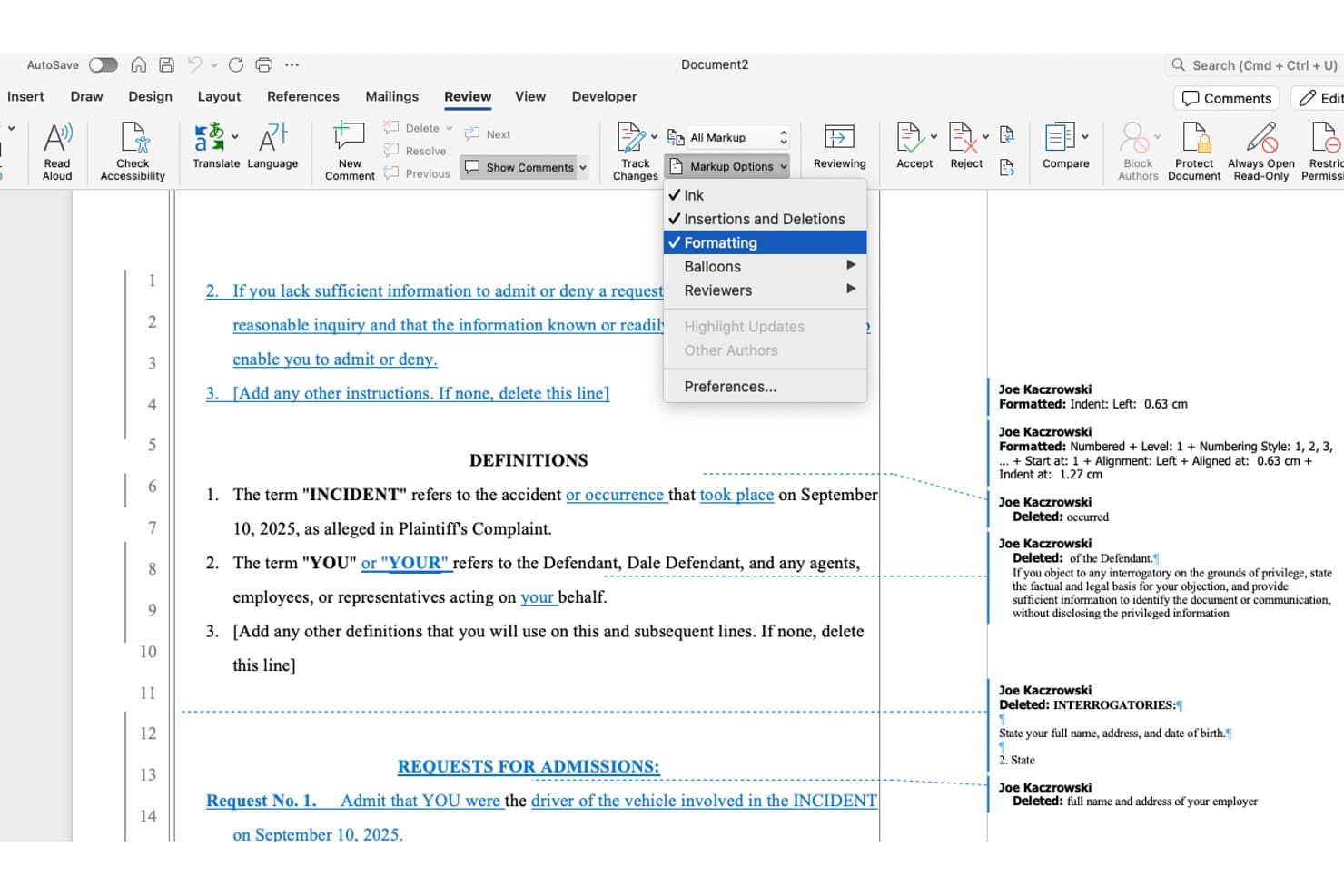
Microsoft Word tracks formatting and deletion changes with markup annotations. Microsoft Word is a word processing application with a built-in legal blackline Compare feature that identifies insertions, deletions, formatting changes, and moved text between two document versions.
Who Is Microsoft Word Best For?
Microsoft Word's Compare feature is a strong fit for litigation and transactional attorneys who already work in Word daily and need a reliable redlining tool without adding new software to their stack.
Why I Picked Microsoft Word
I've included Microsoft Word in my top picks because if your firm already lives in Word daily, its built-in legal blackline Compare feature means you don't need a separate tool for standard redlining work. I like that Compare produces a clean third document showing every insertion, deletion, and formatting change, and that the output lands directly in Track Changes so you can accept or reject edits one by one. The granular comparison settings, including character-level detection and separate toggles for tables, footnotes, and headers, let you cut through noise on contracts where minor formatting shifts would otherwise clutter the markup.
Microsoft Word Key Features
- Document Inspector: Scans your document and removes hidden data including tracked changes, comments, personal information, and custom XML before you share it externally.
- iManage and NetDocuments integration: Both DMS platforms surface Word's Compare engine directly inside their Word add-ins, letting you run redlines without leaving your document management environment.
- Custom markup styles: Configure insertion, deletion, moved-text, and table-cell colors and formats through the Advanced Track Changes Options dialog to match your firm's redline conventions.
- Copilot AI contract analysis: When available on an eligible Microsoft 365 plan, Copilot summarizes differences between contract versions and flags unusual clauses as a structured table inside Word.
Microsoft Word Integrations
Microsoft Word has native integrations across the Microsoft ecosystem, including Microsoft 365, OneDrive, SharePoint, and Outlook. Its Compare feature also integrates with iManage Work and NetDocuments through their Word add-ins.
Pros and Cons
Pros:
- Track Changes supports individual edit review
- Granular settings reduce formatting noise
- Built-in legal blackline creates third document
Cons:
- PDF conversion can create false differences
- Desktop-only comparison excludes web workflows
Learn more about Microsoft Word: Best for in-house contract negotiation tracking
- Free plan available
- Pricing upon request
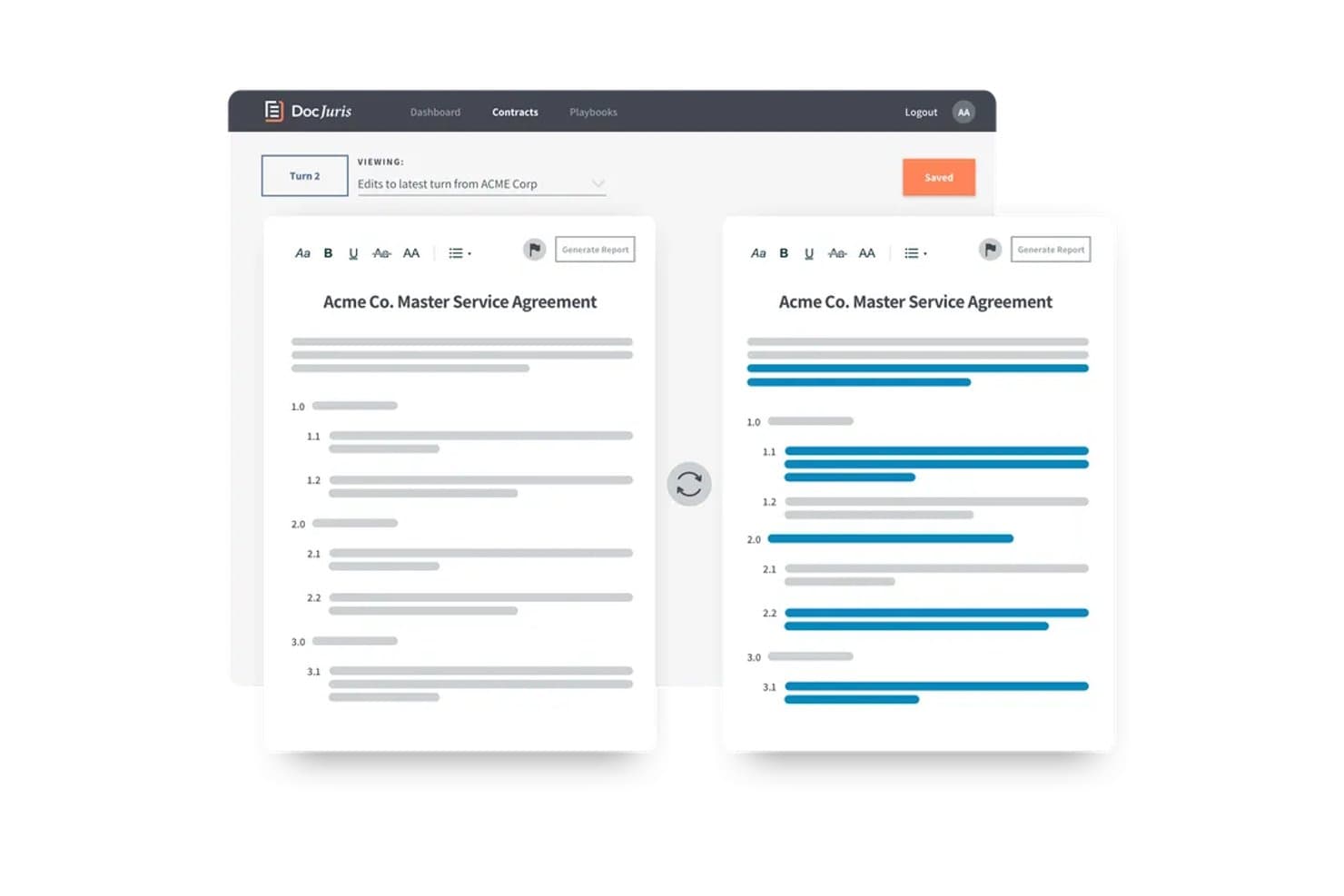
DocJuris highlights redlined edits side-by-side for fast contract review. DocJuris is an AI contract review and negotiation platform for in-house legal teams that combines document comparison, turn tracking, redlining, and playbook-driven clause screening.
Who Is DocJuris Best For?
DocJuris fits in-house legal teams at mid-market to enterprise companies that manage high volumes of contract negotiations and need to track every turn across the deal lifecycle.
Why I Picked DocJuris
I've included DocJuris in my top picks because it's the only tool on this list that treats document comparison as part of a live negotiation workflow rather than a one-off task. I like how turn tracking automatically compares each new version against the previous one, color-coding changes by party so you can spot unnoticed modifications at a glance. The Negotiation History feature takes this further, producing a clause-by-clause change log across every draft in a folder, delivered as a Word report and an Excel heatmap.
DocJuris Key Features
- Counterparty Workspace: A shared deal room that gives opposing parties access via magic link, with no account required, to review versioned documents and track each one's status.
- Document Checker: A pre-signature review tool that flags cross-reference errors, defined-term problems, conflicting dates, and punctuation issues in Word files.
- Free Contract Email Agent: Send any Word or PDF contract to a DocJuris email address and receive a risk summary or marked-up Word file back within minutes, no signup needed.
- Mixed-format comparison: Compare Word against PDF, PDF against PDF, or locked and encrypted files against standard documents, with automatic conversion handled by the platform.
DocJuris Integrations
DocJuris supports SharePoint, NetDocuments through Power Automate, Google Drive, Dropbox, Box, OneDrive, Salesforce, and Microsoft 365. It also offers an API for custom connectors and Zapier.
Pros and Cons
Pros:
- Compares locked PDFs with Word files
- Produces native Word tracked-change redlines
- Tracks negotiation turns across every draft
Cons:
- Misses embedded objects and metadata changes
- PDF conversion can create noisy redlines
Learn more about DocJuris:
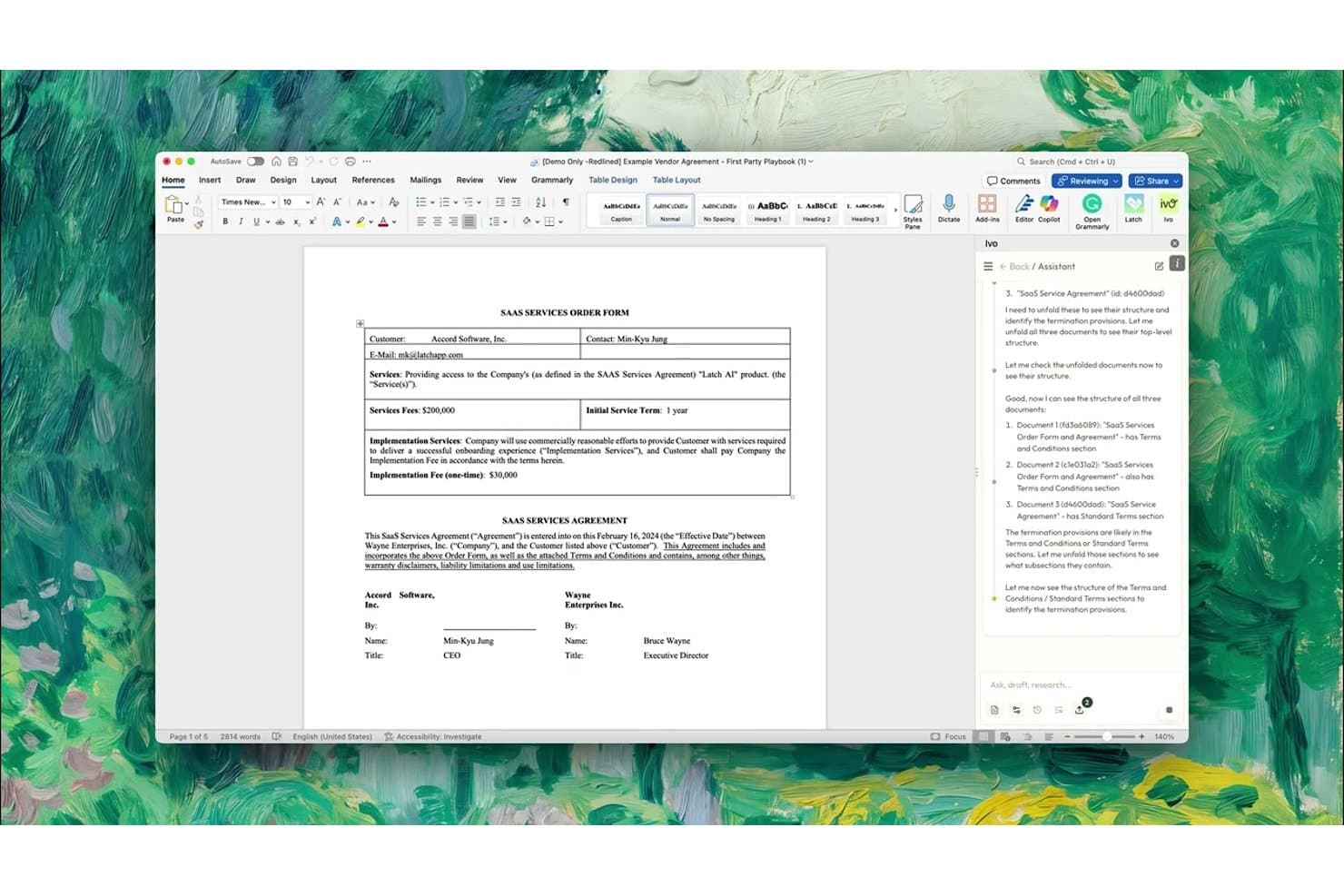
Ivo's AI assistant analyzes and compares legal document structures side by side. Ivo is an AI contract review and redlining platform that works inside Microsoft Word and Google Docs, offering clause-level benchmarking, version comparison, and contract repository intelligence for in-house legal teams.
Who Is Ivo Best For?
Ivo is built for in-house legal teams at mid-market and enterprise companies that need AI-driven contract redlining and clause benchmarking directly inside Word or Google Docs.
Why I Picked Ivo
I've included Ivo in my top picks because it's one of the few tools that brings AI-driven contract redlining and clause benchmarking directly into Word and Google Docs, where in-house teams already work. Its Compare Versions feature is especially useful: upload the version you sent to the counterparty before their latest markup, and Ivo isolates only the new changes in that round, cutting through noise in multi-round negotiations. I also like how it benchmarks clauses against your own signed contracts, filtered by contract type and governing law, so you can see exactly where a counterparty's position deviates from your historical norms.
Ivo Key Features
- AI contract repository: Ivo Intelligence automatically indexes your signed contracts without manual tagging, then builds composite agreements that incorporate amendments and track how terms have changed over time.
- Multi-playbook review: Run up to three playbooks simultaneously during a single review, such as an MSA, DPA, and regional overlay, so every relevant standard is applied in one pass.
- Bulk document upload in Assistant: Upload multiple PDF or DOCX files at once and prompt Ivo to produce a comparison table of differences across all versions.
- DMS and cloud storage sync: Ivo connects directly to NetDocuments, SharePoint, OneDrive, Box, and Google Drive, keeping your contracts in place with no migration or re-filing required.
Ivo Integrations
Ivo offers native integrations with Microsoft Word, Google Docs, NetDocuments, SharePoint, OneDrive, Box, Google Drive, Salesforce, and DocuSign. It also provides API and MCP access for custom connections.
Pros and Cons
Pros:
- Produces tracked-change redlines for contract review
- Benchmarks clauses against historical agreements
- Isolates new counterparty changes between rounds
Cons:
- Formatting retention and occasional hallucinations require review
- Cannot insert redlines into PDF files
Learn more about Ivo: Best for Am Law 100-scale redline standardization
- Free demo available
- Pricing upon request
Litera Compare highlights redlined document changes side by side. Litera Compare is a document comparison tool built for legal workflows, offering deterministic redlining, multi-format support, customizable markup profiles, batch comparison, and deep integration with document management systems like iManage and NetDocuments.
Who Is Litera Best For?
Litera Compare is a strong fit for large law firms that need centrally enforced redline standards across dozens or hundreds of attorneys.
Why I Picked Litera
Litera Compare earns its spot on my shortlist because its centrally locked comparison profiles solve a real standardization problem at scale. At Am Law 100 firms, where dozens of attorneys might each run their own redlines differently, admins can enforce a single markup style across the entire firm. I also rate its moved-text detection highly: rather than flagging a repositioned clause as a deletion and an insertion, it surfaces the move as its own styled change, which cuts review time on heavily restructured drafts.
Litera Key Features
- Batch and bulk comparison: Run one-to-one, one-to-many, or bulk comparisons across multiple documents from the desktop app, web, or directly within your document management system.
- Lito AI change summaries: Lito layers on top of the comparison engine to summarize changes, flag risk, and suggest clause-level rewrites using your firm's approved language.
- Multi-format module support: Dedicated comparison modules handle Word, Excel, PowerPoint, and PDF files, with OCR processing available for scanned documents through the Word module.
- Right-click DMS compare: Attorneys can right-click documents directly inside iManage or NetDocuments and open a comparison in Litera Platform without leaving their document management workflow.
Litera Integrations
Litera Compare offers native integrations with NetDocuments, iManage Work, OpenText eDOCS, Worldox, SharePoint, Microsoft 365, Google Docs, and Google Drive. Litera Compare Server also provides an API for custom integrations.
Pros and Cons
Pros:
- Locked profiles standardize firmwide redlines
- Catches tables, images, and embedded objects
- Moved-text detection prevents misleading redlines
Cons:
- Native PDF comparison lacks OCR and images
- Windows desktop limits platform flexibility
Learn more about Litera: Best for DMS-embedded redline and AI change review
- Free demo available
- Pricing upon request
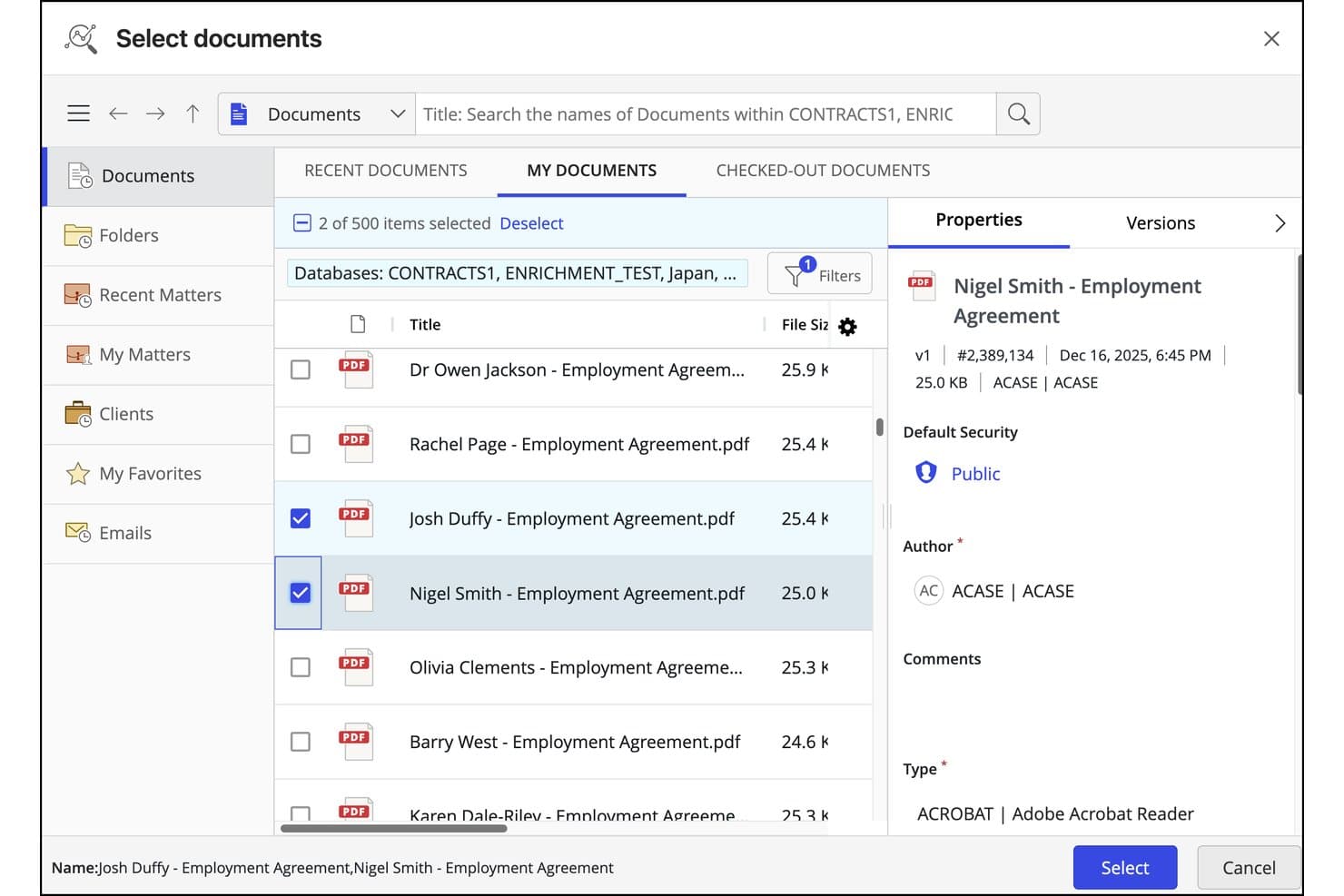
iManage Work lets users select and compare multiple documents side by side. iManage Work is a legal document and email management system (DMS) with built-in document comparison via its native Office-based Compare tool and AI-powered redline analysis through Ask iManage.
Who Is iManage Work Best For?
iManage Work is a strong fit for law firms and legal teams already running iManage as their DMS who want document comparison built into the same platform where they manage matters.
Why I Picked iManage Work
I've included iManage Work in my top picks because it's the only tool on this list that embeds document comparison directly inside a full DMS, so there's no jumping between platforms to compare versions. I particularly like Ask iManage's AI redline analysis, which launched in January 2026: it generates exportable Word or PDF redlines with a structured change table, plain-language summaries, and risk categorization that separates substantive edits from formatting noise. That last part matters when you're reviewing a heavily marked-up contract and need to spot the clause-level changes that actually carry legal risk.
iManage Work Key Features
- Version comparison from the DMS: Select any two saved document versions directly from the iManage version history and run a comparison without downloading local copies.
- Playbook analysis: Check contracts against your organization's pre-approved positions to flag deviations from standard language.
- Exportable change table: Ask iManage generates a structured change table alongside the redline, which you can export to Word or Excel and save back into the matter file.
- Microsoft 365 ribbon integration: Run comparisons and access Ask iManage directly from the iManage ribbon inside Word, PowerPoint, and Excel without switching applications.
iManage Work Integrations
iManage Work offers native integrations across Microsoft 365, including Word, PowerPoint, Excel, Outlook, Teams, and Copilot. It also provides an open API, Power Automate connector, and 200+ technology partner integrations, including Litera, Draftable, and Diffchecker.
Pros and Cons
Pros:
- Exports redlines and structured change tables
- AI prioritizes substantive clause changes
- Compares saved versions inside matter workflows
Cons:
- Scanned documents need separate tools
- No native batch comparison support
Learn more about iManage Work: Best for an easy-to-navigate comparison viewer
- 5-day free trial
- From $10.75/user/month
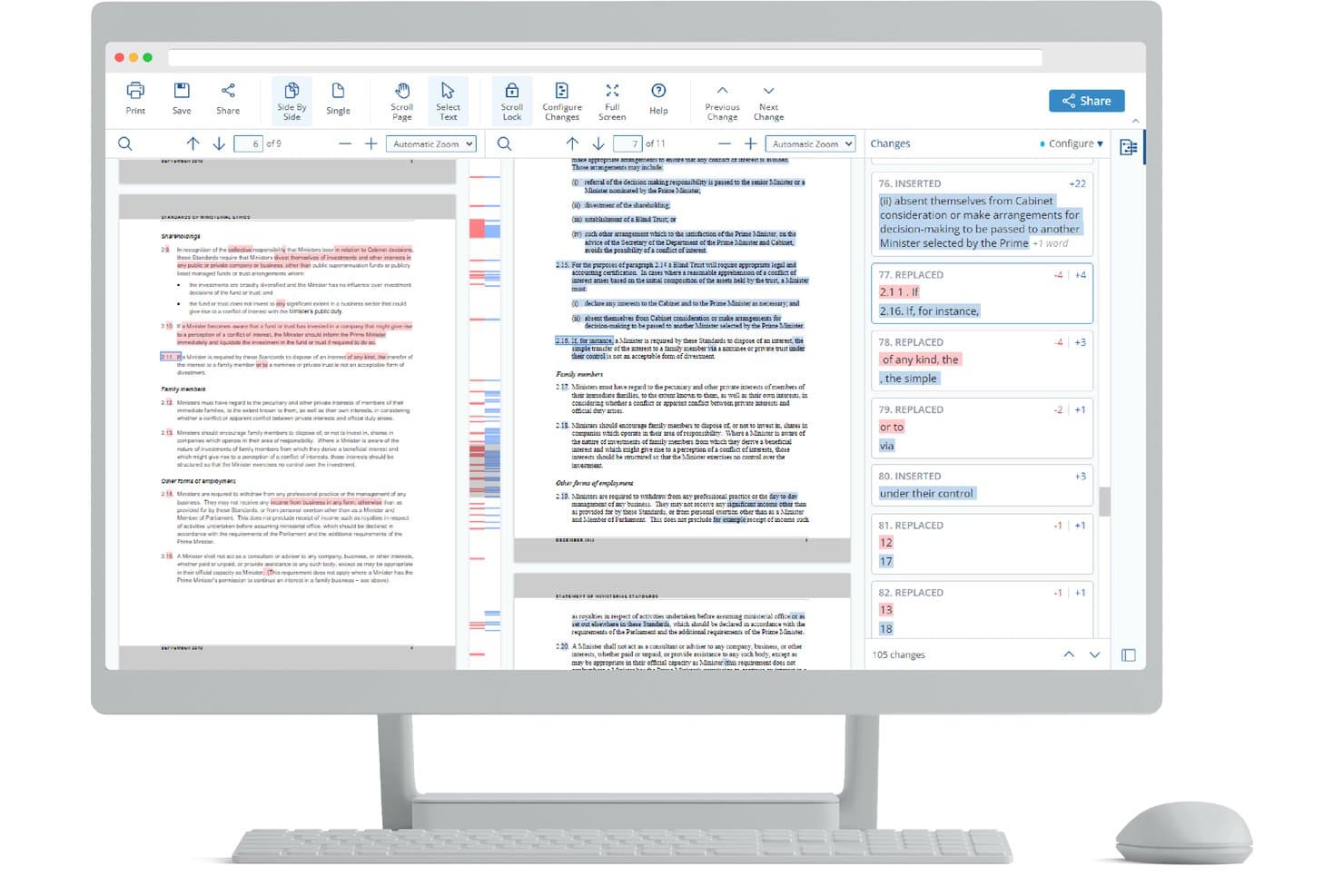
Draftable highlights tracked changes side-by-side for legal document review. Draftable is a Windows desktop document comparison tool built for law firms that supports redlining, multi-format comparison across Word, PDF, PowerPoint, and Excel, and legal-specific outputs like Departures Tables and Bulk Compare.
Who Is Draftable Best For?
Draftable is a strong fit for law firms and legal teams that want a document comparison tool attorneys and paralegals can pick up and use without formal training.
Why I Picked Draftable
Draftable earns its spot on my shortlist because the comparison viewer is genuinely one of the clearest I've used. I love that you can switch between side-by-side, inline, and 3-pane views without losing your place, and the filterable change list lets you tag and annotate individual edits before they flow into a Departures Table export. The "Adjust Comparison" dropdown is a small but meaningful detail: you can swap file versions or change your redline profile without closing the viewer and starting over.
Draftable Key Features
- Bulk Compare: Runs hundreds of comparisons at once in Pairs, One-to-Many, or Timeline mode, with results exportable as a combined Departures Table.
- Redline in Email: Redlines email threads directly inside Outlook, with accept all, reject all, and shared mailbox support.
- Redline Profiles: Lets firms customize color, highlight, and text style for each change type, with profiles lockable by administrators via Group Policy.
- AI-Ready Redline export: Generates a locally processed text summary of insertions, deletions, and moves for pasting into AI tools like Copilot, Harvey, or CoCounsel.
Draftable Integrations
Draftable has native integrations with iManage, NetDocuments, SharePoint, Worldox, Epona 365, Microsoft Office, and Outlook. Its REST API supports custom integrations, with hosted and self-hosted deployment options.
Pros and Cons
Pros:
- Bulk comparison supports high-volume legal review
- Moved-text detection clarifies relocated contract language
- Easy navigation across three comparison views
Cons:
- Metadata scrubbing requires a separate product
- Windows desktop support excludes macOS users
Learn more about Draftable: Best for cross-format redlines on a free trial
- Free plan available; 14-day free trial
- From $20/user/month (billed annually)
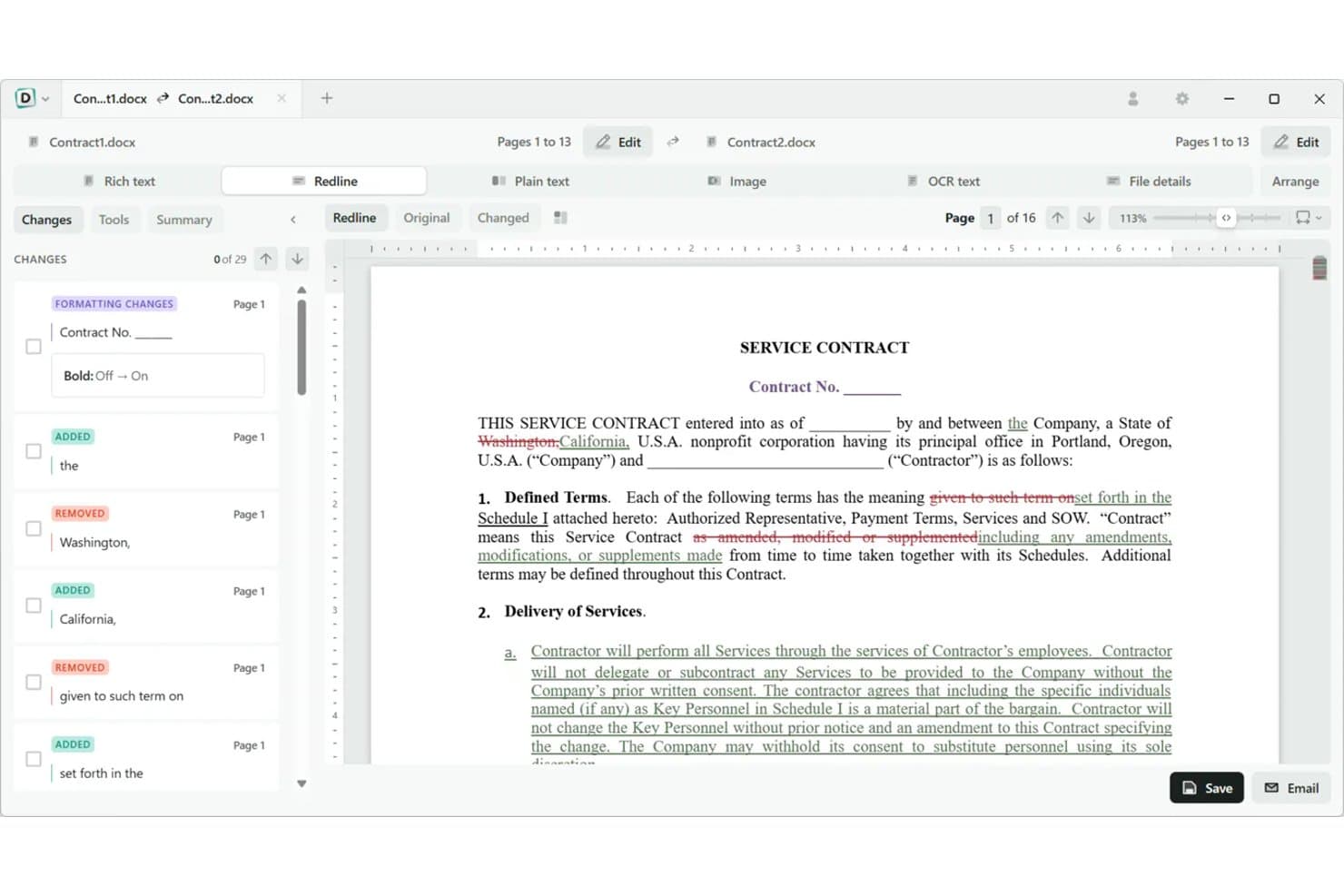
Diffchecker highlights added, removed, and formatted text side by side. Diffchecker is a document comparison tool that supports cross-format redlining across Word, PDF, Excel, PowerPoint, and scanned files, with tracked-changes export and customizable markup output.
Who Is Diffchecker Best For?
Diffchecker suits contract managers and small legal teams who need to compare documents across multiple formats—Word, PDF, and Excel—without committing to an expensive enterprise contract.
Why I Picked Diffchecker
I've included Diffchecker in my top picks because it handles cross-format comparison better than most tools at this price point, letting you run a Word-vs-PDF redline without any reformatting prep. I particularly like the native Word Tracked Changes export, which means a redline you produce in Diffchecker drops cleanly into a contract draft your counterparty can review. The offline desktop app also lets you compare scanned, OCR-processed PDFs without files ever touching a server.
Diffchecker Key Features
- Cross-format document comparison: Compare files across Word, PDF, Excel, PowerPoint, and scanned PDFs in any combination without reformatting them first.
- Moved-content detection: Identifies text that has been relocated within a document, not just added or deleted, so no changes slip through a review.
- Batch and folder comparison: Compare hundreds of files at once using recursive folder comparison, available on desktop tiers.
- Customizable redline styles: Set colors, text styling, and saved settings profiles so your team's markup output stays consistent across matters.
Diffchecker Integrations
Diffchecker has documented integrations with iManage Cloud, Microsoft Word, and Git, with the Word add-in and Git integration available on Enterprise. It also offers an API and CLI for custom workflows.
Pros and Cons
Pros:
- Detects moved content and formatting changes
- Exports native Word tracked changes
- Compares Word, PDF, Excel, and images
Cons:
- Provides limited legal workflow depth
- Offers no clause-level classification
Learn more about Diffchecker: Best for contract redlining against firm precedent
- Free demo available
- Pricing upon request
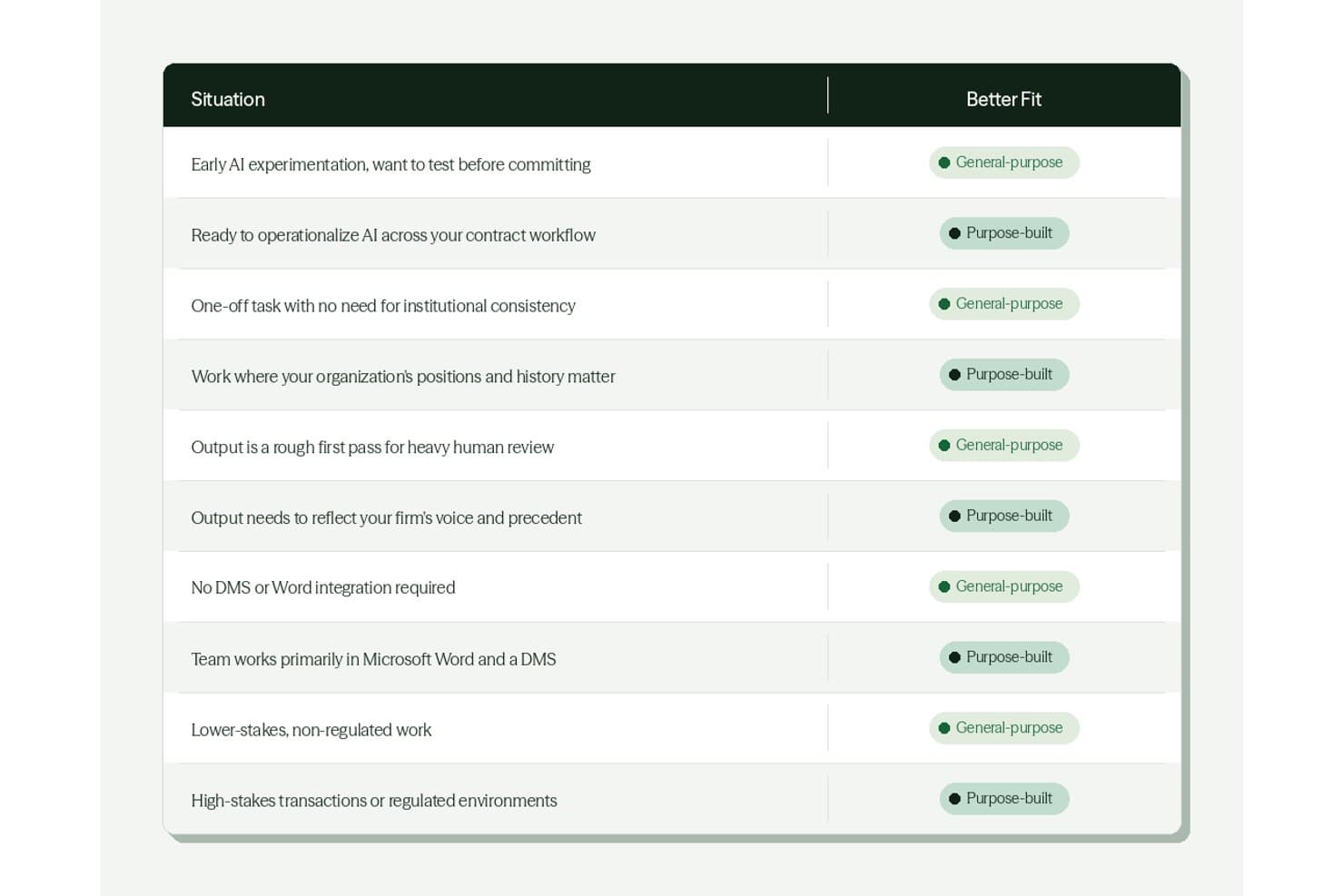
DraftWise guides users to the right AI tool based on their situation. DraftWise is an AI contract drafting and review platform that compares clauses against firm precedent, flags deviations from preferred positions, and generates redlines directly inside Microsoft Word.
Who Is DraftWise Best For?
DraftWise suits transactional attorneys at large law firms who need AI-powered contract review grounded in the firm's own deal history.
Why I Picked DraftWise
I picked DraftWise as one of the best because it does something no generic compare tool does: it redlines your contract against your firm's own deal history, not just a blank standard. Markup flags clause-level deviations from preferred positions and proposes AI-generated redlines directly in Word. AI Associate goes further, marking up entire agreements with a cited precedent source for every suggestion.
DraftWise Key Features
- Term sheet checker: Automatically compares a draft agreement against an uploaded term sheet to flag mismatches across the full document.
- Defined term detection: Identifies missing definitions, flags inconsistent terms, and inserts required definitions directly in Word.
- Deal Table: Extracts obligations, renewal dates, payment schedules, and risk patterns from large sets of executed agreements.
- DMS permission mirroring: Replicates your document management system's access controls and ethical walls within the DraftWise environment.
DraftWise Integrations
DraftWise integrates with Microsoft Word, iManage, NetDocuments, SharePoint, Google Drive, DocuSign, and Outlook. Marketplace integrations include Egnyte and Okta, with DMS permission mirroring and ethical-wall enforcement.
Pros and Cons
Pros:
- Cited suggestions support attorney review
- Clause-level checks catch defined-term errors
- Precedent-based redlines reflect firm positions
Cons:
- PDF and scanned comparison remain unsupported
- No documented two-version blackline engine
Learn more about DraftWise:
Outro software de comparação de documentos jurídicos
Abaixo encontra-se uma lista de software adicional de gestão de práticas jurídicas que selecionei, mas que não chegou aos 10 primeiros. Vale definitivamente a pena consultá-los.
- 11RecitalBest for in-house redlines powered by Litera engine
- 12DocStyle CompareBest for Word-native redlining with DMS integration
- 13CongaBest for comprehensive legal document automation
How I Evaluate Legal Document Comparison Software
I split my evaluation into three parts. First—and most heavily weighted—is core functionality: can the tool reliably catch every text, formatting, and structural change, and handle Word, PDF, and scanned files without dropping results? Then I look at standout features like moved-text detection. Finally, I consider vendor reputation, data privacy assurances, and pricing transparency.
Core Functionality (Table Stakes For This List)
When I'm selecting tools for my list, I score each one on a scale from 0 (does not offer the functionality) to 5 (excels in this area) for each core functionality listed below. I then convert the total into a percentage to help assess each tool's overall fit, with extra weight on any functionalities I've deemed essential.
- Version Comparison Accuracy (Essential): I check whether the tool catches every text, formatting, and structural change—even in heavily revised documents with reordered clauses.
- Multi-Format Support (Essential): I evaluate how reliably each tool compares Word, PDF, and scanned files, since opposing counsel rarely sends back the same format you sent out.
- Redline and Markup Output: The redline needs to be clear enough to share with clients or colleagues without cleanup, so I look at customization and summary options.
- Metadata and Clause-Level Detection: I look for granular flagging of metadata shifts, embedded object changes, and paragraph-level edits that surface hidden revisions.
- Document Management Integration: Tools that connect directly to platforms like iManage, NetDocuments, or Outlook let you compare versions without leaving your workflow, which I weigh here.
Once I have a list of tools that meet the criteria, I consider what sets each platform apart.
Differentiating Factors (What Sets Vendors Apart)
Here's how I compare and contrast different vendors:
Standout Features
Moved-text detection matters most to me. During M&A due diligence, I've seen entire indemnity clauses relocated between sections—tools without this feature flag them as separate deletions and insertions, burying the real change. I also evaluate how each tool handles signature blocks and tables, since these break easily in comparisons. Batch comparison is another separator; reviewing hundreds of lease amendments one pair at a time isn't realistic under deal timelines.
Beyond Features
I evaluate whether a vendor offers on-premise or private-cloud deployment, since firms handling privileged matters often can't route documents through shared infrastructure. Licensing transparency matters too—I check whether pricing is per-user, per-device, or firm-wide, because hidden seat costs add up fast when onboarding a growing team. I also look at how well each vendor supports rollout across a firm, including dedicated training resources and DMS integration setup that won't disrupt existing attorney workflows.
Como escolher software de comparação de documentos jurídicos
É fácil ficar atolado em listas extensas de funcionalidades e estruturas de preços complexas. Para o ajudar a manter o foco enquanto percorre o seu processo específico de seleção de software, apresentamos uma lista de verificação dos fatores a ter em conta:
| Fator | O que considerar |
|---|---|
| FatorEscalabilidade | O que considerarO software pode crescer com a sua empresa? Considere se suporta o número de utilizadores que espera ter dentro de alguns anos. Procure opções capazes de gerir um volume crescente de documentos. |
| FatorIntegrações | O que considerarEstabelece ligação com as suas ferramentas existentes, como sistemas de gestão documental ou armazenamento na nuvem? Certifique-se de que se integra no seu fluxo de trabalho atual sem causar interrupções. |
| FatorPersonalização | O que considerarPode adaptar o software para responder às suas necessidades específicas? Procure opções que permitam ajustar definições ou criar relatórios personalizados. |
| FatorFacilidade de utilização | O que considerarA interface é intuitiva para a sua equipa? Teste o software para verificar se é fácil de utilizar sem necessidade de formação extensa. |
| FatorImplementação e integração inicial | O que considerarQuanto tempo será necessário para começar a utilizá-lo? Verifique se o fornecedor disponibiliza recursos de formação e apoio durante a fase de transição. |
| FatorCusto | O que considerarO preço enquadra-se no seu orçamento? Tenha atenção a taxas ocultas ou aos custos de funcionalidades adicionais. Compare com ferramentas semelhantes para garantir uma boa relação qualidade-preço. |
| FatorMedidas de segurança | O que considerarOs seus documentos estão protegidos? Certifique-se de que o software cumpre as normas de proteção de dados e disponibiliza encriptação. |
| FatorDisponibilidade do apoio | O que considerarExiste ajuda quando precisa dela? Procure fornecedores que disponibilizem apoio 24 horas por dia, 7 dias por semana, e vários métodos de contacto, como chat e telefone. |
O que é um software de comparação de documentos jurídicos?
O software de comparação de documentos jurídicos é uma ferramenta essencial para profissionais do setor jurídico, incluindo advogados, assessores jurídicos e departamentos jurídicos de organizações. Foi concebido para identificar e destacar as diferenças entre dois ou mais documentos jurídicos — como contratos, acordos ou formulários jurídicos.
O software simplifica a tarefa frequentemente morosa da comparação manual, que pode estar sujeita a erro humano. É especialmente útil ao rever versões de informações jurídicas de metadados de documentos, identificar alterações não autorizadas ou garantir a conformidade com as normas jurídicas. Esta tecnologia não só poupa tempo, como também melhora significativamente a precisão e a eficiência do processo de revisão de documentos jurídicos.
Funcionalidades
Ao selecionar um software de comparação de documentos jurídicos, procure as seguintes funcionalidades essenciais:
- Deteção de alterações: Identifica e destaca automaticamente as alterações entre versões de documentos, garantindo que nada é ignorado.
- Suporte para vários formatos: Permite comparar documentos em vários formatos, proporcionando flexibilidade na gestão documental.
- Comparação lado a lado: Apresenta os documentos lado a lado para facilitar a comparação visual e melhorar a precisão.
- Capacidades de integração: Estabelece ligação com ferramentas existentes, como sistemas de gestão documental, melhorando a eficiência do fluxo de trabalho.
- Relatórios personalizáveis: Gera relatórios adaptados às necessidades específicas de documentação jurídica, facilitando uma análise personalizada.
- Colaboração em tempo real: Permite que vários utilizadores trabalhem simultaneamente nos documentos, promovendo o trabalho em equipa e a produtividade.
- Funcionalidades de segurança: Disponibiliza encriptação e conformidade com as normas de proteção de dados, protegendo informações sensíveis.
- Interface fácil de utilizar: Oferece um design intuitivo que reduz a curva de aprendizagem, tornando-o acessível a todos os membros da equipa.
- Acesso através de dispositivos móveis: Permite comparar documentos em dispositivos móveis, proporcionando comodidade aos profissionais em movimento.
- Informações baseadas em IA: Utiliza inteligência artificial para fornecer análises e informações mais aprofundadas, melhorando a tomada de decisões.
Vantagens
A implementação de um software de comparação de documentos jurídicos proporciona várias vantagens à sua equipa e à sua empresa. Eis algumas das que pode esperar:
- Maior precisão: A deteção automática de alterações reduz o risco de não identificar edições importantes, garantindo maior rigor.
- Poupança de tempo: Funcionalidades como a comparação lado a lado aceleram o processo de revisão, libertando tempo para outras tarefas.
- Colaboração melhorada: As ferramentas de colaboração em tempo real permitem que os membros da equipa trabalhem em conjunto de forma eficiente, melhorando o trabalho em equipa.
- Segurança reforçada: As funcionalidades de segurança integradas protegem informações sensíveis, proporcionando tranquilidade.
- Flexibilidade: O suporte para vários formatos permite gerir diferentes tipos de documentos, adaptando-se a necessidades jurídicas distintas.
- Comodidade: O acesso através de dispositivos móveis garante que pode rever documentos a qualquer hora e em qualquer lugar, melhorando a produtividade.
- Melhor tomada de decisões: As informações baseadas em IA fornecem análises mais aprofundadas, apoiando decisões jurídicas fundamentadas.
Custos e preços
A seleção de software de comparação de documentos jurídicos requer uma compreensão dos vários modelos de preços e planos disponíveis. Os custos variam consoante as funcionalidades, o tamanho da equipa, os complementos e muito mais.
A tabela abaixo resume os planos mais comuns, os respetivos preços médios e as funcionalidades habitualmente incluídas nas soluções de software de comparação de documentos jurídicos:
Tabela de comparação de planos para software de comparação de documentos jurídicos
| Tipo de plano | Preço médio | Funcionalidades comuns |
|---|---|---|
| Tipo de planoPlano gratuito | Preço médio$0 | Funcionalidades comunsDeteção básica de alterações, formatos de documentos limitados e armazenamento restrito |
| Tipo de planoPlano pessoal | Preço médio$10-$30/utilizador/mês | Funcionalidades comunsDeteção de alterações, suporte para vários formatos e funcionalidades básicas de elaboração de relatórios. |
| Tipo de planoPlano empresarial | Preço médio$30-$60/utilizador/mês | Funcionalidades comunsFerramentas avançadas de comparação, capacidades de integração e funcionalidades de segurança reforçadas. |
| Tipo de planoPlano empresarial de grande escala | Preço médio$60-$100/utilizador/mês | Funcionalidades comunsPersonalização completa, colaboração em tempo real, suporte dedicado e medidas de segurança abrangentes |
Perguntas frequentes sobre software de comparação de documentos jurídicos
Eis algumas respostas a perguntas comuns sobre software de comparação de documentos jurídicos:
Posso utilizar software de comparação de documentos jurídicos em dispositivos móveis?
Sim, muitas ferramentas de comparação de documentos jurídicos são compatíveis com dispositivos móveis. Algumas têm aplicações móveis dedicadas, enquanto outras disponibilizam interfaces Web adaptadas a dispositivos móveis. Isto garante que pode consultar documentos enquanto se desloca. Se o acesso móvel for importante para o seu fluxo de trabalho, confirme se o software é compatível com o seu dispositivo antes de assumir um compromisso.
Quão seguros estão os meus dados com software de comparação de documentos jurídicos?
A segurança dos dados varia consoante o software, mas a maioria das ferramentas de confiança inclui encriptação e controlos de acesso. Verifique sempre as funcionalidades de segurança e as normas de conformidade, como o RGPD ou a HIPAA. Se tratar informações sensíveis, dê prioridade a software com medidas de segurança robustas para proteger os seus dados contra acessos não autorizados.
Preciso de formação para utilizar software de comparação de documentos jurídicos?
A maioria do software foi concebida para ser fácil de utilizar, mas alguma formação pode ser útil. Muitos fornecedores disponibilizam tutoriais, guias e apoio ao cliente para ajudar nos primeiros passos. Se não está familiarizado com este tipo de software, aproveite os recursos disponíveis para garantir uma transição tranquila e uma utilização eficaz.
O software de comparação de documentos jurídicos pode integrar-se no meu fluxo de trabalho atual?
Sim, a maioria das soluções modernas integra-se com sistemas de gestão documental, plataformas de correio eletrónico e serviços de armazenamento na nuvem, permitindo uma colaboração e um controlo de versões mais eficientes.
O software de comparação de documentos jurídicos é adequado tanto para pequenas equipas jurídicas como para grandes sociedades de advogados?
Sim, muitas plataformas adaptam-se ao número de utilizadores e às necessidades de armazenamento, dando suporte tanto a profissionais em prática individual como a equipas jurídicas internas e grandes sociedades de advogados.