

A redação jurídica pode ser uma verdadeira dor de cabeça. Tem de gerir documentos complexos, prazos apertados e regulamentações em constante mudança. Compreendo. É aí que o software de redação jurídica entra em ação para lhe facilitar o trabalho. Estas ferramentas ajudam-no a criar documentos precisos e detalhados sem o stress habitual.
Passei inúmeras horas a testar e analisar estas soluções. Conheço bem os meandros do setor da prática jurídica e dos seus mercados de software. O meu objetivo? Apresentar-lhe uma análise imparcial e bem fundamentada das melhores opções disponíveis.
Neste artigo, partilharei as minhas principais escolhas. Abordarei as suas funcionalidades, vantagens e desvantagens, e explicarei por que motivo podem ser adequadas para a sua equipa. Vamos tornar o seu processo de redação um pouco mais simples.
Why Trust Our Software Recommendations
6,700+
Reviews
20
Industry experts
16+
Evaluation factors
14
Years
Our team has been testing and reviewing software since 2012. As legal practice leaders ourselves, we know how difficult—and important—it is to choose the right software.
For this guide, we evaluated tools using hands-on testing and independent research, scoring tools using our selection criteria.
Our reviews reflect our human editorial judgment, not a sales pitch.
Tabela comparativa de software de redação jurídica
Esta tabela comparativa resume os detalhes dos preços das minhas principais seleções de software de redação jurídica:
| Tool | Best For | Trial Info | Price | ||
|---|---|---|---|---|---|
| 1 | Best for creating document templates | Free demo available | Pricing upon request | Website | |
| 2 | Best for multi-platform integration | Free trial available | Pricing upon request | Website | |
| 3 | Best for document drafting with eSignatures | 7-day free trial + free demo available | From $59/user/month | Website | |
| 4 | Best for cutting-edge e-discovery and litigation | Free demo available | Pricing upon request | Website | |
| 5 | Best for law practice management | Free trial available | From £79/user/month | Website | |
| 6 | Best for no-code legal document automation | Free demo available | Pricing upon request | Website | |
| 7 | Best for streamlining contract lifecycle management | Free demo available | Pricing upon request | Website | |
| 8 | Best for comprehensive legal knowledge base access | Free demo available | Pricing upon request | Website | |
| 9 | Best for intelligent contract lifecycle automation | Free demo available | Pricing upon request | Website | |
| 10 | Best for US court-specific compliance | From $1895/brief | Website |


Análises do melhor software de redação jurídica
Apresentamos abaixo os meus resumos detalhados do melhor software de redação jurídica que chegou à minha lista restrita. As minhas análises oferecem uma visão detalhada das principais funcionalidades, vantagens e desvantagens, integrações e casos de utilização ideais de cada ferramenta, para o ajudar a encontrar a melhor opção para si.
 Best for creating document templates
- Free demo available
- Pricing upon request
Visit WebsiteCustomer Rating:4.3/5
Users can fill out information from templates or create their own for different legal documents. HotDocs is an advanced document software designed to reduce the time needed to generate client or customer-specific documents by automating the creation, generation, assembly, and preparation of complex documents, ensuring they are custom and error-free.
Why I Picked HotDocs: I picked HotDocs for its ability to transform frequently used documents and forms into reusable templates. This functionality significantly speeds up the document creation process by automating repetitive tasks, which traditionally consume a lot of time. Furthermore, HotDocs offers advanced features like version control, built-in e-signing, and metadata scrubbing, which are essential for maintaining compliance and ensuring document security.
Standout features & integrations:
The platform also includes optical character recognition (OCR) capabilities, which help in converting different types of documents, such as scanned paper documents, PDFs, or images, into editable and searchable data. Important integrations for HotDocs include Microsoft 365, Microsoft Word, Tabs3, CARET Legal, Actionstep, BHL Insight, Salesforce, Microsoft Dynamics, and Sage.
Pros and Cons
Pros:
- Customizable templates
- Robust document automation capabilities
- Good for end-to-end document management
Cons:
- Challenging to learn how to create templates
- Can be pricey for smaller firms
Learn more about Mitratech Hotdocs: 2Best for multi-platform integration
8am
- Free trial available
- Pricing upon request
Visit WebsiteCustomer Rating:4.6/5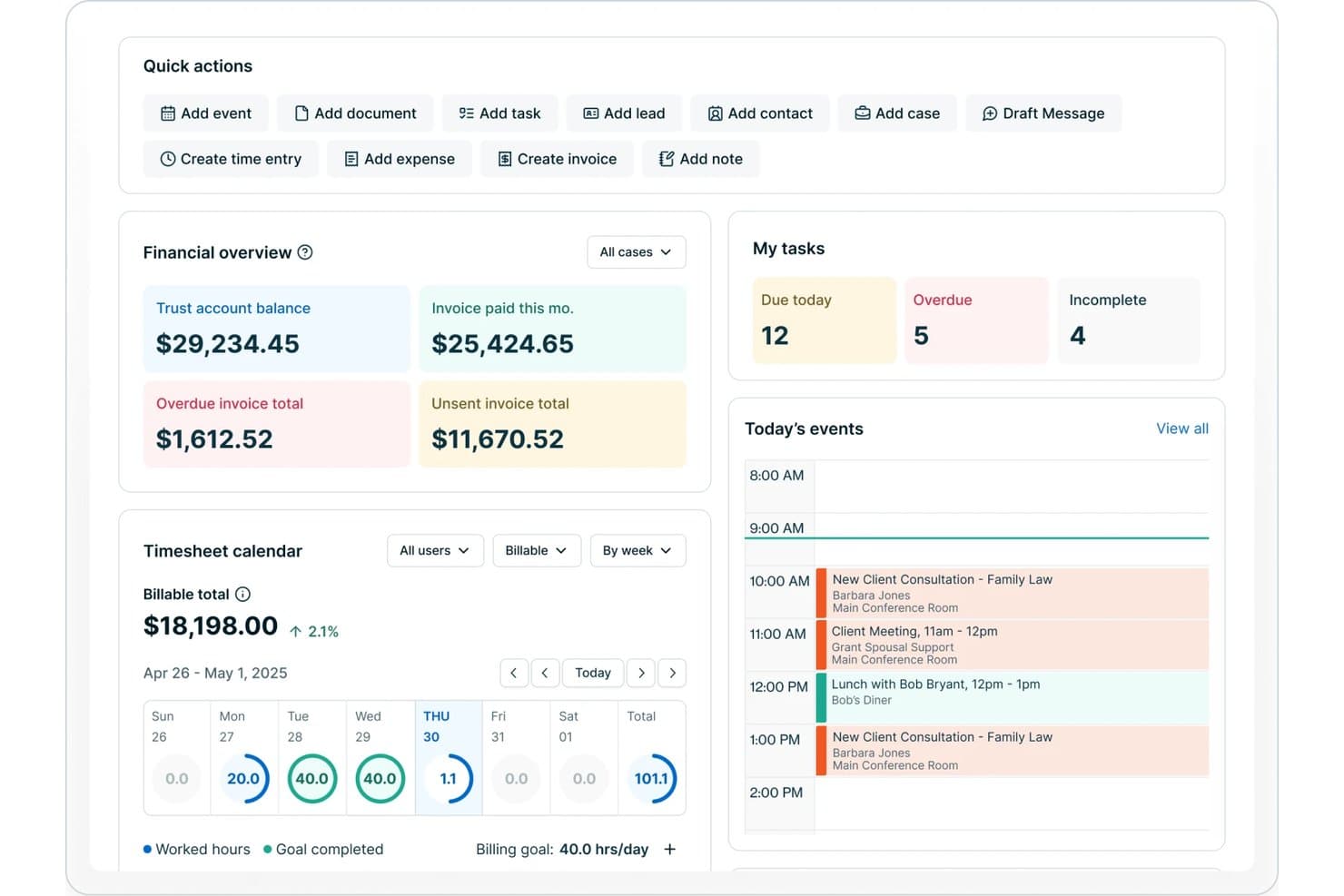
8am offers a legal practice dashboard with financial overview, task tracking, timesheet calendar, and today's events including client consultations and meetings. 8am is a unified law firm workflow platform that combines practice management, document automation, intake and data merge, clause management, and legal-specific AI tools through deep integration with established legal software modules.
Who Is 8am Best For?
Multi-practice law firms and legal teams seeking integrated workflows across document drafting, matter management, and payment compliance.
Why I Picked 8am
I picked 8am as one of the best because it brings together matter management, document workflows, and payments through native connections with platforms like MyCase, DocketWise, and LawPay. I like how my team can handle drafting, intake, and billing using one integrated workspace, which is rare for legal drafting solutions. 8am stands out for being best with multi-platform integration for law firms.
8am Key Features
- AI-powered legal document search: Find, summarize, and extract insights from documents using built-in AI tools.
- Customizable intake forms: Collect structured client and matter data through tailored digital forms.
- Multi-practice workspace switching: Seamlessly manage workflows for general, immigration, and personal injury law in one account.
- Real-time reporting dashboard: Track key performance, billing, and productivity metrics from a unified analytics panel.
8am Integrations
8am offers 60+ native integrations, including MyCase, DocketWise, LawPay, CasePeer, QuickBooks, and Microsoft 365. An API is available for custom integrations.
Pros and Cons
Pros:
- Robust support for multi-practice law workflows
- Custom intake forms for matter creation
- AI-powered document search and extraction
Cons:
- Clause library management is limited
- No advanced legal formatting automation
Learn more about 8am: Best for document drafting with eSignatures
- 7-day free trial + free demo available
- From $59/user/month
Visit WebsiteCustomer Rating:4.3/5
PracticePanther lets you upload documents and request eSignatures in one view. PracticePanther is designed to support legal professionals who need document drafting with eSignatures built into their daily workflows. Built for law firms of all sizes, it combines document management, signing tools, and client communication into a single platform. This software helps legal teams handle document-related tasks more efficiently and keep work organized.
Why I Picked PracticePanther
I picked PracticePanther for its document drafting and eSignatures, which let you prepare legal documents and collect signatures in one place. This reduces the need to switch between tools and helps speed up approvals. It also offers centralized document storage and customizable templates, making it easier for legal teams to keep files organized and create documents with fewer errors.
PracticePanther Key Features
In addition to its eSignature capabilities, PracticePanther offers:
- Case Management: Provides tools for efficiently handling and preparing cases.
- Trust Accounting: Ensures compliance with legal accounting standards.
- Client Portal: Offers secure access for clients to view and sign documents.
- Custom Tags: Allows easy tracking of cases, payments, and documents.
PracticePanther Integrations
Integrations include QuickBooks, LawPay, Google Calendar, Microsoft Outlook, Dropbox, Box, Google Drive, Zapier, Stripe, and PayPal.
Pros and Cons
Pros:
- Organized document storage simplifies case file management
- Built-in billing improves invoice creation and payments
- Client management tools improve workflow coordination
Cons:
- Higher pricing affects smaller law firms
- Mobile app navigation feels limited and slow
Learn more about PracticePanther: Best for cutting-edge e-discovery and litigation
- Free demo available
- Pricing upon request
Visit WebsiteCustomer Rating:4.7/5
EverLaw legal drafting software interface Everlaw is a powerful legal tech tool that focuses on enhancing the e-discovery process and facilitating litigation activities. It provides a cloud-based platform where legal teams can collaboratively review, analyze, and organize evidence, which is why it's especially apt for those in need of cutting-edge e-discovery and litigation services.
Why I Picked Everlaw: I chose Everlaw for its cutting-edge technology that streamlines e-discovery and litigation. Compared to its counterparts, Everlaw brings a unique combination of user-friendly design and advanced analytics that allows for the effective management of legal documents and information. Considering its strong focus on e-discovery and litigation, I judged Everlaw to be the best fit for these specific tasks.
Standout features & integrations:
Everlaw shines with features like predictive coding, which uses machine learning to streamline the legal document review process, and a story builder for chronologically organizing facts and evidence for a case. Its integrations are limited as the tool primarily focuses on being a standalone comprehensive solution for e-discovery and litigation.
Pros and Cons
Pros:
- Predictive coding feature that uses machine learning
- User-friendly interface
- Advanced analytics for e-discovery
Cons:
- Limited integrations as it's a standalone solution
- Pricing is not transparent
- No free plan or trial available
Learn more about Everlaw: 5Best for law practice management
Clio
- Free trial available
- From £79/user/month
Visit WebsiteCustomer Rating:4.7/5
Clio legal drafting software interface Clio is a comprehensive law practice management software offering a platform for legal professionals to manage cases, track time, bill clients, and more. Its focus on creating a cohesive and efficient practice management experience makes it an ideal choice for law firms looking for smoother operations.
Why I Picked Clio: In my comparison, Clio stood out due to its extensive set of features aimed at simplifying the complexities of law practice management. I chose Clio not only for its rich feature set but also for its dedicated focus on law practice management, which sets it apart from other general project management tools. Given its capabilities and specialization, I determined that Clio is the best legal document management software for law practice management.
Standout features & integrations:
Clio comes with a robust set of features, including case management, billable time tracking, electronic signature (e-signature), billing and invoicing, and client communication tools. It integrates with popular platforms like Microsoft Office 365, Google Workspace, Dropbox, and QuickBooks, enabling law firms to synchronize their operations with other necessary tools.
Pros and Cons
Pros:
- Tailored specifically for the needs of legal professionals
- Integration with popular platforms for enhanced productivity
- Comprehensive law practice management features
Cons:
- The interface may be overwhelming for new users due to its feature-richness
- The lowest-tier plan might not include all advanced features
- The free trial is time-limited
Learn more about Clio: Best for no-code legal document automation
- Free demo available
- Pricing upon request
Visit WebsiteCustomer Rating:4.7/5
Checkbox legal drafting software interface Checkbox is an innovative tool that empowers users to create legal documents without any coding knowledge. The platform utilizes drag-and-drop and rule-based workflows, simplifying legal processes and making it particularly suitable for those looking for no-code legal document automation software.
Why I Picked Checkbox: I selected Checkbox because of its unique no-code approach to legal document automation. Amongst its peers, Checkbox stands out due to its ease of use and accessible interface. It encourages non-technical users to engage with legal document automation, thereby simplifying complex processes. I determined that Checkbox is best for no-code legal document automation as it democratizes the process and makes it accessible to a wider range of users.
Standout features & integrations:
Checkbox's notable features include a drag-and-drop interface, rule-based workflow creation, and a user-friendly design. It integrates with popular platforms like Salesforce and Microsoft Office, making it easier to merge data across different applications.
Pros and Cons
Pros:
- User-friendly interface and design
- Integrations with Salesforce and Microsoft Office
- No coding knowledge required for creating legal documents
Cons:
- Advanced features may require higher-priced plans
- Might not be as flexible as coding-based solutions
- No free plan is available
Learn more about Checkbox: 7Best for streamlining contract lifecycle management
Leah
- Free demo available
- Pricing upon request
Visit WebsiteCustomer Rating:4.5/5
ContractPodAi legal drafting software interface ContractPodAi is a robust software that simplifies the entire contract lifecycle. It integrates artificial intelligence for intelligent legal drafting, review, and management of contracts.
Why I Picked ContractPodAi: I selected ContractPodAi for this list because of its unique approach to contract management. It integrates artificial intelligence to automate the most tedious parts of the contract lifecycle. I firmly believe it's best for streamlining contract lifecycle management because it's not just about legal drafting; it uses AI to automate the review and management of contracts too, which saves you considerable time and effort.
Standout features & integrations:
ContractPodAi comes with key features like automatic contract drafting, review, and lifecycle management. Furthermore, it integrates seamlessly with CRM and ERP systems, and with productivity tools such as Microsoft Office and GSuite, making it even easier to manage contracts.
Pros and Cons
Pros:
- Comprehensive contract lifecycle management
- Seamless integration with CRM, ERP, and productivity tools
- Uses AI for automated contract drafting and review
Cons:
- Might be overkill for smaller firms or solo practitioners
- Pricing isn't transparent
- No free tier or trial available
Learn more about Leah: Best for comprehensive legal knowledge base access
- Free demo available
- Pricing upon request
Visit WebsiteCustomer Rating:4.3/5
Practical Law legal drafting software interface Practical Law is a digital platform that delivers expert legal know-how and resources. It provides a treasure trove of pre-prepared templates, checklists, and guides that simplify your legal drafting process.
Why I Picked Practical Law: In my search for outstanding legal drafting software, Practical Law caught my attention due to its unparalleled access to a comprehensive legal knowledge base. I selected it because its resources, prepared by legal experts, make it unique in the marketplace. It's "best for" those seeking extensive legal knowledge access because it grants its users a vast array of professional resources, eliminating the need for starting drafts from scratch.
Standout features & integrations:
Practical Law provides legal professionals with expertly crafted templates, how-to guides, and up-to-date legal information. It offers features such as legal updates, jurisdictional comparisons, and topic-specific resources. On the integration front, Practical Law integrates smoothly with Westlaw and other Thomson Reuters legal solutions, creating a cohesive and comprehensive legal research and drafting environment.
Pros and Cons
Pros:
- Integrates with other Thomson Reuters solutions
- Provides expertly crafted templates
- Access to a comprehensive legal knowledge base
Cons:
- No permanent free option available
- Subscription is billed annually
- Relatively high cost for small firms
Learn more about Practical Law: Best for intelligent contract lifecycle automation
- Free demo available
- Pricing upon request

Conga legal drafting software interface Conga is a robust solution that offers intelligent end-to-end contract lifecycle automation. The software is designed to streamline and simplify the contract process, from creation and negotiation to signing and renewals. With its high level of automation, Conga is particularly effective for managing complex contract lifecycles.
Why I Picked Conga: I chose Conga for this list due to its unique blend of automation, flexibility, and intelligence in contract management. I discerned that its capabilities extend beyond basic contract management, enabling users to automate and optimize every stage of the contract lifecycle. In terms of contract lifecycle automation, I believe Conga is the top choice because it integrates AI capabilities to provide intelligent automation, thus streamlining contract management procedures.
Standout features & integrations:
Conga provides a myriad of impressive features, including its automated contract lifecycle management, AI-powered analytics, and comprehensive contract repository. The software also integrates smoothly with Salesforce, which enables seamless data exchange and maximizes the utility of CRM data in contract management.
Pros and Cons
Pros:
- Strong integration with Salesforce
- AI-powered analytics
- Intelligent automation of the contract lifecycle
Cons:
- Potential learning curve for less tech-savvy users
- May be too complex for small businesses
- No free plan available
Learn more about Conga:

TypeLaw's AI-powered features for legal briefing helps enhance the process for creating legal documents. TypeLaw is a tool tailored for legal professionals to efficiently prepare and format legal briefs. It employs advanced AI technology to ensure documents adhere to help teams create accurate legal briefs quickly.
Why I Picked TypeLaw: TypeLaw offers automatic formatting of legal briefs, ensuring compliance with local court rules across U.S. federal and state courts. Additionally, the software's automatic hyperlinking of citations is another critical feature, which ensures that all references are accurately linked, therefore improving document readability and navigability for the court and other legal parties.
Standout features & integrations:
Other helpful features include the ability to create OCR-searchable PDFs, which ensures that your scanned documents can be searched and referenced easily. You also get a final quality check from a human expert before submitting your brief, offering an extra layer of assurance. Lastly, TypeLaw’s pagination feature keeps your documents updated, even after multiple rounds of revisions. Integrations are not listed on TypeLaw's official website.
Pros and Cons
Pros:
- Keeps pagination and tables accurate with ongoing edits
- Handles exhibits and appendices
- Automates court-compliant formatting
Cons:
- Formatting customization options may be limited
- Not all local courts may be covered
Learn more about TypeLaw Automated Brief Formatting:
Outro software de redação jurídica
Eis algumas opções adicionais de software de redação jurídica que não chegaram à minha lista restrita, mas que vale a pena conhecer:
- 11LexWorkplaceBest for cloud-based document and email management
- 12HenchmanBest for dynamic law firm management
- 13LollyLawBest for immigration practitioners seeking an all-in-one solution
- 14App4LegalGood for full-suite law practice management
- 15FilevineGood for collaborative legal project management
- 16AXDRAFTGood for efficient contract drafting and negotiation
- 17AccessGood for document management in case handling
- 18CobblestoneGood for document assembly in contract management
- 19Wolters KluwerGood for creation of smart legal documents
- 20LexisGood for comprehensive legal research
- 21TemplafyGood for law firm document assembly and brand compliance
- 22LawyawGood for automated legal drafting
- 23WoodpeckerGood for Microsoft Office integration
- 24Smarter DrafterGood for advanced document automation
- 25MotionizeGood for automating repetitive legal tasks
- 26XpuGood for content management in legal drafting
- 27InfowareGood for improving law firm productivity and profitability
- 28ArkenGood for estate planning document creation
- 29KnacklyGood for customized document assembly
- 30EdilexGood for streamlining contract drafting
- 31BoostDraftGood for AI-powered document drafting
- 32XcentialGood for legislative and regulatory drafting
How I Evaluate Legal Drafting Software
I split my evaluation into baseline requirements—like template automation and clause libraries—and differentiators that set litigation-focused tools apart from transactional ones.
Core Functionality (Table Stakes For This List)
When I'm selecting tools for my list, I rank each one on a scale from 0 (does not offer the functionality) to 5 (excels in this area) for each core functionality listed below. Then, I calculate the tool's total score into a percentage. Each tool needs to achieve a minimum total score of 65% to be considered for inclusion.
- Document Automation & Templates: I check whether a tool supports conditional logic and nested variables—for example, generating a lease agreement that adjusts clauses based on property type.
- Clause Library Management: A well-organized clause bank matters, so I evaluate how each tool lets you tag, search, and insert pre-approved language mid-draft.
- Legal-Specific Formatting: I look for court-ready output like pleading paper, auto-numbered paragraphs, tables of authorities, and jurisdiction-specific styling.
- Collaboration & Redlining: Multi-user redlining and version comparison are key, especially for teams passing a purchase agreement or litigation brief through several rounds of review.
- Intake & Data Merge: Each tool should let you build intake questionnaires that populate client and matter data directly into drafts, cutting out manual re-entry.
- Practice Management & DMS Integration: I evaluate native connectivity with platforms like Clio, iManage, NetDocuments, and Microsoft 365 to see how well drafting fits into existing workflows.
Once I have a list of tools that meet this criteria, I consider what sets each platform apart.
Differentiating Factors (What Sets Vendors Apart)
Here's how I compare and contrast different vendors:
Standout Features
AI-powered drafting is a key differentiator—I evaluate whether a tool can suggest clause language or generate a first-pass agreement from a brief prompt. Contract analytics also matters: tools that flag missing indemnification clauses or non-standard termination language during drafting save real review time. I also look for client self-service portals, where a client completes an intake form and receives a routine document like an NDA without requiring attorney time for assembly.
Beyond Features
Practice area fit is something I weigh closely—a tool built for transactional work like M&A closings won't always serve a litigation team drafting motions and discovery responses. Security and compliance also deserve attention, especially SOC 2 certification and data encryption, since drafts often contain privileged information. I check implementation support too. Migrating hundreds of existing templates into a new platform is a real undertaking, and vendors that offer dedicated migration assistance make that transition far smoother for firms of any size.
Como escolher software de redação jurídica
É fácil perder-se em listas longas de funcionalidades e estruturas de preços complexas. Para o ajudar a manter o foco enquanto percorre o seu processo específico de seleção de software, apresentamos uma lista de fatores a ter em conta:
| Fator | O que deve considerar |
|---|---|
| FatorEscalabilidade | O que deve considerarO software consegue acompanhar o crescimento do seu escritório? Considere necessidades futuras, como um aumento do volume de documentos ou do número de utilizadores. Verifique se os planos de preços permitem o crescimento sem grandes aumentos de custos. |
| FatorIntegrações | O que deve considerarFunciona com as suas ferramentas atuais? Procure compatibilidade com o seu sistema de gestão documental, e-mail e outro software jurídico, para evitar interrupções no fluxo de trabalho. |
| FatorPersonalização | O que deve considerarAté que ponto pode adaptá-lo às suas necessidades? Certifique-se de que o software permite personalizar modelos e ajustar fluxos de trabalho de acordo com os seus processos. |
| FatorFacilidade de utilização | O que deve considerarÉ fácil de utilizar pela sua equipa? Teste a interface e a navegação. Evite ferramentas com curvas de aprendizagem acentuadas que possam atrasar a adoção. |
| FatorImplementação e integração inicial | O que deve considerarQuanto tempo demorará a configuração? Avalie o tempo e os recursos necessários para a integração inicial. Procure ferramentas com configurações orientadas ou recursos de formação disponíveis. |
| FatorCusto | O que deve considerarEncaixa-se no seu orçamento? Compare o custo total de propriedade, incluindo taxas ocultas ou custos de atualização. Considere o valor que oferece face ao seu preço. |
| FatorMedidas de segurança | O que deve considerarOs seus documentos estão seguros? Verifique as normas de encriptação, os protocolos de cópia de segurança dos dados e a conformidade com os regulamentos legais de proteção de dados. |
| FatorDisponibilidade do apoio | O que deve considerarTerá ajuda quando precisar? Considere o horário de apoio, os canais disponíveis e os tempos de resposta, para garantir que pode obter assistência rapidamente caso surjam problemas. |
O que é um software de redação jurídica?
O software de redação jurídica é uma ferramenta concebida para ajudar a criar documentos jurídicos de forma eficiente e precisa. Os advogados, os juristas e os assistentes jurídicos utilizam geralmente estas ferramentas para poupar tempo e reduzir os erros na preparação dos documentos. Funcionalidades como a personalização de modelos, a integração com ferramentas de pesquisa jurídica e a gestão de versões de documentos ajudam a manter a precisão, a eficiência e a conformidade. De um modo geral, estas ferramentas proporcionam um enorme valor ao simplificar o processo de redação e assegurar documentos jurídicos de elevada qualidade.
Funcionalidades
Ao selecionar um software de redação jurídica, tenha em atenção as seguintes funcionalidades essenciais:
- Personalização de modelos: Permite adaptar os modelos de documentos para responder a necessidades jurídicas específicas, poupando tempo e assegurando a consistência.
- Capacidades de integração: Estabelece ligação a ferramentas existentes, como sistemas de gestão de documentos e correio eletrónico, simplificando os fluxos de trabalho e reduzindo a introdução manual de dados.
- Gestão de versões de documentos: Regista alterações e revisões, assegurando que todos trabalham com a versão mais atual do documento.
- Análise de contratos com recurso à IA: Utiliza inteligência artificial para analisar contratos em busca de potenciais problemas, melhorando a precisão e a eficiência.
- Colaboração em tempo real: Permite que vários utilizadores trabalhem simultaneamente num documento, melhorando o trabalho em equipa e reduzindo os tempos de resposta.
- Suporte à conformidade: Assegura que os documentos cumprem as normas e os regulamentos jurídicos, minimizando os riscos legais.
- Medidas de segurança: Disponibiliza funcionalidades de encriptação e proteção de dados para manter seguros os documentos jurídicos sensíveis.
- Interface intuitiva: Disponibiliza um design intuitivo que facilita a navegação e a utilização eficaz por parte dos profissionais do setor jurídico.
- Recursos de formação: Inclui tutoriais e guias para ajudar os novos utilizadores a adquirir rapidamente os conhecimentos necessários, melhorando a experiência de integração.
- Suporte multilingue: Permite criar e gerir documentos em diferentes idiomas, respondendo às necessidades jurídicas internacionais.
Vantagens
A implementação de um software de redação jurídica proporciona várias vantagens à sua equipa e à sua empresa. Eis algumas das que pode esperar:
- Maior precisão: As funcionalidades automatizadas reduzem o erro humano na criação de documentos, assegurando documentos jurídicos precisos e fiáveis.
- Poupança de tempo: A personalização de modelos e a colaboração em tempo real aceleram o processo de redação, permitindo que a sua equipa se concentre em tarefas mais complexas.
- Melhoria da conformidade: O suporte integrado à conformidade ajuda a assegurar que os documentos cumprem as normas jurídicas, reduzindo o risco de problemas relacionados com o incumprimento.
- Colaboração melhorada: As funcionalidades de edição e partilha em tempo real facilitam o trabalho eficiente das equipas, independentemente da localização.
- Eficiência de custos: Ao automatizar tarefas rotineiras e reduzir os erros, o software de redação jurídica pode diminuir os custos operacionais e aumentar a rentabilidade.
- Garantia de segurança: As medidas de segurança avançadas protegem as informações sensíveis, proporcionando tranquilidade relativamente à confidencialidade dos documentos.
- Escalabilidade: À medida que o seu escritório cresce, o software pode adaptar-se ao aumento do volume de documentos e da procura por parte dos utilizadores sem comprometer o desempenho.
Custos e preços
A seleção de um software de redação jurídica exige compreender os vários modelos de preços e planos disponíveis. Os custos variam consoante as funcionalidades, a dimensão da equipa, os complementos, entre outros fatores. A tabela abaixo apresenta um resumo dos planos comuns, dos seus preços médios e das funcionalidades normalmente incluídas nas soluções de software de redação jurídica:
Tabela de comparação de planos de software de redação jurídica
| Tipo de plano | Preço médio | Funcionalidades comuns |
|---|---|---|
| Tipo de planoPlano gratuito | Preço médio$0 | Funcionalidades comunsCriação básica de documentos, modelos limitados e ferramentas básicas de colaboração. |
| Tipo de planoPlano pessoal | Preço médio$10-$30/user/month | Funcionalidades comunsAcesso a modelos avançados, integração com o correio eletrónico e controlo limitado de versões. |
| Tipo de planoPlano empresarial | Preço médio$30-$60/user/month | Funcionalidades comunsBiblioteca completa de modelos, colaboração em tempo real, suporte à conformidade e integrações. |
| Tipo de planoPlano empresarial de grande dimensão | Preço médio$60-$100/user/month | Funcionalidades comunsFuncionalidades personalizáveis, segurança avançada, suporte dedicado e opções de escalabilidade. |
Perguntas frequentes sobre software de redação jurídica
Eis algumas respostas a perguntas frequentes sobre software de redação jurídica:
Que tipos de documentos pode criar o software de redação jurídica?
O software de redação jurídica pode criar uma vasta gama de documentos, incluindo contratos, acordos, testamentos e peças processuais. O software inclui frequentemente modelos para diversos formulários jurídicos, facilitando a redação rápida de documentos. Pode personalizar estes modelos para responder a necessidades jurídicas específicas, poupando tempo e garantindo a consistência.
O software de redação jurídica é compatível com outras ferramentas jurídicas?
Sim, a maioria dos softwares de redação jurídica é compatível com outras ferramentas jurídicas, como sistemas de gestão documental e bases de dados de investigação jurídica. Esta integração ajuda a otimizar os fluxos de trabalho, permitindo uma troca de dados fluida entre plataformas. Verifique sempre as capacidades de integração do software para garantir que se adapta bem ao seu conjunto de ferramentas tecnológicas existente.
O software de redação jurídica permite o acesso de vários utilizadores?
Sim, muitas soluções de software de redação jurídica permitem o acesso de vários utilizadores, possibilitando que as equipas colaborem em documentos em tempo real. Esta funcionalidade é particularmente útil para sociedades de advogados, onde vários advogados podem precisar de trabalhar no mesmo processo. Certifique-se de que o software disponibiliza permissões de utilizador para controlar os níveis de acesso dos diferentes membros da equipa.
Como funcionam as atualizações e a manutenção do software de redação jurídica?
A maioria dos fornecedores de software de redação jurídica disponibiliza atualizações regulares para melhorar a funcionalidade e a segurança. Estas atualizações são normalmente automáticas, garantindo que o software se mantém atualizado sem intervenção manual. A manutenção é geralmente assegurada pelo fornecedor, pelo que não precisa de se preocupar com problemas técnicos. Verifique sempre a política de atualizações do fornecedor para saber o que esperar.