

O software de remediação de PDF corrige PDFs inacessíveis para que cumpram as normas legais e de acessibilidade aplicáveis a tribunais, clientes e entidades reguladoras. Se está à procura das melhores ferramentas de remediação de PDF, é provável que esteja a gerir pressões de conformidade, fluxos de trabalho exigentes e um conjunto de documentos jurídicos pendentes que precisam de ser tornados acessíveis dentro do prazo. Passei décadas a resolver estes desafios com escritórios de advogados e equipas de operações jurídicas, por isso sei que o software adequado pode fazer a diferença entre uma conformidade pronta para auditoria e um risco desnecessário. Vou apresentar-lhe as principais soluções em que confio para processamento em lote, relatórios de nível de auditoria e uma integração fluida com os fluxos de trabalho jurídicos — para que possa escolher uma ferramenta que responda às exigências reais da prática.
Why Trust Our Software Recommendations
6,700+
Reviews
20
Industry experts
16+
Evaluation factors
14
Years
Our team has been testing and reviewing software since 2012. As legal practice leaders ourselves, we know how difficult—and important—it is to choose the right software.
For this guide, we evaluated tools using hands-on testing and independent research, scoring tools using our selection criteria.
Our reviews reflect our human editorial judgment, not a sales pitch.
Tabela de comparação de software de remediação de PDF
Esta tabela de comparação destaca os detalhes de preços do meu principal software de remediação de PDF para direito da família.
| Tool | Best For | Trial Info | Price | ||
|---|---|---|---|---|---|
| 1 | Best for developer-built PDF/UA compliance pipelines | 30-day free trial | Pricing upon request | Website | |
| 2 | Best for on-prem PDF accessibility compliance | Free demo available | Pricing upon request | Website | |
| 3 | Best for scaling PDF/UA compliance via API | 14-day free trial | Pricing upon request | Website | |
| 4 | Best for high-volume compliance across regulated docs | Not available | Pricing upon request | Website | |
| 5 | Best for audit-ready batch compliance certificates | Free trial available (100 pages) | From $0.30/page | Website | |
| 6 | Best for legal PDF batch compliance at scale | 7-day free trial | From $19.99/user/month (billed annually) | Website | |
| 7 | Best for compliance-grade multi-standard auditing | Free trial available | Pricing upon request | Website | |
| 8 | Best for on-premises government-scale remediation | Free plan available | From $599/user/year | Website | |
| 9 | Best for multi-standard compliance at scale | Free demo available | Pricing upon request | Website | |
| 10 | Best for high-volume, standards-driven PDF compliance | 7-day free trial + free demo available | Pricing upon request | Website |


Análises de software de remediação de PDF
Seguem-se os meus resumos detalhados dos melhores softwares de remediação de PDF que entraram na minha seleção. As minhas análises apresentam uma perspetiva detalhada sobre as funcionalidades, os melhores casos de utilização e as capacidades de cada software, para o ajudar a encontrar a melhor opção para si.
 Best for developer-built PDF/UA compliance pipelines
- 30-day free trial
- Pricing upon request
Visit WebsiteCustomer Rating:4.2/5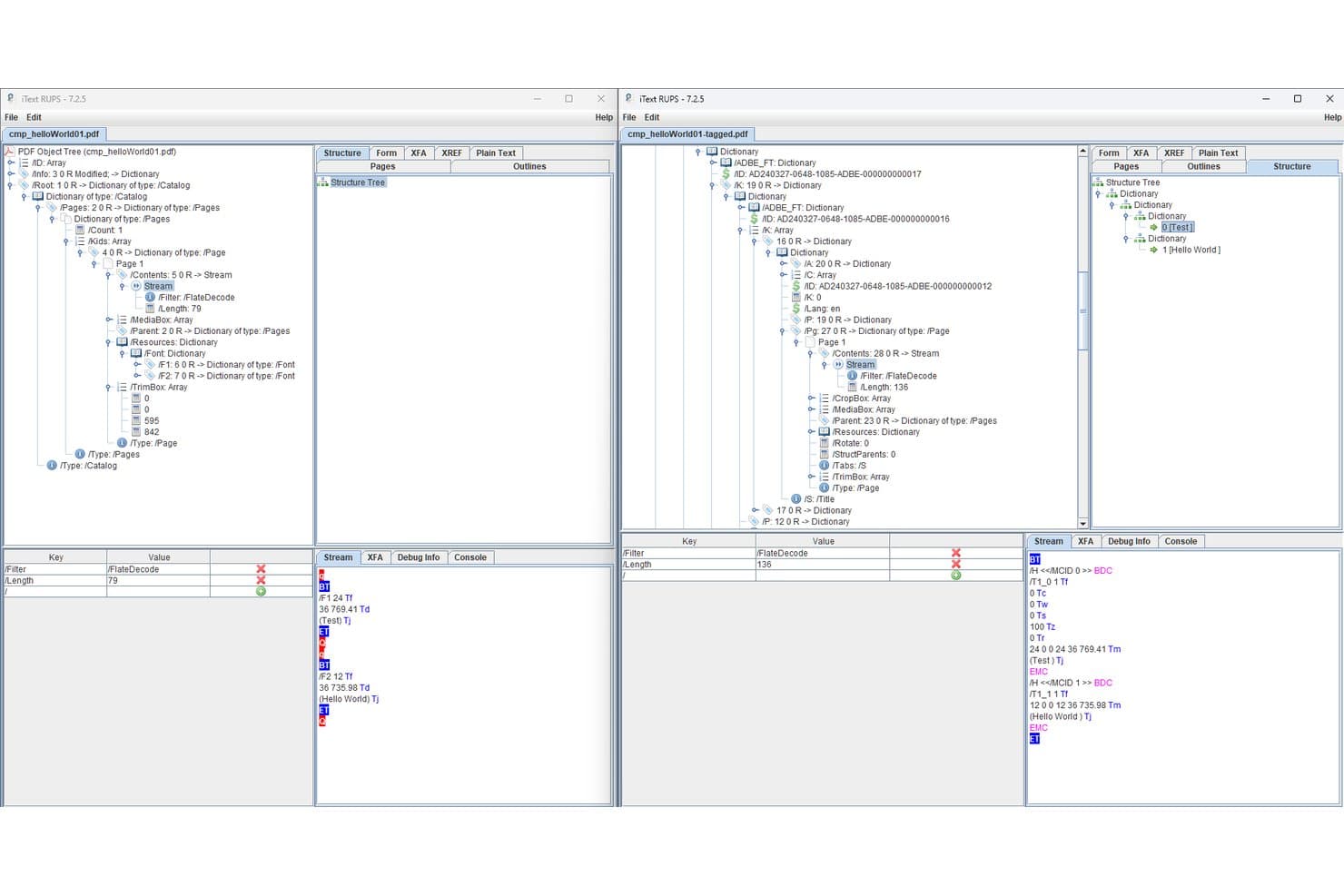
iText lets users compare tagged and untagged PDF structures side by side. iText is a PDF SDK that lets developers programmatically generate, tag, and validate accessible PDFs against PDF/UA-1, PDF/UA-2, Section 508, and ADA standards, with add-ons for OCR, redaction, and XFA form flattening.
Who Is iText Best For?
iText is the right fit for law firm IT teams and developers who need to build custom, high-volume PDF/UA compliance pipelines with full on-premise data control.
Why I Picked iText
I picked iText as one of the best because it's the only PDF SDK I know of that supports both PDF/UA-1 and the newest PDF/UA-2 (ISO 14289-2:2024) standard, with automatic Matterhorn Protocol validation built directly into the document generation process. Law firm IT teams can script fully automated remediation pipelines in Java or .NET that process multi-gigabyte document volumes without routing files through third-party servers, which matters when you're handling privileged material.
iText Key Features
- pdfSweep redaction: Permanently removes text, images, and drawing regions from PDFs using regex pattern matching or coordinate-defined areas.
- pdfOCR text recognition: Converts scanned PDFs and images into searchable, structured PDF/A-3u files using ONNX AI or Tesseract 4 engines.
- Dual PDF/A and PDF/UA conformance: Generates PDFs that simultaneously meet both archival (PDF/A) and accessibility (PDF/UA) standards in a single document output.
- pdfXFA form flattening: Converts dynamic XFA forms embedded in PDFs into static, accessible AcroForm-compatible documents.
iText Integrations
iText supports custom integrations through Java/.NET APIs and a REST API deployment available through AWS Marketplace. Its documented connectivity includes HTML/CSS through pdfHTML and Microsoft Office through pdfOffice; native legal DMS connectors aren't documented.
Pros and Cons
Pros:
- Enables on-premise, privacy-focused deployments
- Fully automates high-volume remediation pipelines
- Deepest standards compliance supports PDF/UA-2
Cons:
- Oriented toward creating, not remediating PDFs
- No GUI or visual tag tree editor
Learn more about iText: Best for on-prem PDF accessibility compliance
- Free demo available
- Pricing upon request
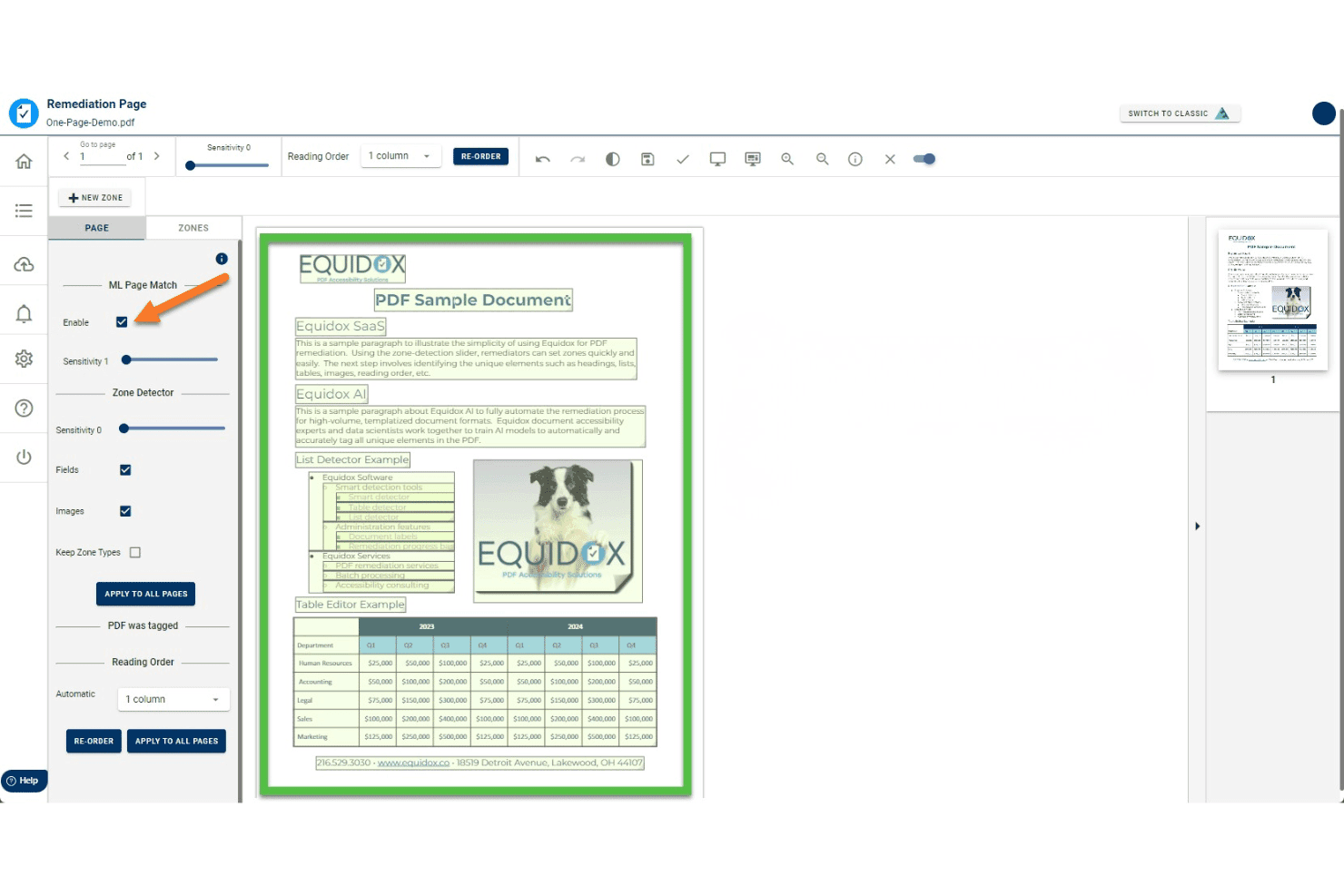
Equidox uses ML Page Match to auto-detect zones for PDF remediation. Equidox is a PDF accessibility remediation platform that uses a zone-based tagging interface, AI-assisted structure detection, and built-in OCR to tag, structure, and validate PDFs against standards like WCAG, Section 508, ADA, and PDF/UA.
Who Is Equidox Best For?
Equidox is a strong fit for compliance and accessibility officers in government, healthcare, and financial services who need on-premise PDF remediation to meet WCAG, Section 508, or ADA requirements without sending sensitive documents to the cloud.
Why I Picked Equidox
I've included Equidox in my top picks because it's the only tool on this list built to run entirely on your organization's own infrastructure, which matters when the documents you're remediating can't leave your network. Its zone-based tagging interface pairs with a Smart Table Detector that auto-identifies merged cells and multi-level headers, and on-prem deployment means remediated files never touch a third-party server. That combination is hard to replicate across WCAG 2.1, Section 508, and PDF/UA in a single on-premise package.
Equidox Key Features
- Built-in OCR: Converts scanned or image-only PDFs into editable, taggable content with a custom text-correction tool for fixing OCR errors.
- Alt text pane: A centralized pane lets you add or edit alt text for every image in the document from a single location, with options to mark decorative images as artifacts.
- Zone Transfer: Copies a validated zone and tag structure from one PDF to another, speeding up remediation for recurring documents with identical layouts.
- Export output warnings: At export, Equidox automatically flags missing alt text, broken URLs, heading errors, and missing form tooltips before the file leaves your workflow.
Equidox Integrations
Equidox supports REST API integrations with SharePoint and Canvas, plus Microsoft and Google organizational sign-in. Its API also supports custom connections to document workflows.
Pros and Cons
Pros:
- Zone-based tagging speeds manual remediation
- Smart table detector manages complex structures
- Runs fully on-premises for data security
Cons:
- Fully automated AI limited to templates only
- No legal-document-specific tagging features
Learn more about Equidox: Best for scaling PDF/UA compliance via API
- 14-day free trial
- Pricing upon request
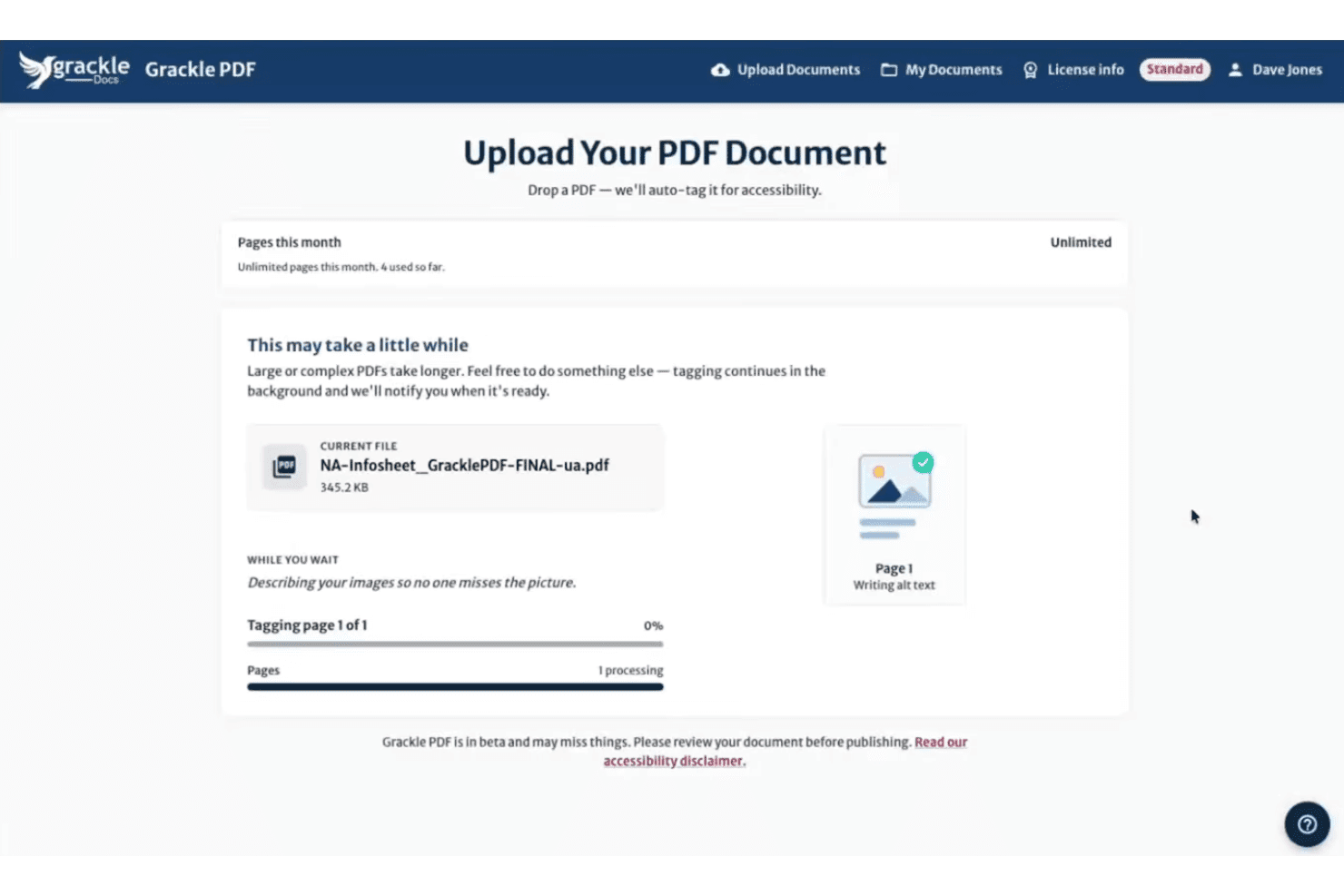
Grackle PDF auto-tags uploaded PDFs for accessibility, including alt text. GrackleDocs is a purpose-built PDF accessibility remediation platform that combines AI-powered auto-tagging, multi-standard compliance validation, reading order editing, and high-volume automated processing via its Grackle Stream API.
Who Is GrackleDocs Best For?
GrackleDocs is a strong fit for compliance and accessibility officers at enterprise or government organizations that need to process high volumes of PDFs to PDF/UA and WCAG standards at scale.
Why I Picked GrackleDocs
GrackleDocs earns its spot on my shortlist because of Grackle Stream, its API-driven batch processing service that handles unlimited pages per day with a 100% PDF/UA compliance guarantee. I've worked with organizations that need to push hundreds of documents through remediation pipelines without manual touchpoints, and Grackle Stream plugs directly into existing infrastructure. The March 2025 AI Layout Detection and Auto Tagging update adds another layer, cutting manual tagging time by up to 90–95% before documents even reach human review.
GrackleDocs Key Features
- AI-suggested alt text: The AI generates contextual alt text for images and figures that you can review and edit before finalizing.
- GrackleScan compliance monitoring: Produces ongoing monthly grading reports so you can track your document estate's accessibility status over time.
- Table Wizard: A guided, step-by-step interface for remediating complex tables, including row and column header identification.
- Grackle GO validator: A free, no-login tool that checks documents against PDF/UA and WCAG standards and generates a printable compliance report in under 10 seconds.
GrackleDocs Integrations
GrackleDocs has a native Google Workspace integration for Google Docs, Sheets, and Slides. Grackle PDF and Grackle Stream also provide API access for custom document-processing workflows, while Grackle Gateway supports SSO.
Pros and Cons
Pros:
- Built-in validator covers multiple accessibility standards
- API supports unlimited batch processing workflows
- AI auto-tagging dramatically speeds up remediation
Cons:
- No pricing published on the company website
- No legal workflow templates or DMS connectors
Learn more about GrackleDocs: Best for high-volume compliance across regulated docs
- Not available
- Pricing upon request
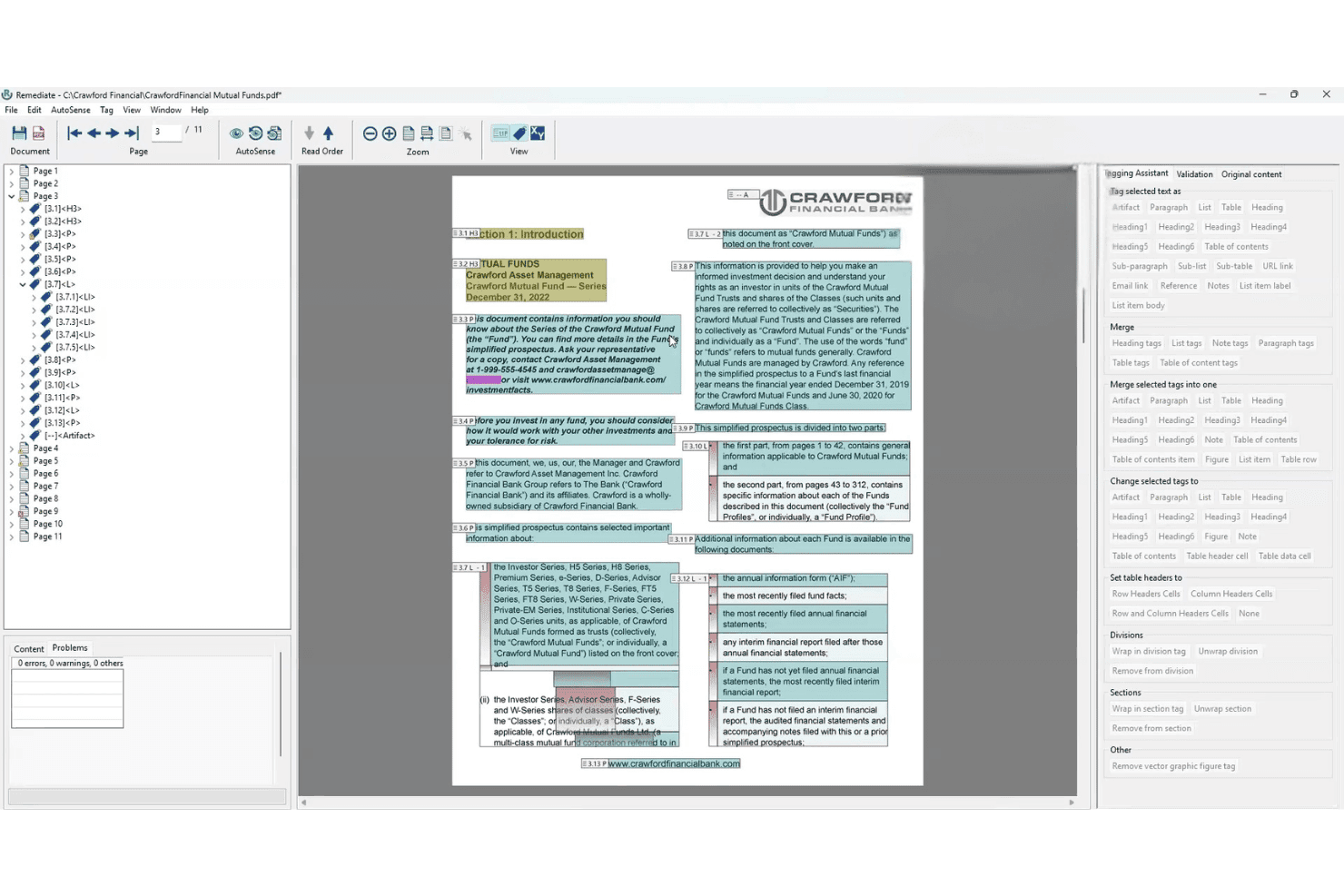
AccessibilityNow Remediate lets users tag and fix PDF accessibility issues visually. AccessibilityNow Remediate is a Windows-based PDF remediation tool from Crawford Technologies that combines AI-assisted tagging via its AutoSense engine with manual tag finishing for reading order, headings, tables, and lists across static and transactional documents.
Who Is AccessibilityNow Remediate Best For?
It's a strong fit for compliance and accessibility officers in regulated industries who need to process large volumes of PDFs against WCAG, Section 508, and PDF/UA standards.
Why I Picked AccessibilityNow Remediate
I picked AccessibilityNow Remediate because its AutoSense AI engine does something I genuinely value: it scans a PDF and flags complex tables, nested lists, and multi-column reading order issues before you touch a single tag. That's a real advantage when you're processing high volumes of regulated documents against WCAG 2.1/2.2, PDF/UA, and Section 508 standards. The companion Validator module then runs batch compliance checks with detailed reporting, so you're not guessing whether a document passes.
AccessibilityNow Remediate Key Features
- Standalone Windows desktop application: Runs without requiring Adobe Acrobat, giving you a dedicated tagging environment independent of third-party software licenses.
- Complex and nested table tagging: Handles multi-level table structures within PDFs, including nested tables that most tools struggle to tag correctly.
- AccessibilityNow Validator integration: Pairs with a companion compliance module that batch-scans documents against WCAG 2.1/2.2, PDF/UA, Section 508, and ADA standards and generates detailed reports.
- Multi-deployment platform ecosystem: Connects to broader AccessibilityNow modules—Publisher, Gateway, and Transactional—supporting cloud, on-premises, hybrid, and SaaS deployment for enterprise-scale workflows.
AccessibilityNow Remediate Integrations
The broader AccessibilityNow platform connects with SharePoint, Alfresco, and Nuxeo through CCM Gateway, plus OpenText and document repositories through Gateway workflows. REST APIs, web services, APIs, command-line tools, scripts, watch folders, and custom SDK integrations support additional connections.
Pros and Cons
Pros:
- Compliance coverage spans global accessibility laws
- Handles nested lists and detailed reading order
- AI flags complex tables and multi-columns
Cons:
- No templates for court filings or Bates numbering
- Manual tool lacks built-in batch processing
Learn more about AccessibilityNow Remediate: Best for audit-ready batch compliance certificates
- Free trial available (100 pages)
- From $0.30/page
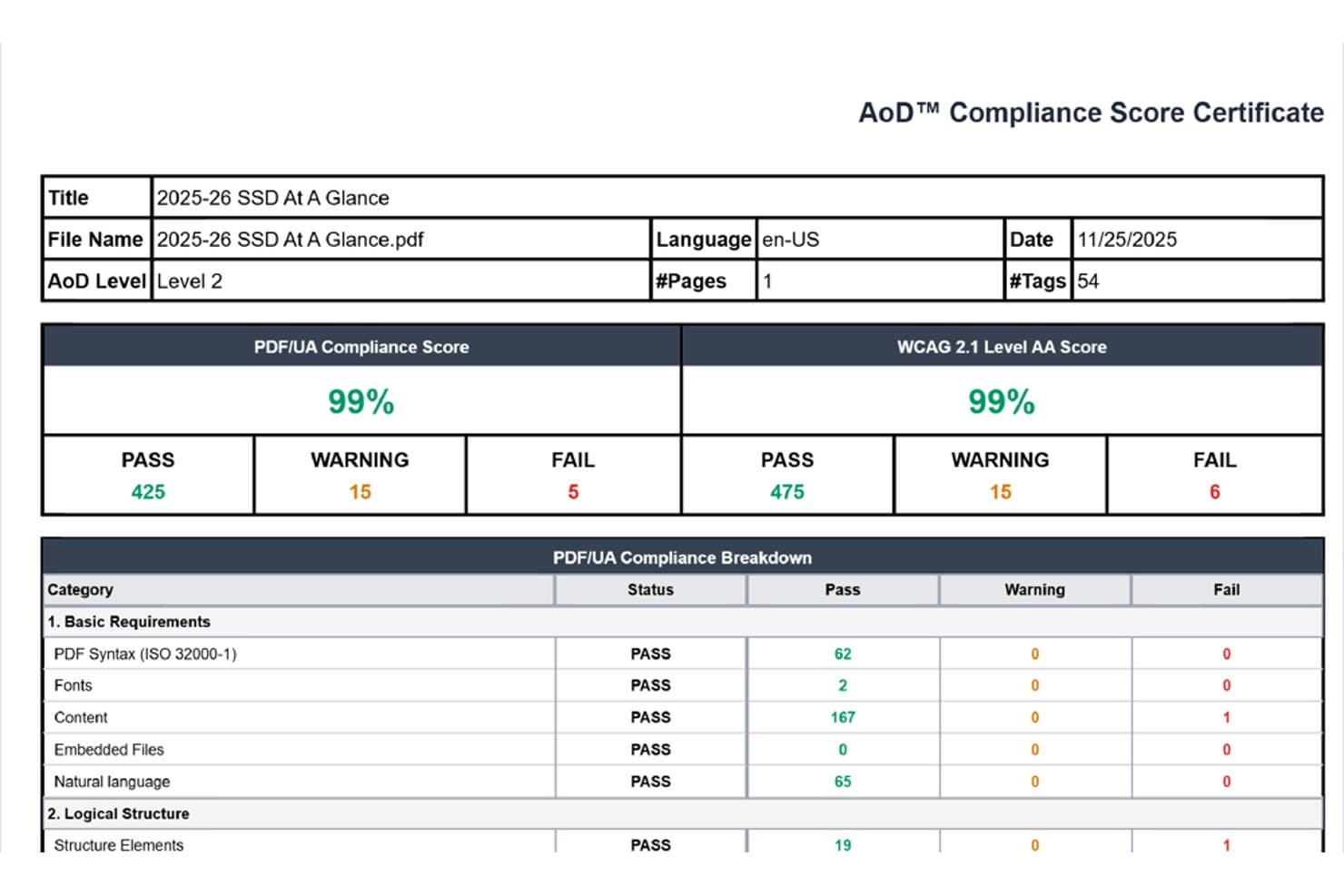
Accessibility On Demand reports PDF compliance scores with pass/fail breakdowns. Accessibility On Demand is an AI-powered PDF remediation service that handles automated tagging, reading order correction, alt text generation, and multi-standard compliance validation across WCAG 2.1/2.2 AA, PDF/UA, Section 508, and ADA Title II/III.
Who Is Accessibility On Demand Best For?
Accessibility On Demand is a strong fit for compliance and accessibility officers who need to process large document backlogs and produce independently validated, audit-ready remediation certificates at scale.
Why I Picked Accessibility On Demand
I've included Accessibility On Demand in my top picks because it's built specifically around producing audit-ready output at scale, not just compliant output. Every remediated PDF gets an independently validated Compliance Score Certificate from PAC by Axes4, a third-party checker, which is the kind of documented proof that holds up in an audit. I also like that the Enhanced tier carries a 95%+ compliance guarantee (with no charge if it falls short), and the Expert Review tier backs that up with a 100% guarantee and human sign-off for complex or legally sensitive documents.
Accessibility On Demand Key Features
- Multi-standard compliance validation: Every remediated PDF is checked against WCAG 2.1/2.2 AA, PDF/UA, Section 508, ADA Title II/III, and Section 504 in a single workflow.
- In-platform tag tree editing: After automated processing, you can manually review and adjust the tag tree, reading order, and OCR text directly in the platform's editing interface.
- Enterprise API for batch pipelines: A dedicated API lets you embed AoD into existing intelligent document processing workflows for fully automated, high-volume remediation at scale.
- Multi-language remediation support: The platform supports PDF remediation in six languages—English, Spanish, French, German, Italian, and Portuguese—with roughly 100 languages planned.
Accessibility On Demand Integrations
Native integrations are not clearly documented. Accessibility On Demand supports custom integrations through an enterprise API and offers a drag-and-drop self-service portal for direct uploads.
Pros and Cons
Pros:
- Multi-standard remediation covers legal requirements
- Batch processing handles large document backlogs
- PAC-validated compliance certificates for every document
Cons:
- No native integration with legal document management systems
- No legal-specific features like Bates preservation
Learn more about Accessibility On Demand: Best for legal PDF batch compliance at scale
- 7-day free trial
- From $19.99/user/month (billed annually)
Visit WebsiteCustomer Rating:4.5/5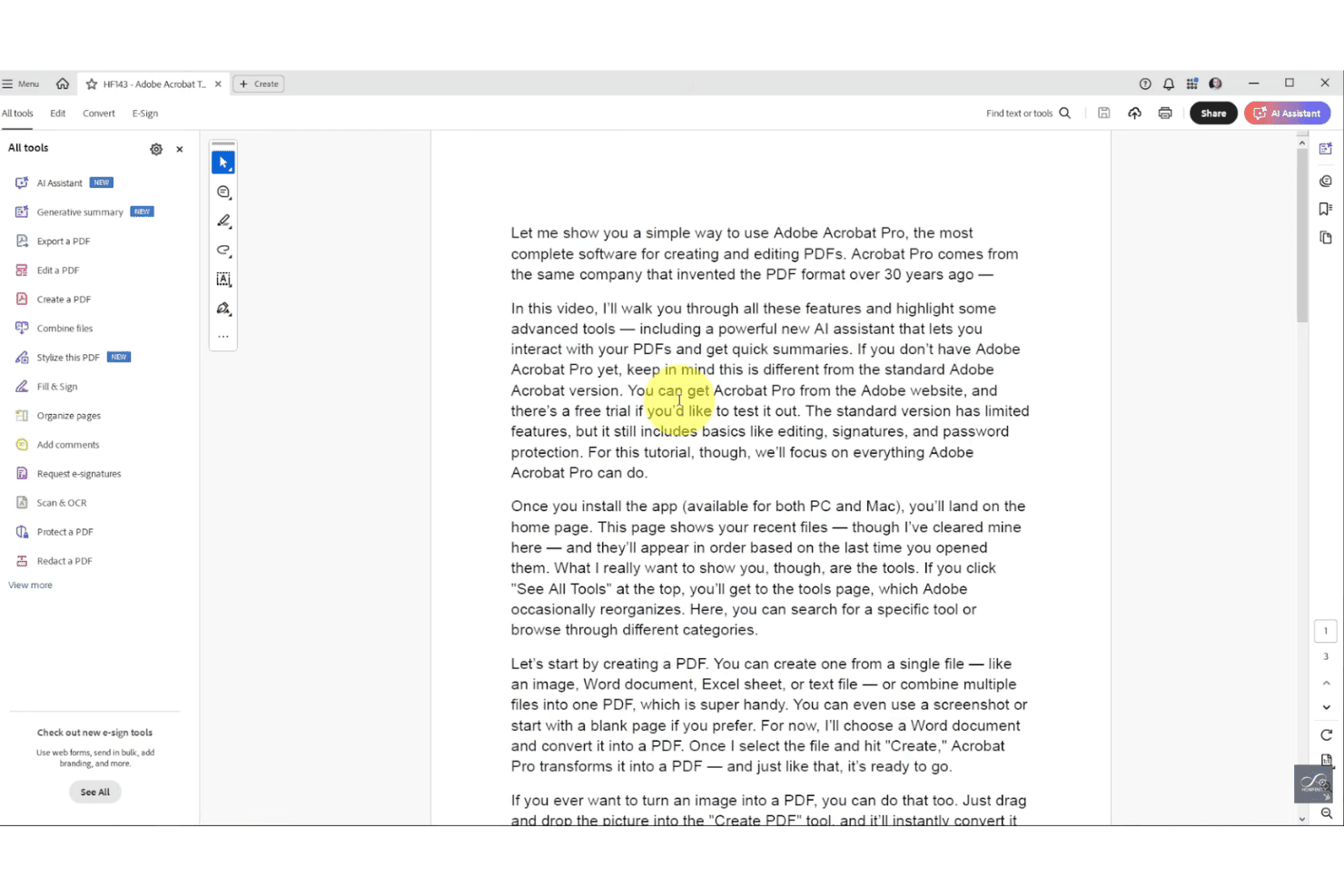
Adobe Acrobat Pro covers a full suite of PDF tools in one workspace. Adobe Acrobat is a PDF editor and remediation platform that includes AI-powered auto-tagging, full tag tree editing, accessibility compliance checking against WCAG and PDF/UA, batch processing via Action Wizard, OCR, redaction, and Bates numbering.
Who Is Adobe Acrobat Best For?
Adobe Acrobat is a strong fit for legal operations teams and law firms that need to process large volumes of PDFs for accessibility compliance across departments or client portfolios.
Why I Picked Adobe Acrobat
Adobe Acrobat earns its spot on my shortlist because no other tool matches its batch processing depth for legal teams running high-volume compliance workflows. The Action Wizard lets you apply a full "Make Accessible" remediation sequence across entire document folders in one pass, and the PDF Accessibility Auto-Tag API has handled real-world workloads as large as 8 million WCAG 2.1 AA compliant documents per year for a U.S. state court system. I also rely on the built-in Bates numbering tool, which applies sequential identifiers across batched PDFs without breaking your remediation workflow.
Adobe Acrobat Key Features
- AI-powered auto-tagging: Uses Adobe Sensei AI to automatically assign structural tags—including headings, tables, and lists—to untagged or partially tagged PDFs.
- Accessibility checker: Validates PDFs against WCAG 2.1/2.2, PDF/UA, and Section 508, and flags issues with suggested one-click fixes directly in the checker panel.
- OCR conversion: Converts scanned or image-only PDFs into searchable, editable, tag-ready text before remediation begins.
- Redaction tool: Permanently removes sensitive text and images from PDFs, with redacted content markable as artifacts within the accessibility tag structure.
Adobe Acrobat Integrations
Adobe Acrobat has native integrations across the Microsoft ecosystem, including Microsoft 365, Microsoft Information Protection, and Power Automate, plus Google Drive, Dropbox, Box, and Adobe Experience Manager. Acrobat Services APIs support custom integrations; native iManage, NetDocuments, and Worldox connectors aren’t documented.
Pros and Cons
Pros:
- Full manual and automated PDF tagging workflow
- Industry-standard Bates numbering with batch support
- AI-powered batch auto-tagging for high volumes
Cons:
- No native iManage or NetDocuments connector
- Accessibility checker catches limited real issues
Learn more about Adobe Acrobat: Best for compliance-grade multi-standard auditing
- Free trial available
- Pricing upon request
Visit WebsiteCustomer Rating:4.6/5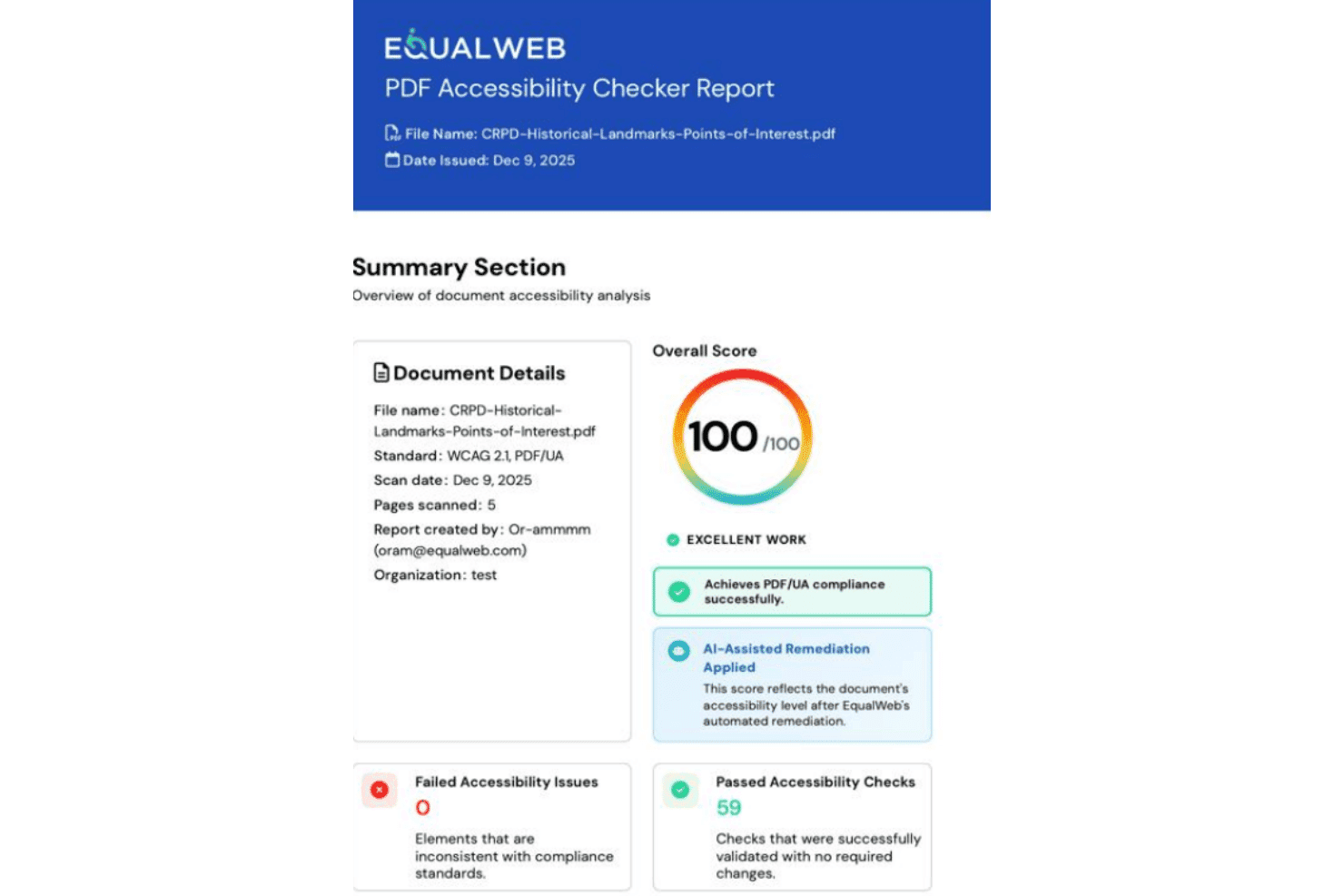
EqualWeb scores PDFs for accessibility compliance across multiple standards. EqualWeb PDF Accessibility is a cloud-based PDF remediation platform that combines AI auto-remediation, OCR for scanned documents, and IAAP/CPWA-certified expert manual remediation across a multi-standard compliance framework covering WCAG, PDF/UA, Section 508, ADA, and EN 301 549.
Who Is EqualWeb PDF Accessibility Best For?
EqualWeb PDF Accessibility is a strong fit for compliance and accessibility officers who need to audit documents against multiple standards simultaneously.
Why I Picked EqualWeb PDF Accessibility
EqualWeb PDF Accessibility earns its spot on my shortlist because no other tool I've tested audits against as many standards simultaneously, covering WCAG 2.1 and 2.2, PDF/UA-1, PDF/UA-2, Section 508, ADA, and EN 301 549 in a single pass. I particularly like the post-remediation re-audit, which runs the same 80+ checks on every output file and generates a shareable pass/fail report you can hand directly to an auditor. The conformance records issued for manually remediated documents add another layer of defensibility that matters when a client or regulator asks for proof.
EqualWeb PDF Accessibility Key Features
- AI auto-remediation engine: Automatically builds a full tag tree from scratch, covering headings, lists, tables, reading order, language attribution, and metadata in a single pass.
- Human approval gate for alt text: AI-generated alt text is displayed alongside screenshots of the relevant image regions, requiring human review and approval before being applied.
- Cloud Connect integration: Connects to SharePoint, Google Drive, OneDrive, Dropbox, Box, and S3-compatible storage, enabling automated in-place remediation without manual file uploads.
- OCR for scanned documents: Converts scanned, image-only PDFs of up to 400 pages into searchable, tagged, accessible text before applying full AI remediation.
EqualWeb PDF Accessibility Integrations
Native integrations span Microsoft 365, Google Drive, OneDrive, Dropbox, Box, AWS S3, Cloudflare R2, WordPress, Drupal, and Moodle. It also supports Shopify, Canvas LMS, other cloud storage, and REST API custom integrations.
Pros and Cons
Pros:
- Human approval required for all AI alt text
- Hybrid AI and certified expert remediation
- Audits against the most compliance standards
Cons:
- No redaction-aware or Bates-number handling
- No legal DMS platform integrations
Learn more about EqualWeb PDF Accessibility: Best for on-premises government-scale remediation
- Free plan available
- From $599/user/year
Visit WebsiteCustomer Rating:5/5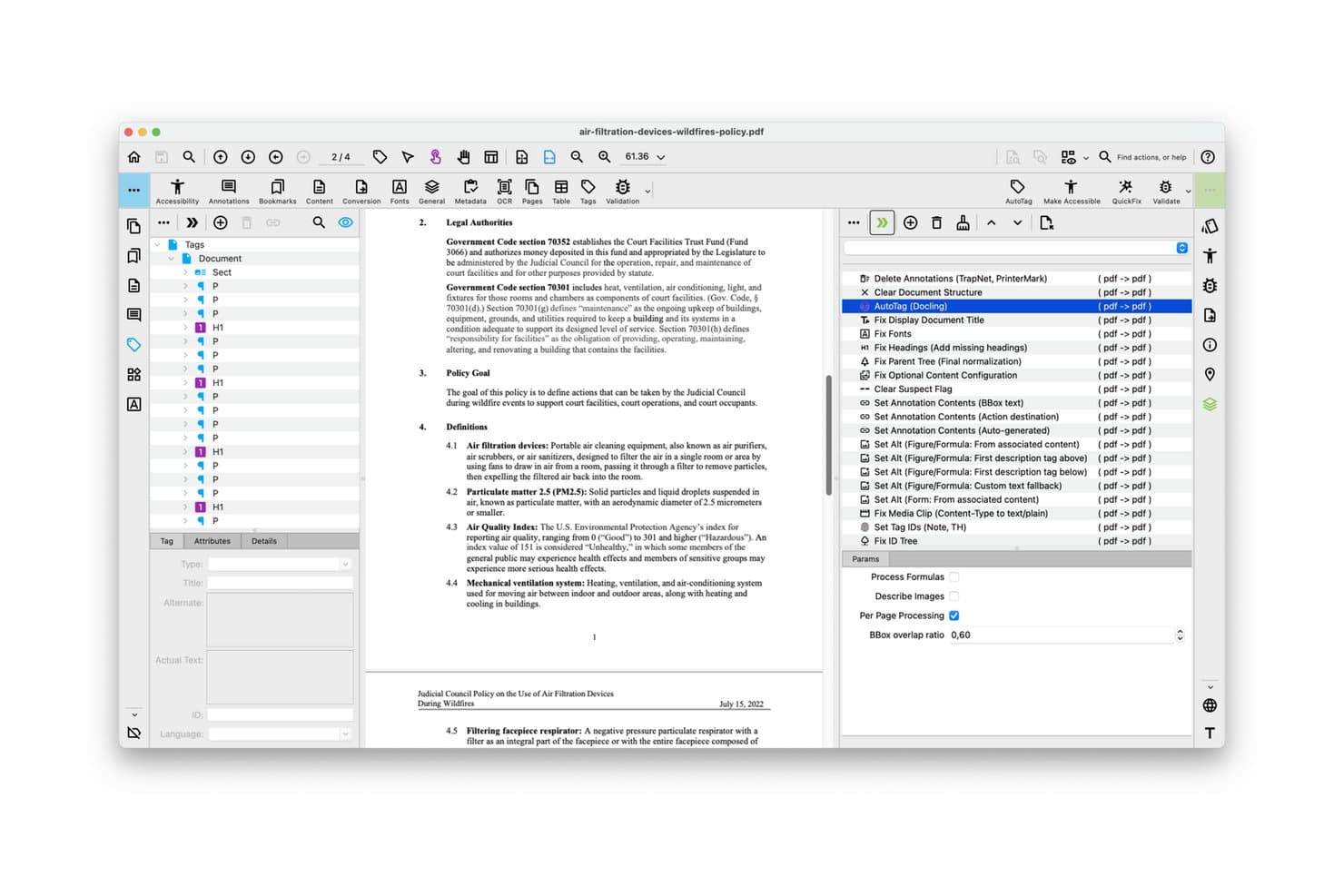
PDFix lets users auto-tag and remediate PDF accessibility issues visually. PDFix is a PDF remediation tool that combines AI-powered auto-tagging, multi-standard compliance validation (PDF/UA, WCAG, Section 508, ADA Title II), batch processing, and on-premises deployment across Windows, macOS, and Linux.
Who Is PDFix Best For?
PDFix is a strong fit for IT administrators and compliance officers in government agencies, courts, and regulated institutions that process high volumes of PDFs on-premises.
Why I Picked PDFix
I picked PDFix as one of the best because its on-premises deployment is genuinely built for institutions that can't send sensitive documents to an external server. The California Judicial Council uses it to process 4.8 million cases annually across 58 courts, which tells you exactly what scale it's designed for. I also love that reusable JSON layout templates let you define remediation rules once and apply them across thousands of identical court forms automatically.
PDFix Key Features
- Multi-standard compliance validation: The embedded veraPDF engine checks documents against PDF/UA-1, PDF/UA-2, WCAG 2.1, WCAG 2.2, Section 508, ADA Title II, and the European Accessibility Act in a single workflow.
- AI alt text generation: Generate alt text for images using a local offline BLIP model or OpenAI's API, with bulk editing supported through JSON layout templates.
- Cross-platform native support: PDFix runs natively on Windows, macOS, and Linux, making it usable across mixed-OS environments without virtualization.
- Exportable audit reports: Validation results export as HTML, XML, or JSON, giving compliance officers documentation-ready reports for accessibility audits.
PDFix Integrations
PDFix offers marketplace integrations through Enfocus Switch, including PDFix Validation and PDFix Make Accessible. Its SDK supports custom integrations through REST-compatible interfaces, Python, C#, Java, C++, and Node.js, plus Docker, Kubernetes, and GitHub Actions workflows.
Pros and Cons
Pros:
- Customizable AI models for tagging and alt text
- Native support for Windows, macOS, and Linux
- Runs entirely on-premises with no data loss
Cons:
- Advanced automation requires technical template setup
- No built-in legal DMS connectors
Learn more about PDFix: 9Best for multi-standard compliance at scale
PREP
- Free demo available
- Pricing upon request
Visit WebsiteCustomer Rating:5/5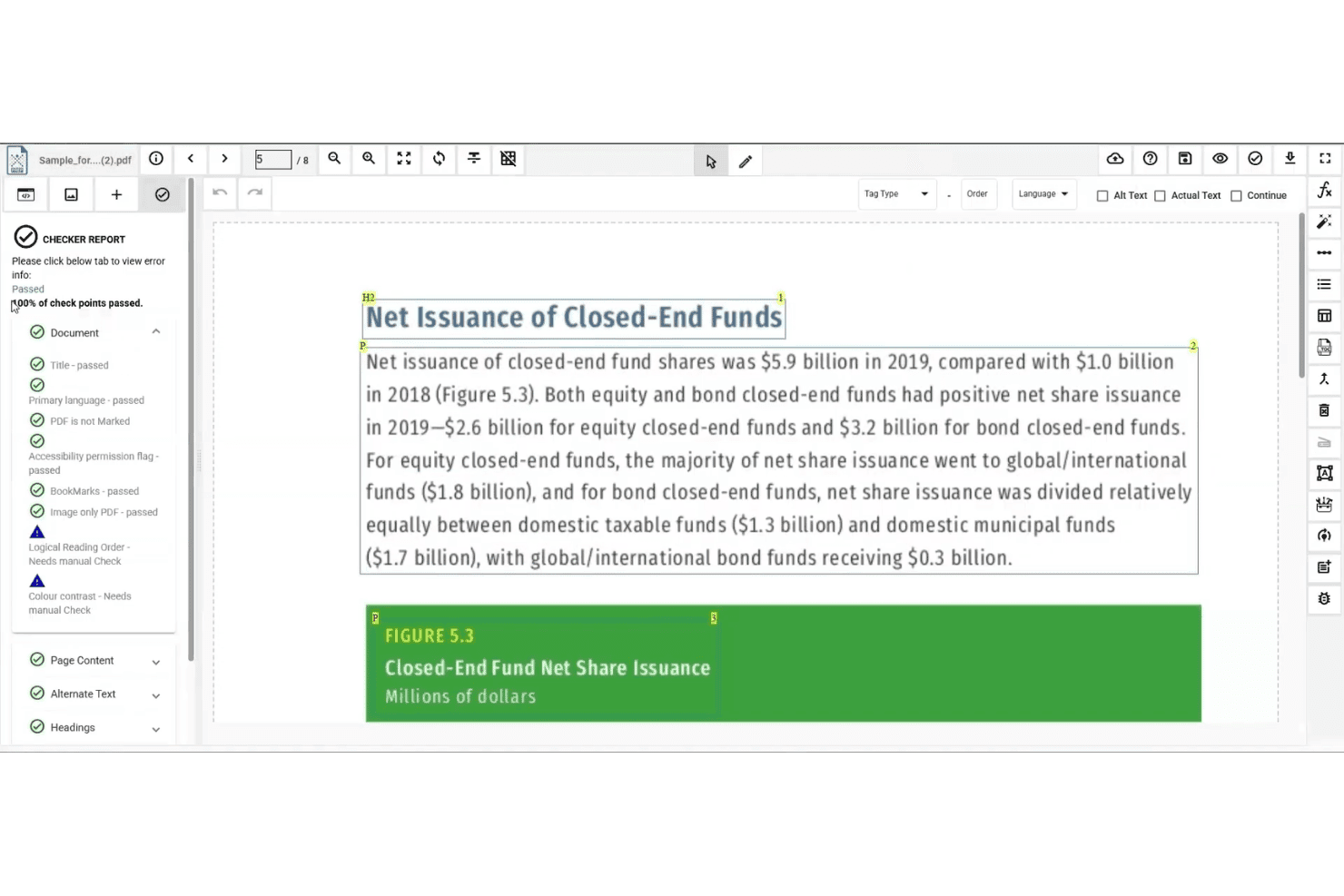
PREP checks PDF accessibility and flags issues needing manual review. PREP is a PDF remediation platform by Continual Engine that uses AI-assisted auto-tagging, batch processing, built-in compliance checking across multiple accessibility standards, and a REST API suite to handle large-scale document remediation workflows.
Who Is PREP Best For?
PREP is a strong fit for compliance and accessibility officers at enterprise organizations managing high volumes of documents across multiple regulatory standards.
Why I Picked PREP
I picked PREP as one of the best because no other tool I've evaluated covers this many accessibility standards in a single platform. WCAG 2.2 AA, PDF/UA, Section 508, ADA Title II, AODA, and the European Accessibility Act are all built into the compliance checker, which means one batch run surfaces violations across every standard at once. The template tagging feature is what makes this scalable: once you configure a tagging profile for a recurring document structure, PREP applies it automatically across future uploads without manual review.
PREP Key Features
- Real-time screen reader preview: Lets you verify how tagged content will be read aloud before exporting the final document.
- AI-enhanced OCR: Processes scanned and image-only PDFs, including multilingual and right-to-left language content, in batch.
- Multi-user workflow management: Supports document assignment, progress tracking, and usage reporting by team or department.
- PREP+ REST API suite: Enables automated remediation pipelines via Auto Tag, Accessibility Checker, and Audit APIs for integration into existing systems.
PREP Integrations
PREP has documented integrations with Canvas, D2L Brightspace, LTI, CivicPlus, Wagtail, and Okta. Its REST API supports custom connections, but native integrations with iManage Work, NetDocuments, and Worldox aren’t documented.
Pros and Cons
Pros:
- Real-time screen reader preview for QC
- AI tags most PDF elements automatically
- Covers six accessibility standards in one check
Cons:
- Lacks native legal document management connectors
- No legal-industry-specific features available
Learn more about PREP: Best for high-volume, standards-driven PDF compliance
- 7-day free trial + free demo available
- Pricing upon request
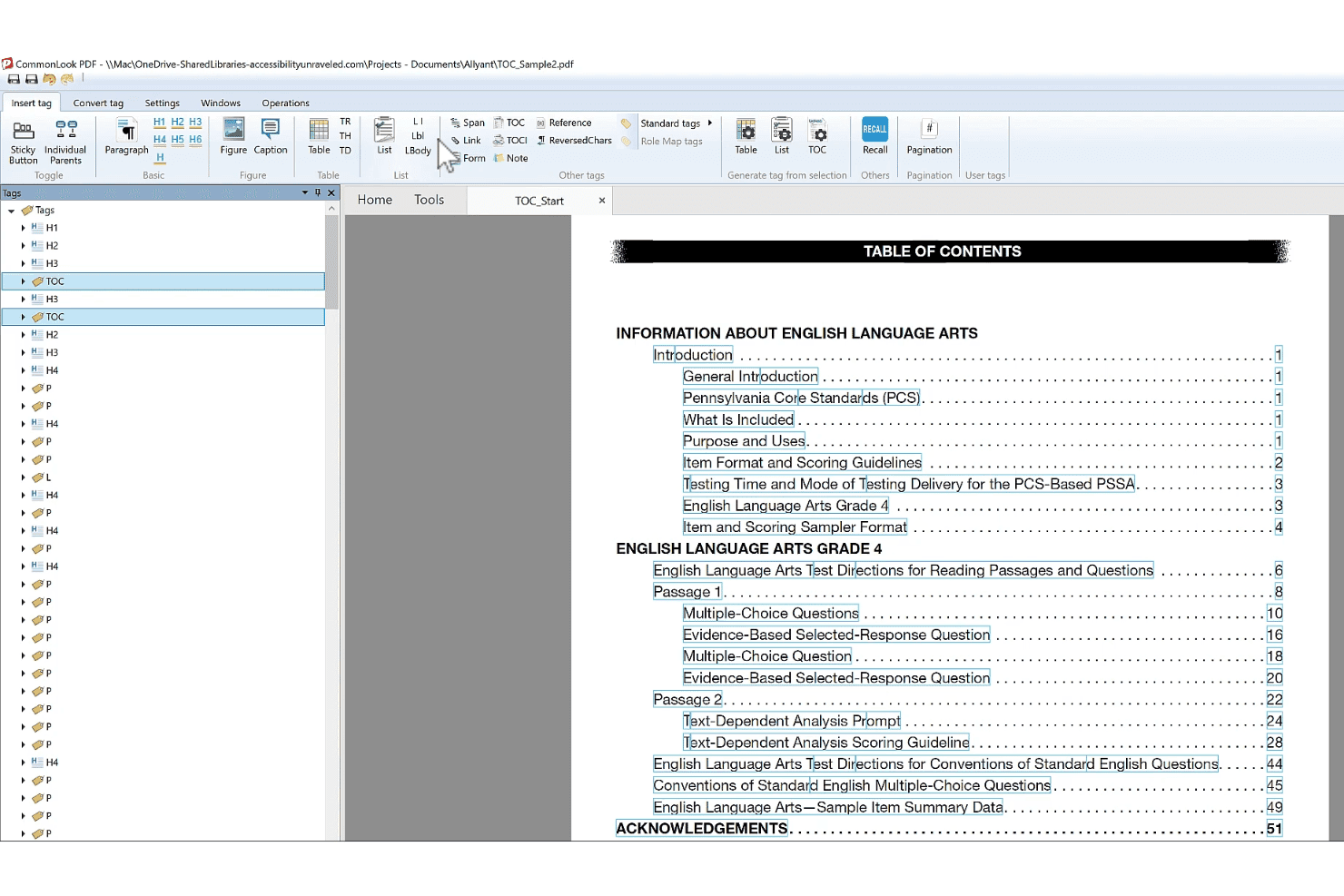
CommonLook Dynamic helps users tag and remediate PDF accessibility structures. CommonLook Dynamic is an enterprise PDF remediation and accessibility platform that handles high-volume, data-driven document production with multi-standard compliance validation across WCAG, PDF/UA, Section 508, ADA Title II, and the European Accessibility Act.
Who Is CommonLook Dynamic Best For?
CommonLook Dynamic is a strong fit for compliance officers and legal operations teams managing high-volume, templated document workflows that must meet multiple accessibility standards simultaneously.
Why I Picked CommonLook Dynamic
CommonLook Dynamic earns its spot on my shortlist because it's purpose-built for exactly the scenario most remediation tools struggle with: generating accessible, compliant PDFs at enterprise scale from structured data sources like databases and spreadsheets. I picked it specifically for teams running templated, high-volume document workflows where multi-standard compliance isn't optional. The suite validates against WCAG 2.0/2.1/2.2, PDF/UA, Section 508, and ADA Title II simultaneously, and every processed document ships with a paired Validation Report you can use as an audit trail.
CommonLook Dynamic Key Features
- Fix Wizard: A step-by-step guided tool that walks users through identifying and correcting accessibility and structural issues in a PDF without requiring deep specialist knowledge.
- System of Record: Tracks remediation history and stores each processed PDF paired with its Validation Report, creating a retrievable audit trail for compliance documentation.
- CommonLook PDF Validator: A free Adobe Acrobat Pro plugin that tests individual PDFs against accessibility standards and generates certification reports covering tagging, alt text, metadata, and links.
- CommonLook Clarity: Continuously scans document repositories and websites to flag newly added inaccessible PDFs, giving teams a live view of their compliance exposure across large document libraries.
CommonLook Dynamic Integrations
CommonLook’s documented integrations include Adobe Acrobat Pro DC, Microsoft Word and PowerPoint through CommonLook Office, Monsido, and the Allyant HUB. CommonLook Dynamic also connects to databases and spreadsheets as data sources.
Pros and Cons
Pros:
- AI auto-tagging for tables, forms, lists
- Compliance audit reports paired with each PDF
- Multi-standard compliance validation in every workflow
Cons:
- No Bates numbering or redaction-aware tagging
- No native legal DMS integrations available
Learn more about CommonLook Dynamic:
Outro software de remediação de PDF
Eis algumas opções adicionais de software de remediação de PDF que não entraram na minha seleção, mas que ainda vale a pena consultar:
- 11RemeDocsBest for automated compliance cert generation
- 12DocAccessBest for public-sector PDF accessibility at scale
- 13OpenTextBest for AI-assisted PDF accessibility in large orgs
- 14Recite MeBest for website-wide PDF accessibility monitoring
- 15Foxit PDF EditorBest for PDF remediation inside legal DMS workflows
- 16Tungsten AutomationBest for legal PDF workflows with DMS integration
- 17MadeToTagBest for InDesign-to-PDF/UA accessibility output
- 18CommonLook PDFBest for compliance-grade table and tag remediation
- 19AppligentBest for expert-led Section 508 certification
- 20SensusAccessBest for accessible alt text in batch PDF workflows
How I Evaluate PDF Remediation Software
I split my evaluation into baseline capabilities every tool must meet and the differentiators—like DMS integration, audit-grade reporting, and redaction-aware tagging—that separate tools built for legal workflows from general-purpose options.
Core Functionality (Table Stakes For This List)
When I'm selecting tools for my list, I rank each one on a scale from 0 (does not offer the functionality) to 5 (excels in this area) for each core functionality listed below. I then calculate the tool's total score into a percentage, using 65% as a benchmark to help assess its overall fit for the list.
- PDF Tagging & Structure: I check whether a tool offers full tag tree editing with role mapping, not just auto-tagging that leaves you cleaning up messy heading hierarchies in a 200-page brief.
- Compliance Checks: Each tool should audit against WCAG, PDF/UA, and Section 508 with clear pass/fail reporting, since court filings and client documents often need to satisfy multiple standards at once.
- Alt Text & Image Handling: I look for bulk alt text editing, decorative image detection, and figure tagging—features that matter when you're remediating exhibit-heavy case documents with dozens of embedded images.
- Table & Form Remediation: Complex tables in contracts and financial disclosures break screen readers fast, so I evaluate how well each tool handles nested table headers, form field labeling, and tab order.
- Batch Processing & Automation: High-volume legal workflows demand more than single-file remediation. I look for API access, rules-based batch processing, and template support that can handle hundreds of documents in a single run.
- Reading Order & Language Controls: A misordered reading sequence can make a court filing incomprehensible to a screen reader user. I evaluate whether tools let you visually adjust reading order and tag per-element language attributes for multilingual documents.
Once I have a list of tools that meet the criteria, I consider what sets each platform apart.
Differentiating Factors (What Sets Vendors Apart)
Here's how I compare and contrast different vendors:
Standout Features
Redaction-aware tagging is non-negotiable for legal work. I check whether a tool correctly flags redacted content as artifacts so screen readers never expose privileged or sealed information. DMS integration matters just as much. I evaluate whether tools connect to iManage, NetDocuments, or Worldox and preserve metadata when documents move through remediation. Audit trail and certification capabilities round out my assessment—I look for timestamped remediation logs and PDF/UA conformance certificates that hold up during ADA compliance audits.
Beyond Features
Data security matters when privileged or sealed filings pass through remediation. I check whether a vendor offers on-premise or private-cloud deployment and holds SOC 2 Type II certification, since many firms' outside counsel guidelines require both. DMS integration is equally important—I evaluate whether tools connect to iManage, NetDocuments, or Worldox and preserve metadata and version history during remediation. I also look at licensing models, especially whether pricing scales by volume or per seat, because case-driven document loads fluctuate and a rigid structure can inflate costs fast.
Como escolher software de remediação de PDF
A escolha do software de remediação de PDF adequado depende da forma como este se adapta ao seu volume, fluxo de trabalho e pressões de conformidade — por isso, pergunte a si próprio: qual é o maior obstáculo à acessibilidade que a sua equipa enfrenta neste momento?
| Se a sua prioridade for... | Procure... |
|---|---|
| Se a sua prioridade for...Remediar grandes volumes de documentos jurídicos em lote | Procure...Processamento em massa com API ou fluxos de trabalho automatizados |
| Se a sua prioridade for...Rastos de auditoria defensáveis | Procure...Geração de certificados e relatórios exportáveis |
| Se a sua prioridade for...Gestão documental | Procure...Integração com as suas plataformas DMS existentes |
| Se a sua prioridade for...Gestão fiável de ocultações | Procure...Etiquetagem com reconhecimento de ocultações e controlos de artefactos |
| Se a sua prioridade for...Trabalho para o governo ou para o setor público | Procure...Verificações segundo vários padrões, incluindo PDF/UA e a Secção 508 |
Como avaliar criteriosamente a sua seleção
- Peça um exemplo de relatório de auditoria: Peça a cada fornecedor um certificado real (com os dados ocultados) de conformidade com PDF/UA ou com a Secção 508, gerado pela respetiva plataforma.
- Faça um teste de processamento em lote: Processe mais de 10 PDFs jurídicos de exemplo durante um período de teste, para avaliar a velocidade e a precisão do processamento em massa de acordo com os seus padrões.
- Teste a integração com o DMS: Peça ao fornecedor que demonstre, numa sessão em direto, como guardar um documento remediado na sua configuração DMS (iManage, NetDocuments, etc.).
- Confirme o fluxo de trabalho de ocultação: Envie um ficheiro com informação ocultada para remediação e confirme que os blocos sensíveis são corretamente etiquetados como artefactos.
- Critério de decisão — volume vs. integração: Dê prioridade às ferramentas de automatização de grandes volumes quando a conformidade em escala for mais importante; escolha ferramentas nativas do fluxo de trabalho para uma integração profunda com a gestão de registos.
O que é o software de remediação de PDF?
O software de remediação de PDF é um tipo de ferramenta que identifica e corrige problemas de acessibilidade em documentos PDF, tornando-os conformes com normas legais e de acessibilidade, como WCAG, PDF/UA e a Secção 508. Estas ferramentas adicionam etiquetas, ordem de leitura, texto alternativo e outras funcionalidades de acessibilidade, para que os leitores de ecrã e as tecnologias de apoio possam interpretar o conteúdo com precisão para todos os utilizadores. Isto é essencial para a conformidade legal, regulamentar e do setor público.
Funcionalidades do software de remediação de PDF
Ao selecionar software de remediação de PDF, esteja atento às seguintes funcionalidades principais:
- Etiquetagem de PDF e edição da estrutura: Permite adicionar, modificar ou reparar a árvore de etiquetas e a estrutura dos documentos, garantindo que todos os títulos, parágrafos e elementos são compatíveis com leitores de ecrã e cumprem os requisitos de acessibilidade.
- Verificações de conformidade e relatórios: Audita automaticamente os PDFs em relação às normas WCAG, PDF/UA e Secção 508, fornecendo resultados claros de aprovação/reprovação e relatórios detalhados para auditorias ou submissões regulamentares.
- Texto alternativo e remediação de imagens: Permite adicionar, editar ou aplicar texto alternativo em massa a imagens e sinalizar imagens decorativas como artefactos, o que é essencial para peças processuais, gráficos e documentos com muitos elementos gráficos.
- Remediação de tabelas e campos de formulário: Suporta a correção de tabelas complexas, cabeçalhos aninhados e identificação de campos de formulário, garantindo que a ordem de tabulação e as relações entre dados são claras para as tecnologias de apoio.
- Processamento em massa e automatização: Permite processar vários documentos simultaneamente, através de integrações de API ou ferramentas incorporadas de processamento em massa, algo fundamental para fluxos de trabalho jurídicos de grande volume e prazos apertados.
- Controlos da ordem de leitura e do idioma: Permite visualizar, ajustar e definir a ordem lógica de leitura e as etiquetas de idioma de cada elemento, para que os leitores de ecrã interpretem o conteúdo na sequência e no idioma corretos.
- Etiquetagem de artefactos com reconhecimento de ocultação: Sinaliza conteúdos ocultados ou protegidos por privilégio como artefactos na estrutura de etiquetas, impedindo que os leitores de ecrã revelem informações seladas ou sensíveis em peças processuais ou documentos de clientes.
- Integração com sistemas de gestão documental (DMS): Liga-se às plataformas DMS existentes, como iManage, NetDocuments ou Worldox, para importação, exportação e preservação direta de metadados durante os fluxos de trabalho de remediação.
- Registo de auditoria e exportação de certificação: Cria registos com marca temporal e gera certificados PDF/UA ou da Secção 508 para demonstrar a conformidade — algo essencial para responder a pedidos de clientes, tribunais ou entidades reguladoras.
- Opções de implementação e segurança: Oferece opções como implementação no local, numa nuvem privada ou através de SaaS seguro, com gestão de credenciais e certificações de conformidade, para que possa tratar com segurança documentos confidenciais ou protegidos por privilégio.
Funcionalidades comuns de IA do software de remediação de PDF
Para além das funcionalidades padrão do software de remediação de PDF acima mencionadas, muitas destas soluções estão a integrar IA com funcionalidades como:
- Etiquetagem automática baseada em IA: Utiliza aprendizagem automática para analisar a estrutura dos documentos e gerar automaticamente árvores de etiquetas precisas, reduzindo o tempo de etiquetagem manual e melhorando a consistência em grandes lotes de PDFs.
- Geração de texto alternativo com IA: Cria automaticamente texto alternativo descritivo para imagens, gráficos e elementos gráficos, interpretando o conteúdo visual, o que ajuda a garantir a acessibilidade mesmo quando faltam descrições de origem.
- Reconhecimento da estrutura de tabelas baseado em IA: Deteta e reconstrói tabelas complexas, incluindo células intercaladas e cabeçalhos aninhados, facilitando a remediação de demonstrações financeiras e peças processuais sem intervenção manual.
- Correção assistida por IA da ordem de leitura: Analisa a disposição e o fluxo do conteúdo dos documentos para sugerir ou aplicar ordens lógicas de leitura, minimizando erros que podem confundir os leitores de ecrã e dificultar a compreensão dos documentos.
- Deteção de idiomas com IA: Identifica e etiqueta diferentes idiomas num único documento, permitindo uma saída correta do leitor de ecrã para peças processuais multilingues e documentos jurídicos internacionais.
Benefícios do software de remediação de PDF
A implementação de software de remediação de PDF proporciona vários benefícios à sua equipa e à sua empresa. Eis alguns dos benefícios que pode esperar:
- Conformidade legal e regulamentar consistente: As verificações de conformidade automatizadas e os relatórios com qualidade de auditoria ajudam a cumprir as normas WCAG, PDF/UA e Section 508 para requisitos judiciais, de clientes e governamentais.
- Acessibilidade precisa dos documentos: A etiquetagem, a edição da estrutura e a etiquetagem automática orientada por IA garantem que os PDFs são compatíveis com leitores de ecrã, permitindo que todos acedam a conteúdos jurídicos essenciais.
- Proteção de informações privilegiadas e ocultadas: A etiquetagem com reconhecimento de redações assinala secções seladas ou sensíveis como artefactos, impedindo que as tecnologias de apoio exponham informações confidenciais.
- Processamento simplificado de grandes lotes: A correção em massa, a automatização de lotes e as integrações de API permitem corrigir grandes volumes de documentos sem abrandar o seu fluxo de trabalho.
- Integração fiável com a gestão documental: As integrações com DMS permitem mover, guardar e preservar metadados em sistemas como o iManage, o NetDocuments ou o Worldox durante a correção.
- Gestão eficiente de imagens e tabelas: Funcionalidades como a edição em massa do texto alternativo, o reconhecimento de tabelas com tecnologia de IA e a correção de campos de formulário ajudam a sua equipa a gerir corretamente anexos complexos e formulários jurídicos.
- Registos de auditoria e certificação fiáveis: Os registos de correção com marca temporal e os certificados PDF/UA ou Section 508 exportáveis fornecem documentação para satisfazer auditorias de clientes ou pedidos de entidades reguladoras.
Custos e preços do software de correção de PDFs
A seleção de software de correção de PDFs exige uma compreensão dos vários modelos de preços e planos disponíveis. Os custos variam consoante as funcionalidades, o tamanho da equipa, os complementos e outros fatores. A tabela abaixo resume os planos comuns, os respetivos preços médios e as funcionalidades normalmente incluídas nas soluções de software de correção de PDFs:
Tabela comparativa de planos de software de correção de PDFs
| Tipo de plano | Preço médio | Funcionalidades comuns |
|---|---|---|
| Tipo de planoPlano gratuito | Preço médio$0 | Funcionalidades comunsVerificações básicas de conformidade, número limitado de páginas, exportação restrita e suporte mínimo. |
| Tipo de planoPlano pessoal | Preço médio$30–$75/utilizador/mês | Funcionalidades comunsLicença para um único utilizador, ferramentas padrão de etiquetagem de PDFs, auditoria de conformidade simples e suporte por e-mail. |
| Tipo de planoPlano empresarial | Preço médio$100–$400/utilizador/mês | Funcionalidades comunsLugares para vários utilizadores, processamento em lotes, etiquetagem avançada, relatórios PDF/UA e Section 508 e suporte. |
| Tipo de planoPlano empresarial de grande dimensão | Preço médio$500–$2,500/mês (personalizado) | Funcionalidades comunsLugares ilimitados, integração de API, conectores DMS, implementação no local, registos de auditoria e conformidade com SOC 2. |
Perguntas frequentes sobre software de remediação de PDF
Eis algumas respostas a perguntas frequentes sobre software de remediação de PDF:
Que integrações devo procurar num software de remediação de PDF?
Procure integrações com os principais sistemas de gestão documental, como iManage, NetDocuments e Worldox. Estas integrações facilitam bastante o armazenamento e a gestão de documentos remediados sem interromper os fluxos de trabalho existentes. O acesso à API também é valioso se precisar de automatizar o processamento de grandes volumes ou de estabelecer ligação a sistemas personalizados.
Como gere o software de remediação de PDF o conteúdo ocultado?
Um bom software de remediação de PDF assinala os blocos ocultados como artefactos durante o processo de etiquetagem. Isto garante que os leitores de ecrã e as tecnologias de assistência não expõem texto selado, sujeito a privilégio ou confidencial. Teste sempre um ficheiro com conteúdo ocultado antes da implementação para confirmar que a ferramenta aplica consistentemente uma etiquetagem que tem em conta o conteúdo ocultado.
A implementação no local é importante para as equipas jurídicas?
Sim, a implementação no local ou numa nuvem privada é importante se o seu escritório de advogados ou departamento jurídico tratar documentos sujeitos a privilégio ou processos sensíveis. Muitas diretrizes para advogados externos exigem soluções no local ou certificação SOC 2 Type II para efeitos de conformidade, por isso confirme sempre as opções de implementação junto do fornecedor.
Como posso avaliar as capacidades de processamento em lote?
Peça ao fornecedor que demonstre o processamento de 10 ou mais PDFs jurídicos num único lote. Procure funcionalidades como modelos baseados em regras, monitorização da fila e relatórios claros sobre erros ou o estado da remediação. As equipas que gerem grandes volumes de processos judiciais ou regulamentares beneficiarão sobretudo de um processamento em lote robusto.
Estas ferramentas geram certificados de conformidade?
Sim, as soluções líderes podem gerar certificados de conformidade com PDF/UA ou com a Secção 508, bem como relatórios de auditoria com marca temporal. Estes elementos são importantes para auditorias de conformidade com a ADA, avaliações regulamentares ou quando é necessário responder a pedidos de clientes que solicitem provas da remediação. Peça sempre um certificado de exemplo como parte do seu processo de avaliação.
Como devo avaliar a integração com o DMS durante um período de teste?
Durante um período de teste, peça ao fornecedor que demonstre como guardar e obter um PDF remediado a partir da mesma plataforma DMS que a sua equipa utiliza, como o iManage ou o NetDocuments. Confirme que os metadados e o histórico de versões são preservados durante o processo, uma vez que isso contribui para uma gestão de registos defensável.
As funcionalidades de IA podem substituir a remediação manual?
Não, a IA acelera tarefas como a etiquetagem automática e a geração de texto alternativo, mas continua a ser necessária uma revisão manual, sobretudo no caso de documentos jurídicos complexos. Utilize a IA para tratar tarefas repetitivas e, em seguida, verifique manualmente a estrutura das etiquetas, a ordem de leitura e o conteúdo sensível para garantir a conformidade.