

O software empresarial de gestão de processos jurídicos proporciona à sua equipa um sistema único para acompanhar, organizar e supervisionar um elevado volume de trabalho jurídico em toda a empresa. Se procura formas de gerir processos complexos, colaborar entre departamentos e reduzir custos sem deixar escapar nenhum detalhe, está no sítio certo.
Neste guia, poderá comparar claramente, lado a lado, as principais opções, perceber o que torna cada uma única e descobrir como estas ferramentas respondem às exigências do dia a dia dos departamentos jurídicos empresariais.
Why Trust Our Software Recommendations
6,700+
Reviews
20
Industry experts
16+
Evaluation factors
14
Years
Our team has been testing and reviewing software since 2012. As legal practice leaders ourselves, we know how difficult—and important—it is to choose the right software.
For this guide, we evaluated tools using hands-on testing and independent research, scoring tools using our selection criteria.
Our reviews reflect our human editorial judgment, not a sales pitch.
Tabela comparativa de software empresarial de gestão de processos jurídicos
Esta tabela comparativa resume os detalhes de preços das minhas principais escolhas de software empresarial de gestão de processos jurídicos:
| Tool | Best For | Trial Info | Price | ||
|---|---|---|---|---|---|
| 1 | Best for data-driven vendor and spend insights | Free demo available | Pricing upon request | Website | |
| 2 | Best for quick setup with existing tools | Free demo available | Pricing upon request | Website | |
| 3 | Best for AI-native legal operating system | Free demo available | Pricing upon request | Website | |
| 4 | Best for collaborative legal matter dashboards | Free demo available | Pricing upon request | Website | |
| 5 | Best for unified workflow and contract automation | Free demo available | Pricing upon request | Website | |
| 6 | Best for spend tracking and benchmarking | Free demo available | Pricing upon request | Website | |
| 7 | Best for configurable global compliance workflows | Not available | Pricing upon request | Website | |
| 8 | Best for integrated AI invoice and matter review | Free demo available | Pricing upon request | Website | |
| 9 | Best for legal spend analytics and benchmarking | Free demo available | Pricing upon request | Website | |
| 10 | Best for AI-powered matter summaries | Free demo available | Pricing upon request | Website |


Avaliações do melhor software empresarial de gestão de processos jurídicos
Apresentamos abaixo os meus resumos detalhados dos melhores softwares empresariais de gestão de processos jurídicos que entraram na minha lista curta. As minhas avaliações oferecem uma análise aprofundada das funcionalidades, capacidades e integrações de cada plataforma, para o ajudar a encontrar a melhor opção para si.
 Best for data-driven vendor and spend insights
- Free demo available
- Pricing upon request
Visit WebsiteCustomer Rating:4.6/5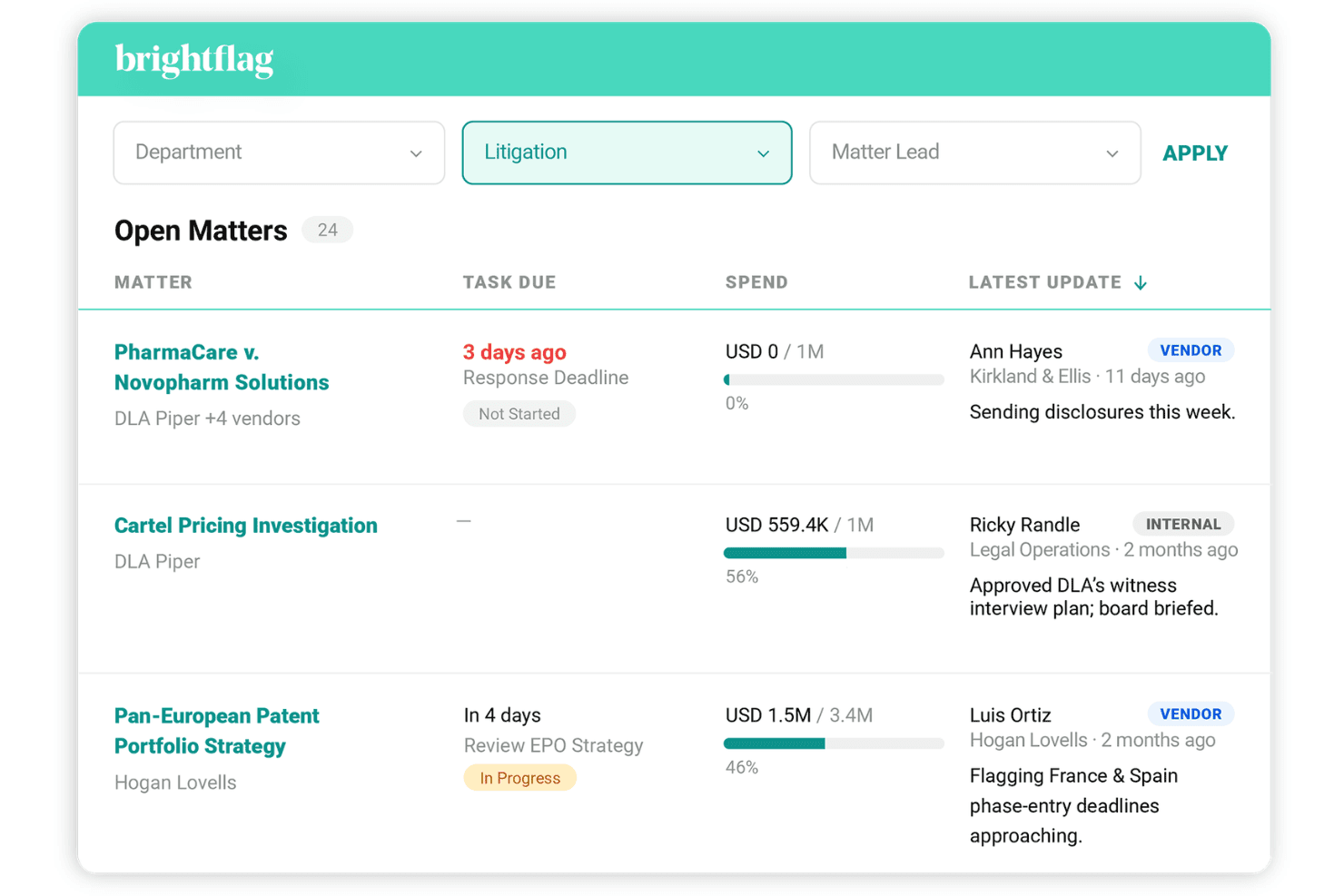
Brightflag centralizes legal spend, matters, billing, vendors, and AI analytics. Brightflag is an AI-powered legal spend and matter management platform for in-house legal teams, centralizing outside counsel invoicing, vendor tracking, matter records, and spend analytics in a single system.
Who Is Brightflag Best For?
Brightflag is a strong fit for enterprise legal operations teams that manage high volumes of outside counsel spend across multiple vendors and jurisdictions.
Why I Picked Brightflag
Brightflag earns its spot on my shortlist because of how it connects vendor performance data directly to spend. I use the 360-degree vendor assessment to compare outside counsel across matters, rates, and billing behavior in one view. The self-serve report builder and "Ask Brightflag" GenAI interface let me pull spend breakdowns without waiting on a data team.
Brightflag Key Features
- Matter workspace collaboration: Enable teams to track deliverables, milestones, and progress updates for each matter in one shared space.
- Automated accruals collection: Gather unbilled estimates from vendors and manage approval workflows for accruals directly in the system.
- Integrated document organization: Store and organize contracts, pleadings, and work product within each matter, with permissions and version control.
- AP and ERP system integrations: Connect with platforms like SAP, Oracle, Workday, and NetSuite to sync legal spend and matter data across business systems.
Brightflag Integrations
Brightflag offers native integrations with SAP, Oracle, NetSuite, iManage, and NetDocuments, and provides an API for custom integrations.
Pros and Cons
Pros:
- Reporting visibility on budget vs. actuals
- AI-powered vendor benchmarking across matters
- Strong invoice review and billing rule automation
Cons:
- AI features only support English-language content
- Dashboard and export customization is limited
Learn more about Brightflag: Best for quick setup with existing tools
- Free demo available
- Pricing upon request
Visit WebsiteCustomer Rating:4.5/5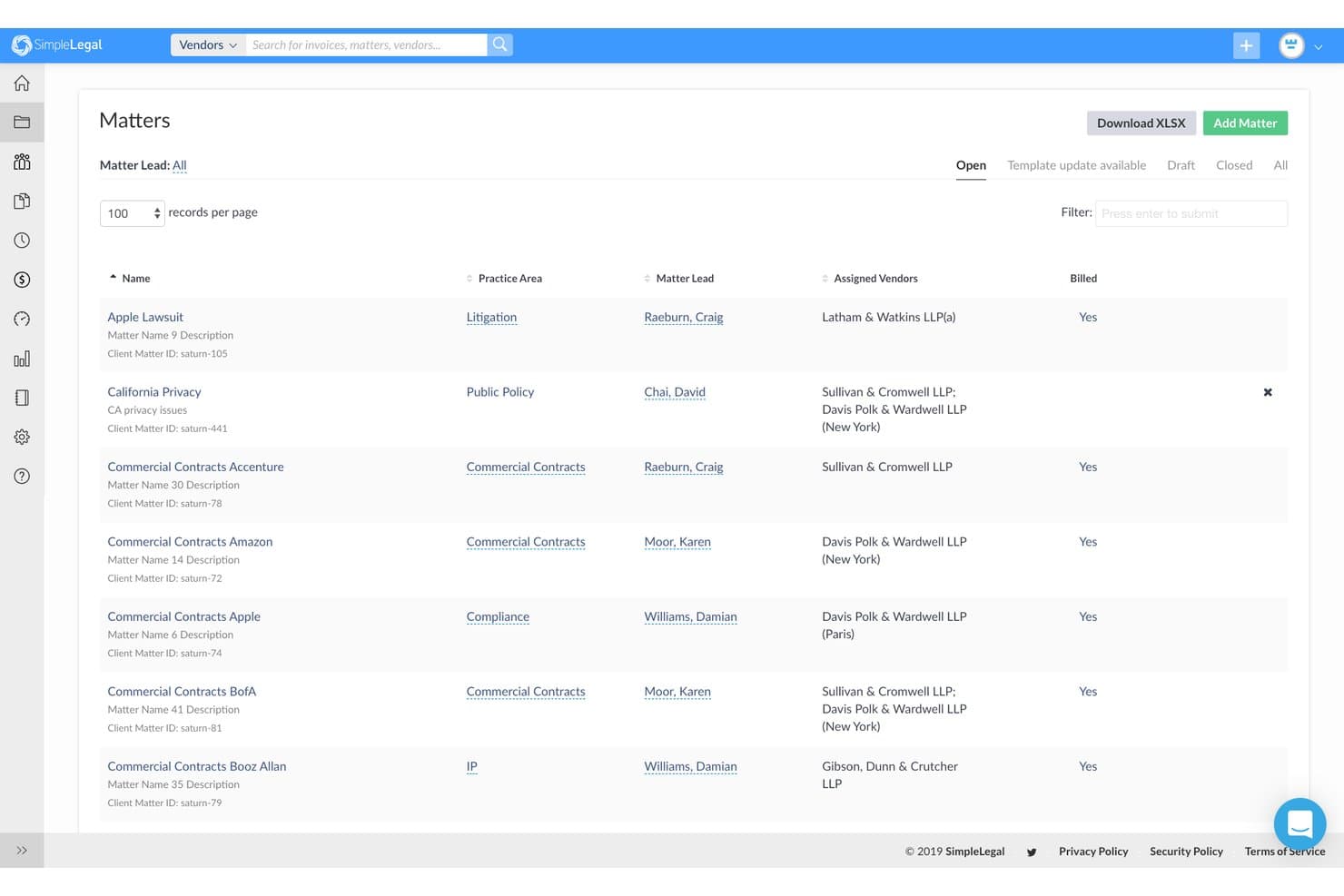
SimpleLegal offers a Matter List view that displays open matters with key details including practice area, matter lead, assigned vendors, and billing status in a centralized dashboard. SimpleLegal is an enterprise legal management platform that covers matter tracking, eBilling, outside counsel management, and spend analytics for in-house legal departments.
Who Is SimpleLegal Best For?
SimpleLegal is a strong fit for corporate legal operations teams at mid-market to enterprise companies that need structured matter and spend management without a lengthy implementation.
Why I Picked SimpleLegal
I've included SimpleLegal in my top picks because of how quickly it connects to the finance and document systems legal teams already rely on. Prebuilt connectors to tools like NetSuite, Workday, SAP Concur, and iManage mean you're not rebuilding your tech stack from scratch. CounselGO, its outside counsel portal, also gets law firms up and running fast, which removes a common delay in getting eBilling workflows live.
SimpleLegal Key Features
- Matter lifecycle tracking: Manage matters from intake through resolution with custom fields, categories, and stage workflows.
- Automated invoice review: Enforce billing guidelines using rules-based approvals and flag non-compliant charges.
- Timekeeper management: Maintain accuracy and compliance by tracking and approving outside counsel timekeepers within the platform.
- Configurable reporting dashboards: Build and schedule reports on spend, matter status, and firm performance using real-time data.
SimpleLegal Integrations
SimpleLegal offers native integrations with NetSuite, Workday, SAP Concur, iManage, NetDocuments, and has native integrations across the Microsoft ecosystem, including SharePoint. An API is available for custom integrations.
Pros and Cons
Pros:
- Spend dashboards are highly configurable out-of-the-box
- CounselGO speeds up outside counsel onboarding
- Fast implementation compared to enterprise competitors
Cons:
- Workflow automation tools are relatively basic
- Reporting lacks depth for complex analytics
Learn more about Onit SimpleLegal: Best for AI-native legal operating system
- Free demo available
- Pricing upon request
Visit WebsiteCustomer Rating:4.5/5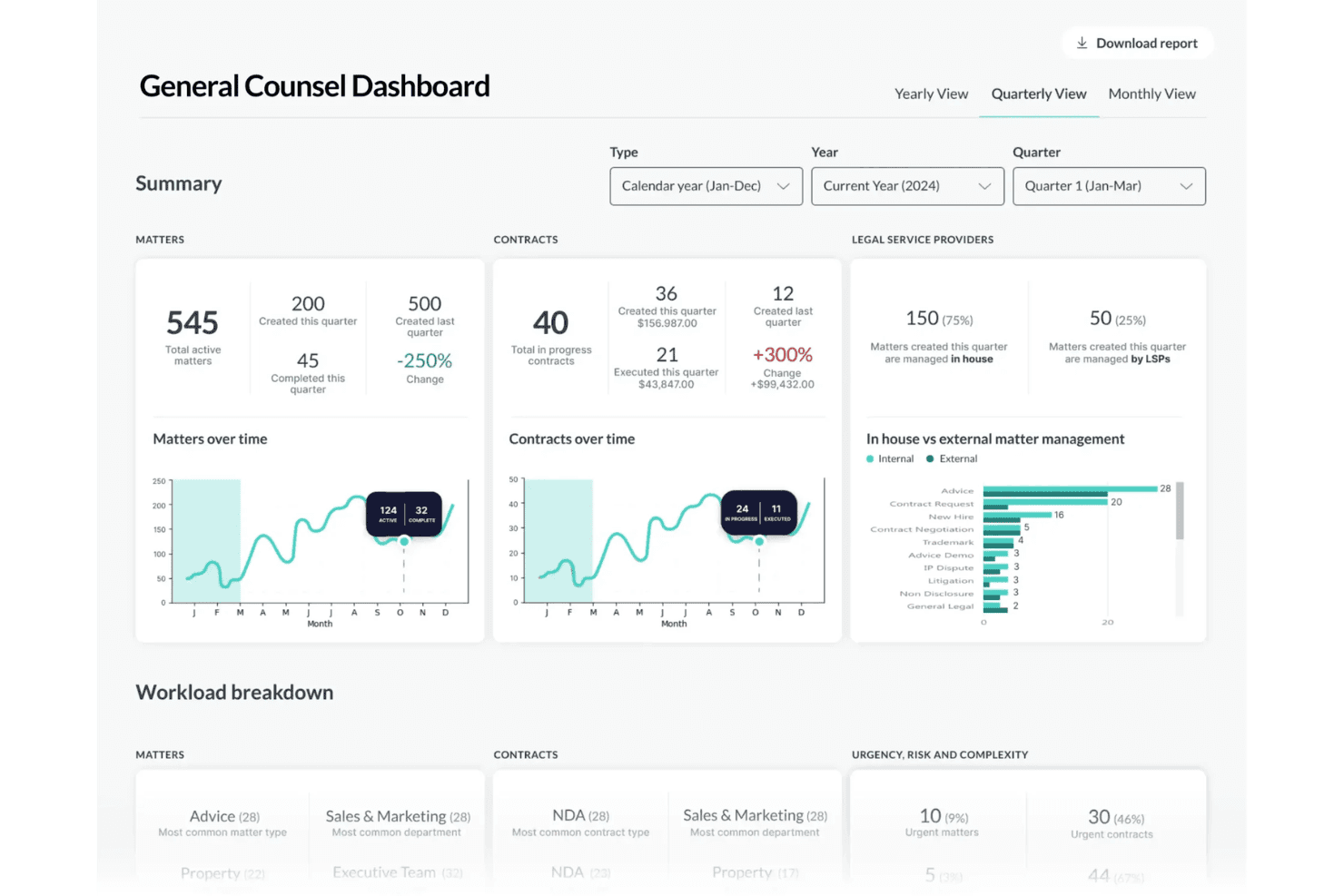
LawVu unifies matters, intake, contracts, and outside counsel spend with secure AI. LawVu is an AI-native legal operating system for in-house legal teams that combines matter management, legal intake, contract lifecycle management, and outside counsel spend tracking in a single unified platform.
Who Is LawVu Best For?
LawVu is a strong fit for in-house legal teams at mid-to-large enterprises that need a single system to manage matters, contracts, and outside counsel spend.
Why I Picked LawVu
LawVu earns its spot as one of the best on my shortlist because of how deeply AI is woven into the core legal workflow. The LawVu Assistant lets me open matters and trigger workflows using natural language, which removes a lot of manual overhead from day-to-day legal operations. I also appreciate how the AI Intelligence layer actively flags auto-renewing contracts and playbook deviations without me having to dig for them.
LawVu Key Features
- Integrated matter and contract management: Centralizes all matters and contracts with linked records, document storage, and communications.
- Spend control and invoice review: Tracks outside counsel invoices and budgets with audit trails and AI-assisted review.
- Customizable intake and workflow forms: Lets you define intake forms and automate assignment and escalation for legal requests.
- Enterprise-grade reporting and dashboards: Generates configurable dashboards and reports tracking matter status, spend, cycle time, and risk.
LawVu Integrations
LawVu offers native integrations with DocuSign, Microsoft 365, SharePoint, Box, Google Drive, Dropbox, and Litera Compare. An API is available for custom integrations.
Pros and Cons
Pros:
- AI surfaces insights without manual data hunting
- Customizable workflows for litigation and vendor management
- Unified matter, contract, and spend management
Cons:
- Background system changes occur without user notification
- Contract approval hierarchy is too lengthy
Learn more about LawVu: Best for collaborative legal matter dashboards
- Free demo available
- Pricing upon request
Visit WebsiteCustomer Rating:4.3/5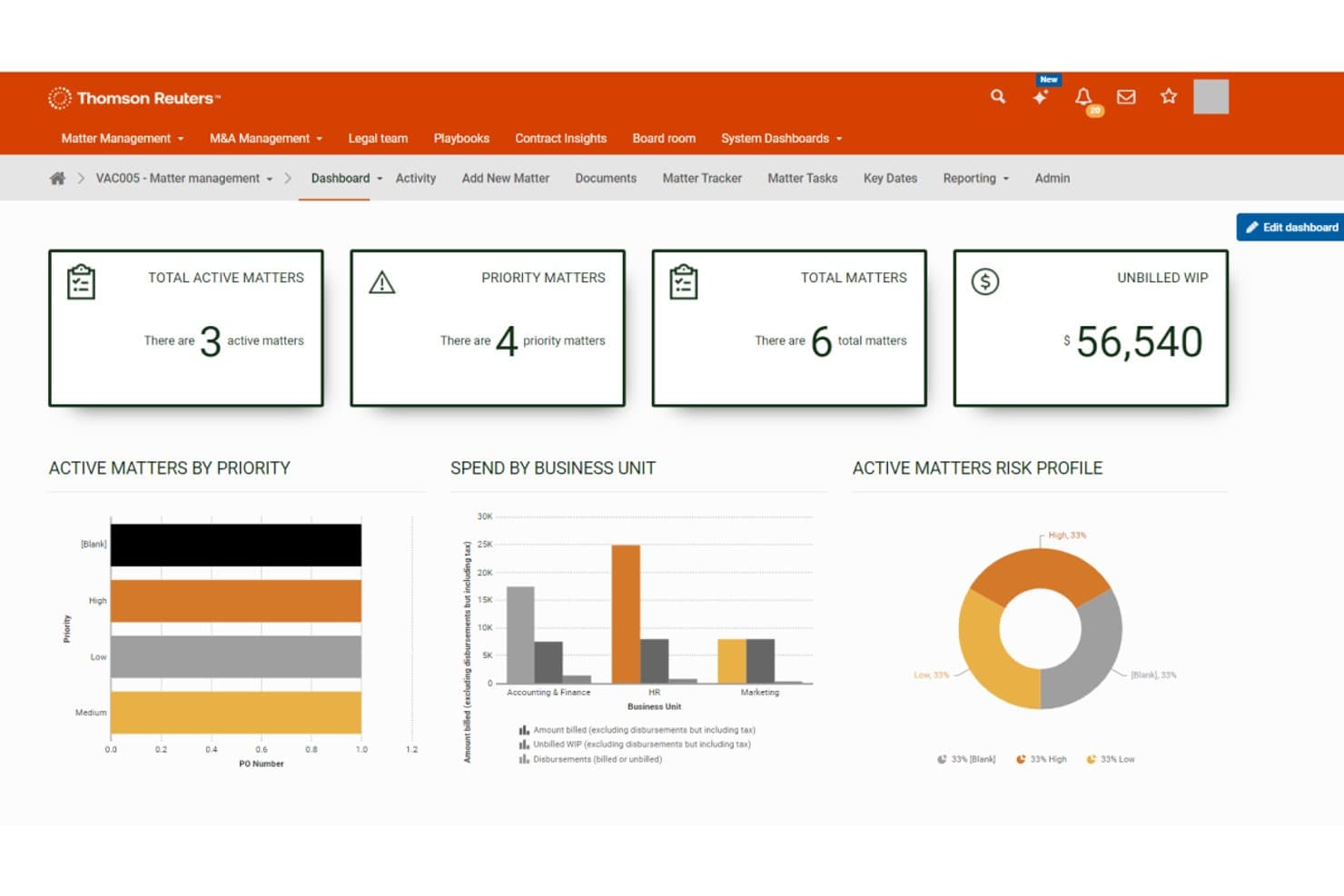
Thomson Reuters HighQ offers an enterprise legal matter management dashboard displaying active matters, priority matters, unbilled WIP, and visual analytics by priority, business unit, and risk profile. Thomson Reuters HighQ is a cloud-based legal matter management platform that centralizes matter tracking, document management, workflow automation, and configurable dashboards for law firms, corporate legal departments, and government organizations.
Who Is Thomson Reuters HighQ Best For?
HighQ is a strong fit for enterprise corporate legal departments and large law firms managing high volumes of matters across multiple teams and stakeholders.
Why I Picked Thomson Reuters HighQ
HighQ earns its spot on my shortlist because of how well it handles matter dashboard collaboration at enterprise scale. I particularly like the configurable dashboards that pull live matter data, spend, and risk indicators into a single shared view for internal teams and outside counsel alike. The granular permission controls let me manage exactly what each user group can see, edit, or download, which matters a lot when I'm working across internal stakeholders and external law firms simultaneously.
Thomson Reuters HighQ Key Features
- Automated workflow builder: Configure multistage workflows to automate matter intake, approvals, and assignments.
- Granular role-based permissions: Set detailed access rights for users, groups, and external partners across documents and workspaces.
- Matter-linked document storage: Store, version, and audit all case files and correspondence directly within each matter.
- Custom analytics dashboards: Build tailored dashboards to track matter lifecycles, workload distribution, and risk exposure.
Thomson Reuters HighQ Integrations
HighQ offers native integrations with iManage, Microsoft 365, NetDocuments, and DocuSign. An API is available for custom integrations.
Pros and Cons
Pros:
- Granular, role-based permissions for external collaborators
- No-code workflow automation for legal ops teams
- Configurable dashboards with live matter data views
Cons:
- AI party identification in documents requires manual corrections
- Initial platform configuration is time-consuming
Learn more about Thomson Reuters HighQ: 5Best for unified workflow and contract automation
Onit
- Free demo available
- Pricing upon request
Visit WebsiteCustomer Rating:4.8/5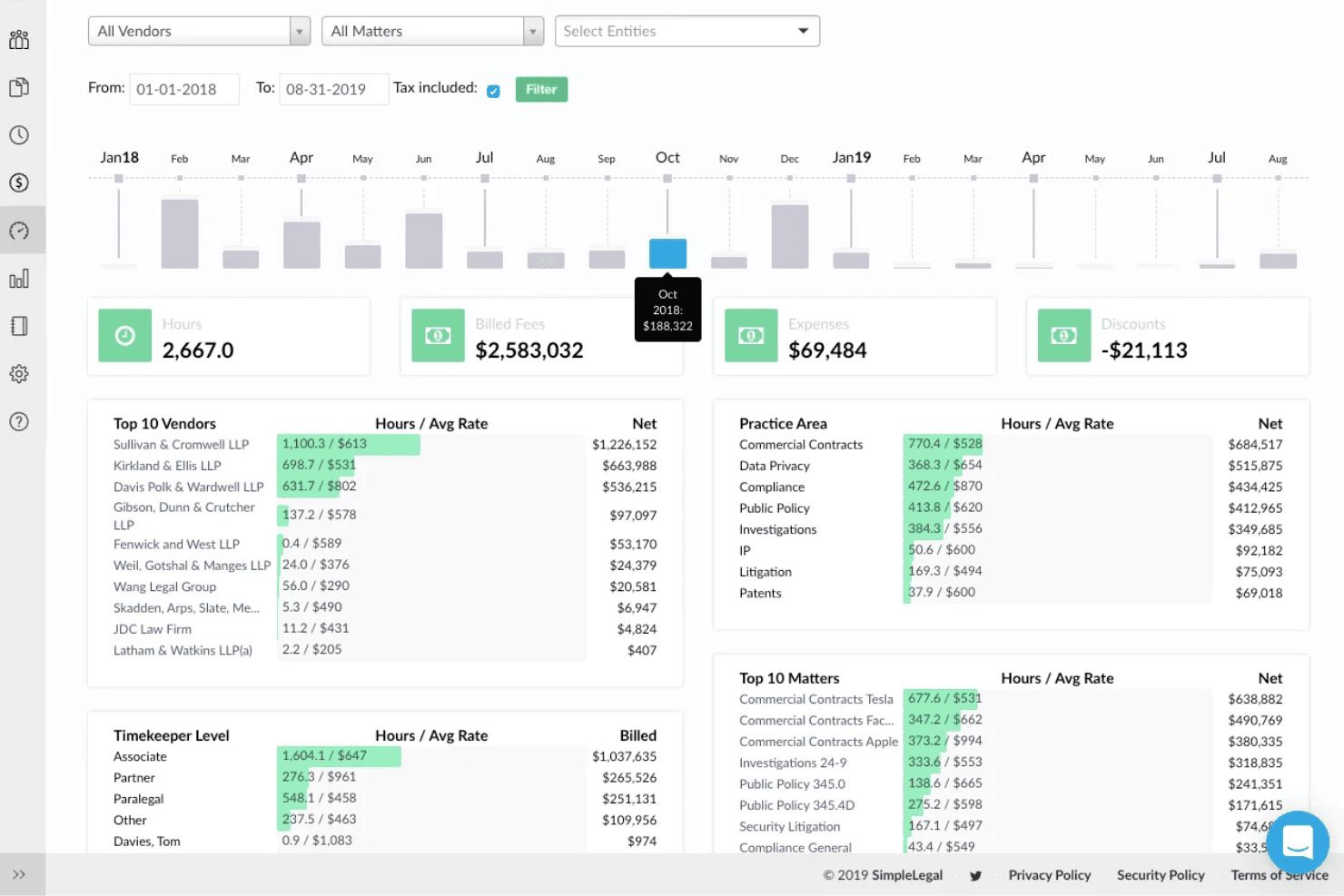
Onit unifies matters, e-billing, outside counsel, contracts, and legal workflow. Onit is an enterprise legal management platform that combines matter lifecycle tracking, e-billing, outside counsel management, contract lifecycle management, and configurable workflow automation across corporate legal departments.
Who Is Onit Best For?
Onit is built for large enterprise legal departments and legal operations teams managing high volumes of matters, outside counsel relationships, and complex approval workflows.
Why I Picked Onit
Onit earns its spot on my shortlist because of how tightly it connects matter management, contract lifecycle management, and workflow automation in one platform. I particularly like the Apptitude no-code builder, which lets my team configure 200+ workflow apps, including legal service requests and NDA approvals, without touching code. The AI-native Spend Agent then reviews invoices with 92%+ claimed accuracy, catching billing violations in seconds rather than hours.
Onit Key Features
- Legal hold integration: Manage legal holds and preservation notices directly within active matter workflows.
- Outside counsel collaboration portal: Provide law firms a centralized space for e-billing, document exchange, and performance tracking.
- Advanced spend analytics: Access configurable dashboards with accrual tracking, rate benchmarking, and budget reporting.
- Enterprise document management integrations: Connect matter records with NetDocuments, iManage, and SharePoint for secure file storage and access.
Onit Integrations
Onit offers native integrations with iManage, NetDocuments, SharePoint, SAP, Oracle, and has native integrations across the Microsoft ecosystem, including Microsoft 365 and Azure. An API is available for custom integrations.
Pros and Cons
Pros:
- AI invoice review catches billing guideline violations at submission
- No-code workflow builder supports highly configurable legal intake processes
- Scales well across high-volume, multi-matter enterprise environments
Cons:
- Self-service documentation and end-user training materials are thin
- Out-of-the-box functionality is limited compared to some competing ELM platforms
Learn more about Onit: Best for spend tracking and benchmarking
- Free demo available
- Pricing upon request
Visit WebsiteCustomer Rating:4.6/5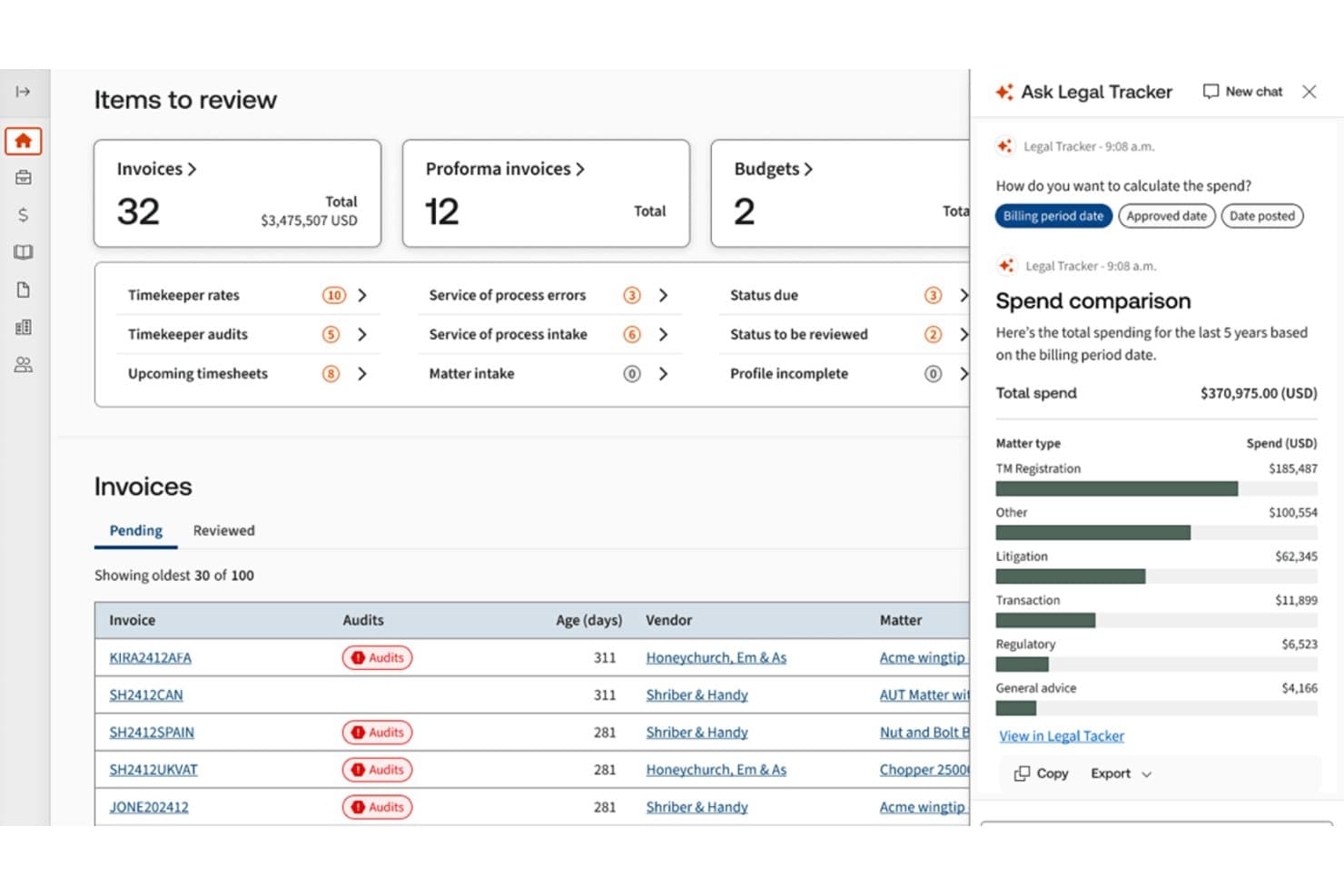
Thomson Reuters Legal Tracker offers an AI-powered dashboard with invoice management, spend comparison by matter type, and actionable item reviews for enterprise legal teams. Thomson Reuters Legal Tracker is an AI-powered enterprise legal management platform built for corporate legal departments, combining matter management, e-billing, outside counsel tracking, and spend analytics in a single system.
Who Is Thomson Reuters Legal Tracker Best For?
Legal Tracker is a strong fit for large enterprise legal departments managing high volumes of outside counsel invoices and complex multi-matter portfolios.
Why I Picked Thomson Reuters Legal Tracker
Legal Tracker earns its spot as one of the best on my shortlist because no other platform comes close to its benchmarking depth. I love that it draws from $310B of aggregated legal spend data across 1,800+ law departments, so I can benchmark outside counsel rates and firm performance against real peer data by industry, work type, and metro area. The AI-powered invoice review also catches duplicate billing and guideline violations automatically, which tightens spend control without manual line-item scrutiny.
Thomson Reuters Legal Tracker Key Features
- Matter lifecycle automation: Configure custom fields, workflows, and templates for each stage of the matter process.
- Enterprise document management integrations: Link matters directly to iManage, NetDocuments, and SharePoint Online document repositories.
- Power BI and Tableau connectors: Sync data to your own BI dashboards for advanced analytics and custom reporting.
- Legal hold module integration: Create and manage linked legal hold matters within the same workflow as core matters.
Thomson Reuters Legal Tracker Integrations
Legal Tracker offers native integrations with iManage, NetDocuments, SharePoint Online, Power BI, Tableau, and Oracle, and provides an API for custom integrations.
Pros and Cons
Pros:
- Outside counsel scorecards and diversity tracking included
- AI invoice review catches billing guideline violations
- Deep benchmarking against $310B in spend data
Cons:
- Advanced reporting requires vendor support or configuration
- Implementation typically spans several months enterprise-wide
Learn more about Thomson Reuters Legal Tracker: Best for configurable global compliance workflows
- Not available
- Pricing upon request
Visit WebsiteCustomer Rating:4.7/5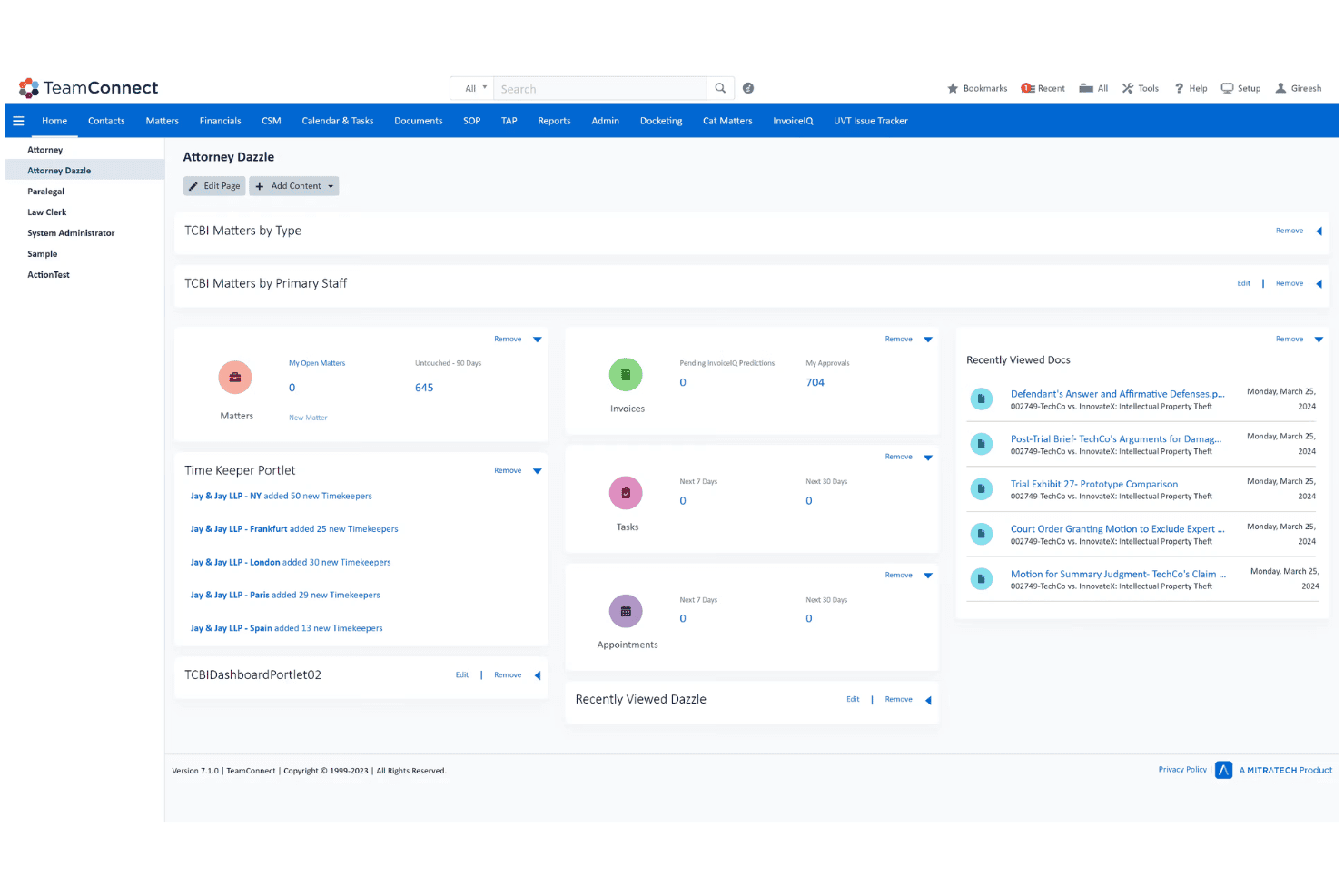
TeamConnect centralizes matters, spend, outside counsel, intake, and compliance. Mitratech TeamConnect is an enterprise legal management platform that centralizes matter lifecycle tracking, e-billing, outside counsel management, legal intake, document management, and compliance workflows for large in-house legal teams.
Who Is Mitratech TeamConnect Best For?
TeamConnect is a strong fit for large multinational legal departments managing matters and compliance obligations across multiple jurisdictions.
Why I Picked Mitratech TeamConnect
I picked TeamConnect as one of the best because its no-code workflow engine lets me configure matter routing by practice area, geography, and workload without touching a line of code. I particularly like how intake requests from Slack, Teams, and email feed directly into configurable approval paths, with self-service policy and FAQ tools built right in. The ARIES AI layer sits on top, surfacing invoice anomalies and matter insights through natural language queries.
Mitratech TeamConnect Key Features
- Advanced spend analytics: Offers configurable dashboards for budget variance reporting and outside counsel rate benchmarking.
- Matter document management: Supports version-controlled document storage linked to matters, with granular permissions and audit trails.
- Outside counsel collaboration portal: Lets law firms securely submit invoices, share documents, and access matter status updates.
- Role-based access controls: Enables administrators to set detailed user permissions and ethical walls to protect sensitive information.
Mitratech TeamConnect Integrations
TeamConnect offers native integrations with iManage, SharePoint, Microsoft 365, and Oracle, and provides an API for custom integrations.
Pros and Cons
Pros:
- Supports multi-jurisdiction matter tracking natively
- AI-powered invoice anomaly detection built in
- Highly configurable no-code workflow builder
Cons:
- Interface feels dated vs. newer competitors
- Implementation can take six-plus months
Learn more about Mitratech TeamConnect: Best for integrated AI invoice and matter review
- Free demo available
- Pricing upon request
Visit WebsiteCustomer Rating:3.8/5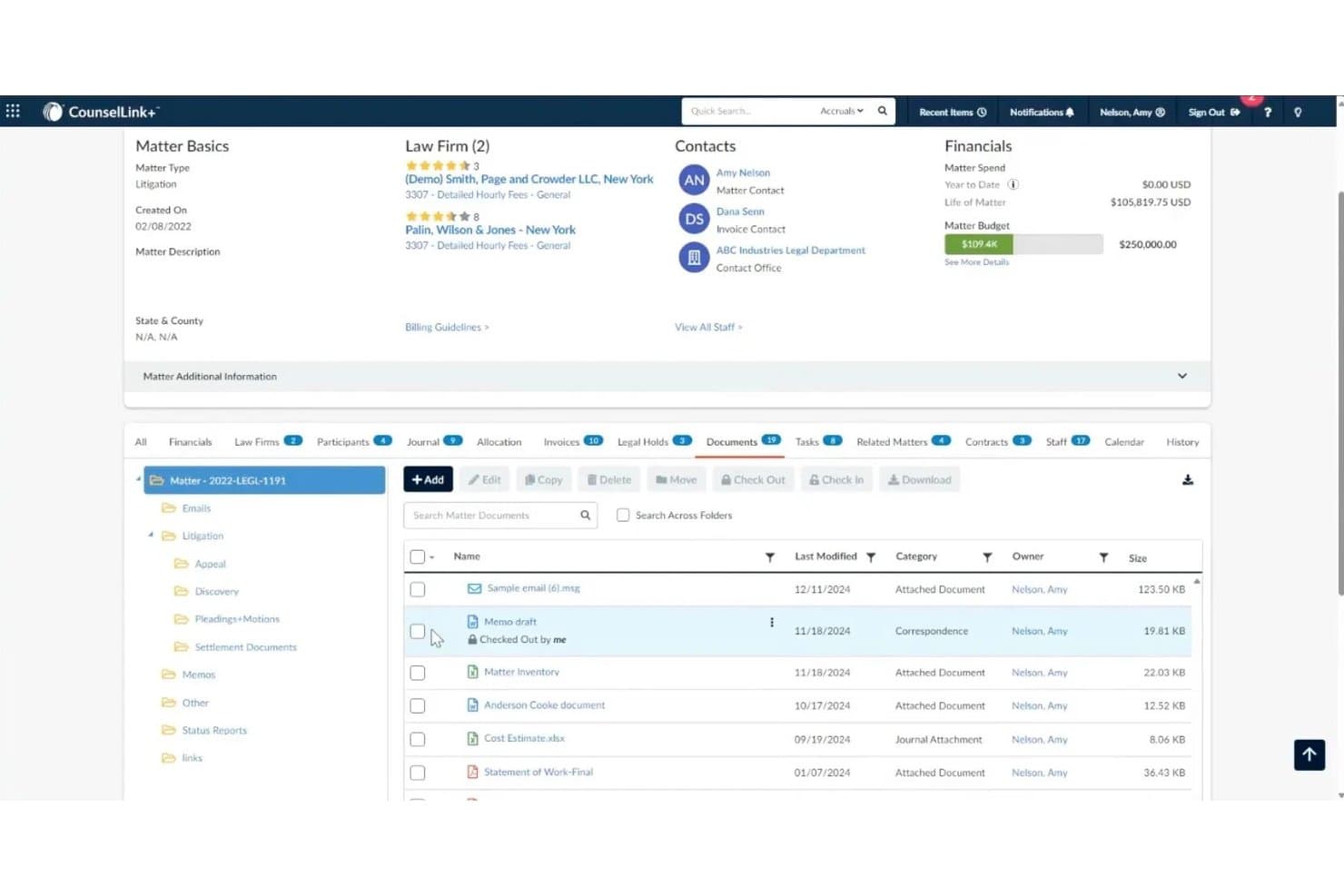
LexisNexis CounselLink+ offers a comprehensive matter management view with document storage, financial tracking, law firm assignments, and contact management in a single dashboard. LexisNexis CounselLink+ is an enterprise legal management platform that combines matter lifecycle management, AI-powered e-billing, outside counsel management, contract lifecycle management, and spend analytics in one system.
Who Is LexisNexis CounselLink+ Best For?
It's a strong fit for large corporate legal departments managing high outside counsel invoice volumes across multiple law firms.
Why I Picked LexisNexis CounselLink+
I picked LexisNexis CounselLink+ as one of the best because its AI billing review goes deeper than most competitors. SmartReview® checks every invoice line item against your custom billing guidelines and automatically flags or adjusts non-compliant charges before approval. Paired with Protégé, which generates instant AI snapshots of invoice and matter status, my team can move through high invoice volumes without manual bottlenecks.
LexisNexis CounselLink+ Key Features
- Matter lifecycle workflows: Create, assign, track, and close legal matters with configurable workflows and approvals.
- Vendor management module: Onboard law firms, track engagement data, and manage rate cards in a centralized system.
- Contract lifecycle management: Store, author, and manage contracts with matter-linked access and version control.
- Custom analytics dashboards: Build and schedule reports on matter status, spend, vendor performance, and risk metrics.
LexisNexis CounselLink+ Integrations
Native integrations are not clearly documented. The tool supports integrations via API for custom connections.
Pros and Cons
Pros:
- Strong custom reporting across spend and matter data
- Scales well for global, multi-matter legal departments
- AI invoice review catches non-compliant billing line items
Cons:
- Law firms can't create new matters independently
- Invoice processing times can be slow
Learn more about LexisNexis CounselLink+: Best for legal spend analytics and benchmarking
- Free demo available
- Pricing upon request
Visit WebsiteCustomer Rating:3.6/5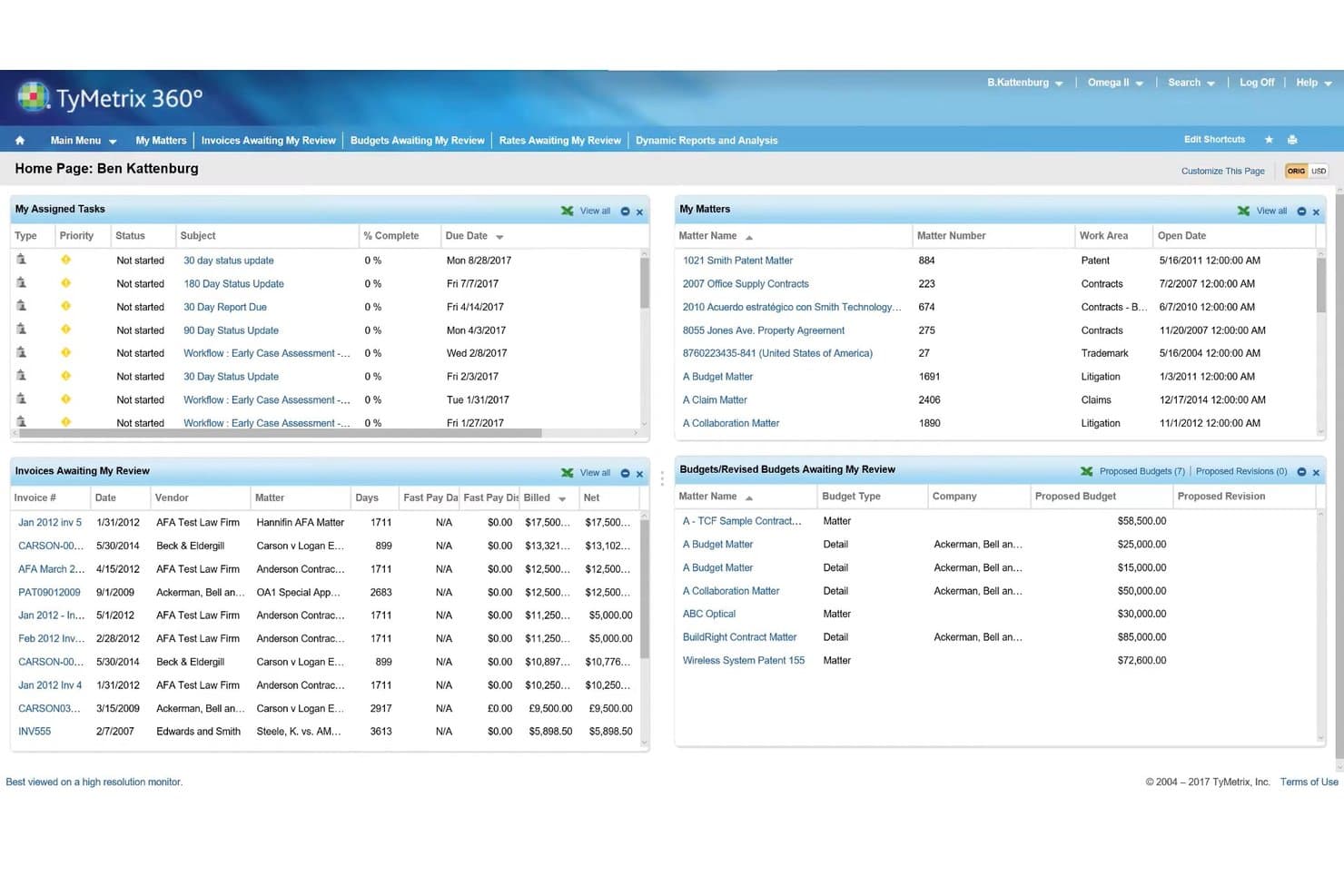
TyMetrix 360 offers a centralized dashboard for managing legal matters, invoices, budgets, and assigned tasks in one unified view. TyMetrix 360° is a cloud-based e-billing and legal matter management platform from Wolters Kluwer that combines matter tracking, invoice processing, outside counsel management, and AI-powered spend analytics in a single system.
Who Is TyMetrix 360° Best For?
TyMetrix 360° is a strong fit for large corporate legal departments that need enterprise-grade outside counsel billing controls and spend visibility across global operations.
Why I Picked TyMetrix 360°
TyMetrix 360° earns its spot on my shortlist because of the depth of its benchmarking capability, backed by LegalVIEW, the world's largest legal spend database with over $130B in spend data. I use that benchmarking to evaluate whether my outside counsel rates are competitive before negotiations even begin. On top of that, the Microsoft Power BI-powered dashboards let me slice spend data by firm, matter type, or timekeeper without waiting on a custom report.
TyMetrix 360° Key Features
- Matter summary AI: Uses generative AI to summarize matters by extracting key points from documents and notes.
- Invoice appeals workflow: Lets you manage invoice disputes and resolutions directly within the platform.
- Multi-currency and VAT support: Supports billing, reporting, and compliance in 180+ currencies and global tax jurisdictions.
- Office Companion integration: Enables you to manage matter emails, documents, and notes inside Microsoft Outlook and other Microsoft 365 apps.
TyMetrix 360° Integrations
TyMetrix 360° offers native integrations across the Microsoft ecosystem, including Microsoft 365 and Outlook, and provides an API for custom integrations.
Pros and Cons
Pros:
- Handles multi-currency billing across global jurisdictions
- AI invoice review flags billing guideline violations
- Unmatched spend benchmarking via LegalVIEW database
Cons:
- Implementation timelines run long for large deployments
- UI feels dated compared to newer platforms
Learn more about TyMetrix 360°: Best for AI-powered matter summaries
- Free demo available
- Pricing upon request
Visit WebsiteCustomer Rating:3.5/5
Wolters Kluwer Passport tracks matters, billing, counsel, intake, and documents. Wolters Kluwer Passport is a modular enterprise legal management platform that covers matter lifecycle tracking, e-billing, outside counsel management, legal intake, document management, and AI-powered matter analysis for corporate legal departments.
Who Is Wolters Kluwer Passport Best For?
It's a strong fit for large enterprise legal departments and insurance claims organizations that need a highly configurable, scalable ELM platform.
Why I Picked Wolters Kluwer Passport
Wolters Kluwer Passport earns its spot on my shortlist because of how it uses Expert AI to generate concise matter summaries without disrupting existing workflows. I like that my team can instantly surface key narratives, identify critical timekeepers, and review matter details at a glance. Paired with LegalVIEW BillAnalyzer, the AI also flags noncompliant invoice line items automatically, cutting legal spend by up to 10%.
Wolters Kluwer Passport Key Features
- Microsoft Office integration: Passport Office Companion connects matter management features to Outlook, Word, and Excel.
- Collaboration portal: Lets inside and outside counsel share budgets, timekeeper rates, and documents in a secure workspace.
- Business process automation: Uses rules engines to enforce billing compliance and trigger task assignments or alerts.
- LegalVIEW Analytics: Provides dashboards and insights using invoice data from over $230 billion in legal spend.
Wolters Kluwer Passport Integrations
Wolters Kluwer Passport offers native integrations across the Microsoft ecosystem, including Microsoft 365 and SharePoint, and provides an API for custom integrations. It also connects to enterprise systems like SAP, Oracle, and iManage.
Pros and Cons
Pros:
- Highly configurable for complex enterprise matter structures
- LegalVIEW benchmarks spend against industry-wide data
- AI-generated matter summaries reduce review time
Cons:
- Interface feels dated versus newer ELM platforms
- Implementation timelines run long for large deployments
Learn more about Wolters Kluwer Passport:
Outro software empresarial de gestão de processos jurídicos
Eis algumas opções adicionais de software empresarial de gestão de processos jurídicos que não entraram na minha lista curta, mas que ainda vale a pena conhecer:
- 11XakiaBest for affordable legal team onboarding
- 12Legal SuiteBest for AI-assisted matter triage and risk alerts
- 13FilevineBest for integrated document automation workflows
- 14LexzurBest for modular compliance management
- 15LawcadiaBest for automated legal intake and triage
- 16Streamline AIBest for configurable no-code workflow creation
- 17Ascent ELM by DiliTrustBest for multilingual legal team collaboration
- 18Priori LegalBest for vetted external counsel sourcing
- 19LegistifyBest for cross-region litigation tracking
- 20PracticeLeague RazorCubeBest for AI-driven contract intelligence
How I Evaluate Enterprise Legal Matter Management Software
I split my evaluation into core requirements—like matter lifecycle tracking and e-billing—and the differentiators that separate a good platform from the right one for your legal department.
Core Functionality (Table Stakes For This List)
When I'm selecting tools for my list, I rank each one on a scale from 0 (does not offer the functionality) to 5 (excels in this area) for each core functionality listed below. Then, I calculate the tool's total score into a percentage. Each tool needs to achieve a minimum total score of 65% to be considered for inclusion.
- Matter Lifecycle Tracking: I look for configurable matter records with status stages, custom fields, and categorization that scale across practice areas like litigation, IP, and regulatory.
- E-Billing & Spend Management: LEDES compliance matters here—I check for budget tracking, accrual support, and automated billing rule enforcement to manage outside counsel invoices.
- Outside Counsel Management: I evaluate how each platform handles firm onboarding, rate tracking, and performance scorecards so you can benchmark firms across similar matters.
- Intake & Workflow Automation: Configurable intake forms with conditional routing and approval chains matter, especially for high-volume teams fielding requests from multiple business units.
- Document Management: Each tool should link documents directly to matters with version control and permissions—think pleadings, contracts, and correspondence all in one place.
- Reporting & Analytics: I look for dashboards that go beyond canned reports, giving legal ops teams the ability to track spend trends, cycle times, and risk exposure by matter type.
Once I have a list of tools that meet the criteria, I consider what sets each platform apart.
Differentiating Factors (What Sets Vendors Apart)
Here's how I compare and contrast different vendors:
Standout Features
AI-powered insights are a big differentiator—I look for platforms that flag risk patterns and recommend next steps based on historical matter data, not just surface-level dashboards. Configurable workflow builders also matter here. Legal ops teams should be able to adjust intake forms, approvals, and lifecycle stages without filing a support ticket. I evaluate whether the platform offers an outside counsel portal where firms can submit LEDES invoices, update matter status, and exchange documents in one secure place.
Beyond Features
Integration depth is one of the first things I check. Your matter management platform needs to connect with ERP systems like SAP or Oracle for spend reconciliation, plus document management tools like iManage or NetDocuments. Security posture matters just as much—I evaluate whether vendors hold SOC 2 Type II and ISO 27001 certifications and offer ethical walls to protect privileged data. Global scalability is another key factor, including multi-currency support and data residency options for legal departments operating across regions.
Como escolher software empresarial de gestão de processos jurídicos
É fácil perder-se em listas extensas de funcionalidades e estruturas de preços complexas. Para o ajudar a manter o foco enquanto percorre o seu processo específico de seleção de software, apresentamos uma lista de verificação dos fatores a ter em conta:
| Fator | O que deve considerar |
|---|---|
| FatorEscalabilidade | O que deve considerarA plataforma será capaz de lidar com o volume atual e futuro de processos? Certifique-se de que suporta operações multi-entidade, globais e de grande volume. |
| FatorIntegrações | O que deve considerarA ferramenta liga-se ao seu ERP, DMS, fornecedores de faturação eletrónica e SSO? Antes de comprar, liste os sistemas essenciais para a atividade com os quais precisa de integração. |
| FatorPersonalização | O que deve considerarCom que facilidade pode adaptar fluxos de trabalho, modelos e campos às necessidades jurídicas em constante mudança sem envolver o fornecedor? Teste as opções de arrastar e largar ou sem código. |
| FatorFacilidade de utilização | O que deve considerarOs funcionários do departamento jurídico, os advogados e os parceiros empresariais irão realmente utilizar a ferramenta? Solicite demonstrações dos principais fluxos de trabalho para identificar problemas de usabilidade ou complexidade oculta. |
| FatorImplementação e integração inicial | O que deve considerarQue recursos são necessários para implementar o sistema em toda a empresa? Peça um calendário realista, informações sobre os níveis de suporte e ajuda na migração de dados. |
| FatorCusto | O que deve considerarCalculou o custo total, incluindo licenças por utilizador, personalizações, integrações e suporte? Reserve orçamento tanto para a configuração inicial como para as despesas contínuas. |
| FatorMedidas de segurança | O que deve considerarSão cumpridas as normas de privacidade de dados SOC 2, ISO e regionais? Confirme se as barreiras éticas, os controlos de acesso e os registos de auditoria correspondem aos seus requisitos de governação. |
| FatorCapacidades internacionais | O que deve considerarO sistema suporta várias moedas, línguas e regras locais de conformidade se a sua equipa jurídica operar a nível global? Verifique também a residência regional dos dados. |
O que é o software empresarial de gestão de processos jurídicos?
O software empresarial de gestão de processos jurídicos consiste em plataformas que ajudam as equipas jurídicas a centralizar, acompanhar e controlar todo o trabalho jurídico numa grande organização. Estes sistemas organizam processos, gerem advogados externos, controlam as despesas jurídicas e apoiam a gestão segura de documentos nas operações jurídicas internas, proporcionando maior supervisão e consistência em ambientes jurídicos complexos e de grande volume.
Funcionalidades do software empresarial de gestão de processos jurídicos
Ao selecionar um software empresarial de gestão de processos jurídicos, procure as seguintes funcionalidades principais:
- Gestão do ciclo de vida dos processos: Centraliza a receção, categorização, atualização e monitorização da resolução dos processos, permitindo às equipas jurídicas acompanhar os processos do início ao fim num único espaço de trabalho.
- Faturação eletrónica e gestão de despesas: Recolhe as faturas de advogados externos, suporta as normas LEDES, automatiza as revisões de despesas e permite acompanhar os orçamentos para evitar gastos excessivos e simplificar a gestão de acréscimos.
- Gestão de advogados externos: Simplifica a integração de sociedades de advogados, a definição de honorários e o acompanhamento do histórico das contratações, permitindo aos departamentos jurídicos comparar o desempenho das sociedades e gerir eficazmente as relações com as sociedades selecionadas.
- Automatização de fluxos de trabalho: Automatiza a receção, atribuição, aprovação e escalada dos processos através de fluxos de trabalho configuráveis, poupando tempo e uniformizando os processos jurídicos em toda a empresa.
- Gestão documental: Disponibiliza armazenamento seguro e com controlo de versões para contratos, peças processuais e correspondência, garantindo que apenas os utilizadores autorizados acedem a documentos sensíveis associados a processos específicos.
- Relatórios e análises avançados: Disponibiliza painéis, relatórios personalizados e análises detalhadas para acompanhar o progresso dos processos, as despesas, os tempos de ciclo e identificar tendências de custos ou riscos de imediato.
- Controlos de acesso baseados em funções: Configura as permissões com base nas funções e responsabilidades dos utilizadores, limitando o acesso a informações sensíveis e apoiando o cumprimento das políticas internas.
- Registos de auditoria e ferramentas de conformidade: Regista a atividade dos utilizadores, as alterações aos documentos e as aprovações, fornecendo um registo defensável para auditorias ou investigações regulamentares.
- Ecossistema de integrações: Liga-se a ERP, DMS, sistemas de gestão de contratos e fornecedores de identidade para manter as operações jurídicas alinhadas com outros sistemas empresariais essenciais.
- Suporte para retenção legal e descoberta eletrónica: Gere retenções legais, notificações aos responsáveis pela custódia e processos de preservação de dados, facilitando a manutenção da conformidade e a preparação para litígios.
Vantagens do software empresarial de gestão de processos jurídicos
A implementação de um software empresarial de gestão de processos jurídicos proporciona várias vantagens para a sua equipa e para a sua empresa. Eis algumas das que pode esperar:
- Supervisão centralizada: Obtém uma fonte única de informação para todos os processos, documentos, orçamentos e contratações de advogados externos do seu departamento jurídico.
- Melhor controlo de custos: A faturação eletrónica, as análises de despesas e o acompanhamento dos orçamentos combinam-se para ajudar a gerir as despesas jurídicas, identificar poupanças e reduzir erros de faturação.
- Maior produtividade da equipa: As ferramentas automatizadas de receção, encaminhamento e fluxo de trabalho dos processos retiram tarefas repetitivas à sua equipa jurídica, libertando-a para trabalho de maior valor.
- Reforço da conformidade e da gestão de riscos: Os registos de auditoria, os controlos de acesso e as ferramentas de conformidade integrados ajudam a gerir os requisitos regulamentares e a responder rapidamente a auditorias ou investigações.
- Colaboração mais eficaz: A gestão documental segura e as comunicações centralizadas facilitam o trabalho com equipas internas e advogados externos, mesmo entre diferentes regiões.
- Escalabilidade para o crescimento: Estas plataformas adaptam-se para suportar um número crescente de processos, várias entidades e equipas jurídicas globais à medida que a sua empresa cresce.
- Tomada de decisões baseada em dados: Os relatórios e as análises avançados proporcionam informações em tempo real sobre o progresso dos processos, as despesas jurídicas e o desempenho dos advogados externos.
Custos e preços do software empresarial de gestão de processos jurídicos
A seleção de um software empresarial de gestão de processos jurídicos exige uma compreensão dos vários modelos de preços e planos disponíveis. Os custos variam em função das funcionalidades, da dimensão da equipa, dos complementos e de outros fatores. A tabela abaixo resume os planos comuns, os respetivos preços médios e as funcionalidades normalmente incluídas nas soluções de software empresarial de gestão de processos jurídicos:
Tabela de comparação de planos de software empresarial de gestão de processos jurídicos
| Tipo de plano | Preço médio | Funcionalidades comuns |
|---|---|---|
| Tipo de planoPlano gratuito | Preço médio$0 | Funcionalidades comunsAcompanhamento limitado de processos, armazenamento básico de documentos e gestão simples de utilizadores. |
| Tipo de planoPlano pessoal | Preço médio$25-$50/utilizador/mês | Funcionalidades comunsGestão essencial de processos, automatizações básicas de fluxos de trabalho, armazenamento de documentos e ferramentas de relatórios padrão. |
| Tipo de planoPlano empresarial | Preço médio$60-$120/utilizador/mês | Funcionalidades comunsGestão completa do ciclo de vida, faturação eletrónica avançada, integrações de terceiros, permissões baseadas em funções e painéis analíticos. |
| Tipo de planoPlano empresarial avançado | Preço médio$150+/utilizador/mês | Funcionalidades comunsFluxos de trabalho personalizados, acesso à API, suporte global, gestão dedicada de contas e funcionalidades avançadas de conformidade. |
Perguntas frequentes sobre software empresarial de gestão de assuntos jurídicos
Eis algumas respostas a perguntas comuns sobre software empresarial de gestão de assuntos jurídicos:
Como ajuda o software empresarial de gestão de assuntos jurídicos a gerir advogados externos?
Centraliza a contratação de advogados externos, o acompanhamento de honorários e a gestão de despesas. Muitos sistemas suportam a gestão de painéis de escritórios, a faturação eletrónica LEDES e portais seguros para comunicar atualizações ou partilhar documentos com escritórios de advogados.
Posso personalizar os fluxos de trabalho e os formulários de entrada para se adaptarem às necessidades da minha equipa jurídica?
Sim, a maioria das plataformas disponibiliza fluxos de trabalho configuráveis. Pode adaptar a entrada de assuntos, as cadeias de aprovação e as fases do ciclo de vida para corresponderem aos processos da sua organização, sem ter de envolver o departamento de TI ou o fornecedor em cada alteração.
Que integrações devo procurar num software empresarial de gestão de assuntos jurídicos?
Procure integrações com o seu sistema ERP ou financeiro, soluções de gestão documental como o iManage ou o NetDocuments, plataformas de gestão de contratos e fornecedores de SSO. As ligações perfeitas às ferramentas empresariais existentes ajudam a maximizar o valor e a reduzir a introdução manual de dados.
Quão seguro é o software empresarial de gestão de assuntos jurídicos?
A maioria das plataformas de nível empresarial dispõe de certificações SOC 2 ou ISO, permissões baseadas em funções e registos de auditoria. Controlos como a encriptação, as barreiras éticas e as opções de residência dos dados ajudam a cumprir requisitos rigorosos de segurança e conformidade.
Quanto tempo demora normalmente a implementar um software empresarial de gestão de assuntos jurídicos?
Os prazos de implementação variam, mas normalmente situam-se entre quatro e nove meses para organizações de grande dimensão. Inclua a migração de dados, a integração de sistemas, a configuração e a formação na sua estratégia de implementação.