

Navegar pelas complexidades da prática jurídica pode ser avassalador. Pode dar por si soterrado sob montanhas de papelada, com dificuldades em acompanhar prazos e informações dos clientes. É aí que entra o software de acompanhamento jurídico.
De acordo com a minha experiência, estas ferramentas podem transformar o trabalho da sua equipa. Ajudam a gerir tarefas de forma eficiente, garantindo que nada fica para trás.
Passei algum tempo a testar e analisar as melhores opções disponíveis e estou aqui para partilhar as minhas conclusões. Terá uma perspetiva imparcial sobre as principais soluções que podem ajudar a sua prática a funcionar de forma mais fluida.
Why Trust Our Software Recommendations
6,700+
Reviews
20
Industry experts
16+
Evaluation factors
14
Years
Our team has been testing and reviewing software since 2012. As legal practice leaders ourselves, we know how difficult—and important—it is to choose the right software.
For this guide, we evaluated tools using hands-on testing and independent research, scoring tools using our selection criteria.
Our reviews reflect our human editorial judgment, not a sales pitch.
Tabela de comparação: software de acompanhamento jurídico
| Tool | Best For | Trial Info | Price | ||
|---|---|---|---|---|---|
| 1 | Best for bar association-approved legal workflows | Free trial available | Pricing upon request | Website | |
| 2 | Best for client-ready invoice customization | Free trial available | From $49/user/month | Website | |
| 3 | Best for remote legal work and mobile access | 7-day free trial + free demo available | From $59/user/month | Website | |
| 4 | Best for automated legal forms and document assembly | Free demo available | Pricing upon request | Website | |
| 5 | Best for comprehensive case management and client communication | 7-day free trial | From $49/user/month | Website |


Análises do melhor software de acompanhamento jurídico
 1Best for bar association-approved legal workflows
8am
- Free trial available
- Pricing upon request
Visit WebsiteCustomer Rating:4.6/5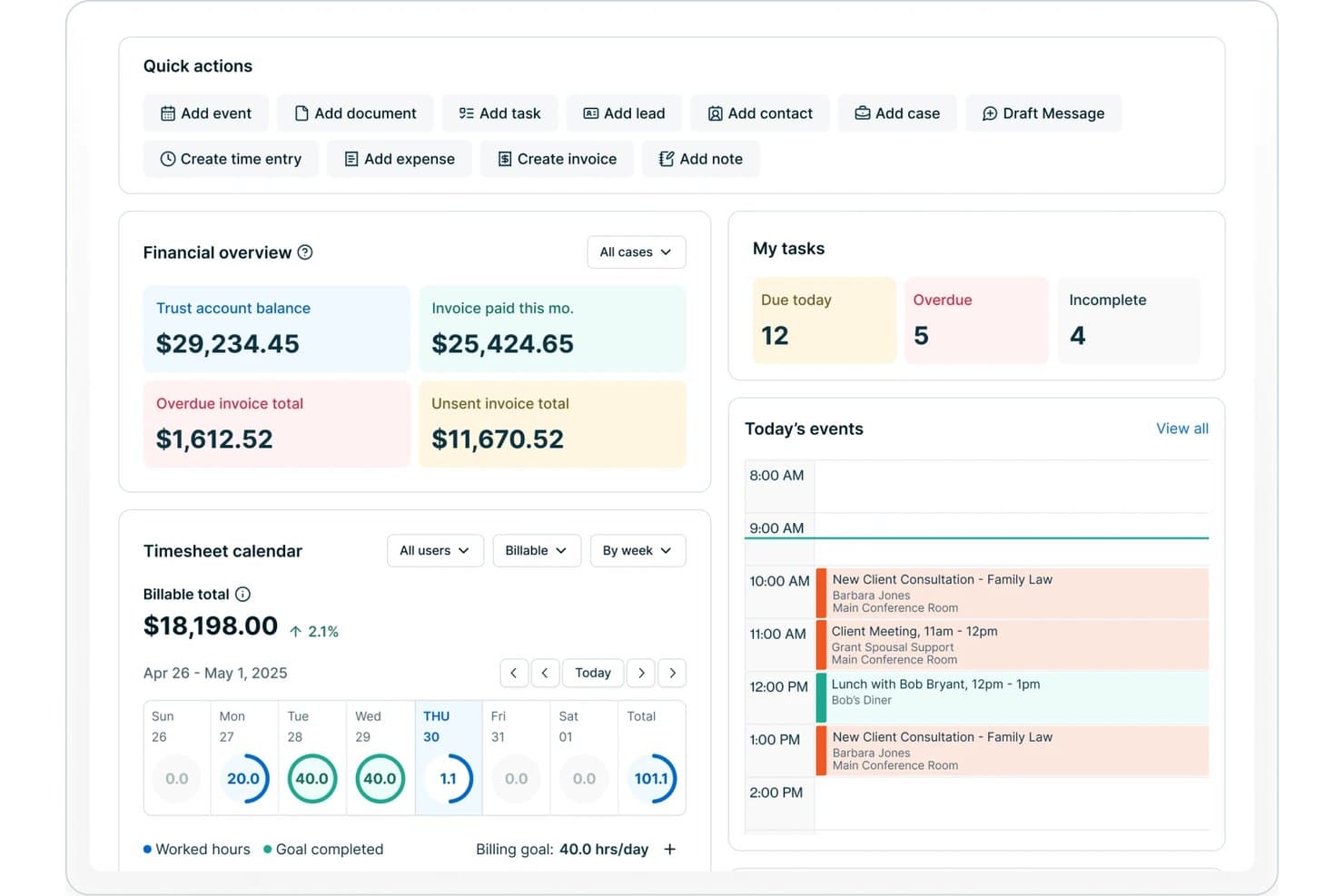
8am offers a dashboard with financial overview, timesheet calendar, task tracking, and today's events for legal practice management. 8am is a legal practice management suite that combines case tracking, time and billing, payment processing, and workflow automation across practice areas including personal injury and immigration.
Who Is 8am Best For?
8am is a strong fit for small to mid-sized private practice law firms that need compliance-ready tools backed by state bar association endorsements.
Why I Picked 8am
I picked 8am as one of the best because LawPay, its payment product, is endorsed by all 50 state bars, which removes genuine compliance risk when handling client funds. I rely on it specifically for IOLTA-compliant trust accounting, where client and operating funds stay separated automatically. MyCase layers in jurisdictional deadline tracking on top, so court-specific filing deadlines are calculated rather than manually managed.
8am Key Features
- Integrated client portal: Clients can securely access documents, messages, and case updates online.
- Customizable intake forms: Collect case and client details with configurable online forms linked to your case files.
- Automated workflow templates: Standardize routine legal processes and trigger tasks automatically based on case events.
- Built-in time entry timers: Track billable and non-billable work with real-time timers tied to specific matters.
8am Integrations
8am offers 35+ native integrations in MyCase, including LawPay, QuickBooks, Xero, Google Calendar, Outlook, and Dropbox Business. An API is available for custom integrations.
Pros and Cons
Pros:
- Automated trust accounting with separation controls
- Comprehensive case and deadline tracking tools
- Trusted for state bar compliance workflows
Cons:
- Advanced accounting requires QuickBooks integration
- Mobile app functionality is limited
Learn more about 8am: Best for client-ready invoice customization
- Free trial available
- From $49/user/month
Visit WebsiteCustomer Rating:4.8/5
Bill4Time’s dashboard helps law firms track time, manage billing, and monitor performance in one streamlined platform. Bill4Time is a cloud-based legal billing platform for law firms and solo attorneys that combines time tracking, matter management, trust accounting, and invoicing in one system.
Who Is Bill4Time Best For?
Bill4Time is a strong fit for solo attorneys, small law firms, and legal operations teams that need purpose-built billing and time tracking tools.
Why I Picked Bill4Time
Bill4Time is one of my top picks because I love how much control it gives you over invoice presentation. You can apply branded invoice templates with your firm's logo, customize the level of detail shown for each time entry, and send polished, client-ready bills in bulk with batch invoicing. I also find the "Pay Now" link embedded directly in each invoice particularly useful—it removes the friction between sending a bill and actually getting paid.
Bill4Time Key Features
- Matter-based time tracking: Log billable and non-billable hours directly against specific client matters using one-click timers on desktop or mobile.
- Trust accounting: Manage client funds with IOLTA-compliant ledgers, automated reconciliation, and a full audit trail for every trust transaction.
- Expense tracking: Record and assign billable expenses to individual matters so every client cost is captured and billed accurately.
- Conflict checker: Search across clients, matters, and contacts to identify potential conflicts of interest before taking on new work.
Bill4Time Integrations
Bill4Time offers a small set of native integrations, including QuickBooks, Box, Google Calendar, Outlook Calendar, and NetDocuments. It also integrates with LawPay for online payment processing and has an API that supports read operations for custom connections to other applications.
Pros and Cons
Pros:
- Batch invoicing across multiple matters
- One-click timers on any device
- Built-in IOLTA trust reconciliation tools
Cons:
- Reporting customization options are narrow
- Mobile app has limited functionality
Learn more about Bill4Time: Best for remote legal work and mobile access
- 7-day free trial + free demo available
- From $59/user/month
Visit WebsiteCustomer Rating:4.3/5
PracticePanther lets lawyers manage cases and client intake from any device. PracticePanther is built for legal teams that need reliable tools to track cases, tasks, and client activity. With support for remote legal work and mobile access, it allows lawyers to stay connected to their cases even when working outside the office. The platform includes features for case tracking, document handling, and billing, helping legal professionals manage daily work more efficiently.
Why I Picked PracticePanther
I picked PracticePanther for its support for remote legal work and mobile access, which lets you manage cases and client updates from anywhere. You can view case details, upload documents, and track tasks without being tied to the office. It also includes case management and billing tools that keep deadlines, invoices, and payments organized in one system.
PracticePanther Key Features
In addition to remote legal work and mobile access, PracticePanther offers:
- Document Management: Allows you to organize, manage, and track legal documents efficiently, ensuring easy retrieval and compliance with legal standards.
- Calendar Management: Helps you set reminders and sync calendars to avoid missing important dates and deadlines, keeping your team on track.
- Task Management: Enables assignment and tracking of tasks among team members, promoting accountability and ensuring project timelines are met.
- Reporting and Analytics: Provides insights into firm performance, allowing you to make informed, data-driven decisions to improve operations.
PracticePanther Integrations
Integrations include Google Calendar, QuickBooks, OneDrive, Google Drive, Box, Dropbox, Apptoto, Smith.ai, Tracers, and Kenect.
Pros and Cons
Pros:
- Customizable intake forms improve client onboarding processes
- Client management tools keep matters well structured
- Comprehensive features including time tracking and invoicing
Cons:
- Customization options might be limited for specific needs
- Can be expensive for small firms
Learn more about PracticePanther: Best for automated legal forms and document assembly
- Free demo available
- Pricing upon request
Visit WebsiteCustomer Rating:4.8/5
Smokeball Legal Tracking Software Interface Smokeball shines in automating legal forms and document assembly, easing one of the most time-consuming aspects of legal practice. Its rich, automated form library can significantly cut down the time spent on paperwork.
Why I Picked Smokeball: In selecting tools for this list, I gravitated towards Smokeball because of its powerful automation capabilities, especially in forms and document assembly. This focus on automation, coupled with its extensive library of legal forms, makes it an efficient tool for law firms that handle large volumes of paperwork. Its emphasis on document automation makes it the best choice for law practices that wish to streamline their document processes.
Standout features & integrations:
Smokeball impresses with its features like task tracking, full legal billing, and case management. It boasts one of the largest libraries of automated legal forms, which is a game-changer for document-heavy practices. Key integrations include Microsoft Word and Outlook, allowing for efficient document creation and email management.
Pros and Cons
Pros:
- Integrations with Microsoft Word and Outlook
- Large library of legal forms
- Strong automation for forms and documents
Cons:
- Some users might find the software complex initially
- No disclosed free trial or free plan
- Higher starting price might not be suitable for smaller firms
Learn more about Smokeball: Best for comprehensive case management and client communication
- 7-day free trial
- From $49/user/month
Visit WebsiteCustomer Rating:4.7/5
Clio Legal Tracking Software Interface Clio Manage is a robust law practice management software that supports various aspects of legal work, including case and document management, billing, and client communication. Its strongest suit lies in providing comprehensive case management and seamless client communication tools, making it an excellent choice for law firms that prioritize organization and client relationships.
Why I Picked Clio Manage: I selected Clio for its strong emphasis on case management and client communication. It offers a unique blend of features that stand out from the rest, including detailed case tracking, scheduling, and direct messaging. Its ability to keep cases organized and maintain smooth communication with clients makes it the best tool for law firms aiming to improve client service and manage cases efficiently.
Standout features & integrations:
Clio Manage offers a wide range of web-based features such as time tracking, billing, document management, and scheduling. It also integrates with a variety of other software, including Microsoft 365, Google Workspace, and Dropbox, allowing for easier document access and management.
Pros and Cons
Pros:
- Extensive integrations with other software
- Seamless client communication tools
- Comprehensive case management features
Cons:
- Customization options could be improved
- Additional cost for more advanced features
- The learning curve can be steep for new users
Learn more about Clio Manage:
Outras ferramentas de software de acompanhamento jurídico
- 6Thomson Reuters Legal TrackerBest for enterprise-level legal department ops and spend management
- 7FilevineBest for customization with its project management approach
- 8BRYTERBest for no-code platform enabling quick software creation
- 9CosmoLexBest for law firms needing all-in-one management and accounting
- 10LEAPBest for seamless legal accounting integration
- 11LegalTrackBest for non-profit legal teams managing multiple grants
- 12Mitratech CasecloudBest for Salesforce-native case tracking
- 13MyCaseGood for online payment processing for law firms
- 14App4LegalGood for intuitive matter management and document automation
- 15Rocket MatterGood for mobile time and expense tracking on-the-go
How I Evaluate Legal Tracking Software
I evaluate every tool against two layers: baseline criteria—like docket management and LEDES billing—and differentiators that separate the best fit for your practice.
Core Functionality (Table Stakes For This List)
When I'm selecting tools for my list, I rank each one on a scale from 0 (does not offer the functionality) to 5 (excels in this area) for each core functionality listed below. Then, I calculate the tool's total score into a percentage. Each tool needs to achieve a minimum total score of 65% to be considered for inclusion.
- Time Tracking: I check whether a tool supports timers, manual entry, and multiple billing rates tied to specific matters—so attorneys can capture six-minute increments at the point of work.
- Matter & Case Tracking: Each tool should let you organize parties, notes, documents, and status updates under structured matter profiles rather than scattered across spreadsheets.
- Deadline & Docket Management: I look for calendar-based deadline tracking with automated reminders, especially tools that calculate deadlines from court rules or filing dates.
- Billing & Invoice Tracking: I evaluate how each platform converts tracked time into invoices, whether it supports LEDES formats, and how it handles trust account draws and AR aging.
- Expense & Disbursement Tracking: Tools should let you log hard and soft costs—filing fees, courier charges, expert witness bills—directly against the right matter for clean client invoicing.
- Legal Reporting & Analytics: I look for reports on utilization rates, work-in-progress totals, and realization by timekeeper, since these are the metrics managing partners actually review.
Once I have a list of tools that meet this criteria, I consider what sets each platform apart.
Differentiating Factors (What Sets Vendors Apart)
Here's how I compare and contrast different vendors:
Standout Features
Trust accounting is a major differentiator—I look for tools that handle IOLTA reconciliation and retainer draws natively, since managing these in separate accounting software introduces compliance risk. Conflict checking matters too, especially for firms with high intake volumes where a missed conflict could trigger a malpractice claim. Client portals add real value when they let clients review matter status and approve invoices directly, cutting down on routine status update emails.
Beyond Features
Integration with your existing legal tech stack is something I always evaluate—whether a platform connects to tools like Westlaw or LexisNexis for research and syncs billing data with accounting software like QuickBooks or Xero. I also consider how well each tool fits different firm sizes and practice areas, since a solo family law attorney has very different needs than a corporate legal department. Security is worth checking too, especially encryption standards and ethical wall support for safeguarding privileged client data.
Como escolher um software de acompanhamento jurídico
É fácil ficar atolado em longas listas de funcionalidades e estruturas de preços complexas. Para o ajudar a manter o foco enquanto percorre o seu processo único de seleção de software, apresentamos uma lista de verificação com os fatores a ter em conta:
| Fator | O que deve considerar |
|---|---|
| FatorEscalabilidade | O que deve considerarO software acompanhará o crescimento do seu escritório? Considere os limites de utilizadores e a capacidade de lidar com um volume de dados crescente. Procure ferramentas que possam expandir conforme necessário. |
| FatorIntegrações | O que deve considerarFunciona com as ferramentas que já utiliza? Verifique a compatibilidade com outros softwares, como sistemas de gestão documental e plataformas de correio eletrónico. |
| FatorPersonalização | O que deve considerarPode adaptá-lo às suas necessidades? Avalie a capacidade de ajustar fluxos de trabalho, campos e relatórios de modo a se adequarem aos seus processos específicos. |
| FatorFacilidade de utilização | O que deve considerarÉ fácil de utilizar? Teste a interface quanto à sua intuitividade e simplicidade. Evite ferramentas com uma curva de aprendizagem acentuada. |
| FatorImplementação e integração inicial | O que deve considerarCom que rapidez pode começar? Avalie o tempo e os recursos necessários para a configuração. Procure ferramentas com integração inicial orientada e recursos de formação. |
| FatorCusto | O que deve considerarEnquadra-se no seu orçamento? Compare os planos de preços e esteja atento a taxas ocultas. Considere o valor oferecido pelo preço. |
| FatorMedidas de segurança | O que deve considerarOs seus dados estão protegidos? Verifique as normas de encriptação e as medidas de proteção de dados. Garanta a conformidade com os requisitos legais relativos aos dados. |
O que é um software de acompanhamento jurídico?
O software de acompanhamento jurídico é uma ferramenta que ajuda os escritórios de advogados e os profissionais jurídicos a gerir processos, acompanhar prazos e organizar informações dos clientes. Os advogados, os paralegais e os assistentes jurídicos utilizam normalmente estas ferramentas para aumentar a eficiência e manter a organização. Funcionalidades como a gestão de processos, o acompanhamento de prazos e o apoio à faturação ajudam nas operações diárias de uma prática jurídica. De um modo geral, estas ferramentas simplificam os fluxos de trabalho jurídicos e melhoram a produtividade.
Funcionalidades
Ao selecionar software de acompanhamento jurídico, esteja atento às seguintes funcionalidades principais:
- Gestão de processos: Organiza e acompanha todos os documentos e comunicações relacionados com os processos, mantendo tudo num só lugar.
- Acompanhamento de prazos: Avisa-o sobre datas e prazos importantes, reduzindo o risco de perder audiências ou prazos de entrega.
- Apoio à faturação: Simplifica a faturação e o registo de horas, facilitando a gestão da faturação e dos pagamentos dos clientes.
- Gestão de documentos: Armazena e organiza documentos jurídicos, permitindo um acesso e uma recuperação rápidos quando necessário.
- Comunicação com clientes: Facilita o envio seguro de mensagens e atualizações aos clientes, garantindo uma comunicação clara e atempada.
- Capacidades de integração: Liga-se a outras ferramentas de software, como o correio eletrónico e sistemas de gestão de documentos, para operações eficientes.
- Fluxos de trabalho personalizáveis: Permite adaptar processos e campos às necessidades e preferências específicas do seu escritório.
- Medidas de segurança: Protege dados jurídicos sensíveis através de encriptação e do cumprimento das normas de proteção de dados.
- Acesso móvel: Permite aceder a informações e ferramentas dos processos através de dispositivos móveis, possibilitando trabalhar em qualquer lugar.
- Relatórios e análises: Gera relatórios e informações sobre o progresso dos processos e o desempenho do escritório, ajudando na tomada de decisões.
Benefícios
A implementação de software de acompanhamento jurídico proporciona vários benefícios à sua equipa e à sua empresa. Eis alguns dos benefícios que pode esperar:
- Melhor organização: Centraliza os processos e documentos, facilitando a localização e a gestão das informações.
- Maior eficiência: Automatiza tarefas rotineiras, como a faturação e o acompanhamento de prazos, libertando tempo para trabalhos mais importantes.
- Melhor comunicação: Facilita uma comunicação segura e atempada com os clientes, melhorando as relações e a satisfação.
- Maior acessibilidade: Disponibiliza acesso móvel às informações dos processos, permitindo-lhe trabalhar a partir de qualquer lugar.
- Decisões baseadas em dados: Disponibiliza funcionalidades de relatórios e análises que ajudam a tomar decisões informadas com base no progresso dos processos e no desempenho do escritório.
- Poupança de custos: Reduz os erros manuais e as ineficiências, ajudando o seu escritório a poupar dinheiro a longo prazo.
- Conformidade em matéria de segurança: Garante a proteção dos dados através de encriptação e do cumprimento das normas jurídicas, protegendo informações sensíveis.
Custos e preços
A seleção de software de acompanhamento jurídico exige uma compreensão dos vários modelos de preços e planos disponíveis. Os custos variam consoante as funcionalidades, a dimensão da equipa, os complementos e outros fatores. A tabela abaixo resume os planos comuns, os respetivos preços médios e as funcionalidades normalmente incluídas nas soluções de software de acompanhamento jurídico:
Tabela de comparação de planos para software de acompanhamento jurídico
| Tipo de plano | Preço médio | Funcionalidades comuns |
|---|---|---|
| Tipo de planoPlano gratuito | Preço médio$0 | Funcionalidades comunsGestão básica de processos, armazenamento limitado de documentos e relatórios básicos. |
| Tipo de planoPlano pessoal | Preço médio$10-$30/utilizador/mês | Funcionalidades comunsGestão de processos, acompanhamento de prazos, comunicação com clientes e integrações limitadas. |
| Tipo de planoPlano empresarial | Preço médio$40-$70/utilizador/mês | Funcionalidades comunsGestão avançada de documentos, apoio à faturação, fluxos de trabalho personalizáveis e segurança reforçada. |
| Tipo de planoPlano empresarial de grande dimensão | Preço médio$80-$150/utilizador/mês | Funcionalidades comunsRelatórios abrangentes, capacidades de integração completas, acesso móvel e apoio ao cliente dedicado. |
Perguntas mais frequentes sobre software de acompanhamento jurídico (FAQ’s)
O software de acompanhamento jurídico pode integrar-se com outras ferramentas?
A maioria das soluções de software de acompanhamento jurídico oferece capacidades de integração com várias ferramentas, como plataformas de correio eletrónico, sistemas de gestão documental e software de faturação. Antes de escolher uma ferramenta, verifique a sua compatibilidade com os sistemas existentes para garantir um fluxo de trabalho harmonioso.
O que deve ter em consideração relativamente à segurança do software de acompanhamento jurídico?
Ao avaliar a segurança, procure normas de encriptação e conformidade com os regulamentos de proteção de dados. Certifique-se de que o software disponibiliza funcionalidades que protegem dados jurídicos sensíveis e cumpre as normas de segurança do setor, para manter as suas informações protegidas.
Como pode o software de acompanhamento jurídico melhorar a comunicação com os clientes?
O software de acompanhamento jurídico pode melhorar a comunicação com os clientes através do fornecimento de mensagens e atualizações seguras. Permite-lhe manter os clientes informados sobre os seus processos e garante que todas as comunicações estão organizadas e facilmente acessíveis. Isto pode resultar em melhores relações com os clientes e numa maior satisfação.