

Programele gratuite de gestionare a dosarelor juridice vă permit să organizați dosarele, să urmăriți termenele-limită și să gestionați clienții fără costuri inițiale — căutați furnizori care oferă un plan gratuit sau o perioadă de testare gratuită.
Dacă sunteți în căutarea celor mai bune soluții care ajută cabinetele de avocatură și echipele juridice să gestioneze volumul de dosare, calendarele, documentele și facturarea fără să depășească bugetul, nu sunteți singurii. Având în vedere că atât de multe instrumente susțin că oferă o valoare reală fără costuri, este dificil să faceți diferența între demonstrațiile limitate și platformele pe care le puteți utiliza cu adevărat.
Acest ghid se concentrează pe cele mai bune instrumente cu adevărat gratuite pentru gestionarea dosarelor juridice, astfel încât să petreceți mai puțin timp comparând funcții și mai mult timp sprijinindu-vă clienții.
Why Trust Our Software Recommendations
6,700+
Reviews
20
Industry experts
16+
Evaluation factors
14
Years
Our team has been testing and reviewing software since 2012. As legal practice leaders ourselves, we know how difficult—and important—it is to choose the right software.
For this guide, we evaluated tools using hands-on testing and independent research, scoring tools using our selection criteria.
Our reviews reflect our human editorial judgment, not a sales pitch.
Tabel comparativ al programelor gratuite de gestionare a dosarelor juridice
Acest tabel comparativ sintetizează detaliile privind prețurile pentru programele mele gratuite de gestionare a dosarelor juridice:
Score legend (out of 5)
- Excellent4.5–5
- Good4–4.4
- Average3–3.9
- Below average2–2.9
- Poor1–1.9
Sorted by: Default
| Tool | Starting Price | Website | |||||||
|---|---|---|---|---|---|---|---|---|---|
Best with customizable case layouts for law firms | 3.5 out of 5 | 4 | 4 | 4 | 4 | 2 | 3 | $8/user/month 30-day free trial | Website |
Best for Outlook integration in matter management | 3.5 out of 5 | 4 | 3 | 4 | 4 | 3 | 3 | $20/user/month Free plan available | Website |
Best for streamlined time tracking and billing | 3.5 out of 5 | 3 | 3 | 4 | 4 | 3 | 4 | $20/user/month Free plan + free demo available | Website |
Best for real-time matter collaboration | 3.5 out of 5 | 3 | 3 | 4 | 3 | 4 | 4 | $69/user/month Free plan + free demo available | Website |
Best for automated court-ready documents | 3.5 out of 5 | 4 | 3 | 4 | 3 | 4 | 3 | From ₱2,499/month Free plan + demo available | Website |
Best for billable time and invoice tracking | 3.7 out of 5 | 4 | 4 | 4 | 4 | 3 | 3 | $45/user/month Free plan + free demo available | Website |
Best for custom legal workflow automation | 3.7 out of 5 | 4 | 4 | 4 | 3 | 3 | 4 | $21/user/month Free plan available | Website |
Best for advanced matter lifecycle management | 3.0 out of 5 | 3 | 3 | 4 | 3 | 1 | 4 | Free Free demo available | Website |


Recenzii ale programelor gratuite de gestionare a dosarelor juridice
Mai jos sunt prezentate rezumatele mele detaliate ale programelor gratuite de gestionare a dosarelor juridice care au ajuns pe lista mea scurtă. Recenziile mele oferă o analiză detaliată a funcțiilor, a celor mai bune cazuri de utilizare, precum și a avantajelor și dezavantajelor fiecărei platforme, pentru a vă ajuta să o găsiți pe cea mai potrivită pentru dumneavoastră.
 Best with customizable case layouts for law firms
- 30-day free trial
- From $8/user/month
Visit WebsiteCustomer Rating:4.9/5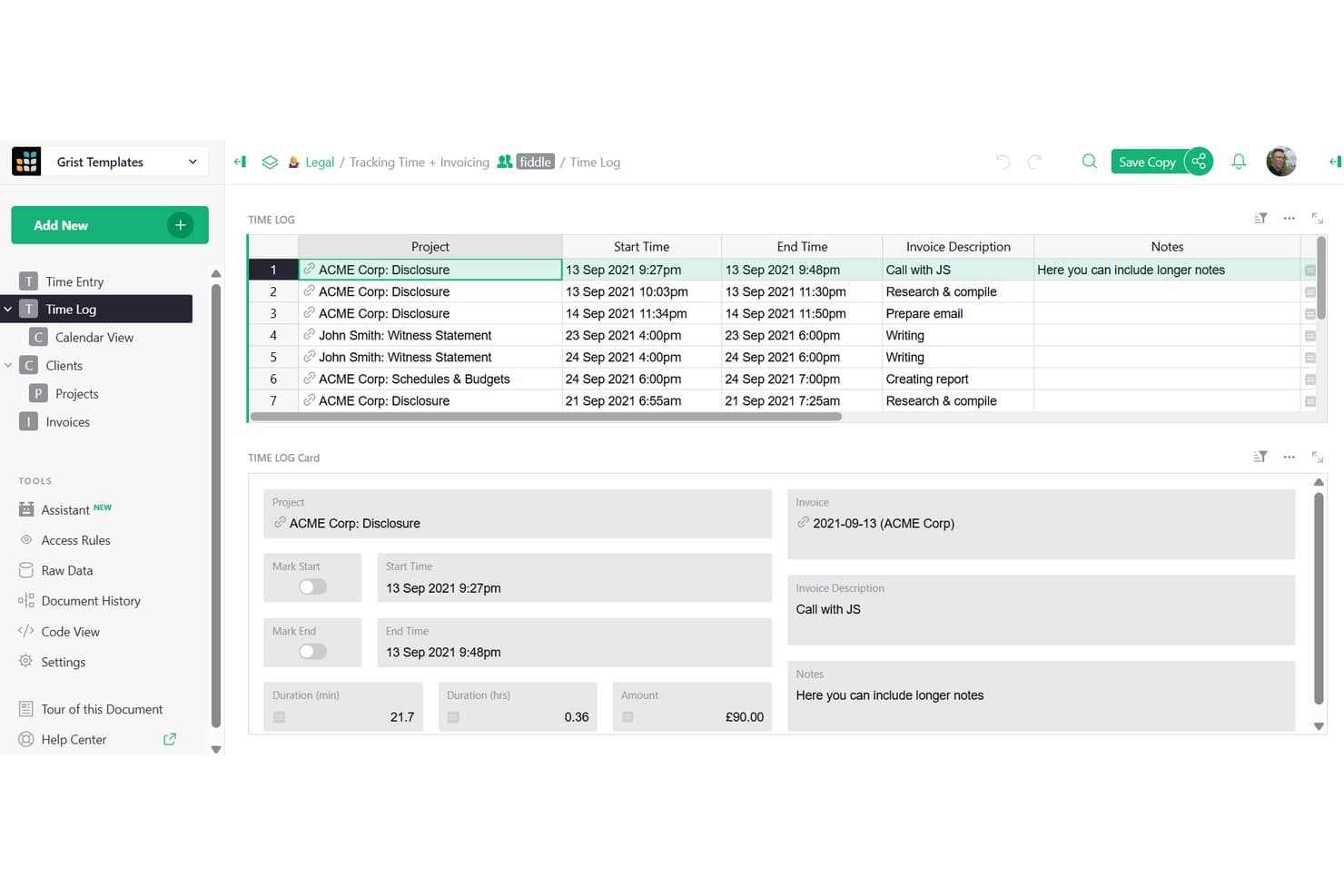
Grist offers a time log and invoicing template that legal professionals can use to track billable hours across client projects and generate invoices. Grist is a no-code relational database and spreadsheet platform that lets law firms build custom case management layouts, track client and matter records, log billable hours, and manage case documents.
Who Is Grist Best For?
Grist is a strong fit for solo practitioners and small law firms that want to build a tailored case management system without paying for rigid, purpose-built legal software.
Why I Picked Grist
Grist earns its spot on my shortlist because of how much control it gives you over case layout design. I've found that linking client records to matters alongside opposing counsel, judges, and witnesses in a single relational view is genuinely useful for keeping case context in one place. I also like the granular access rules, which let you build real ethical walls by restricting associates to only the matters they're actively working on.
Grist Key Features
- Python formulas: Use Python syntax to automate calculations and create complex field logic for case management workflows.
- Custom card and Kanban views: Organize matters and tasks visually with flexible card layouts and board-based tracking options.
- Granular access controls: Set permissions down to the individual field or cell to control who can view or edit sensitive client and case information.
- REST API and Zapier integration: Connect matter data to other tools, automate tasks, and sync documents or deadlines with external platforms.
Grist Integrations
Native integrations are not clearly documented. The tool supports integrations via API and Zapier.
What's Free?
Grist's free plan is a free-forever personal plan that supports up to 10 team members, unlimited documents, and up to 5,000 records per document, with 30 days of automatic backup history. It includes core features like granular access rules, custom layouts, Python formulas, and API access (limited to 5,000 calls per document per day), though automations and admin controls are only available on paid tiers.
Pros and Cons
Pros:
- Relational tables link clients, matters, and contacts
- Granular field-level permissions restrict matter access
- Fully customizable case and matter record layouts
Cons:
- No dedicated court date or deadline calendaring
- No built-in legal billing or invoice tools
Learn more about Grist: Best for Outlook integration in matter management
- Free plan available
- From $20/user/month
Visit WebsiteCustomer Rating:4/5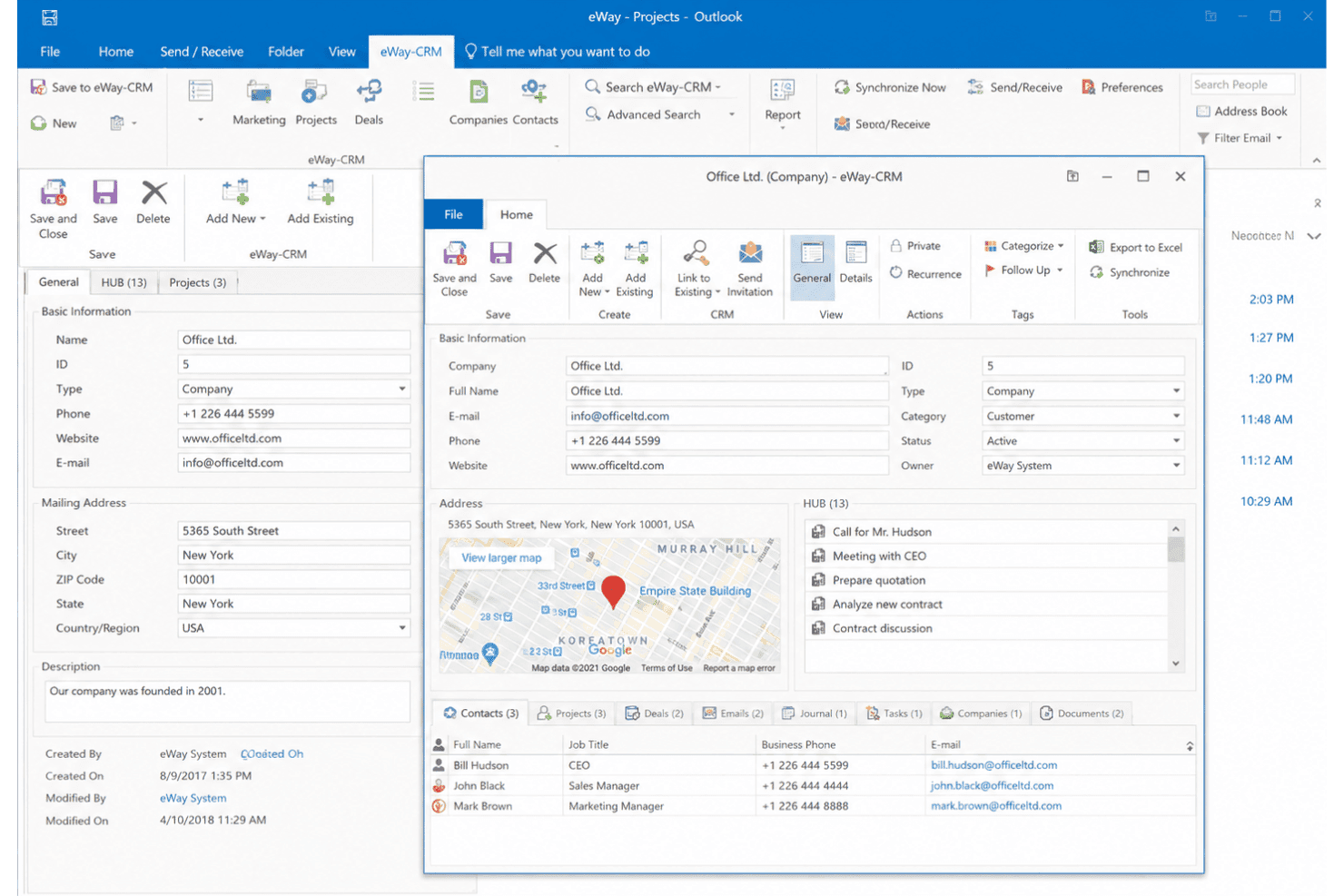
eWay-CRM connects with Microsoft Outlook to manage contacts, emails, tasks, and CRM records within the familiar Outlook workspace. eWay-CRM is an Outlook-native CRM that lets legal professionals manage contacts, matters, documents, tasks, and client communications directly inside Microsoft Outlook and Microsoft Teams.
Who Is eWay-CRM Best For?
It's a natural fit for solo practitioners and small law firms that are already running their practice out of Microsoft Outlook and want to avoid adopting a separate platform.
Why I Picked eWay-CRM
eWay-CRM earns its spot on my list because of how it converts Outlook into a matter management hub without asking attorneys to learn a new tool. I like that you can turn any incoming email into a project (matter) record in one click, with the full communication thread attached and visible across the team. Outlook calendar sync then ties court dates and client appointments directly to the right matter record, so nothing gets lost in a personal inbox.
eWay-CRM Key Features
- Custom fields and forms: Create and organize matter-specific data fields to match your firm's needs.
- Document template editor: Generate legal documents and forms directly from Microsoft Word templates.
- Permissions and user roles: Set access levels to matter records, contacts, and documents for team members.
- REST API and integrations: Connect with QuickBooks, Microsoft Teams, SharePoint, and automate tasks using Power Automate.
eWay-CRM Integrations
eWay-CRM has native integrations across the Microsoft ecosystem, including Microsoft Outlook, Teams, SharePoint, and Microsoft 365. It also offers native integrations with QuickBooks and provides a REST API for custom integrations.
What's Free?
eWay-CRM offers a free-forever plan that supports unlimited users and includes contact management, manual email saving, a single Outlook calendar sync, one workflow per module, up to 10 custom fields, and 200 MB of cloud storage. New accounts start with a 14-day Plus trial before rolling over to the free plan automatically.
Pros and Cons
Pros:
- Outlook calendar syncs to matter records
- Free plan supports unlimited users
- Converts incoming emails into matter records
Cons:
- Free storage is capped at 200 MB
- No built-in trust accounting tools
Learn more about eWay-CRM: Best for streamlined time tracking and billing
- Free plan + free demo available
- From $20/user/month (billed annually)
Visit WebsiteCustomer Rating:4.7/5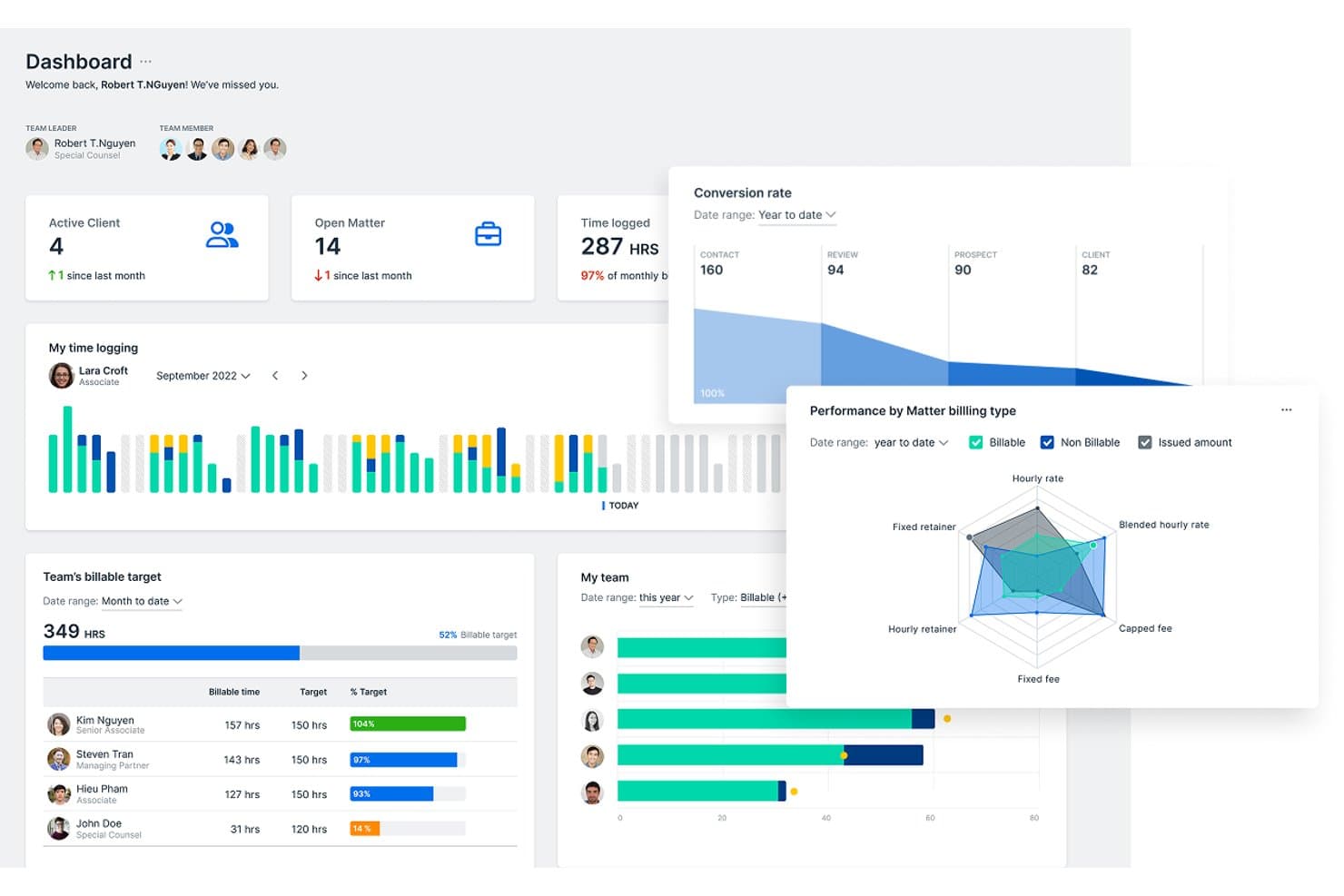
Bilabl offers a comprehensive dashboard with active clients, open matters, time logging, billable targets, conversion rates, and performance by matter billing type. Bilabl is a cloud-based legal practice management platform built for law firms, combining matter and contact management, time tracking, invoicing, document storage, and task management on a free-to-start plan.
Who Is Bilabl Best For?
Bilabl suits solo practitioners and small law firms that want a billing-first approach to case management without enterprise-level costs.
Why I Picked Bilabl
I picked Bilabl as one of the best because time tracking and billing are genuinely its core, not a module bolted on. Time entries link directly to individual matters, and expense and disbursement tracking feeds straight into invoice generation without manual reconciliation. On the free tier, you can generate up to 15 invoices a month, which is enough to cover a solo practitioner's active caseload from day one.
Bilabl Key Features
- Matter management: Track and organize individual cases with custom fields and client linkage.
- Contact database: Store client, opposing counsel, and related contact details with matter associations.
- Calendar and reminders: Schedule court dates, deadlines, and sync events with automated notifications.
- Document organization: Attach, store, and manage case-related documents within each matter.
Bilabl Integrations
Bilabl offers native integrations with Xero, QuickBooks, Zoho Books, and Microsoft SharePoint. An API is available for custom integrations.
What's Free?
Bilabl includes contact and matter management, task management, time and expense tracking, and up to 50GB of document storage. Invoice generation is limited to 15 per month, while Xero, QuickBooks, and Zoho Books integrations require a paid plan.
Pros and Cons
Pros:
- Invoice generation included on the free plan
- Free tier supports up to three users
- Time entries link directly to matters
Cons:
- Smaller support community than established competitors
- No built-in conflict of interest checking
Learn more about Bilabl: Best for real-time matter collaboration
- Free plan + free demo available
- From $69/user/month

Clarra's matters screen tracks each client case with searchable, filterable lists and matter details. Clarra is cloud-based legal case management software with a $0 plan covering matters, documents, contacts, events, tasks, and timekeeping, plus dashboards for tracking litigation activity.
Who Is Clarra Best For?
Clarra suits small litigation teams that need to coordinate matter details, deadlines, documents, and tasks in one workspace.
Why I Picked Clarra
I picked Clarra for real-time matter collaboration that’s grounded in the case record. Its free plan covers up to five users and five open matters, with dashboards that bring teams, events, documents, and tasks together. Matter-level access controls let teams share updates while limiting who can see each case.
Clarra Key Features
- Calendar connections: Connect Google and Microsoft calendars to manage events.
- Timekeeping: Track time with timers and timeslips linked to matters.
- Contact records: Create people and company contacts, then link them to matters.
- Custom reports: Build reports and export them in CSV, Excel, PDF, or Word formats.
Clarra Integrations
Clarra’s Free plan includes Google and Microsoft calendar connections and Zapier. Growth adds Google Drive, SharePoint, OneDrive, and a public REST API for custom integrations.
What's Free?
Clarra offers a free plan rather than a time-limited trial, with limits of five users and five open matters. It includes Google and Microsoft calendar connections and Zapier; Google Drive, SharePoint, OneDrive, and REST API integrations require the Growth plan.
Pros and Cons
Pros:
- Timekeeping links timers and timeslips to matters
- Matter-level permissions and audit logs support controlled collaboration
- Matter dashboards connect teams, events, documents, and tasks
Cons:
- ClarraDocs doesn’t replace a full document management system
- Limited to five open matters
Learn more about Clarra: Best for automated court-ready documents
- Free plan + demo available
- From ₱2,499/month
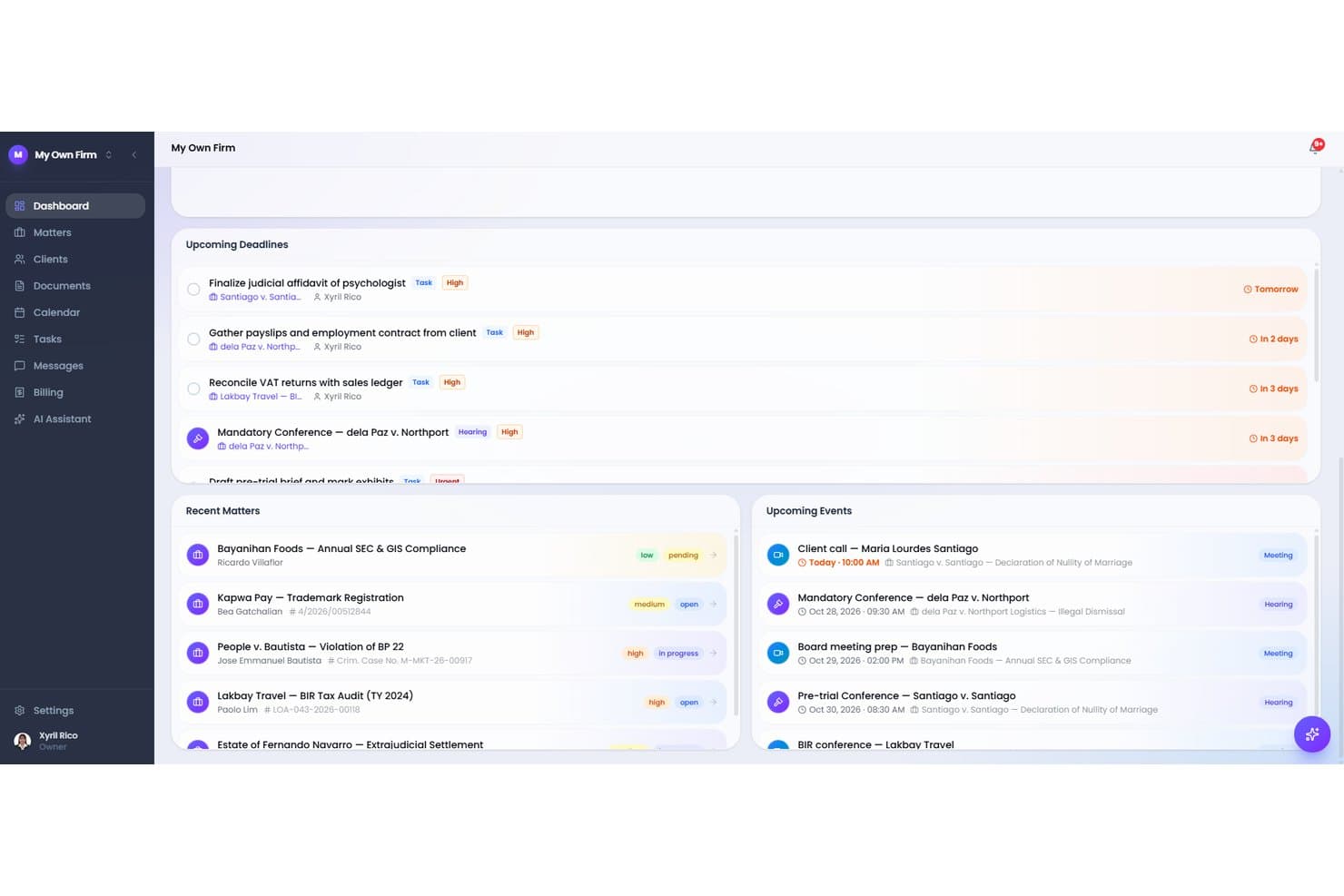
Jurisdocx dashboard tracking upcoming deadlines, recent matters, and court hearings for a law firm. For solo attorneys considering free legal case management software, Jurisdocx is a cloud-based platform with a permanent free plan for matter and client records, tasks, calendars, document storage, and deadlines based on the Philippine Rules of Court.
Who Is Jurisdocx Best For?
Jurisdocx fits Philippine small firms that need to coordinate matter work across attorneys, paralegals, and staff, with role-based access on Firm Starter.
Why I Picked Jurisdocx
I picked Jurisdocx, Best for automated court-ready documents, because its free plan combines basic Kelly AI with deadlines calculated from the Philippine Rules of Court. Kelly drafts first-pass motions, demand letters, and client updates for Word or PDF export. I’d review each draft before filing, and the free plan’s 10,000 daily AI tokens and three-matter limit suit a small caseload.
Jurisdocx Key Features
- Matter records: Link clients, court details, milestones, tasks, and documents to each matter.
- Matter statuses: Track matters as Open, In Progress, Pending, or Closed, with closed matters archived.
- Client profiles: Store contact details, company, address, tags, internal notes, and matter history.
- Task management: Link tasks to matters and track due dates, priorities, and completion status.
Jurisdocx Integrations
Jurisdocx has two documented native integrations: Google Calendar and Outlook, both supporting two-way calendar sync.
What's Free?
Jurisdocx offers a permanent free plan, not just a limited-time trial. It caps accounts at three matters and 10,000 AI tokens per day, with core matter and client records, tasks, calendars, and document storage included.
Pros and Cons
Pros:
- Permanent free plan includes matter tracking
- Kelly AI drafts motions and client updates
- Philippine deadline calculations cite court rules
Cons:
- Deadline rules focus on Philippine procedure
- Free plan caps matters and documents tightly
Learn more about Jurisdocx: Best for billable time and invoice tracking
- Free plan + free demo available
- From $45/user/month
Visit WebsiteCustomer Rating:4.4/5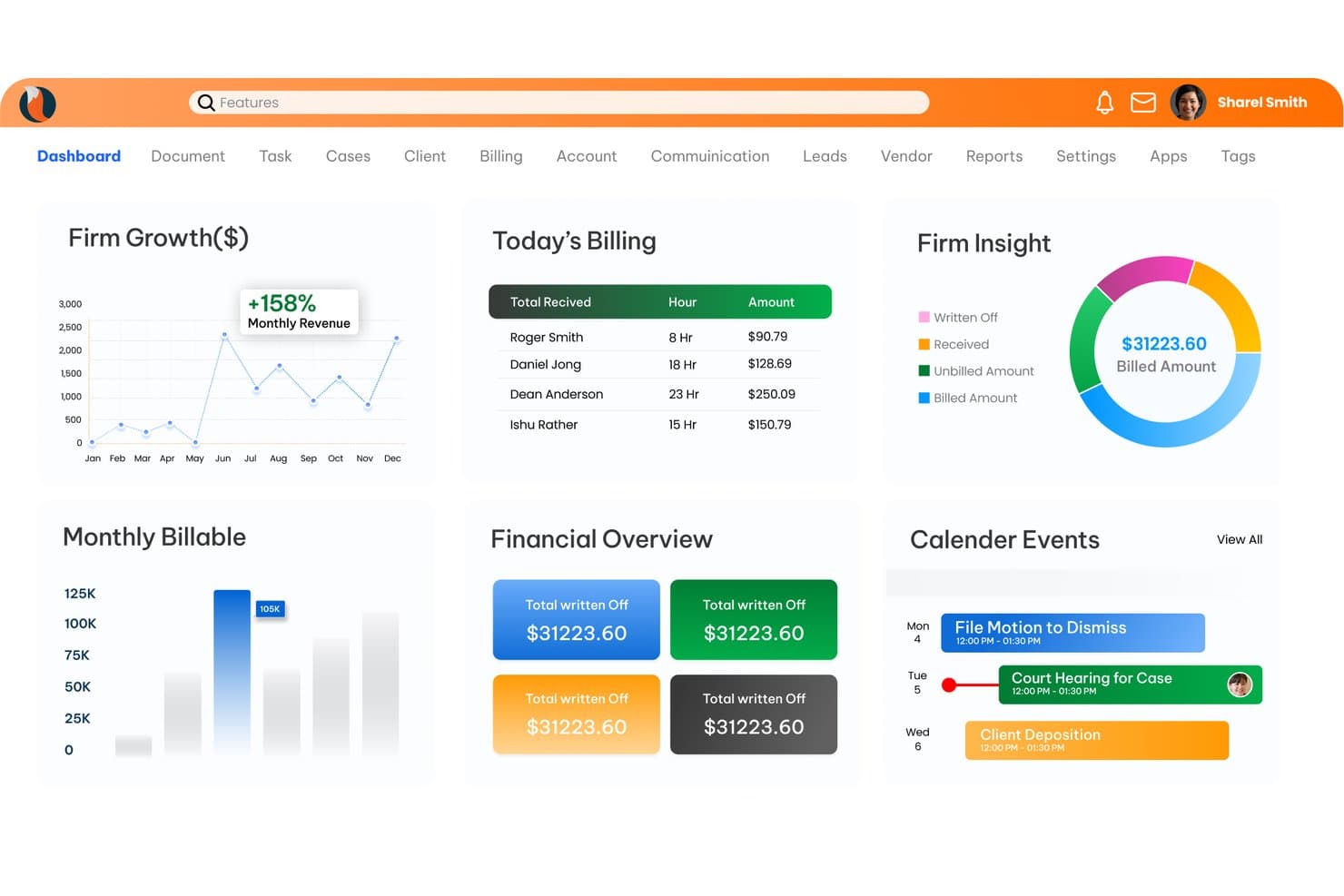
CaseFox offers a comprehensive dashboard with firm growth charts, billing summaries, financial overviews, and calendar events for legal case management. CaseFox is a cloud-based legal case management platform that combines matter tracking, time logging, invoicing, trust accounting, document storage, and client intake tools in one system.
Who Is CaseFox Best For?
CaseFox is a strong fit for solo attorneys and small law firms that need structured billing and case tracking without the cost of enterprise legal software.
Why I Picked CaseFox
I've included CaseFox in my top picks because its time tracking and invoicing tools are built specifically around legal billing norms. Manual and automatic timers log hours per matter, and those entries convert directly into LEDES-compliant invoices with UTBMS codes. The free Solo plan includes all of this, not a stripped-down version, which I find genuinely uncommon at the $0 price point.
CaseFox Key Features
- Matter management with conflict check: Track, organize, and analyze matters with built-in conflict check and custom fields.
- Contact repository: Store client, opposing counsel, and related party details in a centralized, case-linked directory.
- Legal calendaring and reminders: Schedule court dates, appointments, and deadlines with automated reminders.
- Document storage and templates: Upload, organize, and generate documents with template support and matter-based file organization.
CaseFox Integrations
CaseFox provides native integrations with Google Workspace, Microsoft 365, LawPay, QuickBooks, and PayPal. An API is available for custom integrations.
What's Free?
CaseFox's Solo plan is free forever with no credit card required, giving you access to all Pro features including time tracking, invoicing, LEDES billing, calendaring, and a client portal. The plan is capped at 2 users and 4 active cases, so it's best suited to solo practitioners handling a limited caseload.
Pros and Cons
Pros:
- Trust accounting available at no cost
- Client portal included in free tier
- LEDES-compliant invoicing on the free plan
Cons:
- Mobile app experience lags behind desktop
- Active case limit of 4 on free
Learn more about CaseFox: Best for custom legal workflow automation
- Free plan available
- From $21/user/month
Visit WebsiteCustomer Rating:4.1/5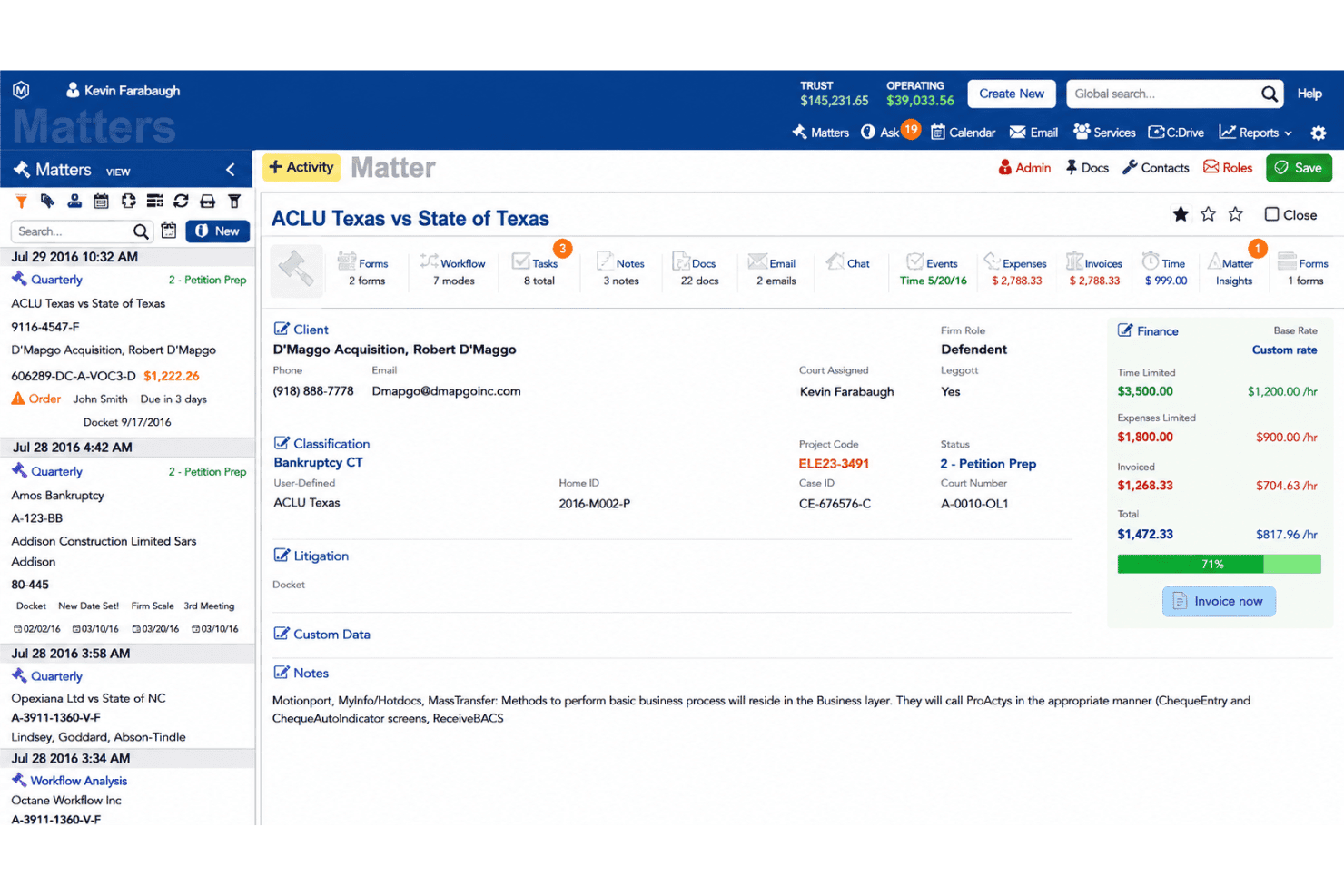
HoudiniESQ manages matters, documents, workflows, time tracking, and billing. HoudiniESQ is a browser-based legal practice management platform that combines matter management, document automation, custom workflow automation, time tracking, and billing—with a perpetual free license available for solo practitioners who self-host.
Who Is HoudiniESQ Best For?
HoudiniESQ is a strong fit for solo practitioners and small law firms that need enterprise-grade automation without the enterprise price tag.
Why I Picked HoudiniESQ
I've included HoudiniESQ in my top picks because its workflow automation engine goes deeper than most legal practice management tools I've used. I particularly like SmartDoc, which lets me build document templates with conditional content fields that auto-populate directly from matter data. The calendaring triggers with conditional branching are equally impressive, and I can set rules that automatically fire task sequences the moment a court date is entered into a matter.
HoudiniESQ Key Features
- Client and contact management: Store and link client, court, and related party details to matters for easy access.
- Central matter dashboard: View, organize, and search all active cases from a customizable dashboard.
- Role-based access controls: Set granular permissions for team members based on matter sensitivity and user role.
- QuickBooks Online integration: Sync client details, invoices, payments, and trust accounting entries directly with your accounting system.
HoudiniESQ Integrations
HoudiniESQ offers native integrations with QuickBooks Online, LawPay, Google Workspace, Adobe Acrobat, Evernote, and CalendarRules. An API is available for custom integrations.
What's Free?
HoudiniESQ offers a perpetual free license for solo practitioners who self-host the software on their own machine, with local data storage included at no cost. The free plan is limited to a single user, so firms with more than one attorney or staff member will need to upgrade to a paid on-premise or cloud plan.
Pros and Cons
Pros:
- Highly customizable matter fields and case types
- Self-hosted option keeps client data on-premise
- Deep workflow automation built into free tier
Cons:
- Self-hosting demands technical knowledge to configure
- UI looks dated compared to modern competitors
Learn more about HoudiniESQ: Best for advanced matter lifecycle management
- Free demo available
- Free
Visit WebsiteCustomer Rating:4.6/5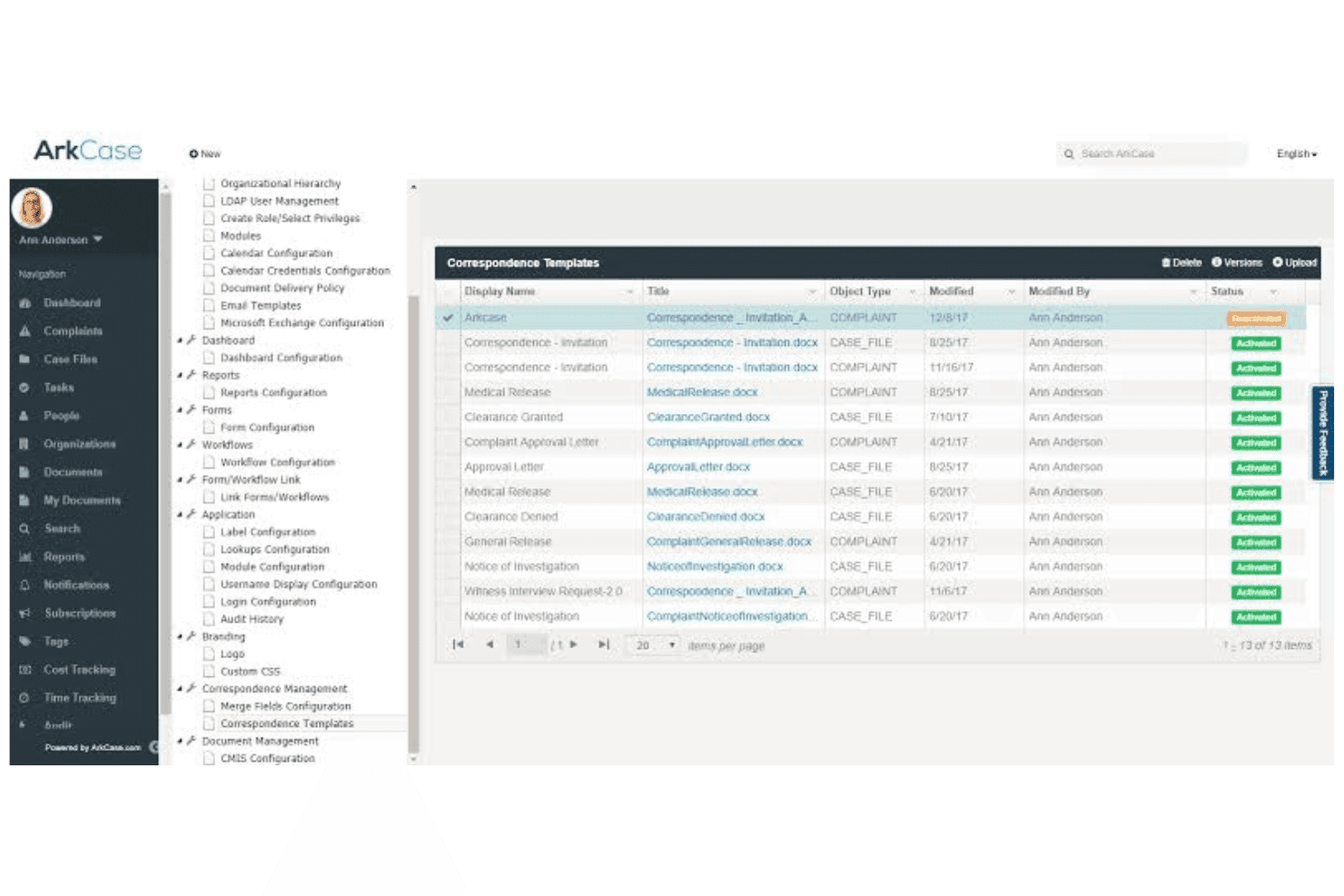
ArkCase manages case lifecycles, documents, workflows, time, and expenses. ArkCase is an open-source case management platform that combines matter lifecycle management, document management, workflow automation, and time and expense tracking across the full case lifecycle.
Who Is ArkCase Best For?
ArkCase is a strong fit for government agencies and enterprise legal teams with in-house IT resources to deploy and manage a self-hosted, open-source platform.
Why I Picked ArkCase
ArkCase earns its spot on my shortlist because no other free platform handles the full matter lifecycle as structurally as this one. I particularly like the low-code workflow builder, which lets my team automate task routing from intake through closure without writing custom code. The built-in OCR engine and AI-powered PII redaction run directly inside the case record. My team can process scanned documents and flag sensitive content without switching tools.
ArkCase Key Features
- Contact management: Store and link client, opposing counsel, and related party details to specific cases.
- Document version control: Track, manage, and restore previous versions of documents within each matter.
- Audit trails: Automatically log all changes and access to case data for security and compliance.
- Calendar integration: Sync events and deadlines with Outlook and other supported calendars.
ArkCase Integrations
ArkCase offers native integrations with Alfresco, Box, Amazon S3, Microsoft Outlook, and Microsoft Exchange, and provides an API for custom integrations.
What's Free?
ArkCase's open-source version is a free-forever plan, available to anyone who wants to self-host the platform. It includes core features like case management, document management, and time and expense management, but you won't get AI-powered tools, cloud hosting, or dedicated support without upgrading to a paid tier.
Pros and Cons
Pros:
- AI-powered PII redaction built into case records
- Full matter lifecycle covered at no cost
- Open-source with an active developer community
Cons:
- No mobile app for remote case access
- Requires dedicated IT resources to self-host
Learn more about ArkCase:
How I Evaluate Free Legal Case Management Software
First, I define what counts as free. Legal case management software must offer a free-forever plan, not just a trial, with limits that still permit basic ongoing use. From there, I split my evaluation into three parts: core functionality, weighted most, like tracking matters and deadlines; standout features, like client intake forms; and beyond-feature fit, like room to grow.
Core Functionality (Table Stakes For This List)
In addition to my free plan requirements, I use a scoring system to select tools for my list. I score each one on a scale from 0 (does not offer the functionality) to 5 (excels in this area) for each core functionality listed below, based on what's available on the free plan. I then convert the total into a percentage to help assess each tool's overall fit, with extra weight on any functionalities I've deemed essential.
- Case & Matter Tracking (Essential): I look for distinct matter records with useful details and status fields, so you can see where each open case stands.
- Calendar & Deadlines (Essential): I check whether you can record hearings and filing dates, then connect reminders to the matters they affect.
- Document Organization (Essential): I assess whether you can upload and find case files from the related matter, such as correspondence or evidence.
- Client & Contact Records (Essential): I look for client and other contact details linked to matters, so you can locate the right person from a case record.
- Task Management (Essential): I check whether you can create matter-linked to-dos, assign responsibility, and track follow-up work across a small caseload.
Once I have a list of tools that meet the criteria, I consider what sets each platform apart.
Differentiating Factors (What Sets Vendors Apart)
Here's how I compare and contrast different vendors:
Standout Features
I check whether a tool includes a secure client portal, since it lets you share documents and exchange messages without routing sensitive case materials through email. A built-in e-signature option is equally useful—collecting signed retainers or releases inside the platform saves steps that solo attorneys and legal aid staff can't afford to waste. I also evaluate mobile app access, because updating a case status or checking a deadline from the courthouse hallway is a real daily need, not a nice-to-have.
Beyond Features
I check whether a free plan lets you export case data, documents, and contacts in open formats. A legal aid team that outgrows its free tier shouldn't lose years of matter history to a proprietary lock-in. I also evaluate confidentiality safeguards—free or not, cloud-hosted case management must offer encryption in transit and at rest to meet bar association obligations around client data handling. For nonprofit legal teams managing high volumes on tight budgets, I look at whether free tiers support multiple users and basic reporting for grant or pro bono tracking.
Cum să alegeți un program gratuit de gestionare a dosarelor juridice
Este ușor să vă pierdeți în liste lungi de funcții și structuri complexe de prețuri. Pentru a vă menține concentrarea în timp ce parcurgeți procesul unic de selectare a programului, iată o listă de verificare a factorilor de care trebuie să țineți cont:
| Factor | Aspecte de luat în considerare |
|---|---|
| FactorScalabilitate | Aspecte de luat în considerareVa putea platforma să gestioneze mai mulți utilizatori sau clienți dacă activitatea dumneavoastră se extinde sau limitele planului gratuit vă vor obliga să schimbați platforma mai târziu? |
| FactorIntegrări | Aspecte de luat în considerareSe conectează sistemul la instrumentele dumneavoastră de e-mail, calendar, contabilitate sau semnătură electronică pentru a reduce introducerea manuală a datelor? |
| FactorPosibilități de personalizare | Aspecte de luat în considerarePuteți adapta cu ușurință câmpurile, fluxurile de lucru sau șabloanele de documente pentru domeniul dumneavoastră specific de activitate (cum ar fi dreptul imigrației sau dreptul familiei)? |
| FactorUșurința utilizării | Aspecte de luat în considerareEste tabloul de bord ușor de navigat? Cât de repede puteți dumneavoastră sau un membru al personalului să învățați noțiunile de bază fără ajutor extern? |
| FactorImplementare și inițiere | Aspecte de luat în considerareExistă tutoriale, instrumente de import al datelor sau baze de cunoștințe care să vă ajute să migrați de la foi de calcul sau de la o altă platformă? |
| FactorCost | Aspecte de luat în considerareAcoperă planul gratuit nevoile dumneavoastră de bază pe termen lung sau este probabil să întâlniți restricții de plată ori taxe suplimentare pentru utilizatori pe măsură ce vă extindeți? |
| FactorMăsuri de securitate | Aspecte de luat în considerareOferă furnizorul criptare, politici clare privind datele și conformitate cu standardele juridice relevante din regiunea dumneavoastră? |
| FactorDisponibilitatea asistenței | Aspecte de luat în considerareCe tip de ajutor primiți dacă întâmpinați dificultăți? Este posibil ca utilizatorii planului gratuit să nu aibă acces la chat live sau la asistență telefonică — planificați în consecință. |
Ce sunt programele gratuite de gestionare a dosarelor juridice?
Programele gratuite de gestionare a dosarelor juridice sunt sisteme care permit cabinetelor de avocatură, echipelor de asistență juridică și avocaților independenți să organizeze dosare, documente, contacte, termene-limită și facturarea fără taxe recurente de abonament. Aceste platforme oferă instrumente esențiale pentru urmărirea problemelor clienților și respectarea obligațiilor, de obicei printr-un plan gratuit pe termen lung care permite gestionarea continuă a activității clienților.
Funcțiile programelor gratuite de gestionare a dosarelor juridice
Să analizăm funcțiile întâlnite frecvent în programele de gestionare a dosarelor juridice și să vedem care dintre acestea sunt de obicei incluse în planurile gratuite față de cele plătite.
Funcții incluse de obicei în programele gratuite de gestionare a dosarelor juridice
- Urmărirea cazurilor și a dosarelor: Creați, organizați și gestionați dosare individuale cu detalii despre clienți, statut și date importante, pentru ca toate informațiile să fie accesibile.
- Gestionarea de bază a contactelor: Stocați într-o listă centralizată detaliile de contact ale clienților, avocaților părții adverse și altor părți, conectată la înregistrările cazurilor.
- Stocarea documentelor: Încărcați, organizați și regăsiți documentele juridice atașate unor dosare specifice, pentru consultare și partajare ușoară.
- Calendar și mementouri: Programați datele ședințelor de judecată, termenele-limită și sarcinile, cu mementouri încorporate, astfel încât nimic să nu fie omis.
- Liste de sarcini și activități: Atribuiți, stabiliți priorități și urmăriți sarcinile asociate unor cazuri sau membri ai echipei, pentru ca fiecare să își asume responsabilitatea.
- Urmărirea de bază a timpului: Înregistrați orele facturabile și asociați-le unor dosare specifice, pentru a avea o imagine de ansamblu asupra modului în care este utilizat timpul.
- Facturare simplă: Generați facturi simple pentru clienți, pe baza timpului facturabil sau a tarifelor fixe.
- Raportare de bază: Generați rapoarte standard despre dosare, facturare sau activitate, pentru a monitoriza progresul în desfășurare.
- Gestionarea utilizatorilor: Adăugați membri ai echipei și atribuiți cazuri sau permisiuni de acces în funcție de roluri.
Funcții ale software-ului de gestionare a cazurilor juridice disponibile de obicei contra cost
- Asamblarea automată a documentelor: Generați documente juridice din șabloane personalizabile, reducând munca repetitivă de redactare pentru formularele utilizate frecvent.
- Automatizarea fluxurilor de lucru: Configurați fluxuri de lucru bazate pe declanșatoare pentru primirea cazurilor, aprobări sau etapele recurente ale dosarelor, eliminând pașii manuali repetați.
- Instrumente avansate de facturare: Accesați facturarea în lot, contabilitatea fondurilor fiduciare, integrarea procesării plăților și opțiuni de facturare conforme cu LEDES pentru cerințe complexe ale clienților.
- Calendar bazat pe reguli: Utilizați reguli specifice jurisdicției pentru a calcula și urmări automat termenele juridice, reducând la minimum erorile de programare.
- Acces la portalul pentru clienți: Oferiți clienților un portal securizat pentru a vedea actualizări, a schimba documente, a trimite mesaje echipei dumneavoastră și a plăti facturile online.
- Verificarea conflictelor: Scanați baza de date cu dosare și contacte pentru a identifica potențiale conflicte înainte de a prelua cazuri sau clienți noi.
- API și integrări avansate: Conectați platforma la o gamă mai largă de instrumente, precum sisteme de contabilitate, semnătură electronică și gestionare a documentelor.
- Asistență pentru migrarea datelor: Beneficiați de ajutor practic sau de instrumente avansate pentru transferul unor volume mari de date din sistemele vechi.
- Permisiuni și securitate personalizate: Controlați la un nivel detaliat cine poate accesa, edita sau vizualiza anumite dosare, documente sau module.
- Asistență prioritară pentru clienți: Beneficiați de asistență live, integrare inițială dedicată sau ajutor tehnic VIP pentru rezolvarea rapidă a problemelor.
Beneficiile software-ului gratuit de gestionare a cazurilor juridice
Implementarea unui software gratuit de gestionare a cazurilor juridice oferă mai multe beneficii pentru echipa și afacerea dumneavoastră. Iată câteva dintre acestea:
- Informații centralizate: Toate detaliile cazurilor, documentele, sarcinile și contactele sunt stocate într-un singur sistem organizat, reducând pierderea fișierelor și munca duplicată.
- Gestionarea termenelor-limită: Calendarele și mementourile încorporate vă ajută să respectați constant datele ședințelor de judecată și termenele de depunere, reducând riscul unor erori costisitoare.
- Colaborare accesibilă: Membrii echipei și, în unele cazuri, clienții pot accesa în siguranță informațiile și actualizările cazurilor de oriunde, facilitând munca la distanță.
- Eficiență îmbunătățită a facturării: Înregistrați timpul și generați facturi din același sistem, reducând la minimum orele facturabile omise și simplificând procesele de la sfârșitul lunii.
- Controlul costurilor: Cu un plan gratuit pe termen lung, evitați costurile inițiale ale software-ului și puteți trece la un nivel superior doar atunci când afacerea depășește nivelul gratuit.
- Integrare inițială simplificată: Interfețele de utilizator intuitive și instrumentele de import permit avocaților independenți și firmelor mici să înceapă rapid, fără a avea nevoie de resurse IT dedicate.
- Servicii îmbunătățite pentru clienți: Portalurile securizate și funcțiile de partajare a documentelor îi mențin pe clienți informați și implicați pe parcursul fiecărui dosar.
Costurile și prețurile software-ului de gestionare a cazurilor juridice
Înțeleg că ați ajuns la acest articol căutând cele mai bune opțiuni de software pentru gestionarea cazurilor juridice disponibile gratuit. Totuși, deoarece planurile gratuite oferă doar funcții limitate, există șanse mari să fie necesar să treceți la un plan superior în viitor.
Tabelul de mai jos prezintă pe scurt planurile uzuale, prețurile medii ale acestora și funcțiile incluse de obicei în software-ul de gestionare a cazurilor juridice:
Tabel comparativ al planurilor pentru software-ul de gestionare a cazurilor juridice
| Tipul planului | Preț mediu | Funcții uzuale |
|---|---|---|
| Tipul planuluiPlan gratuit | Preț mediu$0 | Funcții uzualeUrmărirea de bază a dosarelor, gestionarea simplă a contactelor, calendar, stocarea de bază a documentelor, liste de sarcini și facturare simplă. |
| Tipul planuluiPlan personal | Preț mediu$5–$25/utilizator/lună | Funcții uzualeStocare extinsă, șabloane personalizabile, raportare îmbunătățită, fluxuri de lucru de bază și integrări cu e-mailul și calendarul. |
| Tipul planuluiPlan pentru companii | Preț mediu$25–$50/utilizator/lună | Funcții uzualeInstrumente avansate de facturare, automatizarea documentelor, automatizarea fluxurilor de lucru, portal pentru clienți, permisiuni avansate și asistență standard. |
| Tipul planuluiPlan pentru întreprinderi | Preț mediu$50–$100+/utilizator/lună | Funcții uzualeIntegrări personalizate, securitate avansată, acces API, asistență pentru migrarea datelor, asistență prioritară și funcții complexe de conformitate. |
Întrebări frecvente despre software-ul gratuit de gestionare a cazurilor juridice
Iată câteva răspunsuri la întrebările frecvente despre software-ul gratuit de gestionare a cazurilor juridice:
Sunt instrumentele gratuite de gestionare a cazurilor juridice suficient de sigure pentru informațiile confidențiale?
Da, multe instrumente gratuite de gestionare a cazurilor juridice folosesc criptarea și practici de securitate conforme cu standardele industriei, dar ar trebui să verificați întotdeauna politica de confidențialitate a fiecărui furnizor, locația de stocare a datelor și certificările de conformitate înainte de a adăuga date sensibile.
Care sunt cele mai frecvente limitări ale software-ului gratuit de gestionare a cazurilor juridice?
Planurile gratuite limitează de obicei numărul de utilizatori, volumul de spețe, spațiul de stocare pentru documente sau accesul la funcții avansate, precum automatizarea, fluxurile de lucru personalizate ori portalurile pentru clienți, așa că este important să verificați dacă acestea corespund nevoilor dumneavoastră actuale și viitoare.
Îmi pot migra datele dacă depășesc limitele planului gratuit?
Da, majoritatea platformelor reputabile oferă instrumente pentru exportul datelor, deși procesul poate fi manual sau limitat în cazul planurilor gratuite — asigurați-vă că datele pot fi transferate cu ușurință dacă schimbați furnizorul sau faceți un upgrade.
Soluțiile gratuite de gestionare a cazurilor juridice includ integrarea cu instrumentele de e-mail și calendar?
Unele planuri gratuite oferă integrare de bază cu platforme precum Outlook sau Google Workspace, dar sincronizarea mai complexă, integrările avansate sau accesul la API necesită de obicei un abonament plătit.
Cum aleg între diferitele opțiuni gratuite de gestionare a cazurilor?
Concentrați-vă pe nevoile specifice domeniului de practică al firmei dumneavoastră, așteptările privind dezvoltarea, calitatea și limitările planului gratuit, opțiunile de asistență disponibile și timpul necesar pentru configurarea și utilizarea zilnică a platformei.