

Programele de gestionare a dosarelor juridice pentru instituții guvernamentale urmăresc spețele, termenele-limită, evidențele și responsabilitățile în cadrul birourilor juridice din sectorul public și al echipelor din sistemul judiciar. Sistemul potrivit depinde de rolul biroului dumneavoastră, de tipurile de dosare, de cerințele privind accesul și de conexiunile cu instanțele sau agențiile partenere.
Acest ghid compară opțiuni pentru acuzare, apărare publică, instanțe, drept municipal și activități conexe, astfel încât să vă puteți restrânge opțiunile la instrumentele care se potrivesc fluxurilor dumneavoastră de lucru.
Why Trust Our Software Recommendations
6,700+
Reviews
20
Industry experts
16+
Evaluation factors
14
Years
Our team has been testing and reviewing software since 2012. As legal practice leaders ourselves, we know how difficult—and important—it is to choose the right software.
For this guide, we evaluated tools using hands-on testing and independent research, scoring tools using our selection criteria.
Our reviews reflect our human editorial judgment, not a sales pitch.
Tabel comparativ pentru cele mai bune programe de gestionare a dosarelor juridice pentru instituții guvernamentale
Comparați prețurile și specificațiile, unul lângă altul, pentru programele de gestionare a dosarelor juridice pentru instituții guvernamentale incluse în lista mea scurtă.
Score legend (out of 5)
- Excellent4.5–5
- Good4–4.4
- Average3–3.9
- Below average2–2.9
- Poor1–1.9
Sorted by: Default
| Tool | Starting Price | Website | |||||||
|---|---|---|---|---|---|---|---|---|---|
Best for cross-division agency casework | 3.3 out of 5 | 4 | 2 | 3 | 4 | 3 | 4 | Pricing upon request Free demo available | Website |
Best for agency cooperative purchasing | 3.0 out of 5 | 3 | 2 | 3 | 4 | 3 | 3 | £79/user/month 7-day free trial + free demo available | Website |
Best for government legal billing and case tracking | 2.3 out of 5 | 2 | 1 | 3 | 3 | 3 | 2 | $45/user/month Free plan + free demo available | Website |
Best for public defenders unifying case data | 3.2 out of 5 | 4 | 2 | 3 | 2 | 4 | 4 | Pricing upon request Free trial + free demo available | Website |
Best for court and attorney office coordination | 3.0 out of 5 | 4 | 3 | 3 | 2 | 4 | 2 | Pricing upon request Not available | Website |
Best for law firms linking matters and billing | Not rated | 3 | Not rated | 2 | 2 | 2 | Not rated | Pricing upon request Not available | Website |
Best for prosecutor-led law-enforcement intake | 3.0 out of 5 | 4 | 2 | 3 | 2 | 3 | 4 | Pricing upon request Free demo available | Website |
Best for managing appointed counsel and experts | 3.3 out of 5 | 4 | 3 | 3 | 3 | 3 | 4 | Pricing upon request Free demo available | Website |
Best for defense teams coordinating client care | 3.0 out of 5 | 4 | 3 | 3 | 2 | 3 | 3 | Pricing upon request Free demo available | Website |
Best for courts linking hearings and finances | 3.0 out of 5 | 4 | 3 | 3 | 2 | 3 | 3 | Pricing upon request Not available | Website |


Recenzii ale programelor de gestionare a dosarelor juridice pentru instituții guvernamentale
Mai jos sunt rezumatele mele ale celor mai bune programe de gestionare a dosarelor juridice pentru instituții guvernamentale incluse în lista mea scurtă. Recenziile mele acoperă funcțiile, cazurile de utilizare și capacitățile fiecărei platforme, pentru a vă ajuta să găsiți soluția potrivită.
 Best for cross-division agency casework
- Free demo available
- Pricing upon request
Visit WebsiteCustomer Rating:4.5/5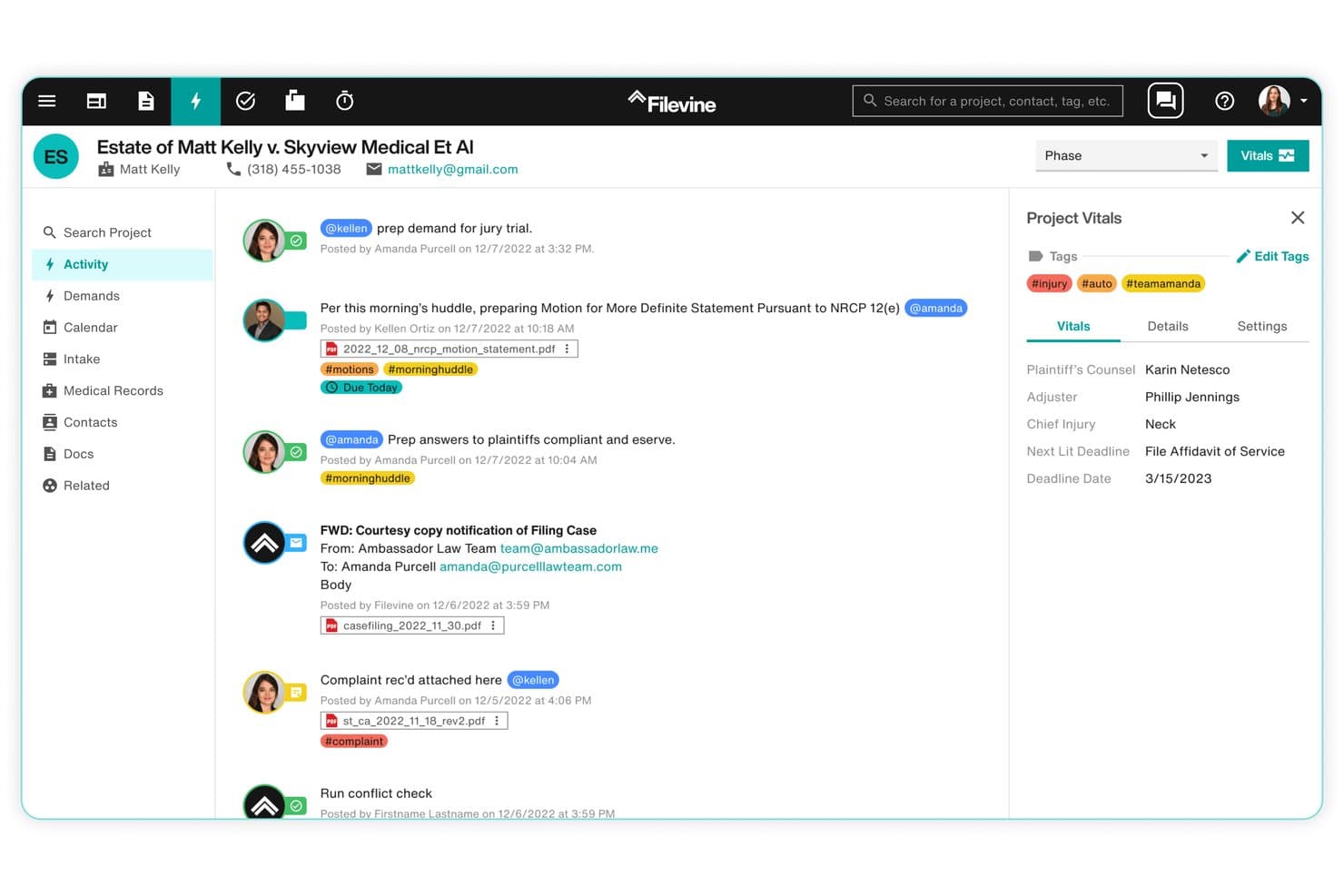
Filevine connects legal case workflows, documents, and tasks across teams. Filevine is a cloud-based legal case management platform built for government agencies, law firms, and in-house legal teams, covering matter tracking, document management, deadline automation, and cross-division workflow configuration.
Who Is Filevine Best For?
Filevine is a strong fit for state and municipal legal teams managing caseloads across multiple divisions or agencies from a single platform.
Why I Picked Filevine
I've included Filevine in my top picks because it's one of the few platforms I've seen handle multi-division government caseloads without forcing every team into the same rigid workflow. I particularly like how deadline chains calculate task due dates from a single case-initiation date, keeping six divisions moving in sync. The configurable, no-code workflow builder also lets each agency unit define its own project types, fields, and permission sets independently.
Filevine Key Features
- OCR document search: Search the full text of PDFs and images stored in a case file to locate specific words or phrases across your document library.
- Conflict check section: Search contacts across projects and your organization's contact list for potential conflicts, then record an undecided, conflict, or no-conflict status directly in the matter.
- Role-based access control: Set user permissions at the project level to control who can view, edit, or be assigned to sensitive case information.
- Audit reports: Pull activity logs filtered by user, action type, affected project or document, and time range, then export or schedule them for recurring review.
Filevine Integrations
Filevine lists over 2,000 potential integrations, including Outlook, Office 365, Google Calendar, Microsoft Teams, InfoTrack, and Snowflake through DataBridge. It also offers APIs and webhooks for custom connections, plus Zapier.
Pros and Cons
Pros:
- Centralized case files keep matter documents together
- Deadline chains coordinate tasks across agency divisions
- Configurable workflows suit cross-division agency caseloads
Cons:
- Extensive setup can strain agency implementation teams
- Complex reports complicate public-sector audit preparation
Learn more about Filevine: 2Best for agency cooperative purchasing
Clio
- 7-day free trial + free demo available
- From £79/user/month
Visit WebsiteCustomer Rating:4.5/5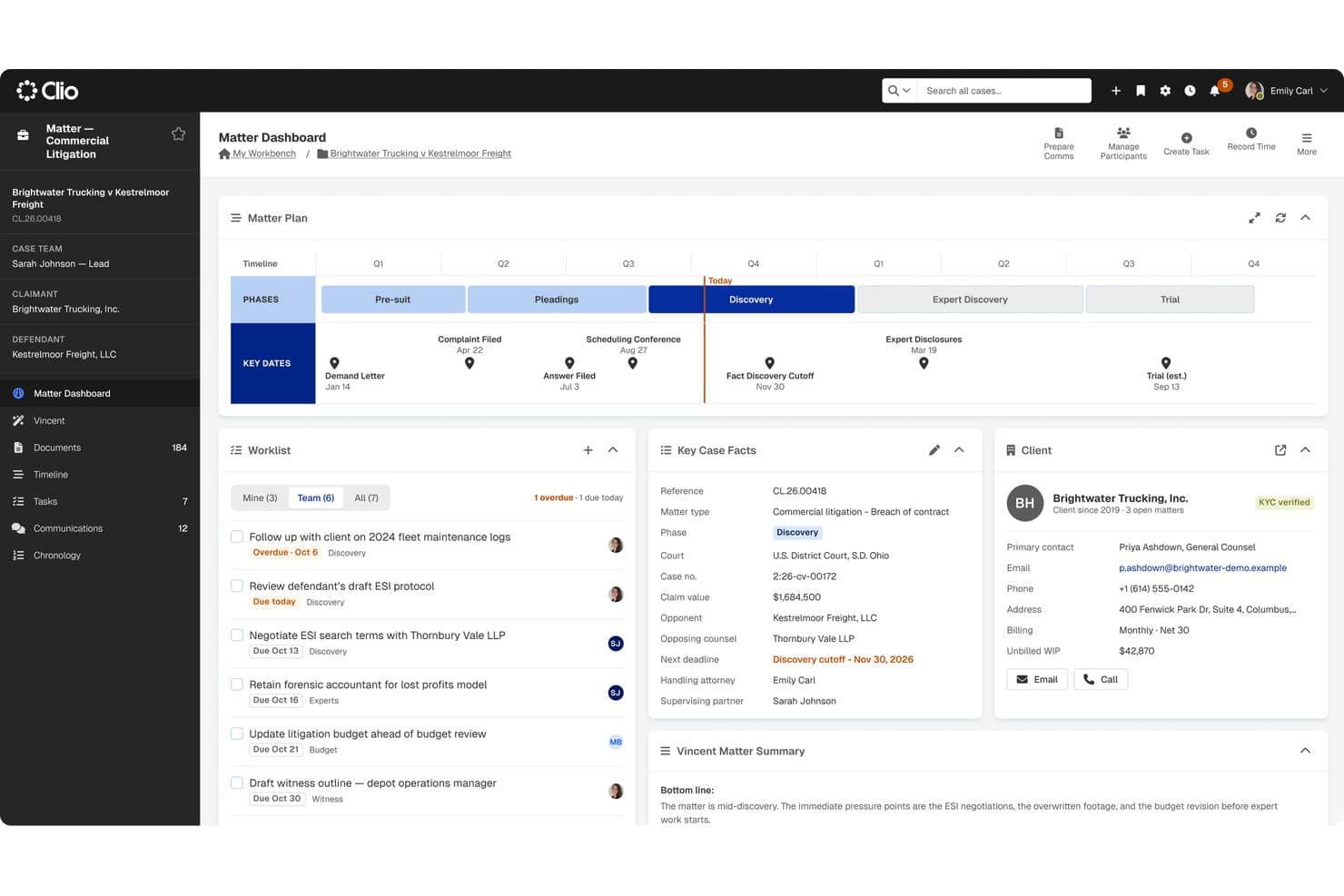
Clio centralizes case timelines, tasks, and client facts for legal teams. Clio is a cloud-based legal practice management platform that centralizes matter tracking, document management, court deadline automation, calendaring, and secure client communication for government legal teams including public defenders and agency counsel.
Who Is Clio Best For?
Clio Manage is a strong fit for public defender offices and government agency counsel that need a proven practice management platform and want to simplify procurement through cooperative purchasing contracts.
Why I Picked Clio
I picked Clio as one of the best because its availability through named cooperative purchasing contracts, including NASPO ValuePoint, TIPS, and OMNIA Partners, lets government legal offices skip a full RFP process and move straight to procurement. I also like that Clio's Court Rules engine covers 50 US states and 2,200 jurisdictions, automatically generating deadline calendars from a trigger date, which matters a lot for public defenders managing high-volume dockets. Matter reassignment keeps every document, note, and deadline attached when caseloads shift between staff.
Clio Key Features
- Conflict checking: Search existing contacts and matters by name, company, or keyword to identify potential conflicts before opening a new matter.
- Secure client portal: Let clients message your office, share documents, view appointments, and make payments through Clio for Clients.
- Court docket monitoring: Link court cases to matters and receive alerts about new filings, orders, and schedule changes.
- Role-based permissions: Restrict matter visibility to selected users or groups, with bulk permission edits covering up to 200 matters at once.
Clio Integrations
Clio lists 300+ apps in its marketplace, including Microsoft 365, Google Workspace, Gmail, Outlook, OneDrive, Google Drive, Dropbox, Box, and NetDocuments. Clio also offers a REST API and webhooks, plus Zapier.
Pros and Cons
Pros:
- Reviewers praise matter-organized files and calendars
- Court Rules cover 2,200 US jurisdictions
- Cooperative contracts can ease agency procurement
Cons:
- No structured inter-agency case exchange
- No CJIS or FedRAMP documentation
Learn more about Clio: Best for government legal billing and case tracking
- Free plan + free demo available
- From $45/user/month
Visit WebsiteCustomer Rating:4.4/5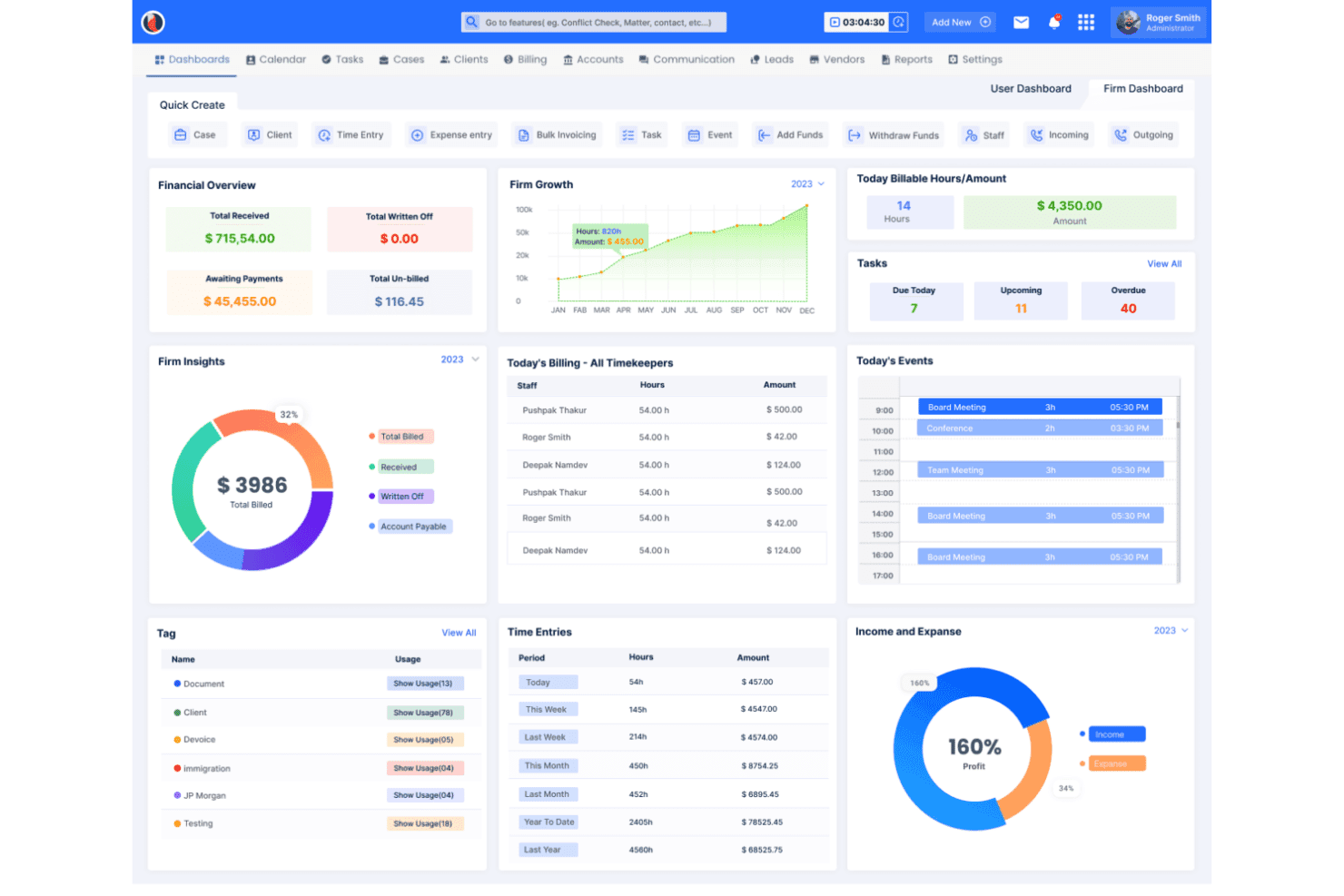
CaseFox supports LEDES billing, UTBMS coding, trust accounting, and court deadlines. CaseFox is a cloud-based legal case management and billing platform that centralizes case records, document storage, time tracking, calendaring, and invoicing for legal teams working across government and private practice.
Who Is CaseFox Best For?
CaseFox suits small government legal teams and solo attorneys who need affordable billing, time tracking, and basic case organization without enterprise complexity.
Why I Picked CaseFox
I picked CaseFox as one of the best because it handles the billing side of government legal work with real precision—LEDES invoicing, UTBMS coding, and trust accounting are all built in, which matters when you're billing against government contracts or public agency budgets. I also like that rule-based calendaring automatically generates court filing and trial deadline entries from trigger dates, keeping government caseloads organized without manual setup. The custom case fields let you tag and track agency-specific information across matters.
CaseFox Key Features
- Role-based access controls: Restrict case visibility and data access by user role, so staff only see the cases and information assigned to them.
- Client portal: Give clients secure access to invoices, payment history, case updates, and shared documents from a dedicated portal.
- AI document drafting: Generate contracts, legal templates, and other documents using AI-assisted prompts directly within the platform.
- Conflict check tool: Search across clients, cases, and contacts by keyword to surface potential conflicts before onboarding new matters.
CaseFox Integrations
CaseFox offers documented integrations with Google Drive, OneDrive, Box, Dropbox, Google Calendar, Microsoft 365, QuickBooks, Xero, LawPay, and PayPal. A Web API is available selectively for custom integrations.
Pros and Cons
Pros:
- Rule-based reminders flag upcoming deadlines
- LEDES billing handles coded legal invoices
- Reviewers praise straightforward matter setup
Cons:
- Reviewers report limited advanced report customization
- No documented CJIS or FedRAMP assurance
Learn more about CaseFox: Best for public defenders unifying case data
- Free trial + free demo available
- Pricing upon request
Visit WebsiteCustomer Rating:4.3/5
Salesforce Missionforce tracks case evidence, proceeding records, and legal documents. Salesforce Missionforce is a public sector case management platform that centralizes case data, evidence tracking, proceeding records, and document management within a government-grade secure cloud environment.
Who Is Salesforce Missionforce Best For?
Public defender offices managing high-volume caseloads will get the most value from Salesforce Missionforce, particularly those with the resources to support a customized deployment.
Why I Picked Salesforce Missionforce
I picked Salesforce Missionforce because it's one of the few platforms with a documented, real-world public defender deployment: Los Angeles County consolidated 160 million records from a 26-part legacy system into a single case view covering charges, digital evidence, and dispositions from pretrial through trial. The Investigative Case Management data model structures custody items with chain-of-custody entries, evidence types, and role-based access controls that limit who can view case files based on job responsibilities.
Salesforce Missionforce Key Features
- 360-degree case view: Centralizes case history, interactions, and real-time collaboration in a single searchable record for each case.
- Case proceeding model: Records proceeding type, filing date, status, participants, and related proceedings, including hearing scheduling and outcome tracking.
- Role-based access controls: Limits staff access to records, reports, and case files based on job responsibilities and reporting hierarchy.
- Case analytics: Surfaces trends in caseload distribution and processing times to support resource planning decisions.
Salesforce Missionforce Integrations
Salesforce Missionforce supports connectivity with MuleSoft for data exchange, Slack for team collaboration, and Tableau for analytics and reporting. It also draws on Salesforce's OmniStudio tools for guided workflows and AgentExchange marketplace for third-party applications and AI agents.
Pros and Cons
Pros:
- Case and evidence records support lifecycle tracking
- Customizable workflows support tailored case models
- Government cloud security earns reviewer praise
Cons:
- Search and navigation frustrate some reviewers
- Statutory deadline calculations aren’t documented
Learn more about Salesforce Missionforce: Best for court and attorney office coordination
- Not available
- Pricing upon request
Visit WebsiteCustomer Rating:4/5
Enterprise Justice centralizes case summaries, tasks, and hearings. Enterprise Justice is Tyler Technologies' court case management suite that connects courts, prosecutors, public defenders, and filing communities through integrated tools for case tracking, document management, e-filing, and inter-agency data sharing.
Who Is Enterprise Justice Best For?
Enterprise Justice is a strong fit for court systems and attorney offices—prosecutors and public defenders alike—that need a single platform connecting case management, e-filing, and inter-agency data sharing across the justice sector.
Why I Picked Enterprise Justice
Enterprise Justice earns its spot on my shortlist because it's one of the few platforms built specifically to connect courts, prosecutors, and public defenders through shared case data rather than siloed systems. I particularly like how Enterprise Attorney Manager lets both prosecuting and public defender offices pull case statuses, evidence, witness details, and upcoming hearings from a single organized view, reducing the back-and-forth between offices that slows down case prep. The court e-filing integration through eFile & Serve also centralizes filed documents and electronic service history in one place, which I find genuinely useful when coordinating across multiple court levels.
Enterprise Justice Key Features
- Judge Edition bench access: Judges can view case documents, charges, demographic information, and mug shots from a touch screen at the bench.
- Clerk Edition batch processing: Clerks can process groups of defendants, cases, or charges in batches and enter separate actions for individual counts in a side-by-side view.
- Financial Management reconciliation: Courts can manage bank transactions, reconciliation, balancing, check printing, and individual or batch disbursements from a centralized financial module.
- Configurable statistical reporting: Attorney Manager lets offices build case statistics using yes/no and multi-valued selections that can be configured to match grant reporting requirements.
Enterprise Justice Integrations
Enterprise Justice integrates with Tyler Technologies’ eFile & Serve and connects with other Tyler products through an integration portal offering hundreds of APIs and message resources. Specific third-party integrations and API protocols aren’t documented.
Pros and Cons
Pros:
- Electronic filing can feel straightforward
- Integrated court, attorney, and financial workflows
- Remote filing earns reviewer praise
Cons:
- Filing glitches cloud acceptance confirmation
- County-specific filing steps complicate access
Learn more about Enterprise Justice: Best for law firms linking matters and billing
- Not available
- Pricing upon request
Visit WebsiteCustomer Rating:3.2/5
ProLaw tracks legal matters, documents, billable time, and accounting records. ProLaw by Thomson Reuters is a law practice management solution that combines matter lifecycle tracking, document management, time entry, billing, and accounting in a single system.
Who Is ProLaw Best For?
ProLaw suits government legal departments that need to manage legal matters, organize documents, track attorney time, and oversee billing and expenses in one system.
Why I Picked ProLaw by Thomson Reuters
I've included ProLaw in my top picks because it keeps matter management, billing, and accounting in one place, which matters when you need a clear link between case activity and financial records. I like how it tracks the full matter lifecycle alongside time entry, so nothing slips between case work and invoicing. Its docketing and deadline-calculator tools also give firms a reliable way to manage court dates without juggling separate systems.
ProLaw by Thomson Reuters Key Features
- Matter lifecycle tracking: Tracks a matter from open to close, capturing notes, tasks, time, and related activity in one place.
- Business intelligence reporting: Delivers real-time firm health data through built-in reporting tools you can query or customize.
- Integrated accounting: Handles general ledger and financial operations alongside case and billing data in a single system.
- Document management: Stores and organizes digital matter files directly within the case record, reducing reliance on paper files.
ProLaw Integrations
ProLaw connects with Microsoft Outlook, Word, Excel, Adobe Acrobat Pro, and Westlaw for email management, document preparation, legal research, and matter-related workflows. Its Outlook integration allows users to save emails and attachments directly to case records and capture time without leaving their inbox.
Pros and Cons
Pros:
- Digital matter files pair with case management
- Docketing tools help teams monitor court deadlines
- Matter tracking links notes, tasks, and time
Cons:
- No documented inter-agency case-sharing capability
- No documented government security or compliance controls
Learn more about ProLaw by Thomson Reuters: Best for prosecutor-led law-enforcement intake
- Free demo available
- Pricing upon request
Visit WebsiteCustomer Rating:4.4/5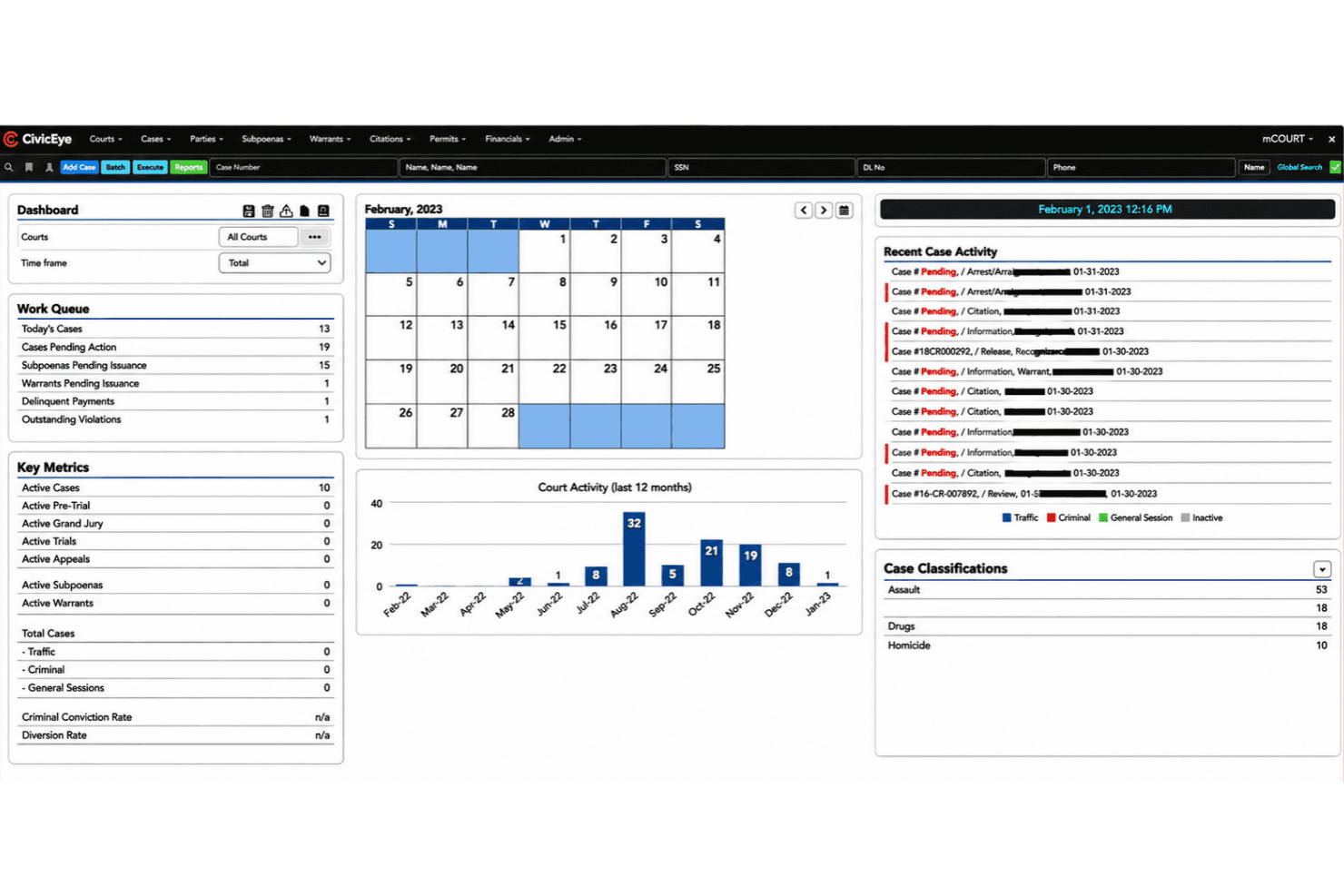
CivicEye organizes prosecution cases, evidence sharing, and law-enforcement intake. CivicEye is a prosecutor-focused case management platform that centralizes case inventory, party management, document drafting, evidence sharing, and law enforcement intake within a CJIS-compliant cloud environment.
Who Is CivicEye Best For?
CivicEye is purpose-built for prosecutor offices, with workflows designed around district attorneys, assistant DAs, and their support staff.
Why I Picked CivicEye
I picked CivicEye as one of the best because its law enforcement intake portal is designed around how prosecutor offices receive cases. Prosecutors or clerks can configure required submission fields, so law enforcement partners can't skip important information before a case enters the queue. I also like that its case party management provides defense attorneys, victim advocates, and witnesses with role-based access, keeping information restricted to what each user is authorized to view.
CivicEye Key Features
- Document drafting: Work from templates or build custom documents with pre-populated case data, and edit collaboratively with multiple users in real time.
- Reporting and case analytics: Dashboards surface active cases, trials, appeals, assignments, case duration, case-type breakdowns, and financial summaries.
- Victim services management: Create detailed victim profiles linked to cases and defendants, set notification preferences, and generate victim-services reports for state or grant reporting.
- CJIS-compliant cloud hosting: Case data is stored on CJIS-compliant infrastructure with support for off-site backups, disaster recovery configurations, and multiple server setups.
CivicEye Integrations
CivicEye supports third-party software connections and data sharing with law enforcement agencies through its API capabilities. It also lists Amazon Web Services, Zetron CAD, Frontline Public Safety Solutions, and BluHorse Jail Management System as technology partners.
Pros and Cons
Pros:
- Caseload, party, and evidence tracking
- CJIS hosting with disaster-recovery options
- Prosecutor-configured law-enforcement intake fields
Cons:
- Inter-agency connections remain unspecified
- No documented statutory deadline engine
Learn more about CivicEye: Best for managing appointed counsel and experts
- Free demo available
- Pricing upon request
Visit WebsiteCustomer Rating:4.2/5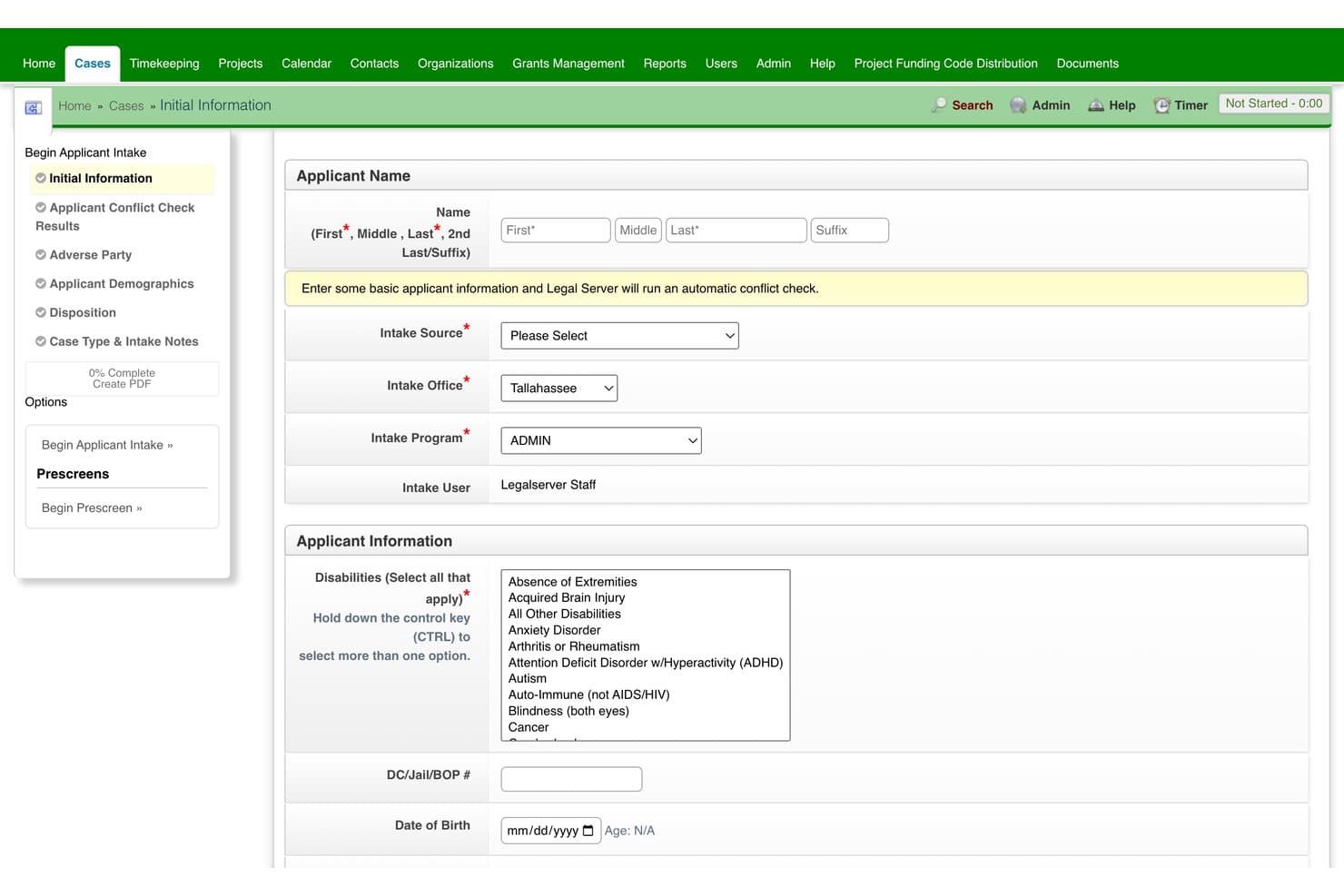
LegalServer tracks public defense intake, cases, activity logs, documents, and discovery. LegalServer is a web-based case management platform built for public defenders and government law offices, with configurable intake, case tracking, document management, discovery, timekeeping, and reporting tools.
Who Is LegalServer Best For?
LegalServer is a strong fit for public defenders and city or county attorneys who need configurable, government-grade case management with built-in document handling and reporting.
Why I Picked LegalServer
I picked LegalServer as one of the best because of how it handles appointed counsel and expert management in a single system. The contract attorney module lets you create work orders, define fee structures, track time and billing, and give outside counsel role-based access to only their assigned cases. I also like that discovery can flow directly from a district attorney's case management system into a case file, keeping appointed counsel current without manual handoffs.
LegalServer Key Features
- Configurable intake: Customize intake forms, fields, and workflows to match your office's data-entry and case-creation requirements.
- Document and discovery storage: Store, search, and retrieve PDFs, audio, video, and email attachments in a centrally managed, permission-controlled case repository.
- Report builder: Build, filter, and export reports to Excel without database expertise, and schedule select reports to run and deliver automatically.
- Conflict search: Run centralized conflict checks during intake to identify potential conflicts across people, cases, and related records.
LegalServer Integrations
LegalServer offers native integrations with SharePoint and Twilio, plus API integrations with Salesforce and Microsoft Power BI. It also supports Microsoft Power Automate, Make, and Zapier, with APIs available for custom integrations.
Pros and Cons
Pros:
- Configurable workflows support government case processes
- Keeps discovery and case documents together
- Manages appointed counsel, experts, and billing
Cons:
- Reviewers describe a dated, clunky interface
- No prosecutor-specific charge tracking
Learn more about LegalServer: Best for defense teams coordinating client care
- Free demo available
- Pricing upon request
Visit WebsiteCustomer Rating:4/5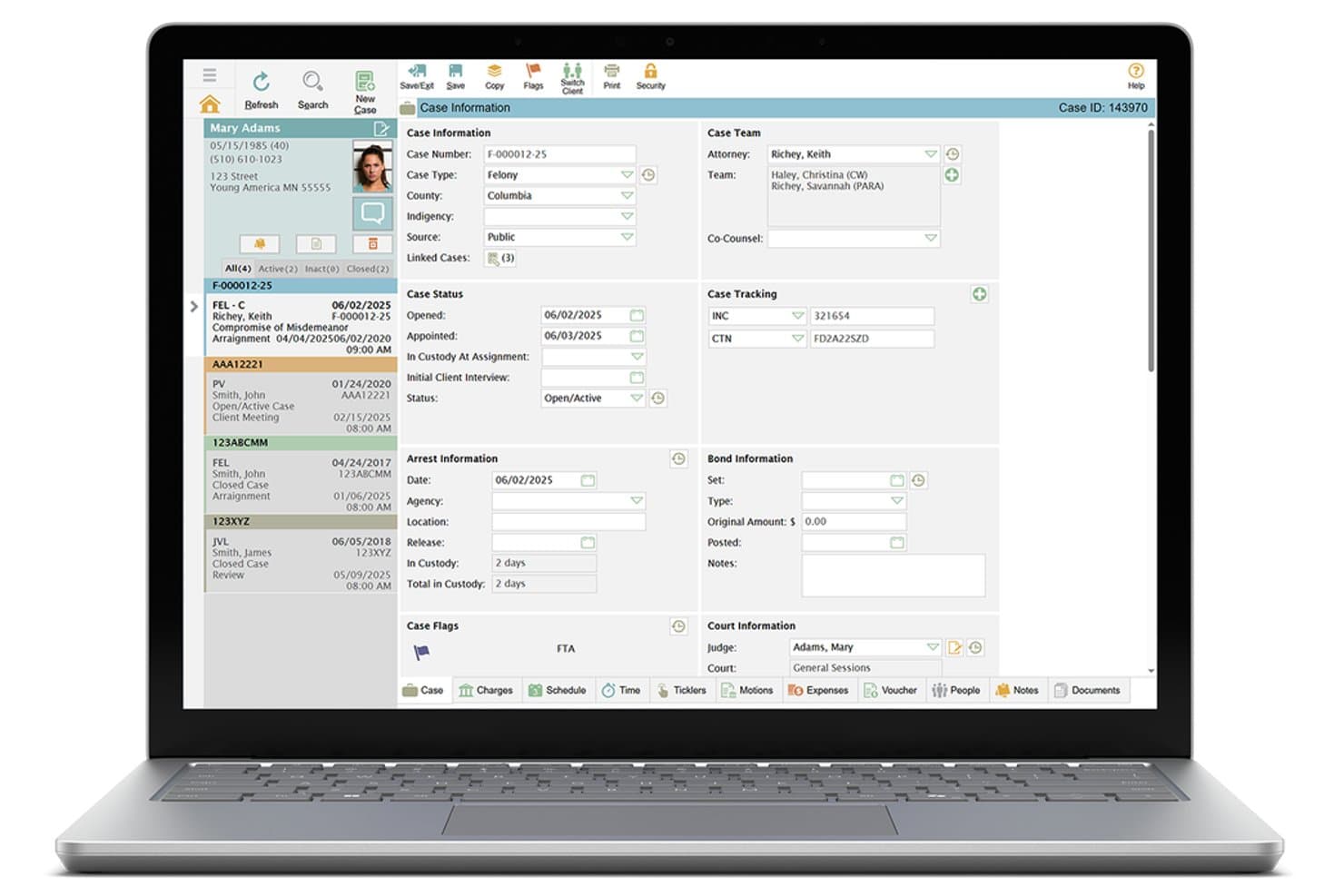
defenderDATA centralizes case details, team, and court info in one view. defenderDATA is a case management platform built specifically for public defender offices, centralizing case records, client information, discovery, documents, calendaring, and inter-agency data exchange in one system.
Who Is defenderDATA Best For?
defenderDATA is purpose-built for public defender offices that need to manage high-volume caseloads across attorney teams, support staff, and client service coordinators in one place.
Why I Picked defenderDATA
I picked defenderDATA as one of the best because it's the only tool on this list built from the ground up for public defender offices to coordinate legal and client-care workflows in one place. I love how client profiles hold referrals, service providers, case plans, and assessments right alongside case records, so a defender managing 500-plus cases can track a client's housing or mental-health services without leaving the system. The conflict-check tool searches across aliases and name variations, flagging potential conflicts before they become ethical problems.
defenderDATA Key Features
- Voucher processing: Submit, review, and approve assigned-counsel billing and expenses, with configurable approval routes and audit trails.
- Two-way SMS communication: Send court-date reminders to clients and receive replies directly within the platform.
- Inter-agency data exchange: Pull in charges, court dates, warrants, discovery, and citations from courts, prosecutors, and law enforcement via configurable integrations.
- Custom report scheduling: Set reports to run daily, weekly, or monthly, with automated delivery by email or system alert.
defenderDATA Integrations
defenderDATA connects with Google Calendar, Microsoft Outlook, Apple Calendar, and Axon Evidence.com for scheduling and digital evidence management. It also supports Microsoft Power BI, Tableau, and Crystal Reports through external reporting capabilities, with OData enabling custom data connections.
Pros and Cons
Pros:
- Client-service plans sit beside case records
- Calendar events support hearing preparation
- Organizes discovery across 500-plus cases
Cons:
- Statutory deadlines require manual entry
- Large-file and batch uploads can fail
Learn more about defenderDATA:
eCourt tracks court cases, hearings, documents, and financial transactions. eCourt is a court case management system by Journal Technologies that handles case lifecycle tracking, hearing scheduling, document management, financial processing, and justice partner access across court divisions.
Who Is eCourt Best For?
eCourt is a strong fit for court administrators managing multi-division dockets across municipal, county, or statewide court systems.
Why I Picked eCourt
I picked eCourt as one of the best because it's the only tool on my list that directly connects hearing scheduling with financial processing in a single case record. The Assessment Engine calculates court-defined fines and fees, ties them to specific case events, and routes payments through reconciliation, all without leaving the case file. I also like that justice partners, attorneys, and litigants access that same live case data through role-based portals, so everyone sees one consistent record from first filing through disposition.
eCourt Key Features
- Multi-division dashboards: Configurable dashboards display caseload trends, workloads, and performance indicators across court divisions in a single view.
- Courtroom annotation and signing tools: Judges and staff can annotate documents, capture notes, issue orders, and apply digital stamps and electronic signatures directly within the case file.
- Justice partner portals: Role-based online portals give attorneys, litigants, and justice partners real-time access to authorized case information, documents, and filing options.
- Document workflow routing: Configurable review and acceptance workflows move documents through intake, indexing, versioning, and auditability steps tied to each case record.
eCourt Integrations
eCourt connects with Journal Technologies' ePay-it for online payments and eFile-it for electronic filing.
Pros and Cons
Pros:
- Shows caseload metrics across court divisions
- Links hearings with fines and payments
- Tracks upcoming appearance and motion dates
Cons:
- Statutory-deadline calculations aren’t documented
- Case dates can update slowly
Learn more about eCourt:
Alte programe de gestionare a dosarelor juridice pentru instituții guvernamentale
Iată câteva opțiuni suplimentare care nu au intrat pe lista mea scurtă, dar care merită totuși verificate:
- 11LegalEdgeBest for defense, prosecution and municipal law
- 12CaseWorthyBest for cross-program service coordination
- 13Mitratech TeamConnectBest for configurable litigation deadlines
- 14EquivantBest for courts sharing data across agencies
- 15CasepointBest for federal defenders’ eDiscovery
- 16CerebraBest for public records and legal workflows
- 17CivicaBest for varied public-sector legal workflows
- 18Thomson Reuters C-TrackBest for courts changing rules on their own
- 19GovGridsBest for municipal legal and records intake
- 20LawBaseBest for matter-triggered follow-up
How I Evaluate Legal Case Management Software for Government
I split my evaluation into three parts. First, core functionality: tools must track full case lifecycles and meet government security standards like CJIS or FedRAMP—this carries the most weight. Second, standout features like victim notification automation. Third, procurement fit and implementation support.
Core Functionality (Table Stakes for This List)
When I'm selecting tools for my list, I score each one on a scale from 0 (does not offer the functionality) to 5 (excels in this area) for each core functionality listed below. I then convert the total into a percentage to help assess each tool's overall fit, with extra weight on any functionalities I've deemed essential.
- Case & Docket Tracking (Essential): I check whether the tool tracks charges, parties, case status, and history across the full lifecycle, including cross-referencing linked matters.
- Government Security & Compliance (Essential): I look for verified compliance with standards like CJIS or FedRAMP, plus audit trails and role-based access controls.
- Deadline & Calendar Automation: Statutory deadline calculation matters here. I evaluate whether the system auto-generates deadlines by case type and jurisdiction.
- Document & Evidence Management: I look at how evidence and documents are stored, versioned, and shared, including chain-of-custody controls for discovery exchange.
- Inter-Agency Data Sharing: Tools like Odyssey and Enterprise Justice connect courts and attorney offices. I evaluate each product's integrations with external agencies.
- Reporting & Public Records: I check for customizable case reporting and whether the tool supports public records request fulfillment or performance audit exports.
Once I have a list of tools that meet the criteria, I consider what sets each platform apart.
Differentiating Factors (What Sets Vendors Apart)
Here's how I compare and contrast different vendors:
Standout Features
Victim and witness notification is a major differentiator. I check whether a tool auto-sends alerts for court dates, dispositions, and status changes in line with victims' rights statutes—manually tracking those obligations across a full caseload is a recipe for missed notices. Conflict of interest checking also matters: I look for automated scans across all parties, defendants, and attorneys, since a single missed conflict can derail a case. Redaction and sealing tools round out my evaluation, especially for offices handling public records requests or expungements where built-in redaction saves hours of manual work.
Beyond Features
I check whether a vendor has actual deployment history in comparable offices—a DA's office running thousands of felony cases needs different validation than a small municipal legal department. Jurisdiction-specific configurability also matters: vendors like Tyler Technologies and Karpel ship preconfigured charge code libraries and deadline rules for specific states, which cuts months off implementation. I evaluate licensing models against government budget realities, since site licenses often fit fluctuating public-sector staffing better than per-seat pricing tied to grant funding cycles.
Cum să alegeți un program de gestionare a dosarelor juridice pentru instituții guvernamentale
Alegeți un sistem testându-l în raport cu termenele-limită, regulile de acces, transferurile de probe și obligațiile de raportare ale biroului dumneavoastră înainte de a vă angaja.
| Dacă prioritatea dumneavoastră este… | Căutați… |
|---|---|
| Dacă prioritatea dumneavoastră este…Exactitatea termenelor-limită | Căutați…Un test realizat folosind regulile jurisdicției dumneavoastră și date de exemplu ale dosarelor |
| Dacă prioritatea dumneavoastră este…Controlul evidențelor sensibile | Căutați…O matrice de roluri și acces care să acopere evidențele sigilate, restricționate și publice |
| Dacă prioritatea dumneavoastră este…Transferurile de probe | Căutați…Un proces documentat pentru înregistrarea transferurilor și păstrarea lanțului de custodie |
| Dacă prioritatea dumneavoastră este…Auditul și activitatea privind evidențele publice | Căutați…Exporturi de exemplu care să arate anonimizările, istoricul dosarelor și urmărirea solicitărilor |
Cum să evaluați lista scurtă
- Testați calculele termenelor-limită: Oferiți fiecărui furnizor aceleași trei scenarii de dosar, cu datele depunerii și jurisdicția, apoi comparați rezultatele cu calendarul aprobat al biroului dumneavoastră.
- Solicitați documentele de securitate: Înaintea unei demonstrații, solicitați documentația privind securitatea și un exemplu de jurnal de audit; confirmați cum apar modificările accesului și vizualizările evidențelor.
- Rulați un scenariu de schimb de date: În cadrul unei sesiuni de testare de 30 de minute, transferați o înregistrare de probă între roluri autorizate, apoi examinați istoricul și permisiunile acesteia.
- Validați raportarea: Solicitați un raport sau un export de exemplu folosind o solicitare simulată privind evidențele publice, inclusiv un document anonimizat și referința dosarului acestuia.
- Alegeți compromisul: Folosiți o fișă de evaluare pentru achiziții pentru a clasifica fluxurile juridice specifice jurisdicției în raport cu schimbul de date între agenții; decideți ce lacună poate gestiona echipa dumneavoastră prin proceduri documentate.
Ce este un program de gestionare a dosarelor juridice pentru instituții guvernamentale?
Programele de gestionare a dosarelor juridice pentru instituții guvernamentale organizează spețele, evidențele, termenele-limită și activitatea din cadrul birourilor juridice din sectorul public. Acestea pot sprijini acuzarea, apărarea publică, instanțele și echipele juridice municipale.
Funcții precum accesul bazat pe roluri, pistele de audit, urmărirea probelor și schimbul de date între agenții ajută echipele să gestioneze evidențele sensibile și să coordoneze activitatea privind dosarele. Soluția potrivită depinde de responsabilitățile biroului dumneavoastră, de regulile specifice jurisdicției și de necesitățile de raportare.
Funcțiile programelor de gestionare a dosarelor juridice pentru instituții guvernamentale
Iată funcțiile esențiale pe care trebuie să le căutați la un program de gestionare a dosarelor juridice pentru instituții guvernamentale:
- Urmărirea cauzelor și a registrelor de dosare: Înregistrează părțile, acuzațiile, stadiul cauzei și istoricul activităților pe parcursul ciclului de viață al unui dosar. Asocierea cauzelor conexe ajută personalul să urmărească dosarele legate între ele fără a pierde evidența lor separată.
- Automatizarea termenelor și a calendarului: Calculează sau sugerează date pe baza tipului cauzei, jurisdicției și evenimentelor importante. Echipa trebuie să verifice regulile în raport cu calendarele aprobate, în special atunci când sunt implicate termene legale.
- Gestionarea documentelor și a probelor: Stochează dosarele cauzelor și probele, cu istoric al versiunilor și acces controlat. Evidențele privind lanțul de custodie pot documenta cine a manipulat un obiect și când, sprijinind predarea probelor și activitățile de divulgare a probelor.
- Acces pe bază de rol și piste de audit: Limitează accesul în funcție de rolul utilizatorului și înregistrează acțiuni precum vizualizarea sau modificarea informațiilor despre cauze. Aceste controale ajută echipele să gestioneze evidențe sensibile, sigilate sau restricționate și să verifice activitatea.
- Schimb de date între agenții: Partajează informații autorizate despre cauze cu instanțe, acuzare, apărare sau agenții partenere prin conexiuni acceptate. Confirmați ce sisteme și tipuri de date acceptă produsul înainte de a vă baza pe un flux de schimb de date.
- Asistență pentru raportare și evidențe publice: Generează rapoarte și exporturi privind cauzele pentru supraveghere, audituri și solicitări de evidențe. Verificați dacă rapoartele pot fi filtrate după câmpurile relevante și dacă păstrează referința cauzei și istoricul solicitării.
- Notificări pentru victime și martori: Trimite alerte despre evenimente precum datele ședințelor de judecată sau modificările stadiului cauzei, atunci când este configurat conform cerințelor instituției. Confirmați ce evenimente, destinatari și metode de livrare acceptă sistemul.
- Verificarea conflictelor de interese: Caută părți, inculpați și avocați pentru a identifica posibile conflicte înainte de repartizare sau de continuarea acțiunilor în cauză. Personalul trebuie să verifice potrivirile posibile, deoarece asemănările dintre nume pot necesita verificare manuală.
- Controale pentru anonimizare și sigilare: Ajută utilizatorii autorizați să restricționeze sau să anonimizeze informațiile sensibile din evidențele pregătite pentru divulgare. Confirmați modul în care sistemul gestionează materialele sigilate, copiile anonimizate și evidența originală.
Beneficiile software-ului de gestionare a cauzelor juridice pentru administrația publică
Iată câteva beneficii obișnuite ale software-ului de gestionare a cauzelor juridice pentru administrația publică:
- Urmărirea cauzelor: Evidențele asociate ale dosarelor ajută echipa să urmărească părțile, acuzațiile, stadiul și activitatea pe parcursul ciclului de viață al unei cauze.
- Controlul termenelor: Automatizarea calendarului poate calcula sau sugera date pe baza tipului cauzei, jurisdicției și evenimentelor importante, pentru verificarea de către personal.
- Protecția evidențelor: Accesul pe bază de rol, pistele de audit și controalele de sigilare ajută la gestionarea evidențelor sensibile, restricționate și publice.
- Trasabilitatea probelor: Istoricul documentelor și evidențele lanțului de custodie arată cine a manipulat probele și când.
- Coordonarea între agenții: Schimburile de date acceptate pot partaja informații autorizate despre cauze cu instanțe, avocați și agenții partenere.
- Asistență pentru raportare: Rapoartele și exporturile personalizate ajută personalul să răspundă solicitărilor de supraveghere, auditurilor și solicitărilor de evidențe publice.
- Notificări la timp: Alertele configurate pot notifica victimele și martorii cu privire la datele ședințelor de judecată, soluții și modificările stadiului cauzei.
Costurile și prețurile software-ului de gestionare a cauzelor juridice pentru administrația publică
Prețurile variază în funcție de caracteristici, dimensiunea echipei, opțiunile suplimentare și cerințele de achiziție. Tarifele publicate sunt neobișnuite pentru sistemele destinate administrației publice, așa că considerați aceste intervale drept estimări generale.
Tabel comparativ al planurilor pentru software-ul de gestionare a cauzelor juridice destinat administrației publice
| Tipul planului | Preț mediu | Caracteristici obișnuite |
|---|---|---|
| Tipul planuluiPlan personal | Preț mediu$25–$75/utilizator/lună | Caracteristici obișnuiteUrmărirea cauzelor și a registrelor de dosare, stocarea documentelor, memento-uri pentru termene și raportare de bază. |
| Tipul planuluiPlan pentru companii | Preț mediu$75–$150/utilizator/lună | Caracteristici obișnuiteFluxuri avansate de lucru pentru cauze, acces pe bază de rol, piste de audit și rapoarte configurabile. |
| Tipul planuluiPlan pentru întreprinderi | Preț mediu$150–$300/utilizator/lună | Caracteristici obișnuiteConfigurare specifică jurisdicției, schimb de date între agenții, gestionarea probelor și asistență dedicată pentru implementare. |
Întrebări frecvente
Câteva răspunsuri la întrebări frecvente despre software-ul de gestionare a cazurilor juridice pentru administrația publică:
Ce ar trebui să planifice biroul nostru înainte de implementare?
Începeți prin desemnarea unui sponsor executiv și a unui responsabil de proiect pentru activitățile zilnice. Cartografiați tipurile existente de dosare, înregistrările, termenele, permisiunile și transferurile înainte de începerea configurării. Stabiliți ce sistem deține fiecare câmp de date și cine aprobă modificările. Testați fluxuri de lucru reprezentative împreună cu avocații, grefierii, personalul responsabil de evidențe și departamentul IT. Stabiliți criterii de acceptare pentru căutare, acces, raportare și exporturi. Programați instruirea pe roluri înainte de lansare și planificați o perioadă pentru raportarea problemelor. Păstrați accesul la sistemul vechi până când echipa verifică înregistrările migrate și activitatea zilnică.
Cât durează implementarea?
Nu există un termen standard pentru implementare; acesta depinde de cerințele instituției dvs. și de planul de lucru al furnizorului. Aprobările pentru achiziții, curățarea datelor, fluxurile de lucru personalizate, integrările, verificările de securitate și testarea de către utilizatori pot influența durata. Cereți furnizorului să împartă proiectul în etape, cu responsabili desemnați și date pentru luarea deciziilor. Confirmați ce trebuie să furnizeze echipa dvs., cum ar fi dicționare de date sau aprobări pentru reguli. Includeți timp pentru testarea unor scenarii reale înainte de lansare, în loc să stabiliți data intrării în producție bazându-vă doar pe instalarea software-ului.
Cum ar trebui să pregătim datele despre dosare pentru migrare?
Inventariați înregistrările pe care trebuie să le mutați, inclusiv dosarele asociate, documentele, notițele și activitatea istorică. Decideți ce migrați, ce păstrați într-o arhivă a sistemului vechi și ce impun regulile dvs. de păstrare. Cereți furnizorului să asocieze câmpurile sursă cu câmpurile destinație și să identifice înregistrările care nu se vor transfera corect. Efectuați o migrare de test, apoi comparați numărul de înregistrări și verificați atașamentele, relațiile, permisiunile și rezultatele căutărilor. Solicitați personalului desemnat să aprobe rezultatele înainte de intrarea în producție și documentați modul în care utilizatorii vor recupera înregistrările rămase în sistemul vechi.
Software-ul de gestionare a cazurilor juridice pentru administrația publică trebuie să respecte cerințele CJIS sau FedRAMP?
Depinde de datele instituției dvs., de modelul de găzduire și de cerințele privind achizițiile. CJIS sau FedRAMP se pot aplica în anumite medii, însă nu trebuie presupus că vreunul dintre acestea acoperă fiecare implementare sau tip de date. Întrebați cărui serviciu, mediu de găzduire și set de controale li se aplică documentația furnizorului. Solicitați echipelor de securitate și achiziții să compare acest domeniu de aplicare cu politica instituției și cu cerințele contractuale. Clarificați, de asemenea, modul în care furnizorul gestionează jurnalele de acces, raportarea incidentelor, subcontractanții și returnarea sau ștergerea datelor la încheierea contractului.
Poate software-ul de gestionare a cazurilor juridice să înlocuiască un sistem de gestionare a dosarelor instanței?
Uneori, dar nu presupuneți că produsele au același rol. Un sistem al instanței poate rămâne sursa oficială pentru evenimentele din registrul cauzelor, în timp ce un sistem al instituției juridice gestionează activitatea și înregistrările interne. Înainte de a planifica o înlocuire, confirmați cine deține fiecare înregistrare și dacă produsele fac schimb de actualizări, documente sau modificări de stare. Întrebați cum gestionează conexiunea corecturile, înregistrările duplicate și întârzierile. Dacă ambele sisteme rămân în uz, documentați sistemul pe care personalul trebuie să îl consulte pentru fiecare activitate și modul în care vor rezolva informațiile contradictorii.