

The 10 Best Legal Contract Management Software In 2026

Best Legal Contract Management Software Shortlist


Navigating the world of contract management can be a daunting task, particularly for in-house legal departments dealing with a constant flow of agreements. A good contract management system, like the solutions we'll be exploring here, can significantly streamline these processes.
A key feature of these tools is a drag-and-drop interface that simplifies contract works, offering intuitive control over the entire contract lifecycle. Furthermore, these systems allow you to establish permissions, granting access to relevant team members while maintaining security and control.
I encourage you to explore the options I've assembled here; they're among the best I've found in my search for efficient, effective contract management solutions.
Why Trust Our Software Recommendations
Our team has been testing and reviewing software since 2012. As legal practice leaders ourselves, we know how difficult—and important—it is to choose the right software.
For this guide, we evaluated tools using hands-on testing and independent research, scoring tools using our selection criteria.
Our reviews reflect our human editorial judgment, not a sales pitch.
Best Legal Contract Management Software Summary
This comparison chart summarizes pricing details for my top legal contract management software selections to help you find the best one for your budget and business needs.
| Tool | Best For | Trial Info | Price | ||
|---|---|---|---|---|---|
| 1 | Best for AI-powered contract review | Free trial included with every plan | From $450/month | Website | |
| 2 | Best for employment contracts | Free demo available | From $5/employee/month | Website | |
| 3 | Best for extracting contract data | Free demo available | Pricing upon request | Website | |
| 4 | Best for AI-driven contract management | Free demo available | Pricing upon request | Website | |
| 5 | Best for collaborative contract creation and negotiation | Free demo available | Pricing upon request | Website | |
| 6 | Best for streamlining complex workflows | Free demo available | Pricing upon request | Website | |
| 7 | Best for comprehensive contract lifecycle management | Free demo available | Pricing upon request | Website | |
| 8 | Best for efficient contract automation | Free trial available | From $49/user/month (billed annually) | Website | |
| 9 | Best for cloud-based contract management | Not available | From $15/user/month | Website | |
| 10 | Best for small businesses seeking affordability and simplicity | Not available | From $15/user/month | Website |
Best Legal Contract Management Software Reviews
Below are my detailed summaries of the best legal contract management software that made it onto my shortlist. My reviews offer a detailed look at the key features, pros & cons, integrations, and ideal use cases of each tool to help you find the best one for you.

Best for AI-powered contract review
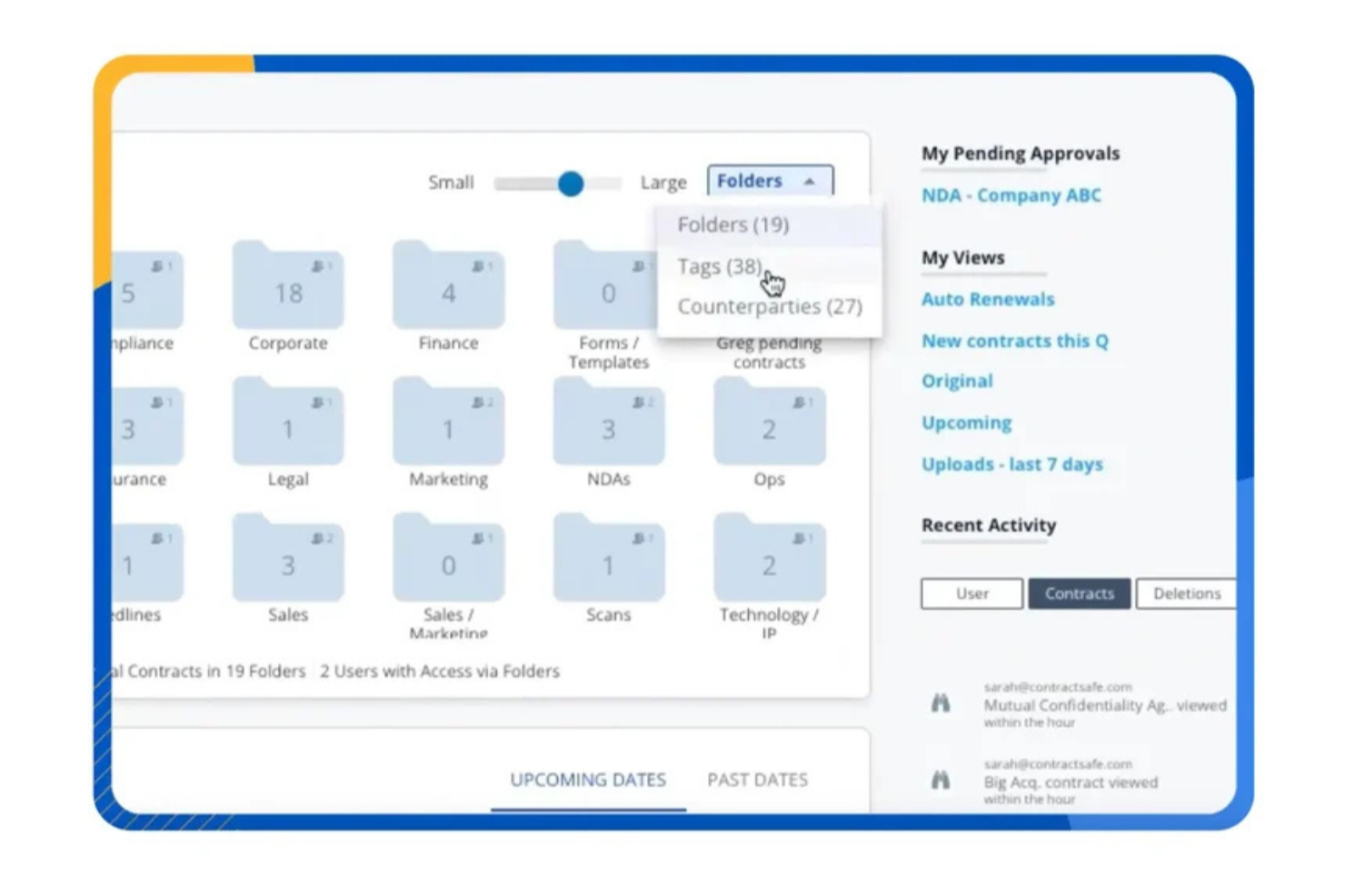
ContractSafe is a contract management software designed to simplify the complex task of contract handling for legal professionals and businesses across various industries. If you find yourself tangled in the intricacies of managing numerous contracts, ContractSafe might be the tool to alleviate those challenges. Its focus on user-friendly features and robust integrations ensures that your team can streamline contract processes and enhance management capabilities without the usual headaches associated with contract management.
Why I Picked ContractSafe
I picked ContractSafe for its standout AI tools, which are particularly beneficial for legal contract management. These AI tools assist in contract review, making it easier for your team to pinpoint critical information quickly, which is crucial for legal compliance and risk management. Additionally, the software’s automated renewal alerts ensure you never miss important deadlines, helping you stay on top of contract obligations. I appreciate how these features directly address the need for efficient contract oversight, a common challenge faced by many legal teams.
ContractSafe Key Features
In addition to its AI tools and automated alerts, I also found several other features that make ContractSafe a strong contender in the realm of legal contract management software.
- Secure Cloud-Based Vault: Offers a centralized and secure location for storing all contracts, ensuring easy access and enhanced security.
- User Roles and Permissions: Allows you to assign specific access levels to different users, maintaining confidentiality and control over sensitive information.
- Date Management Alerts: Notifies your team of upcoming contract deadlines, helping to manage renewals and expirations proactively.
- Exceptional Customer Support: Provides your team with quick assistance and guidance, ensuring smooth adoption and continued use of the software.
ContractSafe Integrations
Integrations include DocuSign, Okta/SAML 2.0, Salesforce, Google, HubSpot, LinkedIn, Microsoft, Reddit, and YouTube.
Pros and Cons
Pros:
- Built-in e-signature and approval workflow tools
- Secure centralized repository with granular user permissions
- Automated renewal alerts reduce missed contract deadlines
Cons:
- Limited advanced analytics compared to enterprise CLMs
- Pricing may be steep for some

Deel HR
Best for employment contracts

Deel is a global HR and employment platform that helps businesses hire and pay employees and contractors in over 150 countries.
Why I Picked Deel: For HR and in-house legal teams that deal with employment and contractor contracts, Deel is a good solution because it allows you to organize and edit contracts while having access to other HR functions in one platform. This means that as you review various contracts or work permit documents, you'll also have access to other data required to maintain compliance in the workplace. The platform also includes audit management, clear audit trails, comprehensive reporting, and proactive incident management.
Standout features & integrations:
Other than managing employment contracts, Deel also offers payroll compliance, in-house visa and immigration support, benefits administration, and various features for engaging employees, like a learning management system. Integrations include NetSuite and NetSuite Bookkeeping, BambooHR, Skovik, Workday, Xero Integration, QuickBooks, Zapier, and Deel API.
Pros and Cons
Pros:
- In-house visa and work permit support
- Automated payroll management
- Comprehensive legal support for international hiring
Cons:
- Limited customization options
- Only useful for employment-related contracts
New Product Updates from Deel HR

Deel Expands Stablecoin Wallet to 80+ Countries
Deel expands its Stablecoin Wallet to 80+ countries with dollar-backed balances and optional rewards. This gives eligible contractors more ways to hold and manage earnings inside Deel. For more information, visit Deel’s official site.
 .
.
Best for extracting contract data

Gatekeeper is a cloud-based contract and vendor management platform designed to help legal teams efficiently oversee their contract lifecycles. It centralizes contract data, automates workflows, and enhances compliance monitoring, enabling your team to focus on high-value tasks.
Why I Picked Gatekeeper: Gatekeeper's AI Extract feature leverages artificial intelligence to extract and analyze contract data. This feature is particularly helpful for converting legacy contracts into structured digital records, saving your team time and ensuring data accuracy. I also like its eNegotiate feature. This tool combines a robust template and clause library with a Word redline solution, enabling your team to draft, negotiate, and finalize contracts efficiently. Paired with integrated eSignatures, Gatekeeper ensures the entire contract lifecycle—from creation to execution—is managed without needing external tools.
Standout features & integrations:
Other features include a workflow engine that allows you to automate and digitize contract processes. Its smart forms feature helps collect and standardize critical contract data, ensuring consistency and clarity across your documents. Gatekeeper’s global search capability further enhances productivity by allowing you to quickly retrieve contracts or clauses using specific keywords. Integrations include Microsoft Dynamics 365 CRM, Google Sheets, Slack, Microsoft Teams, Gmail, Microsoft Outlook, Xero, DocuSign, HubSpot, Microsoft Excel, and Jira Software Cloud.
Pros and Cons
Pros:
- Simplifies data extraction
- Customizable workflows
- Centralized repository improves contract visibility
Cons:
- Some users find the permissions system less flexible
- Complex workflows can be challenging to set up

Best for AI-driven contract management

HyperStart is an AI-powered contract management platform designed to simplify every stage of your contract lifecycle. It helps your team create, negotiate, approve, and store contracts, all from a single platform.
Why I Picked HyperStart: When it comes to legal contract management, HyperStart offers useful features like metadata auto-extraction, AI-driven clause-level contract searches contract search, and version tracking. These tools help you quickly find and manage contracts, track versions, and monitor legal obligations throughout the contract lifecycle. Its approval workflows and automated reminders make it easy for your team to stay on top of contract renewals and prevent lapses in compliance.
Standout features & integrations:
Beyond these, HyperStart also includes e-signature integrations, no-code workflow automation, and in-depth contract analytics. You can also store all contracts in a centralized repository, where AI-based extraction helps you track what you need efficiently. Integrations include Microsoft Word, Gmail, Salesforce, Microsoft SharePoint, Google Drive, DocuSign, AdobeSign, One Drive, Slack, and Microsoft Outlook.
Pros and Cons
Pros:
- Template-based contract creation
- AI-assisted contract review and redlining
- Automatic contract renewals
Cons:
- Mobile capabilities are less robust than desktop
- Configuration for specific needs can be complex

Juro
Best for collaborative contract creation and negotiation

Juro is a contract management platform designed to encourage collaboration during contract creation and negotiation. Its system is built to assist businesses in streamlining the process of contract creation, negotiation, and approval, making it ideal for teams that require a high level of cooperation.
Why I Picked Juro: I chose Juro for its commitment to fostering collaboration in contract management. Its standout ability to facilitate teamwork during contract creation and negotiation is what sets it apart from other tools. Therefore, it truly shines as the best choice for businesses seeking to boost collaboration during contract creation and negotiation.
Standout features & integrations:
Juro offers numerous features, including collaborative contract editing, track changes, and real-time negotiation. These features enable teams to work together seamlessly, negotiate terms, and keep track of amendments. The software integrates with platforms such as Salesforce, Slack, and Google Drive, enhancing team collaboration and document accessibility.
Pros and Cons
Pros:
- Real-time contract negotiation functionality
- Robust integrations with platforms like Salesforce, Slack, and Google Drive
- Excellent collaborative contract creation and negotiation features
Cons:
- Limited functionalities for contract lifecycle management software beyond creation and negotiation
- Pricing might be steep for smaller businesses
- Requires minimum three users

Ironclad
Best for streamlining complex workflows
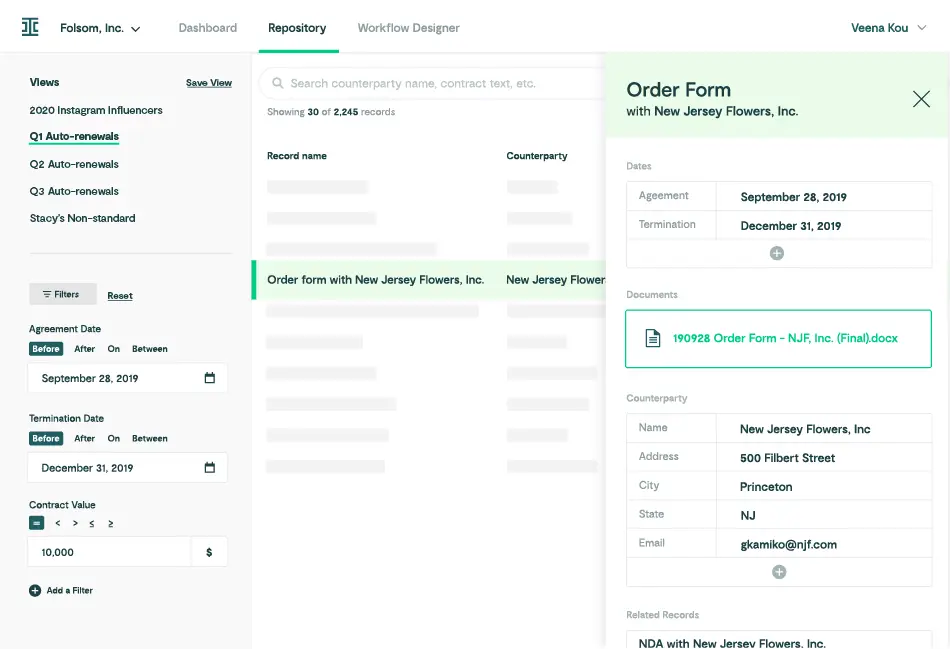
Ironclad is a contract management tool that places a strong emphasis on easing complicated workflows. This platform is designed to handle intricate contract management tasks, making it ideal for firms that deal with complex workflow patterns that need to be simplified and streamlined.
Why I Picked Ironclad: I chose Ironclad for its ability to handle intricate contract management workflows. In a pool of many contract management solutions, Ironclad stands out for its focus on managing complexity, making it my preferred choice for companies seeking to simplify complex workflow structures.
Standout features & integrations:
Ironclad provides robust features like smart forms, contract authoring, negotiation, approval workflows, and reporting. These facilitate easy management of complex contract workflows. Crucially, Ironclad also integrates with leading business tools such as Salesforce, DocuSign, Dropbox, and Google Drive, providing seamless contract data transfer and simplification of workflow across platforms.
Pros and Cons
Pros:
- Integrates well with leading business tools like Salesforce and Google Drive
- Robust features such as smart forms and contract authoring
- Excellent for managing complex contract workflows
Cons:
- The interface could be more user-friendly
- May be more than needed for businesses with simpler workflows
- Pricing details are not transparent

Best for comprehensive contract lifecycle management

Contract Logix is a versatile software solution tailored to oversee every phase of your contract lifecycle. With a focus on all-inclusive contract handling, it caters to businesses needing a powerful tool for crafting, managing, and tracking contracts from inception to closeout.
Why I Picked Contract Logix: I selected Contract Logix for its holistic approach to contract management. The software's comprehensive functionality gives users the ability to control and monitor all aspects of contract lifecycles, which makes it distinct from other platforms. This exceptional capability validates it as the best choice for comprehensive contract lifecycle management, as it covers all contract phases with precision and efficiency.
Standout features & integrations:
Key features of Contract Logix include contract creation, a centralized contract repository, alert notifications, and sophisticated analytics. The contract creation tool streamlines drafting, while the centralized repository ensures easy access and storage. With alerts, you never miss a deadline, and analytics provide insights for data-driven decision making. It integrates seamlessly with leading software like Salesforce, Microsoft Dynamics, and NetSuite for a unified experience.
Pros and Cons
Pros:
- Robust analytical capabilities
- Intuitive user interface
- Comprehensive contract lifecycle management (CLM) software
Cons:
- May take time to understand all features
- Limited customer support hours
- Minimum 5 users required

Best for efficient contract automation

Precisely is a contract management software that focuses on providing robust contract automation solutions. It allows businesses to streamline their contract creation, tracking, and management processes, perfectly fitting scenarios where automation can save valuable time and resources.
Why I Picked Precisely: I picked Precisely because of its excellent contract automation capabilities. The ability of this tool to simplify and automate contract management sets it apart in this crowded field. Precisely, in my opinion, it emerges as the top choice for those seeking efficient contract automation.
Standout features & integrations:
Precisely features automated contract creation, customizable contract templates, and contract tracking tools. These features help companies automate their contract processes, reducing time spent on manual tasks and mitigating human error. It also integrates with popular CRM systems like Salesforce, enabling businesses to align their sales and contract processes.
Pros and Cons
Pros:
- Useful contract tracking tools
- Integration with major CRM systems like Salesforce
- Efficient contract automation features
Cons:
- User interface could be more intuitive
- Limited features for contract negotiation
- Pricing may be prohibitive for smaller businesses

Best for cloud-based contract management

Contractzy is a digital contract management tool that uses cloud-based technology to streamline and automate the entire contract management process. By providing remote accessibility, real-time updates, and secure storage, Contractzy suits businesses that prioritize cloud-based contract management.
Why I Picked Contractzy: In determining which tools to include on this list, the prominence of cloud-based solutions became evident. I selected Contractzy for its strong capabilities in this field. Its powerful cloud-based features, paired with user-friendly interface, make it stand out from other tools. This is why I believe Contractzy is the best choice for businesses seeking a cloud-based contract management tool.
Standout features & integrations:
Contractzy's most significant features include a comprehensive dashboard for contract oversight, real-time updates and notifications, secure document storage, and user-friendly search functions. It seamlessly integrates with major cloud platforms like Google Drive and Dropbox, ensuring easy document access and collaboration.
Pros and Cons
Pros:
- Comprehensive and user-friendly dashboard
- Easy integration with major cloud platforms
- Strong cloud-based contract management features
Cons:
- No free plan available
- Advanced features require higher pricing tiers
- Limited offline functionality
Juridoc
Best for small businesses seeking affordability and simplicity
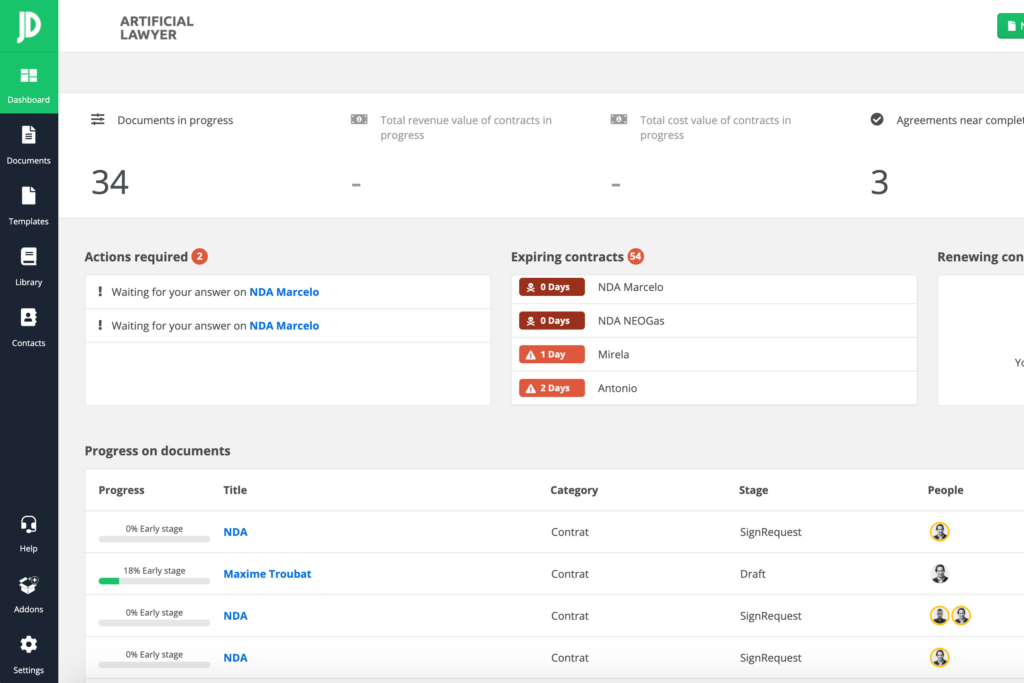
Juridoc is a comprehensive contract management platform designed to help small businesses manage, negotiate, and analyze their contracts. Its balance of simplicity and functionality makes it a suitable choice for smaller organizations requiring an affordable yet capable solution.
Why I Picked Juridoc: I picked Juridoc for this list because it provides an optimal mix of affordability and simplicity without compromising on core functionalities. Its unique appeal lies in its user-friendly interface and streamlined workflows, which are key factors for smaller businesses. These characteristics make it a top pick for small businesses seeking an affordable and straightforward contract management solution.
Standout features & integrations:
Juridoc offers key features such as contract creation, negotiation, approval, and storage. Its alert system for key contract dates helps businesses avoid missing any crucial deadlines. The platform integrates with popular tools like Google Drive, Dropbox, and Office365, facilitating easy file sharing and collaboration.
Pros and Cons
Pros:
- Useful integrations with popular collaboration tools
- User experience friendly interface
- Affordable for small businesses
Cons:
- Customer support may be less responsive than larger competitors
- Limited customization options
- Might lack some advanced features needed by larger organizations
Other Legal Contract Management Software
Below is a list of additional legal contract management software that I shortlisted but did not make it to the top 10. Definitely worth checking them out.
- DocuSign Agreement Cloud
For electronic signing and approval workflows
- Legal Templates
For ready-to-use contract templates
- Icertis Contract
For enterprise-wide contract visibility
- Legal Track
For legal case management in non-profits
- Contract Hound
For contract deadline reminders and notifications
- Contract Eagle
For dynamic contract storage and searching
- Legalesign
Good for efficient electronic signature processing
- Concord
Good for comprehensive CLM solutions
- Leah
Good for end-to-end contract automation
- Evisort
Good for artificial intelligence or AI powered contract analytics


How I Evaluate Legal Contract Management Software
I split my evaluation into baseline requirements—like full lifecycle coverage and clause libraries—and differentiators like AI redlining and Salesforce or DocuSign integrations.
Core Functionality (Table Stakes For This List)
When I'm selecting tools for my list, I rank each one on a scale from 0 (does not offer the functionality) to 5 (excels in this area) for each core functionality listed below. Then, I calculate the tool's total score into a percentage. Each tool needs to achieve a minimum total score of 65% to be considered for inclusion.
- Contract Lifecycle Management: I check whether a platform covers the full arc from request and authoring through negotiation, execution, and renewal—not just a few isolated stages.
- Clause & Template Library: A strong clause library lets legal teams enforce approved language across deals, so I look for dynamic clause insertion and version-controlled templates.
- E-Signature & Execution: Whether native or through integrations with providers like DocuSign or Adobe Sign, I evaluate how smoothly a tool moves contracts from final draft to signed agreement.
- Automated Workflows & Approvals: Real-world contracts often need sign-off from legal, finance, and procurement, so I look for configurable routing with conditional logic and parallel approvals.
- Central Contract Repository: I evaluate search capabilities, metadata tagging, and version history—your team should be able to find any executed NDA or vendor agreement in seconds, not hours.
- Obligation & Renewal Tracking: Missed renewal dates cost real money, so I look for configurable alerts tied to key milestones, deadlines, and performance obligations across your contract portfolio.
Once I have a list of tools that meet this criteria, I consider what sets each platform apart.
Differentiating Factors (What Sets Vendors Apart)
Here's how I compare and contrast different vendors:
Standout Features
AI-powered contract analytics can surface risky clauses and flag deviations from your playbook before a reviewer even opens the document. I also look for self-service intake portals that let business teams generate routine NDAs or vendor agreements without bottlenecking legal. Third-party paper review is another differentiator—when a counterparty sends their template, the best platforms automatically compare it against your standards and recommend fallback language.
Beyond Features
Security and compliance matter here because contracts contain privileged, sensitive data. I check for SOC 2 Type II certification and granular role-based permissions that protect attorney-client privilege. Integration depth is equally important—your CLM needs to connect with tools like Salesforce, Microsoft Word, and your matter management platform so contracts don't live in a silo. I also evaluate onboarding support, especially whether a vendor offers bulk import with AI-assisted metadata extraction to get legacy agreements into the new system quickly.
How to Choose Legal Contract Management Software
It’s easy to get bogged down in long feature lists and complex pricing structures. To help you stay focused as you work through your unique software selection process, here’s a checklist of factors to keep in mind:
| Factor | What to Consider |
|---|---|
| Scalability | Can the software grow with your firm? Ensure it supports more users and documents as you expand. Look for solutions that offer flexible pricing and support for larger document volumes. |
| Integrations | Does it work with your existing tools? Check compatibility with your CRM, email, and document storage systems. Avoid tools that require manual data transfers |
| Customizability | Can you tailor it to your workflows? Consider if you can adjust templates, fields, and dashboards to fit your processes. A rigid system might slow you down. |
| Ease of Use | Is it user-friendly for your team? Test the interface for simplicity. If it takes too long to learn, it might not be worth the investment. |
| Implementation and Onboarding | How quickly can you get started? Look for platforms with comprehensive training materials and support during setup. Avoid lengthy setups that disrupt daily operations. |
| Cost | Does it fit your budget? Compare the price against features and consider any hidden fees. Ensure the cost aligns with the value you expect to receive. |
| Security Safeguards | Are your contracts protected? Verify encryption standards and data protection measures. Ensure compliance with regulations like GDPR. |
| Compliance Requirements | Does it meet your legal standards? Confirm it supports industry regulations and offers audit trails. Non-compliance can lead to legal issues. |
What Is Legal Contract Management Software?
Legal contract management software is a tool used to create, store, and manage legal contracts efficiently. Lawyers, paralegals, and contract managers generally use these tools to ensure compliance, reduce errors, and save time.
Document storage, compliance tracking, and version control features help with organizing contracts, meeting legal standards, and maintaining accuracy. These tools provide immense value by simplifying contract workflows and enhancing productivity for legal professionals.
Features
When selecting legal contract management software, keep an eye out for the following key features:
- Contract creation: Streamlines the drafting process by providing templates and automated workflows, saving time and reducing errors.
- Document storage: Offers a centralized repository for easy access and retrieval of contracts, enhancing organization and efficiency.
- Compliance tracking: Monitors adherence to legal standards and regulations, helping avoid costly penalties and legal issues.
- Version control: Keeps track of changes and updates to documents, ensuring accuracy and preventing misunderstandings.
- Approval workflows: Automates the approval process, ensuring contracts are reviewed and authorized by the right people quickly.
- E-signature integration: Facilitates the signing of contracts digitally, speeding up the execution process and reducing paperwork.
- Customizable dashboards: Allow users to tailor the interface to their needs, improving usability and access to important information.
- AI-driven contract analysis: Uses artificial intelligence to analyze contract terms and identify potential risks, enhancing decision-making.
- Security safeguards: Protects sensitive contract data with encryption and access controls, ensuring confidentiality and compliance.
- Integrations: Connects with other business tools like CRM and email, providing a seamless workflow and reducing manual data entry.
Benefits
Implementing legal contract management software provides several benefits for your team and your business. Here are a few you can look forward to:
- Efficiency boost: Automates contract creation and approval workflows, saving time and reducing manual effort.
- Error reduction: Uses version control to prevent mistakes and ensure accuracy in contract documents.
- Compliance assurance: Tracks legal standards and regulations, helping you avoid penalties and legal issues.
- Improved collaboration: Facilitates communication and document sharing among team members, enhancing teamwork.
- Cost savings: Reduces paper usage and administrative costs with digital storage and e-signature integration.
- Risk management: AI-driven analysis identifies potential contract risks, aiding in better decision-making.
- Data security: Protects sensitive information with encryption and access controls, ensuring confidentiality.
Costs and Pricing
Selecting legal contract management software requires an understanding of the various pricing models and plans available. Costs vary based on features, team size, add-ons, and more.
The table below summarizes common plans, their average prices, and typical features included in legal contract management software solutions:
Plan Comparison Table for Legal Contract Management Software
| Plan Type | Average Price | Common Features |
|---|---|---|
| Free Plan | $0 | Basic contract creation, document storage, and limited e-signature options. |
| Personal Plan | $10-$30/user/month | Contract templates, basic compliance tracking, and version control. |
| Business Plan | $40-$80/user/month | Advanced compliance tracking, approval workflows, and integrations with other business tools. |
| Enterprise Plan | $100-$200/user/month | Customizable dashboards, AI-driven contract analysis, and enhanced security safeguards. |
Legal Contract Management Software FAQs
Here are some answers to common questions about legal contract management software:
How long does it take to implement contract management software?
Implementation time varies, but most systems can be set up in a few weeks. It depends on your existing infrastructure and data organization. Make sure your team is prepared, and consider the level of support the vendor offers during the transition.
Can I migrate existing contracts into the new system?
Yes, most software allows for migrating existing contracts. Look for tools that offer bulk import options and support for various file formats. It’s crucial to ensure no data is lost during this process, so ask about migration assistance.
How does contract management software handle compliance?
These tools track key compliance metrics and deadlines, helping you meet industry standards. They often include automated alerts for renewals and approvals. Ensure the software aligns with your legal requirements to avoid compliance risks.
What search and reporting capabilities should I expect?
Expect real-time search and custom reporting features. You should be able to track contract stages, key dates, and obligations easily. Robust search tools make it simple to find specific contracts or clauses when needed.
Are there any free contract management software options?
Yes, there are a few contract management tools that offer free versions or free trials. However, these usually come with limited features and may be best suited for very small businesses or for trying out the software before committing to a paid plan. Examples include Zoho Contracts and PandaDoc, both of which offer free plans with limited functionality.
What Next?
If you're in the process of researching legal contract management software, connect with a SoftwareSelect advisor for free recommendations.
You fill out a form and have a quick chat where they get into the specifics of your needs. Then you'll get a shortlist of software to review. They'll even support you through the entire buying process, including price negotiations.