


CosmoLex vs. LEAP: Comparison & Expert Reviews 2026
I break down CosmoLex vs. LEAP—from billing and accounting to case workflows—so you can spot the better fit for your firm before booking a demo.

We review tools independently, and commissions help fund our testing. See our transparency policy, our methodology, or suggest a tool.
Choosing between CosmoLex and LEAP can be difficult when you need better control over case workflows, billing, and firm operations. This comparison of legal case management software helps you see which tool better fits your team’s workload, practice needs, and budget.
I’ll compare both platforms’ pros and cons, use cases, pricing, security, and usability so you can make a confident shortlist before booking demos.
Choosing between CosmoLex and LEAP can be difficult when you need better control over case workflows, billing, and firm operations. This comparison of legal case management software helps you see which tool better fits your team’s workload, practice needs, and budget.
I’ll compare both platforms’ pros and cons, use cases, pricing, security, and usability so you can make a confident shortlist before booking demos.
CosmoLex
4.4/5
- 10-day free trial
- From $49/user/month (billed annually)
LEAP
4.3/5
- Free demo available
- Pricing upon request
Why Trust Our Software Recommendations
6,700+
Reviews
20
Industry experts
16+
Evaluation factors
14
Years
Our team has been testing and reviewing software since 2012. As legal practice leaders ourselves, we know how difficult—and important—it is to choose the right software.
For this guide, we evaluated tools using hands-on testing and independent research, scoring tools using our selection criteria.
Our reviews reflect our human editorial judgment, not a sales pitch.
| CosmoLex | LEAP | |
|---|---|---|
| Free Trial | 10-day free trial | Free demo available |
| Pricing | From $49/user/month (billed annually) | Pricing upon request |
The Hidden Costs section title goes here.
The Hidden Costs section text goes here.
| CosmoLex | LEAP | |
|---|---|---|
| 2-Factor Authentication | Yes | Yes |
| API | No | Yes |
| Approval Workflows | No | Yes |
| Audit Trail | No | Yes |
| Calendar Management | Yes | Yes |
| Compliance Tracking | No | Yes |
| Contract Management | No | Yes |
| Custom Reports | No | Yes |
| Customer Management | Yes | No |
| Data Export | No | Yes |
| Data Import | Yes | Yes |
| Document Management | No | Yes |
| External Integrations | Yes | Yes |
| Multi-User | Yes | Yes |
| NDA Management | No | No |
| Notifications | Yes | Yes |
| Policy Management | No | No |
| Scheduling | Yes | Yes |
| Workflow Management | No | Yes |
| Integration | CosmoLex | LEAP |
|---|---|---|
| IntegrationMicrosoft 365 | CosmoLex✅ | LEAP✅ |
| IntegrationLawPay | CosmoLex✅ | LEAP✅ |
| IntegrationBox | CosmoLex✅ | LEAP❌ |
| IntegrationDropbox | CosmoLex✅ | LEAP❌ |
| IntegrationGoogle Drive | CosmoLex✅ | LEAP❌ |
| IntegrationQuickBooks Online | CosmoLex❌ | LEAP✅ |
| IntegrationXero | CosmoLex❌ | LEAP✅ |
| IntegrationInfoTrack | CosmoLex❌ | LEAP✅ |
| IntegrationAPI | CosmoLex✅ | LEAP✅ |
| IntegrationZapier | CosmoLex✅ | LEAP✅ |
CosmoLex and LEAP share Microsoft 365, LawPay, API, and Zapier connections, while CosmoLex favors document storage and LEAP offers more accounting and legal workflow integrations. Both should meet most firms’ needs, although confirm regional availability, subscription requirements, and API access before choosing.
| Factor | CosmoLex | LEAP |
|---|---|---|
| FactorEncryption | CosmoLexCosmoLex encrypts traffic with 256-bit SSL and encrypts stored data. | LEAPLEAP encrypts data in transit with TLS 1.2 and at rest with AES-256, including backups. |
| FactorAccess Controls | CosmoLexCosmoLex provides two-factor authentication, role assignments, access privileges, and user security levels. | LEAPLEAP supports multi-factor authentication, role-based access, OAuth 2.0, access reviews, and time-limited privileged support access. |
| FactorCompliance Controls | CosmoLexCosmoLex holds SOC 2 Type 2 certification and supports trust accounting, compliance reporting, and audit-ready financial records. | LEAPLEAP holds SOC 2 Type II and SOC 3 certifications, supports GDPR obligations, and provides data processing agreements and security documentation. |
| FactorData Residency | CosmoLexCosmoLex stores firm data on servers in the United States, subjecting that data to US jurisdiction. | LEAPLEAP hosts data in regional AWS locations, including the US, Canada, Australia, New Zealand, and Europe. |
| FactorBusiness Continuity | CosmoLexCosmoLex backs up data every few hours, encrypts those backups, and stores them redundantly across multiple locations. | LEAPLEAP uses multi-zone AWS hosting, active-active architecture, encrypted backups, defined recovery objectives, and tested disaster recovery plans. |
LEAP has the stronger documented security and continuity framework, while CosmoLex pairs credible safeguards with deeper legal accounting controls. In my view, CosmoLex’s strengths are trust-account compliance and dependable financial records, while LEAP offers stronger regional hosting, access governance, and recovery controls.
| Factor | CosmoLex | LEAP |
|---|---|---|
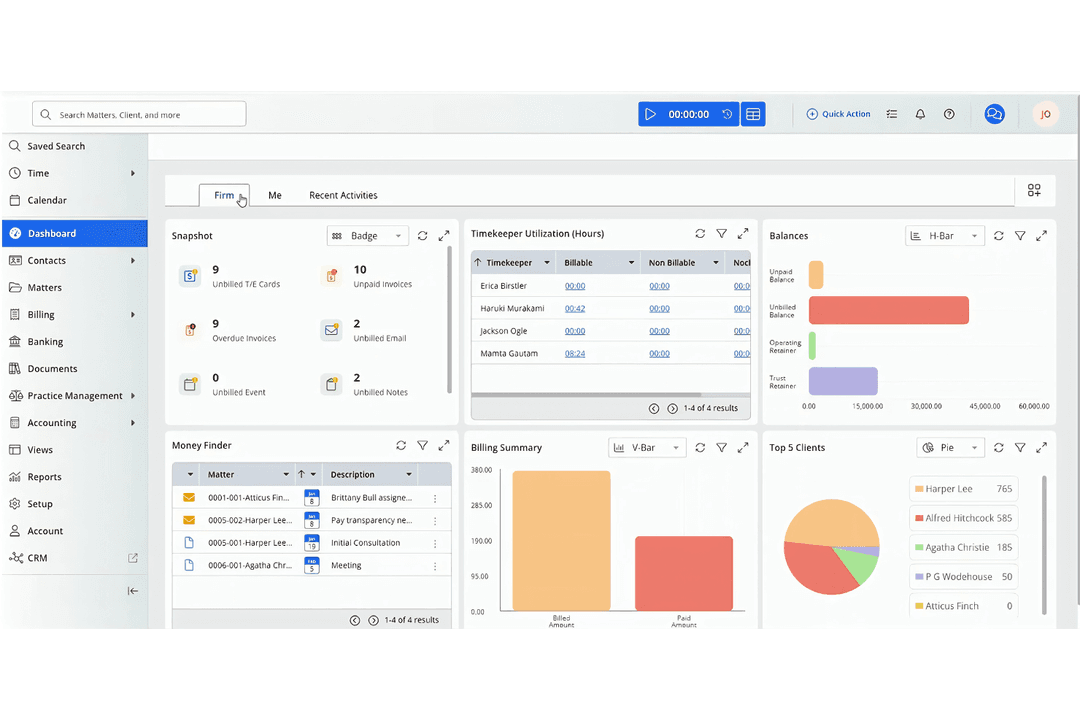
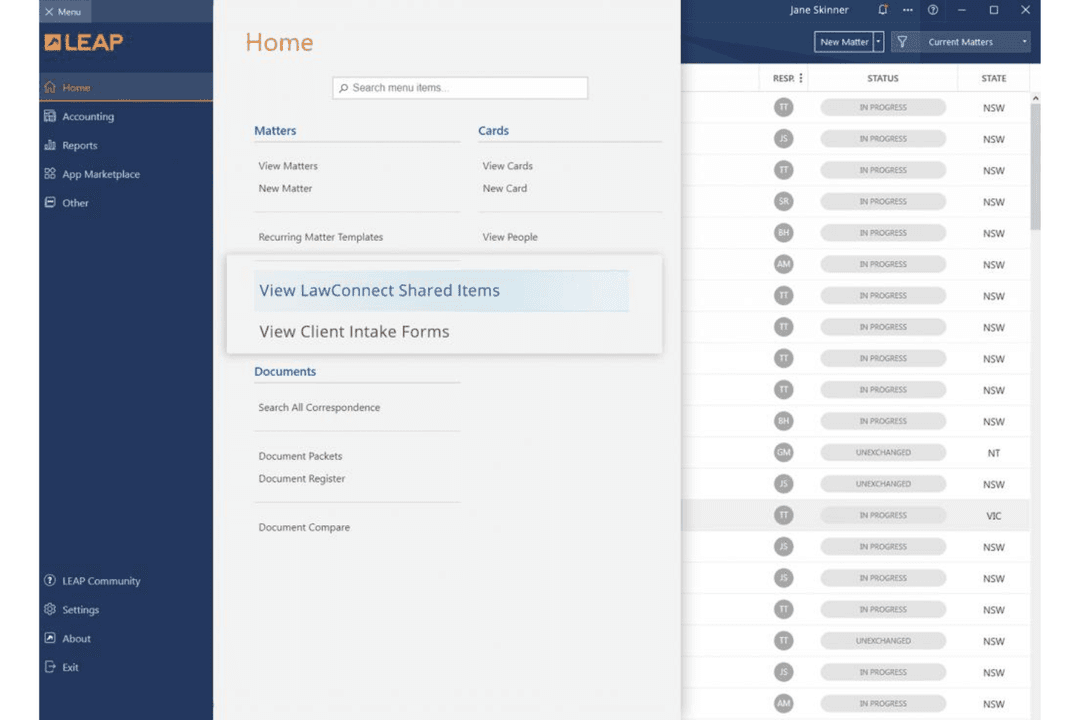
| FactorUser Interface | CosmoLexCosmoLex offers a clear dashboard that brings matters, billing, accounting, and trust balances together. | LEAPLEAP provides intuitive matter navigation, with documents, correspondence, billing, and deadlines organized within each file. |
| FactorSetup Process | CosmoLexCosmoLex supports guided onboarding and can get smaller firms started within weeks without dedicated IT support. | LEAPLEAP provides remote implementation, data migration assistance, and personalized training for each firm’s workflows. |
| FactorLearning Curve | CosmoLexCosmoLex is generally easy to learn, although users sometimes need help locating less frequently used features. | LEAPLEAP is easy to navigate for daily matter work, but its broad feature set can require structured training. |
| FactorSupport Resources | CosmoLexCosmoLex provides ongoing support, training resources, and help with workflows, accounting, and trust-related tasks. | LEAPLEAP offers a help center, videos, webinars, LEAP University courses, and continued client support after implementation. |
LEAP has the gentler learning curve for matter management, while CosmoLex feels more approachable for firms that want accounting built into daily workflows. In my experience, CosmoLex’s unified dashboard and responsive guidance suit financially focused teams, while LEAP’s organized matter workspace and structured training help larger teams adopt more features.
CosmoLex
- Built-in legal accounting eliminates need for third-party tools.
- Trust accounting and compliance features are included.
- Responsive customer support and onboarding assistance.
- Some users report slow performance during peak hours.
- Portal access issues occasionally disrupt client communications.
- Lacks advanced reporting customization options.
LEAP
- Document automation saves time on repetitive drafting tasks
- Built-in trust accounting supports compliance with state bar rules
- Mobile app lets you manage cases and billing remotely
- Data migration can be slow and error-prone for some firms
- Some users report slow customer support response times
- Limited compatibility with non-Microsoft email platforms
CosmoLex
- Estate Planning FirmsTrust accounting and document automation fit estate planning workflows.
- In-House Legal DepartmentsCentralized matter management and billing streamline internal legal operations.
- Family Law PracticesMatter-centric workflows and document management support high-volume casework.
- Legal Aid OrganizationsIntegrated time tracking and billing help manage grant and case reporting.
- Solo PractitionersBuilt-in trust accounting and compliance features simplify solo practice management.
- Small Law FirmsCosmoLex’s all-in-one platform reduces the need for separate billing and accounting tools.
LEAP
- Solo PractitionersLEAP’s all-in-one platform reduces the need for multiple tools and manual processes.
- Small Law FirmsMatter management, billing, and document automation are tailored for firms with limited IT resources.
- Family Law PracticesPre-built templates and forms for family law streamline casework and filings.
- Real Estate LawIntegrated conveyancing tools and e-signature support real estate transactions.
- Legal Aid OrganizationsCloud access and mobile app help manage high case volumes on the go.
- In-House Legal TeamsCentralized document storage and compliance features support internal legal operations.
Who Should Use CosmoLex, and Who Should Use LEAP?
CosmoLex is the better fit for small and midsize firms that want billing, office accounting, trust accounting, and matter management in one system. It suits teams that prioritize financial oversight, straightforward onboarding, and predictable tier-based pricing. LEAP fits firms that handle document-heavy matters and need state-specific forms, document automation, organized matter workspaces, and Matter AI. Choose LEAP when your team can support structured implementation and training for a broader legal workflow platform.
| CosmoLex | LEAP | |
|---|---|---|
| Automation | CosmoLex Money Finder flags potentially missed billable tasks, meetings, and emails. | LEAP State-specific forms, document automation, and Matter AI reuse client data and extract insights from correspondence. |
| Document Storage | CosmoLex Connects with Box, Dropbox, and Google Drive for document storage. | LEAP Focuses on built-in matter document organization and connects with Microsoft 365, but does not list Box, Dropbox, or Google Drive integrations. |
| Financial Tools | CosmoLex Connects matter management with office accounting, trust accounting, bank reconciliation, and compliance reporting. | LEAP Includes billing and trust accounting, with QuickBooks Online and Xero integrations for broader accounting workflows. |
| Matter Workspace | CosmoLex Uses a dashboard that combines matters, billing, accounting, and trust balances. | LEAP Organizes documents, correspondence, billing, and deadlines within each matter. |
| Pricing Model | CosmoLex Uses per-user monthly pricing with Launch, Core, and Pro tiers. | LEAP Uses per-user subscriptions, but requires a quote instead of publishing standard pricing. |
| Billing And Payments | Both platforms support time-based billing, invoice management, trust accounting, and online payments. CosmoLex connects billing closely with office and trust accounting, while LEAP organizes billing within each matter and supports legal workflow integrations. |
|---|---|
| Matter Management | Both solutions centralize client and matter information for legal teams. CosmoLex links matter records with billing and accounting details, while LEAP connects matters with documents, correspondence, deadlines, and legal forms. |
| Mobile Access | CosmoLex and LEAP provide mobile access so legal professionals can review matters and handle work away from the office. CosmoLex supports mobile access to financial and matter information, while LEAP extends mobile matter work across documents, correspondence, and deadlines. |
| Security Controls | Both platforms protect legal data with encryption, multifactor authentication, role-based permissions, and SOC-certified controls. CosmoLex emphasizes access privileges and financial record protection, while LEAP adds access reviews, OAuth 2.0, and time-limited privileged support access. |
| Time Tracking | CosmoLex and LEAP let firms record billable time against matters and use those entries for invoices. CosmoLex’s Money Finder can flag potentially missed billable activities, while LEAP ties time records to its matter-based billing workflows. |