
Anmeldelse af Tabs3: Fordele, ulemper, funktioner og priser forklaret
Tabs3 skiller sig ud med robust fakturering og praksisstyring, men det er ikke den rette løsning for alle virksomheder – opdag, hvor programmet udmærker sig, hvor det kommer til kort, og om det passer til din arbejdsgang.

We review tools independently, and commissions help fund our testing. See our transparency policy, our methodology, or suggest a tool.
Tabs3 is a legal practice management software built for law firms that need tightly integrated billing, accounting, and matter management. I'd consider it if your firm prioritizes financial accuracy and billing workflow depth over broad cloud flexibility. Tabs3 gives you more granular control over trust accounting, billing customization, and financial reporting than Clio does. That makes it a stronger fit for firms where billing complexity is a daily reality.
Tabs3 Evaluation Summary
4.5/5
- From $69/user/month
- 10-day free trial
Hvorfor du kan stole på vores softwareanbefalinger
6,700+
Reviews
20
Industry experts
16+
Evaluation factors
14
Years
Vores team har testet og anmeldt software siden 2012. Vi leder selv advokatfirmaer, så vi ved, hvor svært og hvor vigtigt det er at vælge den rigtige software.
Til denne guide har vi vurderet værktøjerne gennem praktisk afprøvning og uafhængig research og givet dem point ud fra vores udvælgelseskriterier.
Vores anmeldelser bygger på vores egen redaktionelle vurdering. De er ikke et salgsargument.
Tabs3 Overview
If you’re judging Tabs3 against other practice management software, I think its billing, trust accounting, and reporting features are top-tier, especially for firms with complex billing needs. The interface feels a bit dated, and integrations are limited, but support is responsive and onboarding is straightforward. Pricing is competitive for midsize firms, though solo practices may find it less compelling.
If you’re selecting software for a firm that prioritizes billing accuracy and compliance, Tabs3 is a strong contender, but those needing deep integrations or a modern UI might want to compare alternatives.
Pros
- Billing and trust accounting features are highly detailed.
- Reporting tools support compliance and audit needs.
- Responsive customer support with consultant network.
Cons
- Integrations with third-party tools are restricted.
- Limited cloud-based features for remote work.
- Integrations with third-party tools are restricted.
Is Tabs3 Right For Your Needs?
Who Would be a Good Fit for Tabs3?
Tabs3 is a strong choice for law firms and legal professionals who need advanced billing, trust accounting, and compliance features. Its detailed reporting and audit tools make it especially valuable for firms handling complex client matters or those with strict regulatory requirements. Midsize to large firms, legal accounting departments, and practice administrators will find its consultant support network and robust billing tools helpful for managing high volumes of matters and transactions.
- Midsize Law FirmsTabs3 handles complex billing and trust accounting for firms with many clients.
- Legal Accounting DepartmentsDetailed reporting and audit trails support compliance and financial oversight.
- Estate Planning PracticesTrust accounting features align with estate and trust management needs.
- Litigation PracticesMatter management and billing tools support high-volume casework.
- Practice AdministratorsCentralized controls and reporting simplify oversight for administrators.
- Firms With Compliance NeedsAudit-ready reports and trust accounting help meet regulatory standards.
Who Would be a Bad Fit for Tabs3?
Tabs3 is less suited for small firms, solo practitioners, or teams that need modern cloud-based access and deep integrations with other business tools. If your team values a modern interface, remote work capabilities, or relies on integrations with document management or CRM platforms, Tabs3 may not meet your needs. Startups, non-legal businesses, and tech-forward teams will likely find its interface and limited integrations restrictive.
- Solo PractitionersPricing and features may be excessive for single-attorney practices.
- Small StartupsLimited cloud features and integrations don’t support agile workflows.
- Non-Legal BusinessesTabs3 is tailored for legal workflows, not general business needs.
- Tech-Forward TeamsOutdated interface and restricted integrations limit digital transformation.
- Remote-First FirmsLack of full cloud access hinders remote work flexibility.
- Marketing DepartmentsTabs3 lacks marketing, CRM, and client intake integrations.
How We Test & Score Tools
We’ve spent years building, refining, and improving our software testing and scoring system. The rubric is designed to capture the nuances of software selection and what makes a tool effective, focusing on critical aspects of the decision-making process.
Below, you can see exactly how our testing and scoring works across seven criteria. It allows us to provide an unbiased evaluation of the software based on core functionality, standout features, ease of use, onboarding, customer support, integrations, customer reviews, and value for money.
Core Functionality (25% of final scoring)
The starting point of our evaluation is always the core functionality of the tool. Does it have the basic features and functions that a user would expect to see? Are any of those core features locked to higher-tiered pricing plans? At its core, we expect a tool to stand up against the baseline capabilities of its competitors.
Standout Features (25% of final scoring)
Next, we evaluate uncommon standout features that go above and beyond the core functionality typically found in tools of its kind. A high score reflects specialized or unique features that make the product faster, more efficient, or offer additional value to the user.
We also evaluate how easy it is to integrate with other tools typically found in the tech stack to expand the functionality and utility of the software. Tools offering plentiful native integrations, 3rd party connections, and API access to build custom integrations score best.
Ease of Use (10% of final scoring)
We consider how quick and easy it is to execute the tasks defined in the core functionality using the tool. High scoring software is well designed, intuitive to use, offers mobile apps, provides templates, and makes relatively complex tasks seem simple.
Onboarding (10% of final scoring)
We know how important rapid team adoption is for a new platform, so we evaluate how easy it is to learn and use a tool with minimal training. We evaluate how quickly a team member can get set up and start using the tool with no experience. High scoring solutions indicate little or no support is required.
Customer Support (10% of final scoring)
We review how quick and easy it is to get unstuck and find help by phone, live chat, or knowledge base. Tools and companies that provide real-time support score best, while chatbots score worst.
Customer Reviews (10% of final scoring)
Beyond our own testing and evaluation, we consider the net promoter score from current and past customers. We review their likelihood, given the option, to choose the tool again for the core functionality. A high scoring software reflects a high net promoter score from current or past customers.
Value for Money (10% of final scoring)
Lastly, in consideration of all the other criteria, we review the average price of entry level plans against the core features and consider the value of the other evaluation criteria. Software that delivers more, for less, will score higher.
Core Features
Time and Billing
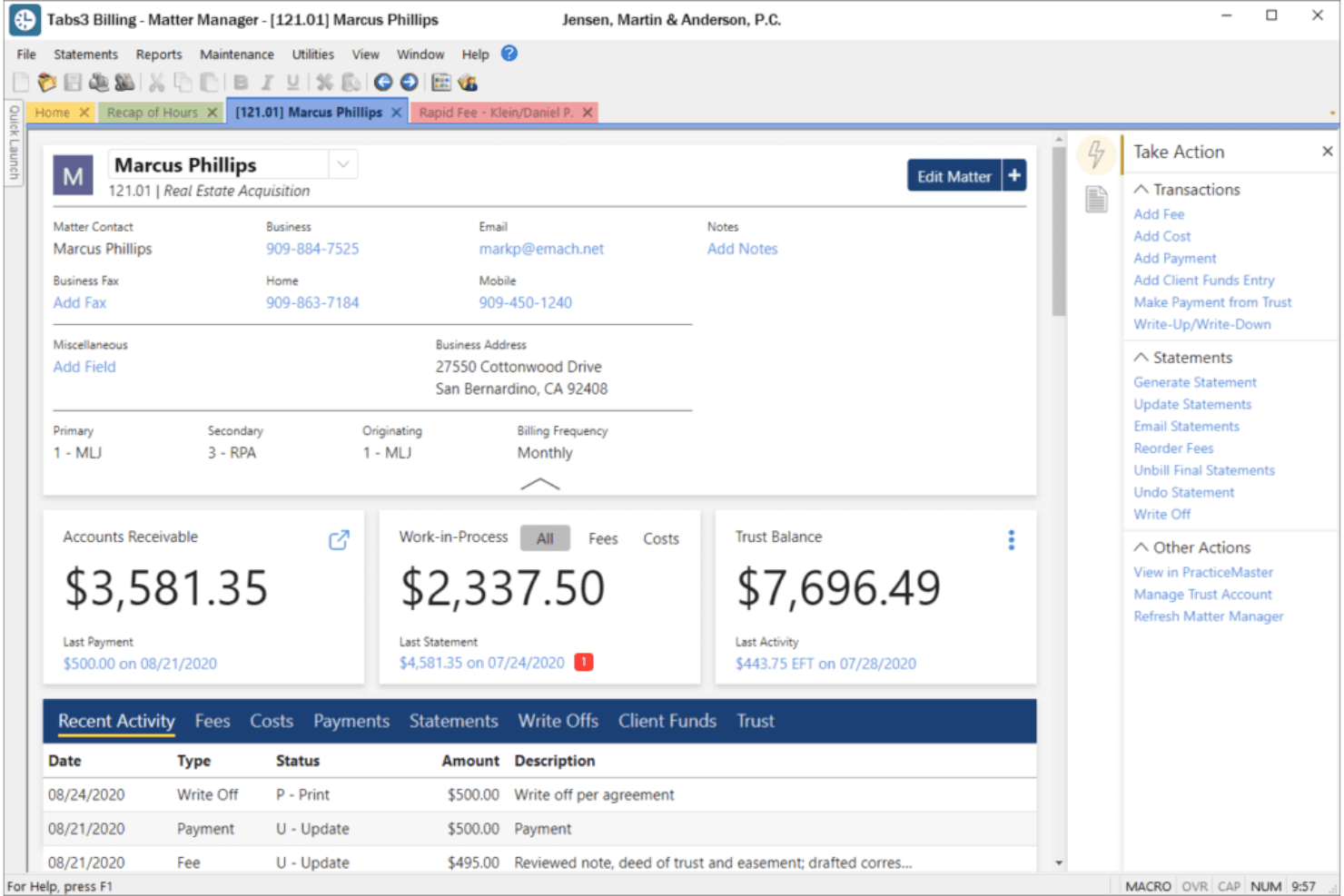
Track billable hours with built-in timers and convert them directly into client invoices. Customizable statements and management reports help firms capture every billable minute.
Trust Accounting
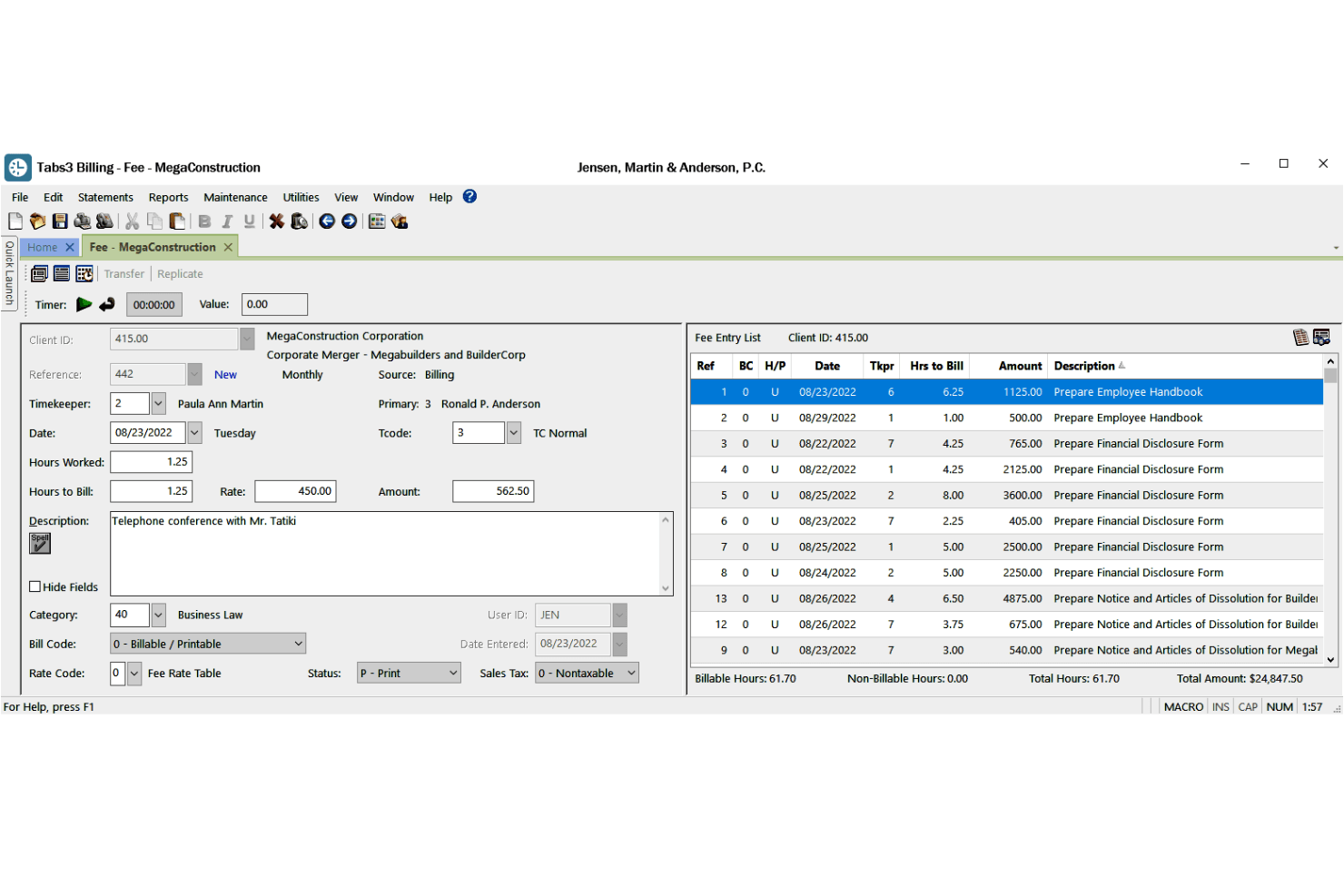
Manage client trust accounts, reconcile bank statements, and ensure compliance with legal trust accounting rules. All trust transactions are integrated with billing and financials.
Practice Management
Organize matters by contacts, appointments, emails, documents, and fees in one place. Centralized matter management streamlines daily workflows for legal teams.
Electronic Payments
Accept online payments through integrated payment processing. Clients can pay invoices faster and more securely.
Accounts Payable
Handle vendor payments, check writing, and outgoing invoices within the same system. Integration with billing and trust accounting gives a full view of firm finances.
Cloud Access
Access Tabs3 from anywhere with its cloud-based platform. Remote and hybrid teams can securely manage cases and billing without on-premises servers.
Ease of Use
Tabs3’s interface feels dated, but navigation is straightforward once you’re familiar with its layout. Users often mention that the menus and workflows are logical, especially for billing and trust accounting tasks. However, new users may need some initial training to get comfortable.
The software’s documentation and access to certified consultants help bridge the gap, making it manageable for firms willing to invest a bit of time upfront.
Integrations
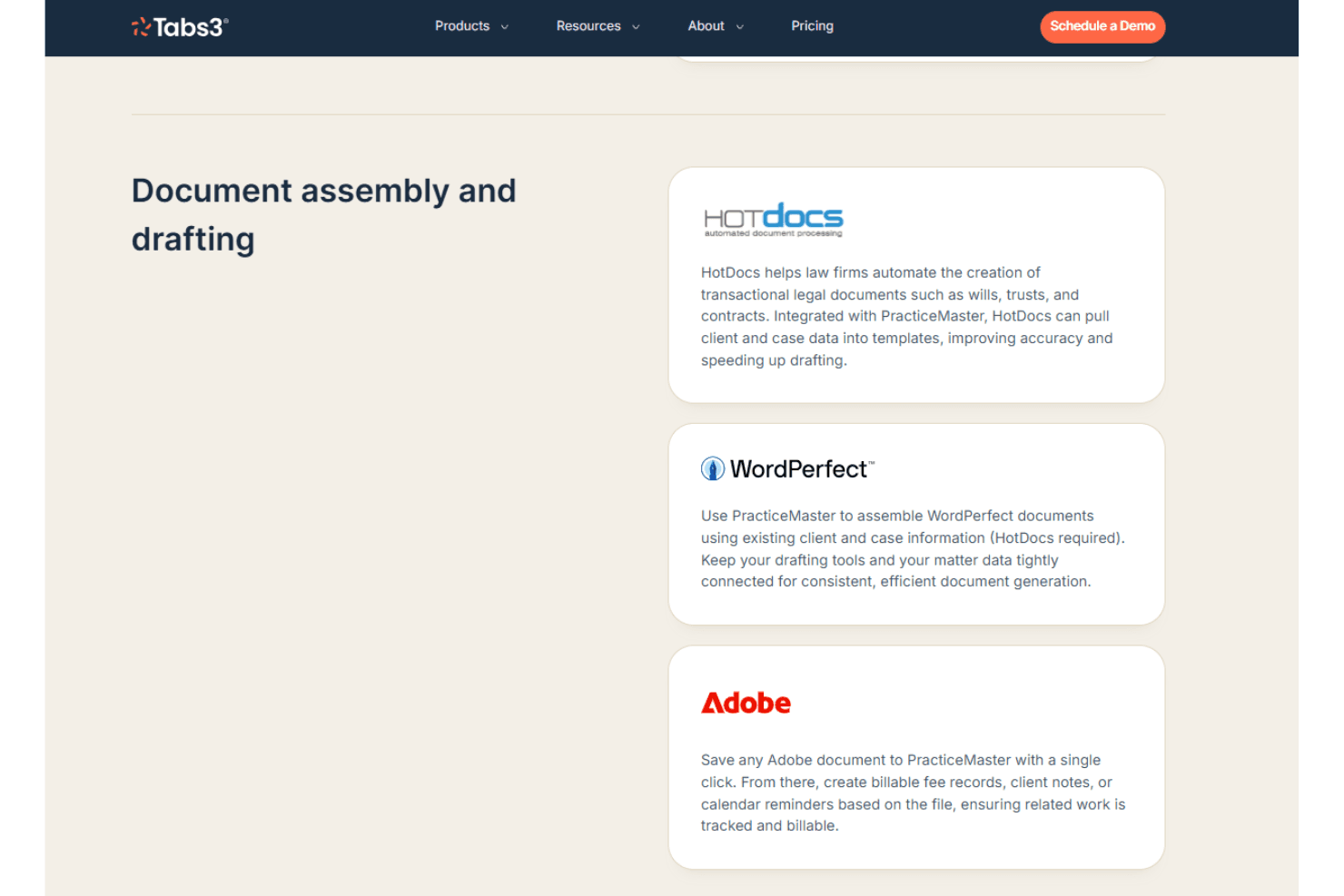
Tabs3 integrates with HotDocs, WordPerfect, Adobe, LexShare, ProPay, Worldox, QuickBooks, PenSoft Payroll, Equitrac, and CalendarRules, among others.
Tabs3 does not offer a public API and has limited connectivity with third-party integration tools.
Tabs3 Specs
- 2-Factor Authentication: Yes
- API: Yes
- Approval Workflows: Yes
- Audit Trail: Yes
- Calendar Management: Yes
- Compliance Tracking: Yes
- Contract Management: Yes
- Custom Reports: Yes
- Customer Management: Yes
- Data Export: Yes
- Data Import: Yes
- Document Management: Yes
- External Integrations: Yes
- Multi-User: Yes
- NDA Management: No
- Notifications: Yes
- Policy Management: No
- Scheduling: Yes
- Workflow Management: Yes


