


LEAP kontra MyCase: Sammenligning og ekspertanmeldelser for 2026
Jeg undersøger LEAP kontra MyCase for at afdække, hvilket værktøj til sagsstyring i advokatbranchen der faktisk effektiviserer din arbejdsgang – og hvordan det passer til dit firmas virkelighed i 2026.

We review tools independently, and commissions help fund our testing. See our transparency policy, our methodology, or suggest a tool.
Juggling growing client demands, tight timelines, and the realities of legal work means you need tools that actually help, not get in the way. If you’re looking at LEAP vs. MyCase, you’re probably trying to cut through the noise and find legal case management software that truly fits your workflow and firm size.
In this article, I break down how LEAP and MyCase compare—including the pros and cons, common use cases, pricing, security, and what the day-to-day experience really looks like. You’ll walk away confident in choosing the software that makes your legal life a bit easier.
LEAP
4.3/5
- Free demo available
- Pricing upon request
MyCase
4.6/5
- 10-day free trial and free demo available
- From $60/user/month
Why Trust Our Software Recommendations
6,700+
Reviews
20
Industry experts
16+
Evaluation factors
14
Years
Our team has been testing and reviewing software since 2012. As legal practice leaders ourselves, we know how difficult—and important—it is to choose the right software.
For this guide, we evaluated tools using hands-on testing and independent research, scoring tools using our selection criteria.
Our reviews reflect our human editorial judgment, not a sales pitch.
| LEAP | MyCase | |
|---|---|---|
| Free Trial | Free demo available | 10-day free trial and free demo available |
| Pricing | Pricing upon request | From $60/user/month |
LEAP vs. MyCase-priser og skjulte omkostninger
Priserne adskiller sig primært i måden, funktionerne er pakket på. LEAP samler generelt sagsstyring, dokumentautomatisering og grundlæggende integrationer i sin kerneplan, mens avancerede integrationer eller brugerdefinerede moduler kan koste ekstra.
MyCase bruger trindelt prissætning, hvor funktioner som elektroniske underskrifter, tekstbeskeder og premium-support varierer efter abonnement. Begge platforme kan også opkræve betaling for onboarding, opsætning eller tredjepartsintegrationer.
Hvis du vil sammenligne de samlede omkostninger, skal du opregne dine vigtigste funktioner og integrationer og derefter bede hver leverandør om et detaljeret tilbud, der inkluderer tilføjelser og potentielle gebyrer.
Både LEAP og MyCase dækker de grundlæggende behov hos juridiske fagfolk. Du får sagsstyring, dokumentlagring, kalender, tidsregistrering, fakturering og klientkommunikation på hver platform. Disse grundlæggende funktioner lader dig samle dine filer, opgaver og klientarbejde i ét organiseret system – uanset hvilken løsning du vælger.
LEAP skiller sig ud med avanceret dokumentautomatisering og juridiske formularbiblioteker, der er udviklet til specifikke jurisdiktioner. MyCase udmærker sig derimod med sin integrerede klientportal og brugervenlige mobilapp, som gør det meget nemmere for både dit team og dine klienter at dele opdateringer eller modtage betalinger.
| LEAP | MyCase | |
|---|---|---|
| 2-Factor Authentication | Yes | Yes |
| API | Yes | Yes |
| Approval Workflows | Yes | No |
| Audit Trail | Yes | Yes |
| Calendar Management | Yes | Yes |
| Compliance Tracking | Yes | Yes |
| Contract Management | Yes | Yes |
| Custom Reports | Yes | Yes |
| Customer Management | No | Yes |
| Data Export | Yes | Yes |
| Data Import | Yes | Yes |
| Document Management | Yes | Yes |
| External Integrations | Yes | Yes |
| Multi-User | Yes | Yes |
| NDA Management | No | Yes |
| Notifications | Yes | Yes |
| Policy Management | No | Yes |
| Scheduling | Yes | Yes |
| Workflow Management | Yes | Yes |
| Integration | LEAP | MyCase |
|---|---|---|
| IntegrationQuickBooks Online | LEAP✅ | MyCase✅ |
| IntegrationLawPay | LEAP✅ | MyCase✅ |
| IntegrationMicrosoft Outlook | LEAP✅ | MyCase✅ |
| IntegrationXero | LEAP✅ | MyCase❌ |
| IntegrationNetDocuments | LEAP✅ | MyCase❌ |
| IntegrationGoogle Kalender | LEAP❌ | MyCase✅ |
| IntegrationDropbox | LEAP❌ | MyCase✅ |
| IntegrationInfoTrack | LEAP✅ | MyCase❌ |
| IntegrationZapier | LEAP❌ | MyCase✅ |
| IntegrationAPI | LEAP✅ | MyCase✅ |
LEAP og MyCase kan begge forbindes med populære løsninger i den juridiske branche som QuickBooks Online, LawPay og Microsoft Outlook, men hver af dem har nogle få unikke kort på hånden – LEAP fungerer sammen med NetDocuments og Xero, mens MyCase kan forbindes med Google Kalender, Dropbox og Zapier for større fleksibilitet i arbejdsgangene. Begge tilbyder en API, så du kan få adgang til endnu flere forbindelser, hvis din virksomhed har brug for noget brugerdefineret.
| Faktor | LEAP | MyCase |
| Datakryptering | Bruger kryptering på bankniveau og sikker serverinfrastruktur til at beskytte følsomme juridiske data. | Krypterer data under overførsel og i hviletilstand med sikkerhedscertificeringer til cloudlagring. |
| Overholdelse af regler | Udviklet til GDPR-, SOC 2- og ISO-standarder med konfigurerbare adgangskontroller til forskellige jurisdiktioner. | Opretholder SOC 2-overholdelse og leverer revisionsspor, der er tilpasset juridiske krav. |
| Brugeradgang | Tilbyder detaljerede tilladelsesindstillinger for medarbejderroller og klientsamarbejde. | Giver dig mulighed for at indstille rollebaserede tilladelser for at begrænse adgangen og sikre kontoen. |
| Sikkerhedskopiering og gendannelse | Tilbyder automatiske daglige sikkerhedskopier med hurtige muligheder for gendannelse efter katastrofer. | Udfører regelmæssige sikkerhedskopier og garanterer gendannelse af data i tilfælde af driftsforstyrrelser. |
| Faktor | LEAP | MyCase |
|---|---|---|
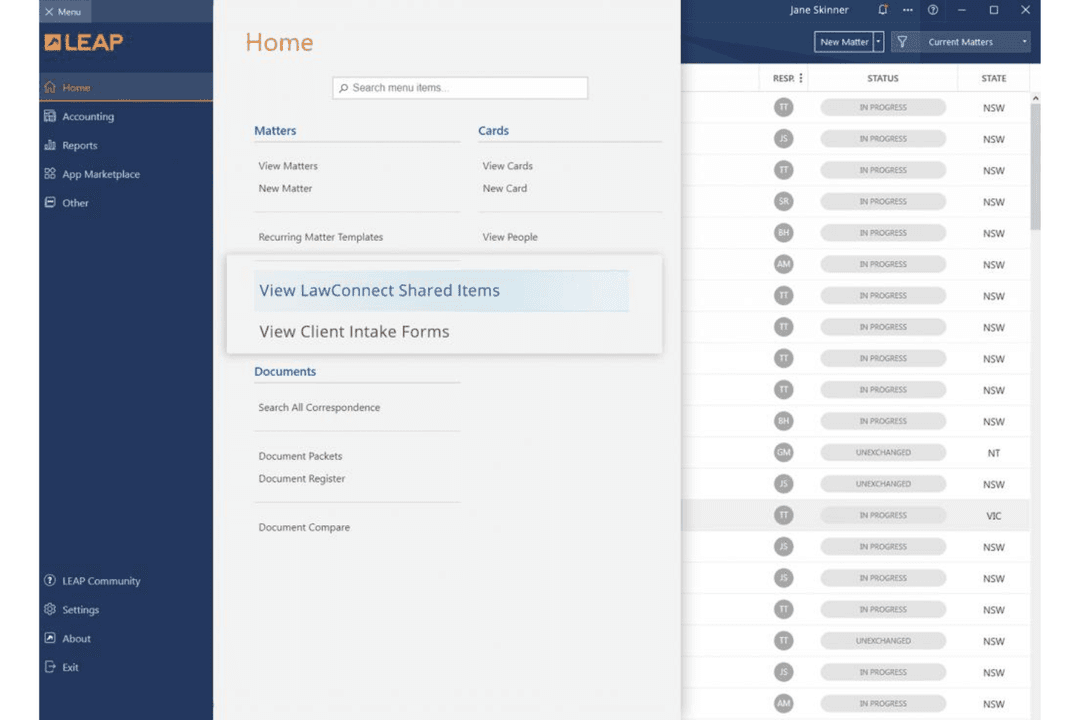
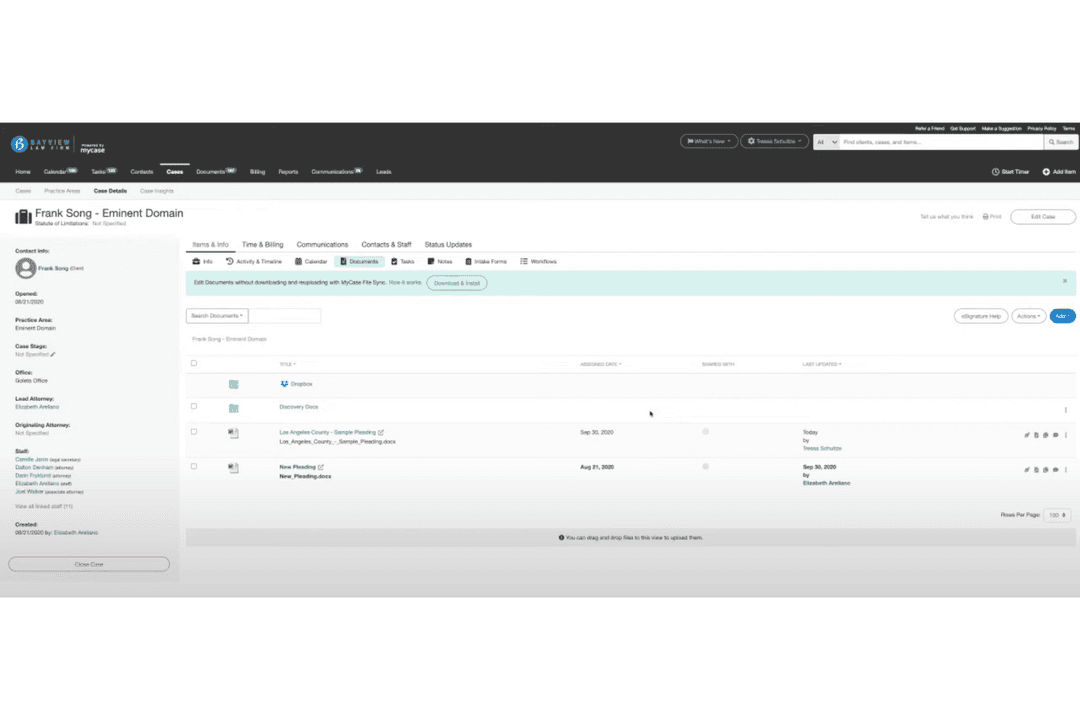
| FaktorBrugerflade | LEAPTraditionelt layout i desktopstil med mange menupunkter og ikoner. | MyCaseRent, moderne design med tydelig navigation og markante visuelle signaler. |
| FaktorIntroduktion | LEAPDen indledende opsætning omfatter trin-for-trin-demonstrationer, men kan føles overvældende. | MyCaseGuidet introduktion, anvisninger i appen og tjeklister til hurtig start hjælper nye brugere. |
| FaktorTilpasning | LEAPOmfattende indstillinger til tilpasning af arbejdsgange, men det kræver tid til konfiguration. | MyCaseEnkel opsætning med træk-og-slip-elementer og nem oprettelse af tilpassede felter. |
| FaktorAdgang til support | LEAPTilbyder telefon- og e-mailsupport samt en omfattende vidensbase. | MyCaseLivechat, telefon og indhold i hjælpecenteret er alt sammen nemt at finde. |
| FaktorLæringskurve | LEAPStejlere læringskurve for enkeltbrugere på grund af de mange funktioner. | MyCaseBlid læringskurve – de fleste brugere føler sig trygge efter den første uge. |
MyCase føles nemmere at komme i gang med og bruge med det samme, mens LEAP tilbyder dybdegående muligheder, som det tager tid at mestre. Jeg tror, at de fleste juridiske teams vil sætte pris på MyCase på grund af den intuitive opbygning, men LEAP belønner dem, der har brug for avancerede styringsmuligheder for arbejdsgange og ikke har noget imod en indledende læringskurve.
LEAP
- Document automation saves time on repetitive drafting tasks
- Built-in trust accounting supports compliance with state bar rules
- Mobile app lets you manage cases and billing remotely
- Data migration can be slow and error-prone for some firms
- Some users report slow customer support response times
- Limited compatibility with non-Microsoft email platforms
MyCase
- MyCase simplifies client communication, making it easy for your team to stay connected with clients.
- The document management feature helps you organize your legal documents efficiently.
- Customer support is highly responsive, ensuring you get help when you need it.
- Some users find the interface a bit dated compared to newer legal software.
- The mobile app lacks some functionalities available on the desktop version.
- Customization options are limited, which might not suit all your firm's needs.
LEAP
- Solo PractitionersLEAP’s all-in-one platform reduces the need for multiple tools and manual processes.
- Small Law FirmsMatter management, billing, and document automation are tailored for firms with limited IT resources.
- Family Law PracticesPre-built templates and forms for family law streamline casework and filings.
- Real Estate LawIntegrated conveyancing tools and e-signature support real estate transactions.
- Legal Aid OrganizationsCloud access and mobile app help manage high case volumes on the go.
- In-House Legal TeamsCentralized document storage and compliance features support internal legal operations.
MyCase
- Small Law FirmsMyCase helps your small team manage cases and clients efficiently, keeping everything organized.
- Solo PractitionersWith MyCase, you can handle every aspect of your practice without feeling overwhelmed.
- Family LawMyCase’s communication tools keep you connected with clients during sensitive cases.
- Personal InjuryThe document management feature simplifies handling extensive paperwork for your cases.
- Criminal DefenseMyCase provides a structured way to manage complex criminal cases, ensuring nothing falls through the cracks.
- Legal Aid OrganizationsIts user-friendly interface allows your team to focus on helping clients rather than administrative tasks.
Hvem bør bruge LEAP, og hvem bør bruge MyCase?
LEAP er et solidt valg for firmaer, der har brug for avanceret dokumentautomatisering, strenge kontrolfunktioner til overholdelse af regler eller håndterer arbejde på tværs af flere jurisdiktioner. MyCase passer til juridiske teams, der ønsker en venlig, moderne brugerflade med indbygget klientkommunikation og enkel fakturering.
Hvis dine prioriteter er dybdegående tilpasning og specialiserede arbejdsgange, skal du vælge LEAP – hvis du ønsker nem introduktion og et værktøj, som hele dit team (og dine klienter) rent faktisk vil bruge fra dag ét, er MyCase det sikrere valg.
| LEAP | MyCase | |
|---|---|---|
| Client Communication | LEAP Basic secure sharing, more focused on internal workflows. | MyCase Integrated client portal for messaging, updates, and payments. |
| Document Automation | LEAP Built-in legal form libraries and advanced document automation tools. | MyCase Focuses on straightforward document storage and sharing. |
| Integration Options | LEAP Deep legal-specific integrations (NetDocuments, Xero, InfoTrack). | MyCase More general integrations (Google Calendar, Dropbox, Zapier). |
| Pricing Structure | LEAP All-in-one subscription, advanced features may incur extra fees. | MyCase Tiered plans—essentials included, extras add up as you grow. |
| User Interface | LEAP Traditional desktop-style interface with dense menus and icons. | MyCase Clean, modern design with bold navigation and easy access. |
| Cloud Accessibility | Both solutions are fully cloud-based, letting you access your files, calendars, and client data from anywhere. LEAP focuses on desktop and remote desktop access, while MyCase leans on a strong web and mobile app presence, but both make your casework portable and secure when you need to work on the go. |
|---|---|
| Core Functionality | Both LEAP and MyCase offer a full suite of legal case management essentials—case tracking, document storage, billing, calendaring, time tracking, and client communications. Each one packages these features as standard so your core legal processes live in one place, whether you prefer LEAP’s depth or MyCase’s approachable style. |
| Integration Basics | Each solution connects with major legal and accounting tools out of the box. Both include integrations for QuickBooks Online, LawPay, Microsoft Outlook, and offer APIs for building custom connections—so you won’t have to abandon tools your firm already relies on, whichever software you pick. |
| Security Standards | Both platforms are built with legal-grade security in mind. They encrypt your data, include user permissions, and back up information automatically—LEAP leans into strict international compliance, while MyCase focuses on user-friendly control and audit trails, but you can trust either with client confidentiality. |
| Subscription Model | Both LEAP and MyCase use recurring subscription pricing instead of charging per case or transaction. While the details and structure differ, you always pay periodic fees and get access to regular updates and support instead of facing unpredictable, one-off charges. |