Key Takeaways
Workflow Essentials: A defined eDiscovery workflow is critical for identifying, preserving, and producing digital evidence in legal matters.
Cost Management: Controlling data volume, early case mapping, and technology use are the main levers for reducing eDiscovery expenses.
Technology Integration: Modern eDiscovery workflows benefit from TAR, analytics, and cloud-based tools to streamline review, analysis, and production.
Team Coordination: Effective workflows require clear roles and communication between legal, IT, operations, and outside vendors across each project stage.
Defensibility Practices: Documenting every step and decision ensures your ediscovery workflow will withstand legal scrutiny and compliance audits.
An eDiscovery workflow is how legal teams identify, preserve, collect, review, and produce electronically stored information for litigation or investigations. Without a defined process, you risk missed data, defensibility gaps, and costs that spiral fast.
In my experience, the biggest risks come from reactive, ad hoc processes built under deadline pressure. This guide covers every stage—from early case assessment through production—along with team roles, cost drivers, key technologies, and best practices. The right eDiscovery software gives you a real edge at nearly every step.
What Is an eDiscovery Workflow?
An eDiscovery workflow is the end-to-end process legal teams follow to identify, preserve, collect, process, review, and produce electronically stored information (ESI) in response to litigation, investigations, or regulatory requests. It's the operational backbone of any dispute or compliance matter involving digital data.
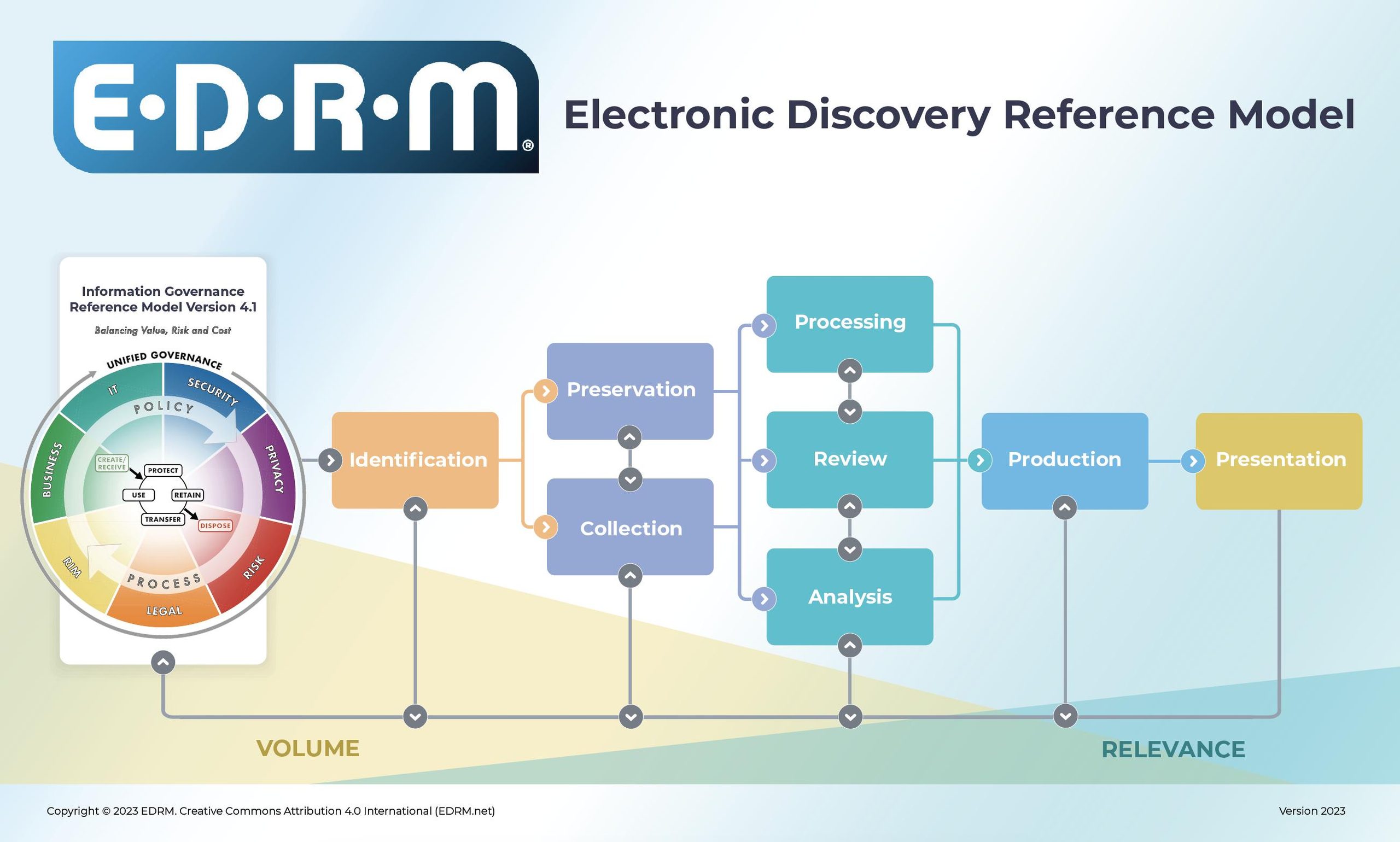
Most eDiscovery workflows map to the Electronic Discovery Reference Model (EDRM), a widely accepted framework that sequences the process from information governance through final presentation. The EDRM doesn't prescribe software or tactics—it gives every stakeholder a shared vocabulary.
Picture the workflow as a funnel. You start with a potentially massive universe of ESI across custodians, systems, and geographies. Each stage narrows that universe—processing removes system files and duplicates, review identifies what's actually relevant—until you're left with only what needs to be produced.
Why a Defined eDiscovery Workflow Matters
A defined workflow is what separates a defensible process from a costly, chaotic one. Without one, teams make decisions under deadline pressure, miss custodians, and leave spoliation exposure on the table.
Courts assess preservation and collection decisions against a standard of reasonableness, not perfection. But reasonableness requires documentation and consistency. According to eDiscovery Assistant's 2024 Case Law Report, sanctions appeared among the issues tagged in 1,456 eDiscovery decisions in 2024. While this doesn't mean sanctions were granted in every case, it highlights how frequently discovery conduct becomes contested. A repeatable workflow provides a documented record when those decisions are challenged.
Efficiency is the other driver. When you know what triggers a hold, who owns each stage, and what tools handle processing and review, you spend less time improvising and more time on work that actually matters.
The Core Stages of the eDiscovery Workflow
The seven stages below follow the core activities in the Electronic Discovery Reference Model (EDRM), adapted into a practical workflow for legal teams. The earlier EDRM framework included nine stages, including Information Governance and Presentation. Those activities aren't excluded here: information governance supports the entire discovery lifecycle, while presentation typically follows production during hearings or trial preparation.
The updated EDRM 2.0, released in September 2026, places greater emphasis on ongoing information governance, continuous analysis, and defensible disposition. This seven-stage guide focuses on the operational steps from identification through production, rather than reproducing every component of the full model.

Stage 1: Identification and Early Case Assessment
Identification is where you scope the matter before any data moves. The goal is to answer two questions: what data exists, and what's potentially relevant?
This stage involves mapping data sources—email servers, cloud storage, collaboration platforms, mobile devices, and third-party repositories—and identifying custodians who likely hold relevant information. Early case assessment (ECA) runs in parallel, letting legal teams evaluate document volume, key themes, and risk before committing to a collection strategy.
I'd recommend looping in IT immediately at this stage. Legal teams rarely have a complete picture of where ESI lives across the organization. A quick data map early on prevents the painful discovery of a forgotten SharePoint site or Slack workspace three months into the matter.
Stage 2: Preservation and Legal Hold
Preservation kicks in the moment litigation becomes reasonably foreseeable. That means suspending routine deletion policies and issuing legal hold notices to all relevant custodians.
Under FRCP 37(e), courts can impose sanctions when ESI is lost because reasonable steps weren't taken to preserve it. The Zubulake v. UBS Warburg line of cases established the current expectation: issue holds promptly, confirm receipt, and follow up on non-responses.
Hold notices should be documented and tracked. Custodian acknowledgments matter—if a hold is challenged, you want a record showing it was issued and confirmed. On any matter with more than a handful of custodians, legal hold software that automates reminders and logs responses is worth the investment.
Stage 3: Collection
Collection is the process of gathering ESI from identified sources in a forensically sound way. How you approach it depends on the matter's complexity and the data types involved.
For high-stakes litigation, forensic collection preserves metadata and maintains chain of custody—a defensibility requirement if authenticity is challenged later. For smaller matters, targeted self-collection by custodians may be acceptable, though it carries higher risk of incomplete or inconsistent results.
“This minor issue can become a major legal risk when authenticating chain of custody in court.”
Cloud platforms add complexity. Collecting from Microsoft 365, Google Workspace, Slack, or Salesforce requires platform-specific connectors and an understanding of what each system retains by default. Know your sources before data moves—another reason early identification pays off.
Stage 4: Processing, De-Duplication, and De-NISTing
Processing converts raw collected data into a reviewable format and reduces volume through culling. It directly determines how much data your review team has to work through.
The core processing tasks are:
- De-duplication: Removing exact or near-exact duplicate documents across custodians so reviewers aren't reading the same email chain multiple times.
- De-NISTing: Filtering out known system files using the National Institute of Standards and Technology (NIST) Reference Data Set. Operating system files and software executables aren't evidence—de-NISTing removes them automatically.
- Metadata extraction: Pulling date, author, file type, and custodian data for use in review and production.
- Format normalization: Converting native files to a standard, indexable format—often TIFF or searchable PDF.
Aggressive but defensible culling at this stage is one of the most direct ways to control review costs downstream.
Stage 5: Review and Privilege Coding
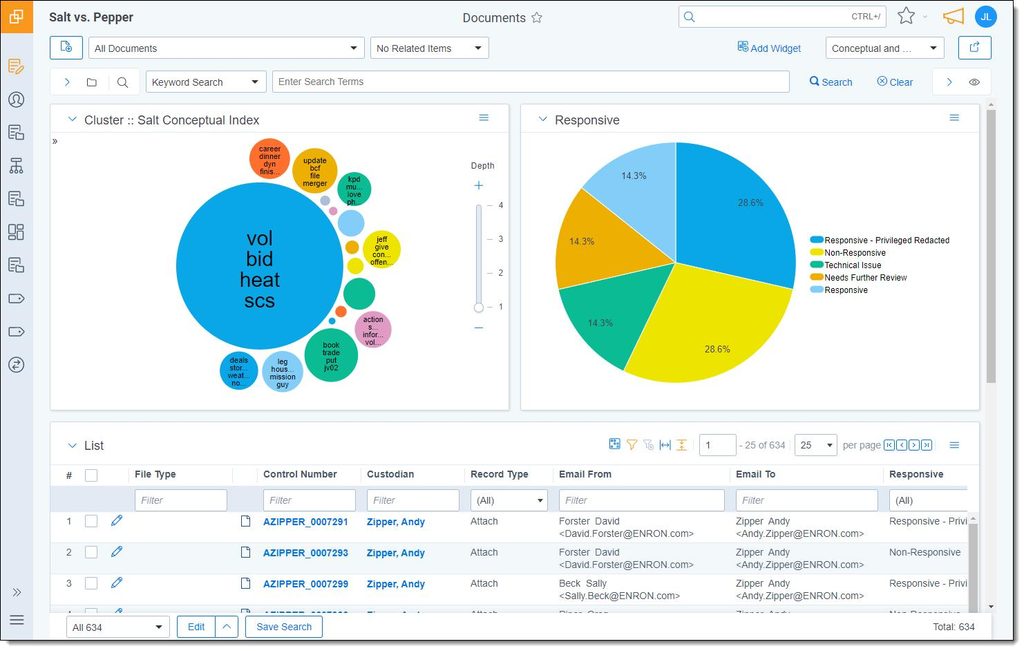
Document review is where attorneys assess each document for relevance, responsiveness, and privilege. It's historically the most expensive part of the process—and the one most transformed by technology.
According to EDRM's analysis of eDiscovery task expenditures, document review accounted for 64% of eDiscovery expenditures in 2024. That share is projected to decline as technology-assisted review (TAR) handles more first-pass work. TAR, also called predictive coding, uses human-reviewed documents to help predict relevance across a broader dataset. Continuous Active Learning (CAL) updates its model as reviewers code additional documents, making it particularly useful for large or evolving datasets.
For privilege review, every document potentially protected by attorney-client privilege or work product doctrine must be flagged and logged. Privilege errors at this stage carry serious consequences—flag liberally and refine, rather than under-coding.
Stage 6: Analysis and Case Strategy
Analysis focuses on patterns across the data rather than individual documents. It's where the team moves from "what does this document say" to "what does this dataset tell us about the case."
“Search terms can serve a very useful purpose in an initial cull, but we all know they’re imperfect.”
Analytics tools support timeline reconstruction, concept clustering, email threading, and communication analysis. These capabilities help you identify key custodian relationships, spot gaps in the record, and surface high-value documents before they appear in opposing counsel's production.
In my experience, this stage gets underused. Teams treat analytics as a post-review add-on rather than an integrated part of the process. Running analytics earlier—alongside or even before linear review—can change which documents you prioritize and how you build the case narrative.
Stage 7: Production and Delivery
Production is the delivery of reviewed, responsive, non-privileged documents to opposing counsel, regulators, or the court. Getting format right matters as much as getting the documents right.
Production specifications typically cover:
- Format: TIFF images with extracted text, native files, or PDF—often dictated by a court order or agreed-upon protocol.
- Metadata fields: Which fields accompany the production, including custodian, date, file path, and file type.
- Bates numbering: Sequential document identifiers applied for reference in depositions and filings.
- Load files: Structured files (DAT, OPT) that allow the receiving party to import the production into their review platform.
- Privilege log: A document-by-document log of withheld materials, including date, author, recipient, and basis for withholding.
Confirm production specifications before finalizing your processing workflow. Retroactively reformatting a large production is expensive and avoidable.
Key Technologies That Power Modern eDiscovery Workflows
Technology doesn't replace judgment in eDiscovery—it reduces the volume of data and labor your team has to manage at every stage. These are the tools that move the needle most:
- TAR and CAL: TAR 1.0 uses a human-coded seed set to train a model, while TAR 2.0 (CAL) continuously updates the model as reviewers code additional documents. These approaches help legal teams prioritize relevant information and manage large document sets more efficiently.
- Generative AI: GenAI tools support document summarization, issue tagging, and privilege classification. According to the Winter 2026 eDiscovery Pricing Survey, $0.26–$0.50 per document was the most commonly reported pricing bracket for GenAI-assisted review among respondents who identified per-document rates. Pricing models vary, and legal teams must still evaluate hallucination risks, auditability, and validation requirements before adoption.
- Analytics: Concept clustering, email threading, and communication mapping help teams prioritize documents and reconstruct timelines without reading everything manually.
- Cloud-based platforms: Cloud-native eDiscovery tools offer faster processing, flexible scaling, and more predictable pricing than on-premise systems. Look for platforms that integrate collection, processing, review, and production in a single environment.
- Legal hold software: Automates custodian notices, tracks acknowledgments, and creates an audit trail. On any multi-custodian matter, this is a defensibility essential, not a nice-to-have.
Team Roles and Responsibilities Across the Workflow
eDiscovery requires tight coordination across legal, IT, and operations. Gaps in ownership are where things go wrong. Use this table to map who leads and who supports at each stage:
| Stage | Leads | Supports |
|---|---|---|
| StageIdentification / ECA | LeadsIn-house counsel, legal ops | SupportsIT, records management |
| StagePreservation / Legal hold | LeadsIn-house counsel | SupportsLegal ops, IT, paralegals |
| StageCollection | LeadsIT, eDiscovery vendor | SupportsIn-house counsel, legal ops |
| StageProcessing | LeadseDiscovery vendor | SupportsIT |
| StageReview | LeadsOutside counsel, contract attorneys | SupportsLegal ops, paralegals |
| StageAnalysis | LeadsOutside counsel, legal ops | SupportseDiscovery vendor |
| StageProduction | LeadsOutside counsel, eDiscovery vendor | SupportsLegal ops, IT |
A few things I'd add from experience:
- Legal ops often serves as the coordination layer between legal and IT. On larger matters, assigning a dedicated legal ops point of contact prevents delays at handoff points.
- IT frequently doesn't have visibility into what legal is doing until a collection request arrives. Looping IT into identification—before any data moves—avoids last-minute scrambles.
- Vendors vary widely in scope. Some provide end-to-end managed review; others handle only processing and hosting. Know what you're buying before the matter starts.
More Articles
eDiscovery Workflow Cost Drivers and How to Control Them
The biggest cost lever in eDiscovery is data volume. The less data you move through the workflow, the less you spend at every downstream stage. Here are the primary cost drivers and where you can push back:
- Collection scope: Broad custodian lists and full-inbox collections drive up everything downstream. Targeted collection—scoped by date range, file type, and keyword—cuts volume without sacrificing defensibility.
- Processing fees: Processing can cost approximately $25–$100 per GB, depending on data volume, vendor agreements, and processing requirements. According to eDiscovery Insider's pricing guide, competitive processing rates commonly fall between $50 and $100 per GB, while high-volume arrangements can be lower. De-duplication and de-NISTing help reduce the amount of data that must be hosted and reviewed.
- Hosting fees: Per-GB monthly charges accumulate fast on long matters. Negotiate upfront for flat-fee or all-in-one pricing, and confirm whether deduplication is applied before hosting costs are calculated.
- Review labor: Attorney review and privilege assessment can drive substantial eDiscovery expenses, particularly when large document volumes require manual examination. Using TAR or validated GenAI-assisted first-pass review can reduce the workload and help teams prioritize documents that require closer examination.
- Late-stage format changes: Agreeing on production specifications early avoids costly reformatting. Build format requirements into your collection and processing plan from day one.
I'd push every team to track spend by stage across matters. It's hard to negotiate better pricing or justify technology investment without baseline data on where the money actually goes.
Best Practices for a Defensible, Repeatable eDiscovery Workflow
A defensible workflow isn't just about doing the right things—it's about being able to show you did them. These practices make your process both sound and documentable:
- Build a data map before every matter: Know where ESI lives, who controls it, and what the retention policies are. This makes identification faster and holds more complete.
- Issue holds immediately and track acknowledgments: Don't rely on informal communications. Use hold software or, at minimum, a tracked email with a required response. Document everything.
- Scope proportionately: Work with counsel to set collection parameters under FRCP 26(b)(1). Proportionality is a recognized standard—use it to push back on overbroad requests.
- Document every processing decision: De-NISTing filters, date range culls, search term logic—all of it should be logged and retained. If your process is challenged, your documentation is your defense.
- Validate TAR before closing review: Before relying on predictive coding to close a document set, run a statistically valid quality-control sample to confirm recall and precision meet agreed thresholds.
- Agree on production specs in writing: Get a joint stipulation or court order covering format, metadata fields, and privilege log requirements before you produce anything.
- Run post-matter reviews: After each matter closes, debrief the team. Where did costs spike? What took longer than expected? Feed those findings back into your next workflow.
Repeatable doesn't mean rigid. Your workflow should be documented enough to defend and flexible enough to adapt to the data types and complexity of each matter.
Find the Right eDiscovery Software for Your Workflow
A defensible eDiscovery workflow depends on having the right tools to manage preservation, collection, processing, review, and production. Explore my guide to the best eDiscovery software to compare platforms, evaluate their capabilities, and find a solution that fits your legal team's needs.