

Las 10 mejores herramientas de IA jurídica analizadas en 2026

10 Lista de las mejores herramientas de IA jurídica


Explorar el panorama de la tecnología jurídica puede ser difícil. Te enfrentas a una presión constante para gestionar los casos de forma eficiente y, al mismo tiempo, cumplir la normativa. Las herramientas de IA jurídica están aquí para ayudarte, ya que ofrecen soluciones que reducen las tareas manuales y mejoran la precisión de tu trabajo.
Según mi experiencia, al evaluar estas herramientas de forma independiente, he comprobado que el software adecuado puede marcar una gran diferencia para tu equipo. Mi objetivo es ofrecer reseñas imparciales y bien documentadas que te ayuden a elegir la opción más adecuada.
En este artículo te presentaré mis principales opciones y destacaré las funciones que responden a tus necesidades específicas. Tanto si buscas mejorar la gestión documental como potenciar la investigación jurídica, aquí encontrarás algo para tu despacho.
Por qué confiar en nuestras recomendaciones de software
Nuestro equipo lleva probando y evaluando software desde 2012. Como líderes de despachos jurídicos, sabemos lo difícil —y lo importante— que es elegir el software adecuado.
Para esta guía, evaluamos las herramientas mediante pruebas prácticas e investigación independiente, puntuando las herramientas según nuestros criterios de selección.
Nuestras reseñas reflejan nuestro criterio editorial humano, no un discurso de ventas.
Tabla comparativa de herramientas de IA jurídica
Esta tabla comparativa resume los detalles de precios de mi selección de las mejores herramientas de IA jurídica:
| Tool | Best For | Trial Info | Price | ||
|---|---|---|---|---|---|
| 1 | Ideal para litigios colaborativos | Demostración gratuita | Precio a consultar | Website | |
| 2 | Mejor para la gestión de casos | Prueba gratuita + demostración gratuita disponible | Precio según solicitud | Website | |
| 3 | Mejor para procesos de descubrimiento electrónico (e-discovery) | Demostración gratuita | Precio a consultar | Website | |
| 4 | Mejor para análisis de documentos legales | Hay demostración gratuita disponible | Precio a consultar | Website | |
| 5 | Ideal para la gestión del ciclo de vida de contratos | Demo gratuita disponible | Precio a consultar | Website | |
| 6 | El mejor para bases de datos de investigación jurídica | Demo gratuita disponible | Precio a consultar | Website | |
| 7 | Mejor para gestión basada en la nube | Prueba gratuita de 7 días + demo gratuita disponible | Desde $39/usuario/mes (facturación anual) | Website | |
| 8 | Ideal para tareas de investigación legal | Demostración gratuita disponible | Precio bajo solicitud | Website | |
| 9 | Mejor para casos de lesiones personales | Demostración gratuita disponible | Precio a consultar | Website | |
| 10 | Ideal para comunicación segura con clientes | Prueba gratuita + demo gratis disponible | Desde $149/mes (facturado anualmente) | Website |
Reseñas de las mejores herramientas de IA jurídica
A continuación encontrarás mis resúmenes detallados de las mejores herramientas de IA jurídica que llegaron a mi selección. Mis reseñas ofrecen un análisis detallado de las funciones principales, ventajas y desventajas, integraciones y casos de uso ideales de cada herramienta para ayudarte a encontrar la más adecuada para ti.

Everlaw
Ideal para litigios colaborativos
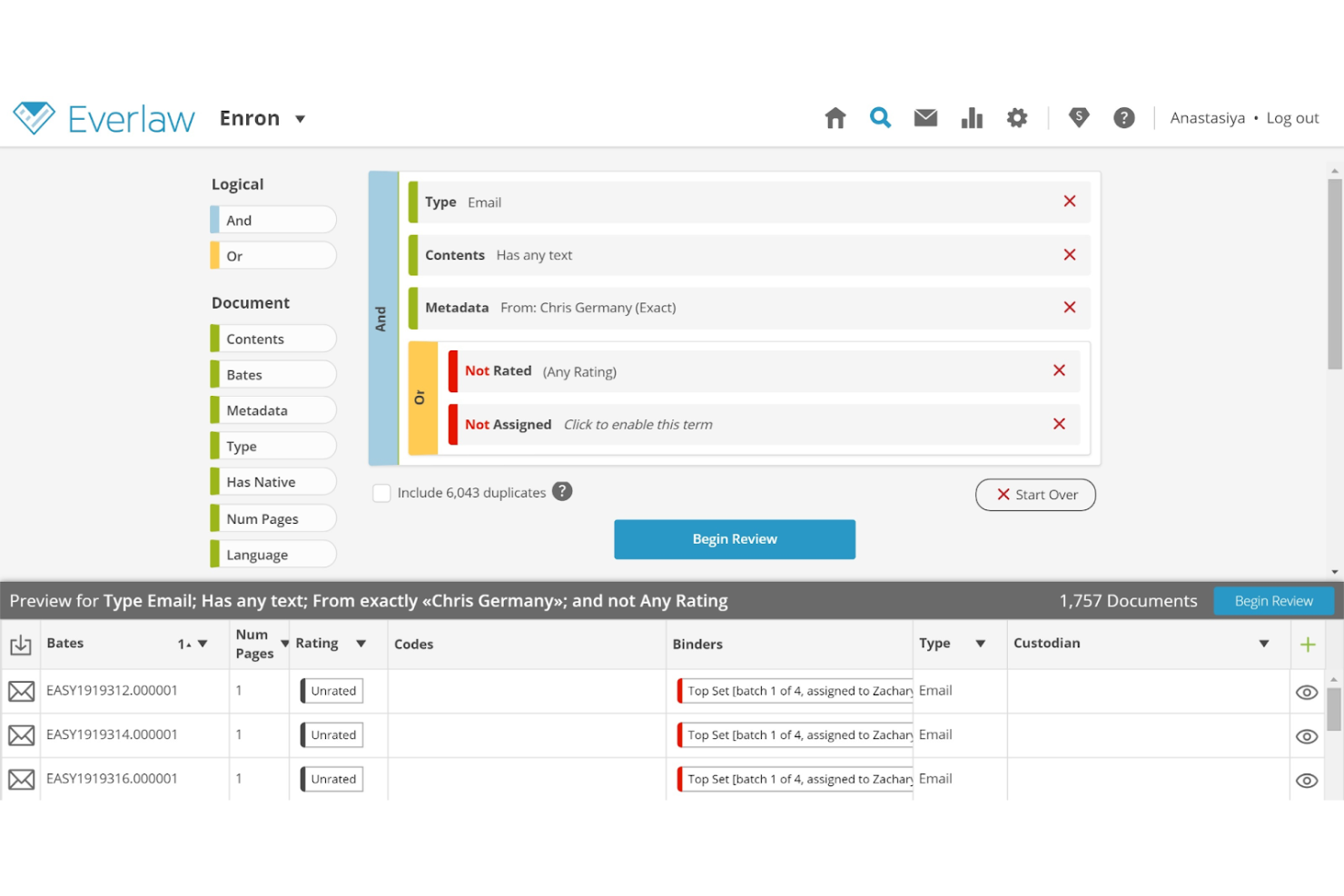
Everlaw ofrece a los equipos legales una plataforma en la nube diseñada para litigios e investigaciones complejas. Sus funciones avanzadas de búsqueda impulsada por IA, revisión de documentos y construcción de casos apoyan a bufetes de abogados y departamentos jurídicos internos en la gestión de asuntos legales colaborativos y de alto volumen.
¿Para quién es mejor Everlaw?
Equipos de litigio en bufetes de abogados y departamentos jurídicos corporativos que gestionan casos complejos y voluminosos de documentos entre múltiples partes interesadas.
Por qué elegí Everlaw
Elegí Everlaw porque ninguna otra plataforma mantiene a todo el equipo de litigación—asesores internos y externos—trabajando en el mismo entorno desde la revisión de documentos hasta el juicio. En particular, me gusta Storybuilder, que permite a los equipos coautorizar cronologías del caso, esquemas y preguntas de deposición directamente junto a las pruebas revisadas. El Analizador de Declaraciones de EverlawAI añade otra capa, permitiendo a mi equipo generar antecedentes de declarantes y señalar inconsistencias en testimonios sin salir de la plataforma. Para litigios que abarcan grandes equipos y largos plazos, ese tipo de colaboración integral en un solo espacio de trabajo es difícil de replicar en otro lugar.
Características clave de Everlaw
- Codificación predictiva: Utiliza aprendizaje automático para clasificar documentos por relevancia, permitiendo que los revisores se centren primero en las pruebas más importantes.
- Deep Dive: Permite a los equipos buscar entre millones de documentos usando preguntas en lenguaje natural y recibir respuestas con citas y respaldo en pruebas.
- Traducciones por IA: Detecta y traduce automáticamente documentos en más de 100 idiomas, con traducción masiva y resultados almacenados.
- Clasificación en grupos: Agrupa documentos por similitud conceptual en una interfaz visual, mostrando patrones temáticos en grandes conjuntos de datos no estructurados.
Integraciones de Everlaw
Las integraciones incluyen Microsoft 365, Google Workspace, Slack, Zoom, Box, Dropbox, Google Vault, Microsoft Teams, Proofpoint y Okta.
Pros and Cons
Pros:
- Impulsa los esfuerzos colaborativos
- Revisión de documentos en tiempo real
- Herramientas avanzadas de visualización
Cons:
- Puede requerir tiempo de configuración inicial
- Limitado a procesos de litigio
- Complejidad en el análisis de datos

Filevine
Mejor para la gestión de casos
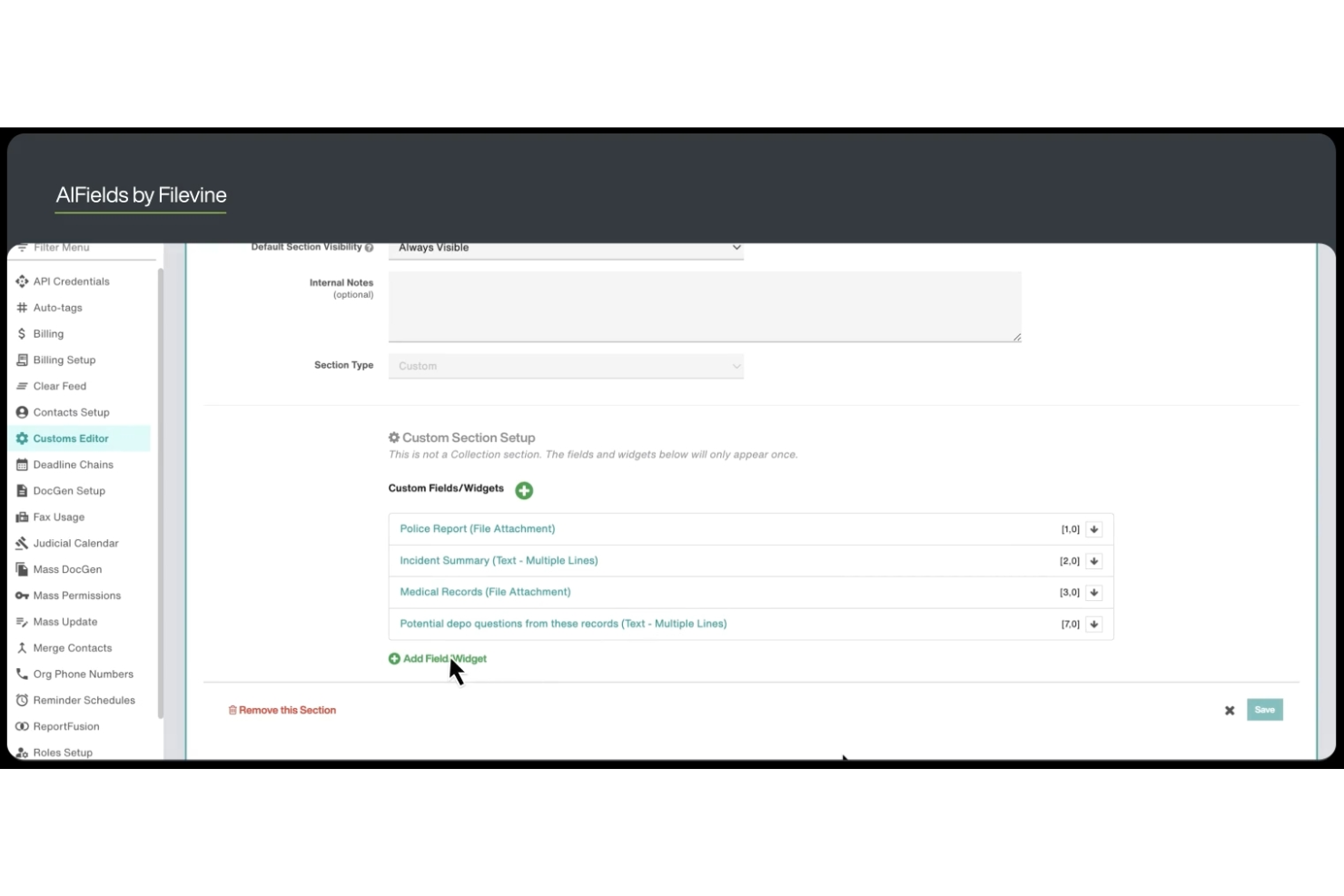
Filevine ofrece a los equipos legales una plataforma centralizada diseñada para la gestión compleja de casos y la colaboración. Sus flujos de trabajo flexibles y las funciones de automatización documental la hacen especialmente útil para bufetes de abogados y departamentos legales que gestionan grandes volúmenes de casos o asuntos legales complejos.
¿Para Quién es Mejor Filevine?
Filevine es ideal para bufetes de abogados y equipos legales que necesitan flujos de trabajo personalizables y gestión centralizada de casos para tratar asuntos legales complejos o de alto volumen.
Por Qué Elegí Filevine
Elegí Filevine porque es una de las pocas herramientas de IA legal donde la IA está integrada directamente en la gestión de casos—no agregada como un módulo aparte. Me gusta cómo los Campos de IA leen automáticamente los documentos y trasladan los datos extraídos a campos reportables, así mi equipo no tiene que ingresar manualmente información de historiales médicos o contratos. La Validación de Fases es otra función en la que confío: LOIS verifica que todas las tareas, datos y documentos requeridos estén completos antes de que un caso avance, lo que elimina la incertidumbre en el progreso del caso. Para equipos que gestionan decenas de casos activos a la vez, ese tipo de control incorporado es difícil de encontrar en otro lugar.
Funciones Clave de Filevine
- DemandsAI®: Genera cartas de demanda redactadas por IA utilizando datos de casos de Filevine, produciendo cartas finales en 15 minutos o menos.
- AI Doc Review: Examina documentos legales subidos para extraer información clave y producir resúmenes concisos sin revisión manual.
- ImmigrationAI®: Analiza documentos de clientes y completa automáticamente formularios y cuestionarios de USCIS en hasta 170 idiomas.
- Depo CoPilot: Analiza testimonios de deposición en tiempo real y muestra respuestas de testigos expertos durante las audiencias.
Integraciones de Filevine
Las integraciones incluyen Sageness, Gemini Legal, InfoTrack, Record Retrieval Solutions, DocuPost, MoveDocs, Copitrak, Postage: FedEx, Stamps, Soluno Balances, Microsoft Teams y Dialpad.
Pros and Cons
Pros:
- Flujos de trabajo personalizables según las necesidades del caso
- Optimiza la organización de la información de casos
- Soporta flujos de trabajo de departamentos legales
Cons:
- Limitado a la gestión de casos
- Complejidad en la personalización
- Específico para flujos de trabajo legales

DISCO
Mejor para procesos de descubrimiento electrónico (e-discovery)
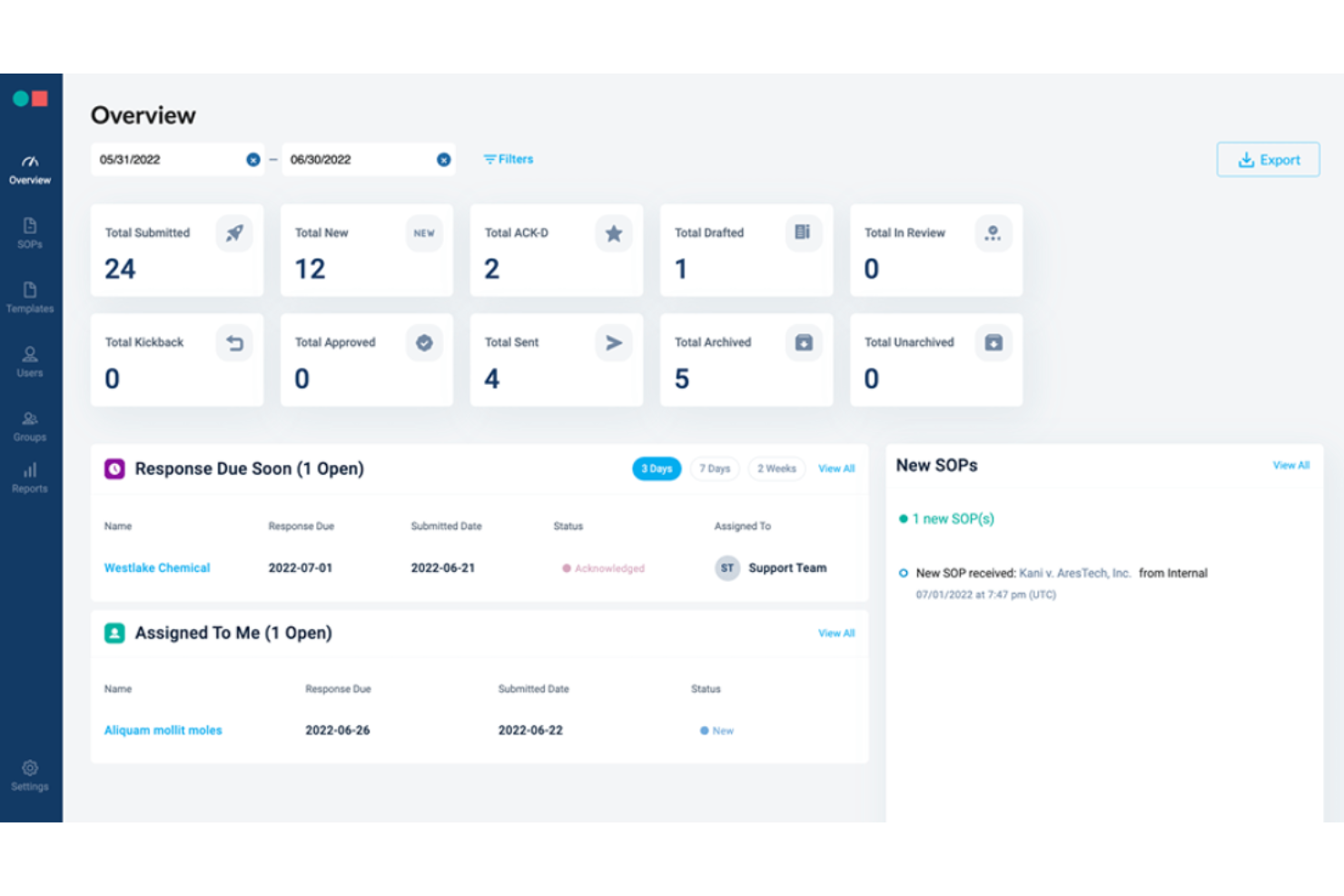
DISCO ofrece a los equipos legales una plataforma potenciada por IA diseñada para gestionar tareas complejas de descubrimiento electrónico (e-discovery) con rapidez y precisión. Su interfaz intuitiva y sus características de automatización resultan atractivas para despachos de abogados y departamentos jurídicos internos que manejan litigios de alto volumen o asuntos regulatorios.
¿Para quién es mejor DISCO?
DISCO es adecuado para equipos de litigios y profesionales de operaciones legales en despachos de abogados o empresas que gestionan proyectos de e-discovery y revisión de documentos a gran escala.
Por qué elegí DISCO
Las capacidades de e-discovery de DISCO van mucho más allá de la simple gestión de documentos. Lo elegí porque su función de Revisión Automática procesa hasta 32.000 documentos por hora —completando revisiones iniciales en horas en lugar de semanas— con una precisión de un 10–20% mayor que los revisores humanos. También valoro que Revisión Automática proporciona una explicación detallada para cada decisión de etiquetado, por lo que mi equipo puede realizar controles de calidad con confianza en lugar de tratar los resultados de IA como una caja negra. Para los casos en los que la evaluación temprana es crucial, DISCO utiliza una sola base de datos tanto para la evaluación temprana del caso como para la revisión activa, lo que significa que mi equipo evita el proceso laborioso de migrar documentos entre diferentes entornos.
Características clave de DISCO
- Cecilia Q&A: Una herramienta de análisis de pruebas basada en IA que te permite hacer preguntas en lenguaje natural sobre tu caso y proporciona respuestas con citas extraídas directamente de tu base de documentos.
- Definiciones contextuales de IA: Resalta cualquier acrónimo o término en el visor de documentos y genera una definición obtenida exclusivamente de tus documentos del caso, con una lista completa de citas.
- DISCO Hold: Una herramienta de gestión de retenciones legales que automatiza las notificaciones a custodios, la preservación de datos en Microsoft 365, Google Workspace y Slack, y genera registros de auditoría defendibles.
- Producción de documentos de hasta un millón de páginas: Realiza producciones de hasta un millón de páginas en solo 25 minutos, con selección de metadatos configurable incorporada en el flujo de trabajo de configuración de la producción.
Integraciones de DISCO
Actualmente no se listan integraciones nativas. DISCO sí ofrece una API para integraciones personalizadas.
Pros and Cons
Pros:
- Interfaz intuitiva para la gestión de datos
- Escalable para casos grandes
- Compatible con litigios y cumplimiento
Cons:
- Limitado a funciones de descubrimiento electrónico (e-discovery)
- Complejidad en el análisis de datos
- Específico para revisión de documentos legales

Harvey
Mejor para análisis de documentos legales

Harvey utiliza IA avanzada para ayudar a los equipos legales a analizar e interpretar rápidamente documentos legales complejos. Está diseñado para bufetes de abogados y asesores internos que necesitan extraer información, identificar riesgos y gestionar grandes volúmenes de texto legal con precisión.
¿Para quién es mejor Harvey?
Harvey es adecuado para profesionales legales y despachos de abogados que necesitan procesar, revisar y analizar grandes volúmenes de documentos legales de manera eficiente.
Por qué elegí Harvey
Elegí Harvey por su función Vault, que permite a mi equipo ejecutar análisis masivos de documentos en miles de archivos a la vez—algo realmente difícil de encontrar en otras herramientas de IA jurídica. Cuando trabajo en una revisión de due diligence para una gran fusión y adquisición, puedo consultar toda una bóveda para identificar contratos con disposiciones de cambio de control o derechos de terminación, en lugar de revisar cada documento manualmente. Las tablas de revisión de Harvey extraen y comparan los puntos clave de datos en un formato estructurado, por lo que puedo sintetizar los hallazgos en toda la documentación del acuerdo. Esa combinación de análisis masivo y extracción estructurada es lo que hace de Harvey la opción más clara para el análisis de documentos legales a gran escala.
Características clave de Harvey
- Chat estilo preguntas y respuestas: Haz preguntas en lenguaje natural y recibe respuestas fundamentadas extraídas de tus documentos cargados, bases de conocimiento internas y bases legales conectadas.
- Agentes de flujo de trabajo: Crea y despliega agentes personalizados de varios pasos usando instrucciones en lenguaje natural, con soporte para condicionales, clasificación y plantillas internas del despacho.
- Búsqueda agentiva: Harvey refina de forma iterativa las búsquedas en tus fuentes cargadas, ampliando el contexto hasta reunir suficiente información para generar una respuesta completa.
- Investigación legal interjurisdiccional: Consulta más de 500 fuentes de datos legales a nivel mundial—including Ask LexisNexis®, EUR-Lex y EDGAR—directamente en la plataforma.
Integraciones de Harvey
Actualmente no se enumeran integraciones nativas.
Pros and Cons
Pros:
- Automatiza tareas legales complejas
- Generación precisa de citas
- Gestión segura de documentos
Cons:
- Limitado al análisis de documentos legales
- Podría ser complejo para equipos pequeños
- Las salidas generadas por IA varían

Leah
Ideal para la gestión del ciclo de vida de contratos
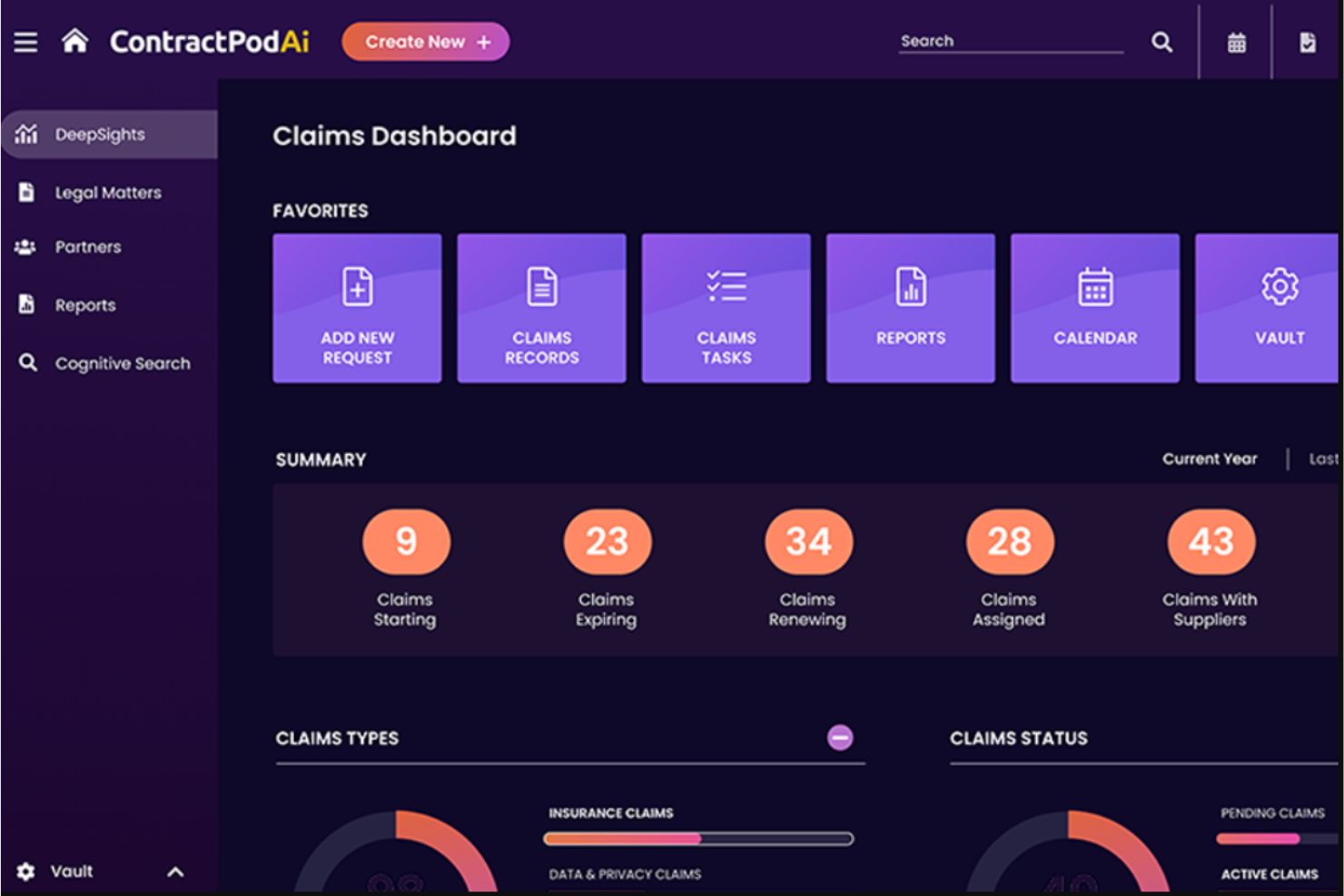
Leah de ContractPodAi ofrece gestión de contratos impulsada por IA, diseñada para equipos legales y asesores internos que buscan automatizar flujos de trabajo contractuales complejos. Su enfoque en la gestión integral del ciclo de vida ayuda a las organizaciones a reducir la revisión manual, mejorar el cumplimiento y centralizar la supervisión de contratos.
¿Para quién es mejor Leah?
Leah es ideal para equipos legales internos en empresas medianas y grandes que necesitan gestionar grandes volúmenes de contratos complejos.
Por qué elegí Leah
Leah se gana su lugar en esta lista porque cubre todo el ciclo de vida del contrato en una sola plataforma—desde la recepción hasta el seguimiento de obligaciones—sin requerir que los equipos legales unan herramientas separadas. Me gusta especialmente la revisión por IA a nivel de cláusula, que resalta riesgos y sugiere ediciones alineadas con las políticas durante la negociación, en lugar de después. La función de extracción de obligaciones categoriza automáticamente los compromisos, asigna responsables y activa recordatorios, para que mi equipo no persiga manualmente fechas de renovación o entregables pendientes. Para equipos internos que gestionan grandes volúmenes de contratos, esa cobertura integral es difícil de igualar.
Características clave de Leah
- Plantillas de contrato de autoservicio: Los equipos legales y de negocio pueden generar contratos a partir de bibliotecas de cláusulas previamente aprobadas y formularios de entrada, sin redactar desde cero.
- Evaluación de riesgos: Leah asigna automáticamente una puntuación a los contratos según desviaciones de cláusulas y señala lenguaje que se aparta de los marcos legales de tu organización.
- Repositorio inteligente: Un centro de contratos, controlado por permisos y con búsqueda avanzada, filtros y acciones en bloque, además de vistas personalizables para gestionar todo el portafolio de contratos.
- Paneles de informes personalizados: Realiza seguimiento de KPIs como tiempos de ciclo, fechas de renovación y uso de cláusulas, con reportes exportables en formato Excel o PDF.
Integraciones de Leah
Las integraciones incluyen Salesforce, DocuSign, Adobe Sign, Microsoft Outlook, Microsoft 365, SAP, Oracle, Workday, Google Workspace y Slack.
Pros and Cons
Pros:
- Análisis contractual impulsado por IA
- Soporta el ciclo de vida completo del contrato
- Reduce el tiempo de revisión manual
Cons:
- Puede requerir configuración inicial
- Limitado a la gestión de contratos

El mejor para bases de datos de investigación jurídica
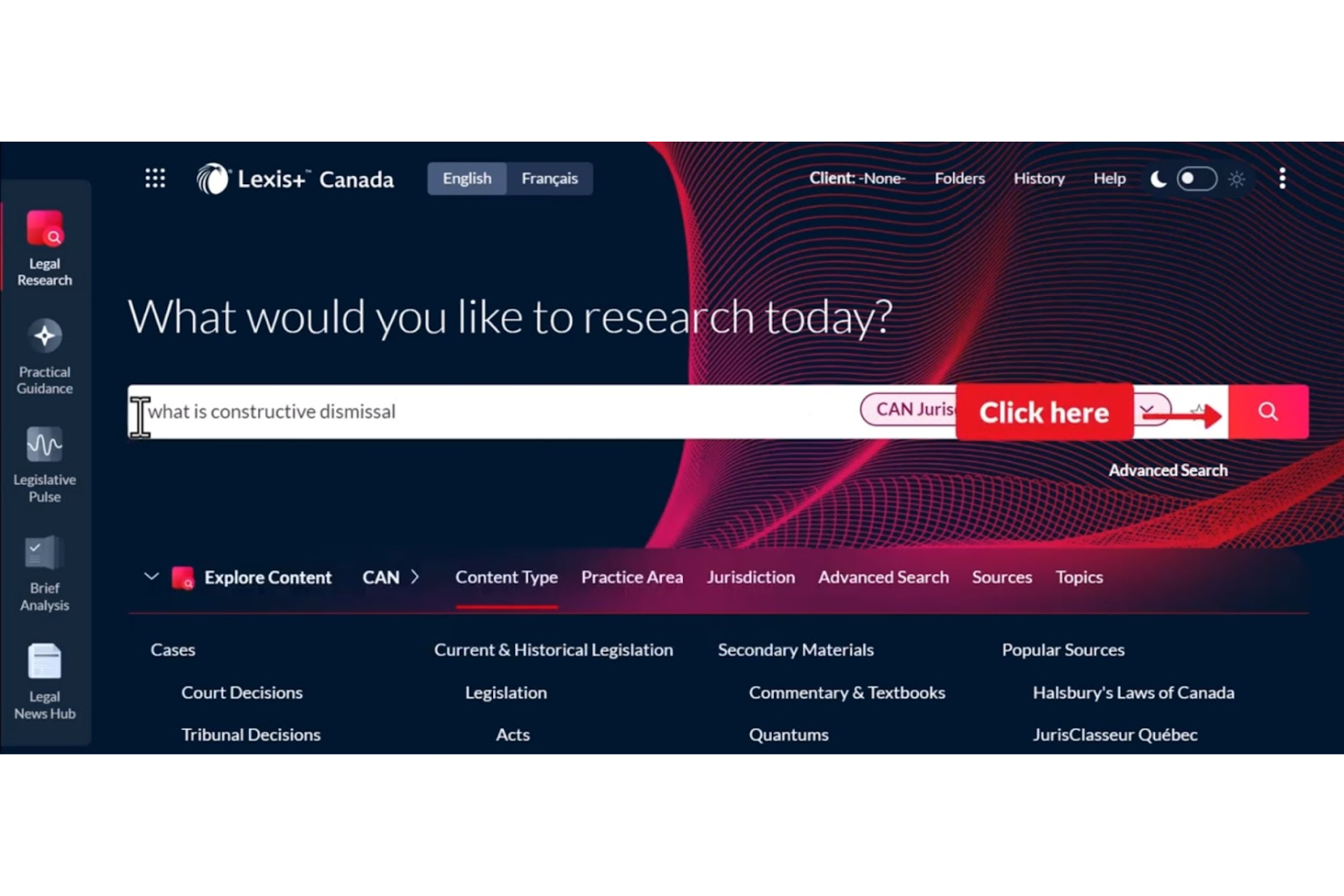
LexisNexis ofrece a los profesionales del derecho acceso a una amplia gama de herramientas de investigación y análisis adaptadas a despachos de abogados, asesores jurídicos internos y equipos de operaciones legales. Sus avanzadas capacidades de búsqueda y contenido jurídico seleccionado ayudan a los usuarios a encontrar rápidamente respuestas autorizadas y gestionar asuntos legales complejos.
¿Para quién es mejor LexisNexis?
LexisNexis es una opción sólida para profesionales y investigadores jurídicos en despachos de abogados, departamentos jurídicos corporativos e instituciones académicas que buscan información legal autorizada.
Por qué elegí LexisNexis
Lo que distingue a LexisNexis en el ámbito de la IA legal es la profundidad y autoridad de su contenido subyacente. Lo elegí porque Lexis+ AI fundamenta cada respuesta en derecho primario del Reino Unido: legislación, jurisprudencia de los All England Law Reports y las Leyes de Inglaterra de Halsbury, con citas que se pueden rastrear directamente a la fuente. Valoro que la función Vault permite a mi equipo guardar y reutilizar documentos clave, con respuestas de IA basadas tanto en nuestros propios materiales cargados como en contenido jurídico autorizado. En la práctica, esto significa que puedo realizar una consulta de investigación compleja, obtener una respuesta citada y verificar cada referencia sin salir de la plataforma.
Características clave de LexisNexis
- Lexis+ AI Ask: Ofrece respuestas instantáneas a preguntas legales fundamentadas en fuentes del Reino Unido autorizadas, incluidas las Leyes de Halsbury y los All England Law Reports, con citas enlazadas.
- Análisis de documentos transaccionales: Escanea contratos subidos para identificar cláusulas faltantes, inconsistencias y contradicciones directamente en la plataforma.
- Integración con DMS: Se conecta con sistemas de gestión documental como iManage, NetDocs y SharePoint, para que puedas consultar los documentos de tu firma junto con el contenido de LexisNexis.
- Generación gráfica de líneas de tiempo: Crea automáticamente una línea de tiempo visual a partir de documentos subidos, útil para la cronología de casos y la preparación de asuntos.
Integraciones de LexisNexis
Las integraciones incluyen iManage, Microsoft 365, NetDocuments, SharePoint, Visualfiles, Lexis® Create+, Lexis® Everyfile, Azure y otros sistemas de gestión documental jurídica. También está disponible una API para integraciones personalizadas.
Pros and Cons
Pros:
- Base de datos amplia de recursos legales
- Acceso integral a la jurisprudencia
- Permite una investigación jurídica exhaustiva
Cons:
- Puede requerir tiempo de configuración
- Complejidad al inicio del aprendizaje
- Limitado a funciones de investigación

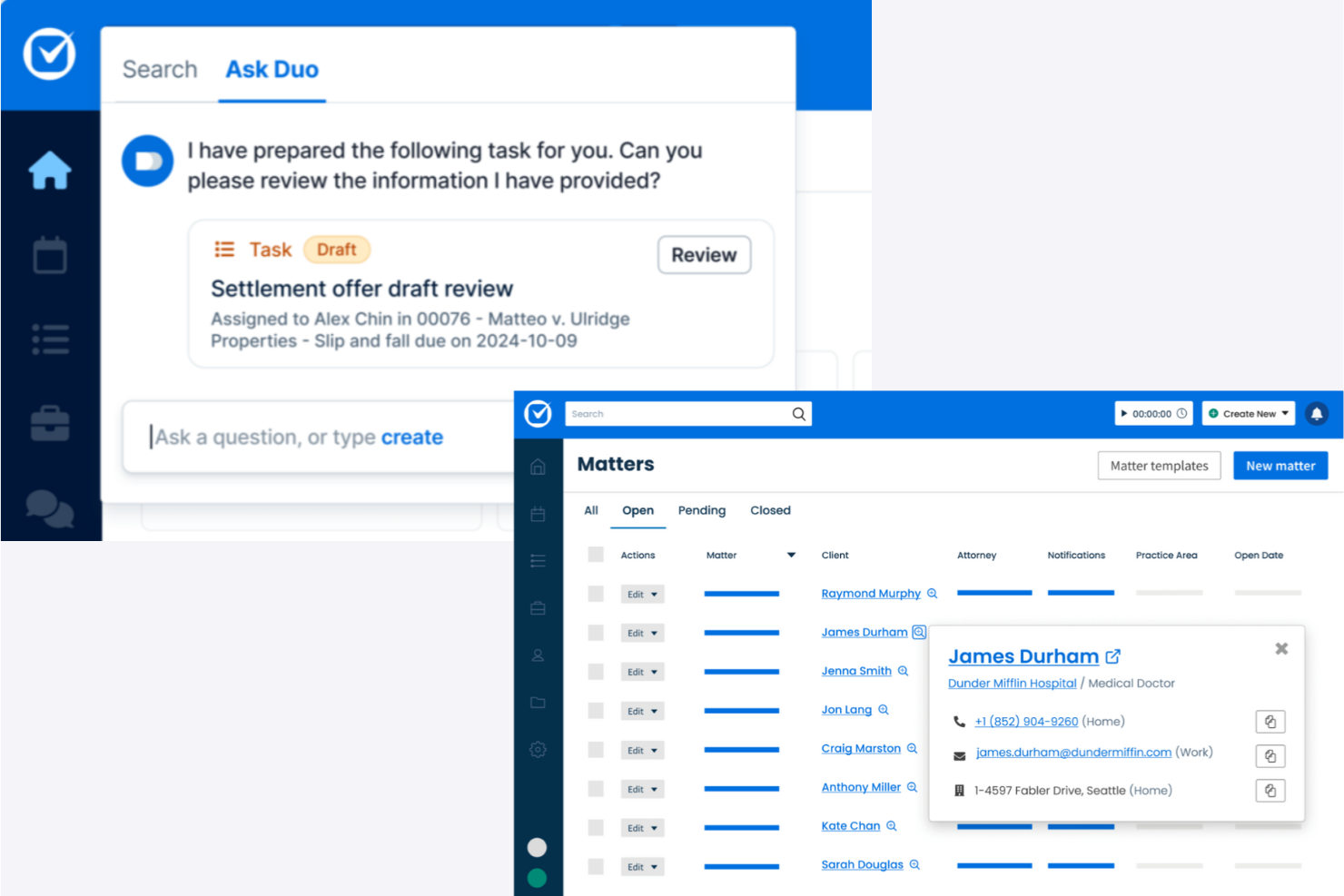
Clio Duo aporta automatización impulsada por IA y gestión documental a profesionales jurídicos que buscan una solución pensada para la nube. Su integración con la reconocida plataforma de gestión de despachos de Clio resulta atractiva para firmas que desean modernizar sus flujos de trabajo y reducir tareas legales manuales.
¿Para quién es mejor Clio Duo?
Clio Duo es ideal para bufetes y equipos jurídicos pequeños y medianos que priorizan la gestión segura de despachos en la nube y los flujos de trabajo legales potenciados por IA.
Por qué elegí Clio Duo
Elegí Clio Duo porque va más allá de redactar textos: transforma el trabajo legal en acciones completadas dentro de un entorno nativo en la nube. Valoro cómo Manage AI extrae plazos directamente de documentos judiciales y crea eventos de calendario automáticamente, lo que significa que mi equipo evita audiencias perdidas sin tener que ingresar datos manualmente. También dependo de su automatización de facturación: genera facturas preliminares, empareja recibos con asuntos y enruta aprobaciones, todo dentro de la infraestructura en la nube de Clio Manage. Para firmas que ya operan en la nube, esa integración elimina la fricción de alternar entre herramientas desconectadas.
Características clave de Clio Duo
- Resumir documentos con IA: Resume documentos legales extensos en síntesis concisas directamente dentro de la plataforma.
- Chat IA específico por asunto: Permite consultar detalles de casos, notas y documentos mediante una interfaz conversacional ligada a cada asunto.
- Automatización de admisión de clientes: Genera formularios de admisión y completa campos de asuntos con IA para reducir la carga manual.
- Asistencia en investigación legal: Destaca jurisprudencia relevante y referencias legales dentro del flujo de trabajo para apoyar la investigación jurídica.
Integraciones de Clio Duo
Las integraciones incluyen QuickBooks Online, Xero, InfoTrack, OurFamilyWizard, Case Status, ChartSquad, Legl, Precedent Demand Composer, Scorpion RevenueMAX y LawPay.
Pros and Cons
Pros:
- Acceso en la nube para mayor flexibilidad
- Simplifica la facturación y los pagos
- Gestión integral de casos
Cons:
- Puede requerir tiempo de configuración
- Limitado a la gestión de despachos
- Complejidad al configurar inicialmente


Hebbia utiliza inteligencia artificial avanzada para ayudar a los profesionales jurídicos a analizar, buscar y extraer rápidamente información relevante de documentos complejos. Su plataforma flexible está diseñada para bufetes de abogados y equipos internos que necesitan gestionar grandes volúmenes de datos legales y optimizar flujos de trabajo que requieren mucha investigación.
¿Para quién es mejor Hebbia?
Equipos jurídicos y profesionales de investigación en despachos de abogados o departamentos legales corporativos que necesitan analizar y sintetizar grandes volúmenes de documentos legales.
Por qué elegí Hebbia
Elegí Hebbia porque su interfaz Matrix resuelve directamente una de las partes más difíciles de la investigación legal: sintetizar información de cientos o miles de documentos a la vez. En lugar de revisar contratos o declaraciones uno por uno, puedo ejecutar consultas estructuradas sobre todo un conjunto de documentos y obtener los resultados en una cuadrícula similar a una hoja de cálculo: cada fila es un documento, cada columna es una indicación de análisis. Para el trabajo de litigios, esto significa identificar pruebas clave en transcripciones de declaraciones en una fracción del tiempo. También valoro el agente Deeper Research de Hebbia, que utiliza un sistema multiagente para descomponer preguntas legales complejas, recuperar información tanto de repositorios privados de documentos como de fuentes públicas, y producir informes completamente citados—de modo que puedo rastrear cada hallazgo hasta su origen.
Características clave de Hebbia
- Identificación de arte previo en patentes: Buscar y comparar reclamaciones clave en documentos de patentes para identificar arte previo superpuesto.
- Biblioteca automatizada de puntos de acuerdo: Construir y consultar un repositorio con capacidad de búsqueda de términos de acuerdos de fusiones y adquisiciones extraídos de transacciones pasadas.
- Auditoría de banderas rojas en sala de datos virtual (VDR): Analizar contratos en toda una VDR y generar un informe inicial de riesgos en minutos.
- Automatización de flujos de trabajo: Codificar procesos legales de varios pasos, como listas de verificación de diligencia debida o secuencias de revisión de contratos, para que Hebbia los ejecute de forma recurrente sin necesidad de re-indicación manual.
Integraciones de Hebbia
Las integraciones incluyen Snowflake, Amazon AWS S3, FactSet, Guidepoint, Pitchbook, Thirdbridge, Box, Dropbox, S&P Capital IQ y SharePoint.
Pros and Cons
Pros:
- Gestiona consultas legales complejas
- Comprensión contextual de los documentos
- Ideal para tareas de investigación intensiva
Cons:
- Puede requerir curva de aprendizaje
- Limitado a funciones de investigación
- Puede resultar abrumador para equipos pequeños

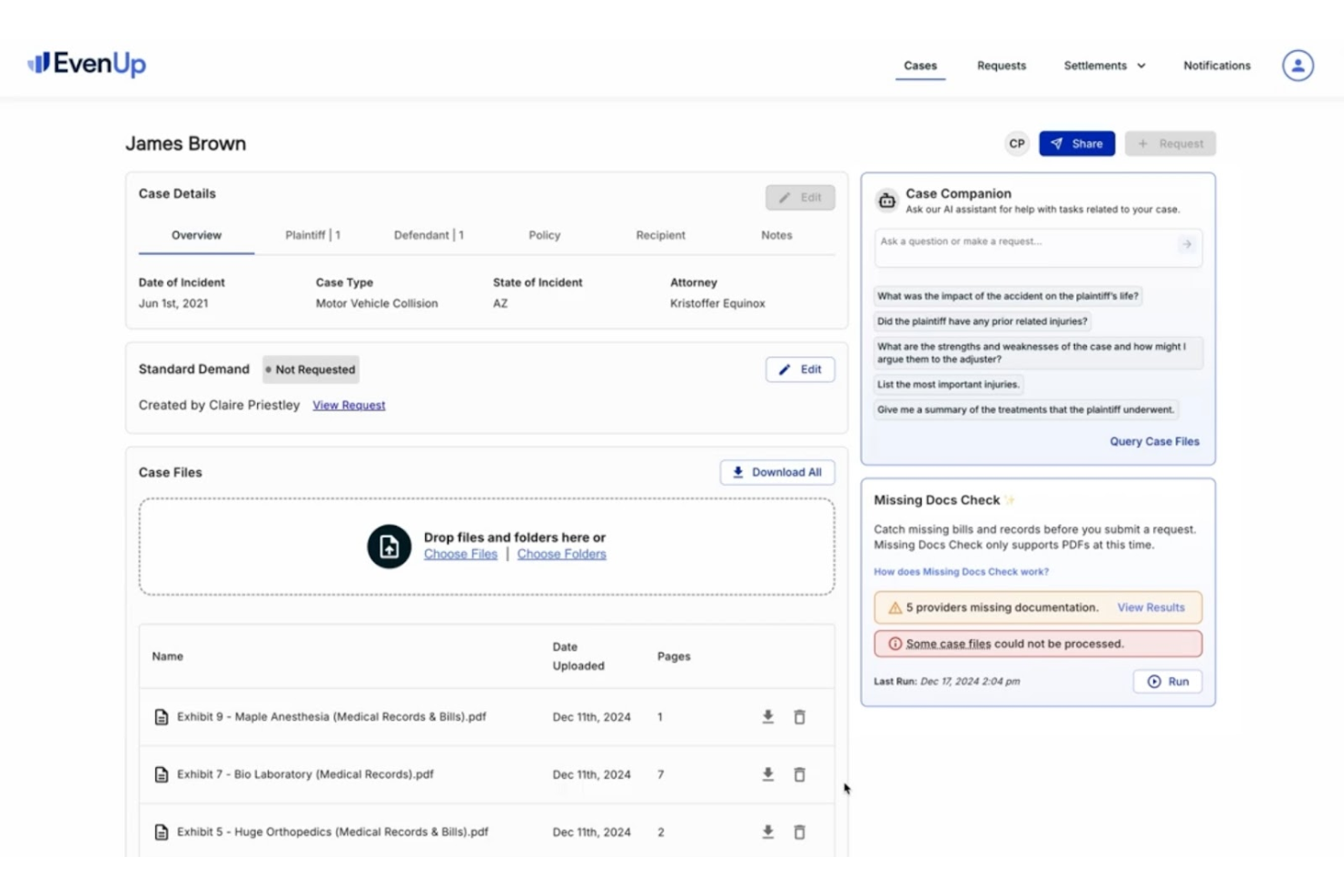
EvenUp utiliza inteligencia artificial para ayudar a bufetes de abogados y equipos legales de lesiones personales a automatizar la preparación de paquetes de demanda y documentos de conciliación. Su enfoque en agilizar la documentación compleja de los casos resulta atractivo para firmas que manejan grandes volúmenes de reclamaciones por lesiones personales.
¿Para quién es mejor EvenUp?
Abogados de lesiones personales y equipos de operaciones legales en bufetes que buscan automatizar y estandarizar la creación de paquetes de demanda.
Por qué elegí EvenUp
Elegí EvenUp porque ninguna otra herramienta legal de IA está construida exclusivamente en torno al ciclo de vida de un caso de lesiones personales. Su producto Demands™ combina Piai™—una IA propietaria entrenada con cientos de miles de casos de lesiones personales—con la revisión de más de 100 expertos legales internos, incluidos enfermeros, asistentes legales y ajustadores. También valoro la función Negotiation Preparation™, que destaca indicadores quirúrgicos, incidentes previos y diagnósticos negativos, para que mi equipo pueda anticipar los argumentos de la defensa antes de entrar en negociaciones con ajustadores. Para bufetes de lesiones personales que manejan altos volúmenes de casos, ese nivel de inteligencia específica de cada caso es difícil de encontrar en otros lugares.
Principales características de EvenUp
- MedChrons™: Genera cronologías médicas asistidas por IA con líneas de tiempo de tratamiento, aspectos destacados de diagnósticos, hipervínculos a pruebas y resúmenes organizados por proveedor en formatos web, PDF y .DOCX.
- Guías de acción con IA: Filtra y canaliza automáticamente los casos entrantes en la fase de admisión, señalando indicadores de alto valor, como demandados comerciales, y sacando a la luz posibles inconsistencias en los registros médicos.
- Repositorio de Acuerdos™: Ofrece una referencia basada en datos para las decisiones de acuerdo, apoyada en resultados históricos de casos.
- Análisis Ejecutivos™: Rastrea métricas a nivel de bufete como la velocidad de pedidos, continuidad de tratamientos y documentos faltantes, con comparativas entre pares a nivel estatal y nacional.
Integraciones de EvenUp
No se enumeran integraciones nativas actualmente.
Pros and Cons
Pros:
- Cartas de demanda generadas por IA
- Cronología médica eficaz
- Enfocado en la gestión de casos
Cons:
- Limitado al derecho de lesiones personales
- Específico para documentación legal
- Complejidad en el uso de analíticas

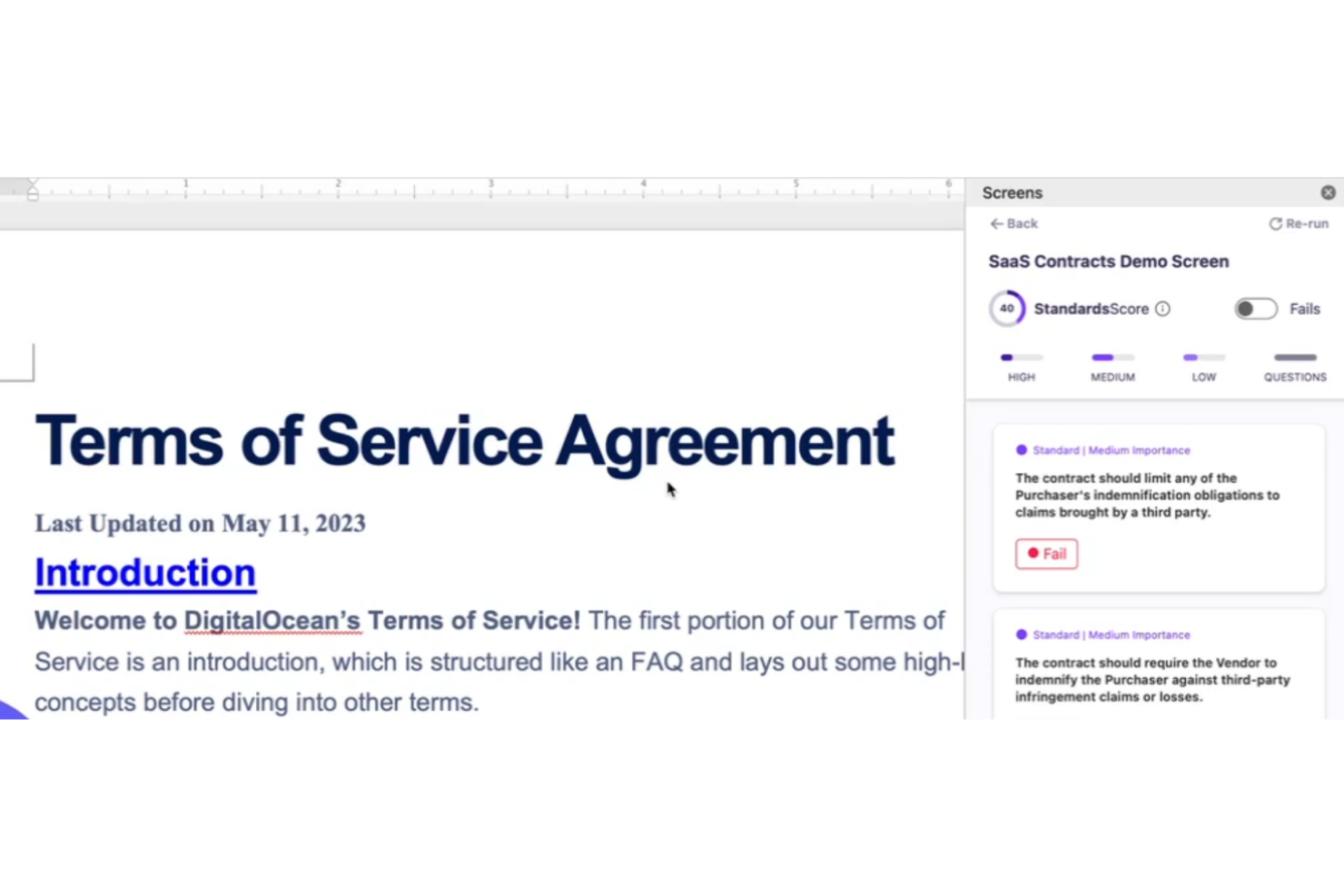
Screens ofrece a los profesionales del derecho una plataforma diseñada para la comunicación y colaboración confidencial y en tiempo real con clientes. Su enfoque en la privacidad y el cumplimiento normativo la convierte en una excelente opción para bufetes de abogados y asesores internos que manejan asuntos legales sensibles.
¿Para quién es mejor Screens?
Screens es ideal para despachos de abogados y equipos legales que requieren canales seguros y conformes para la comunicación con clientes y el intercambio de documentos.
Por qué elegí Screens
Screens se gana su lugar en esta lista gracias a su Compromiso de Datos Limpios de Screens: un compromiso formal de que los datos de sus contratos nunca se utilizarán para entrenar modelos de IA y de que todos sus subprocesadores se someten al mismo estándar. Lo elegí específicamente para equipos legales que gestionan asuntos delicados de clientes donde la confidencialidad de los datos no es negociable. También aprecio la función 'Chatea con el Documento', que le permite consultar un contrato en un espacio de trabajo privado sin exponer esos datos externamente. Combinado con el marcado de cambios en un solo clic y libros de jugadas personalizados, Screens brinda a los profesionales legales una forma de acelerar la revisión de contratos sin sacrificar la confidencialidad.
Funciones clave de Screens
- Revisión masiva: Cargue múltiples documentos Word, PDFs o contratos alojados públicamente y ejecútelos contra sus libros de jugadas de manera simultánea.
- Hacer Mutuo: Realice cambios en el texto del contrato directamente en Word para asegurar que los derechos y obligaciones apliquen por igual a todas las partes.
- Contratos de referencia: Acceda a una base de datos pública de contratos con datos de referencia en tiempo real para comparar los términos de los contratos con los estándares de mercado.
- Libros de jugadas instantáneos: Cree libros de jugadas personalizados basados en estándares de contratos específicos, que pueden reutilizarse en varias revisiones.
Integraciones de Screens
Actualmente no se enumeran integraciones nativas.
Pros and Cons
Pros:
- Edición directa de contratos en Word
- Análisis de múltiples contratos
- Libros de jugadas expertos de IA disponibles
Cons:
- Limitado a la gestión de contratos
- Puede requerir tiempo inicial de configuración
- Complejidad en el análisis de varios contratos
Otras herramientas de IA jurídica
Estas son algunas opciones adicionales de herramientas de IA jurídica que no llegaron a mi selección, pero que aun así merece la pena consultar:
- Trustiics AI
Ideal para firmas pequeñas y medianas
- Veritec AI
Mejor para monitoreo de cumplimiento
- Darrow
Ideal para identificar oportunidades legales


Cómo Evalúo las Herramientas de IA Jurídica
Cualquier herramienta incluida en esta lista debe hacer más que simplemente añadir un chatbot a una barra de búsqueda; busco una IA que realmente ahorre tiempo a los abogados en tareas como la revisión de contratos, la investigación legal y la elaboración de documentos. Divido mi evaluación en funcionalidades centrales que toda herramienta debe cumplir y factores diferenciadores que distinguen unas opciones de otras.
Funcionalidad Central (Requisitos Básicos para esta Lista)
Cuando selecciono herramientas para mi lista, califico cada una en una escala de 0 (no ofrece la funcionalidad) a 5 (sobresale en esta área) para cada funcionalidad central mencionada a continuación. Luego, calculo la puntuación total de la herramienta como un porcentaje. Cada herramienta debe obtener una puntuación total mínima del 65% para ser considerada para su inclusión.
- Análisis de Documentos Legales: Verifico si una herramienta puede resumir un contrato de arrendamiento, señalar cláusulas de riesgo en un acuerdo con proveedores o extraer fechas clave de un expediente.
- Investigación Jurídica Impulsada por IA: Evalúo cuán bien la herramienta responde a consultas en lenguaje natural con jurisprudencia, leyes o regulaciones citadas de distintas jurisdicciones.
- Automatización de Redacción de Documentos: Las buenas herramientas permiten a los abogados generar borradores iniciales de NDA, escritos o cartas de reclamación a partir de indicaciones o bibliotecas de cláusulas.
- Citas y Referencias Fidedignas: Cada cita debe enlazar con una autoridad legal verificable; busco herramientas que minimicen referencias inventadas a casos.
- Seguridad de Datos y Confidencialidad: Reviso el cumplimiento con SOC 2, compromisos de no entrenar con datos y estándares de cifrado que protejan la información privilegiada.
- Integración en el Flujo de Trabajo: La herramienta debe conectarse con plataformas que los abogados ya usan, como iManage, Clio, Relativity o Microsoft Word.
Una vez que tengo una lista de herramientas que cumplen con estos criterios, considero qué distingue a cada plataforma.
Factores Diferenciadores (Qué Distingue a los Proveedores)
Así es como comparo y contrasto diferentes proveedores:
Características Destacadas
El razonamiento sensible a la jurisdicción es importante cuando tu trabajo abarca múltiples regiones; busco herramientas que ajusten su análisis según la legislación aplicable. Las auditorías y la explicabilidad son igual de valiosas, especialmente cuando un abogado supervisor necesita revisar cómo la IA llegó a una conclusión. También evalúo si una herramienta ofrece chat conversacional sobre asuntos, lo que permite consultar tus propios expedientes en lenguaje claro en vez de realizar búsquedas manuales de palabras clave entre docenas de pruebas.
Más allá de las características
El riesgo de alucinaciones es una preocupación real, por lo que evalúo si un proveedor utiliza generación aumentada por recuperación y publica estándares de precisión o informes de transparencia. La adopción por parte de abogados también importa: una herramienta que ofrece incorporación exclusiva para el ámbito legal y capacitación válida para CLE será mucho mejor recibida que una que conduce a los usuarios a un centro de ayuda genérico. También considero el tamaño del despacho y el área de práctica, ya que un abogado litigante independiente tiene necesidades muy diferentes a las de un equipo interno encargado de la diligencia de grandes volúmenes en fusiones y adquisiciones.
Cómo elegir herramientas de IA jurídica
Es fácil perderse entre largas listas de funciones y complejas estructuras de precios. Para ayudarte a mantener la concentración mientras consideras cómo encaja cada herramienta de IA con el resto de tu software para despachos de abogados, aquí tienes una lista de factores que debes tener en cuenta:
| Factor | Qué debes considerar |
| Escalabilidad | Asegúrate de que la herramienta pueda crecer junto con tu despacho y gestionar el aumento de datos y de las demandas de los usuarios. |
| Integraciones | Comprueba si se integra con los sistemas existentes, incluido el software de gestión de despachos jurídicos, las herramientas de gestión documental y los sistemas de facturación. |
| Personalización | Busca opciones que permitan adaptar los flujos de trabajo y los informes a tus necesidades jurídicas específicas. |
| Facilidad de uso | Elige una herramienta con una interfaz fácil de usar para minimizar la formación y la incorporación de usuarios. |
| Presupuesto | Considera el coste total, incluidas las posibles tarifas ocultas, y asegúrate de que se ajuste a tu presupuesto. |
| Medidas de seguridad | Verifica que la herramienta cuente con medidas de seguridad sólidas para proteger los datos jurídicos sensibles. |
| Soporte | Evalúa la disponibilidad y la calidad del servicio de atención al cliente para resolver problemas. |
| Cumplimiento normativo | Asegúrate de que la herramienta cumpla las normas y regulaciones jurídicas pertinentes en tu ámbito. |
Tendencias en las herramientas de IA jurídica
Durante mi investigación, recopilé innumerables actualizaciones de productos, comunicados de prensa y registros de versiones de distintos proveedores de herramientas de IA jurídica. Estas son algunas de las tendencias emergentes que estoy siguiendo:
- Análisis predictivo: Los proveedores están mejorando las herramientas con análisis predictivo para pronosticar resultados legales. Esto ayuda a los abogados a tomar decisiones basadas en datos. Por ejemplo, algunas plataformas ahora ofrecen información sobre las tendencias de los casos y los posibles veredictos.
- Procesamiento del lenguaje natural (NLP): El procesamiento del lenguaje natural está mejorando la forma en que las herramientas comprenden y generan el lenguaje humano. Esto hace que la revisión y el análisis de documentos sean más rápidos y precisos. Muchas herramientas utilizan el procesamiento del lenguaje natural para resumir documentos legales y extraer rápidamente información clave.
- Información basada en IA: Las herramientas ofrecen información basada en IA que proporciona un análisis más profundo de los datos legales. Esto ayuda a identificar patrones y anomalías. Los proveedores están incorporando funciones que alertan a los usuarios sobre posibles riesgos u oportunidades legales.
- Blockchain para la seguridad: Algunos proveedores están integrando blockchain para mejorar la integridad y la seguridad de los datos. Esto garantiza que los documentos legales no puedan alterarse y sean verificables. Se está convirtiendo en una función clave para los bufetes que gestionan información confidencial.
- Asistentes legales virtuales: El auge de los asistentes legales virtuales está ayudando a los bufetes a gestionar las tareas de forma más eficiente. Estos asistentes pueden programar reuniones, organizar archivos e incluso realizar investigaciones preliminares. Se están convirtiendo en elementos esenciales para los bufetes que buscan optimizar sus operaciones.
¿Qué son las herramientas legales de IA?
Las herramientas legales de IA son soluciones de software que utilizan inteligencia artificial para ayudar a los profesionales del derecho a gestionar tareas como la revisión de documentos, la investigación jurídica y la supervisión del cumplimiento normativo. Los abogados, asistentes jurídicos e investigadores jurídicos suelen utilizar estas herramientas para mejorar la eficiencia y la precisión de su trabajo. El análisis predictivo, el procesamiento del lenguaje natural y la información basada en IA ayudan en la toma de decisiones, la comprensión del lenguaje complejo y el análisis de datos legales. Estas herramientas ofrecen un valor considerable al ahorrar tiempo, reducir errores y mejorar la calidad general de los servicios jurídicos.
Funciones de las herramientas legales de IA
Al seleccionar herramientas legales de IA, presta atención a las siguientes funciones clave:
- Análisis predictivo: Analiza datos para pronosticar resultados legales, lo que ayuda a tomar decisiones y planificar estrategias.
- Procesamiento del lenguaje natural: Comprende y procesa el lenguaje humano, lo que hace que la revisión y el análisis de documentos sean más rápidos y precisos.
- Información basada en IA: Proporciona un análisis más profundo de los datos legales e identifica patrones y posibles riesgos u oportunidades.
- Gestión de contratos: Automatiza la creación, revisión y gestión de contratos, garantizando la coherencia y el cumplimiento normativo.
- Supervisión del cumplimiento normativo: Realiza un seguimiento y garantiza el cumplimiento de las normas y regulaciones legales, reduciendo el riesgo de incumplimiento.
- Automatización de documentos: Acelera la creación y gestión de documentos legales, reduciendo la carga de trabajo manual.
- Descubrimiento electrónico: Facilita el proceso de descubrimiento electrónico mediante la organización y revisión de datos digitales relevantes para los casos legales.
- Asistentes legales virtuales: Ayudan a programar reuniones, organizar archivos y realizar investigaciones, optimizando la eficiencia operativa.
- Medidas de seguridad: Garantizan la protección de datos legales confidenciales mediante medidas de seguridad avanzadas.
Beneficios de las herramientas legales de IA
La implementación de herramientas legales de IA ofrece varios beneficios para tu equipo y tu empresa. Estos son algunos de los que puedes esperar:
- Mayor eficiencia: La automatización de tareas como la revisión de documentos y la gestión de contratos ahorra tiempo y reduce el esfuerzo manual.
- Mayor precisión: Funciones como el procesamiento del lenguaje natural garantizan un análisis preciso y reducen el riesgo de errores.
- Mejor toma de decisiones: El análisis predictivo y la información basada en IA proporcionan datos valiosos para fundamentar las estrategias legales.
- Mejora del cumplimiento normativo: La supervisión del cumplimiento ayuda a tu equipo a mantenerse al día con las normas y regulaciones legales.
- Ahorro de costes: Reducir la carga de trabajo manual y agilizar los procesos puede generar reducciones de costes considerables.
- Seguridad de los datos: Las medidas de seguridad avanzadas protegen la información legal confidencial y ofrecen tranquilidad.
- Flexibilidad operativa: Los asistentes legales virtuales y el acceso basado en la nube permiten trabajar desde cualquier lugar, mejorando la flexibilidad.
Costes y precios de las herramientas legales de IA
La selección de herramientas legales de IA requiere comprender los distintos modelos de precios y planes disponibles. Los costes varían en función de las funciones, el tamaño del equipo, los complementos y otros factores. La siguiente tabla resume los planes habituales, sus precios medios y las funciones que suelen incluir las soluciones de herramientas legales de IA:
Tabla comparativa de planes para herramientas legales de IA
| Tipo de plan | Precio medio | Funciones habituales |
| Plan gratuito | $0 | Revisión básica de documentos, almacenamiento limitado y asistencia básica. |
| Plan personal | $20-$50/ usuario/mes | Revisión avanzada de documentos, análisis básicos y asistencia por correo electrónico. |
| Plan empresarial | $50-$100/ usuario/mes | Análisis completos, supervisión del cumplimiento, asistencia mejorada y opciones de integración. |
| Plan para empresas | $100-$200/usuario/mes | Soluciones personalizadas, asistencia especializada, integraciones completas y análisis avanzados. |
Preguntas frecuentes sobre herramientas jurídicas de AI
Estas son algunas respuestas a preguntas frecuentes sobre las herramientas jurídicas de AI:
¿Qué consideraciones jurídicas existen en la AI?
Al utilizar AI en contextos jurídicos, debes abordar la confidencialidad y la protección de datos. Asegúrate de verificar la exactitud de los resultados generados por AI. Es importante crear políticas claras y ofrecer formación sobre el uso responsable de la AI para mitigar los riesgos.
¿Cuáles son las principales cuestiones jurídicas de la inteligencia artificial?
La AI en contextos jurídicos plantea varias cuestiones, como las alucinaciones y la falta de precisión, los problemas relacionados con la propiedad intelectual y la protección de datos. También existe la posibilidad de sesgos en los sistemas de AI y una falta actual de leyes integrales que regulen el uso de la AI.
¿Existe alguna herramienta de AI para crear documentos jurídicos?
Sí, herramientas como Spellbook utilizan AI para redactar contratos. Se integran con Microsoft Word para predecir cláusulas, sugerir lenguaje jurídico y garantizar la coherencia entre documentos, lo que hace que la redacción sea más eficiente.
¿Cómo gestionan la protección de datos las herramientas jurídicas de AI?
Las herramientas jurídicas de AI suelen incorporar cifrado y controles de acceso para proteger los datos confidenciales. También pueden ofrecer funciones que garantizan el cumplimiento de las normativas y políticas de protección de datos, proporcionando tranquilidad a los profesionales del Derecho.
¿Qué tecnologías impulsan las herramientas jurídicas de AI y cómo funcionan?
Las herramientas jurídicas de AI se basan en la AI generativa, los modelos de lenguaje de gran tamaño y el aprendizaje automático, que permiten automatizar tareas jurídicas como la investigación y la redacción. Estas herramientas suelen depender de algoritmos y plataformas de vanguardia como OpenAI para producir textos similares a los humanos.
Funciones como los asistentes de AI, los chatbots de AI y los modelos de AI permiten a los profesionales del Derecho optimizar sus flujos de trabajo. Los equipos jurídicos que buscan la mejor AI suelen recurrir a soluciones de AI y herramientas de AI generativa que se integran perfectamente con el software jurídico.
¿Cómo se utiliza actualmente la AI en el sector jurídico?
En el sector jurídico, las herramientas de AI ayudan a los bufetes y a los equipos jurídicos internos a reducir la carga de trabajo manual. Son especialmente útiles para tareas como redactar memorandos, analizar resultados de casos, gestionar la redacción de documentos y llevar a cabo procesos de diligencia debida.
Al automatizar tareas rutinarias y reducir el trabajo que consume tiempo, las herramientas jurídicas de AI mejoran la productividad y la precisión. También facilitan una mejor gestión de las jurisdicciones y producen documentos jurídicos de alta calidad con mayor rapidez y coherencia.
¿Cuáles son algunas de las herramientas jurídicas de AI más populares disponibles?
Plataformas líderes como Casetext y CoCounsel están a la vanguardia de la AI en la tecnología jurídica. Estas herramientas utilizan AI generativa y modelos de lenguaje de gran tamaño para ofrecer investigación jurídica avanzada, automatización de documentos y asistencia en la redacción.
Están diseñadas para ayudar tanto a los bufetes como a los departamentos jurídicos internos, proporcionando análisis jurídicos rápidos, fiables y precisos mediante flujos de trabajo basados en AI.
¿Cómo abordan las herramientas jurídicas de AI las cuestiones de privacidad de los datos?
La privacidad de los datos es una preocupación fundamental al adoptar herramientas jurídicas de AI. Las soluciones desarrolladas teniendo en cuenta la privacidad garantizan que la información confidencial sea procesada de forma segura por los modelos de AI. Muchas herramientas —ya sean asistentes de AI, chatbots o plataformas como CoCounsel— cumplen estrictas normas de protección de datos, lo que ayuda a los equipos jurídicos a mantener la confidencialidad de los clientes y a cumplir las normativas específicas de cada jurisdicción.