

El software de gestión de expedientes de marcas te ayuda a ti y a tu equipo a gestionar plazos, renovaciones y el cumplimiento legal, y el riesgo de pasar algo por alto es elevado. Ayuda a mantener organizados y accesibles todos los datos de tus marcas.
Llevo años probando y analizando software, especialmente en el sector jurídico. Sé qué funciona y qué no. En este artículo, compartiré mis conclusiones sobre los mejores programas de gestión de expedientes de marcas disponibles, centrándome en las funciones que realmente marcan la diferencia.
Por qué confiar en nuestras recomendaciones de software
6,700+
Reviews
20
Industry experts
16+
Evaluation factors
14
Years
Nuestro equipo lleva probando y evaluando software desde 2012. Como líderes de despachos jurídicos, sabemos lo difícil —y lo importante— que es elegir el software adecuado.
Para esta guía, evaluamos las herramientas mediante pruebas prácticas e investigación independiente, puntuando las herramientas según nuestros criterios de selección.
Nuestras reseñas reflejan nuestro criterio editorial humano, no un discurso de ventas.
Resumen de los mejores programas de gestión de expedientes de marcas
Esta tabla comparativa resume los detalles de precios de mis principales selecciones de programas de gestión de expedientes de marcas para ayudarte a encontrar el más adecuado para tu presupuesto y las necesidades de tu empresa.
| Tool | Best For | Trial Info | Price | ||
|---|---|---|---|---|---|
| 1 | Ideal para la gestión automatizada de expedientes | Demostración gratuita disponible | Desde $60/mes | Website | |
| 2 | Ideal para pequeños bufetes de abogados | Demostración gratuita disponible | Desde $125/mes | Website | |
| 3 | Ideal para grandes empresas | Demostración gratuita disponible | Precios bajo solicitud | Website | |
| 4 | La mejor opción para soluciones basadas en la nube | Demostración gratuita disponible | Precio bajo solicitud | Website | |
| 5 | Ideal para oficinas de transferencia tecnológica | Demostración gratuita disponible | Precio bajo solicitud | Website | |
| 6 | Ideal para el seguimiento de patentes | Demostración gratuita disponible | Precios bajo solicitud | Website | |
| 7 | Ideal para la gestión global de marcas | Demostración gratuita disponible | Precios bajo solicitud | Website | |
| 8 | La mejor opción para la supervisión de patentes | Demostración gratuita disponible | Precio bajo petición | Website | |
| 9 | La mejor opción para el análisis de carteras de propiedad intelectual | Demostración gratuita disponible | Precios disponibles bajo solicitud | Website | |
| 10 | La mejor opción para instituciones de investigación | Demostración gratuita disponible | Precios bajo solicitud | Website |


Análisis de los mejores programas de gestión de expedientes de marcas
A continuación se incluyen mis resúmenes detallados de los mejores programas de gestión de expedientes de marcas de mi lista. En mis análisis examino las funciones principales, las ventajas y desventajas, las integraciones y los casos de uso ideales de cada herramienta para ayudarte a encontrar la más adecuada.
 Ideal para la gestión automatizada de expedientes
- Demostración gratuita disponible
- Desde $60/mes
Visit WebsiteCustomer Rating:4.9/5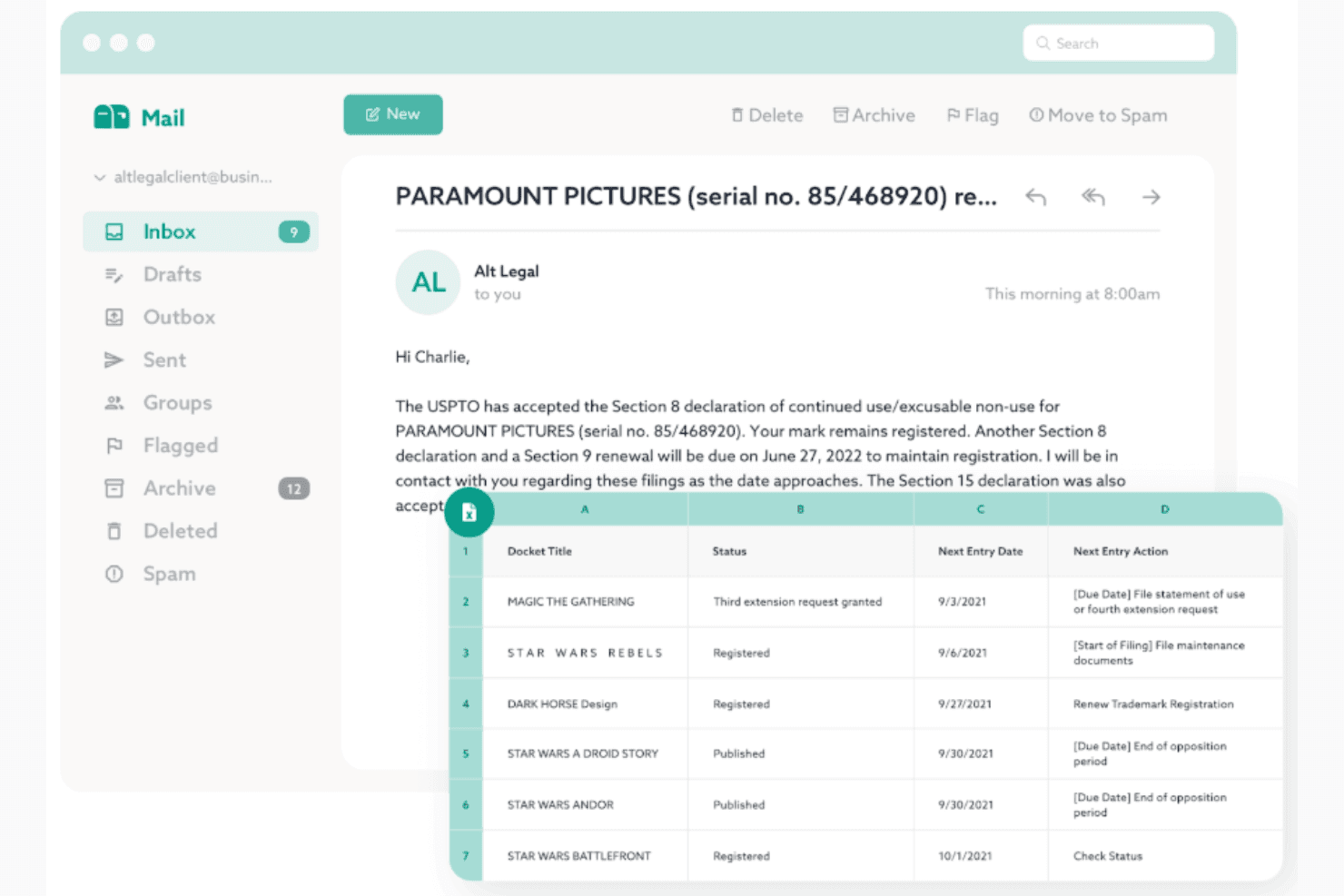
Alt Legal registra automáticamente las marcas con seguimiento global en tiempo real. Alt Legal es una plataforma de gestión de expedientes de marcas basada en la nube que completa automáticamente los registros de asuntos, calcula los plazos y sincroniza directamente los datos de tramitación desde la USPTO, la CIPO y más de 180 oficinas de propiedad intelectual de todo el mundo.
¿Para quién es más adecuado Alt Legal?
Alt Legal es adecuado para abogados y asistentes jurídicos especializados en marcas de boutiques de propiedad intelectual, despachos individuales y firmas Am Law que gestionan expedientes de tramitación activos en varias jurisdicciones.
Por qué elegí Alt Legal
Alt Legal está en mi lista de favoritos por la manera tan eficaz en que el proceso de gestión de expedientes se vuelve prácticamente automático una vez conectado a la base de datos TSDR de la USPTO. Cuando se presenta una respuesta y la USPTO actualiza el registro, Alt Legal elimina automáticamente el plazo anterior y registra el siguiente, sin necesidad de intervención manual. También me gusta que la misma automatización se extienda a más de 180 oficinas internacionales de propiedad intelectual mediante su integración con CompuMark, de modo que los plazos de renovación extranjeros se creen automáticamente cuando las marcas se registran o renuevan en otros países.
Principales funciones de Alt Legal
- Acceso al portal para clientes y asociados: Ofrece acceso ilimitado y gratuito a clientes y asociados extranjeros para consultar expedientes y plazos en tiempo real.
- Generador de informes personalizados: Crea informes de marcas adaptados con filtros dinámicos y entrega programada a abogados o clientes.
- Compositor de productos y servicios: Redacta declaraciones de productos y servicios que cumplen con el Manual de identificación de productos y servicios de la USPTO y calcula las tasas de solicitud TEAS.
- Actualizaciones diarias automatizadas del estado: Recibe correos electrónicos diarios automatizados con los últimos cambios de estado y las acciones pendientes de todos los asuntos del expediente.
Integraciones de Alt Legal
Alt Legal ofrece integraciones nativas con CompuMark (Clarivate), USPTO y CIPO para recibir directamente datos de gestión de expedientes. Hay una API disponible para integraciones personalizadas.
Pros and Cons
Pros:
- Resuelve automáticamente los plazos cuando se actualizan los registros de la USPTO
- Realiza un seguimiento de los datos de tramitación en más de 180 oficinas de propiedad intelectual
- Incluye un número ilimitado de plazas en los portales para clientes y asociados
Cons:
- La gestión de documentos está menos desarrollada que la de sus competidores
- No incluye herramientas integradas de facturación ni de estimación de tasas
Learn more about Alt Legal: Ideal para pequeños bufetes de abogados
- Demostración gratuita disponible
- Desde $125/mes
Visit WebsiteCustomer Rating:4.9/5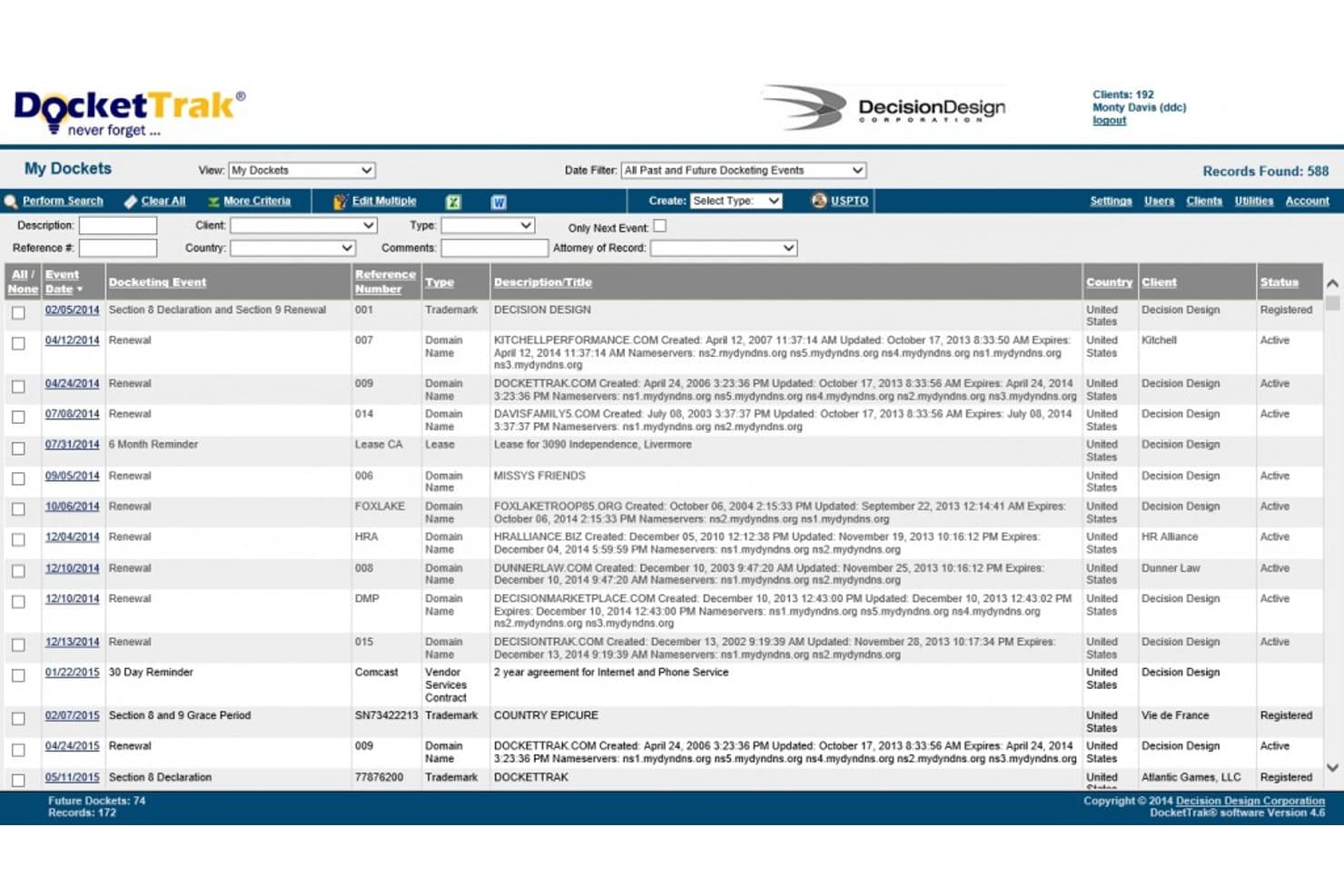
DocketTrak ofrece un completo panel de gestión de expedientes que muestra eventos de renovación de marcas y nombres de dominio, con funciones de filtrado, búsqueda y seguimiento de varios clientes. DocketTrak es un sistema de gestión de expedientes de propiedad intelectual basado en la nube que realiza el seguimiento de carteras de marcas y patentes, automatiza los cálculos de plazos y se sincroniza con oficinas de marcas, incluidas USPTO, EUIPO, WIPO y CIPO.
¿Para quién es más adecuado DocketTrak?
Pequeños bufetes de abogados especializados en propiedad intelectual y despachos boutique de marcas que necesitan una gestión de expedientes fiable y asequible sin la complejidad de los sistemas diseñados para empresas grandes.
Por qué elegí DocketTrak
DocketTrak ocupa un lugar en mi lista de favoritos porque reduce la carga de trabajo manual que los pequeños equipos de marcas no pueden mantener. Me encanta que cree automáticamente los registros del expediente en el momento en que se presenta una solicitud ante la USPTO y que se sincronice cada noche, para que mi equipo no tenga que perseguir las actualizaciones. DocketWatch analiza diariamente cada nueva solicitud de la USPTO y señala las acciones oficiales de la Sección 2(d) que citan las marcas de sus clientes, lo que proporciona a los pequeños despachos una supervisión proactiva de conflictos sin el presupuesto necesario para contratar un servicio especializado de vigilancia.
Funciones principales de DocketTrak
- Integraciones internacionales de marcas: Sincroniza diariamente los datos de marcas de las oficinas de CIPO, EUIPO, WIPO, Reino Unido, Australia y Nueva Zelanda.
- Portal de acceso para clientes: Concede a los clientes acceso seguro y de solo lectura para consultar en línea sus carteras de marcas y fechas de vencimiento.
- Generador de informes configurable: Permite generar y exportar en tiempo real informes personalizados de carteras, expedientes y plazos.
- Licencias de usuario ilimitadas: Admite clientes, registros y usuarios ilimitados con todos los niveles de suscripción.
Integraciones de DocketTrak
DocketTrak ofrece integraciones nativas con USPTO, CIPO, EUIPO, WIPO, UK IPO, IP Australia e IP New Zealand para sincronizar diariamente los datos de marcas. También hay una API disponible para integraciones personalizadas.
Pros and Cons
Pros:
- Portal del cliente para acceder en tiempo real al estado de las marcas
- Realiza el seguimiento de plazos en múltiples jurisdicciones internacionales
- Usuarios y registros ilimitados en todos los planes
Cons:
- No ofrece análisis de correspondencia ni clasificación automática basados en inteligencia artificial
- Escalabilidad limitada para grandes departamentos de propiedad intelectual
Learn more about DocketTrak: Ideal para grandes empresas
- Demostración gratuita disponible
- Precios bajo solicitud
Visit WebsiteCustomer Rating:4.4/5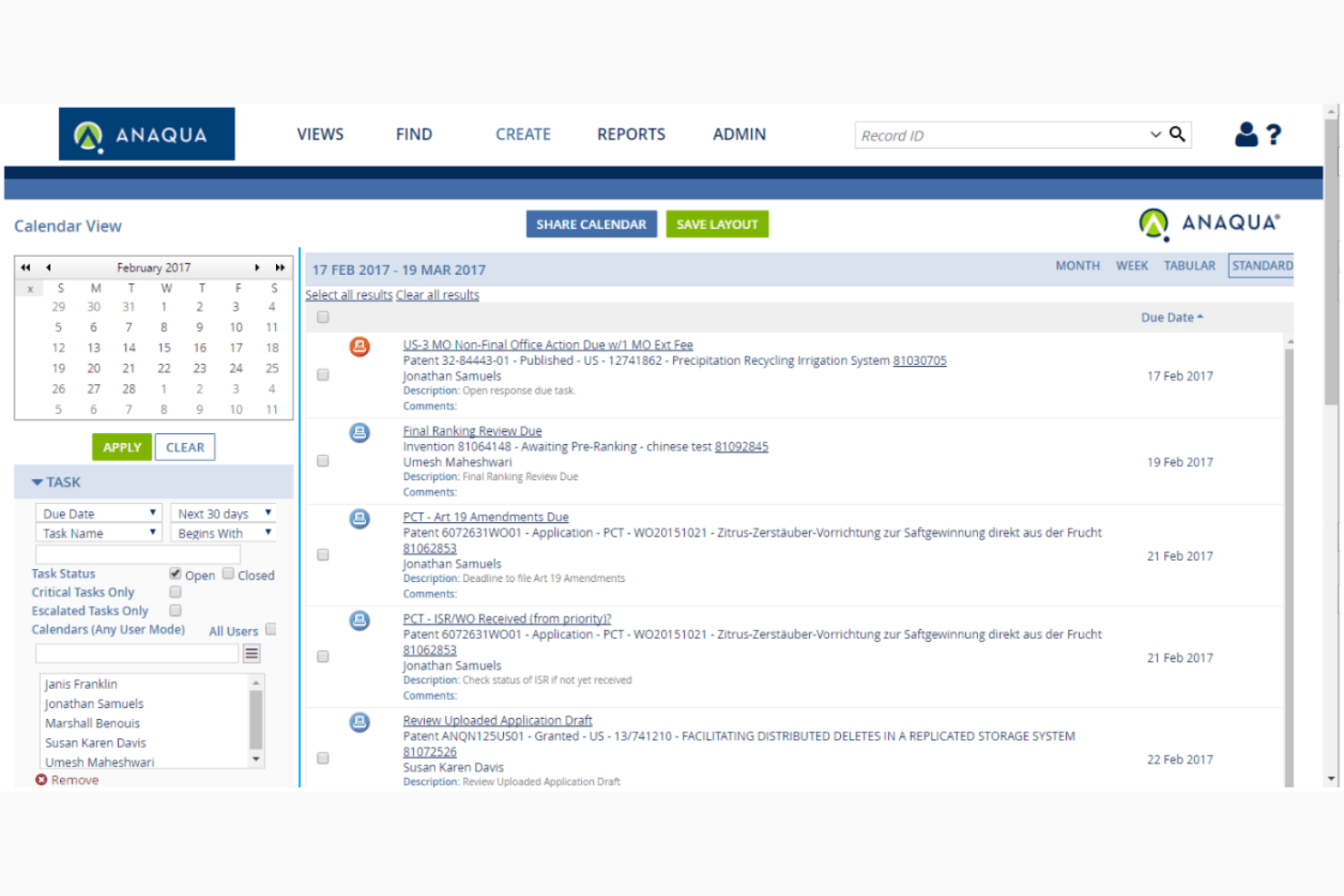
Anaqua AQX centraliza las operaciones globales de marcas para grandes empresas. Anaqua AQX es una plataforma empresarial de gestión de marcas que unifica la gestión automatizada de expedientes, el seguimiento de plazos en múltiples jurisdicciones, el análisis de carteras y la incorporación de correspondencia mediante IA en un solo sistema.
¿Para quién es más adecuada Anaqua AQX?
AQX está diseñada específicamente para grandes corporaciones y firmas legales globales que gestionan carteras de marcas de gran volumen en docenas de jurisdicciones simultáneamente.
Por qué elegí Anaqua AQX
Anaqua AQX ocupa un lugar en mi lista de opciones finalistas gracias a su motor de plazos basado en reglas, que abarca más de 180 jurisdicciones, con una lógica específica para cada país mantenida por expertos legales. Me gusta especialmente la incorporación de correspondencia mediante IA (a través de Microsoft Azure AI Document Intelligence), que procesa automáticamente el correo de las oficinas de propiedad industrial y completa las entradas de los expedientes sin intervención manual. Los paneles de HyperView también permiten a mi equipo analizar en tiempo real una enorme cartera global por marca, región geográfica o línea de productos.
Características principales de Anaqua AQX
- Paneles de HyperView: Accede a informes visuales en tiempo real organizados por marca, región geográfica y línea de productos.
- Colaboración mediante Anaqua Connect: Intercambia datos y coordina flujos de trabajo de forma segura con asesores externos y clientes.
- Herramientas de migración masiva de datos: Importa directamente en la plataforma registros históricos de gestión de expedientes y clasificaciones personalizadas.
- Aplicación móvil contra la falsificación: Envía desde cualquier dispositivo casos sospechosos de infracción o falsificación de marcas.
Integraciones de Anaqua AQX
Anaqua AQX ofrece integraciones nativas con USPTO TSDR, EUIPO, WIPO, Anaqua Services y WiseTime, además de una API para integraciones personalizadas.
Pros and Cons
Pros:
- El motor de plazos basado en reglas abarca más de 180 jurisdicciones
- La IA analiza la correspondencia de las oficinas sin intervención de asistentes jurídicos
- Análisis de carteras consultable por marca y región geográfica
Cons:
- La incorporación requiere especialistas dedicados y una cantidad considerable de tiempo
- No es muy adecuada para pequeñas firmas de propiedad intelectual
Learn more about Anaqua AQX: La mejor opción para soluciones basadas en la nube
- Demostración gratuita disponible
- Precio bajo solicitud
Visit WebsiteCustomer Rating:4.6/5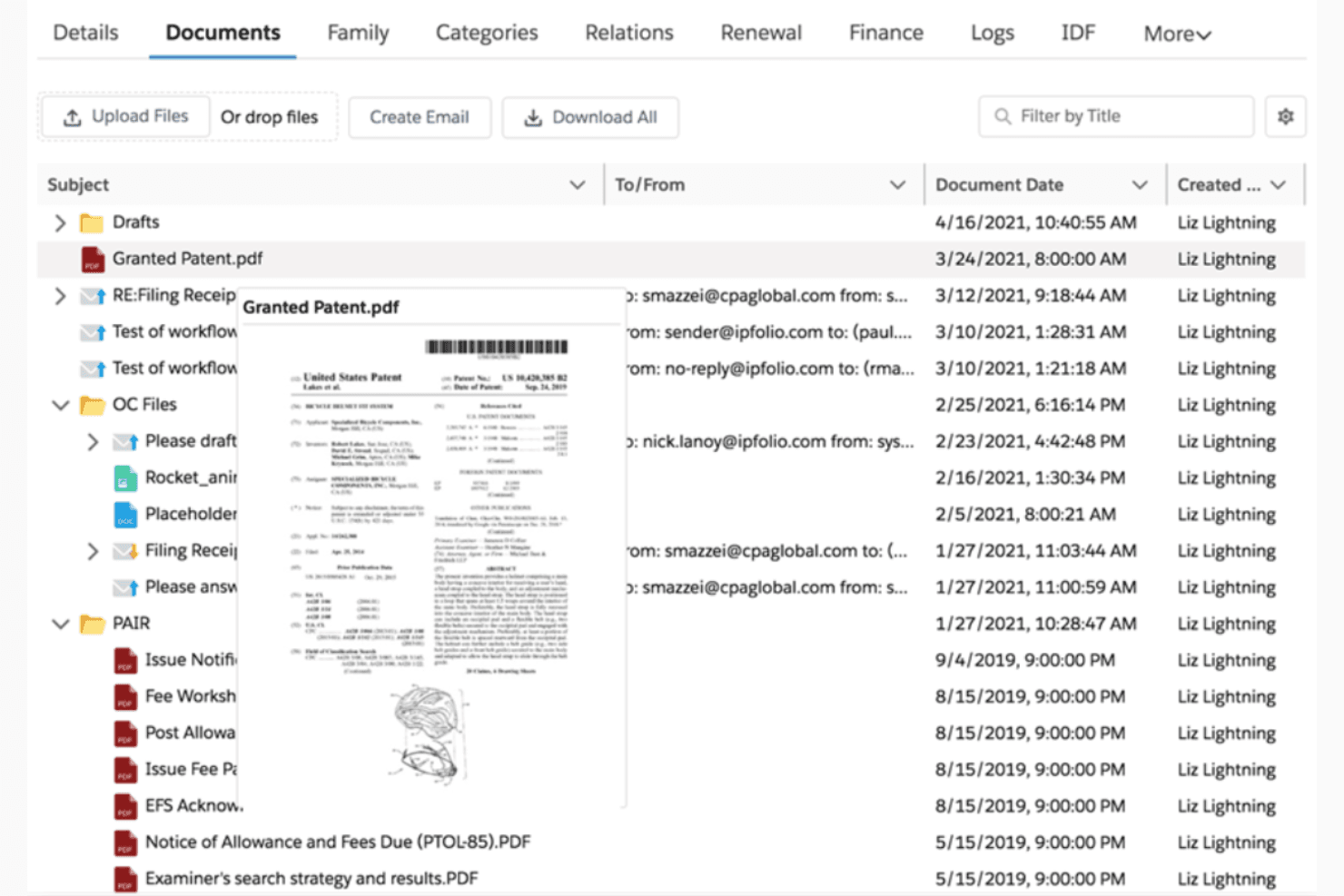
IPfolio agiliza las tareas de propiedad intelectual con una gestión de marcas basada en la nube. IPfolio es una plataforma de gestión de propiedad intelectual nativa de Salesforce que abarca la gestión de expedientes de marcas, el seguimiento de plazos en múltiples jurisdicciones, la gestión de carteras y la incorporación automatizada de expedientes para los equipos de propiedad intelectual corporativa.
¿Para quién es más adecuado IPfolio?
Los departamentos corporativos de propiedad intelectual de medianas y grandes empresas, especialmente aquellos que ya utilizan la plataforma Salesforce, son los usuarios naturales de IPfolio.
Por qué elegí IPfolio
Elegí IPfolio como una de las mejores opciones porque su arquitectura nativa de Salesforce proporciona actualizaciones automáticas de la plataforma, eliminando los costosos ciclos de actualización que requieren los sistemas locales. Me gusta especialmente cómo el motor de legislación por país calcula los plazos de las marcas en distintas jurisdicciones sin necesidad de mantener reglas manualmente. La función de gestión automática de expedientes enriquece posteriormente esos registros con datos de marcas verificados, manteniendo los expedientes actualizados sin introducir datos manualmente.
Funciones principales de IPfolio
- Paneles de gestión de carteras: Accede a paneles configurables que muestran asuntos de marcas, estados e historial de tramitación de toda tu cartera.
- Gestión integrada de documentos: Almacena y organiza documentos de marcas, correspondencia y acciones oficiales dentro de cada registro.
- Herramientas de informes personalizables: Crea y programa informes de estado y resúmenes de plazos adaptados para tus usuarios o partes interesadas.
- Seguridad de la plataforma Salesforce: Confía en controles de acceso basados en roles, cifrado y registros de auditoría integrados en la infraestructura de Salesforce.
Integraciones de IPfolio
IPfolio ofrece integraciones nativas con CompuMark, FoundationIP y Salesforce. Hay una API disponible para integraciones personalizadas.
Pros and Cons
Pros:
- Las actualizaciones automáticas de la plataforma eliminan los costosos ciclos de actualización
- El motor de legislación por país calcula automáticamente los plazos en múltiples jurisdicciones
- Controles de seguridad de nivel empresarial integrados en la plataforma
Cons:
- Requiere una instancia de Salesforce existente para su implementación
- Las opciones de personalización de informes son relativamente limitadas
Learn more about IPfolio: Ideal para oficinas de transferencia tecnológica
- Demostración gratuita disponible
- Precio bajo solicitud
Visit WebsiteCustomer Rating:4.4/5
Inteum Minuet gestiona los ciclos de vida de la propiedad intelectual para oficinas de transferencia tecnológica. Inteum es una plataforma de gestión de carteras de propiedad intelectual que combina la gestión de expedientes de marcas y patentes, el seguimiento de plazos, la gestión documental y los flujos de trabajo de acuerdos de licencia para equipos institucionales de propiedad intelectual.
¿Para quién es más adecuado Inteum?
Inteum es una opción sólida para las oficinas de transferencia tecnológica de universidades, hospitales de investigación y laboratorios federales que gestionan carteras de propiedad intelectual mixtas con patentes, marcas y acuerdos de licencia.
Por qué elegí Inteum
Elegí Inteum porque es la única plataforma de gestión de expedientes de marcas diseñada específicamente para oficinas de transferencia tecnológica, donde las carteras de propiedad intelectual suelen combinar patentes, marcas y acuerdos de licencia. El módulo de marcas de Minuet realiza un seguimiento de los gastos de presentación y anualidades junto con los acuerdos de marca asociados, manteniendo todo conectado en un solo registro. A continuación, Sentinel Notifications automatiza las alertas de plazos vinculadas directamente a registros específicos de propiedad intelectual, para que nada se pase por alto durante los ajetreados ciclos de tramitación.
Características principales de Inteum
- Portal para inventores: Los investigadores pueden enviar divulgaciones de invenciones directamente a través de un portal en línea específico.
- Integración con DocuSign CLM: Las firmas digitales y los eventos del ciclo de vida de los contratos se gestionan desde la plataforma.
- Campos personalizados y localización: Los campos configurables ilimitados y las etiquetas de la interfaz de usuario admiten hasta 10 idiomas.
- Editor de tecnología: Promueve tecnologías susceptibles de licencia entre socios potenciales a través de un mercado en línea integrado.
Integraciones de Inteum
Inteum ofrece integraciones nativas con DocuSign CLM, CPI, RenewalsDesk, Clarivate y Outlook, además de una API para integraciones personalizadas.
Pros and Cons
Pros:
- Realiza un seguimiento de acuerdos de licencia vinculados a registros de marcas
- Diseñado para carteras institucionales de propiedad intelectual mixtas
- Gestiona las divulgaciones de invenciones junto con las solicitudes de marca
Cons:
- No está adaptado a la gestión de expedientes de bufetes de abogados
- Automatización de plazos en múltiples jurisdicciones más limitada que la de sus competidores
Learn more about Inteum: Ideal para el seguimiento de patentes
- Demostración gratuita disponible
- Precios bajo solicitud
Visit WebsiteCustomer Rating:4/5
PATTSY WAVE automatiza el seguimiento de patentes con precisión y cumplimiento normativo. PATTSY WAVE es una plataforma de gestión de expedientes de patentes y marcas de doble propósito, diseñada para bufetes de abogados de propiedad intelectual, que combina la automatización de AutoDocket®, el seguimiento de plazos en múltiples jurisdicciones y la gestión de correspondencia integrada con sistemas de gestión documental.
¿Para quién es más adecuada PATTSY WAVE?
PATTSY WAVE es una opción excelente para bufetes de abogados de propiedad intelectual con equipos especializados en gestión de expedientes que administran grandes carteras de patentes y marcas en múltiples jurisdicciones y bajo una presión constante por cumplir plazos estrictos.
Por qué elegí PATTSY WAVE
Elegí PATTSY WAVE porque su motor AutoDocket® gestiona automáticamente la correspondencia tanto de patentes como de marcas, extrayendo datos actualizados de USPTO TSDR, EUTM y WIPO Madrid para actualizar las entradas de los expedientes sin intervención manual. Esta cobertura de carteras duales resulta realmente útil cuando un bufete gestiona asuntos de patentes y marcas en paralelo dentro de un mismo sistema. También me gusta cómo la Validación de datos web verifica los datos entrantes directamente con los registros de las oficinas de marcas, detectando discrepancias antes de que se conviertan en plazos incumplidos.
Características principales de PATTSY WAVE
- Portal para inventores: Permite a los inventores enviar divulgaciones y realizar un seguimiento del estado de sus reconocimientos mediante cuestionarios personalizables sin código.
- Integración de sincronización con sistemas de gestión documental: Sincroniza documentos y metadatos con sistemas líderes de gestión documental como NetDocuments e iManage.
- Estimador de costes globales de propiedad intelectual: Genera informes detallados de estimación de costes para solicitudes de marcas en todo el mundo directamente desde cualquier registro de asunto.
- Flujos de trabajo de recordatorios configurables: Programa recordatorios automatizados para tareas de tramitación con notificaciones a múltiples destinatarios, incluidos abogados y clientes.
Integraciones de PATTSY WAVE
PATTSY WAVE ofrece integraciones nativas con NetDocuments e iManage para la gestión documental y proporciona una API para integraciones personalizadas.
Pros and Cons
Pros:
- AutoDocket® completa automáticamente los plazos de múltiples oficinas
- Cubre asuntos de patentes y marcas en una sola plataforma
- La Validación de datos web señala automáticamente las discrepancias en la correspondencia
Cons:
- Menos adecuada para boutiques de propiedad intelectual unipersonales
- La personalización de informes requiere un tiempo considerable de configuración
Learn more about PATTSY WAVE: Ideal para la gestión global de marcas
- Demostración gratuita disponible
- Precios bajo solicitud
Visit WebsiteCustomer Rating:4.3/5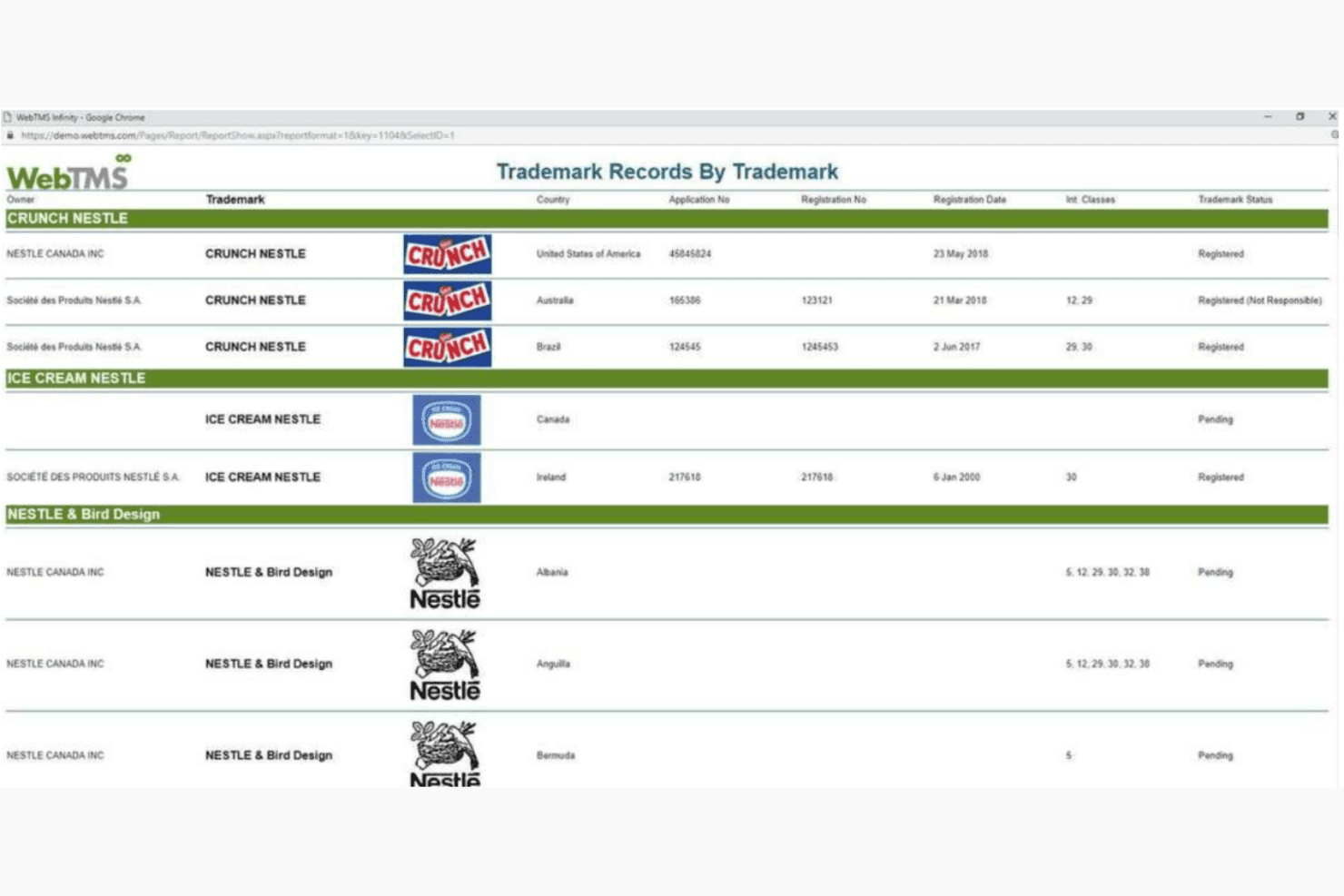
WebTMS automatiza las actualizaciones globales de marcas en más de 180 regiones. WebTMS es una plataforma web de gestión de expedientes de marcas que abarca la gestión de carteras en múltiples jurisdicciones, el seguimiento automatizado de plazos y la sincronización de datos en más de 180 oficinas de PI de todo el mundo.
¿Para quién es más adecuado WebTMS?
WebTMS es adecuado para despachos de abogados y equipos internos de PI que gestionan grandes carteras de marcas en múltiples jurisdicciones para varios clientes o unidades de negocio.
Por qué elegí WebTMS
WebTMS se ha ganado un lugar en mi lista de opciones debido a la seriedad con la que aborda la cobertura global. Me gusta la función de sincronización de datos, que extrae automáticamente registros actualizados de más de 180 oficinas de PI. También registra un historial de auditoría completo de cada cambio de estado, algo importante al gestionar carteras a gran escala. Los informes de visualización en mapas son algo que no he visto en muchas otras herramientas de gestión de expedientes, ya que muestran de un vistazo la distribución geográfica de los derechos de marca de un cliente en toda su cartera.
Características principales de WebTMS
- Portales de acceso para clientes: Permiten a los clientes consultar de forma segura los registros de marcas, los informes y los plazos con permisos personalizables.
- Panel de gestión electrónica de expedientes: Ofrece una vista actualizada de los próximos plazos de marcas y eventos de tramitación en una interfaz codificada por colores.
- Constructor de informes: Permite a los usuarios crear informes personalizados con filtrado avanzado, diseños y elementos de marca, tanto para uso interno como para clientes.
- Asistentes de registros: Agilizan la introducción masiva de datos para proyectos como solicitudes en varios países, renovaciones y cesiones.
Integraciones de WebTMS
Las integraciones nativas no están documentadas con claridad. WebTMS ofrece una API para integraciones personalizadas.
Pros and Cons
Pros:
- La auditoría en tiempo real verifica los datos con los registros de marcas
- La importación masiva extrae los casos directamente de las oficinas de marcas
- Equipo de atención al cliente muy valorado y receptivo
Cons:
- No dispone de un módulo de patentes para la gestión consolidada de expedientes de PI
- La automatización del módulo de litigios es en gran medida manual
Learn more about WebTMS: La mejor opción para la supervisión de patentes
- Demostración gratuita disponible
- Precio bajo petición
Visit WebsiteCustomer Rating:4.1/5
IAMIP realiza un seguimiento de los datos globales de propiedad intelectual para respaldar decisiones inteligentes y colaborativas. IAMIP Platform es una plataforma de inteligencia de propiedad intelectual impulsada por IA que combina la supervisión de patentes, la gestión de carteras, el seguimiento de la competencia y las alertas sobre el estado legal en bases de datos de patentes de todo el mundo.
¿Para quién es más adecuada IAMIP Platform?
IAMIP Platform es adecuada para profesionales de la propiedad intelectual y equipos de I+D de empresas tecnológicas que necesitan supervisar la actividad de patentes de sus competidores en distintas jurisdicciones de todo el mundo.
Por qué elegí IAMIP Platform
He incluido IAMIP Platform entre mis principales opciones porque la profundidad de su supervisión de patentes es realmente difícil de replicar en otros lugares. Su sistema de alerta temprana señala las nuevas solicitudes de patentes de competidores en el momento en que aparecen en más de 105 países, y el comparador de reivindicaciones basado en IA me permite realizar análisis comparativos entre jurisdicciones sin cambiar de herramienta. Para los equipos de propiedad intelectual que necesitan hacer un seguimiento de las solicitudes de sus competidores mientras gestionan su propia cartera, esa combinación de alertas en tiempo real y análisis de reivindicaciones integrado mantiene todo en un solo lugar.
Funciones principales de IAMIP Platform
- Resumidor de patentes impulsado por IA: Condensa automáticamente documentos de patentes extensos en resúmenes claros y redactados en lenguaje sencillo.
- Espacios de trabajo colaborativos: Permite a los equipos comentar, compartir y organizar carteras con roles de usuario y niveles de acceso configurables.
- Supervisión del estado legal: Analiza y actualiza continuamente los cambios en el estado legal de las patentes procedentes de oficinas de patentes de todo el mundo.
- Almacenamiento seguro de documentos: Almacena y gestiona archivos de patentes y documentos relacionados en centros de datos con certificación ISO 27001.
Integraciones de IAMIP Platform
Las integraciones nativas no están documentadas con claridad. La herramienta ofrece una API para integraciones personalizadas.
Pros and Cons
Pros:
- Supervisa las solicitudes de competidores en más de 105 países
- La IA resume automáticamente los documentos de patentes
- Alertas en tiempo real sobre el estado legal de oficinas de todo el mundo
Cons:
- Está centrada en patentes y no está diseñada para la gestión de expedientes de marcas
- No cuenta con un motor específico para calcular plazos de marcas
Learn more about IAMIP Platform: La mejor opción para el análisis de carteras de propiedad intelectual
- Demostración gratuita disponible
- Precios disponibles bajo solicitud
Visit WebsiteCustomer Rating:5/5
Clarivate ofrece información de propiedad intelectual en tiempo real con potentes herramientas de gestión de carteras. Clarivate es una plataforma de gestión de propiedad intelectual que combina el registro automatizado de marcas, el seguimiento de plazos en múltiples jurisdicciones, la gestión de carteras y la incorporación de correspondencia de las principales oficinas de marcas, incluidas USPTO, WIPO y EPO.
¿Para quién es más adecuada Clarivate?
Clarivate es una opción excelente para los equipos corporativos de propiedad intelectual y los grandes bufetes de abogados que gestionan carteras de marcas complejas y de gran volumen en múltiples jurisdicciones de todo el mundo.
Por qué elegí Clarivate
Clarivate ocupa un lugar en mi lista de finalistas por la profundidad con la que integra la inteligencia de cartera en el flujo de trabajo de registro. IPfolio incorpora directamente en cada asunto datos de marcas enriquecidos de CompuMark y Darts-ip, de modo que puedo consultar el historial de oposiciones y el riesgo de litigio sin salir de la plataforma. La capa de análisis basada en Salesforce me permite crear paneles personalizados que muestran de un vistazo la exposición a renovaciones de toda una cartera.
Características principales de Clarivate
- Centro de correspondencia centralizado: Recopila y organiza en un solo lugar, por asunto, toda la correspondencia de las oficinas de marcas, los agentes y los clientes.
- Motor de plazos para múltiples jurisdicciones: Admite reglas de plazos automatizadas para presentaciones ante USPTO, EPO, WIPO, JPO, CIPO y otras oficinas.
- Gestión documental integrada: Almacena, vincula y recupera todos los documentos y la correspondencia relacionados con marcas por expediente.
- Generador de informes personalizados: Permite a los usuarios diseñar y programar la entrega de informes sobre el estado de la cartera de marcas para las necesidades internas y de los clientes.
Integraciones de Clarivate
Clarivate ofrece integraciones nativas con USPTO, EPO, WIPO, JPO, CIPO e IPA para la recepción automatizada de expedientes y documentos, y proporciona una API para integraciones personalizadas.
Pros and Cons
Pros:
- Análisis profundo de carteras de propiedad intelectual sobre marcas de todo el mundo
- Integra de forma nativa los datos de vigilancia de CompuMark
- Cubre más de 100 jurisdicciones con reglas mantenidas por expertos
Cons:
- Implementación compleja para equipos de propiedad intelectual más pequeños
- La dependencia de Salesforce limita la flexibilidad de implementación
Learn more about Clarivate: La mejor opción para instituciones de investigación
- Demostración gratuita disponible
- Precios bajo solicitud
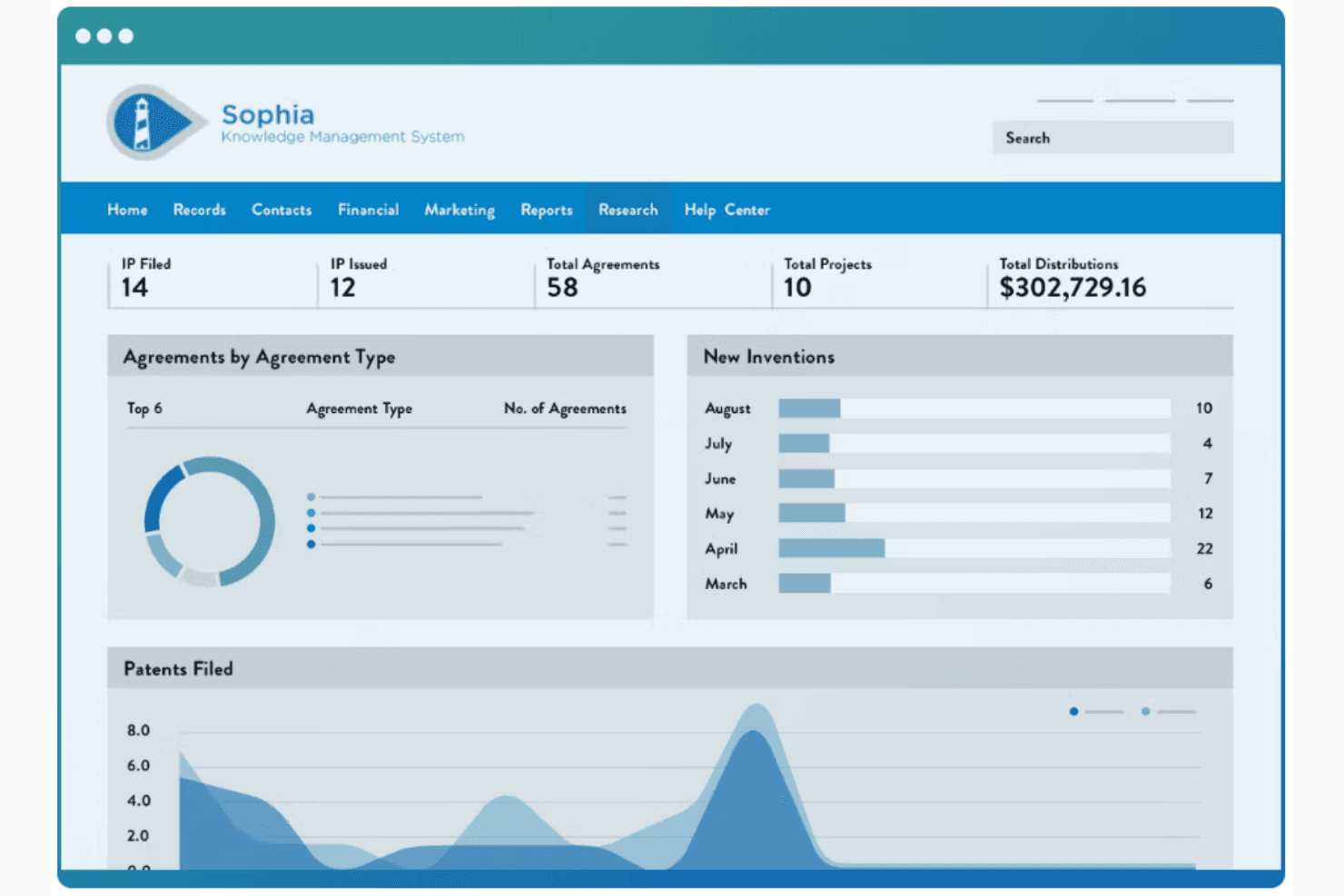
Wellspring agiliza la gestión de la propiedad intelectual y el cumplimiento normativo para instituciones de investigación. Wellspring IP Management es una plataforma de gestión del ciclo de vida de la propiedad intelectual que abarca la gestión de expedientes de marcas y patentes, el seguimiento de plazos, la gestión de carteras y el almacenamiento de documentos en más de 122 jurisdicciones.
¿Para quién es más adecuada Wellspring IP Management?
Wellspring es una opción natural para las oficinas de transferencia tecnológica de universidades y las instituciones de investigación que gestionan grandes carteras de propiedad intelectual relacionadas con solicitudes de patentes y marcas.
Por qué elegí Wellspring IP Management
Elegí Wellspring IP Management como una de las mejores opciones porque su motor de gestión de expedientes está diseñado en torno a los flujos de trabajo institucionales de propiedad intelectual, no a los ciclos de facturación de los bufetes de abogados. Las reglas automatizadas de plazos específicas de cada país cubren las renovaciones de marcas en más de 122 países, algo importante cuando una TTO realiza el seguimiento simultáneo de una cartera global. También me gusta el portal para inventores, que permite a los investigadores enviar divulgaciones directamente al expediente, manteniendo todo el ciclo de vida de la propiedad intelectual en un solo lugar.
Funciones principales de Wellspring IP Management
- Sistema automatizado de gestión de expedientes: Calcula los plazos de acciones oficiales y renovaciones según las normas actualizadas de cada país.
- Carga de documentos vinculados a asuntos: Permite adjuntar y organizar documentos y correspondencia de marcas directamente dentro de cada registro.
- Controles de permisos personalizables: Ofrece gestión de roles de usuario con configuraciones personalizadas de acceso de solo lectura y de administrador.
- Vinculación integrada de acuerdos: Conecta acuerdos de licencia y contratos con activos específicos de propiedad intelectual para una gestión centralizada.
Integraciones de Wellspring IP Management
Las integraciones nativas no están documentadas claramente. Hay una API disponible para integraciones personalizadas.
Pros and Cons
Pros:
- Seguimiento sólido del ciclo de vida de la propiedad intelectual específico para TTO
- Se adapta a los flujos de trabajo específicos de la institución sin ayuda del proveedor
- Recordatorios automatizados de solicitudes de patentes integrados
Cons:
- El sistema puede ralentizarse notablemente durante las búsquedas de registros
- Las reglas de gestión de expedientes específicas para marcas son secundarias frente al enfoque en patentes
Learn more about Wellspring IP Management :
Otros programas de gestión de expedientes de marcas
Estas son algunas opciones adicionales de programas de gestión de expedientes de marcas que no llegaron a mi lista, pero que aún merece la pena consultar:
- 11Equinox IPMSIdeal para flujos de trabajo personalizables
- 12AppColl Prosecution ManagerIdeal para la tramitación de propiedad intelectual
- 13FlexTracIdeal para la gestión flexible de casos
Cómo evalúo el software de gestión de expedientes de marcas
Divido mi evaluación en dos capas: las capacidades básicas que una herramienta debe tener—como reglas de plazos multijurisdiccionales y autopoblación del expediente—y los diferenciadores que distinguen a los proveedores.
Funcionalidad básica (Imprescindibles para esta lista)
Cuando selecciono herramientas para mi lista, califico cada una en una escala de 0 (no ofrece la funcionalidad) a 5 (sobresale en esta área) por cada funcionalidad básica de las enumeradas abajo. Luego, calculo la puntuación total de la herramienta en forma de porcentaje. Cada herramienta debe alcanzar una puntuación total mínima del 55% para ser considerada para su inclusión.
- Seguimiento de plazos de marcas: Busco motores basados en reglas que calculen automáticamente los plazos de respuesta para acciones oficiales, periodos de renovación y declaraciones de uso, en lugar de depender de entradas manuales en el calendario.
- Soporte multijurisdiccional: Cada herramienta debe cubrir las reglas de gestión de expedientes de las principales oficinas de marcas como la USPTO, EUIPO y el Protocolo de Madrid de la OMPI, con reglas locales para oficinas nacionales más allá de estas.
- Gestión de portafolios de marcas: Evalúo cómo cada plataforma organiza los signos, clases, productos y servicios, cadenas de titularidad e historiales de tramitación—especialmente en grandes portafolios de múltiples clientes.
- Población automática del expediente: Reviso si una herramienta ingiere datos de fuentes de oficinas de marcas o analiza correspondencia oficial para poblar las entradas de los expedientes, reduciendo la introducción manual que puede provocar pérdida de plazos.
- Reportes de estado y recordatorios: La plataforma debe ofrecer flujos de trabajo de recordatorios configurables y reportes personalizados para que los asistentes legales puedan generar actualizaciones de estado listas para el cliente sin necesidad de exportar a hojas de cálculo.
- Gestión de documentos y correspondencia: Miro cómo cada herramienta almacena y vincula acciones oficiales, certificados de registro y documentos de tramitación a los registros de marcas correspondientes para una recuperación rápida.
Una vez tengo una lista de herramientas que cumplen con los criterios, considero qué distingue a cada plataforma.
Factores diferenciadores (Qué distingue a los proveedores)
Así es como comparo y contrasto los diferentes proveedores:
Características destacadas
El análisis de correspondencia impulsado por IA es un gran diferenciador—las herramientas que clasifican automáticamente las acciones oficiales entrantes y extraen fechas clave ahorran a los asistentes legales horas de ingreso manual de datos cada semana. También evalúo la automatización del flujo de trabajo, especialmente la dirección de tareas configurable que traslada el trabajo desde corresponsales extranjeros, pasando por asistentes legales, hasta los abogados revisores sin cadenas de correos electrónicos. El acceso al portal del cliente también es importante, especialmente para los despachos que gestionan grandes portafolios donde los titulares de marcas esperan visibilidad en tiempo real sobre los estados de presentación y los plazos próximos.
Más allá de las características
El mantenimiento de las reglas es una de las primeras cosas que reviso. Un plazo perdido debido a reglas de jurisdicción desactualizadas supone un riesgo de mala praxis, por lo que busco proveedores que empleen profesionales de PI cualificados para mantener actualizadas las reglas de gestión. La seguridad de los datos también tiene mucho peso—evalúo si las plataformas cuentan con la certificación SOC 2 Tipo II y aplican controles de acceso basados en roles que protegen el privilegio abogado-cliente. El soporte en la implementación es igual de importante, especialmente para firmas que migran desde sistemas heredados donde los datos históricos del expediente y los plazos abiertos requieren una transferencia validada.
Cómo elegir un programa de gestión de expedientes de marcas
Es fácil perderse entre largas listas de funciones y estructuras de precios complejas. Para ayudarte a mantener la atención mientras avanzas en tu proceso particular de selección de software, esta es una lista de factores que debes tener en cuenta:
| Factor | Qué debes tener en cuenta |
|---|---|
| FactorEscalabilidad | Qué debes tener en cuenta¿Puede el software crecer junto con tu empresa? Comprueba si admite un número cada vez mayor de marcas y usuarios sin aumentos significativos de costes ni problemas de rendimiento. |
| FactorIntegraciones | Qué debes tener en cuenta¿Se conecta con otras herramientas que utilizas? Asegúrate de que ofrece una transferencia de datos fluida con tus sistemas actuales, como el CRM o el software de gestión documental. |
| FactorPersonalización | Qué debes tener en cuenta¿Puedes adaptar el software a tus flujos de trabajo? Busca opciones para modificar paneles, informes y flujos de trabajo según tus necesidades. |
| FactorFacilidad de uso | Qué debes tener en cuenta¿Hasta qué punto es intuitiva la interfaz? Comprueba si tu equipo puede utilizarla sin una formación exhaustiva. Un diseño sencillo puede reducir la curva de aprendizaje. |
| FactorImplementación e incorporación | Qué debes tener en cuenta¿Qué asistencia está disponible durante la configuración? Comprueba si ofrece materiales de formación, asistencia específica y un calendario claro para poner el software en funcionamiento. |
| FactorCoste | Qué debes tener en cuenta¿Cuál es el coste total de propiedad? Evalúa no solo el precio inicial, sino también las tarifas periódicas, los posibles costes ocultos y si se ajusta a tu presupuesto. |
| FactorMedidas de seguridad | Qué debes tener en cuenta¿Cómo protege el software tus datos? Asegúrate de que cumple las normas del sector en materia de cifrado de datos, controles de acceso y actualizaciones de seguridad periódicas. |
| FactorRequisitos de cumplimiento | Qué debes tener en cuenta¿Cumple las normas legales? Asegúrate de que se ajusta a las leyes y normativas de marcas pertinentes para tu jurisdicción y sector. |
¿Qué es un programa de gestión de expedientes de marcas?
El software de gestión de expedientes de marcas ayuda a gestionar y hacer un seguimiento de las tareas y los plazos relacionados con las marcas. Lo utilizan profesionales del derecho, como abogados especializados en marcas y responsables de propiedad intelectual, para organizar su trabajo y garantizar el cumplimiento.
Sus funciones incluyen recordatorios automatizados, seguimiento de plazos y gestión de documentos, lo que ayuda a estar al día con las renovaciones y las presentaciones. En general, estas herramientas ahorran tiempo y reducen el riesgo de incumplir plazos importantes relacionados con las marcas.
Funciones del software de gestión de plazos de marcas
Al seleccionar un software de gestión de plazos de marcas, presta atención a las siguientes funciones clave:
- Seguimiento de plazos: Realiza un seguimiento automático de los plazos importantes relacionados con las marcas para ayudar a evitar renovaciones y presentaciones fuera de plazo.
- Recordatorios automatizados: Envía alertas y notificaciones para informar al equipo sobre las próximas tareas y los plazos.
- Gestión de documentos: Organiza y almacena todos los documentos relacionados con las marcas en una ubicación centralizada para facilitar el acceso.
- Herramientas de generación de informes: Genera informes que proporcionan información sobre las carteras de marcas y las métricas de rendimiento.
- Flujos de trabajo personalizables: Permite adaptar los procesos y las tareas para ajustarlos a las necesidades y preferencias específicas de tu equipo.
- Capacidades de integración: Se conecta con otras herramientas y sistemas, como sistemas CRM y software de gestión de documentos, para transferir datos sin interrupciones.
- Medidas de seguridad: Protege los datos confidenciales mediante cifrado y controles de acceso para garantizar el cumplimiento de las normas del sector.
- Interfaz fácil de usar: Ofrece un diseño intuitivo que reduce la curva de aprendizaje y mejora la eficiencia de tu equipo.
- Gestión del cumplimiento normativo: Garantiza que todas las actividades relacionadas con las marcas cumplan las leyes y normativas pertinentes.
- Gestión de carteras: Ayuda a organizar y gestionar múltiples marcas, proporcionando una visión clara de tus activos de propiedad intelectual.
Ventajas del software de gestión de plazos de marcas
La implementación de un software de gestión de plazos de marcas proporciona varias ventajas para tu equipo y tu empresa. Estas son algunas de las que puedes esperar:
- Ahorro de tiempo: La automatización del seguimiento de plazos y los recordatorios reduce el tiempo dedicado a la supervisión manual y la introducción de datos.
- Mayor precisión: La gestión centralizada de documentos ayuda a minimizar los errores al mantener toda la información de las marcas organizada y accesible.
- Mayor cumplimiento normativo: Las funciones de gestión del cumplimiento garantizan que tus actividades relacionadas con las marcas cumplan las leyes y normativas pertinentes, reduciendo los riesgos legales.
- Mejor toma de decisiones: Las herramientas de generación de informes proporcionan información sobre tus carteras de marcas, ayudándote a tomar decisiones fundamentadas sobre tu estrategia de propiedad intelectual.
- Mayor eficiencia: Una interfaz fácil de usar permite que tu equipo trabaje de forma más eficiente al reducir la curva de aprendizaje y simplificar la navegación.
- Escalabilidad: La capacidad de gestionar múltiples marcas y adaptar los flujos de trabajo permite respaldar el crecimiento y la evolución de tu empresa.
- Rentabilidad: Al evitar renovaciones y presentaciones fuera de plazo, evitas sanciones costosas y mantienes el valor de tus marcas.
Costes y precios del software de gestión de plazos de marcas
Para seleccionar un software de gestión de plazos de marcas, es necesario comprender los distintos modelos de precios y planes disponibles. Los costes varían en función de las funciones, el tamaño del equipo, los complementos y otros factores. La tabla siguiente resume los planes habituales, sus precios medios y las funciones que suelen incluir las soluciones de software de gestión de plazos de marcas:
Tabla comparativa de planes del software de gestión de plazos de marcas
| Tipo de plan | Precio medio | Funciones habituales |
|---|---|---|
| Tipo de planPlan gratuito | Precio medio$0 | Funciones habitualesSeguimiento básico de plazos, almacenamiento de documentos y acceso limitado para usuarios. |
| Tipo de planPlan personal | Precio medio$10-$30/ usuario/mes | Funciones habitualesSeguimiento de plazos, gestión de documentos y funciones básicas de generación de informes. |
| Tipo de planPlan empresarial | Precio medio$50-$100/ usuario/mes | Funciones habitualesGeneración avanzada de informes, opciones de integración y flujos de trabajo personalizables. |
| Tipo de planPlan corporativo | Precio medio$150-$300/ usuario/mes | Funciones habitualesGestión integral de carteras, funciones avanzadas de seguridad y asistencia prioritaria. |
Preguntas frecuentes sobre el software de gestión de marcas
Estas son algunas respuestas a preguntas frecuentes sobre el software de gestión de marcas:
¿El software admite plazos de marcas en varias jurisdicciones?
Sí, muchas plataformas de gestión de marcas admiten jurisdicciones nacionales e internacionales. Los compradores deben verificar que el software cubra los países, las oficinas de marcas y los sistemas de presentación específicos pertinentes para su cartera.
¿Cómo mantiene el sistema actualizadas las normas de marcas y los cálculos de plazos?
La mayoría de las plataformas especializadas mantienen bibliotecas de normas que reflejan los cambios en los requisitos de las oficinas de marcas y los plazos de presentación. Antes de comprar, confirme con qué frecuencia actualiza el proveedor estas normas y si los cambios se aplican automáticamente.
¿Puede el software realizar un seguimiento automático de renovaciones, acciones oficiales, oposiciones y otros plazos relacionados con las marcas?
Sí, esta es una capacidad fundamental del software de gestión de marcas. El sistema debe calcular y realizar un seguimiento de fechas clave, como renovaciones, respuestas a acciones oficiales, periodos de oposición, declaraciones de uso y plazos de mantenimiento, basándose en cada expediente.
¿Admite la plataforma carteras internacionales de marcas y solicitudes del Protocolo de Madrid?
Muchos sistemas de gestión de marcas admiten carteras internacionales, incluidas las solicitudes y renovaciones del Protocolo de Madrid. Los compradores que gestionen marcas a escala mundial deben comprobar la cobertura jurisdiccional, las normas sobre plazos internacionales y la compatibilidad con los flujos de trabajo relacionados con la OMPI antes de elegir una plataforma.
¿Puede el software de gestión de marcas conectarse con los sistemas jurídicos y de propiedad intelectual existentes?
Muchas plataformas se conectan con sistemas de gestión documental, facturación, correo electrónico, generación de informes y gestión integral de la propiedad intelectual. Los compradores deben confirmar que el software funciona con sus herramientas existentes y que puede transferir datos de expedientes, contactos y plazos sin crear registros duplicados.
¿Qué asistencia para la migración y la implementación debo esperar al cambiar de sistema?
Los proveedores suelen ofrecer distintos niveles de asistencia para la migración de datos, la configuración, la formación y la incorporación. Antes de comprometerse, pregunte cómo se transferirán y validarán los registros de marcas, los plazos, los documentos y los datos históricos existentes para reducir el riesgo de omitir fechas críticas durante la transición.