


Avis sur Gatekeeper : avantages, inconvénients, fonctionnalités et tarification expliqués



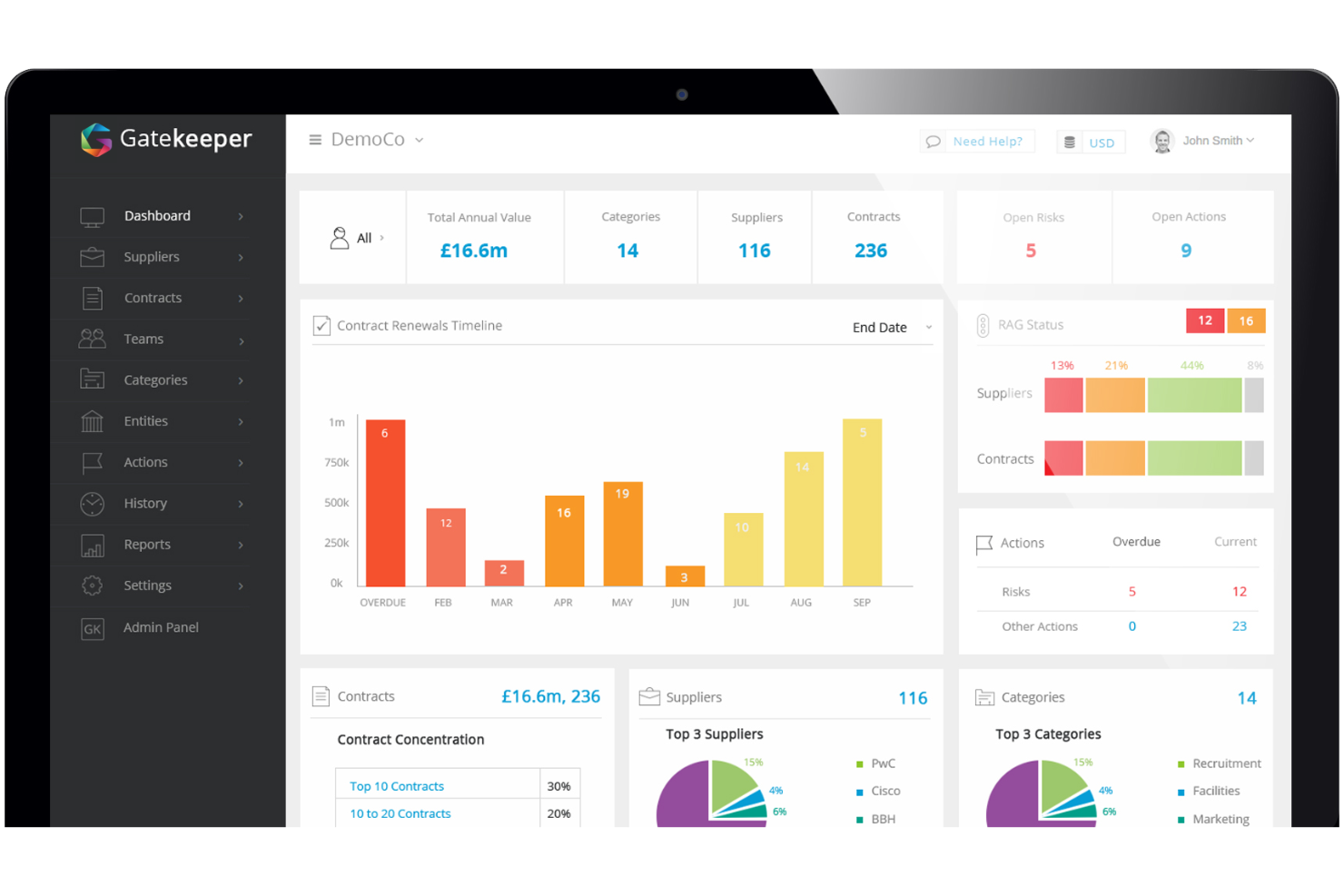
Gatekeeper is a legal contract management software that pairs contract lifecycle management with vendor relationship tracking in one platform. It's a natural fit for legal and procurement teams that need to manage contracts and supplier data side by side, without depending on IT to get the system up and running. I'd choose it over something like Ironclad if vendor management is a real priority—Gatekeeper has that built in natively, rather than treated as an add-on.
Gatekeeper Evaluation Summary
- Pricing upon request
- Free demo available
Pourquoi faire confiance à nos recommandations de logiciels
Notre équipe teste et évalue des logiciels depuis 2012. En tant que dirigeants de cabinets juridiques nous-mêmes, nous savons à quel point il est difficile — et important — de choisir le bon logiciel.
Pour ce guide, nous avons évalué les outils grâce à des tests pratiques et une recherche indépendante, en notant les outils selon nos critères de sélection.
Nos avis reflètent notre jugement éditorial humain, et non un argumentaire de vente.
Gatekeeper Overview
Gatekeeper offers a strong mix of automation, customizable workflows, and modular features, making it a top choice for legal teams prioritizing ease of use and quick onboarding. Its support is responsive, but advanced integrations and highly tailored configurations can lag behind some competitors.. Gatekeeper excels for organizations seeking to standardize contract processes and reduce manual oversight, especially in mid-sized legal departments or businesses scaling their contract volume. If you’re judging options based on user experience and straightforward implementation, Gatekeeper stands out, though those needing deep customization may find limitations.
pros
-
Automated contract reminders reduce missed renewal dates.
-
Visual workflow builder supports process standardization for legal teams.
-
Audit trails provide clear contract activity tracking for compliance.
cons
-
Advanced reporting options are limited compared to some competitors.
-
Bulk document upload can be slow with large files.
-
Clause library lacks advanced search and filtering features.
-

CARET Legal
Visit WebsiteThis rating combines scores from multiple user review sites to reflect overall customer sentiment about the product.4.4 -
Mitratech TAP Workflow Automation
Visit WebsiteThis rating combines scores from multiple user review sites to reflect overall customer sentiment about the product.4.2 -
Redactable
Visit WebsiteThis rating combines scores from multiple user review sites to reflect overall customer sentiment about the product.4.8


Comment nous testons et évaluons les outils
Nous avons passé des années à construire, affiner et améliorer notre système de test et de notation des logiciels. Notre grille est conçue pour saisir les nuances de la sélection logicielle et ce qui rend un outil efficace, en mettant l’accent sur les aspects critiques du processus décisionnel. Ci-dessous, vous pouvez voir exactement comment notre système de test et de notation fonctionne selon sept critères. Cela nous permet de fournir une évaluation objective du logiciel basée sur les fonctionnalités essentielles, les caractéristiques remarquables, la facilité d’utilisation, l’intégration, l’accompagnement client, les avis clients et le rapport qualité/prix.
Fonctionnalité principale (25 % de la note finale)
Le point de départ de notre évaluation est toujours la fonctionnalité principale de l’outil. Celui-ci possède-t-il les fonctions et fonctionnalités de base attendues par un utilisateur ? Certaines de ces fonctions essentielles sont-elles uniquement accessibles dans des formules plus chères ? À la base, nous attendons qu’un outil tienne la comparaison avec les capacités minimales de ses concurrents.
Fonctionnalités remarquables (25 % de la note finale)
Ensuite, nous évaluons les fonctionnalités exceptionnelles et rares qui vont au-delà de la fonctionnalité principale que l’on trouve habituellement dans ce type d’outils. Un score élevé reflète des fonctions spécialisées ou uniques rendant le produit plus rapide, plus efficace, ou offrant une valeur ajoutée à l’utilisateur. Nous évaluons également la facilité d’intégration avec d’autres outils présents dans la pile technologique pour élargir la fonctionnalité et l’utilité du logiciel. Les outils proposant de nombreuses intégrations natives, des connexions tierces et un accès API pour créer des intégrations personnalisées obtiennent de meilleurs scores.
Facilité d’utilisation (10 % de la note finale)
Nous prenons en compte la rapidité et la simplicité avec lesquelles il est possible d’exécuter les tâches définies dans la fonctionnalité principale à l’aide de l’outil. Un logiciel bien noté est bien conçu, intuitif à utiliser, propose des applications mobiles, fournit des modèles et rend des tâches relativement complexes simples.
Mise en route (10 % de la note finale)
Nous savons à quel point il est important d’adopter rapidement une nouvelle plateforme au sein d’une équipe, c’est pourquoi nous évaluons la facilité de prise en main et d’utilisation d’un outil avec peu de formation. Nous évaluons le temps nécessaire à un membre de l’équipe pour s’installer et commencer à utiliser l’outil sans expérience préalable. Les solutions bien notées indiquent que peu ou pas d’accompagnement est requis.
Support client (10 % de la note finale)
Nous examinons la rapidité et la facilité d’obtenir de l’aide par téléphone, chat en direct ou base de connaissances. Les outils et entreprises offrant un support en temps réel obtiennent la meilleure note, tandis que les chatbots reçoivent la note la plus basse.
Avis clients (10 % de la note finale)
Au-delà de nos propres tests et évaluations, nous prenons en compte le score de recommandation des clients actuels et passés. Nous vérifions leur probabilité, si elle leur était donnée, de choisir à nouveau cet outil pour ses fonctionnalités essentielles. Un logiciel bien noté reflète un score de recommandation élevé par les clients actuels ou passés.
Rapport qualité/prix (10 % de la note finale)
Enfin, en tenant compte de tous les autres critères, nous comparons le prix moyen des plans d’entrée de gamme aux fonctionnalités essentielles et analysons la valeur des autres critères d’évaluation. Un logiciel qui offre plus pour moins sera mieux noté.
Core Features
Automated Contract Reminders
Gatekeeper sends customizable alerts for key dates like renewals and expirations. This helps legal teams avoid missed deadlines and maintain compliance.
Visual Workflow Builder
Design and automate contract approval processes using a drag-and-drop interface. Users can standardize steps for different contract types without coding.
Centralized Contract Repository
Store all contracts in a secure, searchable cloud database. Quick search and tagging make it easy to locate documents by party, date, or status.
Audit Trails
Track every action taken on a contract, including edits and approvals. This supports compliance and provides a clear record for audits.
Clause Library
Save and reuse approved contract clauses to ensure consistency. Users can quickly insert standard language into new agreements.
E-signature Integration
Send contracts for e-sign directly from Gatekeeper. This speeds up execution and keeps signed documents linked to their records.
Ease of Use
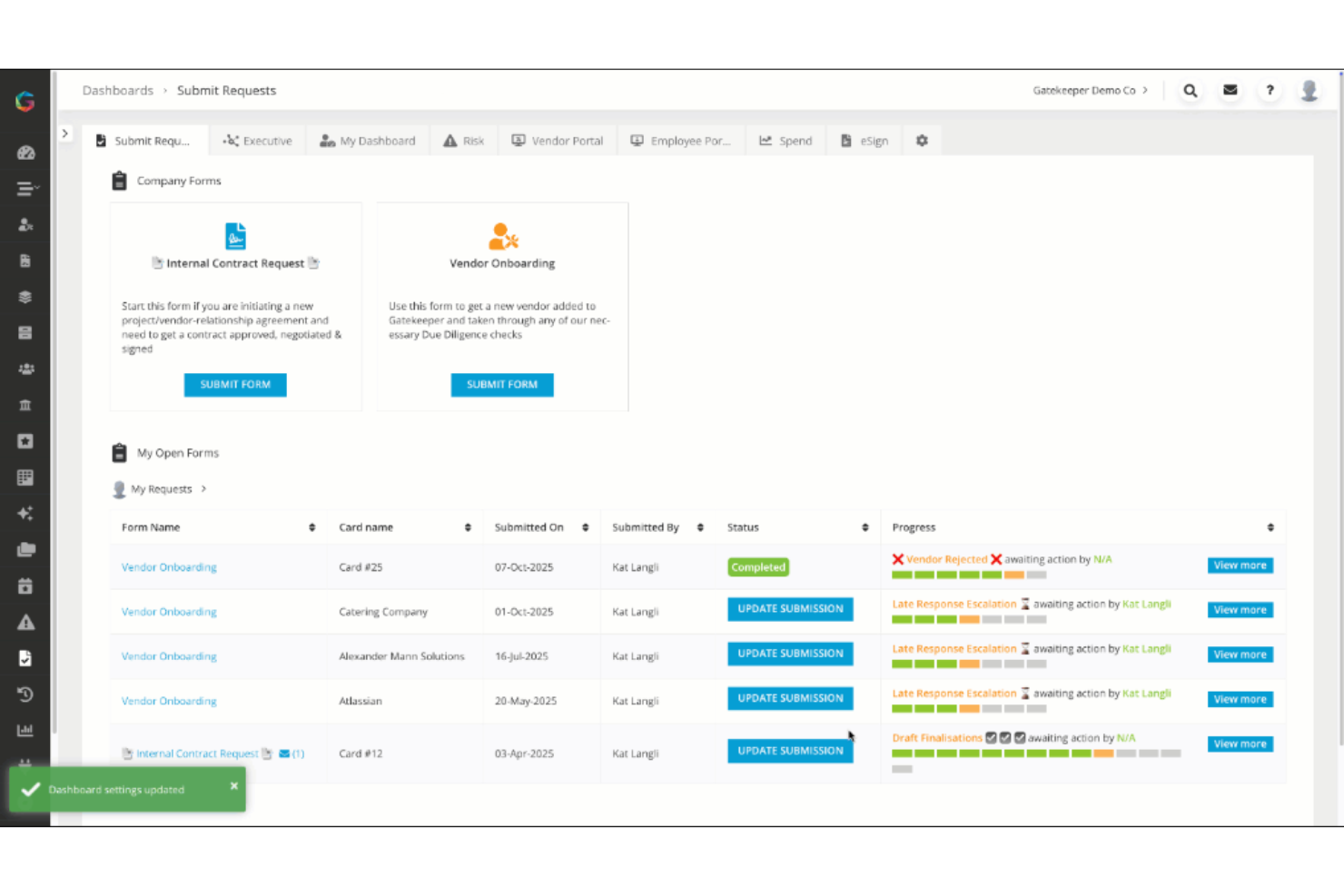
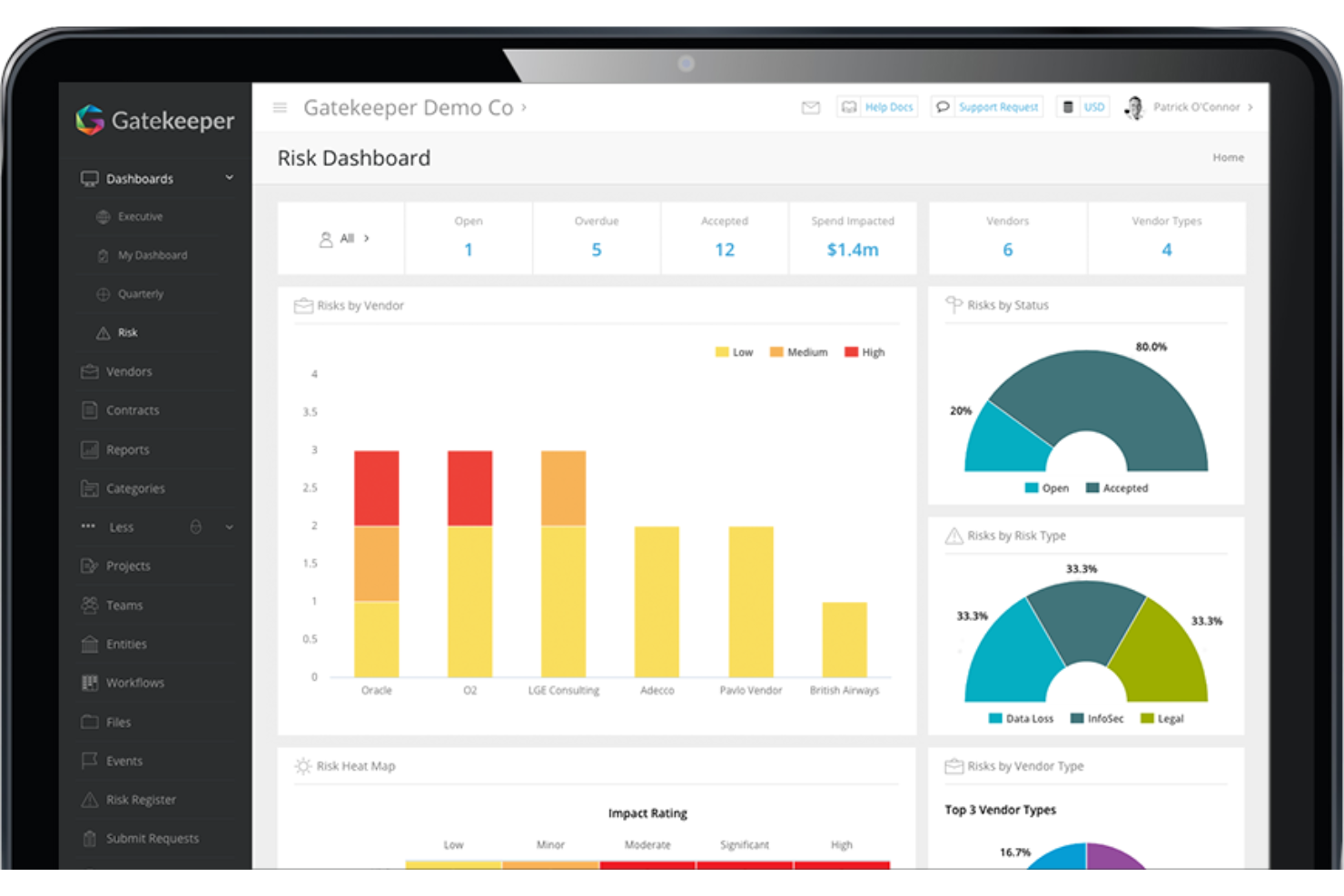
Gatekeeper is widely recognized for its intuitive interface and straightforward navigation, making it accessible for legal teams without the need for a steep learning curve. The visual workflow builder and Kanban-style dashboard simplify process management, while clear labeling and search functions help users find contracts quickly. Many users highlight the minimal training required to get started, and the platform’s logical layout reduces confusion when managing complex contract lifecycles.
Integrations
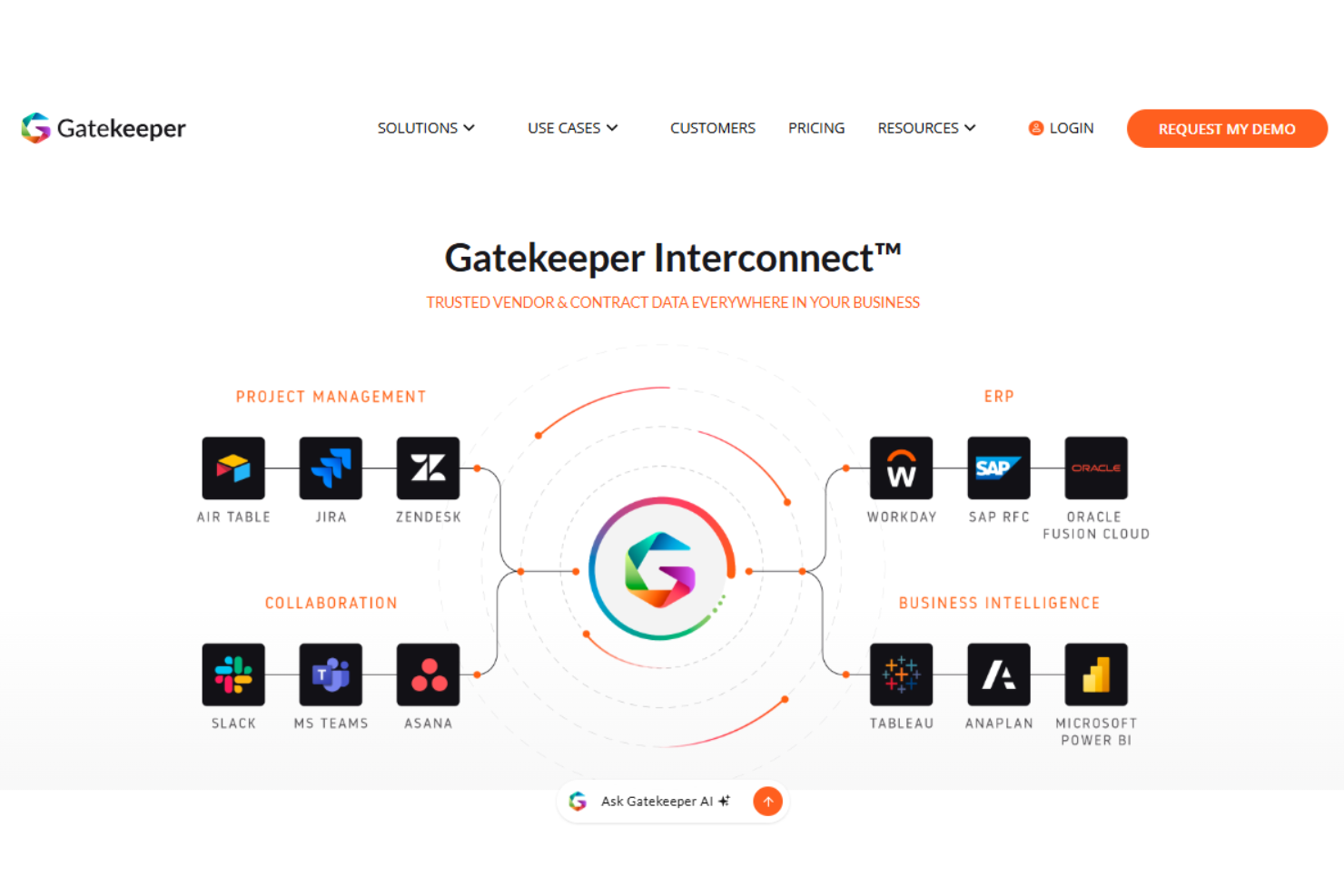
Gatekeeper integrates with Asana, Microsoft Teams, Slack, Workday, NetSuite, Box, and Jira, among others.
Gatekeeper also offers an API and connects with third-party integration tools for expanded connectivity.
Gatekeeper Specs
- 2-Factor Authentication
- API
- Approval Workflows
- Audit Trail
- Batch Permissions & Access
- Calendar Management
- Compliance Tracking
- Contact Management
- Dashboards
- Database
- Design Templates
- Document Comparison
- Document Management
- Electronic Signature
- External Integrations
- File Sharing
- File Transfer
- History/Version Control
- Multi-User
- NDA Management
- Notifications
- Reports
- Scheduling
- Task Scheduling/Tracking
- Third-Party Plugins/Add-Ons
- Workflow Management