

Comprendo quanto sia fondamentale disporre di un software affidabile ed efficiente per la gestione degli studi legali. Questi strumenti sono preziosi per gli studi legali, le agenzie governative e persino i professionisti che lavorano autonomamente, poiché consentono di gestire varie attività come la programmazione delle consulenze, la gestione del registro dei procedimenti e il monitoraggio dei casi importanti, siano essi trattati presso tribunali statali o di primo grado.
Questo software aiuta inoltre gli avvocati di diversi ambiti di pratica a rispettare le norme dei tribunali e a interagire senza problemi con gli ordini degli avvocati, il tutto all'interno di una piattaforma basata sul Web.
Tabella comparativa delle alternative a Westlaw
Questa tabella comparativa riassume i dettagli sui prezzi delle mie migliori alternative a Westlaw:
| Tool | Best For | Trial Info | Price | ||
|---|---|---|---|---|---|
| 1 | Ideale per piccoli studi legali che desiderano aumentare la produttività | Demo gratuita disponibile | Prezzi su richiesta | Website | |
| 2 | Ideale per strumenti di ricerca e redazione giuridica basati sull'IA | Non disponibile | Prezzi su richiesta | Website | |
| 3 | Ideale come soluzione completa per la gestione dello studio legale | Prova gratuita di 10 giorni | A partire da $60/utente/mese | Website | |
| 4 | Ideale per notizie giuridiche in tempo reale e analisi dei dati di mercato | Demo gratuita disponibile | Prezzi su richiesta | Website | |
| 5 | Ideale per l'accesso gratuito a giurisprudenza e citazioni | Piano gratuito disponibile | Prezzi su richiesta | Website | |
| 6 | La soluzione migliore per la ricerca e l'individuazione di clausole contrattuali | Prova gratuita di 7 giorni | A partire da $179/mese | Website | |
| 7 | Ideale per attività complete di pianificazione successoria | Demo gratuita disponibile | Prezzi su richiesta | Website | |
| 8 | Ideale per l’accesso alla giurisprudenza riservato ai membri delle associazioni forensi | Piano gratuito disponibile | Prezzi su richiesta | Website | |
| 9 | Ideale per un'ampia ricerca giuridica canadese con strumenti di IA | Prova gratuita di 7 giorni | Prezzo su richiesta | Website | |
| 10 | Ideale per l'automazione e la composizione personalizzabili dei documenti | Demo gratuita disponibile | Prezzi su richiesta | Website |


Perché fidarsi dei nostri consigli sui software
6,700+
Reviews
20
Industry experts
16+
Evaluation factors
14
Years
Il nostro team testa e recensisce software dal 2012. In quanto leader di studi legali noi stessi, sappiamo quanto sia difficile — e importante — scegliere il software giusto.
Per questa guida, abbiamo valutato gli strumenti attraverso test pratici e ricerche indipendenti, assegnando un punteggio agli strumenti in base ai nostri criteri di selezione.
Le nostre recensioni riflettono il nostro giudizio editoriale umano, non un discorso di vendita.
Recensioni delle migliori alternative a Westlaw
 Ideale per piccoli studi legali che desiderano aumentare la produttività
- Demo gratuita disponibile
- Prezzi su richiesta
Visit WebsiteCustomer Rating:4.8/5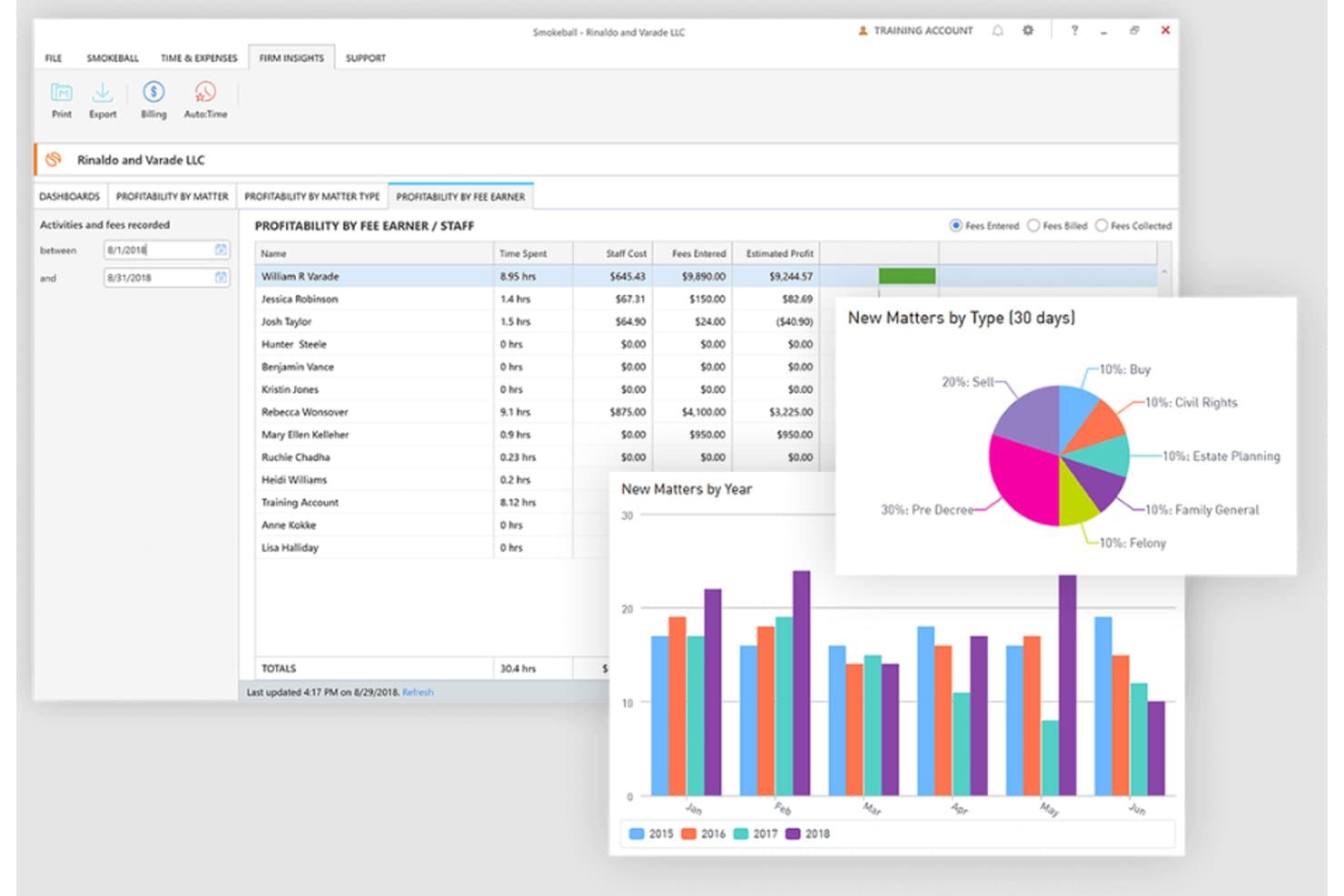
Smokeball monitora la redditività del personale e le nuove pratiche per tipologia e anno. Smokeball è un software di gestione degli studi legali per piccoli studi che riunisce flussi di lavoro delle pratiche, automazione dei documenti, monitoraggio del tempo e fatturazione per ridurre il lavoro amministrativo.
A chi è più adatto Smokeball?
Smokeball è adatto ai piccoli studi legali che desiderano gestire le pratiche, automatizzare i documenti, monitorare il tempo e gestire la fatturazione in un unico sistema.
Perché ho scelto Smokeball
Includo Smokeball come alternativa per la gestione dello studio destinata ai piccoli studi legali che desiderano aumentare la produttività, sebbene non sia un database di ricerca giuridica come Westlaw. I suoi flussi di lavoro delle pratiche e l'automazione dei documenti aiutano il personale a gestire il fascicolo di un cliente dall'acquisizione fino alla preparazione dei documenti. Il monitoraggio integrato del tempo collega il lavoro svolto su ciascuna pratica alla fatturazione.
Funzionalità principali di Smokeball
- Assistente AI basato sulla pratica : Risponde alle domande utilizzando fascicoli, attività ed eventi.
- Integrazione con Microsoft Word e Outlook : Crea, modifica e invia email dalle applicazioni che già conosci.
- Portale sicuro per i clienti : Condividi documenti e messaggi con i clienti.
- Moduli digitali di acquisizione : Raccogli le informazioni sui potenziali clienti tramite moduli e utilizzale per creare le pratiche.
Integrazioni di Smokeball
Smokeball si integra con QuickBooks Online e LawPay per i flussi di lavoro di fatturazione, oltre che con LawToolBox e Microsoft Outlook per le scadenze e la pianificazione.
Pros and Cons
Pros:
- L'acquisizione automatica del tempo recupera il lavoro fatturabile non registrato
- I modelli per le pratiche riducono la preparazione ripetitiva dei documenti
- L'assistente AI basato sulla pratica crea bozze a partire dai fascicoli
Cons:
- Nessun database di ricerca delle fonti primarie
- Gli utenti segnalano arresti anomali e problemi di fatturazione
Learn more about Smokeball: Ideale per strumenti di ricerca e redazione giuridica basati sull'IA
- Non disponibile
- Prezzi su richiesta
Visit WebsiteCustomer Rating:4.7/5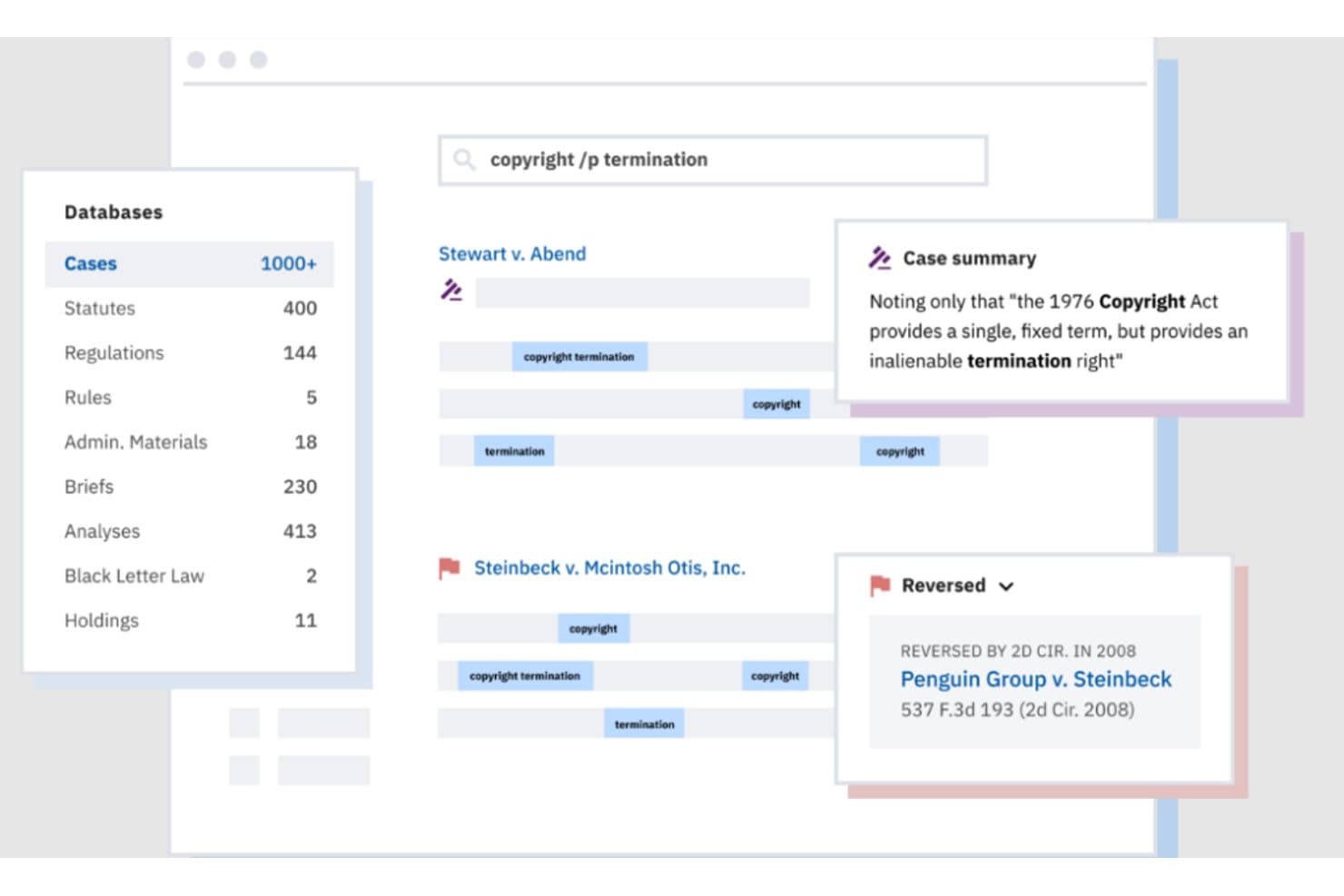
Casetext consente agli utenti di cercare nei database giuridici e consultare istantaneamente i riepiloghi delle sentenze. Casetext è una piattaforma di ricerca giuridica per studi legali e consulenti legali interni che aiuta a trovare la giurisprudenza pertinente e a preparare documenti legali con meno ricerca manuale.
Per chi è più adatto Casetext?
Casetext è una scelta adatta per gli avvocati che desiderano il supporto dell'IA nella ricerca giuridica e nella redazione come parte della loro attività quotidiana.
Perché ho scelto Casetext
Ho scelto Casetext per i suoi strumenti di ricerca e redazione giuridica basati sull'IA, che collegano la ricerca delle sentenze al supporto nella redazione. CARA può analizzare una memoria caricata per individuare le sentenze pertinenti, mentre Compose aiuta a redigere documenti legali con citazioni. Questo può aiutarmi a verificare le fonti giuridiche e a preparare una prima bozza all'interno dello stesso flusso di lavoro.
Caratteristiche principali di Casetext
- Ricerca parallela: Inserisci un'argomentazione giuridica in linguaggio naturale per trovare sentenze pertinenti dal punto di vista concettuale.
- Filtri di ricerca: Restringi i risultati per giurisdizione, data, stato di pubblicazione, causa dell'azione o tipo di istanza.
- SmartCite: Controlla le pagine delle sentenze per individuare orientamenti negativi, cronologia dei ricorsi e citazioni contrarie.
- Avvisi sui casi: Tieni sotto controllo sentenze, leggi codificate o ricerche e ricevi aggiornamenti via e-mail quando nuovi materiali citano una sentenza monitorata.
Integrazioni di Casetext
Casetext si integra con Clio, consentendo di inviare i documenti delle pratiche a CARA, e offre un componente aggiuntivo per Microsoft Word per Compose e Ricerca parallela.
Pros and Cons
Pros:
- CARA trova sentenze nelle memorie caricate
- La ricerca in linguaggio naturale individua sentenze pertinenti dal punto di vista concettuale
- SmartCite verifica gli orientamenti negativi e la cronologia delle sentenze
Cons:
- Il servizio autonomo ha cessato di essere disponibile nell'aprile 2025
- La copertura delle fonti secondarie è rimasta limitata
- Alcuni utenti hanno segnalato una copertura incompleta delle sentenze
Learn more about Casetext: Ideale come soluzione completa per la gestione dello studio legale
- Prova gratuita di 10 giorni
- A partire da $60/utente/mese
Visit WebsiteCustomer Rating:4.6/5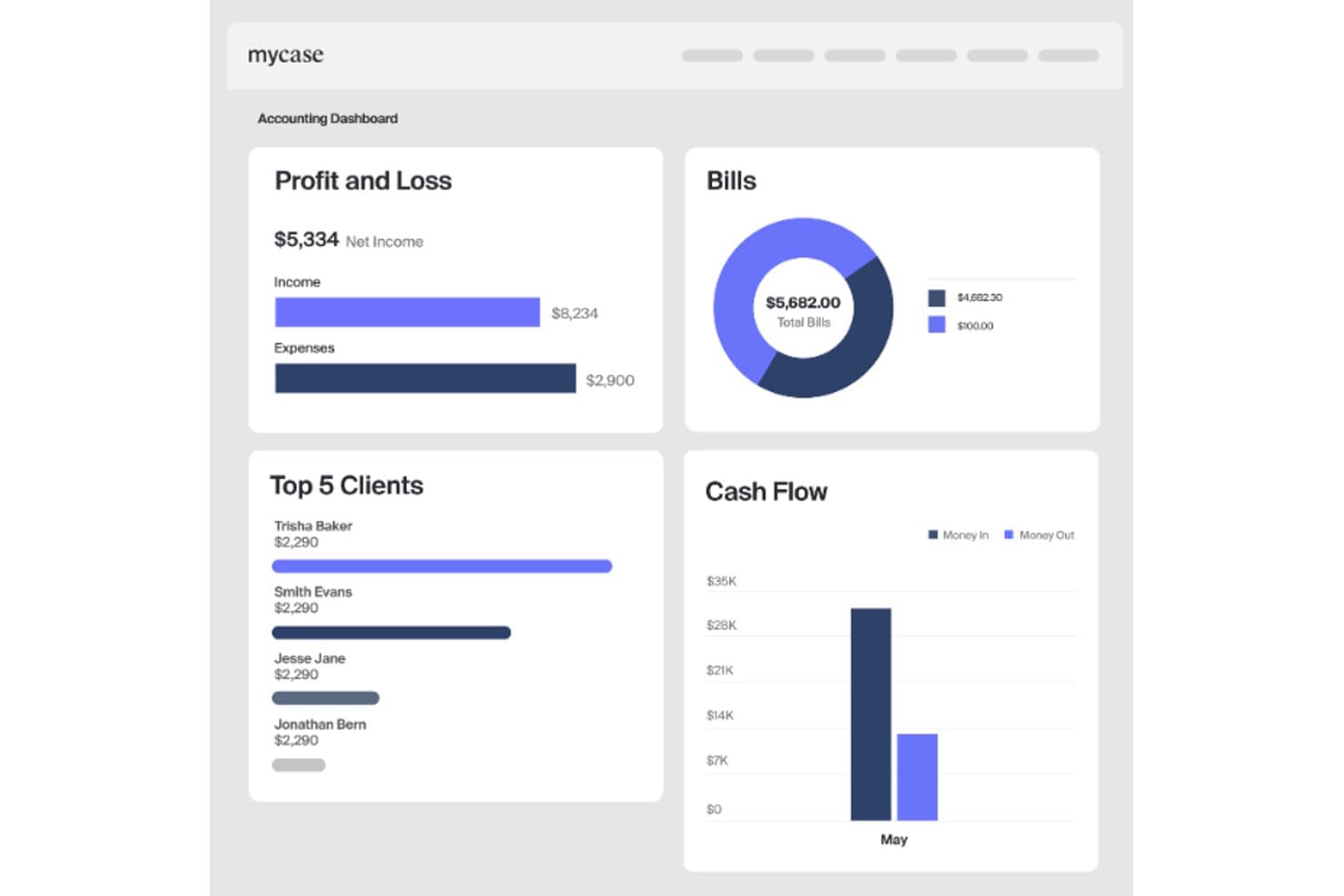
MyCase offre agli studi una visione chiara di entrate, spese e flusso di cassa. MyCase è un software di gestione degli studi legali per i team legali che devono organizzare le pratiche, monitorare le scadenze, coordinare il lavoro con i clienti e gestire le attività operative ordinarie dello studio in un unico luogo.
Per chi è più adatto MyCase?
MyCase è adatto ai professionisti singoli e ai piccoli studi legali che gestiscono le pratiche dei clienti e le attività operative quotidiane dello studio.
Perché ho scelto MyCase
Ho scelto MyCase come valida alternativa a Westlaw per gestire il lavoro successivo alla ricerca giuridica. È ideale come soluzione completa per la gestione dello studio legale, con funzionalità di gestione delle pratiche e calendario per monitorare i dettagli dei casi e le scadenze. Il suo portale clienti offre inoltre ai clienti uno spazio per scambiare messaggi e documenti.
Funzionalità principali di MyCase
- Moduli di raccolta dati dei clienti: Moduli online personalizzabili raccolgono le informazioni dei potenziali clienti.
- Monitoraggio del tempo: I timer registrano il lavoro fatturabile e non fatturabile associato alle pratiche.
- Fatturazione automatizzata: Genera fatture a partire dal tempo e dalle spese registrati.
- Contabilità fiduciaria: Monitora i fondi dei clienti, riconcilia i conti fiduciari e gestisce i mastrini dei clienti.
Integrazioni di MyCase
MyCase elenca 61 integrazioni, tra cui QuickBooks Online, LawPay, LawToolBox, Lawmatics, InfoTrack, Dropbox, Gmail, Google Calendar, Microsoft Outlook e Zapier. Un'API aperta per le integrazioni personalizzate è disponibile nel piano Advanced.
Pros and Cons
Pros:
- I calendari delle pratiche mantengono visibili le scadenze dei casi
- Il portale clienti centralizza messaggi e documenti
- Il monitoraggio del tempo alimenta le fatture basate sulle pratiche
Cons:
- Non offre una ricerca della giurisprudenza in stile Westlaw
- L'automazione dei flussi di lavoro e i controlli delle attività suscitano lamentele
 Ideale per notizie giuridiche in tempo reale e analisi dei dati di mercato
- Demo gratuita disponibile
- Prezzi su richiesta
Visit WebsiteCustomer Rating:4.1/5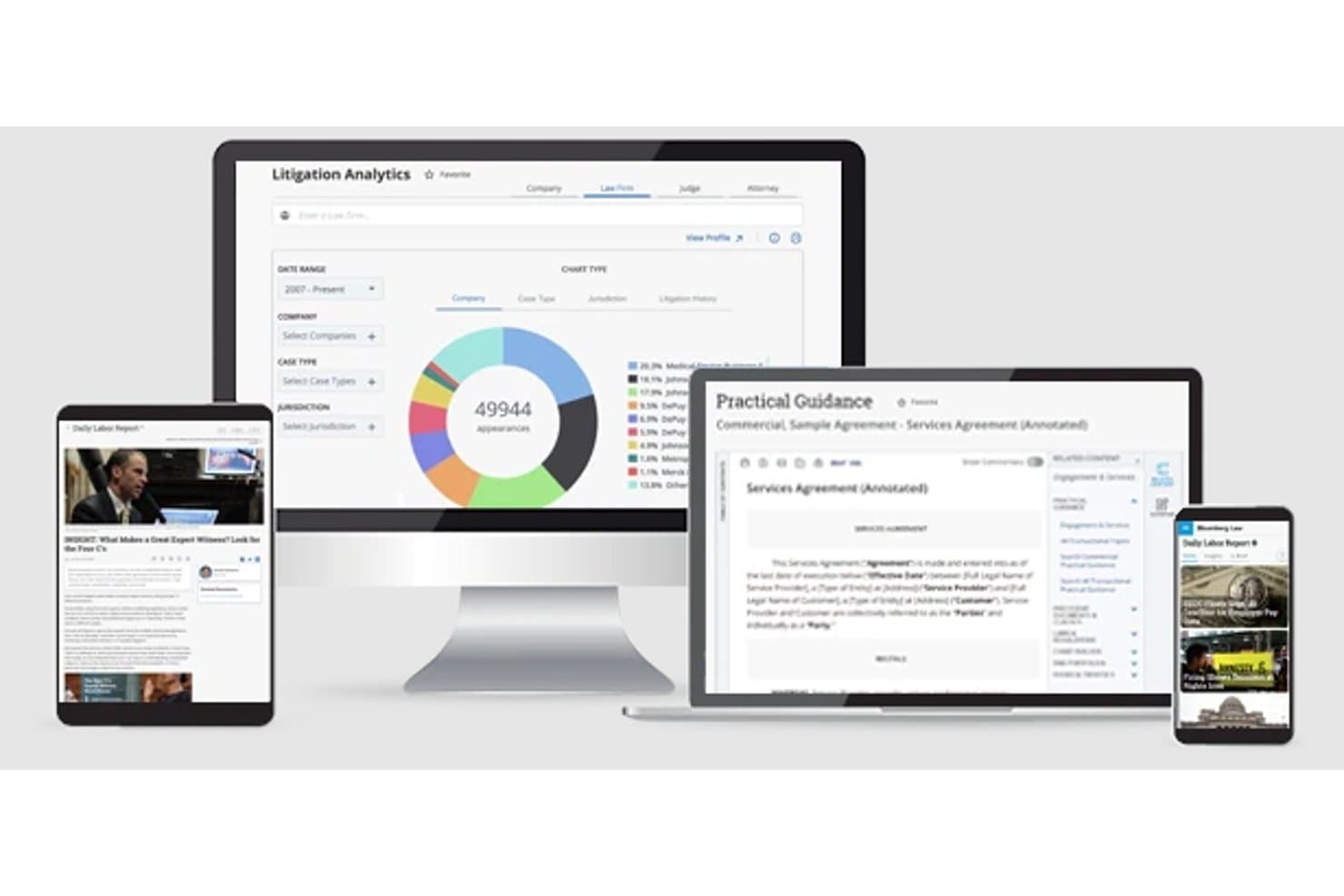
Bloomberg Law mostra analisi dei contenziosi e guida sui contratti su diversi dispositivi. Bloomberg Law è una piattaforma di ricerca giuridica per i consulenti legali interni e gli studi legali, che aiuta i team legali a trovare fonti autorevoli e analisi pratiche per supportare la consulenza ai clienti, le decisioni aziendali e il lavoro legale quotidiano.
Per chi è più adatto Bloomberg Law?
Bloomberg Law è adatto ai ricercatori giuridici e ai consulenti che seguono gli sviluppi giuridici in rapida evoluzione e utilizzano i dati di mercato per inquadrare le questioni nel contesto aziendale.
Perché ho scelto Bloomberg Law
Ho scelto Bloomberg Law come alternativa a Westlaw perché abbina notizie giuridiche in tempo reale all'analisi dei dati di mercato. Utilizzo le sue notizie giuridiche per seguire gli sviluppi in rapida evoluzione e i suoi dati di mercato per inquadrare le questioni legali nel contesto aziendale quando fornisco consulenza su questioni o decisioni.
Caratteristiche principali di Bloomberg Law
- Ricerca del diritto primario: Cerca sentenze, leggi, regolamenti e norme dei tribunali.
- Ricerca nei registri giudiziari: Trova gli atti giudiziari e monitora l'attività processuale.
- Guida pratica: Accedi a note operative, checklist, moduli e clausole.
- Principi giuridici: Trova la giurisprudenza in base a specifici principi giuridici.
Integrazioni di Bloomberg Law
Bloomberg Law offre un componente aggiuntivo per Microsoft Word e un connettore Microsoft Copilot per le informazioni sui registri giudiziari e sui contenziosi. Il suo prodotto Dashboard Legal si integra con Outlook, iManage e NetDocuments, mentre l'API Enterprise Dockets fornisce i dati dei registri giudiziari ai sistemi degli studi legali.
Pros and Cons
Pros:
- Gli avvisi in tempo reale sulle cause supportano il monitoraggio dei contenziosi
- I dati giuridici e di mercato aggiungono contesto aziendale
- Le analisi dei registri giudiziari confrontano giudici, studi legali e avvocati
Cons:
- Alcuni recensori segnalano una copertura delle opere dottrinali più debole rispetto a Westlaw
- I recensori ritengono che l'interfaccia sia meno intuitiva rispetto a quella dei concorrenti
Learn more about Bloomberg Law: Ideale per l'accesso gratuito a giurisprudenza e citazioni
- Piano gratuito disponibile
- Prezzi su richiesta
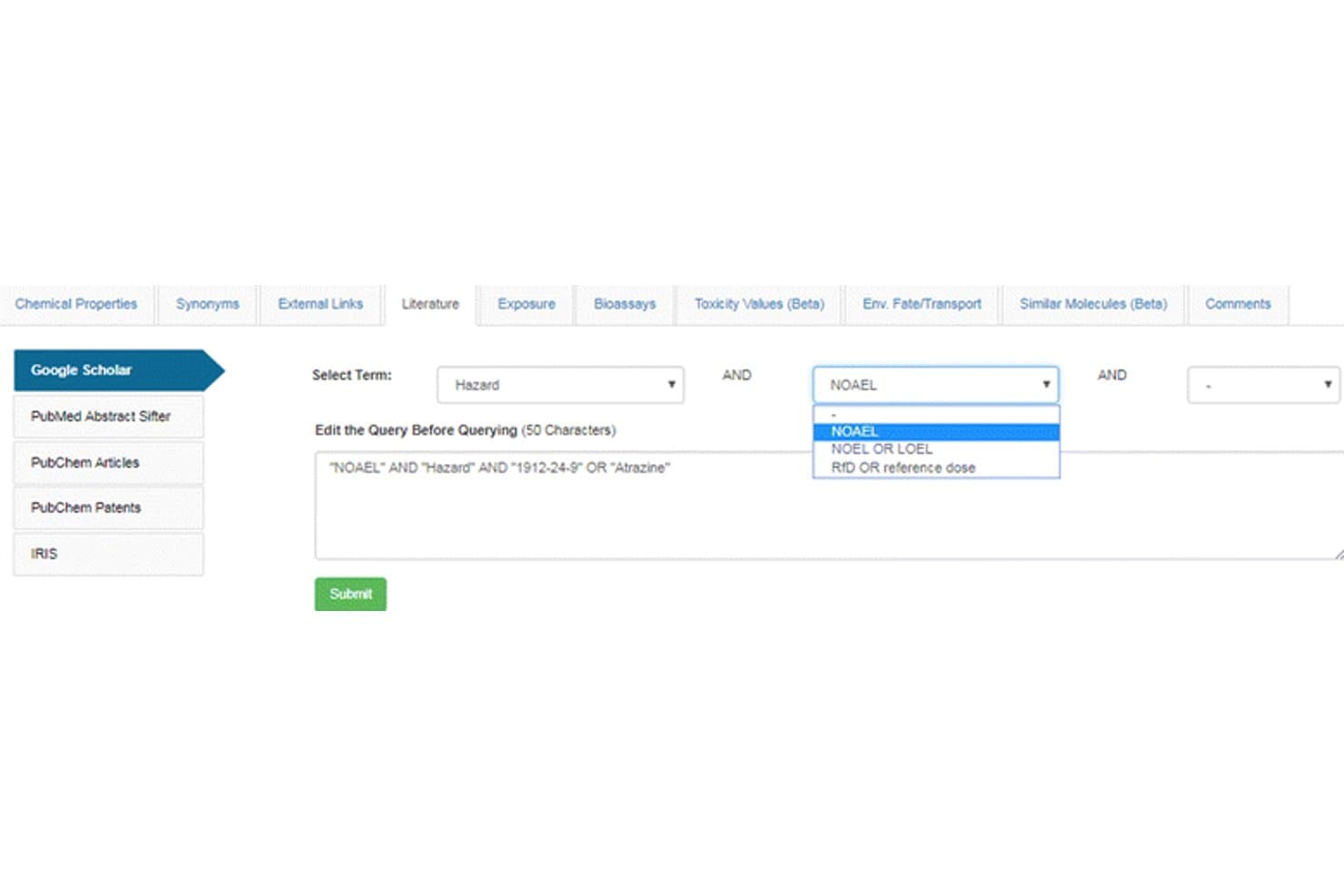
Google Scholar consente agli utenti di creare query mirate sulla letteratura con filtri per termini. Per i team legali che integrano le banche dati della giurisprudenza, Google Scholar è un motore di ricerca accademico per trovare articoli e analisi accademiche che possono orientare la ricerca giuridica e il lavoro in ambito normativo.
A chi è più adatto Google Scholar?
Google Scholar è adatto agli accademici del diritto, ai ricercatori in ambito normativo e agli avvocati che devono individuare fonti accademiche in diverse discipline.
Perché ho scelto Google Scholar
Ho scelto Google Scholar per l'accesso gratuito a un'ampia gamma di letteratura accademica, inclusi articoli, libri e tesi che possono orientare la ricerca giuridica. Utilizzo i link “Citato da” e quelli agli articoli correlati per seguire le analisi accademiche su una questione; l'accesso al testo integrale dipende dalla fonte.
Caratteristiche principali di Google Scholar
- Ricerca avanzata: Filtra i risultati per autore, pubblicazione, data o frase esatta.
- Avvisi via email: Ricevi notifiche per i nuovi risultati che corrispondono a una query di ricerca.
- Esportazione delle citazioni: Esporta i record delle citazioni in formati come BibTeX ed EndNote.
- La mia biblioteca: Salva e organizza i record selezionati in una biblioteca personale.
Integrazioni di Google Scholar
Google Scholar non dispone di integrazioni native chiaramente documentate né di un'API pubblica. Consente di esportare le citazioni in formati compatibili con strumenti come EndNote, BibTeX e RefWorks.
Pros and Cons
Pros:
- Accesso gratuito a un'ampia letteratura accademica
- Cerca insieme sentenze e commenti accademici
- I link alle citazioni aiutano a seguire le analisi giuridiche successive
Cons:
- Nessun indicatore citazionale del trattamento negativo delle sentenze
- La giurisprudenza comprende tribunali statunitensi selezionati
Learn more about Google Scholar: La soluzione migliore per la ricerca e l'individuazione di clausole contrattuali
- Prova gratuita di 7 giorni
- A partire da $179/mese
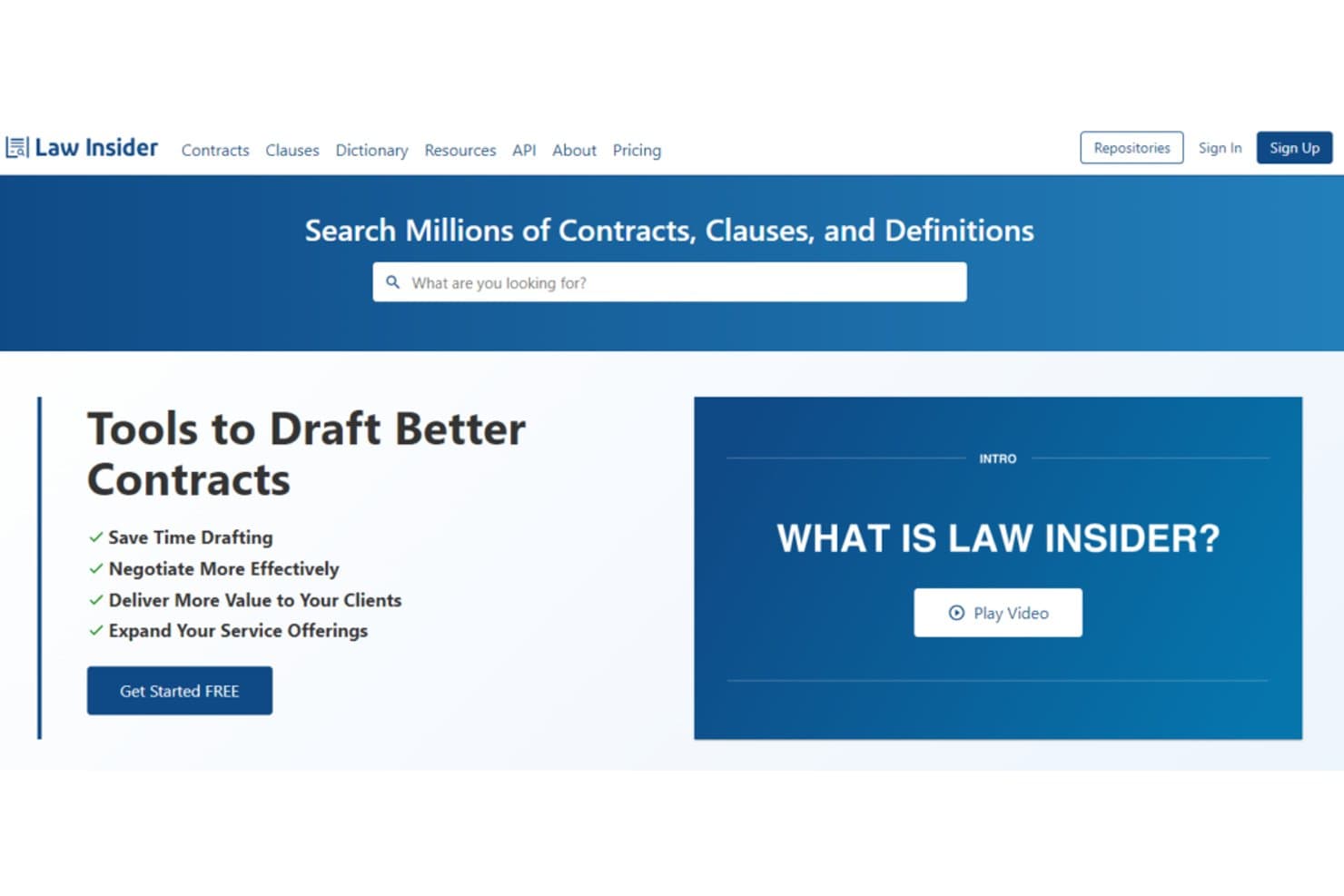
Law Insider consente agli utenti di cercare istantaneamente milioni di contratti e clausole. Law Insider è una piattaforma di ricerca giuridica per avvocati e team legali interni che necessitano di riferimenti pratici sui contratti per orientare la redazione, la revisione e le decisioni aziendali oltre la tradizionale ricerca giurisprudenziale.
Per chi è più indicato Law Insider?
È adatto agli avvocati specializzati in contratti che necessitano di esempi di clausole per orientare la redazione e la negoziazione di diversi tipi di accordi.
Perché ho scelto Law Insider
Ho scelto Law Insider come soluzione migliore per la ricerca e l'individuazione di clausole contrattuali perché la sua libreria di accordi ricercabile mi aiuta a trovare esempi pratici oltre la giurisprudenza. Confronto disposizioni come quelle relative all'indennizzo o alla risoluzione in diversi contratti, quindi utilizzo le clausole pertinenti per orientare la redazione e la negoziazione.
Funzionalità principali di Law Insider
- Revisione dei contratti tramite IA: segnala disposizioni mancanti, termini incoerenti e potenziali rischi in un documento.
- Componente aggiuntivo per Microsoft Word: offre gli strumenti contrattuali di Law Insider in Word per il web e desktop.
- Playbook personalizzati: applicano regole definite dal team per segnalare clausole o suggerire modifiche evidenziate.
- Domande e risposte specifiche sulle clausole: consente di porre domande sul linguaggio contrattuale e ottenere risposte basate sul documento.
Integrazioni di Law Insider
Law Insider offre un componente aggiuntivo per Microsoft Word e un'integrazione Law Insider GPT per effettuare ricerche in linguaggio naturale nel suo database di contratti. I piani Enterprise offrono inoltre integrazioni con CRM, firma elettronica e CMS, sebbene non vengano indicati fornitori specifici.
Pros and Cons
Pros:
- I contratti eseguiti e ricercabili forniscono precedenti a livello di clausola
- I filtri restringono gli esempi in base alla giurisdizione e al settore
- Gli accordi originali consentono di verificare il contesto delle clausole
Cons:
- I precedenti contrattuali non sostituiscono la copertura giurisprudenziale
- Gli accordi pubblici tendono a riflettere le pratiche delle grandi aziende
Learn more about Law Insider: Ideale per attività complete di pianificazione successoria
- Demo gratuita disponibile
- Prezzi su richiesta
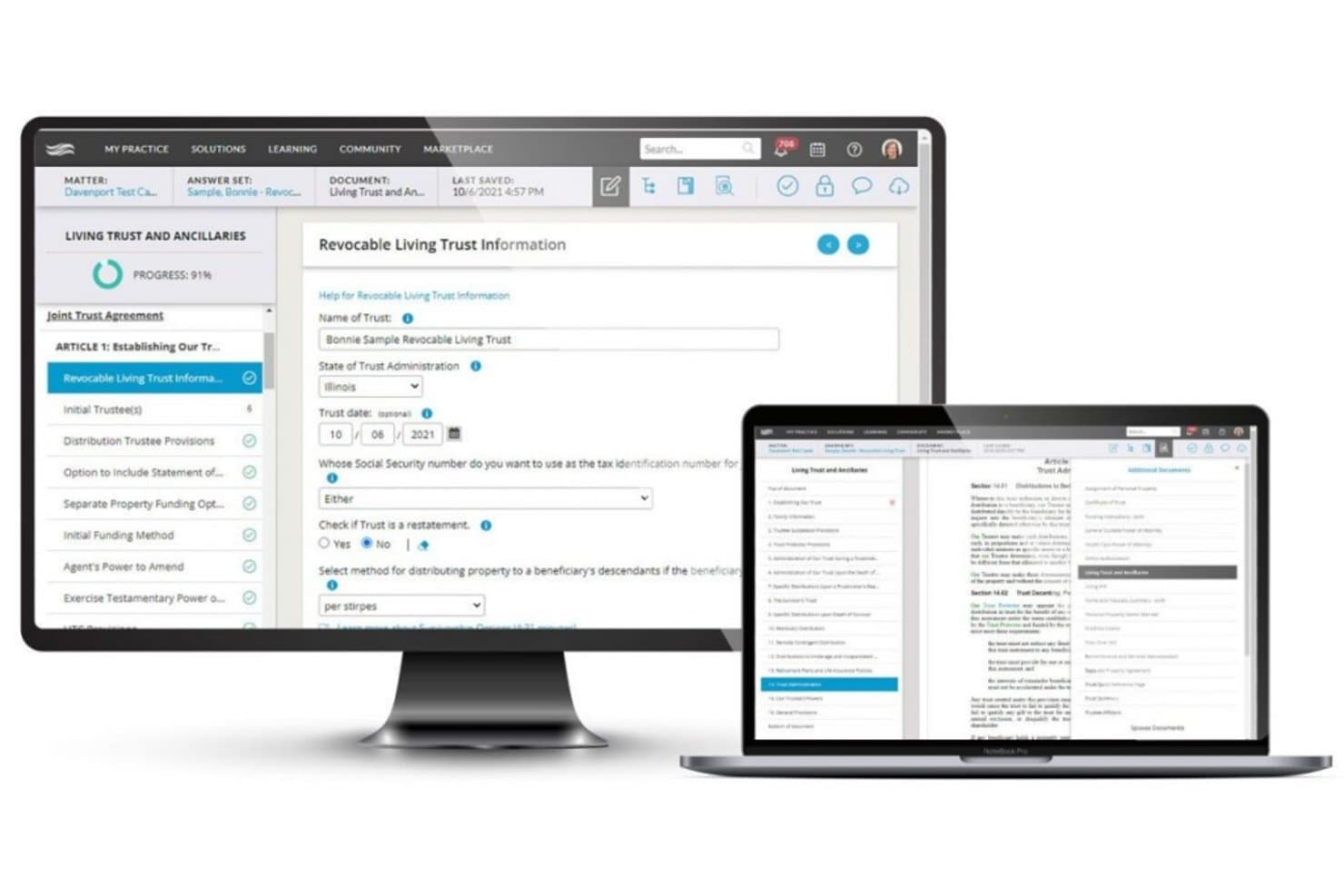
Wealth Docx guida gli utenti nella creazione di documenti per trust viventi revocabili. Wealth Docx è un software per la redazione di documenti destinato agli avvocati specializzati nella pianificazione successoria che devono preparare i piani dei clienti e organizzare il lavoro correlato tra le varie pratiche.
Per chi è più adatto Wealth Docx?
Wealth Docx è adatto agli avvocati specializzati nella pianificazione successoria che gestiscono pratiche diverse per i clienti e devono redigere i relativi documenti del piano successorio.
Perché ho scelto Wealth Docx
Ho scelto Wealth Docx perché è in linea con l'obiettivo indicato: ideale per attività complete di pianificazione successoria. I questionari guidati aiutano a definire testamenti e trust personalizzati per i clienti, mentre i sistemi di redazione coprono i trust irrevocabili e la pianificazione filantropica. Lo considero una valida alternativa a Westlaw quando una pratica richiede la preparazione di un piano successorio anziché la ricerca di giurisprudenza.
Funzionalità principali di Wealth Docx
- Modelli per scenari: Crea modelli per fattispecie specifiche o ricorrenti.
- Modelli di redazione personalizzati: Adatta i modelli ai tuoi clienti e alla tua attività.
- Aggiornamenti automatici: Ricevi aggiornamenti sul linguaggio giuridico e sulle funzionalità del software.
- Documenti statali: Aggiungi disposizioni preferite o riferimenti normativi consigliati per gli stati selezionati.
Integrazioni di Wealth Docx
Wealth Docx dispone di integrazioni documentate con LEAP, Clio, DecisionVault, PracticePanther ed Eternal Pro e supporta Zapier. WealthCounsel fornisce inoltre un'API per le integrazioni personalizzate.
Pros and Cons
Pros:
- I questionari guidati supportano la redazione di piani successori complessi
- Gli scenari riutilizzabili riducono il lavoro di redazione ripetitivo
- I modelli coprono trust e pianificazione filantropica
Cons:
- I documenti generati richiedono accurati controlli di qualità
- I modelli specifici per stato possono richiedere modifiche manuali
Learn more about Wealth Docx: Ideale per l’accesso alla giurisprudenza riservato ai membri delle associazioni forensi
- Piano gratuito disponibile
- Prezzi su richiesta
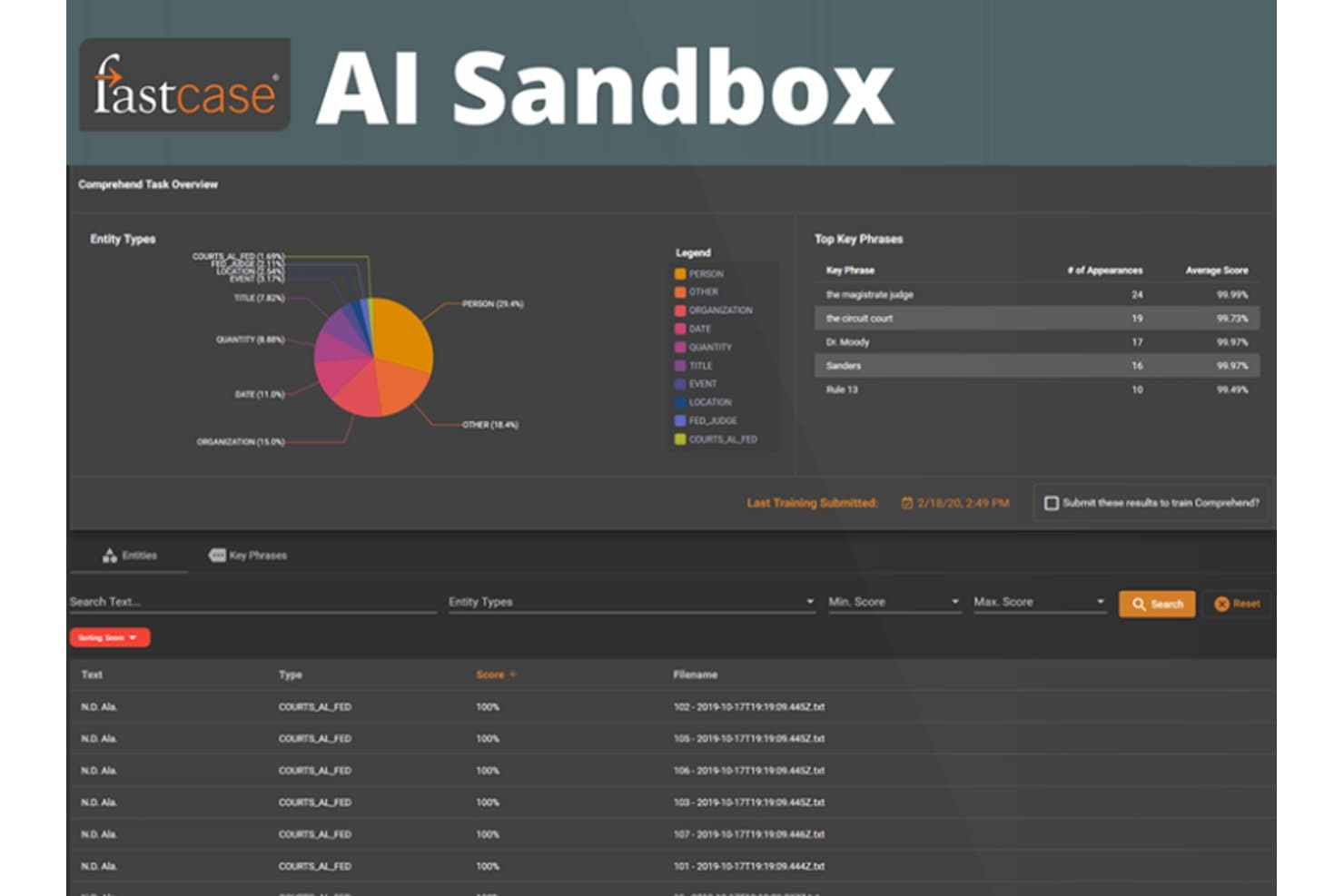
Fastcase AI Sandbox identifica entità e frasi giuridiche chiave nei documenti relativi alle cause. Fastcase è una piattaforma di ricerca giuridica per studi legali, consulenti interni e professionisti singoli che devono trovare giurisprudenza e norme pertinenti per questioni relative ai clienti e all’attività aziendale.
Per chi è più adatto Fastcase?
Fastcase è adatto ad avvocati e ricercatori giuridici che desiderano esplorare la giurisprudenza e le relazioni tra citazioni attraverso un’interfaccia intuitiva con strumenti di ricerca visiva.
Perché ho scelto Fastcase
Ho scelto Fastcase per la ricerca giuridica intuitiva e la visualizzazione dei dati, perché i suoi risultati di ricerca visivi mi aiutano a individuare le autorità pertinenti e i modelli di citazione. Utilizzo la rete delle citazioni per tracciare il modo in cui le cause citano le une le altre, quindi esamino i pareri sottostanti per valutarne la pertinenza. Questa visualizzazione può essere utile quando verifico se una causa sostiene la posizione di un cliente.
Caratteristiche principali di Fastcase
- Metodi di ricerca multipli: Cerca per parola chiave, linguaggio naturale o citazione giuridica.
- Banche dati di diritto primario: Cerca cause federali e statali, norme, regolamenti e regole dei tribunali.
- Filtri di ricerca: Restringi i risultati per giurisdizione, tipo di documento, livello del tribunale e intervallo di date.
- Esportazione dei documenti: Scarica o stampa i documenti di ricerca nei formati DOC, DOCX, PDF o RTF.
Integrazioni di Fastcase
Fastcase si integra con Clio per il monitoraggio del tempo dedicato alla ricerca e il salvataggio delle voci di ricerca nelle cause. Offre inoltre API e feed di dati giuridici per integrazioni personalizzate, inclusi i feed di Docket Alarm verso dashboard come Salesforce e Foundation.
Pros and Cons
Pros:
- Le mappe delle citazioni rivelano le relazioni tra le cause
- Le ricerche in linguaggio naturale e per citazione individuano le autorità
- I collegamenti tra cause e norme supportano il controllo incrociato
Cons:
- Le fonti secondarie sono meno approfondite rispetto a Westlaw
- Potrebbero mancare le decisioni di alcuni tribunali
Learn more about Fastcase: Ideale per un'ampia ricerca giuridica canadese con strumenti di IA
- Prova gratuita di 7 giorni
- Prezzo su richiesta
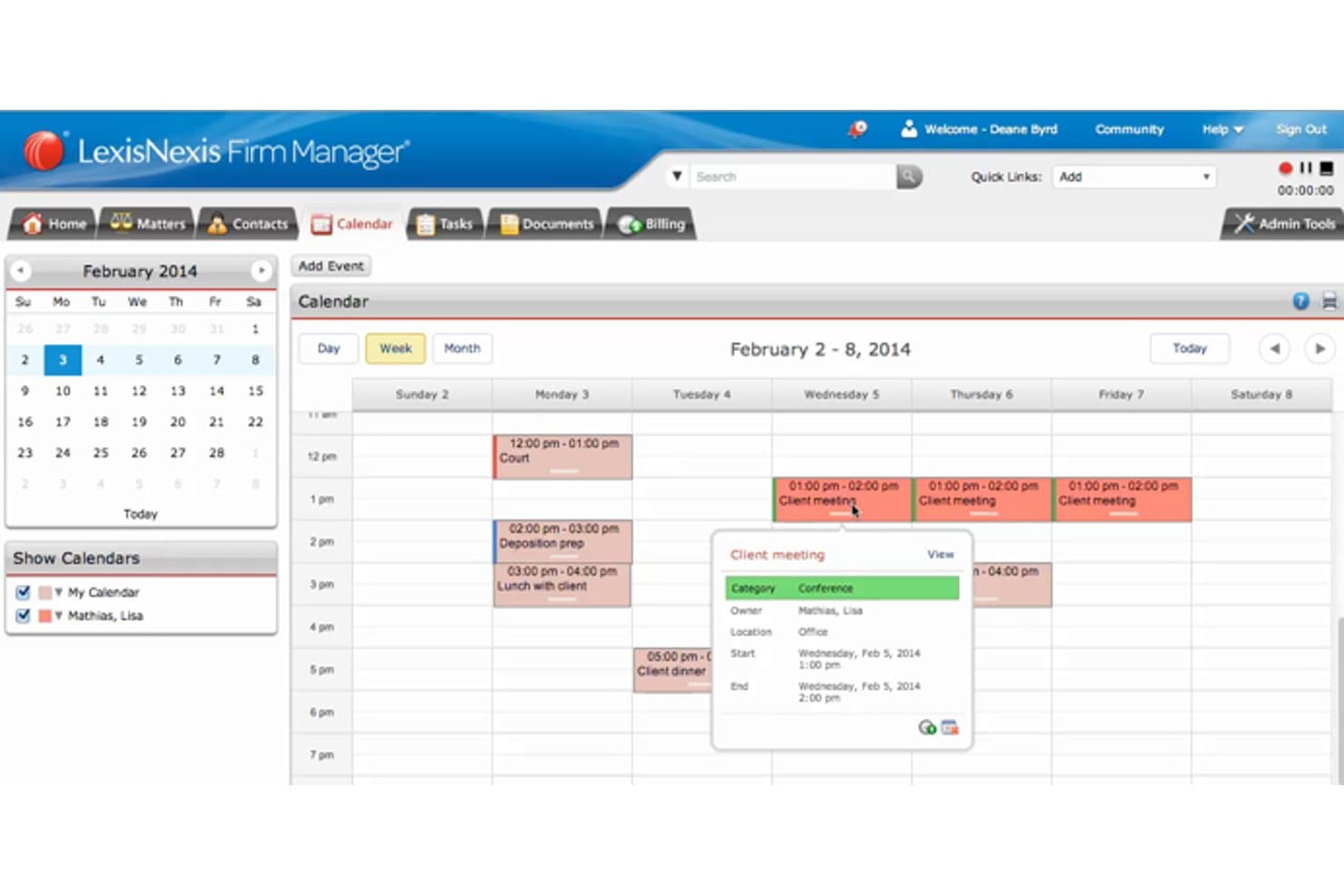
LexisNexis Firm Manager consente agli utenti di tenere traccia degli incontri con i clienti in un calendario settimanale. LexisNexis offre a consulenti legali interni e studi legali strumenti per trovare fonti giuridiche pertinenti e supportare la consulenza in diverse giurisdizioni; è ideale per le sue ampie capacità di ricerca giuridica e la copertura globale.
Per chi è più adatto Lexis Nexis?
I professionisti legali canadesi che gestiscono questioni transfrontaliere possono utilizzare LexisNexis per collegare il lavoro giuridico nazionale alle fonti internazionali.
Perché ho scelto LexisNexis
Ho scelto LexisNexis come “ideale per le sue ampie capacità di ricerca giuridica e la copertura globale” perché le questioni transfrontaliere spesso richiedono più delle sole fonti giuridiche canadesi. Lexis Advance Quicklaw integra nella ricerca la giurisprudenza canadese, la legislazione e i commenti degli esperti, mentre Lexis+ collega le ricerche ai materiali giuridici internazionali. Utilizzo QuickCITE per verificare come sono state trattate le decisioni canadesi prima di basarmi su di esse.
Funzionalità principali di LexisNexis
- Note operative: Trova indicazioni dettagliate organizzate per area della pratica legale.
- Modelli automatizzati: Rispondi a domande interattive per generare prime bozze.
- Monitoraggio legislativo: Tieni traccia dei disegni di legge e monitora i potenziali cambiamenti legislativi.
- Avvisi per parole chiave: Ricevi aggiornamenti quando nuovo materiale corrisponde ai termini di ricerca salvati.
Integrazioni di LexisNexis
Lexis Create+ si integra con Microsoft 365 e DocuSign, mentre CaseMap+ dispone di un'integrazione con iManage. LexisNexis offre inoltre servizi REST/web e API URL per flussi di lavoro personalizzati.
Pros and Cons
Pros:
- Ampia copertura della giurisprudenza canadese e dei tribunali
- QuickCITE verifica il trattamento e la validità delle decisioni
- Le fonti internazionali supportano la ricerca giuridica transfrontaliera
Cons:
- La ricerca può risultare meno intuitiva rispetto a Westlaw
- Le risposte di Lexis AI richiedono una verifica delle citazioni
Learn more about Lexis Nexis: 10Ideale per l'automazione e la composizione personalizzabili dei documenti
HOTdocs
- Demo gratuita disponibile
- Prezzi su richiesta
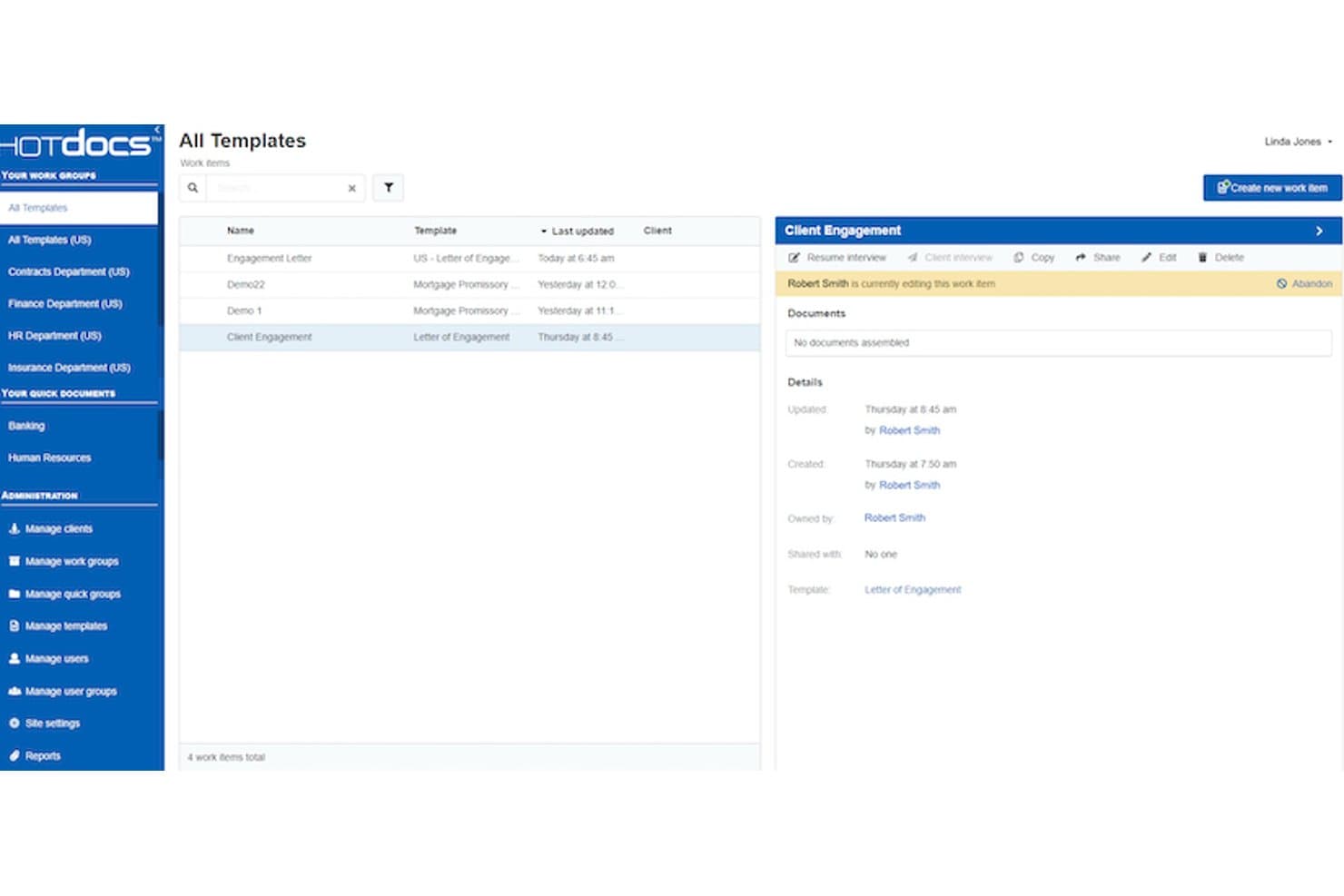
HOTdocs consente agli utenti di gestire e monitorare i modelli di documenti tra i gruppi di lavoro. HOTdocs è una piattaforma di automazione dei documenti legali per studi legali e team interni che devono ridurre la stesura ripetitiva e mantenere coerenti gli accordi e i moduli ricorrenti; integra Westlaw anziché sostituire la ricerca giuridica.
Per chi è più adatto HOTdocs?
HOTdocs è adatto ai team di gestione delle attività legali e agli avvocati che gestiscono accordi e moduli basati su modelli tra diversi reparti.
Perché ho scelto HOTdocs
Ho scelto HOTdocs perché la sua automazione e composizione personalizzabile dei documenti affronta la stesura ripetitiva che gli strumenti di ricerca giuridica come Westlaw non gestiscono. Le interviste dinamiche raccolgono i dettagli della pratica e le clausole condizionali generano contratti o moduli personalizzati; i file di risposte riutilizzabili aiutano a trasferire le informazioni nei documenti correlati. Lo considero un complemento a Westlaw, non un sostituto della ricerca della giurisprudenza.
Caratteristiche principali di HOTdocs
- Gestione centralizzata dei modelli: Gestisci i modelli legali da un unico sistema.
- Controllo delle versioni: Tieni traccia delle modifiche ai modelli di documenti.
- API aperta: Collega HotDocs ai sistemi di gestione delle pratiche e ai sistemi CRM.
- Generazione in batch: Crea grandi serie di documenti a partire dai dati.
Integrazioni di HOTdocs
HOTdocs Advance dispone di integrazioni documentate con iManage Work e Mitratech TAP, mentre Mitratech offre l'automazione dei documenti HOTdocs per Salesforce tramite Salesforce AppExchange. HOTdocs fornisce inoltre un'API aperta per le integrazioni personalizzate.
Pros and Cons
Pros:
- Le interviste condizionali gestiscono logiche documentali complesse
- Le risposte riutilizzabili riducono l'inserimento ripetuto dei dati dei clienti
- La composizione basata su Word supporta pacchetti di documenti personalizzati
Cons:
- I modelli complessi richiedono competenze specifiche di creazione
- Non offre ricerca della giurisprudenza o strumenti di citazione
Learn more about HOTdocs:
Altri strumenti alternativi a Westlaw
Di seguito è riportato un elenco di ulteriori alternative a Westlaw che ho selezionato, ma che non sono rientrate tra le prime 10. Vale sicuramente la pena dare un’occhiata anche a queste.
- 11LollyLawIdeale per avvocati dell'immigrazione che cercano efficienza nei flussi di lavoro
- 12CasemakerIdeale per la ricerca sul diritto statale grazie alla loro vasta biblioteca giuridica
- 13LegalResearch.comIdeale per esternalizzare compiti di ricerca legale
Recensioni di altri software per la ricerca giuridica
- Software per la gestione dei casi legali
- Strumenti gratuiti per la ricerca giuridica
- Software per il confronto di documenti legali
Come valuto le alternative a Westlaw
Divido la mia valutazione in criteri di base — affidabilità del verificatore delle citazioni, ampiezza della giurisprudenza e copertura legislativa — e fattori distintivi come funzionalità di IA, trasparenza dei prezzi e integrazioni per la redazione degli atti.
Funzionalità essenziali (requisiti fondamentali per questo elenco)
Quando seleziono gli strumenti per il mio elenco, assegno a ciascuno un punteggio su una scala da 0 (non offre la funzionalità) a 5 (eccelle in questo ambito) per ogni funzionalità essenziale elencata di seguito. Poi converto il punteggio totale dello strumento in una percentuale. Ogni strumento deve ottenere un punteggio totale minimo del 65% per essere preso in considerazione.
- Banca dati della giurisprudenza: verifico se la piattaforma copre in modo sufficientemente ampio le sentenze d'appello federali e statali, così da poter reperire una decisione pertinente di una corte di circuito senza finire in un vicolo cieco.
- Leggi e regolamenti: ogni strumento dovrebbe consentirmi di consultare i codici legislativi vigenti, i regolamenti amministrativi e i regolamenti giudiziari sia a livello federale sia statale.
- Convalida delle citazioni: è importante disporre di un verificatore delle citazioni affidabile: cerco indicazioni chiare sul trattamento di una decisione, che mi dicano se è stata annullata, distinta o confermata prima di citarla in un atto.
- Ricerca legale avanzata: valuto se la ricerca va oltre le semplici parole chiave, includendo operatori booleani, query in linguaggio naturale, consultazione dei sommari e filtri per argomento.
- Fonti secondarie: piattaforme come Fastcase e Casetext gestiscono questo aspetto in modo diverso, quindi verifico se ogni strumento fornisce trattati, riviste giuridiche o guide pratiche oltre al solo diritto primario.
- Strumenti per il flusso di lavoro della ricerca: cerco funzionalità per organizzare le cartelle, aggiungere annotazioni ed esportare le citazioni, che mi consentano di trasferire la ricerca in un documento Word o in un atto senza dover reinserire tutto manualmente.
Una volta ottenuto un elenco di strumenti che soddisfano questi criteri, valuto ciò che distingue ogni piattaforma.
Fattori distintivi (ciò che differenzia i fornitori)
Ecco come confronto e metto in contrapposizione i diversi fornitori:
Funzionalità di spicco
Gli assistenti alla ricerca basati sull'IA sono un importante fattore distintivo: cerco strumenti in grado di riassumere un orientamento giurisprudenziale o rispondere a una domanda giuridica con riferimenti ad autorità citate, non semplicemente di restituire un elenco di risultati. Anche gli strumenti di analisi del contenzioso sono importanti quando ci si prepara per un'udienza su un'istanza e si desiderano dati su come un determinato giudice abbia deciso questioni analoghe. Le funzionalità di analisi degli atti completano il quadro, consentendo di caricare una bozza e segnalare le citazioni deboli prima che lo faccia il legale della controparte.
Oltre le funzionalità
La trasparenza dei prezzi è una delle prime cose che valuto: alcune piattaforme applicano un costo per ricerca o per postazione, e questa distinzione incide sul costo totale per un professionista che esercita individualmente rispetto a uno studio con 20 avvocati. Verifico inoltre quanto bene ogni strumento si integri con i comuni software per la redazione degli atti e la gestione dello studio, come Microsoft Word o Clio, poiché una ricerca che rimane isolata rallenta tutto il lavoro. Anche le politiche di sicurezza dei dati sono importanti, soprattutto per quanto riguarda la conservazione o l'utilizzo per l'apprendimento delle query relative ai clienti e alle pratiche da parte delle funzionalità di IA.
Perché cercare un'alternativa a Westlaw?
Westlaw è un servizio completo di ricerca giuridica online ampiamente utilizzato dai professionisti del settore in tutto il mondo. Offre accesso a un vasto database di risorse giuridiche, tra cui sentenze, leggi, regolamenti e fonti secondarie. Questo lo rende uno strumento prezioso per avvocati, assistenti legali e studi legali che necessitano costantemente di un'ampia raccolta di informazioni giuridiche per svolgere le proprie ricerche.
Tuttavia, alla luce dei rapidi progressi della tecnologia giuridica, molti professionisti sono alla ricerca di alternative a Westlaw. Ciò avviene principalmente perché desiderano funzionalità e caratteristiche adattate alle proprie esigenze specifiche: che si tratti di una tecnologia di intelligenza artificiale più sofisticata, di strumenti migliori per la gestione dei casi o di soluzioni economicamente vantaggiose. La ricerca di un'alternativa riflette il desiderio di ottimizzare, rendere più efficiente e personalizzare la propria attività legale.
Le persone chiedono anche
Quali sono i vantaggi dell'utilizzo delle alternative a Westlaw?
L’utilizzo di alternative a Westlaw offre numerosi vantaggi, tra cui la convenienza economica, poiché molte alternative offrono funzionalità comparabili a prezzi inferiori. Offrono inoltre diverse funzionalità di ricerca e banche dati giuridiche, ampliando l’ambito della ricerca. Alcune alternative sfruttano l’intelligenza artificiale per fornire ulteriori informazioni e aumentare l’efficienza della ricerca giuridica. Inoltre, possono includere funzionalità specifiche come strumenti di collaborazione, analisi giuridiche e accessibilità da dispositivi mobili, pensate per determinati casi d’uso.
Quanto costano in genere Westlaw e le sue alternative?
I prezzi di Westlaw e delle sue alternative possono variare notevolmente. Westlaw, ad esempio, non rende pubblici i propri prezzi, ma gli utenti hanno segnalato costi compresi tra $20 e $100 per utente al mese, a seconda dei moduli e delle funzionalità selezionati. Le alternative a Westlaw tendono a essere più trasparenti per quanto riguarda i prezzi: alcune partono da appena $65/utente/mese (come Casetext), mentre altre prevedono prezzi personalizzati in base alle esigenze del singolo utente.
Quali sono i modelli di prezzo per questi strumenti di ricerca giuridica?
Gli strumenti di ricerca giuridica adottano generalmente uno di due modelli di prezzo: prezzo per utente o prezzo personalizzato. Il prezzo per utente prevede un costo mensile o annuale fisso per ciascun utente, spesso con opzioni a più livelli che consentono di accedere a funzionalità aggiuntive a prezzi maggiori. Il prezzo personalizzato adegua il costo alle esigenze specifiche e alle dimensioni dello studio, offrendo maggiore flessibilità, ma anche minore trasparenza iniziale.
Qual è l'intervallo di prezzo tipico delle alternative a Westlaw?
L’intervallo di prezzo delle alternative a Westlaw può variare in base alle funzionalità e ai servizi offerti. Alcune alternative partono da appena $65 per utente al mese (come Casetext) e possono arrivare a diverse centinaia di dollari per utente al mese per servizi più completi.
Quali sono le alternative a Westlaw più economiche e più costose?
Tra le alternative esaminate, Casetext è una delle opzioni meno costose, con prezzi a partire da $65/utente/mese. Lexis Nexis, invece, può essere una delle opzioni più costose, con prezzi spesso personalizzati in base alle esigenze specifiche dell’utente e che possono quindi raggiungere importi più elevati.
Esistono alternative gratuite a Westlaw?
Sì, esistono alternative gratuite a Westlaw. Google Scholar, ad esempio, offre accesso gratuito a un’ampia banca dati di documenti giuridici, sentenze e riviste giuridiche, rappresentando un’opzione conveniente per la ricerca giuridica preliminare. Tuttavia, potrebbe non disporre di alcune delle funzionalità avanzate e delle banche dati complete disponibili nelle alternative a pagamento.