

10 migliori strumenti di IA legale recensiti nel 2026

10 Elenco dei migliori strumenti di IA legale


Orientarsi nel panorama della tecnologia legale può essere difficile. Devi affrontare la pressione costante di gestire i casi in modo efficiente, rispettando al contempo le normative. Gli strumenti di IA legale sono qui per aiutarti, offrendo soluzioni per ridurre le attività manuali e migliorare la precisione del tuo lavoro.
In base alla mia esperienza nella valutazione indipendente di questi strumenti, ho scoperto che il software giusto può fare una grande differenza per il tuo team. Il mio obiettivo è fornire recensioni imparziali e approfondite per aiutarti a scegliere la soluzione più adatta.
In questo articolo ti presenterò le mie scelte principali, evidenziando le funzionalità che rispondono alle tue esigenze specifiche. Che tu voglia migliorare la gestione dei documenti o potenziare la ricerca giuridica, troverai qualcosa di adatto al tuo studio.
Perché fidarsi dei nostri consigli sui software
Il nostro team testa e recensisce software dal 2012. In quanto leader di studi legali noi stessi, sappiamo quanto sia difficile — e importante — scegliere il software giusto.
Per questa guida, abbiamo valutato gli strumenti attraverso test pratici e ricerche indipendenti, assegnando un punteggio agli strumenti in base ai nostri criteri di selezione.
Le nostre recensioni riflettono il nostro giudizio editoriale umano, non un discorso di vendita.
Tabella di confronto degli strumenti di IA legale
Questa tabella di confronto riassume i dettagli sui prezzi delle mie migliori selezioni di strumenti di IA legale:
| Tool | Best For | Trial Info | Price | ||
|---|---|---|---|---|---|
| 1 | Ideale per il contenzioso collaborativo | Demo gratuita | Prezzo su richiesta | Website | |
| 2 | Ideale per la gestione dei casi | Prova gratuita + demo gratuita disponibile | Prezzo su richiesta | Website | |
| 3 | Ideale per processi di e-discovery | Demo gratuita | Prezzo su richiesta | Website | |
| 4 | Ideale per l’analisi di documenti legali | Demo gratuita disponibile | Prezzo su richiesta | Website | |
| 5 | Ideale per la gestione del ciclo di vita dei contratti | Demo gratuita disponibile | Prezzo su richiesta | Website | |
| 6 | Ideale per banche dati di ricerca legale | Demo gratuita disponibile | Prezzo su richiesta | Website | |
| 7 | Ideale per la gestione dello studio in cloud | Prova gratuita di 7 giorni + demo gratuita disponibile | Da $39/utente/mese (fatturazione annuale) | Website | |
| 8 | Ideale per compiti di ricerca legale | Demo gratuita disponibile | Prezzo su richiesta | Website | |
| 9 | Ideale per casi di lesioni personali | Demo gratuita disponibile | Prezzo su richiesta | Website | |
| 10 | Ideale per la comunicazione sicura con i clienti | Prova gratuita + demo gratuita disponibile | Da $149/mese (fatturato annualmente) | Website |
Recensioni dei migliori strumenti di IA legale
Di seguito trovi le mie sintesi dettagliate dei migliori strumenti di IA legale inclusi nel mio elenco. Le mie recensioni offrono una panoramica dettagliata delle funzionalità principali, dei pro & contro, delle integrazioni e dei casi d’uso ideali di ogni strumento, per aiutarti a trovare quello più adatto a te.

Everlaw
Ideale per il contenzioso collaborativo
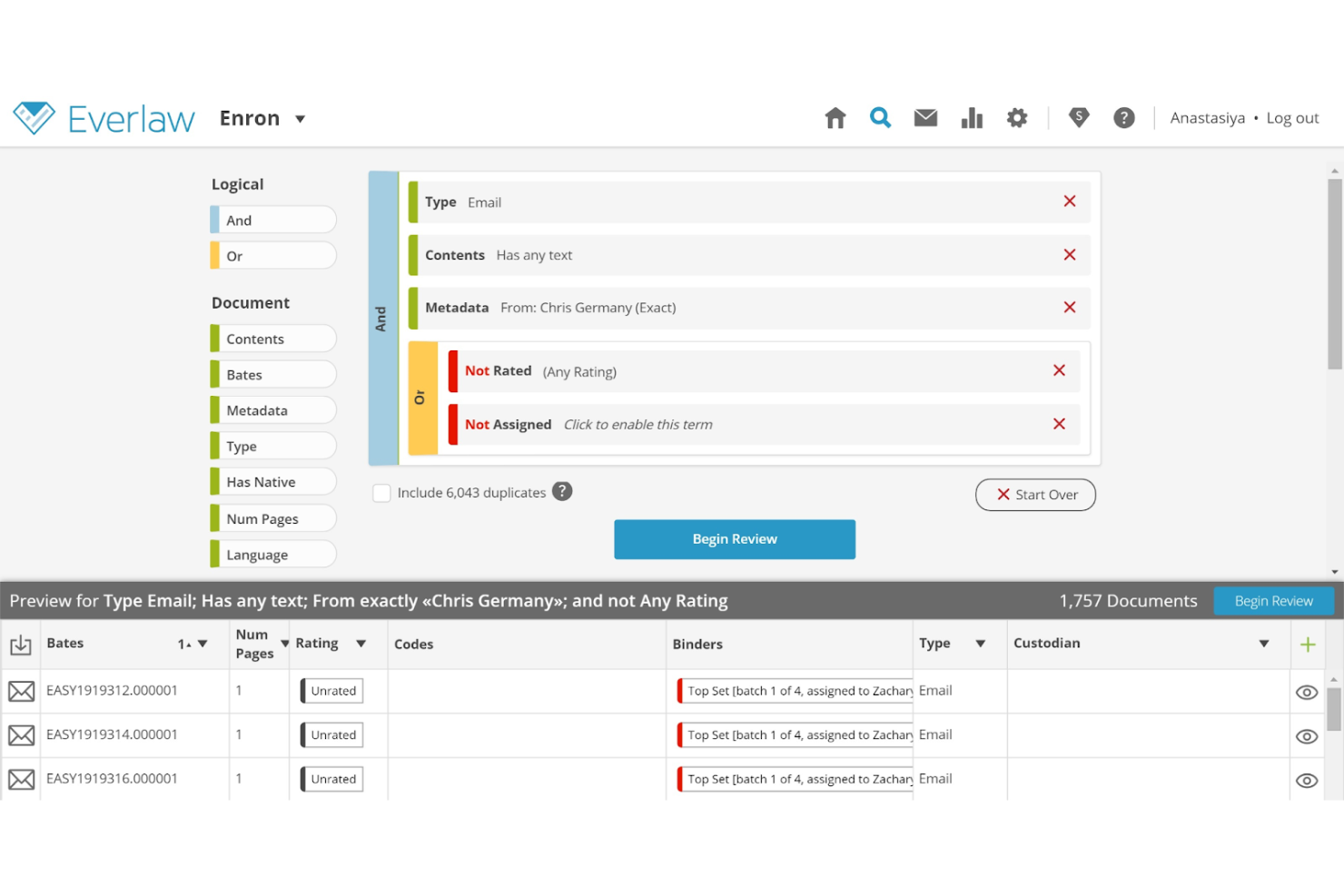
Everlaw offre ai team legali una piattaforma cloud progettata per contenziosi e indagini complesse. Le sue funzionalità avanzate per la ricerca guidata dall'IA, la revisione dei documenti e la costruzione dei casi supportano studi legali e uffici legali interni nella gestione di pratiche legali collaborative ad alto volume.
Per Chi è Ideale Everlaw?
Team di contenzioso presso studi legali e dipartimenti legali aziendali che gestiscono casi complessi e ricchi di documentazione tra molteplici stakeholder.
Perché Ho Scelto Everlaw
Ho scelto Everlaw perché nessun'altra piattaforma permette all'intero team di contenzioso—consulenti interni ed esterni—di lavorare nello stesso ambiente dalla revisione dei documenti fino al processo. Mi piace in particolare Storybuilder, che consente ai team di co-redigere cronologie di casi, scalette e domande per le deposizioni direttamente accanto alle prove esaminate. L'EverlawAI Deposition Analyzer aggiunge un altro livello, permettendo al mio team di generare background dei deponenti e segnalare discrepanze nelle testimonianze senza lasciare la piattaforma. Per le dispute che coinvolgono ampi team e tempistiche lunghe, questo tipo di collaborazione end-to-end in un'unica area di lavoro è difficile da replicare altrove.
Caratteristiche Principali di Everlaw
- Codifica predittiva: Utilizza il machine learning per classificare i documenti per rilevanza, così i revisori si concentrano prima sulle prove più importanti.
- Deep Dive: Permette ai team di cercare tra milioni di documenti utilizzando domande in linguaggio naturale e ricevere risposte con citazioni e prove a supporto.
- Traduzioni AI: Rileva e traduce automaticamente i documenti in oltre 100 lingue, con traduzioni di massa e risultati archiviati.
- Clustering: Raggruppa i documenti per similitudine concettuale in un'interfaccia visiva, mettendo in evidenza pattern tematici su grandi set di dati non strutturati.
Integrazioni Everlaw
Le integrazioni includono Microsoft 365, Google Workspace, Slack, Zoom, Box, Dropbox, Google Vault, Microsoft Teams, Proofpoint e Okta.
Pros and Cons
Pros:
- Potenzia la collaborazione
- Revisione documentale in tempo reale
- Strumenti avanzati di visualizzazione
Cons:
- Può richiedere tempo per la configurazione iniziale
- Limitato ai processi di contenzioso
- Analisi dei dati complessa

Filevine
Ideale per la gestione dei casi
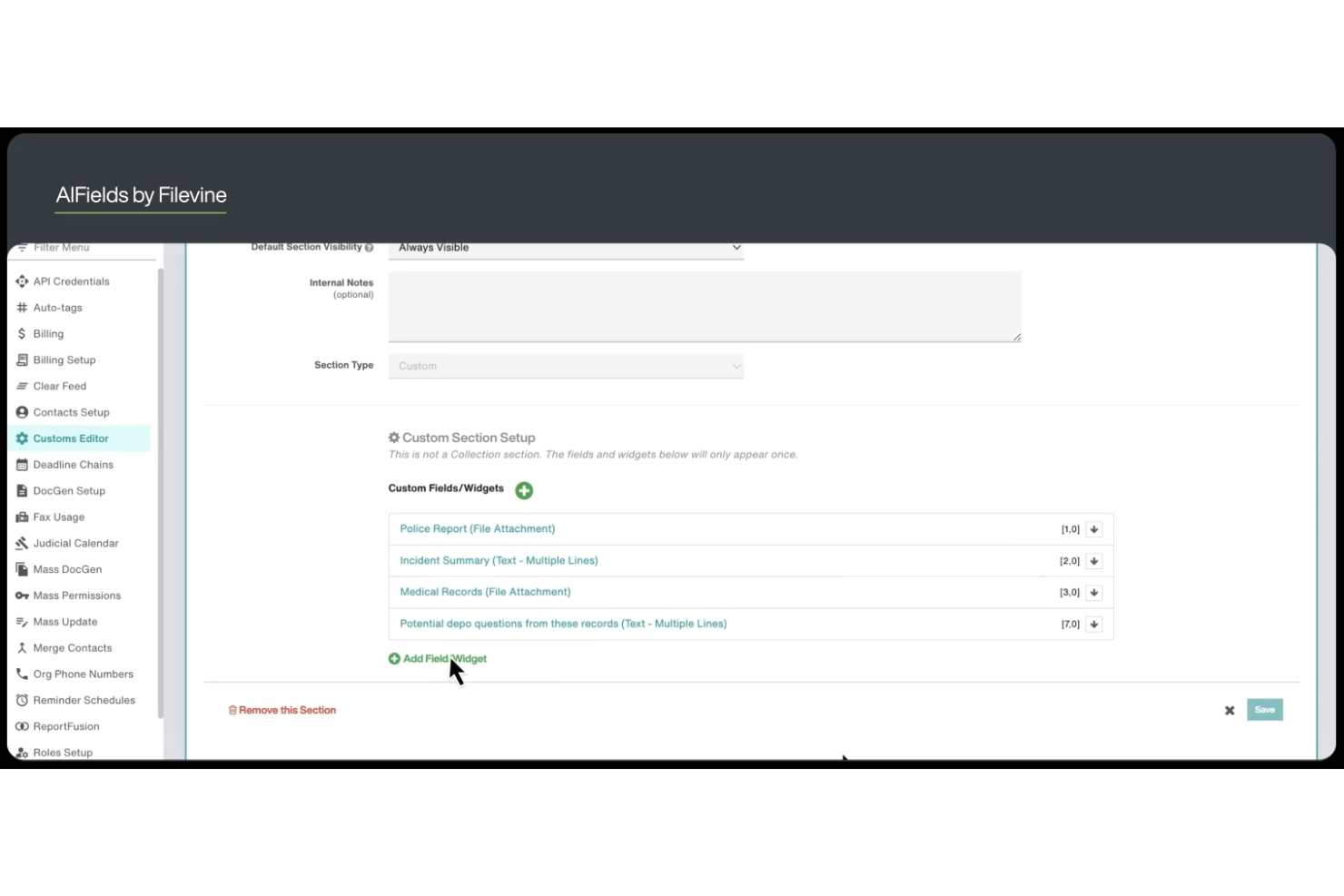
Filevine offre ai team legali una piattaforma centralizzata progettata per la gestione complessa dei casi e la collaborazione. I suoi flussi di lavoro flessibili e le funzionalità di automazione dei documenti la rendono particolarmente utile per studi legali e dipartimenti legali che gestiscono un alto volume di casi o questioni legali complesse.
Per Chi È Filevine?
Filevine è adatto agli studi legali e ai team legali che necessitano di flussi di lavoro personalizzabili e di una gestione centralizzata dei casi per affrontare questioni legali complesse o ad alto volume.
Perché Ho Scelto Filevine
Ho scelto Filevine perché è uno dei pochi strumenti legali di intelligenza artificiale con l’AI integrata direttamente nella gestione dei casi, e non come modulo separato. Apprezzo come i Campi AI leggano automaticamente i documenti e mappino i dati estratti in campi riportabili, così il mio team non deve inserire manualmente le informazioni da cartelle cliniche o contratti. La Validazione delle Fasi è un’altra funzionalità su cui conto: LOIS verifica che tutte le attività, i dati e i documenti richiesti siano completi prima che una pratica proceda oltre, eliminando ogni incertezza nell’avanzamento del caso. Per i team che gestiscono dozzine di pratiche attive contemporaneamente, un sistema di governance integrato di questo tipo è difficile da trovare altrove.
Funzionalità Chiave di Filevine
- DemandsAI®: Genera lettere di richiesta redatte tramite intelligenza artificiale utilizzando i dati dei casi provenienti da Filevine, producendo lettere completate in 15 minuti o meno.
- AI Doc Review: Scansiona i documenti legali caricati per estrarre le informazioni chiave e produrre riassunti concisi senza necessità di revisione manuale.
- ImmigrationAI®: Analizza i documenti dei clienti e compila automaticamente moduli e questionari USCIS in fino a 170 lingue.
- Depo CoPilot: Analizza in tempo reale le testimonianze in deposizione e propone risposte dei testimoni esperti durante le procedure.
Integrazioni di Filevine
Le integrazioni includono Sageness, Gemini Legal, InfoTrack, Record Retrieval Solutions, DocuPost, MoveDocs, Copitrak, Postage: FedEx, Stamps, Soluno Balances, Microsoft Teams e Dialpad.
Pros and Cons
Pros:
- Flussi di lavoro personalizzabili in base alle esigenze dei casi
- Ottimizza l'organizzazione delle informazioni sui casi
- Supporta i flussi di lavoro dei dipartimenti legali
Cons:
- Limitato alla gestione dei casi
- Complessità nella personalizzazione
- Specifico per i flussi di lavoro legali

DISCO
Ideale per processi di e-discovery
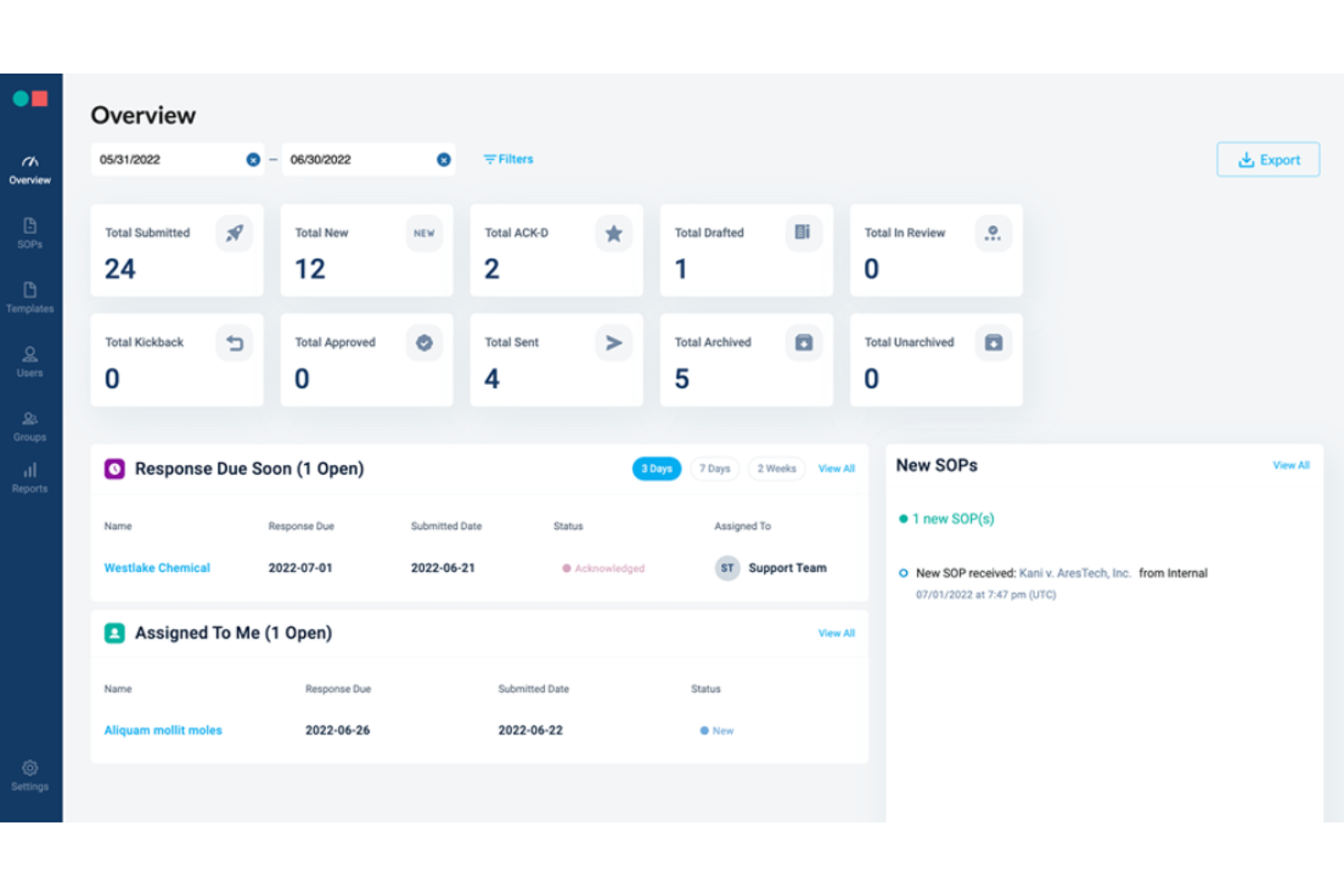
DISCO offre alle squadre legali una piattaforma potenziata dall'intelligenza artificiale progettata per gestire compiti complessi di e-discovery con velocità e precisione. La sua interfaccia intuitiva e le funzioni di automazione sono apprezzate da studi legali e consulenti interni che affrontano cause ad alto volume o questioni regolamentari.
Per chi è più indicato DISCO?
DISCO è adatto a team di contenzioso e professionisti delle operazioni legali presso studi legali o aziende che gestiscono progetti di e-discovery e revisione documentale su larga scala.
Perché ho scelto DISCO
Le capacità di e-discovery di DISCO vanno ben oltre la semplice gestione dei documenti. L'ho scelto perché la sua funzione Auto Review elabora fino a 32.000 documenti all'ora—completando revisioni di primo passaggio in poche ore invece che in settimane—with una precisione superiore del 10–20% rispetto ai revisori umani. Apprezzo inoltre che Auto Review fornisca una spiegazione dettagliata per ogni decisione di etichettatura, così la mia squadra può effettuare il controllo qualità con sicurezza e non limitarsi a trattare i risultati dell'AI come una scatola nera. Per i casi in cui è fondamentale una valutazione precoce, DISCO utilizza un unico database per ECA e revisione attiva, il che significa che la mia squadra evita la dispendiosa migrazione dei documenti tra diversi ambienti.
Caratteristiche principali di DISCO
- Cecilia Q&A: Uno strumento di analisi delle prove basato su AI che permette di porre domande in linguaggio naturale sul proprio caso e restituisce risposte con citazioni prese direttamente dal database documentale.
- Definizioni contestuali AI: Evidenzia qualsiasi acronimo o termine nel visualizzatore di documenti e genera una definizione esclusivamente dai documenti del caso, con un elenco completo delle citazioni.
- DISCO Hold: Uno strumento di gestione dei legal hold che automatizza le notifiche ai custodi, la conservazione dei dati su Microsoft 365, Google Workspace e Slack, e genera tracciati di audit difendibili.
- Produzione documentale da milioni di pagine: Esegue produzioni fino a un milione di pagine in appena 25 minuti, con selezione metadati configurabile integrata nel flusso di lavoro di preparazione alla produzione.
Integrazioni DISCO
Le integrazioni native non sono attualmente elencate. DISCO offre un'API per integrazioni personalizzate.
Pros and Cons
Pros:
- Interfaccia intuitiva per la gestione dei dati
- Scalabile per casi di grandi dimensioni
- Supporta contenziosi e conformità
Cons:
- Limitato alle funzioni di e-discovery
- Complesso nelle analisi dei dati
- Specifico per la revisione di documenti legali

Harvey
Ideale per l’analisi di documenti legali
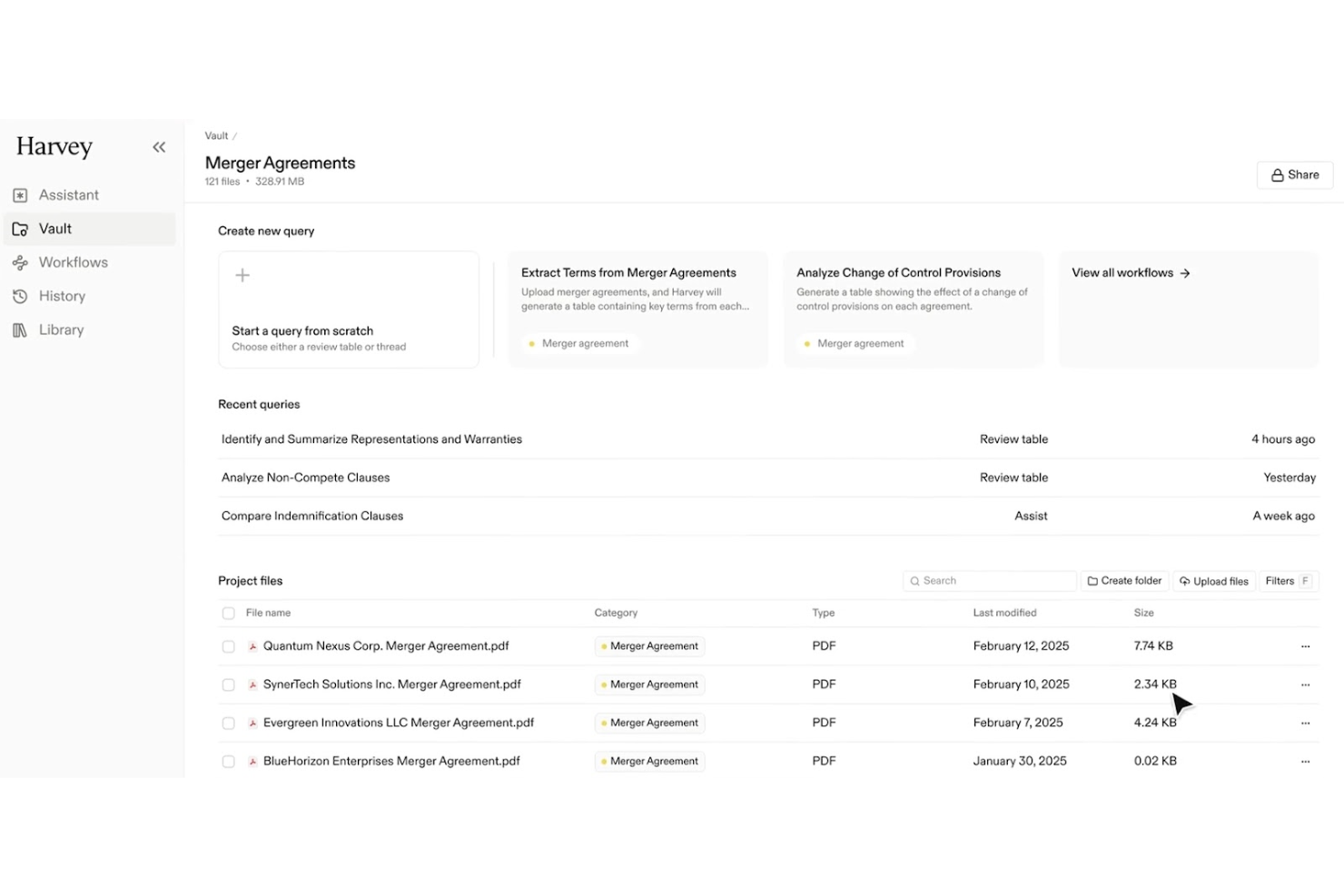
Harvey utilizza un'intelligenza artificiale avanzata per aiutare i team legali ad analizzare e interpretare rapidamente documenti giuridici complessi. È progettato per studi legali e consulenti interni che devono estrarre informazioni, identificare rischi e gestire grandi volumi di testi legali con precisione.
Per chi è migliore Harvey?
Harvey è adatto a professionisti legali e studi che hanno bisogno di elaborare, revisionare e analizzare grandi quantità di documenti legali in modo efficiente.
Perché ho scelto Harvey
Ho scelto Harvey per la sua funzione Vault, che consente al mio team di condurre analisi in blocco su migliaia di file contemporaneamente—una caratteristica davvero difficile da trovare in altri strumenti di IA legale. Quando affronto una revisione approfondita di un’operazione di M&A, posso interrogare un intero vault per individuare contratti con clausole di cambio di controllo o diritti di recesso, invece di dover esaminare ogni documento singolarmente. Le tabelle di revisione di Harvey poi estraggono e confrontano i dati chiave in un formato strutturato, così posso sintetizzare le conclusioni sull'intero insieme documentale dell’operazione. Questa combinazione di analisi in blocco ed estrazione strutturata rende Harvey la scelta più chiara per l’analisi di documenti legali su larga scala.
Funzionalità principali di Harvey
- Chat in stile Q&A: Fai domande in linguaggio naturale e ricevi risposte citate provenienti dai documenti caricati, dalle knowledge base interne e da database giuridici collegati.
- Agenti di workflow: Crea e utilizza agenti personalizzati multi-step tramite prompt in linguaggio naturale, con supporto per condizioni, classificazione e modelli templatizzati dello studio.
- Ricerca agentica: Harvey affina iterativamente le ricerche tra le fonti caricate, espandendo il contesto finché non ricava informazioni sufficienti per generare una risposta completa.
- Ricerca legale cross-jurisdizionale: Interroga oltre 500 fonti di dati legali a livello globale—inclusi Ask LexisNexis®, EUR-Lex e EDGAR—direttamente all'interno della piattaforma.
Integrazioni Harvey
Le integrazioni native non sono attualmente elencate.
Pros and Cons
Pros:
- Automatizza compiti legali complessi
- Generazione accurata di citazioni
- Gestione sicura dei documenti
Cons:
- Limitato all’analisi di documenti legali
- Può essere complesso per piccoli team
- Output generati dall’IA variabili

Leah
Ideale per la gestione del ciclo di vita dei contratti
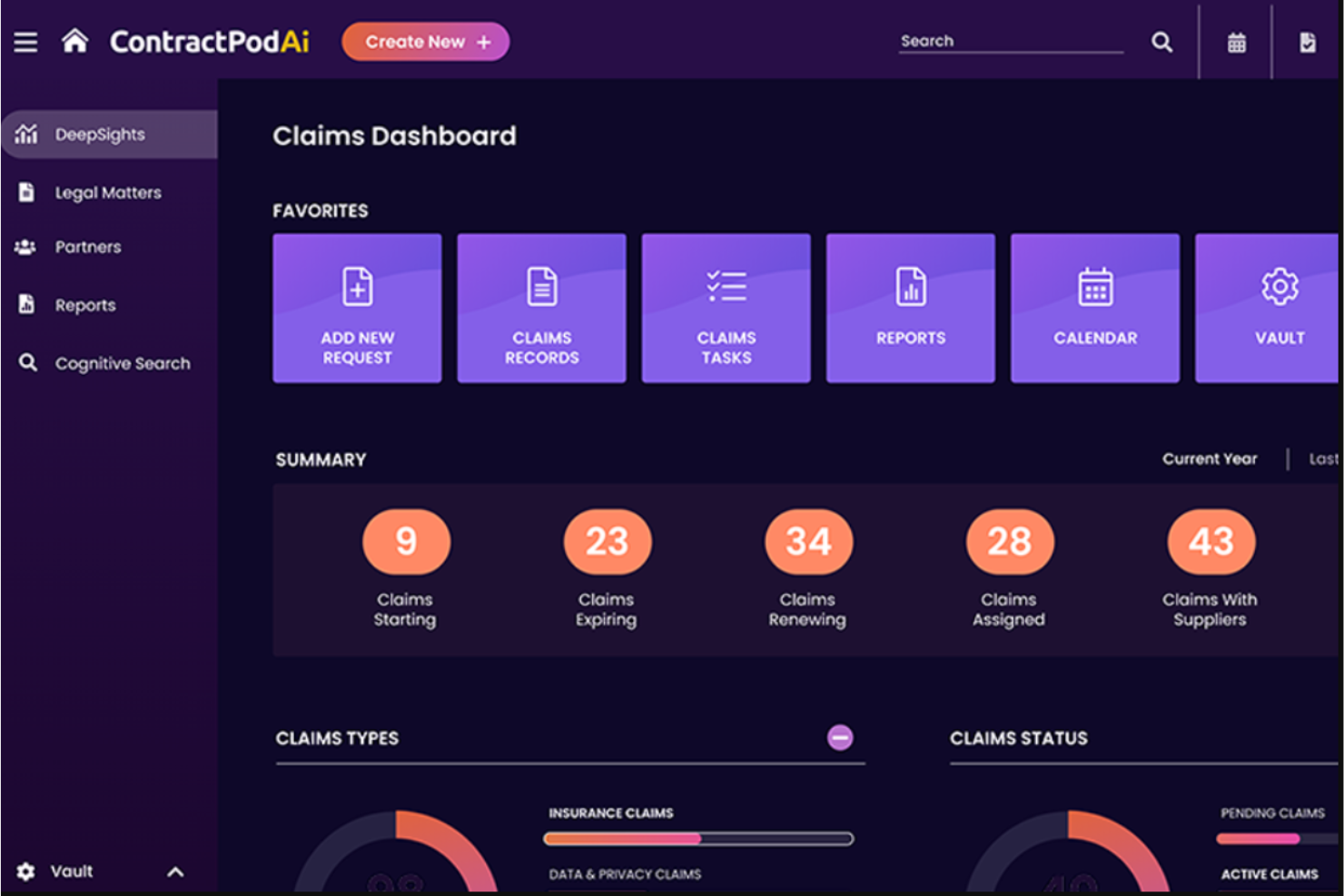
Leah di ContractPodAi offre una gestione dei contratti guidata dall’IA progettata per i team legali e i consulenti aziendali che desiderano automatizzare flussi di lavoro contrattuali complessi. La sua attenzione alla gestione dell’intero ciclo di vita dei contratti aiuta le organizzazioni a ridurre le revisioni manuali, migliorare la conformità e centralizzare il controllo sui contratti.
Per Chi è Ideale Leah?
Leah è particolarmente adatta ai team legali interni di aziende di medie e grandi dimensioni che devono gestire grandi volumi di contratti complessi.
Perché Ho Scelto Leah
Leah merita il suo posto in questa lista perché copre l’intero ciclo di vita del contratto su una piattaforma unica—dalla raccolta iniziale al tracciamento degli obblighi—senza che i team legali debbano integrare strumenti separati. Apprezzo particolarmente la revisione con IA a livello di clausola, che mette in evidenza i rischi e suggerisce modifiche in linea con le policy durante la negoziazione, invece che successivamente. La funzione di estrazione degli obblighi classifica automaticamente gli impegni, assegna responsabili e attiva promemoria, così il mio team non deve inseguire manualmente scadenze o consegne mancate. Per i team interni che gestiscono un elevato flusso di contratti, questa copertura end-to-end è difficile da eguagliare.
Caratteristiche Principali di Leah
- Template di contratto self-service: Team legali e business possono generare contratti utilizzando librerie di clausole pre-approvate e moduli di raccolta dati senza dover partire da zero.
- Punteggio di rischio: Leah assegna automaticamente un punteggio ai contratti in base alle variazioni delle clausole e segnala i linguaggi che esulano dai parametri legali dell’organizzazione.
- Repository intelligente: Un hub contrattuale ricercabile e controllato tramite permessi, con filtri avanzati, azioni in blocco e visualizzazioni personalizzabili per la gestione dell’intero portafoglio contrattuale.
- Dashboard personalizzate di reportistica: Monitora KPI come tempi di ciclo, date di rinnovo e uso delle clausole, con report esportabili in formato Excel o PDF.
Integrazioni Leah
Le integrazioni includono Salesforce, DocuSign, Adobe Sign, Microsoft Outlook, Microsoft 365, SAP, Oracle, Workday, Google Workspace e Slack.
Pros and Cons
Pros:
- Analisi contrattuale basata su IA
- Supporta l’intero ciclo di vita del contratto
- Riduce i tempi di revisione manuale
Cons:
- Potrebbe richiedere una configurazione iniziale
- Limitato alla gestione dei contratti

Ideale per banche dati di ricerca legale
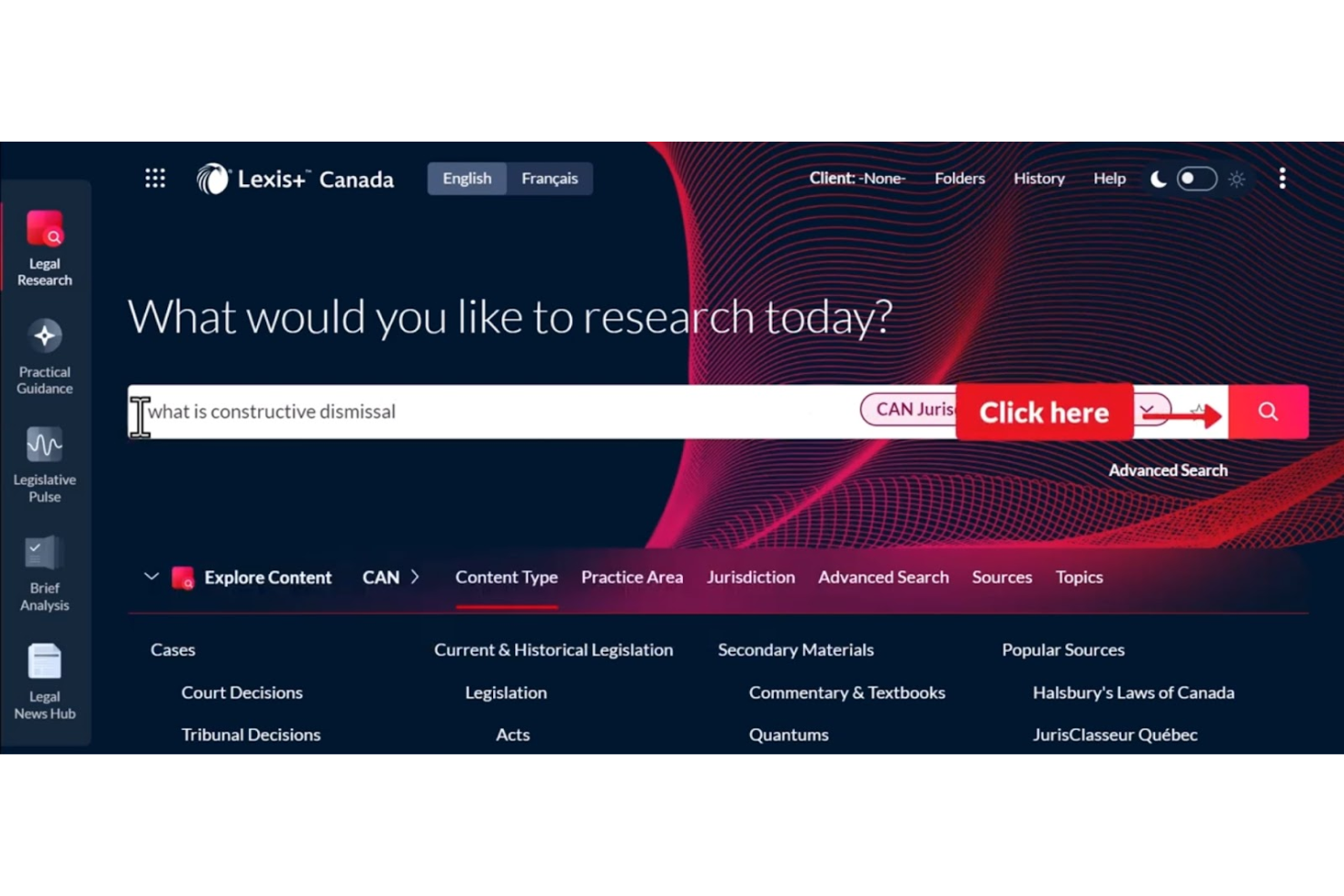
LexisNexis offre ai professionisti del settore legale l'accesso a una vasta suite di strumenti di ricerca e analisi progettati per studi legali, consulenti interni e team di operazioni legali. Le sue avanzate capacità di ricerca e i contenuti legali curati aiutano gli utenti a trovare rapidamente risposte autorevoli e a gestire questioni legali complesse.
Per chi è pensato LexisNexis?
LexisNexis è una soluzione ideale per professionisti e ricercatori legali che operano in studi legali, reparti legali aziendali e istituzioni accademiche alla ricerca di informazioni legali autorevoli.
Perché ho scelto LexisNexis
Ciò che distingue LexisNexis nel campo dell'IA legale è la profondità e l'autorevolezza dei suoi contenuti di base. L'ho scelto perché Lexis+ AI fonda ogni risposta su fonti primarie della legge britannica: normativa, giurisprudenza riportata negli All England Law Reports e Halsbury's Laws of England, con citazioni che si possono verificare direttamente alla fonte. Apprezzo il fatto che la funzione Vault permetta al mio team di archiviare e riutilizzare documenti chiave, con risposte dell'IA basate sia sui nostri materiali caricati sia su contenuti legali autorevoli. In pratica, ciò significa che posso eseguire una ricerca complessa, ottenere una risposta citata e verificare ogni riferimento senza lasciare la piattaforma.
Caratteristiche principali di LexisNexis
- Lexis+ AI Ask: Fornisce risposte immediate a domande legali basate su fonti britanniche autorevoli, inclusi Halsbury's Laws e gli All England Law Reports, con citazioni collegate.
- Analisi di documenti transazionali: Analizza i contratti caricati per individuare clausole mancanti, incoerenze e contraddizioni direttamente all'interno della piattaforma.
- Integrazione DMS: Si collega con sistemi di gestione documentale come iManage, NetDocs e SharePoint per consentire la ricerca sia nei documenti dello studio sia nei contenuti di LexisNexis.
- Generazione di timeline grafiche: Crea automaticamente una timeline visiva dai documenti caricati, utile per la cronologia del caso e la preparazione delle pratiche.
Integrazioni LexisNexis
Le integrazioni includono iManage, Microsoft 365, NetDocuments, SharePoint, Visualfiles, Lexis® Create+, Lexis® Everyfile, Azure e altri sistemi di gestione documentale legale. È disponibile anche un'API per integrazioni personalizzate.
Pros and Cons
Pros:
- Ampio database di risorse legali
- Accesso completo alla giurisprudenza
- Supporta ricerche legali approfondite
Cons:
- Potrebbe richiedere tempo di configurazione
- Complessità iniziale nell'apprendimento
- Limitato alle funzioni di ricerca

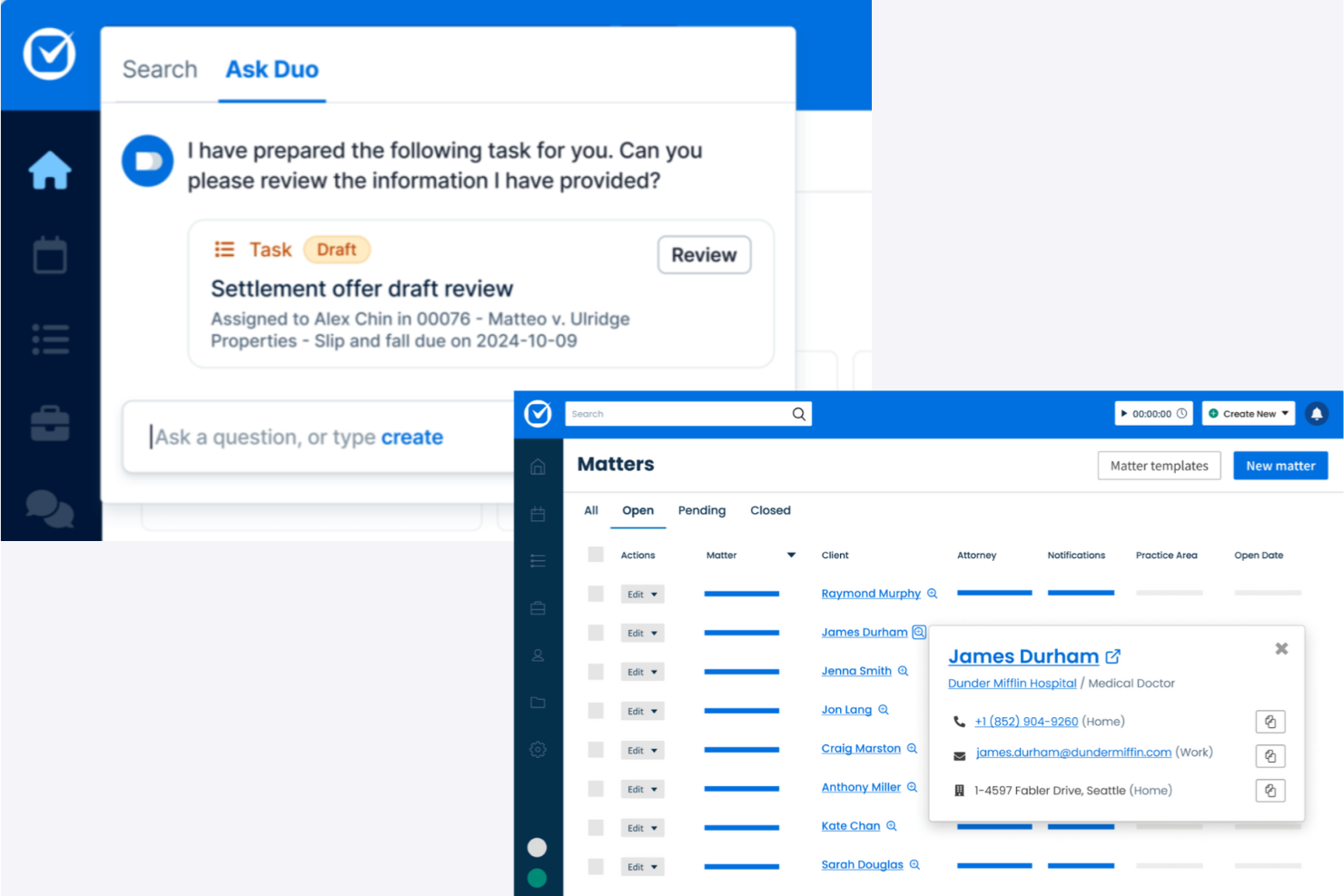
Clio Duo porta l'automazione guidata dall'IA e la gestione dei documenti ai professionisti legali che cercano una soluzione cloud-first. La sua integrazione con la consolidata piattaforma di gestione degli studi legali di Clio è ideale per gli studi che vogliono modernizzare i flussi di lavoro e ridurre le attività legali manuali.
Per chi è Clio Duo?
Clio Duo è adatto a studi legali e team legali di piccole e medie dimensioni che danno priorità a una gestione sicura, in cloud, dello studio e a flussi di lavoro legali potenziati dall’IA.
Perché ho scelto Clio Duo
Ho scelto Clio Duo perché va oltre la semplice redazione di testi: trasforma il lavoro legale in azioni completate in un ambiente nativo nel cloud. Apprezzo come Manage AI estragga le scadenze direttamente dai documenti del tribunale e crei automaticamente eventi in calendario, evitando così che il mio team perda udienze senza dover inserire i dati manualmente. Faccio anche affidamento sulla sua automazione della fatturazione: genera bozze di fatture, associa le ricevute ai fascicoli e gestisce le approvazioni, tutto all’interno dell’infrastruttura cloud di Clio Manage. Per gli studi che già lavorano nel cloud, questa integrazione elimina la difficoltà di passare tra strumenti disconnessi.
Funzionalità principali di Clio Duo
- Riepilogo documenti con IA: Condensa lunghi documenti legali in sintesi concise direttamente all’interno della piattaforma.
- Chat IA specifica per la pratica: Consente di interrogare dettagli, note e documenti di un caso tramite un'interfaccia conversazionale legata ai singoli fascicoli.
- Automazione dell’accoglienza clienti: Genera moduli di raccolta dati e compila campi pratiche con l’IA per ridurre l’inserimento manuale.
- Assistenza nella ricerca legale: Fornisce giurisprudenza e riferimenti legali rilevanti durante il flusso di lavoro per supportare le attività di ricerca degli avvocati.
Integrazioni di Clio Duo
Le integrazioni includono QuickBooks Online, Xero, InfoTrack, OurFamilyWizard, Case Status, ChartSquad, Legl, Precedent Demand Composer, Scorpion RevenueMAX e LawPay.
Pros and Cons
Pros:
- Accesso cloud per flessibilità
- Semplifica fatturazione e pagamenti
- Gestione delle pratiche completa
Cons:
- Potrebbe richiedere tempo di configurazione
- Limitato alla gestione dello studio
- Configurazione iniziale complessa

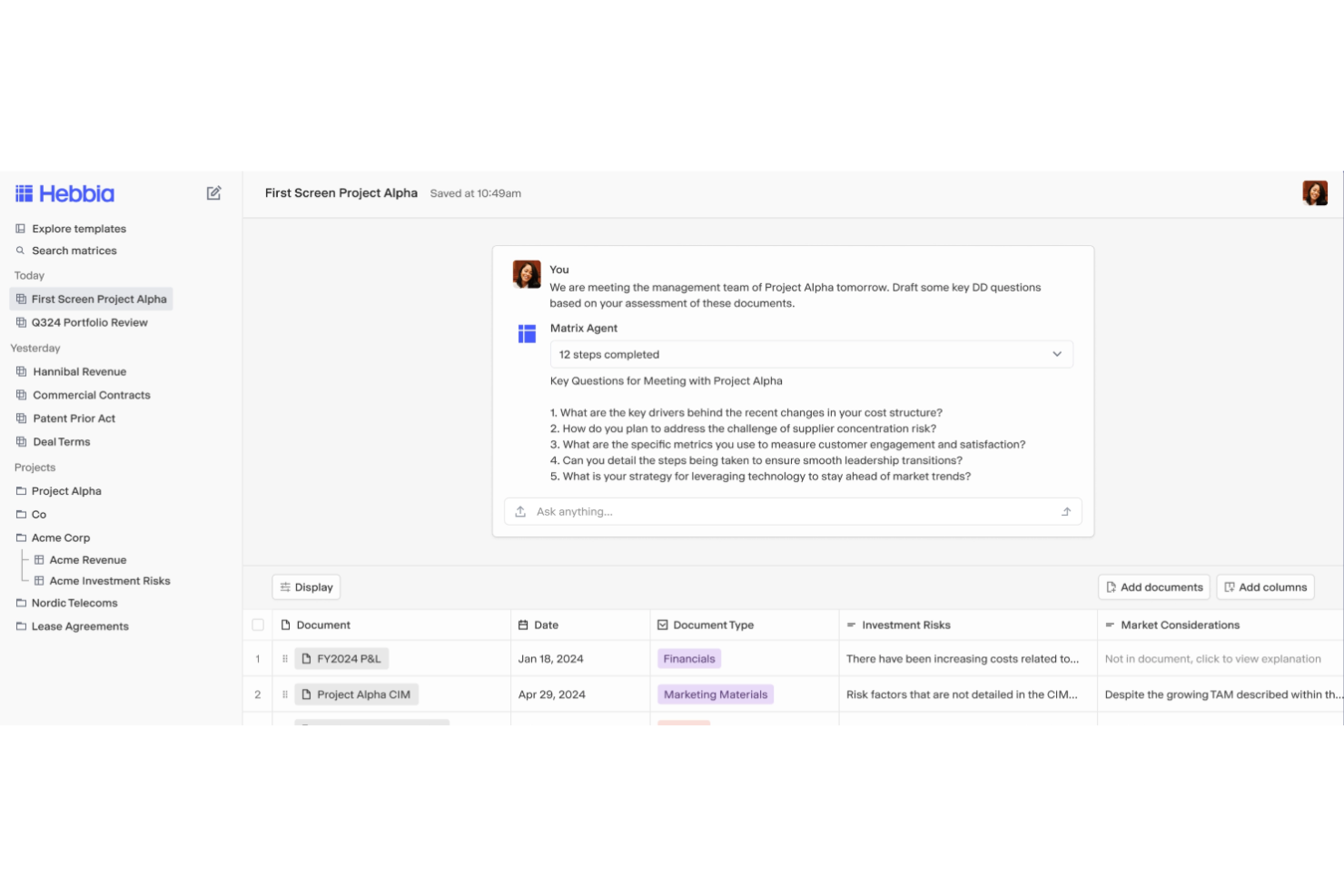
Hebbia utilizza un'intelligenza artificiale avanzata per aiutare i professionisti legali ad analizzare, ricercare ed estrarre rapidamente approfondimenti da documenti complessi. La sua piattaforma flessibile è progettata per studi legali e team interni che devono gestire grandi volumi di dati legali e ottimizzare flussi di lavoro ad alta intensità di ricerca.
Per Chi È Più Indicata Hebbia?
Team legali e professionisti della ricerca in studi legali o dipartimenti legali aziendali che devono analizzare e sintetizzare grandi quantità di documenti legali.
Perché Ho Scelto Hebbia
Ho scelto Hebbia perché la sua interfaccia Matrix affronta direttamente una delle parti più difficili della ricerca legale: sintetizzare approfondimenti attraverso centinaia o migliaia di documenti contemporaneamente. Invece di esaminare contratti o deposizioni uno per uno, posso eseguire query strutturate su un intero set di documenti e ottenere risultati in una griglia in stile foglio di calcolo—ogni riga un documento, ogni colonna uno spunto di analisi. Nel lavoro di contenzioso, questo significa portare alla luce prove chiave attraverso trascrizioni di deposizioni in una frazione del tempo. Apprezzo anche l'agente Deeper Research di Hebbia, che utilizza un sistema multi-agente per scomporre questioni legali complesse, recuperare informazioni sia da repository di documenti privati sia da fonti pubbliche, e produrre report completamente citati—così posso risalire ogni approfondimento alla sua fonte.
Funzionalità Chiave di Hebbia
- Identificazione dello stato dell’arte nei brevetti: Ricerca e confronta rivendicazioni chiave tra documenti brevettuali per individuare stati dell’arte sovrapposti.
- Libreria automatica di deal points: Crea e interroga un archivio ricercabile di termini M&A estratti da transazioni passate.
- Audit dei red flag nella virtual data room (VDR): Analizza i contratti presenti in una intera VDR e genera un rapporto iniziale dei rischi in pochi minuti.
- Automazione dei flussi di lavoro: Codifica processi legali multi-step—come checklist di due diligence o sequenze di revisione dei contratti—così che Hebbia li esegua ripetutamente senza necessità di rilanciare manualmente i prompt.
Integrazioni Hebbia
Le integrazioni includono Snowflake, Amazon AWS S3, FactSet, Guidepoint, Pitchbook, Thirdbridge, Box, Dropbox, S&P Capital IQ e SharePoint.
Pros and Cons
Pros:
- Gestisce interrogazioni legali complesse
- Comprensione contestuale dei documenti
- Ideale per compiti di ricerca approfondita
Cons:
- Potrebbe richiedere tempo di apprendimento
- Limitato alle funzioni di ricerca
- Può risultare complesso per team piccoli


EvenUp utilizza l'IA per aiutare gli studi legali e i team legali che si occupano di lesioni personali ad automatizzare la preparazione dei pacchetti di richiesta e dei documenti di transazione. Il suo focus sull'ottimizzazione della documentazione dei casi complessi è ideale per gli studi che gestiscono un alto volume di reclami per lesioni personali.
Per chi è consigliato EvenUp?
Avvocati specializzati in lesioni personali e team operativi legali di studi legali che desiderano automatizzare e standardizzare la creazione dei pacchetti di richiesta.
Perché ho scelto EvenUp
Ho scelto EvenUp perché nessun altro strumento di IA legale è costruito esclusivamente attorno al ciclo di vita dei casi di lesioni personali. Il suo prodotto Demands™ combina Piai™—un'IA proprietaria addestrata su centinaia di migliaia di casi PI—con la revisione da parte di oltre 100 esperti legali interni, compresi infermieri, assistenti legali ed esaminatori. Apprezzo anche la funzione Negotiation Preparation™, che evidenzia indicatori chirurgici, precedenti incidenti e diagnosi negative, così il mio team può anticipare le argomentazioni della difesa prima delle trattative con gli assicuratori. Per gli studi PI che gestiscono grandi volumi di casi, questo livello di intelligenza specifica per caso è difficile da trovare altrove.
Caratteristiche principali di EvenUp
- MedChrons™: Genera cronologie mediche con assistenza AI, includendo linee temporali dei trattamenti, punti diagnostici salienti, collegamenti ipertestuali a documenti allegati e sommari organizzati per fornitore in formato web, PDF e .DOCX.
- AI Playbooks: Esamina e instrada automaticamente i casi in ingresso durante l'accettazione, segnalando indicatori di alto valore come imputati commerciali e identificando potenziali incongruenze nei fascicoli medici.
- Settlement Repository™: Fornisce un riferimento basato su dati concreti per decisioni di transazione, utilizzando risultati storici di casi.
- Executive Analytics™: Monitora metriche a livello di studio come la velocità di richiesta, la continuità delle cure e i documenti mancanti, con benchmarking tra pari a livello statale e nazionale.
Integrazioni EvenUp
Le integrazioni native non sono attualmente elencate.
Pros and Cons
Pros:
- Lettere di richiesta generate da AI
- Cronologie mediche efficaci
- Focalizzato sulla gestione dei casi
Cons:
- Limitato al diritto delle lesioni personali
- Specifico per la documentazione legale
- Analisi complesse da usare

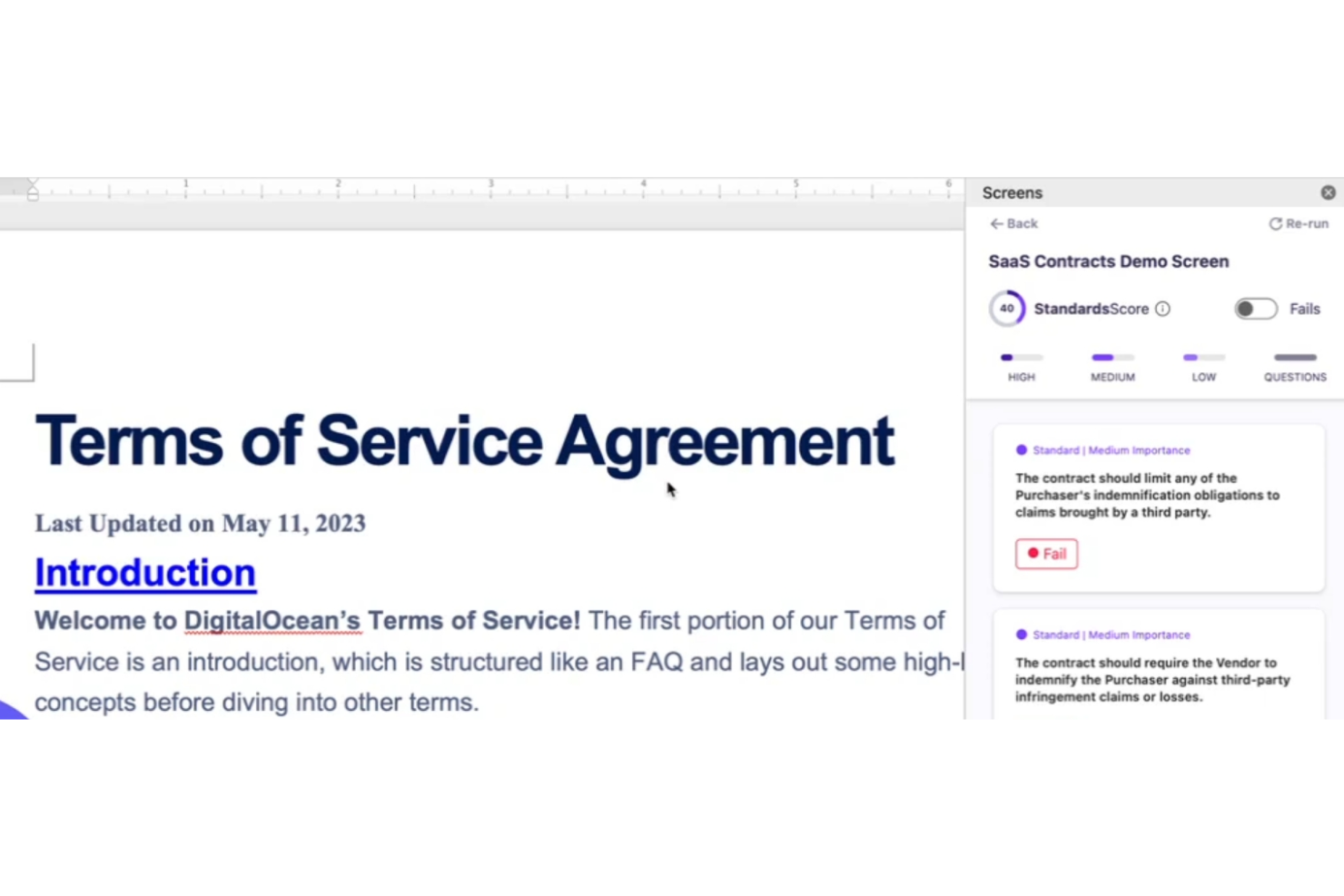
Screens offre ai professionisti legali una piattaforma progettata per la comunicazione e la collaborazione con i clienti in tempo reale e in totale riservatezza. Il suo focus su privacy e conformità lo rende una scelta solida per studi legali e uffici legali interni che gestiscono questioni legali sensibili.
Per Chi è Screens?
Screens è adatto a studi legali e team legali che necessitano di canali sicuri e conformi per la comunicazione con i clienti e la condivisione di documenti.
Perché Ho Scelto Screens
Screens si merita un posto in questa lista grazie alla sua Screens Clean Data Promise—un impegno formale che i dati dei tuoi contratti non saranno mai utilizzati per addestrare modelli di AI e che tutti i subfornitori sono soggetti al medesimo standard. L'ho scelto specificamente per i team legali che gestiscono questioni sensibili dei clienti, dove la riservatezza dei dati è imprescindibile. Apprezzo anche la funzione 'Chat con Documento', che consente di interrogare un contratto in uno spazio di lavoro privato senza esporre quei dati all'esterno. Combinato con le revisioni in un clic e i playbook personalizzati, Screens offre ai professionisti legali un modo veloce di esaminare i contratti senza compromettere la riservatezza.
Caratteristiche Principali di Screens
- Revisione bulk: Carica più documenti Word, PDF o contratti ospitati pubblicamente ed eseguili simultaneamente con i tuoi playbook.
- Make Mutual: Applica redline direttamente sul testo selezionato di un contratto in Word per garantire che diritti e obblighi si applichino equamente a tutte le parti.
- Benchmark contrattuale: Accedi a un database pubblico di contratti con dati di benchmark reali e aggiornati per confrontare le clausole dei contratti con gli standard di mercato.
- Playbook istantanei: Crea playbook personalizzati in base a standard contrattuali specifici, riutilizzabili durante le revisioni.
Integrazioni di Screens
Non sono attualmente elencate integrazioni native.
Pros and Cons
Pros:
- Modifica del contratto direttamente in Word
- Analisi di più contratti
- Playbook AI professionali disponibili
Cons:
- Limitato alla gestione dei contratti
- Può richiedere tempo iniziale di configurazione
- Analisi multicontatto complessa
Altri strumenti di IA legale
Ecco alcune ulteriori opzioni di strumenti di IA legale che non sono state incluse nel mio elenco, ma che vale comunque la pena approfondire:
- Trustiics AI
Ideale per studi piccoli e medi
- Veritec AI
Ideale per il monitoraggio della conformità
- Darrow
Ideale per identificare opportunità legali


Come valuto gli strumenti di intelligenza artificiale per il settore legale
Qualsiasi strumento presente in questa lista deve fare molto più che aggiungere un chatbot a una barra di ricerca: cerco AI che effettivamente facciano risparmiare tempo agli avvocati in attività come la revisione dei contratti, la ricerca legale e la redazione di documenti. Suddivido la mia valutazione in funzionalità di base che ogni strumento deve soddisfare e fattori differenzianti che distinguono una soluzione dall’altra.
Funzionalità di base (Requisiti minimi per questa lista)
Quando seleziono gli strumenti per la mia lista, valuto ciascuno su una scala da 0 (non offre la funzionalità) a 5 (eccelle in quest’area) per ogni funzionalità di base elencata di seguito. Poi calcolo il punteggio totale dello strumento in percentuale. Ogni strumento deve raggiungere un punteggio totale minimo del 65% per essere considerato per l’inclusione.
- Analisi di documenti legali: Verifico se uno strumento è in grado di riassumere un contratto di locazione, segnalare clausole a rischio in un accordo con un fornitore o estrarre date chiave da un deposito.
- Ricerca legale potenziata dall’AI: Valuto quanto bene lo strumento risponde a domande in linguaggio naturale con riferimenti a sentenze, normative o regolamenti citati in diverse giurisdizioni.
- Automazione nella redazione di documenti: Gli strumenti migliori consentono agli avvocati di generare prime bozze di NDA, istanze o lettere di diffida a partire da prompt o da librerie di clausole.
- Citazioni e attribuzione delle fonti: Ogni citazione dovrebbe rimandare a un’autorità legale verificabile—cerco strumenti che minimizzano riferimenti a sentenze inventate.
- Sicurezza dei dati e riservatezza: Verifico la conformità a SOC 2, impegni di non utilizzo dei dati per addestramento e standard di crittografia a tutela delle informazioni privilegiate.
- Integrazione con i flussi di lavoro dello studio: Lo strumento dovrebbe connettersi alle piattaforme già in uso dagli avvocati, come iManage, Clio, Relativity o Microsoft Word.
Una volta che dispongo di una lista di strumenti che soddisfano queste condizioni, considero le caratteristiche distintive di ciascuna piattaforma.
Fattori differenzianti (Cosa distingue i fornitori)
Ecco come confronto e metto a fuoco i diversi fornitori:
Caratteristiche di spicco
Un ragionamento attento alla giurisdizione è fondamentale quando il lavoro riguarda più regioni—cerco strumenti che adattino la loro analisi in base alla legge applicabile. I tracciamenti delle attività e la spiegabilità sono altrettanto importanti, soprattutto quando un avvocato supervisore deve esaminare come l’AI ha raggiunto una conclusione. Valuto anche se uno strumento offre una chat conversazionale sulle pratiche, che permette di interrogare i propri fascicoli legali in linguaggio naturale invece di eseguire ricerche manuali per parole chiave tra decine di allegati.
Oltre alle funzionalità
Il rischio di allucinazioni è un problema reale, quindi valuto se un fornitore utilizza tecniche di generazione aumentata dal recupero delle fonti e pubblica benchmark di accuratezza o report di trasparenza. Anche l’adozione da parte degli avvocati è importante—uno strumento che offre onboarding specifico per il settore legale e formazione valida per crediti CLE avrà una diffusione molto migliore rispetto a uno che indirizza gli utenti verso un generico centro assistenza. Considero anche la dimensione dello studio e l’ambito di pratica, poiché un avvocato singolo orientato al contenzioso ha esigenze molto diverse da un team interno che gestisce grandi volumi di due diligence per fusioni e acquisizioni.
Come scegliere gli strumenti di IA legale
È facile perdersi in lunghi elenchi di funzionalità e strutture tariffarie complesse. Per aiutarti a rimanere concentrato mentre valuti come ogni strumento di IA si integra con il resto del tuo software per studi legali, ecco un elenco di fattori da tenere a mente:
| Fattore | Cosa considerare |
| Scalabilità | Assicurati che lo strumento possa crescere insieme al tuo studio, gestendo quantità crescenti di dati e richieste da parte degli utenti. |
| Integrazioni | Verifica che si integri con i sistemi esistenti, inclusi i software per la gestione degli studi legali, gli strumenti di gestione dei documenti e i sistemi di fatturazione. |
| Personalizzazione | Cerca opzioni che consentano di adattare i flussi di lavoro e i report alle tue esigenze legali specifiche. |
| Facilità d'uso | Scegli uno strumento con un'interfaccia intuitiva per ridurre al minimo la formazione e l'inserimento degli utenti. |
| Budget | Considera il costo totale, comprese eventuali commissioni nascoste, e assicurati che rientri nel tuo budget. |
| Misure di sicurezza | Verifica che lo strumento disponga di solide misure di sicurezza per proteggere i dati legali sensibili. |
| Assistenza | Valuta la disponibilità e la qualità dell'assistenza clienti per la risoluzione dei problemi. |
| Conformità | Assicurati che lo strumento sia conforme agli standard e alle normative legali pertinenti alla tua area. |
Tendenze negli strumenti di IA legale
Nella mia ricerca ho raccolto innumerevoli aggiornamenti sui prodotti, comunicati stampa e registri delle versioni di diversi fornitori di strumenti di IA legale. Ecco alcune delle tendenze emergenti che sto monitorando:
- Analisi predittiva: I fornitori stanno potenziando gli strumenti con funzionalità di analisi predittiva per prevedere gli esiti legali. Questo aiuta gli avvocati a prendere decisioni basate sui dati. Ad esempio, alcune piattaforme offrono ora informazioni sulle tendenze dei casi e sui possibili verdetti.
- Elaborazione del linguaggio naturale (NLP): L'NLP sta migliorando il modo in cui gli strumenti comprendono e generano il linguaggio umano. Questo rende la revisione e l'analisi dei documenti più rapide e accurate. Molti strumenti utilizzano l'NLP per riassumere i documenti legali ed estrarre rapidamente le informazioni principali.
- Informazioni basate sull'IA: Gli strumenti offrono informazioni basate sull'IA che consentono un'analisi più approfondita dei dati legali. Questo aiuta a identificare schemi e anomalie. I fornitori stanno integrando funzionalità che avvisano gli utenti di potenziali rischi o opportunità legali.
- Blockchain per la sicurezza: Alcuni fornitori stanno integrando la blockchain per migliorare l'integrità e la sicurezza dei dati. Questo garantisce che i documenti legali siano a prova di manomissione e verificabili. Sta diventando una funzionalità essenziale per gli studi che gestiscono informazioni sensibili.
- Assistenti legali virtuali: La diffusione degli assistenti legali virtuali aiuta gli studi a gestire le attività in modo più efficiente. Questi assistenti possono programmare riunioni, organizzare i file e persino condurre ricerche preliminari. Stanno diventando essenziali per gli studi che desiderano ottimizzare le proprie attività.
Cosa sono gli strumenti legali basati sull'IA?
Gli strumenti legali basati sull'IA sono soluzioni software che utilizzano l'intelligenza artificiale per assistere i professionisti del settore legale nella gestione di attività come la revisione dei documenti, la ricerca giuridica e il monitoraggio della conformità. Avvocati, assistenti legali e ricercatori giuridici utilizzano generalmente questi strumenti per migliorare l'efficienza e l'accuratezza del proprio lavoro. L'analisi predittiva, l'elaborazione del linguaggio naturale e le informazioni basate sull'IA aiutano a prendere decisioni, comprendere il linguaggio complesso e analizzare i dati legali. Questi strumenti offrono un valore significativo perché fanno risparmiare tempo, riducono gli errori e migliorano la qualità complessiva dei servizi legali.
Funzionalità degli strumenti legali basati sull'IA
Quando selezioni gli strumenti legali basati sull'IA, presta attenzione alle seguenti funzionalità principali:
- Analisi predittiva: Analizza i dati per prevedere gli esiti legali, supportando il processo decisionale e la pianificazione delle strategie.
- Elaborazione del linguaggio naturale: Comprende ed elabora il linguaggio umano, rendendo la revisione e l'analisi dei documenti più rapide e accurate.
- Informazioni basate sull'IA: Fornisce un'analisi più approfondita dei dati legali, identificando schemi e potenziali rischi o opportunità.
- Gestione dei contratti: Automatizza la creazione, la revisione e la gestione dei contratti, garantendo coerenza e conformità.
- Monitoraggio della conformità: Tiene traccia del rispetto degli standard e delle normative legali e lo garantisce, riducendo il rischio di non conformità.
- Automazione dei documenti: Accelera la creazione e la gestione dei documenti legali, riducendo il carico di lavoro manuale.
- Ricerca elettronica: Semplifica il processo di ricerca elettronica organizzando e revisionando i dati digitali rilevanti per i casi legali.
- Assistenti legali virtuali: Aiutano a programmare gli appuntamenti, organizzare i file e condurre ricerche, ottimizzando l'efficienza operativa.
- Misure di sicurezza: Garantisce la protezione dei dati legali sensibili attraverso misure di sicurezza avanzate.
Vantaggi degli strumenti legali basati sull'IA
L'implementazione di strumenti legali basati sull'IA offre diversi vantaggi al tuo team e alla tua azienda. Ecco alcuni dei vantaggi che puoi aspettarti:
- Maggiore efficienza: L'automazione di attività come la revisione dei documenti e la gestione dei contratti fa risparmiare tempo e riduce il lavoro manuale.
- Maggiore accuratezza: Funzionalità come l'elaborazione del linguaggio naturale garantiscono analisi precise e riducono il rischio di errori.
- Migliore processo decisionale: L'analisi predittiva e le informazioni basate sull'IA forniscono dati preziosi per definire le strategie legali.
- Conformità rafforzata: Il monitoraggio della conformità aiuta il tuo team a rimanere aggiornato sugli standard e sulle normative legali.
- Risparmio sui costi: La riduzione del lavoro manuale e l'ottimizzazione dei processi possono portare a significative riduzioni dei costi.
- Sicurezza dei dati: Misure di sicurezza avanzate proteggono le informazioni legali sensibili, garantendo tranquillità.
- Flessibilità operativa: Gli assistenti legali virtuali e l'accesso basato sul cloud consentono di lavorare da qualsiasi luogo, aumentando la flessibilità.
Costi e prezzi degli strumenti legali basati sull'IA
La selezione degli strumenti legali basati sull'IA richiede la comprensione dei vari modelli e piani tariffari disponibili. I costi variano in base alle funzionalità, alle dimensioni del team, ai componenti aggiuntivi e ad altri fattori. La tabella seguente riassume i piani più comuni, i relativi prezzi medi e le funzionalità generalmente incluse nelle soluzioni di strumenti legali basati sull'IA:
Tabella di confronto dei piani per gli strumenti legali basati sull'IA
| Tipo di piano | Prezzo medio | Caratteristiche comuni |
| Piano gratuito | $0 | Revisione di base dei documenti, spazio di archiviazione limitato e supporto di base. |
| Piano personale | $20-$50/ utente/mese | Revisione avanzata dei documenti, analisi di base e supporto via e-mail. |
| Piano aziendale | $50-$100/ utente/mese | Analisi complete, monitoraggio della conformità, supporto avanzato e opzioni di integrazione. |
| Piano per grandi imprese | $100-$200/utente/mese | Soluzioni personalizzate, supporto dedicato, integrazioni complete e analisi avanzate. |
Domande frequenti sugli strumenti legali basati sull'IA
Ecco alcune risposte alle domande comuni sugli strumenti legali basati sull’IA: