

Recensione Appara 2026: Pro, Contro, Caratteristiche e Prezzi
Ho messo alla prova Appara—ecco perché si distingue per i team legali aziendali che cercano l’automazione dei flussi di lavoro, ma anche dove lascia ancora insoddisfatti gli utenti più esigenti.

Recensiamo gli strumenti in modo indipendente e le commissioni ci aiutano a finanziare i nostri test. Consulta la nostra politica sulla trasparenza, la nostra metodologia o suggerisci uno strumento.
Appara is a corporate legal software built for law firms managing minute books, corporate records, and entity filings across multiple clients. It automates the drafting of resolutions, registers, and corporate documents—work that otherwise takes hours to prepare manually. I'd consider it over a platform like Diligent Entities if your firm needs solid document automation without the overhead of an enterprise entity management system.
Appara Evaluation Summary
4.8/5
- Pricing upon request
- Free demo available
Perché fidarsi dei nostri consigli sui software
6,700+
Reviews
20
Industry experts
16+
Evaluation factors
14
Years
Il nostro team testa e recensisce software dal 2012. In quanto leader di studi legali noi stessi, sappiamo quanto sia difficile — e importante — scegliere il software giusto.
Per questa guida, abbiamo valutato gli strumenti attraverso test pratici e ricerche indipendenti, assegnando un punteggio agli strumenti in base ai nostri criteri di selezione.
Le nostre recensioni riflettono il nostro giudizio editoriale umano, non un discorso di vendita.
Appara Overview
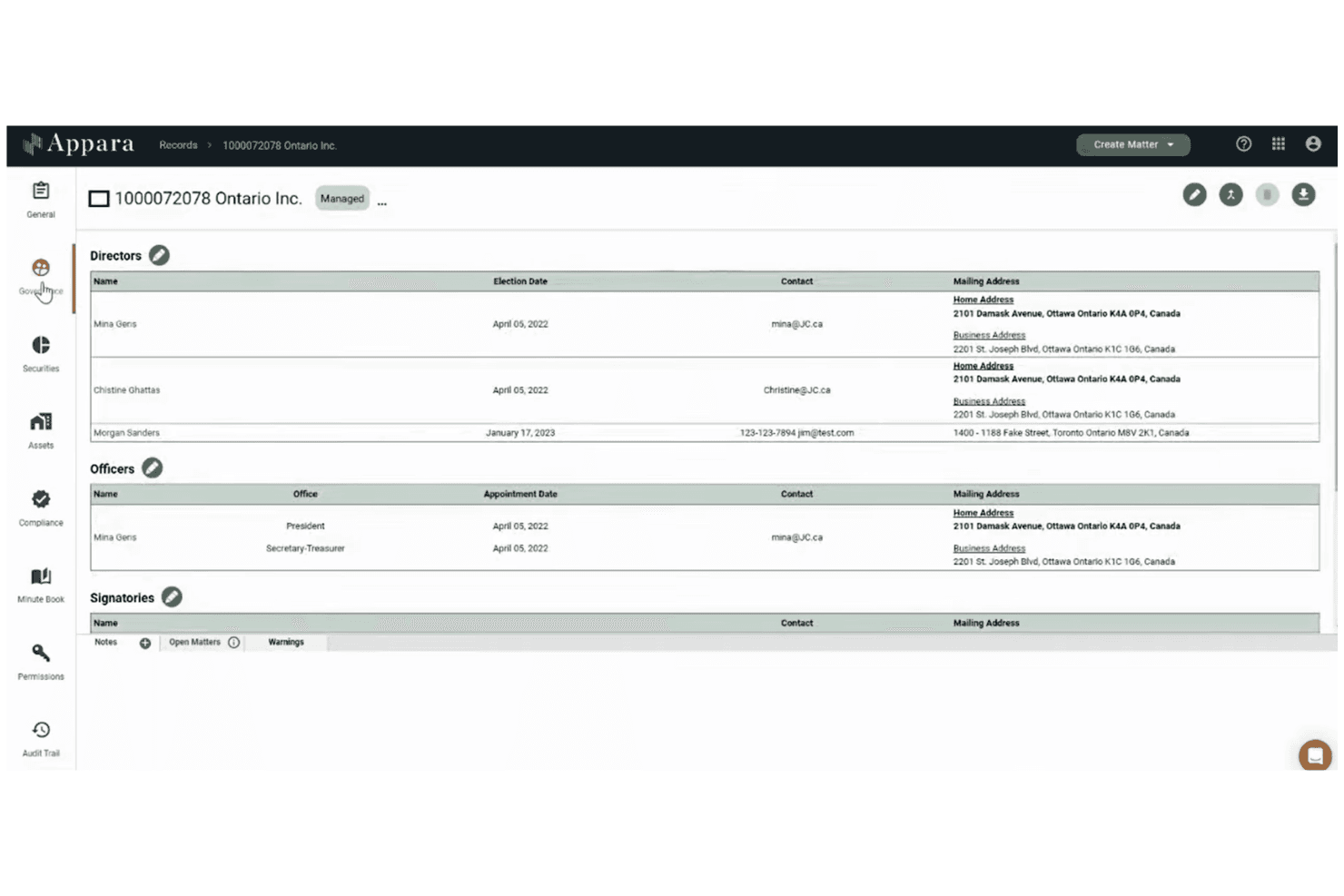
When I compare Appara to other corporate legal software, I think its workflow automation and document assembly features are a clear strength, especially for teams handling high volumes of entity management. The interface is modern and onboarding is straightforward, but integration options are more limited than some competitors. Pricing is transparent and support is responsive, which helps when you’re judging long-term value.
I’d suggest Appara is best for midsize legal teams or firms that want to automate repetitive work without a steep learning curve. For example, entity data centralization is a real time-saver for corporate records management.
Pros
- Responsive customer support with onboarding assistance
- Centralizes entity management for multi-entity organizations
- Automates document creation with customizable templates
Cons
- Advanced features require time to fully master
- Limited integration options with third-party tools
- Occasional glitches and platform slowdowns reported by users
Is Appara Right For Your Needs?
Who Would be a Good Fit for Appara?
Appara is a strong choice for legal teams that need to automate document workflows, centralize entity management, and handle recurring corporate records. I think midsize organizations, regulated industries, and firms with high entity volumes will get the most value. Its strengths in document automation and entity tracking make it ideal for teams that want to reduce manual work and improve compliance.
If your department manages multiple subsidiaries or needs to generate complex legal documents quickly, Appara’s feature set is going to save you time and reduce errors.
- In-House CounselWorkflow tools help manage board resolutions and annual returns efficiently.
- Franchise OperationsCentralized entity management simplifies multi-location corporate governance.
- Real Estate CompaniesAutomated document assembly speeds up property transaction paperwork.
- Financial ServicesAppara’s compliance tracking helps manage regulatory filings and deadlines.
- Midsize Law FirmsThe platform supports high-volume document generation and workflow automation.
- Corporate Legal DepartmentsAppara centralizes entity data and automates recurring corporate filings.
Who Would be a Bad Fit for Appara?
Appara isn’t the best fit for teams that need deep integrations, highly specialized legal workflows, or operate in industries with unique compliance needs. If your business relies on connecting legal software to a broad tech stack or requires advanced customization, you’ll likely find Appara limiting.
Small teams with simple needs or those outside of corporate law may not benefit from its advanced features, and highly regulated sectors with niche requirements may need more tailored solutions.
- Intellectual Property TeamsAppara doesn’t offer IP portfolio or trademark management features.
- Government AgenciesPublic sector compliance and reporting needs aren’t fully addressed.
- Tech StartupsLimited integrations restrict connecting with broader tech stacks.
- Healthcare ProvidersIndustry-specific compliance features for healthcare are missing.
- Litigation PracticesAppara lacks litigation management and case tracking tools.
- Small StartupsThe platform’s advanced features are unnecessary for basic legal needs.
Come Testiamo e Valutiamo gli Strumenti
Abbiamo trascorso anni a costruire, perfezionare e migliorare il nostro sistema di test e valutazione del software. La nostra rubrica è progettata per cogliere le sfumature della selezione del software e ciò che rende uno strumento efficace, concentrandosi sugli aspetti critici del processo decisionale. Qui sotto puoi vedere esattamente come funzionano i nostri test e la nostra valutazione su sette criteri. Questo ci permette di offrire una valutazione imparziale del software sulla base della funzionalità principale, delle caratteristiche distintive, facilità d’uso, onboarding, assistenza clienti, integrazioni, recensioni dei clienti e rapporto qualità-prezzo.
Funzionalità Principale (25% della valutazione finale)
Il punto di partenza della nostra valutazione è sempre la funzionalità principale dello strumento. Possiede le funzionalità e le caratteristiche di base che un utente si aspetterebbe di trovare? Alcune di queste funzionalità principali sono bloccate su piani tariffari più costosi? Ci aspettiamo che uno strumento sia competitivo rispetto alle capacità di base dei suoi concorrenti.
Caratteristiche Distintive (25% della valutazione finale)
Valutiamo quindi le caratteristiche distintive e non comuni che vanno oltre la funzionalità di base generalmente presente in strumenti dello stesso tipo. Un punteggio elevato riflette caratteristiche specializzate o uniche che rendono il prodotto più veloce, più efficiente, oppure che offrono ulteriore valore all’utente. Valutiamo anche quanto sia facile integrare con altri strumenti tipici della propria infrastruttura tecnologica per espandere la funzionalità e l’utilità del software. Gli strumenti che offrono molte integrazioni native, connessioni di terze parti e accesso API per costruire integrazioni personalizzate ottengono i punteggi migliori.
Facilità d’Uso (10% della valutazione finale)
Consideriamo quanto sia rapido e semplice eseguire le attività definite nella funzionalità principale utilizzando lo strumento. Il software con punteggio più alto è ben progettato, intuitivo da usare, offre app mobili, propone modelli e rende semplici anche le attività relativamente complesse.
Onboarding (10% della valutazione finale)
Sappiamo quanto sia importante una rapida adozione da parte del team per una nuova piattaforma, quindi valutiamo quanto sia facile imparare e usare uno strumento con il minimo di formazione. Esaminiamo quanto rapidamente un membro del team può essere operativo e iniziare a usare lo strumento senza esperienza. Le soluzioni con punteggi elevati richiedono poco o nessun supporto.
Assistenza Clienti (10% della valutazione finale)
Esaminiamo quanto sia rapido e semplice sbloccarsi e trovare aiuto tramite telefono, chat dal vivo o knowledge base. Gli strumenti e le aziende che forniscono supporto in tempo reale ottengono i punteggi migliori, mentre i chatbot ottengono i punteggi peggiori.
Recensioni dei Clienti (10% della valutazione finale)
Oltre ai nostri test e alle nostre valutazioni, consideriamo il net promoter score dei clienti attuali e passati. Esaminiamo la probabilità che, se avessero la scelta, selezionerebbero di nuovo lo strumento per la funzionalità principale. Un software con punteggio alto riflette un alto net promoter score da parte dei suoi utenti.
Rapporto Qualità-Prezzo (10% della valutazione finale)
Infine, considerando tutti gli altri criteri, valutiamo il prezzo medio dei piani entry level rispetto alle funzionalità principali e consideriamo anche il valore degli altri criteri di valutazione. Il software che offre di più, al costo minore, otterrà un punteggio più elevato.
Core Features
Entity Management
Store and access all corporate records in secure, cloud-based folders. Track changes and maintain a single source of truth for every entity.
Document Automation
Generate legal documents using customizable templates and AI-powered drafting tools. Create entire document packages, including indexes and board resolutions, in minutes.
Workflow Automation
Automate multi-step legal processes from drafting to closing. Assign tasks, set deadlines, and monitor progress across your team.
Compliance Tracking
Monitor regulatory deadlines and automate recurring filings for multiple entities. Get reminders and status updates to avoid missed compliance events.
Centralized Data Storage
Keep all client, entity, and transaction data in one searchable platform. Reduce manual data entry and eliminate version control issues.
User Permissions and Security
Control access with role-based permissions and ISO-accredited security protocols. Protect sensitive data and ensure only authorized users can view or edit records.
Ease of Use
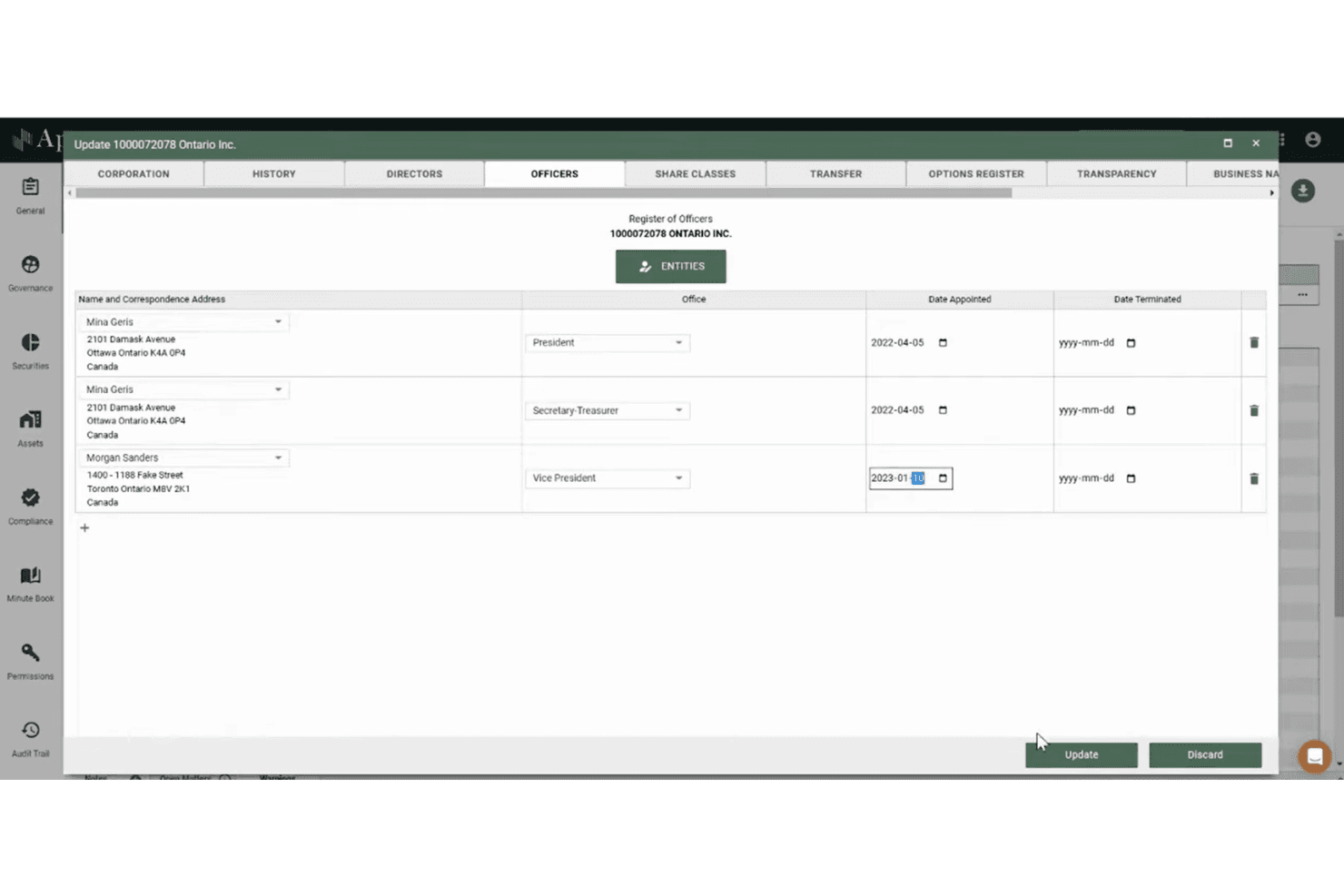
Appara’s interface is clean and intuitive, making it easy for legal teams to navigate complex workflows without feeling overwhelmed. Users often mention that onboarding is quick, with helpful in-app guidance and responsive support. Features like drag-and-drop document assembly and centralized dashboards simplify daily tasks.
While some advanced tools take time to master, most teams can get up and running fast, which is a real advantage for busy legal departments.
Integrations
Appara integrates with tools such as Google Workspace, Microsoft 365, DocuSign, Adobe Sign, BC OnLine, OnCorp, Nuans Canada, Google Addresses, Soluno, and QuickBooks.
Appara does not publicly highlight an open API or native integrations with third-party automation platforms, though additional integrations may be available through custom setup or upon request.
Appara Specs
- 2-Factor Authentication: Yes
- API: Yes
- Approval Workflows: Yes
- Audit Trail: Yes
- Calendar Management: Yes
- Compliance Tracking: Yes
- Contract Management: Yes
- Custom Reports: Yes
- Customer Management: Yes
- Data Export: Yes
- Data Import: Yes
- Document Management: Yes
- External Integrations: Yes
- Multi-User: Yes
- NDA Management: Yes
- Notifications: Yes
- Policy Management: Yes
- Scheduling: No
- Workflow Management: Yes


