

10 Best Corporate Legal Software Solutions for 2026

Best Corporate Legal Software Shortlist


Corporate legal software refers to digital platforms that help legal teams manage compliance, contracts, workflows, and risk across the business. If you’re searching for the best corporate legal software, you’re likely balancing complex regulatory demands, high volumes of legal work, and the need to deliver clear guidance to your organization.
The right solution can help your team organize matters, automate routine tasks, and maintain oversight—without sacrificing accuracy or confidentiality. In this list, you’ll find trusted options for 2026, each selected to address the real challenges legal professionals face today.
Why Trust Our Software Recommendations
Our team has been testing and reviewing software since 2012. As legal practice leaders ourselves, we know how difficult—and important—it is to choose the right software.
For this guide, we evaluated tools using hands-on testing and independent research, scoring tools using our selection criteria.
Our reviews reflect our human editorial judgment, not a sales pitch.
Best Corporate Legal Software Summary
This comparison chart summarizes pricing details for my top corporate legal software selections to help you find the best one for your budget and business needs.
| Tool | Best For | Trial Info | Price | ||
|---|---|---|---|---|---|
| 1 | Best for legal spend analysis | Free demo available | Pricing upon request | Website | |
| 2 | Best with contract lifecycle automation | Free demo available | Pricing upon request | Website | |
| 3 | Best with advanced legal analytics features | Free demo available | Pricing upon request | Website | |
| 4 | Best for enterprise process integration | 14-day free trial | From $600/month (billed annually) | Website | |
| 5 | Best for regulatory compliance management | Expert consultation available | Pricing upon request | Website | |
| 6 | Best with integrated legal research tools | Not available | Pricing upon request | Website | |
| 7 | Xakia shows legal workload analytics with charts by department. | Free demo available | Pricing upon request | Website | |
| 8 | Best for customizable matter management | Free demo available | Pricing upon request | Website | |
| 9 | Best for workflow automation in legal ops | Free demo available | From $22,900/year | Website | |
| 10 | Best for European legal data localization | Free demo available | Pricing upon request | Website |
Best Corporate Legal Software Reviews
Below are my detailed summaries of corporate legal software that made it onto my shortlist. My reviews offer a detailed look at the features, best use cases, and integrations of each platform to help you find the best one for your team.

Best for legal spend analysis
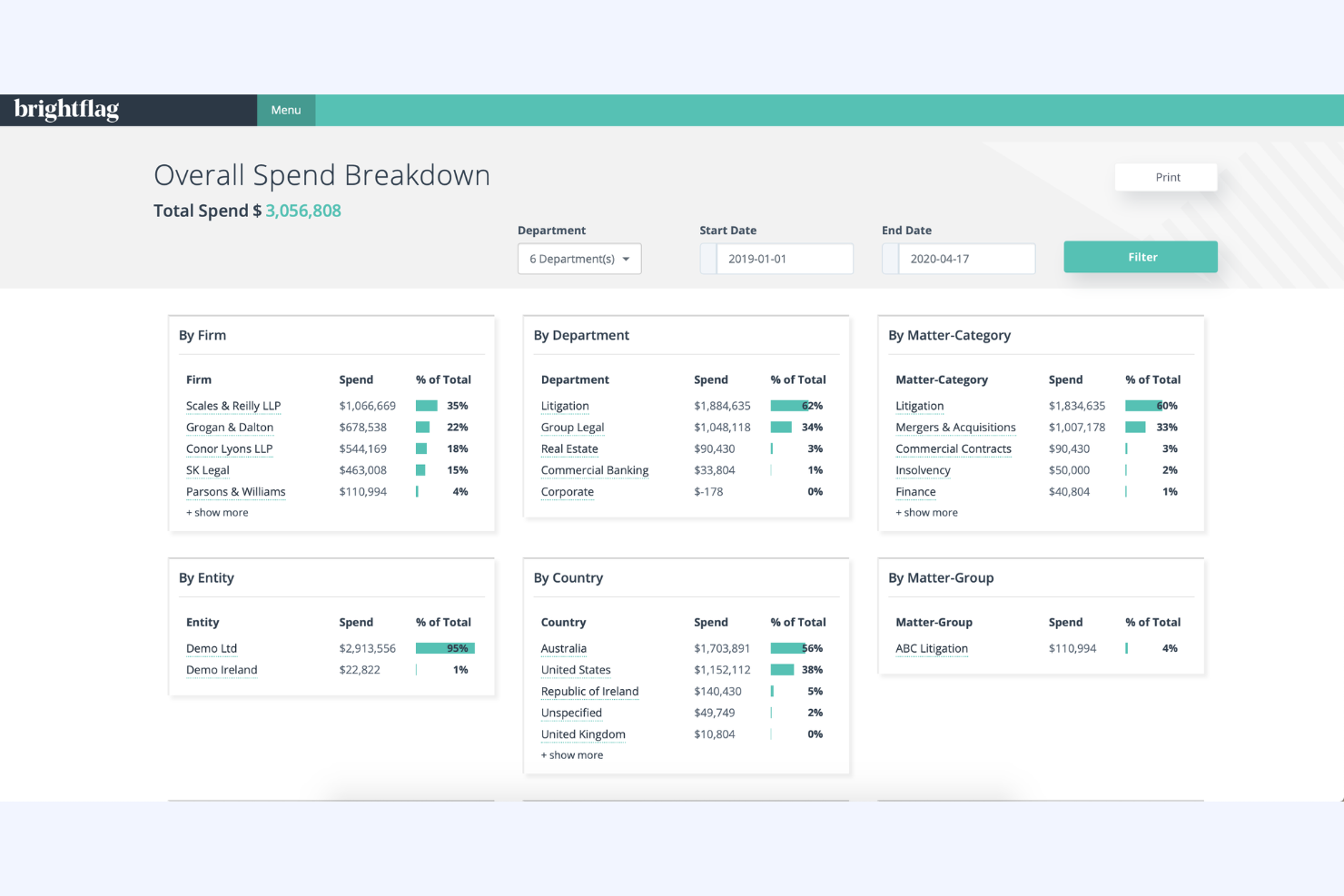
Brightflag is designed for legal departments and operations teams that need to analyze and control legal spend. The platform uses AI to categorize invoices, flag unusual billing, and provide detailed spend analytics. It’s especially useful for organizations looking to improve budget forecasting and vendor management through data-driven insights.
Why I Picked Brightflag
Brightflag stands out for legal teams that need to get a handle on legal spend analysis. I picked Brightflag because its AI-driven invoice review automatically categorizes billing entries and flags non-compliant charges, which helps teams spot issues quickly.
The platform’s spend analytics dashboard breaks down costs by matter, vendor, and time period, giving users a clear view of where budgets are going. These features make Brightflag a strong choice for organizations focused on controlling costs and improving financial oversight in their legal operations.
Brightflag Key Features
Some other features that make Brightflag useful for legal teams include:
- Matter Management: Track, organize, and report on all legal matters in one place.
- Vendor Collaboration Portal: Share documents, communicate, and manage tasks with outside counsel through a secure portal.
- Budget Tracking Tools: Set, monitor, and adjust budgets for matters and vendors in real time.
- Custom Reporting: Build and export tailored reports on spend, matters, and vendor performance.
Brightflag Integrations
Integrations are not publicly listed.
Pros and Cons
Pros:
- Vendor portal supports secure document sharing
- Budget tracking updates in real time
- AI reviews invoices for billing compliance
Cons:
- No built-in e-signature functionality
- Workflow automation options are basic

Ironclad
Best with contract lifecycle automation
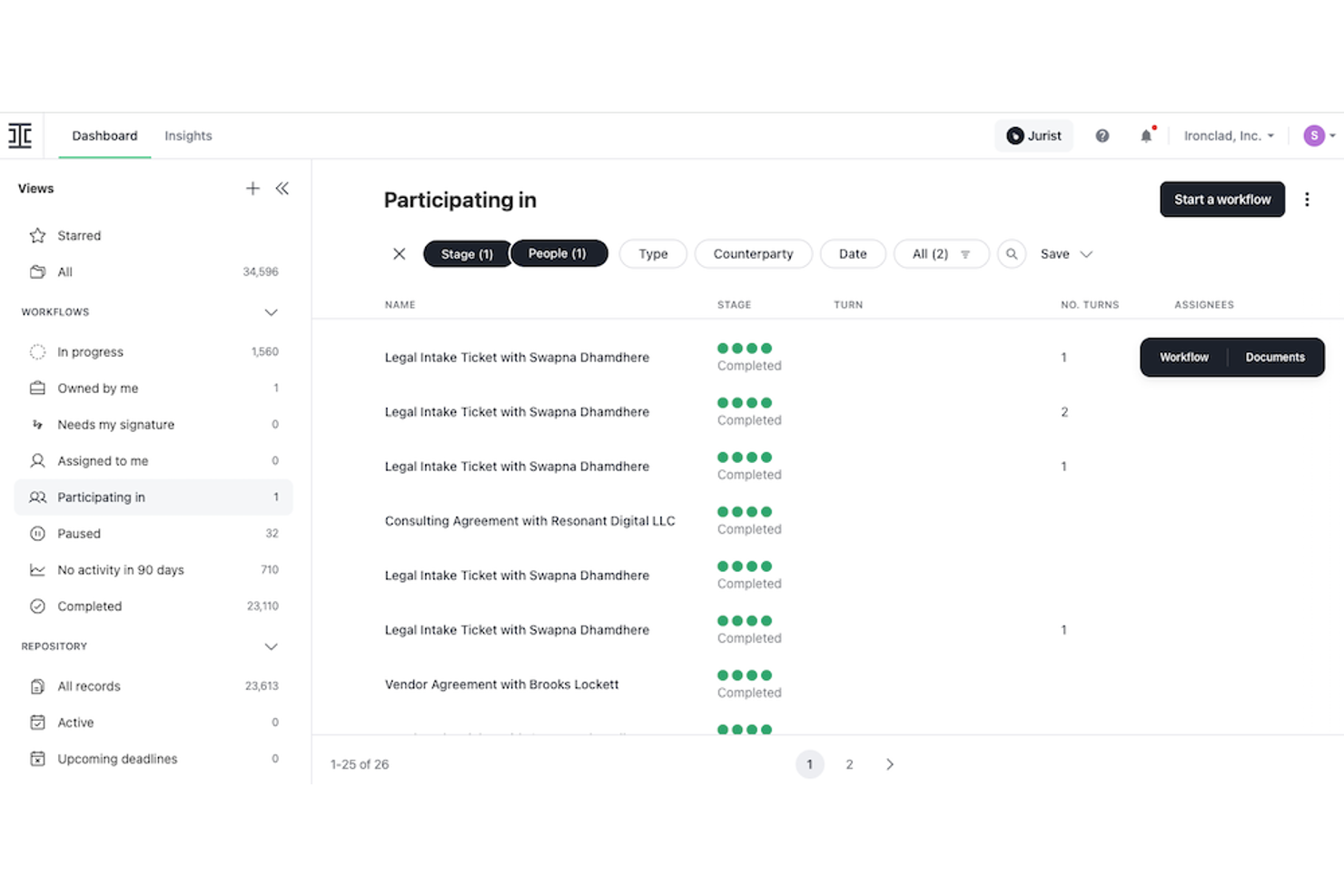
Ironclad is designed for legal teams that need to automate and control every stage of the contract lifecycle. Its workflow automation and digital contracting tools appeal to in-house counsel and legal operations teams managing high contract volumes or complex approval chains. With Ironclad, you can standardize processes, reduce manual work, and gain visibility into contract status across your organization.
Why I Picked Ironclad
Ironclad stands out for its contract lifecycle automation, which is essential for legal teams managing high volumes of agreements. The platform lets you build automated workflows for contract creation, review, negotiation, and approval, so you can reduce manual steps and keep processes consistent. I appreciate that Ironclad includes a dynamic clause library and version control, making it easier to maintain compliance and track changes across contracts.
These features make Ironclad a strong choice for organizations that want to simplify contract management and reduce risk.
Ironclad Key Features
Some other features that make Ironclad valuable for legal teams include:
- Clickwrap Agreements: Capture and manage acceptance of online agreements with audit-ready records.
- Reporting Dashboard: Visualize contract data and track key metrics in real time.
- Salesforce Integration: Connect contract workflows directly with your CRM for unified processes.
- Bulk Actions: Perform mass updates or approvals on multiple contracts at once.
Ironclad Integrations
Integrations include Salesforce, HubSpot, DocuSign, Adobe Sign, Slack, Microsoft Teams, Dropbox, and Google Drive.
Pros and Cons
Pros:
- Clause library supports standardized legal language
- Clickwrap tracking for enforceable online agreements
- Automated approval routing for contract workflows
Cons:
- Steep learning curve for complex workflows
- No built-in document redlining tool

Best with advanced legal analytics features
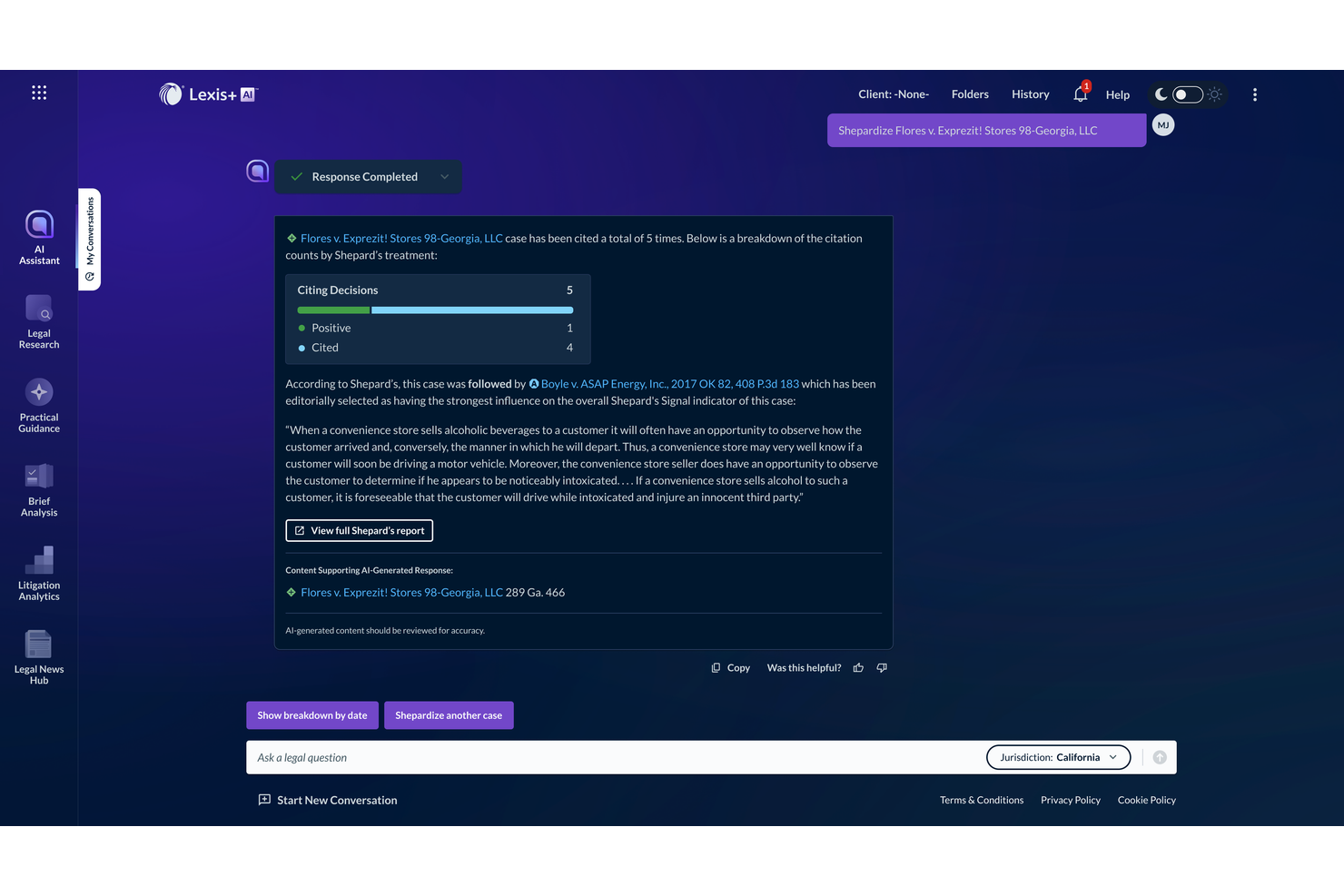
LexisNexis brings advanced legal analytics to corporate legal teams and law firms that need deep insights for litigation, compliance, and research. The platform is especially useful for professionals who want to leverage data-driven decision-making in case strategy and risk assessment. Its analytics tools help users uncover trends, predict outcomes, and benchmark performance across jurisdictions and practice areas.
Why I Picked LexisNexis
What sets LexisNexis apart for corporate legal teams is its advanced legal analytics capabilities. I picked LexisNexis because it offers litigation analytics that help users assess judge and court tendencies, as well as outcomes for similar cases.
The platform’s data visualization tools make it easier to spot trends and benchmark legal performance across jurisdictions. These analytics features support more informed decision-making and risk management for in-house counsel and law firms alike.
LexisNexis Key Features
Some other features that make LexisNexis valuable for legal services teams include:
- Legal Research Database: Access a vast library of statutes, case law, and secondary sources.
- Contract Analysis Tools: Review, compare, and extract key terms from contracts using AI.
- Shepard’s Citations Service: Check the validity and history of legal authorities with citation analysis.
- Regulatory Compliance Tracker: Monitor changes in laws and regulations across multiple jurisdictions.
LexisNexis Integrations
Native integrations are not currently listed.
Pros and Cons
Pros:
- Regulatory tracker monitors global legal changes
- Shepard’s Citations ensures case law reliability
- Litigation analytics cover judges and courts
Cons:
- Some features limited to US and UK law
- Advanced analytics require separate subscriptions

Onit
Best for enterprise process integration
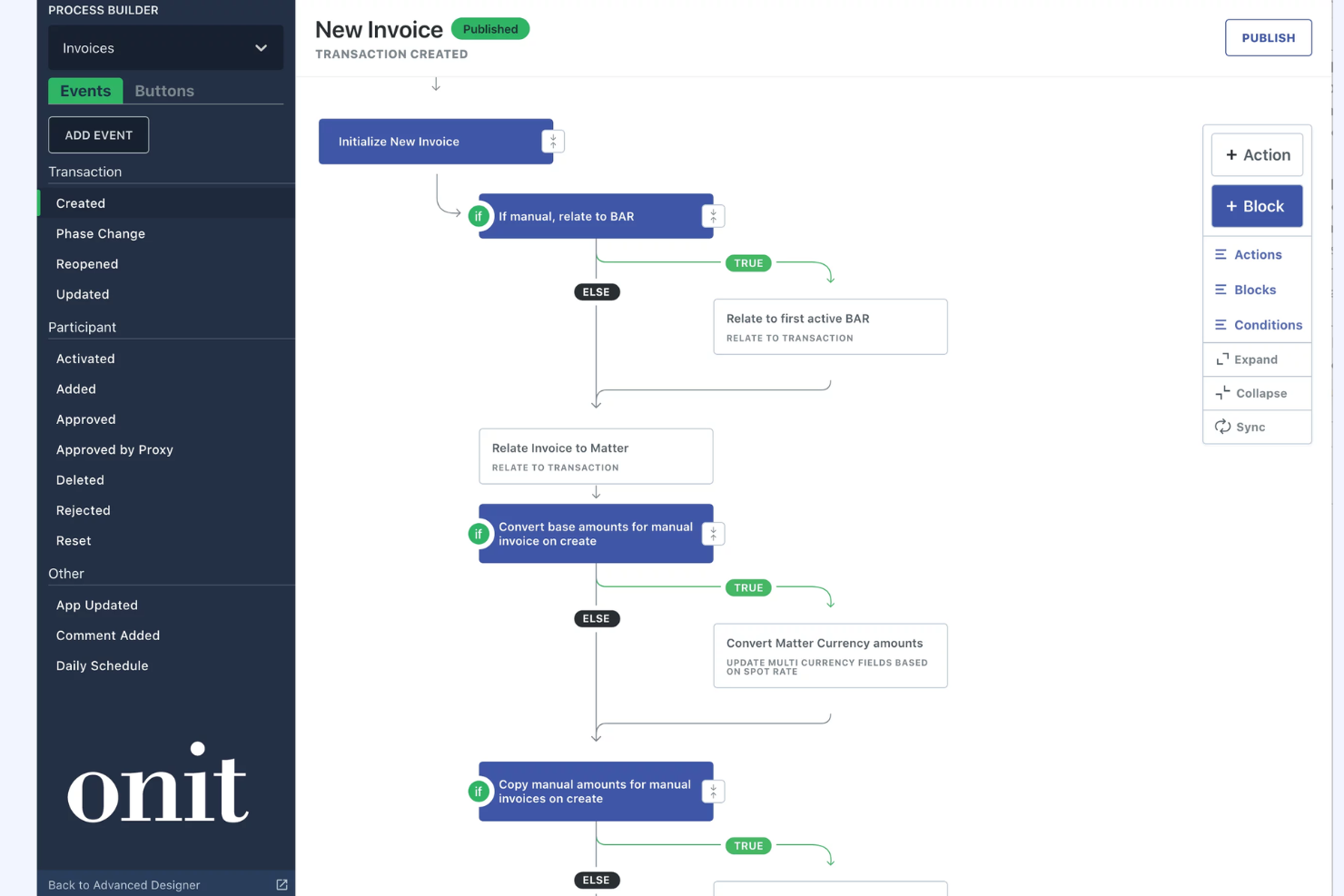
Onit offers a modular platform built for legal departments that need to connect legal workflows with broader enterprise processes. It’s a strong fit for large organizations and legal operations teams looking to automate, track, and integrate legal work with finance, procurement, and compliance systems. Onit helps you centralize legal requests, manage spend, and ensure legal processes align with business operations at scale.
Why I Picked Onit
What sets Onit apart is its focus on enterprise process integration, which is especially valuable for legal teams working within large, complex organizations. Onit’s workflow automation engine lets you design and connect legal processes with other business functions, such as procurement, finance, and compliance, so legal work doesn’t happen in a silo.
I like that Onit offers configurable apps for matter management and legal spend, which help legal teams align their work with broader company objectives. These capabilities make Onit a strong choice for legal departments that need to coordinate with multiple business units and maintain visibility across enterprise operations.
Onit Key Features
Some other features that make Onit useful for legal teams include:
- Contract Repository: Store, search, and organize all contracts in a centralized location.
- Automated Document Assembly: Generate legal documents using pre-approved templates and data fields.
- Spend Analytics: Track and analyze legal spend with customizable dashboards and reports.
- Role-Based Access Controls: Set permissions and manage user access based on roles and responsibilities.
Onit Integrations
Integrations are not publicly listed.
Pros and Cons
Pros:
- Automated approval chains for legal requests
- Advanced spend management with analytics tools
- Modular apps for tailored legal workflows
Cons:
- Reporting exports lack formatting options
- Limited contract authoring within the platform

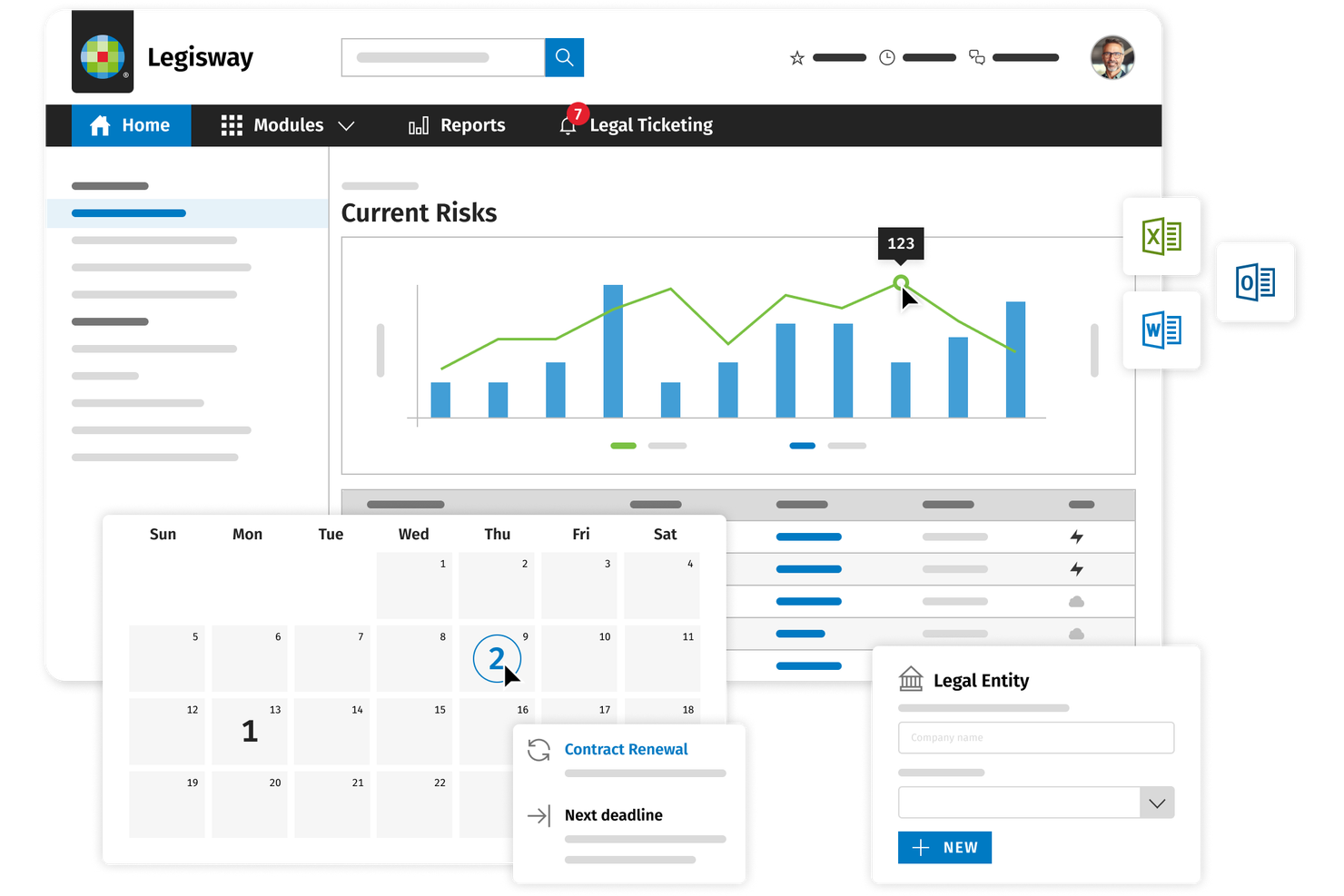
Wolters Kluwer offers an all-in-one suite of legal and compliance solutions designed for organizations that need to manage complex regulatory requirements. This platform is especially useful for legal teams in highly regulated industries who need to track, interpret, and implement changing laws across multiple jurisdictions. Its tools help you centralize compliance tasks and reduce the risk of missing critical regulatory updates.
Why I Picked Wolters Kluwer
For legal teams focused on regulatory compliance management, Wolters Kluwer stands out with its specialized compliance tracking and regulatory intelligence tools. I picked this platform because it offers real-time updates on changing laws and regulations, which is essential for organizations operating in multiple jurisdictions.
Its workflow automation features help legal departments assign, monitor, and document compliance tasks, reducing manual oversight. The platform’s centralized repository for regulatory content also makes it easier to audit and demonstrate compliance when needed.
Wolters Kluwer Key Features
Some other features that make Wolters Kluwer useful for corporate legal teams include:
- Document Management: Store, organize, and retrieve compliance documents in a secure digital repository.
- Customizable Reporting: Generate tailored compliance and risk reports to meet internal and external requirements.
- Audit Trail Tracking: Maintain a detailed log of all compliance activities and document changes for accountability.
- Role-Based Access Controls: Set user permissions to ensure sensitive compliance information is only accessible to authorized team members.
Wolters Kluwer Integrations
Integrations are not publicly listed.
Pros and Cons
Pros:
- Centralized repository for compliance documentation
- Advanced compliance workflow automation tools
- Real-time regulatory updates for multiple jurisdictions
Cons:
- Initial setup can require significant configuration
- Older legal content may be incomplete

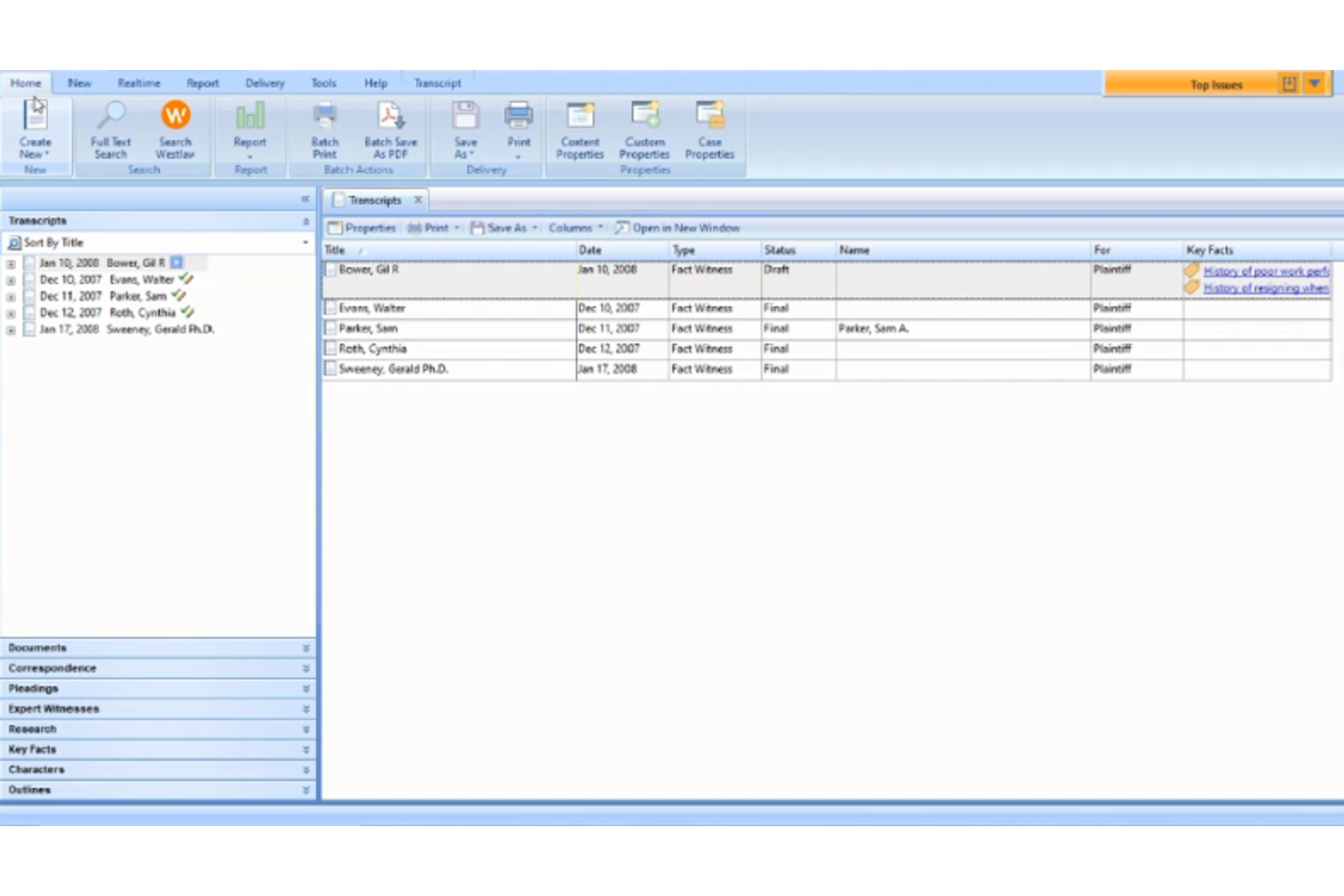
Thomson Reuters delivers a suite of legal software solutions with a strong focus on integrated legal research tools. This platform is a good fit for in-house counsel and law firms that need to connect research, matter management, and workflow in one place. Its research capabilities help legal teams quickly access up-to-date case law, statutes, and regulatory guidance directly within their daily workflow.
Why I Picked Thomson Reuters
What sets Thomson Reuters apart for corporate legal teams is its deep integration of legal research tools within its broader legal management platform. I picked this solution because it allows users to access Westlaw research, statutes, and case law directly from matter files, eliminating the need to switch between systems. Its AI-powered search and citation analysis features help legal professionals quickly find relevant precedents and ensure their work is up to date. This level of integration supports faster, more accurate legal research and decision-making within daily workflows.
Thomson Reuters Key Features
Some other features that make Thomson Reuters valuable for legal teams include:
- Matter Management: Track, organize, and manage all legal matters in a centralized dashboard.
- Document Automation: Generate legal documents using customizable templates and automated workflows.
- Time and Billing Tracking: Record billable hours and manage invoicing directly within the platform.
- Collaboration Tools: Share files, notes, and updates securely with internal and external stakeholders.
Thomson Reuters Integrations
Native integrations are not currently listed.
Pros and Cons
Pros:
- Extensive library of statutes and case law
- AI-powered citation analysis for legal documents
- Integrated Westlaw research within matter management
Cons:
- High technical proficiency required
- Complex navigation across sub-platforms

Xakia
Xakia shows legal workload analytics with charts by department.
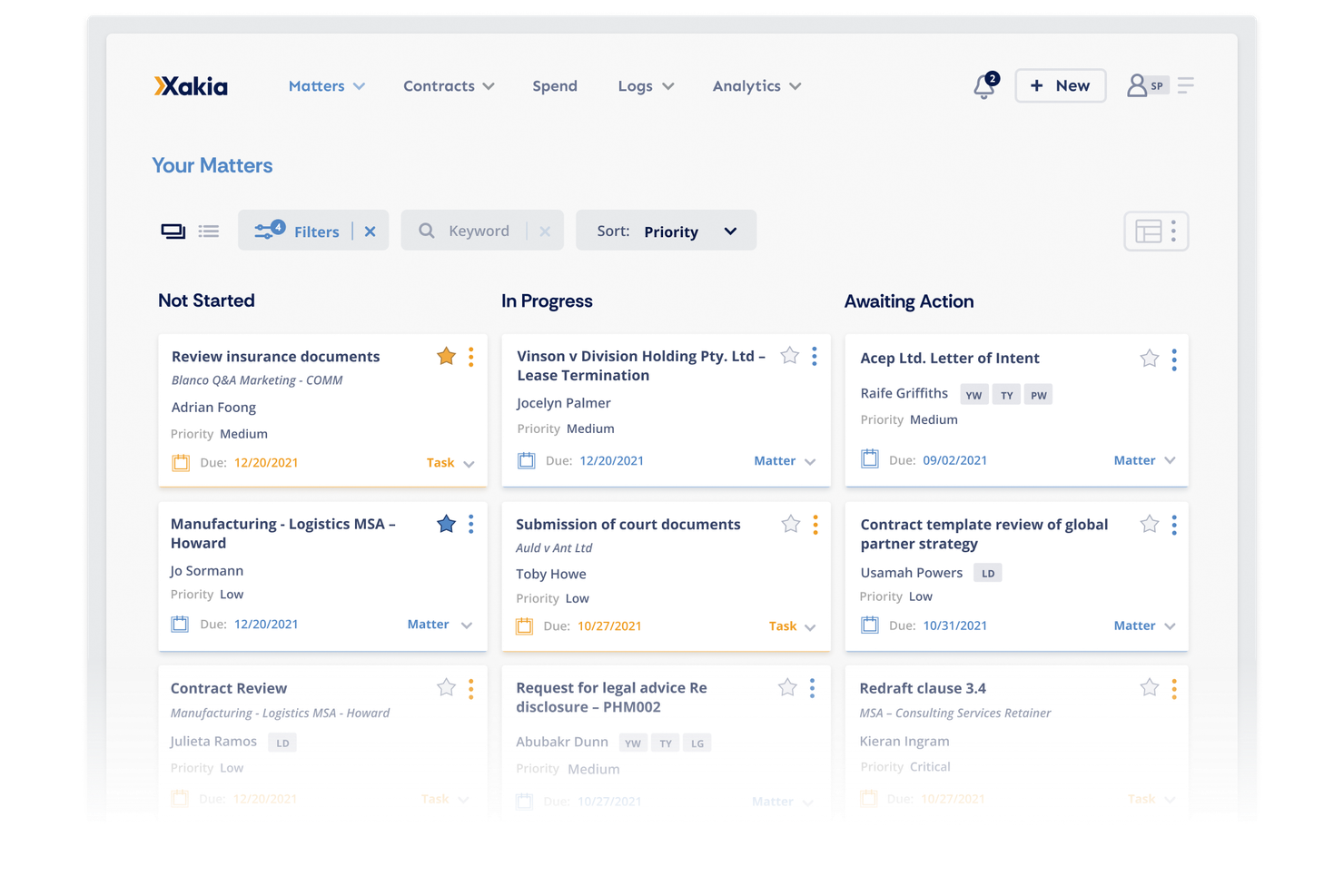
Xakia is designed for in-house legal teams that want a clear, real-time view of their workload and priorities. Its dashboard approach helps legal departments visualize matters, deadlines, and resource allocation in one place. This focus on actionable dashboards makes it easier for teams to manage requests, track progress, and report on legal work to business stakeholders.
Why I Picked Xakia
For legal departments that need a clear overview of their workload, Xakia’s dashboard-driven approach stands out. I picked Xakia because its dashboards let in-house teams track matters, deadlines, and team capacity at a glance. The platform’s visual reporting tools help legal leaders communicate status and trends to business stakeholders without manual data gathering. With customizable widgets and real-time updates, Xakia makes it easier to prioritize work and demonstrate legal team value.
Xakia Key Features
In addition to its dashboard capabilities, Xakia offers several other features that support in-house legal teams:
- Matter Intake Forms: Collect and organize new legal requests through customizable online forms.
- Document Management: Store, search, and manage legal documents within a secure, centralized repository.
- Spend Tracking: Monitor legal spend and budgets with built-in expense tracking tools.
- Task Assignment: Assign tasks to team members and track progress within each matter.
Xakia Integrations
Integrations are not publicly listed.
Pros and Cons
Pros:
- Task assignment supports team collaboration
- Spend tracking links to specific legal matters
- Visual dashboards highlight team workload
Cons:
- Limited automation for recurring legal tasks
- Reporting exports limited to certain formats

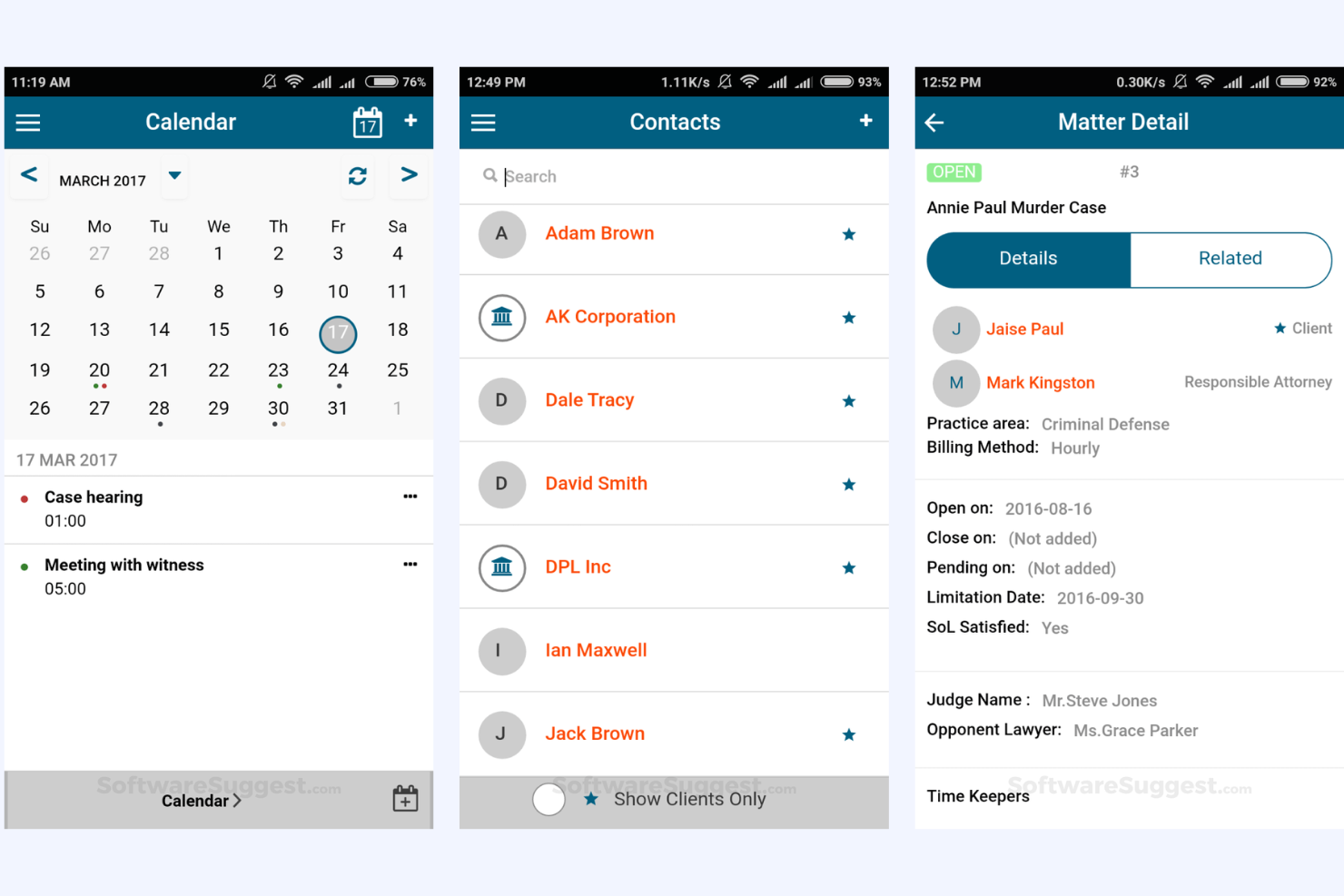
Zelican offers legal teams a flexible cloud-based platform for managing matters, documents, and workflows. Its customizable matter management features let in-house counsel and law firms tailor fields, templates, and processes to fit their unique requirements. This approach helps organizations handle complex, multi-jurisdictional matters and adapt quickly as their legal operations evolve.
Why I Picked Zelican
What drew me to Zelican is its focus on customizable matter management, which is a priority for many legal departments handling diverse case types. The platform lets you create custom fields and templates for matters, so you can capture the exact information your team needs for each case. I appreciate that you can also design workflows to match your internal processes, making it easier to standardize how matters move from intake to resolution.
These features make Zelican a strong fit for organizations that want to adapt their legal software to their own requirements, rather than changing their processes to fit the tool.
Zelican Key Features
Some other features that make Zelican appealing for legal industry include:
- Document Management: Store, organize, and search legal documents within a centralized repository.
- Time Tracking: Log billable and non-billable hours directly from the platform.
- Task Management: Assign, monitor, and update tasks for team members across matters.
- Calendar Integration: Sync important dates and deadlines with your preferred calendar system.
Zelican Integrations
Native integrations are not currently listed.
Pros and Cons
Pros:
- Built-in time tracking for legal billing
- Bulk document upload for large cases
- Custom fields support unique matter types
Cons:
- No built-in contract lifecycle management
- Occasional downtime for system maintenance

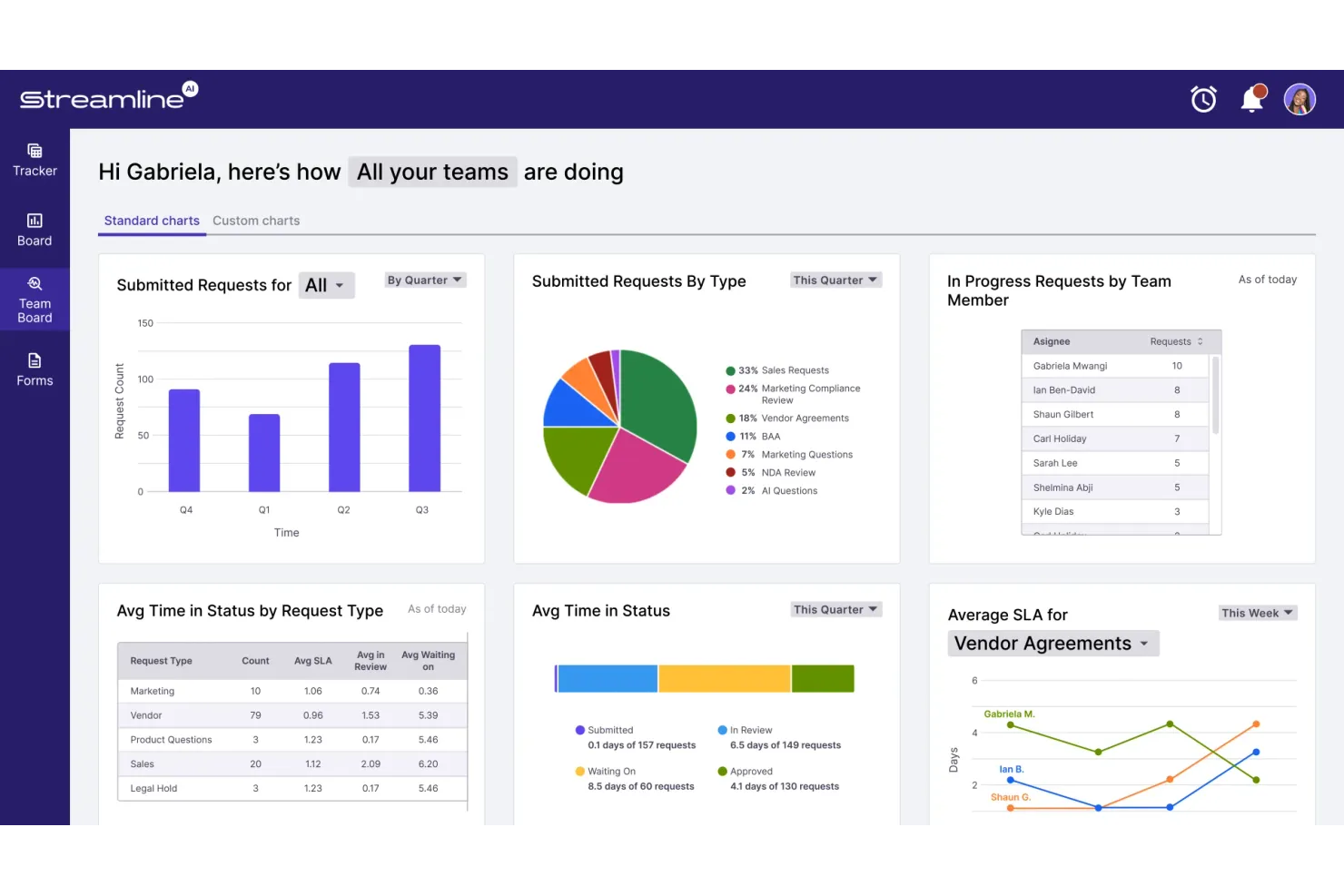
Streamline AI brings workflow automation to legal operations teams that need to manage high volumes of requests and approvals. The platform is built for legal ops professionals who want to automate intake, triage, and collaboration across business units. Its focus on configurable workflows and process visibility helps legal departments reduce manual work and keep matters moving efficiently.
Why I Picked Streamline AI
When workflow automation is a top priority for legal operations, Streamline AI offers a focused solution. I picked Streamline AI because it lets legal teams design and automate intake, triage, and approval processes without relying on IT. The platform’s visual workflow builder and conditional logic tools help legal ops professionals tailor processes to their organization’s needs.
With built-in tracking and audit trails, Streamline AI supports transparency and accountability across every step of the legal workflow.
Streamline AI Key Features
Some other features that make Streamline AI useful for legal operations teams include:
- Customizable Intake Forms: Build and deploy tailored forms to capture the right information for each legal request.
- Role-Based Access Controls: Set permissions and visibility for users based on their role in the organization.
- Automated Notifications: Trigger email or in-app alerts to keep stakeholders updated on matter status.
- Analytics Dashboard: View real-time metrics on request volume, turnaround times, and workflow bottlenecks.
Streamline AI Integrations
Integrations include Ironclad, Box, Salesforce, Slack, Docusign, and more.
Pros and Cons
Pros:
- Native integration with Ironclad and Docusign
- Real-time analytics dashboard tracks request status
- Intake forms can be tailored per request type
Cons:
- No public-facing request portal for external users
- No built-in document editing functionality

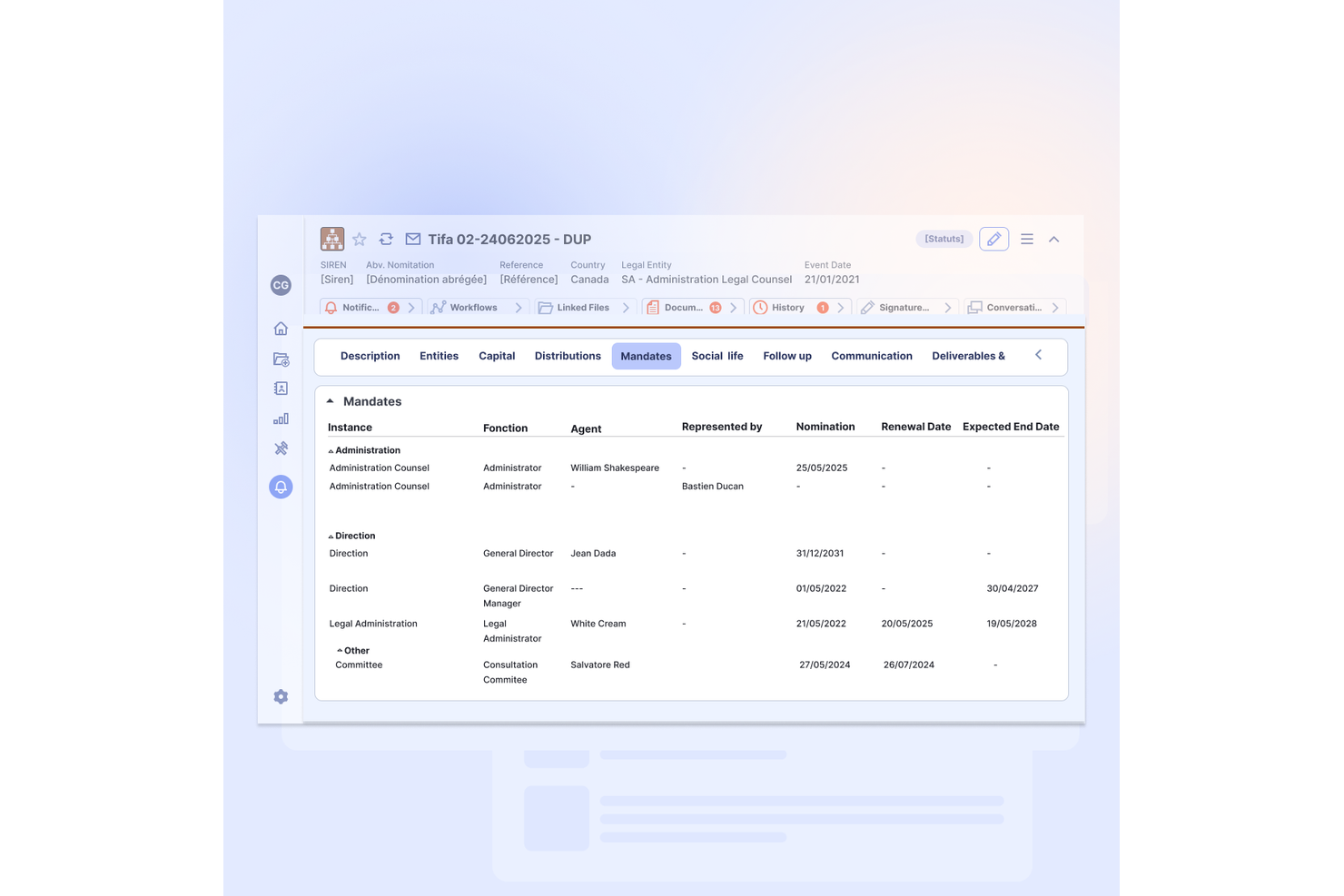
Septeo is designed for legal teams and firms that need to ensure strict compliance with European data localization and privacy regulations. The platform appeals to organizations operating in or with the EU, where GDPR and local data residency requirements are a top concern. Its suite of legal management tools is built to keep sensitive data within European borders and support region-specific workflows.
Why I Picked Septeo
For legal teams that need to prioritize European data localization, Septeo stands out with its regionally focused infrastructure. I picked Septeo because it offers legal management solutions that are purpose-built to comply with GDPR and local data residency laws.
The platform provides secure hosting within the EU and supports workflows that address European regulatory requirements. This makes Septeo a strong choice for organizations that can’t risk data leaving European borders.
Septeo Key Features
In addition to its focus on European data localization, Septeo offers several other features relevant to legal teams:
- Document Automation Tools: Generate, manage, and store legal documents using customizable templates.
- Case Management Module: Track case progress, deadlines, and related communications in one place.
- E-signature Integration: Collect legally binding electronic signatures directly within the platform.
- Client Portal: Improve client communication with secure access to case updates and shared documents.
Septeo Integrations
Native integrations are not currently listed.
Pros and Cons
Pros:
- Document automation supports French and Dutch
- GDPR compliance features built into workflows
- Data hosting remains fully within the EU
Cons:
- User interface design feels dated
- Limited language support outside Europe
Other Corporate Legal Software
Here are some additional corporate legal software options that didn’t make it onto my shortlist, but are still worth checking out:


How I Evaluate Corporate Legal Software
I split my evaluation into two layers: the core functionality every tool must have—think matter intake and CLM workflows—and the differentiators that set the strongest options apart.
Core Functionality (Table Stakes For This List)
When I'm selecting tools for my list, I rank each one on a scale from 0 (does not offer the functionality) to 5 (excels in this area) for each core functionality listed below. Then, I calculate the tool's total score into a percentage. Each tool needs to achieve a minimum total score of 75% to be considered for inclusion.
- Matter Management: I evaluate how each tool handles matter intake, assignment, and tracking—like routing a new employment dispute from an HR request through triage to resolution with full audit history.
- Contract Lifecycle Management: From template-based drafting to redlining, approvals, and post-signature storage, I look for platforms that cover the full contract workflow rather than just serving as a document repository.
- Legal Spend & E-Billing: Every platform I consider should support LEDES-format billing, budget tracking, and outside counsel performance reporting so your team can review invoices against billing guidelines in one place.
- Document & Knowledge Management: I check whether the tool offers version-controlled storage with full-text search and permission controls—think locating a prior board resolution or pulling a precedent clause across hundreds of saved agreements.
- Entity & Governance Management: Maintaining subsidiary records, officer and director details, ownership structures, and filing deadlines is a core need I look for, especially for teams managing dozens of legal entities.
- Compliance & Risk Tracking: I evaluate each platform's ability to track regulatory obligations, manage legal holds, and surface risk exposure through dashboards tailored to in-house legal reporting needs.
Once I have a list of tools that meet the criteria, I consider what sets each platform apart.
Differentiating Factors (What Sets Vendors Apart)
Here's how I compare and contrast different vendors:
Standout Features
AI-powered legal assistants are a major differentiator—I look for tools that can summarize contracts, extract key clauses, or flag risk language without manual review. Self-service legal intake portals also matter a lot, especially for teams fielding hundreds of NDA or procurement requests from business users each quarter. For legal departments operating across borders, I evaluate multi-jurisdiction support including multi-currency billing, local compliance content, and language options.
Beyond Features
Security posture is one of the first things I check—SOC 2 Type II certification, data residency options, and privilege-safe audit trails are baseline expectations for any platform handling sensitive legal data. Integration depth matters just as much. I evaluate whether a tool connects natively with Microsoft 365, DocuSign, and your ERP system so invoices and accruals flow without manual re-entry. I also look closely at pricing transparency, particularly how vendors license different seat types like outside counsel or business requesters versus full legal users.
How to Choose Corporate Legal Software
It’s easy to get bogged down in long feature lists and complex pricing structures. To help you stay focused as you work through your unique software selection process, here’s a checklist of factors to keep in mind:
| Factor | What to Consider |
|---|---|
| Scalability | Will the software handle your current and future matter volume, user count, and workflow complexity as your organization grows? |
| Integrations | Does the tool connect natively with your existing systems (e.g., document management, ERP, e-billing) to avoid manual workarounds? |
| Customizability | Can you tailor workflows, fields, and reporting to match your legal team’s processes without heavy IT involvement? |
| Ease of use | Will your team adopt the tool quickly, or will the interface and navigation slow down daily work and require extra training? |
| Implementation and onboarding | How long will it take to get up and running, and what resources (internal or vendor-provided) are needed for data migration and setup? |
| Cost | Are all costs transparent—including licensing, support, and upgrades—and does the pricing model fit your usage patterns and budget? |
| Security safeguards | Does the software meet your organization’s data privacy, encryption, and access control requirements, especially for sensitive matters? |
| Compliance requirements | Does the tool support your industry’s regulatory needs (e.g., GDPR, HIPAA) and provide audit trails or certifications as needed? |
What Is Corporate Legal Software?
Corporate legal software is a category of digital tools designed to help in-house legal teams manage legal matters, contracts, compliance, and workflows within an organization. These platforms centralize legal information, automate routine processes, and support collaboration across departments, similar to legal practice management software used by law firms.
By using corporate legal software, legal teams can improve visibility, maintain compliance, and handle higher volumes of work with greater consistency and control.
Features
When selecting corporate legal software, keep an eye out for the following key features:
- Matter management: Centralizes all legal matters, allowing you to track case status, deadlines, documents, and communications in one place.
- Contract lifecycle management: Manages the creation, negotiation, approval, storage, and renewal of contracts, ensuring version control and easy retrieval.
- Document management: Organizes, stores, and secures legal documents with search, tagging, and permission controls for efficient access and collaboration.
- Legal spend tracking: Monitors and reports on legal expenses, budgets, and invoices, helping you control costs and analyze spending patterns.
- Workflow automation: Automates repetitive legal processes such as approvals, notifications, and task assignments to reduce manual work and errors.
- Compliance management: Tracks regulatory requirements, deadlines, and obligations, providing alerts and audit trails to support ongoing compliance.
- Reporting and analytics: Generates customizable reports and dashboards to visualize key metrics, identify trends, and support data-driven decision-making.
- Role-based access controls: Restricts access to sensitive information based on user roles, ensuring confidentiality and compliance with internal policies.
- Calendar and deadline tracking: Integrates with calendars to manage important dates, court appearances, and filing deadlines, reducing the risk of missed obligations.
Common Corporate Legal Software AI Features
Beyond the standard corporate legal software features listed above, many of these solutions are incorporating AI with features like:
- Automated contract review: Uses legal AI tools to analyze contract language, flag risks, and suggest revisions, helping legal teams quickly identify problematic clauses and ensure compliance with company standards.
- Predictive matter outcomes: Leverages legal tech, historical data, and machine learning to forecast the likely results of legal matters, supporting better risk assessment and resource allocation.
- Intelligent document classification: Applies artificial intelligence to automatically categorize and tag legal documents based on content, making it easier to organize, search, and retrieve files.
- AI-powered invoice review: Analyzes legal invoices for errors, duplicate charges, and compliance with billing guidelines, reducing manual review time and controlling legal spend.
- Natural language search: Enables users to search legal databases and documents using conversational queries, improving the speed and accuracy of information retrieval.
Benefits
Implementing corporate legal software provides several benefits for your team and your business. Here are a few you can look forward to:
- Centralized information management: Keeps all legal matters, contracts, and documents organized in one secure platform, making it easier to find and manage critical information.
- Improved compliance: Tracks regulatory requirements and deadlines, providing alerts and audit trails that help your team stay compliant with industry standards.
- Greater process consistency: Automates workflows and approvals, ensuring legal processes are followed the same way every time and reducing the risk of errors.
- Enhanced collaboration: Facilitates communication and task assignment across legal and business teams, supporting more efficient project management and decision-making.
- Cost control and transparency: Monitors legal spend and budgets, providing detailed analytics and reporting to help you manage costs and justify expenditures.
- Faster turnaround times: Simplifies time-consuming tasks, like document review, contract management, and matter tracking, allowing your team to respond more quickly to business needs.
- Data-driven insights: Delivers customizable reports and analytics that help you identify trends, measure performance, and make informed decisions.
Costs and Pricing
Selecting corporate legal software requires an understanding of the various pricing models and plans available. Costs vary based on features, team size, add-ons, and more. The table below summarizes common plans, their average prices, and typical features included in corporate legal software solutions:
Plan Comparison Table for Corporate Legal Software
| Plan Type | Average Price | Common Features |
|---|---|---|
| Free Plan | $0 | Basic matter tracking, limited document storage, simple task management, and email support. |
| Personal Plan | $20-$50/user/month | Matter management, contract storage, basic reporting, limited integrations, and standard support. |
| Business Plan | $50-$120/user/month | Advanced workflow automation, spend tracking, compliance tools, custom reporting, and API access. |
| Enterprise Plan | $120-$250/user/month | Custom integrations, advanced security, dedicated account management, audit trails, and priority support. |
Corporate Legal Software FAQs
Here are some answers to common questions about corporate legal software:
How does corporate legal software help with compliance management?
Corporate legal software helps with compliance management by tracking regulatory requirements, deadlines, and obligations in one place. It provides automated alerts, audit trails, and reporting tools so your team can monitor compliance activities and respond quickly to regulatory changes.
Can corporate legal software integrate with other business systems?
Yes, most corporate legal software can integrate with systems like document management, e-billing, HR, and ERP platforms. Integrations reduce manual data entry, improve data consistency, and help legal teams work more efficiently across departments.
What should I consider when migrating data to a new corporate legal software platform?
When migrating data, consider data mapping, compatibility, and security. Plan for a thorough data audit, involve IT and legal stakeholders, and use vendor-provided migration tools or services to ensure a smooth transition with minimal disruption.
How do legal teams ensure data security when using corporate legal software?
Legal teams ensure data security by choosing software with strong encryption, access controls, and compliance certifications. Regularly review user permissions, enable multi-factor authentication, and work with vendors that offer transparent security practices and regular audits.
Is corporate legal software suitable for small legal departments?
Yes, many corporate legal software solutions offer scalable plans and features that fit small legal departments. Small law firms have different operational needs and may be better served by broader law firm software built around client matters, billing, and practice operations. Look for platforms with flexible pricing, easy onboarding, and essential features like matter management and document storage without unnecessary complexity.