

10 Best Legal AI Tools Reviewed in 2026

10 Best Legal AI Tools Shortlist


Navigating the legal tech landscape can be tough. You face constant pressure to manage cases efficiently while staying compliant with regulations. Legal AI tools are here to help, offering solutions to cut down on manual tasks and improve accuracy in your work.
In my experience, evaluating these tools independently, I've found that the right software can make a big difference for your team. I aim to provide unbiased, well-researched reviews to guide you in choosing the best fit.
This article will walk you through my top picks, highlighting features that address your specific needs. Whether you're looking to improve document management or enhance legal research, there's something here for your practice.
Why Trust Our Software Recommendations
Our team has been testing and reviewing software since 2012. As legal practice leaders ourselves, we know how difficult—and important—it is to choose the right software.
For this guide, we evaluated tools using hands-on testing and independent research, scoring tools using our selection criteria.
Our reviews reflect our human editorial judgment, not a sales pitch.
Legal AI Tools Comparison Table
This comparison table summarizes pricing details for my top legal AI tool selections:
| Tool | Best For | Trial Info | Price | ||
|---|---|---|---|---|---|
| 1 | Best for collaborative litigation | Free demo available | Pricing upon request | Website | |
| 2 | Best for case management | Free demo available | Pricing upon request | Website | |
| 3 | Best for e-discovery processes | Free demo available | Pricing upon request | Website | |
| 4 | Best for legal document analysis | Free demo available | Pricing upon request | Website | |
| 5 | Best for contract lifecycle management | Free demo available | Pricing upon request | Website | |
| 6 | Best for legal research databases | Free demo available | Pricing upon request | Website | |
| 7 | Best for cloud-based practice | 7-day free trial + free demo available | From $39/user/month (billed annually) | Website | |
| 8 | Best for legal research tasks | Free demo available | Pricing upon request | Website | |
| 9 | Best for personal injury cases | Free demo available | Pricing upon request | Website | |
| 10 | Best for secure client communication | Free trial + free demo available | From $149/month (billed annually) | Website |
Best Legal AI Tool Reviews
Below are my detailed summaries of the best legal AI tools that made it onto my shortlist. My reviews offer a detailed look at the key features, pros & cons, integrations, and ideal use cases of each tool to help you find the best one for you.

Everlaw
Best for collaborative litigation

Everlaw offers legal teams a cloud-based platform designed for complex litigation and investigations. Its advanced AI-driven search, document review, and case-building features support law firms and in-house counsel handling high-volume, collaborative legal matters.
Who Is Everlaw Best For?
Litigation teams at law firms and corporate legal departments managing complex, document-heavy cases across multiple stakeholders.
Why I Picked Everlaw
I picked Everlaw because no other platform keeps the entire litigation team—inside and outside counsel—working in the same environment from document review through trial. I particularly like Storybuilder, which lets teams co-author case timelines, outlines, and deposition questions directly alongside the reviewed evidence. The EverlawAI Deposition Analyzer adds another layer, letting my team generate deponent backgrounds and flag testimony inconsistencies without leaving the platform. For litigation that spans large teams and long timelines, that kind of end-to-end collaboration in a single workspace is hard to replicate elsewhere.
Everlaw Key Features
- Predictive coding: Uses machine learning to rank documents by relevance, so reviewers focus on the most important evidence first.
- Deep Dive: Lets teams search across millions of documents using natural language questions and receive cited, evidence-backed answers.
- AI translations: Automatically detects and translates documents in over 100 languages, with bulk translation and stored results.
- Clustering: Groups documents by conceptual similarity in a visual interface, surfacing thematic patterns across large, unstructured data sets.
Everlaw Integrations
Integrations include Microsoft 365, Google Workspace, Slack, Zoom, Box, Dropbox, Google Vault, Microsoft Teams, Proofpoint, and Okta.
Pros and Cons
Pros:
- Advanced visualization tools
- Real-time document review
- Enhances collaborative efforts
Cons:
- Complexity in data analysis
- Limited to litigation processes
- May require initial setup time

Filevine
Best for case management

Filevine offers legal teams a centralized platform designed for complex case management and collaboration. Its flexible workflows and document automation features make it especially useful for law firms and legal departments handling high volumes of cases or intricate legal matters.
Who Is Filevine Best For?
Filevine suits law firms and legal teams that need customizable workflows and centralized case management for handling complex or high-volume legal matters.
Why I Picked Filevine
I picked Filevine because it's one of the few legal AI tools where AI is embedded directly into case management—not bolted on as a separate module. I appreciate how AI Fields automatically reads documents and maps extracted data into reportable fields, so my team isn't manually entering information from medical records or contracts. Phase Validation is another feature I rely on: LOIS checks that all required tasks, data, and documents are complete before a matter advances, which removes the guesswork from case progression. For teams managing dozens of active matters at once, that kind of built-in governance is hard to find elsewhere.
Filevine Key Features
- DemandsAI®: Generates AI-drafted demand letters using case data from Filevine, producing completed letters in 15 minutes or less.
- AI Doc Review: Scans uploaded legal documents to extract key information and produce concise summaries without manual review.
- ImmigrationAI®: Parses client documents and auto-populates USCIS forms and questionnaires in up to 170 languages.
- Depo CoPilot: Analyzes deposition testimony in real time and surfaces answers from expert witnesses during proceedings.
Filevine Integrations
Integrations include Sageness, Gemini Legal, InfoTrack, Record Retrieval Solutions, DocuPost, MoveDocs, Copitrak, Postage: FedEx, Stamps, Soluno Balances, Microsoft Teams, and Dialpad.
Pros and Cons
Pros:
- Supports legal department workflows
- Streamlines case information organization
- Customizable workflows for case needs
Cons:
- Specific to legal workflows
- Complexity in customization
- Limited to case management

DISCO
Best for e-discovery processes

DISCO offers legal teams an AI-powered platform designed to manage complex e-discovery tasks with speed and accuracy. Its intuitive interface and automation features appeal to law firms and in-house counsel handling high-volume litigation or regulatory matters.
Who Is DISCO Best For?
DISCO suits litigation teams and legal operations professionals at law firms or corporations managing large-scale e-discovery and document review projects.
Why I Picked DISCO
DISCO's e-discovery capabilities go well beyond basic document management. I picked it because its Auto Review feature processes up to 32,000 documents per hour—completing first-pass reviews in hours rather than weeks—with 10–20% higher precision than human reviewers. I also appreciate that Auto Review provides a detailed explanation for every tagging decision, so my team can run quality control with confidence rather than treating AI output as a black box. For matters where early case assessment is critical, DISCO uses a single database for both ECA and active review, which means my team avoids the time-consuming step of migrating documents between separate environments.
DISCO Key Features
- Cecilia Q&A: An AI evidence analysis tool that lets you ask plain-language questions about your case and returns answers with citations drawn directly from your document database.
- AI contextual definitions: Highlights any acronym or term in the document viewer and generates a definition sourced exclusively from your case documents, with a full list of citations.
- DISCO Hold: A legal hold management tool that automates custodian notifications, data preservation across Microsoft 365, Google Workspace, and Slack, and generates defensible audit trails.
- Million-page document production: Runs productions of up to one million pages in as few as 25 minutes, with configurable metadata selection built into the production setup workflow.
DISCO Integrations
Native integrations are not currently listed. DISCO does offer an API for custom integrations.
Pros and Cons
Pros:
- Supports litigation and compliance
- Scalable for large cases
- Intuitive interface for data management
Cons:
- Specific to legal document review
- Complexity in data analytics
- Limited to e-discovery functions

Harvey
Best for legal document analysis
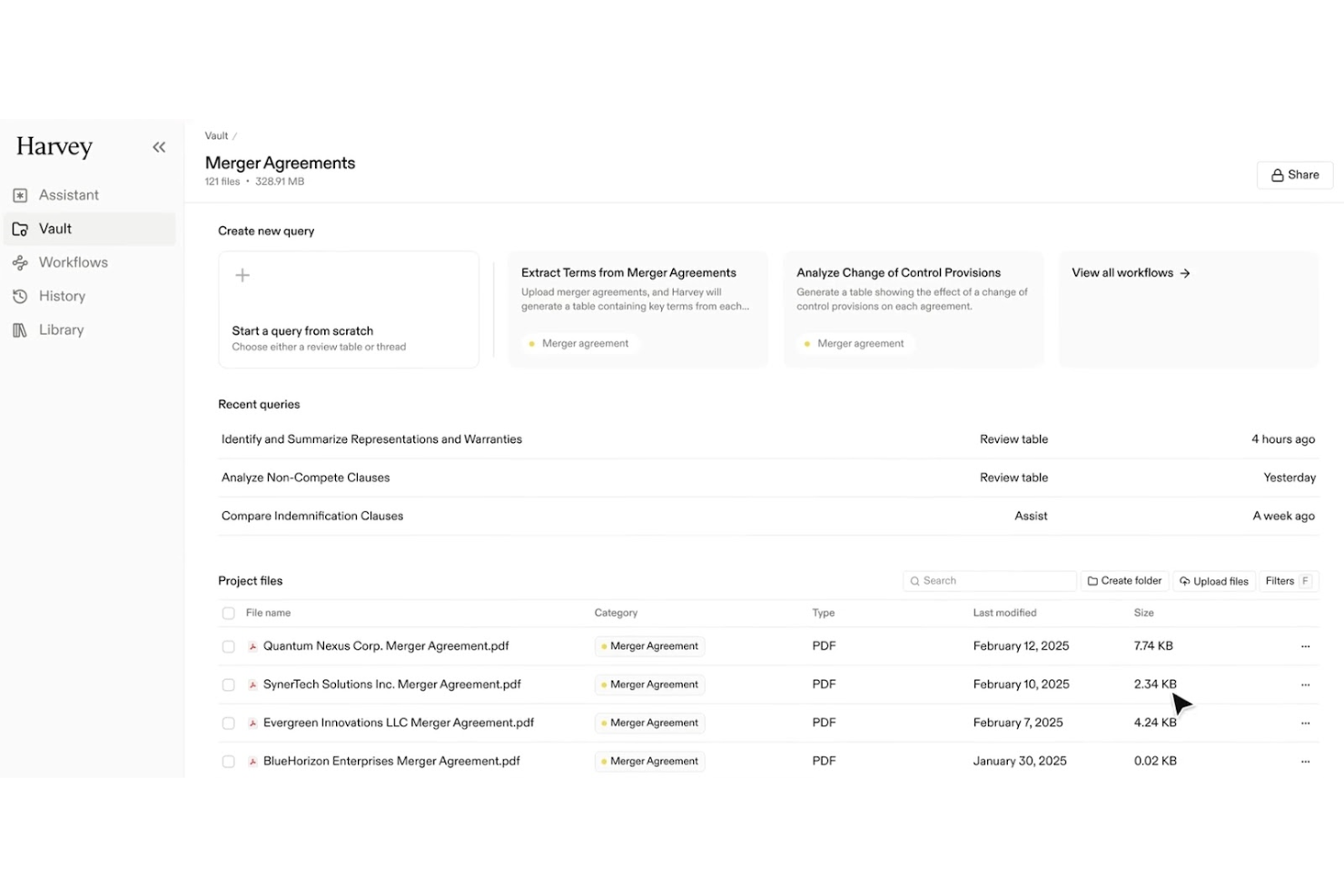
Harvey uses advanced AI to help legal teams quickly analyze and interpret complex legal documents. It’s designed for law firms and in-house counsel who need to extract insights, identify risks, and manage large volumes of legal text with precision.
Who Is Harvey Best For?
Harvey suits legal professionals and law firms that need to process, review, and analyze large volumes of legal documents efficiently.
Why I Picked Harvey
I picked Harvey for its Vault feature, which lets my team run bulk document analysis across thousands of files at once—something that's genuinely hard to find in other legal AI tools. When I'm working through a large M&A due diligence review, I can query an entire vault to surface contracts with change-of-control provisions or termination rights, rather than reviewing each document manually. Harvey's review tables then extract and compare key data points in a structured format, so I can synthesize findings across a deal's full document set. That combination of bulk analysis and structured extraction is what makes Harvey the clearest choice for legal document analysis at scale.
Harvey Key Features
- Q&A-style chat: Ask questions in natural language and get cited answers drawn from your uploaded documents, internal knowledge bases, and connected legal databases.
- Workflow agents: Build and deploy custom multi-step agents using natural language prompts, with support for conditionals, classification, and embedded firm templates.
- Agentic search: Harvey iteratively refines searches across your uploaded sources, expanding context until it has enough information to generate a complete answer.
- Cross-jurisdictional legal research: Query 500+ legal data sources globally—including Ask LexisNexis®, EUR-Lex, and EDGAR—directly within the platform.
Harvey Integrations
Native integrations are not currently listed.
Pros and Cons
Pros:
- Secure document management
- Accurate citation generation
- Automates complex legal tasks
Cons:
- AI-generated outputs vary
- Could be complex for small teams
- Limited to legal document analysis

Leah
Best for contract lifecycle management

Leah by ContractPodAi offers AI-driven contract management designed for legal teams and in-house counsel seeking to automate complex contract workflows. Its focus on end-to-end lifecycle management helps organizations reduce manual review, improve compliance, and centralize contract oversight.
Who Is Leah Best For?
Leah is a strong fit for in-house legal teams at midsize to large enterprises that need to manage high volumes of complex contracts.
Why I Picked Leah
Leah earns its place on this list because it covers the full contract lifecycle in a single platform—from intake to obligation tracking—without requiring legal teams to stitch together separate tools. I particularly like the clause-level AI review, which surfaces risks and suggests policy-aligned edits during negotiation rather than after the fact. The obligation extraction feature automatically categorizes commitments, assigns owners, and triggers reminders, so my team isn't manually chasing renewal dates or missed deliverables. For in-house teams managing high contract volumes, that end-to-end coverage is hard to match.
Leah Key Features
- Self-service contract templates: Legal and business teams can generate contracts from pre-approved clause libraries and intake forms without drafting from scratch.
- Risk scoring: Leah automatically scores contracts based on clause deviations and flags language that falls outside your organization's legal frameworks.
- Smart repository: A searchable, permission-controlled contract hub with advanced filters, bulk actions, and customizable views for managing your full contract portfolio.
- Custom reporting dashboards: Track KPIs like cycle times, renewal dates, and clause usage, with reports exportable in Excel or PDF format.
Leah Integrations
Integrations include Salesforce, DocuSign, Adobe Sign, Microsoft Outlook, Microsoft 365, SAP, Oracle, Workday, Google Workspace, and Slack.
Pros and Cons
Pros:
- Reduces manual review time
- Supports entire contract lifecycle
- AI-driven contract analysis
Cons:
- Limited to contract management
- May require initial setup

Best for legal research databases

LexisNexis offers legal professionals access to a vast suite of research and analytics tools tailored for law firms, in-house counsel, and legal operations teams. Its advanced search capabilities and curated legal content help users quickly find authoritative answers and manage complex legal matters.
Who Is LexisNexis Best For?
LexisNexis is a strong fit for legal professionals and researchers in law firms, corporate legal departments, and academic institutions seeking authoritative legal information.
Why I Picked LexisNexis
What sets LexisNexis apart in the legal AI space is the depth and authority of its underlying content. I picked it because Lexis+ AI grounds every response in primary UK law—legislation, case law from the All England Law Reports, and Halsbury's Laws of England—with citations you can trace directly to the source. I appreciate that the Vault feature lets my team store and reuse key documents, with AI responses grounded in our own uploaded materials alongside authoritative legal content. In practice, that means I can run a complex research query, get a cited answer, and verify every reference without leaving the platform.
LexisNexis Key Features
- Lexis+ AI Ask: Delivers instant answers to legal questions grounded in authoritative UK sources, including Halsbury's Laws and the All England Law Reports, with linked citations.
- Transactional document analysis: Scans uploaded contracts to identify missing clauses, inconsistencies, and contradictions directly within the platform.
- DMS integration: Connects with document management systems like iManage, NetDocs, and SharePoint so you can query your firm's own documents alongside LexisNexis content.
- Graphical timeline generation: Automatically creates a visual timeline from uploaded documents, useful for case chronology and matter preparation.
LexisNexis Integrations
Integrations include iManage, Microsoft 365, NetDocuments, SharePoint, Visualfiles, Lexis® Create+, Lexis® Everyfile, Azure, and other legal document management systems. An API is also available for custom integrations.
Pros and Cons
Pros:
- Supports thorough legal research
- Comprehensive access to case law
- Extensive legal resource database
Cons:
- Limited to research functions
- Complexity in initial learning
- May require setup time


Clio Duo brings AI-driven automation and document management to legal professionals seeking a cloud-first solution. Its integration with Clio’s established practice management platform appeals to firms aiming to modernize workflows and reduce manual legal tasks.
Who Is Clio Duo Best For?
Clio Duo suits small to midsize law firms and legal teams that prioritize secure, cloud-based practice management and AI-powered legal workflows.
Why I Picked Clio Duo
I picked Clio Duo because it goes beyond drafting text—it converts legal work into completed actions within a cloud-native environment. I appreciate how Manage AI extracts deadlines directly from court documents and creates calendar events automatically, which means my team avoids missed hearings without manual data entry. I also rely on its billing automation: it generates draft invoices, matches receipts to matters, and routes approvals—all within Clio Manage's cloud infrastructure. For firms already working in the cloud, that tight integration removes the friction of switching between disconnected tools.
Clio Duo Key Features
- AI-powered document summarization: Condenses lengthy legal documents into concise summaries directly within the platform.
- Matter-specific AI chat: Lets you query case details, notes, and documents using a conversational interface tied to individual matters.
- Client intake automation: Generates intake forms and populates matter fields using AI to reduce manual data entry.
- Legal research assistance: Surfaces relevant case law and legal references within the workflow to support attorney research tasks.
Clio Duo Integrations
Integrations include QuickBooks Online, Xero, InfoTrack, OurFamilyWizard, Case Status, ChartSquad, Legl, Precedent Demand Composer, Scorpion RevenueMAX, and LawPay.
Pros and Cons
Pros:
- Comprehensive case management
- Simplifies invoicing and payments
- Cloud-based access for flexibility
Cons:
- Complexity in initial setup
- Limited to practice management
- May require setup time


Hebbia uses advanced AI to help legal professionals quickly analyze, search, and extract insights from complex documents. Its flexible platform is designed for law firms and in-house teams that need to handle large volumes of legal data and streamline research-intensive workflows.
Who Is Hebbia Best For?
Legal teams and research professionals in law firms or corporate legal departments who need to analyze and synthesize large volumes of legal documents.
Why I Picked Hebbia
I picked Hebbia because its Matrix interface directly addresses one of the hardest parts of legal research: synthesizing insights across hundreds or thousands of documents at once. Instead of reviewing contracts or depositions one by one, I can run structured queries across an entire document set and get results in a spreadsheet-style grid—each row a document, each column an analysis prompt. For litigation work, that means surfacing key evidence across deposition transcripts in a fraction of the time. I also appreciate Hebbia's Deeper Research agent, which uses a multi-agent system to decompose complex legal questions, retrieve information from both private document repositories and public sources, and produce fully cited reports—so I can trace every insight back to its source.
Hebbia Key Features
- Patent prior art identification: Search and compare key claims across patent documents to identify overlapping prior art.
- Automated deal points library: Build and query a searchable repository of M&A deal terms extracted from past transactions.
- Virtual data room (VDR) red flag auditing: Scan contracts across an entire VDR and generate an initial risk report in minutes.
- Workflow automation: Encode multi-step legal processes—such as due diligence checklists or contract review sequences—so Hebbia runs them repeatedly without manual re-prompting.
Hebbia Integrations
Integrations include Snowflake, Amazon AWS S3, FactSet, Guidepoint, Pitchbook, Thirdbridge, Box, Dropbox, S&P Capital IQ, and SharePoint.
Pros and Cons
Pros:
- Ideal for intensive research tasks
- Contextual understanding of documents
- Handles complex legal queries
Cons:
- Could be overwhelming for small teams
- Limited to research functions
- May require learning curve


EvenUp uses AI to help personal injury law firms and legal teams automate the preparation of demand packages and settlement documents. Its focus on streamlining complex case documentation appeals to firms handling high volumes of personal injury claims.
Who Is EvenUp Best For?
Personal injury attorneys and legal operations teams at law firms seeking to automate and standardize demand package creation.
Why I Picked EvenUp
I picked EvenUp because no other legal AI tool is built exclusively around the personal injury case lifecycle. Its Demands™ product combines Piai™—a proprietary AI trained on hundreds of thousands of PI cases—with review by 100+ in-house legal experts, including nurses, paralegals, and adjusters. I also appreciate the Negotiation Preparation™ feature, which surfaces surgical indicators, prior incidents, and negative diagnostics so my team can anticipate defense arguments before entering adjuster negotiations. For PI firms handling high case volumes, that level of case-specific intelligence is hard to find elsewhere.
EvenUp Key Features
- MedChrons™: Generates AI-assisted medical chronologies with treatment timelines, diagnostic highlights, exhibit hyperlinks, and provider-organized summaries in web, PDF, and .DOCX formats.
- AI Playbooks: Automatically screens and routes incoming cases at intake by flagging high-value indicators, such as commercial defendants, and surfacing potential inconsistencies in medical records.
- Settlement Repository™: Provides a data-driven reference for settlement decisions based on historical case outcomes.
- Executive Analytics™: Tracks firm-level metrics like demand velocity, treatment continuity, and missing documents, with peer benchmarking at the state and national level.
EvenUp Integrations
Native integrations are not currently listed.
Pros and Cons
Pros:
- Focused on case management
- Effective medical chronology
- AI-generated demand letters
Cons:
- Complexity in analytics use
- Specific to legal documentation
- Limited to personal injury law


Screens offers legal professionals a platform designed for confidential, real-time client communication and collaboration. Its focus on privacy and compliance makes it a strong choice for law firms and in-house counsel handling sensitive legal matters.
Who Is Screens Best For?
Screens suits law firms and legal teams that require secure, compliant channels for client communication and document sharing.
Why I Picked Screens
Screens earns its place on this list because of its Screens Clean Data Promise—a formal commitment that your contract data will never be used to train AI models and that all subprocessors are held to the same standard. I picked it specifically for legal teams handling sensitive client matters where data confidentiality isn't negotiable. I also appreciate the "Chat with Document" feature, which lets you query a contract in a private workspace without exposing that data externally. Combined with one-click redlines and custom playbooks, Screens gives legal professionals a way to move quickly on contract review without compromising on confidentiality.
Screens Key Features
- Bulk review: Upload multiple Word documents, PDFs, or publicly hosted contracts and run them against your playbooks simultaneously.
- Make Mutual: Redline selected contract text directly in Word to ensure rights and obligations apply equally to all parties.
- Benchmark contracts: Access a public contract database with live, real-world benchmarking data to compare contract terms against market standards.
- Instant playbooks: Build custom playbooks based on specific contract standards, which can be reused across reviews.
Screens Integrations
Native integrations are not currently listed.
Pros and Cons
Pros:
- Expert AI playbooks available
- Multiple contract analysis
- Direct contract editing in Word
Cons:
- Complexity in multi-contract analysis
- May require initial setup time
- Limited to contract management
Other Legal AI Tools
Here are some additional legal AI tools options that didn’t make it onto my shortlist, but are still worth checking out:
- Trustiics AI
For small to medium firms
- Veritec AI
For compliance monitoring
- ChatGPT
For interactive legal queries
- Cetient
For compliance risk assessment
- Darrow
For identifying legal opportunities
- BlackBoiler
For automated contract markup
- Case Compass
For client intake automation


How I Evaluate Legal AI Tools
Any tool on this list has to do more than bolt a chatbot onto a search bar—I look for AI that actually saves attorneys time on tasks like contract review, legal research, and document drafting. I split my evaluation into core functionality every tool must meet and differentiating factors that separate one option from the next.
Core Functionality (Table Stakes For This List)
When I'm selecting tools for my list, I rank each one on a scale from 0 (does not offer the functionality) to 5 (excels in this area) for each core functionality listed below. Then, I calculate the tool's total score into a percentage. Each tool needs to achieve a minimum total score of 65% to be considered for inclusion.
- Legal Document Analysis: I check whether a tool can summarize a lease, flag risky clauses in a vendor agreement, or extract key dates from a filing.
- AI-Powered Legal Research: I evaluate how well the tool answers natural language queries with cited case law, statutes, or regulations across jurisdictions.
- Document Drafting Automation: Good tools let attorneys generate first drafts of NDAs, motions, or demand letters from prompts or clause libraries.
- Citation & Source Grounding: Every citation should link back to a verifiable legal authority—I look for tools that minimize hallucinated case references.
- Data Security & Confidentiality: I check for SOC 2 compliance, no-training-on-data commitments, and encryption standards that protect privileged information.
- Practice Workflow Integration: The tool should connect with platforms attorneys already use, such as iManage, Clio, Relativity, or Microsoft Word.
Once I have a list of tools that meet this criteria, I consider what sets each platform apart.
Differentiating Factors (What Sets Vendors Apart)
Here's how I compare and contrast different vendors:
Standout Features
Jurisdiction-aware reasoning matters when your work spans multiple regions—I look for tools that adjust their analysis based on governing law. Audit trails and explainability are just as valuable, especially when a supervising attorney needs to review how the AI reached a conclusion. I also evaluate whether a tool offers conversational matter chat, which lets you query your own case files in plain language instead of running manual keyword searches across dozens of exhibits.
Beyond Features
Hallucination risk is a real concern, so I evaluate whether a vendor uses retrieval-augmented generation and publishes accuracy benchmarks or transparency reports. Attorney adoption also matters—a tool that offers legal-specific onboarding and CLE-eligible training will see far better uptake than one that drops users into a generic help center. I also consider firm size and practice area fit, since a litigation-focused solo attorney has very different needs than an in-house team managing high-volume M&A diligence.
How to Choose Legal AI Tools
It’s easy to get bogged down in long feature lists and complex pricing structures. To help you stay focused as you consider how each AI tool fits with the rest of your law firm software stack, here’s a checklist of factors to keep in mind:
| Factor | What to Consider |
| Scalability | Ensure the tool can grow with your firm, handling increasing data and user demands. |
| Integrations | Check if it integrates with existing systems, including legal practice management software, document management tools, and billing systems. |
| Customizability | Look for options to tailor workflows and reports to suit your specific legal needs. |
| Ease of Use | Choose a tool with a user-friendly interface to minimize training and onboarding. |
| Budget | Consider the total cost, including any hidden fees, and ensure it fits your budget. |
| Security Safeguards | Verify the tool has strong security measures to protect sensitive legal data. |
| Support | Evaluate the availability and quality of customer support for troubleshooting issues. |
| Compliance | Ensure the tool complies with legal standards and regulations relevant to your area. |
Trends in Legal AI Tools
In my research, I sourced countless product updates, press releases, and release logs from different legal AI tools vendors. Here are some of the emerging trends I’m keeping an eye on:
- Predictive Analytics: Vendors are enhancing tools with predictive analytics to forecast legal outcomes. This helps lawyers make data-driven decisions. For instance, some platforms now offer insights into case trends and potential verdicts.
- Natural Language Processing (NLP): NLP is improving how tools understand and generate human language. This makes document review and analysis faster and more accurate. Many tools are using NLP to summarize legal documents and extract key information quickly.
- AI-Driven Insights: Tools are offering AI-driven insights that provide deeper analysis of legal data. This helps in identifying patterns and anomalies. Vendors are incorporating features that alert users to potential legal risks or opportunities.
- Blockchain for Security: Some vendors are integrating blockchain to enhance data integrity and security. This ensures that legal documents are tamper-proof and verifiable. It's becoming a key feature for firms handling sensitive information.
- Virtual Legal Assistants: The rise of virtual legal assistants is helping firms manage tasks more efficiently. These assistants can schedule meetings, organize files, and even conduct preliminary research. They're becoming essential for firms looking to optimize their operations.
What Are Legal AI Tools?
Legal AI tools are software solutions that use artificial intelligence to assist legal professionals in managing tasks such as document review, legal research, and compliance monitoring. Lawyers, paralegals, and legal researchers generally use these tools to improve efficiency and accuracy in their work. Predictive analytics, natural language processing, and AI-driven insights help with decision-making, understanding complex language, and analyzing legal data. These tools provide significant value by saving time, reducing errors, and enhancing the overall quality of legal services.
Features of Legal AI Tools
When selecting legal AI tools, keep an eye out for the following key features:
- Predictive analytics: Analyzes data to forecast legal outcomes, aiding decision-making and strategy planning.
- Natural language processing: Understands and processes human language, making document review and analysis quicker and more accurate.
- AI-driven insights: Provides deeper analysis of legal data, identifying patterns and potential risks or opportunities.
- Contract management: Automates the creation, review, and management of contracts, ensuring consistency and compliance.
- Compliance monitoring: Tracks and ensures adherence to legal standards and regulations, reducing the risk of non-compliance.
- Document automation: Speeds up the creation and management of legal documents, reducing manual workload.
- E-discovery: Facilitates the electronic discovery process by organizing and reviewing digital data relevant to legal cases.
- Virtual legal assistants: Assists with scheduling, organizing files, and conducting research, optimizing operational efficiency.
- Security safeguards: Ensures the protection of sensitive legal data through advanced security measures.
Benefits of Legal AI Tools
Implementing legal AI tools provides several benefits for your team and your business. Here are a few you can look forward to:
- Increased efficiency: Automating tasks like document review and contract management saves time and reduces manual effort.
- Improved accuracy: Features like natural language processing ensure precise analysis and reduce the risk of errors.
- Better decision-making: Predictive analytics and AI-driven insights provide valuable data to inform legal strategies.
- Enhanced compliance: Compliance monitoring helps your team stay up-to-date with legal standards and regulations.
- Cost savings: Reducing manual workload and streamlining processes can lead to significant cost reductions.
- Data security: Advanced security safeguards protect sensitive legal information, ensuring peace of mind.
- Operational flexibility: Virtual legal assistants and cloud-based access support work from anywhere, enhancing flexibility.
Costs and Pricing of Legal AI Tools
Selecting legal AI tools requires an understanding of the various pricing models and plans available. Costs vary based on features, team size, add-ons, and more. The table below summarizes common plans, their average prices, and typical features included in legal AI tools solutions:
Plan Comparison Table for Legal AI Tools
| Plan Type | Average Price | Common Features |
| Free Plan | $0 | Basic document review, limited storage, and basic support. |
| Personal Plan | $20-$50/ user/month | Advanced document review, basic analytics, and email support. |
| Business Plan | $50-$100/ user/month | Full analytics, compliance monitoring, enhanced support, and integration options. |
| Enterprise Plan | $100-$200/user/month | Custom solutions, dedicated support, full integrations, and advanced analytics. |
Legal AI Tools FAQs
Here are some answers to common questions about legal AI tools:
What are the legal considerations in AI?
When using AI in legal settings, you must address confidentiality and data protection. Ensure AI-generated outputs are verified for accuracy. It’s important to create clear policies and provide training on responsible AI use to mitigate risks.
What are the key legal issues of artificial intelligence?
AI in legal contexts raises several issues, including hallucination and inaccuracy, intellectual property concerns, and data protection. There’s also the potential for bias in AI systems and a current lack of comprehensive laws to regulate AI use.
Is there an AI tool to create legal documents?
Yes, tools like Spellbook use AI for contract drafting. They integrate with Microsoft Word to predict clauses, suggest legal language, and ensure consistency across documents, making drafting more efficient.
How do legal AI tools manage data protection?
Legal AI tools often incorporate encryption and access controls to protect sensitive data. They may also offer features that ensure compliance with data protection regulations and policies, providing peace of mind for legal professionals.
What technologies power AI legal tools and how do they work?
AI legal tools are driven by generative AI, large language models, and machine learning, which enable the automation of legal tasks like research and drafting. These tools often rely on cutting-edge algorithms and platforms such as OpenAI to produce human-like text.
Features like AI assistants, AI chatbots, and AI models allow legal professionals to streamline workflows. Legal teams seeking the best AI often turn to AI solutions and generative AI tools that integrate seamlessly with legal software.
How is AI being used in the legal industry today?
In the legal industry, AI tools are helping law firms and in-house teams reduce manual workloads. They’re especially useful for tasks like drafting memos, analyzing case outcomes, handling document drafting, and conducting due diligence.
By automating routine tasks and reducing time-consuming work, AI legal tools improve productivity and accuracy. They also support better handling of jurisdictions and produce high-quality work products with greater speed and consistency.
What are some of the most popular AI legal tools available?
Leading platforms like Casetext and CoCounsel are at the forefront of AI in legal tech. These tools use generative AI and large language models to power advanced legal research, document automation, and drafting support.
They’re designed to assist both law firms and in-house legal departments by delivering fast, reliable, and accurate legal insights using AI-driven workflows.
How do AI legal tools handle data privacy concerns?
Data privacy is a top concern when adopting AI legal tools. Solutions developed with privacy in mind ensure sensitive information is securely processed by AI models. Many tools—whether they’re AI assistants, chatbots, or platforms like CoCounsel—adhere to strict data protection standards, helping legal teams maintain client confidentiality and comply with jurisdiction-specific regulations.