

Programvare for saksbehandling av immigrasjonssaker i USA hjelper advokatfirmaer med klientinntak, immigrasjonssaker, skjemaer, innleveringer og tilknyttet kommunikasjon. Når du velger en plattform, må du vurdere dekningen av skjemaer, kontrollfunksjoner for gjennomgang, elektronisk innlevering, fakturering og arbeidsflytverktøy opp mot saksmengden og strukturen i praksisen din.
Denne listen sammenligner immigrasjonsspesifikke produkter med bredere systemer for juridisk saksbehandling for å hjelpe deg med å finne en løsning som passer til firmaets daglige arbeid.
Hvorfor du kan stole på våre programvareanbefalinger
6,700+
Reviews
20
Industry experts
16+
Evaluation factors
14
Years
Teamet vårt har testet og anmeldt programvare siden 2012. Vi leder selv advokatfirmaer, så vi vet hvor vanskelig og hvor viktig det er å velge riktig programvare.
I denne guiden har vi vurdert verktøyene gjennom praktisk testing og uavhengig research og gitt dem poeng ut fra våre utvelgelseskriterier.
Anmeldelsene våre bygger på vår egen redaksjonelle vurdering. De er ikke et salgsargument.
Sammenligningstabell for programvare for saksbehandling av immigrasjonssaker i USA
Sammenlign priser og spesifikasjoner side om side for programvaren for saksbehandling av immigrasjonssaker i USA som kom med på kortlisten min.
| Tool | Best For | Trial Info | Price | ||
|---|---|---|---|---|---|
| 1 | Best for immigration form auto-fill and e-filing | 10-day free trial | From $50/user/month (billed annually) | Website | |
| 2 | Best for immigration e-filing and client intake | Free demo available | From $90/user/month | Website | |
| 3 | Best for large firms centralizing immigration workflows | Free trial + free demo available | Pricing upon request | Website | |
| 4 | Best for legal billing built into case tracking | 7-day free trial + free demo available | From $49/user/month | Website | |
| 5 | Best for Salesforce-based immigration workflows | Free demo available | From $150/user/month | Website | |
| 6 | Best for attorney-designed immigration workflows | Free demo available | Pricing upon request | Website | |
| 7 | Best for immigration form autofill across 125+ forms | 7-day free trial | Pricing upon request | Website | |
| 8 | Best for AI form review before filing | Not available | From $79/user/month | Website | |
| 9 | Best for 90-country immigration form libraries | Free demo available | Pricing upon request | Website | |
| 10 | Best for AI-driven petition review and e-filing | Free trial available | Pricing upon request | Website |


Anmeldelser av programvare for saksbehandling av immigrasjonssaker i USA
Nedenfor finner du mine detaljerte anmeldelser av den beste programvaren for saksbehandling av immigrasjonssaker som kom med på kortlisten min. Hver anmeldelse dekker funksjoner, arbeidsflyter og priser for å hjelpe deg med å finne riktig programvare for firmaet ditt.
 Best for immigration form auto-fill and e-filing
- 10-day free trial
- From $50/user/month (billed annually)
Visit WebsiteCustomer Rating:4.6/5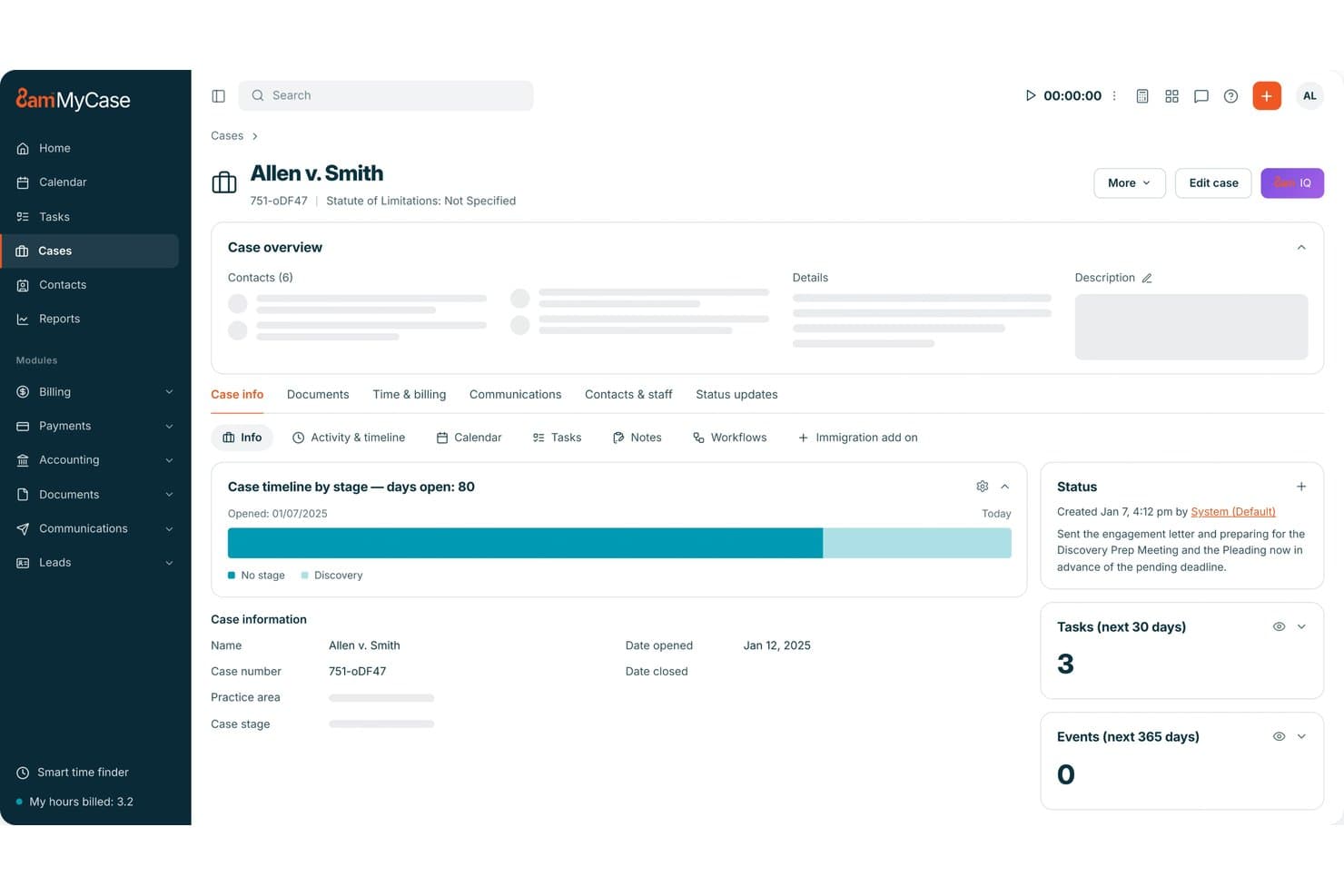
MyCase tracks immigration case timelines, tasks, and status updates in one view. MyCase is a legal practice management platform with a dedicated Immigration Add-On that handles immigration form preparation, e-filing, client intake, case tracking, and secure client communication.
Who Is MyCase Best For?
MyCase is a strong fit for immigration attorneys and paralegals at small to mid-sized law firms who need form auto-fill, e-filing, and client intake in one platform.
Why I Picked MyCase
I picked MyCase as one of the best because its Immigration Add-On handles form auto-fill and e-filing in a way that genuinely cuts prep time. Client and matter data auto-populate across forms like I-129, I-130, I-765, DS-160, and N-400, and saved information carries over to future filings. I also like that clients can complete intake questionnaires in 12 languages, which matters when your caseload includes non-English-speaking applicants.
MyCase Key Features
- AI data capture: Extracts information from passports, green cards, EAD cards, and I-94 documents and maps it to client records and Smart Forms.
- Multilingual client intake: Lets clients complete immigration intake questionnaires in 12 languages, with the option to hide selected tabs from the client view.
- Case-based access controls: Administrators can restrict individual users to only their assigned cases or grant view-only access across matters.
- Filing fee management: Issues virtual cards for USCIS credit-card payments, ties charges to client matters, and sends alerts when fees are processed.
MyCase Integrations
MyCase offers 70+ marketplace integrations, including Google Calendar, Microsoft Outlook, Gmail, QuickBooks, Dropbox, NetDocuments, LawKPIs, and Zapier. An Open API is available on Advanced for custom integrations.
Pros and Cons
Pros:
- Multilingual intake and secure client document exchange
- Supports e-filing for key USCIS forms
- Reuses client data across immigration forms
Cons:
- Users report slow uploads and file-sync problems
- Immigration stages and petition statuses remain unstructured
 Best for immigration e-filing and client intake
- Free demo available
- From $90/user/month
Visit WebsiteCustomer Rating:4.8/5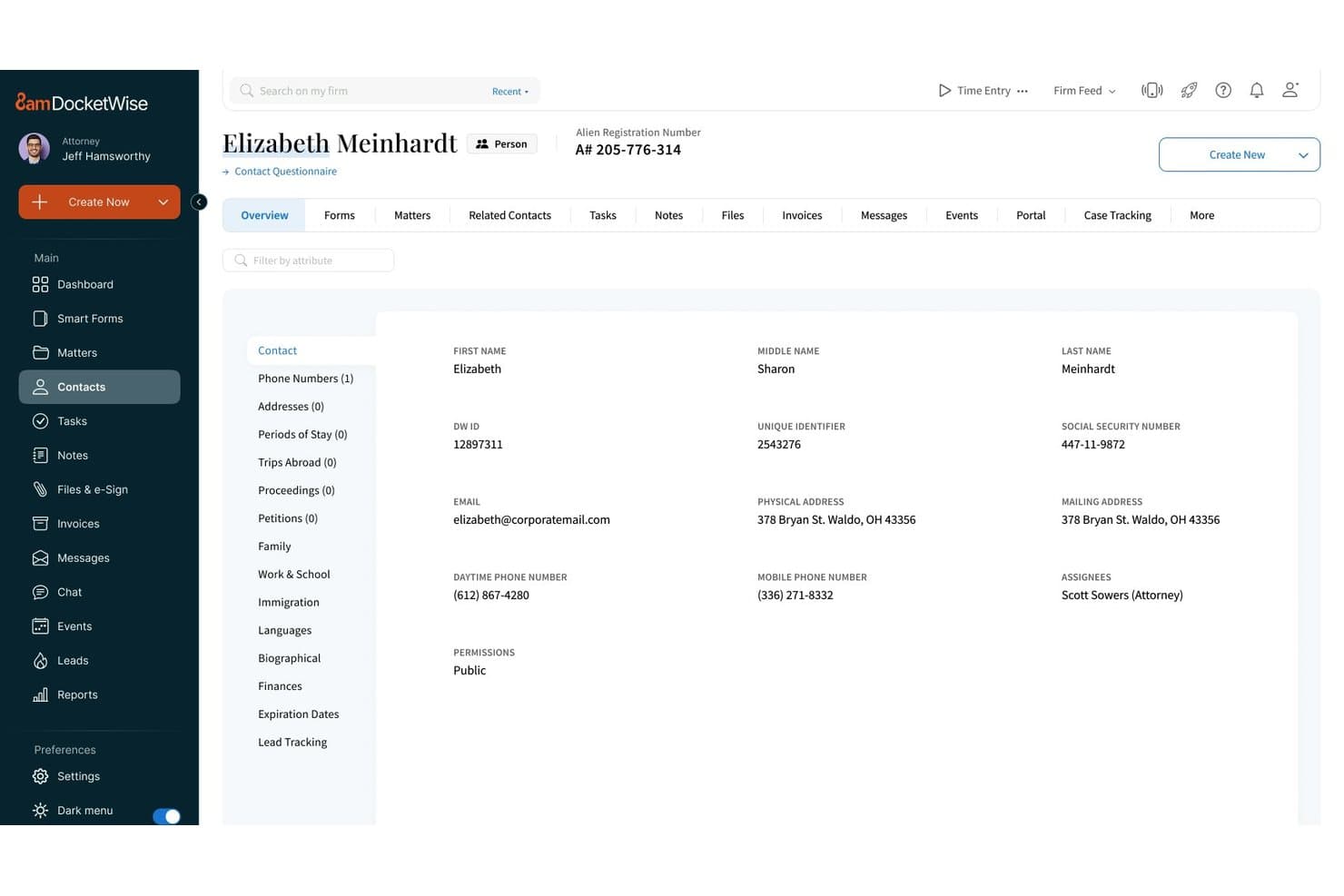
Docketwise centralizes client contact details and immigration case data in one profile. DocketWise is an immigration-specific case management platform that handles Smart Forms automation, USCIS e-filing, client intake, receipt tracking, priority-date tracking, billing, and document management for immigration law firms and legal teams.
Who Is DocketWise Best For?
DocketWise is a strong fit for immigration attorneys and their support staff who need a single platform to handle Smart Forms automation, USCIS e-filing, and client intake.
Why I Picked DocketWise
I've included DocketWise in my top picks because its Smart Forms engine does something I find genuinely useful: it combines multiple immigration forms into a single client questionnaire and auto-populates the required forms from client responses, covering USCIS, DOL, DOS, and EOIR/DOJ forms like I-130, I-485, and N-400. On top of that, its USCIS e-filing lets you submit form combinations like I-129 + G-28 or N-400 + G-28 directly from the platform, and the client portal gives clients real-time access to their USCIS receipt statuses and shared documents.
DocketWise Key Features
- Expiry date reminders: Configures automated alerts for immigration document and status expirations, including EAD, Advance Parole, Non-Immigrant Visa, and LCA dates.
- DocketWise IQ document assistant: Extracts information from scanned passports, green cards, EAD cards, and I-94s and maps it directly into USCIS forms.
- HR Portal: Gives corporate clients a shared view of employee cases, USCIS receipts, invoices, questionnaires, and files tied to their matters.
- Multilingual questionnaires: Translates client intake questionnaires into Spanish, French, Portuguese, Russian, Arabic, Hindi, Chinese, and other languages.
DocketWise Integrations
DocketWise lists 18 integrations, including QuickBooks, Google Calendar, Outlook Calendar, Gmail, Outlook Email, Clio, LawPay, MyCase, PracticePanther, and Zapier. It also offers a RESTful API with JSON-formatted responses for custom integrations.
Pros and Cons
Pros:
- Receipt and priority-date tracking centralizes case status
- Clients complete multilingual intake and uploads
- Questionnaires populate diverse immigration forms
Cons:
- Reviewers report task and template confusion
- Some questionnaire answers need manual correction
Learn more about DocketWise: Best for large firms centralizing immigration workflows
- Free trial + free demo available
- Pricing upon request
Visit WebsiteCustomer Rating:4.5/5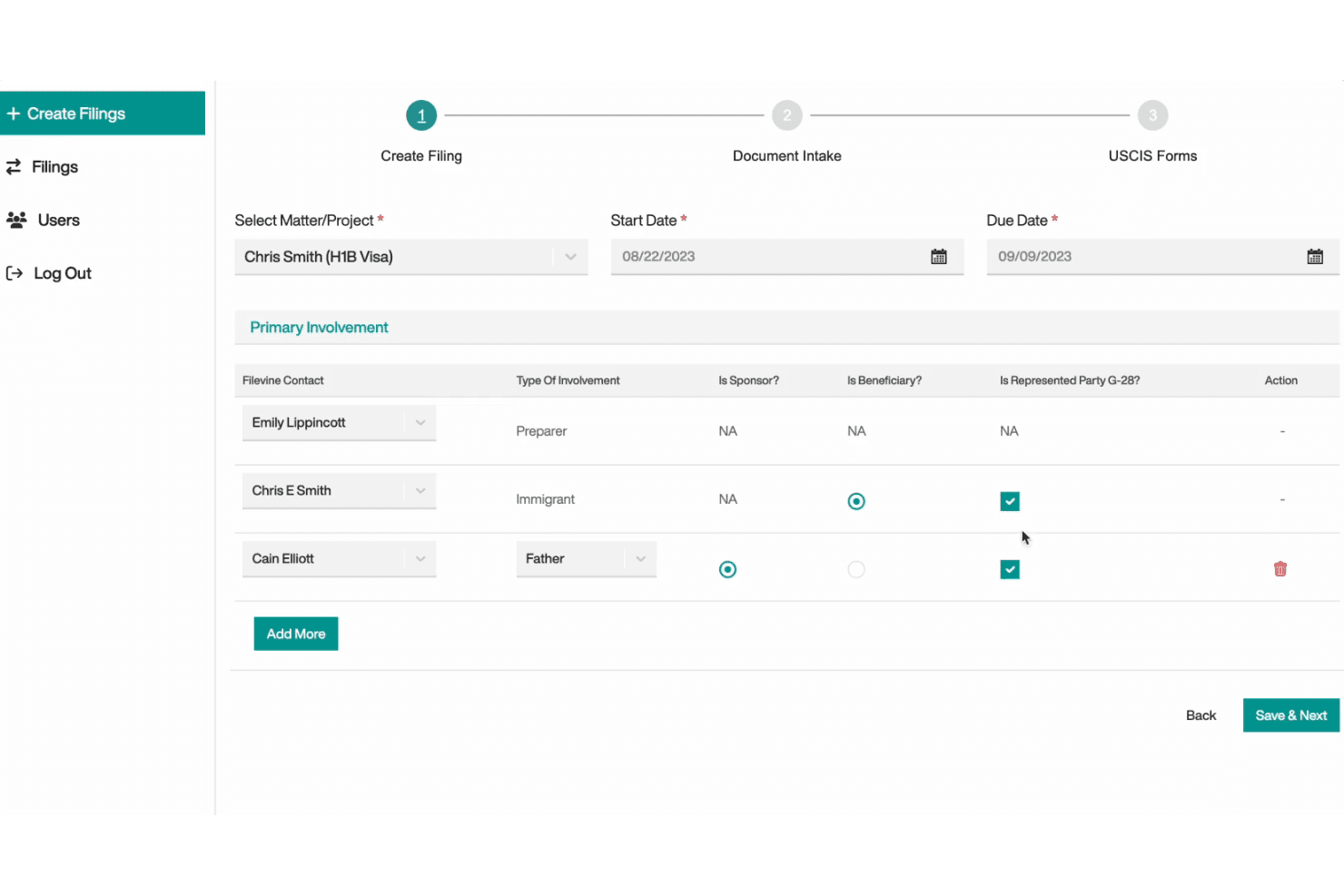
Filevine lets users assign roles and track party involvement in filings. Filevine is a cloud-based legal practice management platform with a dedicated immigration module that handles case workflows, AI-assisted USCIS form completion, client portal intake, document management, and real-time case status tracking.
Who Is Filevine Best For?
Filevine suits large immigration law firms that need to centralize case workflows, document management, and client intake across a high volume of matters in one configurable platform.
Why I Picked Filevine
I've included Filevine in my top picks because it's genuinely built for large immigration practices that need one platform to handle everything from Green Card and H-1B intake through billing and payments. I particularly like how ImmigrationAI pulls client documents in any language, extracts key data, and prefills USCIS form questionnaires within the same workflow, keeping preparers from toggling between systems. The configurable filing dashboard tracks each matter by preparer, due date, and stage, which gives firm administrators real visibility across a high volume of concurrent cases.
Filevine Key Features
- Multilingual questionnaire translation: Client questionnaires can be translated into up to 170 languages, with secure direct links for clients to complete them on their own.
- Real-time USCIS and NVC case status tracking: The platform pulls case status updates from multiple sources and surfaces them within each matter's filing dashboard.
- Client Portal with document upload: Clients can upload documents, make payments, ask questions, and follow their case through a dedicated portal tied directly to their project.
- Configurable deadline reminders: Reminder schedules can be set for a specified number of days before, on, or after a deadline, posting Activity-feed notes and sending email alerts when notifications are enabled.
Filevine Integrations
Filevine says its immigration platform has 30+ native integrations, including Outlook, Gmail, Google Calendar, Office 365, Slack, and QuickBooks. It also offers an Open API and Zapier for custom connectivity.
Pros and Cons
Pros:
- USCIS and NVC statuses appear together
- Configurable workflows receive positive user reviews
- Centralized immigration records and documents
Cons:
- Complex setup can burden smaller practices
- Immigration AI drew harsh user criticism
Learn more about Filevine: 4Best for legal billing built into case tracking
Clio
- 7-day free trial + free demo available
- From $49/user/month
Visit WebsiteCustomer Rating:4.5/5
Clio tracks immigration cases, documents, client intake, billing, and time. Clio is a cloud-based legal practice management platform that combines immigration case tracking, document management, billing, client intake, and time tracking in one system.
Who Is Clio Best For?
Clio Manage is a strong fit for immigration law firms that want billing, time tracking, and trust accounting built directly into their case management system.
Why I Picked Clio
I picked Clio as one of the best because billing, time tracking, and trust accounting sit inside the same system where you're managing immigration matters. In practice, that means I can log billable hours against a specific case, generate a flat-fee invoice for an I-485 filing, and reconcile trust account balances without switching between platforms. The preconfigured immigration custom fields, covering USCIS tracking numbers, A-numbers, and status expiration dates, also keep case-critical details structured from day one.
Clio Key Features
- Immigration status custom fields: Store case-specific data like USCIS tracking numbers, A-numbers, country of citizenship, and status expiration dates directly on each matter.
- Matter stage kanban board: Move cases through configurable practice-area stages and filter the board by client, responsible attorney, or staff member.
- Client portal: Give clients a secure space to view matter progress, share documents, send messages, and make payments.
- Zapier integration: Connect Clio Manage to 1,000+ external apps to automate matter, task, document, and contact workflows without writing code.
Clio Integrations
Clio Manage lists 250+ app integrations, including Gmail, Outlook, Google Calendar, QuickBooks, Xero, and TrustBooks. It also offers an API for custom integrations and Zapier connectivity.
Pros and Cons
Pros:
- Immigration fields track status and expirations
- Reviewers praise organized matter documents
- Integrated billing and trust accounting
Cons:
- High-volume immigration reporting draws concerns
- USCIS form coverage remains unconfirmed
Learn more about Clio: Best for Salesforce-based immigration workflows
- Free demo available
- From $150/user/month
Visit WebsiteCustomer Rating:4.2/5
Litify handles immigration case workflows, USCIS form auto-fill, and reporting. Litify is a Salesforce-native legal platform built for law firms that combines immigration case management, configurable matter workflows, USCIS form auto-fill, document management, client intake, and real-time reporting dashboards.
Who Is Litify Best For?
Litify suits immigration law firms that already run on Salesforce or want a platform built on its infrastructure, with configurable matter workflows, USCIS form auto-fill, and real-time reporting in one place.
Why I Picked Litify
I picked Litify as one of the best because it's built directly on Salesforce, which means your immigration workflows inherit enterprise-grade infrastructure from day one. I especially like how matter plans are fully configurable by case type, so a family-based petition and a corporate PERM filing each get their own structured task sequences. Paired with USCIS form auto-fill that pulls from client intake data, the manual re-entry that slows most immigration teams down is largely eliminated.
Litify Key Features
- Branded client portal: Clients can submit forms, upload documents, track case progress, and message staff directly through a firm-branded portal.
- Automated email and SMS updates: Litify sends automated client communications tied to immigration matter activity, keeping clients informed without manual outreach.
- AI intake agent: AI assists with intake calls, summarizes findings, and completes questionnaires using data captured during client conversations.
- Configurable reporting dashboards: Real-time dashboards surface immigration-specific metrics like time to submission, approval rates, and document turnaround times.
Litify Integrations
Litify documents integrations with Outlook, DocuSign, QuickBooks, Case Status, CalendarRules, Confido Legal, NetDocuments, and iManage. It offers a Salesforce-native platform and an open API for custom integrations, though API protocols and endpoints aren't specified.
Pros and Cons
Pros:
- Client portal supports uploads and case updates
- USCIS forms auto-fill from intake data
- Configurable workflows cover diverse immigration filings
Cons:
- A reviewer questioned its fit for migration law
- Immigration stages and alerts aren’t enumerated
Learn more about Litify: Best for attorney-designed immigration workflows
- Free demo available
- Pricing upon request
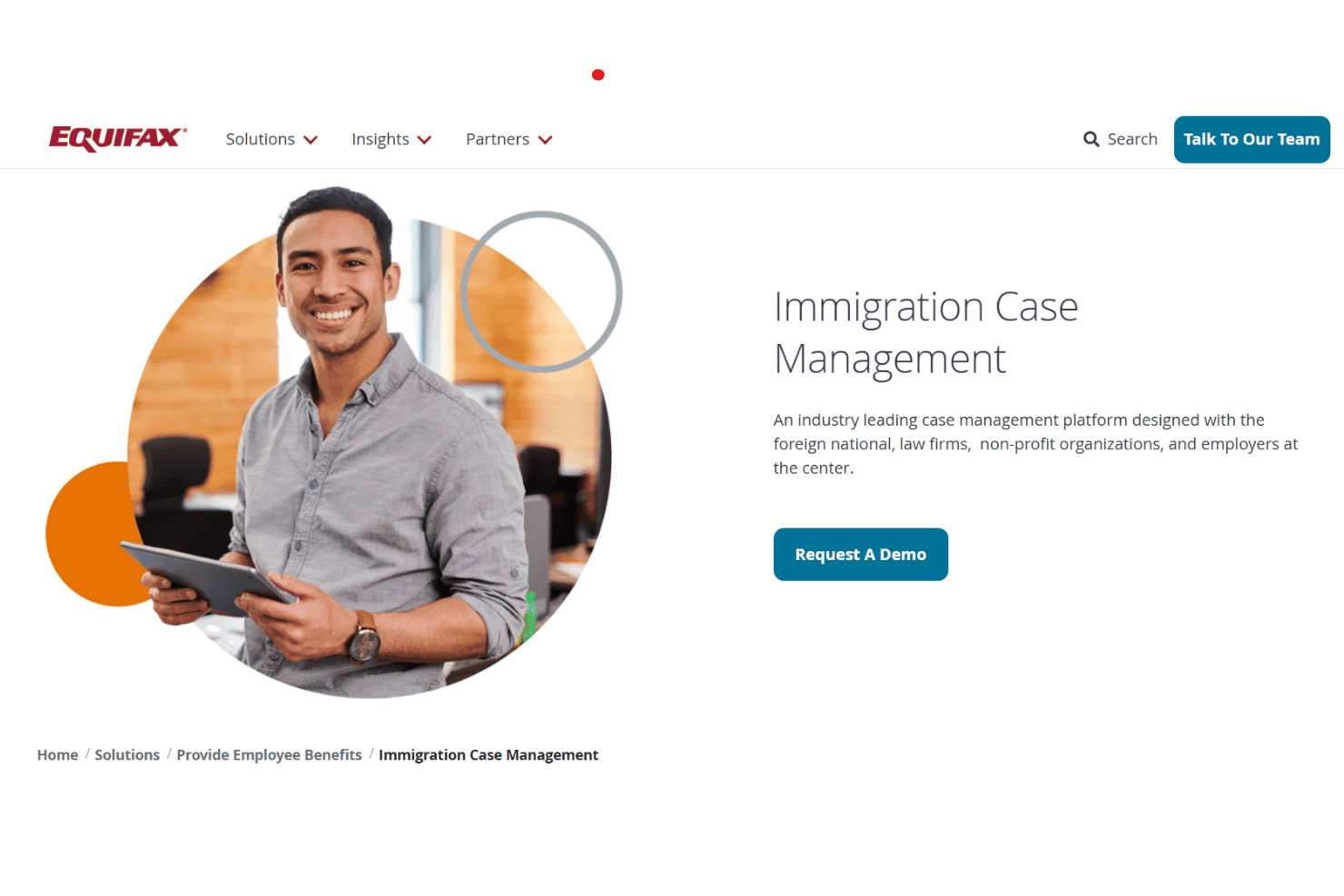
LawLogix tracks immigration cases, populates forms, and supports government e-filing. LawLogix is an immigration case management platform, now part of Equifax Workforce Solutions, that supports law firms, employers, and nonprofits with case tracking, customizable client portals, form population, and government e-filing.
Who Is LawLogix Best For?
LawLogix is a strong fit for immigration law firms and nonprofits that need a case management platform built around attorney-designed workflows.
Why I Picked LawLogix
I've included LawLogix in my top picks because it's one of the few immigration case management platforms built from the ground up by immigration attorneys, and that origin shows in how the workflows are structured. I like that the client portal guides foreign nationals through individualized, case-type-specific intake with tailored questionnaires and forms, so attorneys aren't chasing down missing documents. The platform also supports form auto-population and government e-filing, including PERM workspace management, which cuts down on redundant data entry across a high-volume caseload.
LawLogix Key Features
- Customizable client web portal: Foreign nationals access a dedicated portal where they complete case-specific questionnaires, upload documents, and move through intake steps tailored to their case type.
- PERM workspace management: The platform includes a dedicated ETA-9089 PERM Workspace for organizing and managing labor certification cases.
- Flexible data reporting: Generate case-status reports, firm-activity reports, and accounts-receivable reports using configurable reporting tools.
- Firm administration controls: Administrators can set up and offboard users, configure custom fields and email templates, and enforce MFA standards across the firm.
LawLogix Integrations
LawLogix’s Immigration Case Management integrations aren’t clearly documented. Equifax lists 10 API integrations, including Workday, SAP SuccessFactors 2.0, Oracle Cloud HCM, iCIMS, and Bullhorn, while its help center references Microsoft integrations.
Pros and Cons
Pros:
- Supports detailed records for high-volume practices
- Tailored client intake by case type
- Attorney-designed immigration workflows
Cons:
- Deadline alert triggers aren’t specified
- Some form details may not save
Learn more about LawLogix: Best for immigration form autofill across 125+ forms
- 7-day free trial
- Pricing upon request
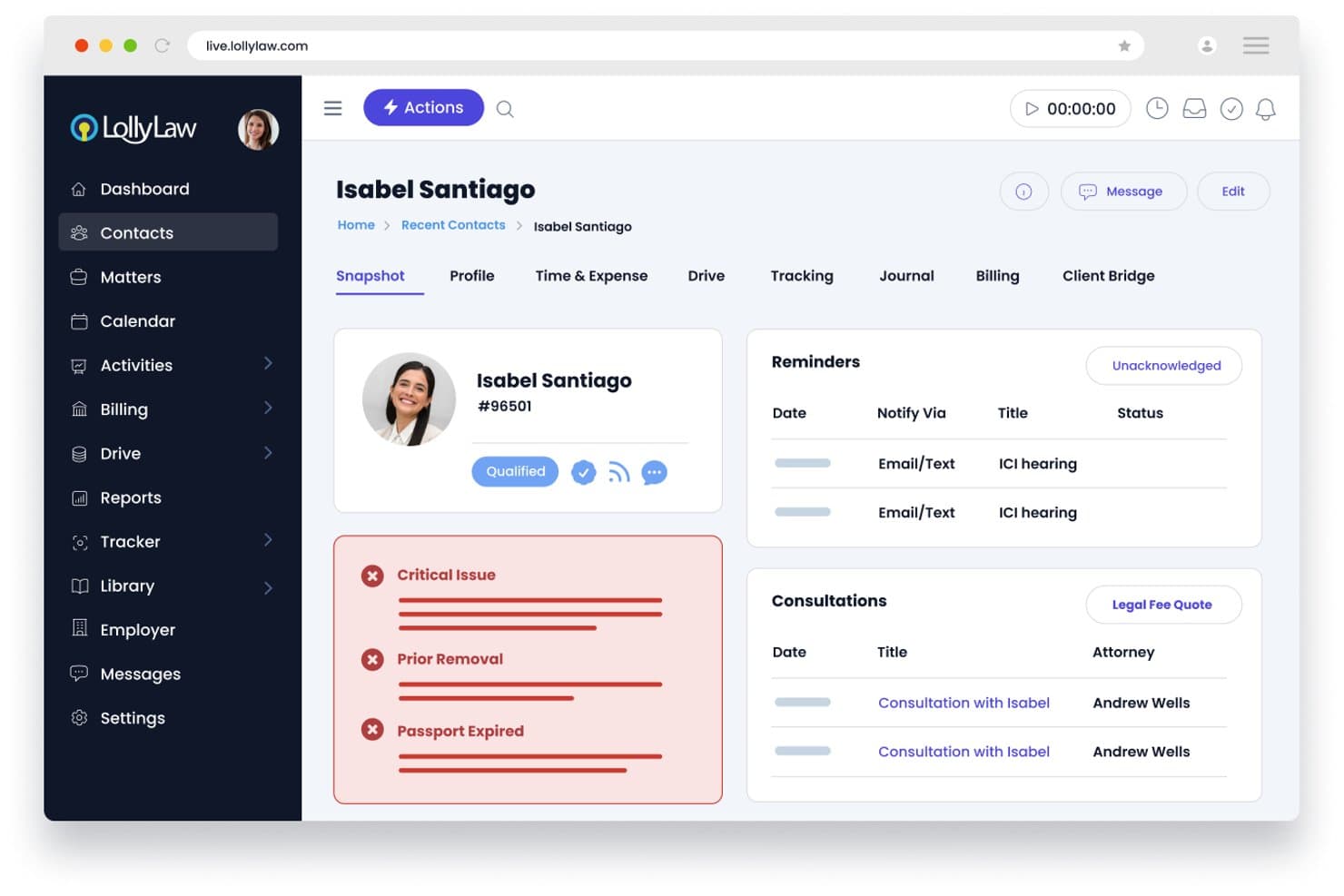
LollyLaw flags critical immigration issues like expired passports on client profiles. LollyLaw is immigration-specific case management software that covers form autofill, client intake, document management, workflows, task tracking, and billing for immigration law firms.
Who Is LollyLaw Best For?
LollyLaw is a strong fit for immigration attorneys and paralegals at dedicated immigration law firms who need a single platform for form filing, case workflows, and client intake.
Why I Picked LollyLaw
I've included LollyLaw in my top picks because its LollyForms library covers 125+ government immigration forms from USCIS, DOJ, and EOIR, all auto-populated with stored client data. I particularly like that when a new form edition is released, LollyLaw flags the old version and walks you through copying existing subjects and values into the updated edition. Pair that with 40+ pre-built immigration workflows, and you get a platform built specifically around how immigration caseloads actually run.
LollyLaw Key Features
- Client Bridge portal: Clients can log in to review case progress, complete questionnaires, upload documents, and make payments directly through the portal.
- LollyDrive document management: Store, organize, and search case files with role-based permissions, document locking, version tracking, and audit trails.
- Expiry date tracking: Record visa and document expiration dates on contact records and configure in-app and email alerts for selected staff on custom trigger days.
- Billing and payment processing: Track billable time, generate invoices, set up payment plans, and accept credit cards, ACH, and eChecks through LollyPayments.
LollyLaw Integrations
LollyLaw offers documented integrations with Google Drive, Dropbox, Microsoft OneDrive, Box, Amazon Web Services (AWS), Google Calendar, and Outlook Calendar. API availability for custom integrations isn’t documented.
Pros and Cons
Pros:
- Autofills 125+ immigration forms from client data
- Case tasks and billing stay organized
- Client portal earns praise for uploads
Cons:
- Expiry alerts omit documented RFE deadlines
- Contact updates require manual form resync
Learn more about LollyLaw:
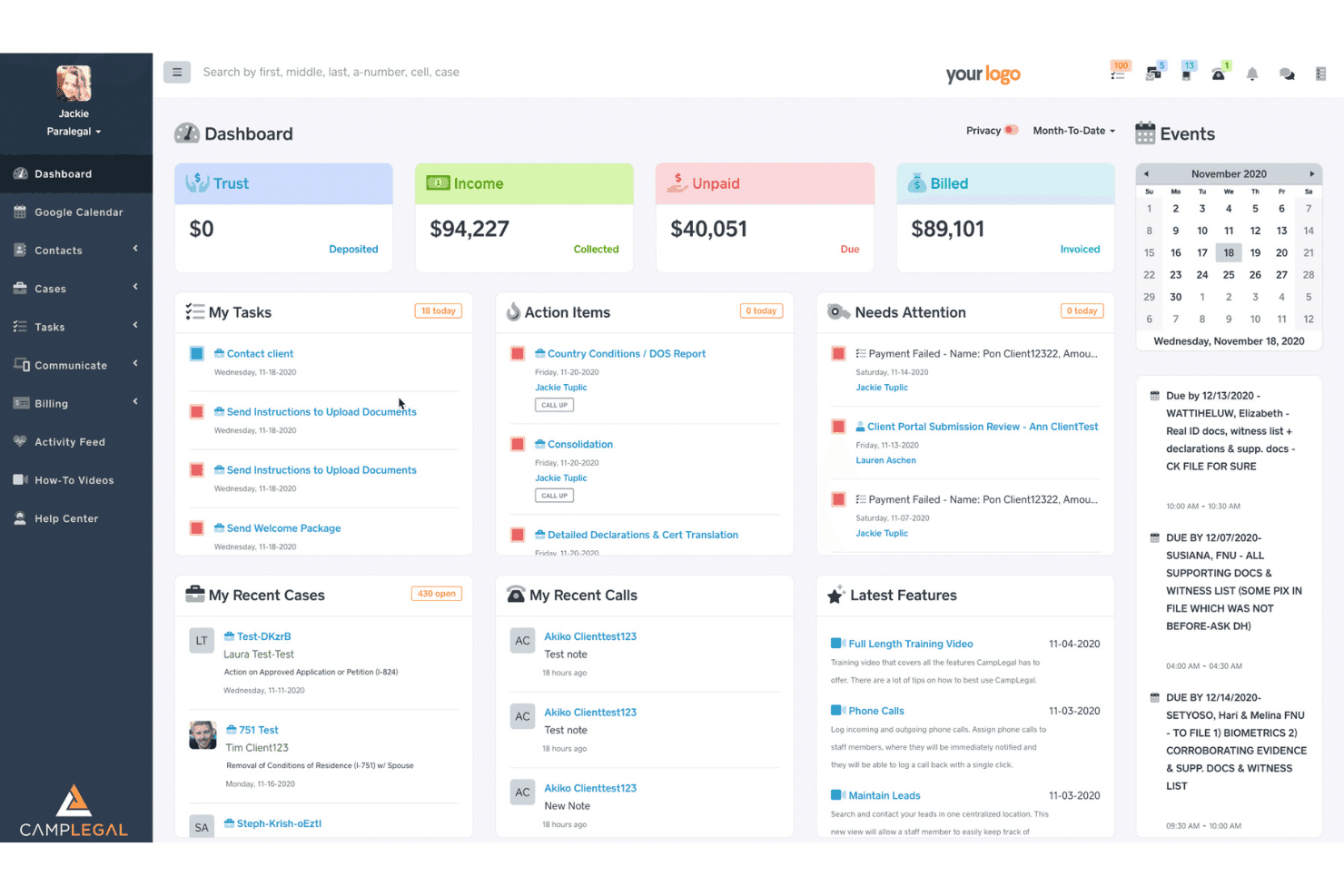
CampLegal's dashboard centralizes billing, tasks, and immigration case management. CampLegal is an immigration-specific case management platform for law firms that covers case tracking, USCIS form generation, client intake, document management, workflow automation, and trust accounting.
Who Is CampLegal Best For?
CampLegal is a strong fit for immigration law firms—from solo practices to multi-office teams—that want a purpose-built platform to handle cases, forms, and client intake in one place.
Why I Picked CampLegal
I picked CampLegal as one of the best because its AI form review runs cross-form consistency checks and flags missing evidence, inconsistent data, and common RFE triggers before anything goes to USCIS. I find this especially valuable when managing cases like I-485 adjustment alongside an I-130, where data mismatches across forms are easy to miss. The AI outputs confidence indicators and source references, and a human must review and approve before filing, which keeps your team in control.
CampLegal Key Features
- Custom milestone templates: Configure case-specific milestone tracks for I-130/I-485 adjustment, H-1B petitions, N-400 naturalization, consular processing, and asylum applications.
- Multilingual client portal: Clients access case status, upload documents, and communicate with your firm through a mobile app that supports 17 languages.
- USCIS receipt tracking: Upload a receipt notice image and the platform extracts the receipt number, form type, service center, and notice date automatically.
- Legal trust accounting: Create invoices, configure payment plans, run batch invoicing, and process ACH, credit-card, and debit-card payments through LawPay.
CampLegal Integrations
CampLegal offers documented integrations with Google Calendar, Microsoft Outlook and Microsoft 365, QuickBooks, and LawPay. Pro also includes Zapier.
Pros and Cons
Pros:
- Reviewers praised organized case handoffs
- Client portal centralizes uploads and case messages
- Cross-form AI checks flag filing inconsistencies
Cons:
- Initial workflow setup took reviewer time
- One reviewer reported faulty DS-160/260 autofill
Learn more about CampLegal: Best for 90-country immigration form libraries
- Free demo available
- Pricing upon request
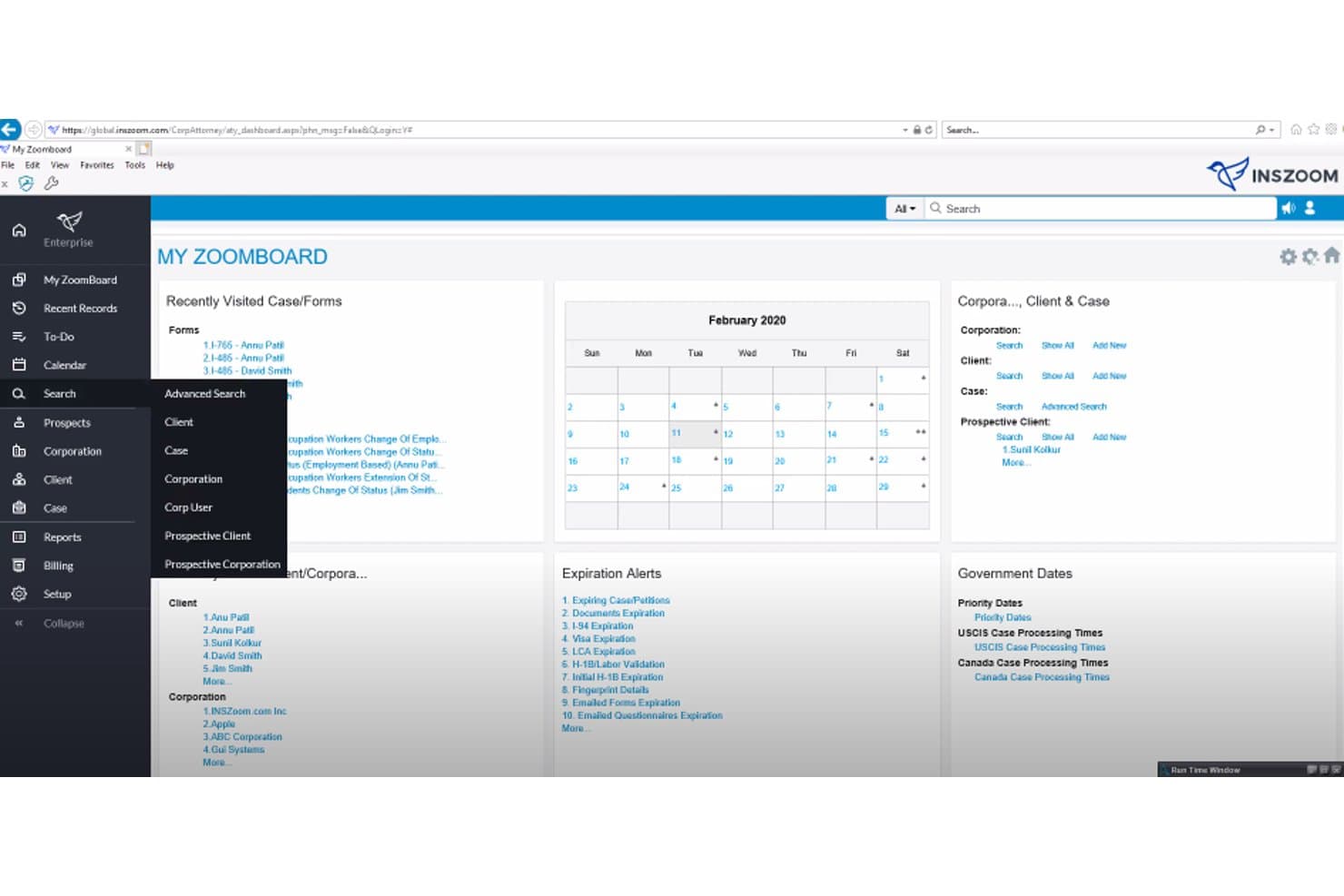
INSZoom centralizes case management, alerts, and client data. INSZoom is Mitratech's cloud-based immigration case management platform covering U.S., Canadian, and global cases, with tools for form automation, workflow tracking, deadline alerts, document management, and client portals.
Who Is INSZoom Best For?
INSZoom is a strong fit for immigration law firms and corporate legal teams managing high volumes of cases across multiple countries and visa types.
Why I Picked INSZoom
INSZoom earns its spot on my shortlist because of its depth of global form coverage: 2,500+ forms across 90+ countries, with U.S. forms updated within 48 hours of an official release. I especially like the questionnaire-driven intake, which collects client data upfront and pushes it directly into filing-ready forms, cutting down the manual rework that typically eats up a case manager's day. The Global Forms Framework also lets Enterprise clients add country-specific subscriptions for inbound applications and immigration-record tracking beyond the U.S. and Canada.
INSZoom Key Features
- Reports 3.0: Role-based dashboards and reports filterable by case manager, corporation, case type, and time period, covering case status, expirations, RFE due dates, and billing summaries.
- Labor condition application management: Users can manage and e-file individual and bulk LCAs with the Department of Labor, assign LCAs to employees, track usage, and run compliance reports.
- Automated Data Entry (ADE): Machine learning and robotic process automation read receipts and government notices, update case status, and create calendar alerts for court dates and expiration deadlines.
- Client and partner portals: Self-service portals let clients monitor case status, upload documents, and complete questionnaires in more than 100 languages.
INSZoom Integrations
INSZoom lists integrations with Workday, ADP, SuccessFactors, PeopleSoft, Outlook, DocuSign, QuickBooks, QuickBooks Online, Authorize.Net, and LawPay. It also provides an API for HR-system and custom integrations.
Pros and Cons
Pros:
- Case templates track steps and expirations
- Questionnaires populate USCIS forms for filing
- Forms span 2,500 across 90+ countries
Cons:
- Ad-hoc reports can be difficult or inaccurate
- Reviewers report dated navigation and complex workflows
Learn more about INSZoom: Best for AI-driven petition review and e-filing
- Free trial available
- Pricing upon request
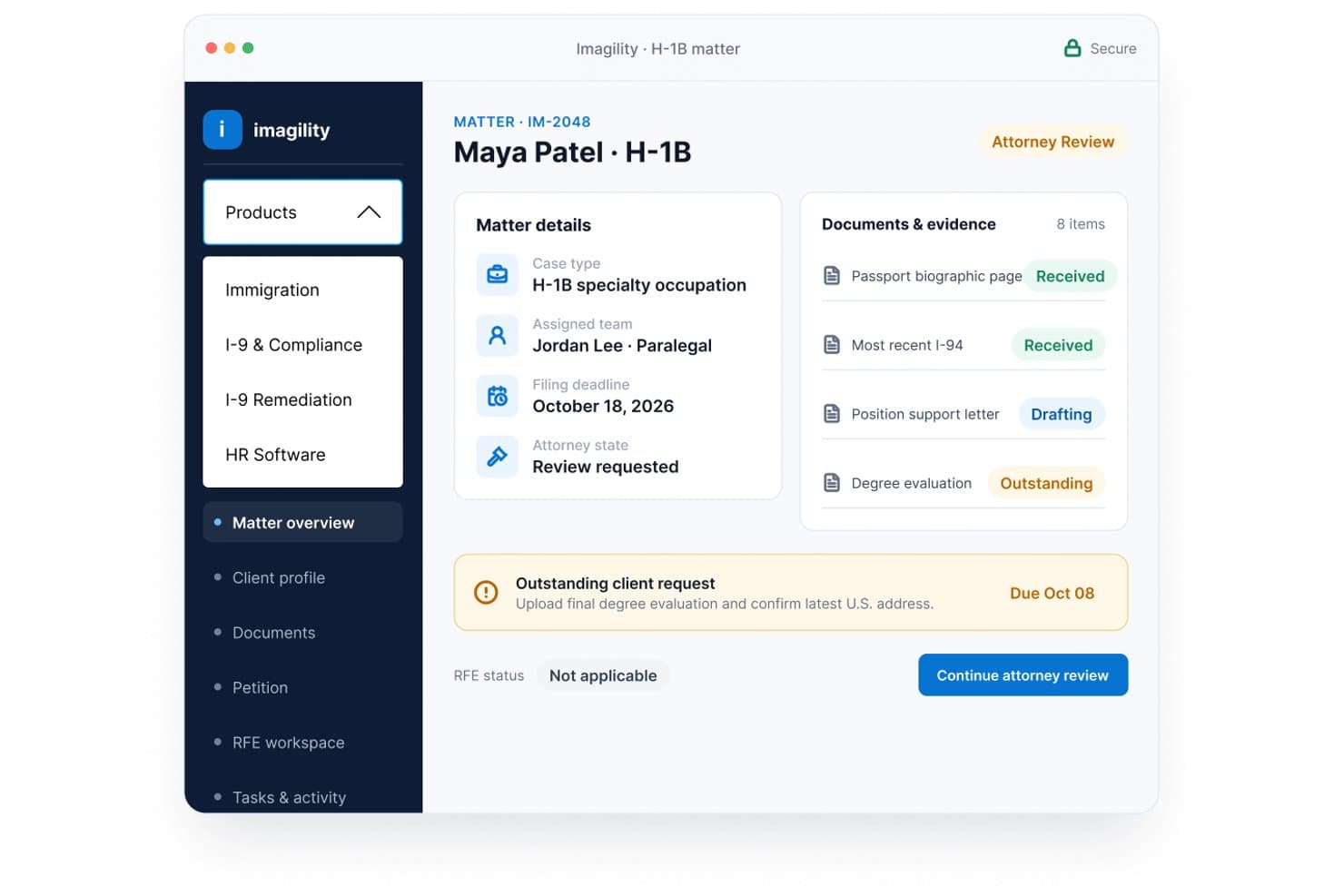
Imagility centralizes H-1B case details, documents, and deadlines in one view. Imagility is a cloud-based immigration case management platform for law firms and employers that covers petition building, AI-driven petition analysis, e-filing, document management, and multi-stakeholder workflow coordination.
Who Is Imagility Best For?
Imagility is a strong fit for immigration law firms and corporate HR teams that handle high volumes of employment-based petitions and want AI-assisted petition review built into their case management workflow.
Why I Picked Imagility
I picked Imagility as one of the best because its AI-driven petition review genuinely sets it apart from standard case management tools. The virtual adjudicator checks petition content against nine factors, flagging gaps in job descriptions, LCA correctness, and beneficiary qualifications before you file. Pair that with direct USCIS e-filing that auto-populates I-129, G-28, I-907, and LCA forms from beneficiary data, and you have a workflow that catches problems early and moves petitions to submission faster.
Imagility Key Features
- Guided petition builder: Build H-1B, L-1, and other petitions through color-coded timeline steps that capture job duties, beneficiary qualifications, and employer-employee relationship details.
- Bulk upload and OCR processing: Upload multiple beneficiary documents at once and extract data automatically to populate petition fields across multiple cases simultaneously.
- Role-based workflow collaboration: Assign petition steps to beneficiaries, petitioners, attorneys, preparers, and authorized signatories, with permission controls determining what each user can view and edit.
- I-9 compliance management: Manage I-9 completion workflows, digital signatures, E-Verify integration, audit-ready document storage, and LCA Public Access Files for H-1B and related visa categories.
Imagility Integrations
Imagility has documented native integrations with Gmail, Outlook, Google Drive, Dropbox, QuickBooks, LawPay, AffiniPay, FLAG Portal, and the USCIS portal. It also offers an open API for custom integrations.
Pros and Cons
Pros:
- Bulk OCR populates beneficiary petition fields
- Reviewers praise clear petition timelines
- AI-driven petition checks flag gaps
Cons:
- Spam-prone invitations and lead-entry logouts
- Recent reviewer reported multiple features malfunctioning
Learn more about Imagility:
Annen programvare for saksbehandling av immigrasjonssaker i USA
Her er noen flere alternativer som ikke kom med på kortlisten min, men som likevel er verdt å se nærmere på:
- 11TooreyBest for AI-assisted immigration form filing
- 12eIMMIGRATIONBest for 300+ forms with built-in e-filing
- 13AlmaBest for corporate HR immigration tracking
- 14LawcusBest for general practice firms adding immigration
- 15BoundlessBest for employer-led global immigration tracking
- 16CaseBlinkBest for AI agents with attorney sign-off controls
- 17LawpilotBest for immigration firm workflow coordination
- 18LexCoveBest for intake-to-filing-PDF workflow coordination
- 19Visalaw.aiBest for AI drafting backed by AILA research
- 20Envoy GlobalBest for corporate HR managing global immigration
How I Evaluate Immigration Case Management Software
I split my evaluation into three parts, with core functionality carrying the most weight: auto-populating government forms and tracking case stages across petition types. From there, I look at standout features like e-filing integration. Beyond features, I consider support, onboarding, and pricing value.
Core Functionality (Table Stakes for This List)
When I'm selecting tools for my list, I score each one on a scale from 0 (does not offer the functionality) to 5 (excels in this area) for each core functionality listed below. I then convert the total into a percentage to help assess each tool's overall fit, with extra weight on any functionalities I've deemed essential.
- Form Automation (Essential): I check whether the tool auto-populates USCIS and DOS forms from stored client data across petition types like H-1B, I-130, and N-400.
- Case & Workflow Tracking (Essential): Each tool should let me follow a case through defined stages, from initial filing to approval, with status views by petition type.
- Deadline & Compliance Alerts: I look for automated reminders tied to visa expirations, RFE response windows, and priority date movements.
- Document Management: Secure, case-level document organization matters here, including version control and permissions for sensitive client records.
- Client Intake & Portal: The intake process should connect submitted questionnaires and documents directly to the case record without manual re-entry.
- Collaboration Tools: I evaluate how task assignments, internal notes, and role-based visibility work when multiple staff members share a caseload.
Once I have a list of tools that meet the criteria, I consider what sets each platform apart.
Differentiating Factors (What Sets Vendors Apart)
Here's how I compare and contrast different vendors:
Standout Features
I look for direct e-filing connections to USCIS so attorneys can submit petitions without re-entering data into a government portal. AI-powered form review matters just as much—I check whether a tool flags inconsistencies across related fields before filing, which directly reduces RFEs. Multi-entity case linking is another separator; a family-based petition often involves dependents whose cases share evidence, and I evaluate how each platform ties those records together.
Beyond Features
I check how quickly a vendor updates its form library after USCIS or DOS revisions, since a lag of even a few weeks can mean filing on outdated versions. Integration with your existing tech stack matters just as much. If your firm already runs a billing or CRM platform, I look for API access or native connectors that avoid duplicate data entry. I also evaluate onboarding support, especially migration help from legacy systems, because a mid-cycle switchover during H-1B cap season can stall active cases.
Slik velger du programvare for saksbehandling av immigrasjonssaker i USA
Velg et system ved å teste innleveringene, sakskontrollene og overleveringene teamet ditt håndterer oftest.
| Hvis prioriteten din er | Se etter |
|---|---|
| Hvis prioriteten din erNøyaktig utfylling av skjemaer | Se etterEn test med gjeldende skjemaversjoner fra USCIS og DOS |
| Hvis prioriteten din erTydelig saksansvar | Se etterEn eksempelarbeidsflyt med trinn, frister og tildelt personale |
| Hvis prioriteten din erFærre overleveringer ved inntak | Se etterEt klientspørreskjema som overfører svarene til en saksmappe |
| Hvis prioriteten din erKoblede familiesaker | Se etterEt eksempel som viser relaterte søkere og delt dokumentasjon |
Slik vurderer du kortlisten din
- Gjennomfør en skjematest: Bruk en prøveperiode eller en veiledet demonstrasjon til å legge inn eksempeldata om en klient, og gå gjennom ett H-1B-, I-130- eller N-400-skjema for feltkobling og kontrollfunksjoner for korrigering.
- Be om dokumentasjon på skjemaoppdateringer: Be om de nyeste versjonsnotatene eller en datert endringslogg, og bekreft deretter versjonene som ble brukt i testen.
- Følg én sak: Be leverandøren demonstrere en eksempelsak fra inntak til innlevering, inkludert en frist, en dokumentversjon og en medarbeidertildeling.
- Få migreringsvilkårene skriftlig: Be om et eksempel på eksport og skriftlig bekreftelse på hvilke saksfelter, dokumenter og notater som overføres fra det nåværende systemet ditt.
- Velg kompromisset ditt: Foretrekk et immigrasjonsspesifikt system når søknadsskjemaer og innleveringsarbeidsflyter driver arbeidet; foretrekk en bredere juridisk plattform når delte saks- og faktureringsprosesser er viktigere. Test saken du har høyest volum av før du bestemmer deg.
Hva er programvare for saksbehandling av immigrasjonssaker i USA?
Programvare for håndtering av immigrasjonssaker i USA hjelper juridiske team med å organisere klientinntak, immigrasjonssaker, skjemaer, innleveringer, dokumenter, frister og kommunikasjon.
Disse plattformene kan omfatte verktøy for utarbeiding av immigrasjonsskjemaer, sporing av saksfaser og koordinering av arbeid på tvers av et firma. Sammenlign funksjonene i hvert system med praksisens behov for innlevering og gjennomgangsprosesser.
Funksjoner i programvare for håndtering av immigrasjonssaker i USA
Her er de viktigste funksjonene jeg ser etter i programvare for håndtering av immigrasjonssaker:
- Automatisering av skjemaer: Systemet bruker lagret klientinformasjon til å fylle ut immigrasjonsskjemaer, for eksempel skjemaene H-1B, I-130 og N-400. Personalet kan gjennomgå de tilordnede feltene og korrigere feil før en innlevering klargjøres.
- Sporing av saker og arbeidsflyter: Team kan organisere saker i faser, tildele ansvarlige og følge fremdriften fra inntak til innlevering og avgjørelse. Visninger etter sakstype hjelper personalet med å se hvor sakene står, og hva som krever oppmerksomhet.
- Fristvarsler: Automatiske påminnelser markerer datoer som visumutløp og frister for svar. Personalet kan knytte varsler til saksoppføringer og tildele oppfølgingsoppgaver for å redusere risikoen for å oversitte en frist.
- Dokumenthåndtering: Lagring på saksnivå holder skjemaer, dokumentasjon og korrespondanse organisert. Versjonshistorikk og tilgangstillatelser hjelper personalet med å identifisere det gjeldende dokumentet og kontrollere hvem som kan se sensitive opplysninger.
- Klientinntak og portal: Spørreskjemaer og dokumentopplastinger samler inn informasjon fra klienter gjennom en nettportal. Når svarene kobles til en saksoppføring, kan personalet gjennomgå innsendingene uten å legge inn opplysningene på nytt manuelt.
- Samarbeidsverktøy: Oppgavetildelinger, interne notater og rollebasert tilgang gjør det mulig for flere teammedlemmer å arbeide med en sak. Disse kontrollene tydeliggjør ansvarsfordelingen og bidrar til å holde interne saksdiskusjoner adskilt fra kommunikasjon med klienter.
- Støtte for elektronisk innlevering: En tilkobling til USCIS' innleveringssystemer, der dette er tilgjengelig, kan støtte elektronisk innsending av aktuelle skjemaer. Kontroller hvilke skjemaer og innleveringstrinn systemet støtter, og bekreft om personalet fortsatt må gjennomføre trinn i en offentlig portal.
- Kontroller ved gjennomgang av skjemaer: Valideringsverktøy kan markere manglende felt eller uoverensstemmelser mellom relaterte opplysninger før innsending. Personalet bør gjennomgå hvert varsel og kontrollere de underliggende faktaene i stedet for å betrakte automatiske kontroller som juridisk gjennomgang.
- Kobling av relaterte saker: Systemet kobler sammen saker for familiemedlemmer eller andre relaterte søkere og kan knytte felles dokumentasjon til disse oppføringene. Dette hjelper team med å følge separate innleveringer samtidig som forbindelsen mellom sakene forblir synlig.
Fordeler med programvare for håndtering av immigrasjonssaker i USA
Programvare for håndtering av immigrasjonssaker kan støtte teamet ditt på flere praktiske måter:
- Utarbeiding av skjemaer: Lagrede klientopplysninger kan fylle ut immigrasjonsskjemaer og gi personalet et utgangspunkt som kan gjennomgås og korrigeres før innlevering.
- Oversikt over saker: Fasebaserte arbeidsflyter og tildelte ansvarlige viser hvor sakene står, og hvem som håndterer neste trinn.
- Fristoppfølging: Automatiske varsler knyttet til saksdatoer kan utløse oppfølging av visumutløp og frister for svar.
- Dokumentkontroll: Lagring på saksnivå, versjonshistorikk og tilgangstillatelser hjelper personalet med å finne gjeldende oppføringer og håndtere sensitive filer.
- Sammenkoblet inntak: Klientspørreskjemaer og dokumentopplastinger som er koblet til saksoppføringer, reduserer behovet for å legge inn innsendt informasjon på nytt manuelt.
- Teamkoordinering: Oppgavetildelinger, interne notater og rollebasert synlighet tydeliggjør ansvarsområdene mellom ansatte.
- Organisering av relaterte saker: Koblinger mellom familiesaker og felles dokumentasjon hjelper team med å følge separate innleveringer samtidig som forbindelsene mellom dem forblir synlige.
Kostnader og priser for programvare for håndtering av immigrasjonssaker i USA
Kostnadene varierer etter funksjoner, teamstørrelse og behov for støtte. Programvare for håndtering av immigrasjonssaker i USA varierer vanligvis fra gratis prøveperioder til tilpassede priser for virksomheter.
Sammenligningstabell for abonnementer for immigrasjonsprogramvare i USA
| Abonnementstype | Gjennomsnittspris | Vanlige funksjoner |
|---|---|---|
| AbonnementstypePersonlig abonnement | Gjennomsnittspris$50–$90/bruker/måned | Vanlige funksjonerAutomatisering av skjemaer, saksoppfølging, klientinntak, dokumentlagring og kalenderverktøy. |
| AbonnementstypeForretningsabonnement | Gjennomsnittspris$90–$150/bruker/måned | Vanlige funksjonerFunksjonene i personlig abonnement, alternativer for elektronisk innlevering, klientportaler, arbeidsflytverktøy og teamtillatelser. |
| AbonnementstypeVirksomhetsabonnement | Gjennomsnittspris$150+/bruker/måned eller tilpasset tilbud | Vanlige funksjonerAvansert saks- og samsvarsoppfølging, brukeradministrasjon, rapportering, implementeringsstøtte og tilpasset konfigurasjon. |
Vanlige spørsmål
Her finner du svar på vanlige spørsmål om programvare for saksbehandling av immigrasjonssaker i USA.
Sender programvare for saksbehandling av immigrasjonssaker inn søknader direkte til USCIS?
Noen ganger, men bare for skjemaene og trinnene leverandøren støtter. Noen arbeidsflyter krever fortsatt at ansatte bruker en USCIS-konto. Før dere kjøper, be leverandøren oppgi hvert støttede skjema og demonstrere innsendingen. Bekreft om programvaren overfører data, sender inn søknaden eller klargjør en pakke som ansatte kan laste opp. Sjekk også hvordan den registrerer kvitteringer og avviste innsendinger. Teamet deres bør bekrefte den offisielle USCIS-statusen i stedet for å stole utelukkende på et internt saksstadium.
Hva bør jeg spørre leverandører om når det gjelder sikkerheten til klientdata?
Spør leverandørene hvordan de beskytter, lagrer og kontrollerer tilgangen til sensitive klientopplysninger. Be om detaljer om rollebaserte tilgangsrettigheter, kryptering, revisjonslogger, lagring av data, sikkerhetskopier og eventuelle underleverandører som håndterer opplysningene deres. Sjekk om dere kan begrense tilgangen per sak og fjerne tilgangen raskt når ansatte slutter. La IT- eller sikkerhetsteamet deres gjennomgå leverandørens dokumentasjon og kontraktsvilkår. Ikke anta at en klientportal eller skyhosting alene betyr at et system oppfyller firmaets sikkerhetskrav.
Kan programvare for saksbehandling av immigrasjonssaker erstatte advokatens gjennomgang?
Nei. Programvare kan bidra til å klargjøre skjemaer og markere manglende felt eller motstridende svar, men slike kontroller fastslår ikke om de juridiske kravene er oppfylt eller bekrefter at opplysningene klienten har gitt, er korrekte. Sørg for at kvalifisert personale gjennomgår underlagsdokumentene, svarene i skjemaene og innsendingspakken før innsending. Be leverandørene vise hva valideringskontrollene deres omfatter, og hva de ikke omfatter. Teamet deres bør også bekrefte at skjemaene gjenspeiler gjeldende versjoner fra USCIS eller DOS. Se på programvarevarsler som signaler til gjennomgang, ikke som juridiske råd.