

Som immigrasjonsadvokat kjenner du verdien av komplett juridisk programvare som effektiviserer praksisen din, slik at du kan prioritere og håndtere sakene dine effektivt. Det kan være vanskelig å forstå forskjellen mellom ulike løsninger for saksbehandling, så jeg har grundig testet, evaluert og analysert de beste løsningene for immigrasjonsadvokatpraksiser, slik at du kan forenkle søket etter løsningen firmaet ditt trenger.
Hvorfor du kan stole på våre programvareanbefalinger
6,700+
Reviews
20
Industry experts
16+
Evaluation factors
14
Years
Teamet vårt har testet og anmeldt programvare siden 2012. Vi leder selv advokatfirmaer, så vi vet hvor vanskelig og hvor viktig det er å velge riktig programvare.
I denne guiden har vi vurdert verktøyene gjennom praktisk testing og uavhengig research og gitt dem poeng ut fra våre utvelgelseskriterier.
Anmeldelsene våre bygger på vår egen redaksjonelle vurdering. De er ikke et salgsargument.
Sammenligningstabell for programvare for saksbehandling av immigrasjonssaker
Tabellen nedenfor sammenligner prisopplysninger for mine beste utvalgte løsninger for saksbehandling av immigrasjonssaker.
| Tool | Best For | Trial Info | Price | ||
|---|---|---|---|---|---|
| 1 | Best for immigration-focused legal practices | Free trial available | From £79/user/month | Website | |
| 2 | Best for intuitive immigration form preparation | Free demo available | From $90/user/month | Website | |
| 3 | Best for customizable immigration case workflows | Free trial + free demo available | Pricing upon request | Website | |
| 4 | Best for no-code immigration workflows | Free trial available | Pricing upon request | Website | |
| 5 | Best for cloud-based immigration case processing | Free demo available | From $55/user/month (billed annually) | Website | |
| 6 | Best for immigration legal accounting | 10-day free trial | From $49/user/month (billed annually) | Website | |
| 7 | Best for corporate immigration compliance | Free demo available | Pricing upon request | Website | |
| 8 | Best for Canadian immigration case management | From $69/month | Pricing upon request | Website | |
| 9 | Best for comprehensive immigration case tracking | 7-day free trial + free demo available | Pricing upon request | Website | |
| 10 | Best for immigration client communication | 7-day free trial + free demo available | Pricing upon request | Website |


Anmeldelser av den beste programvaren for saksbehandling av immigrasjonssaker
Nedenfor finner du mine detaljerte sammendrag av den beste programvaren for saksbehandling av immigrasjonssaker som kom med på kortlisten min. Anmeldelsene mine gir et detaljert innblikk i funksjonene, integrasjonene og de beste bruksområdene for hver programvare, slik at du kan finne den beste løsningen for deg.
 1Best for immigration-focused legal practices
Clio
- Free trial available
- From £79/user/month
Visit WebsiteCustomer Rating:4.7/5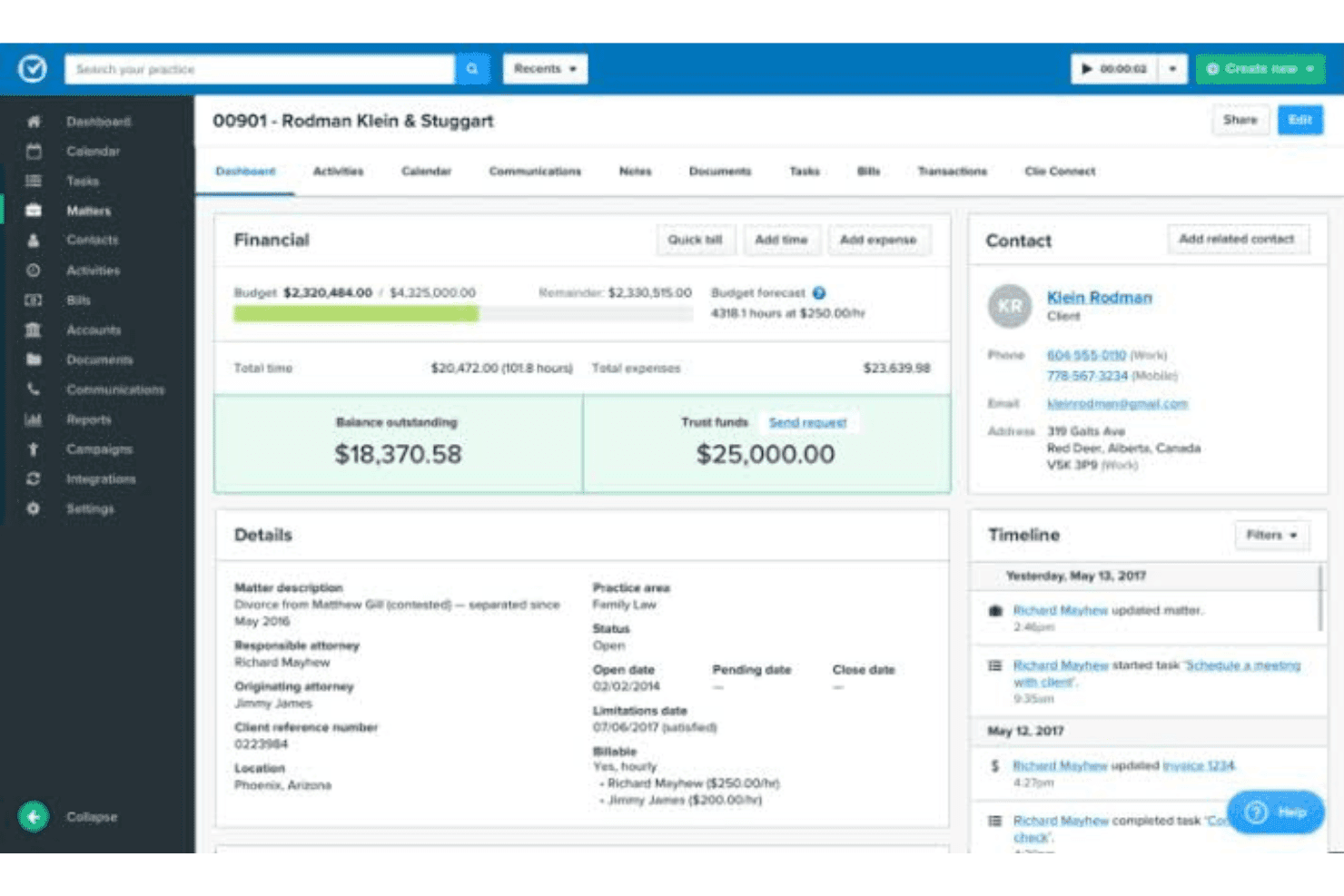
Clio manages immigration cases, intake, documents, billing, and workflows. Clio is a cloud-based legal practice management platform that combines case management, client intake, document handling, billing, and workflow automation — with dedicated features for immigration case types.
Who Is Clio Best For?
Clio suits solo immigration attorneys and small immigration law firms that want a single platform to handle intake, case management, and billing without juggling multiple tools.
Why I Picked Clio
I've included Clio in my top picks because it treats immigration as a distinct practice area, not a generic matter type. I particularly like its intake forms, which you can tailor to specific case types like marriage visas or green card applications, with custom fields for passport numbers, citizenship status, and marital status. The Related Contacts feature lets you link spouses and dependents directly to a matter, which keeps complex family-based cases organized.
Clio Key Features
- Custom task lists: Build case-specific task lists to manage document requirements and deadlines for each immigration matter.
- Secure client portal: Share documents and updates with clients through a password-protected online portal.
- Advanced reporting: Generate reports on matters, billing, and client activity with custom filters and export options.
- Unlimited document storage: Store, organize, and retrieve all case-related files securely with no set data limit.
Clio Integrations
Clio offers native integrations with Docketwise, DocuSign, Dropbox, Google Drive, Microsoft 365, QuickBooks Online, Xero, and Zoom, and connects with Zapier. An API is available for custom integrations.
Pros and Cons
Pros:
- IOLTA-compliant trust accounting included natively
- Links dependents and sponsors to case matters
- Customizable intake forms for immigration case types
Cons:
- Immigration-specific compliance reporting is limited
- No native USCIS form auto-population
Learn more about Clio: Best for intuitive immigration form preparation
- Free demo available
- From $90/user/month
Visit WebsiteCustomer Rating:4.8/5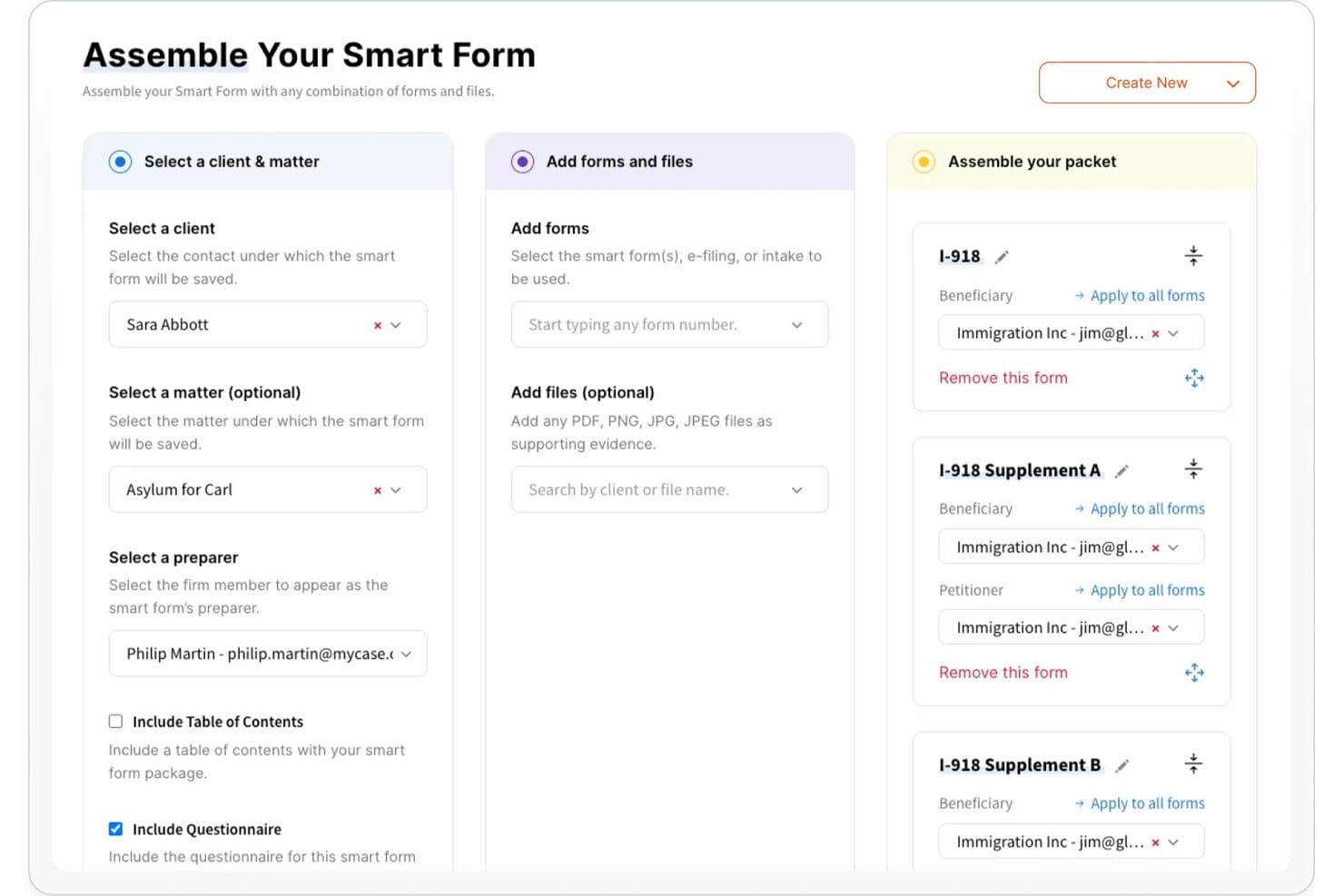
Docketwise offers a Smart Form assembly tool that lets immigration professionals select clients, matters, preparers, and combine forms like I-918 and its supplements into a single packet. Docketwise is an immigration-specific case management platform that combines smart form auto-population across USCIS, DOL, and DOS form libraries with multilingual client intake, e-filing, and secure document management.
Who Is Docketwise Best For?
Docketwise is a strong fit for immigration attorneys and small-to-midsize immigration law firms that handle high volumes of USCIS petitions and need to manage multilingual client intake alongside form preparation.
Why I Picked Docketwise
I picked Docketwise as one of the best because its approach to form preparation genuinely stands apart from other immigration tools. A single intake questionnaire pushes client data into every required form simultaneously, so I'm not re-entering the same beneficiary details across an I-130, I-485, and supporting documents. The 8am IQ feature also reads scanned passports and green cards to auto-import key data directly into forms, cutting manual entry at the source.
Docketwise Key Features
- Case and priority date tracking: Instantly track case progress, monitor visa priority dates, and receive automated deadline alerts for expiring documents.
- Multilingual client intake questionnaires: Collect biographical and case details from clients in multiple languages using customizable online forms.
- Secure document management: Store, organize, and share immigration documents with clients and stakeholders through a secure, cloud-based portal.
- Clio, LawPay, and QuickBooks integrations: Syncs case data, billing, and document management seamlessly with leading legal tech platforms.
Docketwise Integrations
Docketwise offers native integrations with Clio, LawPay, QuickBooks, Dropbox, RingCentral, and Google Workspace. An API is available for custom integrations.
Pros and Cons
Pros:
- Passport scanning auto-imports data into forms
- Multilingual client intake questionnaires built in
- Covers USCIS, DOL, and DOS form libraries
Cons:
- No global mobility dashboards for corporate HR
- Limited built-in billing and trust accounting tools
Learn more about DocketWise: Best for customizable immigration case workflows
- Free trial + free demo available
- Pricing upon request
Visit WebsiteCustomer Rating:4.5/5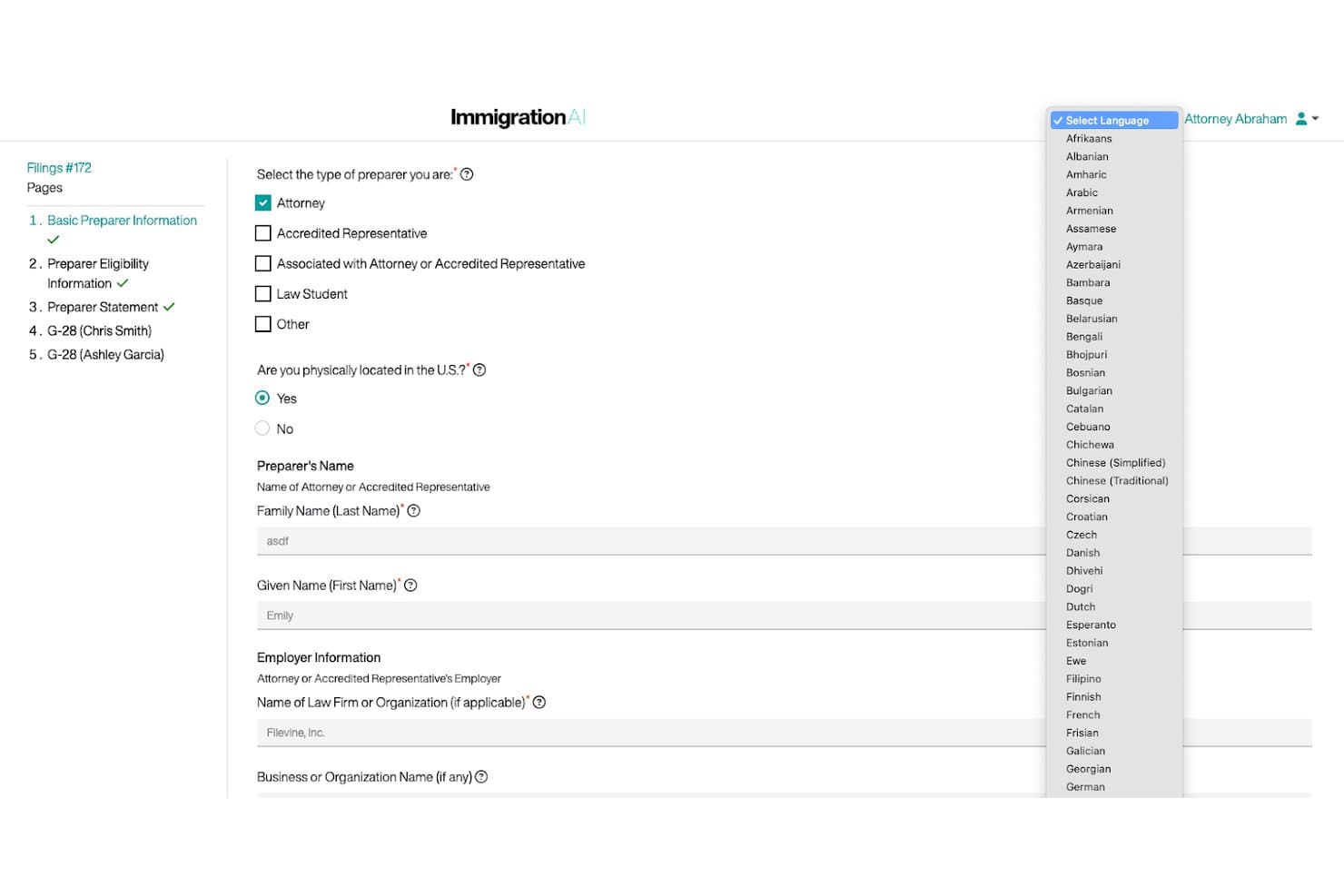
Filevine offers a multilingual immigration form interface with preparer type selection, location verification, and attorney name fields for case management. Filevine is a legal case management platform with a dedicated ImmigrationAI module that handles USCIS form auto-population, multilingual client intake, document management, eFiling, and real-time case status tracking.
Who Is Filevine Best For?
Filevine is a strong fit for immigration law firms that need to build and manage multi-step case workflows across a high volume of matters.
Why I Picked Filevine
I picked Filevine as one of the best because its workflow customization is genuinely deeper than most immigration tools I've evaluated. I can build case stages, automated task sequences, and deadline triggers that map to a firm's actual process rather than a rigid template. ImmigrationAI adds another layer, auto-populating USCIS forms from scanned client documents and automatically refreshing those forms within 72 hours of any government updates.
Filevine Key Features
- Client portal with multilingual support: End clients can upload documents and complete questionnaires in 170 different languages through a secure portal.
- Audit-ready document management: All immigration-related files are stored with encryption, access controls, and detailed activity audit trails.
- Integrated time tracking and billing: Track billable hours, generate invoices, and process online payments directly in the platform.
- Custom analytics dashboards: Build visual reports for matter status, deadlines, and productivity metrics filtered by case type or user.
Filevine Integrations
Filevine offers native integrations with Outlook, QuickBooks, DocuSign, NetDocuments, and Zapier. An API is available for custom integrations.
Pros and Cons
Pros:
- Supports multilingual client intake in 170 languages
- Highly customizable multi-step case workflow builder
- ImmigrationAI auto-populates USCIS forms from documents
Cons:
- General legal platform, not immigration-only software
- Workflow configuration demands significant initial time investment
Learn more about Filevine: Best for no-code immigration workflows
- Free trial available
- Pricing upon request
Visit WebsiteCustomer Rating:4.7/5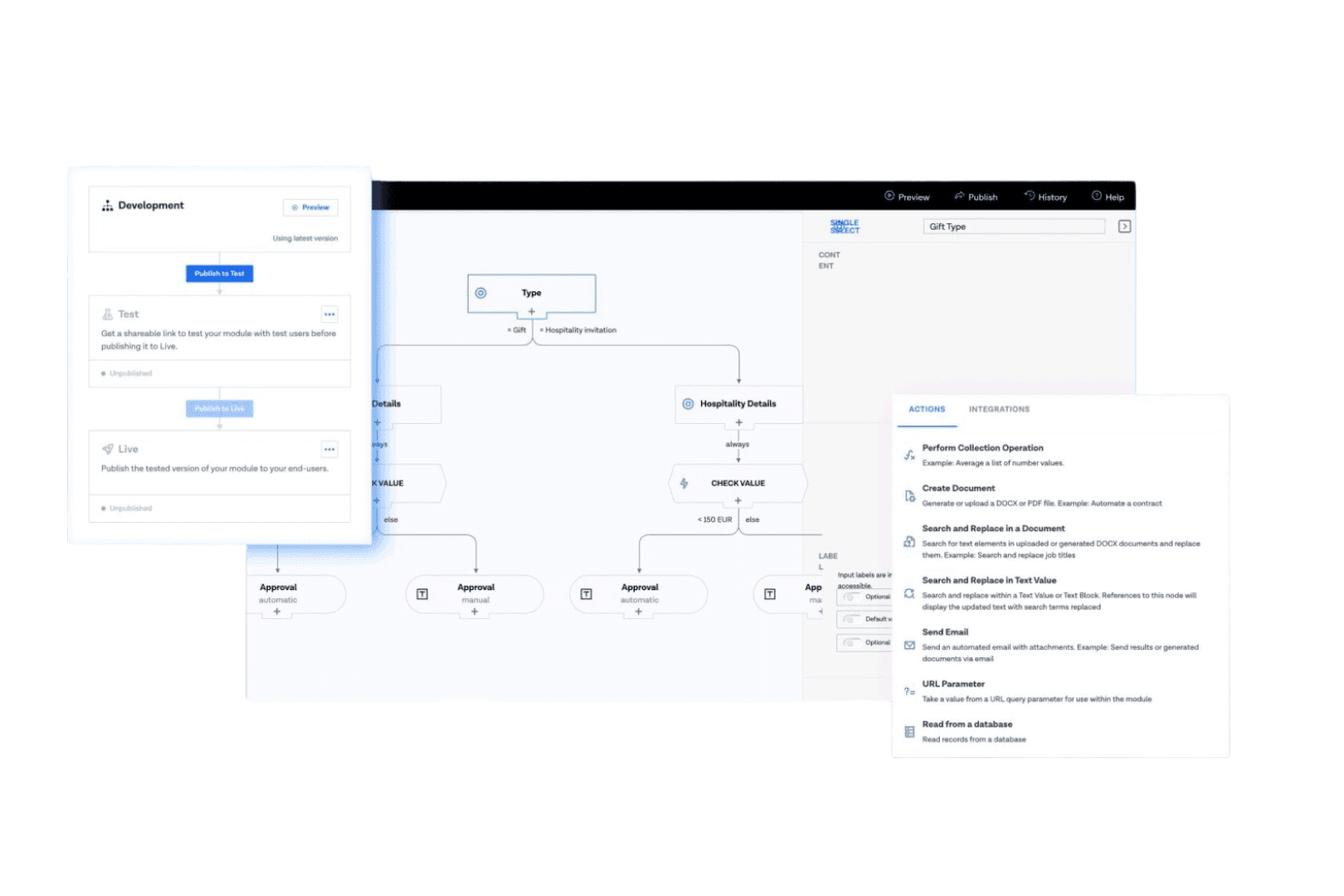
BRYTER builds no-code immigration intake, document, and decision workflows. BRYTER is a no-code legal automation platform that lets immigration teams build custom intake questionnaires, document workflows, and rule-based decision logic applications without writing any code.
Who Is BRYTER Best For?
BRYTER suits large law firms and enterprise legal teams that want to build and control their own immigration workflows without relying on IT.
Why I Picked BRYTER
I picked BRYTER as one of the best because its no-code workflow builder is genuinely built for legal reasoning. It lets my team design conditional decision trees that map directly to visa eligibility logic. I like that intake questionnaires can branch based on nationality, petition type, or case complexity, routing each case automatically. The drag-and-drop module creator means we can update those workflows as immigration rules change, without waiting on IT.
BRYTER Key Features
- AI-powered document extraction: Automate the extraction of structured data from legal and supporting documents.
- SharePoint and DocuSign integration: Connect workflows directly with document management and electronic signature platforms.
- Customizable workflow modules: Use drag-and-drop builders to create and adapt case processes as requirements change.
- Role-based permissions: Set access levels for different stakeholders to control data visibility and action within workflows.
BRYTER Integrations
BRYTER offers native integrations with Microsoft 365, SharePoint, Salesforce, DocuSign, and Signicat, and provides an API for custom integrations.
Pros and Cons
Pros:
- Branching intake questionnaires adapt to petition type
- Workflows update without IT involvement
- Conditional logic handles complex visa eligibility rules
Cons:
- No built-in client or sponsor portal
- No native USCIS form auto-population
Learn more about BRYTER: Best for cloud-based immigration case processing
- Free demo available
- From $55/user/month (billed annually)
Visit WebsiteCustomer Rating:4.8/5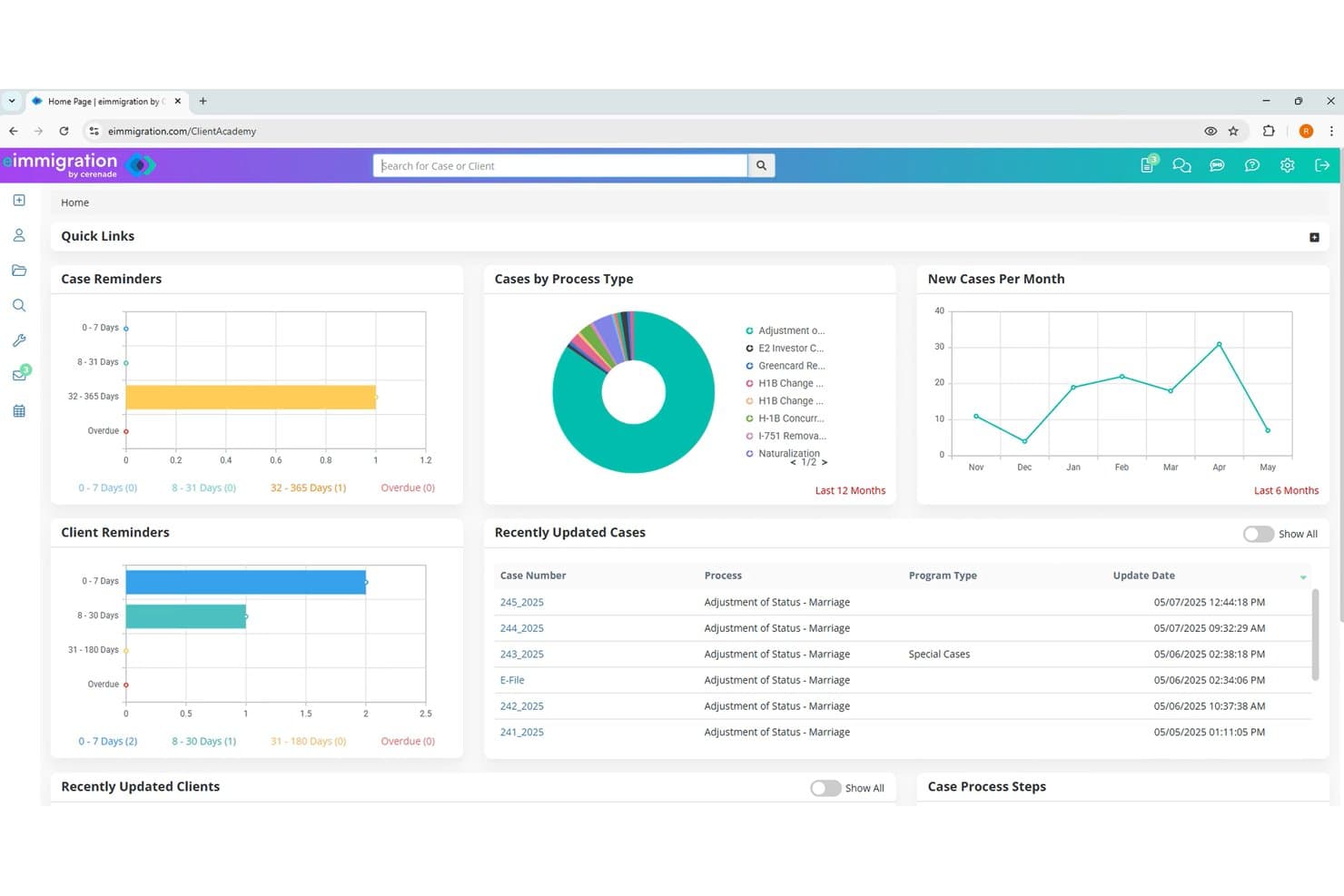
Cerenade eImmigration offers a comprehensive caseworker dashboard featuring case reminders, client reminders, cases by process type, new cases per month, and recently updated cases. Cerenade eImmigration is a cloud-based immigration case management platform built for law firms and nonprofits, covering USCIS/DOS/DOL forms automation, multilingual client intake, case tracking, document management, and billing.
Who Is Cerenade eImmigration Best For?
It's a strong fit for immigration law firms and nonprofits of any size that handle high volumes of US-based immigration cases.
Why I Picked Cerenade eImmigration
Cerenade eImmigration earns its spot because it handles cloud-based immigration case processing end to end, from auto-populating USCIS, DOS, and DOL forms with direct e-filing to monitoring Visa Bulletin priority dates with automated alerts. I also love that the AI-powered intake collects client data in 13 languages, including Farsi and Ukrainian, and auto-maps responses into case profiles. Instant CBP data import pulls I-94 travel history directly into each case without manual entry.
Cerenade eImmigration Key Features
- Visa Bulletin priority date tracking: Built-in tools monitor monthly DOS Visa Bulletin updates and flag clients with affected cases.
- USCIS case status sync: Real-time syncing of receipt numbers auto-updates the case progress and tracks governmental actions.
- Billing and trust accounting: Time tracking, flat fee billing, and IOLTA-compliant accounting are included for immigration matters.
- Organized document management: Store, tag, and share all immigration documents securely with customizable folders and access controls.
Cerenade eImmigration Integrations
Native integrations are not clearly documented. The tool supports integrations via API for custom workflows.
Pros and Cons
Pros:
- CBP I-94 travel history imports automatically
- AI auto-populates USCIS, DOS, and DOL forms
- Multilingual client intake supports 13 languages
Cons:
- Reporting tools lack advanced customization options
- UI feels dated compared to newer tools
Learn more about Cerenade eImmigration: Best for immigration legal accounting
- 10-day free trial
- From $49/user/month (billed annually)
Visit WebsiteCustomer Rating:4.4/5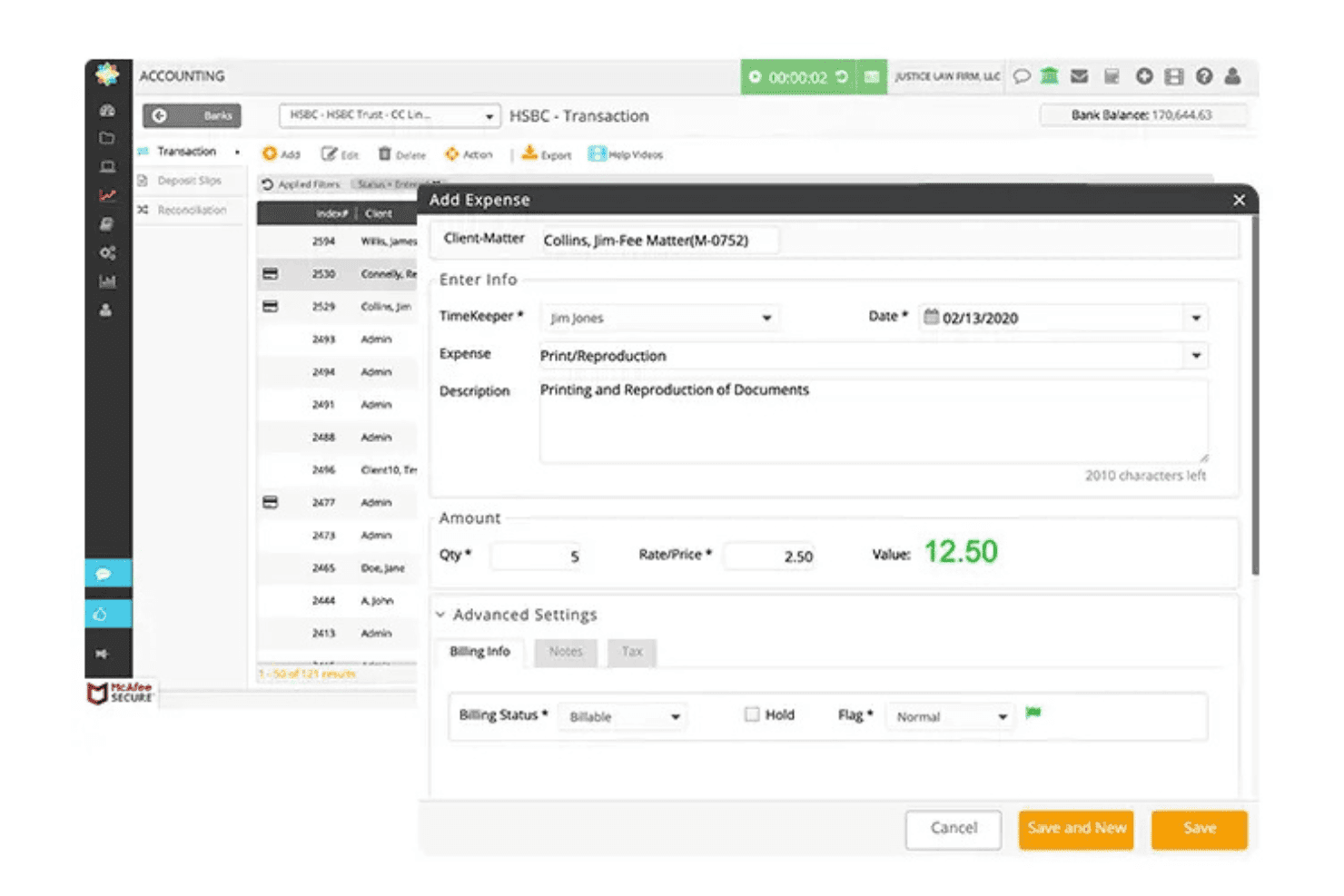
CosmoLex handles cases, billing, documents, and trust accounting in one system. CosmoLex is a cloud-based legal practice management platform that integrates matter tracking, time entry, billing, document management, and native trust/IOLTA accounting in a single system, without requiring a separate accounting tool.
Who Is CosmoLex Best For?
Immigration law firms that manage high volumes of IOLTA transactions and government filing fees will get the most from CosmoLex's built-in trust accounting.
Why I Picked CosmoLex
CosmoLex earns its spot on my shortlist because of its built-in trust accounting, which handles three-way IOLTA reconciliation without requiring a separate accounting tool. Immigration matters typically involve multiple trust checks per filing sent to government agencies, and CosmoLex tracks every disbursement directly against the case. I like that trust balances, operating accounts, and billing all live in the same platform, which keeps financial records clean across high-volume caseloads.
CosmoLex Key Features
- Document management and sharing: Store, organize, and securely share legal files and client documents with built-in e-signature support.
- Customizable client intake forms: Use logic-based intake questionnaires to collect and centralize client case data directly in the platform.
- Matter workflows and task automation: Automate recurring tasks and set up dependent task logic to standardize case processes across your team.
- Integrated time and expense tracking: Track billable hours, expenses, and generate professional invoices directly linked to each immigration matter.
CosmoLex Integrations
CosmoLex offers native integrations with NetDocuments, LawPay, QuickBooks Online, Xero, Dropbox, Microsoft 365, and Google Workspace. An API is available for custom integrations.
Pros and Cons
Pros:
- Time tracking ties directly to immigration matters
- Three-way reconciliation built directly into the platform
- Native trust accounting requires no separate software
Cons:
- Lacks dedicated visa deadline tracking tools
- No immigration-specific form automation included
Learn more about CosmoLex: Best for corporate immigration compliance
- Free demo available
- Pricing upon request
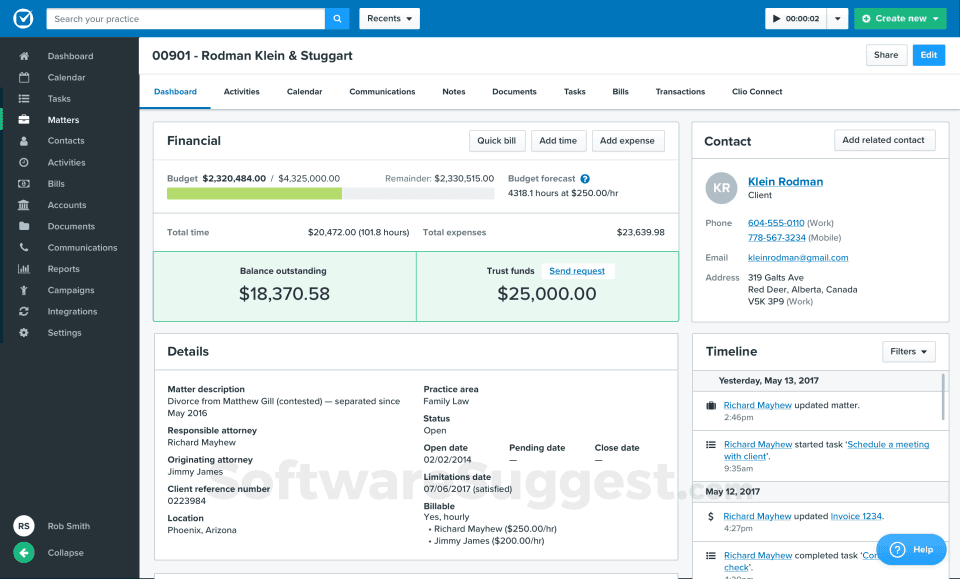
Mitratech INSZoom Immigration Case Management Software Interface Mitratech INSZoom is a cloud-based immigration case management platform covering U.S., Canadian, and global immigration workflows, with tools for forms automation, deadline tracking, compliance reporting, and client and sponsor portals.
Who Is Mitratech INSZoom Best For?
Corporate legal and HR teams managing multi-country employee immigration programs will get the most out of INSZoom's compliance-focused Enterprise edition.
Why I Picked Mitratech INSZoom
I've included Mitratech INSZoom in my top picks because its Enterprise edition is purpose-built for corporate mobility compliance. I particularly like the HR Portal, which gives multiple corporate contacts role-based access to case status and document exchange without routing everything through outside counsel. The automated LCA e-filing with the DOL and prevailing wage Business Intelligence Reports give me real confidence when overseeing H-1B-heavy immigration programs at scale.
Mitratech INSZoom Key Features
- Customizable intake questionnaires: Collects biographic and case-specific data directly from foreign nationals with configurable digital forms.
- Extensive forms library: Provides over 2,000 immigration forms and questionnaires updated within 24–48 hours of release.
- Automated deadline alerts: Monitors visa, document, and case expiration dates with real-time notifications and reminders.
- Branded client and sponsor portals: Enables secure document exchange, online payments, and status tracking for both clients and HR sponsors.
Mitratech INSZoom Integrations
Native integrations are not clearly documented. The platform provides an API for custom integrations.
Pros and Cons
Pros:
- Multi-stakeholder HR portal with role-based access
- 2,000+ immigration forms updated within 48 hours
- Extensive LCA compliance and PAF tracking tools
Cons:
- Reporting tools require significant manual configuration
- Dated interface compared to newer competitors
Learn more about Mitratech INSZoom: Best for Canadian immigration case management
- From $69/month
- Pricing upon request
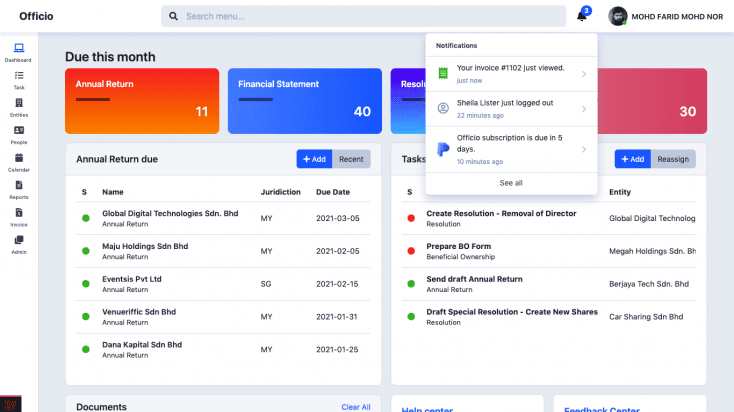
Officio Immigration Case Management Software Interface Officio is an immigration case management platform for Canadian RCICs that combines automated form population, client and prospect management, document storage, and a built-in client portal.
Who Is Officio Best For?
Officio is a strong fit for solo RCICs and small Canadian immigration consultancies that need a purpose-built platform for managing IRCC-specific cases and regulatory compliance.
Why I Picked Officio
I've included Officio in my top picks because no other platform goes as deep on Canadian immigration forms. It auto-populates over 400 forms spanning federal, Quebec, PNP, and Service Canada applications, which cuts down on manual data entry across complex multi-step cases. I also like Officio Studio, which bundles CPD content and client file simulations directly into the platform to help RCICs meet their regulatory training requirements without switching tools.
Officio Key Features
- Client portal: Clients can upload documents, communicate securely, and track their case progress online.
- Employer module: Manage employer-side case information for Canadian LMIA and work permit processes.
- Template management: Build and maintain custom templates for emails, forms, and standard case documents.
- PUA planning: Plan for practitioner absences by designating workflows, permissions, and hand-offs within the team.
Officio Integrations
Native integrations are not clearly documented. An API is available for custom integrations.
Pros and Cons
Pros:
- Built specifically for RCIC regulatory compliance requirements
- Officio Studio bundles CPD training inside the platform
- Covers 400+ Canadian and Quebec immigration forms
Cons:
- Interface complexity can slow down onboarding for new staff
- Not suitable for US-based immigration practitioners
Learn more about Officio: Best for comprehensive immigration case tracking
- 7-day free trial + free demo available
- Pricing upon request
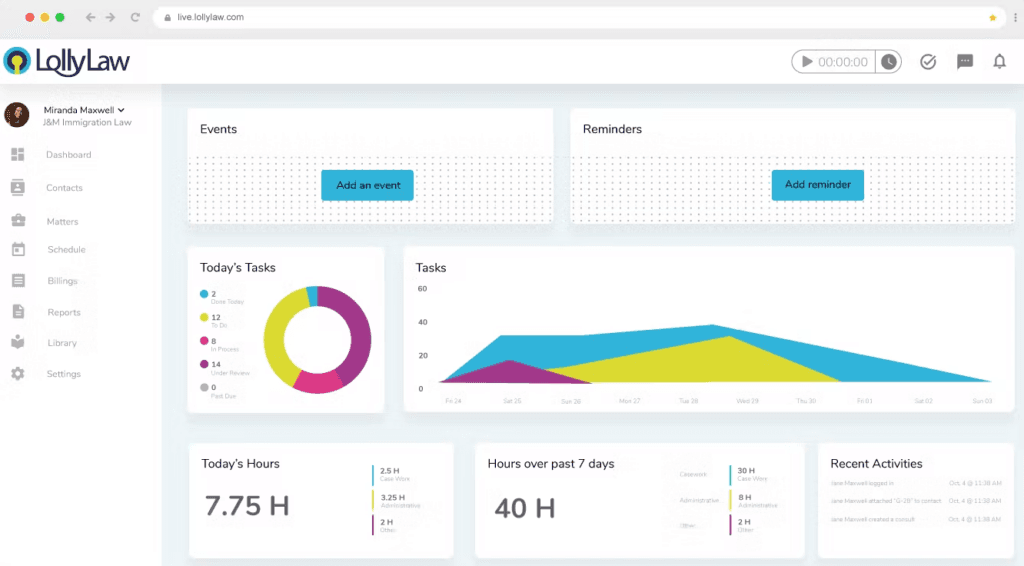
LollyLaw Immigration Case Management Software Interface LollyLaw is an immigration-specific practice management platform that combines case tracking, USCIS/DOJ/EOIR form auto-population, multilingual client intake questionnaires, secure document management, and a client-facing portal with built-in messaging and payments.
Who Is LollyLaw Best For?
LollyLaw is a strong fit for solo immigration attorneys and small-to-mid-sized immigration law firms that need a dedicated, easy-to-use platform without a steep learning curve.
Why I Picked LollyLaw
LollyLaw earns its spot on my shortlist because its case tracking is built entirely around immigration workflows, not retrofitted from general legal software. I like that it ships with 40+ prebuilt immigration-specific workflow templates, so tracking a family-based petition or a removal defense case follows the actual stages those matters go through. The LollyForms feature lets me work through USCIS forms with a client in real time, with case data auto-populating across 125+ forms simultaneously.
LollyLaw Key Features
- Multilingual intake questionnaires: Collect client data using more than 100 pre-built questionnaires available in 20+ languages.
- Client Bridge portal: Give clients secure, real-time access to their case documents, updates, and messaging in one dedicated online portal.
- Native payment processing: Accept payments via SMS, QR code, or portal, supporting multiple payment types and languages.
- Google Workspace integration: Sync schedules, documents, and correspondence through Google Calendar, Docs, and Gmail.
LollyLaw Integrations
LollyLaw offers native integrations with Google Workspace, Box, OneDrive, and LawPay. An API is available for custom integrations.
Pros and Cons
Pros:
- 40+ prebuilt immigration-specific workflow templates included
- Multilingual intake questionnaires available in 20+ languages
- Auto-populates 125+ immigration-specific forms simultaneously
Cons:
- Limited scalability for high-volume enterprise firms
- Reporting lacks depth for corporate mobility teams
Learn more about LollyLaw: Best for immigration client communication
- 7-day free trial + free demo available
- Pricing upon request
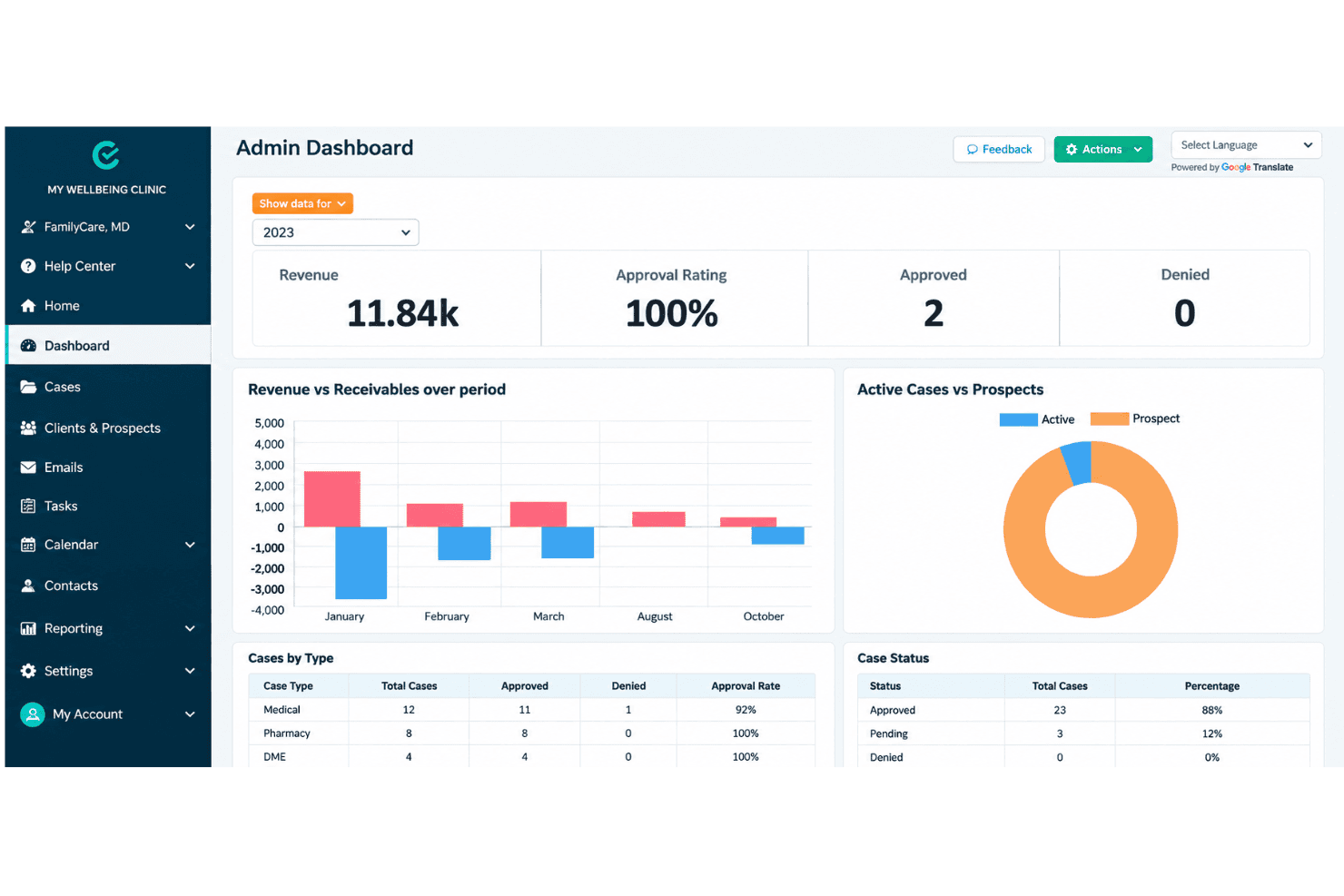
CaseEasy CRM organizes Canadian immigration cases, forms, files, and accounting. CaseEasy CRM is a Canadian immigration case management platform built for RCICs and immigration lawyers, combining client intake, IRCC form autofill, document management, trust accounting, and client communication tools in one system.
Who Is CaseEasy CRM Best For?
It's a strong fit for solo practitioners and small Canadian immigration firms looking for an all-in-one platform tailored to IRCC workflows and CICC compliance requirements.
Why I Picked CaseEasy CRM
CaseEasy CRM earns its spot on my shortlist because of how thoroughly it handles client communication at every stage of a case. I like that clients get their own portal to track case progress, exchange documents via Secure Share, and receive automated follow-up emails without my team needing to chase anyone manually. The Employer Module adds a dedicated employer portal for corporate cases, which means HR sponsors stay informed without getting pulled into every client-facing thread.
CaseEasy CRM Key Features
- IRCC form autofill: Auto-populates Canadian immigration application forms directly from collected client data.
- Trust accounting tools: Handles client funds with CICC/Law Society-compliant reconciliation reports and multi-currency invoicing.
- AI-driven eligibility assessments: Uses copilot modules to automate Express Entry and FSW points calculation and document reviews.
- Document expiration tracking: Monitors and alerts for expiring passports, permits, and other essential immigration documents.
CaseEasy CRM Integrations
Native integrations are not clearly documented. An API is available for custom integrations.
Pros and Cons
Pros:
- Automated client document expiration alerts
- Dedicated employer portal for corporate cases
- Built-in CICC compliance trust accounting tools
Cons:
- Limited USCIS form library for US firms
- Primarily built for Canadian immigration workflows
Learn more about CaseEasy CRM:
Andre verktøy for saksbehandling av immigrasjonssaker
Nedenfor finner du en liste over flere alternativer for programvareverktøy til saksbehandling av immigrasjonssaker som vi vurderte, men som ikke nådde topp 10. De er absolutt verdt å sjekke ut.
- 118amBest for centralized document storage
- 12MyCaseGood for client communication and collaboration
- 13LitifyBest with dynamic AI-powered intake questionnaires
- 14eIMMIGRATIONBest for robust workflow customization
- 15LawLogixBest for automated I-9 compliance workflows
- 16CaseTrackerLawBest for customizable dashboards and reporting
- 17SuperdocuBest for custom document collection
- 18ImmilyticsBest for intelligent immigration automation
- 19Migration ManagerBest for Australian immigration compliance
- 20CampLegalBest for automated USCIS receipt data extraction
How I Evaluate Immigration Case Management Software
I split my evaluation into baseline requirements—like USCIS form automation and deadline tracking—and the differentiators that set the strongest tools apart.
Core Functionality (Table Stakes For This List)
When I'm selecting tools for my list, I rank each one on a scale from 0 (does not offer the functionality) to 5 (excels in this area) for each core functionality listed below. Then, I calculate the tool's total score into a percentage. Each tool needs to achieve a minimum total score of 55% to be considered for inclusion.
- Immigration Forms Automation: I check whether a tool auto-populates USCIS, DOS, and DOL forms—like the I-129 or ETA-9089—from stored client data rather than requiring manual re-entry.
- Case & Deadline Tracking: Each tool should surface immigration-specific milestones, such as RFE response windows, visa expiration dates, and priority date movement alerts.
- Client Intake Questionnaires: I look for digital questionnaires that map answers directly into case records, so a beneficiary's intake data flows into petition forms without duplicate work.
- Secure Document Management: Storing passports, I-94s, and evidence packets demands organized, encrypted document handling with client-level access controls and clear categorization.
- Client & Sponsor Portal: I evaluate whether both foreign nationals and employer sponsors can upload documents, view case progress, and communicate through a dedicated portal.
- Compliance & Reporting: Tools should support LCA posting, Public Access File management, and audit-ready reporting so firms can respond to DOL or FDNS inquiries with confidence.
Once I have a list of tools that meet this criteria, I consider what sets each platform apart.
Differentiating Factors (What Sets Vendors Apart)
Here's how I compare and contrast different vendors:
Standout Features
I look for tools that sync USCIS receipt numbers to pull real-time case status updates, saving paralegals from manually checking each case online. Priority date bulletin integration also matters—a tool that ingests monthly Visa Bulletin data and flags affected clients removes a tedious manual step. For corporate teams, global mobility dashboards showing visa inventory and expiration forecasts help HR sponsors plan ahead. AI-driven drafting of petition letters and RFE responses is worth evaluating too, as it can cut hours off attorney prep time.
Beyond Features
Security matters when you're handling passport scans, visa applications, and sensitive PII daily—I check for SOC 2 Type II compliance and role-based access controls. Integration depth is equally important; a tool that connects with HRIS platforms like Workday or SAP SuccessFactors makes corporate immigration workflows far smoother. I also evaluate whether onboarding support includes data migration from legacy systems, since switching from an existing platform shouldn't mean losing years of case history. Finally, pricing transparency helps firms forecast costs as caseloads scale.
Slik velger du programvare for saksbehandling av immigrasjonssaker
Det er lett å gå seg vill i lange funksjonslister og kompliserte prisstrukturer. For å hjelpe deg med å holde fokus mens du går gjennom den unike prosessen med å velge programvare, får du her en sjekkliste over faktorer du bør ha i bakhodet:
| Faktor | Hva bør du vurdere? |
|---|---|
| FaktorSkalerbarhet | Hva bør du vurdere?Vil programvaren vokse sammen med firmaet ditt? Se etter fleksible brukerlisenser og datalagring som dekker fremtidige behov uten kostbare oppgraderinger. |
| FaktorIntegrasjoner | Hva bør du vurdere?Kan den kobles til eksisterende verktøy som e-post, kalender eller regnskapsprogramvare? Sørg for sømløs dataflyt for å unngå manuell registrering. |
| FaktorTilpasningsmuligheter | Hva bør du vurdere?Kan du tilpasse arbeidsflyter til prosessene dine? Sjekk om programvaren støtter egendefinerte felt, rapporter og dashbord. |
| FaktorBrukervennlighet | Hva bør du vurdere?Er grensesnittet intuitivt og brukervennlig? En bratt læringskurve kan bremse innføringen og føre til frustrasjon blant brukerne. |
| FaktorImplementering og oppstart | Hva bør du vurdere?Hvor lang tid tar det før løsningen er klar til bruk? Vurder hvor tilgjengelig hjelp med oppsett, opplæringsressurser og innledende tilpasningsmuligheter er. |
| FaktorKostnad | Hva bør du vurdere?Samsvarer prisen med budsjettet ditt? Vær oppmerksom på skjulte gebyrer, og vurder om funksjonene forsvarer kostnaden. |
| FaktorSikkerhetstiltak | Hva bør du vurdere?Hvordan beskytter programvaren sensitive data? Se etter kryptering, regelmessige sikkerhetskopier og samsvar med personvernregelverket. |
| FaktorEtterlevelseskrav | Hva bør du vurdere?Følger verktøyet regelverket for immigrasjon? Sørg for at det støtter nødvendig dokumentasjon og rapportering for å unngå juridiske problemer. |
Hva er programvare for saksbehandling av immigrasjonssaker?
Programvare for håndtering av immigrasjonssaker er et verktøy utviklet for å hjelpe juridiske fagpersoner med å håndtere immigrasjonssaker effektivt. Advokater, advokatfullmektiger og immigrasjonskonsulenter bruker vanligvis disse verktøyene til å håndtere klientinformasjon, følge fremdriften i saker og sikre at regelverket overholdes.
Funksjoner for dokumenthåndtering, automatisert utfylling av skjemaer og kommunikasjon med klienter bidrar til å organisere data, redusere manuelt arbeid og opprettholde tydelig kommunikasjon. Disse verktøyene gir samlet sett verdi ved å forbedre effektiviteten og nøyaktigheten i håndteringen av immigrasjonssaker.
Funksjoner i programvare for håndtering av immigrasjonssaker
Når du velger programvare for håndtering av immigrasjonssaker, bør du se etter følgende viktige funksjoner:
- Håndtering av klientinntak: Opprett digitale spørreskjemaer og inntaksskjemaer som samler inn opplysninger om søkeren, sakshistorikk og støttende informasjon før saksforberedelsen begynner.
- Oppfølging av saker og oppdrag: Organiser klientopplysninger, søknadsfaser, tildelte medarbeidere, saksnotater og innsendingsaktivitet fra et sentralt arbeidsområde.
- Forberedelse av immigrasjonsskjemaer: Fyll ut offentlige skjemaer ved hjelp av lagrede klientopplysninger for å redusere gjentatt inntasting og opprettholde konsistent informasjon på tvers av søknader.
- Innsamling og håndtering av dokumenter: Be om, kategoriser, gjennomgå og lagre pass, attester, økonomiske dokumenter og annen støttedokumentasjon knyttet til hver sak.
- Oppfølging av frister og oppgaver: Angi innsendingsdatoer, påminnelser om utløp, avtaler og interne oppgaver for å holde sakene i fremdrift i henhold til de nødvendige tidsfristene.
- Klientportaler: Gi klienter sikker tilgang til spørreskjemaer, forespørsler om dokumenter, saksoppdateringer, fakturaer og meldinger uten å være helt avhengig av e-post.
- Automatisering av arbeidsflyt: Bygg gjentakbare prosesser for vanlige saker om visum, oppholdstillatelse, statsborgerskap og etterlevelse ved hjelp av utløsere, oppgavetildelinger og statusendringer.
- Fakturering og håndtering av klientmidler: Registrer tid, opprett fakturaer, bokfør betalinger og håndter klientmidler i henhold til juridiske regnskapskrav.
- Etterlevelse og revisjonsspor: Oppretthold oversikter over endringer i skjemaer, godkjenninger, kommunikasjon, dokumentaktivitet og medarbeideres handlinger for interne gjennomganger og regulatoriske krav.
- Rapportering og oversikter: Generer rapporter om saksmengde, behandlingsfaser, medarbeidernes arbeidsmengde, frister, inntekter og utfallet av søknader.
Fordeler
Implementering av programvare for håndtering av immigrasjonssaker gir flere fordeler for teamet og virksomheten din. Her er noen av fordelene du kan se frem til:
- Raskere saksforberedelse: Gjenbruk lagrede klientopplysninger på tvers av skjemaer, spørreskjemaer og støttedokumenter for å redusere gjentakende administrativt arbeid.
- Færre feil ved innsending: Bruk konsistente data, valideringsregler og dokumentsjekklister for å oppdage manglende eller motstridende informasjon før innsending.
- Bedre friststyring: Følg med på innsendingsdatoer, visumutløp, avtaler og oppfølgingsoppgaver gjennom delte kalendere og automatiserte påminnelser.
- Bedre kommunikasjon med klienter: Del saksoppdateringer, forespørsler om dokumenter, meldinger og betalingsinformasjon gjennom en sikker klientportal.
- Mer konsekvent dokumentinnsamling: Bruk strukturerte forespørsler og statusoppfølging for å identifisere manglende dokumentasjon og holde saksmappene komplette.
- Bedre kontroll med etterlevelse: Bevar kommunikasjonsregistre, skjemaversjoner, godkjenninger og aktivitetslogger for revisjoner og interne gjennomganger.
- Bedre oversikt over saker: Se saksfaser, arbeidsmengde, ventende oppgaver og behandlingstrender gjennom sentraliserte oversikter og rapporter.
Kostnader og priser
Valg av programvare for håndtering av immigrasjonssaker krever en forståelse av de ulike prismodellene og abonnementene som er tilgjengelige. Kostnadene varierer basert på funksjoner, teamstørrelse, tillegg og mer. Tabellen nedenfor oppsummerer vanlige abonnementer, gjennomsnittsprisene deres og typiske funksjoner som er inkludert i programvareløsninger for håndtering av immigrasjonssaker:
Sammenligningstabell for abonnementer på programvare for håndtering av immigrasjonssaker
| Plantype | Gjennomsnittspris | Vanlige funksjoner |
|---|---|---|
| PlantypeGratisplan | Gjennomsnittspris$0 | Vanlige funksjonerTilgang til grunnleggende saksbehandling, dokumentlagring og begrensede verktøy for klientkommunikasjon. |
| PlantypePersonlig plan | Gjennomsnittspris$20-$50/bruker/måned | Vanlige funksjonerForbedret dokumenthåndtering, automatisk utfylling av skjemaer og fristoppfølging. |
| PlantypeForretningsplan | Gjennomsnittspris$60-$100/bruker/måned | Vanlige funksjonerAvanserte verktøy for klientkommunikasjon, tilpassbare arbeidsflyter og integrasjonsmuligheter. |
| PlantypeVirksomhetsplan | Gjennomsnittspris$150+/bruker/måned | Vanlige funksjonerOmfattende rapportering og analyse, samsvarsovervåking og dedikert kundestøtte. |
Programvare for behandling av immigrasjonssaker (vanlige spørsmål)
Her er noen svar på vanlige spørsmål om programvare for behandling av immigrasjonssaker
Hvordan velger jeg riktig programvare for behandling av immigrasjonssaker?
Når du skal velge riktig programvare, må du vurdere firmaets spesifikke behov, for eksempel antall saker og nødvendige funksjoner som dokumenthåndtering og samsvarsoppfølging. Ta hensyn til brukervennlighet, integrasjonsmuligheter og tilbudte støttetjenester. Kontroller at løsningen er skalerbar, slik at den kan vokse sammen med virksomheten din.
Kan programvare for behandling av immigrasjonssaker integreres med andre verktøy?
Ja, de fleste programmer for behandling av immigrasjonssaker kan integreres med verktøy som CRM-systemer, regnskapssystemer og e-postplattformer. Kontroller om den støtter de spesifikke integrasjonene du trenger for å opprettholde effektive arbeidsflyter. Integrasjonsmuligheter kan øke produktiviteten betydelig ved å effektivisere datadeling mellom systemer.
Hvilke typer brukerstøtte er vanligvis tilgjengelige med programvare for behandling av immigrasjonssaker?
Alternativene varierer, men omfatter ofte tilgang til et hjelpesenter, livechat, e-poststøtte og telefonassistanse. Noen leverandører tilbyr støtte døgnet rundt, mens andre kan være begrenset til åpningstidene. Vurder støttetjenestene for å sikre at de dekker teamets behov, særlig i kritiske perioder.
Er datasikkerhet en bekymring ved bruk av programvare for behandling av immigrasjonssaker?
Datasikkerhet er avgjørende, ettersom disse verktøyene håndterer sensitiv klientinformasjon. Se etter programvare som tilbyr kryptering, sikre tilgangskontroller og samsvar med regelverk for databeskyttelse. Ved å sikre at programvaren har robuste sikkerhetstiltak, bidrar du til å beskytte klientenes data mot uautorisert tilgang.
Hvordan bidrar programvare for behandling av immigrasjonssaker til samsvar?
Disse verktøyene bidrar til å følge med på endringer i regelverket og sikre at virksomheten din overholder immigrasjonslovgivningen. Funksjoner som samsvarsoppfølging og automatiske varsler om frister hjelper deg med å unngå juridiske fallgruver. Det er viktig å velge programvare som holdes oppdatert med de nyeste juridiske kravene.
Hva bør jeg forvente under introduksjonsprosessen?
Introduksjonsprosessen omfatter vanligvis første gangs konfigurering, opplæringsøkter og tilgang til ressurser som veiledninger og webinarer. Prosessen bør hjelpe teamet ditt med å komme raskt i gang og bruke programvaren effektivt. Vurder støtten under introduksjonen for å sikre en smidig overgang for virksomheten din.