

Som en som kjenner det juridiske fagfeltet ut og inn, forstår jeg utfordringene du møter hver dag – som å holde oversikt over fakturerbare timer, håndtere fakturaer og opprettholde en produktiv arbeidsflyt. Det er her programvare for tidsregistrering i juridiske virksomheter kan hjelpe.
Programvare for tidsregistrering i juridiske virksomheter løser vanlige problemer knyttet til håndtering av tidsregistreringer og sikring av nøyaktig fakturering; integrasjon med verktøy for juridisk praksis; håndheving av juridiske faktureringsstandarder; og levering av presise tidsregistreringer for å unngå tvister. Hvis du har problemer med å registrere fakturerbare timer nøyaktig og effektivt, kan det hende du trenger programvare for tidsregistrering i juridiske virksomheter.
Som analytiker innen juridisk teknologi kan du lese videre for mine beste anbefalinger.
Hvorfor du kan stole på våre programvareanbefalinger
6,700+
Reviews
20
Industry experts
16+
Evaluation factors
14
Years
Teamet vårt har testet og anmeldt programvare siden 2012. Vi leder selv advokatfirmaer, så vi vet hvor vanskelig og hvor viktig det er å velge riktig programvare.
I denne guiden har vi vurdert verktøyene gjennom praktisk testing og uavhengig research og gitt dem poeng ut fra våre utvelgelseskriterier.
Anmeldelsene våre bygger på vår egen redaksjonelle vurdering. De er ikke et salgsargument.
Sammenligningstabell for programvare for tidsregistrering i juridiske virksomheter
Denne sammenligningstabellen oppsummerer prisdetaljene for mine beste utvalgte programmer for tidsregistrering i juridiske virksomheter
| Tool | Best For | Trial Info | Price | ||
|---|---|---|---|---|---|
| 1 | Best for billing, invoicing, and a client portal in one place | Free trial available | From $49/user/month | Website | |
| 2 | Best for centralized staff scheduling | Free trial available | Pricing upon request | Website | |
| 3 | Best for one-click billable hour tracking | Free plan available; 30-day free trial; Free demo available | From $9/user/month | Website | |
| 4 | Best for flexible time tracking | Free plan + Free trial + Free demo available | From $6/user/month | Website | |
| 5 | Best for attorneys desiring a detailed view of time utilization | Free plan + free trial + free demo available | From $3.99/user/month (billed annually) | Website | |
| 6 | Best for firms seeking a complete legal practice management suite | Free trial available | From £79/user/month | Website | |
| 7 | Best for firms wanting robust project management features | Free demo + 10-day free trial available | From $43/user/month (billed annually) | Website | |
| 8 | Best for cloud-based convenience with integrated expense tracking | Free plan (1 user) | Website | ||
| 9 | Best for AI-powered timesheets | Free trial + demo available | From $6/user/month | Website | |
| 10 | Best for firms needing personalized, professional invoice creation | Not available | Free forever plan | Website |


Anmeldelser av den beste programvaren for tidsregistrering i juridiske virksomheter
Nedenfor finner du mine detaljerte sammendrag av den beste programvaren for tidsregistrering i juridiske virksomheter som kom med på kortlisten min. Anmeldelsene mine gir en detaljert gjennomgang av de viktigste funksjonene, fordelene og ulempene, integrasjonene og ideelle bruksområdene for hvert verktøy, slik at du kan finne det som passer best for deg.
 Best for billing, invoicing, and a client portal in one place
- Free trial available
- From $49/user/month
Visit WebsiteCustomer Rating:4.8/5
Main dashboard of Bill4Time Bill4Time is a comprehensive legal time tracking and billing software that combines the power of an intuitive invoicing system with a versatile client portal. It's a one-stop solution for law firms that are looking to manage billing, invoicing, and client interactions within a single platform.
Why I Picked Bill4Time: I chose Bill4Time for its comprehensive blend of billing, invoicing, and client portal features. This blend makes it an all-in-one tool, a rarity in the market, and its intuitive design ensures that these features work harmoniously together. For law firms seeking a unified solution for these areas, Bill4Time stands out as the best fit.
Standout Features & Integrations:
Features include detailed time entries, streamlined invoice creation, and a client portal that facilitates secure client communications and document sharing.
Integrations include popular applications such as QuickBooks, PayPal, and Stripe make it easy to sync data and simplify financial operations.
Pros and Cons
Pros:
- Affordable pricing with a comprehensive feature set
- Integrated client portal for easy communication and document sharing
- Comprehensive billing and invoicing capabilities
Cons:
- Certain features may have a steep learning curve for new users
- User interface can seem outdated compared to some other tools
- Limited customizability may not suit firms with unique workflow requirements
Learn more about Bill4Time: 2Best for centralized staff scheduling
8am
- Free trial available
- Pricing upon request
Visit WebsiteCustomer Rating:4.6/5
8am offers a legal time tracking dashboard with billable hour totals, timesheet calendar, financial overview, and daily task management for law firms. 8am is a suite of legal and accounting practice management tools—including MyCase for case management, time entry, billing, and payments—built for law firms and accounting professionals.
Who Is 8am Best For?
8am's suite of tools is a natural fit for small to mid-sized law firms that need integrated case management, time tracking, and billing in one place.
Why I Picked 8am
I've included 8am in my top picks because MyCase gives law firms a single place to monitor staff workload and billable time across every active case. The real-time reporting dashboard shows exactly how much time each team member has logged, which makes it easy to spot capacity gaps before they become billing problems. I also like the multiple simultaneous timers, letting attorneys jump between cases without losing a single entry.
8am Key Features
- Smart Time Finder: Automatically captures billable time in the background as you draft emails, attend meetings, and make calls.
- UTBMS task codes: Supports standard billing codes and LEDES 1998B format for structured, compliant legal billing.
- Invoice generation: Converts logged time entries directly into itemized client invoices without manual reformatting.
- Expense tracking: Lets you log case-related expenses alongside time entries to keep all billable items in one record.
8am Integrations
8am MyCase integrates with a range of apps to extend its case management and billing workflows. With 56 listed integrations, the most relevant for legal time tracking include LawPay and Outlook, along with Dropbox, Gmail, Google Calendar, QuickBooks, NetDocuments, Lawmatics, LawToolBox, and Mailchimp. It also connects with Zapier, and an open API is available for custom integrations.
Pros and Cons
Pros:
- Supports multiple billing rate structures
- Built-in client texting from the platform
- Auto-captures billable time per matter
Cons:
- Mobile app lags behind desktop version
- Fewer third-party integrations than competitors
Learn more about 8am: Best for one-click billable hour tracking
- Free plan available; 30-day free trial; Free demo available
- From $9/user/month
Visit WebsiteCustomer Rating:4.7/5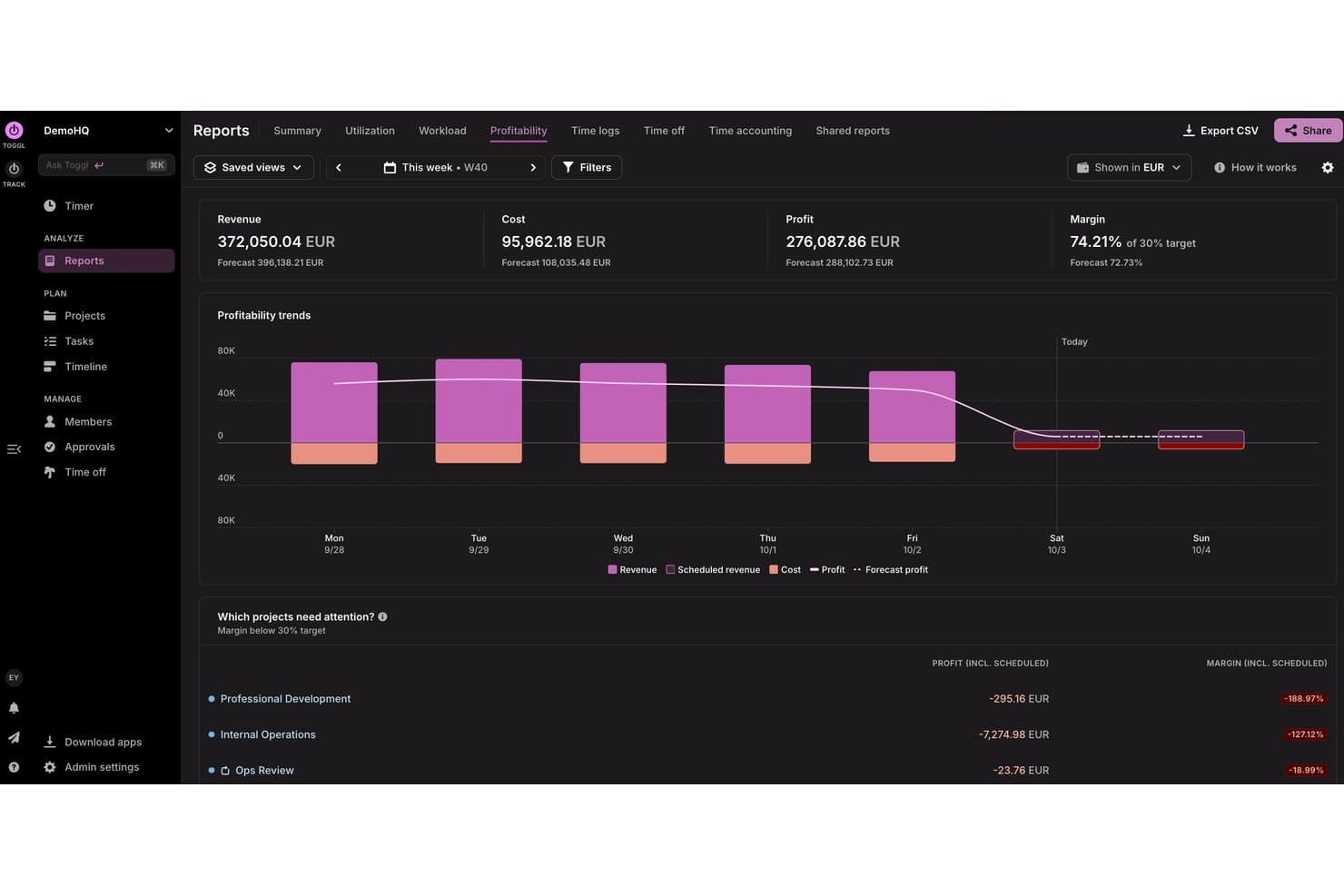
Toggl tracks weekly profitability, costs, and margins by project. Toggl is a time tracking and capacity planning tool fit for lawyers and legal teams, offering one-click timers, billable rate assignment, task management, matter and client tagging, and reporting across web, desktop, and mobile.
Who Is Toggl Best For?
Solo practitioners and small-to-midsized law firms that want lightweight, no-fuss time tracking without committing to a full legal practice management suite.
Why I Picked Toggl
Toggl earns its spot on my shortlist because the one-click timer is genuinely as frictionless as it sounds. I like that you can assign billable rates at the project or task level and round time entries to 6-minute increments, which maps directly to the 1/10th-hour standard that legal billing requires. The calendar view also lets me spot unlogged gaps across the day and backfill entries before they slip through the cracks.
Toggl Key Features
- Automated time tracking: Runs in the background to record app and website activity for later assignment to matters.
- Multi-device sync: Lets you track time seamlessly across web, desktop, and mobile platforms with data always up to date.
- Customizable reporting: Allows you to generate, save, and share detailed reports filtered by client, matter, or activity. Reports can also break down team capacity and project profitability
- Calendar integration: Connects with Google and Outlook Calendar to automatically create time entries from scheduled events.
Toggl Integrations
Toggl offers native integrations with Google Calendar, Outlook Calendar, Asana, Jira, and Todoist. It also connects with Zapier, provides an API for custom integrations, and an MCP for connecting to Claude, Cursor, or Codex.
Pros and Cons
Pros:
- Calendar view reveals untracked time gaps quickly
- Background app tracking captures missed billable time
- One-click timer starts tracking in seconds
Cons:
- No built-in IOLTA or trust accounting
- No native LEDES invoice export available
Learn more about Toggl: Best for flexible time tracking
- Free plan + Free trial + Free demo available
- From $6/user/month
Visit WebsiteCustomer Rating:4.6/5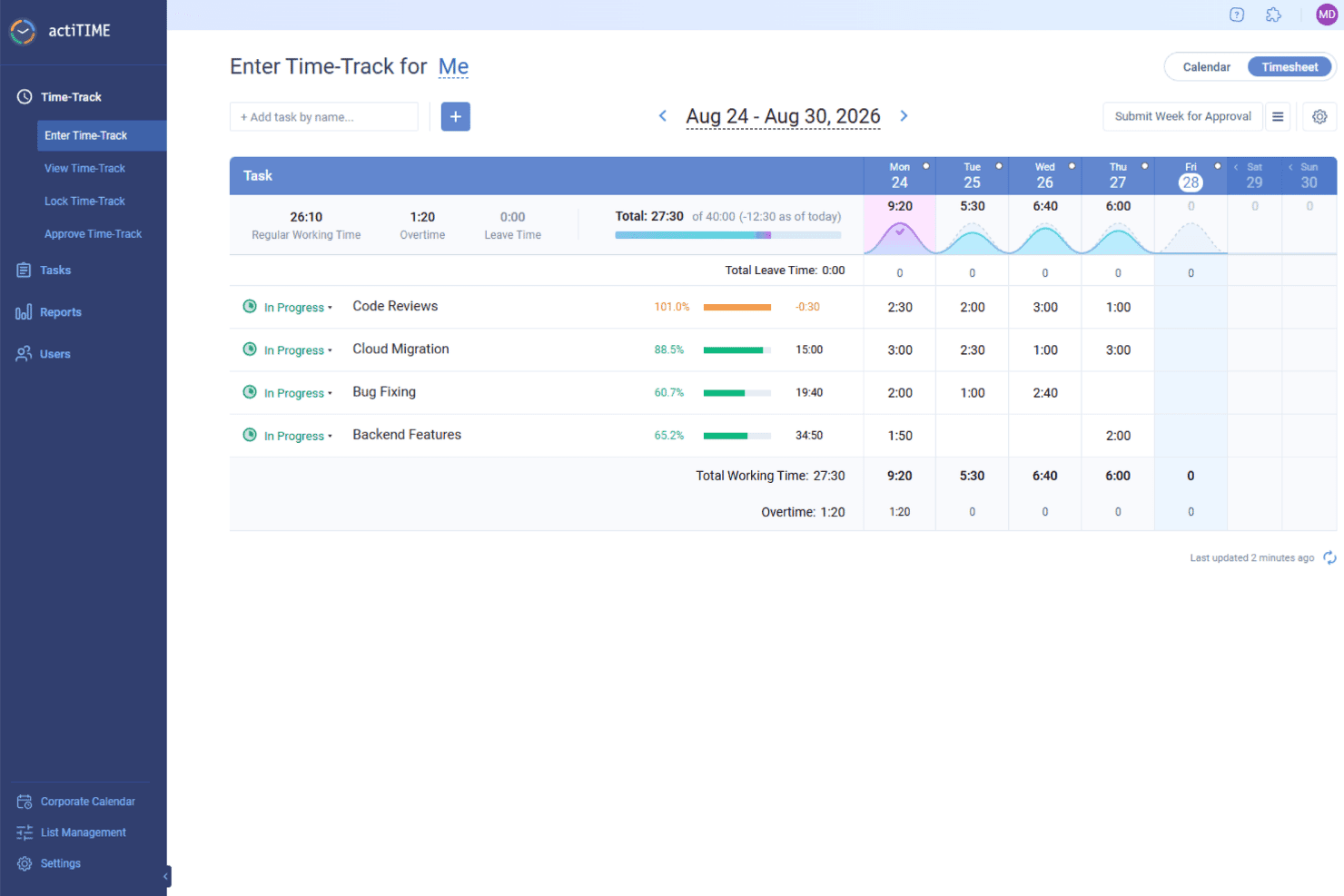
actiTIME helps legal teams track billable hours by task and client, apply billing rates, and turn recorded time into invoices. actiTIME is a time-tracking software designed to help businesses manage projects, track work hours, and analyze performance.
Why I Picked actiTIME: I like that you can define types of work to distinguish between billable and non-billable tasks, ensuring accurate client billing and internal cost assessment. This feature helps in calculating billable amounts and comparing them to project costs, providing a clear picture of profitability. actiTIME also has flexible time-tracking options. You can log hours using online timesheets, specify start and end times in a weekly calendar view, or capture time automatically with a Chrome extension.
Standout Features & Integrations:
Features include customizable workflows, mobile app access, calendar view for visual time management, automatic time tracking, client billing capabilities, and time-off management.
Integrations include QuickBooks, Zapier, actiPLANS, GitHub, Salesforce, Jira, Trello, Outlook, Evernote, Todoist, and Bamboo HR.
Pros and Cons
Pros:
- Provides detailed reporting tools
- Allows customization of work structures
- Offers multiple methods for time tracking
Cons:
- Some users find the user interface cluttered
- The mobile version lacks some features of the desktop version
Learn more about actiTIME: Best for attorneys desiring a detailed view of time utilization
- Free plan + free trial + free demo available
- From $3.99/user/month (billed annually)
Visit WebsiteCustomer Rating:4.7/5
Desktop and mobile view for the timer feature for TimeCamp legal time tracking software TimeCamp is a versatile time tracking tool that allows for deep insights into how time is spent. It is a perfect fit for attorneys looking for detailed time utilization information to optimize their workflows and increase productivity.
Why I Picked TimeCamp: In my search for an optimal time tracking app for attorneys, TimeCamp's detailed reporting functionality stood out. What sets it apart is its ability to deliver a comprehensive view of how time is spent, thus helping attorneys to optimize their efficiency. Given this capability, I deemed TimeCamp best for attorneys who desire a detailed view of their time utilization.
Standout Features & Integrations:
Features include automatic time tracking app, detailed reports, and a user-friendly dashboard that makes it easy to get an overview of time utilization.
Integrations include popular tools like Trello, Asana, Google Calendar, and more, making it easy to sync data and work efficiently.
Pros and Cons
Pros:
- User-friendly dashboard simplifies data interpretation
- Integrates well with popular productivity and project management tools
- Detailed reports offer comprehensive insights into time utilization
Cons:
- The interface might feel less modern compared to some of its competitors
- Some users may find the auto-tracking feature intrusive
- May not be as feature-rich as some other tools in terms of project management
Learn more about TimeCamp: 6Best for firms seeking a complete legal practice management suite
Clio
- Free trial available
- From £79/user/month
Visit WebsiteCustomer Rating:4.7/5
Main dashboard of Clio Clio is a comprehensive legal practice management software that offers a variety of functionalities, including case management, billing, client intake, and more. Designed specifically for law firms, it provides a centralized platform for lawyers to handle all aspects of their practice effectively. Considering its extensive features tailored to the unique needs of law offices, Clio is best suited for firms seeking a complete practice management solution.
Why I Picked Clio: When choosing Clio, I appreciated its specialized, all-in-one approach to legal practice management. It's different from other tools due to its comprehensive feature set that caters specifically to legal practitioners. This is why I chose Clio as the "Best for..." firms that want a complete solution for managing their legal practice without the need for multiple, disjointed tools.
Standout Features & Integrations:
Features include detailed case management, robust billing and invoicing, client intake and relationship management, and task tracking. The platform also offers a client portal for secure communication and document sharing.
Integrations include popular software like QuickBooks, LawPay, Dropbox, and Microsoft Office 365, providing users with a well-rounded, efficient workspace.
Pros and Cons
Pros:
- Wide range of integrations with popular software
- Secure client portal for communication and document sharing
- Comprehensive, all-in-one legal practice management
Cons:
- The learning curve might be steep for non-tech savvy users
- Higher price point compared to more basic tools
- May be too feature-rich for smaller firms
Learn more about Clio: Best for firms wanting robust project management features
- Free demo + 10-day free trial available
- From $43/user/month (billed annually)
Visit WebsiteCustomer Rating:4.5/5
client management page of TimeSolv legal time tracking software TimeSolv is a web-based time tracking and billing solution that also provides extensive project management features. Designed specifically for professional services firms, it helps effectively monitor billable and non-billable hours, manage invoices, and supervise projects. Its emphasis on project management and time tracking integration makes it an ideal choice for firms that want these two crucial aspects in one place.
Why I Picked TimeSolv: In my assessment of various tools, I singled out TimeSolv for its impressive amalgamation of time tracking, billing, and project management features. Its emphasis on not only tracking time but also managing projects in a comprehensive way makes it unique. In my judgement, for firms seeking to improve their project management capabilities while keeping an accurate account of their billable time, TimeSolv is the best option.
Standout Features & Integrations:
Features include detailed work breakdown structures, budgeting and forecasting, and comprehensive task management. Its features extend beyond time tracking and billing, incorporating robust project management capabilities.
Integrations include other popular tools such as QuickBooks, Dropbox, and LawPay.
Pros and Cons
Pros:
- Wide range of integrations with popular tools
- Detailed work breakdown structure feature for efficient task organization
- Comprehensive project management capabilities integrated with time tracking
Cons:
- Customization options could be more extensive
- Occasional issues reported with mobile app functionality
- Interface might not be as intuitive for first-time users
 Best for cloud-based convenience with integrated expense tracking
- Free plan (1 user)
Visit WebsiteCustomer Rating:4.7/5
Log time feature in Amberlo legal time tracking software Amberlo is a comprehensive legal management software designed for legal professionals and law firms. With a focus on cloud-based convenience, it offers the ability to track time and expenses all in one platform.
Why I Picked Amberlo: In my search for the top legal time tracking software, I selected Amberlo primarily for its impeccable integration of time and expense tracking in a cloud-based environment. This feature set offers law professionals an opportunity to manage their time and associated costs from anywhere. The tool stands out with its commitment to convenience and flexibility, making it the best for those who value these aspects.
Standout Features & Integrations:
Features include case management, invoicing, and billing on top of its time and expense tracking capabilities. It also provides an intuitive dashboard that presents a complete overview of your firm’s activities.
Integrations include Google Calendar, enabling the scheduling of appointments and meetings directly from the platform.
Pros and Cons
Pros:
- Google Calendar integration for effective scheduling
- Robust feature set that includes case management and invoicing
- Convenient cloud-based platform for anywhere access
Cons:
- Complex interface may require a learning curve
- Lacks integration with other popular software like Outlook
- Higher cost compared to other options
Learn more about Amberlo: Best for AI-powered timesheets
- Free trial + demo available
- From $6/user/month
Visit WebsiteCustomer Rating:4.3/5
Deltek Replicon Time's timesheets let professionals log their hours across different projects and clients. Deltek Replicon Time is a time-tracking software designed to help businesses efficiently manage employee time and project hours. It offers a range of features to capture, validate, and analyze time data, making it suitable for various industries, including legal firms.
Why I Picked Deltek Replicon Time: It offers project and task time tracking that's tailored to your firm's needs. You can log hours against various attributes, making it easy to track billable hours for different cases or clients. This ensures accurate billing and saves you time. The AI-powered timesheets also help by automating timesheet completion with pre-population rules, reducing errors from manual data entry and letting your team focus more on legal work instead of administrative tasks.
Standout Features & Integrations:
Features include time off management, mobile app access, analytics tools, customizable timesheets, approval workflows, client management, project expense tracking, real-time reporting, compliance management, resource allocation, budgeting tools, and invoicing capabilities.
Integrations include Jira, Microsoft Project, QuickBooks, Sage Financials, Sage Intacct, Salesforce, SAP, ServiceNow, Xero, Zendesk, BambooHR, and ADP.
Pros and Cons
Pros:
- Mobile app enhances accessibility
- Robust reporting capabilities
- Customizable to fit business needs
Cons:
- Extensive features may be overwhelming for new users
- Reporting customization can be challenging
Learn more about Deltek Replicon Time: Best for firms needing personalized, professional invoice creation
- Not available
- Free forever plan
Visit WebsiteCustomer Rating:4.3/5
Invoice tab for Zoho Invoice legal time tracking software Zoho Invoice is a cloud-based invoicing software specifically designed for businesses to manage their invoices effectively and professionally. For firms that require a personalized touch to their invoices, Zoho Invoice is an ideal choice due to its advanced customization options and user-friendly interface.
Why I Picked Zoho Invoice: As I was evaluating various invoicing tools, Zoho Invoice came across as a tool that has successfully combined the ease of use with a high degree of customization, and it particularly excels in creating professional and personalized invoices. This is why I picked Zoho Invoice as the best option for firms that are in need of custom and professional invoice creation.
Standout Features & Integrations:
Features include detailed and personalized invoices, manage clients and projects, and even automate payment reminders. The tool provides various customization options for invoices, including custom fields, templates, and branding options.
Integrations include a range of applications, such as Zoho CRM, Zoho Projects, Zoho Books, and popular payment gateways like PayPal, Stripe, and Square.
Pros and Cons
Pros:
- Automated reminders for payments streamline the invoicing process
- Wide range of integrations with Zoho apps and other popular applications
- Advanced customization options for professional and personalized invoices
Cons:
- More integrations with third-party apps outside the Zoho ecosystem would be beneficial
- Lacks advanced project management features compared to some competitors
- The interface may take some time to get used to due to numerous features
Learn more about Zoho Invoice:
Annen programvare for tidsregistrering i juridiske virksomheter
Nedenfor finner du en liste over ytterligere programvare for juridisk praksis som jeg hadde på kortlisten, men som ikke kom med blant de 10 beste. Det er absolutt verdt å ta en titt på dem.
- 11CaseFoxBest for firms seeking advanced case management and time tracking
- 12App4LegalBest for multi-functional case and document management
- 13ActionstepBest for managing workflows and automating administrative tasks
- 14HarvestBest for teams that value easy integrations with existing tools
- 15TimeSlipsBest for law offices prioritizing user-friendly time tracking
- 16Time59Best for solo practitioners needing comprehensive time tracking
- 17Deel HRBest for desktop and mobile
- 18InsightfulBest for automatic time mapping
- 19ClickTimeBest for DCAA-compliant timesheets
- 20CosmoLexGood for firms looking for built-in legal accounting
- 21LegalTrekGood for larger firms requiring custom legal solutions
- 22LegalFilesGood for managing complex legal documents and cases
- 23ProTempusGood for small to mid-sized firms wanting an all-in-one practice management software
- 24TimeLedgerGood for businesses that require real-time expense tracking
How I Evaluate Legal Time Tracking Software
I split my evaluation into baseline requirements—matter-based time capture, ABA codes, LEDES invoicing—and the differentiating factors that make a tool the right fit.
Core Functionality (Table Stakes For This List)
When I'm selecting tools for my list, I rank each one on a scale from 0 (does not offer the functionality) to 5 (excels in this area) for each core functionality listed below. Then, I calculate the tool's total score into a percentage. Each tool needs to achieve a minimum total score of 55% to be considered for inclusion.
- Billable Time Capture: I check whether timers, manual entry, and mobile logging all tie directly to matters—so an attorney switching between three client calls can track each one without losing time.
- ABA/UTBMS Code Support: Each tool should include a preloaded legal billing code library, since manually building code sets from scratch defeats the purpose of standardized timekeeping.
- Matter and Client Association: I evaluate how each platform handles rate hierarchies—for example, whether you can set a different hourly rate for the same timekeeper across two matters for the same client.
- Legal Invoice Generation: LEDES export support matters here, especially 1998B format, because corporate clients and insurers increasingly require it before they'll process a payment.
- Trust/IOLTA Compatibility: I look at whether the tool tracks client trust funds with three-way reconciliation or integrates with platforms that do, since commingling errors carry real disciplinary risk.
- Practice Management Integration: The tool should connect to legal PM systems or include native matter management, so time entries flow into case files and conflict checks without duplicate data entry.
Once I have a list of tools that meet this criteria, I consider what sets each platform apart.
Differentiating Factors (What Sets Vendors Apart)
Here's how I compare and contrast different vendors:
Standout Features
Passive time capture is a real differentiator—tools like Clio and TimeSolv can monitor document edits, emails, and calendar events to surface billable work that might otherwise go unrecorded. AI narrative drafting takes this further by turning shorthand entries into polished, client-ready descriptions. I also evaluate realization rate analytics, since dashboards showing write-offs, collection trends, and timekeeper utilization help billing managers spot revenue leakage before it becomes a pattern.
Beyond Features
Firm size fit matters—a solo practitioner needs an affordable, bundled platform, while a mid-size firm requires multi-user permissions and departmental reporting. I also evaluate legal ecosystem integrations, checking whether time data syncs with tools like NetDocuments, Smokeball, or QuickBooks without manual exports. Data security deserves close attention too, since these platforms store privileged client information. I look for SOC 2 Type II certification and role-based access controls that limit who can view billing details across matters.
Slik velger du programvare for tidsregistrering i juridiske virksomheter
Det er lett å gå seg vill i lange funksjonslister og kompliserte prisstrukturer. For å hjelpe deg med å holde fokus mens du arbeider deg gjennom din unike prosess for valg av programvare, får du her en sjekkliste over faktorer du bør ha i mente:
| Faktor | Hva du bør vurdere |
|---|---|
| FaktorSkalerbarhet | Hva du bør vurdereVurder om programvaren kan vokse med praksisen din. Vil den håndtere flere brukere eller større prosjekter i fremtiden? Se etter alternativer som tilbyr fleksible abonnementer. |
| FaktorIntegrasjoner | Hva du bør vurdereKontroller om verktøyet integreres med de eksisterende systemene dine, for eksempel programvare for regnskap eller dokumenthåndtering, for å unngå forstyrrelser i arbeidsflyten. |
| FaktorTilpasningsmuligheter | Hva du bør vurdereVurder muligheten til å tilpasse programvaren til dine spesifikke behov. Kan du justere innstillinger eller rapporter slik at de passer til prosessene dine? |
| FaktorBrukervennlighet | Hva du bør vurdereVurder hvor intuitiv programvaren er for teamet ditt. Vil den kreve omfattende opplæring, eller kan de begynne å bruke den med en gang? |
| FaktorImplementering og innføring | Hva du bør vurdereFastslå hvor mye tid og hvilke ressurser som trengs for å implementere programvaren. Finnes det opplæringsmateriell og støtte som kan hjelpe teamet ditt med å komme i gang? |
| FaktorKostnad | Hva du bør vurdereSammenlign de totale eierkostnadene, inkludert eventuelle skjulte gebyrer eller nødvendige oppgraderinger. Passer det innenfor budsjettbegrensningene dine? |
| FaktorSikkerhetstiltak | Hva du bør vurdereSørg for at programvaren har sterke sikkerhetstiltak. Følger den juridiske bransjestandarder for å beskytte sensitive klientdata? |
| FaktorTilgjengelig brukerstøtte | Hva du bør vurdereVurder nivået på brukerstøtten som tilbys. Finnes det hjelp døgnet rundt, og hvor raskt kan du få hjelp hvis det oppstår problemer? |
Hva er programvare for tidsregistrering i juridisk virksomhet?
Programvare for tidsregistrering i juridisk virksomhet er et verktøy som er utviklet for å hjelpe juridiske fagpersoner med å registrere nøyaktig hvor mye tid som brukes på ulike oppgaver og klientarbeid. Advokater, advokatfullmektiger og annet juridisk personale bruker disse verktøyene for å forbedre faktureringsnøyaktigheten og administrere arbeidsmengden effektivt.
Som en type løsning for juridisk fakturering støtter programvare for tidsregistrering i juridisk virksomhet nøyaktig fakturering og sikrer åpenhet i klientfaktureringen.
Funksjoner som registrering av fakturerbare timer, generering av fakturaer og hjelp med tidsrapporter gjør det enklere å administrere klientprosjekter og integrere med andre juridiske verktøy. Samlet sett gir disse verktøyene betydelig verdi ved å forbedre faktureringsnøyaktigheten og overholdelsen av juridiske standarder.
Funksjoner
Når du velger programvare for tidsregistrering i juridisk virksomhet, er det avgjørende å fokusere på funksjoner som effektiviserer arbeidsflyten og øker produktiviteten. Her er de viktigste funksjonene du bør se etter, slik at programvaren oppfyller kravene til en moderne juridisk virksomhet.
- Automatisk tidsregistrering: Registrerer automatisk tiden som brukes på oppgaver, noe som reduserer risikoen for glemte fakturerbare timer.
- Integrasjon med verktøy for virksomhetsstyring: Synkroniserer sømløst med de eksisterende systemene dine og skaper en samlet arbeidsflyt som sparer tid og minimerer feil.
- Mobil tilgjengelighet: Gjør det mulig å registrere tid hvor som helst, slik at du aldri går glipp av en mulighet til å registrere fakturerbare timer.
- Tilpassbare rapporter: Genererer rapporter som er skreddersydd til virksomhetens spesifikke behov, og gir innsikt som støtter velinformerte beslutninger.
- Fakturering og fakturautstedelse: Forenkler prosessen med å omgjøre registrert tid til nøyaktige fakturaer og fremskynder betalingssyklusene.
- Sikkerhet og samsvar: Beskytter sensitive klientdata med sterk kryptering og funksjoner for samsvar, og opprettholder tillit og overholdelse av regelverket.
- Brukervennlig grensesnitt: Tilbyr et intuitivt design som krever minimal opplæring, slik at teamet ditt raskt kan komme i gang.
- Analyser av tidsregistrering: Gir datadrevet innsikt i tidsbruken, slik at du kan optimalisere produktiviteten og identifisere områder som kan forbedres.
- Samarbeid i sanntid: Gjør det mulig for teammedlemmer å samarbeide om tidsregistrering i sanntid, noe som forbedrer koordineringen og effektiviteten.
- Klientportal: Gjør det mulig for klienter å se fakturaene og tidsloggene sine, noe som øker åpenheten og tilliten.
Fordeler
Investering i programvare for tidsregistrering i juridisk virksomhet gir betydelige fordeler for både individuelle brukere og organisasjoner. Her er de viktigste fordelene som gjør denne programvaren til en verdifull ressurs for advokatfirmaer.
- Økt faktureringsnøyaktighet: Automatisk registrering av fakturerbare timer reduserer feil og sikrer at klientene faktureres korrekt.
- Effektiv fakturering: Generering av fakturaer direkte fra registrert tid sparer tid og forenkler faktureringsprosessen.
- Bedre tidsstyring: Tidsrapportering hjelper deg med å analysere hvordan tiden brukes, slik at du kan ta mer informerte beslutninger.
- Forbedret datasikkerhet: Sikkerhetstiltak beskytter sensitiv klientinformasjon og opprettholder tillit og samsvar med regelverket.
- Bedre prosjektoversikt: Prosjektstyring med integrerte verktøy bidrar til effektiv ressursfordeling og fremdriftsoppfølging.
- Større fleksibilitet: Funksjonalitet i mobilappen gjør det mulig å registrere tid hvor som helst, og støtter et mer fleksibelt arbeidsmiljø.
- Redusert administrativ belastning: Automatisk tidsregistrering og brukervennlige grensesnitt minimerer behovet for manuell registrering og opplæring.
Kostnader og priser
Denne delen gir et estimat over gjennomsnittlige abonnementer og kostnader for programvare for tidsregistrering for juridisk arbeid. Prisene varierer etter abonnementstype, og funksjonene skaleres for å dekke ulike behov.
| Abonnementstype | Gjennomsnittspris | Vanlige funksjoner |
|---|---|---|
| AbonnementstypeGratisabonnement | Gjennomsnittspris$0 | Vanlige funksjonerGrunnleggende tidsregistrering, begrenset antall brukere, standardrapporter |
| AbonnementstypePersonlig abonnement | Gjennomsnittspris$10/mo | Vanlige funksjonerAvansert tidsregistrering, mobiltilgang, grunnleggende fakturering |
| AbonnementstypeBedriftsabonnement | Gjennomsnittspris$30/mo | Vanlige funksjonerIntegrasjon med verktøy for praksisadministrasjon, tilpassbare rapporter, teamsamarbeid |
| AbonnementstypeAbonnement for store virksomheter | Gjennomsnittspris$75/mo | Vanlige funksjonerAI-drevne funksjoner, forbedret sikkerhet, ubegrenset antall brukere, prioritert brukerstøtte |