

O software gratuito de gestão de processos jurídicos permite-lhe organizar processos, acompanhar prazos e gerir clientes sem custos iniciais — procure fornecedores com um plano gratuito ou um período experimental gratuito.
Se procura as melhores soluções para ajudar escritórios de advogados e equipas jurídicas a gerir processos, calendários, documentos e faturação sem ultrapassar o orçamento, não está sozinho. Com tantas ferramentas a afirmarem oferecer verdadeiro valor gratuitamente, é difícil distinguir demonstrações limitadas de plataformas que pode realmente utilizar.
Este guia centra-se nas melhores ferramentas verdadeiramente gratuitas de gestão de processos jurídicos, para que passe menos tempo a comparar funcionalidades e mais tempo a apoiar os seus clientes.
Why Trust Our Software Recommendations
6,700+
Reviews
20
Industry experts
16+
Evaluation factors
14
Years
Our team has been testing and reviewing software since 2012. As legal practice leaders ourselves, we know how difficult—and important—it is to choose the right software.
For this guide, we evaluated tools using hands-on testing and independent research, scoring tools using our selection criteria.
Our reviews reflect our human editorial judgment, not a sales pitch.
Tabela comparativa de software gratuito de gestão de processos jurídicos
Esta tabela comparativa resume os detalhes de preços do meu software gratuito de gestão de processos jurídicos:
| Tool | Best For | Trial Info | Price | ||
|---|---|---|---|---|---|
| 1 | Best for app-based case tracking without coding | 14-day free trial | From $79/month | Website | |
| 2 | Best for customizable legal workflow apps | Free plan available; 15-day free trial | Pricing upon request | Website | |
| 3 | Best with customizable case layouts for law firms | 30-day free trial | From $8/user/month | Website | |
| 4 | Best for Outlook integration in matter management | Free plan available | From $20/user/month | Website | |
| 5 | Best for streamlined time tracking and billing | Free plan + free demo available | From $20/user/month (billed annually) | Website | |
| 6 | Best for billable time and invoice tracking | Free plan + free demo available | From $45/user/month | Website | |
| 7 | Best for custom legal workflow automation | Free plan available | From $21/user/month | Website | |
| 8 | Best for advanced matter lifecycle management | Free demo available | Free | Website | |
| 9 | Best for templates and client communication | Free demo available | From €38/user/month | Website | |
| 10 | Best for unified case timelines | Free plan available | From $45/user/month | Website |


Avaliações de software gratuito de gestão de processos jurídicos
Apresentamos abaixo os meus resumos detalhados do software gratuito de gestão de processos jurídicos que entrou na minha seleção. As minhas avaliações analisam em detalhe as funcionalidades, os melhores casos de utilização e as vantagens e desvantagens de cada plataforma, para o ajudar a encontrar a melhor opção para si.
 Best for app-based case tracking without coding
- 14-day free trial
- From $79/month
Visit WebsiteCustomer Rating:4.9/5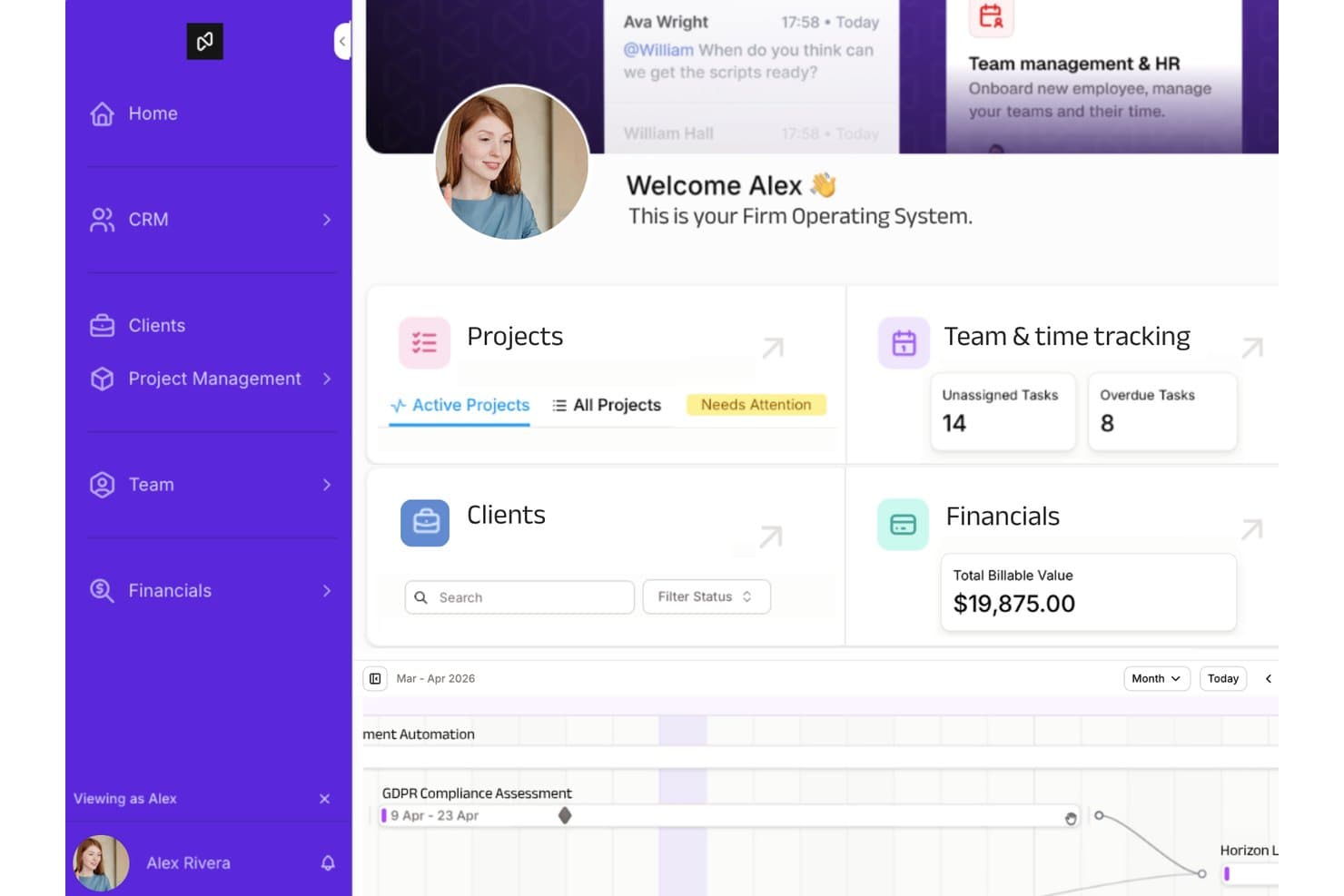
Noloco offers a firm operating system dashboard with project management, client tracking, team time tracking, and financials overview. Noloco is a no-code app builder that lets law firms create custom case tracking systems on top of existing data sources like Airtable, Google Sheets, and PostgreSQL.
Who Is Noloco Best For?
Noloco suits small law firms and solo practitioners who want a tailored case tracking setup but don't have a developer on hand to build it.
Why I Picked Noloco
I picked Noloco as one of the best because it's the only tool on this list where you design the case tracking app itself. I use Noloco's interface builder to configure matter record layouts, set role-based permissions by user type, and trigger status automations as cases move through stages. Rather than inheriting a predefined legal workflow, you build one that reflects how your firm actually operates.
Noloco Key Features
- Custom permissions controls: Assign user, group, or role-based access to sensitive client or case data.
- Airtable and Google Sheets integration: Connect your app directly to existing spreadsheets and databases without migration.
- Automated workflows: Trigger case updates, notifications, or document routing with configurable no-code logic.
- Client portal capabilities: Provide secure, custom access for clients to share files, view case status, or submit requests through your app.
Noloco Integrations
Noloco offers native integrations with Airtable, Google Sheets, and PostgreSQL, and connects with Zapier. An API is available for custom integrations.
What's Free?
Noloco offers a free-forever plan that includes unlimited apps, unlimited team members, and up to 50 client users, but caps you at 2,000 records and 100 workflow runs per month.
Pros and Cons
Pros:
- Client portal included on the free plan
- Role-based access controls for sensitive matters
- Fully customizable case record layouts
Cons:
- Record limits restrict active caseload size
- No built-in legal-specific matter templates
Learn more about Noloco: Best for customizable legal workflow apps
- Free plan available; 15-day free trial
- Pricing upon request
Visit WebsiteCustomer Rating:4.3/5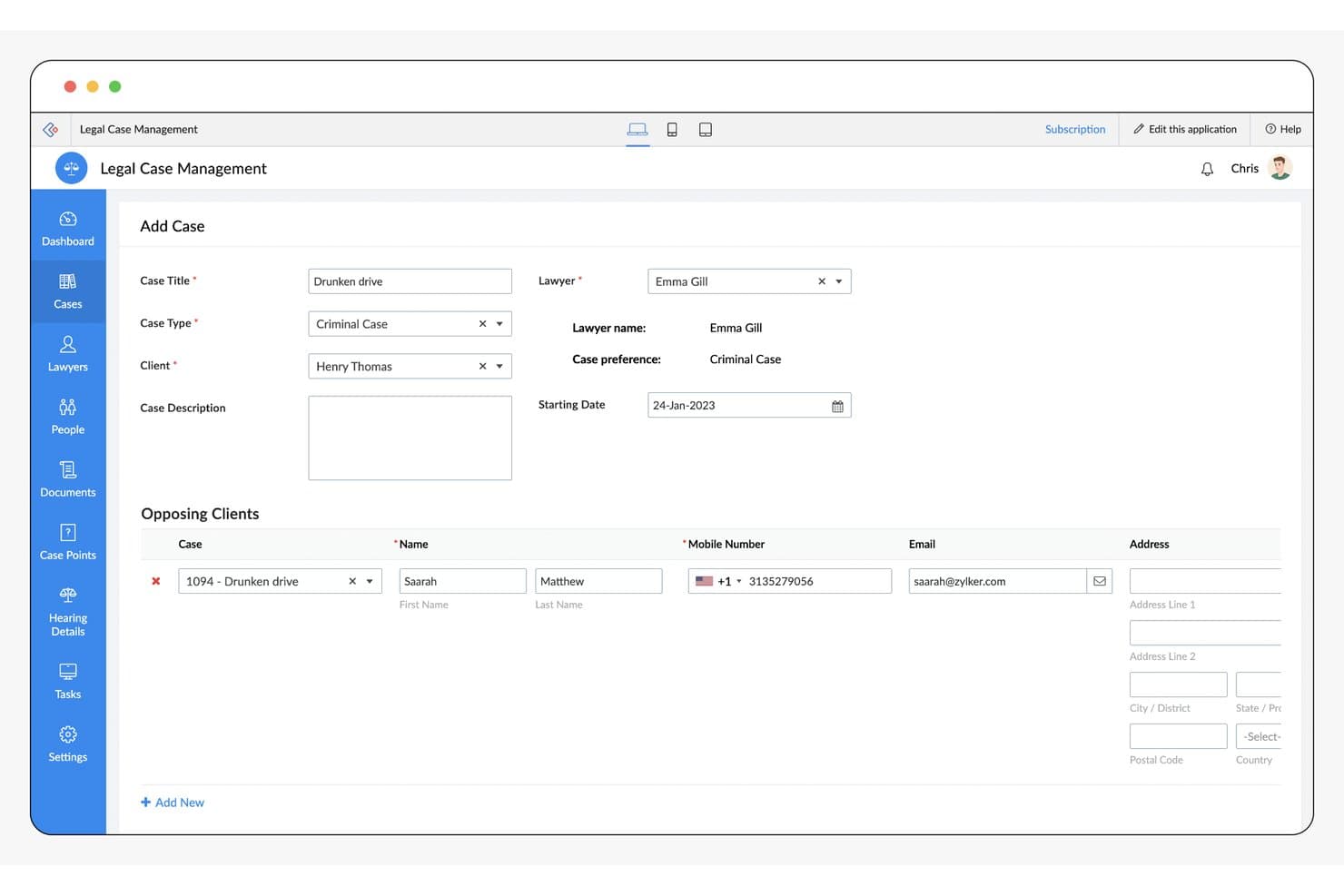
Zoho Creator offers a structured Add Case form with fields for case title, type, client, lawyer assignment, and opposing client details for legal case management. Zoho Creator is a low-code application platform with a pre-built Legal Case Management App for tracking matters, managing client contacts, storing case documents, scheduling court dates, and logging billable hours.
Who Is Zoho Creator Best For?
Zoho Creator suits solo practitioners and small law firms with some technical comfort who want to build and tailor their own case management workflows from a pre-built template.
Why I Picked Zoho Creator
I picked Zoho Creator as one of the best because no other free-tier platform lets you reshape a legal case management app at this depth. I use the drag-and-drop builder to adjust matter fields, case types, and task lifecycles, then layer in Deluge scripting for conditional notifications and milestone triggers. Every change I make is reflected instantly in the accompanying native mobile app.
Zoho Creator Key Features
- Centralized contact records: Store client, opposing counsel, and witness details in one searchable system, linking contacts to specific matters.
- Case-linked document storage: Attach documents directly to cases, organizing files by case, client, or court for fast retrieval.
- Calendar event tracking: Schedule court dates, appointments, and critical deadlines with automated reminders to prevent missed dates.
- Basic time and invoice entry: Log billable hours on each matter and generate client invoices from tracked activity.
Zoho Creator Integrations
Zoho Creator offers native integrations with Zoho CRM, Zoho Books, PayPal, Twilio, and Google Workspace, and provides an API for custom integrations.
What's Free?
Zoho Creator has a free-forever plan that lets you build one custom app, which includes the pre-built Legal Case Management App from the template marketplace. The free plan is limited in its automation scheduling, data source connections, and custom connector allowances, so teams with more complex workflow needs will likely need a paid tier.
Pros and Cons
Pros:
- Mobile app included on the free plan
- Matter fields fully customizable without any code
- Legal case app template ready to customize
Cons:
- Requires technical setup before it's practice-ready
- No built-in legal conflict check tool
Learn more about Zoho Creator: Best with customizable case layouts for law firms
- 30-day free trial
- From $8/user/month
Visit WebsiteCustomer Rating:4.9/5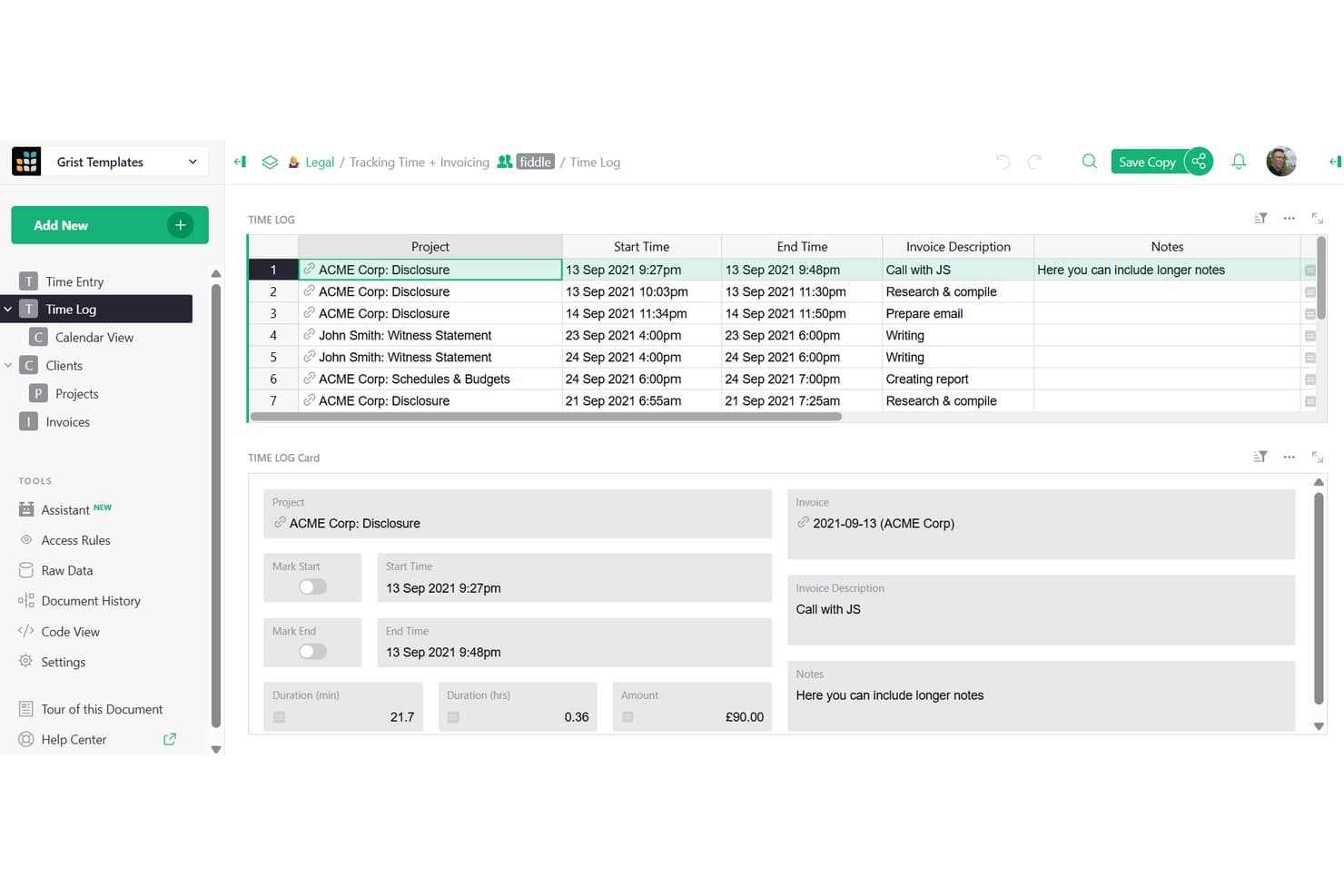
Grist offers a time log and invoicing template that legal professionals can use to track billable hours across client projects and generate invoices. Grist is a no-code relational database and spreadsheet platform that lets law firms build custom case management layouts, track client and matter records, log billable hours, and manage case documents.
Who Is Grist Best For?
Grist is a strong fit for solo practitioners and small law firms that want to build a tailored case management system without paying for rigid, purpose-built legal software.
Why I Picked Grist
Grist earns its spot on my shortlist because of how much control it gives you over case layout design. I've found that linking client records to matters alongside opposing counsel, judges, and witnesses in a single relational view is genuinely useful for keeping case context in one place. I also like the granular access rules, which let you build real ethical walls by restricting associates to only the matters they're actively working on.
Grist Key Features
- Python formulas: Use Python syntax to automate calculations and create complex field logic for case management workflows.
- Custom card and Kanban views: Organize matters and tasks visually with flexible card layouts and board-based tracking options.
- Granular access controls: Set permissions down to the individual field or cell to control who can view or edit sensitive client and case information.
- REST API and Zapier integration: Connect matter data to other tools, automate tasks, and sync documents or deadlines with external platforms.
Grist Integrations
Native integrations are not clearly documented. The tool supports integrations via API and Zapier.
What's Free?
Grist's free plan is a free-forever personal plan that supports up to 10 team members, unlimited documents, and up to 5,000 records per document, with 30 days of automatic backup history. It includes core features like granular access rules, custom layouts, Python formulas, and API access (limited to 5,000 calls per document per day), though automations and admin controls are only available on paid tiers.
Pros and Cons
Pros:
- Relational tables link clients, matters, and contacts
- Granular field-level permissions restrict matter access
- Fully customizable case and matter record layouts
Cons:
- No dedicated court date or deadline calendaring
- No built-in legal billing or invoice tools
Learn more about Grist: Best for Outlook integration in matter management
- Free plan available
- From $20/user/month
Visit WebsiteCustomer Rating:4/5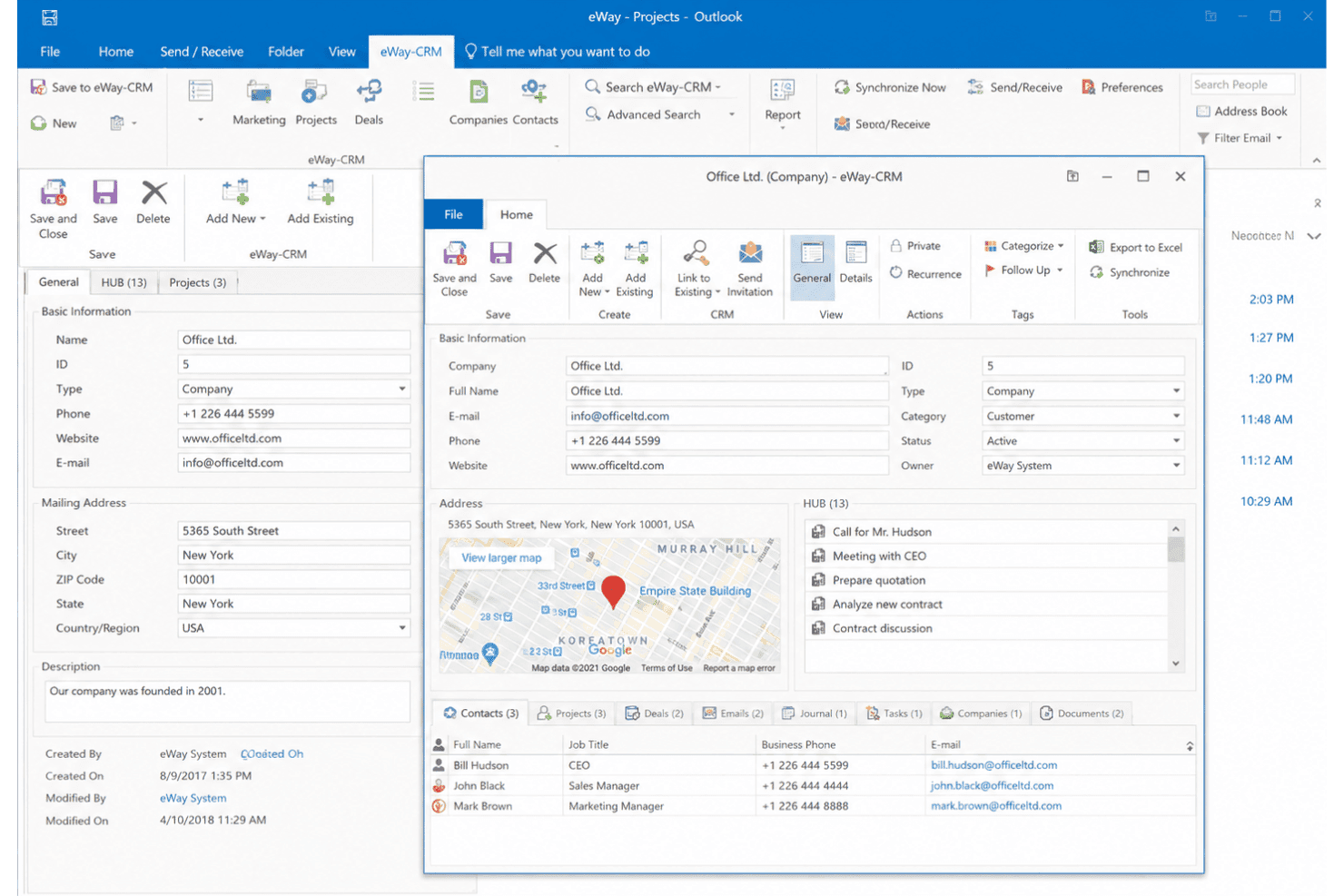
eWay-CRM connects with Microsoft Outlook to manage contacts, emails, tasks, and CRM records within the familiar Outlook workspace. eWay-CRM is an Outlook-native CRM that lets legal professionals manage contacts, matters, documents, tasks, and client communications directly inside Microsoft Outlook and Microsoft Teams.
Who Is eWay-CRM Best For?
It's a natural fit for solo practitioners and small law firms that are already running their practice out of Microsoft Outlook and want to avoid adopting a separate platform.
Why I Picked eWay-CRM
eWay-CRM earns its spot on my list because of how it converts Outlook into a matter management hub without asking attorneys to learn a new tool. I like that you can turn any incoming email into a project (matter) record in one click, with the full communication thread attached and visible across the team. Outlook calendar sync then ties court dates and client appointments directly to the right matter record, so nothing gets lost in a personal inbox.
eWay-CRM Key Features
- Custom fields and forms: Create and organize matter-specific data fields to match your firm's needs.
- Document template editor: Generate legal documents and forms directly from Microsoft Word templates.
- Permissions and user roles: Set access levels to matter records, contacts, and documents for team members.
- REST API and integrations: Connect with QuickBooks, Microsoft Teams, SharePoint, and automate tasks using Power Automate.
eWay-CRM Integrations
eWay-CRM has native integrations across the Microsoft ecosystem, including Microsoft Outlook, Teams, SharePoint, and Microsoft 365. It also offers native integrations with QuickBooks and provides a REST API for custom integrations.
What's Free?
eWay-CRM offers a free-forever plan that supports unlimited users and includes contact management, manual email saving, a single Outlook calendar sync, one workflow per module, up to 10 custom fields, and 200 MB of cloud storage. New accounts start with a 14-day Plus trial before rolling over to the free plan automatically.
Pros and Cons
Pros:
- Outlook calendar syncs to matter records
- Free plan supports unlimited users
- Converts incoming emails into matter records
Cons:
- Free storage is capped at 200 MB
- No built-in trust accounting tools
Learn more about eWay-CRM: Best for streamlined time tracking and billing
- Free plan + free demo available
- From $20/user/month (billed annually)
Visit WebsiteCustomer Rating:4.7/5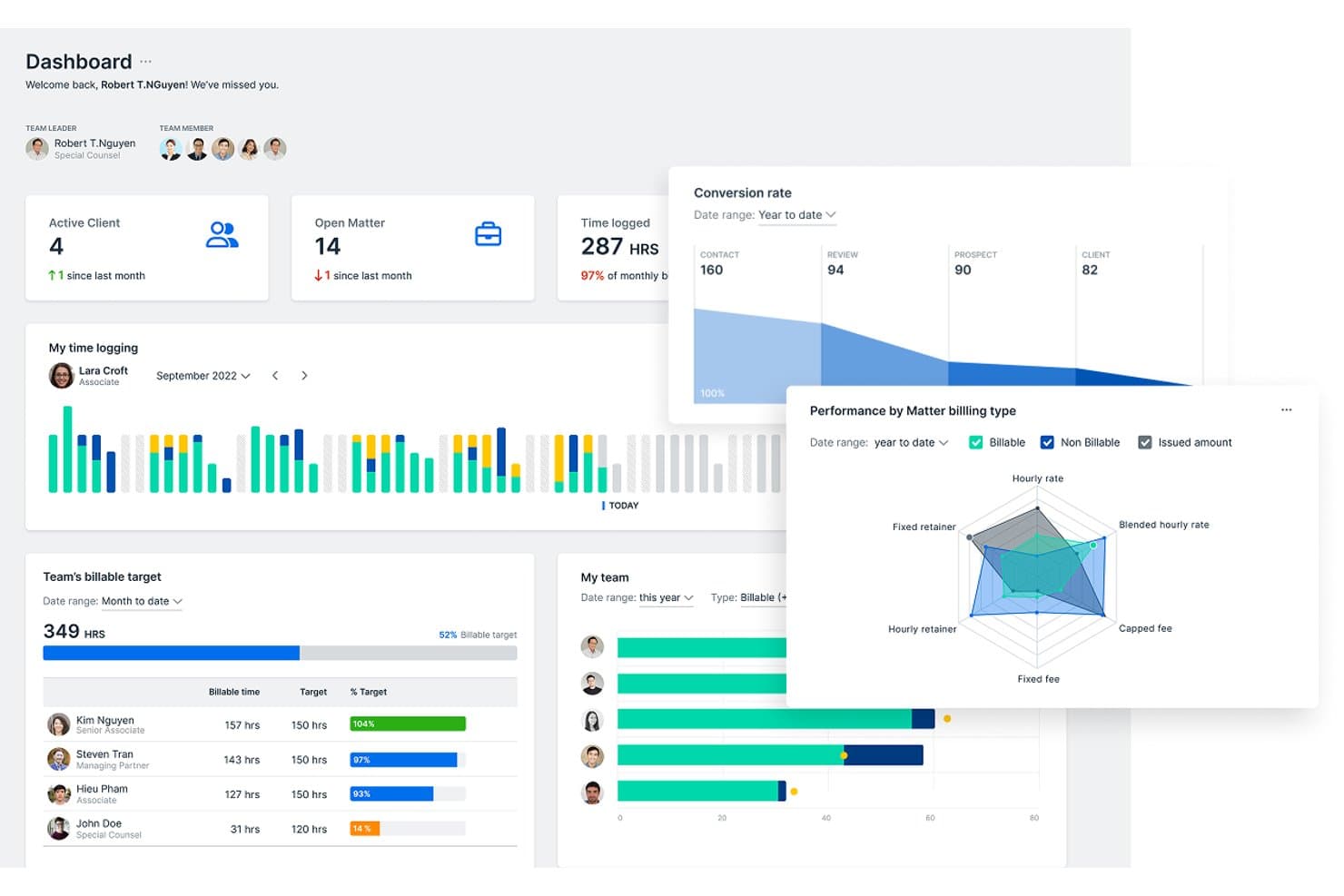
Bilabl offers a comprehensive dashboard with active clients, open matters, time logging, billable targets, conversion rates, and performance by matter billing type. Bilabl is a cloud-based legal practice management platform built for law firms, combining matter and contact management, time tracking, invoicing, document storage, and task management on a free-to-start plan.
Who Is Bilabl Best For?
Bilabl suits solo practitioners and small law firms that want a billing-first approach to case management without enterprise-level costs.
Why I Picked Bilabl
I picked Bilabl as one of the best because time tracking and billing are genuinely its core, not a module bolted on. Time entries link directly to individual matters, and expense and disbursement tracking feeds straight into invoice generation without manual reconciliation. On the free tier, you can generate up to 15 invoices a month, which is enough to cover a solo practitioner's active caseload from day one.
Bilabl Key Features
- Matter management: Track and organize individual cases with custom fields and client linkage.
- Contact database: Store client, opposing counsel, and related contact details with matter associations.
- Calendar and reminders: Schedule court dates, deadlines, and sync events with automated notifications.
- Document organization: Attach, store, and manage case-related documents within each matter.
Bilabl Integrations
Bilabl offers native integrations with Xero, QuickBooks, Zoho Books, and Microsoft SharePoint. An API is available for custom integrations.
What's Free?
Bilabl includes contact and matter management, task management, time and expense tracking, and up to 50GB of document storage. Invoice generation is limited to 15 per month, while Xero, QuickBooks, and Zoho Books integrations require a paid plan.
Pros and Cons
Pros:
- Invoice generation included on the free plan
- Free tier supports up to three users
- Time entries link directly to matters
Cons:
- Smaller support community than established competitors
- No built-in conflict of interest checking
Learn more about Bilabl: Best for billable time and invoice tracking
- Free plan + free demo available
- From $45/user/month
Visit WebsiteCustomer Rating:4.4/5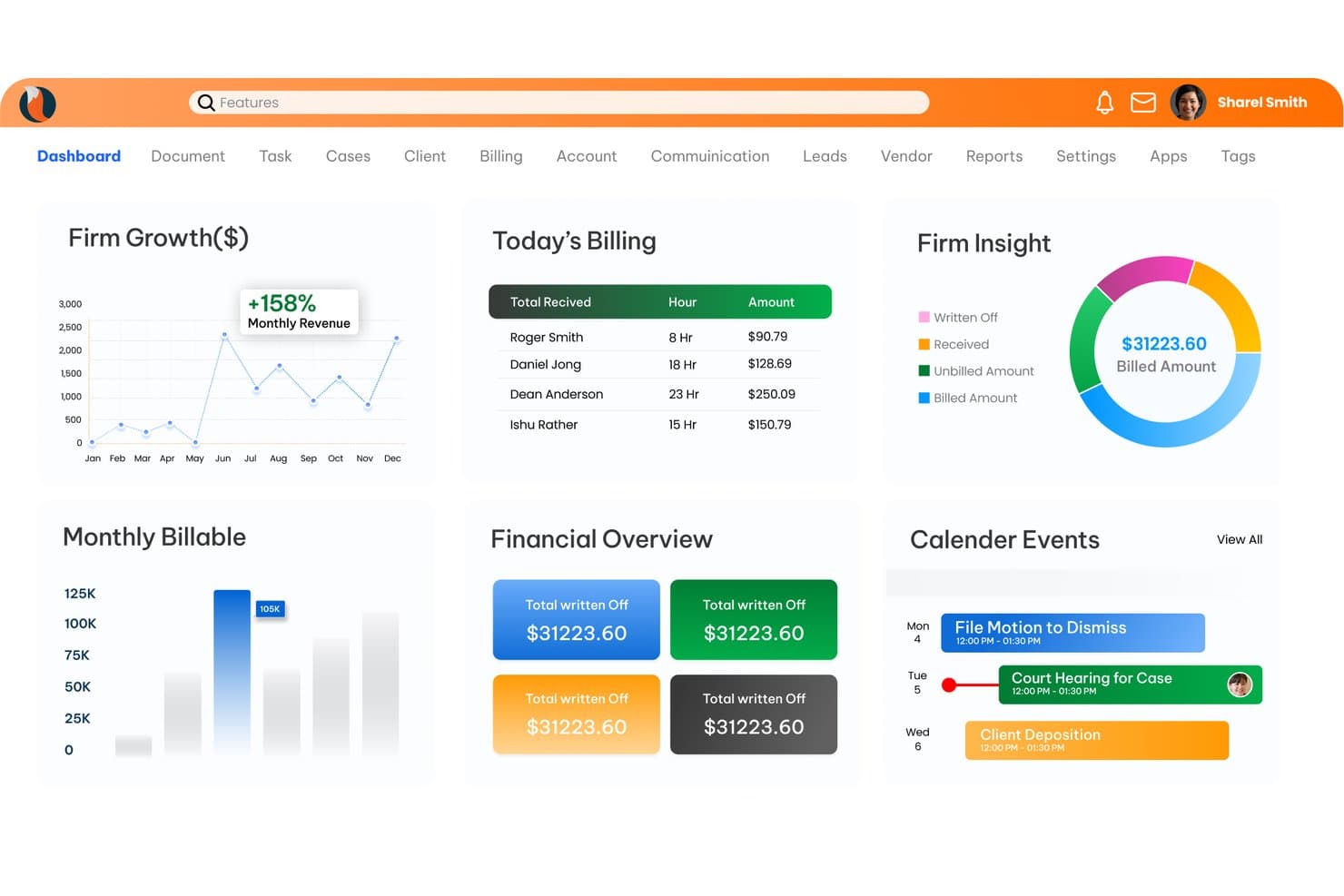
CaseFox offers a comprehensive dashboard with firm growth charts, billing summaries, financial overviews, and calendar events for legal case management. CaseFox is a cloud-based legal case management platform that combines matter tracking, time logging, invoicing, trust accounting, document storage, and client intake tools in one system.
Who Is CaseFox Best For?
CaseFox is a strong fit for solo attorneys and small law firms that need structured billing and case tracking without the cost of enterprise legal software.
Why I Picked CaseFox
I've included CaseFox in my top picks because its time tracking and invoicing tools are built specifically around legal billing norms. Manual and automatic timers log hours per matter, and those entries convert directly into LEDES-compliant invoices with UTBMS codes. The free Solo plan includes all of this, not a stripped-down version, which I find genuinely uncommon at the $0 price point.
CaseFox Key Features
- Matter management with conflict check: Track, organize, and analyze matters with built-in conflict check and custom fields.
- Contact repository: Store client, opposing counsel, and related party details in a centralized, case-linked directory.
- Legal calendaring and reminders: Schedule court dates, appointments, and deadlines with automated reminders.
- Document storage and templates: Upload, organize, and generate documents with template support and matter-based file organization.
CaseFox Integrations
CaseFox provides native integrations with Google Workspace, Microsoft 365, LawPay, QuickBooks, and PayPal. An API is available for custom integrations.
What's Free?
CaseFox's Solo plan is free forever with no credit card required, giving you access to all Pro features including time tracking, invoicing, LEDES billing, calendaring, and a client portal. The plan is capped at 2 users and 4 active cases, so it's best suited to solo practitioners handling a limited caseload.
Pros and Cons
Pros:
- Trust accounting available at no cost
- Client portal included in free tier
- LEDES-compliant invoicing on the free plan
Cons:
- Mobile app experience lags behind desktop
- Active case limit of 4 on free
Learn more about CaseFox: Best for custom legal workflow automation
- Free plan available
- From $21/user/month
Visit WebsiteCustomer Rating:4.1/5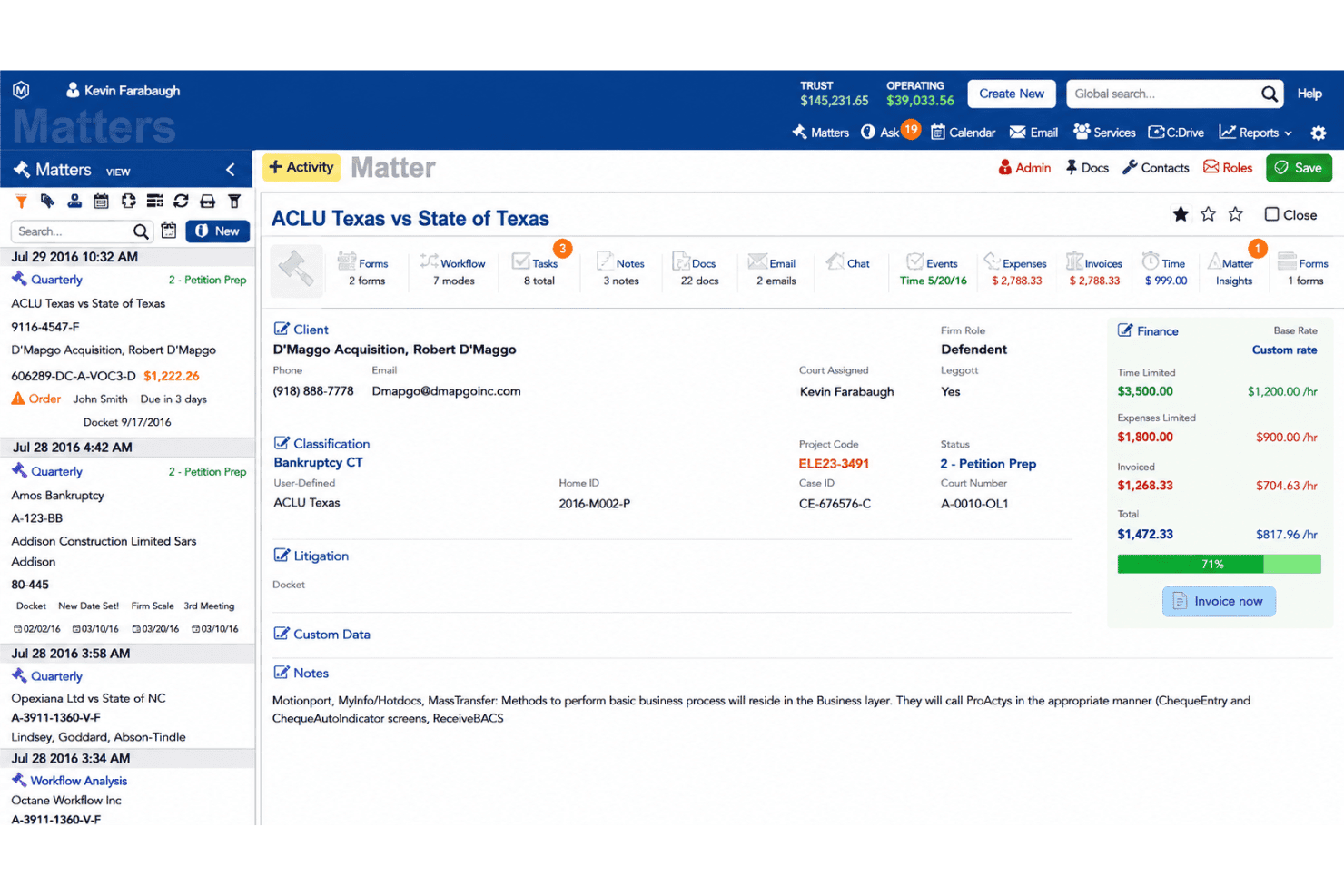
HoudiniESQ manages matters, documents, workflows, time tracking, and billing. HoudiniESQ is a browser-based legal practice management platform that combines matter management, document automation, custom workflow automation, time tracking, and billing—with a perpetual free license available for solo practitioners who self-host.
Who Is HoudiniESQ Best For?
HoudiniESQ is a strong fit for solo practitioners and small law firms that need enterprise-grade automation without the enterprise price tag.
Why I Picked HoudiniESQ
I've included HoudiniESQ in my top picks because its workflow automation engine goes deeper than most legal practice management tools I've used. I particularly like SmartDoc, which lets me build document templates with conditional content fields that auto-populate directly from matter data. The calendaring triggers with conditional branching are equally impressive, and I can set rules that automatically fire task sequences the moment a court date is entered into a matter.
HoudiniESQ Key Features
- Client and contact management: Store and link client, court, and related party details to matters for easy access.
- Central matter dashboard: View, organize, and search all active cases from a customizable dashboard.
- Role-based access controls: Set granular permissions for team members based on matter sensitivity and user role.
- QuickBooks Online integration: Sync client details, invoices, payments, and trust accounting entries directly with your accounting system.
HoudiniESQ Integrations
HoudiniESQ offers native integrations with QuickBooks Online, LawPay, Google Workspace, Adobe Acrobat, Evernote, and CalendarRules. An API is available for custom integrations.
What's Free?
HoudiniESQ offers a perpetual free license for solo practitioners who self-host the software on their own machine, with local data storage included at no cost. The free plan is limited to a single user, so firms with more than one attorney or staff member will need to upgrade to a paid on-premise or cloud plan.
Pros and Cons
Pros:
- Highly customizable matter fields and case types
- Self-hosted option keeps client data on-premise
- Deep workflow automation built into free tier
Cons:
- Self-hosting demands technical knowledge to configure
- UI looks dated compared to modern competitors
Learn more about HoudiniESQ: Best for advanced matter lifecycle management
- Free demo available
- Free
Visit WebsiteCustomer Rating:4.6/5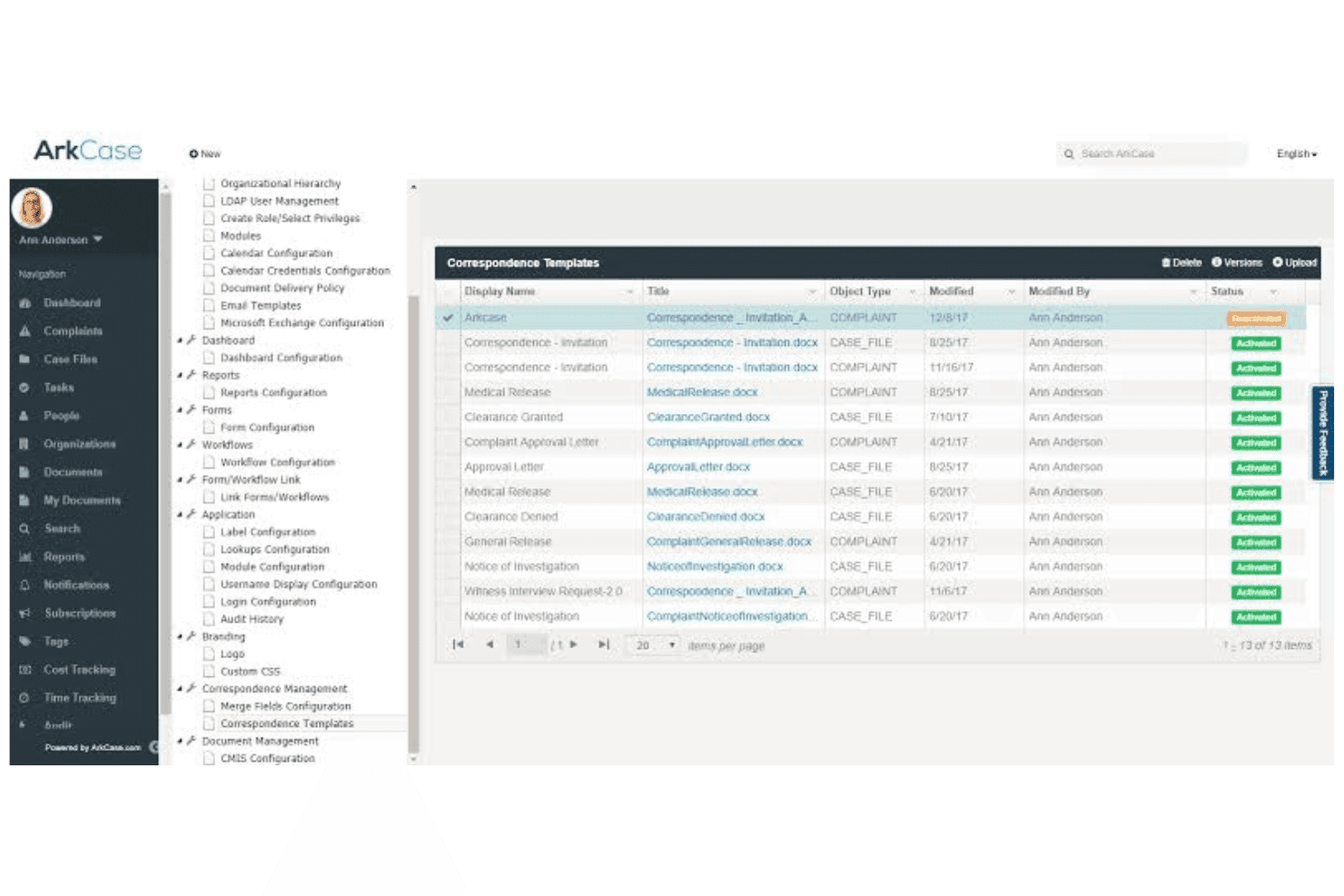
ArkCase manages case lifecycles, documents, workflows, time, and expenses. ArkCase is an open-source case management platform that combines matter lifecycle management, document management, workflow automation, and time and expense tracking across the full case lifecycle.
Who Is ArkCase Best For?
ArkCase is a strong fit for government agencies and enterprise legal teams with in-house IT resources to deploy and manage a self-hosted, open-source platform.
Why I Picked ArkCase
ArkCase earns its spot on my shortlist because no other free platform handles the full matter lifecycle as structurally as this one. I particularly like the low-code workflow builder, which lets my team automate task routing from intake through closure without writing custom code. The built-in OCR engine and AI-powered PII redaction run directly inside the case record. My team can process scanned documents and flag sensitive content without switching tools.
ArkCase Key Features
- Contact management: Store and link client, opposing counsel, and related party details to specific cases.
- Document version control: Track, manage, and restore previous versions of documents within each matter.
- Audit trails: Automatically log all changes and access to case data for security and compliance.
- Calendar integration: Sync events and deadlines with Outlook and other supported calendars.
ArkCase Integrations
ArkCase offers native integrations with Alfresco, Box, Amazon S3, Microsoft Outlook, and Microsoft Exchange, and provides an API for custom integrations.
What's Free?
ArkCase's open-source version is a free-forever plan, available to anyone who wants to self-host the platform. It includes core features like case management, document management, and time and expense management, but you won't get AI-powered tools, cloud hosting, or dedicated support without upgrading to a paid tier.
Pros and Cons
Pros:
- AI-powered PII redaction built into case records
- Full matter lifecycle covered at no cost
- Open-source with an active developer community
Cons:
- No mobile app for remote case access
- Requires dedicated IT resources to self-host
Learn more about ArkCase: Best for templates and client communication
- Free demo available
- From €38/user/month
Visit WebsiteCustomer Rating:4.9/5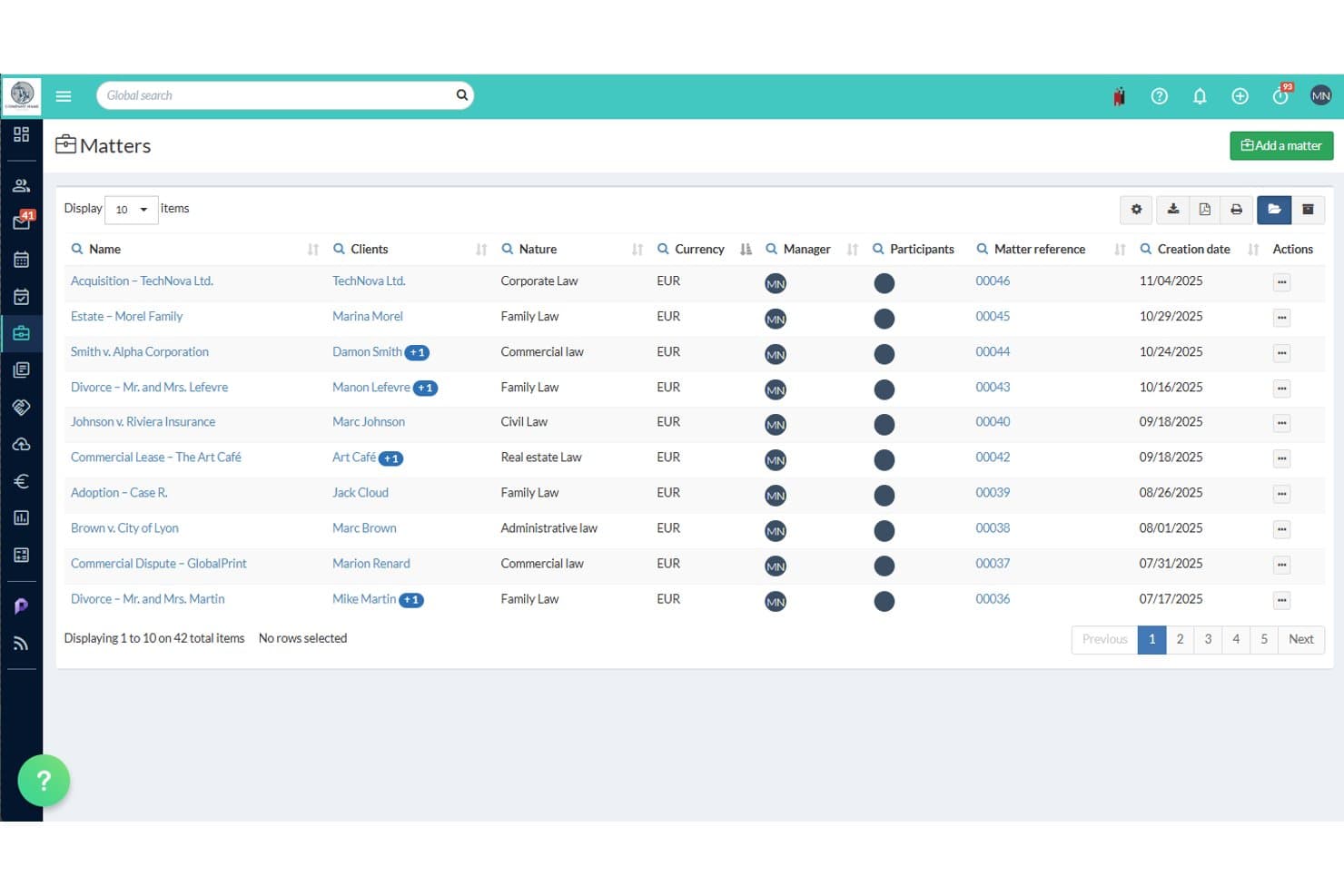
Jarvis Legal (Jarvis One) offers a Matters list view displaying 42 legal cases with details like client names, case nature, currency, manager, and creation date. Jarvis Legal is a web-based legal practice management platform covering matter management, time tracking, billing, document automation, and client communication tools for solo practitioners and small law firms.
Who Is Jarvis Legal Best For?
Jarvis Legal is a strong fit for small European law firms, particularly those in France, that need a practice management platform with built-in document automation and client communication tools.
Why I Picked Jarvis Legal
Jarvis Legal earns its spot as one of the best on my shortlist because of how well it handles document templates and client-facing workflows. I particularly like the eParapheur feature, which runs a validation workflow on documents before they go to clients, catching errors before they leave the office. The client portal adds another layer: clients can view bills, make payments, and exchange files directly, keeping all communication in one place rather than scattered across email threads.
Jarvis Legal Key Features
- Matter management: Track cases with custom fields, multiple billing establishments, and status tracking for each matter.
- Time tracking: Log billable hours using simultaneous stopwatches, direct entry, or calendar appointment conversion.
- Calendar integrations: Sync court dates, meetings, and deadlines with Microsoft Outlook and Office 365 calendars.
- Reporting dashboards: Access real-time analytics on firm performance, profitability, and productivity.
Jarvis Legal Integrations
Jarvis Legal offers native integrations with Microsoft 365, Outlook, and SharePoint. An API is available for custom integrations.
What's Free?
Jarvis Legal's free plan, Jarvis One, is a free-forever offering exclusively for law students and law professors, with no credit card or commitment required. It's not available to practicing attorneys, so working legal professionals will need to start with the 14-day free trial on a paid plan.
Pros and Cons
Pros:
- Real-time analytics on firm profitability and performance
- Multiple simultaneous stopwatches for time tracking
- Strong matter management with custom field options
Cons:
- Interface and support primarily in French
- Free plan excludes practicing attorneys entirely
Learn more about Jarvis Legal (Jarvis One):
LexATT manages matters, documents, billing, and client collaboration with AI tools. LexATT is an AI-native legal case management platform that combines matter tracking, document automation, time and billing, and client collaboration in a single unified workspace, with both a free cloud plan and an open-source self-hosted edition.
Who Is LexATT Best For?
Solo practitioners and small law firms that want a free, full-featured case management platform without managing complex infrastructure will find LexATT a strong fit.
Why I Picked LexATT
LexATT earns its spot as one of the best on my shortlist because of how it handles matter timelines. Every email, filing, note, and court date logs automatically into one chronological feed per matter, so nothing gets lost across inboxes or shared drives. I like that I can a colleague inside a specific matter and search the full timeline by keyword to pull up exactly what I need during a client call.
LexATT Key Features
- Open-source self-hosting option: Download and run your own instance of LexATT with full feature access and no user limits.
- Document automation and templates: Generate legal documents automatically using customizable templates connected to matters.
- Role-based dashboards: See tailored workspaces for partners, associates, and paralegals with matter-specific assignments and updates.
- Integrated e-signature support: Send documents for signing via DocuSign, Adobe Sign, or HelloSign directly from the platform.
LexATT Integrations
LexATT offers native integrations with Google Calendar, Outlook, iManage, NetDocuments, SharePoint, QuickBooks, Xero, Stripe, LawPay, DocuSign, and Adobe Sign. An API is available for custom integrations.
What's Free?
LexATT offers two free-forever options: a Free Cloud plan for up to 10 users with unlimited matters and 50 GB of storage, and a fully open-source self-hosted edition with unlimited users and unlimited storage. The Free Cloud plan includes a limited version of the AI Assistant, while premium integrations and advanced AI features are reserved for the paid Professional plan.
Pros and Cons
Pros:
- Document templates auto-populate from matter data
- Self-hosted edition allows unlimited free users
- Automatic timeline logs every matter activity
Cons:
- Smaller user community than established competitors
- AI assistant restricted on the free plan
Learn more about LexATT:
Outro software gratuito de gestão de processos jurídicos
Eis algumas opções adicionais de software gratuito de gestão de processos jurídicos que não entraram na minha seleção, mas que vale a pena conhecer:
- 11DocketfloBest for document automation in legal matters
- 12Konfidential.lawBest for trust accounting in small firms
- 13ZelicanBest for secure document sharing within cases
- 14QuillmaticBest for AI-powered legal drafting and filing
- 15ClarraBest for real-time matter collaboration
- 16Vertex.LegalBest for customizable workflow steps on matters
- 17FirmChambersBest for case management with email sync
- 18LawWorksBest for legal aid case and intake tracking
- 19JurisdocxBest for automated court-ready documents
- 20Timeline DigitalBest for drag-and-drop case timelines
How I Evaluate Free Legal Case Management Software
First, I define what counts as free. For legal case management, that means a permanent free plan—a free trial won't cut it when dropping access mid-representation puts client service and ethical obligations at risk. From there, I evaluate each platform against core functionality requirements and the differentiating factors that distinguish one tool from another.
Core Functionality (Table Stakes for This List)
In addition to my free offer requirements, I also use a scoring system to select tools for my list. Here's how it works:
I rank each one on a scale from 0 (does not offer the functionality) to 5 (excels in this area) for each core functionality listed below. Then, I calculate the tool's total score into a percentage. Each tool needs to achieve a minimum total score of 65% to be considered for inclusion.
- Matter Management: I look for the ability to create individual case records with client linkage, status tracking, and case-type labels—so you can pull up a family law matter and immediately see its stage, parties, and history.
- Contact Management: Each tool should let you store client, opposing counsel, and court contacts tied directly to matters rather than floating in a generic address book.
- Calendar & Deadlines: I evaluate whether the calendar supports scheduled reminders for court dates, filing deadlines, and statute-of-limitations windows that keep you ahead of critical dates.
- Document Management: The platform should offer organized, matter-level file storage—think uploading a signed retainer agreement and finding it under the right case without digging through folders.
- Task Management: I check for task assignment with due dates and responsible parties linked to specific matters, so a paralegal knows exactly what's owed on each case and when.
- Time & Billing: Free plans should include at least basic time entry tied to matters and simple invoice generation, letting you log billable hours on a consultation and send a client invoice from the same system.
Once I have a list of tools that meet the criteria, I consider what sets each platform apart.
Differentiating Factors (What Sets Vendors Apart)
Here's how I compare and contrast different vendors:
Standout Features
Document templates are a key differentiator. Being able to generate engagement letters or pleadings from reusable templates saves hours of manual drafting on each new matter. I also look for a client portal, where clients can check case updates and share documents without relying on email chains. Free plans that include payment tracking alongside time entry and invoicing are worth prioritizing, since you can manage the full billing cycle from one platform.
Beyond Features
Data security matters here—I check whether the vendor offers encryption and clear data ownership policies, since you're trusting client-confidential information to a free platform. Ease of setup is another priority. Free plans rarely include onboarding support, so I look for self-service tutorials and data import tools that let a solo attorney get up and running without IT help. I also evaluate the upgrade path, because a free tier with harsh seat or matter caps can force a costly migration just as your caseload grows.
Como escolher software gratuito de gestão de processos jurídicos
É fácil perder-se em listas longas de funcionalidades e estruturas de preços complexas. Para o ajudar a manter o foco enquanto analisa o seu processo específico de seleção de software, apresentamos uma lista de fatores a ter em conta:
| Fator | O que considerar |
|---|---|
| FatorEscalabilidade | O que considerarA plataforma conseguirá lidar com mais utilizadores ou clientes se o seu escritório crescer, ou os limites do plano gratuito obrigá-lo-ão a mudar mais tarde? |
| FatorIntegrações | O que considerarO sistema liga-se ao seu correio eletrónico, calendário, ferramentas de contabilidade ou assinatura eletrónica para reduzir a introdução manual de dados? |
| FatorPersonalização | O que considerarPode adaptar facilmente campos, fluxos de trabalho ou modelos de documentos à sua área de prática específica, como direito da imigração ou direito da família? |
| FatorFacilidade de utilização | O que considerarO painel é fácil de utilizar? Com que rapidez pode aprender os conceitos básicos, ou pode um membro da equipa fazê-lo sem ajuda externa? |
| FatorImplementação e integração inicial | O que considerarExistem tutoriais, ferramentas de importação de dados ou bases de conhecimento para o ajudar a migrar de folhas de cálculo ou de outra plataforma? |
| FatorCusto | O que considerarO plano gratuito cobre as suas necessidades essenciais a longo prazo — ou é provável que encontre bloqueios de funcionalidades pagas ou custos adicionais por utilizador à medida que cresce? |
| FatorMedidas de segurança | O que considerarO fornecedor disponibiliza encriptação, políticas de dados claras e conformidade com as normas jurídicas relevantes na sua região? |
| FatorDisponibilidade do apoio | O que considerarQue tipo de ajuda recebe se ficar bloqueado? Os utilizadores gratuitos poderão não ter acesso a conversas em direto ou apoio telefónico — planeie em conformidade. |
O que é software gratuito de gestão de processos jurídicos?
O software gratuito de gestão de processos jurídicos é um sistema que permite a escritórios de advogados, equipas de apoio judiciário e advogados em prática individual organizar processos, documentos, contactos, prazos e faturação sem custos de subscrição contínuos. Estas plataformas disponibilizam ferramentas essenciais para acompanhar os assuntos dos clientes e cumprir as tarefas previstas, normalmente através de um plano gratuito de longa duração que permite apoiar continuamente o trabalho com clientes.
Funcionalidades do software gratuito de gestão de processos jurídicos
Vamos analisar as funcionalidades normalmente encontradas no software de gestão de processos jurídicos e quais são geralmente incluídas nos planos gratuitos e pagos.
Funcionalidades normalmente gratuitas do software de gestão de processos jurídicos
- Acompanhamento de processos e assuntos: Crie, organize e gere ficheiros individuais de processos com dados do cliente, estado e datas importantes, mantendo toda a informação acessível.
- Gestão básica de contactos: Armazene os dados de contacto dos clientes, advogados da parte contrária e outras partes numa lista centralizada associada aos registos dos processos.
- Armazenamento de documentos: Carregue, organize e consulte documentos jurídicos associados a assuntos específicos para facilitar a consulta e a partilha.
- Calendário e lembretes: Agende datas de audiências, prazos e tarefas com lembretes integrados, para que nada fique esquecido.
- Listas de tarefas e afazeres: Atribua, defina prioridades e acompanhe tarefas associadas a processos específicos ou a membros da equipa, mantendo todos responsáveis.
- Acompanhamento básico do tempo: Registe as horas faturáveis e associe-as a assuntos específicos, obtendo uma visão geral de onde o tempo é despendido.
- Faturação simples: Crie faturas diretas para os clientes com base no tempo faturável ou em honorários fixos.
- Relatórios básicos: Crie relatórios padrão sobre assuntos, faturação ou atividade para acompanhar o progresso em curso.
- Gestão de utilizadores: Adicione membros da equipa e atribua processos ou permissões de acesso de acordo com as funções.
Funcionalidades normalmente pagas do software de gestão de processos jurídicos
- Criação automatizada de documentos: Gere documentos jurídicos a partir de modelos personalizáveis, reduzindo o trabalho repetitivo de redação em formulários utilizados com frequência.
- Automatização de fluxos de trabalho: Configure fluxos de trabalho acionados por eventos para admissões, aprovações ou fases recorrentes de assuntos, eliminando passos manuais repetitivos.
- Ferramentas avançadas de faturação: Tenha acesso à faturação em lote, à contabilidade de fundos fiduciários, à integração do processamento de pagamentos e a opções de faturação compatíveis com LEDES para requisitos complexos dos clientes.
- Agendamento baseado em regras: Utilize regras específicas da jurisdição para calcular e acompanhar automaticamente os prazos jurídicos, minimizando erros de calendário.
- Acesso ao portal do cliente: Ofereça aos clientes um portal seguro onde possam consultar atualizações, trocar documentos, enviar mensagens à sua equipa e pagar faturas online.
- Verificação de conflitos: Analise a sua base de dados de assuntos e contactos para detetar potenciais conflitos antes de aceitar novos processos ou clientes.
- API e integrações avançadas: Ligue a sua plataforma a uma gama mais ampla de ferramentas, como sistemas de contabilidade, assinatura eletrónica e gestão documental.
- Suporte à migração de dados: Obtenha assistência prática ou ferramentas avançadas para transferir grandes volumes de dados de sistemas antigos.
- Permissões e segurança personalizadas: Controle, com um nível de detalhe granular, quem pode aceder, editar ou consultar determinados assuntos, documentos ou módulos.
- Suporte prioritário ao cliente: Beneficie de suporte em direto, integração dedicada ou assistência técnica VIP para resolver problemas rapidamente.
Vantagens do software gratuito de gestão de processos jurídicos
A implementação de software gratuito de gestão de processos jurídicos proporciona várias vantagens para a sua equipa e para a sua empresa. Eis algumas das vantagens que pode esperar:
- Informação centralizada: Todos os dados dos processos, documentos, tarefas e contactos são armazenados num sistema organizado, reduzindo a perda de ficheiros e o trabalho duplicado.
- Gestão de prazos: Os calendários e lembretes integrados ajudam-no a cumprir consistentemente as datas de audiências e os prazos de apresentação de documentos, reduzindo o risco de erros dispendiosos.
- Colaboração acessível: Os membros da equipa e, em alguns casos, os clientes podem aceder de forma segura às informações e atualizações dos processos a partir de qualquer lugar, facilitando o trabalho remoto.
- Maior eficiência na faturação: Registe o tempo e gere faturas a partir do mesmo sistema, reduzindo os serviços faturáveis não registados e simplificando os processos de fim de mês.
- Controlo de custos: Com um plano gratuito a longo prazo, evita custos iniciais de software e pode fazer a atualização apenas quando a sua empresa ultrapassar o nível gratuito.
- Integração simplificada: As interfaces intuitivas e as ferramentas de importação permitem que advogados a título individual e pequenos escritórios comecem rapidamente, sem precisarem de recursos de TI dedicados.
- Melhoria do serviço ao cliente: Os portais seguros e as funcionalidades de partilha de documentos mantêm os clientes informados e envolvidos ao longo de cada assunto.
Custos e preços do software de gestão de processos jurídicos
Percebo que veio a este artigo à procura das melhores opções de software de gestão de processos jurídicos disponíveis gratuitamente. No entanto, uma vez que os planos gratuitos oferecem apenas funcionalidades limitadas, é bastante provável que precise de aumentar o seu plano no futuro.
A tabela abaixo resume os planos mais comuns, os respetivos preços médios e as funcionalidades normalmente incluídas no software de gestão de processos jurídicos:
Tabela de comparação de planos para software de gestão de processos jurídicos
| Tipo de plano | Preço médio | Funcionalidades comuns |
|---|---|---|
| Tipo de planoPlano gratuito | Preço médio$0 | Funcionalidades comunsAcompanhamento básico de processos, gestão simples de contactos, calendário, armazenamento básico de documentos, listas de tarefas e faturação simples. |
| Tipo de planoPlano pessoal | Preço médio$5–$25/utilizador/mês | Funcionalidades comunsArmazenamento ampliado, modelos personalizáveis, relatórios melhorados, fluxos de trabalho básicos e integrações com e-mail e calendário. |
| Tipo de planoPlano empresarial | Preço médio$25–$50/utilizador/mês | Funcionalidades comunsFerramentas avançadas de faturação, automatização de documentos, automatização de fluxos de trabalho, portal do cliente, permissões avançadas e suporte padrão. |
| Tipo de planoPlano empresarial de grande dimensão | Preço médio$50–$100+/utilizador/mês | Funcionalidades comunsIntegrações personalizadas, segurança avançada, acesso à API, apoio à migração de dados, suporte prioritário e funcionalidades complexas de conformidade. |
Perguntas frequentes sobre software gratuito de gestão de processos jurídicos
Eis algumas respostas a perguntas comuns sobre software gratuito de gestão de processos jurídicos:
As ferramentas gratuitas de gestão de processos jurídicos são suficientemente seguras para informações confidenciais?
Sim, muitas ferramentas gratuitas de gestão de processos jurídicos utilizam encriptação e práticas de segurança padrão do setor, mas deve sempre consultar a política de privacidade de cada fornecedor, a localização do armazenamento de dados e as certificações de conformidade antes de adicionar dados sensíveis.
Quais são as limitações mais comuns do software gratuito de gestão de processos jurídicos?
Os planos gratuitos costumam limitar o número de utilizadores, o volume de processos, o armazenamento de documentos ou o acesso a funcionalidades avançadas, como automatização, fluxos de trabalho personalizados ou portais do cliente. Por isso, é importante verificar se estas limitações se adequam às suas necessidades atuais e futuras.
Posso migrar os meus dados se deixar de ter espaço no plano gratuito?
Sim, a maioria das plataformas reputadas disponibiliza ferramentas de exportação de dados, embora o processo possa ser manual ou limitado nos escalões gratuitos. Confirme se os seus dados podem ser transferidos facilmente caso mude de fornecedor ou atualize o plano.
As soluções gratuitas de gestão de processos jurídicos incluem integração com ferramentas de e-mail e calendário?
Alguns planos gratuitos oferecem integração básica com plataformas como o Outlook ou o Google Workspace, mas a sincronização mais completa, as integrações avançadas ou o acesso à API costumam exigir uma subscrição paga.
Como escolher entre diferentes opções gratuitas de gestão de processos?
Concentre-se nas necessidades da área de prática do seu escritório, nas expectativas de crescimento, na qualidade e nas limitações do escalão gratuito, nas opções de suporte disponíveis e no tempo necessário para configurar e utilizar a plataforma no dia a dia.