

O software de gestão de processos de lesões pessoais ajuda-o a organizar processos, acompanhar prazos, gerir informações dos clientes e armazenar documentos essenciais — tudo num só lugar. A ferramenta certa poupa-lhe tempo, aumenta a sua produtividade e facilita a prestação de uma melhor experiência aos seus clientes.
Coloquei estas soluções à prova, para que possa evitar a sobrecarga e encontrar um software que resolva os verdadeiros desafios da área das lesões pessoais, como acompanhar registos médicos, calcular indemnizações e manter tudo a funcionar sem problemas.
Why Trust Our Software Recommendations
6,700+
Reviews
20
Industry experts
16+
Evaluation factors
14
Years
Our team has been testing and reviewing software since 2012. As legal practice leaders ourselves, we know how difficult—and important—it is to choose the right software.
For this guide, we evaluated tools using hands-on testing and independent research, scoring tools using our selection criteria.
Our reviews reflect our human editorial judgment, not a sales pitch.
Tabela de comparação de software de gestão de processos de lesões pessoais
Esta tabela de comparação resume os detalhes de preços do meu software de gestão de processos de lesões pessoais:
| Tool | Best For | Trial Info | Price | ||
|---|---|---|---|---|---|
| 1 | Best for role-based access controls | Free demo available | Pricing upon request | Website | |
| 2 | Best for automated task tracking in PI cases | Free demo available | Pricing upon request | Website | |
| 3 | Best for robust integrations and billing features | Free trial available | From £79/user/month | Website | |
| 4 | Best for fast personal injury firm onboarding | Free demo available | From $90/user/month | Website | |
| 5 | Best for cloud-based, end-to-end case management | Free demo available | Pricing upon request | Website | |
| 6 | Best for customizable case management workflows | Free demo available | Pricing upon request | Website | |
| 7 | Best for unified accounting and compliance | 10-day free trial + free demo available | From $49/user/month (billed annually) | Website | |
| 8 | Best for comprehensive case management | Free demo available | Pricing upon request | Website | |
| 9 | Best for streamlining workflow and collaboration | Free demo available | Pricing upon request | Website | |
| 10 | Best for integrated document generation | Free trial available | Pricing upon request | Website |


Análises do melhor software de gestão de processos de lesões pessoais
Seguem-se os meus resumos detalhados do melhor software de gestão de processos de lesões pessoais que entrou na minha lista restrita. As minhas análises apresentam uma análise detalhada das funcionalidades, integrações e melhores casos de utilização de cada software, para o ajudar a encontrar a melhor opção para si.
 Best for role-based access controls
- Free demo available
- Pricing upon request
Visit WebsiteCustomer Rating:4.4/5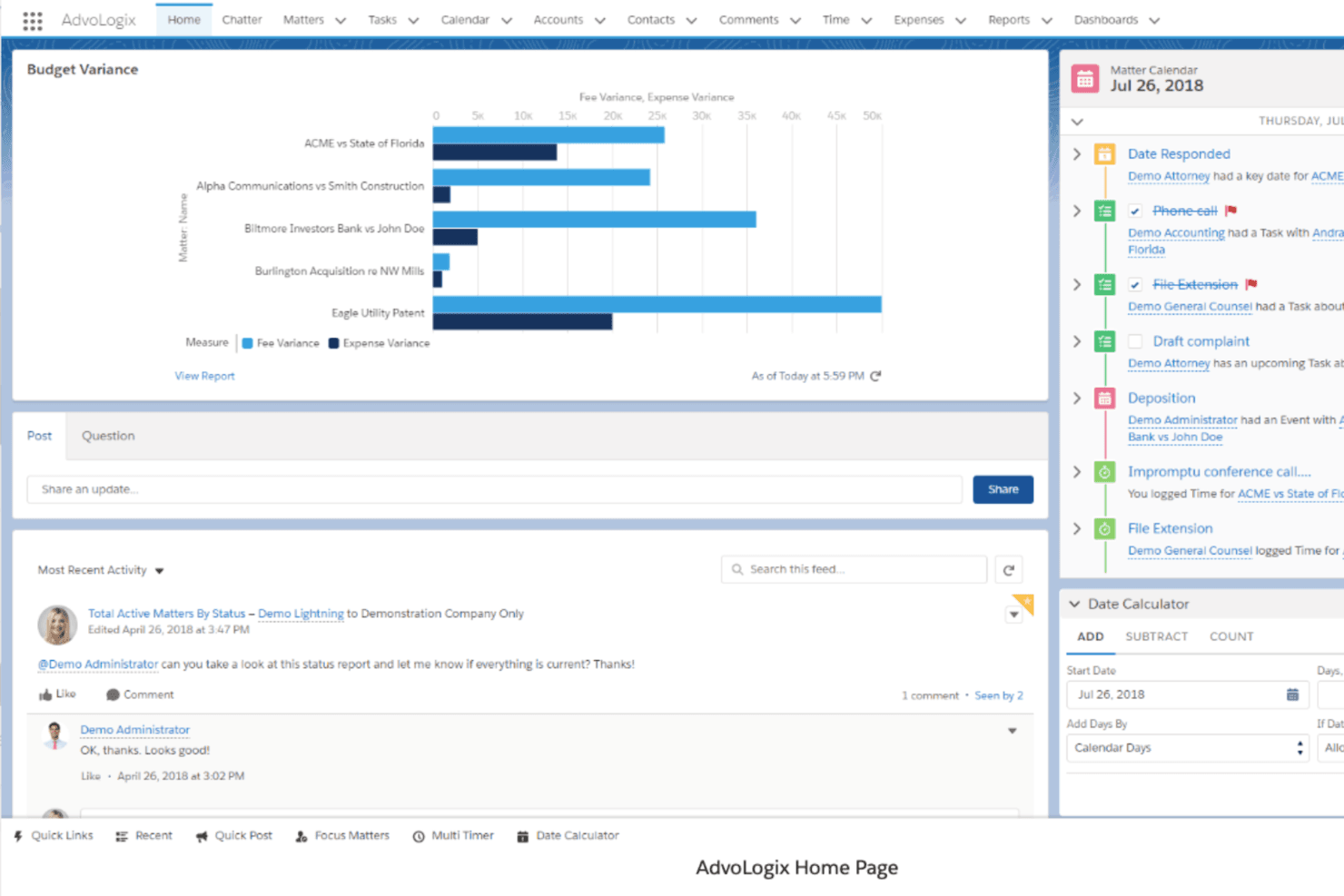
Mitratech CaseCloud dashboard showing matter management insights, budget variance reporting, and activity tracking within a centralized legal operations workspace. Mitratech CaseCloud is a Salesforce-native case and matter management platform for law firms that centralizes intake, document management, workflow automation, and legal spend tracking across practice areas.
Who Is Mitratech CaseCloud Best For?
Mid-to-large law firms that need enterprise-grade security, configurable workflows, and centralized matter oversight across multiple practice areas.
Why I Picked Mitratech CaseCloud
I've included Mitratech CaseCloud in my top picks because its role-based access controls are built directly into Salesforce's security architecture, giving PI firms field-level permissions and full audit trails without extra compliance tooling. In practice, that means a paralegal sees only their assigned cases while a partner gets firm-wide financial and matter visibility. I also like that practice-specific dashboards let you configure exactly what each role sees across active matters.
Mitratech CaseCloud Key Features
- Configurable intake workflows: Build custom matter intake forms, automate routing, and set specific approval paths for new personal injury cases.
- Matter-level financial tracking: Track budgets, expenses, and billing data for each case from intake to resolution within the platform.
- Integrated document management: Store, search, and version legal documents securely with access controls directly in the platform.
- Automated task generation: Set up automatic creation of assignments, reminders, and deadlines based on case type and workflow rules.
Mitratech CaseCloud Integrations
Native integrations include Salesforce, iManage, SharePoint, NetDocuments, and Blackthorn SMS. An API is available for custom integrations.
Pros and Cons
Pros:
- Configurable workflows adapt to PI case stages
- Built on Salesforce's enterprise security infrastructure
- Granular role-based permissions for every user
Cons:
- Setup requires significant IT involvement
- Not purpose-built for personal injury firms
Learn more about Mitratech Casecloud: Best for automated task tracking in PI cases
- Free demo available
- Pricing upon request
Visit WebsiteCustomer Rating:4.8/5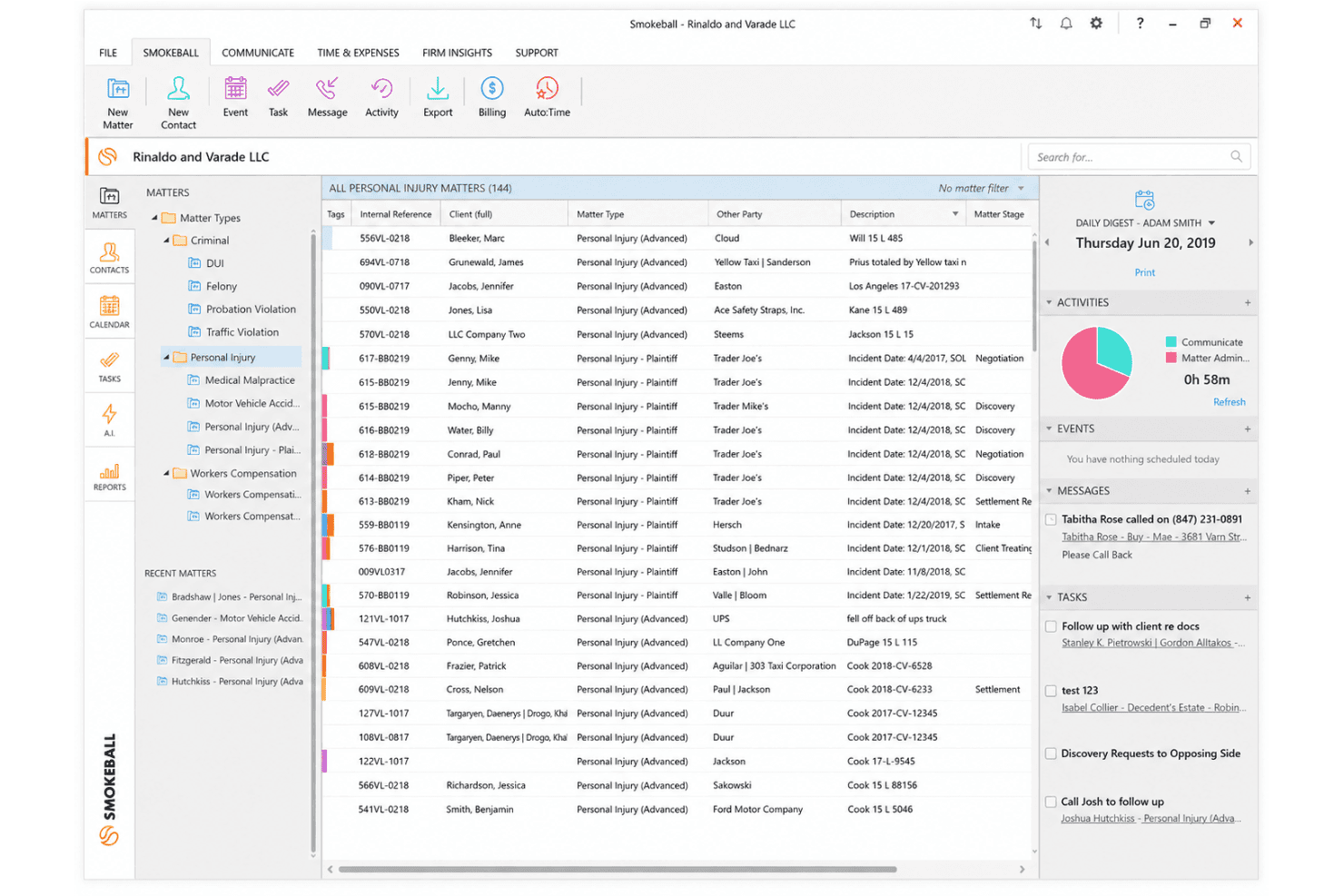
Smokeball organizes personal injury matters with file management, matter tags, and a Daily Digest sidebar for task and activity tracking. Smokeball is a legal practice management platform built for small and mid-sized law firms, combining PI-specific case workflows, automated time tracking, document automation, client intake, trust accounting, and billing in one system.
Who Is Smokeball Best For?
Smokeball is a strong fit for plaintiff personal injury firms with small-to-mid-sized teams managing high case volumes without adding headcount.
Why I Picked Smokeball
I picked Smokeball as one of the best because its PI Workflows automatically create and assign tasks as a case advances through each stage, triggering document drafts like medical records requests and demand letters without any manual input. AutoTime runs in the background, recording every minute worked and tying it to the correct matter automatically. I also rely on Archie AI to generate demand letters and case summaries directly from existing case data.
Smokeball Key Features
- Client portal: Securely share documents, case updates, and messages with personal injury clients using a browser-based portal with two-factor authentication.
- TemplateLab document library: Access a library of PI-specific court forms and templates that auto-fill with matter data for efficient document production.
- QuickBooks Online integration: Sync billing and trust transactions seamlessly with QuickBooks to maintain compliant PI firm accounting.
- PI intake forms: Capture detailed injury data, treatment history, insurance information, and track form completion with customizable online intake workflows.
Smokeball Integrations
Smokeball offers native integrations with Microsoft 365, Outlook, QuickBooks Online, InfoTrack, LawPay, and offers marketplace integrations with medical records services like YoCierge, AcroDocz, Tavrn, and Arctrieval. An API is available for custom integrations.
Pros and Cons
Pros:
- Built-in SMS keeps PI clients informed instantly
- PI workflows auto-trigger documents at each stage
- AutoTime captures billable time automatically in background
Cons:
- Reporting dashboards lack deep customization options
- Windows desktop app limits Mac users
Learn more about Smokeball: 3Best for robust integrations and billing features
Clio
- Free trial available
- From £79/user/month
Visit WebsiteCustomer Rating:4.7/5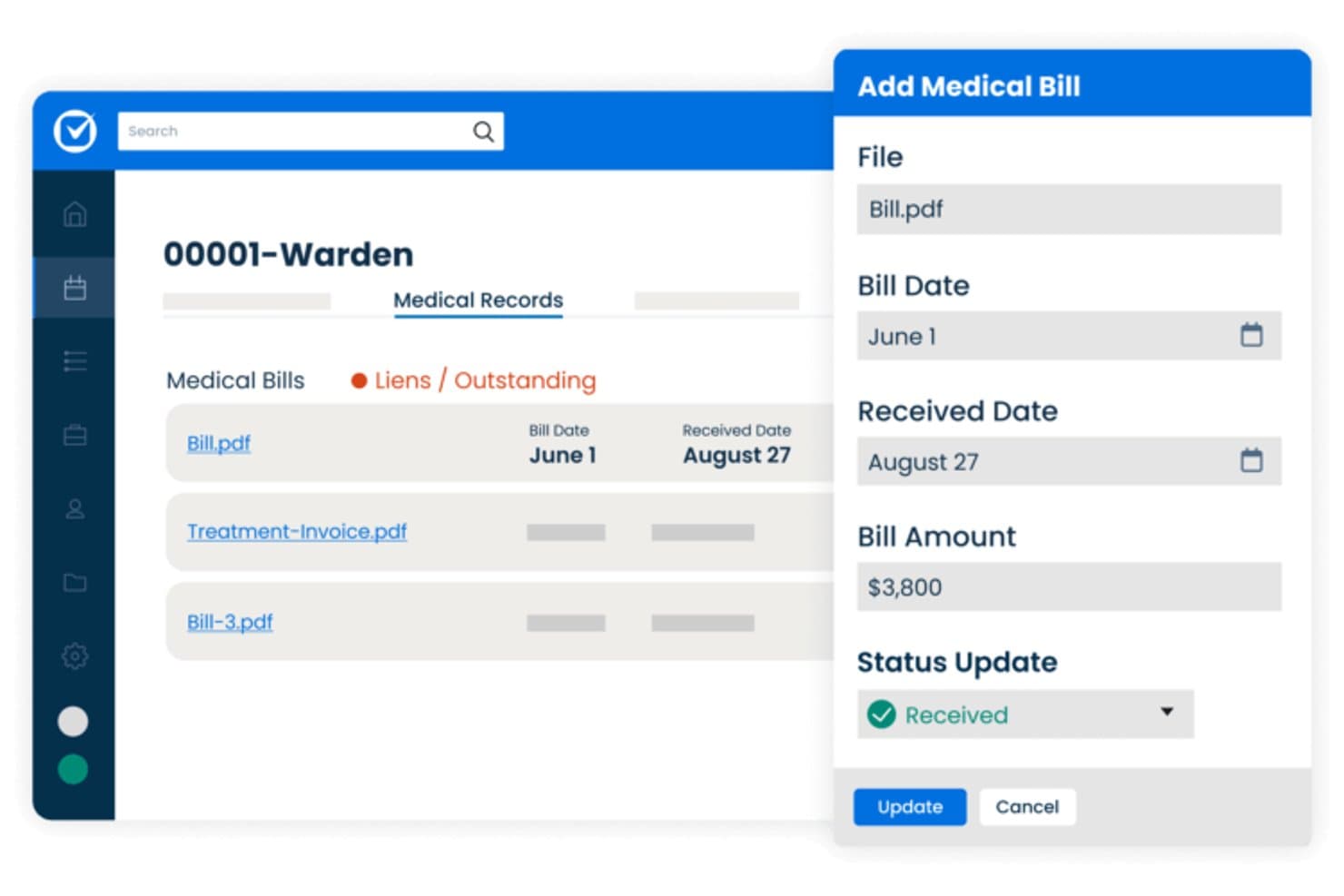
Clio offers a medical bill management interface that allows personal injury firms to track bill dates, received dates, amounts, and lien statuses for each client case. Clio is a legal practice management platform that covers matter management, time and expense tracking, contingency fee billing, document automation, client intake, and trust accounting for personal injury firms.
Who Is Clio Best For?
Clio is a strong fit for solo and small personal injury firms that want an all-in-one platform with billing, intake, and case management in a single system.
Why I Picked Clio
Clio earns its spot as one of the best on my shortlist because its billing suite is genuinely purpose-built for contingency-based PI firms. I love that it handles IOLTA-compliant trust accounting, three-way reconciliation, and contingency fee billing natively, without needing a separate accounting tool. Clio Accounting connects directly to matter records, so cost tracking stays attached to the right case file from day one.
Clio Key Features
- AI-powered scheduling automation: Reads court notices and generates calendar events with extracted dates and source context.
- Personal injury document templates: Provides PI-specific templates for demand letters, HIPAA authorizations, and retainer agreements with auto-population.
- Medical record management: Stores confidential medical documents and links related records to individual matters within the platform.
- Secure client communication portal: Allows clients to send messages, upload documents, and check their case status securely online.
Clio Integrations
Clio offers 300+ native integrations, including Xero, QuickBooks Online, Dropbox, Google Drive, Microsoft 365, DocuSign, Zoom, Outlook, RingCentral, and NetDocuments. An API is available for custom integrations.
Pros and Cons
Pros:
- Robust document automation for PI-specific templates
- Client portal supports e-signature and messaging
- Strong IOLTA-compliant trust accounting built in
Cons:
- Limited PI-specific settlement disbursement tools
- No dedicated medical lien tracking features
Learn more about Clio: Best for fast personal injury firm onboarding
- Free demo available
- From $90/user/month
Visit WebsiteCustomer Rating:4.8/5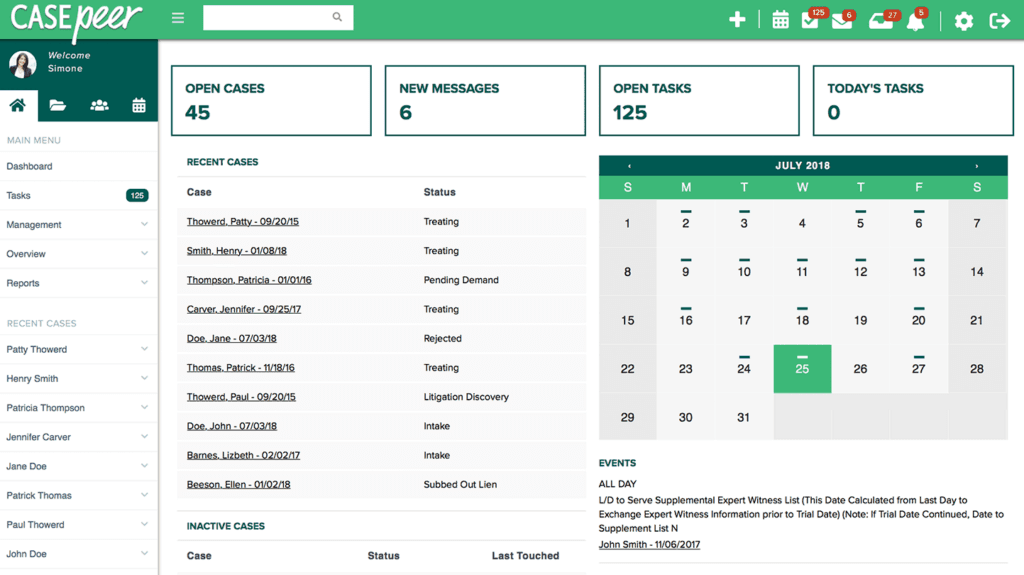
Casepeer Personal Injury Case Management Software Interface CasePeer is a cloud-based personal injury case management platform built exclusively for plaintiff firms, combining intake management, medical treatment tracking, lien management, settlement calculation, document automation, and case reporting in one system.
Who Is CasePeer Best For?
CasePeer is a strong fit for small to mid-sized plaintiff-side personal injury firms looking to manage high case volumes without custom-configuring a general-purpose platform.
Why I Picked CasePeer
CasePeer earns its spot on my shortlist because of how much real visibility it gives into case performance across a firm. I particularly value the High Value Cases report and the Firm Productivity report, which let me quickly see which cases need immediate attention and where staff time is actually going. On the Advanced plan, the data sync and Multi-Office Reporting Suite mean I can monitor performance across locations without pulling separate exports or reconciling spreadsheets.
CasePeer Key Features
- Client communication portal: Clients can message your team, upload documents, and check case status in real time.
- Medical treatment tracking: Track medical appointments, providers, and manage medical bill and lien records per case.
- Document automation and PI templates: Generate demand letters, HIPAA forms, and retainers with PI-specific templates auto-filled from case data.
- Native texting and e-signature tools: Send two-way SMS messages, request e-signatures, and share documents with clients directly from the platform.
CasePeer Integrations
CasePeer offers native integrations with LawPay, QuickBooks Online, Lead Docket, MoveDocs, Multus Medical, Records On Time, Captorra, Apex Chat, Client Chat Live, Ngage, and EvenUp. An API is available for custom integrations.
Pros and Cons
Pros:
- Native SMS and e-signature without third-party tools
- Tracks medical treatment, bills, and liens together
- PI-specific dashboards built directly into the platform
Cons:
- Advanced reporting features require the higher-tier plan
- Designed exclusively for plaintiff-side personal injury firms
 Best for cloud-based, end-to-end case management
- Free demo available
- Pricing upon request
Visit WebsiteCustomer Rating:4.8/5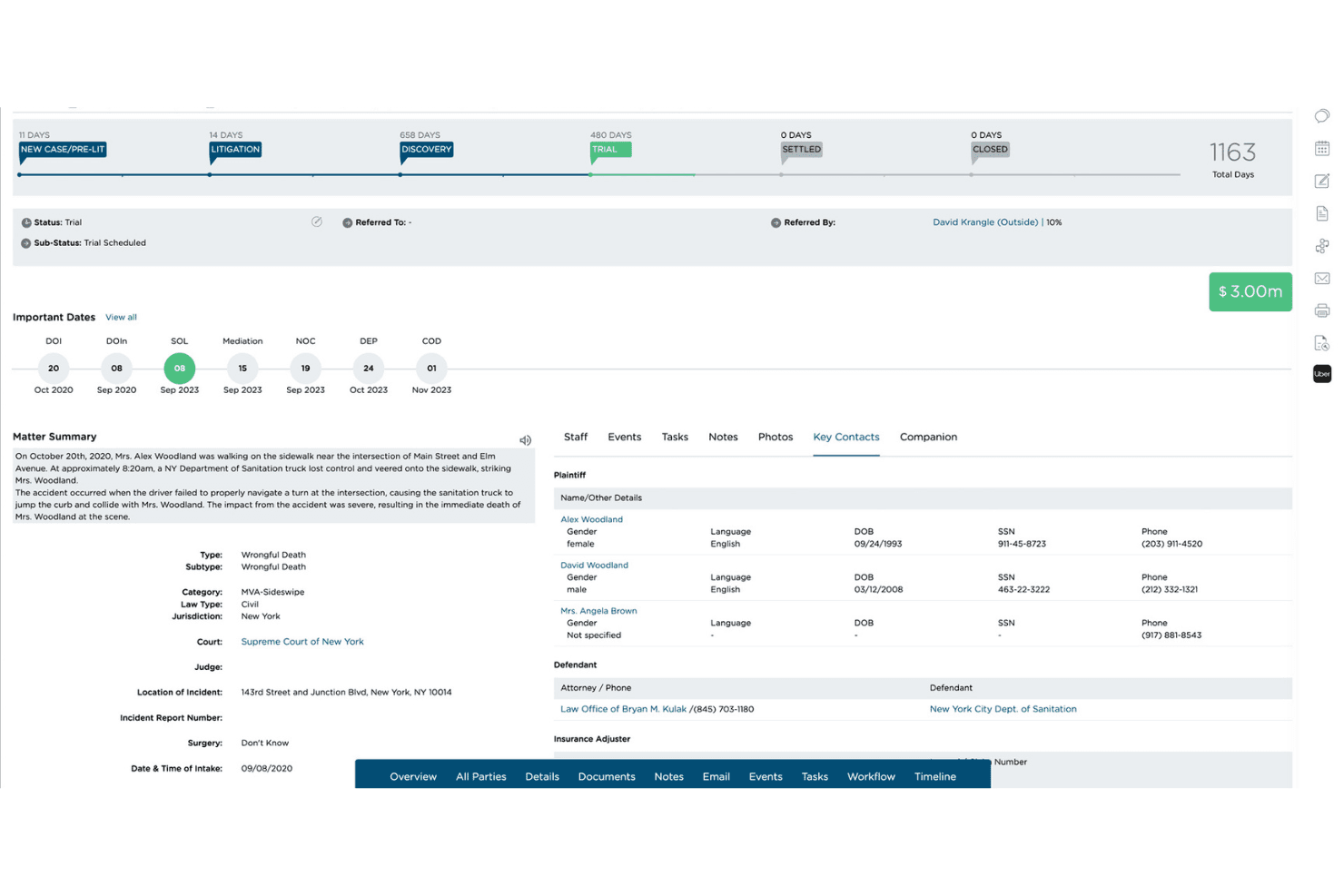
CloudLex provides cloud-based, end-to-end personal injury case management for handling matters, documents, workflows, and client information in one platform. CloudLex is a personal injury case management platform built exclusively for plaintiff law firms, covering intake, medical records tracking, lien management, settlement workflows, document automation, and client communication in one cloud-based system.
Who Is CloudLex Best For?
CloudLex suits small to midsize plaintiff personal injury law firms that manage high case volumes and need a dedicated system built around PI workflows rather than a general-purpose legal tool.
Why I Picked CloudLex
CloudLex earns its spot on my shortlist because it's the only PI platform where the full case lifecycle, from intake through settlement, lives in one cloud-based system. I especially like that Lexee AI is baked directly into the case file, so demand package drafts and medical summaries are tied to the matter rather than generated elsewhere and manually uploaded. The built-in medical records retrieval service is also worth noting: retrieved records land directly in the case file, not in a separate portal.
CloudLex Key Features
- Client messenger: Secure two-way messaging enables clients and legal teams to communicate directly through the platform.
- Referral engine: Manage, send, and track case referrals and fee splits with other firms entirely within CloudLex.
- Calendar and events: Syncs court dates, statutes of limitations, and all deadlines with Google and Outlook calendars.
- Reporting and analytics: Visual dashboards provide insights on settlement ratios, marketing ROI, staff activity, and firm performance.
CloudLex Integrations
CloudLex offers native integrations with QuickBooks Online, DocuSign, Adobe Sign, Google Workspace, and Microsoft Outlook. An API is available for custom integrations.
Pros and Cons
Pros:
- AI drafts demand letters automatically
- Native texting and e-signature included
- Built exclusively for plaintiff PI firms
Cons:
- Mobile app functionality lags the desktop
- Reporting customization is somewhat limited
Learn more about CloudLex: Best for customizable case management workflows
- Free demo available
- Pricing upon request
Visit WebsiteCustomer Rating:4.5/5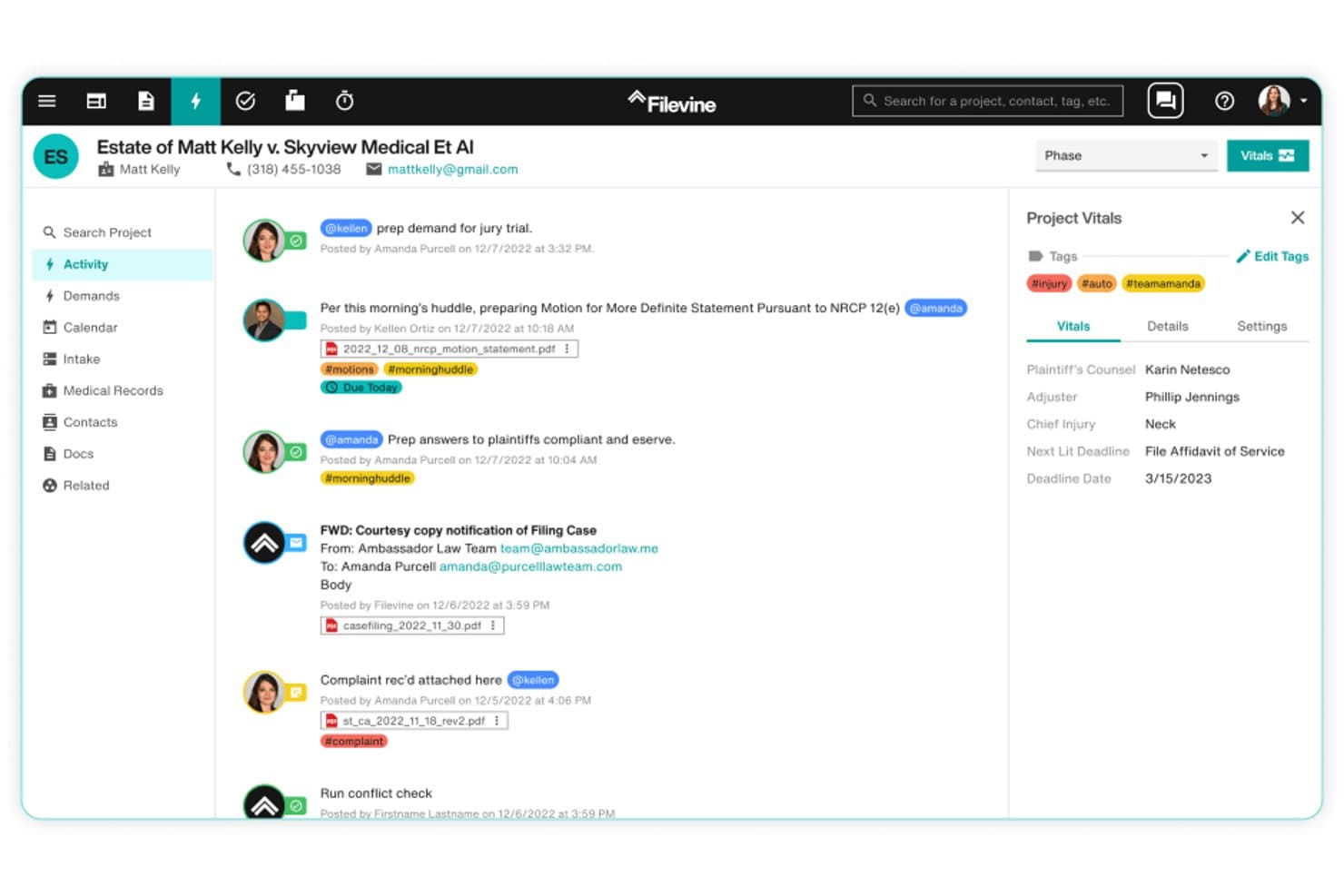
Filevine offers a real-time activity feed with case notes, document attachments, tags, and project vitals for personal injury case management. Filevine is a personal injury case management platform built around customizable workflows, with tools for client intake, medical record tracking, document automation, deadline management, and settlement processing.
Who Is Filevine Best For?
Filevine is a strong fit for plaintiff personal injury firms that need to tailor their case workflows, intake processes, and document pipelines to match how their practice actually runs.
Why I Picked Filevine
Filevine earns its spot as one of the best on my shortlist because no other PI platform gives you this level of control over how a case actually moves through your firm. I love that you can build custom phase workflows that trigger specific tasks (like requesting medical records or sending HIPAA authorizations) automatically when a case advances. MedChron AI then pulls treatment timelines, CPT codes, and diagnosis codes directly into demand packages, cutting what used to take 4-8 hours down to under one.
Filevine Key Features
- Client communication portal: Lets clients message their legal team, upload documents, and e-sign forms in a secure online portal.
- Referral and co-counsel tracking: Tracks referral sources, co-counsel arrangements, and manages fee splits across firms.
- Reporting and settlement analytics: Provides dashboards for settlement values, case statuses, and attorney or paralegal productivity metrics.
- Two-way texting and Vinesign e-signature: Enables native SMS messaging and digital contract signing without third-party plugins.
Filevine Integrations
Filevine offers native integrations with Lead Docket, MoveDocs, Vinesign, Lawmatics, Hona, QuickBooks, DocuSign, and Microsoft 365. An API is available for custom integrations.
Pros and Cons
Pros:
- Native two-way texting and e-signature included
- AI-powered medical record summarization built in
- Highly customizable phase-based case workflows
Cons:
- Reporting customization requires significant setup time
- Steep onboarding for complex workflow configuration
Learn more about Filevine: Best for unified accounting and compliance
- 10-day free trial + free demo available
- From $49/user/month (billed annually)
Visit WebsiteCustomer Rating:4.3/5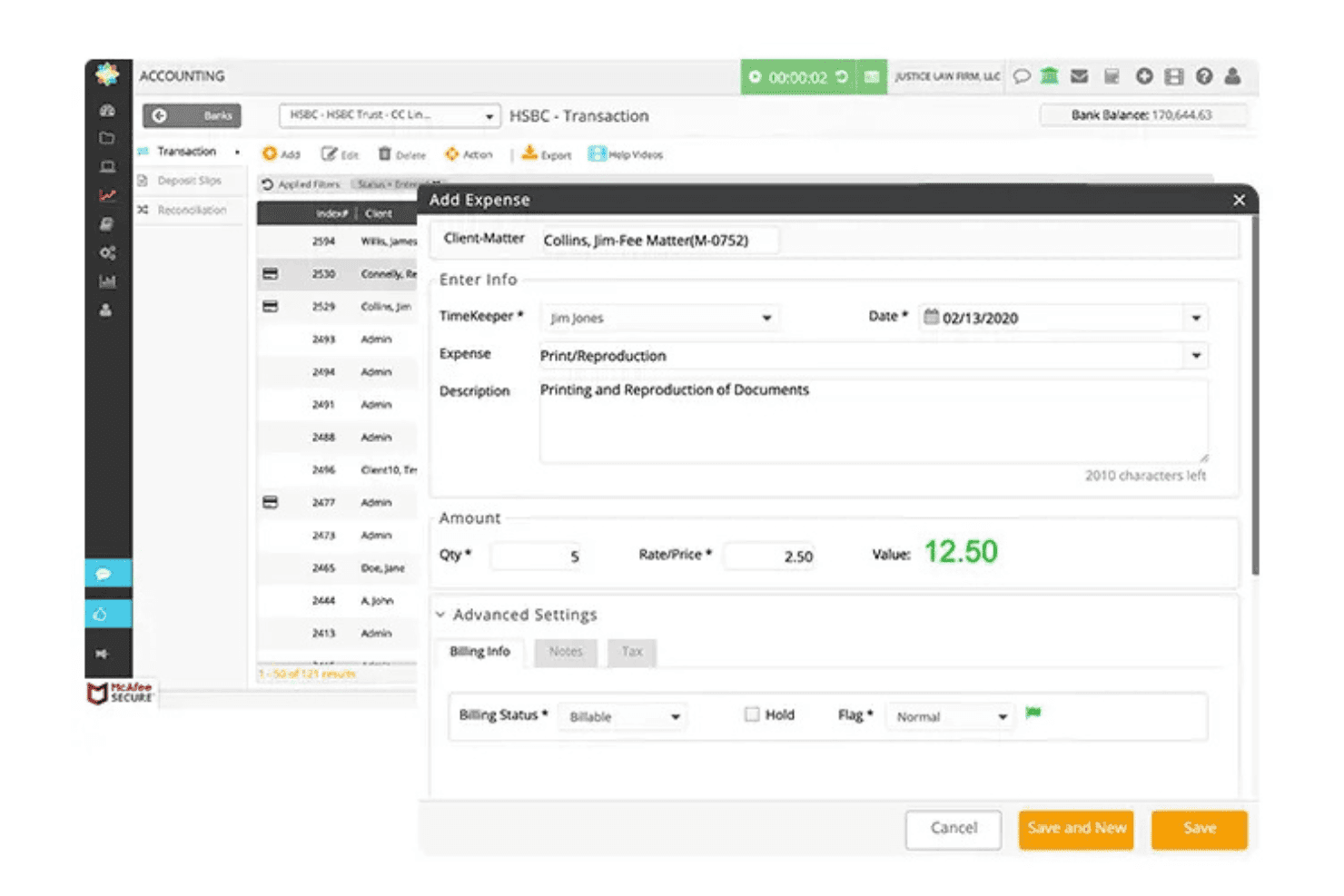
CosmoLex handles cases, billing, documents, and trust accounting in one system. CosmoLex is a cloud-based legal practice management platform that combines matter management, trust and business accounting, time tracking, billing, and document management in a single system purpose-built for law firms.
Who Is CosmoLex Best For?
CosmoLex is a strong fit for small-to-mid-sized personal injury firms that need IOLTA-compliant trust accounting and settlement disbursement built into their practice management platform.
Why I Picked CosmoLex
CosmoLex earns its spot as one of the best on my shortlist because it builds full trust accounting and settlement disbursement directly into the practice management platform. I like that PI firms can pay medical liens and provider invoices individually or in bulk from the matter's settlement account, with every disbursement logged with memos and trust account details. That built-in three-way trust reconciliation means I'm not running a separate QuickBooks account alongside each case file.
CosmoLex Key Features
- Conflict check: Instantly runs a search against your active and archived matters to help identify potential conflicts before case intake.
- Custom field templates: Lets you tailor matter records with PI-relevant data fields like incident details, medical info, and prior claims.
- Secure client portal: Built-in portal enables clients to exchange documents, message your firm, and view important case information.
- Role-based permissions: Assigns granular access rights for attorneys, paralegals, and admin staff across different modules and workflows.
CosmoLex Integrations
CosmoLex offers native integrations with LawPay (CosmoLexPay), Microsoft 365, Google Workspace, Dropbox, and NetDocuments. An API is available for custom integrations.
Pros and Cons
Pros:
- Handles settlement disbursements from within the matter
- Three-way trust reconciliation included natively
- Built-in IOLTA trust accounting, no add-ons
Cons:
- Reporting dashboards lack PI-specific case analytics
- PI intake automation less developed than competitors
Learn more about CosmoLex: Best for comprehensive case management
- Free demo available
- Pricing upon request
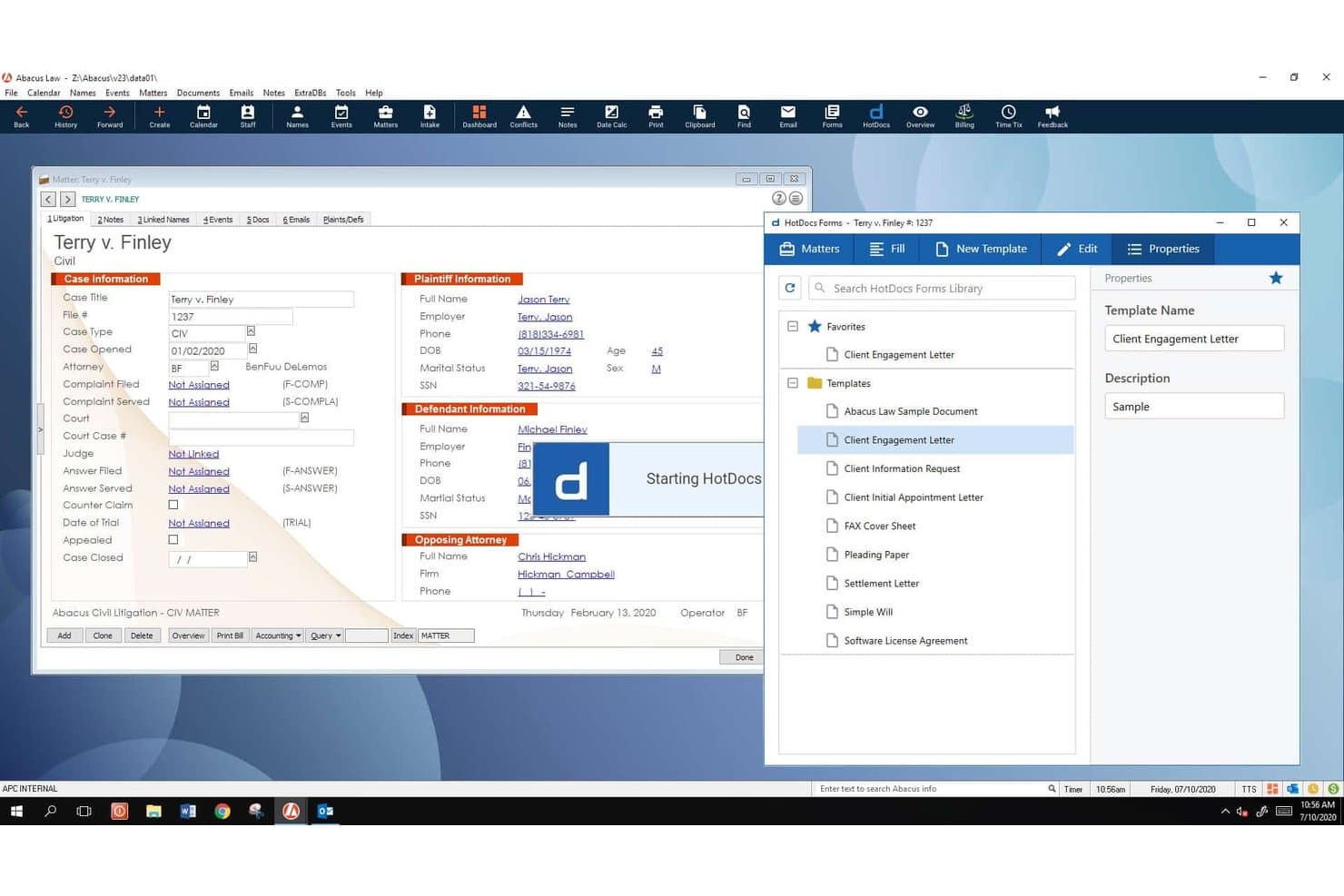
AbacusNext Personal Injury Software Suite offers integrated HotDocs Forms document generation alongside detailed case and plaintiff/defendant information management. AbacusNext, now operating under its parent brand CARET, is a personal injury practice management platform that combines settlement management, rules-based deadline tracking, hard and soft cost tracking, document automation, and contingency billing in one system.
Who Is AbacusNext Personal Injury Software Suite Best For?
It's a strong fit for small to midsize PI firms that want an on-premises or private cloud practice management solution within a Windows and Microsoft 365 environment.
Why I Picked AbacusNext Personal Injury Software Suite
AbacusNext Personal Injury Software Suite earns its spot because it covers the full PI case lifecycle without requiring firms to patch together separate tools. I especially like the Smart Settlement Management module, which generates itemized Settlement Memos for all parties and automatically pulls in every tracked expense. The Abacus Court Rules integration keeps jurisdiction-specific Federal, State, and Local deadlines current, so statutes of limitations stay on track without manual monitoring.
AbacusNext Personal Injury Software Suite Key Features
- Customizable intake forms: Tailor lead capture fields to qualify personal injury cases and track referral sources.
- Client communication portal: Secure portal for clients to upload documents, send messages, and check their case status.
- Rules-based legal calendaring: Automatically apply Federal, State, and Local court rules to key dates and deadlines.
- Contingency fee billing: Built-in tools for contingency fee calculation and consolidated invoice creation for PI matters.
AbacusNext Personal Injury Software Suite Integrations
AbacusNext Personal Injury Software Suite offers native integrations with Microsoft 365, QuickBooks, and HotDocs, and provides an API for custom integrations.
Pros and Cons
Pros:
- On-premises and private cloud deployment options
- Dedicated settlement management with disbursement memos
- Rules-based deadline tracking for PI matters
Cons:
- Limited mobile accessibility for field work
- Dated interface compared to cloud-native competitors
Learn more about AbacusNext Personal Injury Software Suite: Best for streamlining workflow and collaboration
- Free demo available
- Pricing upon request
Visit WebsiteCustomer Rating:4/5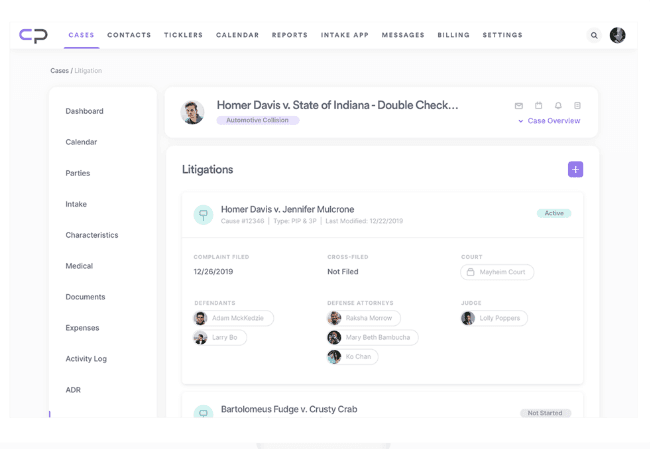
Casepacer Personal Injury Case Management Software Interface CasePacer is a cloud-based personal injury case management platform built specifically for plaintiff firms, combining case tracking, document management, client communication, task workflow automation, and reporting in one system.
Who Is CasePacer Best For?
CasePacer is a strong fit for plaintiff-side personal injury and mass tort firms that manage high caseloads with lean teams.
Why I Picked CasePacer
I picked CasePacer as one of the best because its patented task workflow system keeps every case moving without manual follow-up. My team can assign role-specific task sequences that trigger automatically as cases progress. CP Direct adds a real collaboration layer, letting clients upload documents and message the firm directly from their phones, which cuts the back-and-forth that typically slows high-volume plaintiff practices.
CasePacer Key Features
- CP Vantage analytics: Generate custom reports and dashboards to track case performance, deadlines, and team productivity.
- CP Hub document management: Connect desktop systems to cloud storage for secure, centralized access to legal documents.
- Configurable user roles: Set detailed permissions and access levels by role or team for security and workflow segmentation.
- Cloud deployment options: Choose between a managed cloud solution or onsite deployment based on your firm’s needs.
CasePacer Integrations
CasePacer offers native integrations with Microsoft Outlook and Kenect, and provides an API for custom integrations.
Pros and Cons
Pros:
- Tracks referral sources and co-counsel fee splits
- PI-specific demand letter templates auto-populate case data
- Built-in SMS for client appointment reminders
Cons:
- Trust accounting less advanced than dedicated software
- Interface can feel dated for newer users
Learn more about CasePacer: 10Best for integrated document generation
8am
- Free trial available
- Pricing upon request
Visit WebsiteCustomer Rating:4.6/5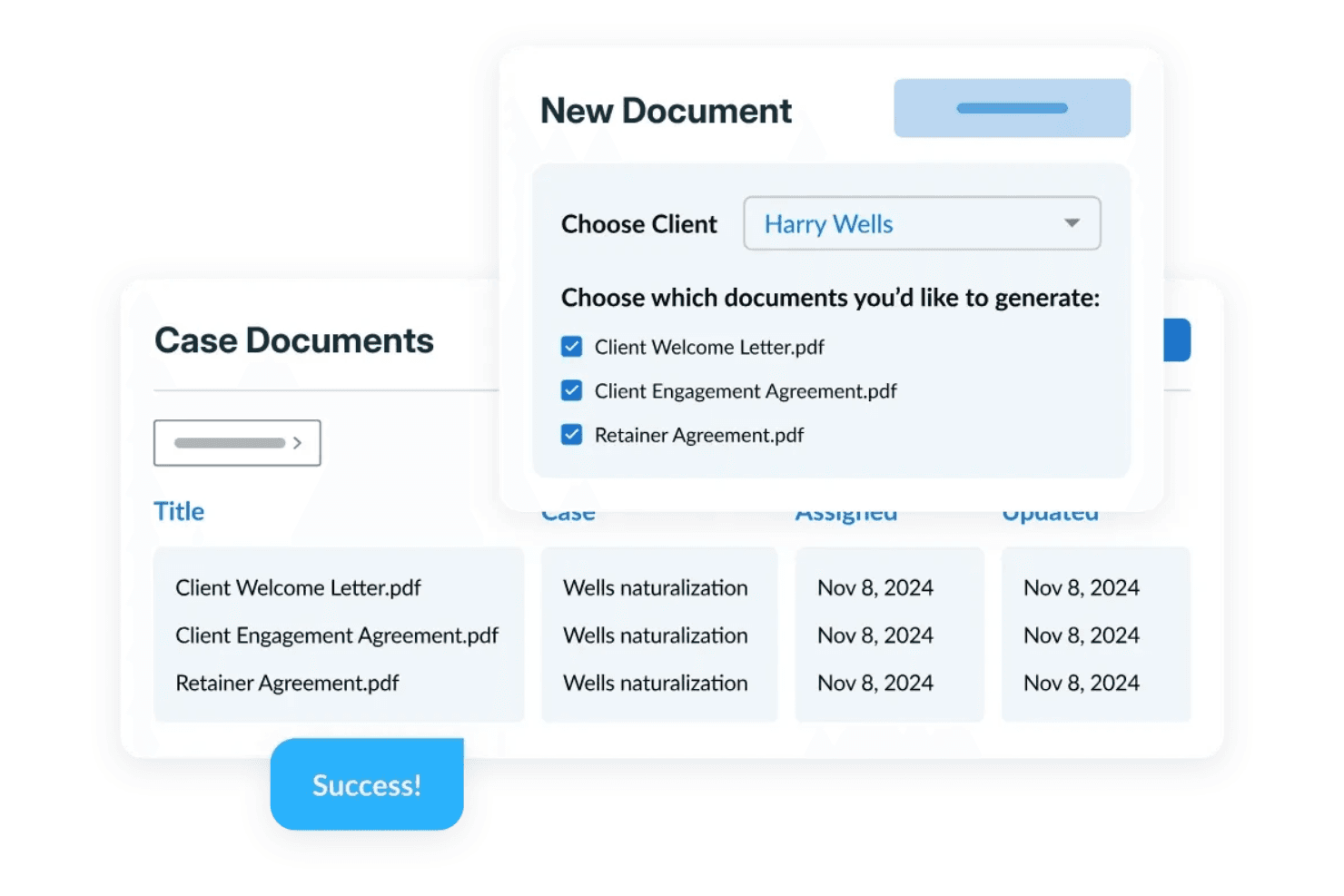
8am creates multiple client documents from customizable templates and keeps case files organized in a centralized document management system. 8am is a personal injury case management platform built specifically for PI law firms, with PI-configured workflows, medical treatment tracking, lien and LOP management, settlement calculators, document automation, and built-in client communication tools.
Who Is 8am Best For?
8am is a strong fit for personal injury law firms of any size that want a purpose-built platform rather than a general legal practice management tool adapted for PI work.
Why I Picked 8am
8am earns its spot on my shortlist because of how well its document generation tools fit the actual rhythm of a PI practice. I particularly like the document automation feature, which lets my team generate demand letters, contingency fee agreements, and settlement releases directly from case data already in the system. The 8am IQ Writing Assistant goes a step further, letting me adjust tone (professional, empathetic, or assertive) and translate documents between English, Spanish, and Arabic without leaving the platform.
8am Key Features
- Medical treatment tracking: Log and monitor a client's medical providers, visit history, and treatment status directly within each case file.
- Lien and LOP tracking: Record and manage medical liens and letters of protection tied to individual cases and providers.
- Settlement calculator: Run settlement breakdowns within the platform, factoring in liens, fees, and expenses to produce final disbursement figures.
- Statute of limitations alerts: Set automated deadline alerts so your team gets notified before critical filing dates pass.
8am Integrations
8am's CasePeer product offers 36+ integrations, including LawPay, QuickBooks, Dropbox, OneDrive, Microsoft 365, Microsoft Outlook, Google Calendar, Mailchimp, RingCentral, and EvenUp. It also connects with Zapier and provides an API for custom integrations.
Pros and Cons
Pros:
- Legal calendaring calculates jurisdiction-specific deadlines
- Documents organized around case stages automatically
- Built-in settlement and demand tracking tools
Cons:
- Mobile experience less polished than desktop
- AI features lag behind competing platforms
Learn more about 8am:
Outro software de gestão de processos de lesões pessoais
Segue-se uma lista de opções adicionais de software de gestão de processos de lesões pessoais que incluímos na lista restrita, mas que não chegaram às 10 melhores. Vale definitivamente a pena consultá-las.
- 11WrikeBest for collaborative case management and workflow automation
- 12LEAPBest for legal AI and document automation
- 13App4LegalBest for comprehensive legal practice management
- 14SmartAdvocateBest with built-in AI medical record summaries
- 15PracticePantherBest for client intake and custom forms
- 16NeosBest for dedicated personal injury workflows
- 17TimeSolvBest for trust accounting and invoicing
- 18LitifyBest for AI workflows in high-volume PI firms
- 19BQE CORE SuiteGood for integrated project management and accounting
How I Evaluate Personal Injury Case Management Software
I split my evaluation into two layers: the baseline features a PI tool must have—like settlement calculators and lien tracking—and the differentiators that separate the best options from the rest.
Core Functionality (Table Stakes For This List)
When I'm selecting tools for my list, I rank each one on a scale from 0 (does not offer the functionality) to 5 (excels in this area) for each core functionality listed below. Then, I calculate the tool's total score into a percentage. Each tool needs to achieve a minimum total score of 65% to be considered for inclusion.
- Intake & Lead Management: I check whether each tool lets you capture new injury leads, run conflict checks, and track referral sources from first contact through signed retainer.
- Medical Records & Provider Tracking: Organizing treatment timelines, logging provider bills, and tracking records requests are core to building a demand—so I evaluate how each tool handles this.
- Settlement & Lien Management: I look for built-in settlement calculators that account for medical liens, subrogation, attorney fees, and client net so your team can generate accurate disbursement sheets.
- Case & Deadline Automation: Missed statutes of limitations end careers. I evaluate whether tools auto-calculate SOL dates, trigger task cascades, and send alerts for key deadlines.
- Document Automation & Demands: Each platform should offer PI-specific templates—demand letters, HIPAA authorizations, retainer agreements—that auto-populate with case and client data.
- Trust Accounting & Billing: Contingency fee structures and IOLTA compliance are table stakes. I look at how each tool handles trust ledgers, cost tracking, and three-way reconciliation.
Once I have a list of tools that meet this criteria, I consider what sets each platform apart.
Differentiating Factors (What Sets Vendors Apart)
Here's how I compare and contrast different vendors:
Standout Features
AI-assisted medical summaries are a major differentiator. I look for tools that extract diagnoses, treatment timelines, and billing totals from uploaded records, which saves hours when building demands. A client communication portal also matters—PI clients expect real-time case status updates without calling the office. I evaluate case analytics dashboards too, specifically ones that track metrics like time-to-settlement and case value by injury type, giving firm partners the data they need to spot bottlenecks.
Beyond Features
HIPAA compliance is essential when your platform stores medical records and provider communications, so I check whether each vendor holds relevant certifications like SOC 2 Type II. Integration depth also matters—PI firms need their case management tool to sync with QuickBooks for trust accounting and connect to medical records retrieval services. I also evaluate how each platform handles data migration, since most firms are moving from legacy tools like Needles or spreadsheets and need a smooth transition path with dedicated onboarding support.
Como escolher um software de gestão de processos de lesões pessoais
É fácil ficar preso a listas extensas de funcionalidades e estruturas de preços complexas. Para o ajudar a manter-se concentrado enquanto percorre o seu processo específico de seleção de software, segue-se uma lista de verificação dos fatores a ter em conta:
| Fator | O que considerar |
|---|---|
| FatorEscalabilidade | O que considerarO software pode crescer com o seu escritório? Procure planos flexíveis e considere se a ferramenta consegue gerir um aumento do número de clientes ou de membros da equipa. |
| FatorIntegrações | O que considerarFunciona com as ferramentas que já utiliza? Verifique a compatibilidade com o seu e-mail, calendário e sistemas de gestão de documentos. |
| FatorPersonalização | O que considerarPode adaptar o software aos seus fluxos de trabalho? Certifique-se de que lhe permite ajustar formulários, campos e relatórios de acordo com os seus processos. |
| FatorFacilidade de utilização | O que considerarA interface é intuitiva para a sua equipa? Um design simples pode reduzir o tempo de formação e melhorar a eficiência diária. |
| FatorImplementação e integração inicial | O que considerarQuanto tempo demorará a começar? Procure apoio à integração inicial, como tutoriais e serviço de apoio ao cliente, para facilitar a transição. |
| FatorCusto | O que considerarEnquadra-se no seu orçamento? Compare os modelos de preços, esteja atento a custos ocultos e considere o valor das funcionalidades incluídas. |
| FatorMedidas de segurança | O que considerarComo protege o software os dados dos clientes? Certifique-se de que dispõe de encriptação, cópias de segurança regulares e cumpre os regulamentos de proteção de dados. |
| FatorRequisitos de conformidade | O que considerarA ferramenta cumpre as normas do setor? Verifique a conformidade com regulamentos legais, como a HIPAA ou o RGPD, se aplicável. |
O que é um software de gestão de processos de lesões pessoais?
O software de gestão de processos de danos pessoais é uma ferramenta concebida para ajudar os escritórios de advogados a gerir os processos dos clientes de forma mais eficiente. Os profissionais jurídicos, como advogados e juristas, utilizam geralmente estas ferramentas para organizar os detalhes dos processos, gerir prazos e melhorar a comunicação com os clientes.
As funcionalidades de gestão de documentos, agendamento de compromissos e acompanhamento de clientes ajudam a manter a organização e a garantir o progresso atempado dos processos. De um modo geral, estas ferramentas simplificam a gestão dos complexos fluxos de trabalho envolvidos nos processos de danos pessoais.
Funcionalidades
Ao selecionar um software de gestão de processos de danos pessoais, esteja atento às seguintes funcionalidades principais:
- Gestão de clientes: Organiza e armazena as informações dos clientes, facilitando o acesso e a atualização dos detalhes dos processos.
- Automatização de documentos: Gera rapidamente documentos jurídicos, poupando tempo e reduzindo os erros manuais.
- Calendário e agendamento: Acompanha datas e prazos importantes, ajudando a evitar compromissos e datas de tribunal falhados.
- Gestão de tarefas: Atribui e acompanha tarefas dentro da equipa para garantir que todas as atividades relacionadas com os processos são concluídas atempadamente.
- Relatórios e análises: Fornece informações sobre o progresso e o desempenho dos processos, ajudando os escritórios a tomar decisões fundamentadas.
- Capacidades de integração: Liga-se a outras ferramentas, como sistemas de correio eletrónico e de gestão de documentos, melhorando a eficiência do fluxo de trabalho.
- Armazenamento seguro de dados: Protege as informações sensíveis dos clientes através de encriptação e cópias de segurança regulares, mantendo a confidencialidade.
- Portal de comunicação com os clientes: Facilita a comunicação direta com os clientes, melhorando a transparência e a gestão das relações.
- Fluxos de trabalho personalizáveis: Permite que os escritórios adaptem os processos às suas necessidades específicas, melhorando a eficiência operacional.
- Acesso móvel: Permite aos utilizadores gerir processos em qualquer lugar, oferecendo flexibilidade e conveniência.
Vantagens
A implementação de um software de gestão de processos de danos pessoais proporciona várias vantagens à sua equipa e à sua empresa. Eis algumas das vantagens que pode esperar:
- Melhor organização: Centraliza as informações dos clientes e dos processos, facilitando o acesso e a gestão de todos os detalhes necessários.
- Poupança de tempo: Automatiza tarefas de rotina, como a criação de documentos e o agendamento, permitindo que a sua equipa se concentre em trabalho de maior valor.
- Comunicação melhorada: Facilita uma melhor comunicação com os clientes através de portais, garantindo transparência e atualizações atempadas.
- Maior eficiência: Os fluxos de trabalho personalizáveis e as funcionalidades de gestão de tarefas ajudam a simplificar as operações e a reduzir os estrangulamentos.
- Segurança dos dados: Protege as informações sensíveis dos clientes através de armazenamento seguro e do cumprimento dos regulamentos relativos aos dados.
- Melhor tomada de decisões: Os relatórios e as análises fornecem informações sobre o progresso dos processos e o desempenho da equipa, apoiando o planeamento estratégico.
- Flexibilidade: O acesso móvel permite aos membros da equipa gerir processos a partir de qualquer lugar, oferecendo maior conveniência e adaptabilidade.
Custos & Preços
A seleção de um software de gestão de processos de danos pessoais requer uma compreensão dos vários modelos de preços e planos disponíveis. Os custos variam consoante as funcionalidades, o tamanho da equipa, os complementos e outros fatores. A tabela abaixo resume os planos comuns, os seus preços médios e as funcionalidades normalmente incluídas nas soluções de software de gestão de processos de danos pessoais:
Tabela de comparação de planos para software de gestão de processos de danos pessoais
| Tipo de plano | Preço médio | Funcionalidades comuns |
|---|---|---|
| Tipo de planoPlano gratuito | Preço médio$0 | Funcionalidades comunsGestão básica de clientes, armazenamento limitado de documentos e agendamento essencial. |
| Tipo de planoPlano pessoal | Preço médio$20-$50/utilizador/mês | Funcionalidades comunsAutomatização avançada de documentos, gestão de tarefas e relatórios e análises básicos. |
| Tipo de planoPlano empresarial | Preço médio$60-$120/utilizador/mês | Funcionalidades comunsPortal completo de comunicação com os clientes, fluxos de trabalho personalizáveis e capacidades de integração. |
| Tipo de planoPlano empresarial de grande dimensão | Preço médio$150+/utilizador/mês | Funcionalidades comunsMedidas de segurança abrangentes, suporte dedicado e acesso móvel completo e análises avançadas. |
Perguntas frequentes sobre software de gestão de casos de lesões pessoais
Eis algumas respostas a perguntas comuns sobre software de gestão de casos de lesões pessoais:
Como é que a maioria das plataformas gere o controlo de versões dos documentos?
O controlo de versões é normalmente gerido guardando cada atualização como uma nova instância dentro do processo. As versões anteriores permanecem acessíveis para consulta ou reversão. Algumas ferramentas apresentam marcas temporais ou o histórico do utilizador para cada versão guardada.
Estas ferramentas suportam campos de dados personalizados para a recolha inicial de dados ou os registos dos processos?
Sim, a maioria dos sistemas permite que os escritórios adicionem campos personalizados para corresponder aos seus fluxos de trabalho específicos. Estes campos podem ser utilizados durante a recolha inicial de dados do cliente, a configuração do processo ou a recolha contínua de dados. Os tipos de campos incluem frequentemente texto, listas pendentes, caixas de seleção e seletores de data.
Como é que as plataformas gerem ações em massa em vários processos?
As ações em massa são normalmente geridas através de ferramentas de processamento em lote disponíveis na interface. Os utilizadores podem selecionar vários processos para aplicar atualizações, como alterações de estado, atribuições de tarefas ou carregamentos de documentos. O acesso às ações em massa pode depender das permissões do utilizador.
É possível filtrar ou pesquisar os registos de comunicações por palavra-chave nestes softwares?
A maioria dos sistemas inclui ferramentas de pesquisa ou filtragem para navegar pelo histórico de comunicações. Os utilizadores podem pesquisar por data, nome do contacto, assunto ou palavras-chave específicas. Isto ajuda a localizar rapidamente interações anteriores sem ter de organizar manualmente todo o histórico do processo.
É possível gerar documentos com modelos dentro da plataforma?
A maioria das ferramentas suporta a automatização de documentos através de modelos pré-carregados. Estes modelos podem ser preenchidos com dados do cliente ou do processo obtidos diretamente do sistema. Os casos de utilização mais comuns incluem cartas de interpelação, formulários de recolha inicial de dados ou contratos de honorários.