

O software de operações jurídicas proporciona à sua equipa jurídica um único local para acompanhar assuntos, controlar despesas, gerir documentos e automatizar fluxos de trabalho. Se está cansado de ver tarefas esquecidas ou de utilizar sistemas que não se adequam às necessidades do seu escritório, sabe que a ferramenta certa pode determinar o sucesso ou o fracasso da forma como a sua prática lida com o crescimento, a conformidade e a colaboração. Nesta lista, explicarei o que é importante — desde a automatização de fluxos de trabalho e os relatórios até às integrações com plataformas como o ServiceNow ou o LexisNexis — para que possa escolher um software adequado às suas operações, ao seu orçamento e à realidade de gerir atualmente um departamento jurídico.
Why Trust Our Software Recommendations
6,700+
Reviews
20
Industry experts
16+
Evaluation factors
14
Years
Our team has been testing and reviewing software since 2012. As legal practice leaders ourselves, we know how difficult—and important—it is to choose the right software.
For this guide, we evaluated tools using hands-on testing and independent research, scoring tools using our selection criteria.
Our reviews reflect our human editorial judgment, not a sales pitch.
Compare o melhor software de operações jurídicas
Este quadro comparativo resume os detalhes de preços das minhas principais seleções de software de operações jurídicas, para o ajudar a encontrar a melhor opção para o seu orçamento e as necessidades da sua prática.
| Tool | Best For | Trial Info | Price | ||
|---|---|---|---|---|---|
| 1 | Best for matter and CLM-led in-house legal ops | Free demo available | Pricing upon request | Website | |
| 2 | Best for e-billing and spend analytics at scale | Free demo available | Pricing upon request | Website | |
| 3 | Best for legal ops built on a TR ecosystem | Free demo available | Pricing upon request | Website | |
| 4 | Best for LexisNexis-integrated legal ops | Free demo available | Pricing upon request | Website | |
| 5 | Best for small legal teams managing matters in-house | 14-day free trial | From $100/user/month | Website | |
| 6 | Best for AI-driven invoice review and spend control | Free demo available | Pricing upon request | Website | |
| 7 | Best for unified legal ops with AI-native intake | Free demo available | Pricing upon request | Website | |
| 8 | Best for global corporate legal departments | Free demo available | Pricing upon request | Website | |
| 9 | Best for Fortune 100-scale legal ops | Not available | Pricing upon request | Website | |
| 10 | Best for enterprises on ServiceNow managing legal ops | Free demo available | Pricing upon request | Website |


Avaliações de software de operações jurídicas
Segue-se o meu resumo detalhado do melhor software de operações jurídicas que integrou a minha lista restrita. As minhas avaliações apresentam uma análise detalhada das funcionalidades, dos melhores casos de utilização e das integrações de cada plataforma, para o ajudar a encontrar a melhor opção para si.
 Best for matter and CLM-led in-house legal ops
- Free demo available
- Pricing upon request
Visit WebsiteCustomer Rating:4.5/5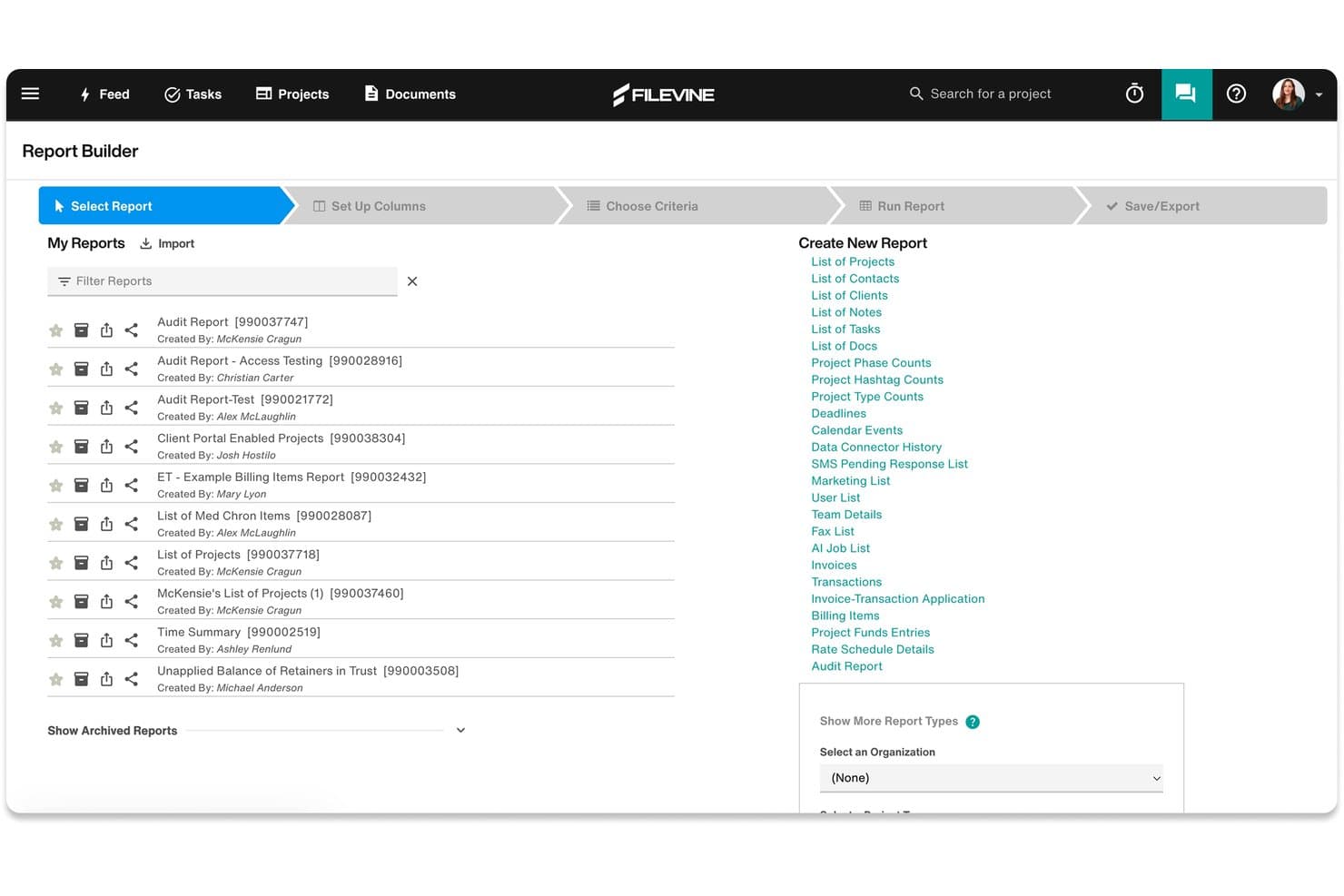
Filevine's Report Builder lets users create and manage custom legal reports. Filevine is a legal operations platform for in-house counsel that covers matter management, contract lifecycle management, legal holds, task tracking, and outside counsel collaboration in a single interface.
Who Is Filevine Best For?
Filevine is a strong fit for in-house legal teams that need to manage matters and contracts in one place, particularly those handling high contract volumes or complex outside counsel relationships.
Why I Picked Filevine
Filevine earns its spot on my shortlist because of how tightly it connects matter management with contract lifecycle management in a single platform. I particularly like the contract clause analytics feature, which flags negotiation risks by analyzing clause-level data across your contract portfolio—something most standalone CLM tools don't do at this depth. The automated legal hold management is also genuinely useful, handling notifications and follow-ups without manual tracking.
Filevine Key Features
- Vinesign e-signature: Send contracts for signature directly within the platform using Filevine's built-in e-signature tool, without routing documents to a separate signing service.
- Outside counsel guest access: Assign customized roles and permissions to external counsel or vendors so they can collaborate on matters without accessing unrelated files.
- Matter budgeting and cost tracking: Set budgets at the matter level and track spend against them, giving you visibility into outside counsel costs and project expenses.
- AI data mapping: Upload documents and let FilevineAI extract and map relevant data into structured fields across your matter records automatically.
Filevine Integrations
Filevine offers 40+ native and partner integrations, including Microsoft 365, Outlook, Gmail, Google Calendar, Microsoft Teams, Slack, QuickBooks, RingCentral, Dialpad, and Domo, and it connects with Zapier. An API is also available for custom integrations, and Workato is supported for building additional workflow automations.
Pros and Cons
Pros:
- Contract clause analytics highlights negotiation risks
- Automated legal hold notifications and tracking
- Matter and contract management in one interface
Cons:
- High-volume users may face performance lags
- Workflow customization sometimes requires vendor support
Learn more about Filevine: Best for e-billing and spend analytics at scale
- Free demo available
- Pricing upon request
Visit WebsiteCustomer Rating:4.5/5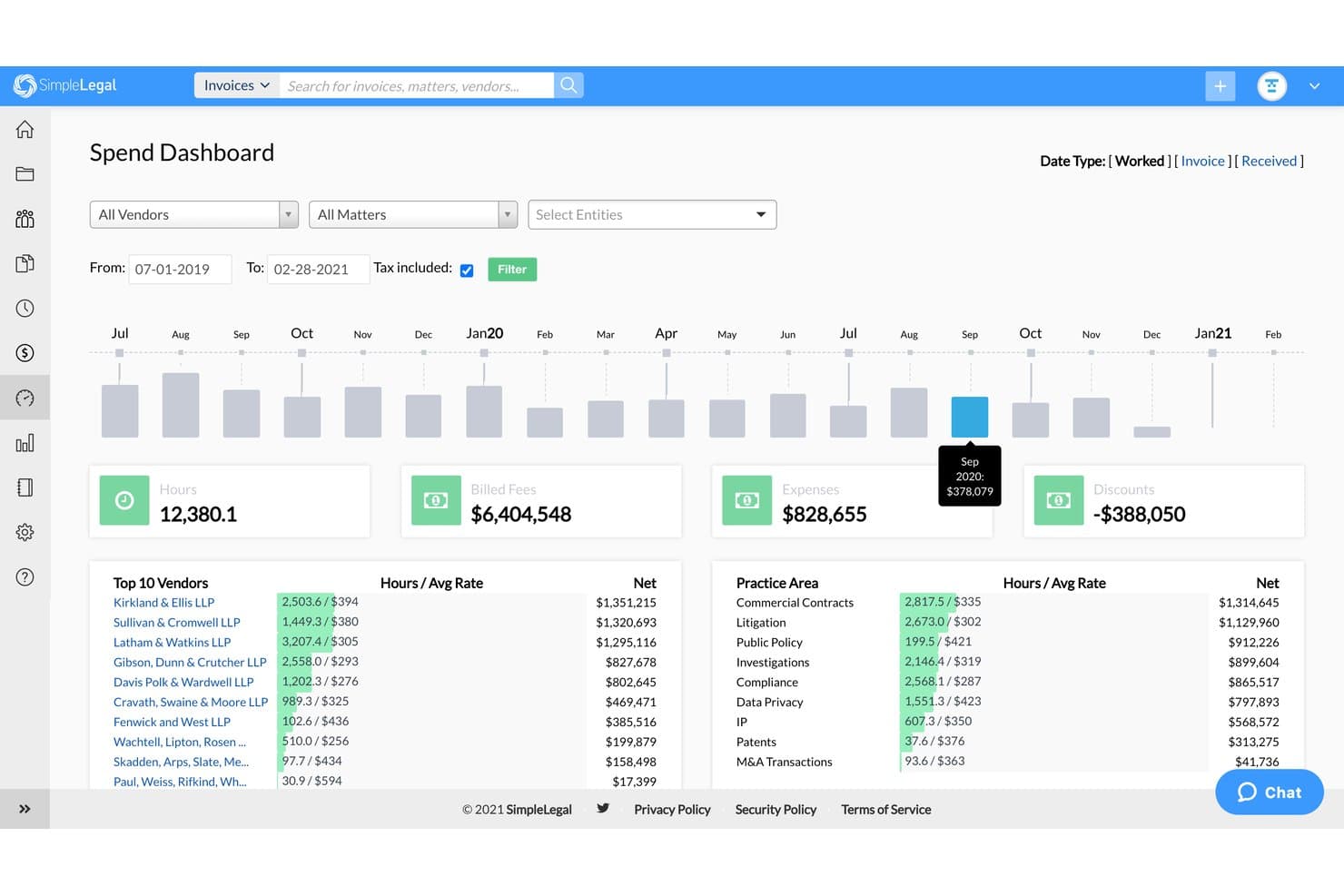
SimpleLegal's Spend Dashboard tracks legal spend, hours, and vendor costs. SimpleLegal is an enterprise legal management (ELM) platform that covers e-billing, matter management, vendor management, and spend analytics for corporate legal departments.
Who Is Onit SimpleLegal Best For?
SimpleLegal is built for corporate legal departments that manage significant outside counsel spend and need full visibility into invoices, budgets, and vendor performance at scale.
Why I Picked Onit SimpleLegal
I picked SimpleLegal as one of the best because the depth of its e-billing and spend analytics features is unlike most ELM tools I've seen. It manages over $5.2 billion in annual legal spend across its user base, and the rules-based invoice review catches billing non-compliance before it ever reaches approval. I also like that the reporting layer goes beyond basic dashboards, letting you benchmark vendor performance across matters and set Alternative Fee Arrangements directly from spend data.
Onit SimpleLegal Key Features
- Matter management: Track internal and external matters with standardized intake, task templates, and workflow tools that keep every matter progressing.
- CounselGO vendor portal: A dedicated portal for outside counsel that reduces billing back-and-forth and clarifies expectations between your legal team and law firms.
- Timekeeper management: Track and report on timekeeper rates and activity across matters to keep billing accurate and audit-ready.
- AP/ERP integrations: Connect SimpleLegal to your finance and accounting systems via APIs, prebuilt connectors, or flat file imports to eliminate duplicate data entry.
Onit SimpleLegal Integrations
SimpleLegal supports integrations with AP, ERP, IP management, and document management systems, including NetSuite, Oracle, SAP Concur, Microsoft Dynamics GP, Workday Financial, Coupa, iManage, Anaqua, IPfolio, and eBillingHub. It connects through prebuilt connectors, flat file imports, and an open API for custom integrations.
Pros and Cons
Pros:
- Supports benchmarking vendor performance across matters
- CounselGO portal simplifies outside counsel billing
- Rules-based invoice review prevents billing errors
Cons:
- Limited matter intake customization options
- Reporting setup can require vendor assistance
Learn more about Onit SimpleLegal: Best for legal ops built on a TR ecosystem
- Free demo available
- Pricing upon request
Visit WebsiteCustomer Rating:4.3/5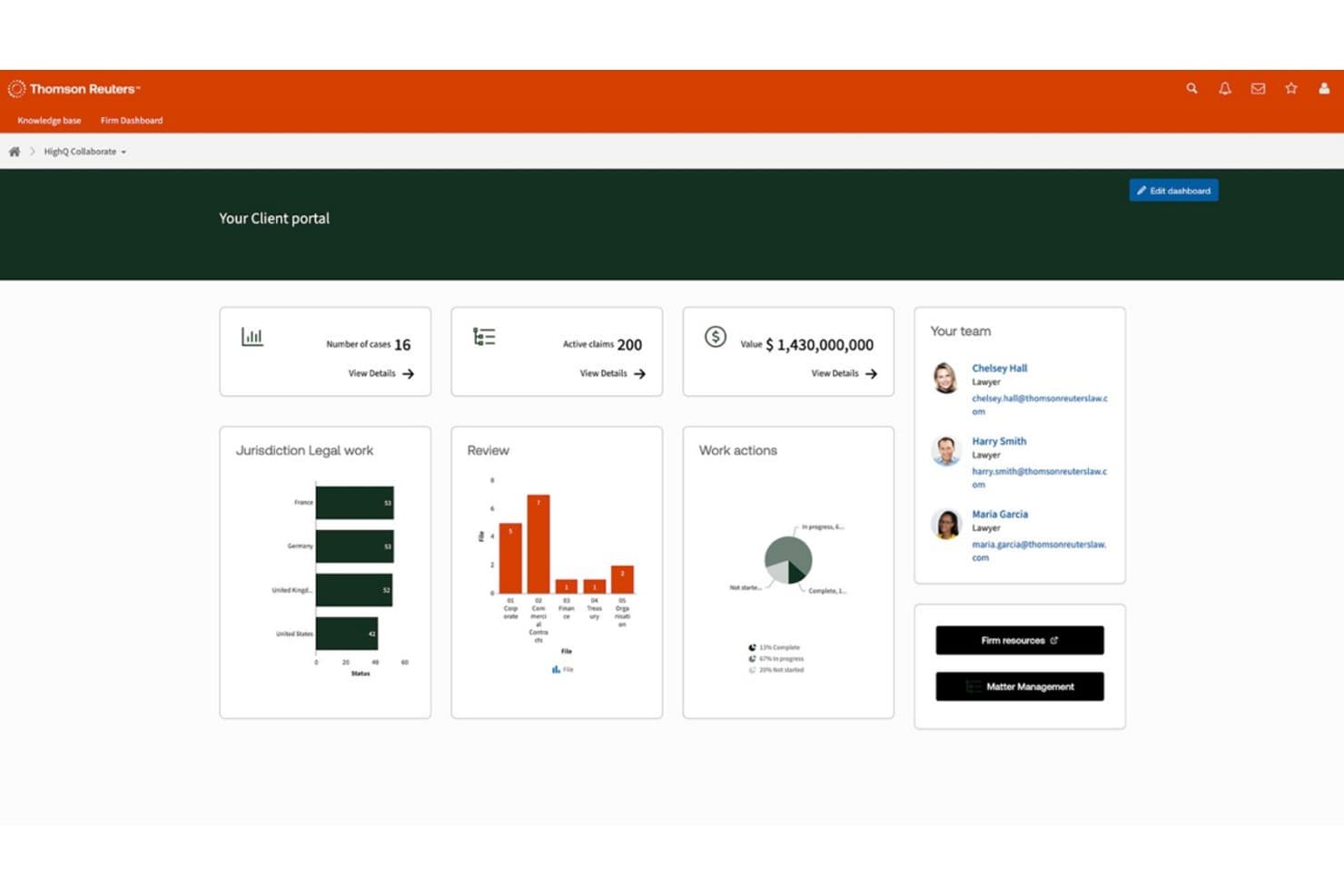
HighQ centralizes case metrics, team contacts, and work actions in one client portal. HighQ is a cloud-based legal operations and collaboration platform from Thomson Reuters that covers document sharing, client portals, workflow automation, and legal project management for law firms, corporate legal departments, and government organizations.
Who Is HighQ Best For?
HighQ is a strong fit for legal teams already using Thomson Reuters products who want document collaboration, client portals, and workflow tools within a connected TR environment.
Why I Picked HighQ
HighQ earns its spot on my list because of how naturally it fits into a Thomson Reuters environment. If your team already runs on Legal Tracker for e-billing or uses Practical Law for research, HighQ connects directly to those tools rather than operating in isolation. I particularly like its iSheets feature, which lets legal ops teams build structured data trackers inside the platform for things like matter status dashboards or regulatory deadline logs. The client portal functionality is also genuinely useful, giving clients self-service document access and e-signature workflows without leaving the TR ecosystem.
HighQ Key Features
- Matter management dashboard: Track matter workload, activity, spend, and risk from a centralized view that pulls all matter data into one place.
- Legal intake and triage: Route incoming legal service requests to the right subject matter experts using automated intake forms and assignment rules.
- Legal project management tools: Manage tasks, timelines, budgets, and risk trackers across matters, with real-time spend vs. budget dashboards and automated alerts.
- Microsoft 365 integration: Connect directly with Outlook, Microsoft Teams, and Word to capture metadata and collaborate without switching between applications.
HighQ Integrations
HighQ offers native integrations with iManage, NetDocuments, Microsoft SharePoint, Microsoft 365, Google Workspace, DocuSign, Adobe Sign, Kira Systems, Workshare, and Thomson Reuters products like Legal Tracker, Practical Law, and CoCounsel. Additional connectivity is available through the Syncly-powered Integration Hub, SAML 2.0 SSO, Active Directory/LDAP sync, a SQL database connector for iSheets, and an API for custom integrations.
Pros and Cons
Pros:
- Includes legal intake and triage features
- Supports building custom matter trackers with iSheets
- Connects directly to Thomson Reuters legal tools
Cons:
- Performance may slow with large data sets
- Navigation can feel complex for new users
Learn more about HighQ: Best for LexisNexis-integrated legal ops
- Free demo available
- Pricing upon request
Visit WebsiteCustomer Rating:3.8/5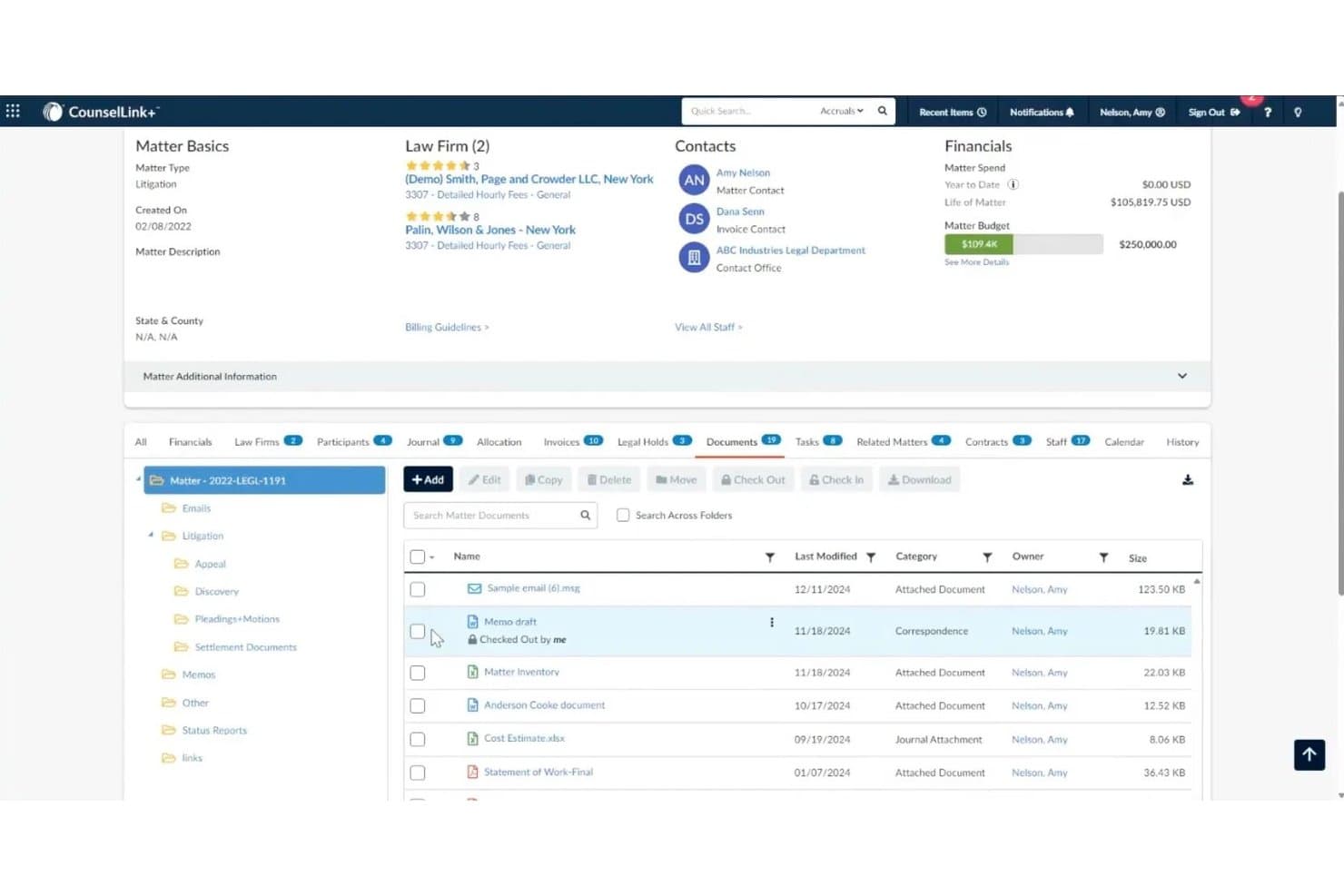
LexisNexis CounselLink+ centralizes matter documents with folder organization and version control. LexisNexis CounselLink+ is an enterprise legal management platform for corporate legal departments that covers matter management, legal e-billing, contract lifecycle management, vendor management, and AI-powered analytics through its built-in Protégé assistant.
Who Is LexisNexis CounselLink+ Best For?
CounselLink+ is a strong fit for corporate legal departments that already rely on LexisNexis research tools and want their matter management, e-billing, and contract lifecycle workflows in one connected ecosystem.
Why I Picked LexisNexis CounselLink+
I picked CounselLink+ as one of the best because the LexisNexis ecosystem integration is genuinely hard to replicate elsewhere: you get one-click access to Lex Machina, Practical Guidance, and the Protégé AI assistant without ever leaving your matter management workflow. Protégé is worth calling out specifically, as it generates real-time invoice summaries, flags billing anomalies, and delivers predictive insights on legal spend directly inside the platform. I also think the built-in contract lifecycle management, paired with AI-driven contract analysis that extracts key terms automatically, gives in-house legal ops teams a tighter loop between outside counsel spend and contract obligations.
LexisNexis CounselLink+ Key Features
- Timekeeper rate benchmarking: Benchmark outside counsel hourly rates against industry data by firm size, geography, practice area, and timekeeper role.
- Vendor scorecards: Track law firm performance with comparative reporting dashboards and in-house counsel feedback tools across matters.
- SmartReview® billing guideline enforcement: AI flags invoice line items that violate your billing guidelines automatically before payment processing.
- Legal spend allocation tracking: Assign and monitor legal costs across cost centers, departments, and GL codes for financial oversight.
LexisNexis CounselLink+ Integrations
LexisNexis CounselLink+ offers native integrations with Microsoft Word, Microsoft Outlook, Microsoft Teams, iManage, and across the LexisNexis ecosystem, including Lex Machina, Practical Guidance, Lexis+, and Law360. A CounselLink Integration API (CL-INT-API) is available for custom integrations and partner-built connections.
Pros and Cons
Pros:
- AI assistant delivers spend and contract insights
- SmartReview enforces billing guideline compliance
- Direct access to LexisNexis research tools
Cons:
- Reporting dashboards offer limited customization options
- Initial setup for workflows can be complex
Learn more about LexisNexis CounselLink+: Best for small legal teams managing matters in-house
- 14-day free trial
- From $100/user/month
Visit WebsiteCustomer Rating:4.8/5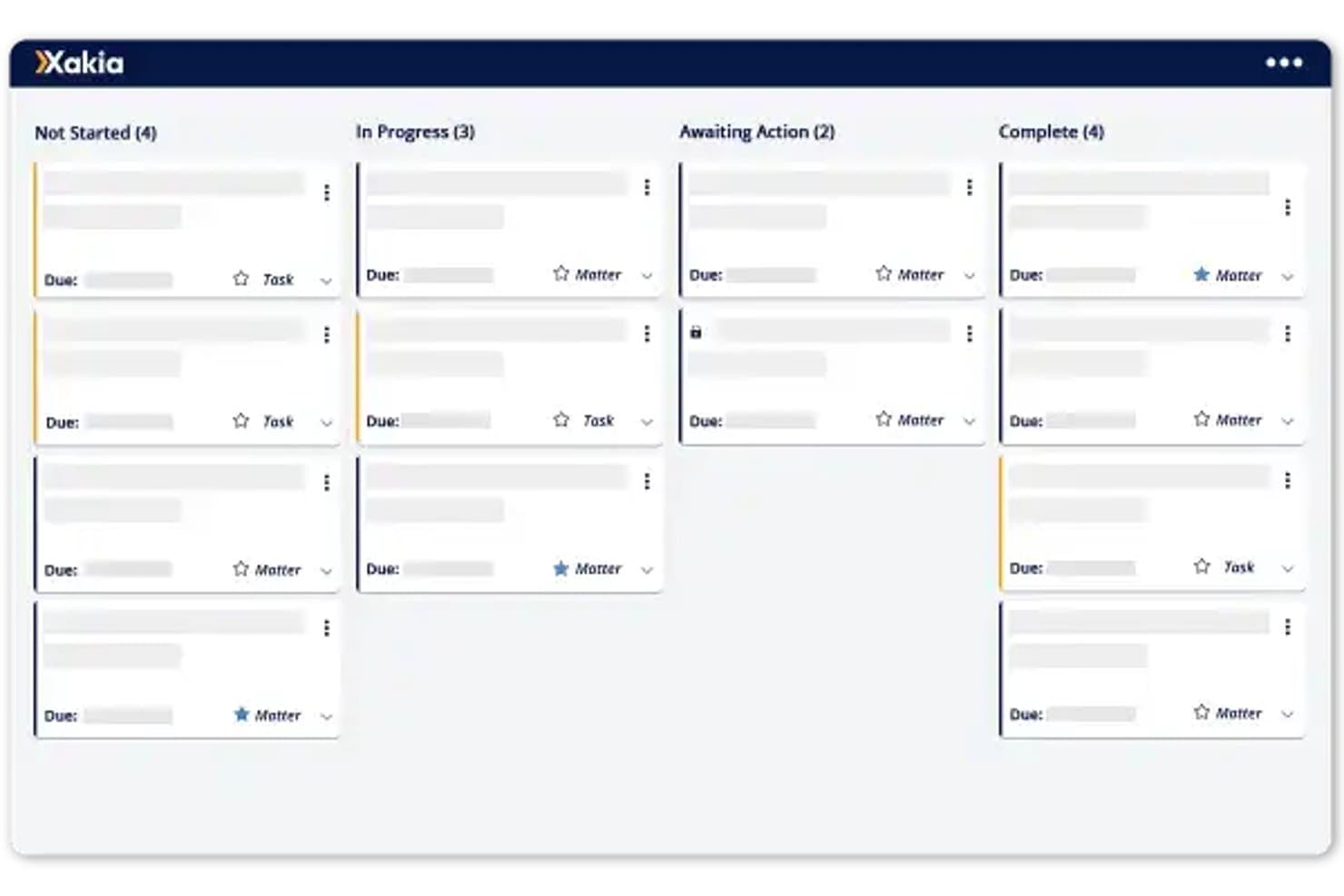
Xakia organizes legal matters into Kanban-style status columns for easy tracking. Xakia is a legal operations platform for in-house legal teams that covers matter management, legal intake, contract lifecycle management, spend management, document management, and reporting.
Who Is Xakia Best For?
Xakia works well for small in-house legal teams that need a dedicated matter management system without the complexity of an enterprise-grade platform.
Why I Picked Xakia
I've included Xakia in my top picks because its matter management is purpose-built for small in-house legal teams, not scaled-down versions of enterprise tools. I particularly like the intake and triage module, which gives the business a single front door to submit legal requests that get routed, tagged, and assigned without relying on email. The built-in dashboards also let you surface workload and spend data without building reports from scratch, which is exactly what a lean legal team needs.
Xakia Key Features
- Contract lifecycle management: Generate contracts from templates and track agreements through review and signature stages.
- Xakia AI: Reviews third-party contracts against your playbook, extracts key terms with confidence scores, and flags potential invoice billing issues.
- Spend management: Track legal budgets against forecasts and monitor outside counsel costs in one place.
- Document management: Store, search, and retrieve legal documents linked directly to their associated matters.
Xakia Integrations
Xakia offers native integrations with NetDocuments, iManage, SharePoint, Microsoft Outlook, Gmail, Microsoft Word, DocuSign, Josef, Ironclad, Brightflag, Salesforce, Slack, Microsoft Entra, Okta, and ADFS, and provides an open API for custom integrations.
Pros and Cons
Pros:
- Dashboards show workload and spend insights instantly
- Contract tracking includes templates and review workflows
- Intake and triage module reduces email reliance
Cons:
- Not ideal for large, enterprise legal departments
- Reporting options are limited for complex needs
Learn more about Xakia: Best for AI-driven invoice review and spend control
- Free demo available
- Pricing upon request
Visit WebsiteCustomer Rating:4.6/5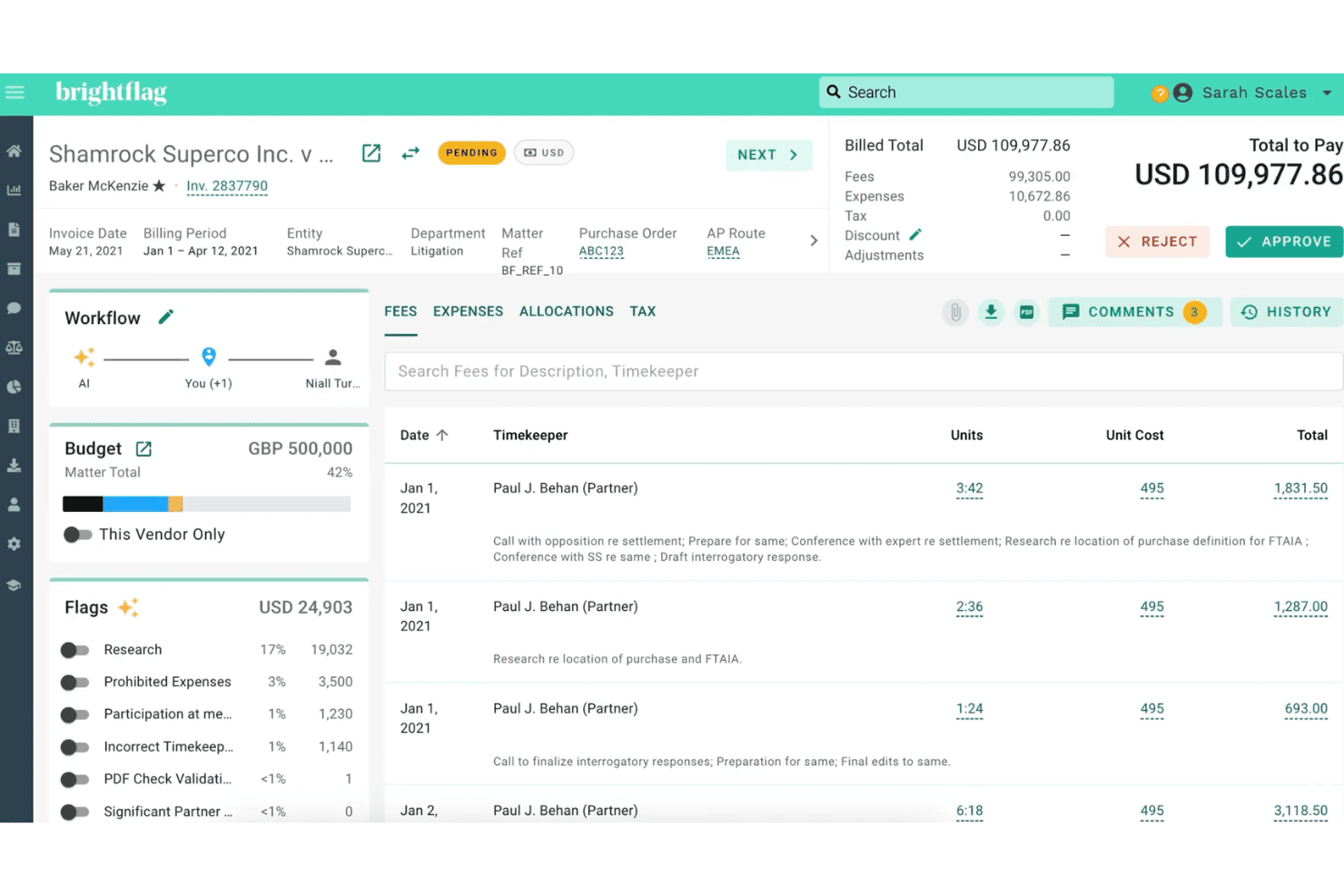
Brightflag lets users review, flag, and approve legal invoices with AI insights. Brightflag is an AI-powered enterprise legal management (ELM) platform that centralizes matter management, e-billing and invoice review, vendor management, and outside counsel spend tracking for in-house legal teams.
Who Is Brightflag Best For?
Brightflag is a strong fit for in-house legal and legal operations teams at mid-to-large enterprises that manage significant outside counsel spend and need tighter visibility into e-billing, invoice review, and vendor performance.
Why I Picked Brightflag
Brightflag earns its spot on my shortlist because of how its patented AI handles invoice review at scale. The AI reads every invoice line, catches billing guideline violations automatically, and emails reviewers a plain-language summary with a single-click approval option directly from their inbox. On top of that, the e-billing module layers in controlled approval workflows and full audit trails, so your team has end-to-end visibility into legal spend without manually chasing every line item.
Brightflag Key Features
- Matter management workspace: Centralizes matter data, tracks deliverables and milestones, and gives your team and outside counsel a shared space to collaborate and collect progress updates.
- Vendor RFP and panel management: Runs RFPs directly within the platform and uses AI-generated vendor profiles to help you select the right firm for each matter.
- Budget management: Sets and monitors budgets at both the cost center and individual matter level, with automatic tracking against actual spend.
- Configurable reporting dashboards: Builds custom reports and dashboards without needing a BI analyst, with direct integrations to external BI tools for deeper analysis.
Brightflag Integrations
Brightflag offers native integrations across accounts payable, IP management, BI, and identity systems, including NetSuite, SAP Ariba, Coupa, QuickBooks, Workday, Anaqua AQX, iManage, NetDocuments, Jira, Okta, and BI tools like Power BI, Tableau, and Snowflake, plus AI workspace connections to ChatGPT, Claude, and Microsoft Copilot. It also provides an API and MCP server for custom integrations, along with iPaaS support through Boomi, MuleSoft, and Workato.
Pros and Cons
Pros:
- Customizable matter and vendor workspaces
- Sends plain-language invoice summaries to reviewers
- AI flags billing violations automatically
Cons:
- Reports may require manual adjustments for accuracy
- Initial setup for invoice rules takes time
Learn more about Brightflag: Best for unified legal ops with AI-native intake
- Free demo available
- Pricing upon request
Visit WebsiteCustomer Rating:4.5/5
LawVu uses AI to suggest matter managers during legal intake. LawVu is an AI-native legal operating system for in-house legal teams that unifies matter management, contract lifecycle management, intake, spend management, and AI-assisted workflows in a single platform.
Who Is LawVu Best For?
LawVu is a strong fit for in-house legal teams that need a single platform to manage matters, contracts, intake, and outside counsel spend without stitching together multiple tools.
Why I Picked LawVu
LawVu earns its spot on my shortlist because of how it handles intake: instead of a basic ticketing form, it uses AI to triage and route incoming requests automatically, so nothing gets lost in an inbox or a shared spreadsheet. I also like that the agentic framework ties intake directly to matter creation, which means a request from a business team can trigger a fully structured matter without manual setup. That connection between intake, matter management, contracts, and spend in a single data layer is what makes LawVu genuinely different from tools that bolt these modules together.
LawVu Key Features
- AI contract drafting and review: Draft and review contracts directly in Microsoft Word using LawVu's embedded AI, with full context from your existing legal data.
- E-billing and outside counsel management: Submit, review, and approve invoices from external counsel within the platform, with workflow automation and spend reporting built in.
- Searchable document knowledge base: Store, organize, and search legal documents and precedents in a centralized repository accessible to your whole team.
- Visual reporting dashboards: Track matter, contract, and spend data through configurable dashboards that surface workload, risk, and budget insights in one view.
LawVu Integrations
LawVu offers native integrations with Salesforce, Microsoft 365, SharePoint, Microsoft Teams, Outlook, Gmail, Google Drive, Slack, Box, DocuSign, Adobe Acrobat Sign, Dropbox Sign, Formstack, Litera Compare, BlackBoiler, and Okta for SSO. A LawVu connector for Microsoft Power Platform and a public API are available for custom integrations and workflow automation.
Pros and Cons
Pros:
- Visual dashboards show matter and spend insights
- Single data layer ties modules together
- AI-native intake automates request triage
Cons:
- Occasional delays with larger data uploads
- Platform can feel complex to set up
Learn more about LawVu: Best for global corporate legal departments
- Free demo available
- Pricing upon request
Visit WebsiteCustomer Rating:4.3/5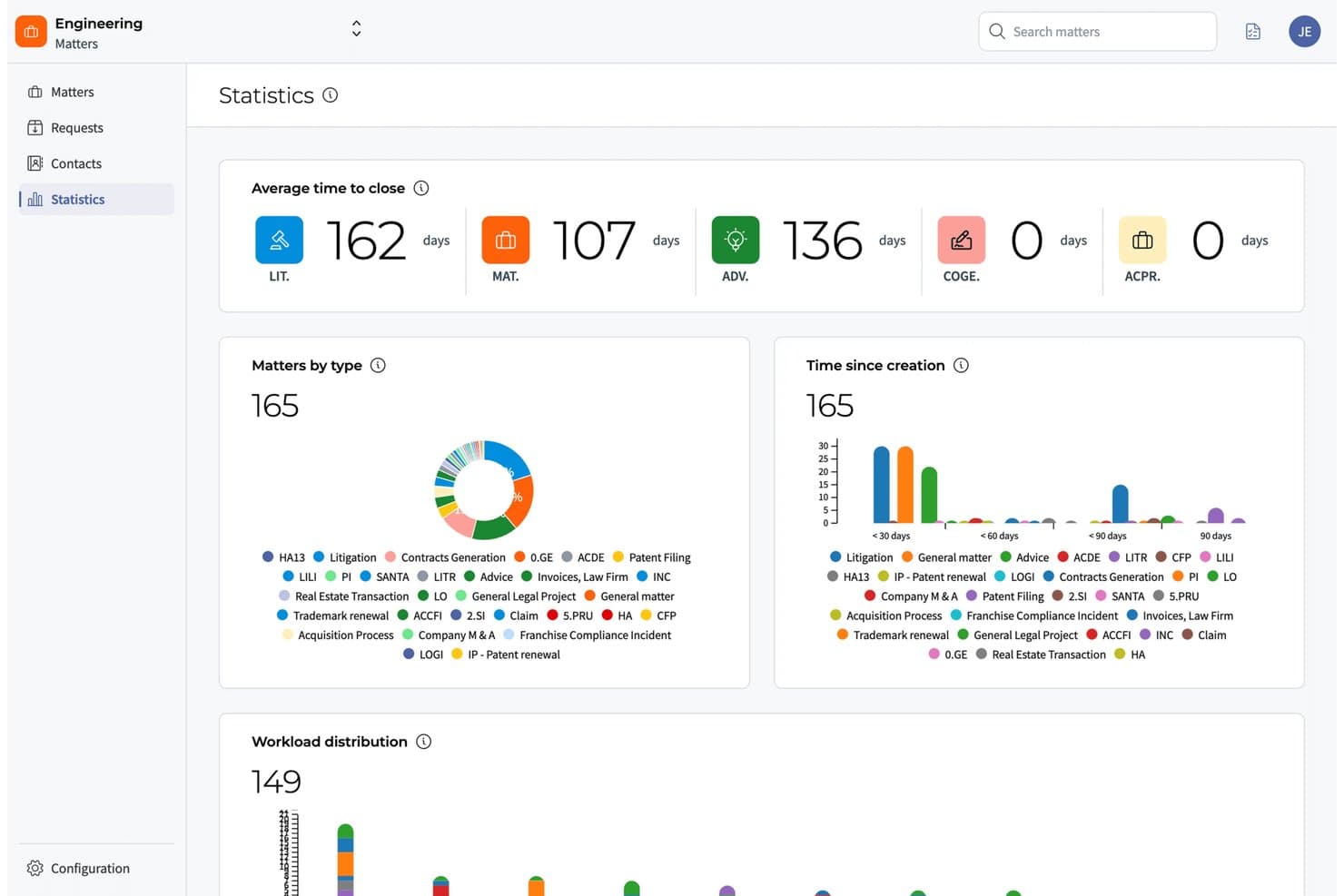
DiliTrust surfaces matter stats and workload trends in one dashboard. DiliTrust is a legal operations and corporate governance platform that brings contract lifecycle management, matter management, entity management, board portal, and secure document storage into a single AI-native suite.
Who Is DiliTrust Best For?
DiliTrust is a strong fit for in-house legal teams and corporate secretaries managing multiple legal entities across jurisdictions.
Why I Picked DiliTrust
I've included DiliTrust in my top picks because it's the only platform I've come across that genuinely unifies entity management, board governance, contract lifecycle management, and matter management in a single AI-native suite. For legal departments managing entities across multiple jurisdictions, the entity management module gives you real-time corporate structure visibility and centralizes compliance reporting without toggling between tools. I also think the board portal is worth noting: it handles agenda prep, document sharing, vote management, and automatic minute generation all in one place, which is exactly what corporate secretaries supporting international boards need.
DiliTrust Key Features
- Dataroom: A secure, centralized document repository with granular access controls and full audit trails for both internal and external sharing.
- Integrated e-signature: Sign documents directly within the platform without routing them to a third-party tool.
- No-code workflow customization: Customize workflows, fields, and layouts to match your team's processes without involving IT or technical resources.
- ISO 27001, ISO 27701, and SOC 2 Type II certification: The platform stores and transmits data with full encryption, two-factor authentication, and independently audited security standards.
DiliTrust Integrations
DiliTrust offers native integrations with Salesforce, HubSpot, Microsoft Dynamics 365, Microsoft Word, Microsoft Teams, Outlook, Google Docs, Gmail, DocuSign, and Adobe Sign, plus third-party eSignature connections to Dropbox Sign, BoxSign, YouSign, UniverSign, and SignaturIt. An API is available for custom integrations.
Pros and Cons
Pros:
- Real-time compliance visibility across jurisdictions
- Secure audit trails for sensitive documents
- Centralizes board, entity, and contract management
Cons:
- Custom reporting features are limited
- Workflow automation options are basic
Learn more about DiliTrust: Best for Fortune 100-scale legal ops
- Not available
- Pricing upon request
Visit WebsiteCustomer Rating:4.7/5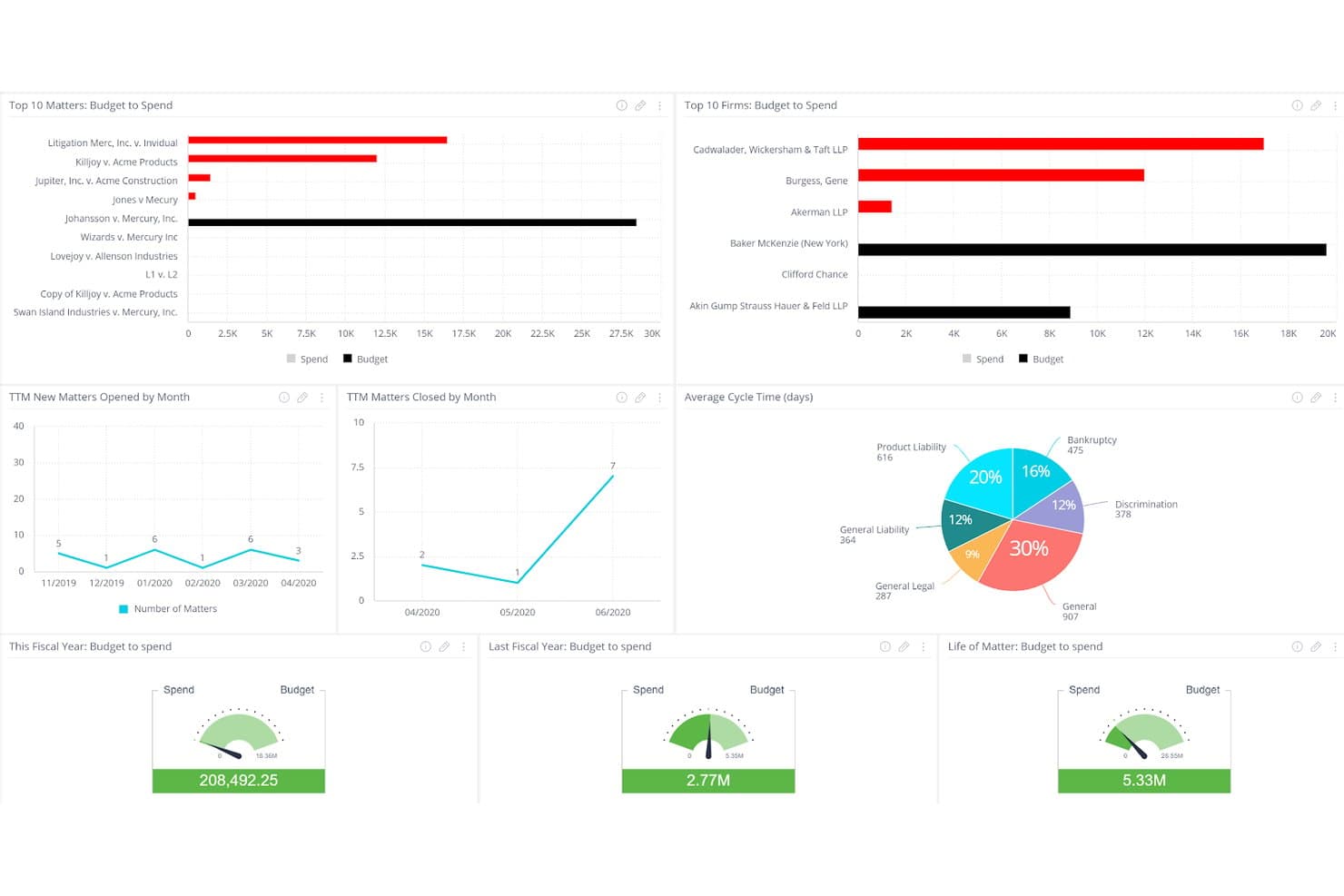
Mitratech TeamConnect tracks legal spend, budgets, and matter cycle times in one dashboard. Mitratech TeamConnect is an enterprise legal management platform built for in-house legal departments, covering matter management, e-billing, contract lifecycle management, compliance intake, and legal spend analytics in a single configurable system.
Who Is Mitratech TeamConnect Best For?
TeamConnect is built for large enterprise legal departments—think Fortune 100 in-house teams—that need a single system to manage matters, outside counsel billing, contracts, and compliance at scale.
Why I Picked Mitratech TeamConnect
Mitratech TeamConnect earns its spot on my shortlist because it's trusted by 60% of the Fortune 100, which tells you everything about its ability to handle legal operations at the most demanding scale. I'm particularly impressed by its AI-powered Invoice IQ, which automates billing guideline enforcement across 14,000+ outside counsel firms and flags invoice discrepancies in real time. Matter creation triggered directly from Outlook or service of process feeds is the kind of automation that makes a genuine difference when your team is handling high volumes daily.
Mitratech TeamConnect Key Features
- Contract lifecycle management: Build contracts from templates, run automated approval workflows, collect e-signatures, and store all contract data in a centralized repository.
- Custom reporting and analytics dashboards: Configure dashboards to track matter volume, legal spend trends, and capacity gaps across your department.
- Global compliance configuration: Support multi-country invoicing mandates with built-in tax authority fields, pro-forma invoice workflows, and country-specific validation rules.
- Native document management: Store documents directly inside case files rather than in a separate system, keeping all matter records in one place.
Mitratech TeamConnect Integrations
Mitratech TeamConnect offers native integrations with Microsoft Outlook, Microsoft Teams, Salesforce, and Slack, plus connections to HR and finance systems used across the enterprise. An API is available for custom integrations, and the platform supports service of process feeds for automated matter intake.
Pros and Cons
Pros:
- Real-time invoice discrepancy flagging
- Enterprise-grade contract management workflows
- AI-powered billing guideline enforcement
Cons:
- Designed for large enterprise legal teams
- Complex setup for custom reporting
Learn more about Mitratech TeamConnect: Best for enterprises on ServiceNow managing legal ops
- Free demo available
- Pricing upon request
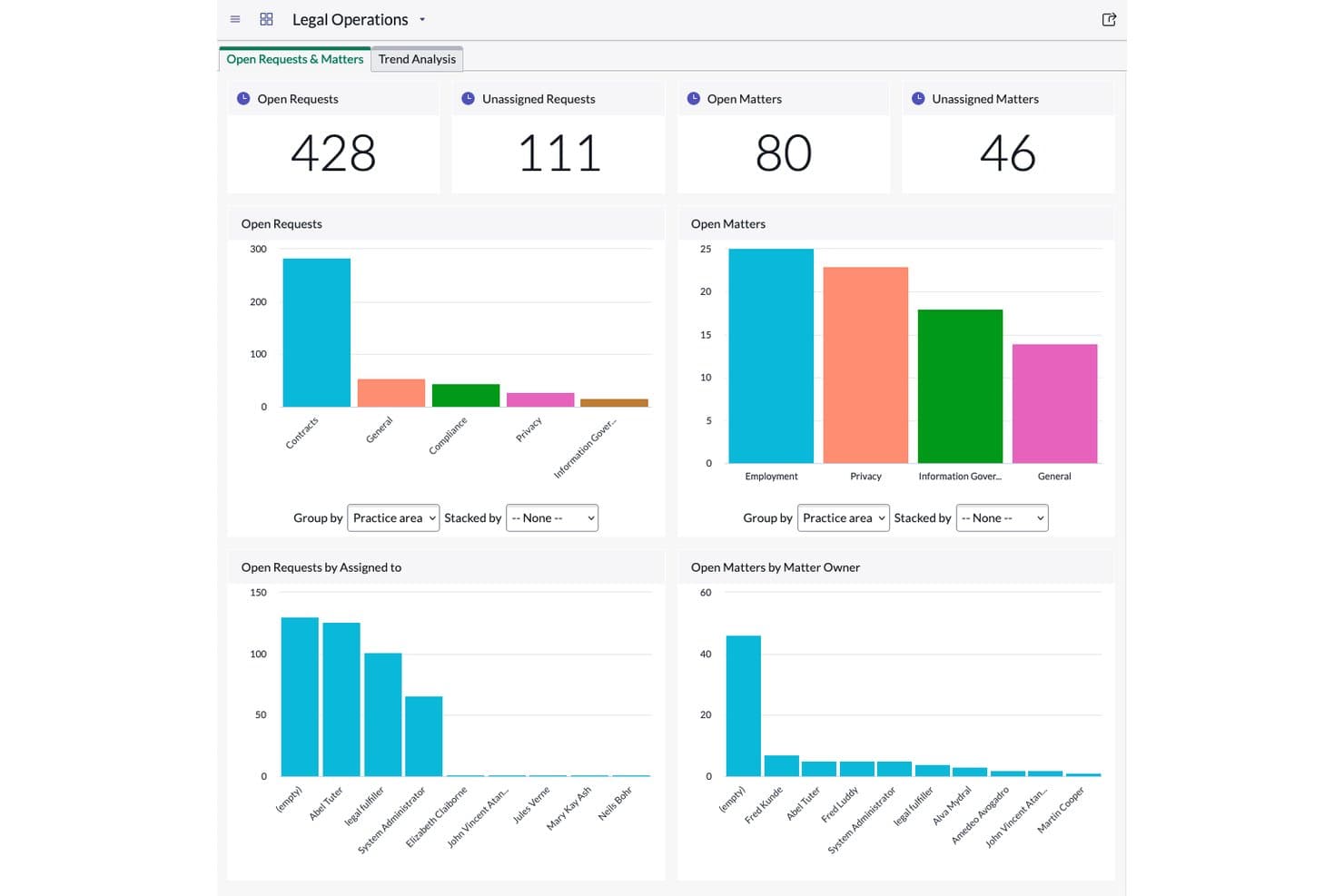
ServiceNow Legal Service Delivery tracks open requests and matters via dashboard. ServiceNow Legal Service Delivery is a legal operations module built on the ServiceNow platform that covers legal request management, matter management, contract workflows, legal investigations, and practice-specific apps.
Who Is ServiceNow Legal Service Delivery Best For?
It's the right fit for large enterprises that already run on ServiceNow and want to bring legal request management, matter tracking, and contract workflows into that same platform.
Why I Picked ServiceNow Legal Service Delivery
I've included ServiceNow Legal Service Delivery in my top picks because it's the only legal ops tool that lives natively inside the ServiceNow platform, which means legal request management and matter tracking plug directly into the same system your IT, HR, and finance teams already use. I particularly like the Legal Request Management portal, which routes incoming requests to the right legal team automatically, cutting out the back-and-forth email chains. The practice apps let you turn complex, practice-specific workflows into configurable digital processes without building from scratch.
ServiceNow Legal Service Delivery Key Features
- Legal matter management: Track and escalate ongoing legal matters in a centralized system, replacing manual spreadsheet-based tracking.
- Legal knowledge management: Share legal resources and collaborate on documents across the legal team from a single repository.
- Virtual agent: An AI-powered chatbot handles routine legal questions, freeing your team to focus on complex matters.
- Document integrations: Connect directly with iManage, Box, Google Drive, and Microsoft OneDrive to manage files and permissions within legal workflows.
ServiceNow Legal Service Delivery Integrations
ServiceNow Legal Service Delivery offers native integrations with iManage, Box, Google Drive, and Microsoft OneDrive for document management, and connects natively across the ServiceNow ecosystem, including IT Service Management, HR Service Delivery, and Source-to-Pay Operations. It also provides REST and SOAP APIs for custom integrations, plus access to the ServiceNow Store for additional partner-built connectors.
Pros and Cons
Pros:
- Centralized matter and knowledge management
- Legal requests auto-routed to right team
- Native to ServiceNow with workflow automation
Cons:
- Configuration requires ServiceNow platform expertise
- Not suitable for organizations without ServiceNow
Learn more about ServiceNow Legal Service Delivery:
Outro software de operações jurídicas
Eis algumas opções adicionais de software de operações jurídicas que não integraram a minha lista restrita, mas que vale a pena consultar:
- 11LawcadiaBest for APAC legal ops and no-code workflows
- 12SirionBest for AI-native contract ops in legal teams
- 13CheckboxBest for AI-powered legal intake and triage
- 14AgiloftBest for no-code CLM and contract-led legal ops
- 15Legal TrackerBest for corporate legal spend and benchmarking
- 16Legal FilesBest for matter and intake ops in gov and higher-ed
- 17TyMetrix 360°Best for spend benchmarking against outside counsel
- 18LegiswayBest for CLM-led legal ops in mid-size teams
- 19Acuity ELMBest for mid-market e-billing and spend oversight
Related Reviews
How I Evaluate Legal Operations Software
I split every evaluation into baseline functionality a platform must cover—matter tracking, e-billing, intake, CLM, documents, and reporting—and the differentiators that separate a tool worth recommending from one that just checks boxes.
Core Functionality (Table Stakes For This List)
When I'm selecting tools for my list, I rank each one on a scale from 0 (does not offer the functionality) to 5 (excels in this area) for each core functionality listed below. I then calculate the tool's total score into a percentage, using 75% as a benchmark to help assess its overall fit for the list.
- Matter management: I evaluate how each tool handles matter creation, assignment, status tracking, and lifecycle workflows—including whether it links matters to related spend, contracts, and documents.
- Legal spend management: I look for LEDES-compatible e-billing, invoice review automation, budget tracking, and outside counsel spend analysis, since these are the levers legal departments actually use to control costs.
- Legal intake and workflow: Each platform's intake forms, routing rules, and triage logic get close attention. Tools like ServiceNow Legal Service Delivery and LawVu approach intake differently, so I check whether the workflow fits real request volumes.
- Contract lifecycle management: I check for contract creation with templates, approval routing, renewal tracking, and clause management—not just a place to store PDFs.
- Document and knowledge repository: A searchable, permission-controlled repository with version control matters here. I look at how well the tool organizes templates, playbooks, and precedent documents for day-to-day reuse.
- Reporting and analytics: Dashboards covering matters, spend, cycle times, and workload distribution are table stakes. I evaluate whether reports are customizable and whether the platform supports cross-module analytics that connect spend data to matter outcomes.
Once I have a list of tools that meet the criteria, I consider what sets each platform apart.
Differentiating Factors (What Sets Vendors Apart)
Here's how I compare and contrast different vendors:
Standout Features
I look for AI-powered invoice review that catches block billing, rate violations, and guideline breaches at the line-item level before a human reviewer ever sees them. Platforms like Brightflag and Onit SimpleLegal handle this differently, so I check how each flags exceptions and routes approvals. A legal front door portal is just as important—I evaluate whether business users can submit requests, track status, and find self-help resources without emailing the legal team. No-code workflow builders round out the picture. I look at whether legal ops can configure intake forms, approval chains, and matter playbooks without filing IT tickets or paying for vendor professional services.
Beyond Features
Total cost of ownership matters more than sticker price. I check whether vendors charge per-user, per-matter, or per-module, and I factor in implementation, data migration, and e-billing onboarding fees that can rival first-year subscription costs. Integration depth is just as important—I look for native connectors to Microsoft 365, iManage, DocuSign, and ERP systems like SAP or Oracle, plus open APIs for BI tools like Power BI. Security posture rounds out the picture: SOC 2 Type II, ethical walls, matter-level access controls, and clear AI data isolation policies are non-negotiable for protecting privileged information.
Como escolher um software de operações jurídicas
Ao escolher um software de operações jurídicas, concentre-se numa ferramenta que corresponda efetivamente aos fluxos de trabalho do seu escritório, às suas necessidades de segurança dos dados e ao seu conjunto de integrações — e não apenas numa ferramenta que pareça impressionante numa lista de funcionalidades.
| Se a sua prioridade é... | Procure... |
| Automatização flexível de fluxos de trabalho | Criadores sem código de fluxos de trabalho e formulários de recolha |
| Controlo rigoroso das despesas e faturas | Análise de faturas com inteligência artificial e sinalização de itens individuais |
| Integração profunda com o ecossistema | Conectores nativos para Microsoft 365, DocuSign e iManage |
| Apoio à conformidade global | Residência de dados em várias regiões e controlos de acesso |
| Relatórios fáceis de utilizar | Painéis personalizáveis que abrangem assuntos e despesas |
Como avaliar a sua lista restrita
- Teste a velocidade de configuração dos fluxos de trabalho: Configure um formulário de recolha personalizado ou um circuito de aprovação em menos de 30 minutos durante a demonstração.
- Valide os controlos de despesas: Processe uma fatura real ou de exemplo através da plataforma e verifique se são assinaladas a faturação em bloco ou as violações das diretrizes.
- Confirme as integrações na prática: Solicite uma demonstração funcional que envie um documento ou assunto para o Microsoft 365, o DocuSign ou o sistema de gestão documental do seu escritório.
- Solicite documentação de conformidade: Peça o SOC 2 Tipo II e uma política de privacidade dos dados assinada antes de avançar.
- Compromisso: flexibilidade sem código versus integração profunda com sistemas antigos: Decida se precisa de ampla configurabilidade e automatização prontas a utilizar ou se o seu ambiente exige uma integração estreita com plataformas antigas, mesmo que isso implique menor agilidade.
O que é um software de operações jurídicas?
O software de operações jurídicas é uma plataforma digital que ajuda as equipas jurídicas a organizar processos, controlar despesas, automatizar fluxos de trabalho, gerir documentos e melhorar a visibilidade dos seus processos. Estas ferramentas conferem estrutura ao trabalho jurídico ao centralizarem as informações dos processos, acompanharem os orçamentos, permitirem a elaboração de relatórios e apoiarem a conformidade. Os profissionais jurídicos utilizam software de operações jurídicas para reduzir tarefas manuais, manter a segurança dos dados e aumentar a eficiência na gestão das atividades diárias dos departamentos jurídicos.
Funcionalidades do software de operações jurídicas
Ao selecionar software de operações jurídicas, procure as seguintes funcionalidades essenciais:
- Gestão de processos: Acompanha todos os processos jurídicos num único local, com atribuição, atualizações de estado, prazos e documentos relacionados associados para facilitar a consulta. Suporta todo o ciclo de vida, desde a receção até à resolução.
- Gestão das despesas jurídicas: Gere a faturação eletrónica, as aprovações de faturas, o acompanhamento de orçamentos e a análise de despesas. Permite medir os custos jurídicos, comparar advogados externos e manter a conformidade com as orientações de faturação.
- Receção de pedidos jurídicos e fluxo de trabalho: Recolhe pedidos de serviços jurídicos através de formulários ou portais, aplica regras de encaminhamento e triagem e ajuda as equipas a definir prioridades e a responder de forma eficiente.
- Gestão do ciclo de vida dos contratos: Gere a criação, aprovação, renovação e arquivamento de contratos, com controlo de versões e lembretes automatizados, garantindo a conformidade e minimizando o acompanhamento manual.
- Repositório de documentos e conhecimento: Armazena, organiza e protege documentos jurídicos, modelos, políticas e acordos históricos. Disponibiliza ferramentas de pesquisa e controla o acesso com base nas funções dos utilizadores.
- Relatórios e análises: Disponibiliza painéis e relatórios personalizáveis sobre processos, despesas, cargas de trabalho e tempos de ciclo. Fornece informações para melhorar as operações e apoiar o planeamento de recursos.
- Capacidades de integração: Liga-se a ferramentas como o Microsoft 365, o DocuSign, sistemas ERP e software de gestão documental, permitindo que o software de operações jurídicas se integre nas tecnologias já existentes.
- Controlos de acesso baseados em funções: Define permissões e níveis de acesso por utilizador ou grupo, protegendo informações sensíveis e privilegiadas contra visualização ou edição não autorizadas.
- Gestão da conformidade: Acompanha os requisitos regulamentares, conserva a documentação necessária e mantém registos de auditoria para apoiar a conformidade interna, com clientes ou regulamentar.
- Acompanhamento de tarefas e prazos: Atribui ações e prazos aos membros da equipa, com notificações e calendários para reduzir o risco de obrigações não cumpridas e atrasos.
Funcionalidades comuns de IA do software de operações jurídicas
Para além das funcionalidades padrão do software de operações jurídicas acima indicadas, muitas destas soluções estão a integrar IA com funcionalidades como:
- Revisão de faturas com IA: Utiliza aprendizagem automática para assinalar automaticamente faturação agrupada, violações de tarifas e lançamentos não conformes em faturas jurídicas antes de estas chegarem a um revisor humano. Isto ajuda a sua equipa a detetar erros e a fazer cumprir as orientações de faturação sem verificações manuais linha a linha.
- Análise de contratos com IA: Aplica o processamento de linguagem natural para analisar contratos em busca de cláusulas de risco, termos em falta ou linguagem não normalizada. A ferramenta destaca os problemas e sugere alterações, facilitando a revisão de grandes volumes de acordos e a manutenção da conformidade.
- Triagem de processos com IA: Categoriza e encaminha automaticamente os pedidos jurídicos recebidos com base no conteúdo, na urgência e em padrões históricos. Isto reduz o trabalho manual de receção e garante que os pedidos chegam rapidamente ao membro certo da equipa.
- Resumo de documentos com IA: Gera resumos concisos de documentos jurídicos, contratos ou processos extensos. Esta funcionalidade ajuda a sua equipa a familiarizar-se mais rapidamente com os conteúdos e a concentrar-se nos pontos essenciais sem ler todas as páginas.
- Pesquisa jurídica com tecnologia de IA: Pesquisa jurisprudência, legislação e bases de conhecimento internas para sugerir precedentes ou orientações relevantes para processos específicos. Isto poupa tempo e ajuda a sua equipa a encontrar respostas sem sair da plataforma.
Benefícios do software de operações jurídicas
A implementação de software de operações jurídicas proporciona vários benefícios à sua equipa e à sua empresa. Eis alguns dos benefícios que pode esperar:
- Acompanhamento centralizado de processos: Mantenha todos os seus processos jurídicos, atribuições, estados e documentos relacionados organizados num só lugar, para nunca perder o controlo de informações críticas.
- Controlos automatizados das despesas: Utilize funcionalidades como faturação eletrónica, revisão de faturas com IA e acompanhamento do orçamento para fazer cumprir as diretrizes de faturação e obter uma visão abrangente das despesas jurídicas.
- Receção de pedidos e fluxos de trabalho simplificados: Recolha e faça a triagem de pedidos de serviços jurídicos através de formulários de receção configuráveis e da automatização de fluxos de trabalho, reduzindo o acompanhamento manual e a dependência do correio eletrónico.
- Gestão de contratos melhorada: Gira o ciclo de vida dos contratos com modelos de criação, encaminhamento para aprovação e lembretes de renovação, apoiados por ferramentas de análise de contratos que assinalam cláusulas de risco e termos em falta.
- Repositório seguro de documentos: Armazene, controle e pesquise documentos jurídicos, modelos e manuais num repositório baseado em permissões que protege informações confidenciais.
- Relatórios e análises orientados para a ação: Aceda a painéis personalizáveis e relatórios entre módulos que relacionam os resultados dos processos com dados de despesas e desempenho, ajudando no planeamento de recursos.
- Capacidades avançadas de integração: Ligue-se a sistemas empresariais essenciais, como o Microsoft 365, o DocuSign, o iManage e plataformas ERP, tornando o software de operações jurídicas numa parte central da infraestrutura tecnológica da sua equipa.
Custos e preços do software de operações jurídicas
A seleção de software de operações jurídicas exige uma compreensão dos vários modelos de preços e planos disponíveis. Os custos variam consoante as funcionalidades, a dimensão da equipa, os complementos e outros fatores. A tabela abaixo resume os planos comuns, os respetivos preços médios e as funcionalidades normalmente incluídas nas soluções de software de operações jurídicas:
Tabela de comparação de planos de software de operações jurídicas
| Tipo de plano | Preço médio | Funcionalidades comuns |
| Plano gratuito | $0/utilizador/mês | Acompanhamento básico de processos, armazenamento simples de documentos, acesso limitado dos utilizadores e relatórios básicos. |
| Plano pessoal | $20–$50/utilizador/mês | Gestão de processos, formulários de receção de pedidos jurídicos, repositório de documentos, relatórios padrão e permissões baseadas em funções. |
| Plano empresarial | $50–$120/utilizador/mês | Faturação eletrónica e gestão de despesas, automatização avançada de fluxos de trabalho, gestão do ciclo de vida dos contratos, capacidades de integração e painéis personalizáveis. |
| Plano corporativo | $120–$250/utilizador/mês | Fluxos de trabalho personalizados, funcionalidades baseadas em IA, análises avançadas, integrações premium, gestão reforçada da conformidade e suporte dedicado. |
Perguntas frequentes sobre software de operações jurídicas
Eis algumas respostas a perguntas comuns sobre software de operações jurídicas:
Como posso comparar diferentes plataformas de software de operações jurídicas?
Comece por mapear o fluxo de trabalho da sua equipa e enumerar as funcionalidades indispensáveis, como a gestão de processos, o acompanhamento de despesas, a receção de pedidos e a gestão de contratos. Em seguida, avalie cada produto com base na forma como responde a essas tarefas em situações reais — e não apenas com base na sua lista de funcionalidades. Teste os formulários de receção de pedidos, a análise de faturas e as integrações durante as demonstrações. Considere o custo total de propriedade, incluindo o suporte, a implementação e quaisquer custos adicionais, bem como a integração com o seu conjunto tecnológico existente.
Que integrações devo priorizar ao escolher software de operações jurídicas?
Concentre-se em ligar o seu software de operações jurídicas ao Microsoft 365, DocuSign, iManage, ao seu sistema de gestão documental (DMS) e à sua plataforma ERP, como o SAP ou o Oracle. Estas integrações ajudam a sua equipa a trabalhar mais rapidamente, mantendo os documentos, contratos e dados financeiros interligados em toda a empresa. Verifique se a plataforma disponibiliza conectores nativos e APIs abertas para os sistemas que já utiliza.
O software de operações jurídicas pode ajudar na conformidade global e na segurança dos dados?
Sim, muitas plataformas de operações jurídicas disponibilizam funcionalidades de conformidade e segurança, como a certificação SOC 2 Tipo II, registos de auditoria, armazenamento encriptado, residência de dados em várias regiões e controlos de acesso granulares. Isto ajuda a cumprir os requisitos regulamentares, a proteger documentos abrangidos pelo sigilo profissional e a demonstrar a conformidade a clientes ou auditores. Solicite sempre documentação e confirme estas capacidades antes de assumir um compromisso.
Como é que as funcionalidades de IA ajudam efetivamente no software de operações jurídicas?
O software de operações jurídicas baseado em IA pode sinalizar problemas de faturação, detetar cláusulas contratuais de risco e encaminhar automaticamente os pedidos jurídicos para a pessoa certa. Por exemplo, a análise de faturas com IA pode identificar a faturação por blocos ou violações das diretrizes antes de ser necessária uma análise humana da fatura. A análise contratual baseada em IA destaca termos em falta ou perigosos nos acordos, poupando tempo e reduzindo o risco.
Qual é a diferença entre a automatização de fluxos de trabalho sem código e com pouco código nas ferramentas de operações jurídicas?
As ferramentas de fluxos de trabalho sem código permitem às equipas jurídicas criar formulários de receção de pedidos, circuitos de aprovação e manuais de procedimentos através de interfaces de arrastar e largar, sem necessitarem de conhecimentos técnicos. As opções com pouco código permitem uma personalização mais complexa, mas podem exigir alguns conhecimentos de TI ou de desenvolvimento. Se pretende manter a agilidade e fazer alterações rápidas por conta própria, dê prioridade a capacidades verdadeiramente sem código.