

Enquanto pessoa que conhece todos os pormenores do setor jurídico, compreendo os desafios que enfrenta diariamente — como controlar as horas faturáveis, gerir faturas e manter um fluxo de trabalho produtivo. É aqui que o software de controlo de tempo jurídico pode ajudar.
O software de controlo de tempo jurídico resolve problemas comuns relacionados com a gestão dos registos de tempo e a garantia da precisão da faturação; a integração com ferramentas de gestão de práticas jurídicas; a aplicação das normas de faturação jurídica; e o fornecimento de registos de tempo precisos para evitar litígios. Se tem dificuldades em controlar as horas faturáveis com precisão e eficiência, poderá precisar de software de controlo de tempo jurídico.
Enquanto analista de tecnologia jurídica, continue a ler para conhecer as minhas principais recomendações.
Why Trust Our Software Recommendations
6,700+
Reviews
20
Industry experts
16+
Evaluation factors
14
Years
Our team has been testing and reviewing software since 2012. As legal practice leaders ourselves, we know how difficult—and important—it is to choose the right software.
For this guide, we evaluated tools using hands-on testing and independent research, scoring tools using our selection criteria.
Our reviews reflect our human editorial judgment, not a sales pitch.
Tabela de comparação de software de controlo de tempo jurídico
Esta tabela de comparação resume os detalhes dos preços das minhas principais seleções de software de controlo de tempo jurídico
| Tool | Best For | Trial Info | Price | ||
|---|---|---|---|---|---|
| 1 | Best for billing, invoicing, and a client portal in one place | Free trial available | From $49/user/month | Website | |
| 2 | Best for centralized staff scheduling | Free trial available | Pricing upon request | Website | |
| 3 | Best for one-click billable hour tracking | Free plan available; 30-day free trial; Free demo available | From $9/user/month | Website | |
| 4 | Best for flexible time tracking | Free plan + Free trial + Free demo available | From $6/user/month | Website | |
| 5 | Best for attorneys desiring a detailed view of time utilization | Free plan + free trial + free demo available | From $3.99/user/month (billed annually) | Website | |
| 6 | Best for firms seeking a complete legal practice management suite | Free trial available | From £79/user/month | Website | |
| 7 | Best for firms wanting robust project management features | 10-day free trial + demo available | Pricing upon request | Website | |
| 8 | Best for cloud-based convenience with integrated expense tracking | Free plan (1 user) | Website | ||
| 9 | Best for AI-powered timesheets | Free trial + demo available | From $6/user/month | Website | |
| 10 | Best for firms needing personalized, professional invoice creation | Not available | Free forever plan | Website |


Avaliações do melhor software de controlo de tempo jurídico
Apresentamos abaixo os meus resumos detalhados do melhor software de controlo de tempo jurídico que integrou a minha seleção. As minhas avaliações analisam em detalhe as principais funcionalidades, vantagens & desvantagens, integrações e casos de utilização ideais de cada ferramenta, para o ajudar a encontrar a melhor opção para si.
 Best for billing, invoicing, and a client portal in one place
- Free trial available
- From $49/user/month
Visit WebsiteCustomer Rating:4.8/5
Main dashboard of Bill4Time Bill4Time is a comprehensive legal time tracking and billing software that combines the power of an intuitive invoicing system with a versatile client portal. It's a one-stop solution for law firms that are looking to manage billing, invoicing, and client interactions within a single platform.
Why I Picked Bill4Time: I chose Bill4Time for its comprehensive blend of billing, invoicing, and client portal features. This blend makes it an all-in-one tool, a rarity in the market, and its intuitive design ensures that these features work harmoniously together. For law firms seeking a unified solution for these areas, Bill4Time stands out as the best fit.
Standout Features & Integrations:
Features include detailed time entries, streamlined invoice creation, and a client portal that facilitates secure client communications and document sharing.
Integrations include popular applications such as QuickBooks, PayPal, and Stripe make it easy to sync data and simplify financial operations.
Pros and Cons
Pros:
- Affordable pricing with a comprehensive feature set
- Integrated client portal for easy communication and document sharing
- Comprehensive billing and invoicing capabilities
Cons:
- Certain features may have a steep learning curve for new users
- User interface can seem outdated compared to some other tools
- Limited customizability may not suit firms with unique workflow requirements
Learn more about Bill4Time: 2Best for centralized staff scheduling
8am
- Free trial available
- Pricing upon request
Visit WebsiteCustomer Rating:4.6/5
8am offers a legal time tracking dashboard with billable hour totals, timesheet calendar, financial overview, and daily task management for law firms. 8am is a suite of legal and accounting practice management tools—including MyCase for case management, time entry, billing, and payments—built for law firms and accounting professionals.
Who Is 8am Best For?
8am's suite of tools is a natural fit for small to mid-sized law firms that need integrated case management, time tracking, and billing in one place.
Why I Picked 8am
I've included 8am in my top picks because MyCase gives law firms a single place to monitor staff workload and billable time across every active case. The real-time reporting dashboard shows exactly how much time each team member has logged, which makes it easy to spot capacity gaps before they become billing problems. I also like the multiple simultaneous timers, letting attorneys jump between cases without losing a single entry.
8am Key Features
- Smart Time Finder: Automatically captures billable time in the background as you draft emails, attend meetings, and make calls.
- UTBMS task codes: Supports standard billing codes and LEDES 1998B format for structured, compliant legal billing.
- Invoice generation: Converts logged time entries directly into itemized client invoices without manual reformatting.
- Expense tracking: Lets you log case-related expenses alongside time entries to keep all billable items in one record.
8am Integrations
8am MyCase integrates with a range of apps to extend its case management and billing workflows. With 56 listed integrations, the most relevant for legal time tracking include LawPay and Outlook, along with Dropbox, Gmail, Google Calendar, QuickBooks, NetDocuments, Lawmatics, LawToolBox, and Mailchimp. It also connects with Zapier, and an open API is available for custom integrations.
Pros and Cons
Pros:
- Supports multiple billing rate structures
- Built-in client texting from the platform
- Auto-captures billable time per matter
Cons:
- Mobile app lags behind desktop version
- Fewer third-party integrations than competitors
Learn more about 8am: Best for one-click billable hour tracking
- Free plan available; 30-day free trial; Free demo available
- From $9/user/month
Visit WebsiteCustomer Rating:4.7/5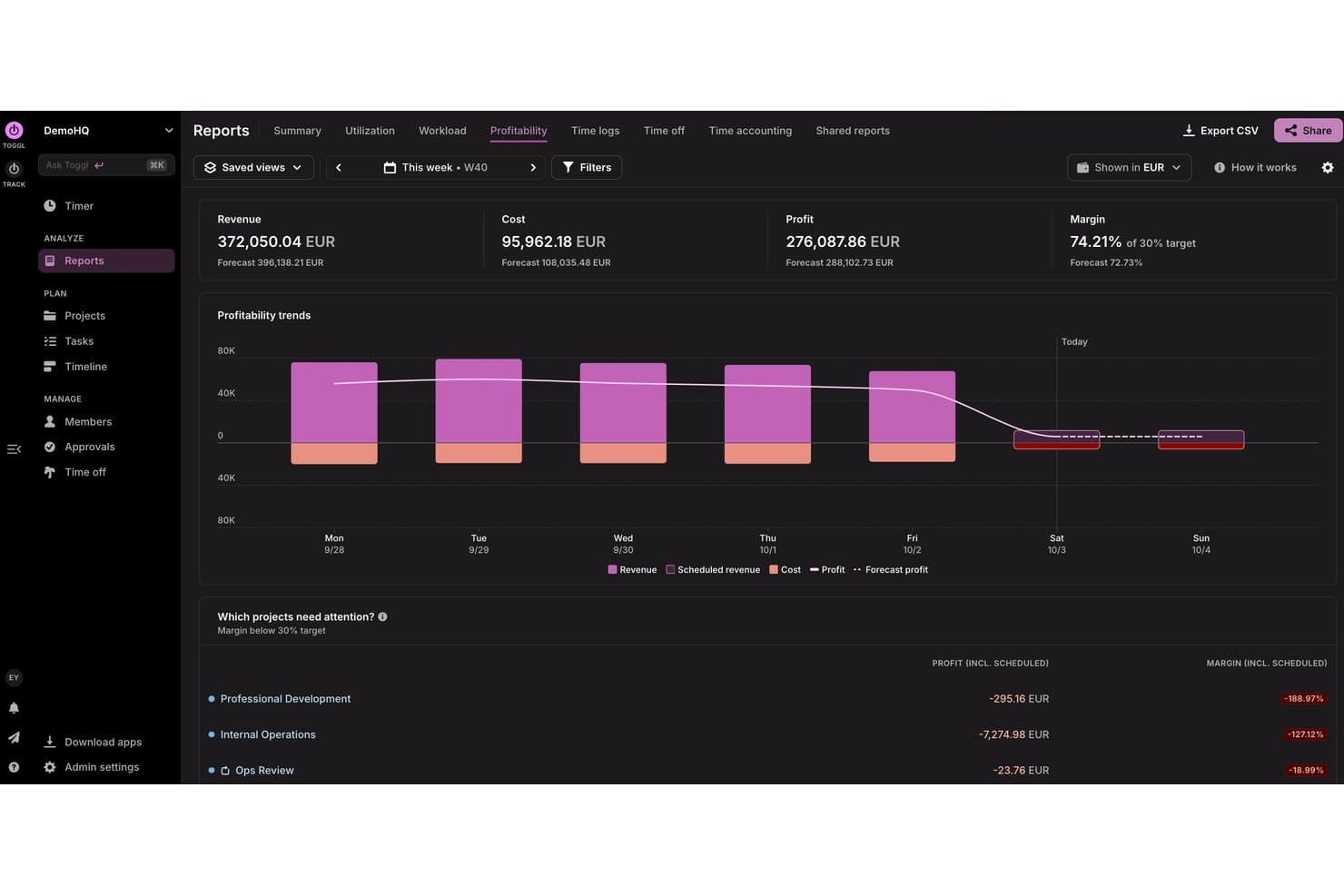
Toggl tracks weekly profitability, costs, and margins by project. Toggl is a time tracking and capacity planning tool fit for lawyers and legal teams, offering one-click timers, billable rate assignment, task management, matter and client tagging, and reporting across web, desktop, and mobile.
Who Is Toggl Best For?
Solo practitioners and small-to-midsized law firms that want lightweight, no-fuss time tracking without committing to a full legal practice management suite.
Why I Picked Toggl
Toggl earns its spot on my shortlist because the one-click timer is genuinely as frictionless as it sounds. I like that you can assign billable rates at the project or task level and round time entries to 6-minute increments, which maps directly to the 1/10th-hour standard that legal billing requires. The calendar view also lets me spot unlogged gaps across the day and backfill entries before they slip through the cracks.
Toggl Key Features
- Automated time tracking: Runs in the background to record app and website activity for later assignment to matters.
- Multi-device sync: Lets you track time seamlessly across web, desktop, and mobile platforms with data always up to date.
- Customizable reporting: Allows you to generate, save, and share detailed reports filtered by client, matter, or activity. Reports can also break down team capacity and project profitability
- Calendar integration: Connects with Google and Outlook Calendar to automatically create time entries from scheduled events.
Toggl Integrations
Toggl offers native integrations with Google Calendar, Outlook Calendar, Asana, Jira, and Todoist. It also connects with Zapier, provides an API for custom integrations, and an MCP for connecting to Claude, Cursor, or Codex.
Pros and Cons
Pros:
- Calendar view reveals untracked time gaps quickly
- Background app tracking captures missed billable time
- One-click timer starts tracking in seconds
Cons:
- No built-in IOLTA or trust accounting
- No native LEDES invoice export available
Learn more about Toggl: Best for flexible time tracking
- Free plan + Free trial + Free demo available
- From $6/user/month
Visit WebsiteCustomer Rating:4.6/5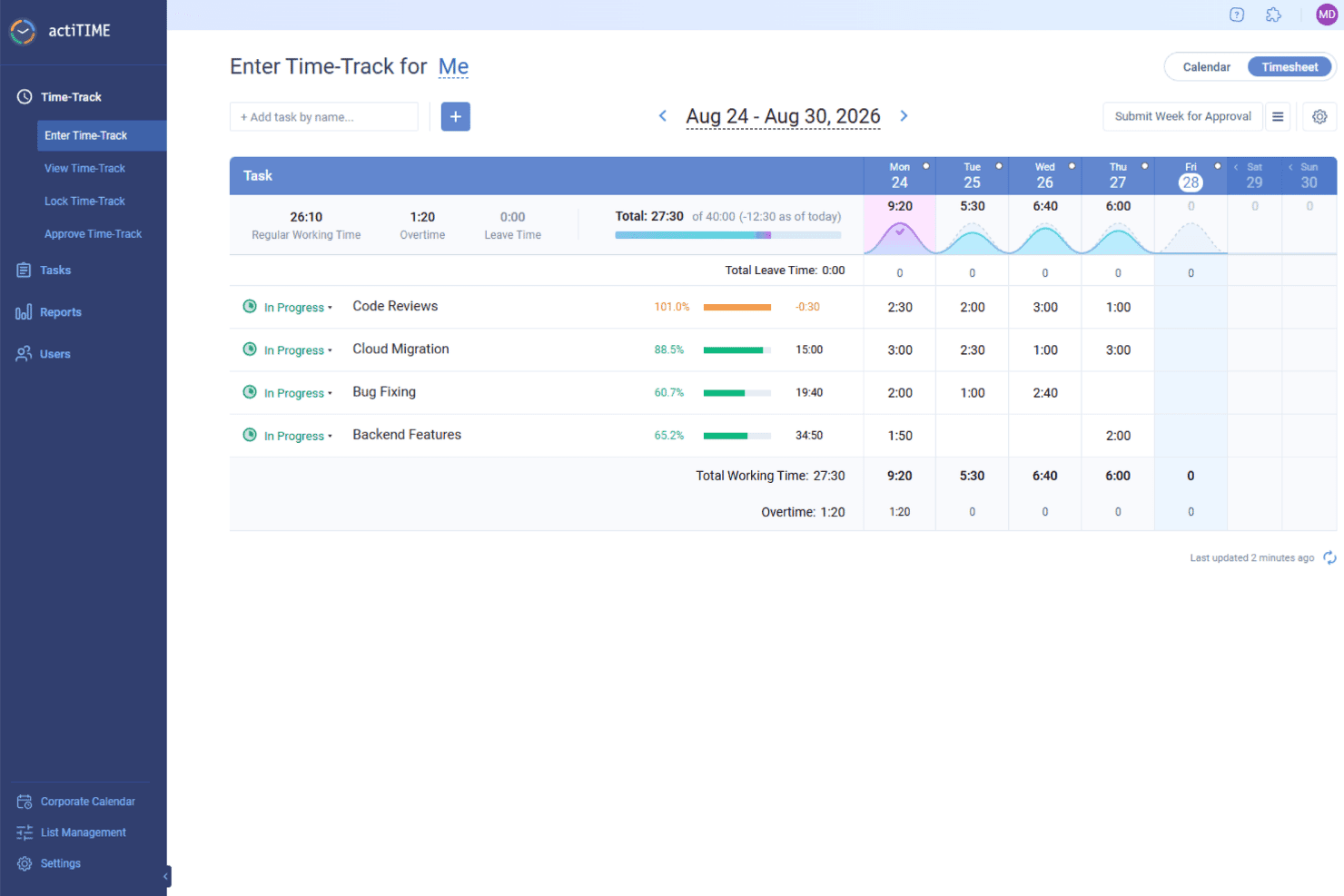
actiTIME helps legal teams track billable hours by task and client, apply billing rates, and turn recorded time into invoices. actiTIME is a time-tracking software designed to help businesses manage projects, track work hours, and analyze performance.
Why I Picked actiTIME: I like that you can define types of work to distinguish between billable and non-billable tasks, ensuring accurate client billing and internal cost assessment. This feature helps in calculating billable amounts and comparing them to project costs, providing a clear picture of profitability. actiTIME also has flexible time-tracking options. You can log hours using online timesheets, specify start and end times in a weekly calendar view, or capture time automatically with a Chrome extension.
Standout Features & Integrations:
Features include customizable workflows, mobile app access, calendar view for visual time management, automatic time tracking, client billing capabilities, and time-off management.
Integrations include QuickBooks, Zapier, actiPLANS, GitHub, Salesforce, Jira, Trello, Outlook, Evernote, Todoist, and Bamboo HR.
Pros and Cons
Pros:
- Provides detailed reporting tools
- Allows customization of work structures
- Offers multiple methods for time tracking
Cons:
- Some users find the user interface cluttered
- The mobile version lacks some features of the desktop version
Learn more about actiTIME: Best for attorneys desiring a detailed view of time utilization
- Free plan + free trial + free demo available
- From $3.99/user/month (billed annually)
Visit WebsiteCustomer Rating:4.7/5
Desktop and mobile view for the timer feature for TimeCamp legal time tracking software TimeCamp is a versatile time tracking tool that allows for deep insights into how time is spent. It is a perfect fit for attorneys looking for detailed time utilization information to optimize their workflows and increase productivity.
Why I Picked TimeCamp: In my search for an optimal time tracking app for attorneys, TimeCamp's detailed reporting functionality stood out. What sets it apart is its ability to deliver a comprehensive view of how time is spent, thus helping attorneys to optimize their efficiency. Given this capability, I deemed TimeCamp best for attorneys who desire a detailed view of their time utilization.
Standout Features & Integrations:
Features include automatic time tracking app, detailed reports, and a user-friendly dashboard that makes it easy to get an overview of time utilization.
Integrations include popular tools like Trello, Asana, Google Calendar, and more, making it easy to sync data and work efficiently.
Pros and Cons
Pros:
- User-friendly dashboard simplifies data interpretation
- Integrates well with popular productivity and project management tools
- Detailed reports offer comprehensive insights into time utilization
Cons:
- The interface might feel less modern compared to some of its competitors
- Some users may find the auto-tracking feature intrusive
- May not be as feature-rich as some other tools in terms of project management
Learn more about TimeCamp: 6Best for firms seeking a complete legal practice management suite
Clio
- Free trial available
- From £79/user/month
Visit WebsiteCustomer Rating:4.7/5
Main dashboard of Clio Clio is a comprehensive legal practice management software that offers a variety of functionalities, including case management, billing, client intake, and more. Designed specifically for law firms, it provides a centralized platform for lawyers to handle all aspects of their practice effectively. Considering its extensive features tailored to the unique needs of law offices, Clio is best suited for firms seeking a complete practice management solution.
Why I Picked Clio: When choosing Clio, I appreciated its specialized, all-in-one approach to legal practice management. It's different from other tools due to its comprehensive feature set that caters specifically to legal practitioners. This is why I chose Clio as the "Best for..." firms that want a complete solution for managing their legal practice without the need for multiple, disjointed tools.
Standout Features & Integrations:
Features include detailed case management, robust billing and invoicing, client intake and relationship management, and task tracking. The platform also offers a client portal for secure communication and document sharing.
Integrations include popular software like QuickBooks, LawPay, Dropbox, and Microsoft Office 365, providing users with a well-rounded, efficient workspace.
Pros and Cons
Pros:
- Wide range of integrations with popular software
- Secure client portal for communication and document sharing
- Comprehensive, all-in-one legal practice management
Cons:
- The learning curve might be steep for non-tech savvy users
- Higher price point compared to more basic tools
- May be too feature-rich for smaller firms
Learn more about Clio: Best for firms wanting robust project management features
- 10-day free trial + demo available
- Pricing upon request
Visit WebsiteCustomer Rating:4.5/5
client management page of TimeSolv legal time tracking software TimeSolv is a web-based time tracking and billing solution that also provides extensive project management features. Designed specifically for professional services firms, it helps effectively monitor billable and non-billable hours, manage invoices, and supervise projects. Its emphasis on project management and time tracking integration makes it an ideal choice for firms that want these two crucial aspects in one place.
Why I Picked TimeSolv: In my assessment of various tools, I singled out TimeSolv for its impressive amalgamation of time tracking, billing, and project management features. Its emphasis on not only tracking time but also managing projects in a comprehensive way makes it unique. In my judgement, for firms seeking to improve their project management capabilities while keeping an accurate account of their billable time, TimeSolv is the best option.
Standout Features & Integrations:
Features include detailed work breakdown structures, budgeting and forecasting, and comprehensive task management. Its features extend beyond time tracking and billing, incorporating robust project management capabilities.
Integrations include other popular tools such as QuickBooks, Dropbox, and LawPay.
Pros and Cons
Pros:
- Wide range of integrations with popular tools
- Detailed work breakdown structure feature for efficient task organization
- Comprehensive project management capabilities integrated with time tracking
Cons:
- Customization options could be more extensive
- Occasional issues reported with mobile app functionality
- Interface might not be as intuitive for first-time users
 Best for cloud-based convenience with integrated expense tracking
- Free plan (1 user)
Visit WebsiteCustomer Rating:4.7/5
Log time feature in Amberlo legal time tracking software Amberlo is a comprehensive legal management software designed for legal professionals and law firms. With a focus on cloud-based convenience, it offers the ability to track time and expenses all in one platform.
Why I Picked Amberlo: In my search for the top legal time tracking software, I selected Amberlo primarily for its impeccable integration of time and expense tracking in a cloud-based environment. This feature set offers law professionals an opportunity to manage their time and associated costs from anywhere. The tool stands out with its commitment to convenience and flexibility, making it the best for those who value these aspects.
Standout Features & Integrations:
Features include case management, invoicing, and billing on top of its time and expense tracking capabilities. It also provides an intuitive dashboard that presents a complete overview of your firm’s activities.
Integrations include Google Calendar, enabling the scheduling of appointments and meetings directly from the platform.
Pros and Cons
Pros:
- Google Calendar integration for effective scheduling
- Robust feature set that includes case management and invoicing
- Convenient cloud-based platform for anywhere access
Cons:
- Complex interface may require a learning curve
- Lacks integration with other popular software like Outlook
- Higher cost compared to other options
Learn more about Amberlo: Best for AI-powered timesheets
- Free trial + demo available
- From $6/user/month
Visit WebsiteCustomer Rating:4.3/5
Deltek Replicon Time's timesheets let professionals log their hours across different projects and clients. Deltek Replicon Time is a time-tracking software designed to help businesses efficiently manage employee time and project hours. It offers a range of features to capture, validate, and analyze time data, making it suitable for various industries, including legal firms.
Why I Picked Deltek Replicon Time: It offers project and task time tracking that's tailored to your firm's needs. You can log hours against various attributes, making it easy to track billable hours for different cases or clients. This ensures accurate billing and saves you time. The AI-powered timesheets also help by automating timesheet completion with pre-population rules, reducing errors from manual data entry and letting your team focus more on legal work instead of administrative tasks.
Standout Features & Integrations:
Features include time off management, mobile app access, analytics tools, customizable timesheets, approval workflows, client management, project expense tracking, real-time reporting, compliance management, resource allocation, budgeting tools, and invoicing capabilities.
Integrations include Jira, Microsoft Project, QuickBooks, Sage Financials, Sage Intacct, Salesforce, SAP, ServiceNow, Xero, Zendesk, BambooHR, and ADP.
Pros and Cons
Pros:
- Mobile app enhances accessibility
- Robust reporting capabilities
- Customizable to fit business needs
Cons:
- Extensive features may be overwhelming for new users
- Reporting customization can be challenging
Learn more about Deltek Replicon Time: Best for firms needing personalized, professional invoice creation
- Not available
- Free forever plan
Visit WebsiteCustomer Rating:4.3/5
Invoice tab for Zoho Invoice legal time tracking software Zoho Invoice is a cloud-based invoicing software specifically designed for businesses to manage their invoices effectively and professionally. For firms that require a personalized touch to their invoices, Zoho Invoice is an ideal choice due to its advanced customization options and user-friendly interface.
Why I Picked Zoho Invoice: As I was evaluating various invoicing tools, Zoho Invoice came across as a tool that has successfully combined the ease of use with a high degree of customization, and it particularly excels in creating professional and personalized invoices. This is why I picked Zoho Invoice as the best option for firms that are in need of custom and professional invoice creation.
Standout Features & Integrations:
Features include detailed and personalized invoices, manage clients and projects, and even automate payment reminders. The tool provides various customization options for invoices, including custom fields, templates, and branding options.
Integrations include a range of applications, such as Zoho CRM, Zoho Projects, Zoho Books, and popular payment gateways like PayPal, Stripe, and Square.
Pros and Cons
Pros:
- Automated reminders for payments streamline the invoicing process
- Wide range of integrations with Zoho apps and other popular applications
- Advanced customization options for professional and personalized invoices
Cons:
- More integrations with third-party apps outside the Zoho ecosystem would be beneficial
- Lacks advanced project management features compared to some competitors
- The interface may take some time to get used to due to numerous features
Learn more about Zoho Invoice:
Outro software de controlo de tempo jurídico
Apresentamos abaixo uma lista de software adicional de gestão de práticas jurídicas que incluí na minha seleção, mas que não chegou aos 10 primeiros lugares. Vale definitivamente a pena conhecê-lo.
- 11CaseFoxBest for firms seeking advanced case management and time tracking
- 12App4LegalBest for multi-functional case and document management
- 13ActionstepBest for managing workflows and automating administrative tasks
- 14HarvestBest for teams that value easy integrations with existing tools
- 15TimeSlipsBest for law offices prioritizing user-friendly time tracking
- 16Time59Best for solo practitioners needing comprehensive time tracking
- 17Deel HRBest for desktop and mobile
- 18InsightfulBest for automatic time mapping
- 19ClickTimeBest for DCAA-compliant timesheets
- 20CosmoLexGood for firms looking for built-in legal accounting
- 21LegalTrekGood for larger firms requiring custom legal solutions
- 22LegalFilesGood for managing complex legal documents and cases
- 23ProTempusGood for small to mid-sized firms wanting an all-in-one practice management software
- 24TimeLedgerGood for businesses that require real-time expense tracking
How I Evaluate Legal Time Tracking Software
I split my evaluation into baseline requirements—matter-based time capture, ABA codes, LEDES invoicing—and the differentiating factors that make a tool the right fit.
Core Functionality (Table Stakes For This List)
When I'm selecting tools for my list, I rank each one on a scale from 0 (does not offer the functionality) to 5 (excels in this area) for each core functionality listed below. Then, I calculate the tool's total score into a percentage. Each tool needs to achieve a minimum total score of 55% to be considered for inclusion.
- Billable Time Capture: I check whether timers, manual entry, and mobile logging all tie directly to matters—so an attorney switching between three client calls can track each one without losing time.
- ABA/UTBMS Code Support: Each tool should include a preloaded legal billing code library, since manually building code sets from scratch defeats the purpose of standardized timekeeping.
- Matter and Client Association: I evaluate how each platform handles rate hierarchies—for example, whether you can set a different hourly rate for the same timekeeper across two matters for the same client.
- Legal Invoice Generation: LEDES export support matters here, especially 1998B format, because corporate clients and insurers increasingly require it before they'll process a payment.
- Trust/IOLTA Compatibility: I look at whether the tool tracks client trust funds with three-way reconciliation or integrates with platforms that do, since commingling errors carry real disciplinary risk.
- Practice Management Integration: The tool should connect to legal PM systems or include native matter management, so time entries flow into case files and conflict checks without duplicate data entry.
Once I have a list of tools that meet this criteria, I consider what sets each platform apart.
Differentiating Factors (What Sets Vendors Apart)
Here's how I compare and contrast different vendors:
Standout Features
Passive time capture is a real differentiator—tools like Clio and TimeSolv can monitor document edits, emails, and calendar events to surface billable work that might otherwise go unrecorded. AI narrative drafting takes this further by turning shorthand entries into polished, client-ready descriptions. I also evaluate realization rate analytics, since dashboards showing write-offs, collection trends, and timekeeper utilization help billing managers spot revenue leakage before it becomes a pattern.
Beyond Features
Firm size fit matters—a solo practitioner needs an affordable, bundled platform, while a mid-size firm requires multi-user permissions and departmental reporting. I also evaluate legal ecosystem integrations, checking whether time data syncs with tools like NetDocuments, Smokeball, or QuickBooks without manual exports. Data security deserves close attention too, since these platforms store privileged client information. I look for SOC 2 Type II certification and role-based access controls that limit who can view billing details across matters.
Como escolher software de controlo de tempo jurídico
É fácil ficar preso a listas extensas de funcionalidades e estruturas de preços complexas. Para o ajudar a manter o foco enquanto percorre o seu processo único de seleção de software, apresentamos uma lista de verificação dos fatores a ter em conta:
| Fator | O que considerar |
|---|---|
| FatorEscalabilidade | O que considerarConsidere se o software pode crescer com o seu escritório. Conseguirá lidar com mais utilizadores ou projetos maiores no futuro? Procure opções que ofereçam planos flexíveis. |
| FatorIntegrações | O que considerarVerifique se a ferramenta se integra com os seus sistemas existentes, como software de contabilidade ou de gestão documental, para evitar interrupções no fluxo de trabalho. |
| FatorPersonalização | O que considerarAvalie a capacidade de adaptar o software às suas necessidades específicas. Pode ajustar as definições ou os relatórios para se adequarem aos seus processos? |
| FatorFacilidade de utilização | O que considerarAvalie até que ponto o software é intuitivo para a sua equipa. Exigirá formação extensa ou poderão começar a utilizá-lo imediatamente? |
| FatorImplementação e integração inicial | O que considerarDetermine o tempo e os recursos necessários para implementar o software. Estão disponíveis materiais de formação e suporte para ajudar a integrar a sua equipa? |
| FatorCusto | O que considerarCompare o custo total de propriedade, incluindo quaisquer taxas ocultas ou atualizações necessárias. Enquadra-se nas suas limitações orçamentais? |
| FatorMedidas de segurança | O que considerarCertifique-se de que o software dispõe de medidas de segurança robustas. Cumpre as normas legais do setor para proteger os dados sensíveis dos clientes? |
| FatorDisponibilidade do suporte | O que considerarConsidere o nível de suporte oferecido. Existe assistência 24 horas por dia, 7 dias por semana, e com que rapidez pode obter ajuda caso surjam problemas? |
O que é um software de controlo de tempo jurídico?
O software de controlo de tempo jurídico é uma ferramenta concebida para ajudar os profissionais do setor jurídico a registar com precisão o tempo despendido em várias tarefas e no trabalho para clientes. Advogados, advogados estagiários e outros profissionais jurídicos utilizam estas ferramentas para melhorar a precisão da faturação e gerir a sua carga de trabalho de forma eficiente.
Enquanto tipo de solução de faturação jurídica, o software de controlo de tempo jurídico permite emitir faturas com precisão e garante transparência na faturação dos clientes.
Funcionalidades como o registo de horas faturáveis, a geração de faturas e o apoio à elaboração de relatórios de tempo ajudam a gerir projetos de clientes e a integrar outras ferramentas jurídicas. De um modo geral, estas ferramentas oferecem um valor significativo ao melhorar a precisão da faturação e a conformidade com as normas jurídicas.
Funcionalidades
Ao escolher um software de controlo de tempo jurídico, é crucial concentrar-se nas funcionalidades que irão simplificar o seu fluxo de trabalho e aumentar a produtividade. Eis as principais funcionalidades a procurar para garantir que o seu software responde às exigências de um escritório de advogados moderno.
- Registo automático do tempo: Regista automaticamente o tempo despendido nas tarefas, reduzindo o risco de não registar horas faturáveis.
- Integração com ferramentas de gestão do escritório: Sincroniza-se de forma simples com os seus sistemas existentes, criando um fluxo de trabalho unificado que poupa tempo e minimiza erros.
- Acessibilidade móvel: Permite-lhe registar o tempo a partir de qualquer lugar, garantindo que nunca perde uma oportunidade de registar horas faturáveis.
- Relatórios personalizáveis: Gera relatórios adaptados às necessidades específicas do seu escritório, oferecendo informações que apoiam uma tomada de decisões fundamentada.
- Faturação e emissão de faturas: Simplifica o processo de converter o tempo registado em faturas precisas, acelerando os ciclos de pagamento.
- Segurança e conformidade: Protege os dados sensíveis dos clientes através de encriptação robusta e funcionalidades de conformidade, preservando a confiança e o cumprimento regulamentar.
- Interface fácil de utilizar: Oferece um design intuitivo que requer formação mínima, permitindo que a sua equipa se familiarize rapidamente com a ferramenta.
- Análise do registo de tempos: Fornece informações baseadas em dados sobre a utilização do tempo, ajudando a otimizar a produtividade e a identificar áreas de melhoria.
- Colaboração em tempo real: Permite que os membros da equipa colaborem no registo do tempo em tempo real, melhorando a coordenação e a eficiência.
- Portal de acesso do cliente: Permite aos clientes consultar as suas faturas e registos de tempo, aumentando a transparência e a confiança.
Vantagens
Investir num software de controlo de tempo jurídico oferece vantagens significativas tanto para utilizadores individuais como para organizações. Eis as principais vantagens que tornam este software um recurso valioso para os escritórios de advogados.
- Maior precisão na faturação: O acompanhamento automático das horas faturáveis reduz os erros e garante que os clientes são faturados corretamente.
- Faturação eficiente: A criação de faturas diretamente a partir do tempo registado poupa tempo e simplifica o processo de faturação.
- Melhor gestão do tempo: Os relatórios de tempo ajudam a analisar como o tempo é utilizado, permitindo tomar decisões mais fundamentadas.
- Segurança de dados reforçada: As medidas de proteção de segurança protegem as informações sensíveis dos clientes, mantendo a confiança e a conformidade.
- Melhor supervisão dos projetos: A gestão de projetos com ferramentas integradas ajuda a distribuir os recursos de forma eficaz e a acompanhar o progresso.
- Maior flexibilidade: A funcionalidade da aplicação móvel permite registar o tempo a partir de qualquer lugar, apoiando um ambiente de trabalho mais adaptável.
- Redução da carga administrativa: O registo automático do tempo e as interfaces fáceis de utilizar minimizam a introdução manual de dados e as necessidades de formação.
Custos e preços
Esta secção apresenta uma estimativa dos planos e custos médios do software de registo de tempo para advogados. Os preços variam consoante o tipo de plano, com funcionalidades que se adaptam a diferentes necessidades.
| Tipo de plano | Preço médio | Funcionalidades comuns |
|---|---|---|
| Tipo de planoPlano gratuito | Preço médio$0 | Funcionalidades comunsRegisto básico do tempo, número limitado de utilizadores, relatórios padrão |
| Tipo de planoPlano pessoal | Preço médio$10/mo | Funcionalidades comunsRegisto avançado do tempo, acesso móvel, faturação básica |
| Tipo de planoPlano empresarial | Preço médio$30/mo | Funcionalidades comunsIntegração com ferramentas de gestão de escritórios, relatórios personalizáveis, colaboração em equipa |
| Tipo de planoPlano empresarial de grande dimensão | Preço médio$75/mo | Funcionalidades comunsFuncionalidades com tecnologia de IA, segurança reforçada, utilizadores ilimitados, suporte prioritário |
Perguntas frequentes sobre software de controlo de tempo jurídico
Eis algumas respostas a perguntas comuns sobre software jurídico de controlo de tempo:
Como posso garantir que o meu software jurídico de controlo de tempo se integra corretamente com os sistemas existentes?
A maioria dos softwares jurídicos de controlo de tempo oferece integração com ferramentas comuns de gestão de escritórios. Antes de escolher o software, verifique a compatibilidade com os seus sistemas atuais. Muitos fornecedores disponibilizam documentação detalhada ou apoio ao cliente para ajudar no processo de integração, garantindo uma transição tranquila.
Isto é especialmente importante se utilizar \u003ca href=\u0022https://thelegalpractice.com/tools/best-small-law-firm-billing-software/\u0022\u003esoftware de faturação para pequenos escritórios de advogados\u003c/a\u003e, uma vez que alguns apresentam integrações limitadas para reduzir os custos.
Que medidas de segurança devo procurar num software jurídico de controlo de tempo?
Procure funcionalidades como encriptação de dados, autenticação multifator e conformidade com normas do setor, como o RGPD ou a HIPAA. Estas medidas ajudam a proteger as informações sensíveis dos clientes e a manter a integridade dos seus dados. As atualizações regulares do software e as auditorias também são essenciais para manter a segurança.
O software jurídico de controlo de tempo consegue gerir várias taxas de faturação para diferentes clientes?
Sim, a maioria dos softwares jurídicos avançados de controlo de tempo permite definir diferentes taxas de faturação para vários clientes, assuntos ou até tarefas individuais. Esta flexibilidade garante uma faturação precisa e ajuda a gerir facilmente estruturas de honorários complexas.
Como posso gerir as permissões dos utilizadores num software jurídico de controlo de tempo?
As permissões dos utilizadores podem ser geridas através de controlos de acesso baseados em funções. Esta funcionalidade permite atribuir diferentes níveis de acesso aos utilizadores consoante as suas funções no escritório. Por exemplo, os sócios podem ter acesso total, enquanto os associados têm acesso limitado a determinados dados.
É possível controlar eficazmente as horas não faturáveis com um software jurídico de controlo de tempo?
Sim, o software jurídico de controlo de tempo permite normalmente distinguir entre horas faturáveis e não faturáveis. Esta funcionalidade ajuda a compreender onde é despendido o tempo e a gerir os recursos internos de forma mais eficaz, garantindo que as horas não faturáveis são contabilizadas.
Que opções de apoio estão normalmente disponíveis para software jurídico de controlo de tempo?
As opções de apoio incluem frequentemente e-mail, apoio telefónico, conversação em direto e uma base de conhecimento abrangente. Alguns fornecedores também oferecem pacotes de apoio premium, com tempos de resposta mais rápidos e gestores de conta dedicados, especialmente nos escalões de preços mais elevados.
Como posso garantir a exatidão dos dados ao mudar para um novo software jurídico de controlo de tempo?
Comece por elaborar um plano de migração de dados que inclua a criação de cópias de segurança dos dados atuais, o teste do processo de migração e a realização de verificações completas da validação dos dados após a migração. Muitos fornecedores disponibilizam assistência ou ferramentas de migração para ajudar a transferir os dados com precisão.
Que capacidades de elaboração de relatórios devo esperar de um software jurídico de controlo de tempo?
Espere relatórios personalizáveis que abranjam horas faturáveis, métricas de produtividade e resumos financeiros. O melhor software permitir-lhe-á filtrar os dados por cliente, assunto ou período de tempo, fornecendo informações adaptadas às necessidades específicas do seu escritório.
O software jurídico de controlo de tempo consegue gerir códigos de faturação jurídica (UTBMS)?
Sim, a maioria dos softwares jurídicos de controlo de tempo consegue gerir \u003ca href=\u0022https://thelegalpractice.com/legal-billing/legal-billing-codes/\u0022\u003ecódigos UTBMS de faturação jurídica\u003c/a\u003e. Ao integrar estes códigos, o software ajuda os advogados a categorizar as suas tarefas de forma mais eficiente, garantindo uma faturação precisa e o alinhamento com as expectativas dos clientes.