O software de fluxos de trabalho jurídicos simplifica tarefas administrativas repetitivas e reduz os estrangulamentos no tratamento de documentos, na gestão de calendários e nas comunicações com clientes, permitindo que a sua equipa se concentre em fornecer uma estratégia jurídica e um serviço ao cliente excecionais. Gerir prazos, conformidade e colaboração entre processos pode ser um desafio, mas o apoio adequado pode aumentar a eficiência e reduzir erros dispendiosos.
Neste artigo, comparo e analiso as melhores ferramentas de fluxos de trabalho jurídicos para apoiar a sua decisão de compra.
Why Trust Our Software Recommendations
6,700+
Reviews
20
Industry experts
16+
Evaluation factors
14
Years
Our team has been testing and reviewing software since 2012. As legal practice leaders ourselves, we know how difficult—and important—it is to choose the right software.
For this guide, we evaluated tools using hands-on testing and independent research, scoring tools using our selection criteria.
Our reviews reflect our human editorial judgment, not a sales pitch.
Tabela de comparação de software de fluxos de trabalho
Esta tabela de comparação resume os detalhes de preços das minhas principais escolhas de software de fluxos de trabalho jurídicos.
| Tool | Best For | Trial Info | Price | ||
|---|---|---|---|---|---|
| 1 | Best for seamless time tracking, billing, and matter management in one platform | 7-day free trial + free demo available | From $59/user/month | Website | |
| 2 | Best for integrated billing and payments | Free trial available | Pricing upon request | Website | |
| 3 | Best for compliant digital document exchange | Free trial + free demo available | From $5,000/year (billed annually) | Website | |
| 4 | Best for customizable document workflows | Free demo available | Pricing upon request | Website | |
| 5 | Best for a no-code workflow interface | Free demo available | Pricing upon request | Website | |
| 6 | Best for automatic time tracking | Free demo available | Pricing upon request | Website | |
| 7 | Best comprehensive law practice software | Free trial available | From £79/user/month | Website | |
| 8 | Best for adaptable workflow management in fast-paced legal environments | 14-day free trial + free demo available | From $11/user/month (billed annually) | Website | |
| 9 | Best for automating legal workflows | Free plan + trial available | From $49/user/month | Website | |
| 10 | Best for dedicated law firm workflow management in the cloud | Free demo available | Pricing upon request | Website |


Análises do melhor software de fluxos de trabalho
Abaixo encontram-se os meus resumos detalhados do melhor software de fluxos de trabalho jurídicos que integrou a minha lista restrita. As minhas análises oferecem uma visão detalhada das principais funcionalidades, vantagens e desvantagens, integrações e casos de utilização ideais de cada ferramenta, para o ajudar a encontrar a melhor opção para si.
 Best for seamless time tracking, billing, and matter management in one platform
- 7-day free trial + free demo available
- From $59/user/month
Visit WebsiteCustomer Rating:4.3/5
Here's a screenshot of PracticePanther's dashboard. PracticePanther is a comprehensive legal case management software that merges time tracking, billing, and matter management into a single platform. It excels in these areas, making it an ideal choice for firms that are looking for an efficient way to handle these functions.
Why I Picked PracticePanther: I selected PracticePanther for its ability to unify multiple crucial functions into one user-friendly platform. This integration is a key differentiator for PracticePanther.
It stands out as the optimal tool for those seeking a solution for time tracking, billing, and matter management in a single, cohesive platform.
Standout Features & Integrations:
Features include integrated billing, billable time and expense tracking, messaging, and case management, along with a client portal.
Integrations include QuickBooks, Gmail, Outlook, and Microsoft Calendar, ensuring a smoother workflow.
Pros and Cons
Pros:
- Numerous integrations with commonly used applications
- User-friendly interface
- Consolidates time tracking, billing, and case management
Cons:
- Some users may find the abundance of features overwhelming
- May be expensive for smaller firms
- No free tier, only a free trial
Learn more about PracticePanther: 2Best for integrated billing and payments
8am
- Free trial available
- Pricing upon request
Visit WebsiteCustomer Rating:4.6/5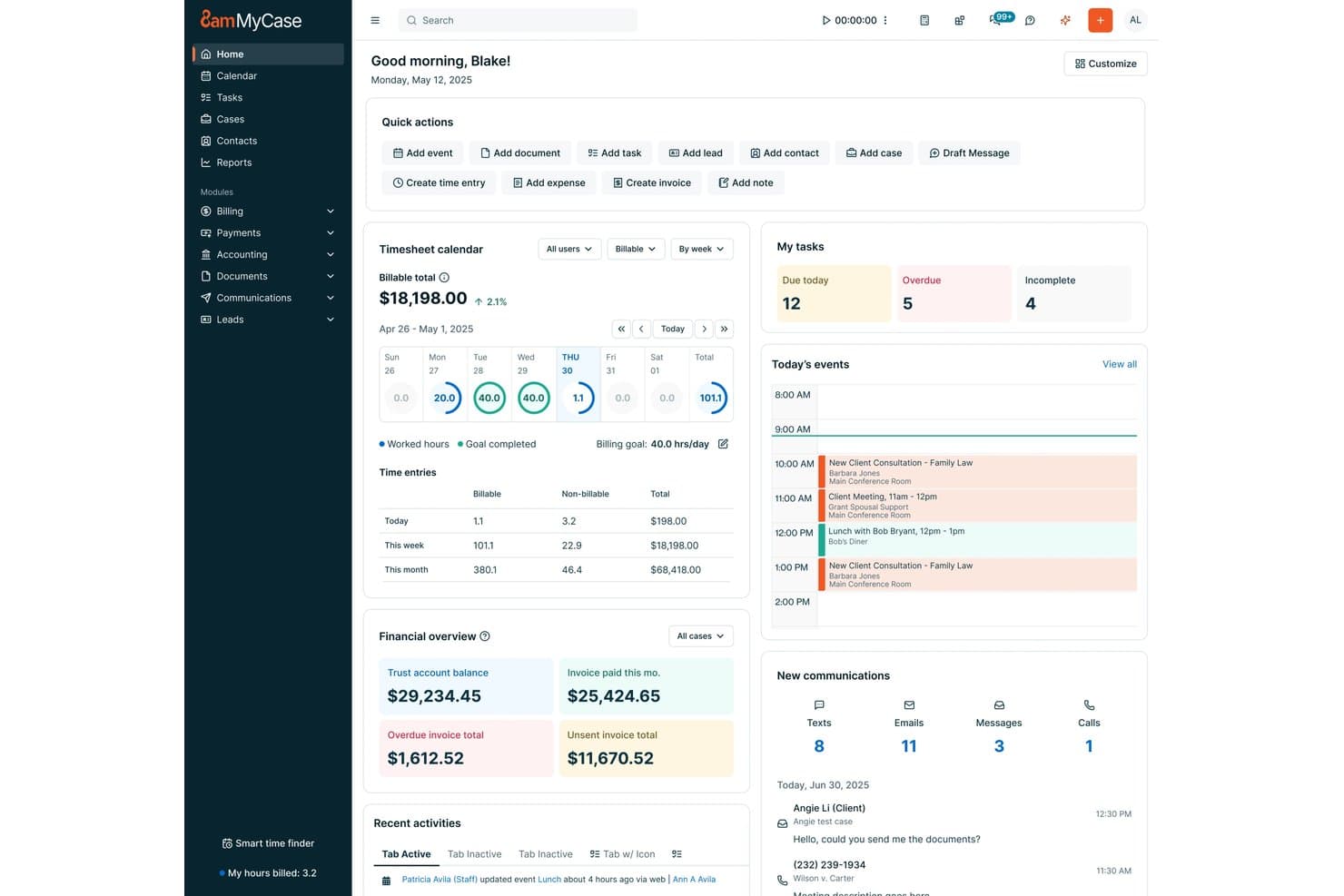
8am offers a centralized home dashboard with task management, timesheet tracking, financial overview, and today's events for legal professionals. 8am is a legal workflow software platform designed for law firms and legal teams, offering integrated case management, workflow automation, document organization, time tracking, and comprehensive billing tools.
Who Is 8am Best For?
Law firms and legal departments seeking a unified platform to manage matters, workflows, and payments in one place.
Why I Picked 8am
I picked 8am as one of the best because I can manage invoices, trust accounting, and payments in one secure system. I like that my team can generate bills directly from matters, process cards online, and automate collections with built-in compliance checks.
8am Key Features
- Matter management dashboard: Gives a unified view of all cases, tasks, and documents in one place.
- Integrated document automation: Lets you generate, edit, and organize legal documents tied to specific matters.
- Role-based user permissions: Allows firms to control access based on team members’ roles or practice area.
- Calendar and deadline tracking: Monitors court dates, appointments, and statutory deadlines across cases.
8am Integrations
8am offers native integrations with LawPay, QuickBooks Online, NetDocuments, DocuSign, Microsoft 365, Google Workspace, Xero, Infotrack, Smith.ai, and Zapier. An API is available for custom integrations.
Pros and Cons
Pros:
- Streamlined multi-method payment collection process
- Centralized matter and document management tools
- Automated trust accounting and compliance workflows
Cons:
- Occasional support responsiveness issues reported
- Limited complex workflow branching customization
Learn more about 8am: 3Best for compliant digital document exchange
Moxo
- Free trial + free demo available
- From $5,000/year (billed annually)
Visit WebsiteCustomer Rating:4.4/5
Moxo shows a workflow builder for account onboarding with automations. Moxo is a workflow orchestration platform that combines secure client workspaces, document exchange, eSignatures, and automated process flows to manage external-facing legal engagements from intake through completion.
Who Is Moxo Best For?
Moxo is a strong fit for legal teams and law firms that manage high volumes of client-facing workflows and need a structured, trackable way to coordinate document exchange and approvals outside the firm.
Why I Picked Moxo
Moxo earns its spot on my shortlist because of how it handles document exchange in compliance-sensitive legal work. Files shared through a workspace are encrypted in transit and at rest, and built-in document request actions keep intake organized by prompting clients to upload specific files at the right stage. I also use the activity log to confirm exactly when each party viewed or downloaded a document, which matters when questions arise about disclosure timing.
Moxo Key Features
- White-label client portal: Brand the client-facing workspace with your firm's logo and colours instead of Moxo's.
- In-workspace messaging: Send and receive messages with clients or co-counsel directly inside a matter workspace.
- Intake form builder: Collect structured information from clients at the start of a matter using customizable forms.
- Workflow templates: Save repeatable matter types as reusable templates to launch new client workflows quickly.
Moxo Integrations
Moxo offers data sync connectors with Salesforce, HubSpot, Microsoft Dynamics, Zoho, Filevine, Xero, Global Relay, Smarsh, Redtail, and Follow Up Boss. It also supports file uploads from Google Drive, Dropbox, Box, and OneDrive directly into workspaces, and native calendar integrations sync meetings with Google Calendar and Outlook. A REST API and webhooks are available for custom integrations, and it connects with Zapier.
Pros and Cons
Pros:
- Built-in eSignatures and file requests
- White-label branded portal for each client
- SOC 2 Type II and GDPR compliant
Cons:
- Setup requires heavy configuration time up front
- No native time tracking for matters
Learn more about Moxo: Best for customizable document workflows
- Free demo available
- Pricing upon request
Visit WebsiteCustomer Rating:4.3/5
HotDocs standardizes documentation and offers workflow automation for reviewing and approving official documents. HotDocs is a document automation software designed to enhance the creation and management of frequently used documents and forms.
Why I Picked HotDocs: I chose HotDocs for its customizable templates, which allow legal professionals to standardize document creation processes. The platform also provides audit trails and customizable workflow automation for repetitive tasks such as document review, approval, and filing.
Standardization, templates, and workflow automation can save legal firms a substantial amount of time, which would otherwise be spent drafting documents from scratch.
Standout Features & Integrations:
Features include conditional logic, which helps users create dynamic documents by incorporating if/then statements. It also offers batch document processing, digital signatures, and options to perform sophisticated calculations within documents.
Integrations include Salesforce, Microsoft Dynamics, Sage, Microsoft 365, Microsoft Word, Tabs3, CARET Legal, Actionstep, Amicus Attorney, and AbacusLaw.
Pros and Cons
Pros:
- Scalable for growing firms
- Good document workflow automation
- Customizable templates
Cons:
- Can take time to learn how to create templates
- Can be expensive for smaller firms
Learn more about Mitratech Hotdocs: Best for a no-code workflow interface
- Free demo available
- Pricing upon request
Visit WebsiteCustomer Rating:4.2/5
TAP lets you view all workflows within a single interface. TAP by Mitratech is a no-code workflow automation software designed for high-volume workflows across various business sectors, including legal.
Why I Picked TAP: I like its no-code workflow automation capabilities, which enable legal teams to handle complex processes without the need for IT support. Users can create and modify workflows using a simple drag-and-drop interface, making it easy to automate tasks like document approvals, compliance tracking, and contract management.
With its built-in conditional logic, TAP allows for customizable routing, ensuring that legal matters are handled efficiently and in alignment with internal policies.
Standout Features & Integrations:
Features include real-time collaboration, allowing multiple users to work on workflows simultaneously, and integrates e-signature functionalities for secure and legally binding approvals. Additional features include audit trails for full process transparency and automated reminders to ensure tasks are completed on time.
Integrations include Microsoft 365, DocuSign, Salesforce, and NetDocuments.
Pros and Cons
Pros:
- Supports collaboration
- Customizable workflows
- Easy no-code platform
Cons:
- Initial setup can be time-consuming
- Limitations to customization for specific needs
Learn more about Mitratech TAP Workflow Automation: Best for automatic time tracking
- Free demo available
- Pricing upon request
Visit WebsiteCustomer Rating:4.8/5
Smokeball's web app interface offers easy navigation for legal professionals. Smokeball is a legal workflow software designed to enhance the efficiency of law firms. It combines technology and practical features to support various legal practice areas, ensuring that you can manage your cases and clients effectively.
Why I Picked Smokeball: I picked Smokeball because of its automatic time tracking feature, which records billable hours without manual input. This means you can focus on your legal work while knowing your time is being accurately captured. Additionally, Smokeball's legal billing software converts this tracked time into professional invoices, simplifying the billing process for both you and your clients.
Another reason is Smokeball's document automation, which integrates with Microsoft Word to automate the creation of legal documents. This reduces the risk of manual errors and ensures consistency across your firm's documentation. The software also offers dashboards and reporting tools that provide insights into your firm's performance, helping you understand your operations better.
Standout Features & Integrations
Features include a client portal that enhances communication by allowing clients to access their case information easily. The intake and onboarding tools streamline the client intake process with electronic signatures, making it easier for you to bring new clients on board. Moreover, Smokeball provides award-winning support, ensuring you have access to assistance whenever needed.
Integrations include Setmore Appointments, Clio, Microsoft Outlook, Google Tasks, Gavel, Mailchimp, Motion, Zoho Forms, Google Docs, Jotform, Slack, and HubSpot.
Pros and Cons
Pros:
- Strong document‑automation and large pre‑built form library.
- Automatic time‑tracking captures billable work without manual timers.
- Workflow automation: tasks, reminders, dependencies to manage matters.
Cons:
- Mac users and Google Workspace users may face limitations.
- Workflow‑tailoring may not meet very specialized needs.
Learn more about Smokeball: 7Best comprehensive law practice software
Clio
- Free trial available
- From £79/user/month
Visit WebsiteCustomer Rating:4.7/5
Here's the law practice management feature in Clio. Clio is a cloud-based legal practice management software that provides a comprehensive suite of tools for law firms. It encompasses all aspects of legal operations, making it the top pick for a comprehensive best law practice management software solution.
Why I Picked Clio: I chose Clio for its comprehensive feature set that caters to all legal operations. From case management to billing, it provides an all-in-one platform that stands out in its capability to handle a law firm's varied needs. That's why I consider Clio best for law practices seeking a comprehensive, one-stop solution for their operations.
Standout Features & Integrations:
Features include case management, time tracking, billing, and client communication tools.
Integrations include Google Workspace, Microsoft Office 365, and QuickBooks, thus enhancing its functionality and seamless workflow.
Pros and Cons
Pros:
- User-friendly interface and robust client communication tools
- Integration with popular productivity tools
- Comprehensive suite of features for all legal operations
Cons:
- Pricing might be on the higher side for solo practitioners or small law firms
- The extensive features may be overwhelming for smaller firms
- Doesn't offer a free plan, only a free trial
Learn more about Clio: Best for adaptable workflow management in fast-paced legal environments
- 14-day free trial + free demo available
- From $11/user/month (billed annually)
Visit WebsiteCustomer Rating:4.8/5
Here's Cflow's workflow automation tool feature. Cflow is a workflow automation tool designed to streamline and automate business processes. Particularly in fast-paced legal environments, this software excels at offering adaptability and flexibility in managing workflows.
Why I Picked Cflow: The reason I selected Cflow is due to its dynamic nature in adapting to rapidly changing legal environments. Compared to other tools, Cflow's customizability and flexible workflow design set it apart.
Because of this, I believe Cflow is best suited for those seeking adaptable workflow management in a fast-paced legal setting.
Standout Features & Integrations:
Features include process templates, automatic notifications, and real-time analytics and reporting.
Integrations include various platforms including Google Drive, Dropbox, and Microsoft Office 365, simplifying data access and collaboration.
Pros and Cons
Pros:
- Real-time analytics and reporting features available
- Provides a wide range of integrations with platforms like Google Drive and Microsoft Office 365
- Offers dynamic workflow management suitable for fast-paced environments
Cons:
- The cost may be high for small-scale legal firms
- The interface might be complex for beginners
- No free tier available, only a 14-day free trial
Learn more about Cflow: Best for automating legal workflows
- Free plan + trial available
- From $49/user/month
Visit WebsiteCustomer Rating:4.8/5
Lawcus offers a visual task management tool with kanban boards. Lawcus is a legal practice management software designed to improve your legal workflows. It provides a centralized platform where you can manage cases, clients, and tasks.
Why I Picked Lawcus: I picked Lawcus because it offers robust case management and document automation features, allowing you to handle legal matters efficiently. The platform's workflow automation lets you automate repetitive tasks, freeing up more time to focus on your clients. Additionally, the billing and accounting functionalities help you manage financial aspects without hassle, ensuring accurate and timely invoicing.
Another reason Lawcus stands out is its client intake and CRM capabilities, which facilitate smooth client onboarding and relationship management. The software also provides customizable reporting options, enabling you to analyze firm performance and make informed decisions. With the inclusion of a client portal, you can securely communicate and share documents with your clients, fostering transparency and trust.
Standout Features & Integrations
Features include legal AI tools that assist in document review and analysis, enhancing your decision-making capabilities. The no-code automation feature allows you to create custom workflows without technical expertise, adapting the software to your firm's unique needs. Bank-grade security ensures that your client data is protected, giving you peace of mind when handling sensitive information.
Integrations include Gmail, Google Calendar, Google Drive, Dropbox, Microsoft 365, Microsoft Outlook, QuickBooks, Microsoft Exchange, Box, Microsoft OneDrive, Zapier, and LawPay.
Pros and Cons
Pros:
- Strong automation capabilities (no‑code triggers, workflow automation).
- Integrated CRM + client intake + case management in one platform.
- Good billing/time tracking features integrated with matters.
Cons:
- Integration ecosystem may be less extensive than leading alternatives.
- Mobile features described as weaker or needing improvement.
Learn more about Lawcus: 10Best for dedicated law firm workflow management in the cloud
CloudLex
- Free demo available
- Pricing upon request
Visit WebsiteCustomer Rating:4.8/5
Here's the CloudLex law firm workflow feature. CloudLex is a comprehensive, cloud-based solution that excels in handling intricate law firm workflows. Specifically designed for law firms, it offers a unified platform that significantly enhances the management of legal processes in a cloud environment.
Why I Picked CloudLex: In my evaluation, CloudLex was a standout candidate because of its exclusive focus on legal workflows and cloud-based operations. It showed a unique alignment with the needs of law firms aiming to leverage cloud technology for better workflow management.
I determined that CloudLex is the ideal option for those seeking dedicated law firm workflow management in the cloud.
Standout Features & Integrations:
Features include its matter manager, intuitive client communicator, and insightful analytics.
Integrations include Microsoft Office 365, enhancing its functionality and user convenience.
Pros and Cons
Pros:
- Integrates seamlessly with Microsoft Office 365
- Offers a range of useful features including client communicator
- Tailored for legal workflows in a cloud-based environment
Cons:
- The platform might require a learning curve for non-tech-savvy users
- High starting price may not be suitable for all budgets
- Doesn't offer a free tier
Learn more about CloudLex:
Outro software de fluxos de trabalho jurídicos
Abaixo encontra-se uma lista de software adicional de fluxos de trabalho jurídicos que incluí na minha lista restrita, mas que não chegou aos 10 principais. Vale definitivamente a pena consultá-lo.
- 11LawmaticsBest for advanced custom automation
- 12ActionstepBest for full-featured law firm management, from intake to invoicing
- 13OnitBest for AI-driven legal operations
- 14Pneumatic WorkflowBest for an AI-powered workflow builder
- 15LEGALFLYBest for AI-driven legal automation
- 16PatternBuilderBest for advanced document creation and collaboration
- 17BigHandBest for integrating workflow management into existing operations
- 18LawcadiaBest for introducing transparency into legal project management
- 19DazychainBest for AI-driven legal automation
- 20Caseflow AcumenBest for streamlining intricate case management workflows
- 21LEXolution.FLOWBest for case knowledge management
- 22Mitratech CasecloudBest for automating legal workflows
- 23InRuleBest for managing business logic
- 24Insight LegalBest for centralized case management
How I Evaluate Legal Workflow Software
I split my evaluation into two layers: the baseline requirements a firm needs—like matter management, document automation, and billing—and the differentiators that set one tool apart from another.
Core Functionality (Table Stakes For This List)
When I'm selecting tools for my list, I rank each one on a scale from 0 (does not offer the functionality) to 5 (excels in this area) for each core functionality listed below. Then, I calculate the tool's total score into a percentage. Each tool needs to achieve a minimum total score of 65% to be considered for inclusion.
- Matter & Case Management: I look for a centralized hub where you can link contacts, notes, documents, and communications to each matter rather than toggling between disconnected systems.
- Legal Workflow Automation: Each tool gets evaluated on whether it lets you build configurable workflows for intake requests, approval chains, and task routing across your team.
- Document Automation & Management: I check whether the platform supports template-based document generation with merge fields, version tracking, and matter-linked storage for briefs, contracts, and filings.
- Deadline & Task Tracking: Court dates, statutes of limitation, and filing deadlines can't slip through the cracks, so I evaluate how each tool handles reminders, dependent tasks, and calendar syncing.
- Time Tracking & Billing: The billing module matters—I look for legal-specific invoicing, trust accounting support, and the ability to capture time entries directly from matter records.
- Legal Integrations & Compliance: Tools like Clio, PracticePanther, and CosmoLex each handle this differently, so I evaluate connectivity with e-signature, legal research, and e-filing systems alongside data security standards.
Once I have a list of tools that meet this criteria, I consider what sets each platform apart.
Differentiating Factors (What Sets Vendors Apart)
Here's how I compare and contrast different vendors:
Standout Features
AI-assisted drafting and contract review is a major differentiator—tools that offer clause extraction or research summarization save attorneys real hours on routine work. I also evaluate whether a platform includes a secure client portal, since giving clients direct access to matter updates and documents cuts down on back-and-forth email. Conflict check automation matters most for firms with high-volume intake. Manual checks against prior clients and adverse parties become unsustainable at scale.
Beyond Features
Security and compliance standards are a top consideration—I check for SOC 2 Type II certification, ethical walls, and audit trails that align with attorney-client privilege obligations. Integration depth also matters. A platform that connects with Microsoft 365, legal research tools, and accounting systems like QuickBooks reduces manual data entry across your stack. I also evaluate firm size fit, since a tool built for Am Law firms often overwhelms a solo practitioner, and vice versa.
Como escolher software de fluxos de trabalho jurídicos
É fácil ficar atolado em longas listas de funcionalidades e estruturas de preços complexas. Para o ajudar a manter o foco enquanto percorre o seu processo específico de seleção de software, eis uma lista de verificação dos fatores a ter em conta:
| Fator | O que deve considerar |
|---|---|
| FatorEscalabilidade | O que deve considerarO software acompanhará o crescimento do seu escritório? Considere as necessidades futuras e se a ferramenta consegue lidar com um aumento da carga de trabalho. |
| FatorIntegrações | O que deve considerarÉ compatível com as ferramentas que já utiliza? Verifique a compatibilidade com outro software que utiliza diariamente. |
| FatorPersonalização | O que deve considerarPode adaptá-lo aos seus processos? Procure opções para ajustar os fluxos de trabalho e as interfaces de utilizador. |
| FatorImplementação e integração inicial | O que deve considerarÉ fácil começar a utilizá-lo? Avalie o tempo e os recursos necessários para uma implementação completa. |
| FatorCusto | O que deve considerarEnquadra-se no seu orçamento? Considere não só o preço, mas também o valor que proporciona em comparação com outras opções. |
| FatorMedidas de segurança | O que deve considerarQuão seguros estão os seus dados? Garanta a conformidade com as normas do setor e procure funcionalidades de encriptação. |
O que é software de fluxos de trabalho jurídicos?
O software de fluxos de trabalho jurídicos é uma ferramenta digital que automatiza e organiza tarefas jurídicas rotineiras. É utilizado por escritórios de advogados, departamentos jurídicos e equipas de operações jurídicas para gerir processos, documentos, prazos e aprovações.
Ao reduzir o trabalho manual, ajuda a eliminar estrangulamentos, melhorar a precisão e simplificar a colaboração entre equipas.
Funcionalidades
Ao selecionar software de fluxos de trabalho jurídicos, esteja atento às seguintes funcionalidades essenciais:
- Gestão de documentos: Organiza e armazena documentos jurídicos, tornando-os facilmente acessíveis e pesquisáveis.
- Automatização de tarefas: Automatiza tarefas repetitivas, poupando tempo e reduzindo o erro humano.
- Acompanhamento de processos: Monitoriza o progresso dos processos, garantindo o cumprimento dos prazos e marcos.
- Registo de horas: Regista com precisão as horas faturáveis, contribuindo para uma faturação e emissão de faturas eficientes.
- Faturação e emissão de faturas: Gere a faturação dos clientes através de processos simplificados de emissão de faturas.
- Fluxos de trabalho personalizáveis: Permite adaptar os fluxos de trabalho aos seus processos jurídicos específicos.
- Capacidades de integração: Liga-se a outras ferramentas que utiliza, melhorando a produtividade geral.
- Acesso móvel: Permite aceder ao software em qualquer lugar, garantindo a continuidade do trabalho fora do escritório.
- Medidas de segurança: Protege informações jurídicas sensíveis através de encriptação e conformidade com as normas do setor.
- Interface intuitiva: Garante facilidade de utilização, permitindo que os membros da equipa adotem rapidamente o software.
Benefícios
A implementação de software de fluxos de trabalho jurídicos proporciona vários benefícios à sua equipa e à sua empresa. Eis alguns dos benefícios que pode esperar:
- Maior eficiência: A automatização de tarefas e a gestão de documentos reduzem o tempo despendido em processos manuais.
- Maior precisão: Funcionalidades como o registo de horas garantem uma faturação precisa, reduzindo os erros.
- Organização melhorada: A gestão de documentos mantém os seus ficheiros organizados e fáceis de recuperar.
- Melhor colaboração: As capacidades de integração permitem que os membros da equipa trabalhem em conjunto utilizando ferramentas familiares.
- Flexibilidade: O acesso móvel permite-lhe gerir tarefas e processos a partir de qualquer lugar e a qualquer momento.
- Segurança: A proteção de informações sensíveis através de medidas de segurança proporciona tranquilidade.
- Poupança de custos: Ao melhorar a eficiência e a precisão, a sua sociedade pode poupar nos custos operacionais.
Custos e preços
A seleção de software de fluxos de trabalho jurídicos requer uma compreensão dos vários modelos de preços e planos disponíveis. Os custos variam consoante as funcionalidades, o tamanho da equipa, os complementos e outros fatores.
A tabela abaixo resume os planos comuns, os respetivos preços médios e as funcionalidades normalmente incluídas nas soluções de software de fluxos de trabalho jurídicos:
Tabela de comparação de planos de software de fluxos de trabalho jurídicos
| Tipo de plano | Preço médio | Funcionalidades comuns |
|---|---|---|
| Tipo de planoPlano gratuito | Preço médio$0/utilizador/mês | Funcionalidades comunsGestão básica de documentos, automatização limitada de tarefas e acompanhamento básico de processos. |
| Tipo de planoPlano pessoal | Preço médio$5-$25/utilizador/mês | Funcionalidades comunsGestão avançada de documentos, automatização de tarefas e capacidades de registo de horas. |
| Tipo de planoPlano empresarial | Preço médio$30-$60/utilizador/mês | Funcionalidades comunsFluxos de trabalho personalizáveis, capacidades de integração e acesso móvel. |
| Tipo de planoPlano empresarial de grande escala | Preço médio$70-$120/utilizador/mês | Funcionalidades comunsMedidas de segurança abrangentes, relatórios avançados e suporte personalizado. |
Perguntas frequentes sobre software de fluxos de trabalho jurídicos
Eis algumas respostas a perguntas frequentes sobre software de fluxos de trabalho jurídicos:
A segurança dos dados é uma preocupação com o software de fluxos de trabalho jurídicos?
Sim, a segurança dos dados deve ser uma prioridade máxima. Procure software que ofereça encriptação, atualizações regulares e conformidade com normas jurídicas como o GDPR ou a HIPAA. Isto protege as informações sensíveis dos clientes e preserva a reputação do seu escritório. Pergunte sempre aos potenciais fornecedores sobre os seus protocolos de segurança e medidas de proteção de dados.
O software de fluxos de trabalho jurídicos pode integrar-se com as minhas ferramentas existentes?
Sim, a maioria dos softwares de fluxos de trabalho jurídicos pode integrar-se com ferramentas populares, como clientes de email, armazenamento de documentos e sistemas de faturação. Verifique as capacidades de integração do software para garantir que este se liga às ferramentas que já utiliza. Isto pode aumentar a eficiência e minimizar as perturbações durante a transição.
A migração de dados para um novo software de fluxos de trabalho jurídicos é difícil?
A migração de dados pode ser desafiante, mas muitos fornecedores oferecem apoio para facilitar o processo. Procure software que disponibilize ferramentas de importação de dados ou consulte a equipa de apoio para obter assistência. É importante fazer uma cópia de segurança dos seus dados antes de iniciar a migração, para evitar qualquer perda.
Com que frequência devo atualizar o meu software de fluxos de trabalho jurídicos?
Deve atualizar o seu software de fluxos de trabalho jurídicos sempre que for lançada uma nova versão. As atualizações regulares garantem que dispõe das funcionalidades, correções de segurança e melhorias mais recentes. Manter o software atualizado ajuda a preservar o seu desempenho e mantém os seus dados seguros.
Preciso de formação para utilizar eficazmente o software de fluxos de trabalho jurídicos?
Sim, a formação é frequentemente benéfica para maximizar o potencial do software. Muitos fornecedores oferecem tutoriais, webinars e recursos de apoio. Familiarizar-se, juntamente com a sua equipa, com estes recursos pode ajudar-vos a utilizar o software de forma eficaz e a adaptá-lo aos vossos fluxos de trabalho específicos.
Existem opções gratuitas de software de fluxos de trabalho jurídicos?
Embora a maioria das opções de software de fluxos de trabalho jurídicos seja paga, algumas oferecem períodos de avaliação gratuitos, como a Cosmolex e a Zola Suite, ou planos gratuitos limitados. É importante notar que estas opções gratuitas têm frequentemente limitações e podem não disponibilizar todas as funcionalidades necessárias para uma gestão abrangente dos fluxos de trabalho jurídicos. Verifique sempre as funcionalidades e limitações antes de aderir a um plano gratuito.