

O software de insolvência ajuda os escritórios de advogados a gerir requerimentos, automatizar formulários judiciais, acompanhar processos e simplificar as comunicações com os clientes durante todas as fases dos processos de insolvência. Se está à procura das melhores opções, precisa de ferramentas que reduzam o trabalho manual, apoiem a conformidade local e mantenham a faturação rigorosa — tudo isto enquanto reduzem os constrangimentos administrativos que atrasam a sua equipa.
Este guia baseia-se em avaliações práticas e em décadas de experiência na gestão de operações jurídicas para o ajudar a encontrar a solução certa para o seu escritório, quer esteja focado na automatização de formulários, na admissão segura de clientes ou numa gestão integrada de processos.
Why Trust Our Software Recommendations
6,700+
Reviews
20
Industry experts
16+
Evaluation factors
14
Years
Our team has been testing and reviewing software since 2012. As legal practice leaders ourselves, we know how difficult—and important—it is to choose the right software.
For this guide, we evaluated tools using hands-on testing and independent research, scoring tools using our selection criteria.
Our reviews reflect our human editorial judgment, not a sales pitch.
Tabela de comparação de software de insolvência
Esta tabela de comparação resume os detalhes de preços das minhas principais seleções de software de insolvência:
| Tool | Best For | Trial Info | Price | ||
|---|---|---|---|---|---|
| 1 | Best for PACER alerts and fee billback | 7-day free trial + free demo available | From £79/user/month | Website | |
| 2 | Best for cloud-based client intake and workflow | Free plan available + free demo available | From $159 up to 4 cases/year | Website | |
| 3 | Best for court form automation and direct e-filing | 30-day free trial | From $99/user/month | Website | |
| 4 | Best for credit imports and creditor auto-mapping | Free demo available | From $995/year (billed annually) | Website | |
| 5 | Best for debtor questionnaire and data collection | Free demo available | From $39.99/case | Website | |
| 6 | Best for local form compliance and updates | Not available | From $199.99 | Website | |
| 7 | Best for debtor financing and payment options | 14-day free trial | From $39/month | Website | |
| 8 | Best for cloud-based document automation | 30-day free trial + free demo available | From $50/month | Website | |
| 9 | Best for live case queries via AI assistants | Free plan + free demo available | Pricing upon request | Website | |
| 10 | Best for integration with legal CRM tools | 7-day free trial + free demo available | From $59/user/month | Website |


Avaliações de software de insolvência
Segue-se um resumo detalhado do melhor software de insolvência que integrou a minha lista restrita. As minhas avaliações apresentam uma análise detalhada das funcionalidades, dos casos de utilização mais adequados e das integrações de cada software, para o ajudar a encontrar a melhor opção para si.
 1Best for PACER alerts and fee billback
Clio
- 7-day free trial + free demo available
- From £79/user/month
Visit WebsiteCustomer Rating:4.5/5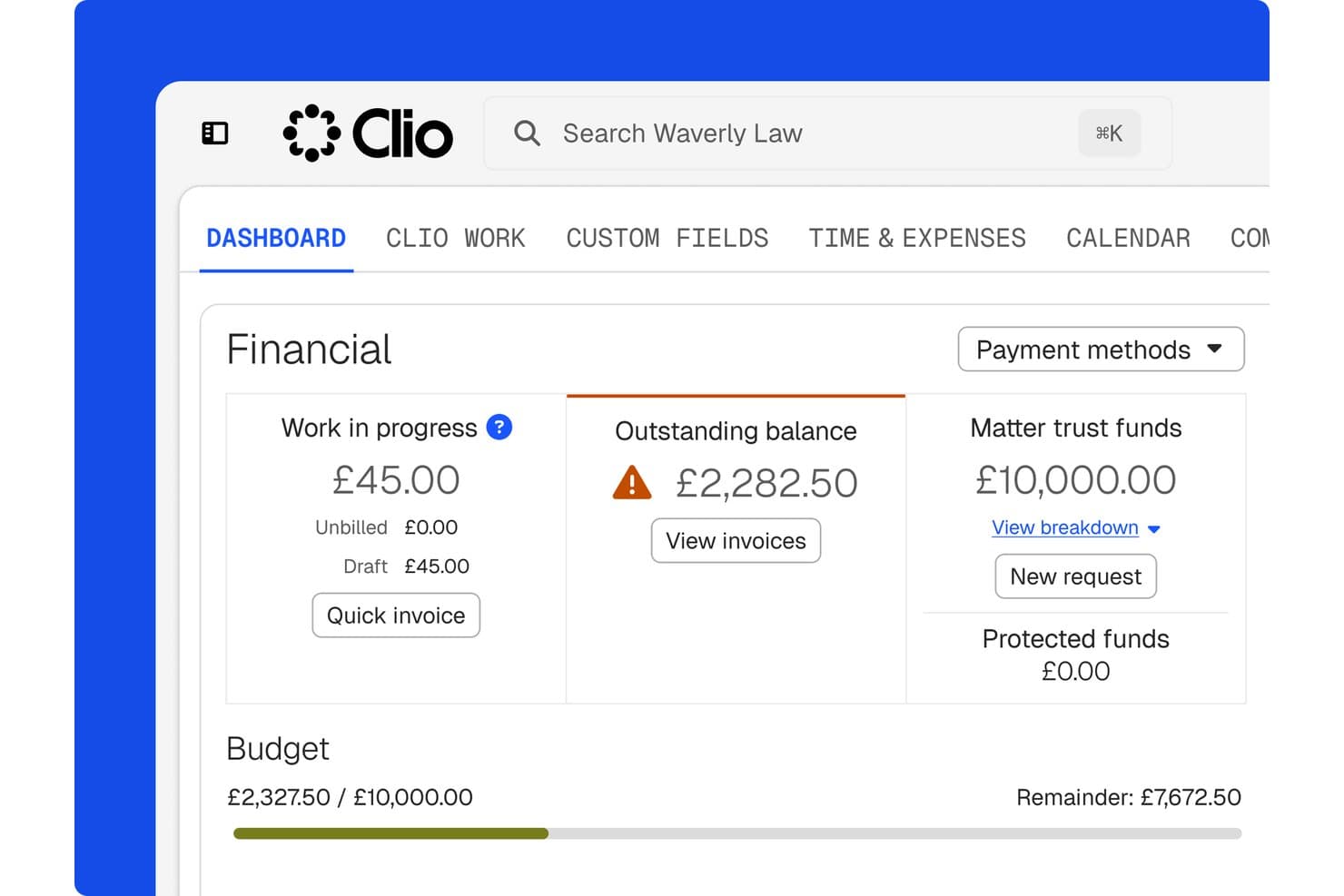
Clio tracks financials, trust funds, and budgets per matter. Clio is a legal practice management platform that handles matter organization, document management, case deadlines, PACER docket tracking, billing, and client communication for law firms handling bankruptcy cases.
Who Is Clio Best For?
Clio fits bankruptcy attorneys at small to mid-sized firms who need a central hub for case records, deadlines, and billing—and are comfortable pairing it with dedicated filing software like NextChapter or Jubilee.
Why I Picked Clio
I've included Clio in my top picks because its PACER docket tracking is genuinely useful for bankruptcy work: it flags new filings as they're indexed, saves stamped PDFs directly to the matter, and logs PACER fees for client billback automatically. I also like that custom deadline sets can be built around creditors' meetings, objection windows, and claim deadlines, keeping the whole case timeline visible in one place without manual calendar entry.
Clio Key Features
- Matter templates: Configure bankruptcy matter types with dedicated custom fields, task lists, folder structures, and billing methods for Chapter 7, 11, and 13 cases.
- Secure client portal: Let clients upload financial records, review outstanding document requests, and exchange messages through an encrypted portal connected directly to the matter.
- Trust and operating account ledgers: Track client funds across separate trust and operating ledgers, with deposits, disbursements, and transfers logged against individual matters.
- AI motion drafting: Draft motions and responses directly from matter data for attorney review before filing.
Clio Integrations
Clio offers 300+ marketplace integrations, including bankruptcy tools NextChapter and Jubilee, plus native integrations with QuickBooks, Xero, and TrustBooks. It also supports Google Drive, Microsoft 365, Zapier, and an API for custom integrations.
Pros and Cons
Pros:
- PACER alerts log fees for billback
- Shared calendars help coordinate bankruptcy deadlines
- Matter records centralize documents and claims
Cons:
- Petition filing depends on external tools
- Means-test and exemption calculations remain manual
Learn more about Clio: Best for cloud-based client intake and workflow
- Free plan available + free demo available
- From $159 up to 4 cases/year
Visit WebsiteCustomer Rating:4.8/5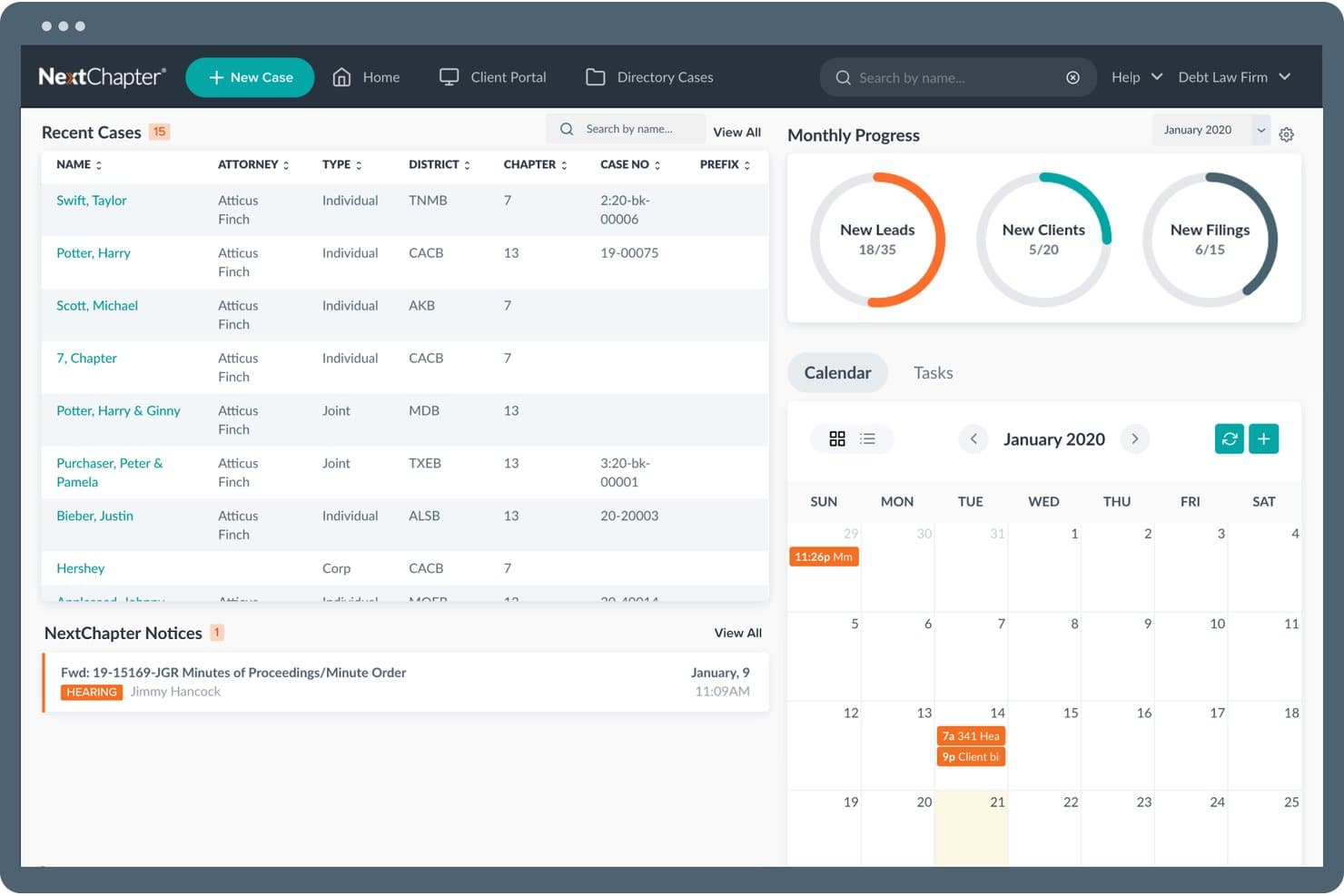
NextChapter offers a centralized bankruptcy management dashboard featuring recent cases, monthly progress metrics, a calendar, and court notices in one view. NextChapter is a cloud-based bankruptcy software platform that handles petition preparation, CM/ECF e-filing, means test calculations, tri-merge credit report imports, and case management across Chapters 7, 11, 12, and 13.
Who Is NextChapter Best For?
NextChapter is a strong fit for small bankruptcy law firms where paralegals and attorneys share case preparation responsibilities across multiple chapter types.
Why I Picked NextChapter
I picked NextChapter as one of the best because of how its MyChapter client portal handles intake. Clients complete their bankruptcy questionnaire online, and that data imports directly into the case, bypassing manual re-entry entirely. The Bankruptcy Web Workflow® then carries that data across every required schedule automatically, so I'm not re-entering the same creditor or asset information multiple times across different forms.
NextChapter Key Features
- Tri-merge credit report import: Pulls debtor data from Experian, Equifax, and TransUnion, then maps it into bankruptcy schedules.
- CM/ECF direct filing integration: Lets you file cases with federal bankruptcy courts right from the platform.
- Means test calculators: Provides tools for automated Chapter 7 eligibility and disposable income calculations using current IRS and Census data.
- PACER notices and hearing scheduler: Auto-imports court notices and syncs case hearings to your calendar.
NextChapter Integrations
NextChapter offers native integrations with Universal Credit Services for tri-merge credit report import, PACER, federal CM/ECF court systems, and Google Calendar. An API is available for custom integrations.
Pros and Cons
Pros:
- Cloud access removes office-bound filing dependencies
- Bankruptcy Web Workflow® auto-populates across all schedules
- Debtor portal eliminates paper-based intake entirely
Cons:
- Reporting tools offer limited case performance visibility
- Chapter 11 features less developed than 7 and 13
Learn more about NextChapter: Best for court form automation and direct e-filing
- 30-day free trial
- From $99/user/month
Visit WebsiteCustomer Rating:4.1/5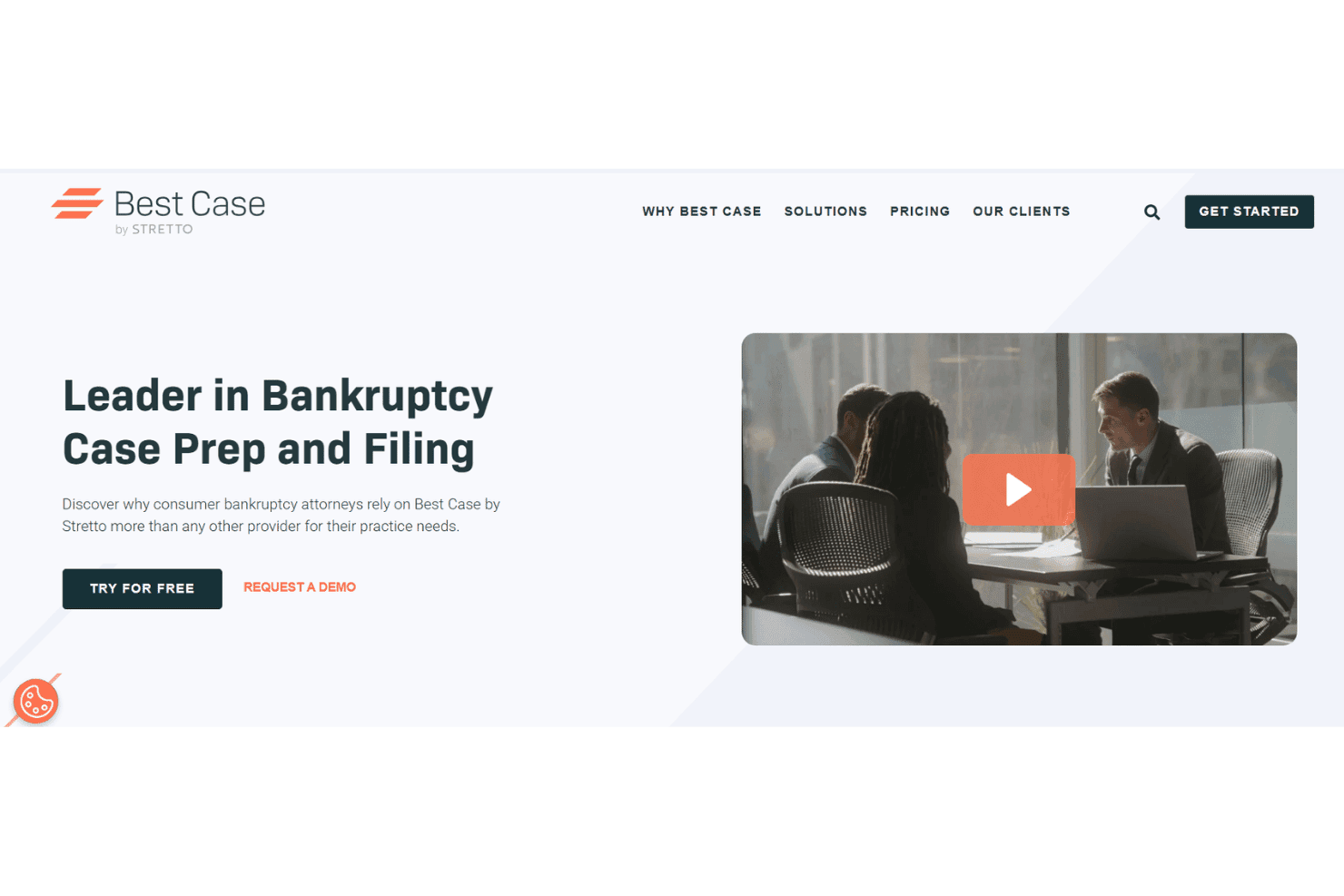
Best Case by Stretto prepares bankruptcy cases, credit reports, and e-filings. Best Case by Stretto is a bankruptcy case preparation and e-filing platform built for consumer bankruptcy attorneys, covering petition drafting across Chapters 7, 11, and 13, means test calculations, credit report imports, and direct CM/ECF filing.
Who Is Best Case by Stretto Best For?
It's a strong fit for small consumer bankruptcy law firms where attorneys and paralegals handle high volumes of personal filings across Chapter 7 and Chapter 13.
Why I Picked Best Case by Stretto
Best Case by Stretto earns its spot on my shortlist because of how tightly its OneTouch® e-filing works in practice. It navigates directly to the court's CM/ECF portal, uploads jurisdiction-compliant documents, and returns a case number and court receipt without me leaving the software. It also automates post-petition filings like Form 423 and the Chapter 13 Plan. Stretto continuously pushes federal, local exemption, and jurisdictional form updates, so I'm always filing against current court-approved versions.
Best Case by Stretto Key Features
- Integrated credit report import: Pulls debtor data from all major credit bureaus and maps it into creditor schedules.
- Client intake portal: Lets clients upload tax records and paystubs directly to their attorney using a secure online portal.
- Automatic form and exemption updates: Delivers real-time updates to federal and local bankruptcy forms and exemptions.
- Calendar sync for critical events: Auto-populates 341 meetings and court hearings onto attorney and staff calendars.
Best Case by Stretto Integrations
Best Case by Stretto offers native integrations with Stretto's debtor payments system and provides an API for custom integrations. Native integrations with other legal practice management platforms are not clearly documented.
Pros and Cons
Pros:
- Means test calculator uses current IRS data
- OneTouch e-filing reduces manual CM/ECF steps
- Jurisdiction-specific court forms update automatically
Cons:
- Chapter 11 support is less developed
- Desktop version limits remote access flexibility
Learn more about Best Case by Stretto: Best for credit imports and creditor auto-mapping
- Free demo available
- From $995/year (billed annually)
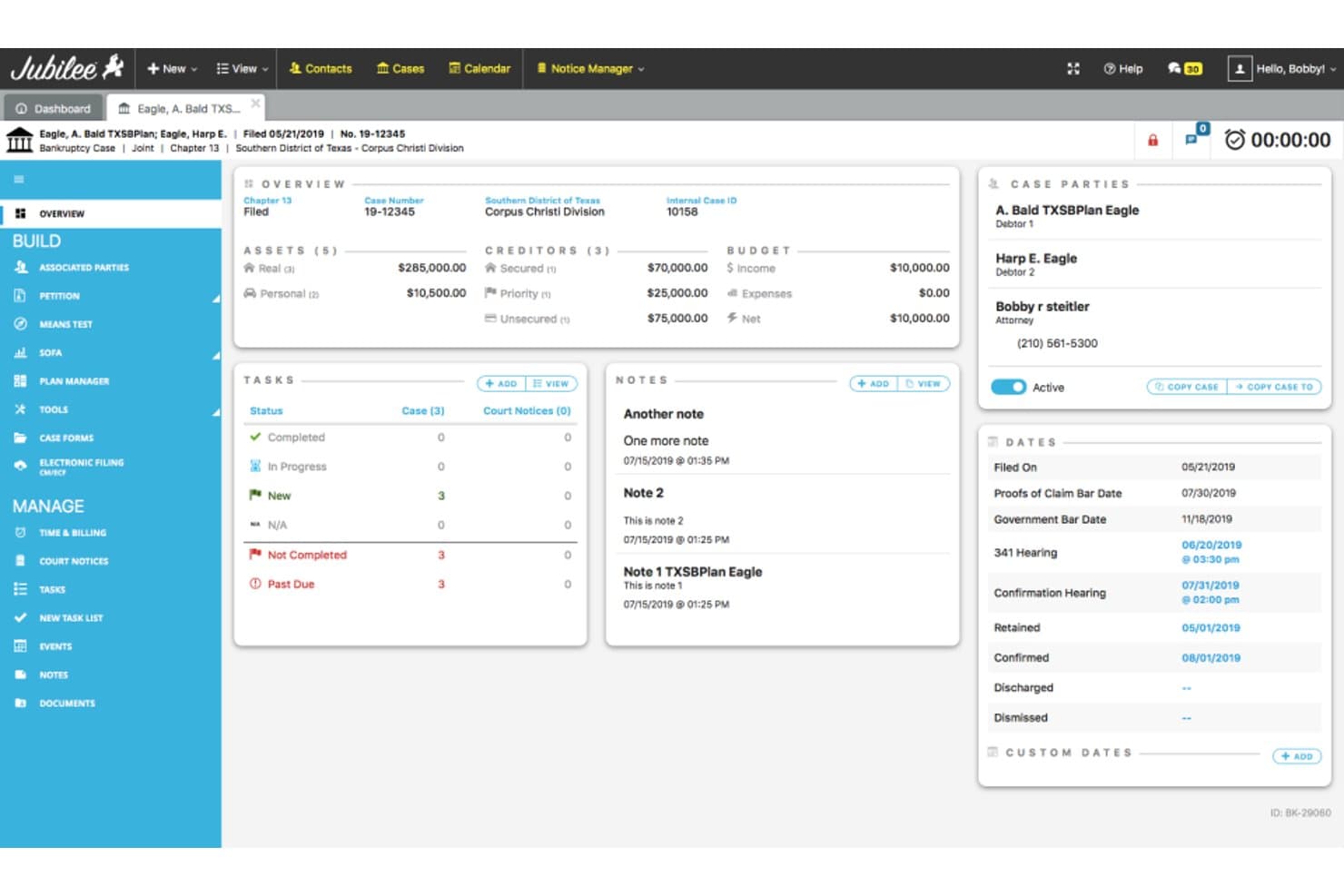
Jubilee offers a comprehensive bankruptcy case dashboard displaying debtor details, assets, creditors, budget, tasks, notes, and key court dates in one view. Jubilee is a cloud-based bankruptcy petition preparation and filing platform that handles Chapters 7, 11, 12, and 13 filings, CM/ECF e-filing, means test calculation, credit report import, court notice management, and client case tracking.
Who Is Jubilee Best For?
Jubilee is a strong fit for small consumer bankruptcy law firms with high filing volumes that need an all-in-one cloud platform for petition prep, e-filing, and client management.
Why I Picked Jubilee
Jubilee earns its spot on my shortlist because of how it handles credit report data at intake. Clients order their credit report through Jubilee Credit Services, and that data imports directly into the case file, auto-populating creditor schedules without manual re-entry. The creditor database then pre-fills addresses from existing records, reducing manual work on Schedule E/F. I also rely on connections to vendors like CIN Legal Data Services for additional creditor data lookups during case prep.
Jubilee Key Features
- CM/ECF e-filing integration: File cases directly with all federal bankruptcy courts and track notices within the platform.
- Means test calculator: Automate eligibility checks using the latest IRS and Census data for Chapter 7 and 13 filings.
- Court notice management: Search, index, and filter court emails and notices by subject, case number, or party name.
- Client document portal: Clients can securely upload required documents and communicate with your firm through a dedicated portal.
Jubilee Integrations
Jubilee offers native integrations with Clio, LawPay, SignNow, and CIN Legal Data Services. An API is available for custom integrations.
Pros and Cons
Pros:
- Responsive support team with continuous updates
- Auto-indexed, searchable court notices by case
- Supports all four bankruptcy chapter types
Cons:
- Chapter 11 tools limited vs. dedicated platforms
- Takes months to learn all platform functions
Learn more about Jubilee: Best for debtor questionnaire and data collection
- Free demo available
- From $39.99/case
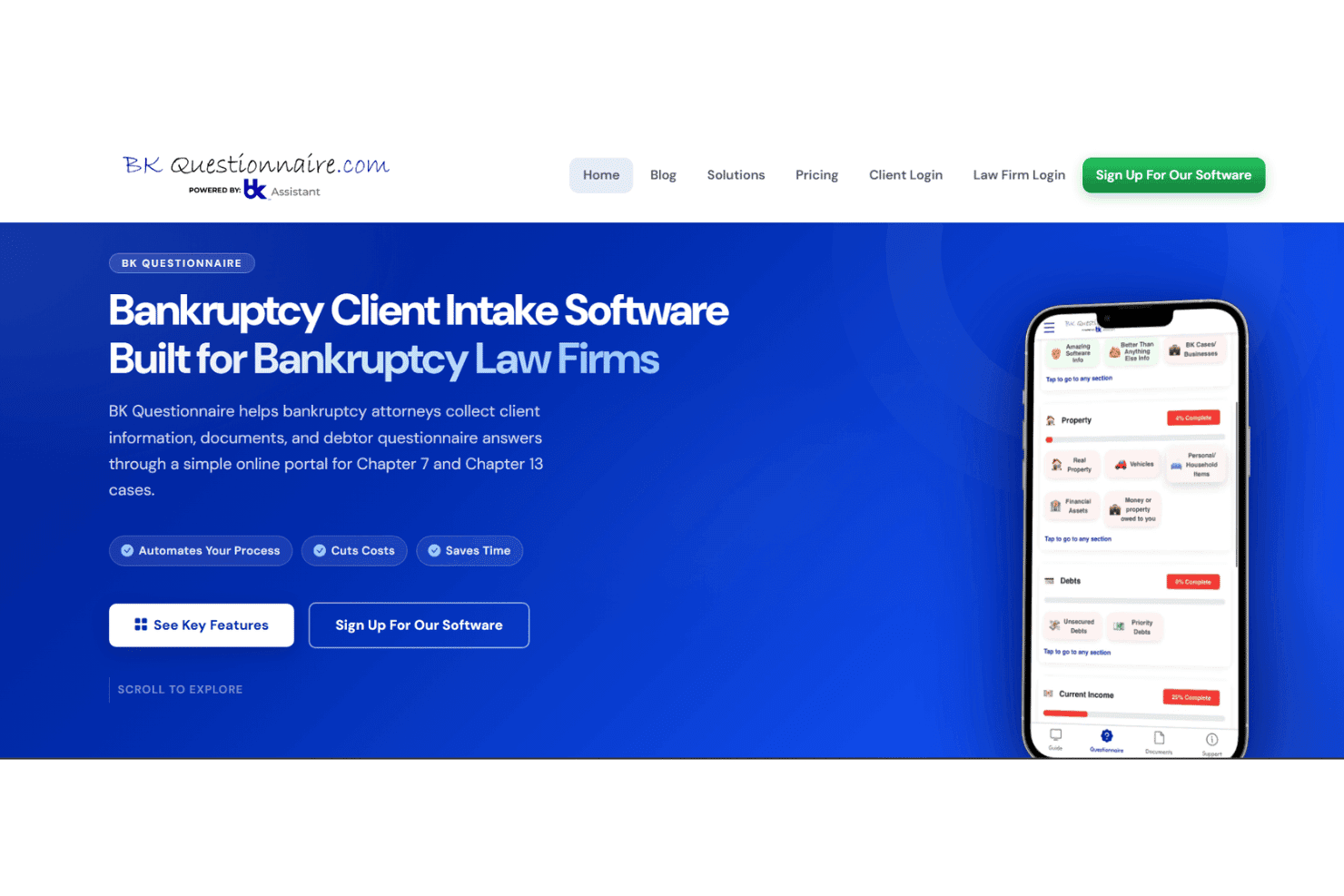
BK Questionnaire handles debtor intake, documents, credit reports, and income. BK Questionnaire is a debtor intake platform built for consumer bankruptcy law firms, combining mobile-friendly digital questionnaires, document collection, a client portal, and add-on tools for credit report imports and income calculation.
Who Is BK Questionnaire Best For?
BK Questionnaire fits consumer bankruptcy law firms and paralegal support services that handle high client volumes and need a structured, remote-friendly intake process.
Why I Picked BK Questionnaire
I picked BK Questionnaire as one of the best because its dynamic questioning logic is genuinely impressive for intake work. Rather than sending clients a static PDF packet, the questionnaire adapts based on each debtor's specific situation, cutting out irrelevant questions entirely. I also like the built-in bilingual support, which lets Spanish-speaking clients complete the full questionnaire without any manual translation effort from the firm's side.
BK Questionnaire Key Features
- Mobile document scanner: Native mobile apps let clients scan and upload documents directly from their smartphones.
- VIN and ID barcode reader: The app reads vehicle VINs and government-issued ID barcodes for fast, error-free data entry.
- Common creditor database: Includes a built-in auto-complete list with over 6,000 creditor addresses for easy schedule creation.
- Automated document tracking: Tracks what’s missing and sends itemized follow-up requests to clients in seconds.
BK Questionnaire Integrations
BK Questionnaire offers native integrations with Jubilee, NextChapter, and Best Case by Stretto for exporting client data directly into bankruptcy petition preparation platforms. An API is available for custom integrations.
Pros and Cons
Pros:
- VIN and ID barcode scanning built in
- Built-in Spanish language support for debtors
- Adaptive questionnaire logic reduces irrelevant client questions
Cons:
- Narrow focus limits full case lifecycle management
- No petition preparation or CM/ECF filing
Learn more about BKK Questionaire: Best for local form compliance and updates
- Not available
- From $199.99
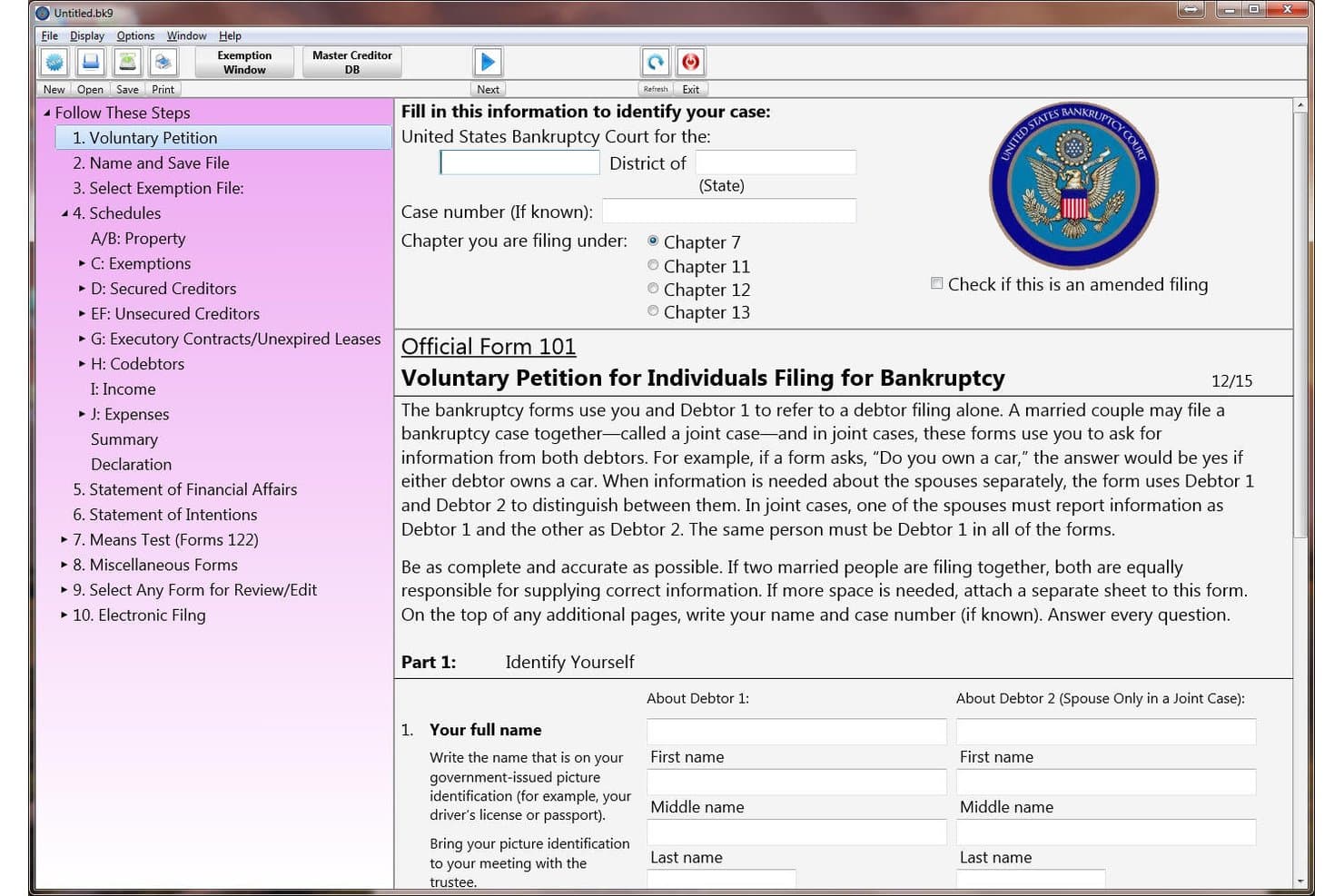
Puritas Springs Software (WBank) offers a step-by-step bankruptcy filing interface with Official Form 101, the Voluntary Petition for Individuals Filing for Bankruptcy. WBank by Puritas Springs Software is a locally installed bankruptcy petition preparation tool that generates official federal forms across Chapters 7, 11, and 13, with built-in means test calculations and PDF creation for e-filing.
Who Is Puritas Springs Software (WBank) Best For?
Solo practitioners and small law firms handling consumer bankruptcy cases who need a no-frills, low-cost desktop tool for petition preparation.
Why I Picked Puritas Springs Software (WBank)
I picked WBank because it keeps the full official form suite current, from Schedule 106A/B through Form 113 (Chapter 13 Plan) and the 122A/122C means test forms, which maps directly to what courts actually require at filing. It's listed as an accepted petition package by multiple federal bankruptcy courts, including Nebraska and the Eastern District of Washington. That court-level recognition is the clearest signal of real compliance depth.
Puritas Springs Software (WBank) Key Features
- Native desktop application: Installs directly on Windows and Mac devices for offline bankruptcy petition preparation.
- Built-in PDF generator: Creates court-ready PDF versions of all bankruptcy forms without needing third-party software.
- Main window tree navigation: Lets users jump quickly between forms and schedules for efficient data entry and editing.
- Export to word processor: Allows exporting bankruptcy petitions as editable documents compatible with Microsoft Word.
Puritas Springs Software (WBank) Integrations
Native integrations are not clearly documented. WBank does not list any official integrations with other software platforms or support an API for custom integrations.
Pros and Cons
Pros:
- Handles all three bankruptcy chapter types
- Local form updates delivered quickly
- Court-accepted in multiple federal bankruptcy districts
Cons:
- No credit report import capability
- No cloud access or remote filing
Learn more about Puritas Springs Software (WBank): Best for debtor financing and payment options
- 14-day free trial
- From $39/month
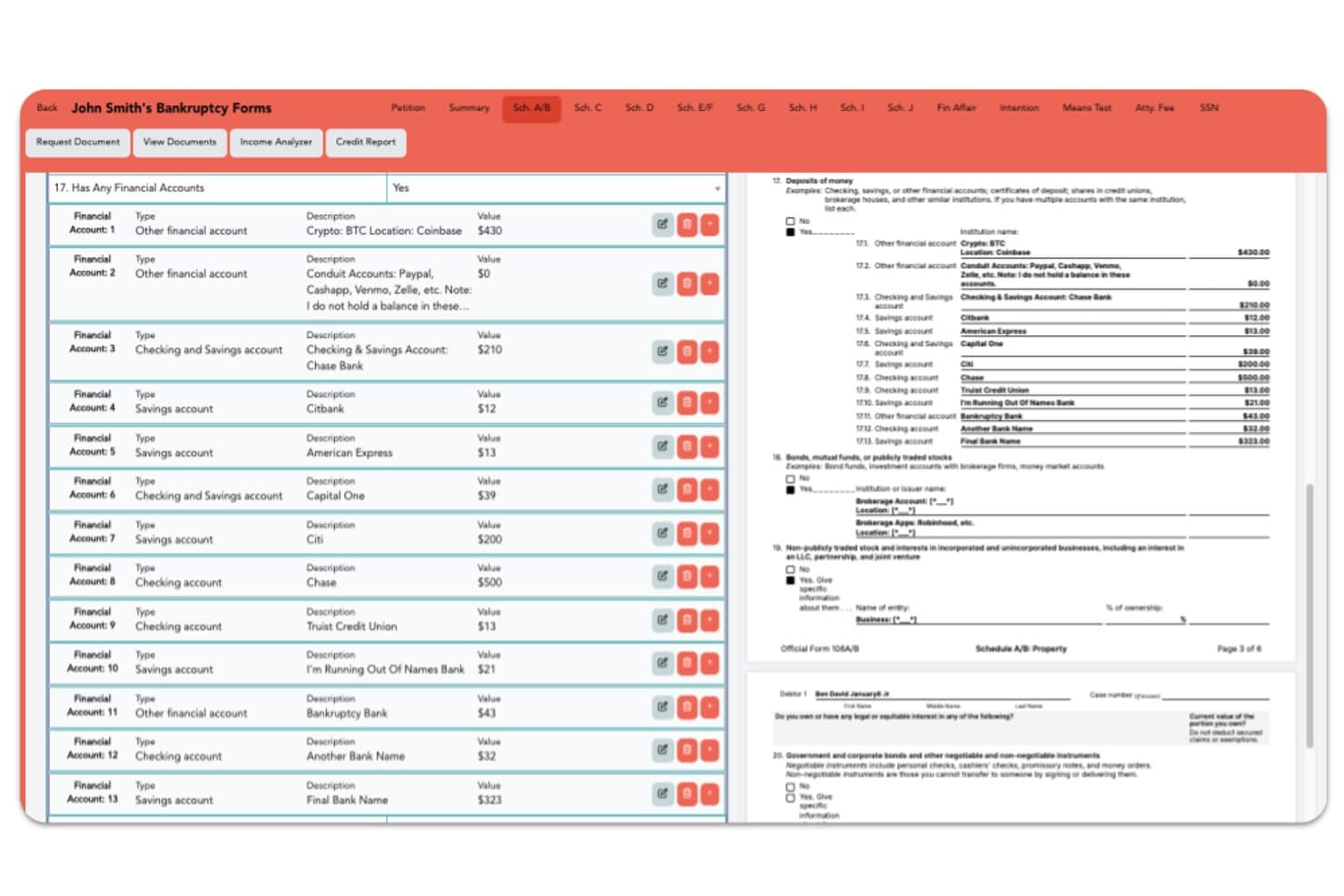
Fresh Start Finance offers a detailed Schedule A/B bankruptcy form interface displaying financial accounts with types, descriptions, and values alongside a real-time form preview. Fresh Start Finance is a cloud-based bankruptcy filing platform for attorneys and petition preparers that covers petition preparation, automated ECF e-filing, exemption mapping, client intake management, and case and deadline tracking.
Who Is Fresh Start Finance Best For?
Fresh Start Finance is a good fit for solo attorneys, small bankruptcy firms, and petition preparers who need affordable, cloud-based filing software without a long-term contract.
Why I Picked Fresh Start Finance
I've included Fresh Start Finance in my top picks because of how it handles the debtor-facing side of a case. The client portal supports two-way SMS messaging, secure document requests, and intake progress tracking, so debtors stay informed and responsive without constant attorney follow-up. On the Enterprise plan, payment plan processing lets firms structure client payments directly within the platform, which is a genuinely useful capability when affordability is a barrier to filing.
Fresh Start Finance Key Features
- Automated ECF filing: Submit bankruptcy petitions directly to federal courts without manual uploads.
- Real-time PDF updating: See forms and schedules update instantly as you enter client data.
- Custom exemptions mapping: Set state or federal exemptions once and auto-apply to all filings.
- Credit report integration: Import debtor credit data to auto-populate creditor schedules and matrices.
Fresh Start Finance Integrations
Native integrations are not clearly documented. An API is available for custom integrations.
Pros and Cons
Pros:
- No desktop installation required
- Intake questionnaire auto-maps directly to forms
- Built-in client portal with two-way SMS messaging
Cons:
- No clearly documented third-party integrations
- Limited to a select number of attorneys
Learn more about Fresh Start Finance: Best for cloud-based document automation
- 30-day free trial + free demo available
- From $50/month

BlueStylus Case Builder tracks tasks and deadlines per matter case. BlueStylus Case Builder PRO is a cloud-based bankruptcy software that handles petition preparation, CM/ECF e-filing, and case management for Chapter 7, Chapter 13, and Chapter 11 (including Subchapter V) cases.
Who Is BlueStylus Case Builder Best For?
BlueStylus Case Builder PRO is a strong fit for solo practitioners and small bankruptcy firms handling Chapter 7, 13, and 11 cases across its 22 supported CM/ECF districts.
Why I Picked BlueStylus Case Builder
I've included BlueStylus Case Builder PRO in my top picks because its cloud-native architecture means your whole team can access and work on cases simultaneously without anyone waiting for a local install or license seat. I particularly like how the form-entry workflow mirrors the actual schedule flow, so information entered once populates across the petition automatically. Its direct CM/ECF integration across 22 supported districts handles e-filing without leaving the platform.
BlueStylus Case Builder Key Features
- Multi-user simultaneous access: Up to 10 users can work in the platform at the same time under a single flat-rate subscription with no per-seat licensing fees.
- CIC Credit integration: Users can order credit reports and import creditor information directly into Case Builder PRO from within the platform, though a separate CIC Credit account is required.
- State exemption lists: The platform includes exemption lists for all 50 states to reference during case preparation.
- Client document collection portal: Attorneys can gather client financial data and supporting documents through a dedicated portal built into the platform.
BlueStylus Case Builder Integrations
BlueStylus Case Builder PRO offers native integrations with Microsoft 365 for email sync, CIC Credit for credit reports and creditor imports, and CM/ECF for filing in 22 supported districts. An API isn't documented.
Pros and Cons
Pros:
- Schedule-following forms carry data across petitions
- Reviewers describe support as responsive
- Reviewers praise organized online case files
Cons:
- No deadline or hearing tracking
- No documented automated means-test calculations
Learn more about BlueStylus Case Builder (Financial Software Solutions): Best for live case queries via AI assistants
- Free plan + free demo available
- Pricing upon request

Glade tracks Chapter 13 Bankruptcy workflow steps and client details. Glade is an AI-powered bankruptcy case management platform that handles client intake, document processing, petition assembly, means test calculations, and electronic court filing through CM/ECF.
Who Is Glade Best For?
Glade is a strong fit for bankruptcy attorneys and paralegals who want an AI-driven platform that handles the full workflow from client intake through CM/ECF filing.
Why I Picked Glade
I've included Glade in my top picks because its MCP server integration is something I haven't seen in other bankruptcy tools: attorneys can query live case data directly through Claude or ChatGPT using plain-language questions, with no API keys or developer setup required. I also like that PACER notices are automatically read, labeled, and attached to the right matter, turning court notices into actionable follow-up tasks without manual sorting.
Glade Key Features
- Schedules Builder: A guided questionnaire populates schedules A/B through SOFA and means-test forms, adapting questions to case type with built-in validation and editable fields.
- Chapter 13 Plan Calculator: Draws on petition schedules, exemptions, income, and means-test data to generate adjustable plan lengths, step payments, and a month-by-month payment waterfall.
- Client portal: Clients log in to complete questionnaires, upload documents, sign agreements, make payments, and track their case status directly.
- AI document extraction and naming: AI reads uploaded paystubs, bank statements, and court PDFs to extract key fields and rename files into consistent, searchable filenames.
Glade Integrations
Glade connects with CM/ECF and PACER for filing and court notices, plus an MCP server for live case queries through Claude and ChatGPT. Native integrations with Slack, Gmail, QuickBooks, and calendars are not clearly documented, and no conventional API is stated.
Pros and Cons
Pros:
- Client portal collects documents and questionnaires
- PACER notices become case follow-up tasks
- Live case queries through AI assistants
Cons:
- AI-generated filings still require attorney review
- Legacy case data may require retraining
Learn more about Glade: Best for integration with legal CRM tools
- 7-day free trial + free demo available
- From $59/user/month
Visit WebsiteCustomer Rating:4.3/5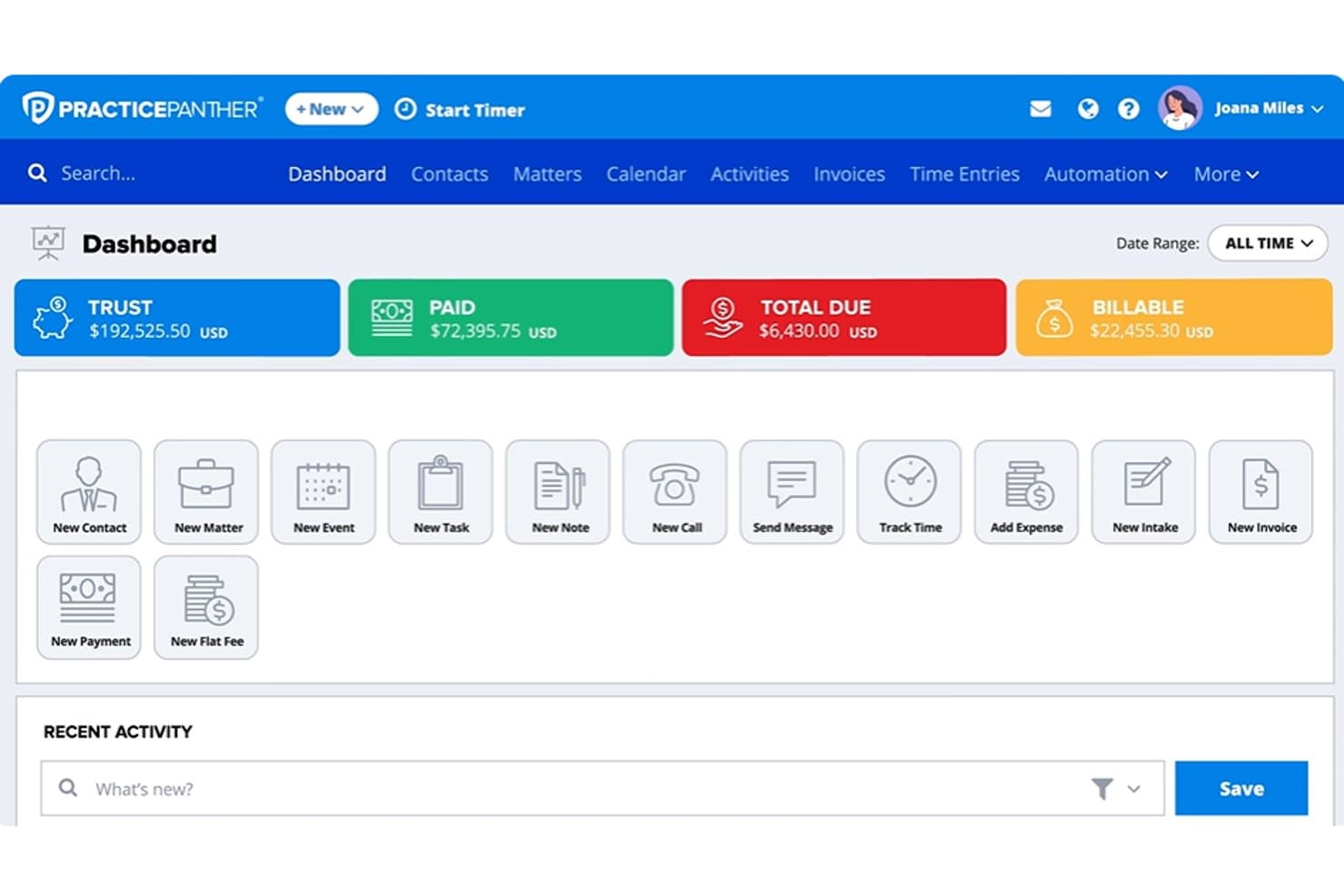
PracticePanther dashboard showing trust balances, payments, billable amounts, matters, and legal billing tools PracticePanther is a legal practice management platform that handles case management, billing, client communication, and document management, with bankruptcy e-filing support available through its Jubilee integration.
Who Is PracticePanther Best For?
Solo and small-firm bankruptcy attorneys who already use PracticePanther for practice management and want to add e-filing through its Jubilee integration.
Why I Picked PracticePanther
I've included PracticePanther in my top picks because it's the strongest option on this list for attorneys who already run their practice in a legal CRM and want bankruptcy e-filing to fit inside that existing system. The Jubilee integration connects directly to your PracticePanther matters, syncing contacts, tasks, hearings, and deadlines without double entry. That means your client relationships, billing, and case communications stay in one place while Jubilee handles CM/ECF filing for Chapters 7, 11, 12, and 13.
PracticePanther Key Features
- Secure client portal: Gives clients a dedicated space to view case progress, exchange messages, and share documents directly within the platform.
- Document templates: Pulls contact and matter data into uploaded templates to generate legal documents without manual re-entry.
- Two-way business texting: Lets attorneys communicate with clients by text while keeping those messages linked to the relevant matter record.
- Trust accounting: Provides trust-account ledgers, three-way reconciliation reporting, and operating-account management through PantherAccounting Plus.
PracticePanther Integrations
PracticePanther has documented integrations with Jubilee for bankruptcy e-filing, LawToolBox for court deadlines, Google Calendar, Microsoft Exchange, QuickBooks, and cloud storage tools. It also supports Zapier and offers an API for custom integrations.
Pros and Cons
Pros:
- Billing and timekeeping suit small firms
- Client portal supports sensitive document exchange
- Matter tasks and deadlines stay organized
Cons:
- Bankruptcy deadlines lack documented rules-based calculation
- Petition preparation depends on separate bankruptcy software
Learn more about PracticePanther:
How I Evaluate Bankruptcy Software
I split my evaluation into three parts, giving the most weight to core functionality: prepare court-ready petitions and calculate means tests accurately. Next, I look for standout features such as debtor intake portals. Finally, I consider beyond-feature factors, including onboarding, support, and pricing fit for the firm’s workload.
Core Functionality (Table Stakes For This List)
When I'm selecting tools for my list, I score each one on a scale from 0 (does not offer the functionality) to 5 (excels in this area) for each core functionality listed below. I then convert the total into a percentage to help assess each tool's overall fit, with extra weight on any functionalities I’ve deemed essential.
- Petition Preparation (Essential): I look for guided entry that populates complete petitions, schedules, and statements across relevant chapters without repetitive data entry.
- Means Tests & Calculations (Essential): I assess automated means tests, exemption calculations, and financial checks, including how clearly staff can review inputs before filing.
- Court Forms & Updates: I check federal and local form coverage, update practices, and whether teams can identify the correct forms for each matter.
- Electronic Filing: I look for direct filing or court-compatible exports, plus confirmation details that help staff track a submission.
- Case & Deadlines: I evaluate matter status, hearing and deadline tracking, and reminders that help staff coordinate the next required action.
- Creditors & Documents: I check how teams build creditor matrices, organize client financial records, and retrieve related correspondence by matter.
Once I have a list of tools that meet the criteria, I consider what sets each platform apart.
Differentiating Factors (What Sets Vendors Apart)
Here's how I compare and contrast different vendors:
Standout Features
I look for client intake portals that let debtors enter financial data before their first meeting—this cuts hours of paralegal data entry per case. Local rule customization matters just as much, since a template built for one district can produce rejected filings in another. I also check whether a platform covers Chapters 7, 11, 12, and 13 in one system, so firms handling mixed caseloads don't need separate tools. Credit counseling integrations that pull certificates directly into the filing workflow round out what I evaluate.
Beyond Features
I check how quickly each vendor pushes form and means test updates after IRS or census figures change—a delayed update can mean rejected filings. Jurisdictional coverage matters just as much, since local forms and procedures differ by district, and firms with multi-district caseloads need one system that handles all of them. I also evaluate whether pricing bundles e-filing fees and form updates or bills them separately, because those costs add up fast for high-volume practices.
Como escolher software de insolvência
Quer saber como adaptar o software de insolvência às necessidades específicas e aos desafios do fluxo de trabalho do seu escritório? Comece pelo requisito mais urgente:
| Se a sua prioridade é... | ...dê prioridade a: |
|---|---|
| Se a sua prioridade é...Preparar formulários complexos para várias jurisdições | ...dê prioridade a:Automatização de formulários judiciais em tempo real |
| Se a sua prioridade é...Um elevado volume de requerimentos e automatização da carga de trabalho | ...dê prioridade a:Processamento de requerimentos em lote e controlos do fluxo de trabalho |
| Se a sua prioridade é...Apresentações judiciais integradas | ...dê prioridade a:Integração direta com CM/ECF |
| Se a sua prioridade é...Reduzir a introdução manual de dívidas | ...dê prioridade a:Importação de relatórios de crédito das três agências |
| Se a sua prioridade é...Colaboração remota com os clientes | ...dê prioridade a:Portal seguro de admissão de clientes orientado para devedores |
Como avaliar a sua lista restrita
- Teste a apresentação eletrónica direta: Apresente pelo menos um requerimento de teste através da integração CM/ECF do fornecedor, confirmando o carregamento e o estado no processo no prazo de 24 horas.
- Peça registos de atualização dos formulários: Solicite documentação que demonstre a rapidez com que os novos formulários judiciais e as isenções são atualizados após uma alteração das regras do tribunal.
- Faça uma importação de dados de crédito: Teste a importação de um relatório de crédito utilizando dados das três agências e analise a forma como os mapas são preenchidos — solicite um registo ou uma exportação como prova.
- Verifique as provas de integração: Exija uma demonstração da integração contabilística com o QuickBooks ou o LawPay, incluindo uma transferência em duas etapas da avença para a conta fiduciária.
- Pondere a profundidade da automatização face à personalização: Decida se a introdução de dados simplificada e orientada é mais valiosa para o seu fluxo de trabalho do que o controlo total dos modelos e do fluxo de trabalho.
O que é o software de insolvência?
O software de insolvência é uma plataforma jurídica especializada que ajuda os escritórios de advogados e os administradores judiciais a preparar, apresentar e gerir processos de insolvência em conformidade com os requisitos dos tribunais federais. Automatiza a criação de requerimentos, os cálculos do teste de recursos, as importações de dados de crédito e as apresentações eletrónicas nos tribunais.
O software simplifica a recolha de informação dos clientes, acompanha prazos e audiências e mantém todos os documentos dos processos organizados e em conformidade com as alterações legais em curso.
Funcionalidades do software de insolvência
Ao escolher software de insolvência, esteja atento às seguintes funcionalidades essenciais:
- Preparação de petições: Gera formulários oficiais de insolvência para os Capítulos 7, 11 e 13, preenchendo automaticamente mapas, declarações e matrizes para cumprir os requisitos do tribunal.
- Integração com o CM/ECF: Liga-se diretamente ao sistema eletrónico de apresentação de documentos dos tribunais federais, permitindo submeter petições e receber atualizações de estado em tempo real.
- Calculadora do teste de meios: Calcula a elegibilidade do devedor para o Capítulo 7 ou 13 utilizando as normas atualizadas do IRS e os dados do Gabinete do Censo, reduzindo os cálculos manuais e o risco de erros.
- Importação de relatórios de crédito: Obtém automaticamente dados financeiros de todas as principais agências de crédito, preenchendo os mapas e as matrizes de credores para poupar tempo e evitar omissões.
- Acompanhamento de prazos e audiências: Monitoriza as próximas datas de tribunal, as reuniões ao abrigo da secção 341 e os prazos de apresentação, acionando lembretes para que nada seja esquecido.
- Gestão de documentos: Armazena os ficheiros dos processos, as divulgações e a correspondência num único repositório seguro e organizado, com controlos de acesso dos utilizadores.
- Portal de recolha de informação dos clientes: Disponibiliza um portal online seguro para que os clientes possam enviar dados financeiros, carregar documentos e assinar eletronicamente os formulários necessários à distância.
- Atualizações de formulários e conformidade: Envia atualizações automáticas sempre que os formulários e as isenções de insolvência federais ou locais são alterados, mantendo as apresentações em conformidade.
- Permissões baseadas em funções: Permite que advogados, assessores jurídicos e funcionários acedam apenas às funções dos processos relevantes para as suas responsabilidades.
- Relatórios e análises: Fornece informações sobre o volume de processos, os resultados e os estrangulamentos dos fluxos de trabalho, ajudando a gerir a sua prática e os seus recursos.
As soluções de software de insolvência normalmente não incluem IA como parte da sua oferta de funcionalidades.
Benefícios do software de insolvência
A implementação de software de insolvência proporciona vários benefícios à sua equipa e à sua empresa. Eis alguns dos que pode esperar:
- Preparação simplificada dos processos: Automatiza a geração de formulários e os testes de meios, reduzindo o tempo despendido na preparação manual das petições.
- Maior precisão nas apresentações: Reduz os erros de digitação e de cálculo através do preenchimento automático dos formulários e da validação dos mapas face às normas atuais dos tribunais.
- Apresentações mais rápidas no tribunal: A integração direta com o CM/ECF permite submeter petições e acompanhar o estado do processo sem carregamentos manuais.
- Melhor experiência para o cliente: Os portais online de recolha de informação permitem que os clientes partilhem documentos e informações do processo de forma segura, de acordo com a sua própria disponibilidade.
- Melhor gestão de prazos: Os lembretes e calendários automatizados ajudam a evitar audiências, reuniões ao abrigo da secção 341 ou prazos de apresentação perdidos.
- Menor risco de incumprimento: As atualizações automáticas garantem que os formulários e as isenções permanecem em conformidade à medida que as regras federais e locais são alteradas.
- Armazenamento centralizado de documentos: Todos os ficheiros dos processos, as divulgações e a correspondência permanecem organizados e acessíveis numa única plataforma segura.
Custos e preços do software de insolvência
A seleção de software de insolvência exige uma compreensão dos vários modelos de preços e planos disponíveis. Os custos variam consoante as funcionalidades, a dimensão da equipa, os complementos e outros fatores. A tabela abaixo resume os planos mais comuns, os seus preços médios e as funcionalidades normalmente incluídas nas soluções de software de insolvência:
Tabela de comparação de planos de software de insolvência
| Tipo de plano | Preço médio | Funcionalidades comuns |
|---|---|---|
| Tipo de planoPlano gratuito | Preço médio$0 | Funcionalidades comunsPermite a elaboração básica de petições, oferece armazenamento limitado de documentos e inclui um acompanhamento simples de prazos. |
| Tipo de planoPlano pessoal | Preço médio$40-$90/utilizador/mês | Funcionalidades comunsOferece automatização de formulários, calculadora do teste de meios, importação de relatórios de crédito e acesso básico ao portal do cliente. |
| Tipo de planoPlano empresarial | Preço médio$100-$300/utilizador/mês | Funcionalidades comunsAdiciona integração com o CM/ECF, automatização de fluxos de trabalho, cobertura completa dos tribunais, processamento em lote e integração com o QuickBooks. |
| Tipo de planoPlano empresarial avançado | Preço médio$400+/utilizador/mês | Funcionalidades comunsInclui análises avançadas, fluxos de trabalho personalizados, gestão de um elevado volume de processos, suporte premium e integrações com sistemas de gestão documental. |
Perguntas frequentes sobre software de insolvência
Eis algumas respostas a perguntas frequentes sobre software de insolvência:
As plataformas de software de insolvência suportam todos os distritos dos tribunais federais?
Sim, a maioria dos principais programas de software de insolvência abrange os 94 distritos dos Tribunais de Falências dos EUA e inclui formulários locais, mas confirme sempre junto do seu fornecedor o suporte às isenções específicas de cada estado e às regras locais.
Posso importar dados de crédito diretamente para as listas da insolvência?
Sim, muitas soluções permitem obter dados diretamente das agências de crédito e preencher automaticamente as listas D, E/F e a matriz de credores, o que poupa tempo e reduz os erros.
Com que frequência são atualizados no software os formulários e as regras de insolvência?
A maioria dos fornecedores disponibiliza atualizações no prazo de alguns dias após alterações dos tribunais federais ou locais, mas deve consultar a respetiva política de atualizações e solicitar documentação ou o histórico de atualizações antes de começar a utilizar o serviço.
É possível registar o processo e apresentar petições eletronicamente no tribunal?
Sim, procure ferramentas com integração com o CM/ECF ou o PACER, para poder apresentar documentos eletronicamente diretamente a partir da plataforma e receber atualizações do processo e comprovativos em tempo real.
Que tipo de suporte e formação estão disponíveis?
Os fornecedores oferecem normalmente integração inicial, suporte por chat em direto ou telefone e recursos de formação centrados na insolvência, como seminários na Internet, mas a qualidade e a disponibilidade podem variar.