

Como assistente jurídico, sei que é difícil prestar um apoio de excelência ao seu escritório de advogados enquanto gere uma carga de trabalho pesada, equilibra prioridades e garante uma comunicação eficaz. O software para assistentes jurídicos pode ajudar a simplificar o seu fluxo de trabalho, tornando a sua lista aparentemente interminável de tarefas mais fácil de gerir e menos demorada. O software que selecionei cuidadosamente permitir-lhe-á gerir a descoberta eletrónica, a gestão de processos, a automatização de documentos, o controlo de tempo, a faturação, as mensagens e muito mais, com facilidade e precisão.
Why Trust Our Software Recommendations
6,700+
Reviews
20
Industry experts
16+
Evaluation factors
14
Years
Our team has been testing and reviewing software since 2012. As legal practice leaders ourselves, we know how difficult—and important—it is to choose the right software.
For this guide, we evaluated tools using hands-on testing and independent research, scoring tools using our selection criteria.
Our reviews reflect our human editorial judgment, not a sales pitch.
Tabela de comparação de software para assistentes jurídicos
Esta tabela de comparação resume os detalhes de preços das minhas principais seleções de software para assistentes jurídicos:
| Tool | Best For | Trial Info | Price | ||
|---|---|---|---|---|---|
| 1 | Best for centralized case and document tracking | 7-day free trial + free demo available | From $59/user/month | Website | |
| 2 | Best for compliant payments and billing | Free trial available | Pricing upon request | Website | |
| 3 | Best for client communication and collaboration | 10-day free trial available | From $50/user/month (billed annually) | Website | |
| 4 | Best for Canadian legal practitioners | From $34/user/month (billed annually) | Website | ||
| 5 | Best for customizable workflows and practice areas | Free demo available | Pricing upon request | Website | |
| 6 | Best for solo and small law firms | Free demo available | Pricing upon request | Website | |
| 7 | Best for comprehensive case management | Free demo available | Pricing upon request | Website | |
| 8 | Best for legal research and analytics | Not available | Pricing upon request | Website | |
| 9 | Best for automated redaction | Free trial available | From $19/month | Website | |
| 10 | Best for legal CRM and intake automation | Free demo available | From $49/user/month (billed annually) | Website |


Análises do melhor software para assistentes jurídicos
Apresento abaixo os meus resumos detalhados do melhor software para assistentes jurídicos que integrou a minha seleção. As minhas análises oferecem uma visão detalhada das principais funcionalidades, vantagens e desvantagens, integrações e casos de utilização ideais de cada ferramenta, para o ajudar a encontrar a melhor opção para si.
 Best for centralized case and document tracking
- 7-day free trial + free demo available
- From $59/user/month
Visit WebsiteCustomer Rating:4.3/5
PracticePanther centralizes case files and documents for faster legal workflows. PracticePanther is a practical tool for paralegals who need better control over daily legal work. This cloud-based practice management software helps law firms handle case files, organize documents, and communicate with clients in one place. Whether you’re managing multiple matters or working with remote teammates, PracticePanther keeps tasks and information organized so you can focus on supporting your legal team efficiently.
Why I Picked PracticePanther
I picked PracticePanther for its exceptional case management and document management capabilities, which are crucial for paralegals managing multiple legal files and deadlines. The software's secure client portal allows for seamless communication and document sharing, reducing the back-and-forth that often hampers efficiency. Additionally, PracticePanther's automation of client intake forms saves valuable time, allowing you to focus more on client service rather than administrative tasks.
PracticePanther Key Features
In addition to centralized case and document tracking, PracticePanther offers:
- eSignature: This feature allows you to send documents for electronic signatures, reducing the need for physical paperwork and speeding up the approval process.
- Two-Way Business Texting: Enables you to communicate directly with clients via text messages, making it easier to keep them updated on case progress.
- Trust Accounting: Helps you manage client funds in compliance with legal standards, ensuring transparency and accuracy in financial handling.
- Customizable Workflows: Tailor processes to specific practice needs, enhancing productivity by automating routine tasks.
PracticePanther Integrations
Integrations include QuickBooks Online, LawPay, Zapier, Box, Mailchimp, Dropbox, Google Calendar, Microsoft Outlook, OneDrive, and CalendarRules.
Pros and Cons
Pros:
- Client management tools keep matters well structured
- Built-in billing tools improve payment collection workflow
- Automates administrative tasks, saving significant time weekly
Cons:
- Mobile app navigation feels limited and clunky
- Customization options might be limited for specific needs
Learn more about PracticePanther: 2Best for compliant payments and billing
8am
- Free trial available
- Pricing upon request
Visit WebsiteCustomer Rating:4.6/5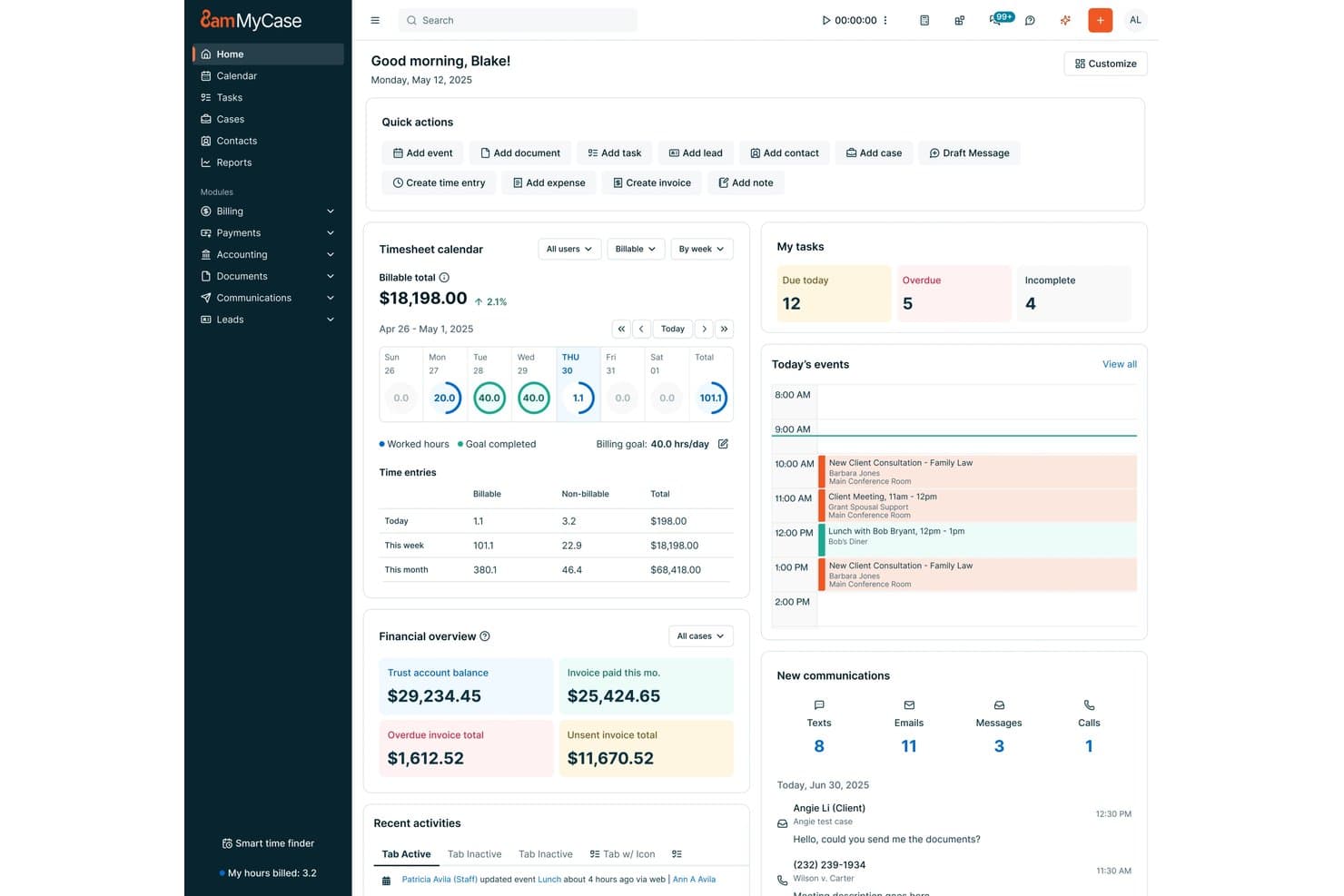
8am offers paralegals a centralized dashboard with task management, billing timesheets, financial overviews, and today's events all in one view. 8am is a legal practice management platform designed for paralegals and legal professionals seeking integrated tools for case management, document automation, billing, calendaring, and secure client communications.
Who Is 8am Best For?
Legal teams at small and midsize law firms that want integrated payment, billing, and case management in a single platform.
Why I Picked 8am
I picked 8am as one of the best because I rely on its secure payment processing and compliance-grade billing features, like native trust accounting and built-in LEDES invoicing. My team uses its centralized financial workflows to simplify court-approved payments and client transactions.
8am Key Features
- Matter management: Manage case files, contacts, and notes in one organized workspace.
- Document automation: Create templates and auto-generate legal documents within the platform.
- Legal calendaring: Track deadlines and integrate events with attorney and court calendars.
- Client portal: Share files and communicate securely with clients through a protected portal.
8am Integrations
Native integrations are not currently listed.
Pros and Cons
Pros:
- Native document automation and eSignatures
- Detailed billing and LEDES invoice features
- Built-in trust accounting and compliance workflows
Cons:
- Workflow customization options are somewhat limited
- Customer support can be slow to respond
Learn more about 8am: Best for client communication and collaboration
- 10-day free trial available
- From $50/user/month (billed annually)
Visit WebsiteCustomer Rating:4.6/5
MyCase paralegals software Interface MyCase is a legal practice management software that focuses on enhancing client communication and collaboration. It offers a secure and user-friendly platform for managing cases and communicating with clients, making it the top choice for law firms that prioritize client interaction.
Why I Picked MyCase: I selected MyCase for this list due to its exceptional capabilities in facilitating seamless communication between law firms and their clients. MyCase stands out from the competition with its emphasis on client collaboration, making it the best choice for law firms looking to improve their client communication and engagement.
Standout features & integrations:
Key features of MyCase include its secure client portal, case management, document storage, and online payments. The secure client portal enables law firms to communicate and collaborate with clients efficiently, while the case management tools help to organize and track case-related information.
MyCase integrates with popular applications such as QuickBooks Online, Microsoft Office 365, and Google Workspace.
Pros and Cons
Pros:
- Integrates with popular productivity tools
- User-friendly interface
- Strong emphasis on client communication and collaboration
Cons:
- Pricing might be high for smaller law firms
- Limited customization options compared to some competitors
- No monthly billing option, annual commitment required
 Best for Canadian legal practitioners
- From $34/user/month (billed annually)
Visit WebsiteCustomer Rating:4.6/5
uLawPractice paralegals software Interface uLawPractice is a legal practice management software specifically designed for Canadian legal practitioners. It offers comprehensive features that cater to the unique regulatory requirements and legal landscape in Canada, making it the top choice for Canadian lawyers and law firms.
Why I Picked uLawPractice: I picked uLawPractice for this list because it stands out as a tailored solution for Canadian legal professionals. Its focus on Canadian legal compliance and its comprehensive features specifically designed for the Canadian legal market make it the best choice for practitioners in Canada.
Standout features & integrations:
Key features of uLawPractice include trust accounting, case management, timekeeping, and billing, all designed to comply with Canadian legal regulations. The platform also offers comprehensive reporting to ensure law firms can meet the unique requirements of Canadian legal practice.
uLawPractice integrates with popular tools such as Microsoft Office 365, Google Workspace, and QuickBooks Online.
Pros and Cons
Pros:
- Integrates with popular productivity tools
- Compliant with Canadian legal regulations
- Tailored for Canadian legal practitioners
Cons:
- No monthly billing option, annual commitment required
- Lacks some advanced features found in other tools
- Not suitable for non-Canadian law firms
Learn more about uLawPractice: Best for customizable workflows and practice areas
- Free demo available
- Pricing upon request
Visit WebsiteCustomer Rating:4.2/5
Actionstep paralegals software Interface Actionstep is a comprehensive legal practice management software with a strong emphasis on customizable workflows and support for various practice areas. Its adaptability and wide range of features make it the best choice for law firms that require tailored solutions for their unique needs.
Why I Picked Actionstep: I selected Actionstep for this list because its customizable workflows and support for multiple practice areas make it stand out from other legal practice management tools. I believe it is the best option for law firms that need a flexible platform capable of adapting to their specific requirements and practice areas.
Standout features & integrations:
Actionstep's most valuable features include its customizable workflows, matter management, and automation capabilities.
Additionally, it integrates with essential tools like Microsoft Office 365, Xero, and LawPay, allowing for seamless collaboration and financial management.
Pros and Cons
Pros:
- Integrates with popular productivity and financial tools
- Supports multiple practice areas
- Highly customizable workflows
Cons:
- Limited integrations compared to some other practice management tools
- Some users may find the customization options overwhelming
- Annual billing commitment required
Learn more about Actionstep: 6Best for solo and small law firms
LEAP
- Free demo available
- Pricing upon request
Visit WebsiteCustomer Rating:4.3/5
Leap paralegals software Interface LEAP is a legal practice management software designed specifically for solo practitioners and small law firms. Its user-friendly interface and tailored features make it the best choice for smaller practices seeking a comprehensive solution.
Why I Picked LEAP: I chose LEAP for this list because it's well-suited to the unique needs of solo and small law firms. Its intuitive design and focus on smaller practices set it apart from other legal practice management tools. I believe it's the best option for smaller firms looking for an all-in-one solution that's easy to use and navigate.
Standout features & integrations:
LEAP's most notable features include matter management, document automation, and integrated billing. It also integrates with essential tools like Microsoft Office 365, LawPay, and QuickBooks Online, making it easy to streamline operations and maintain efficiency in a small law firm.
Pros and Cons
Pros:
- Integrates with popular productivity and financial tools
- User-friendly interface
- Tailored for solo and small law firms
Cons:
- Limited customization options compared to some other practice management tools
- Annual billing commitment required
- Expensive for smaller firms on a budget
Learn more about LEAP: Best for comprehensive case management
- Free demo available
- Pricing upon request
Visit WebsiteCustomer Rating:4/5
AbacusLaw paralegals software Interface AbacusLaw is a law practice management software designed to help law firms streamline their operations and manage cases effectively. It is an all-in-one solution that automates the essential aspects of law practice, making it the best choice for comprehensive case management.
Why I Picked AbacusLaw: I chose AbacusLaw for this list because it offers a robust and feature-rich platform that simplifies the process of managing cases, documents, and financials for law firms. In comparison to other tools, AbacusLaw provides a more comprehensive approach to case management, making it the best choice for law firms seeking an all-inclusive solution.
Standout features & integrations:
AbacusLaw's most significant features include case management, document automation, calendaring, and billing. These tools allow users to manage their cases effectively, streamline document creation, and stay organized with their schedules.
Some of the most important integrations provided by AbacusLaw include Microsoft Office, QuickBooks, and Abacus Private Cloud.
Pros and Cons
Pros:
- Integrates well with popular productivity tools
- Streamlines document creation through automation
- Comprehensive case management features
Cons:
- Learning curve for first-time users
- Requires an annual commitment
- Can be expensive for smaller law firms
Learn more about AbacusLaw:

Thomson Reuters paralegals software Interface Thomson Reuters is a leading provider of legal research and analytics tools, offering a wide range of solutions for legal professionals. Its expertise in legal research and advanced analytics capabilities make it the best choice for those seeking accurate and comprehensive legal information.
Why I Picked Thomson Reuters: I chose Thomson Reuters for this list because its legal research and analytics tools are unparalleled in the industry. After comparing multiple options, I determined that Thomson Reuters stands out for its extensive legal content, sophisticated analytics, and innovative research technology, making it the best choice for legal research and analytics.
Standout features & integrations:
Some of the most important features of Thomson Reuters include its comprehensive legal research platform, Westlaw Edge, and its cutting-edge analytics tools, such as Litigation Analytics and Quick Check Judicial.
Key integrations include Practical Law, which provides practical guidance and resources for legal professionals, and Drafting Assistant, which assists in document drafting and review.
Pros and Cons
Pros:
- Continuous innovation in legal research technology
- Advanced analytics tools for data-driven insights
- Extensive legal content and resources
Cons:
- Learning curve for some features and tools
- May be expensive for smaller firms or solo practitioners
- Pricing information is not transparent
Learn more about Thomson Reuters:

Redactable lets you perform different types of redactions, including manual and auto redactions. Redactable is a cloud-based document redaction tool designed to help organizations efficiently and securely remove sensitive information from PDF documents.
Why I Picked Redactable: Redactable's AI capabilities automatically detect and remove sensitive information, ensuring that no critical details are overlooked. This feature is particularly beneficial for paralegals who handle large volumes of documents, as it reduces the risk of human error and ensures compliance with data protection regulations. Additionally, Redactable's Redaction Wizard offers the convenience of single-click redaction for documents containing many pages.
Standout features & integrations:
Key features include document scrubbing, which permanently removes metadata and hidden elements to ensure the security of redactions. It also offers real-time collaboration tools, version control, and redaction certificates.
Redactable integrates with Google Drive, Dropbox, OneDrive, and Box.
Pros and Cons
Pros:
- Offers collaboration tools
- Complies with GDPR and other privacy regulations
- Uses AI to enhance its redaction process
Cons:
- Not ideal for broader legal document management
- Limited number of redactions per plan
Learn more about Redactable: Best for legal CRM and intake automation
- Free demo available
- From $49/user/month (billed annually)

Law Ruler paralegals software Interface Law Ruler Software is a legal practice management solution that specializes in customer relationship management (CRM) and intake automation. This makes it ideal for law firms looking to optimize their client acquisition process and efficiently manage leads.
Why I Picked Law Ruler Software: I picked Law Ruler Software for this list because it stands out in the area of legal CRM and intake automation. It streamlines the client onboarding process and ensures efficient lead management, making it the best choice for law firms looking to enhance their client acquisition strategies.
Standout features & integrations:
Some of the most important features of Law Ruler Software include lead tracking, intake automation, CRM, and marketing automation. These tools work together to help law firms manage and convert leads more effectively.
Law Ruler Software integrates with a variety of popular applications, including Microsoft Office 365, Google Workspace, QuickBooks Online, and various e-signature providers.
Pros and Cons
Pros:
- Wide range of integrations with popular applications
- Efficient lead tracking and management
- Specializes in legal CRM and intake automation
Cons:
- The user interface could be more intuitive
- Lacks some advanced case management features found in competitors
- Pricing may be high for smaller firms
Learn more about Law Ruler Software:
Outro software para assistentes jurídicos
Eis algumas opções adicionais de software para assistentes jurídicos que não integraram a minha seleção, mas que vale a pena conhecer:
- 11SolunoGood for robust timekeeping and billing
- 12AssemblyBest for document assembly and automation
- 13Mitratech HotdocsBest for creating document templates
- 14QuickbaseGood for customizable app development
- 15CheckboxGood for creating legal automation apps
- 16CosmoLexGood for all-in-one legal practice management
- 17FilevineGood for comprehensive case management
- 18SmokeballGood for automated document management
- 19ClioGood for streamlining legal practice workflows
- 20Rocket MatterGood for streamlined billing and invoicing
- 21DiscoGood for AI-driven ediscovery efficiency
- 22LawyawGood for easy document drafting and editing
- 23SpellbookGood for automating document generation
How I Evaluate Software for Paralegals
I split my evaluation into must-have fundamentals—like matter management and legal calendaring—and differentiators that separate the best tools from the rest.
Core Functionality (Table Stakes For This List)
When I'm selecting tools for my list, I rank each one on a scale from 0 (does not offer the functionality) to 5 (excels in this area) for each core functionality listed below. Then, I calculate the tool's total score into a percentage. Each tool needs to achieve a minimum total score of 65% to be considered for inclusion.
- Case & Matter Management: I look for a centralized hub where paralegals can pull up a matter and instantly see linked contacts, notes, documents, and related cases without toggling between screens.
- Document Management & Automation: Template-based drafting is key here—I check whether paralegals can generate standard pleadings, engagement letters, or discovery requests from reusable templates with auto-populated fields.
- Legal Calendaring & Deadlines: I evaluate whether the platform supports court rules-based calendaring, since manually calculating motion response deadlines or statute-of-limitations dates is a recipe for malpractice risk.
- Time Tracking & Billing Support: Paralegals need to log billable hours directly against matters. I look for built-in timers, batch time entry, and the ability to generate client-ready invoices or export in LEDES format.
- Task & Workflow Management: I check for workflow templates that mirror real legal processes—like client intake checklists, discovery response sequences, or closing binders—with task assignment and status tracking across team members.
- Client & Court Communication Tools: Secure client portals, e-signature integration, and e-filing support all fall here. I evaluate how well the tool handles sensitive document exchange beyond basic email.
Once I have a list of tools that meet this criteria, I consider what sets each platform apart.
Differentiating Factors (What Sets Vendors Apart)
Here's how I compare and contrast different vendors:
Standout Features
Conflict checking is a feature I weigh heavily—before a firm takes on new work, paralegals need to run automated searches across all contacts and matters to flag potential ethical issues. Trust accounting with IOLTA compliance also separates stronger platforms, especially for firms that manage retainers and need three-way reconciliation built into the system. AI-powered document review is another differentiator I evaluate, looking at whether a tool can summarize depositions, extract key clauses, or redact sensitive information during discovery.
Beyond Features
Compliance matters—I check whether a platform meets SOC 2 Type II standards and offers role-based access controls, since paralegals routinely handle privileged client data. Integration fit is equally important; I look at whether a tool connects with Microsoft 365, DocuSign, and billing platforms like LawPay that legal teams already rely on. I also consider firm size and practice area fit, since a litigation paralegal at a mid-size firm has very different workflow needs than a solo immigration paralegal.
Como escolher software para assistentes jurídicos
É fácil ficar preso a longas listas de funcionalidades e estruturas de preços complexas. Para o ajudar a manter o foco enquanto percorre o seu processo específico de seleção de software, eis uma lista de fatores a ter em conta:
| Fator | O que considerar |
|---|---|
| FatorEscalabilidade | O que considerarO software acompanhará o crescimento do seu escritório? Considere se consegue gerir um aumento do número de processos ou de utilizadores sem custos adicionais ou problemas de desempenho. |
| FatorIntegrações | O que considerarFunciona com ferramentas existentes, como sistemas de correio eletrónico ou de gestão de documentos? Verifique se permite uma partilha de dados sem interrupções e reduz a introdução manual de dados. |
| FatorPersonalização | O que considerarPode adaptar o software para se adequar aos seus fluxos de trabalho específicos? Procure opções para modificar modelos e interfaces de utilizador de acordo com as necessidades da sua equipa. |
| FatorFacilidade de utilização | O que considerarO software é intuitivo para todos os membros da equipa? Uma interface simples, com uma navegação clara, pode poupar tempo e reduzir as necessidades de formação. |
| FatorImplementação e integração inicial | O que considerarQuanto tempo será necessário para começar a utilizar o software? Avalie a disponibilidade de recursos de formação e suporte para garantir uma transição tranquila. |
| FatorCusto | O que considerarExistem taxas ocultas? Compare os modelos de preços e considere os custos a longo prazo, incluindo atualizações e taxas de suporte. |
| FatorMedidas de segurança | O que considerarCumpre as normas de segurança do setor? Certifique-se de que a encriptação de dados e as atualizações de segurança regulares fazem parte do pacote. |
| FatorRequisitos de conformidade | O que considerarEstá em conformidade com regulamentos legais como o RGPD ou a HIPAA? Verifique se o software inclui funcionalidades que apoiam a conformidade com as normas legais necessárias. |
O que é software para assistentes jurídicos?
O software para paralegais apoia o fluxo de trabalho e as tarefas dos paralegais em escritórios de advocacia, simplificando os seus processos de trabalho, melhorando a eficiência e aumentando a produtividade. Oferece várias funcionalidades, incluindo gestão documental, descoberta eletrónica, gestão de processos, controlo do tempo, calendários, pesquisa jurídica e ferramentas de comunicação.
Ao tirar partido destas soluções de software, os paralegais podem gerir eficazmente a sua carga de trabalho, manter registos precisos, acompanhar prazos e melhorar a eficiência geral do escritório de advocacia.
Funcionalidades
Ao selecionar software para paralegais, procure as seguintes funcionalidades essenciais:
- Gestão documental: Organiza e armazena documentos jurídicos de forma segura, facilitando o acesso e a partilha de ficheiros.
- Controlo do tempo: Monitoriza eficazmente as horas faturáveis, garantindo uma faturação precisa aos clientes.
- Gestão de processos: Ajuda a gerir os detalhes dos processos, os prazos e as tarefas, mantendo tudo organizado num único local.
- Comunicação com clientes: Facilita a comunicação direta com os clientes, melhorando as relações com os clientes e o serviço prestado.
- Apoio à conformidade: Garante o cumprimento das normas e regulamentações jurídicas, reduzindo o risco de problemas de incumprimento.
- Capacidades de integração: Liga-se a outras ferramentas, como o correio eletrónico e os calendários, para simplificar o fluxo de trabalho e a partilha de dados.
- Fluxos de trabalho personalizáveis: Permite adaptar os processos às necessidades específicas do escritório, aumentando a eficiência.
- Acesso móvel: Permite trabalhar a partir de qualquer lugar, aumentando a flexibilidade e a produtividade.
- Medidas de segurança: Protege dados jurídicos sensíveis através de encriptação e atualizações regulares de segurança.
- Recursos de formação: Disponibiliza materiais didáticos, como vídeos e tutoriais, para facilitar o processo de integração.
Benefícios
A implementação de software para paralegais proporciona vários benefícios à sua equipa e à sua empresa. Eis alguns dos benefícios que pode esperar:
- Melhor organização: Centraliza os ficheiros e documentos dos processos, facilitando a gestão das informações e dos prazos.
- Maior eficiência: Automatiza tarefas repetitivas, como o controlo do tempo e a geração de documentos, poupando tempo e reduzindo erros.
- Melhoria do serviço ao cliente: Facilita uma melhor comunicação e tempos de resposta mais rápidos, aumentando a satisfação dos clientes.
- Redução de custos: Reduz o trabalho administrativo manual, permitindo que a sua equipa se concentre em tarefas faturáveis e aumente as receitas.
- Maior conformidade: Mantém a sua atividade alinhada com as normas jurídicas através do apoio à conformidade, reduzindo o risco de penalizações.
- Flexibilidade: Permite trabalhar a partir de qualquer lugar através do acesso móvel, oferecendo à sua equipa maior flexibilidade e produtividade.
- Segurança dos dados: Protege informações sensíveis através de medidas de segurança avançadas, garantindo a confidencialidade dos clientes.
Custos & preços
A seleção de software para paralegais requer uma compreensão dos vários modelos de preços e planos disponíveis. Os custos variam consoante as funcionalidades, o tamanho da equipa, os complementos e outros fatores. A tabela abaixo resume os planos comuns, os seus preços médios e as funcionalidades normalmente incluídas nas soluções de software para paralegais:
Tabela de comparação de planos de software para paralegais
| Tipo de plano | Preço médio | Funcionalidades comuns |
|---|---|---|
| Tipo de planoPlano gratuito | Preço médio$0 | Funcionalidades comunsGestão documental básica, gestão de processos limitada e controlo do tempo essencial. |
| Tipo de planoPlano pessoal | Preço médio$10-$30/utilizador/mês | Funcionalidades comunsGestão documental, integrações básicas, comunicação com clientes e medidas de segurança padrão. |
| Tipo de planoPlano empresarial | Preço médio$40-$80/utilizador/mês | Funcionalidades comunsGestão documental avançada, gestão completa de processos, acesso móvel e apoio à conformidade. |
| Tipo de planoPlano empresarial avançado | Preço médio$100-$200/utilizador/mês | Funcionalidades comunsFluxos de trabalho personalizáveis, integrações completas, segurança reforçada, apoio dedicado e relatórios abrangentes. |
Perguntas frequentes sobre software para assistentes jurídicos
Aqui ficam algumas respostas a perguntas frequentes sobre software para assistentes jurídicos:
Como pode o software para assistentes jurídicos melhorar a produtividade?
O software para assistentes jurídicos melhora a produtividade ao automatizar tarefas rotineiras, como a gestão de documentos, o controlo do tempo e o agendamento de processos. Esta automatização liberta tempo para trabalhos mais complexos, reduz os erros e garante que os processos jurídicos decorrem sem problemas, permitindo que a sua equipa se concentre em tarefas mais estratégicas.
Está disponível formação para novos utilizadores de software para assistentes jurídicos?
Sim, a maioria dos fornecedores de software para assistentes jurídicos disponibiliza recursos de formação para novos utilizadores. Estes podem incluir tutoriais, webinars e guias interativos para facilitar o processo de integração. O acesso a uma formação abrangente garante que a sua equipa consegue adaptar-se rapidamente ao novo sistema e tirar o máximo partido das suas vantagens.
Como garante o software para assistentes jurídicos a segurança dos dados?
O software para assistentes jurídicos garante a segurança dos dados através de encriptação, controlos de acesso seguros e atualizações regulares de segurança. Estas medidas protegem as informações jurídicas sensíveis contra acessos não autorizados e violações de dados, ajudando o seu escritório a cumprir as normas legais e a manter a confidencialidade dos clientes.
É fácil migrar dados de processos existentes para um novo software?
A migração de dados é muitas vezes a parte mais complicada de uma mudança. Deve verificar se o fornecedor disponibiliza ferramentas de importação, suporte para API ou serviços de migração. Verifique também se irá mapear corretamente os seus campos e formatos antigos para o novo sistema ou se será necessário efetuar uma limpeza manual. Uma boa prova de conceito ou migração de amostra ajuda a testar o processo antes da implementação completa.