

Programele de preluare a clienților pentru firmele de avocatură mici vă oferă un singur sistem pentru captarea potențialilor clienți, efectuarea verificărilor de conflicte, automatizarea formularelor și transformarea fiecărei solicitări într-un client care a semnat, cu mai puține schimburi de mesaje. Dacă gestionați preluarea clienților, marketingul, conformitatea și dezvoltarea cu o echipă restrânsă, știți cât de ușor este ca noile oportunități de afaceri să stagneze sau să se piardă. Acest ghid compară cele mai bune programe de preluare a clienților pentru firmele de avocatură mici și vă arată care instrumente ajută la automatizarea preluării, la accelerarea colectării documentelor și la obținerea unei vizibilități imediate — astfel încât să puteți urmări, converti și dezvolta cu încredere portofoliul de clienți.
Why Trust Our Software Recommendations
6,700+
Reviews
20
Industry experts
16+
Evaluation factors
14
Years
Our team has been testing and reviewing software since 2012. As legal practice leaders ourselves, we know how difficult—and important—it is to choose the right software.
For this guide, we evaluated tools using hands-on testing and independent research, scoring tools using our selection criteria.
Our reviews reflect our human editorial judgment, not a sales pitch.
Cele mai bune programe de preluare a clienților pentru firmele de avocatură mici
Acest tabel comparativ rezumă detaliile privind prețurile pentru selecțiile mele de top de programe de preluare a clienților pentru firmele de avocatură mici, pentru a vă ajuta să găsiți cea mai bună opțiune pentru bugetul și nevoile cabinetului dumneavoastră.
Score legend (out of 5)
- Excellent4.5–5
- Good4–4.4
- Average3–3.9
- Below average2–2.9
- Poor1–1.9
Sorted by: Default
| Tool | Starting Price | Website | |||||||
|---|---|---|---|---|---|---|---|---|---|
Best for document auto-fill across intake and matters | 4.3 out of 5 | 5 | 5 | 2 | 4 | 5 | 5 | Pricing upon request Free trial available | Website |
Best for AI conflict checks in high-growth firms | 4.2 out of 5 | 5 | 5 | 5 | 3 | 5 | 2 | Pricing upon request Free demo available | Website |
Best for conflict checks within a full practice suite | 4.0 out of 5 | 3 | 2 | 4 | 5 | 5 | 5 | Pricing upon request Free demo available | Website |
Best for multi-channel drip campaigns and intake ROI | 4.3 out of 5 | 5 | 5 | 2 | 4 | 5 | 5 | Pricing upon request Free demo available | Website |
Best for conflict checks built into client intake | 4.2 out of 5 | 5 | 4 | 5 | 4 | 3 | 4 | $49/user/month 14-day free trial | Website |
Best for intake-to-signed client via built-in forms | 4.8 out of 5 | 5 | 5 | 4 | 5 | 5 | 5 | Pricing upon request Free demo available | Website |
Best for AI-driven lead scoring and drip follow-up | 4.7 out of 5 | 5 | 5 | 3 | 5 | 5 | 5 | Pricing upon request Free demo available | Website |
Best for AI lead scoring and marketing ROI tracking | 4.8 out of 5 | 5 | 5 | 5 | 4 | 5 | 5 | Pricing upon request Free demo available | Website |
Best for conflict checks built into intake workflows | 4.5 out of 5 | 5 | 5 | 5 | 5 | 5 | 2 | Pricing upon request Free demo available | Website |
Best for Word-native document automation in intake | 4.5 out of 5 | 5 | 4 | 4 | 5 | 5 | 4 | $150/user/month 10-day free trial | Website |


Recenzii ale programelor de preluare a clienților pentru firmele de avocatură mici
Mai jos sunt rezumatele mele detaliate ale celor mai bune programe de preluare a clienților pentru firmele de avocatură mici care au ajuns pe lista mea scurtă. Recenziile mele oferă o analiză detaliată a funcțiilor, a celor mai potrivite cazuri de utilizare și a capacităților fiecărei platforme, pentru a vă ajuta să găsiți cea mai bună opțiune pentru dumneavoastră.
 Best for document auto-fill across intake and matters
- Free trial available
- Pricing upon request
Visit WebsiteCustomer Rating:4.8/5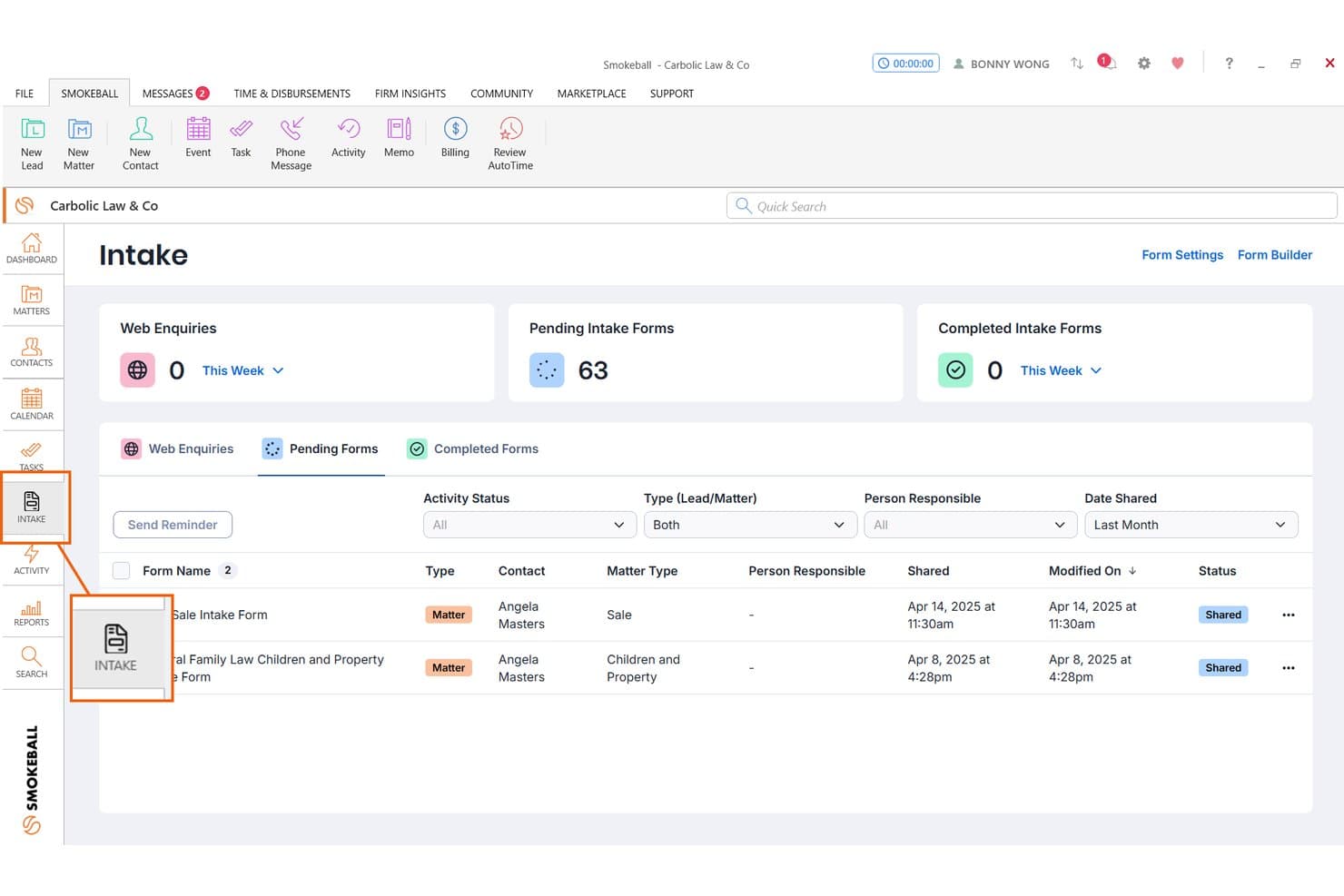
Smokeball tracks pending client intake forms with status and contact details. Smokeball is a legal practice management platform built for solo and small firms, combining client intake, document automation, matter management, billing, and trust accounting in one system.
Who Is Smokeball Best For?
Smokeball fits solo attorneys and small consumer-law firms—think family law, criminal defense, or estate planning—who want intake, document automation, billing, and matter management in one place.
Why I Picked Smokeball
I picked Smokeball as one of the best because its document auto-fill runs across both intake and active matters, not just one or the other. I love that the 20,000+ TemplateLab templates pull directly from matter data, so an engagement letter or client form populates automatically once a lead converts. AI-assisted form generation also builds intake forms from your matter type and jurisdiction, cutting setup time significantly for practice areas like family law or estate planning.
Smokeball Key Features
- AutoTime passive time tracking: Runs in the background to automatically capture billable time spent in documents, emails, and matters without manual entry.
- TemplateLab document library: Gives you access to 20,000+ legal document templates organized by matter type that auto-populate from existing matter data.
- Archie AI matter assistant: Works inside Microsoft Word and Outlook to draft documents, surface next steps, and summarize cases using only your firm's own data.
- Firm Insights reporting: Delivers profitability, staff productivity, and referral source dashboards so managing partners can track performance across the firm.
Smokeball Integrations
Smokeball has native integrations across Microsoft 365, including Word, Outlook, and Calendar, plus QuickBooks Online, LawToolBox, and InfoTrack. Marketplace integrations include Case Status, Lawmatics, and Answering Legal.
Pros and Cons
Pros:
- Built-in passive time tracking for billing
- Deep Microsoft Word and Outlook integration
- Offers 20,000+ auto-filled legal templates
Cons:
- Contract lock-in with higher upfront commitment
- Requires Windows PC for full features
Learn more about Smokeball: Best for AI conflict checks in high-growth firms
- Free demo available
- Pricing upon request
Visit WebsiteCustomer Rating:4.2/5
Litify centralizes case metrics, intakes, and tasks in one dashboard. Litify is a Salesforce-native legal practice management platform built for high-volume plaintiff firms, combining AI-driven intake, conflict checks, CRM, matter management, and marketing attribution in one system.
Who Is Litify Best For?
Litify suits high-growth plaintiff and personal injury firms with 10 or more attorneys who need AI-driven conflict checks and marketing attribution built into their intake workflow.
Why I Picked Litify
Litify earns its spot on my shortlist because its AI-powered Conflict Check Agent is genuinely unlike what most intake tools offer. It uses fuzzy matching to catch conflicts even when names are misspelled or data is inconsistent across matters, and it runs that check directly inside the intake flow. I've also found the marketing attribution dashboards valuable: they trace signed clients back to specific referral sources and campaigns, which is exactly what a growing plaintiff firm needs to make smarter intake decisions.
Litify Key Features
- Dynamic intake questionnaires: Intake forms adapt in real time, automatically skipping irrelevant questions based on prior answers to speed up data collection.
- No-code workflow configuration: Non-technical staff can build and adjust workflows, reports, and matter plans without developer support.
- Marketing attribution dashboards: Track leads from referral source to signed client, giving managing partners visibility into which campaigns drive intake conversions.
- Automated matter plans: Pre-built, practice-area-specific task lists trigger automatically when a new matter is opened, keeping case progression on track.
Litify Integrations
Documented integrations include DocuSign, Microsoft Outlook, Microsoft Word, Intuit, LawPay, RingCentral, CallRail, Case Status, NetDocuments, and Lexitas. Litify is Salesforce-native, with an open API and Salesforce AppExchange access for additional connections.
Pros and Cons
Pros:
- No-code workflow customization for intake processes
- Dynamic intake questionnaires adapt in real time
- AI conflict checks catch inconsistent data
Cons:
- Implementation requires significant time and resources
- Not designed for small firm budgets
Learn more about Litify: 3Best for conflict checks within a full practice suite
LEAP
- Free demo available
- Pricing upon request
Visit WebsiteCustomer Rating:4.3/5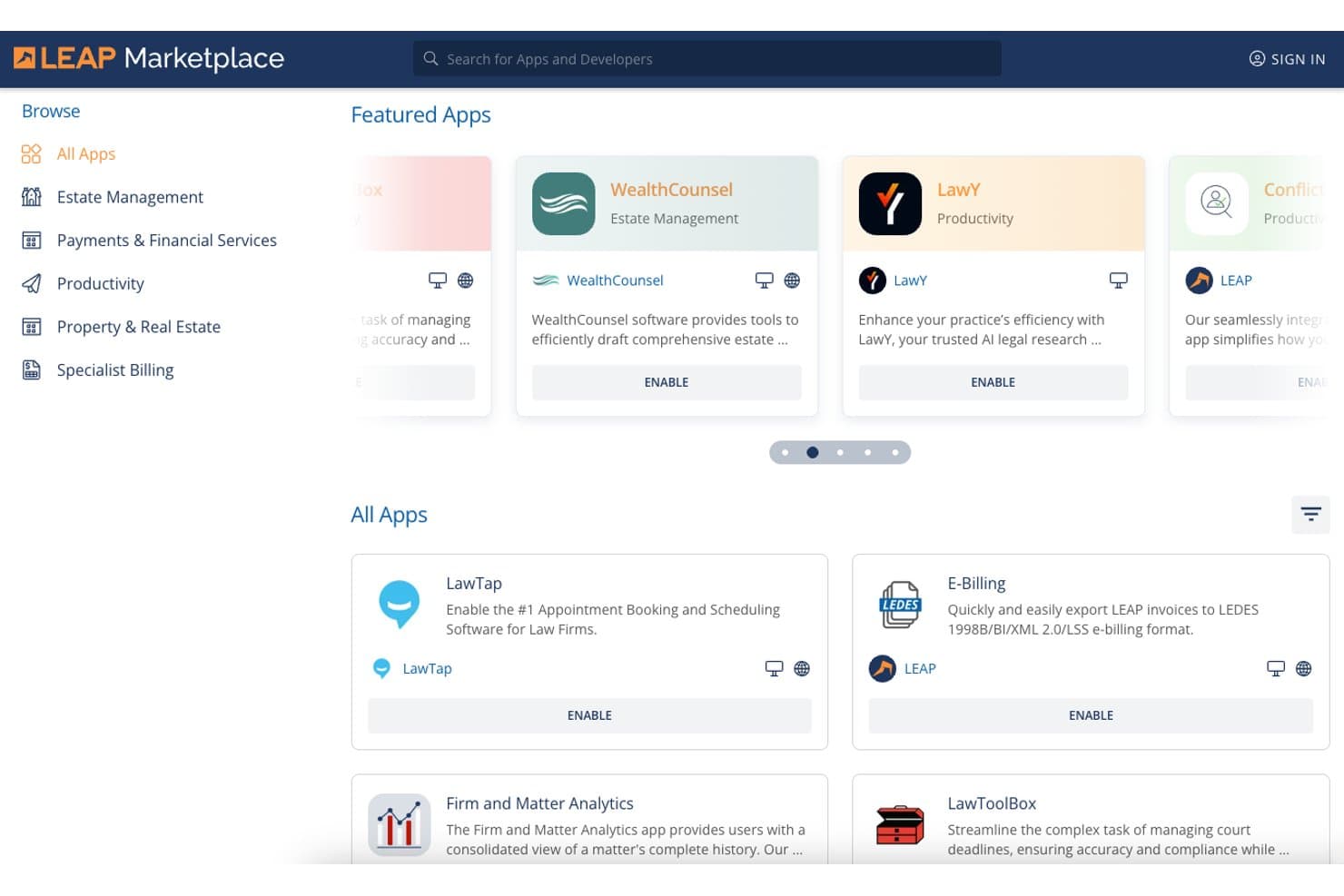
LEAP Marketplace lets small firms browse and enable legal apps. LEAP is a practice management platform for small law firms that combines matter management, document automation, trust accounting, billing, conflict checks, e-signatures, and a secure client portal in one subscription.
Who Is LEAP Best For?
LEAP is a strong fit for small law firms that want a single platform handling matters, billing, trust accounting, and conflict checks—without stitching together multiple tools.
Why I Picked LEAP
LEAP earns its spot on my shortlist because its native Conflict Check App lets you search across every contact, matter, and correspondence record in one click, which is genuinely rare in a platform that also handles billing and trust accounting. I also like that the LawConnect portal and InfoSign e-signature come included at no extra cost, so running conflict checks and getting engagement letters signed both happen inside the same system. If your firm runs on Microsoft 365, the native Outlook integration means emails auto-save to matters automatically.
LEAP Key Features
- Document automation library: Access 9,500+ pre-built legal forms and 1,600+ matter type templates spanning estate planning, family law, real estate, criminal law, and personal injury.
- InfoSign e-signature: Send documents for electronic signature directly from your LEAP correspondence workflow at no extra cost, with full audit trails included.
- LawConnect client portal: Give clients a secure space to share documents, book appointments, pay bills, and complete intake questionnaires without a separate subscription.
- AutoTime time tracking: Automatically captures and records billable time from matter activity, so no billable minutes go unlogged between client interactions.
LEAP Integrations
LEAP has native integrations with Microsoft 365, Lawmatics, DecisionVault, WealthCounsel, InfoTrack, LawToolBox, QuickBooks Online, and Xero. It also supports an open API and Zapier.
Pros and Cons
Pros:
- Client portal allows secure intake and messaging
- Included conflict check app saves manual effort
- Single platform covers intake to billing
Cons:
- Advanced forms require paid third-party software
- No native intake pipeline or CRM features
Learn more about LEAP: Best for multi-channel drip campaigns and intake ROI
- Free demo available
- Pricing upon request
Visit WebsiteCustomer Rating:4.6/5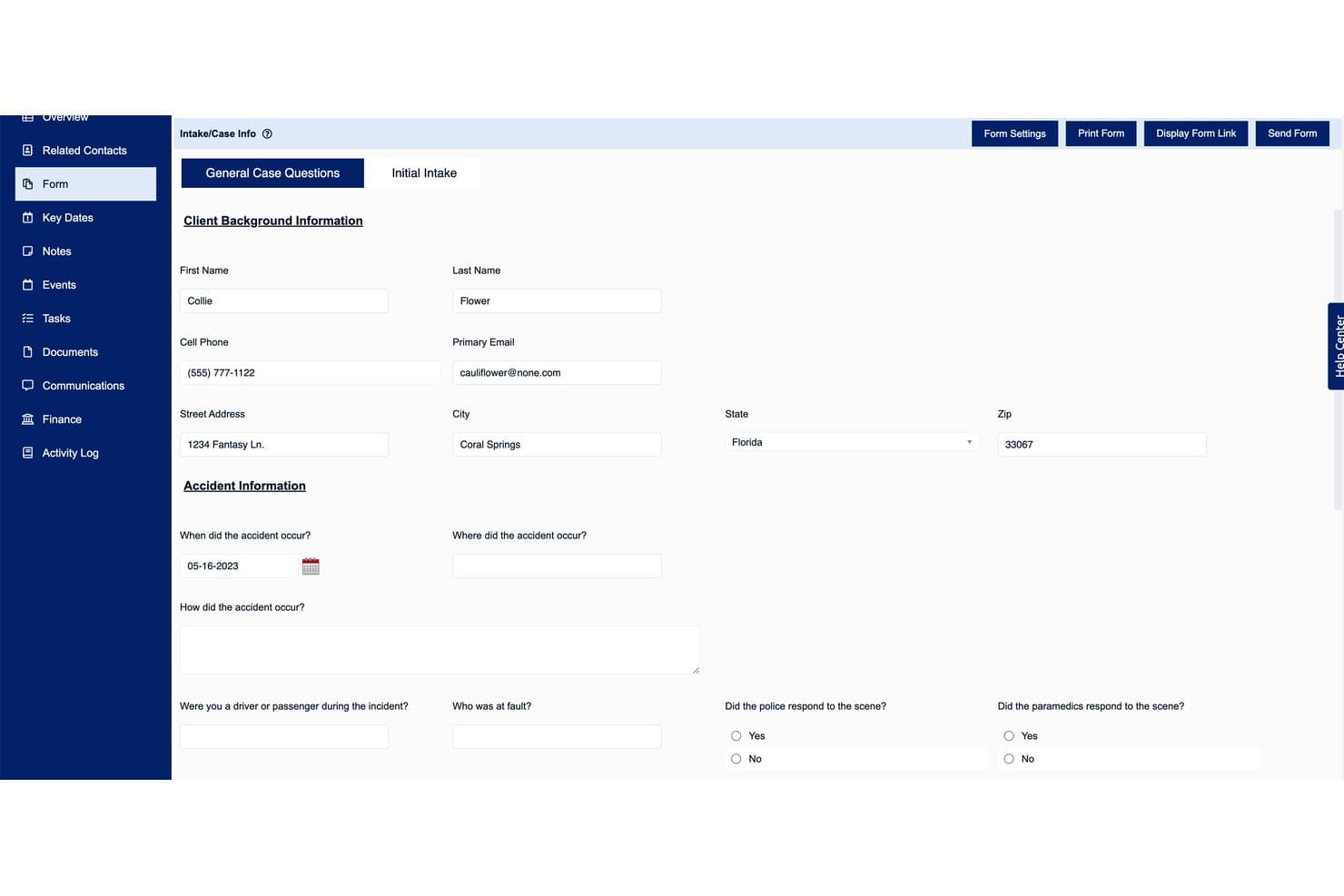
Law Ruler's intake form captures client and accident details efficiently. Law Ruler is a legal CRM and client intake platform built exclusively for law firms, combining multi-channel marketing automation, digital intake forms, native eSignature via email and SMS, a built-in softphone dialer, and lead pipeline management.
Who Is Law Ruler Best For?
Law Ruler is a strong fit for small firms running high-volume intake operations that need to track lead sources and measure which marketing channels actually convert to signed clients.
Why I Picked Law Ruler
Law Ruler earns its spot on my shortlist because of how seriously it takes multi-channel drip campaigns as a core intake function, not a bolted-on extra. I particularly like that automated sequences run across email, SMS, and pre-recorded voice simultaneously, so a personal injury lead who misses your email still gets a text within minutes. The marketing source ROI reporting on Premium and Enterprise plans ties each signed client back to a specific campaign, so you're not guessing which ad spend is actually converting.
Law Ruler Key Features
- Built-in softphone dialer: Make and receive calls directly within the CRM using click-to-call and local presence dialing, which matches your outbound area code to the prospect's to improve pickup rates.
- Native eSignature via SMS: Send engagement letters and retainer agreements for one-click signing by text message, not just email.
- AI Email Assistant: Draft client emails, intake questionnaires, and campaign content using a built-in ChatGPT integration included on all paid plans at no extra cost.
- Conditional logic intake forms: Build dynamic intake forms that adapt based on client responses to automatically qualify or disqualify leads during the intake process.
Law Ruler Integrations
Law Ruler integrates with Clio, CosmoLex, Rocket Matter, TimeSolv, Filevine, HelloSign, Gmail, and Microsoft Office 365. It offers an open API on all plans and supports Zapier.
Pros and Cons
Pros:
- AI email assistant included on all plans
- Built-in softphone dialer with local presence
- One-click eSignature via SMS or email
Cons:
- Severely limited automations on entry plan
- No free trial or public pricing
Learn more about Law Ruler: Best for conflict checks built into client intake
- 14-day free trial
- From $49/user/month (billed annually)
Visit WebsiteCustomer Rating:3.7/5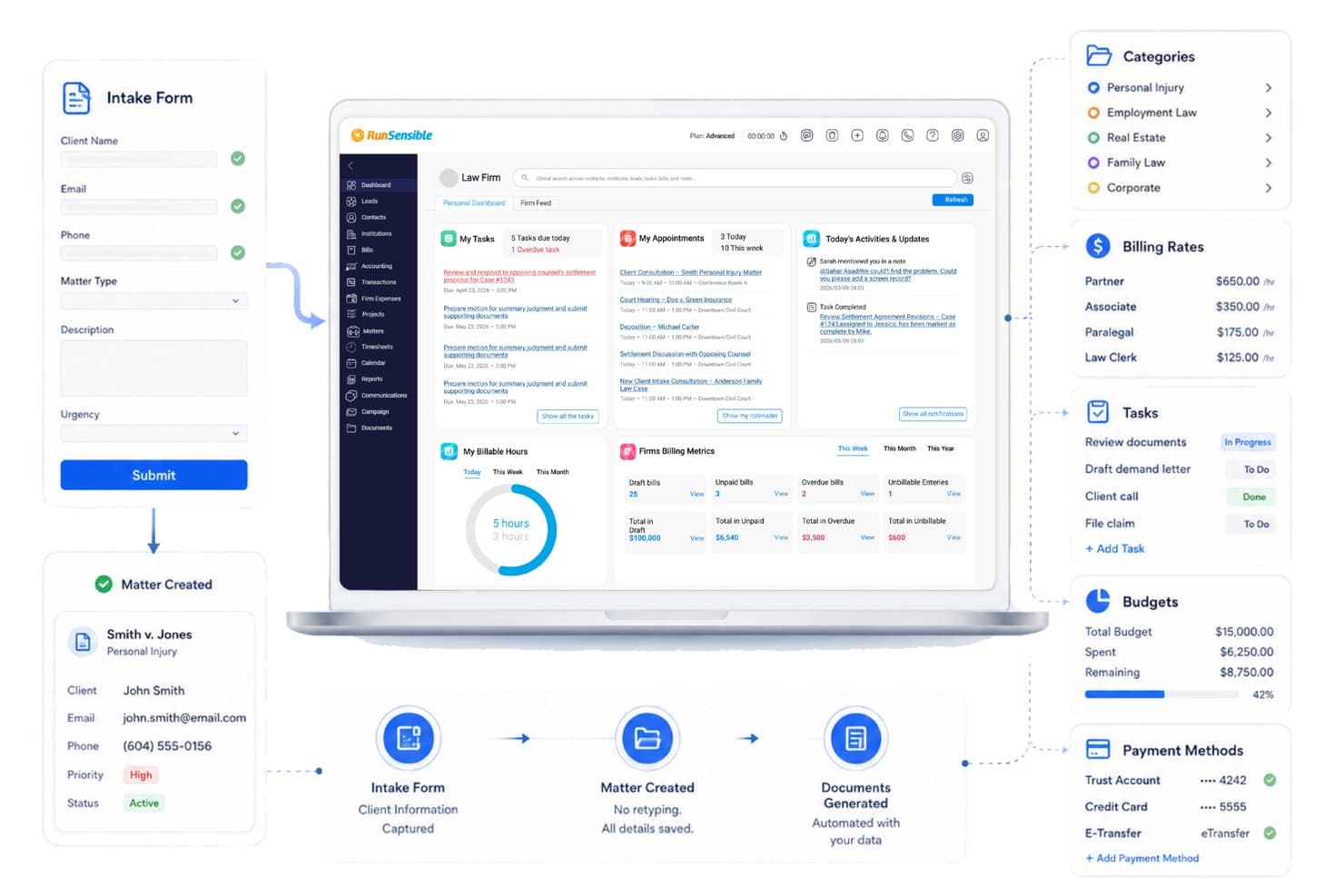
RunSensible turns intake forms into active matters automatically. RunSensible is an all-in-one legal practice management platform for solo practitioners and small firms that combines client intake forms, conflict checking, matter management, document automation, e-signatures, trust accounting, and a secure client portal.
Who Is RunSensible Best For?
RunSensible is a strong fit for solo practitioners and small firms who need conflict checking woven directly into their intake process, not bolted on as an afterthought.
Why I Picked RunSensible
RunSensible earns its spot on my shortlist because conflict checking is woven directly into the matter intake process, not treated as a separate step you might forget. When a new client record is created, the platform automatically cross-references it against existing clients and matters, flags direct or indirect conflicts, and logs an audit trail aligned with ABA Model Rules 1.7 and 1.9. I also like that it supports the full resolution workflow, so your team can document whether a case was declined or informed consent was obtained.
RunSensible Key Features
- IOLTA trust accounting: Manages client retainer funds in a dedicated trust account with reconciliation alerts and QuickBooks integration.
- Document automation: Generates engagement letters, fee agreements, and other legal documents from pre-built templates that auto-fill with client and matter data.
- Online scheduling: Lets clients self-book appointments through a customizable booking link with automated calendar sync and reminders.
- AI-guided form finder: Accepts plain-language case descriptions and returns context-specific recommendations from a library of 54,000+ jurisdiction-specific court forms and legal templates.
RunSensible Integrations
RunSensible integrates with Gmail, Microsoft 365/Outlook, Google Calendar, QuickBooks, Google Drive, Dropbox, Twilio, and Zapier.
Pros and Cons
Pros:
- Unlimited e-signatures and document storage
- Conflict check built into intake workflow
- Intake forms auto-populate client database
Cons:
- Few verified public user reviews online
- Client portal only in higher-tier plan
Learn more about RunSensible: Best for intake-to-signed client via built-in forms
- Free demo available
- Pricing upon request
Visit WebsiteCustomer Rating:4.7/5
Clio Grow streamlines client intake with online forms and appointment booking. Clio Grow is a legal client intake and CRM platform for law firms that combines online intake forms, e-signatures, conflict checks, lead pipeline management, and client communication tools in a single system.
Who Is Clio Grow Best For?
Clio Grow is a strong fit for small law firms already using—or planning to use—Clio Manage, where the native sync between intake and matter management delivers the most value.
Why I Picked Clio Grow
I picked Clio Grow because it covers the entire arc from first inquiry to signed client without ever leaving the platform. A prospect fills out a conditional intake form, you run an automated conflict check across Contacts, Matters, Notes, and Documents, and an engagement letter pre-populated with their intake data lands in their inbox for e-signature, all in one system. What I find genuinely useful is the multi-language form support (English, Spanish, French, German, and Portuguese), which removes a real barrier for firms serving diverse client populations.
Clio Grow Key Features
- Kanban lead pipeline: A drag-and-drop board lets you move prospects through customizable intake stages, from first inquiry to signed client.
- Online consultation booking: Prospective clients self-schedule appointments directly from your website or email signature, with automated SMS reminders sent before each meeting.
- Marketing attribution reporting: Dashboards tie each lead to a specific referral source, ad campaign, or intake channel so you can track which efforts drive conversions.
- Clio for Clients portal: A dedicated web and mobile portal gives clients encrypted messaging, document sharing, invoice review, and 24/7 case status visibility.
Clio Grow Integrations
Clio Grow has native bi-directional integration with Clio Manage and 250+ marketplace integrations through the Clio App Directory, including Google Calendar, Google Drive, Microsoft Outlook, Dropbox, QuickBooks, Xero, LawPay, and Ruby. It also offers an open API and Zapier.
Pros and Cons
Pros:
- Online scheduling reduces new client no-shows
- Automated conflict checks with audit reports
- Multi-language intake forms for diverse clients
Cons:
- Intake features tied closely to Clio Manage
- Advanced marketing automation features are limited
Learn more about Clio Grow: Best for AI-driven lead scoring and drip follow-up
- Free demo available
- Pricing upon request
Visit WebsiteCustomer Rating:4.6/5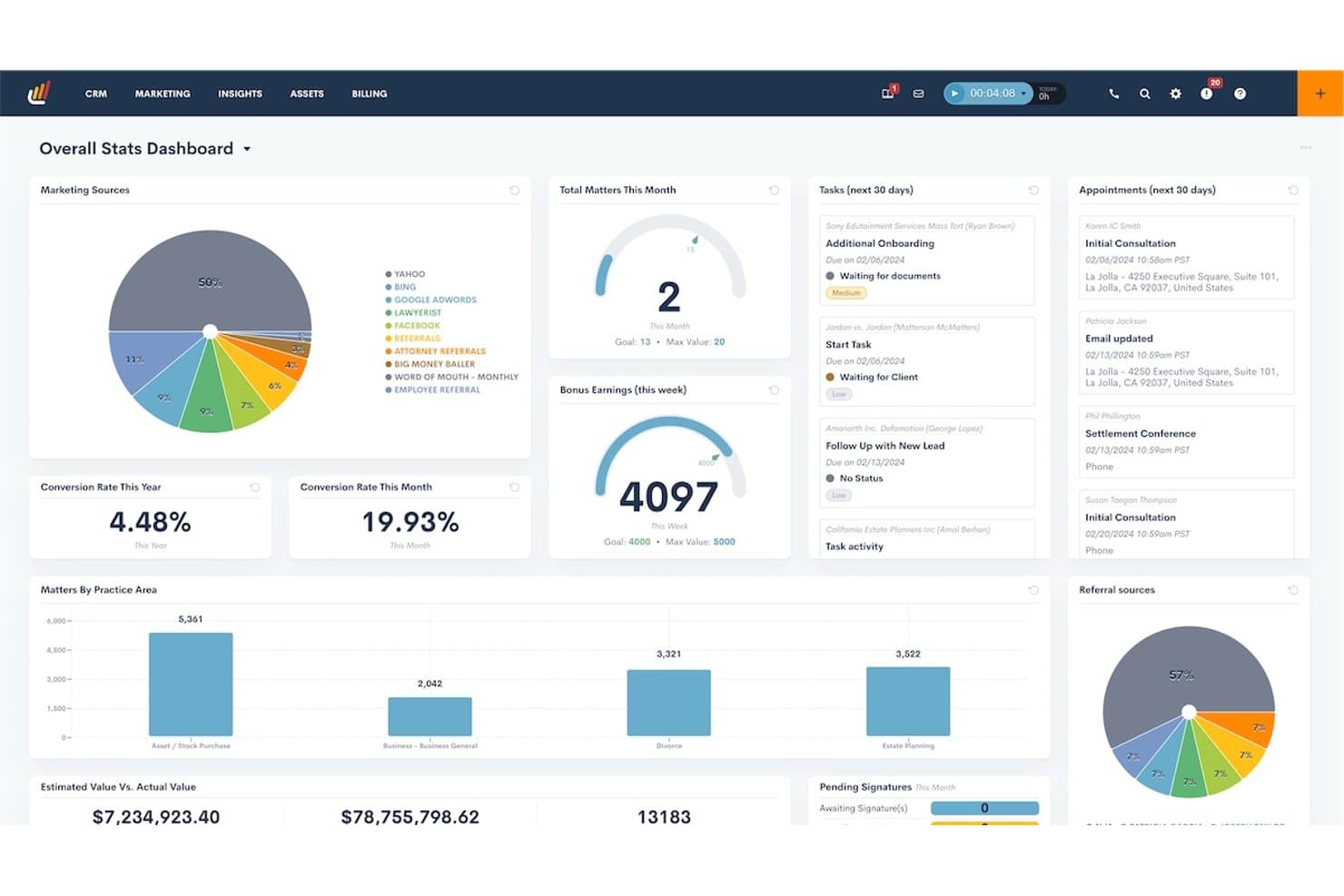
Lawmatics centralizes firm stats, tasks, and appointments in one dashboard. Lawmatics is a legal CRM and client intake platform built specifically for law firms, combining intake form automation, e-signature, drip campaigns, AI lead scoring, and practice management integrations in one system.
Who Is Lawmatics Best For?
Lawmatics is a strong fit for small firms with three or more attorneys who handle high lead volumes and need automated intake, AI-powered lead scoring, and marketing attribution in one platform.
Why I Picked Lawmatics
I've included Lawmatics in my top picks because its Merlin Qualify AI scores every incoming lead against your firm's criteria and routes, follows up, or flags automatically, cutting the manual sorting that buries intake teams at high-volume firms. I especially like how drip campaigns tie directly into those AI scores: a lead who clicks your consultation link but doesn't book triggers a timed SMS and email sequence without anyone touching it. That combination of AI qualification and behavior-based drip follow-up is what earns Lawmatics its spot here.
Lawmatics Key Features
- Conditional intake form logic: Build forms that adapt based on a prospect's answers, routing them through different question paths by practice area or case type.
- Native e-signature with audit trails: Send retainer agreements and fee letters for signature directly from the platform, with real-time status tracking and a complete signing history.
- Client portal: Give clients a secure space to upload documents, view calendar events, complete tasks, and exchange messages without using email.
- Practice management integrations: Sync converted leads and matter data bi-directionally with Clio, MyCase, PracticePanther, Filevine, and several other case management platforms.
Lawmatics Integrations
Lawmatics offers native integrations with Clio, MyCase, PracticePanther, Filevine, LEAP, Smokeball, QuickBooks, LawPay, Google Calendar, and Microsoft Outlook. It also supports custom integrations through its REST API with OAuth2 and webhooks, plus Zapier.
Pros and Cons
Pros:
- Client portal centralizes document and task sharing
- Conditional logic automates intake form workflows
- AI-driven lead scoring reduces manual sorting
Cons:
- No sandbox to test automation changes
- Three-user minimum excludes solo practitioners
Learn more about Lawmatics: Best for AI lead scoring and marketing ROI tracking
- Free demo available
- Pricing upon request
Visit WebsiteCustomer Rating:4.5/5
Filevine tracks monthly leads and sign-ups in one dashboard view. Filevine is a legal practice management and client intake platform that combines case management, AI-powered lead intake via Lead Docket, e-signature through Vinesign, conflict checking, and marketing attribution reporting.
Who Is Filevine Best For?
Filevine fits small firms in plaintiff-side practice areas—personal injury, immigration, mass tort—that run high intake volumes and need to track which ad campaigns are actually converting leads into signed clients.
Why I Picked Filevine
Filevine earns its spot on my shortlist because of how its Lead Docket module connects ad spend directly to signed clients. I love that LeadsAI scores incoming leads the moment they open, so intake staff can prioritize a high-value personal injury case over a weaker inquiry without manual review. Lead Docket's marketing attribution reporting then traces that signed client back to a specific Google Ads campaign, tracking actual revenue per source so managing partners can cut underperforming ad budgets with real data.
Filevine Key Features
- Conflict checker: Searches all org contacts using fuzzy matching across multiple name fields, then locks a vitals snapshot and exports a PDF audit report once a conflict status is set.
- Vinesign e-signature: Sends documents for signature via email or SMS, with automated reminders and merge-code templates that pull data directly from Lead Docket lead records.
- Automated drip campaigns: Triggers personalized email and SMS follow-up sequences at set intervals after a lead opens, keeping prospects engaged without manual staff outreach.
- Client Portal: An optional add-on that lets clients securely share documents, complete intake forms in multiple languages, and exchange case-linked communications with the firm.
Filevine Integrations
Filevine and Lead Docket offer 200+ documented integrations, including QuickBooks, Gmail, Microsoft 365, Google Calendar, Slack, Microsoft Teams, RingCentral, JotForm, Typeform, and CallRail. DataBridge provides API access for custom integrations, and Zapier is also supported.
Pros and Cons
Pros:
- Customizable intake forms for multiple practice areas
- Marketing ROI reporting links clients to ads
- AI lead scoring prioritizes high-value inquiries
Cons:
- Implementation often requires certified partner support
- Intake and e-signature require separate add-ons
Learn more about Filevine: Best for conflict checks built into intake workflows
- Free demo available
- Pricing upon request
Visit WebsiteCustomer Rating:4.2/5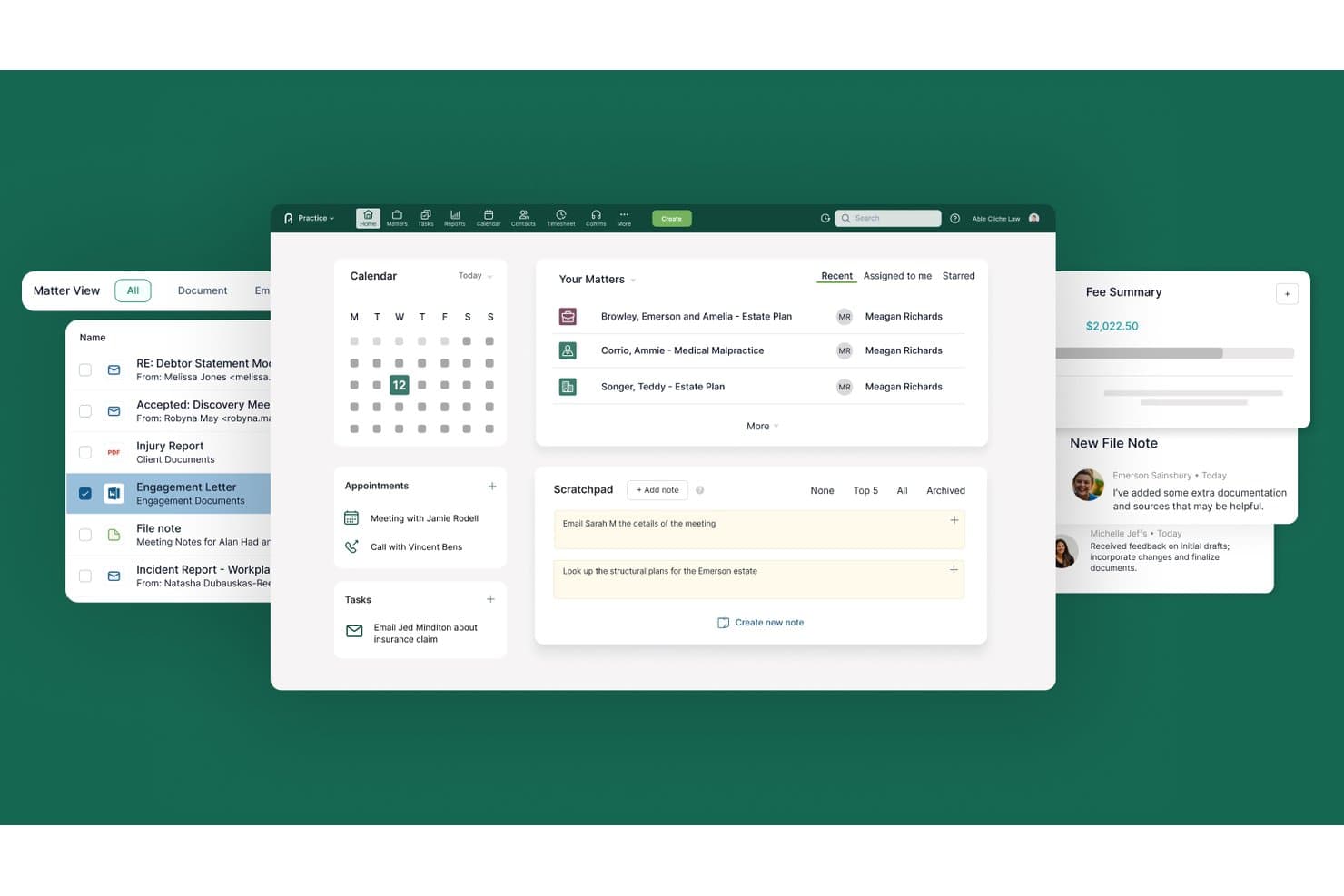
Actionstep centralizes matters, calendar, tasks, and notes in one dashboard. Actionstep is an all-in-one legal practice management platform that combines client intake, conflict checking, document management, a built-in CRM, client portal, workflow automation, and native legal accounting.
Who Is Actionstep Best For?
Actionstep is a strong fit for small firms with 3+ attorneys who want conflict checks, intake workflows, and practice management running on a single platform.
Why I Picked Actionstep
I've included Actionstep in my top picks because its built-in conflict check runs across your entire database—emails, matters, and contacts—in a single click, with permission-aware results you can export as a timestamped PDF straight to the matter record. What I find especially useful is that this lives inside the same platform handling your intake webforms, so a new prospect submission can trigger a conflict check, create a matter, and kick off a workflow without leaving Actionstep.
Actionstep Key Features
- Capture add-on module: A separately priced intake module that lets you collect multiple documents and contacts per form submission, with brand customization and a dashboard for monitoring submitted form statuses.
- Built-in legal accounting: A native legal accounting suite covering trust accounting, multi-currency general ledger, accounts payable/receivable, and financial reporting—all within the same platform.
- Granular client portal permissions: Set per-folder access controls for each client, including an upload-only setting that lets clients submit documents without viewing the folder's contents.
- Workflow automation engine: A configurable automation engine that assigns tasks, sets deadlines, triggers client communications, and generates documents across every stage of a matter.
Actionstep Integrations
Actionstep lists 50+ integrations, including Microsoft 365, DocuSign, Secured Signing, Google Drive, Dropbox, Lexidesk, InfoTrack, and First AML. It also supports an open API and Zapier.
Pros and Cons
Pros:
- Client portal offers granular folder permissions
- Workflow automation covers intake through billing
- Built-in conflict checks trigger from intake workflows
Cons:
- No native e-signature functionality included
- Requires three-user minimum for all plans
Learn more about Actionstep: Best for Word-native document automation in intake
- 10-day free trial
- From $150/user/month
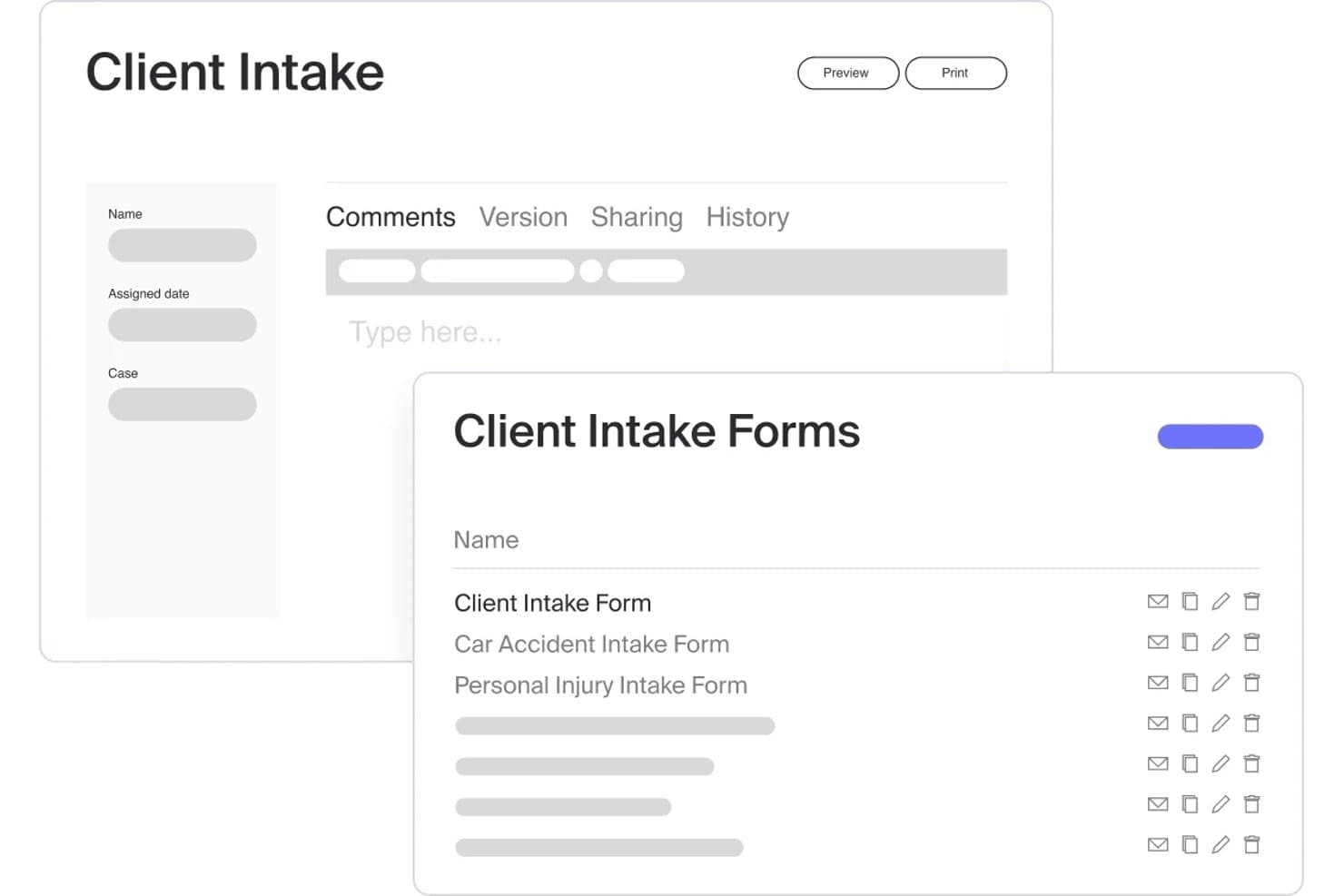
Woodpecker lets users manage client intake forms in one place. Woodpecker is a Word-native document automation tool, now bundled into MyCase Advanced, that lets small firms build smart templates, automate client questionnaires, and generate practice-area documents directly from intake data.
Who Is Woodpecker Best For?
Woodpecker is a strong fit for small firms and solo practitioners who already work in Microsoft Word and want intake questionnaires to feed directly into document templates—without switching to an unfamiliar drafting environment.
Why I Picked Woodpecker
I've included Woodpecker in my top picks because it's the only tool on this list that lets you build and run intake questionnaires directly inside Microsoft Word, in an environment your attorneys already know. Clients complete a questionnaire, and Woodpecker uses that data to populate Word templates instantly, with conditional logic that auto-adjusts clauses and pronouns based on their answers. I particularly like the bulk document generation feature, which lets a paralegal produce every standard engagement document for a new matter from a single dataset in one pass.
Woodpecker Key Features
- Client questionnaire builder: Build external-facing intake questionnaires using customizable field types—multi-select, single-select, rich text, and number fields—without any coding.
- Two-way client texting: Send and receive text messages with clients and leads using a dedicated firm number, including image support, directly within the platform.
- Secure client portal: Clients access case documents, invoices, and status updates through an encrypted portal with 128-bit SSL and 256-bit AES security.
- Automated workflow triggers: Set up task assignment, case creation, and document generation to fire automatically when an intake form is completed.
Woodpecker Integrations
MyCase documents 70+ integrations, including Microsoft Word, QuickBooks, Google Calendar, Gmail, Microsoft Outlook, LawPay, LawToolBox, and Docketwise. MyCase Advanced also includes an open API and Zapier.
Pros and Cons
Pros:
- Direct intake data populates legal templates
- Bulk-generate documents from one intake form
- Works inside Microsoft Word with no retraining
Cons:
- Conflict check available only on top tier
- Requires switching to the full MyCase platform
Learn more about Woodpecker:
Alte programe de preluare a clienților pentru firmele de avocatură mici
Iată câteva opțiuni suplimentare de programe de preluare a clienților pentru firmele de avocatură mici care nu au ajuns pe lista mea scurtă, dar care merită totuși analizate:
- 11PracticePantherBest for intake and e-sign within one subscription
- 12CARET LegalBest for conflict checks across archived matters
- 13CosmoLexBest for intake-to-billing in one platform
- 14Rocket MatterBest for intake-to-billing in one legal suite
- 15DocketWiseBest for immigration intake with multilingual forms
- 16Assembly NEOSBest for PI intake-to-matter in one platform
- 17IntakerBest for AI chat intake across website and social
Related Reviews
How I Evaluate Legal Client Intake Software for Small Firms
I split my evaluation into baseline criteria every tool must meet—like conflict checks and e-signatures—and differentiators that separate a lead-nurturing powerhouse from a basic intake form.
Core Functionality (Table Stakes For This List)
When I'm selecting tools for my list, I rank each one on a scale from 0 (does not offer the functionality) to 5 (excels in this area) for each core functionality listed below. I then calculate the tool's total score into a percentage, using 65% as a benchmark to help assess its overall fit for the list.
- Digital Intake Forms: I look for customizable, client-facing forms with conditional logic and practice-area templates—so a family law firm can collect different fields than a personal injury shop.
- E-Signature & Engagement Letters: Each tool needs native e-signature with audit trails and engagement letter templates, not a manual handoff to a separate signing app.
- Conflict Check Automation: I evaluate whether the tool searches across parties, matters, and related entities automatically, rather than relying on a basic keyword search you run by hand.
- Client Communication Portal: Secure document exchange and messaging matter here—I check for encrypted portals where clients can upload IDs or financials without resorting to unprotected email.
- Lead & Matter Management: Pipeline visibility from first inquiry to signed retainer is key. I look for source tracking, automated stage progression, and conversion reporting.
- Practice Management Integration: The tool should sync client data downstream into billing and document management systems, ideally through native integrations or an open API.
Once I have a list of tools that meet the criteria, I consider what sets each platform apart.
Differentiating Factors (What Sets Vendors Apart)
Here's how I compare and contrast different vendors:
Standout Features
I look for marketing attribution that ties signed clients back to specific ad campaigns or referral sources, so you can see which channels actually convert. Automated drip campaigns matter too—I check whether a tool can re-engage stalled prospects via email and SMS sequences without manual follow-up. Practice-area template libraries round things out; a firm shouldn't have to build intake forms and engagement letters from scratch when ready-made options for personal injury or family law exist.
Beyond Features
I check whether a tool meets legal-specific compliance needs—ABA Model Rule 1.7 conflict checks, audit trails on engagement letters, and encryption standards like SOC 2 Type II. For personal injury or elder law firms, HIPAA support is non-negotiable. I also evaluate total cost of ownership, since per-user pricing can spike fast once you add SMS credits, e-signature caps, or integration fees. Bundled suites that pair intake with practice management often deliver better value than stitching separate tools together.
Cum să alegeți un program de preluare a clienților pentru firmele de avocatură mici
Alegerea programului potrivit de preluare a clienților pentru o firmă de avocatură presupune să corelați cele mai mari blocaje din procesul de preluare cu funcțiile și cerințele esențiale care le abordează direct:
| Dacă prioritatea dumneavoastră este... | Căutați... |
| Automatizarea colectării documentelor și a semnăturilor | Semnătură electronică nativă și fluxuri de lucru bazate pe șabloane |
| Gestionarea conformității încă de la început | Sisteme integrate și ușor de căutat pentru verificarea conflictelor |
| Îmbunătățirea ratelor de conversie a potențialilor clienți | Transferul de la preluare la client, cu urmărirea etapelor |
| Reducerea activităților administrative legate de preluare pentru o echipă restrânsă | Biblioteci de formulare predefinite cu logică condițională |
| Demonstrarea rentabilității marketingului pentru clienții noi | Urmărirea sursei și instrumente automate de atribuire |
Cum să evaluați lista scurtă
- Realizați o simulare a preluării unui client: Folosiți un cont demonstrativ pentru a crea, trimite și procesa o solicitare nouă în termen de 30 de minute.
- Solicitați un exemplu de jurnal de audit al scrisorii de angajament: Cereți furnizorului să vă ofere un export real care să prezinte înregistrări marcate temporal ale semnăturii electronice și ale modificărilor.
- Verificați documentația privind verificarea conflictelor: Asigurați-vă că furnizorul demonstrează căutări în sistem pentru părți, spețe și entități asociate, nu doar verificări de bază ale numelor.
- Verificați transferul datelor către sistemele existente: În timpul unei perioade de testare, exportați sau sincronizați datele completate despre preluare cu instrumentul dumneavoastră de facturare sau de gestionare a spețelor.
- Compromisul: Decideți dacă doriți un instrument specializat exclusiv pentru preluare (mai specializat, dar separat) sau o suită integrată care acoperă preluarea și gestionarea mai amplă a cabinetului (mai unitară, dar care poate face compromisuri în privința funcțiilor avansate de preluare).
Ce este un program de preluare a clienților pentru firmele de avocatură mici?
Un program de preluare a clienților pentru firmele de avocatură mici este un instrument digital care ajută la captarea, gestionarea și transformarea solicitărilor noilor clienți în clienți care au semnat. Acest tip de program centralizează formularele de preluare, verificările de conflicte, semnăturile electronice și comunicarea — toate în cadrul unei singure platforme. Echipele juridice mici folosesc aceste sisteme pentru a reduce procesele manuale, a limita erorile și a asigura conformitatea pe parcursul integrării noilor clienți.
Funcțiile programelor de preluare a clienților pentru firmele de avocatură mici
Atunci când alegeți un program de preluare a clienților pentru firmele de avocatură mici, urmăriți următoarele funcții esențiale:
- Formulare digitale de colectare a informațiilor: Formularele online personalizabile vă permit să colectați informații detaliate despre clienți la începutul fiecărei colaborări. Șabloanele specifice domeniului de practică și logica condițională vă ajută să adaptați întrebările pentru fiecare tip de speță și să omiteți pașii irelevanți.
- Semnături electronice și scrisori de angajament: Instrumentele integrate pentru semnături electronice, cu piste de audit, le permit clienților să semneze electronic contractele de asistență juridică și scrisorile de angajament. Astfel, colectarea semnăturilor rămâne rapidă, sigură și ușor de urmărit în scopul conformității.
- Automatizarea verificării conflictelor: Căutările automatizate verifică părțile, spețele și entitățile asociate în baza de date existentă, semnalând din timp potențialele conflicte. Reduceți verificarea manuală și respectați normele de conduită profesională.
- Portal de comunicare cu clienții: Portalurile securizate permit schimbul criptat de documente și trimiterea de mesaje în timp real. Clienții pot încărca direct documente sensibile, păstrând informațiile protejate și în afara e-mailului.
- Gestionarea potențialilor clienți și a spețelor: Fluxurile de colectare a informațiilor urmăresc stadiul fiecărui potențial client, cu avansare automată între etape și raportare a sursei. Puteți vedea care solicitări se transformă în clienți și reveni către cele care stagnează.
- Integrarea cu sistemele de gestionare a activității juridice: Integrările directe sau API-urile deschise conectează datele colectate cu sistemele de facturare, gestionare a spețelor și gestionare a documentelor. Astfel, informațiile despre clienți rămân sincronizate și se reduc introducerile duplicate.
- Instrumente de atribuire a rezultatelor de marketing: Urmărirea sursei asociază fiecare client nou cu anumite campanii sau persoane care au făcut recomandări. Aveți vizibilitate asupra eforturilor de marketing care aduc activitate calificată.
- Campanii automate succesive: Secvențele integrate de e-mail și SMS revin către potențialii clienți care încă nu au semnat. Puteți relua automat contactul cu potențialii clienți, reducând comunicarea manuală.
- Bibliotecă de șabloane pentru scrisori de angajament: Accesul la șabloane predefinite, specifice domeniului de practică, înseamnă că nu trebuie să redactați de la zero documentele de colectare a informațiilor sau de angajament. Acest lucru uniformizează formulările și reduce riscul de neconformitate.
- Piste de audit și înregistrarea conformității: Jurnalele transparente afișează fiecare interacțiune, modificare și semnătură colectată. Astfel, echipa este protejată în timpul auditurilor și al verificărilor interne.
Beneficiile software-ului de colectare a informațiilor despre clienții juridici pentru firmele mici
Implementarea software-ului de colectare a informațiilor despre clienții juridici pentru firmele mici oferă mai multe beneficii echipei și companiei dumneavoastră. Iată câteva dintre acestea:
- Reducerea etapelor manuale de colectare a informațiilor: Formularele digitale automatizate, verificările conflictelor și fluxurile de semnare electronică vă ajută echipa să transforme rapid solicitările inițiale în clienți care au semnat, cu mai puțin efort manual.
- Reducerea riscurilor de neconformitate: Funcții integrate precum pistele de audit, verificările automatizate ale conflictelor și criptarea mențin procesul de integrare a clienților aliniat la standardele juridice și vă ajută să respectați cerințele de conduită profesională.
- Accelerarea colectării documentelor: Portalurile securizate pentru clienți le permit acestora să încarce direct fișiere sensibile, astfel încât să puteți colecta tot ce aveți nevoie și să evitați schimburile de e-mail neprotejate.
- Îmbunătățirea vizibilității asupra conversiilor: Fluxurile de colectare a informațiilor, cu urmărirea potențialilor clienți și avansarea automată, vă arată exact în ce stadiu se află fiecare potențial client și ce surse aduc clienți noi.
- Facilitarea unor decizii de marketing mai bune: Urmărirea sursei și instrumentele de atribuire a rezultatelor de marketing asociază noile spețe cu anumite campanii, astfel încât să vedeți care eforturi contribuie efectiv la dezvoltarea portofoliului de clienți.
- Reducerea introducerii duplicate a datelor: Integrarea cu sistemele de gestionare a activității juridice și API-urile deschise asigură transferul direct al informațiilor colectate în timpul procesului de colectare către instrumentele existente de facturare și gestionare a spețelor.
- Uniformizarea proceselor de colectare a informațiilor: Bibliotecile de formulare și scrisori de angajament predefinite ajută la crearea unor documente consecvente și conforme pentru integrarea clienților, fără a porni de la zero de fiecare dată.
Costurile și prețurile software-ului de colectare a informațiilor despre clienții juridici pentru firmele mici
Selectarea software-ului de colectare a informațiilor despre clienții juridici pentru firmele mici necesită înțelegerea diferitelor modele de tarifare și planuri disponibile. Costurile variază în funcție de funcții, dimensiunea echipei, suplimente și alți factori. Tabelul de mai jos prezintă pe scurt planurile obișnuite, prețurile lor medii și funcțiile incluse de regulă în soluțiile software de colectare a informațiilor despre clienții juridici pentru firmele mici:
Tabel comparativ al planurilor pentru software-ul de colectare a informațiilor despre clienții juridici pentru firmele mici
| Tipul planului | Preț mediu | Funcții comune |
| Plan personal | $15–$30/utilizator/lună | Formulare personalizate, biblioteci de șabloane, acces de bază la portalul pentru clienți, semnătură electronică cu pistă de audit și asistență prin e-mail. |
| Plan pentru companii | $40–$70/utilizator/lună | Verificări automatizate ale conflictelor, schimb securizat de documente, integrări cu sisteme de gestionare a activității juridice, atribuire a rezultatelor de marketing și raportare pentru echipă. |
| Plan pentru întreprinderi | $90–$150/utilizator/lună | Înregistrare avansată a conformității, asistență HIPAA, acces API, portaluri personalizate cu marca proprie, asistență prioritară și integrare personalizată. |
Software pentru preluarea clienților juridici pentru firme mici – întrebări frecvente
Iată câteva răspunsuri la întrebările frecvente despre software-ul pentru preluarea clienților juridici pentru firme mici:
Cum pot afla dacă software-ul pentru preluarea clienților juridici se integrează cu sistemul meu actual de gestionare a practicii?
Începeți prin a verifica site-ul oficial al furnizorului pentru o pagină dedicată integrărilor sau partenerilor. Căutați mențiuni despre anumite sisteme de gestionare a practicii — precum Clio, MyCase sau PracticePanther — ori despre compatibilitatea cu API-uri deschise. Dacă nu sunteți sigur, contactați echipa de vânzări sau de asistență și solicitați o listă a integrărilor acceptate. Efectuarea unei perioade de testare sau solicitarea unei demonstrații împreună cu sistemul existent vă poate ajuta, de asemenea, să confirmați compatibilitatea.
Ce standarde de securitate ar trebui să caut într-un software pentru preluarea clienților juridici?
Asigurați-vă că orice instrument pe care îl luați în considerare oferă criptarea datelor (în repaus și în tranzit), jurnale de audit și conformitatea cu standardele juridice relevante, precum SOC 2 Type II sau HIPAA pentru aspectele sensibile. Aveți nevoie de înregistrări transparente ale acțiunilor clienților, controale stricte ale accesului și politici de confidențialitate publicate în mod clar. Solicitați întotdeauna furnizorilor să vă explice modelul lor de securitate într-un limbaj simplu înainte de a lua o decizie.
Pot personaliza formularele de preluare pentru diferite domenii de practică?
Da, multe platforme software pentru preluarea clienților juridici oferă instrumente de creare a formularelor cu logică condițională și șabloane pentru diferite domenii de practică. Astfel, puteți crea formulare adaptate dreptului familiei, vătămărilor corporale, imigrației sau altor specializări, adresând doar întrebările relevante. Dacă nu sunt disponibile șabloane, verificați dacă software-ul permite utilizarea câmpurilor personalizate și a ramificării logice, pentru a evita formularele identice pentru toate situațiile.
Care este cea mai bună modalitate de a verifica dacă software-ul gestionează corect verificările de conflicte?
Solicitați furnizorului să demonstreze căutările pentru verificarea conflictelor în timpul unei demonstrații live. Urmăriți dacă sistemul poate căuta în toate părțile, entitățile asociate și dosarele arhivate — nu doar după nume simple. Furnizorii buni vor oferi documentație exemplificativă sau rapoarte de audit care arată cum sunt afișate și înregistrate rezultatele, oferindu-vă o imagine asupra utilizării în situații reale.
Cum ar trebui să compar costul total de deținere pentru diferite soluții?
Priviți dincolo de taxele lunare de abonament. Luați în calcul prețul per utilizator, limitele pentru semnături electronice sau creditele SMS, costurile integrărilor, costurile de configurare inițială și nivelurile de asistență. Calculați costul total pe baza dimensiunii actuale a echipei și a funcțiilor de care aveți nevoie pe parcursul unui an obișnuit. Nu uitați să luați în considerare valoarea oferită: suitele de produse incluse pot oferi prețuri mai bune atunci când aveți nevoie atât de preluarea clienților, cât și de gestionarea practicii.
Ce urmează?
Pentru mai multe informații și resurse juridice, abonați-vă la newsletterul nostru și alăturați-vă unei comunități de profesioniști inovatori din domeniul juridic care modelează viitorul dreptului.