

Criminal law case management software organizes case records, deadlines, communications, and related workflows for defense firms, prosecution offices, public defenders, and justice agencies. The right fit depends on your work: a private defense practice may need intake, client communication, and billing, while a public office may prioritize discovery, evidence tracking, victim services, or cross-agency coordination. This list compares options across these settings to help you find software that fits your team’s workflow, responsibilities, and financial needs.
Why Trust Our Software Recommendations
6,700+
Reviews
20
Industry experts
16+
Evaluation factors
14
Years
Our team has been testing and reviewing software since 2012. As legal practice leaders ourselves, we know how difficult—and important—it is to choose the right software.
For this guide, we evaluated tools using hands-on testing and independent research, scoring tools using our selection criteria.
Our reviews reflect our human editorial judgment, not a sales pitch.
Comparison Table: Criminal Law Case Management Software
Compare pricing and specs side by side for the criminal law case management software that made it onto my shortlist.
Score legend (out of 5)
- Excellent4.5–5
- Good4–4.4
- Average3–3.9
- Below average2–2.9
- Poor1–1.9
Sorted by: Default
| Tool | Starting Price | Website | |||||||
|---|---|---|---|---|---|---|---|---|---|
Best for defense casework and firm finances | 3.5 out of 5 | 4 | 4 | 4 | 3 | 3 | 3 | $49/user/month Free demo + 7-day free trial available | Website |
Best for defense intake and trust accounts | 3.0 out of 5 | 3 | 4 | 4 | 1 | 3 | 3 | $49/user/month 14-day free trial | Website |
Best for cross-agency justice workflows | 3.0 out of 5 | 3 | 4 | 4 | 1 | 3 | 3 | $5,000/year Free demo available | Website |
Best for holistic defense coordination | 3.8 out of 5 | 4 | 4 | 3 | 4 | 5 | 3 | Pricing upon request Free demo available | Website |
Best for LAA casework and court billing | Not rated | 4 | 4 | 4 | Not rated | 3 | 3 | Pricing upon request Free demo available | Website |
Best for coordinating holistic defense teams | 3.7 out of 5 | 4 | 4 | 2 | 4 | 5 | 3 | Pricing upon request Free demo available | Website |
Best for linking victim services to cases | Not rated | 4 | 5 | 3 | Not rated | 4 | 3 | Pricing upon request Free demo available | Website |
Best for case-connected victim services | 3.5 out of 5 | 4 | 3 | 3 | 4 | 4 | 3 | Pricing upon request Not available | Website |
Best for defense discovery and chain of custody | 3.7 out of 5 | 4 | 3 | 4 | 3 | 5 | 3 | $49/user/month Free demo + 10-day free trial available | Website |
Best for personal injury case workflows | Not rated | 2 | 4 | 4 | Not rated | 3 | 3 | $90/user/month Free demo available | Website |


Criminal Law Case Management Software Reviews
Below are my summaries of the best criminal law case management software on my shortlist. My reviews cover each product’s features and best-fit workflows to help you find the right software for your organization.
 Best for defense casework and firm finances
- Free demo + 7-day free trial available
- From $49/user/month
Visit WebsiteCustomer Rating:4.7/5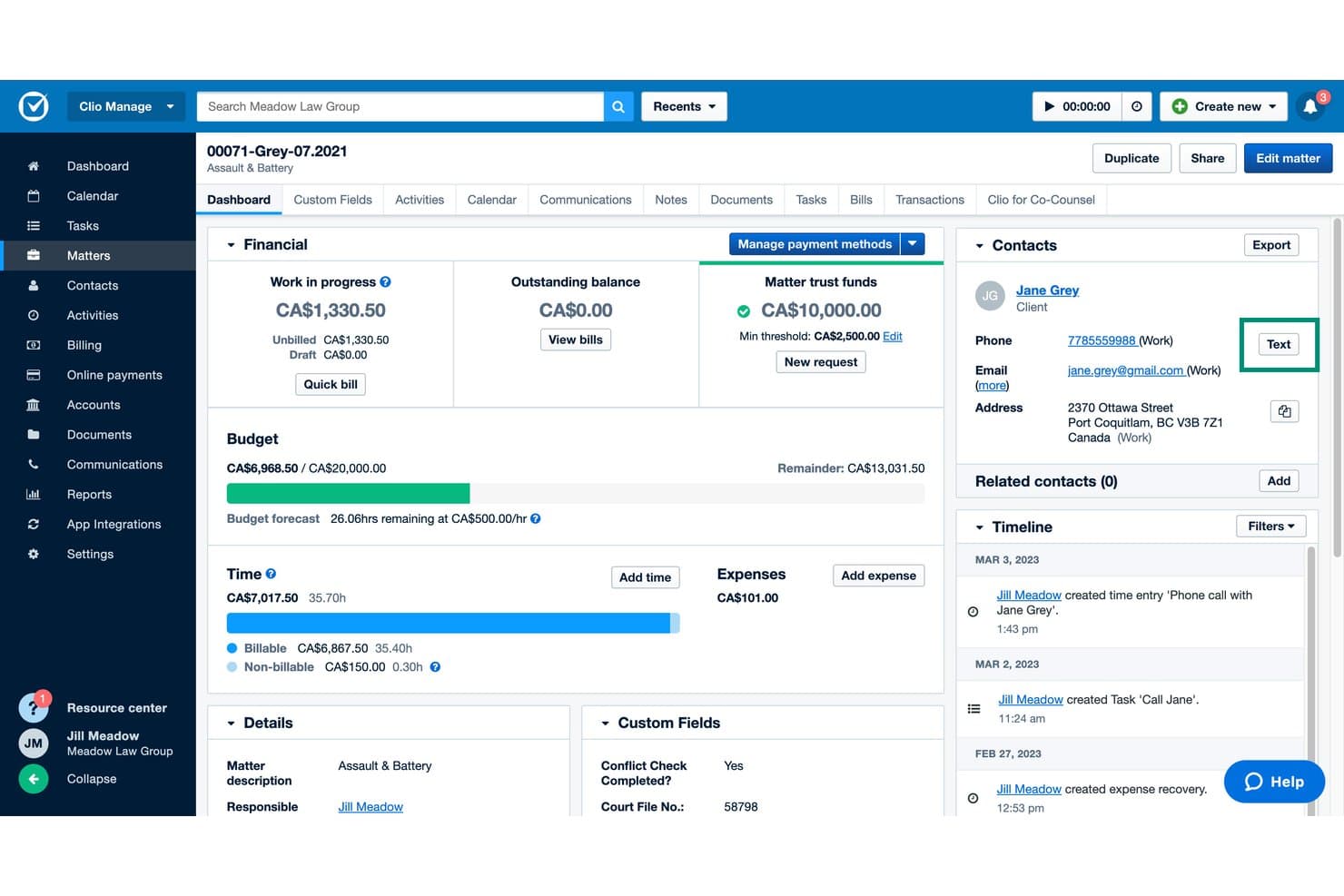
Clio Manage provides criminal case details, financial tracking, and client records. Clio Manage is a cloud-based legal practice management platform that centralizes matter records, client communications, document storage, billing, and trust accounting—with preconfigured criminal-law custom fields for capturing charges, arrest details, and defendant information.
Who Is Clio Manage Best For?
Clio Manage is a strong fit for criminal defense attorneys and legal office administrators who need matter tracking, trust accounting, and client billing in one place.
Why I Picked Clio Manage
I've included Clio Manage in my top picks because it's the only general practice management platform I've seen with preconfigured criminal-law custom fields built in, covering arrest details, charges, and defendant identifiers out of the box. I also like how trust accounting sits alongside matter tracking, so defense attorneys can manage retainers and billing without switching tools. Matter stages let you map a criminal case through arraignment, discovery, plea negotiations, and trial in a single board.
Clio Manage Key Features
- Court calendaring rules: Automatically populate your calendar with deadlines based on court procedure rules for your jurisdiction.
- Conflict checks: Search across contacts, matter notes, calendar events, and communications to flag potential conflicts before taking on a case.
- Secure client portal: Let clients message your firm, share documents, view appointments, and make payments through a web or mobile app.
- Automated workflows: Automatically assign tasks, generate documents, and update matter setup as a case moves forward.
Clio Manage Integrations
Clio Manage offers 300+ marketplace integrations, including Microsoft Outlook, Google Calendar, QuickBooks, Xero, OneDrive, Google Drive, Dropbox, and NetDocuments. It also provides an API and supports Zapier.
Pros and Cons
Pros:
- Trust accounting sits beside defense billing
- Matter stages map cases through court milestones
- Criminal-law fields capture arrest and charge details
Cons:
- No dedicated speedy-trial deadline engine
- No chain-of-custody evidence tracking
Learn more about Clio Manage: Best for defense intake and trust accounts
- 14-day free trial
- From $49/user/month
Visit WebsiteCustomer Rating:4.8/5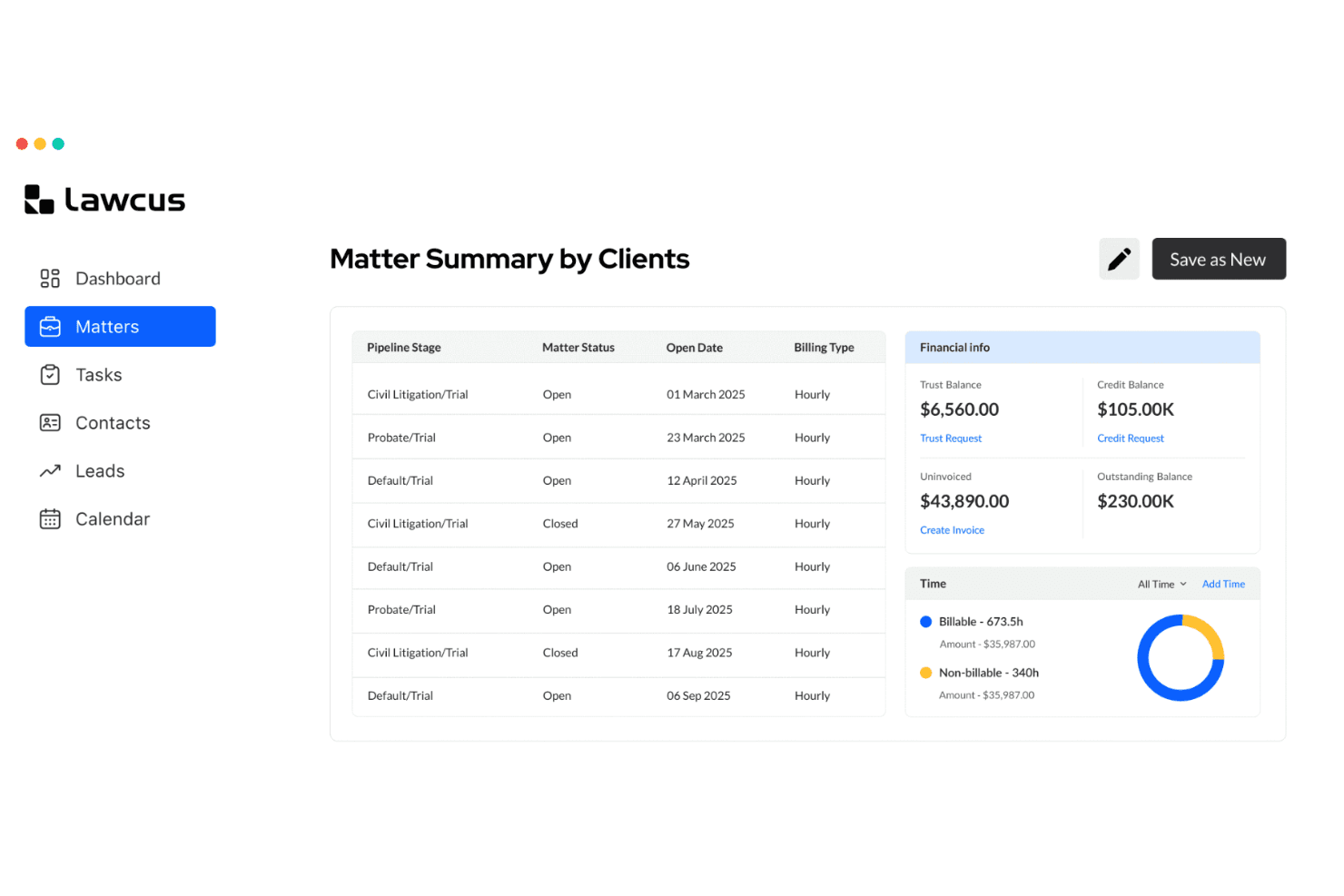
Lawcus provides matter summaries with trust balances and billing details. Lawcus is a cloud-based legal practice management platform that covers matter tracking, client intake, trust accounting, billing, document management, and client communication for private defense firms.
Who Is Lawcus Best For?
Lawcus is a strong fit for small private criminal defense firms that need a single platform for client intake, trust accounting, and matter tracking.
Why I Picked Lawcus
I've included Lawcus in my top picks because it handles two things private defense firms constantly juggle: getting clients signed and keeping their funds straight. The intake pipeline lets you move a prospect from lead to hired matter without re-entering data, which matters when you're onboarding clients under pressure. Trust accounting is built in from the Essential plan, so you can track retainer balances, generate client ledger reports, and manage multiple trust accounts without a separate tool.
Lawcus Key Features
- Client portal: Give clients a secure space to view matter updates, shared documents, invoices, and messages without calling the office.
- Legal calendaring: Schedule hearings, deadlines, and tasks on an integrated calendar with automated reminders for critical dates.
- Document automation and templates: Generate standard legal documents like pleadings and engagement letters from reusable templates.
- Kanban matter pipelines: Track every active case across customizable stages on a visual board so nothing slips through.
Lawcus Integrations
Lawcus lists integrations with Box, Dropbox, Google Drive, Gmail, Microsoft Outlook, Microsoft 365, QuickBooks, and Xero for documents, communications, calendars, and billing. It offers a REST-style API with OAuth 2.0 and supports Zapier.
Pros and Cons
Pros:
- Client portal shares updates and documents
- Built-in trust accounting tracks client balances
- Lead-to-matter intake preserves client details
Cons:
- No evidence chain-of-custody or conflict checks
- No charge-specific fields for criminal matters
Learn more about Lawcus: Best for cross-agency justice workflows
- Free demo available
- From $5,000/year (billed annually)
Visit WebsiteCustomer Rating:5/5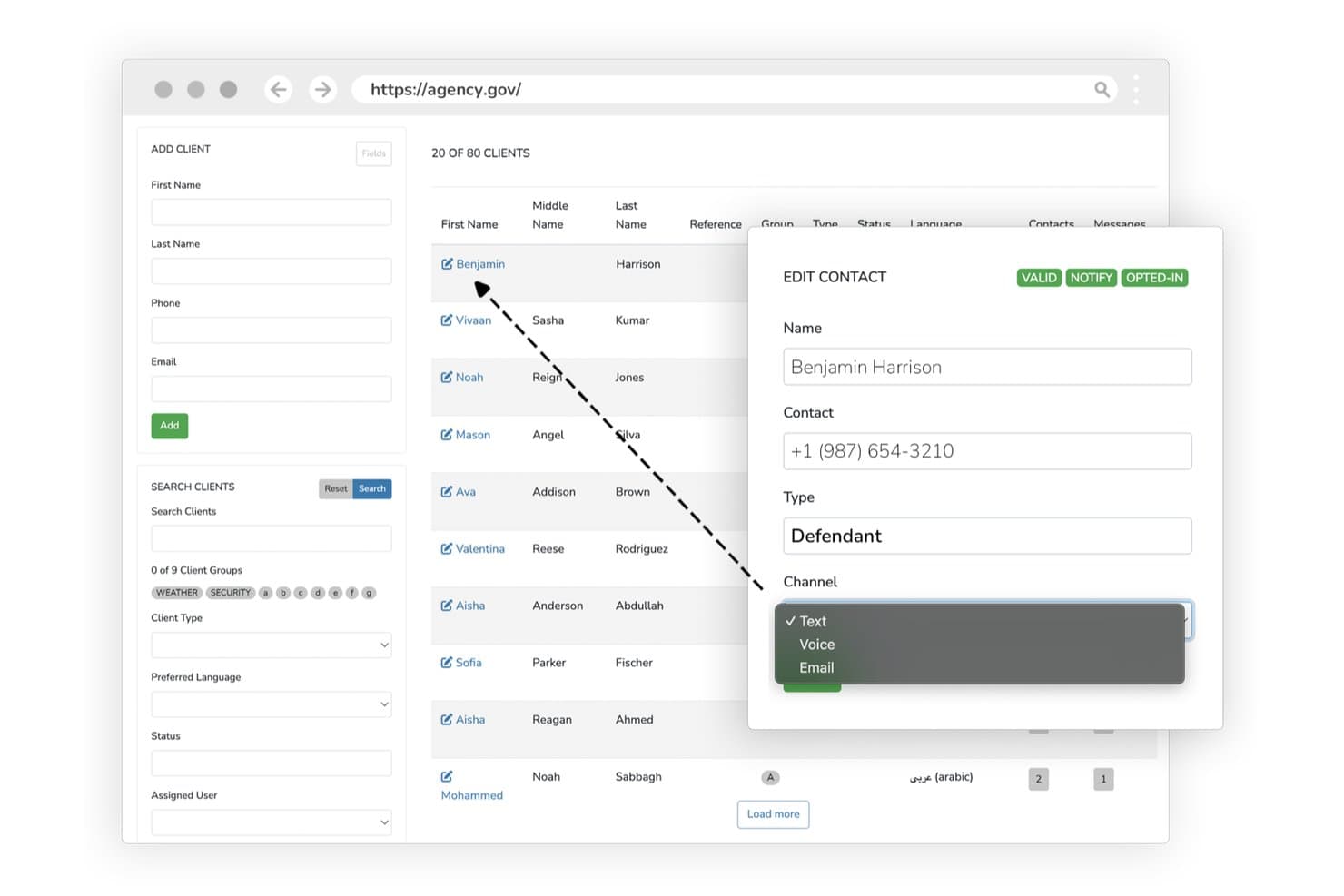
eCourtDate features client records, contact details, and communication channels. eCourtDate is a cloud platform built for courts and justice agencies that covers case management, multi-channel court reminders, hearing scheduling, evidence tracking, electronic warrants, and self-service portals across multiple agencies.
Who Is eCourtDate Best For?
eCourtDate is a strong fit for courts and government justice agencies that need to coordinate case data, communications, and workflows across multiple departments or jurisdictions.
Why I Picked eCourtDate
I've included eCourtDate in my top picks because it's purpose-built for cross-agency justice workflows, which is where most single-platform tools fall short. I particularly like its electronic warrants module, which routes warrant preparation through configurable approval chains covering supervisor and prosecutor review before reaching a judge. Its case management backbone links charges, parties, documents, and financial obligations into one record that every connected agency can read and update in real time.
eCourtDate Key Features
- Multi-channel court reminders: Sends automated case-linked notifications by SMS, email, voice, and push across 100+ languages with live delivery tracking.
- Community supervision monitoring: Tracks pretrial and probation status with risk scoring, geolocation check-ins, and automated compliance alerts.
- Evidence management: Stores and tracks digital evidence with chain-of-custody records and secure sharing controls.
- Role-based access and audit trails: Restricts case record access by role and maintains immutable, exportable logs with user identity and timestamps.
eCourtDate Integrations
eCourtDate offers integrations with Microsoft Outlook, Google Calendar, Zoom, Cisco WebEx, Microsoft Teams, GovPayPlan, ReportBeam, Tyler Technologies, and Journal Technologies. It also supports REST API, webhooks, SFTP, and flat-file imports for custom data exchange.
Pros and Cons
Pros:
- Court reminders cover texts, email, and voice
- Warrant approvals include prosecutor review
- Shared case records across justice agencies
Cons:
- No conflict checks or statutory deadline engine
- Built for agencies, not defense caseloads
Learn more about eCourtDate: Best for holistic defense coordination
- Free demo available
- Pricing upon request
Visit WebsiteCustomer Rating:4.2/5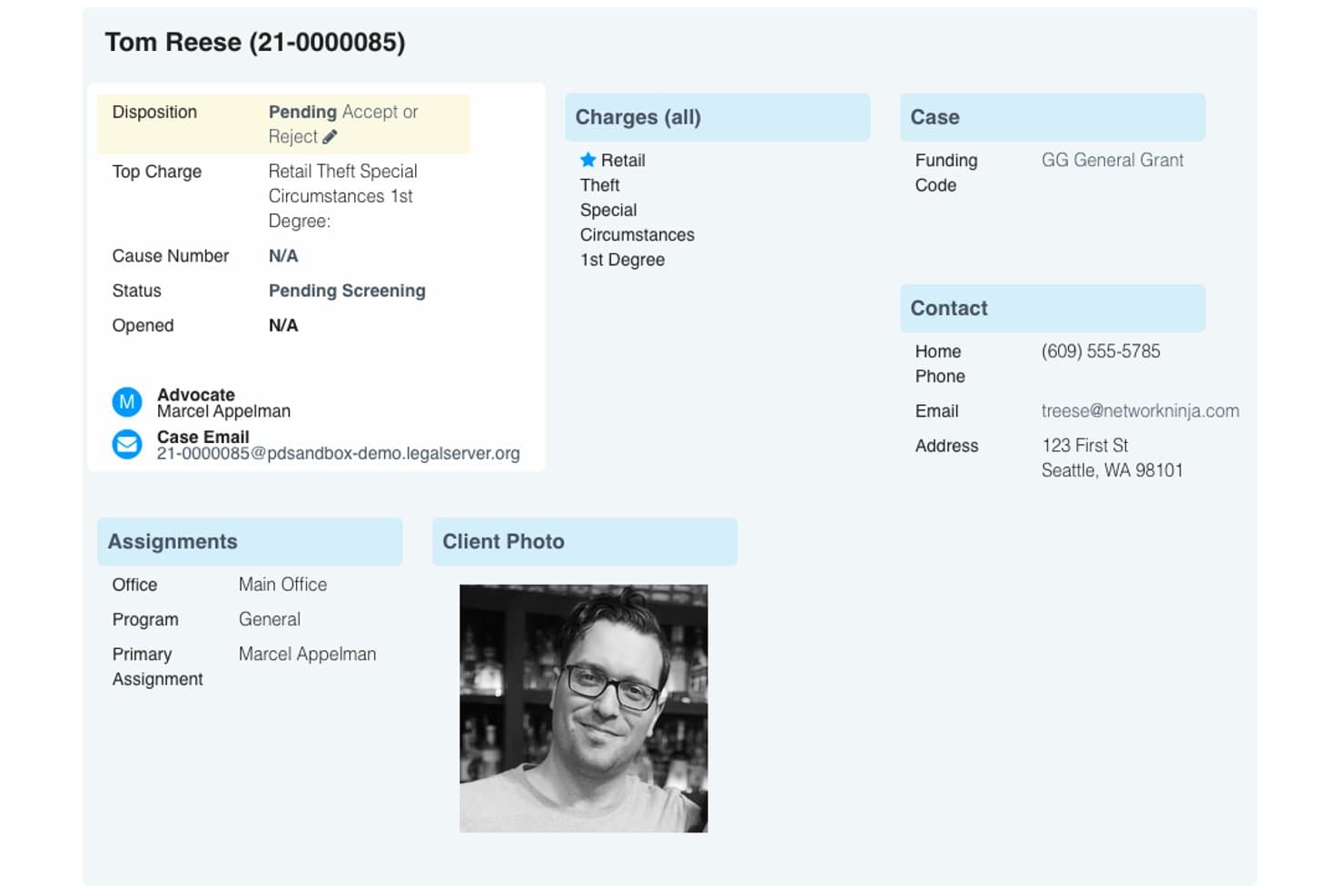
LegalServer case profile includes the disposition, charges, contact details, and the assigned advocate. LegalServer is a case management platform built for public defenders and legal aid organizations, with tools for caseload tracking, document and discovery management, client intake, configurable workflows, and built-in communication.
Who Is LegalServer Best For?
LegalServer is a strong fit for public defender offices and legal aid organizations that need purpose-built case management with holistic defense coordination across criminal, civil, and social services work.
Why I Picked LegalServer
LegalServer earns its spot on my shortlist because of its dedicated public defender case management module, which is purpose-built for the realities of holistic defense work. I love that it coordinates criminal, civil, and social services data in one place, so a defender handling a client's housing issue alongside a criminal charge doesn't have to jump between systems. Its real-time caseload tracking also gives supervisors visibility into attorney workloads, which matters when docket volume is high and resources are thin.
LegalServer Key Features
- Court-system intake integration: Configure client intake to pull defendant information directly from connected court systems, so new cases can be created automatically.
- AI-powered audio and video transcription: Transcribe recordings with speaker identification, content summaries, and searchable speech linked to case files.
- Document permissions: Set granular access controls on individual documents to restrict who can view sensitive case materials.
- Configurable caseload reporting: Generate reports on case distribution and staff capacity, with dashboard views that give supervisors a snapshot of workload across the office.
LegalServer Integrations
LegalServer offers native integrations across the Microsoft ecosystem, including SharePoint, Outlook, Teams, Power BI, and Entra ID, plus Google Workspace, Dropbox, and Okta. It connects with court systems and CalendarRules, provides Core, Legacy, and Reports APIs, and supports Zapier.
Pros and Cons
Pros:
- Supervisors can track attorney caseloads
- Centralizes case files, email, and time records
- Coordinates criminal, civil, and social-service cases
Cons:
- Report configuration can take staff effort
- Calendar interface draws reviewer complaints
Learn more about LegalServer: Best for LAA casework and court billing
- Free demo available
- Pricing upon request
Visit WebsiteCustomer Rating:2.8/5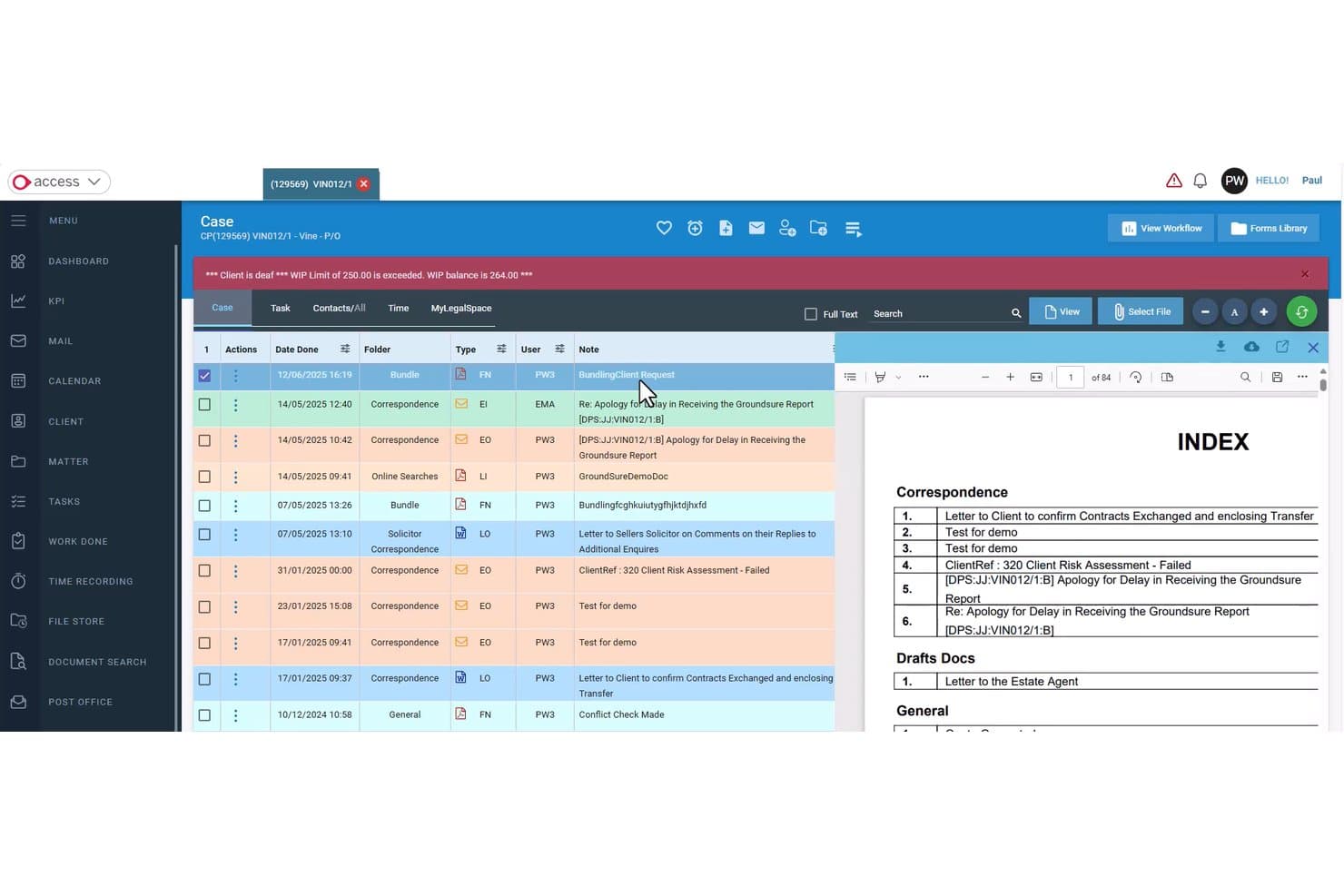
Access Legal includes case records, correspondence, and billing alerts. Access Legal is a browser-based criminal law case management platform built for UK defense firms, combining LAA casework workflows, automated court billing, cost drafting, and AI-assisted case tools.
Who Is Access Legal Best For?
Access Legal is a strong fit for UK criminal defense firms that need LAA-aligned case workflows and integrated court billing in a single browser-based platform.
Why I Picked Access Legal
I picked Access Legal because its criminal law module is built specifically around LAA casework, which is rare. I especially like how it uses recorded fee-earner time to auto-populate criminal claim forms, then posts bills directly to accounts. The criminal case-file structure for LAA investigative and proceedings work means your team isn't retrofitting a generic system to fit defense workflows.
Access Legal Key Features
- Criminal workflows and precedents: Access a built-in bank of workflows and precedents designed specifically for criminal case processes.
- AI Copilot: Ask natural-language questions about cases, summarise documents and media files, and extract relevant case information.
- Client portal with GDPR workflows: Share documents and case progress with clients through a portal that includes pre-built GDPR compliance workflows.
- Evo Analytics dashboards: Build and share customisable dashboards and reports tailored to your criminal practice's data.
Access Legal Integrations
Access Legal lists over 100 integrations, including native Access Legal Finance and Accounting, Access Legal Client Portal, Outlook, 2sms, and Criminal Billing connections. Its integration directory also includes DocuSign, Stripe, and Microsoft.
Pros and Cons
Pros:
- Reviewers praise established case-workflow functionality
- Recorded time feeds criminal claim forms
- Criminal-specific LAA workflows and precedents
Cons:
- Reviewers report delayed support and costly changes
- No documented conflict or deadline automation
Learn more about Access Legal: Best for coordinating holistic defense teams
- Free demo available
- Pricing upon request
Visit WebsiteCustomer Rating:4/5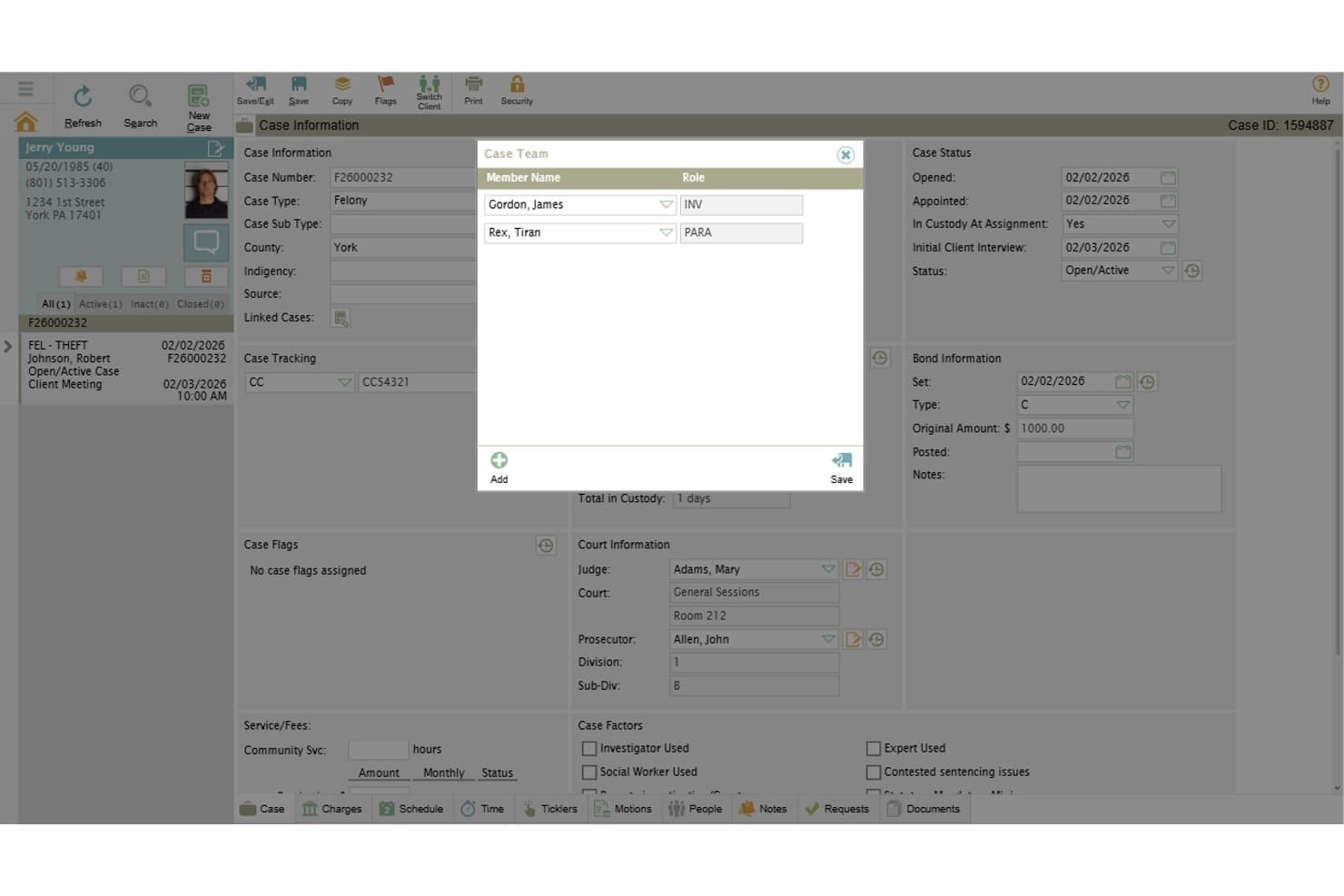
defenderDATA provides case team assignments and role-based defense coordination. defenderDATA is a case management platform built specifically for public defender offices, centralizing case records, charge tracking, document and evidence management, calendaring, conflict checking, and holistic defense coordination across legal and social-service teams.
Who Is defenderDATA Best For?
defenderDATA is built for public defender offices that run holistic defense teams, where attorneys, social workers, and support staff all need access to the same case record.
Why I Picked defenderDATA
I've included defenderDATA in my top picks because it's the only tool here built from the ground up for public defender offices running holistic defense teams. It keeps attorneys, social workers, and investigators on the same case record, with client service coordination that tracks referrals, assessments, and service providers alongside legal case data. I also like its officer body-camera review tool, which lets you transcribe recordings, run keyword searches, and navigate footage by timestamp directly in the case.
defenderDATA Key Features
- Conflict checking: Searches related persons and entities across the full case database for potential conflicts, including name variations.
- Assignment Wheel: Automates case assignment using configurable approaches like round-robin or weighting by caseload, role, or availability.
- Voucher and payment management: Tracks and processes attorney vouchers and expenses with automated calculations, approval rules, and an audit trail.
- Custom fields and screens: Lets you build and organize case data fields without a developer, tailoring the platform to your office's intake and tracking needs.
defenderDATA Integrations
defenderDATA offers documented integrations with Microsoft Outlook, Google Calendar, Apple Calendar, Axon, Power BI, Tableau, and Crystal Reports. It supports OData data extraction for custom reporting and analytics.
Pros and Cons
Pros:
- Tracks criminal charges and related parties
- Searches body-camera footage by keyword
- Coordinates legal and social-service teams
Cons:
- Calendar views may limit schedule comparison
- Large evidence uploads can fail
Learn more about defenderDATA: Best for linking victim services to cases
- Free demo available
- Pricing upon request
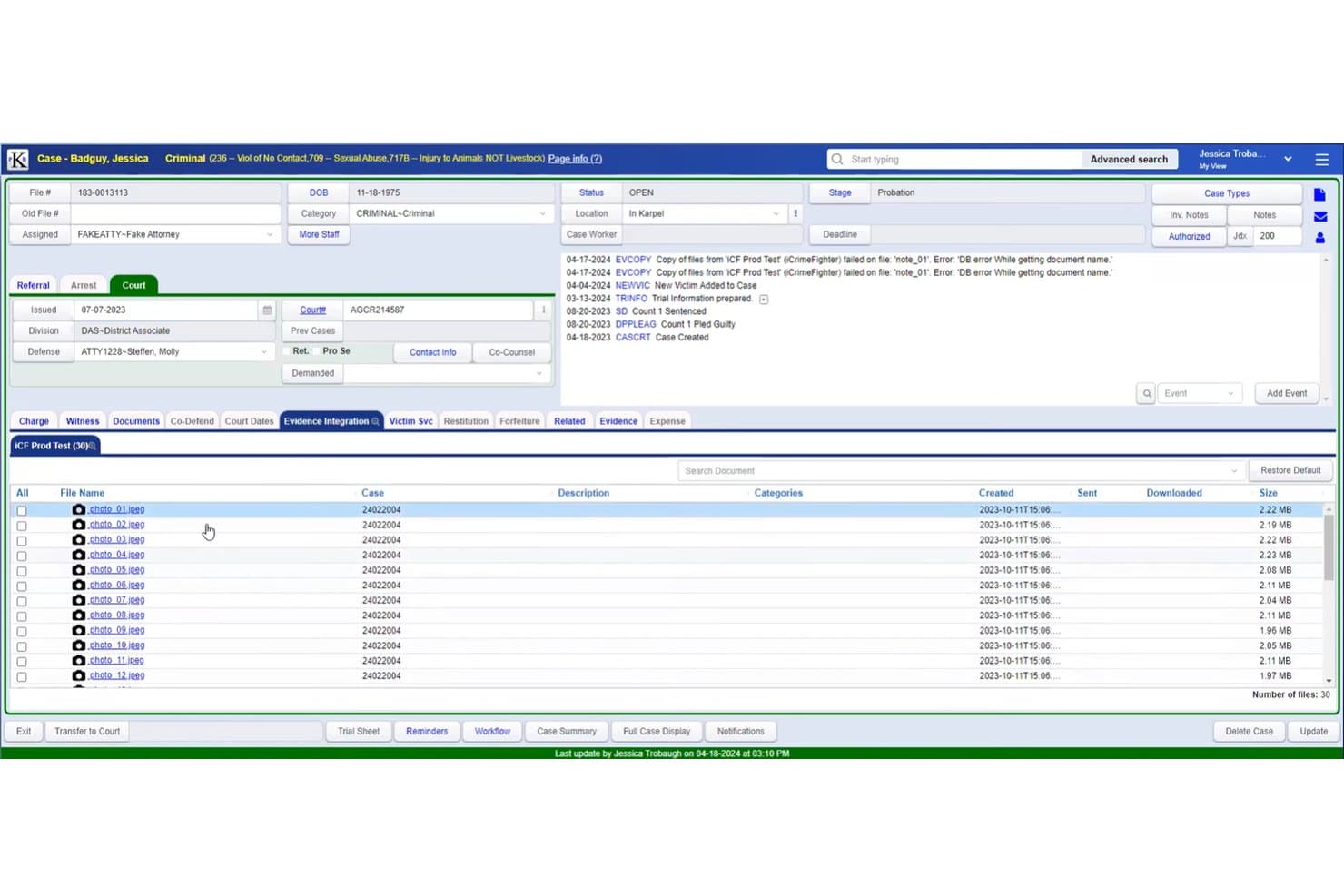
PROSECUTORbyKarpel includes case records, evidence files, and victim services. PROSECUTORbyKarpel is a criminal case management platform built exclusively for prosecutor and district attorney offices, covering case and docket tracking, eDiscovery, evidence management, victim services, and law enforcement and court data exchange.
Who Is PROSECUTORbyKarpel Best For?
PROSECUTORbyKarpel is built for prosecutor and district attorney offices that need a dedicated system for managing criminal caseloads, victim services, and law enforcement data exchange.
Why I Picked PROSECUTORbyKarpel
I picked PROSECUTORbyKarpel as one of the best because no other tool on this list ties victim services as directly into case records. Victim advocates can access case information, generate letters, and communicate via two-way texting, all from within the case. The victim engagement platform also lets victims submit impact statements, update contact preferences, and make restitution requests without going through staff, which keeps the case record current without extra manual entry.
PROSECUTORbyKarpel Key Features
- Bates stamping and redaction: Apply Bates stamps and redact discovery documents directly within the platform, with integration to Adobe Pro and Foxit Business.
- KAi AI assistant: Ask plain-language questions about case data and get answers with supporting information drawn from case records.
- Evidence chain-of-custody tracking: Catalog evidence with photos or media links and record check-in/check-out transactions to document custody history.
- Law enforcement data exchange: Pull police reports, mug shots, lab reports, and crime-scene photos directly from law enforcement records management systems.
PROSECUTORbyKarpel Integrations
Native integrations include Microsoft Outlook and Westlaw. PROSECUTORbyKarpel also integrates with Evidence.com, iSubpoena, Adobe Pro, and Foxit Business, with NIEM-conforming web services for court and law enforcement data exchanges.
Pros and Cons
Pros:
- Supports evidence custody and discovery workflows
- Docket views track appearances across case sessions
- Victim services connect directly to case records
Cons:
- Large body-camera files may strain storage
- Users report difficulty navigating office workflows
Learn more about PROSECUTORbyKarpel:
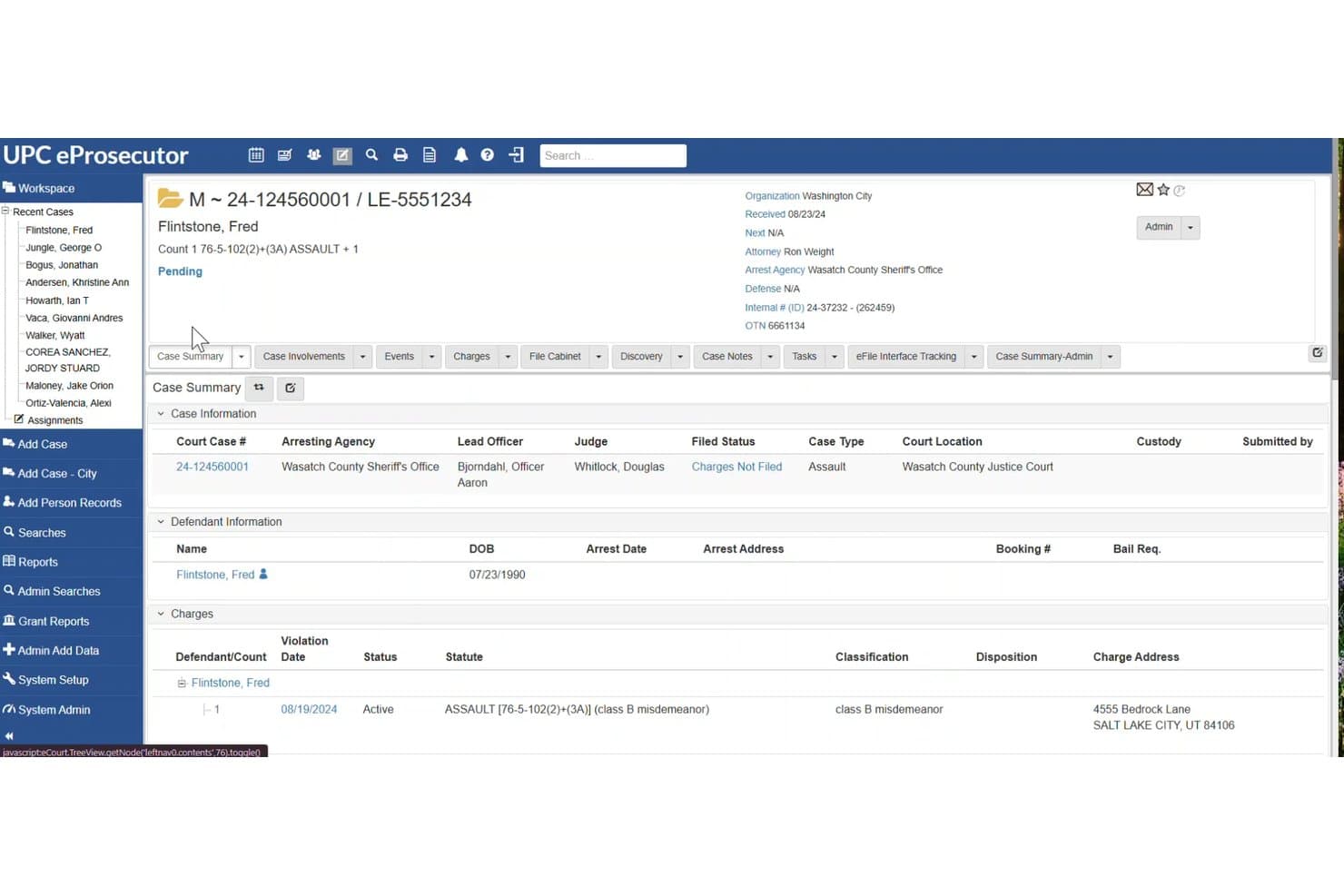
eProsecutor case summary includes case information, defendant details, and charges. eProsecutor is a case management system built for prosecutor and DA offices that covers referral review, charging decisions, eDiscovery, document management, victim services tracking, and subpoena generation.
Who Is eProsecutor Best For?
eProsecutor is built for prosecutor and DA offices that need a single system to handle charging decisions, victim services, and eDiscovery.
Why I Picked eProsecutor
I picked eProsecutor as one of the best because victim services are genuinely built into the case record, not bolted on as an afterthought. The system tracks victimizations, classifications, and services directly alongside charges, and the public portal lets victims submit rights statements, file restitution claims, and view upcoming court dates without needing a staff member to relay information. It also generates VOCA statistical reports from that same case data, which saves prosecutor offices real time at reporting cycles.
eProsecutor Key Features
- Referral review and charge management: Prosecutors can review law enforcement referrals and amend, add, or reject charges directly within the case record.
- Subpoena generation and tracking: Generate and track subpoenas individually or in bulk, with delivery options including email, personal service, or mail.
- Conflict checking: When adding a person to a case, the system searches for prior attorney involvement, personal relationships, or other potential conflicts.
- Exhibits management: Track digital and physical case exhibits, including custody and destruction workflows, through the eSeries framework.
eProsecutor Integrations
eProsecutor integrates with Microsoft Outlook and Google Calendar for calendar synchronization. It also provides a RESTful Services API for custom integrations.
Pros and Cons
Pros:
- Responsive vendor support was praised by prosecutors
- Referral review connects directly to charge decisions
- Victim services tie directly to case records
Cons:
- Large evidence collections can slow document retrieval
- Automation depends on office-specific manual configuration
Learn more about eProsecutor: Best for defense discovery and chain of custody
- Free demo + 10-day free trial available
- From $49/user/month
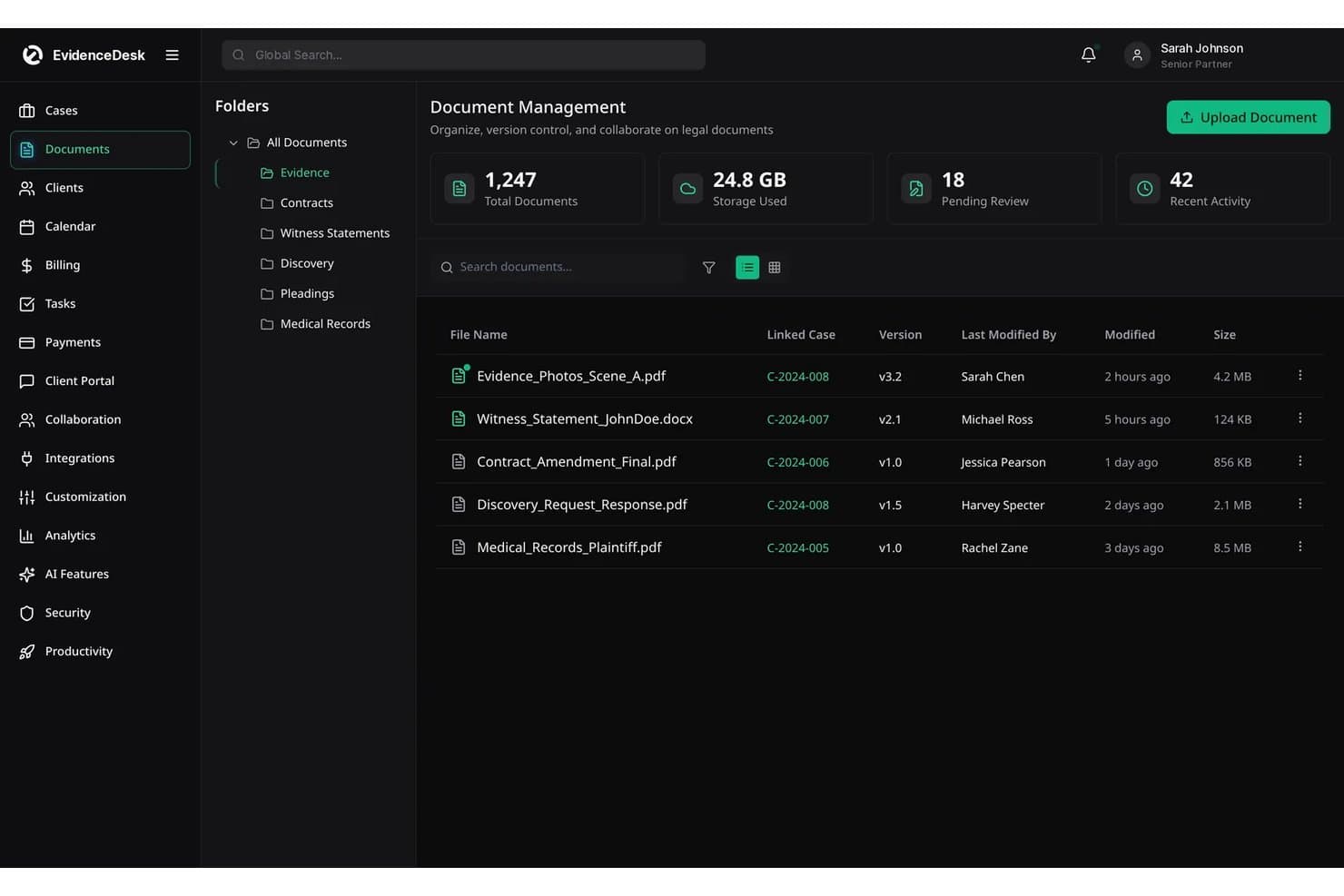
EvidenceDesk's Document Management features folders, file versions, and linked cases. EvidenceDesk is a browser-based legal practice management platform built for criminal defense firms, covering case tracking, evidence and chain of custody management, discovery logs, criminal billing, and client communication in one workspace.
Who Is EvidenceDesk Best For?
EvidenceDesk is a strong fit for private criminal defense firms that need dedicated discovery tracking and chain of custody tools built into their practice management workflow.
Why I Picked EvidenceDesk
I've included EvidenceDesk in my top picks because its chain of custody tracking and discovery log are purpose-built for criminal defense work in a way most general practice management tools aren't. When a production arrives, you can log it, tag exhibits with Bates numbers, and record every access event against that file. I also like that the criminal defense case template tracks custody status, charges, and prosecutor details alongside your hearing calendar, keeping everything a defense attorney actually needs on one screen.
EvidenceDesk Key Features
- Criminal defense case template: Track charges, case number, court, judge, prosecutor, and custody status all from one matter record.
- Witness tracking: Store witness contacts, statements, and subpoena status directly within the case.
- Trust ledger with three-way reconciliation: Manage client trust funds separately from operating funds, with reconciliation across journal activity, client ledgers, and bank balances.
- Client portal: Let clients upload documents, exchange messages, sign engagement letters, and pay invoices from a secure, matter-linked portal.
EvidenceDesk Integrations
EvidenceDesk offers four documented native integrations: Google Calendar, Outlook Calendar, QuickBooks, and Xero. Litigation Pro includes API access for custom integrations, though the vendor doesn’t specify the protocol or available SDKs.
Pros and Cons
Pros:
- Discovery logs track productions and requests
- Criminal templates capture custody and charges
- Evidence logs record access and changes
Cons:
- No documented bulk intake or assignment workflows
- No statute-specific speedy-trial deadline engine
Learn more about EvidenceDesk: 10Best for personal injury case workflows
CasePeer
- Free demo available
- From $90/user/month
Visit WebsiteCustomer Rating:4.8/5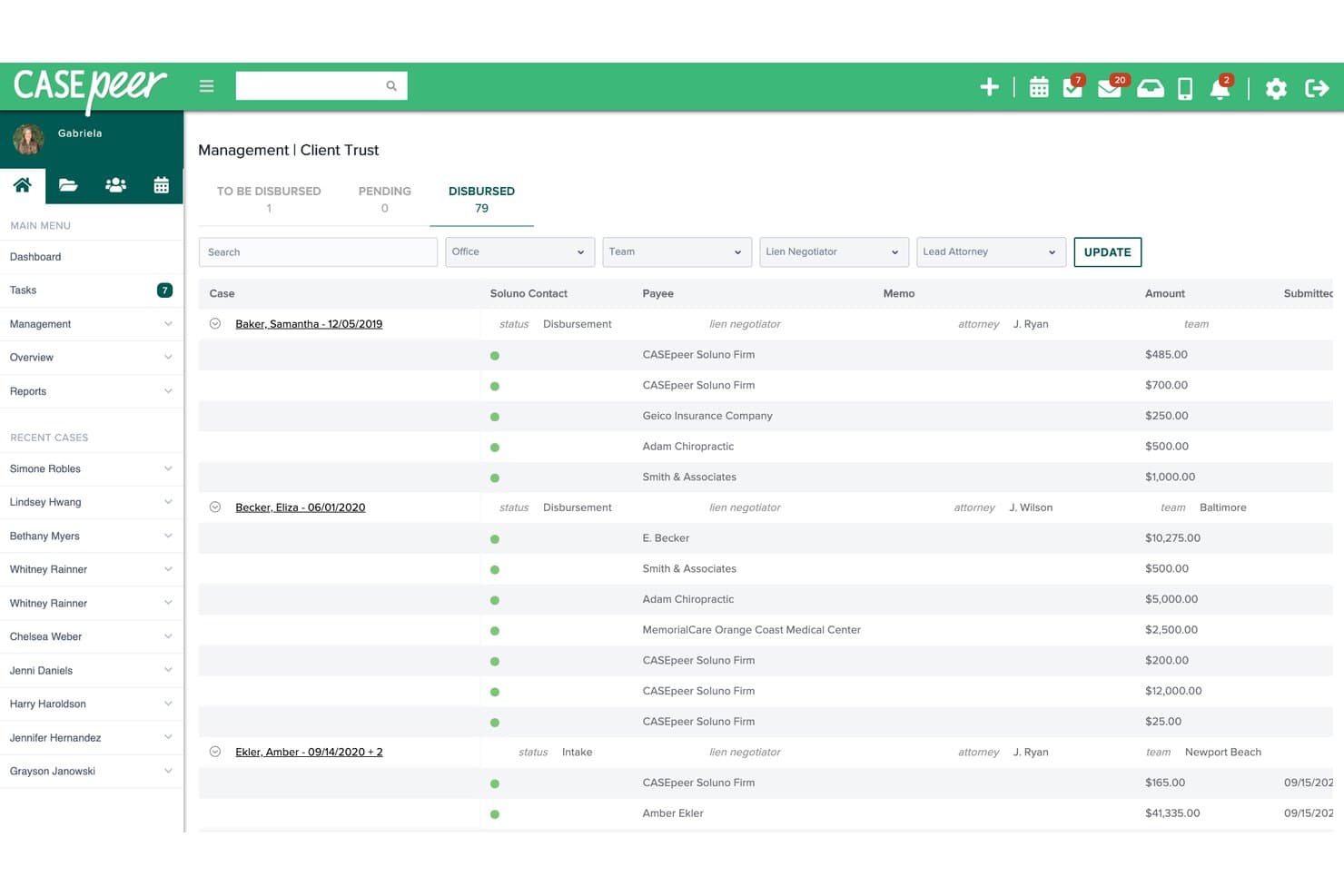
CasePeer's Client Trust screen tracks disbursements, payees and amounts for each case. CasePeer is a cloud-based practice management platform built for personal injury law firms, covering case tracking, document management, client communication, deadline automation, and reporting.
Who Is CasePeer Best For?
CasePeer is built for personal injury plaintiffs' firms that need a purpose-built system for managing medical treatment tracking, settlement negotiations, and case deadlines.
Why I Picked CasePeer
I've included CasePeer in my top picks because it's purpose-built around personal injury case workflows in a way few platforms match. I particularly like how it centralizes medical treatment tracking, settlement negotiations, and lien management in one place, so nothing falls through the cracks across a case's lifecycle. Its automated statute alerts and litigation event plans keep deadline tracking tight without manual follow-up.
CasePeer Key Features
- Client portal: Lets clients access case updates, view documents, and receive messages directly through a secure portal.
- Two-way texting: Supports in-app messaging with clients, including sending and receiving images, without sharing a personal number.
- Document automation: Generates letters and legal documents on demand using pre-built templates stored in the case file.
- User permission controls: Assigns granular permission groups to manage what each team member can access or edit across cases.
CasePeer Integrations
CasePeer lists 41 marketplace integrations, including Microsoft 365, Microsoft Outlook, Google Calendar, Dropbox, OneDrive, QuickBooks, Action Step Legal Accounting, and LawPay. It also supports Zapier and API access for custom integrations.
Pros and Cons
Pros:
- Automated reminders and calendars support deadline tracking
- Case timelines group notes, documents, and tasks
- Client portal and texting support direct updates
Cons:
- No documented conflict-of-interest checking
- No criminal-specific docket or charge tracking
Other Criminal Law Case Management Software
Here are a few additional options that didn’t make my shortlist but are still worth checking out:
- 11MyCaseBest for private firms tying cases to billing
- 12PracticePantherBest for client communication and firm finances
- 13FilevineBest for CJIS-conscious defense firms
- 14ActionstepBest for defense firms shaping case workflows
- 15SmokeballBest for state-specific defense forms
- 16Rocket MatterBest for defense firms managing trust funds
- 17LawmaticsBest for prioritizing arrest-time leads
- 18CenterbaseBest for managing matters and firm finances
- 19Zola SuiteBest for AI summaries of defense case files
- 20PCLawBest for Canadian trust accounting
- 21Tyler ProsecutorBest for offices using Tyler court records
How I Evaluate Criminal Law Case Management Software
I split my evaluation into three parts. First, core functionality: tools must track charges and case status across a full criminal matter, plus manage court dates and deadlines with automated reminders—this carries the most weight. Second, I look for standout features like statute deadline engines or victim/witness contact management. Third, I consider support, onboarding, and pricing structure.
Core Functionality (Table Stakes for This List)
When I'm selecting tools for my list, I score each one on a scale from 0 (does not offer the functionality) to 5 (excels in this area) for each core functionality listed below. I then convert the total into a percentage to help assess each tool's overall fit, with extra weight on any functionalities I've deemed essential.
- Case & Docket Tracking (Essential): I check whether a tool tracks charges, case status, and associated parties across a matter's full lifecycle, including multi-defendant and multi-charge scenarios.
- Court Date & Deadline Management (Essential): Missed arraignments or filing deadlines can mean sanctions or dismissed cases, so I evaluate how each tool calculates and alerts on criminal court dates.
- Document & Evidence Management: Large discovery productions and body-cam footage demand more than basic file storage. I look for tagging, case linking, access controls, and chain-of-custody support.
- Conflict of Interest Checking: Public defenders and multi-attorney firms regularly encounter co-defendant conflicts. I evaluate whether the tool cross-references parties, witnesses, and cases during intake.
- Communication & Client Portal: Clients in criminal matters need timely updates on hearing dates and plea options. I look for secure portals that support document sharing and message tracking.
- Reporting & Case Analytics: Offices managing high-volume dockets need visibility into caseloads by attorney, case type, and disposition. I evaluate the depth of filtering and whether dashboards support workload planning.
Once I have a list of tools that meet the criteria, I consider what sets each platform apart.
Differentiating Factors (What Sets Vendors Apart)
Here's how I compare and contrast different vendors:
Standout Features
I look for a statute deadline engine that auto-calculates speedy trial clocks and jurisdiction-specific filing windows—missing one of those dates can end a case. Victim/witness contact management is another separator; tools like PROSECUTORbyKarpel and eProsecutor maintain safeguarded records apart from general contacts, which matters for prosecution offices handling sensitive witness data. I also evaluate mobile courtroom access, since attorneys regularly need case files during hearings or detention visits.
Beyond Features
I evaluate whether a platform meets CJIS security standards and supports encryption plus audit trails, since criminal case data often includes juvenile or medical records that demand strict access controls. Integration with court e-filing portals matters just as much—tools like Clio Manage and PROSECUTORbyKarpel connect to state filing systems, which cuts manual entry during high-volume docket weeks. I also check vendor-led onboarding, because public defender offices with limited IT staff need hands-on training to hit court deadlines from day one.
How to Choose Criminal Law Case Management Software
Choose a system by testing whether it handles your real docket, records, and deadlines—not by relying on a feature checklist.
| If Your Priority Is | Look For |
|---|---|
| If Your Priority IsTracking multi-charge matters | Look ForA documented workflow for charges, parties, and case status |
| If Your Priority IsManaging court dates and filing deadlines | Look ForA way to verify calculated dates against your jurisdiction’s rules |
| If Your Priority IsHandling discovery and evidence | Look ForRecords showing access history, case links, and chain of custody |
| If Your Priority IsPreventing conflicts | Look ForA repeatable intake check across parties, witnesses, and existing matters |
How to Vet Your Shortlist
- Test a sample matter: Use an anonymized multi-defendant, multi-charge case and compare its docket and deadline outputs with a court calendar and your local rule calendar within 30 minutes.
- Request an evidence record: Ask for a sample export showing how a discovery file’s case link, access history, and chain-of-custody details appear.
- Run a conflict scenario: During a trial, enter a known co-defendant and witness, then compare the results with a prepared list of related parties and matters.
- Review security documentation: Request current documentation on access controls and audit trails, then test permissions with two trial accounts.
- Choose by workflow fit: Compare a specialized criminal-justice system with a general legal practice platform using a scored map of two workflows: cross-agency case handling versus firm intake and billing.
What Is Criminal Law Case Management Software?
Criminal law case management software organizes case records, court dates, deadlines, communications, and related legal workflows. Defense firms, prosecution offices, public defenders, and justice agencies use it to track matters from intake through resolution. Depending on the system, it may also support evidence records, conflict checks, client updates, reporting, and billing. The right features depend on your team’s responsibilities and the rules governing its cases.
Features
Here are the main features I look for in criminal law case management software:
- Case and docket tracking: Links charges, parties, attorneys, and case status in one matter record. This helps your team follow a case from intake through resolution, including matters with multiple charges or defendants.
- Court date and deadline management: Records hearings, filing dates, and other deadlines, then sends reminders to assigned staff. Check how the software calculates dates and verify its rules against the requirements in your jurisdiction.
- Document and evidence management: Stores and links pleadings, discovery, and evidence to the relevant case. Search, permission settings, and access histories help staff locate records and monitor who viewed or handled them.
- Conflict checking: Compares people and organizations entered during intake with existing contacts and matters. This helps flag possible conflicts involving co-defendants, witnesses, or other parties for review.
- Client and case communications: Keeps messages and contact history connected to a matter, and may provide a secure portal for sharing updates or documents. Staff can refer to the record when responding to client questions.
- Reporting and case analytics: Summarizes matters by status, case type, attorney, or disposition. These views help managers review caseloads and identify cases that need attention.
- Intake and matter setup: Captures information about a new client, referral, alleged offense, and related parties before opening a case. Structured intake fields help staff create consistent records and support conflict checks.
- Security and access controls: Assigns permissions by user or role and records activity through audit trails. These controls help limit access to sensitive case information and review changes to records.
Benefits
Here are a few common benefits you can expect from criminal law case management software:
- Case oversight: Case records that link charges, parties, attorneys, and status help your team follow matters from intake through resolution.
- Deadline visibility: Court calendars, deadline tracking, and automated reminders help staff monitor hearings and filing dates.
- Evidence organization: Case-linked document storage, search, permissions, and access histories help staff locate discovery and review who handled it.
- Conflict awareness: Intake checks that compare parties and witnesses with existing matters can flag potential conflicts for review.
- Client communication records: Matter-linked messages and secure portals help staff share updates or documents and refer back to contact history.
- Caseload insight: Reports that group matters by status, case type, attorney, or disposition help managers review workloads and identify cases needing attention.
- Controlled access: User permissions and audit trails help limit access to sensitive records and track activity.
Costs and Pricing of Criminal Law Case Management Software
Pricing varies by features, team size, and add-ons. The ranges below are general estimates; many criminal law platforms use custom quotes.
Plan Comparison Table for Criminal Law Case Management Software
| Plan Type | Average Price | Common Features |
|---|---|---|
| Plan TypeFree Plan | Average Price$0 | Common FeaturesBasic case tracking, limited document storage, calendar access, and a small number of users. |
| Plan TypePersonal Plan | Average Price$20–$80/user/month | Common FeaturesCase and contact records, calendar and deadline reminders, task management, and basic document storage. |
| Plan TypeBusiness Plan | Average Price$80–$200/user/month | Common FeaturesTeam access controls, evidence and document management, conflict checking, and reporting. |
| Plan TypeEnterprise Plan | Average Price$150–$300/user/month or custom | Common FeaturesAdvanced permissions, custom workflows, system integrations, and dedicated onboarding. |
FAQs
Some answers to common questions about criminal law case management software:
Can general legal practice software work for criminal defense?
Yes, if it supports your team’s criminal case workflows. Check that it can track charges, parties, case status, court dates, deadlines, and case-linked documents. You’ll also want to test conflict checks and permissions with realistic defense matters. A platform built for general practice might handle intake and billing well but lack features your team needs for discovery or evidence records. Before choosing, run an anonymized matter through the system and compare its records and calendar outputs with your current process.
Does case management software replace an attorney’s responsibility for deadlines?
No. Software can record dates, send reminders, and, in some systems, calculate deadlines, but your team still needs to verify them. Applicable rules can depend on jurisdiction, case type, court orders, and events in the matter. Test date calculations against authoritative court calendars and local rules before relying on them. Assign a staff member to confirm important dates and set backup reminders for hearings and filing deadlines. Treat the system as a tracking aid, not as a substitute for legal review.
Should prosecution offices and defense firms use the same type of software?
Not necessarily. Both need case records, court calendars, document management, and reporting, but their workflows can differ. A prosecution office may need structured witness records and links to agency or court systems. A defense firm may place more emphasis on client intake, conflict screening, secure client communications, and billing. Compare products against the work your team actually handles. Ask vendors to demonstrate those workflows, including how they restrict access to sensitive records and track changes.